


YouTube Shorts has become one of the most popular short-form video formats after Instagram Reels, letting creators share quick, engaging moments that reach millions in seconds. However, there are times when you may want to save these clips as MP4 files, perhaps to watch offline, edit them for a project, or reuse snippets for your social media content. Converting YouTube Shorts to MP4 allows you to keep a high-quality copy that's compatible across devices and editing tools.
In this guide, we will walk you through safe and reliable methods to convert YouTube Shorts to MP4, discuss the best tools for the process, and show how you can download YouTube Shorts easily while maintaining top-notch quality.
Before we delve into different methods to convert YT Shorts to MP4, here is a quick rundown to give you a proper understanding of different methods and use cases:
Quick Guide: Best YouTube Shorts to MP4 Method by Use Case
| Method | Platform | Pros | Cons | Output Quality | Best For |
| Wondershare UniConverter (Desktop Software) | Windows & Mac | HD and 4K output, ad-free, batch & fast conversion | Paid for advanced AI features | Up to 4K (supports vertical 1080x1920) | Professionals, editors, and creators who need YouTube Shorts to MP4 without a watermark |
| YTShortsDL (Online Converter) | Web (Browser-based) | Free, quick access, no installation | Ads, limited quality, privacy concerns | Up to 720p | Occasional users who want a simple online YT Shorts to MP4 conversion |
| YMusic.io (Mobile App) | Android | Fast, built-in file manager, multiple resolutions | Unofficial app, ads, limited compatibility | Up to 1080p vertical resolution. | Mobile users who want to download YouTube Shorts as MP4 directly on their phone |

YouTube Shorts to MP4 Converter
In this article
Part 1: Why convert YouTube Shorts to MP4
YouTube Shorts are short-form, vertical videos under 60 seconds that allow creators to share quick ideas, trends, and stories in bite-sized form on YouTube. YouTube Shorts were designed to rival TikTok and Instagram Reels, and ever since its launch, it has become one of the most consumed formats on YouTube.
While YouTube Shorts are easy to upload and watch, downloading or saving Shorts directly from the YouTube app isn't as simple. There are several limitations of YouTube Shorts that prompt users to learn how to convert YouTube Shorts to MP4, like:
- The YouTube app doesn't allow direct downloads of Shorts.
- Playback is restricted to online streaming.
- You cannot edit or reuse Shorts content without a separate piece of software.
- Downloads from third-party sites often compromise quality or legality.
This is where YouTube Shorts download MP4 becomes practical. The MP4 format offers flexibility and universal platform support, making it ideal for offline access, editing, and repurposing. Some of the most common YouTube Shorts to MP4 benefits are:
- Universal Compatibility: MP4 files play on almost any device, including phones, laptops, and smart TVs.
- High Quality: The MP4 file format keeps the original resolution and frame rate of the Shorts video.
- Small File Size: Efficient compression allows smooth playback without large storage use.
- Editable Format: Almost all editing software can easily trim, merge, or repurpose MP4 videos for Instagram Reels or TikTok.
- Long-Term Storage: Save your favorite Shorts for offline viewing or creative inspiration.
Part 2: Is It Legal to Convert YouTube Shorts to MP4?
Technically, downloading or converting YouTube Shorts to MP4 is not allowed under YouTube’s Terms of Service, unless the download option is provided directly by YouTube. However, there are exceptions when it comes to using your own content or videos that are shared under a Creative Commons license or marked as copyright-free.
When converting YouTube Shorts, it’s important to understand where the legal boundaries lie to avoid potential copyright violations or misuse.
Guidelines for safe and legal downloads:
- Download only your own Shorts or videos that are explicitly marked as free to reuse.
- Avoid third-party tools that promote mass downloading or redistribute copyrighted content.
- Do not share downloaded Shorts publicly on other platforms without permission from the creator.
- Use the MP4 files strictly for personal or offline viewing, such as saving your creations or backing up your content.
In short, understanding YouTube Shorts to MP4 legal issues ensures your downloads remain safe, ethical, and compliant with YouTube’s policies. Always prioritize using verified, secure tools that respect content ownership and user privacy when considering if it is safe to download YouTube Shorts.
Part 3: How to Convert YouTube Shorts to MP4: 3 Working Methods
Converting YouTube Shorts to MP4 free online is a straightforward method when you use the right tools. Now, depending on your device and preferences, you can download YouTube Shorts as MP4 using an online converter, desktop software, or a mobile app. Each method offers different advantages, from quick web conversions to advanced quality controls. Here are the proven ways to convert YouTube Shorts to MP4:
How to convert YouTube Shorts to MP4 on Windows and Mac
Desktop tools are ideal for content creators or editors looking for the best YouTube Shorts to MP4 tool with advanced editing and batch download options. For those who frequently work with video content, using a YouTube Shorts to MP4 converter like Wondershare UniConverter provides greater control over quality, format, and speed.
Wondershare UniConverter
If you want higher-quality output and full control over your videos, Wondershare UniConverter is one of the best YouTube Shorts-to-MP4 tools available for both Windows and Mac. This all-in-one media suite lets you save and convert YouTube Shorts with a single click, preserving the original resolution and audio quality.
(Disclaimer: Our tool is intended for personal use only. Users are solely responsible for using this tool to save videos or audios, including compliance with platform's terms of service and copyright laws and regulations. We are not liable for any consequences resulting from users' violation of any laws or infringement of others' rights.)
YouTube Shorts to MP4 Converter
Key Features
- One-Click Conversion: You can save and convert YouTube Shorts directly into MP4 format without needing multiple tools.
- Batch Processing: This offline converter tool lets you convert several Shorts at once to save time and effort.
- Remove Watermark: Wondershare UniConverter’s watermark remover lets you remove the watermark from YouTube Shorts with one click.
- Built-in Video Editor: The tool offers editing features such as a video trimmer, a subtitle editor, and merging Shorts before export.
How to Convert YouTube Shorts to MP4 in High Quality Using UniConverter
By following these steps, you can easily convert YouTube Shorts to MP4 in batch:
Step 1: Open Wondershare UniConverter and navigate to the Converter section. Upload YouTube Shorts in batches.
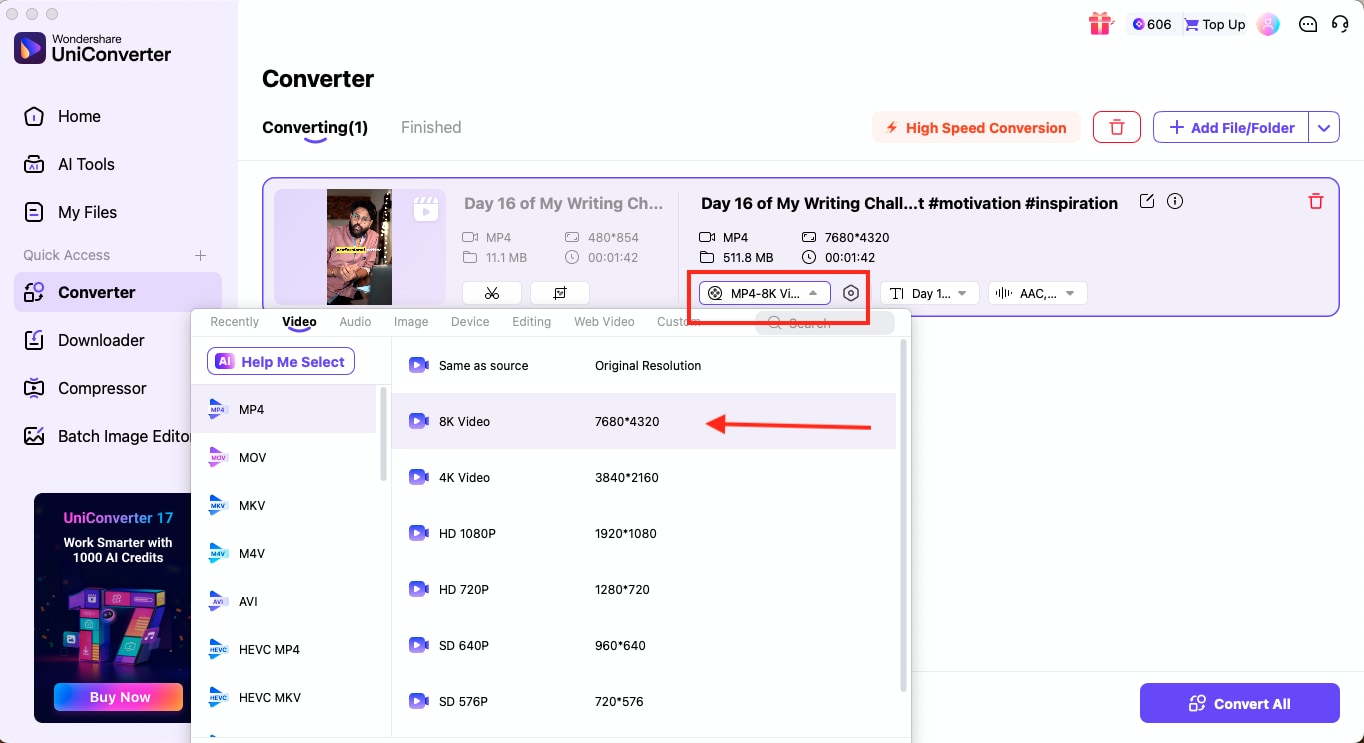
Step 2: Then, you can modify details like the audio bitrate, sample rate, and resolution. Choose the output format as you wish, and you can further convert YT shorts to 8K.
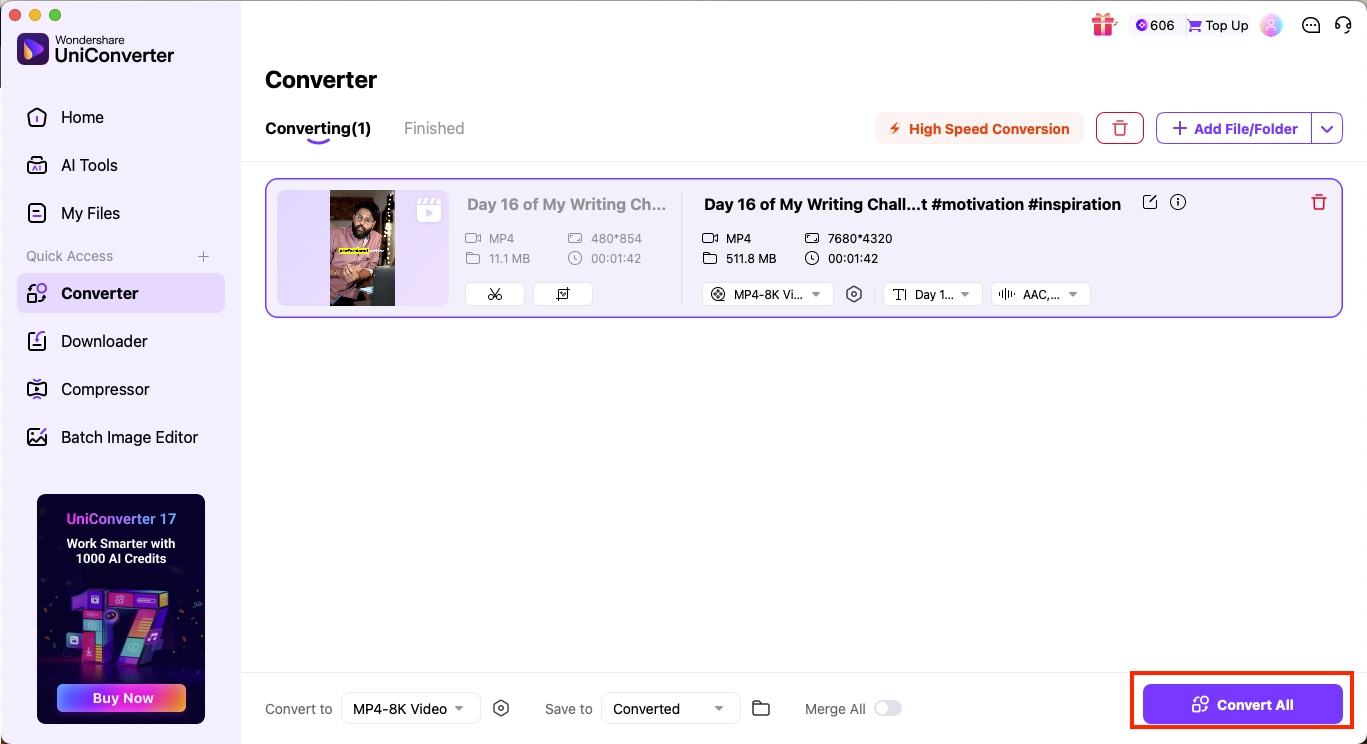
Step 3: After finalizing your settings, click "Convert All" to begin the process. Your high-resolution YouTube Shorts MP4 file will be saved directly to your computer.

How to convert YouTube Shorts to MP4 online for free
If you prefer a fast, browser-based solution, several free online tools that convert YouTube Shorts to MP4 allow you to download Shorts directly without installing anything. These platforms are ideal for occasional users who want to download YouTube Shorts as MP4s for personal use or offline viewing.
Note: Online converters change servers often, may display pop-up ads, and sometimes fail to fetch Shorts links when YouTube updates the player. Avoid tools that ask for login credentials or browser permissions.
Here's one such tool that would let you convert YouTube Shorts videos in MP4 format:
YTShortsDL
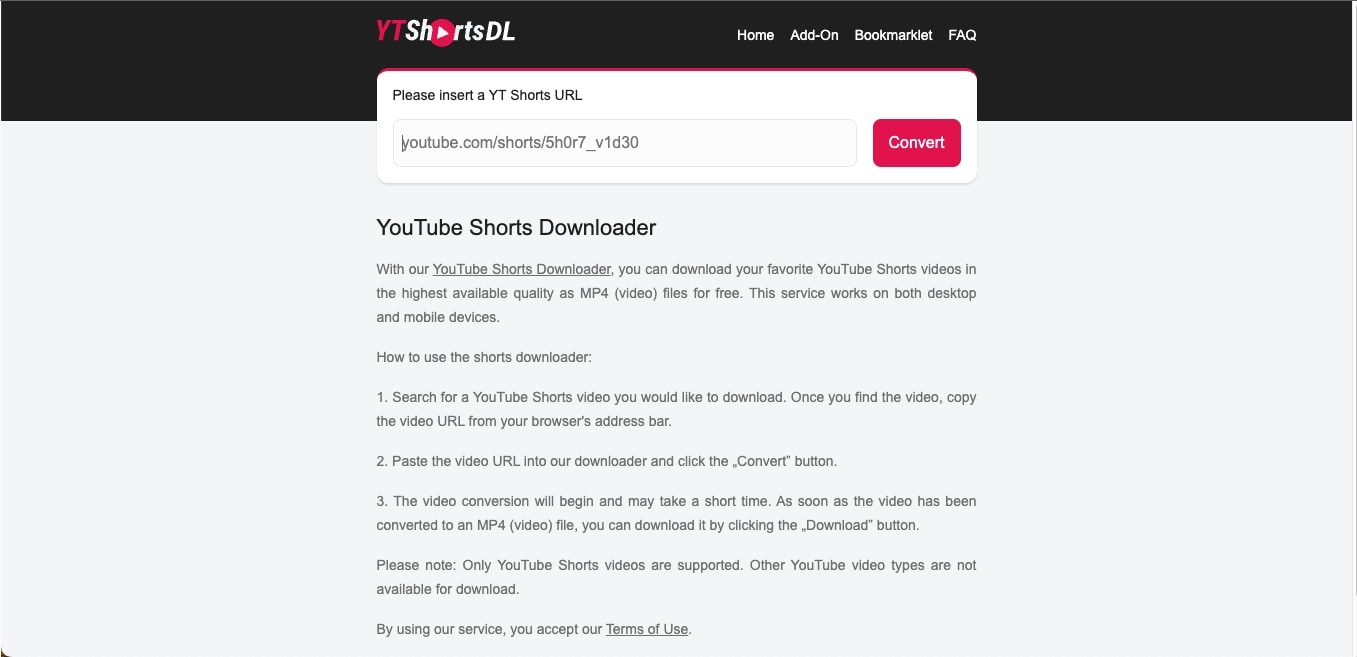
One of the easiest ways to download YouTube Shorts as MP4s is to use an online converter like YTShortsDL. It is a simple, browser-based tool that lets you convert and save Shorts videos in MP4 format without any installation. The platform is completely free and works on both desktop and mobile browsers, which makes it an ideal choice for students and beginners who are looking for quick downloads.
How to Use YTShortsDL to Download YouTube Shorts as MP4
Follow these simple steps to download YouTube Shorts as MP4:
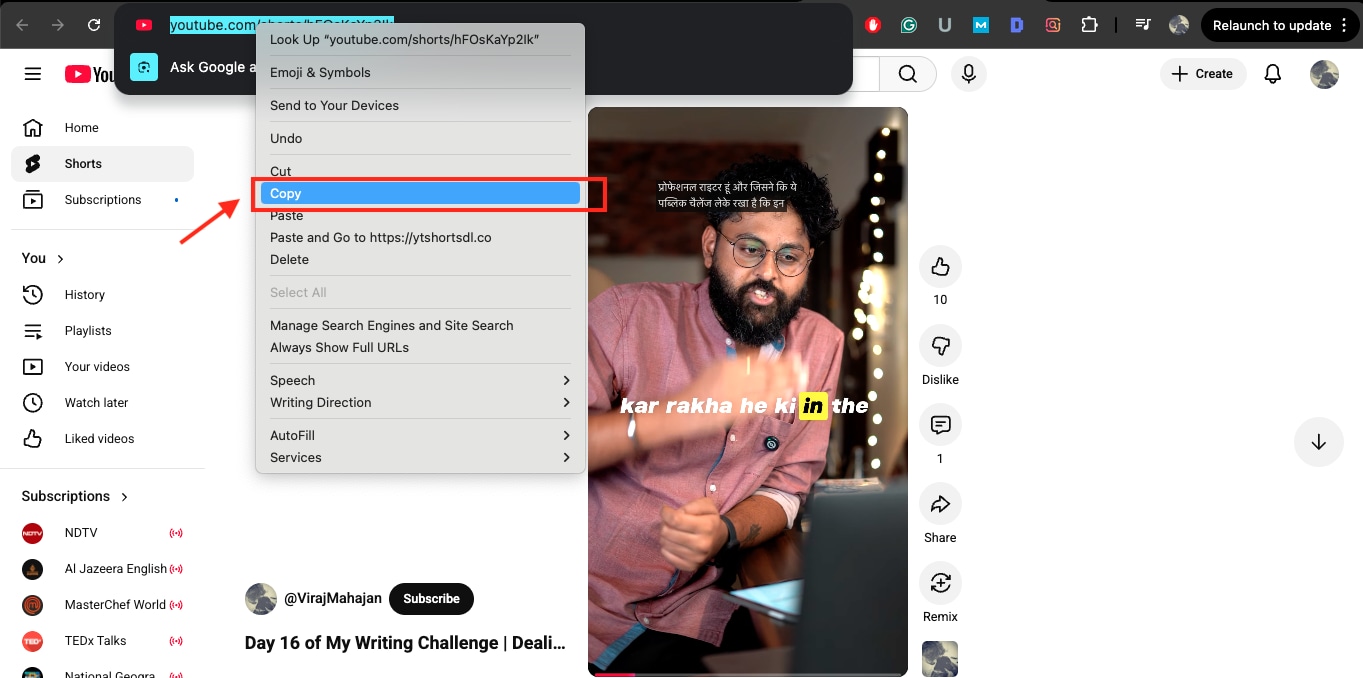
Step 1: Copy the YouTube Shorts URL from the video you want to save.
Step 2: Paste the copied URL into the search box on the YTShortsDL homepage.
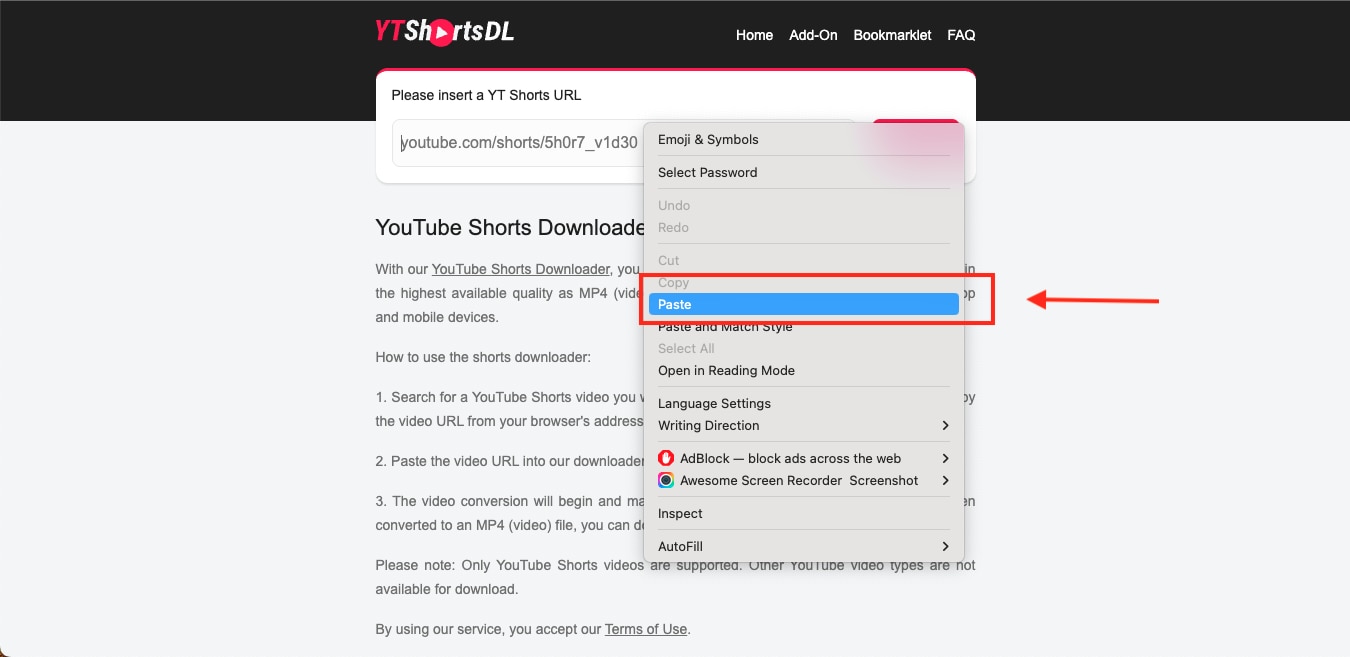
Step 3: Click on Convert to start processing the video.
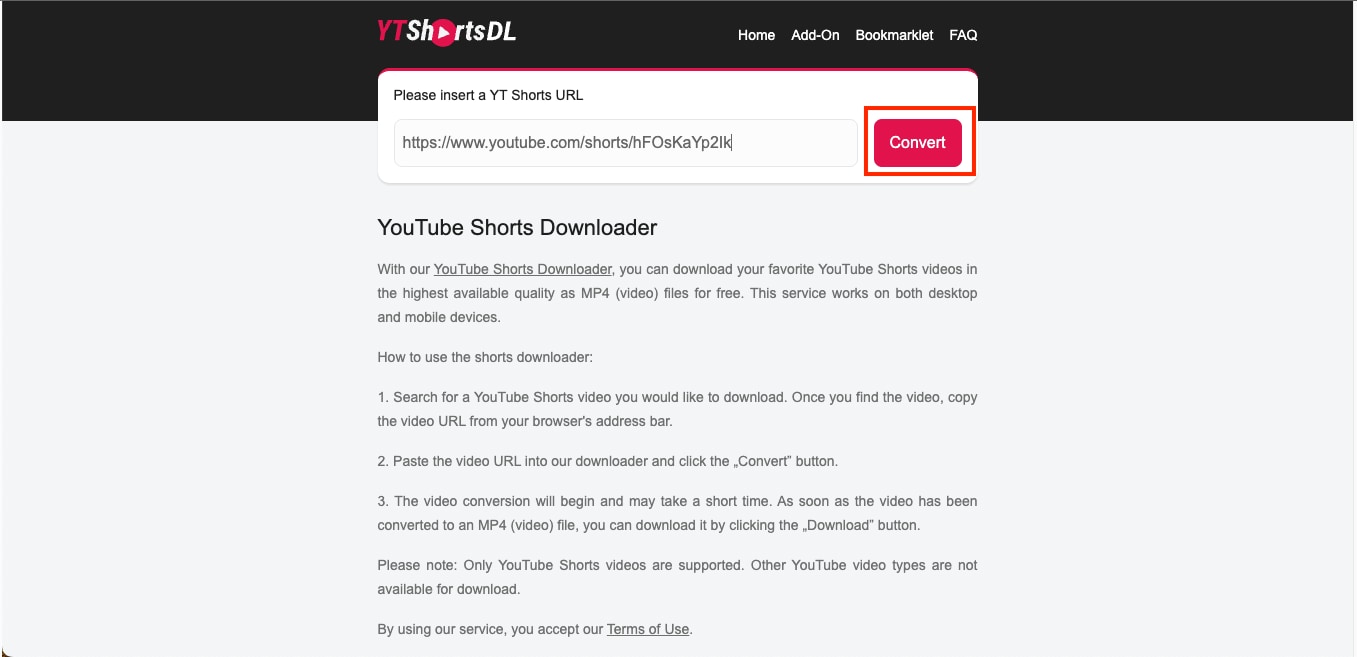
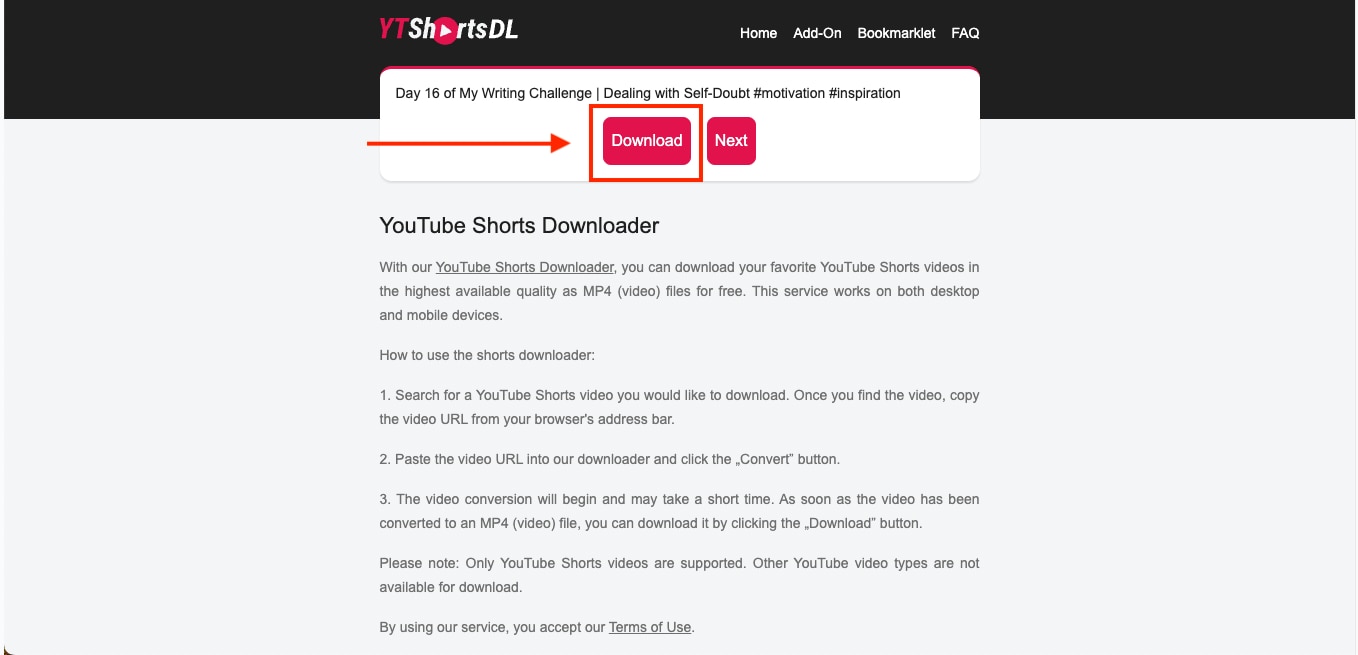
Step 4: Once the extraction is complete, click on Download to save the video as an MP4 file.
Method 3: YouTube Shorts to MP4 Converter on Mobile (Android/iPhone)
There are several reliable apps that make it easy to convert YouTube Shorts to MP4 on mobile devices. Most applications are available for both Android and iPhone, and these tools help users save YT Shorts as MP4s for quick editing or social media.
YMusic.io
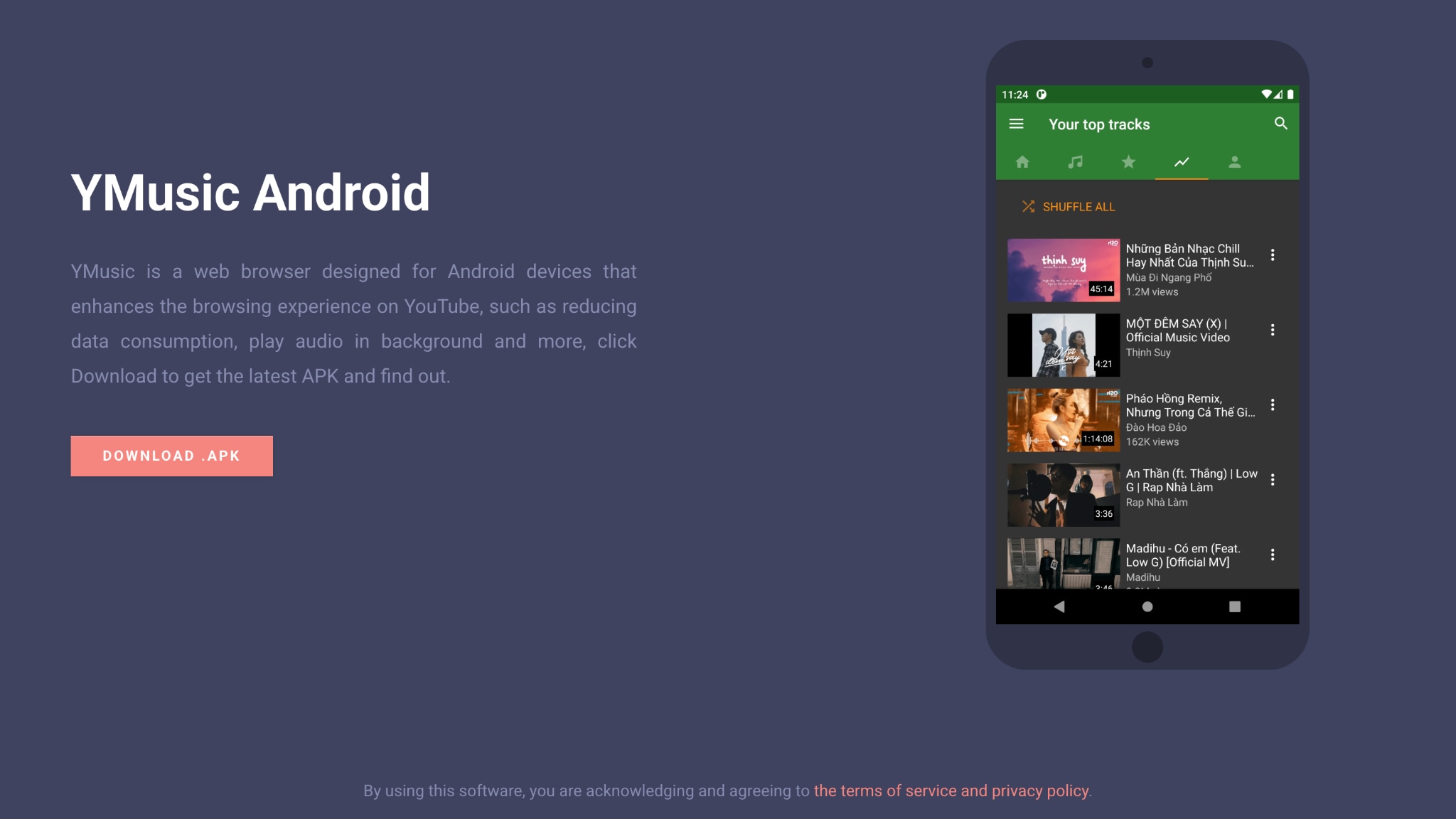
If you prefer to convert videos directly on your smartphone, YMusic.io is an efficient, lightweight app that lets you download and save YouTube Shorts in MP4 format. It's primarily designed for Android devices and offers multiple download speeds, background playback, and a built-in file manager for easy access.
Note: YMusic.io is an APK-based Android app. APKs must be downloaded from verified sources to avoid malware. Do not install modified or repacked versions.
How to use YMusic.io to convert YouTube Shorts to MP4
By following this step-by-step guide, you can convert yt shorts to MP4 on Android:
Step 1: Download the YMusic.io APK from the official website and install it on your Android device. Grant all necessary permissions that the app requests during installation.

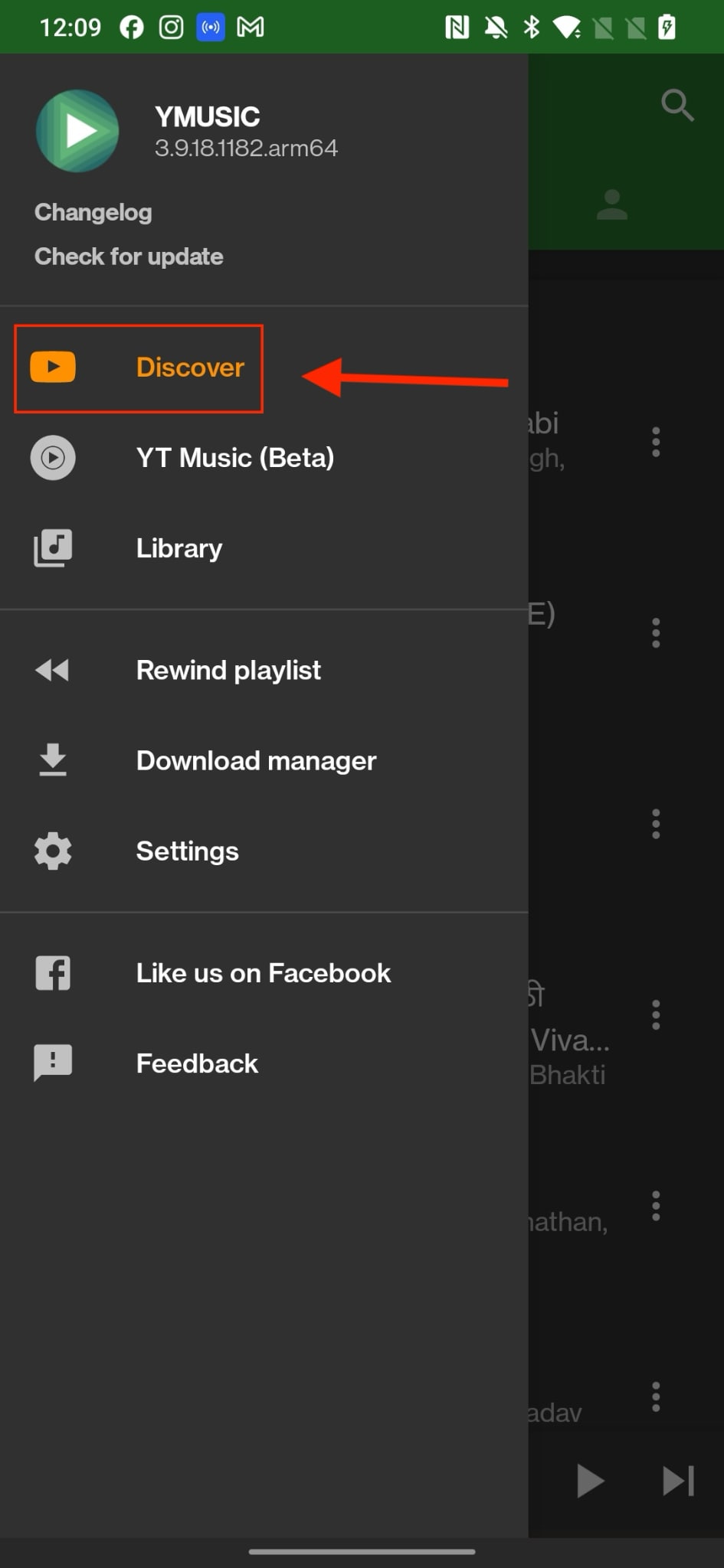
Step 2: Once installed, open YMusic and tap the menu icon (three horizontal lines) in the top-left corner. Navigate to the YouTube Discover section to search for the YouTube Shorts you want to download or convert.
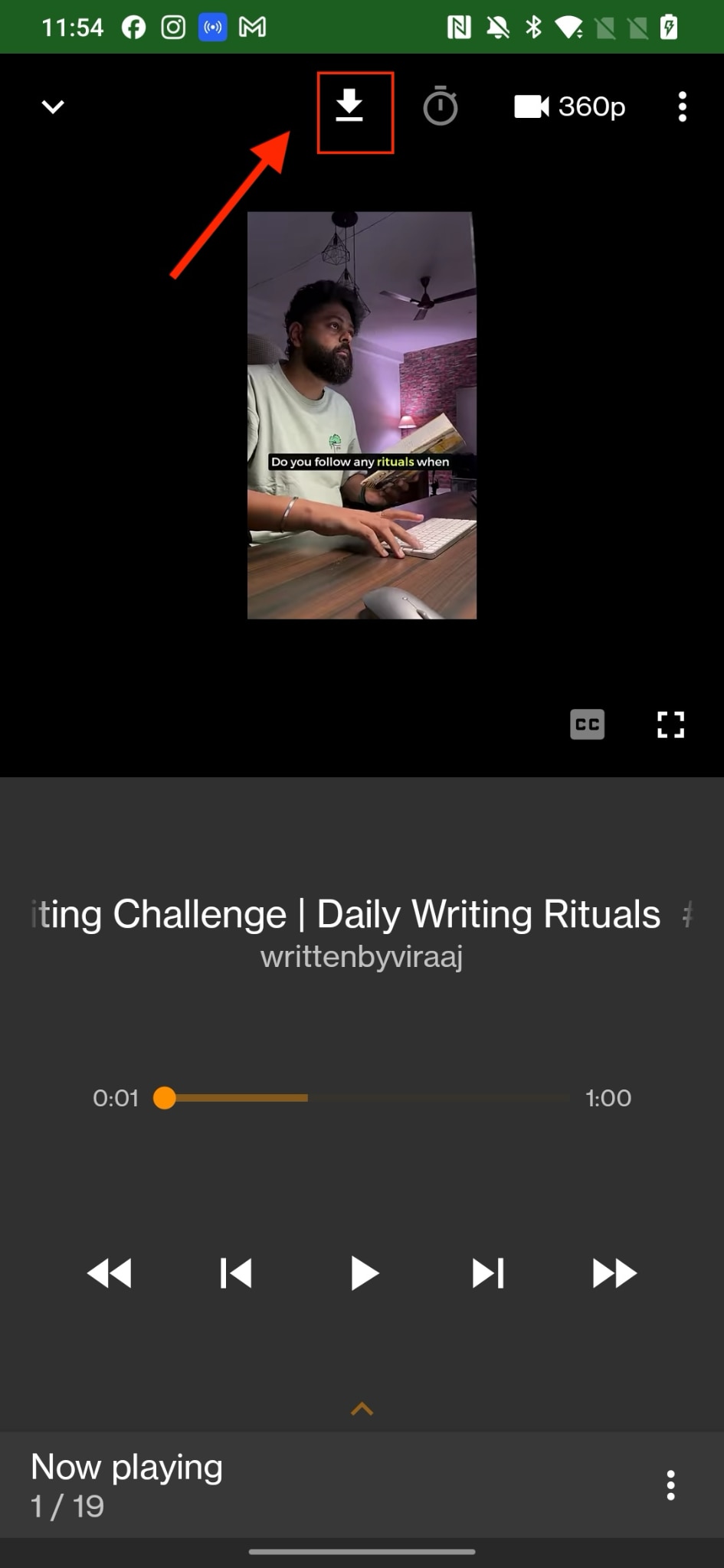
Step 3: After finding your desired video, tap the download icon at the top of the screen.
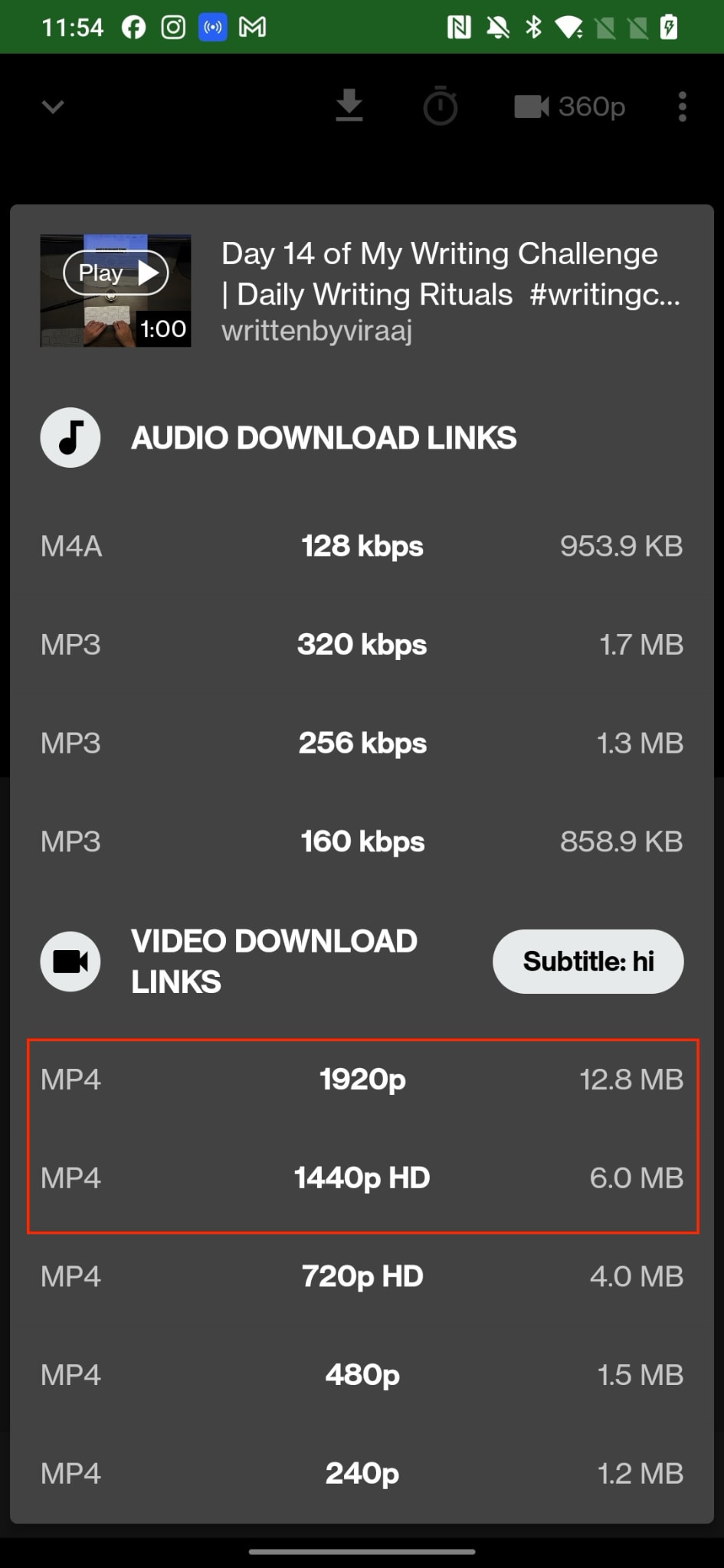
Step 4: YMusic will prompt you to select between audio and video download links. Choose MP4 and pick your preferred video resolution, ranging from 240p to up to 1080p vertical resolution, depending on your storage capacity and quality needs.
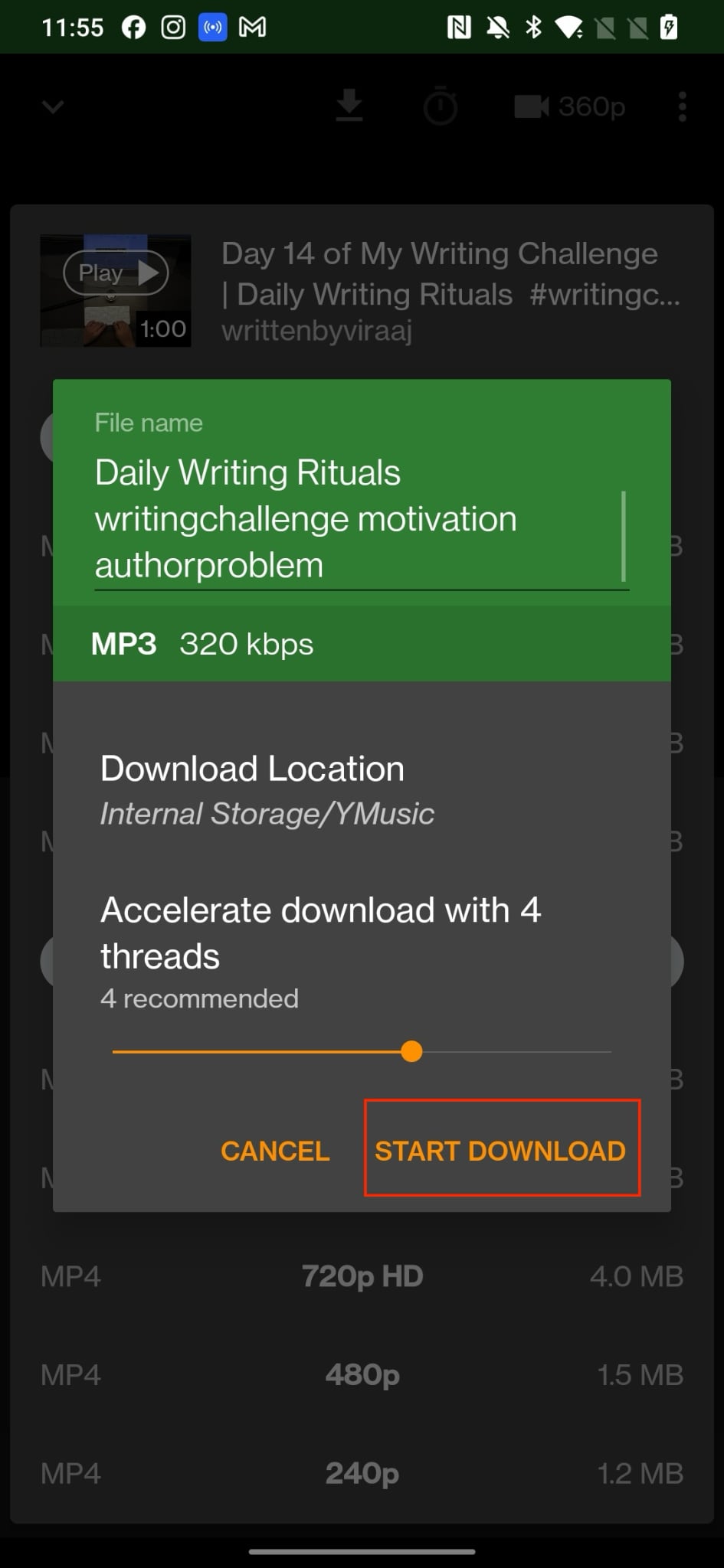
Step 5: Select your desired download location, then tap Start Download. The video will be saved as an MP4 file and can later be accessed through YMusic's built-in file manager or your phone's internal storage.
Tips to Improve Mobile Storage, Resolution, and Performance
- Choose Optimal Resolution: If your phone storage is limited, select 480p or 720p instead of full HD. It saves space while maintaining good visual quality.
- Clean Up Regularly: Delete completed or duplicate downloads from the YMusic file manager to free up storage for new videos.
- Use External Storage: Whenever possible, set your download location to an SD card instead of internal memory.
- Monitor App Permissions: Restrict unnecessary permissions to reduce background activity and improve device performance.
- Avoid Multitasking During Downloads: Running fewer apps while downloading ensures smoother performance and faster completion.
Part 4: Pro Tips to Save YouTube Shorts to MP4 in HD and 4K Quality for Editing and Reuse
If your goal is to save YouTube Shorts offline in high quality and reuse them across different platforms, choosing the right tool matters. While most free converters handle basic downloads, only a few deliver professional-grade output with reliable speed and privacy protection. Wondershare UniConverter stands out as a YouTube Shorts converter for high-quality videos, which is designed for creators who want watermark-free results.
How We Tested YouTube Shorts to MP4 Converters
To create this guide, we reviewed YouTube Shorts to MP4 methods based on output quality, conversion reliability, workflow simplicity, safety, and overall usefulness for offline playback or later editing.
This section explains why we prioritize reliable conversion, better quality retention, and safer download workflows before users review the comparison below.
| Feature | Wondershare UniConverter | Other Online Tools |
| Conversion Speed | Up to 120x faster with GPU acceleration | Depends on the browser or server speed |
| Ads & Pop-ups | No ads or interruptions | Frequent pop-ups and redirects |
| Video Quality | 1080p, 4K, and vertical 1080x1920 support | Often capped at 720p |
| Privacy & Security | 100% safe offline downloads | May risk data leaks or malware |
| Editing Options | Built-in trimming, merging, and subtitles | None or very limited |
| Watermark | Download without watermark | Many tools add branding overlays |
YouTube Shorts to MP4 Converter
Advanced Tips with UniConverter YouTube Shorts to MP4
Here are some advanced features and tips that would help you download YouTube Shorts effectively with the UniConverter YouTube Shorts to MP4 tool:
Batch Download YouTube Shorts Effortlessly: Download multiple Shorts simultaneously without slowing your system. This feature helps content creators manage bulk projects efficiently and save YouTube Shorts offline in one go.
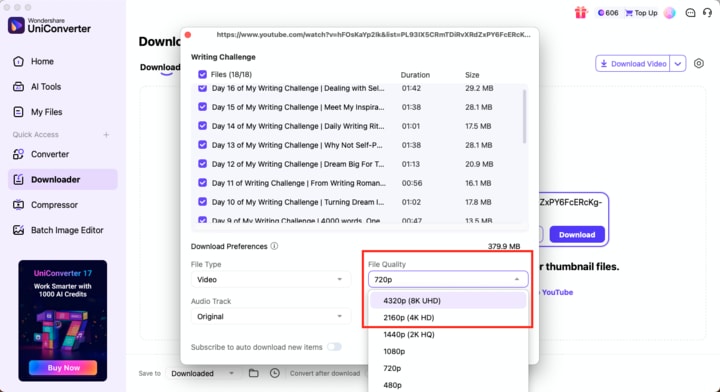
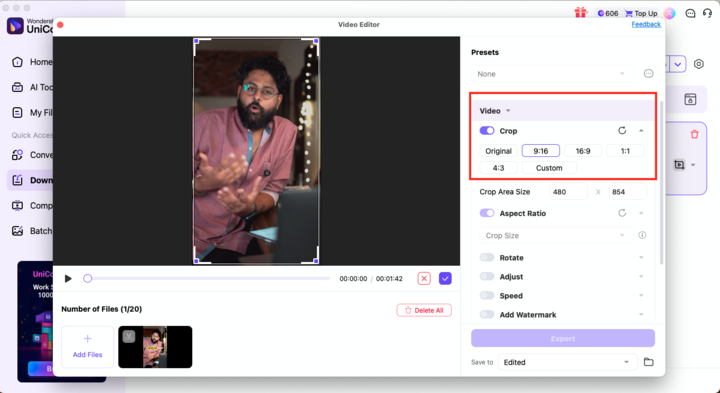
Save in Vertical MP4 Format (1080x1920): Maintain Shorts' original portrait aspect ratio with UniConverter's format presets. This YouTube Shorts converter ensures high quality so that each YouTube Shorts-to-MP4 conversion looks perfect on mobile or social feeds.
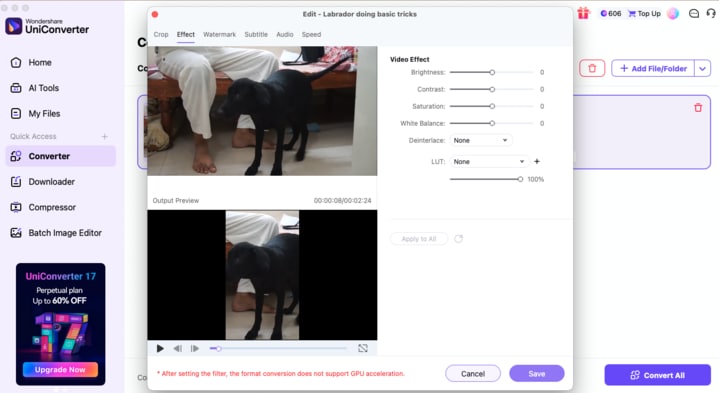
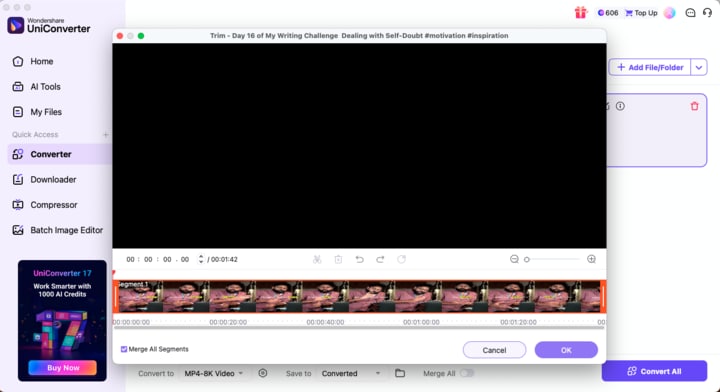
Add Subtitles, Merge Clips, and Edit Instantly: Even before final export, you can fine-tune each download by trimming, cropping, merging multiple Shorts, or adding subtitles. This is particularly helpful for editors who wish to repurpose content for Instagram, TikTok, or YouTube compilations.
Convert for Specific Devices and Platforms: UniConverter optimizes videos for specific platforms like Instagram Reels, TikTok, and Facebook, ensuring smooth playback and accurate file sizes.
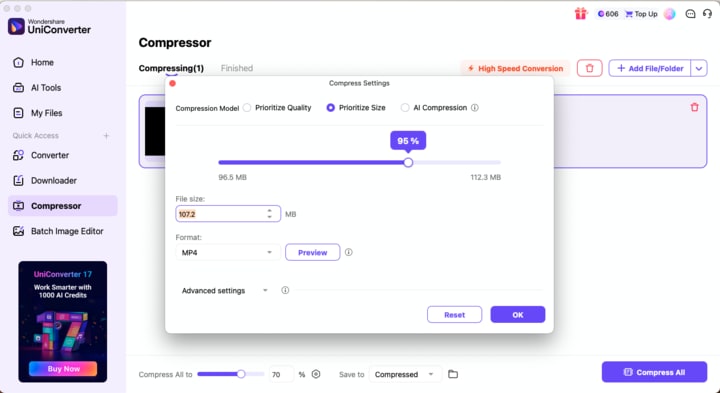
Compress and Enhance for Faster Sharing: You can even reduce file size without losing quality using the built-in compressor. This option is ideal for creators who want to share Shorts quickly or upload them in high definition across multiple platforms.
FAQs on YouTube Shorts to MP4
Can I convert YouTube Shorts to MP4 for free?
Yes, several tools allow free conversion, but quality may vary. UniConverter offers a safer option to download YouTube Shorts as MP4 with HD clarity and reliable performance.
Will the video lose quality after downloading?
No, not when you download the video from Wondershare UniConverter. The offline tool ensures high-quality MP4 encoding, which lets you save Shorts in 1080p or 4K without compression loss.
Is it legal to download YouTube Shorts?
Any major legal issues arising from YouTube Shorts to MP4 conversions occur only when copyrighted content is shared publicly. It is highly recommended to use downloads only for personal or authorized purposes.
Can I convert YouTube Shorts on my phone?
Yes, there are several third-party mobile apps that let you easily convert YT Shorts to MP4s in different resolutions and formats. Meanwhile, you can access Wondershare UniConverter directly in your phone's built-in browser to convert the short to the required format without any issues.
How do I remove the watermark on downloaded YouTube Shorts?
In order to remove a watermark from your video, you can choose UniConverter, which exports YouTube Shorts to MP4 without a watermark and also lets AI remove any third-party object or image from the video if needed.
Conclusion
Downloading and converting YouTube Shorts to MP4 is more than just about saving videos. It ensures uninterrupted offline access, which makes content editing easier and even guarantees smooth playback across all devices. Whether for personal use, content creation, or archiving, MP4 remains the most versatile and high-quality format available.
Among the tools available, Wondershare UniConverter delivers a balance of performance, precision, and reliability. It offers advanced features like batch downloads, HD and 4K output, and watermark-free conversions.
To secure the highest-quality MP4 files from YouTube Shorts, use Wondershare UniConverter. Convert, enhance, and prepare your videos for playback or editing with confidence and clarity.

