Hear AI Noise Removal Before and After
 Background noise such as wind, rain, traffic, static, or fan hum can distract from speech in video and
audio. Play the before-and-after sample below to hear how UniConverter AI Noise Remover reduces unwanted
sound while keeping the recording clear.
Background noise such as wind, rain, traffic, static, or fan hum can distract from speech in video and
audio. Play the before-and-after sample below to hear how UniConverter AI Noise Remover reduces unwanted
sound while keeping the recording clear.




How to Remove Background Noise Online for Free
Clean one MP4 video or MP3 audio file at a time in your browser. Files must be under 50MB, and you can use the online AI noise remover three times for free without registering or logging in.
1. Upload an MP4 or MP3
Choose one video or audio file under 50MB. Online batch processing is not supported.
2. Remove Background Noise
Start the AI noise removal process to reduce unwanted sound in the uploaded recording.
3. Preview and Download
Review the result and download the cleaned video or audio without a watermark.
Remove Common Background Noise from Video and Audio
Use the free online noise remover for a quick MP4 or MP3 cleanup, or choose UniConverter Desktop for multiple files, local processing, and a broader set of video and audio formats. AI helps reduce wind, echo, hum, static, hiss, and other distracting sounds while keeping the main recording clear.
Remove static from audio
Static or crackling sounds from microphones and devices can disrupt your recordings. UniConverter’s background noise remover reduces static noise from microphone and audio files, helping speech sound cleaner and easier to understand.


Remove echo and reverb from audio
Echo and reverb often make calls, meetings, and room recordings sound hollow. With UniConverter Noise Cleaner, you can remove echo from audio and video effortlessly. It reduces reflections and room noise, giving your sound a more balanced, professional tone.
Remove humming and buzzing
Electrical hum, fan buzz, or computer noise can create constant low background tones. UniConverter's audio noise cleaner helps you remove background humming noise instantly and restore clean sound—ideal for podcasts, interviews, and home recordings.


Remove wind noise from video
Wind, rain, and traffic noise often ruin outdoor footage. UniConverter's noise removal makes it easy to remove wind noise from audio or video files, preserving your voice and ambient sounds naturally. Perfect for vloggers, journalists, and outdoor creators.
Reduce crowd noise and background chatter
Crowd noise and distant conversations can distract from the main speaker. UniConverter's video noise reduction software helps reduce background chatter in vlogs, presentations, and street recordings. Results can vary when multiple voices overlap closely.

Remove hissing and keyboard sounds
Hissing, typing, or mouse clicks often appear in screen recordings and tutorials. UniConverter's audio noise reduction filters out these noises automatically, helping your voice sound clean and polished for viewers.
AI Noise Removal for Every Recording Scenario
Whether you're a podcaster, vlogger, educator, or business professional, Use the online noise remover for a quick MP4 or MP3 cleanup, or move to UniConverter Desktop when you need batch and local processing.
Keep your audience engaged with clean and balanced sound. UniConverter's podcast noise removal tool removes background hum, echo, and static from home studio recordings—no need for costly gear or complex editing.
Whether filming in cafes, on beaches, or busy streets, UniConverter's vlog audio cleaning software helps reduce wind, traffic, and crowd noise so speech is easier to hear.
Good audio keeps learners focused. UniConverter improves online course audio quality by removing typing sounds, echo, and air-conditioner noise from screen recordings and lectures.
Remote meetings and training videos often capture background distractions. UniConverter simplifies meeting recording cleanup, ensuring professional-sounding presentations and conference replays.
Clean recorded gameplay and broadcast clips before publishing. Reduce keyboard clicks, fan noise, and microphone hum so commentary stays easier to follow.
Why Upgrade to UniConverter Desktop Noise Remover?
Move from quick online cleanup to a desktop workflow built for multiple files, broader format support, and local data security.

AI-Powered Noise Detection
AI detects common unwanted sounds such as wind, traffic, echo, hum, hiss, and static, reducing the need to isolate each noise manually.

15 Supported Video & Audio Formats
Import AVI, MKV, MOV, MP4, WebM, VOB, M2TS, WAV, MP3, M4A, WMA, AAC, FLAC, MKA, or AIFF directly into the desktop workflow.

Batch Processing for Multiple Files
Add and process multiple video or audio files in one batch. UniConverter does not set a fixed numeric limit on the number of files in a batch.

Local Processing for Data Security
Files are processed locally on your computer instead of being uploaded through the online tool, helping protect meetings, interviews, and unreleased recordings.

Clear, Natural-Sounding Results
AI noise reduction is designed to reduce distracting sound while keeping the main voice clear. Preview the result before export to check each recording.

Fast Desktop Workflow
Import, process, preview, and export in one desktop workflow without uploading each source file to a browser-based tool.
Free Online vs. Desktop Noise Remover
Use the free online noise remover for a quick, no-login MP4 or MP3 cleanup. Choose UniConverter Desktop when you need to process multiple files, work with more formats, or keep source data on your computer.
| Feature | UniConverter Desktop | Free Online Noise Remover |
|---|---|---|
| Access | Windows or Mac desktop app | Use directly in a browser |
| Supported Formats | AVI, MKV, MOV, MP4, WebM, VOB, M2TS, WAV, MP3, M4A, WMA, AAC, FLAC, MKA, AIFF | MP4 and MP3 |
| Online File Limit | No browser upload required | One file under 50MB |
| Batch Processing | Yes, with no fixed numeric batch limit | No, one file at a time |
| Processing Method | Local processing on your computer | Online processing |
| Free Online Access | Not applicable to the desktop workflow | 3 free uses, no registration or login, and no watermark |
| Best For | Batch jobs, sensitive files, and broader format needs | Quick cleanup of a single small MP4 or MP3 |
Start online when you need a fast result without signing in. Upgrade to UniConverter Desktop for repeated workflows, batch processing, and local data security.
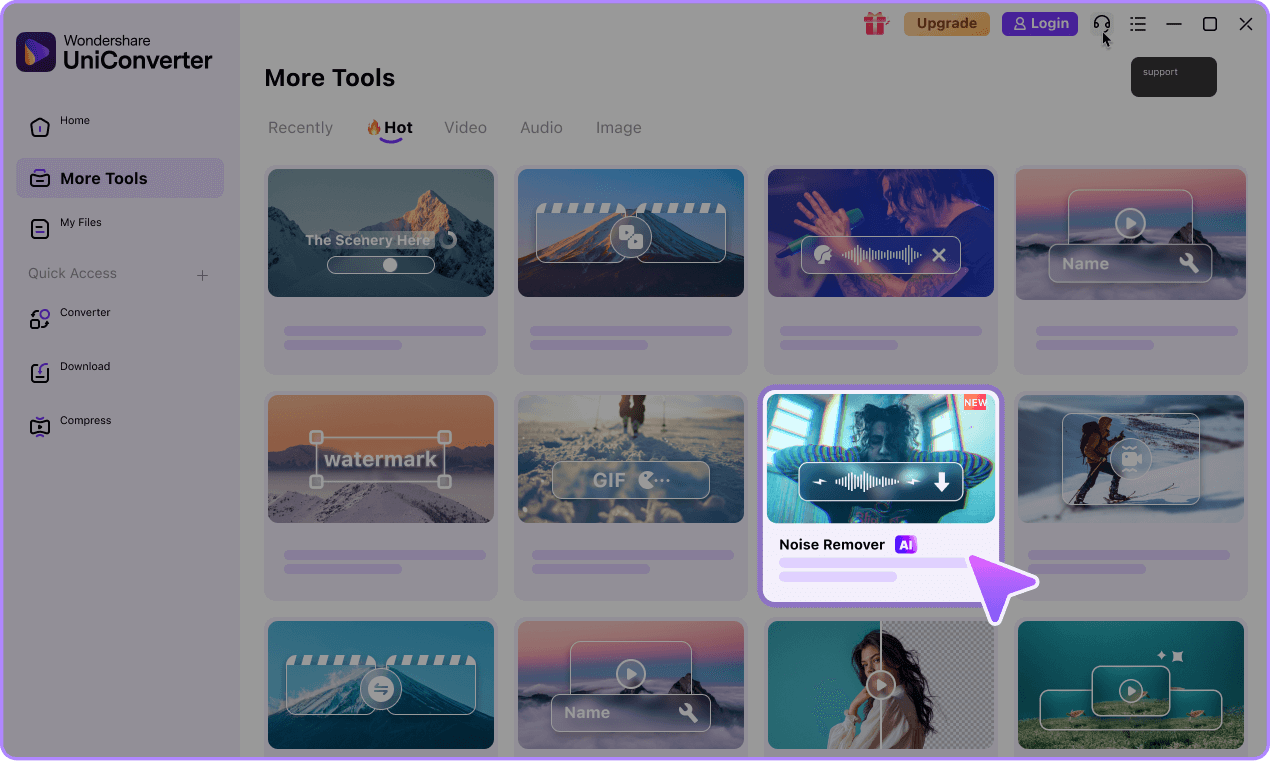
How to Remove Background Noise with UniConverter Desktop in 3 Steps

Step 1. Add Video or Audio Files
Import one or more supported video or audio files, or drag them into the desktop Noise Remover.

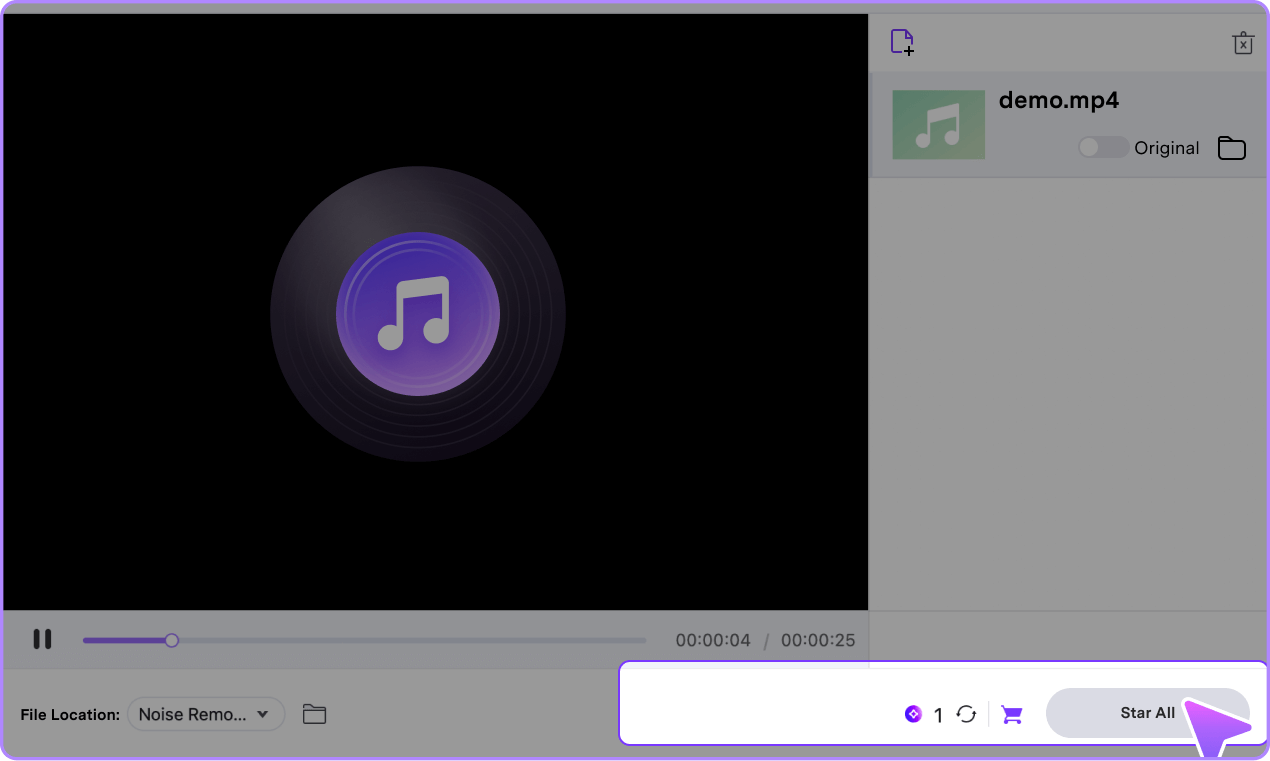
Step 2. Start AI Noise Removal
Click Start All to reduce background noise across the selected video or audio files.

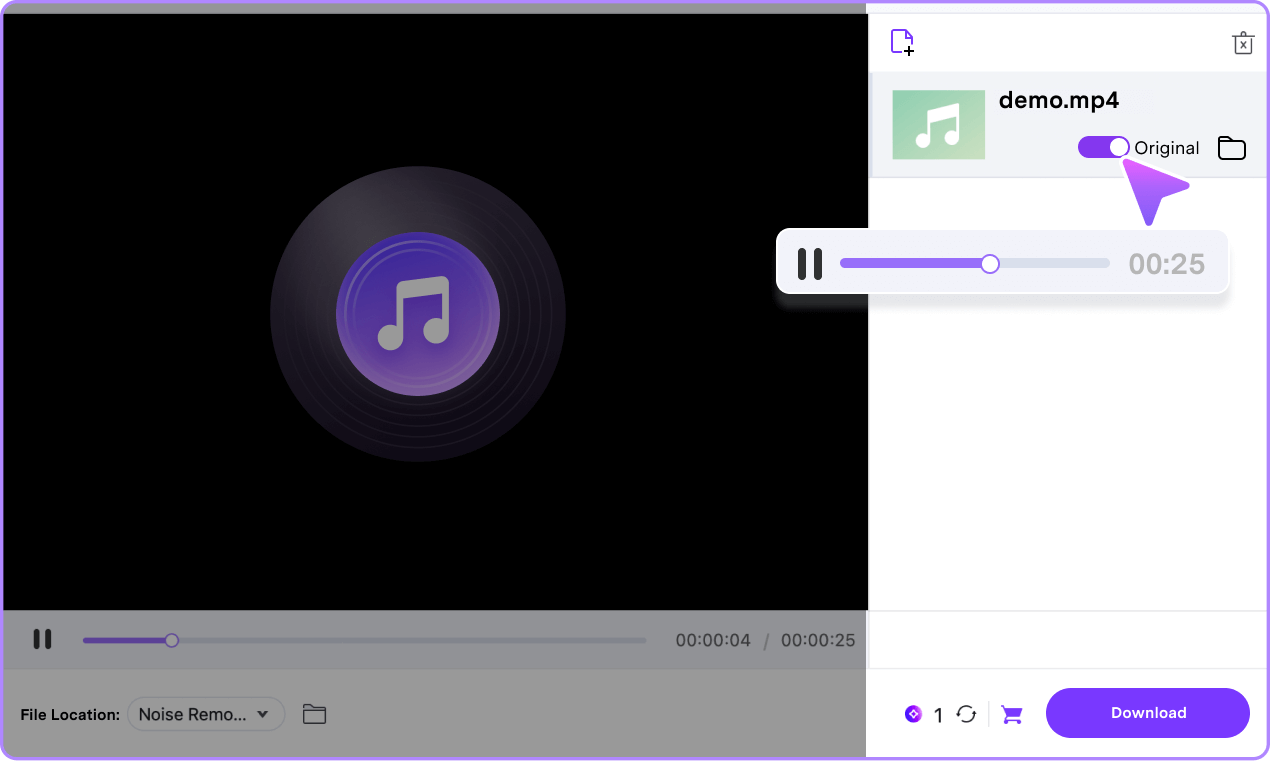
Step 3. Preview and Export
Preview the before-and-after result, export the cleaned files, and open the output folder from the desktop app.
Tips and Tricks for Noise Removal
Free Online Noise Remover FAQs
-
01
Can I remove background noise from video and audio online for free?
Yes. You can remove background noise from video online by uploading one MP4, or remove background noise from audio online by uploading one MP3. Each file must be under 50MB. You can use UniConverter's free online noise remover three times without registering or logging in, and downloaded results have no watermark.
-
02
What formats does the online noise remover support?
The online AI noise remover accepts MP4 video and MP3 audio files under 50MB. For AVI, MKV, MOV, WebM, VOB, M2TS, WAV, M4A, WMA, AAC, FLAC, MKA, or AIFF, use UniConverter Desktop.
-
03
Do I need to register or log in to use the online noise remover?
No. You can remove background noise online three times for free without creating an account or logging in.
-
04
Does the free online noise remover add a watermark?
No. The online noise remover does not add a watermark to the processed MP4 or MP3 output.
-
05
Can I batch remove background noise from multiple files?
The online noise remover processes one file at a time and does not support batch processing. UniConverter Desktop can process multiple video or audio files in one batch and does not set a fixed numeric batch limit.
-
06
Which formats does UniConverter Desktop Noise Remover support?
UniConverter Desktop supports AVI, MKV, MOV, MP4, WebM, VOB, M2TS, WAV, MP3, M4A, WMA, AAC, FLAC, MKA, and AIFF for noise removal.
-
07
Should I use the online or desktop noise remover?
Use the free online noise remover for a quick, no-login cleanup of one MP4 or MP3 file under 50MB. Choose UniConverter Desktop for batch processing, local data security, or support for additional video and audio formats.
More than just a Noise Remover, get more UniConverter AI Tools



Ready to Remove Background Noise from Your Recordings?
Download UniConverter for Windows or Mac to process multiple files in one batch, work with 15 supported video and audio formats, and keep source data on your computer during noise removal.