


Instagram has become one of the busiest visual platforms, filled with creators posting Reels, Stories, and long-form videos that often deserve high-quality downloads for editing, archiving, or offline viewing. Many users look for an Instagram 4K downloader because standard online tools usually downgrade video quality or fail to extract audio correctly. The need for sharper details, better color consistency, and reliable formats has pushed creators toward safer, more professional solutions.
To help you understand how to download Instagram videos in 4K or HD, this guide explains how Instagram downloaders work and shows step-by-step methods for saving Reels, Stories, videos, photos, and carousels in the highest available quality. You will also learn when a true 4K file is available, when Instagram only provides HD output, and how to convert or enhance a saved file to MP4 with Wondershare UniConverter.
Quick Answer: What Is the Best Way to Download Instagram in 4K or HD?
The best way to download Instagram videos, Reels, Stories, and photos in 4K or HD is to save the highest available source file first, then convert or enhance it only when needed. Instagram often compresses uploads, so a downloader can only extract the quality Instagram makes available. If the original file is 1080p, you can save it in HD and use an AI enhancer to upscale it later.
- Best for batch Instagram video downloads: Wondershare UniConverter desktop downloader.
- Best for quick one-link saving: online Instagram downloader, if you only need one public post.
- Best for no-watermark Reels: use a downloader that saves the original public Reel without adding extra branding.
- Best for photos and carousels: use a post downloader that can detect every image in the carousel.
- Best for editing: export Instagram videos to MP4 with the original aspect ratio, audio, and frame rate preserved.
Note: Always download your own content, public content you are allowed to save, or content you have permission to reuse.

Download Instagram Videos, Reels, Stories, and Posts in HD/4K
In this article
- Which Instagram Download Method Should You Use?
- What Is an Instagram 4K Downloader?
- Is It Legal and Safe to Download Instagram in 4K?
- How to Download Instagram Videos in 4K (Step-by-Step)?
- Download Instagram Reels in 4K or HD Without Watermark
- Save Instagram Stories and Highlights in HD/4K
- Download Instagram Posts in 4K (Photos and Carousels)
- Convert Instagram to MP4 in 4K Format
- How to Maintain 4K Clarity and Manageable File Sizes?
- Troubleshooting Common 4K Download Issues
- FAQs on Instagram 4K Downloader
Which Instagram Download Method Should You Use?
Different Instagram download methods work for different needs. If you only want to save your own Reel, Instagram's built-in download or archive options may be enough. If you need no-watermark output, batch downloads, MP4 conversion, or higher quality control, a dedicated downloader is more practical.
| Method | Best for | Quality control | Watermark | Batch support | Main limitation |
| Instagram built-in download | Saving allowed public Reels or your own content | Limited | May include Instagram watermark, username, or audio attribution | Only available when the creator allows downloading | |
| Online Instagram downloader | Quick one-link downloads on mobile or browser | Depends on the source file | Usually no added watermark | Ads, redirects, unstable links, and no manual output settings | |
| Wondershare UniConverter desktop downloader | Batch downloads, MP4 export, editing, and stable HD/4K workflow | High | No added watermark | Requires desktop installation | |
| Screen recording | Backup method when a public video cannot be extracted | Depends on device recording settings | No added downloader watermark | May lose quality and may not preserve original audio cleanly | |
| Instagram data download | Archiving your own Instagram media | Official source quality | No downloader watermark | Not designed for downloading other creators' individual posts |
What Is an Instagram 4K Downloader?
An Instagram 4K downloader is a tool that helps you save Instagram videos, Reels, Stories, photos, and carousels in the highest quality available from the original post. It does not create a true 4K source if Instagram only stores the video in 1080p, but it can help you avoid extra compression, preserve the original aspect ratio, and export the file in a clean MP4 format.
For public videos that are available in higher resolution, a reliable downloader can keep the saved file sharper than screenshots or low-quality browser grabs. For videos that are capped at HD, the better workflow is to download the best available version first, then use an AI video enhancer or converter if you need a 4K-looking export for editing or archiving.
Supported Content Types for IG 4K Downloader
A good Instagram 4K downloader can extract all major post formats and save them in the highest available quality. It usually supports:
- Videos: Standard feed videos in different aspect ratios.
- Reels: Short-form clips with fast transitions and detailed visuals.
- Stories: Temporary posts that you want to save before they expire.
- Posts: Single images and carousels in high resolution.
4K vs. 2K vs. 1080p: Understanding Instagram Quality Before You Download
Many users ask if Instagram truly supports 4K. Most uploads are compressed, but a good downloader can still pull the highest available resolution from the source, giving you cleaner details than screenshots or low-quality saves.
Here’s a quick resolution comparison to help you understand common use cases:
| Resolution | Pixel Size | Visual Clarity | Typical Use | What Instagram Usually Shows |
| 4K | 3840 × 2160 | Very sharp detail | Large screens, pro edits | Often compressed, but tools pull the highest version available |
| 2K | 2560 × 1440 | Sharper than 1080p | Desktop viewing, mid-level edits | Some clips may reach near-2K before compression |
| 1080p | 1920 × 1080 | Good clarity for mobile | Social uploads, casual viewing | Most Reels and videos display around this after compression |
Is It Legal and Safe to Download Instagram in 4K?
It is generally safe to download Instagram videos in 4K when you use trusted tools. Legally, you should only download your own content or get permission from the creator before saving or reusing their posts. For clarity, check Instagram’s guidelines on downloading and redistribution.
Instagram Built-in Download and Data Download Options
Instagram may let you download some public Reels when the creator allows it, and you can also request your own account data through Instagram's data download settings. These official options are useful for saving your own content or allowed public media, but they are not designed for batch downloading, MP4 conversion, no-watermark editing workflows, or downloading other creators' private content.
Copyright and Fair Use Guidelines for Saved Content
Copyright rules still apply when you download Instagram content. Saving a video for personal use is usually fine, but using it publicly or commercially requires the creator’s permission. Treat every downloaded file as protected work.
Here’s a quick comparison of usage types:
| Use Type | Meaning | Allowed Without Permission | Risks | Best Practice |
| Non-Commercial | Personal viewing or reference | Usually acceptable | Low, unless redistributed | Keep for personal use |
| Commercial | Marketing, ads, monetized content | Not allowed | Copyright claims or takedowns | Get written permission |
Privacy Limits to Consider When Using an IG 4K Downloader
Privacy rules still apply when you use an IG 4K downloader. Public posts can be saved because they are already visible to everyone, but private content is restricted and cannot be downloaded without the owner’s approval. Always respect visibility settings and avoid extracting anything that is intentionally limited.
Here’s a quick comparison:
| Content Type | Visibility | Downloader Access | Restrictions | Best Practice |
| Public | Visible to everyone | Yes | Copyright still applies | Save only what you need and credit if reused |
| Private | Followers-only | No | Violates Instagram policies | Download only with clear permission |
How to Download Instagram Videos in 4K (Step-by-Step)?
Downloading high-quality videos from Instagram becomes much easier when you use an Instagram video downloader 4K that maintains sharpness and correct formatting. These tools help you extract Reels, Stories, and feed videos without losing detail during the saving process.
Batch Download IG Videos in HD/4K on Desktop with UniConverter
A desktop tool offers stability and greater control, especially when you need to save multiple videos at once. Wondershare UniConverter can pull the best version of each file and convert it to 4K MP4 in a consistent format. It also avoids common issues like dropped frames, missing audio, or low-resolution exports. This method is ideal for creators who need reliable, high-quality results for editing or long-term storage.
Wondershare UniConverter
UniConverter is a desktop tool built for creators who need stable, high-quality downloads without struggling with broken links or low-resolution exports. It supports batch downloading, which means you can save multiple Reels, Stories, and videos in one go. The tool also lets you convert files to 4K MP4, manage audio settings, and maintain consistent output for editing workflows. This makes it a reliable choice for anyone who needs professional control over their saved content.
(Disclaimer: Our tool is intended for personal use only. Users are solely responsible for using this tool to save videos or audios, including compliance with platform's terms of service and copyright laws and regulations. We are not liable for any consequences resulting from users' violation of any laws or infringement of others' rights.)
Batch Download Instagram Videos in HD/4K
Key Features
- Batch download multiple public Instagram video, Reel, Story, or post links in one workflow.
- Save files in the highest available quality and convert them to MP4 for editing or playback.
- Adjust output format, resolution, bitrate, and audio settings before export.
- Use AI enhancement, compression, trimming, and subtitle tools after downloading when needed.
How to Use UniConverter for 4K Instagram Downloads
Here is the step-by-step guide to use UniConverter to download Instagram Reels in HD/4K when available:
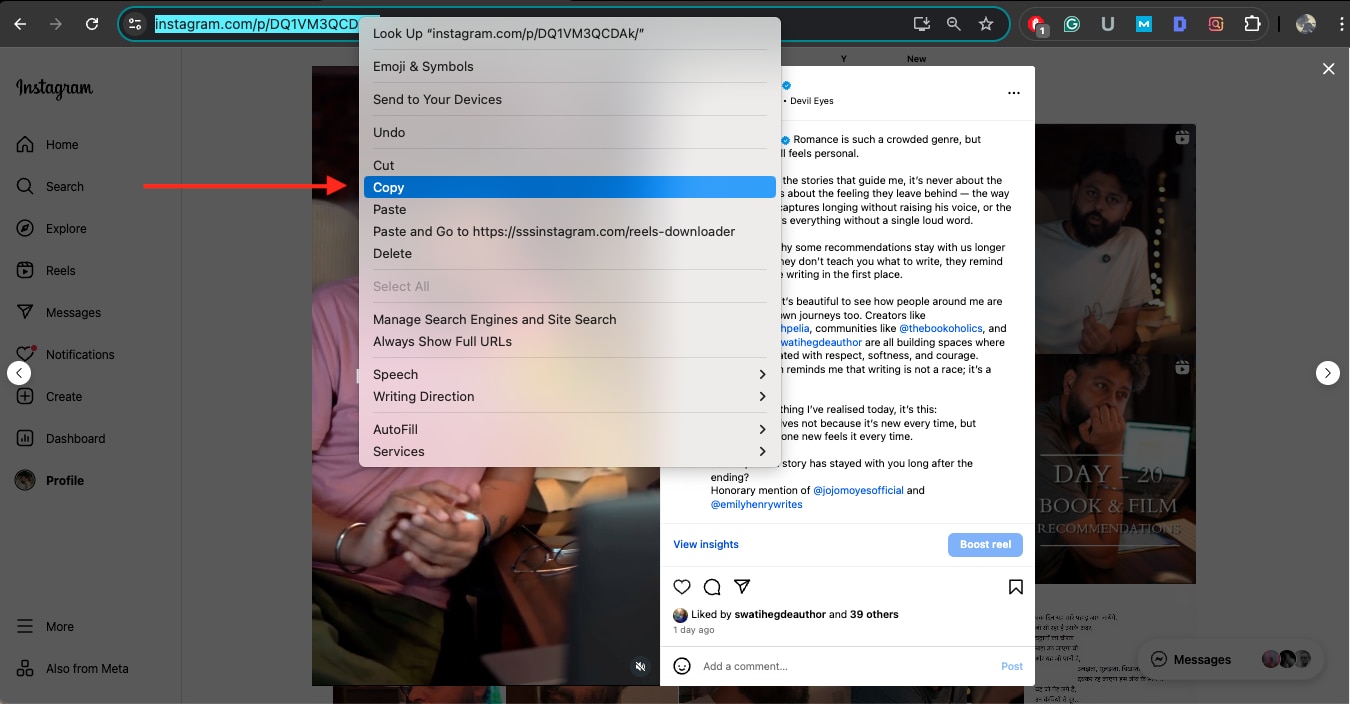
Step 1: Open Instagram on your phone or in a browser, and copy the links to all the Reels or Stories you want to save.
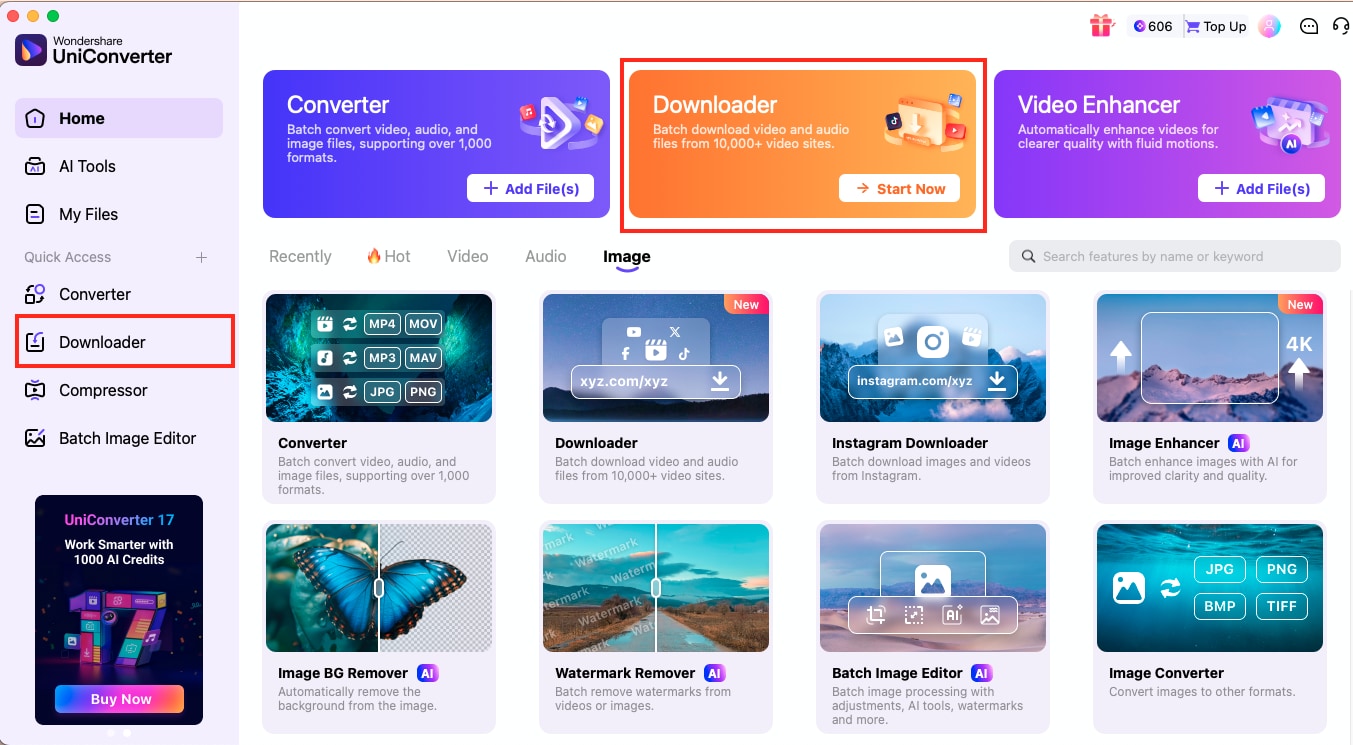
Step 2: Launch UniConverter and select Downloader from the homepage or Quick Access. Paste each Instagram link on a new line inside the URL box.
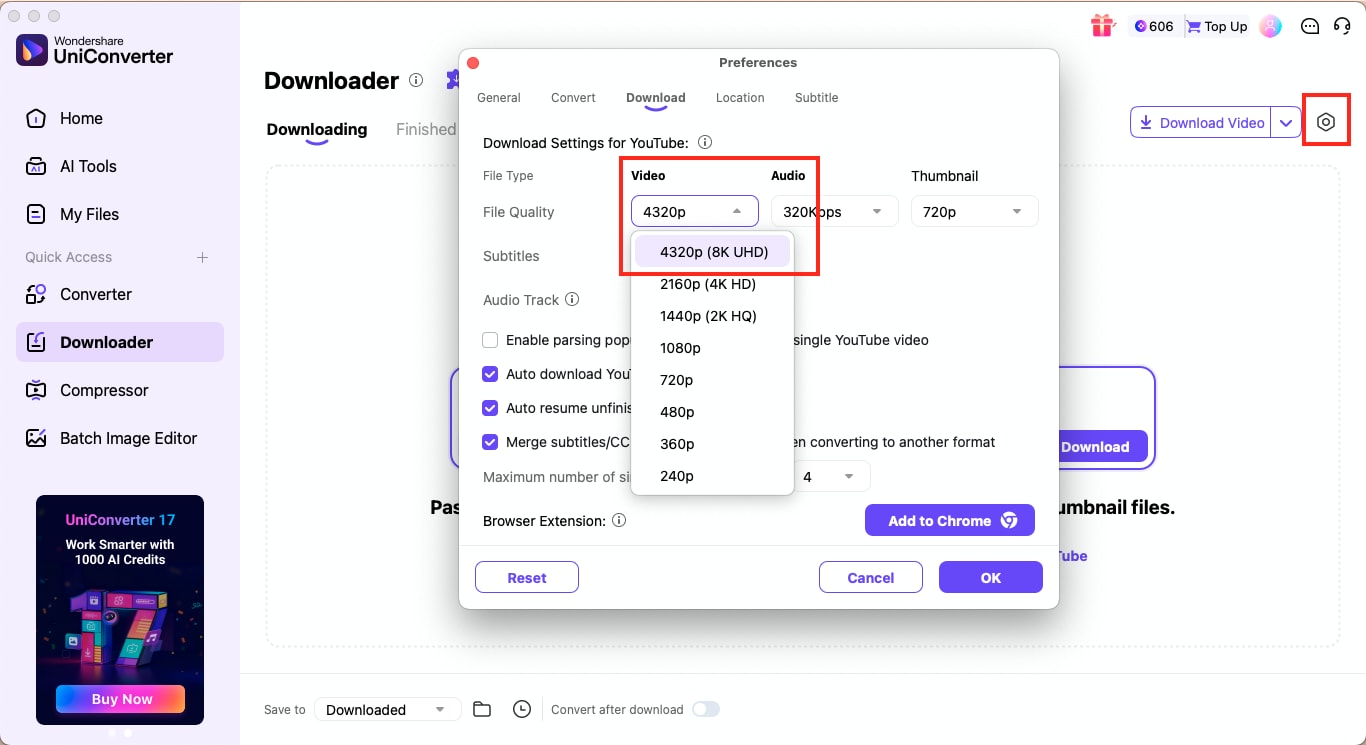
Step 3: Click the gear icon on the right to open the download preferences. Adjust your Video and Audio settings and set the output resolution to 4K. Once ready, click Download to begin saving your files.


Note: Videos that use original audio or copyright-free music download smoothly, as long as they are publicly accessible.
Important Notice: UniConverter supports the ethical use of content. The tool does not promote downloading private, restricted, or copyrighted content without permission. Users are encouraged to follow Instagram's privacy rules and respect creators' rights when saving any video.
Instagram 4K Video Download Online Free
Online tools offer a quick solution for users who want to save a single video without installing software. These sites usually allow you to paste a link and download the highest available resolution instantly. Keep in mind that video quality depends on what Instagram provides, so the output may vary from one post to another.
Here's one such online tool that lets you download Instagram Reels and Stories effectively:
SSS Instagram
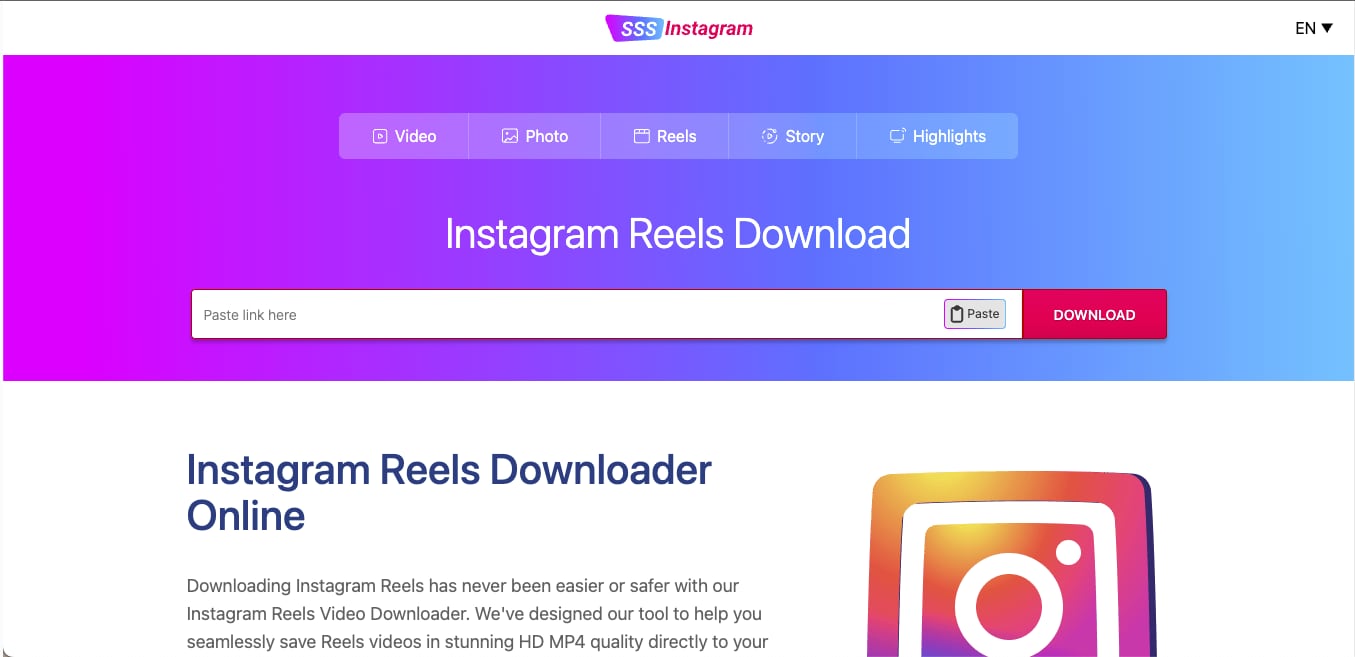
SSS Instagram is a quick online tool that helps you save Reels, Stories, photos, and feed videos without installing anything. It works directly through your browser and processes the highest available resolution from the link you paste. The interface is simple, which makes it a good choice for single downloads when you need something fast.
How to Use SSS Instagram to Download Instagram Reels in MP4
Follow these steps to download Instagram Reels in MP4:
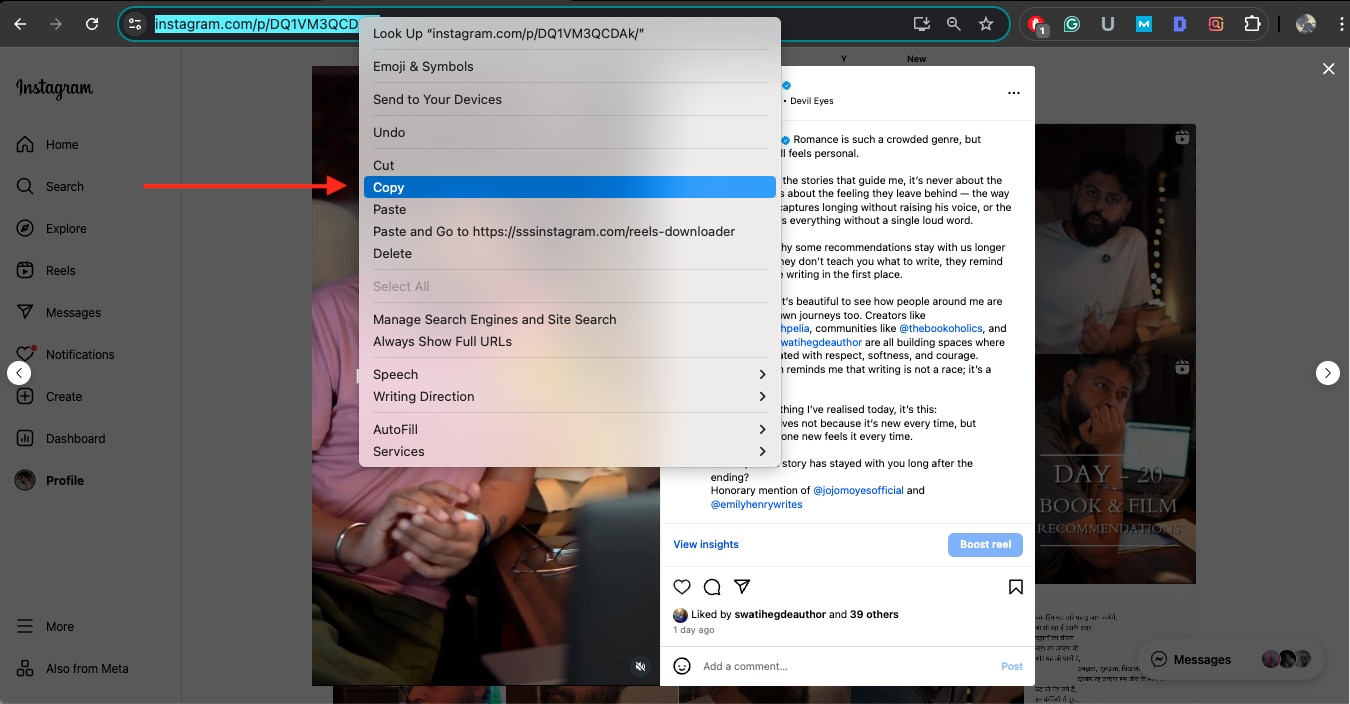
Step 1: Open the Instagram app or website, then copy the link to the Reel or Story you want to download.
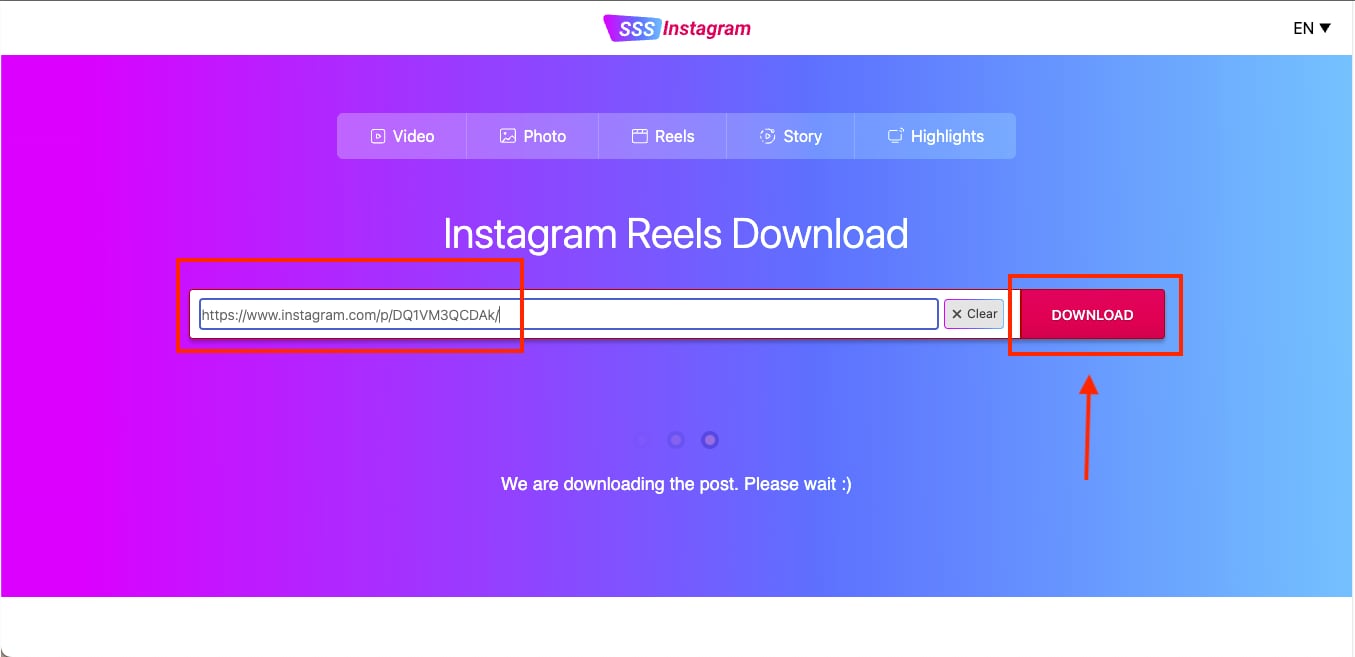
Step 2: Visit the SSS Instagram website and paste the link into the search bar. The tool will automatically start processing it.
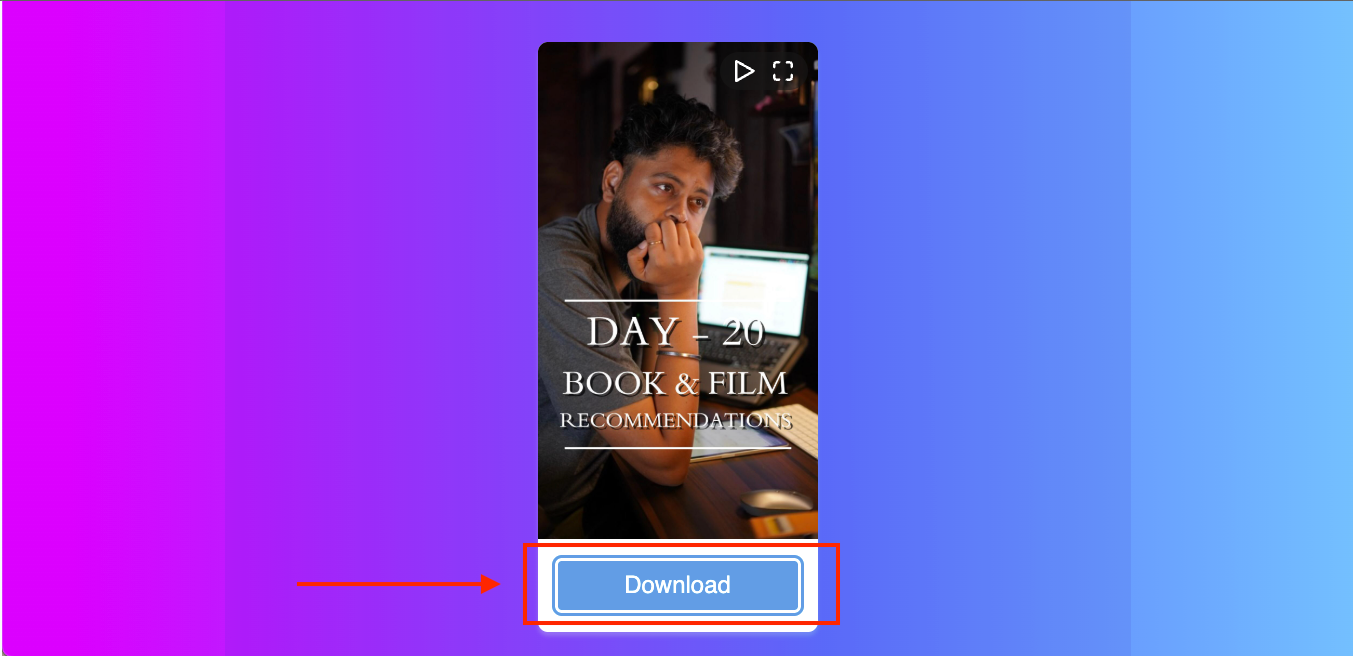
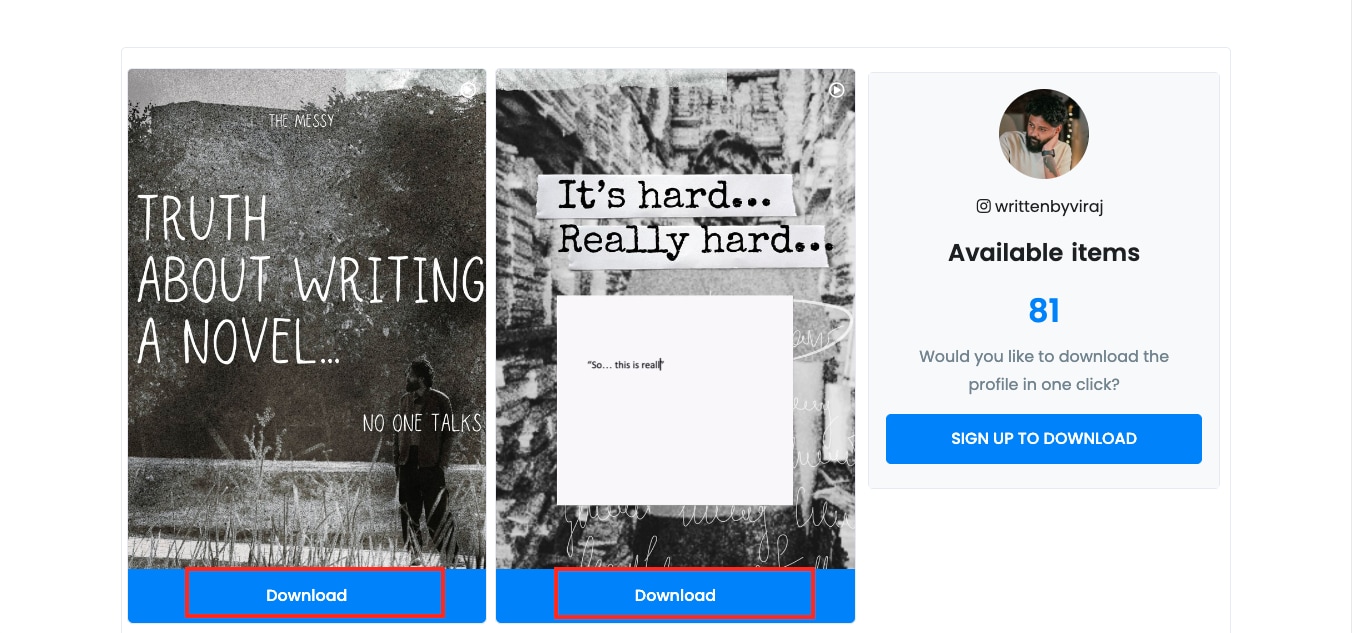
Step 3: After the video loads, scroll down and tap the Download button. The file will be saved at the best available quality, which helps you get a clean MP4 export when Instagram supports it.
Safe Instagram 4K Downloader Alternatives: SaveIG, SSS Instagram, Online Tools vs Desktop
Search results often show online Instagram downloaders such as SaveIG-style tools, SSS Instagram, SaveInsta, SnapReels, StorySaver, and other browser-based options. These tools are useful when you only need to save one public Reel, video, Story, or photo quickly. However, their ads, redirects, download stability, and output quality controls can vary.
If you need repeated downloads, batch Instagram links, cleaner MP4 output, or post-download editing, a desktop workflow such as Wondershare UniConverter is more practical. It lets you manage multiple public Instagram videos, Reels, Stories, and posts in one place, then convert or enhance the saved files when needed.
| Option | Best for | Main advantage | Main limitation |
| SaveIG-style online tools | Quick single-link Instagram downloads | No installation and fast browser access | Ads, redirects, and limited output settings may vary by site |
| SSS Instagram-style tools | Saving one public Reel, Story, video, or photo | Simple paste-link workflow | No batch queue or advanced MP4 conversion controls |
| Wondershare UniConverter | Batch downloads, HD/4K MP4 output, editing, and stable workflow | More control over download, conversion, enhancement, and file management | Requires desktop installation |
How We Tested Instagram 4K Downloaders
For this guide, we evaluated Instagram 4K downloaders based on output clarity, support for Reels, Stories, and posts, download stability, and overall usefulness for high-quality saving.
Quality retention
We checked whether each tool preserves the highest available Instagram quality instead of producing visibly compressed downloads.
Content type support
We compared support for Reels, Stories, feed posts, and other common Instagram content formats.
Download stability
We reviewed link recognition, success rate, and whether downloads remain consistent across different Instagram content types.
Practical value
We also considered batch use, export flexibility, and whether the tool is useful for creators, editors, or personal archiving.
This page gives extra weight to clarity retention and multi-format support, since users searching for Instagram 4K downloaders usually want files that still look good after saving.
Download Instagram Reels in 4K or HD Without Watermark
To download Instagram Reels in 4K without watermark, first check whether the original Reel is available in high resolution. If Instagram only provides a 1080p file, save the HD version without extra compression, then enhance or convert it only when needed. A desktop workflow is better for batch Reels, while online tools are enough for one public link.
What Controls the Real Quality of an Instagram Reel Download?
Reels look different across devices because Instagram adjusts their resolution based on several technical factors. The platform compresses vertical videos, adjusts the bitrate based on upload conditions, and sometimes changes the frame rate during processing. Understanding these parameters helps you know what to expect before downloading a Reel in 4K.
Here are the factors that actually influence Instagram Reel qualities:
| Parameter | What It Means | How It Affects Quality |
| Vertical Resolution | Height of the video frame, usually 1080 or higher | Higher vertical pixel count results in sharper visuals, but Instagram may still compress it |
| Bitrate | Amount of data processed per second | Low bitrate causes grain or blur in fast scenes; higher bitrate produces cleaner details |
| Frame Rate (fps) | Number of frames captured per second | Higher fps looks smoother, but Instagram may lower it during upload or processing |
| Lighting and Exposure | Visual conditions during recording | Poor lighting increases noise, which becomes more visible after compression |
| Original Upload Quality | The file quality before posting | If the creator uploads a compressed video, even 4K download tools cannot restore lost detail |
Desktop Method: Batch Download Instagram Reels with UniConverter
UniConverter offers a straightforward way to save Instagram Reels in full clarity through its dedicated Downloader panel. The dashboard gives you complete control over video quality, making it ideal for creators who want consistent results.
How to Download Instagram Reels in 4K with UniConverter
Here is how you can download Instagram Reel in 4K using UniConverter:
Step 1: Copy the Instagram Reel link you want to save, then open the Downloader tab in UniConverter.
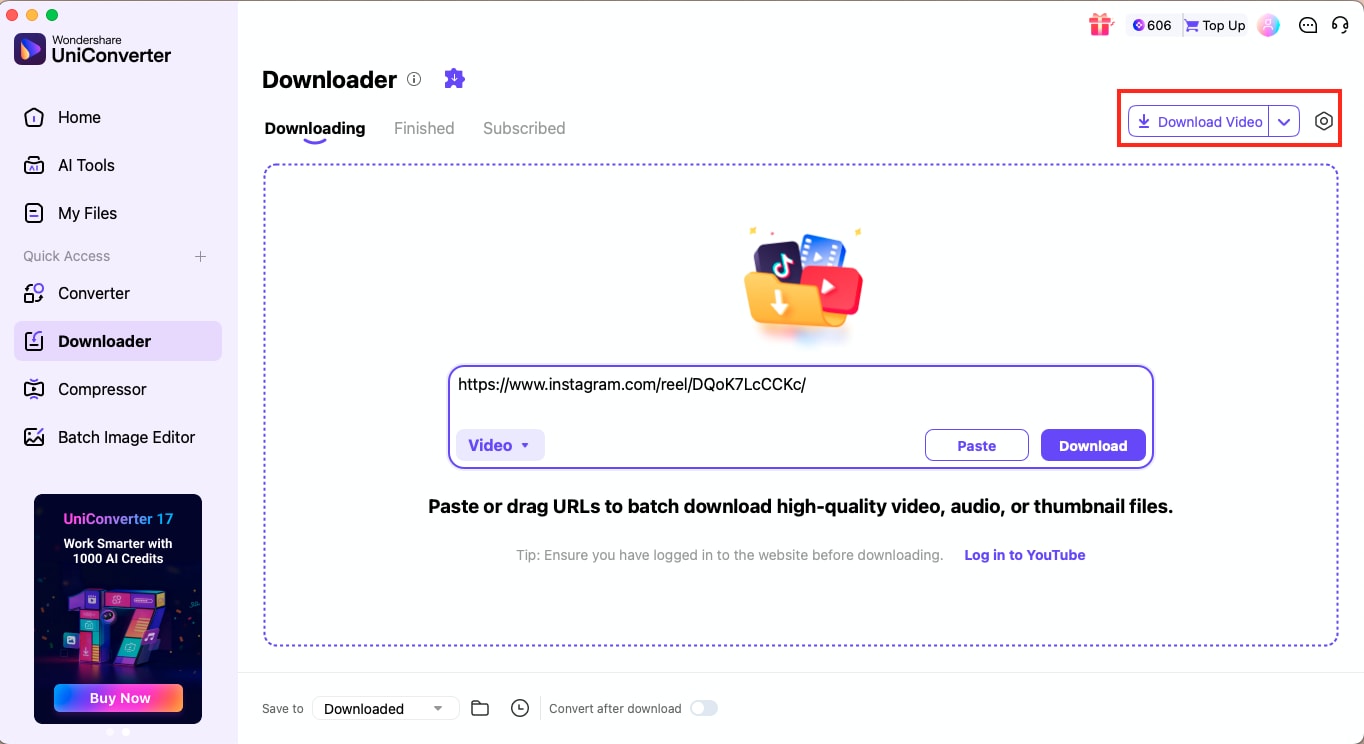
Step 2: Click the gear icon to open the settings panel. Adjust the output quality and select 4K under the Video section.
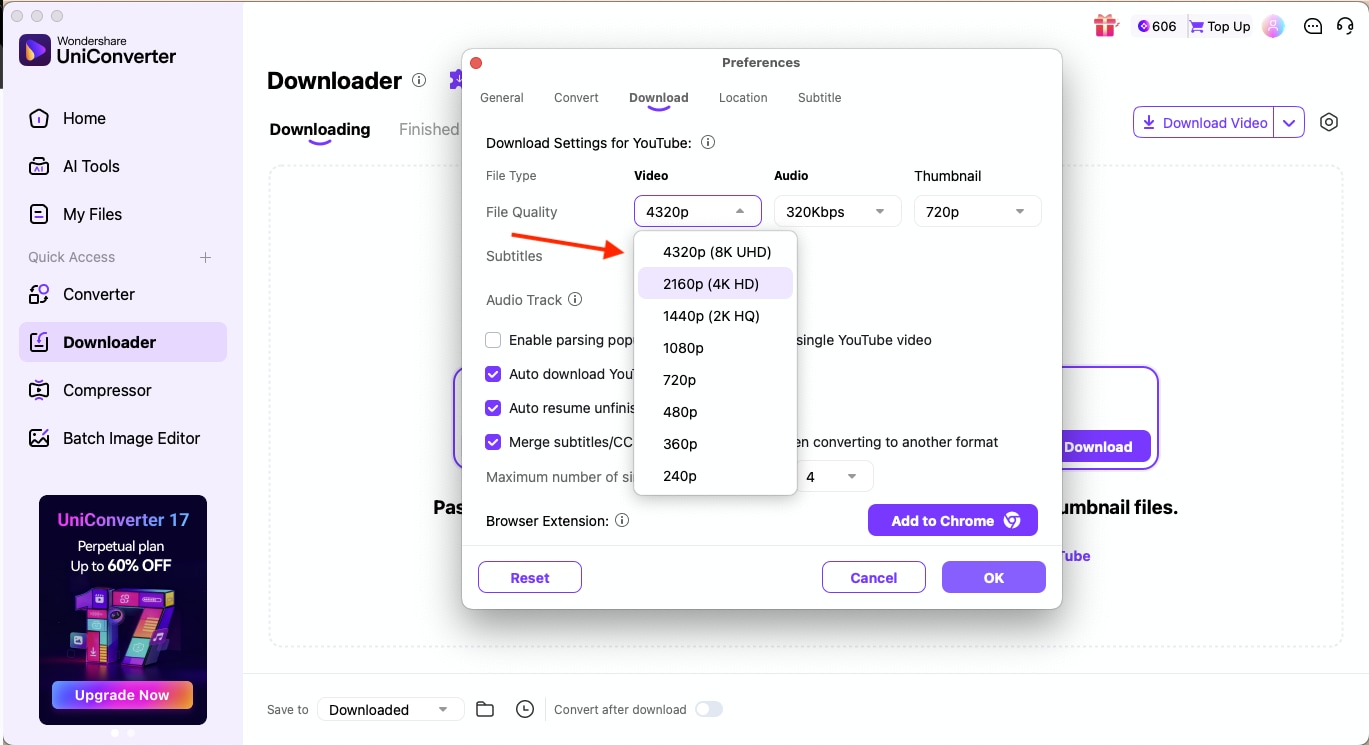
Step 3: Confirm your changes and hit Download. UniConverter will process the Reel and save it to your system in the selected resolution.
Some key advantages of using UniConverter as your preferred 4K IG downloader are:
- It lets you enhance the downloaded Reel for clearer visuals
- It removes watermarks from your saved video when supported
- It allows you to adjust audio tracks, volume levels, and bitrate
- It can generate subtitles automatically with its built-in AI tools
- It supports additional editing options, including trimming, compressing, and converting
Online Method: Download One Instagram Reel in 4K Without Installing an App
You can save Instagram Reels in 4K through both online tools and desktop software, and each option offers a different level of control. Online sites focus on quick, one-click downloads, while desktop tools provide stronger stability and full-resolution output. If you want consistent clarity for editing or repurposing, comparing these two methods helps you pick the right approach.
SaveVid.net: Online Tool for 4K Reel Downloads
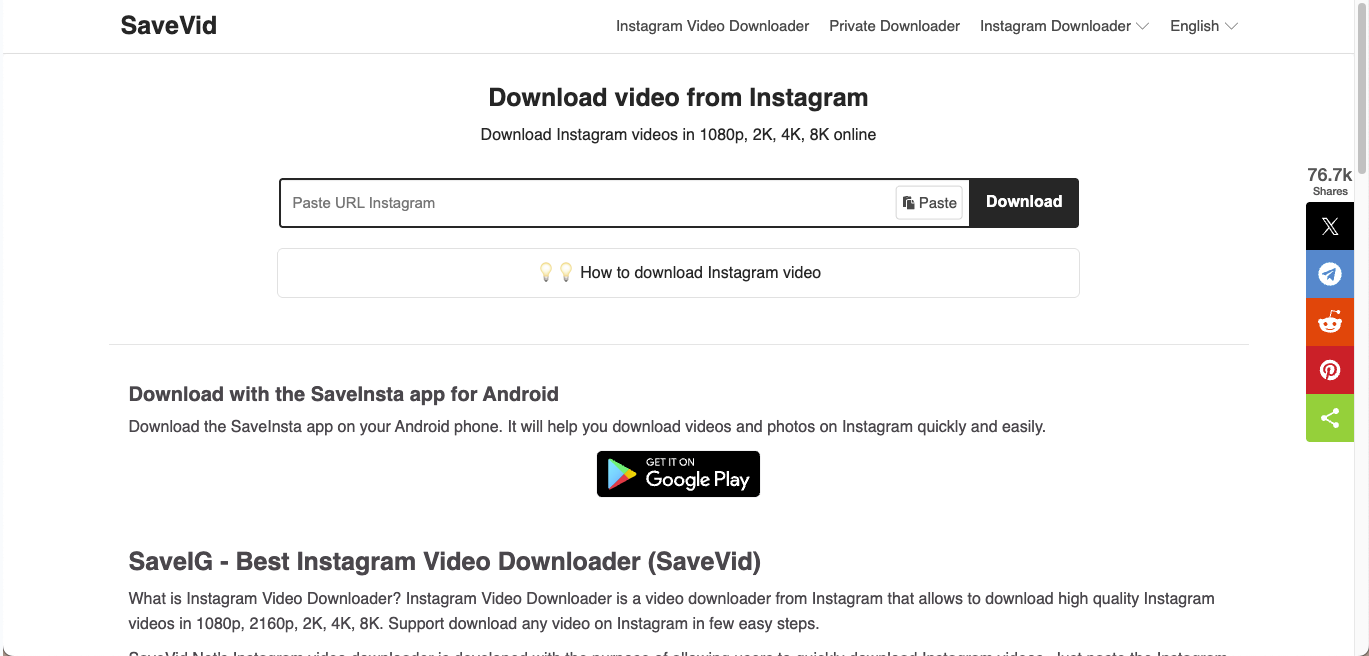
SaveVid.net is a simple web-based downloader that helps you save Instagram videos without installing any software. The site processes links quickly and supports multiple resolutions, including high-quality formats when Instagram provides them.
How to Download Instagram Reels in 4K with SaveVid.net
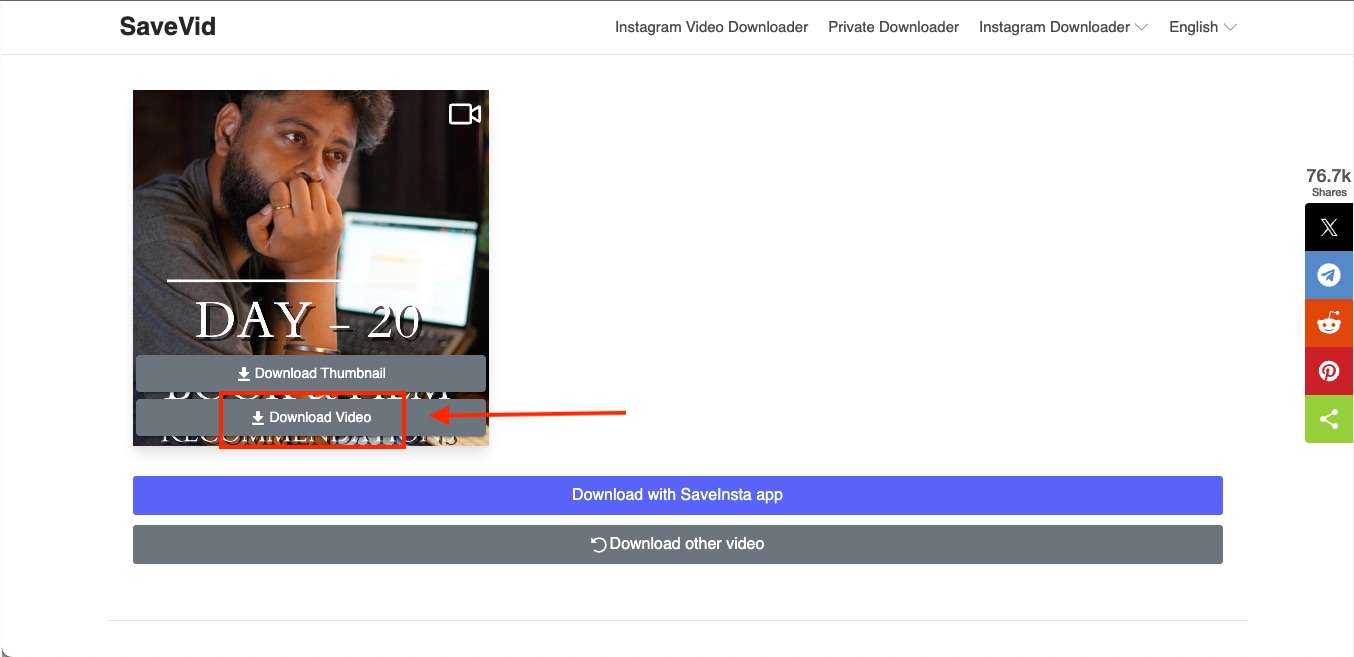
Step 1: Copy the Instagram Reel link you want to download and paste it on SaveVid's homepage, then click Download.
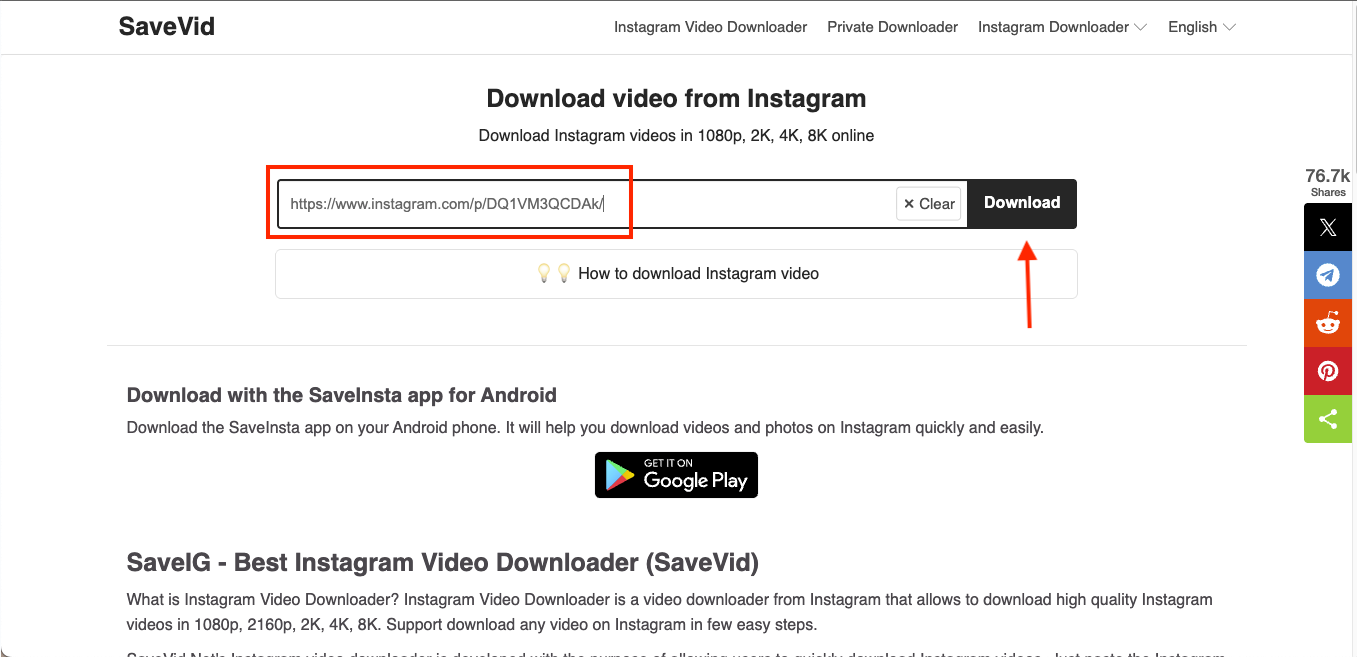
Step 2: Select Download Video from the result preview. The file will save to your device in the best available resolution, such as HD or 4K when Instagram provides a high-resolution source.
Save Instagram Stories and Highlights in HD/4K
Instagram Stories disappear after a short window, which makes Instagram story downloader 4K tools useful for creators who want to preserve their content before it expires. A reliable downloader helps you save Instagram Stories in high clarity, avoid compression issues, and keep them ready for reposting or editing. With the right approach, you can store Instagram Stories and Highlights in the highest available quality, including HD or 4K when the source supports it.
Stories vs. Highlights
Before we move to specific tools, here is a quick breakdown of how Stories differ from Highlights and what you need to keep in mind:
- Stories: Stories stay live for twenty-four hours, making them time-sensitive. If you want to save them in 4K, you need to act quickly or use an automated workflow.
- Highlights: Highlights are curated collections pinned to a profile and remain available indefinitely. They can be downloaded in high quality at any time because they do not expire.
- Availability Window: Stories must be captured before they disappear, while Highlights offer a longer, flexible access period. Both can be saved in 4K when the source quality is high enough.
Download Instagram Stories in 4K with Wondershare UniConverter
UniConverter offers a more reliable way to save Instagram Stories at full resolution, especially when you want a clear Instagram 4K video download without compression artifacts. Its downloader panel works like an Insta 4K downloader but with additional control over file quality, audio, and post-processing. This makes it a strong choice for creators who want consistent clarity for Stories and Highlights.
How to Use UniConverter to Download Instagram Stories in 4K
Here's how to use UniConverter to download Instagram Stories in 4K:
Step 1: Open the Instagram Story you want to save and tap the right arrow icon at the bottom. Select Copy Link to copy the Story URL.
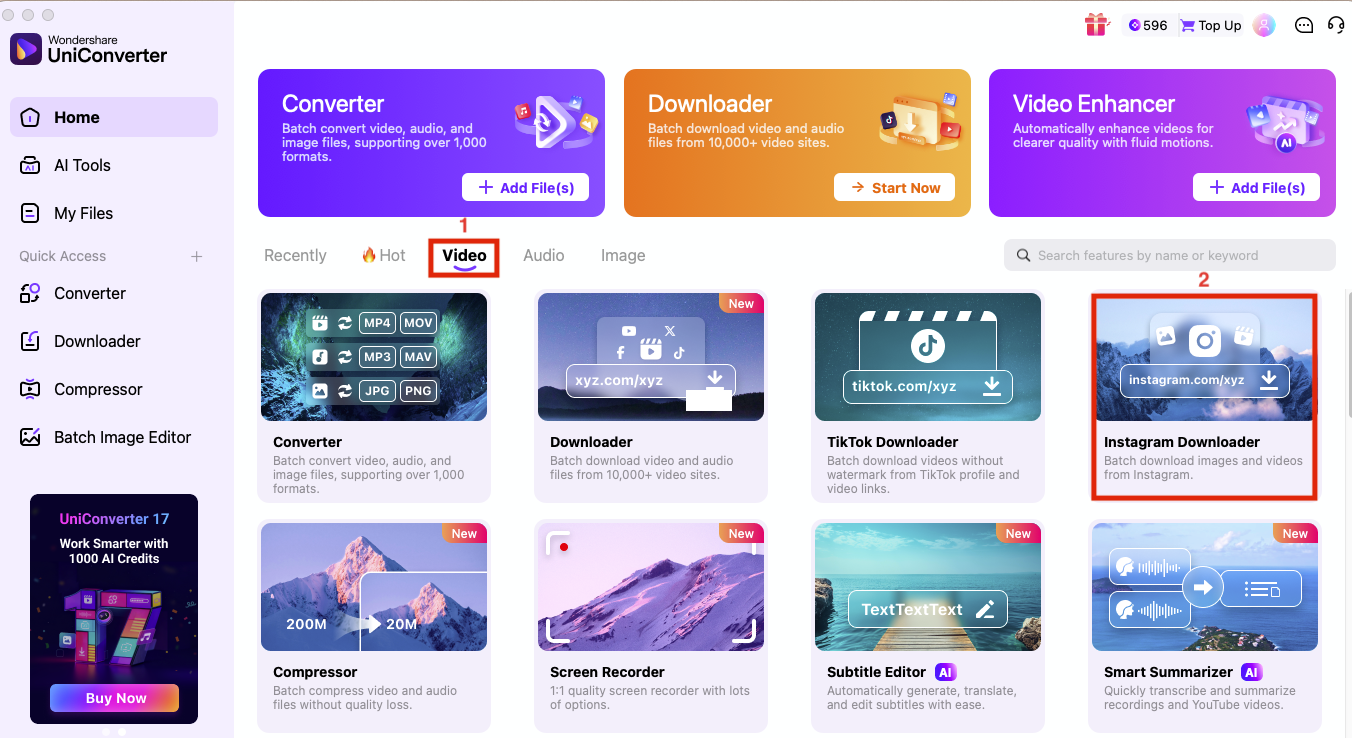
Step 2: Launch UniConverter and go to the Video section, and click Instagram Downloader.
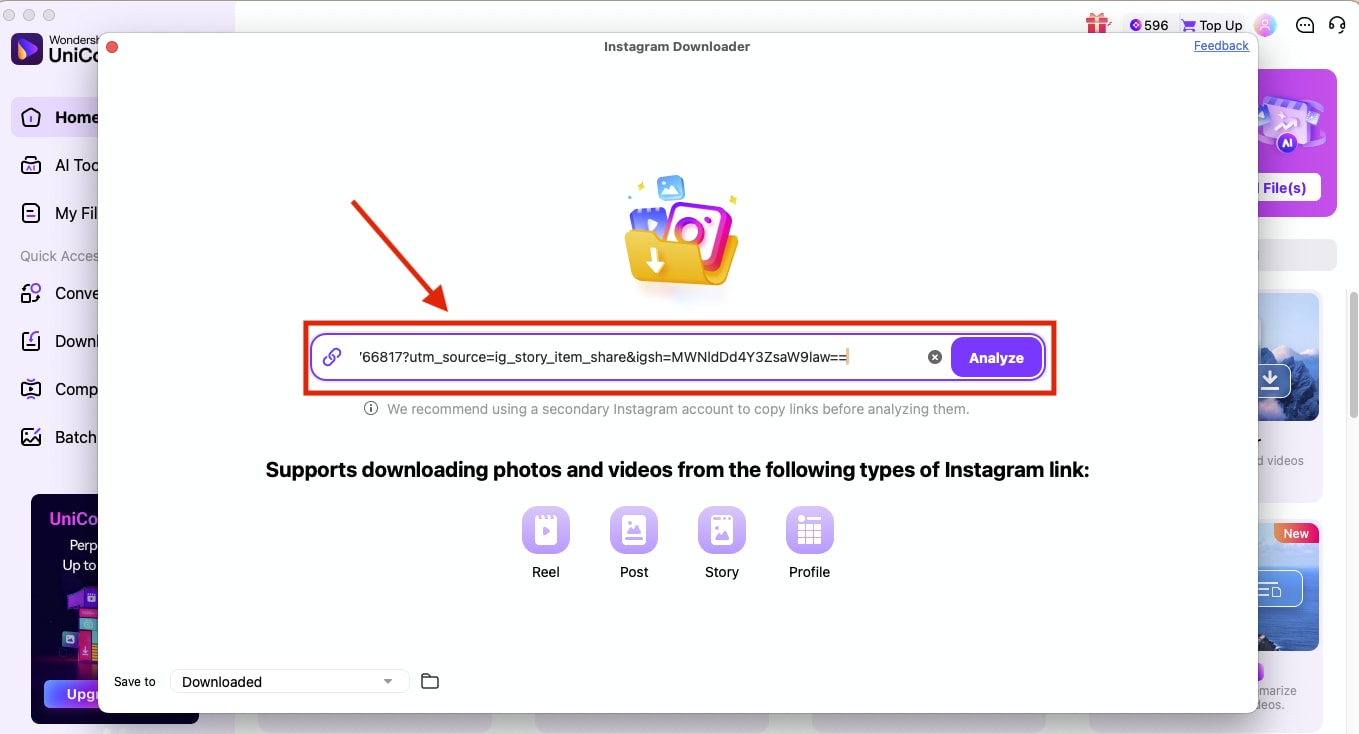
Step 3: Paste the Instagram Story link inside the URL box and click Analyze.
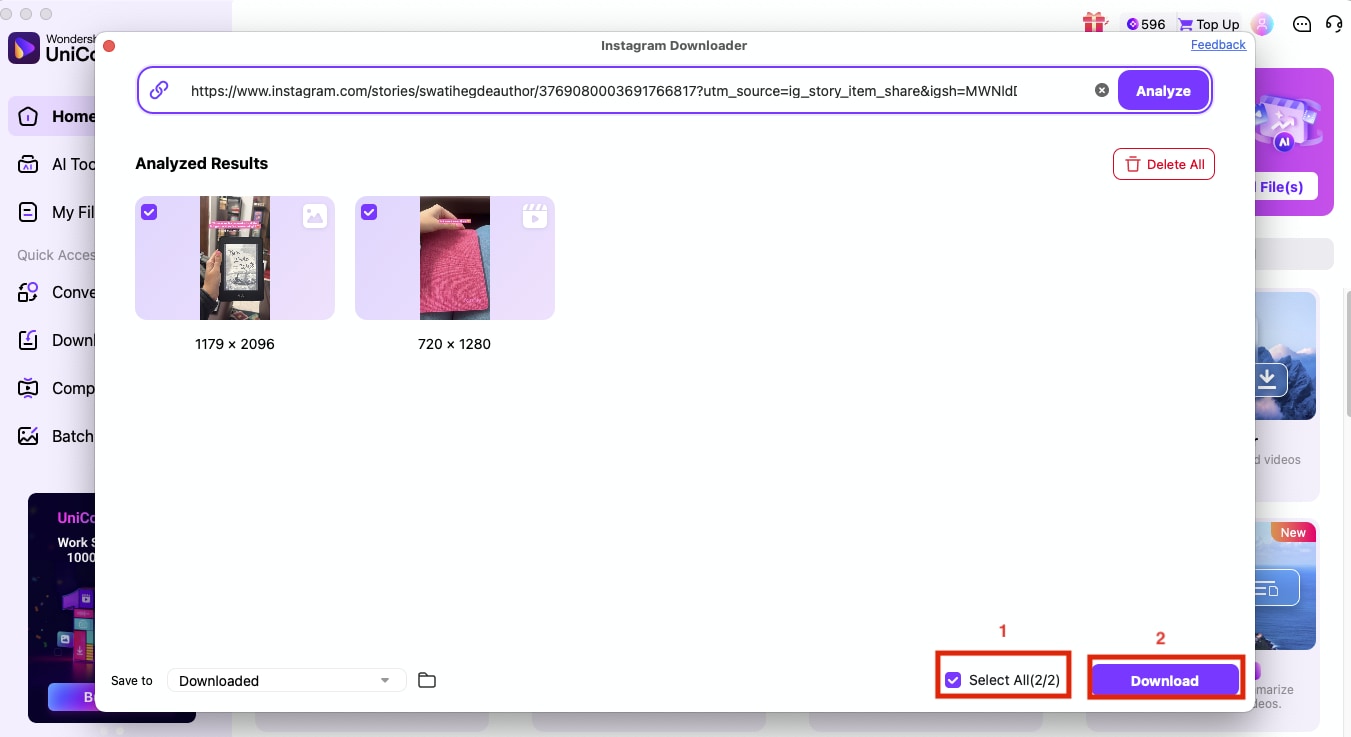
Step 4: Select all and click Download to save the stories in high quality.
Online Tool for Saving Instagram Stories in 4K
There are several online tools that let you download public Instagram Stories and photos in the highest available quality, including HD or 4K when the source supports it.
StorySaver.net
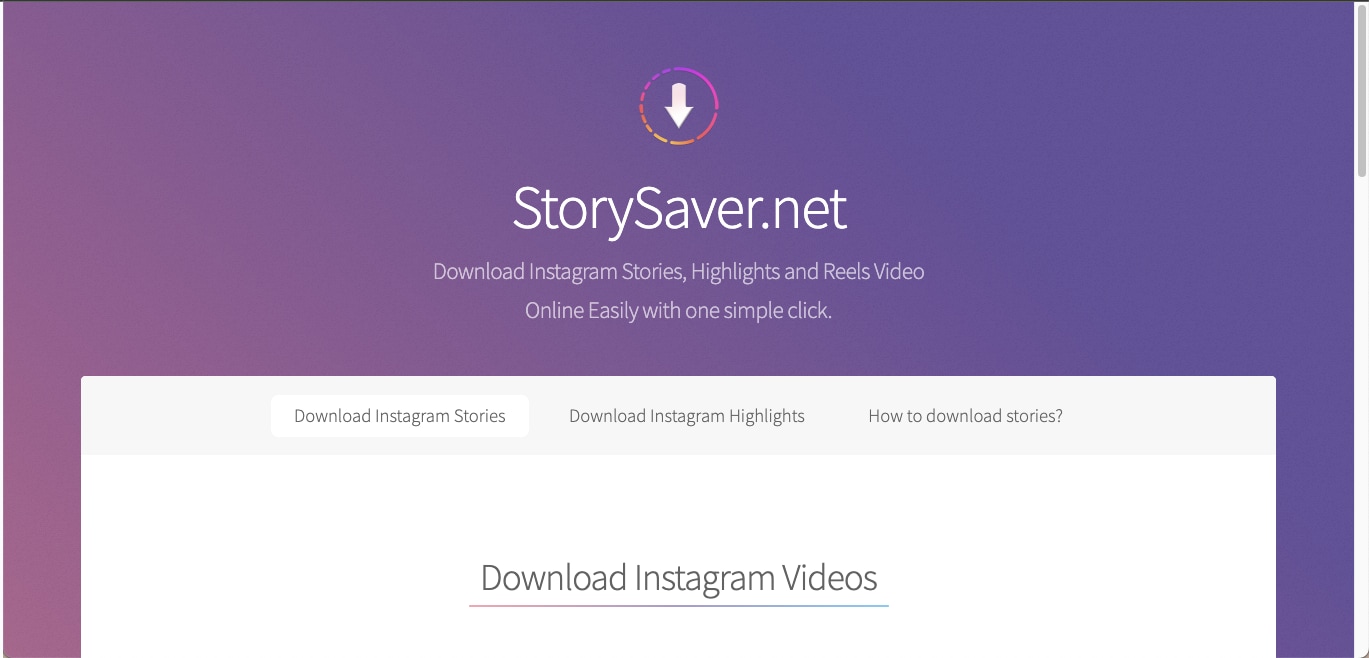
StorySaver.net is a simple browser-based downloader designed specifically for Stories and Highlights. It works without registration and processes links quickly, which makes it useful when you need to save time-sensitive Story content in high clarity.
How to Use StorySaver.net to Download Instagram Stories
Here's how to use this online Instagram Stories downloader:
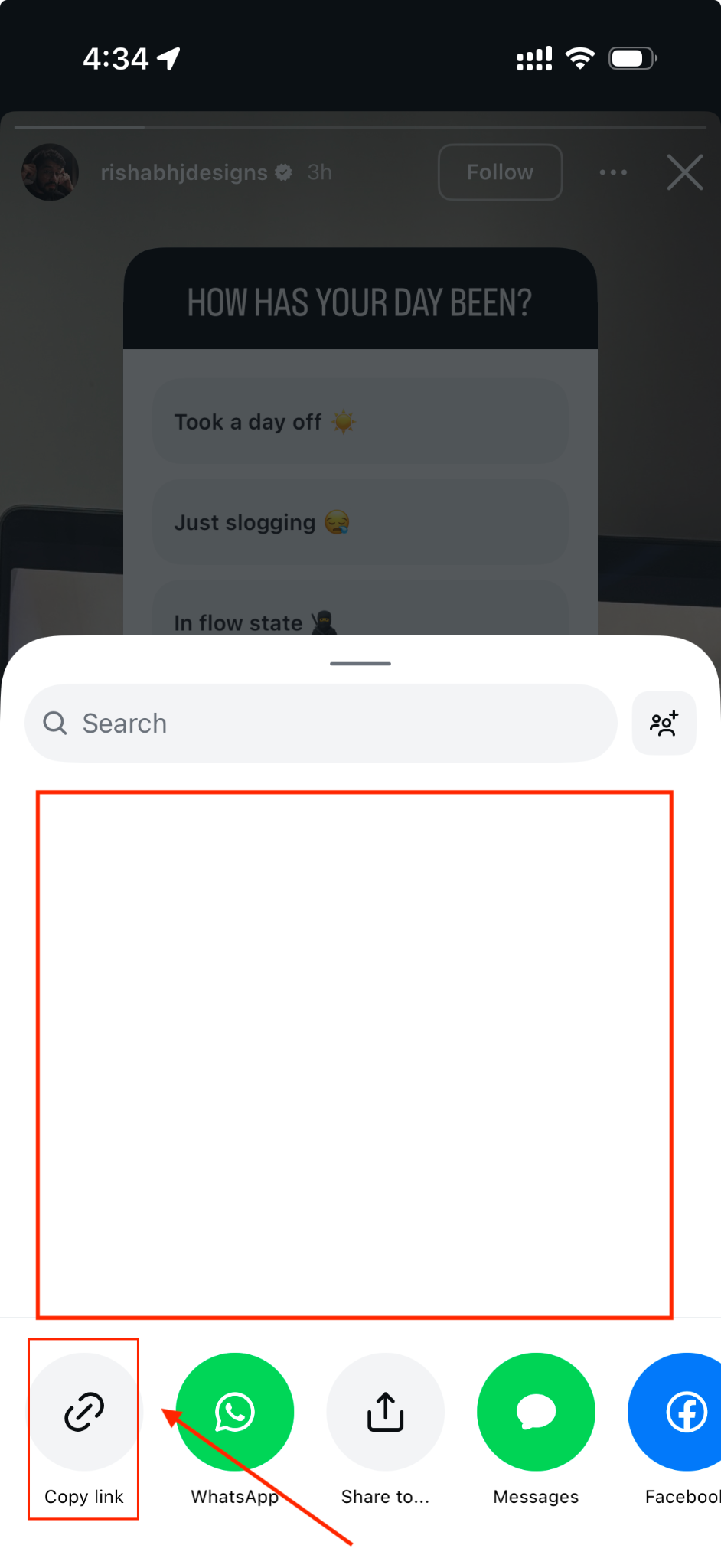
Step 1: Open the Instagram Story you want to save and tap the right arrow icon at the bottom. A share pop-up will appear. Choose Copy Link to copy the Story's URL.
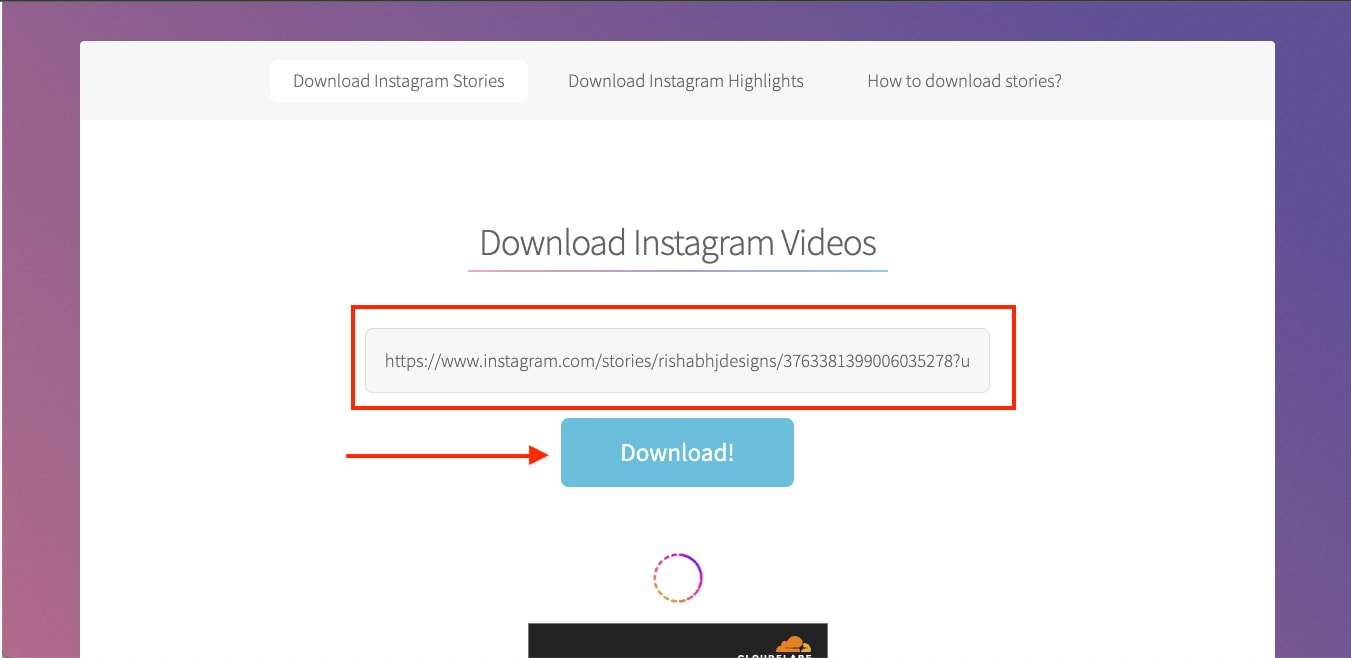
Step 2: Visit StorySaver.net, paste the copied link, and click Download. The tool will process the Story and allow you to save the video once it finishes loading.
Download Instagram Posts in 4K (Photos and Carousels)
Instagram posts come in different formats, including single images, multi-image carousels, and mixed assets that combine photos and short clips. These uploads often undergo compression, which reduces sharpness and color detail, especially when viewed or saved directly from the app.
Using a reliable tool helps you extract cleaner images for editing, archiving, or mood-board work. Carousels and multi-posts are also easier to manage with batch handling, since tools can detect all images in a set and download them together.
Before we explore tools, here are the details that matter when saving 4K photos and multi-asset posts:
- Carousels and Multi-Posts: These contain multiple images or mixed media elements. A good downloader can capture each slide automatically and help you save entire sets in one go.
- Photo Compression: Instagram reduces resolution to optimize loading speed. This makes downloaded images appear softer unless they are processed with a higher-quality encoder.
Download Instagram Carousels with UniConverter’s Instagram Post Downloader
UniConverter’s Instagram Downloader lets you save any Instagram content, Reels, Stories, posts, and even full carousels in just a few clicks. It keeps the original quality intact and gives you a reliable way to store your favorite visuals offline without worrying about compression.
And if any downloaded photo looks a bit low-resolution, UniConverter’s AI Image Enhancer can upscale it to a cleaner, sharper version instantly.
How to Download Instagram Post with UniConverter
Here's how you can easily use UniConverter to download an Instagram carousel:
Step 1: Open UniConverter and go to the Video section, and click Instagram Downloader.
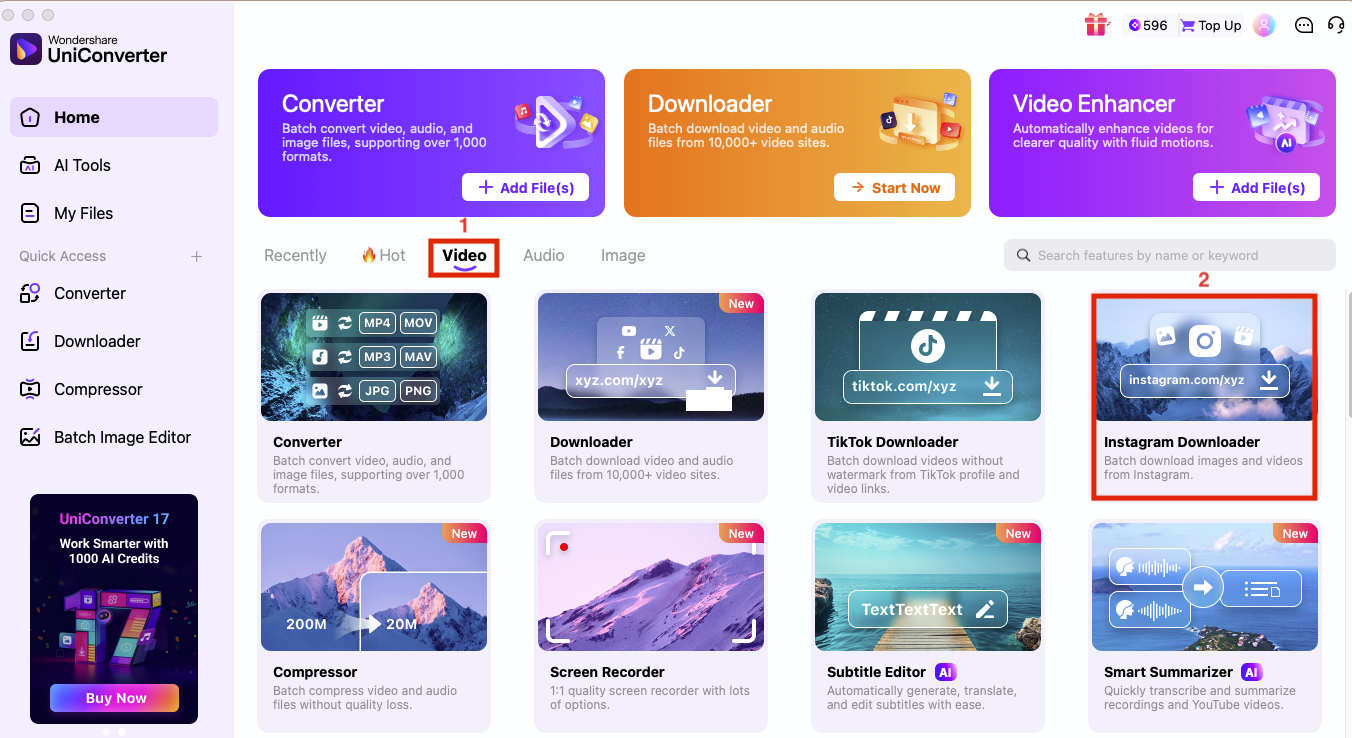
Step 2: Upload the Instagram photo or carousel link and click Analyze.
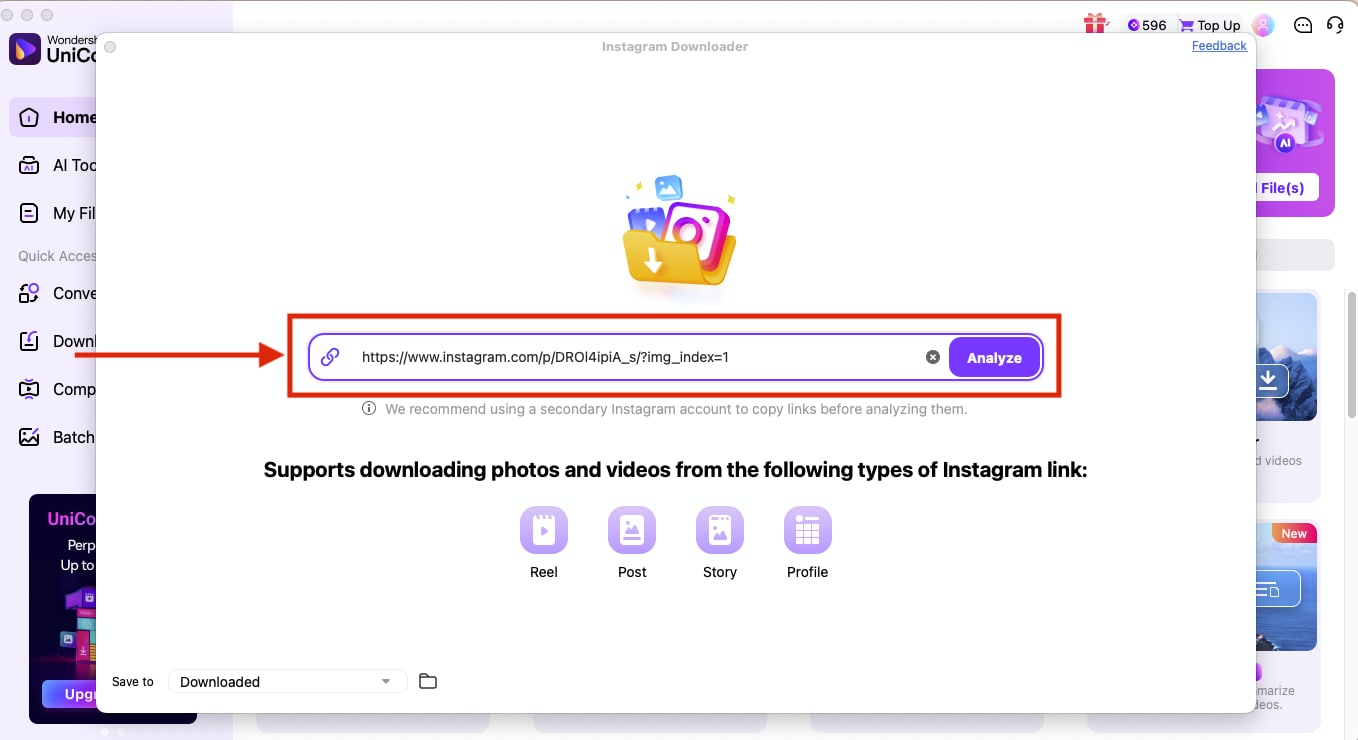
Step 3: After a few seconds, you will get separate images from the carousel, select all, and click Download.
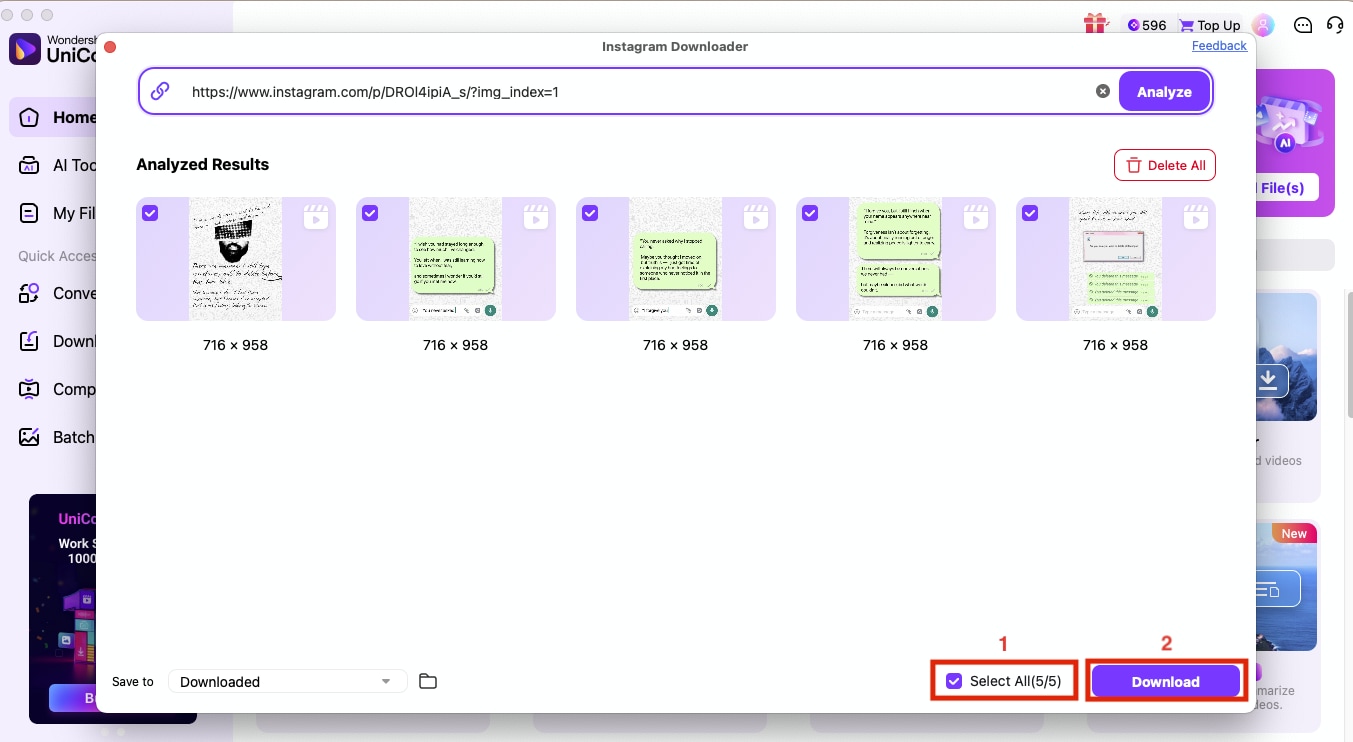
Pro Tip: If you want to download Instagram posts and carousels in bulk, you can use UniConverter’s Downloader feature. Add multiple Instagram posts/carousel links, and it will download them all simultaneously.
Toolzu: Online Downloader for 4K Photos and Carousels
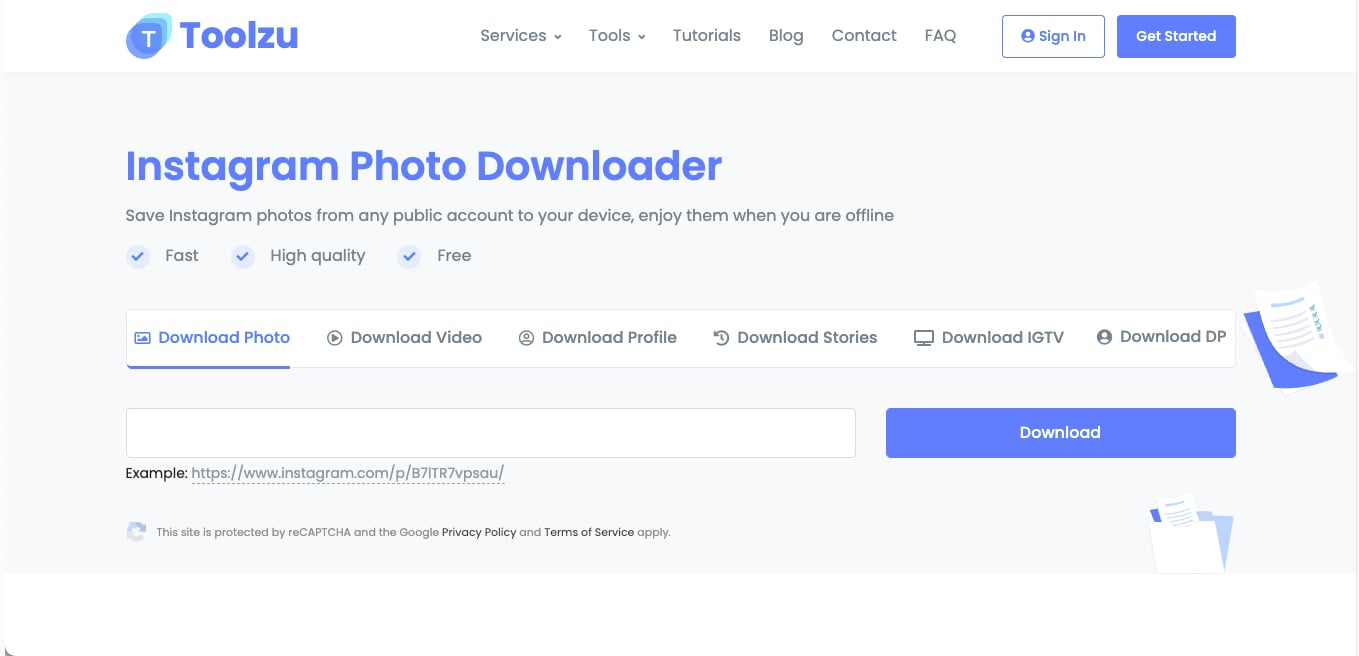
Toolzu is a browser-based downloader built for saving Instagram photos, including multi-image carousels and mixed post formats. It works on any device and processes each asset separately, making it easy to download high-quality images from public posts. The dashboard is simple enough for quick use, and the tool handles individual images inside a carousel without skipping slides.
How to Use Toolzu to Download Instagram Carousels in 4K
Step 1: Open Instagram, copy the link of the carousel or static post you want to save, paste it into the Toolzu input box, and click Download.
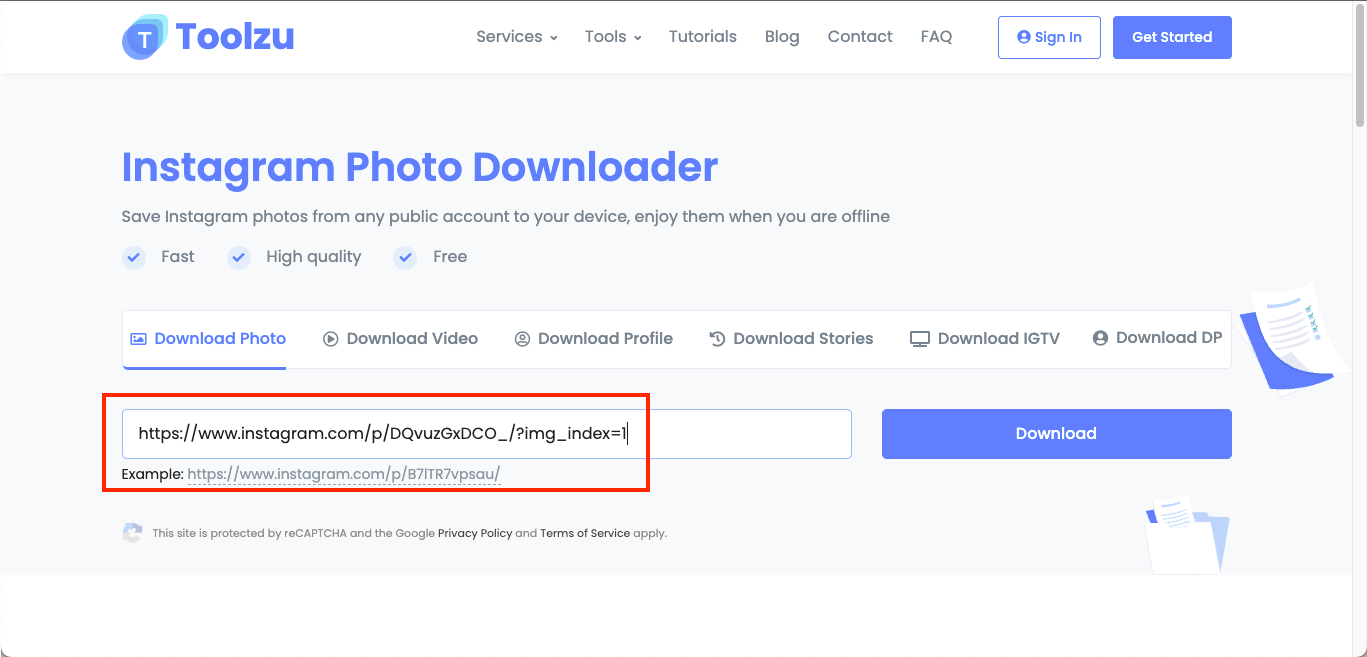
Step 2: Wait while Toolzu processes the link. Once complete, the tool will display each carousel image separately, allowing you to download the entire set as individual high-quality photos.
Convert Instagram to MP4 in 4K Format
If you want to repurpose your Reels, Stories, or videos for editing or reposting, converting Instagram to 4K MP4 is the most reliable format. MP4 ensures wide compatibility, smooth playback, and high-quality compression, especially when paired with modern codecs. Since Instagram already compresses videos during upload, choosing the right output settings helps you retain as much detail as possible during the conversion.
MP4/H.264 vs. HEVC (H.265): What You Should Use:
| Setting / Codec | H.264 (AVC) | H.265 (HEVC) |
| Output Size | Larger files | Smaller files (30–50 percent reduction) |
| Processing Power | Works on all devices, low CPU demand | Requires stronger hardware, newer devices |
| Compatibility | Universal (phones, browsers, editors) | Limited on older devices & browsers |
| Quality at 4K | Good, but needs a higher bitrate | Better clarity at a lower bitrate |
| Best Use Case | Reposting, quick edits, social media | Archiving, cinematic edits, high-quality storage |
Recommended Presets for 4K MP4 Output
Here are the recommended presets for you if you require high-quality video downloaded from Instagram:
- Resolution: 2160p
- Codec: H.264 for compatibility / H.265 for quality
- Bitrate: 20-45 Mbps
- Audio: AAC 256 kbps
- Frame Rate: Match original (usually 24, 30, or 60 fps)
Protect Audio Quality, Captions, and Vertical Framing
When converting Instagram videos to MP4, always maintain:
- Original audio track for voice clarity
- Embedded captions if the source includes text overlay
- Native aspect ratio (9:16 for Reels/Stories, 1:1 or 4:5 for posts) to avoid distortion or cropping
- These small choices determine whether the final 4K output looks crisp or overprocessed.
UniConverter gives you full control when turning downloaded clips into Instagram to MP4 4K exports. You can choose the codec, set a clean bitrate target, preserve the native aspect ratio, and keep audio or captions intact. The tool's built-in hardware acceleration can let you speed up rendering on modern GPUs, and batch mode will further help you prep multiple Reels or Stories in one go.
Note: UniConverter supports lawful, ethical workflows. Always follow Instagram's policies, obtain creator permission for third-party content, and avoid downloading private or restricted videos without consent.
How to Maintain 4K Clarity and Manageable File Sizes?
When saving Instagram videos in 4K, clarity depends on the source file, your download method, and the settings you choose during conversion. Even a good tool can produce soft or grainy results if the bitrate is too low or if the video was already compressed on Instagram. With the right adjustments, you can keep your exports sharp, steady, and lightweight without losing visual quality.
A handful of tips that would help you maintain the 4K clarity while managing the file size:
- Always use the highest available source quality before downloading; Instagram cannot upscale missing detail.
- Try to choose H.265 for smaller 4K files and H.264 for broader compatibility across devices and editors.
- Always keep the bitrate high enough for 4K; start at 20 Mbps for short clips and increase for scenes with motion.
- Try matching the original frame rate to avoid stutter or ghosting.
- You can save in MP4 for faster processing and stable playback on most devices.
- Try to avoid re-exporting multiple times; each pass increases compression artifacts.
- Use UniConverter's GPU acceleration to speed up rendering, especially for batch conversions.
Troubleshooting Common 4K Download Issues
Even a strong IG 4K downloader can run into problems when the source video is compressed or Instagram limits access. Missing 4K options, broken downloads, or silent files are usually due to platform restrictions rather than tool failure. With a few simple checks, you can fix most issues quickly and get a clean 4K download.
Issue: No 4K Option Appears
Why it happens: Instagram often compresses uploads to 1080p or lower, so a true 4K version may not exist.
Fixes:
- Recheck the original upload; if it is ≤1080p, 4K will not appear.
- Try a desktop tool like UniConverter for better extraction.
- Download the video first, then upscale using AI Enhancer.
- Re-copy the URL; Instagram sometimes attaches tracking parameters that break detection.
Issue: Download Fails or Freezes
Why it happens: Online tools can struggle with heavy traffic, unstable links, or expired Stories.
Fixes:
- Refresh the Instagram post and copy a fresh link.
- Switch to a desktop downloader for stable performance.
- Disable ad blockers that may prevent the page from processing.
- Check internet stability before retrying.
Issue: Video Saves with No Audio
Why it happens: Muted Reels, copyrighted music, or region-locked tracks may block extraction.
Fixes:
- Confirm the Reel has audio in the original post.
- Try downloading via desktop tools that handle audio tracks better.
- If the music is copyrighted, save the video and layer royalty-free audio later.
- Use UniConverter to inspect audio metadata after download.
Backup Method: Screen Record Instagram Videos When Download Fails
If a public Instagram video cannot be extracted because of link restrictions, expired Stories, or temporary tool errors, screen recording can be used as a backup method for personal reference. It may not preserve the original quality, bitrate, or audio as cleanly as a downloader, so it should be used only when direct downloading is not available and the content is allowed to be saved.
Private or Restricted Content, Age Limits, and Region Barriers
Some Instagram links have visibility rules that limit what downloaders can extract. Even if the video is public to you, the server may classify it differently based on region, age restrictions, or privacy settings. Understanding these barriers helps you diagnose why a link won't load or displays only partial content.
Key points to know before downloading the Reels from Instagram:
- Private accounts require an approved follow request; downloaders cannot access locked profiles.
- Age-restricted posts block extraction until the viewer uses a verified account.
- Region-locked music removes or alters audio based on your location.
- Expired Stories cannot be downloaded unless they are saved as Highlights.
- Server glitches may prevent loading; retry later or switch devices.
FAQs on Instagram 4K Downloader
Can I actually get 4K if Instagram only serves 1080p?
Most Instagram uploads are stored at around 1080p, so downloaders can only extract the quality Instagram makes available. If the original creator didn't upload a true 4K file, no tool can retrieve one, which is why many videos stop at Full HD.
What is the best way to download Reels on iPhone without a watermark?
The simplest way to download Reels on iPhone is to use a reliable desktop downloader, save a clean file, and then transfer it to your iPhone via AirDrop or cloud storage. Most mobile apps add their own watermarks or compress the file, so avoiding direct "download apps" protects the quality.
How do I batch download carousels in one go?
Carousels contain multiple images or mixed assets, so you need a tool that can detect each slide and separate them automatically. Online tools like Toolzu do this for smaller posts, but a desktop option like UniConverter handles larger carousels without failing or skipping frames.
Why is there no audio in my downloaded Instagram video?
When a downloaded Reel appears silent, it usually means Instagram restricted the audio due to regional rules, licensing, or the creator's settings. Downloading tools can only capture the audio you are allowed to hear on your account.
Is there a safe Instagram downloader that doesn't log my data?
If privacy is your priority, you can use UniConverter, which does not upload your links or files to any external servers, keeping your data out of third-party trackers. This makes it a stronger choice than many online sites that rely on ads and temporary cache storage.
What bitrate should I use for 4K MP4?
A solid bitrate range for converting Instagram clips to 4K MP4 is between 20-35 Mbps for short Reels and 35-50 Mbps for more detailed or fast-motion videos. Higher motion requires more bitrate to maintain clarity, especially when upscaling or editing.
How do I download Highlights after 24 hours?
Unlike regular Stories, Highlights remain permanently visible on a profile until the creator removes them, which means you can download them at any time. Any tool that handles Story links will also process Highlight URLs, and the quality you get depends on how the creator originally uploaded the content.
Why does my Instagram downloader only show 720p or 1080p?
A missing 4K option usually means the creator uploaded the video in a lower resolution or Instagram compressed it during processing. Since downloaders can only extract what Instagram stores, you will see quality caps that reflect the platform's limits.
Is the desktop Instagram downloader faster or safer than the online version?
Yes, desktop downloaders, like UniConverter, tend to be both faster and safer because they bypass server delays, intrusive ads, and browser limitations. They handle long videos, batch downloads, and higher bitrates more smoothly, making them suitable for everyone.
How do I download Instagram videos in 1080p without watermark?
Copy the public Instagram video link, paste it into a reliable downloader, and choose the highest available MP4 option. If you need stable 1080p output, batch downloading, or post-download conversion, use UniConverter instead of an ad-heavy online tool.
What is the safest alternative to SaveIG or SSS Instagram?
SaveIG-style and SSS Instagram-style tools are convenient for single online downloads, but they may include ads, redirects, or limited quality controls. For repeated downloads, desktop software such as UniConverter is safer for managing batch links, MP4 output settings, and local file conversion.
Can I download Instagram Reels without the Instagram watermark?
Instagram's built-in Reel download may include watermark, username, or audio attribution when the creator allows downloading. A third-party downloader may save a clean public file, but you should only download content you own, have permission to use, or are legally allowed to save.
Conclusion
If you want consistent clarity when saving videos, photos, Stories, or Reels, choosing the right Instagram 4K downloader makes a noticeable difference. Instagram compresses most uploads, so the quality you get depends on how the tool handles extraction, conversion, and playback. Online sites work for quick grabs, but they cannot match the stability or control needed for a clean 4K Instagram download, especially when you care about audio, aspect ratio, or file integrity. A stronger workflow helps you avoid blurry exports, missing frames, or muted tracks.
If your goal is to save Instagram content at the best possible resolution and prepare it for editing or long-term archiving, UniConverter offers a smooth, dependable path from download to final export. It combines clarity, control, and security in one place, making it the most effective way to handle any 4K Instagram download with confidence.

