


Instagram delivers crisp visuals and fast entertainment, yet you still deal with compressed quality, missing download options, and no official support for true 4K files. You might want to save a Reel for editing, keep a Story for reference, or archive a creator's video for personal use, but Instagram caps the resolution and locks every file inside the app. That is why searches like "Instagram to MP4 4K" have become common, especially when you want a clean, high-quality MP4 file that actually lasts on your device.
In this guide, you will learn how to convert Instagram videos to MP4 in 4K quality using reliable and practical methods. You will understand Instagram's technical limitations, explore safe download options, and get step-by-step methods for every device.
Key Takeaways
| Topic | Summary |
| Why 4K Matters | 4K offers sharper details, better clarity, and more flexibility for editing or reposting compared to HD or Full HD. |
| Instagram Quality Limits | Instagram compresses every upload and never provides true 4K downloads, so external tools are required. |
| Desktop 4K Conversion | UniConverter gives you stable performance, batch downloads, and direct Instagram saving in MP4 4K. |
| Online Converter Options | Tools like SaveVid.net and Fotor.com help you download or enhance videos, but quality depends on the source file. |
| Safety & Legality | You should only download videos you own or have permission to use and stick to trusted tools for safe conversions. |
| Best 4K Workflow | Download the video, convert or upscale it, then compress or edit it using Wondershare UniConverter for a clean 4K MP4 output. |

Best Instagram to MP4 4K Converter
In this article
Part 1: What Does "Instagram to MP4 4K" Mean?
"Instagram to MP4 4K" refers to the process you follow when you convert an Instagram video into a downloadable MP4 file and upgrade it to a 3840×2160 resolution. 4K gives you sharper visuals, cleaner details, and more room to edit or reuse the clip without visible loss. Many creators prefer higher resolution because it helps them repost, crop, or color-grade the footage with better clarity.
Difference Between HD, Full HD, and 4K
| Format | Resolution | Visual Quality | When It Works Best |
| HD | 1280 × 720 | Basic clarity with visible softness on larger screens | Quick viewing, small phone screens, lightweight edits |
| Full HD | 1920 × 1080 | Sharper and smoother than HD, still limited for heavy editing | Standard content, mobile uploads, general use |
| 4K | 3840 × 2160 | High detail, strong clarity during cropping, color grading, or re-editing | Professional edits, large displays, and repurposing content |
Why You Cannot Download 4K Directly From Instagram
You cannot directly make a 4K Instagram download because the platform compresses every upload and removes the option to save videos as MP4 files. Even if you record your videos in 4K, Instagram downscales the clip to reduce bandwidth and keep the app running smoothly. That means you never receive the original file or the full-resolution version in the app.
Here are the key reasons you cannot get a 4K file from Instagram:
- Instagram compresses every video to smaller file sizes
- The app does not provide any built-in download feature
- Instagram Reels and Stories are stored in a lower resolution than the creator's original
- Playback quality depends on your network, not the creator's upload
- Instagram optimizes videos for mobile viewing instead of professional editing
Part 2: How to Batch Convert Instagram Videos to 4K MP4 on Desktop?
When you want more control over quality and speed, using a desktop tool makes the entire process smoother. A dedicated Instagram video to MP4 4K software gives you stronger processing power, better stability, and consistent results compared to online converters. You can convert Instagram to MP4 HD or upscale the clip to higher resolutions without worrying about browser limits. This approach works well when you handle multiple videos or want professional-level output.
Best Instagram to MP4 4K Converter
Here's how you can use Wondershare UniConverter to convert Instagram videos to 4K MP4:
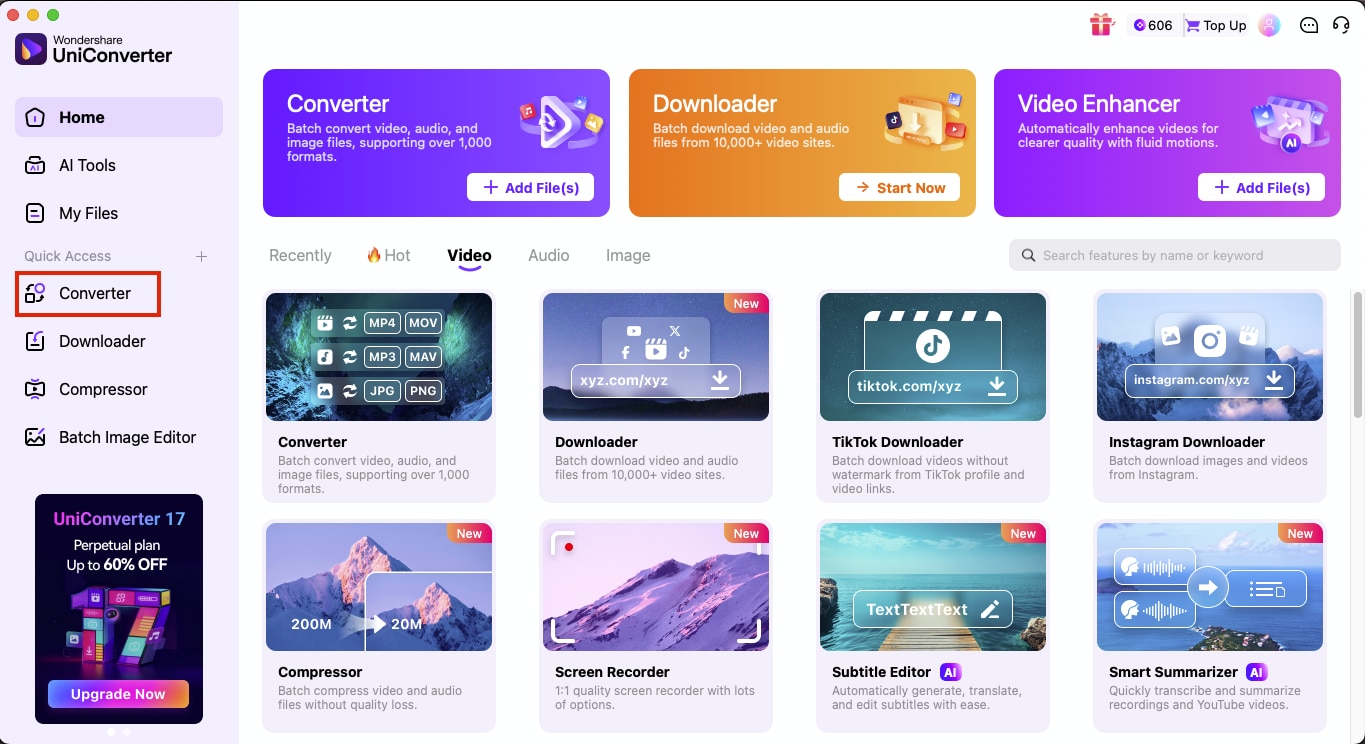
Step 1: Open UniConverter and click Converter to upload the Instagram Reel you want to convert.
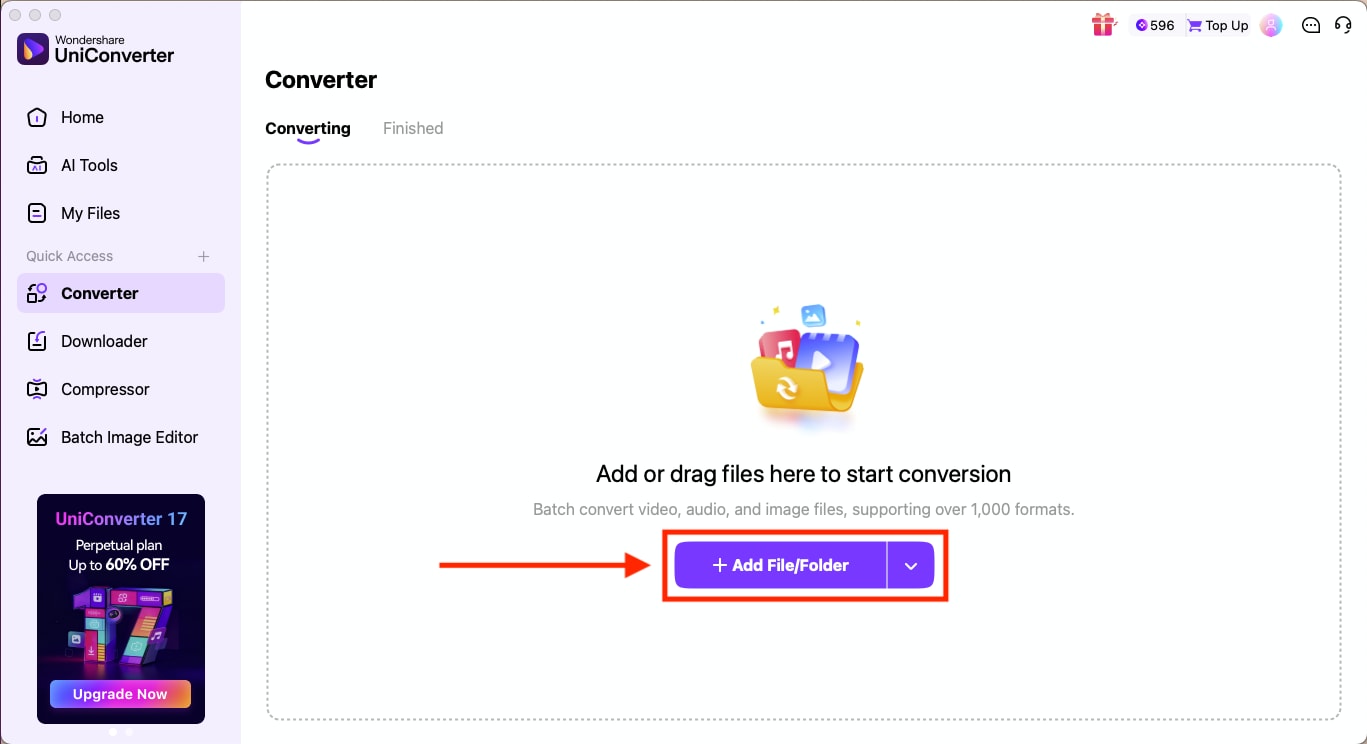
Step 2: Click on “Add Files” to upload your Instagram video.
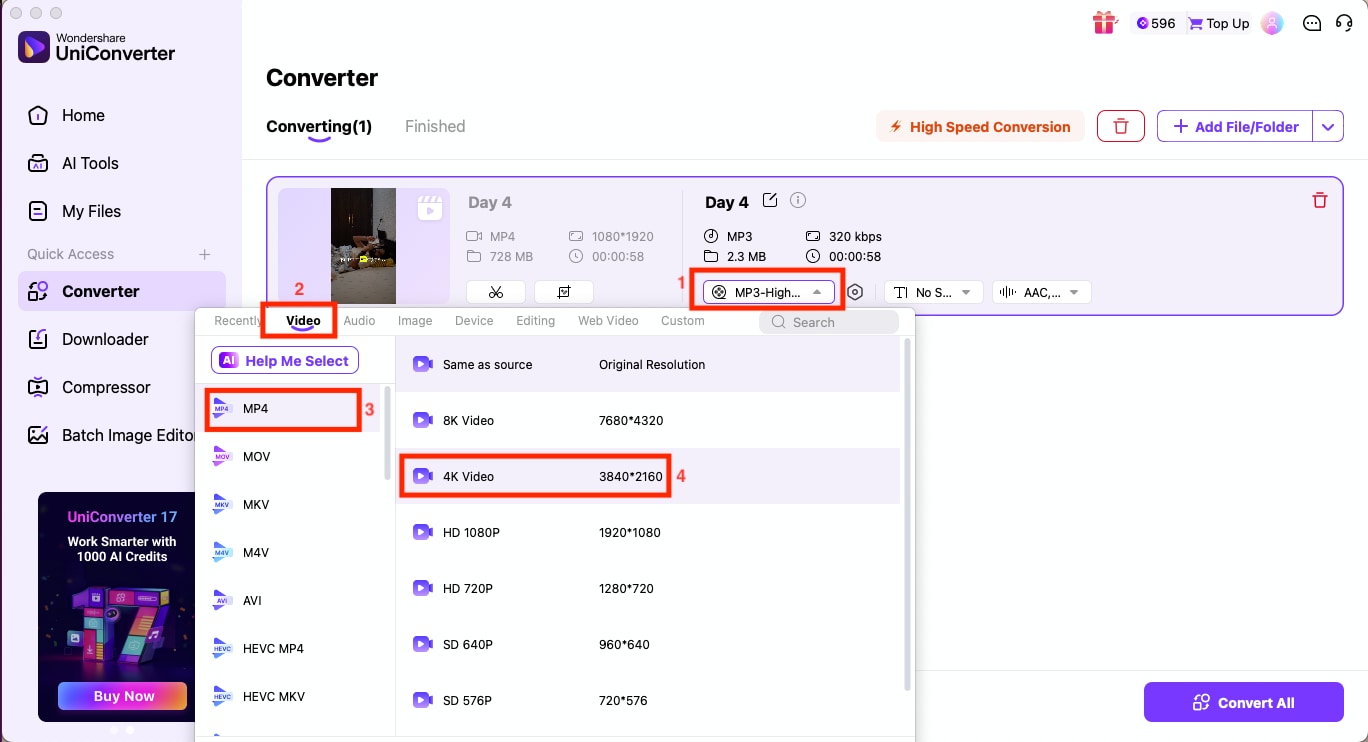
Step 3: In the Convert to menu, navigate to Video and choose MP4>4K Video.
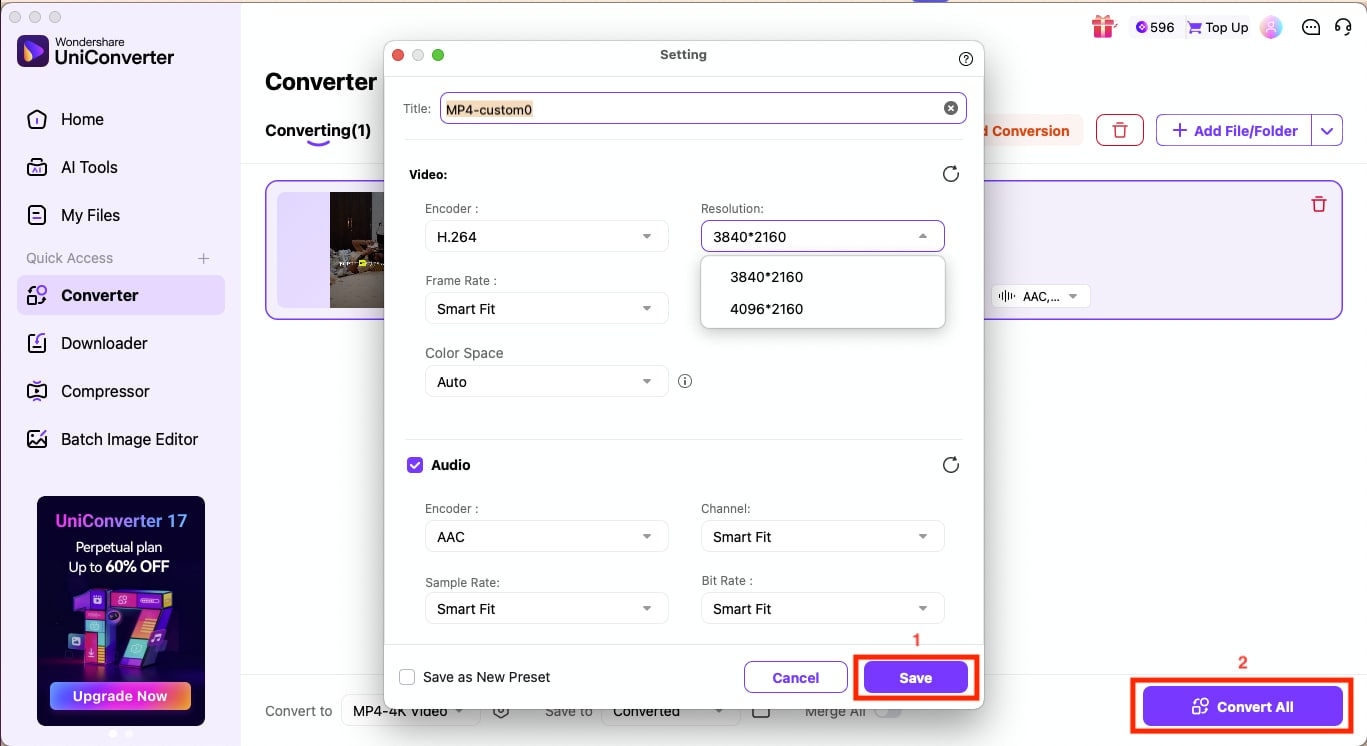
Step 4: Click the Settings icon and adjust settings like resolution, frame rate, color space, and more, and click Save. When done, click “Convert All.”

Part 3: Best Online Tools to Convert Instagram Videos to MP4 4K
Online tools let you download Instagram Reels in 4K without installing anything on your device. You can paste a link, let the tool fetch the video, and then convert Instagram to MP4 HD or higher, depending on what the platform supports.
The internet is flooded with multiple tools that let you convert Instagram videos to a higher quality. These tools are useful when you want fast access, simple controls, and a clean MP4 file for editing. Here is a quick comparison table that would provide you with a basic understanding of the tools:
| Tool | Speed | Format Support | Watermark | File Size Limit |
| UniConverter Online | Stable and Consistent; Fast | MOV, MP4, FLAC, MP3, and more | No | 100MB |
| SaveVid.net | Fast link-based downloads | MP4 in multiple resolutions | No | No strict size limit |
Here are some of the most common and dependable online tools to convert Instagram videos to MP4 in 4K quality:
Wondershare UniConverter Online
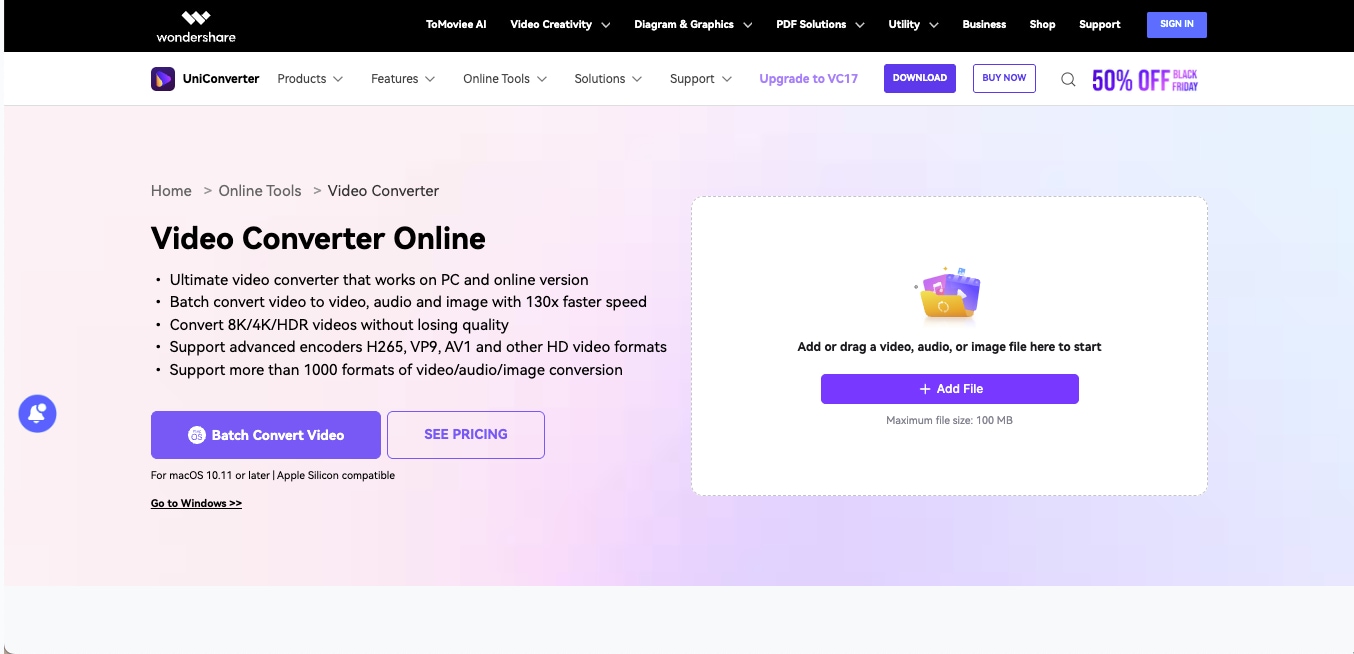
Wondershare UniConverter Online gives you a secure, ad-free way to convert your existing video files into MP4 with a simple drag-and-drop interface. It is useful when you want clean processing and stable results without worrying about pop-ups or hidden scripts. If you have already managed to download Instagram Reels 4K from another source, this online converter helps you turn that file into an MP4 that works smoothly across devices.
How to use Wondershare UniConverter Online to Convert Instagram Reels to MP4
Here is how to convert Instagram to MP4 HD online with UniConverter:
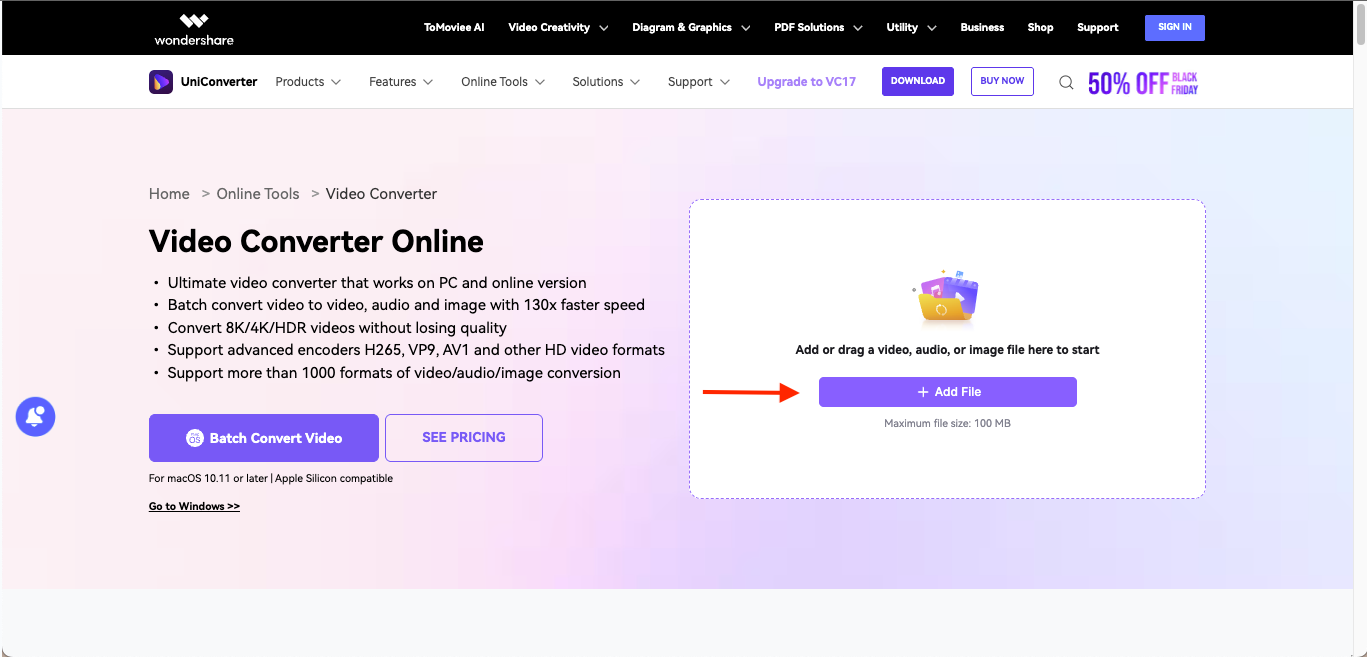
Step 1: Open UniConverter Online in your browser, then click "Add File" to upload the Instagram video you want to convert.
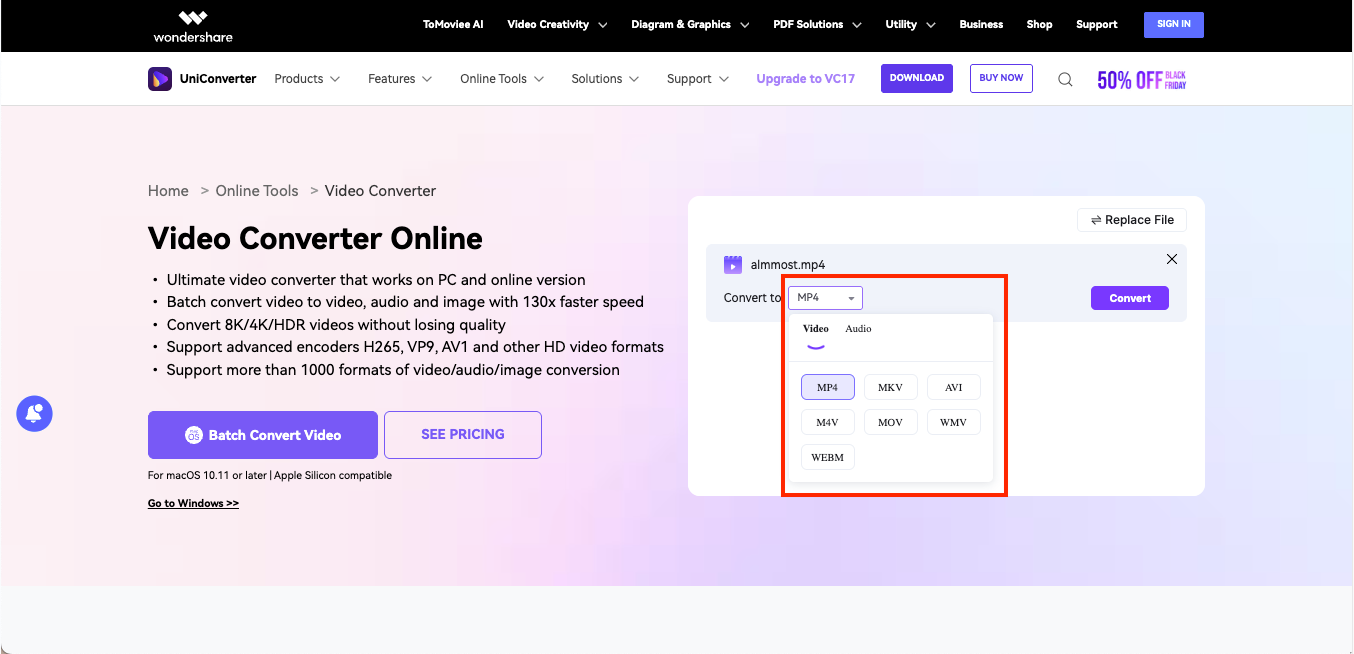
Step 2: Choose MP4 from the "Convert To" dropdown list and click on Convert to start processing the file.
Step 3: Once the conversion is complete, click on "Download" to save the MP4 file to your computer.
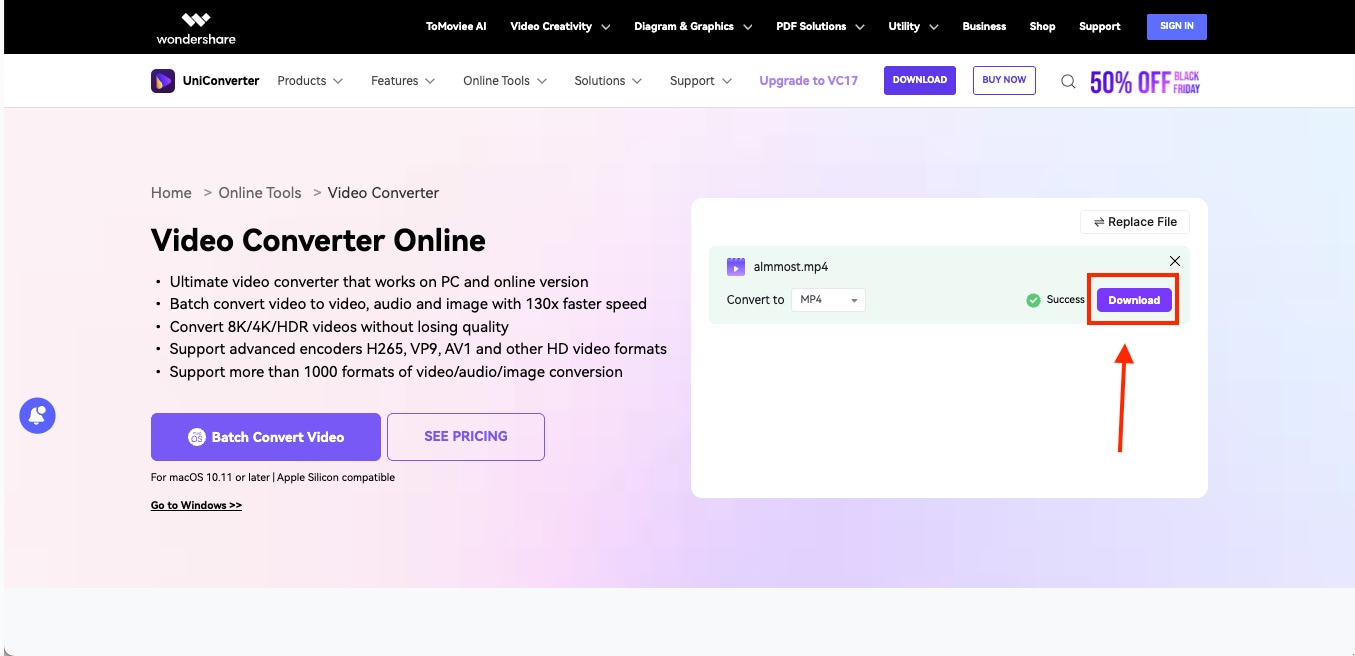
As you can see from the steps above, the online version of UniConverter only converts media files you upload. However, if you want to download or need advanced features, you can switch to the desktop version of UniConverter, which offers greater flexibility in output quality.
SaveVid.net
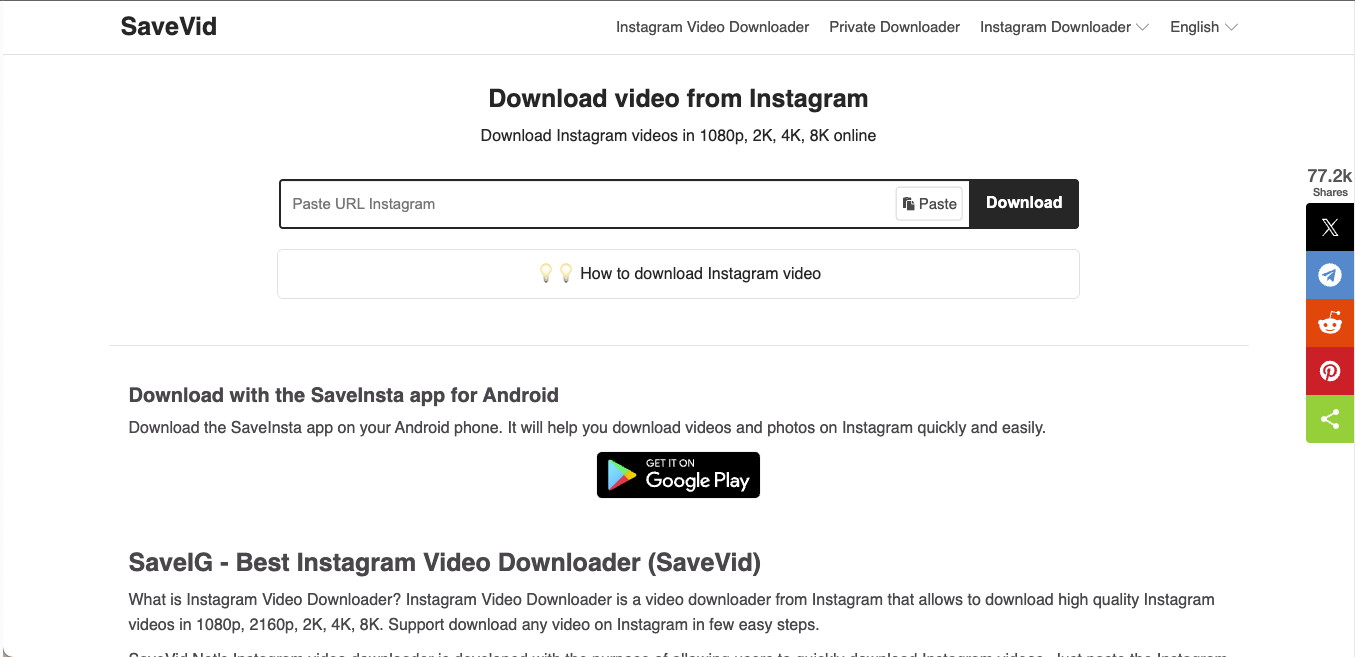
SaveVid.net is a clean, browser-based tool that lets you turn Instagram links into downloadable MP4 files in just seconds. It works as an Instagram to MP4 converter online, which gives you quick access to HD and higher resolutions when available. You only need the video link, and the tool handles the rest with a simple preview and download process.
How to Save Instagram in 4K with SaveVid.net
Here is how to use SaveVid.net to download and convert Instagram Reels in 4K:
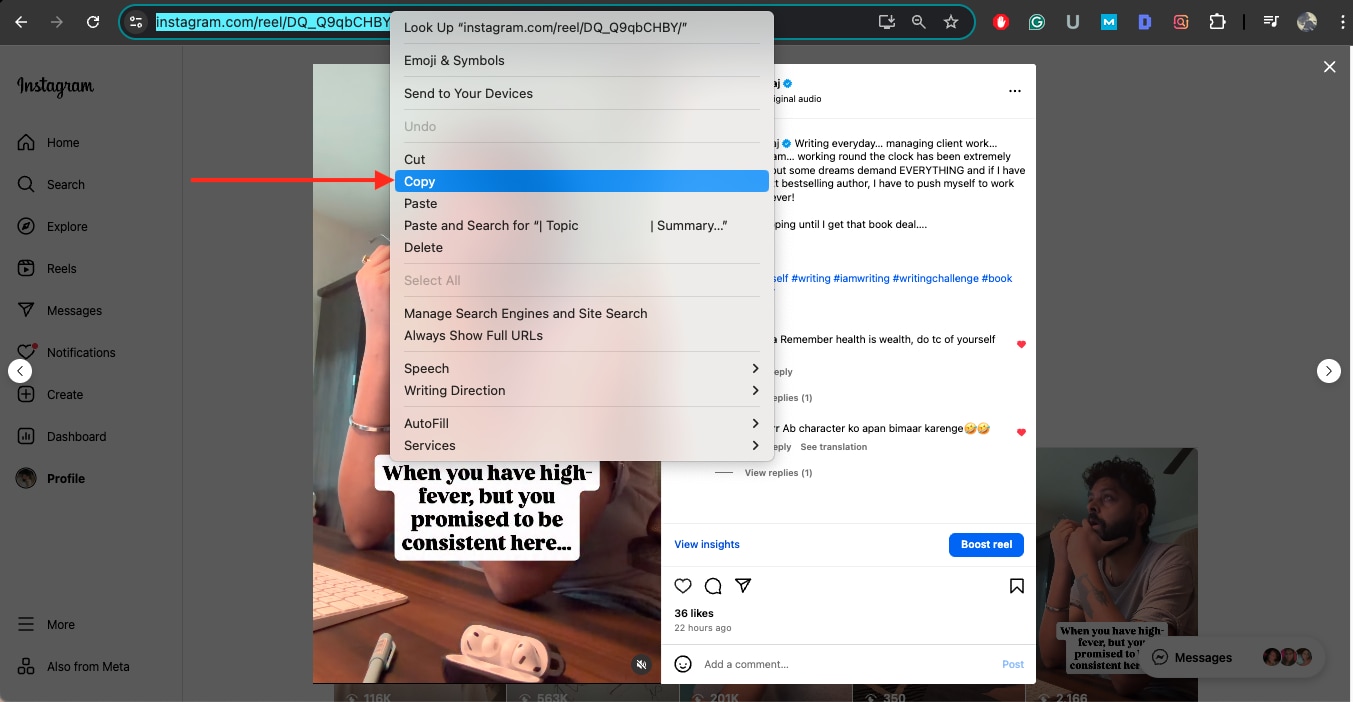
Step 1: Open Instagram in your browser or mobile app, then copy the link to the Reel or video you want to convert to 4K.
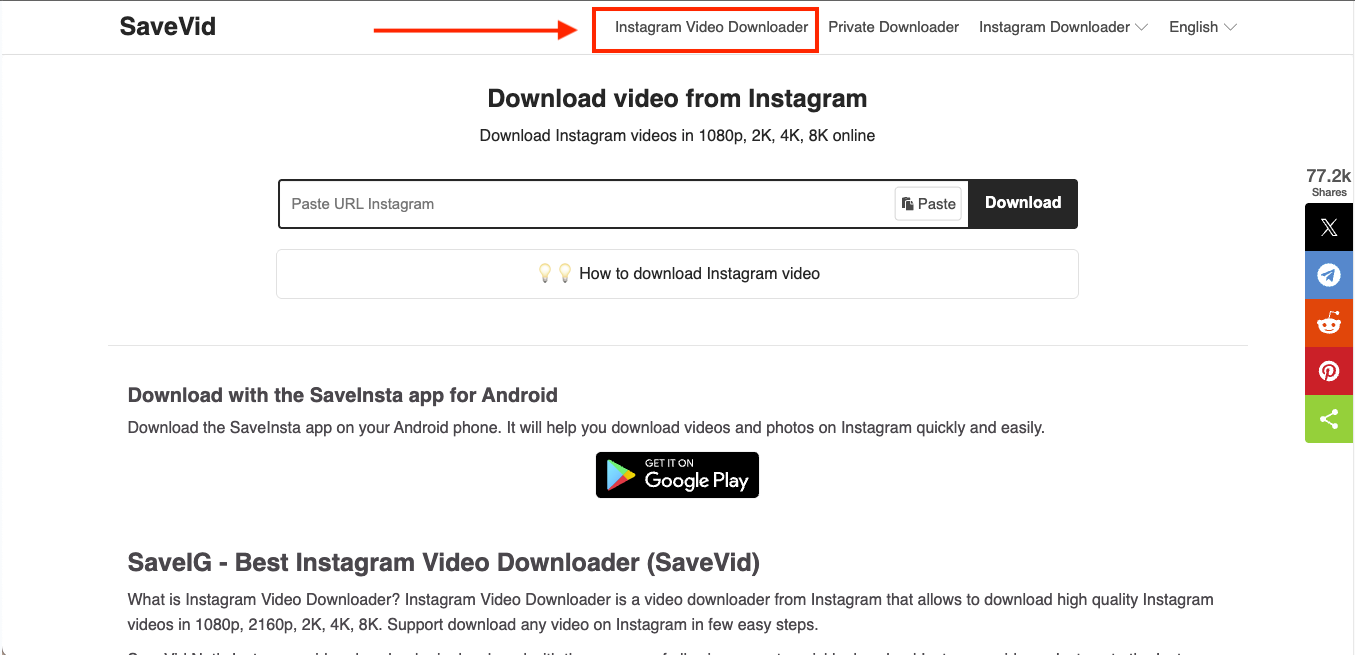
Step 2: Now head to SaveVid.net's official website and click on Instagram Video Downloader from the top menu bar.
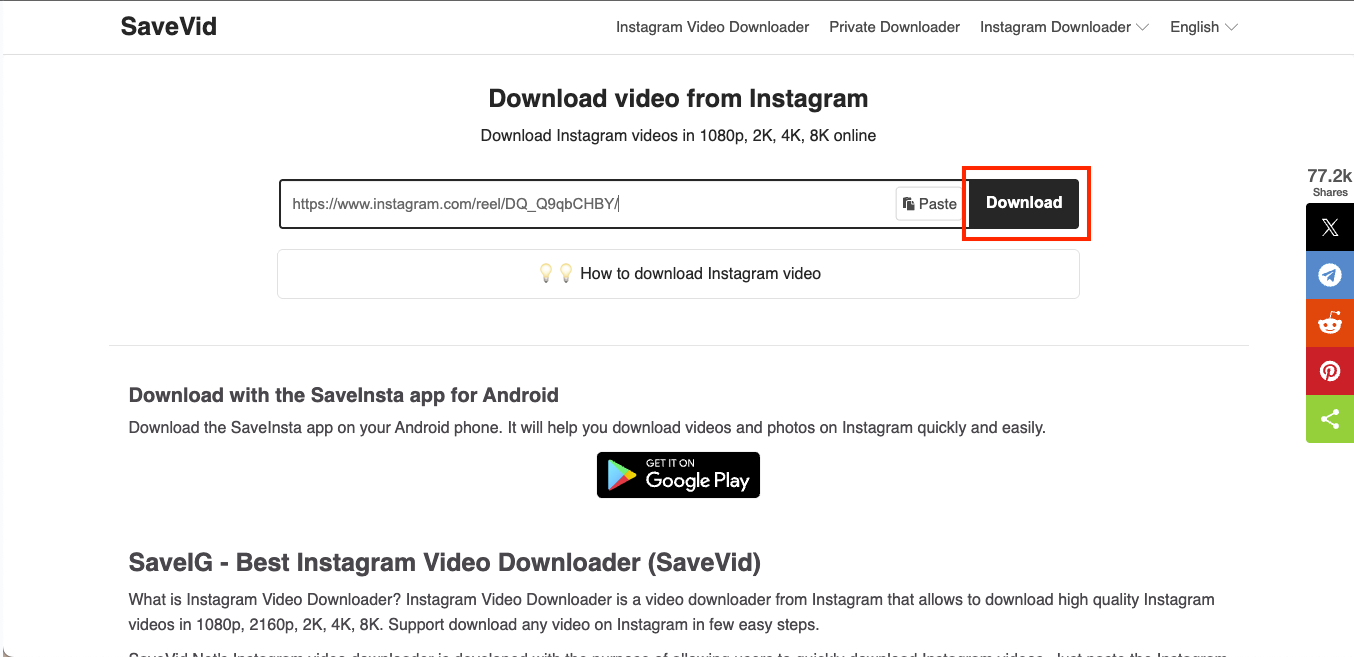
Step 3: In the input box, please paste the URL you copied, then click Download. The online converter will start fetching the video.
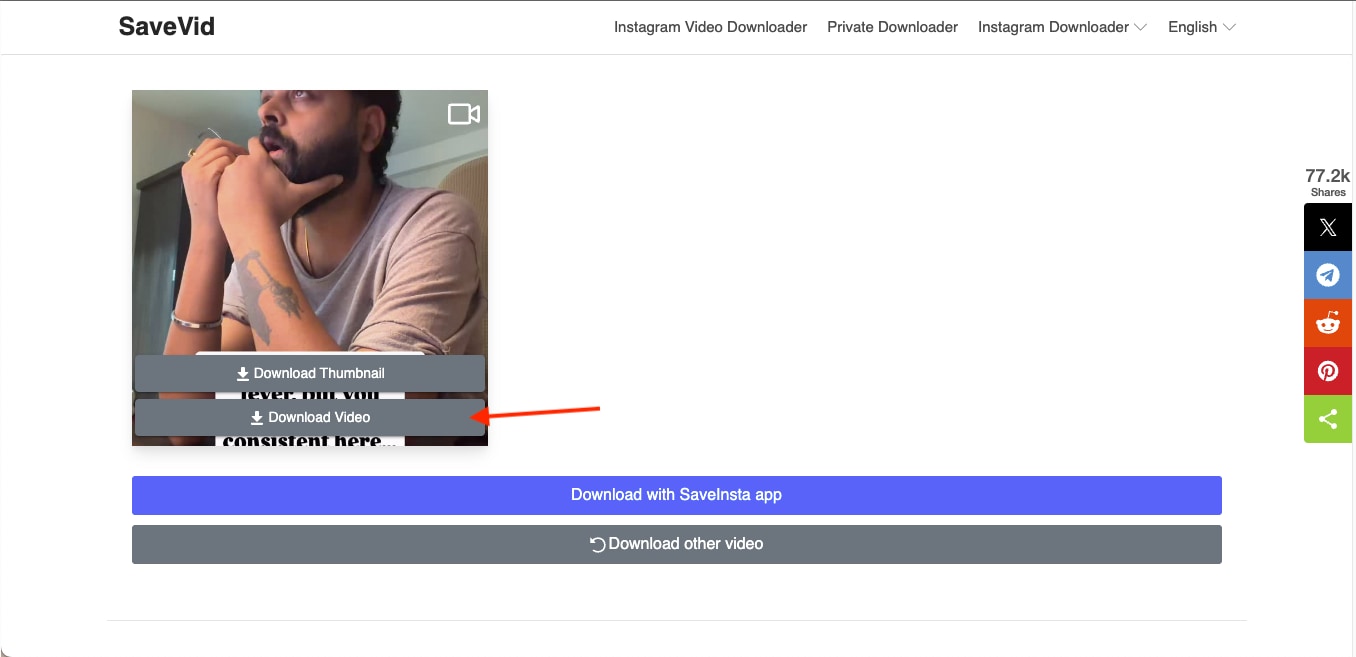
Step 4: Once the video is properly fetched, you can preview it, and if you are satisfied, click Download Video to save the MP4 file on your computer.
Tips to Avoid Ads or Fake “Download” Buttons
When you work with free online downloaders, you often see distracting ads or misleading buttons that look like part of the tool. You need to stay careful so you do not click on anything that installs unwanted software or redirects you to unsafe pages. A few small habits help you keep the process clean and avoid any unnecessary trouble.
Here are simple tips that work:
- Look for the real input box first and ignore any large green or animated buttons
- Avoid sites that open new tabs the moment you click anything
- Do not download .exe or .zip files from an online converter unless clearly required
- Use tools with clean interfaces or ad-free versions whenever possible
- Always double-check the URL before entering your Instagram link
Best Instagram to MP4 4K Converter
Part 4: Is It Legal and Safe to Download Instagram to MP4 in 4K?
Downloading Instagram videos is allowed only under specific conditions, and you need to be careful about how you use the files. When you convert Instagram to HD MP4 or save a clip at a higher resolution, you are still bound by copyright rules.
You can download your own videos or any content where the creator has given you clear permission. The process itself is safe as long as you use trusted tools, like UniConverter.
Here are the key points to remember when you download Instagram videos for MP4 4K conversions:
- You should only download videos you own or have permission to use
- Always avoid reposting or distributing videos without consent from the creator
- Always stick to personal use if you are saving clips for reference or editing practice
- It is highly recommended to use trusted tools to avoid malware, pop-ups, and unsafe download links
- Respect Instagram's terms to prevent copyright issues or content misuse
FAQs About Instagram to MP4 4K Conversion
Can I convert Instagram Reels to 4K MP4?
Yes, you can convert Instagram Reels to 4K MP4 by downloading the video, then using a tool that supports 4K MP4 conversion from IG, such as IG to MP4 4K enhancement or upscaling.
What's the best format for Instagram reposting?
MP4 is the best format for reposting because it loads quickly, maintains stable quality, and works well across devices.
How large is a 4K MP4 file?
A 4K MP4 file can range from 80 MB to several hundred megabytes, depending on the video's length, bitrate, and frame rate.
Does UniConverter support 4K video compression?
Yes, UniConverter supports 4K compression, and you can reduce file size while keeping the video clear enough for editing or sharing.
Can I upscale a low-resolution Instagram video to 4K?
Yes, you can upscale a low-resolution Instagram video to 4K using AI-enhancement tools like UniConverter. The clarity improves, but the final result depends on the quality of the original file.
Conclusion
Turning Instagram videos into high-quality files becomes easy once you know the right tools and steps. You explored online platforms and full desktop software that help you handle Instagram to MP4 4K conversions with clarity and control. Each method serves a specific purpose, from quick link-based downloads to deeper editing and upscaling when you need stronger results. With these options, you can save videos in the resolution you prefer and manage them without losing quality.
If you want a smoother workflow and reliable IG to MP4 4K output, Wondershare UniConverter gives you a more complete setup. You can download Reels and convert, compress and enhance, or repurpose them for creative projects in one place. The process stays clean and consistent, especially for 4K files.
Try Wondershare UniConverter today and start working with your Instagram videos the way you need.

