

Music lovers often look for ways to convert their favorite Bandcamp tracks to MP3s, especially when they want a portable, universally supported format. In simple terms, converting Bandcamp to MP3 means downloading a purchased or freely available Bandcamp track and saving it as a high-quality, compressed MP3 for easier playback.
Many users prefer MP3 over formats like FLAC or WAV because it offers an ideal balance between file size and sound quality. While FLAC and WAV provide lossless audio, they occupy significantly more storage and are not always supported across all devices. In this guide, we will explain how to safely convert Bandcamp to MP3 320kbps for personal use.

Best Bandcamp to MP3 Converter
In this article
- Part 1: Why convert Bandcamp audio files to MP3 for offline listening?
- Part 3: Best Bandcamp to MP3 Converter Tools Comparison (2025 Update)
- Part 4: Convert Bandcamp to MP3 320kbps – Ensuring High Quality
- Part 5: Is It Legal to Convert Bandcamp Music?
-
FAQs about Bandcamp ConverterDownload the latest version | Secure & verified
Part 1: Why convert Bandcamp audio files to MP3 for offline listening?
Converting Bandcamp music to MP3 gives listeners more control over how and where they enjoy their tracks. Instead of being limited to streaming or large audio formats, a simple Bandcamp to-MP3 converter lets ardent users store, organize, and play their music conveniently across devices.
Here are a few reasons why people prefer converting Bandcamp to MP3:
- Portability: MP3 files can be played on every device, from phones and laptops to smart speakers and car stereos.
- Smaller File Size: MP3 compression reduces storage requirements without sacrificing quality, making it easier to save entire albums offline.
- Device Compatibility: Unlike FLAC or WAV, MP3s are compatible with most media players and editing software.
- Faster Transfers: MP3 files upload and transfer faster between devices and cloud storage.
- Ease of Organization: Managing playlists and tagging songs becomes simpler with MP3's universal metadata system.

Best Bandcamp downloaders to save music in high quality >>
Part 2: How to convert Bandcamp audio files to MP3 in 3 practical ways
There are multiple ways to convert Bandcamp to MP3, depending on your device workflow and level of convenience. Some users prefer quick online Bandcamp MP3 converters, while others rely on full-featured desktop software for stable, high-quality results. In this section, we'll explore three common and reliable methods that help you convert Bandcamp to MP3 for personal usage.
Method 1: Desktop Apps to Batch Convert Bandcamp Music
For users who need better audio quality, faster conversion, and advanced features like batch downloads or format customization, desktop apps are the ideal choice. Here are the highly recommended Bandcamp to MP3 converter that works completely offline:
Tool 1 Wondershare UniConverter
Wondershare UniConverter is a full-featured multimedia tool. It lets you convert video and audio files across more than 1,000 formats without losing quality. It is ideal for users who have already downloaded Bandcamp music in formats like AIFF, ALAC, or WAV and want to convert them to MP3 320 kbps for better compatibility and smaller file sizes. What makes it stand out is its batch conversion capabilities and ease of use.
UniConverter is trusted across 150+ countries and receives regular feature updates, making it more reliable than free or ad-supported Bandcamp MP3 converters.
Best Bandcamp to MP3 Converter
How to Convert Bandcamp Music to MP3 in UniConverter:
To convert Bandcamp music to MP3 using UniConverter, follow these steps:
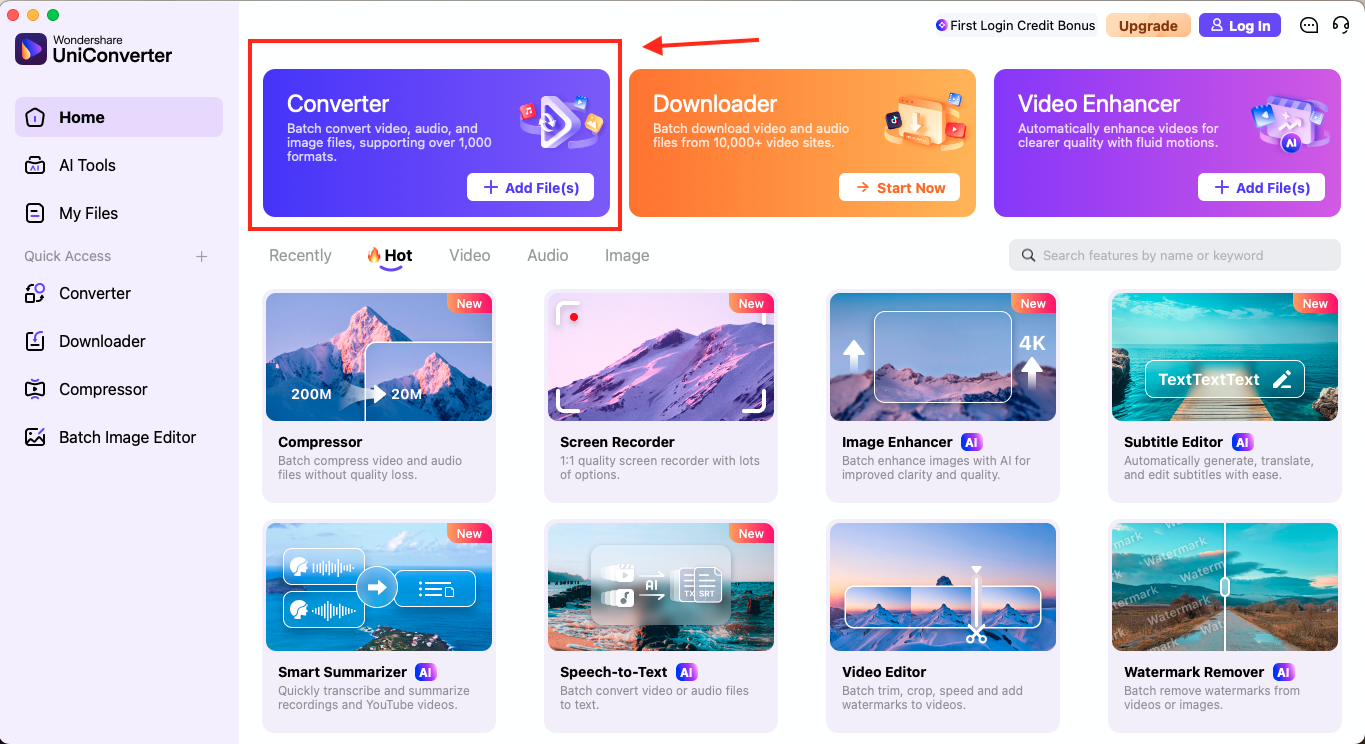
Step 1: Open UniConverter and click on "Converter" from the homepage to import the Bandcamp WAV or AIFF file you have already downloaded.
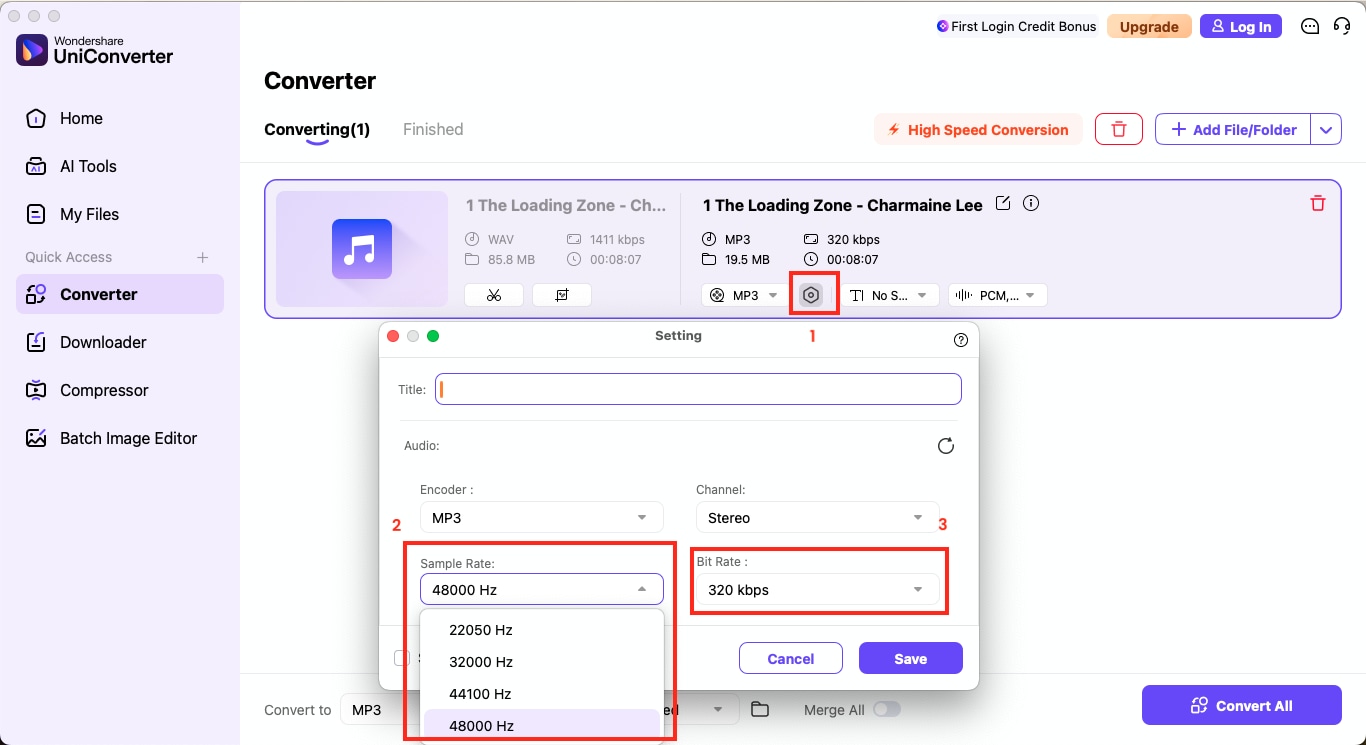
Step 2: Once the music file is added, click the gear icon next to the output format to set the audio quality.
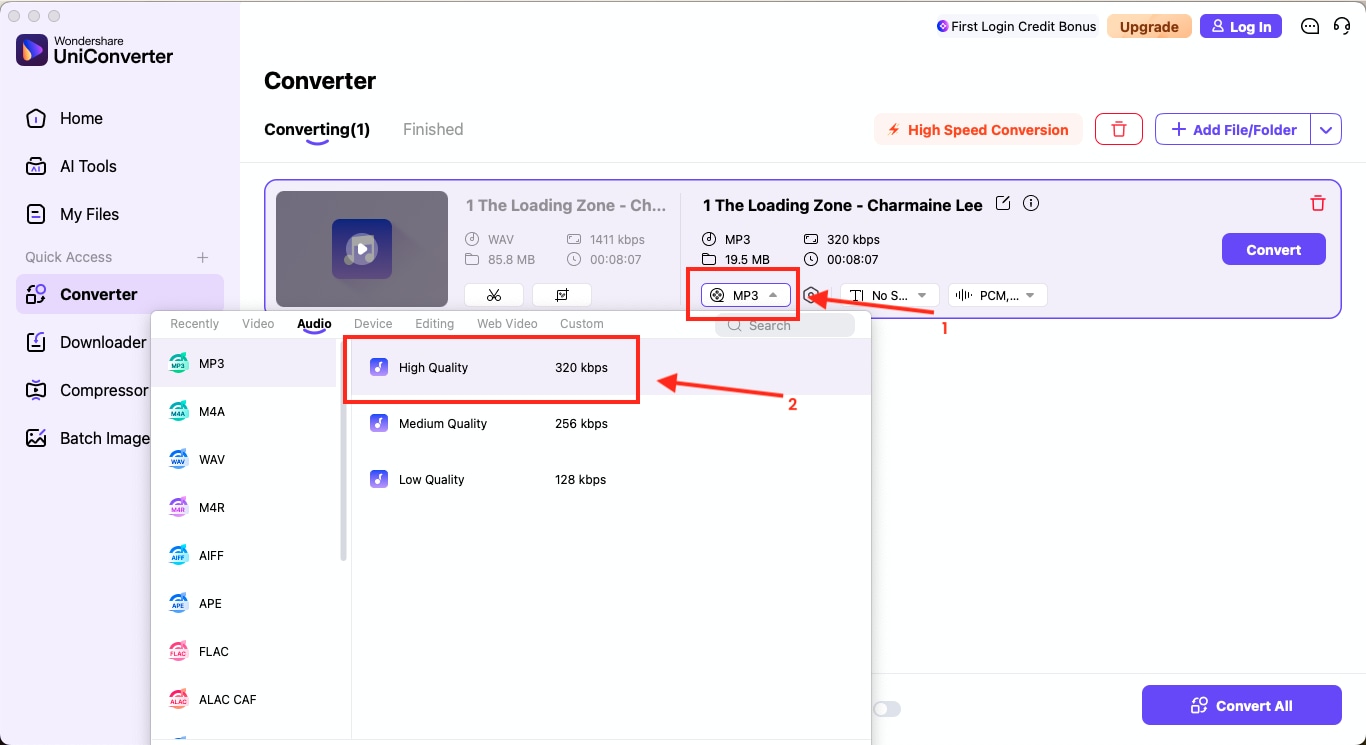
Step 3: In the audio settings, choose MP3 (High Quality - 320 kbps) and adjust the sample rate to 44.1 kHz or 48.0 kHz, in stereo if desired.
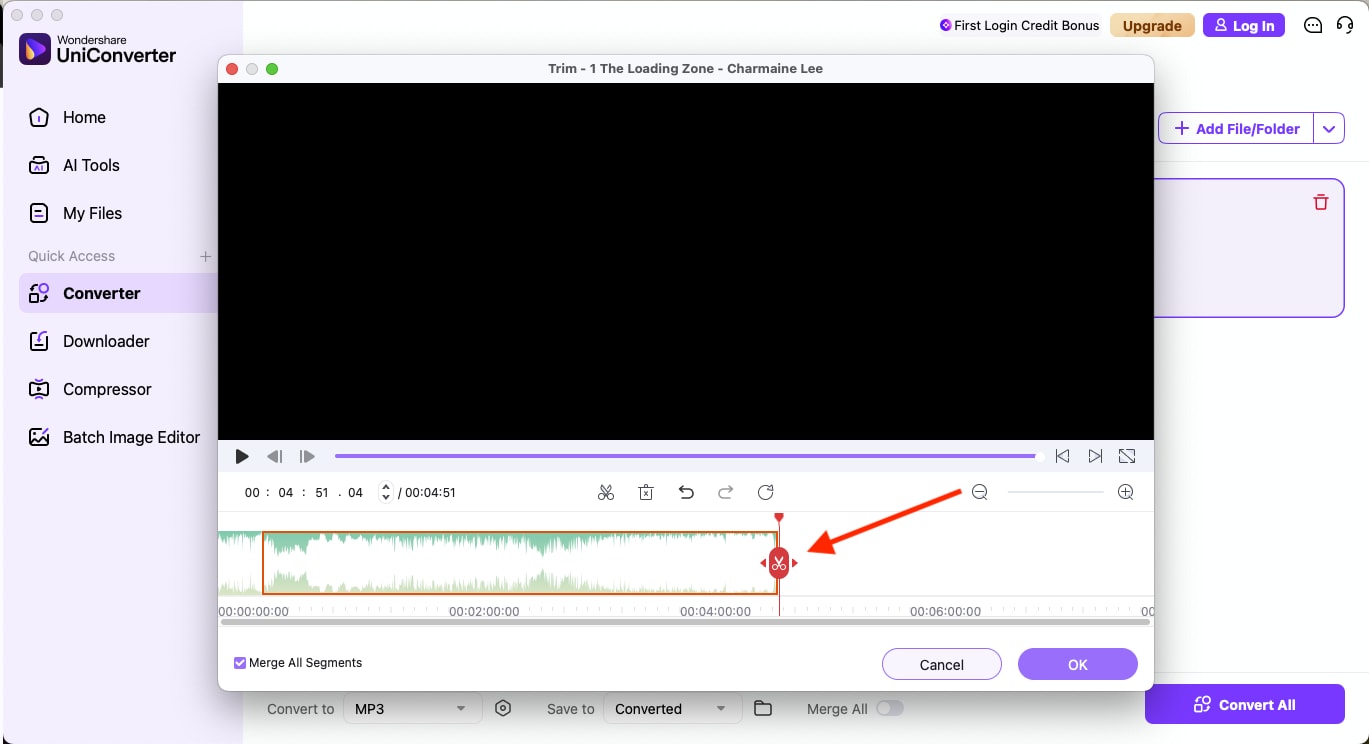
Step 4 (optional): Click on the edit icon to trim or fine-tune your Bandcamp track before conversion.
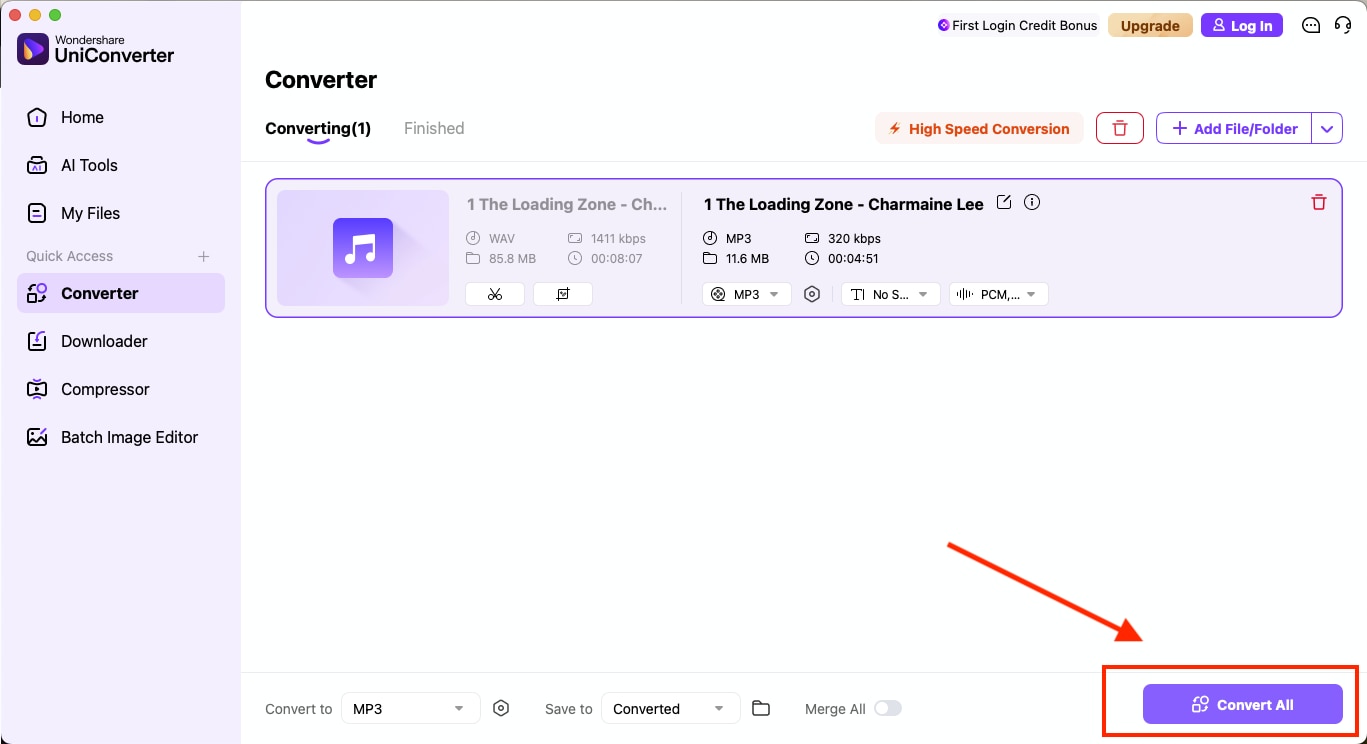
Step 5: After adjusting all settings, click Convert All to export the final MP3 file.
Tool 2 Audacity
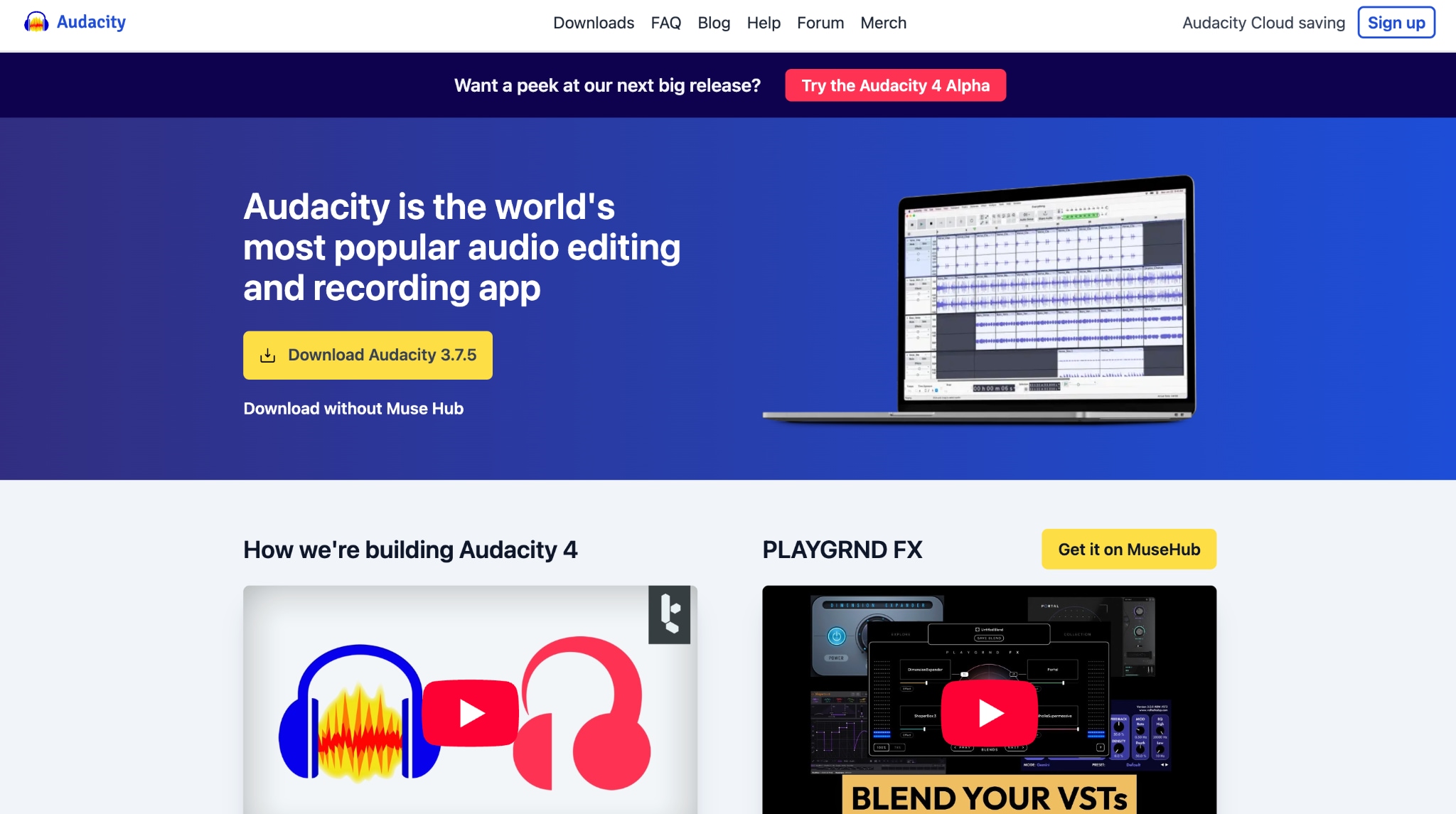
Audacity is a free, open-source audio editor that also doubles as a powerful Bandcamp to MP3 converter for users who prefer complete control over sound quality and output customization. It supports advanced editing features such as noise reduction, equalization, and trimming, making it an excellent option for musicians or sound enthusiasts who want to refine their Bandcamp WAV files before converting them to 320 kbps MP3.
How to Convert Bandcamp WAV to MP3 in Audacity:
Follow these simple steps to get Bandcamp to an MP3 file using Audacity:
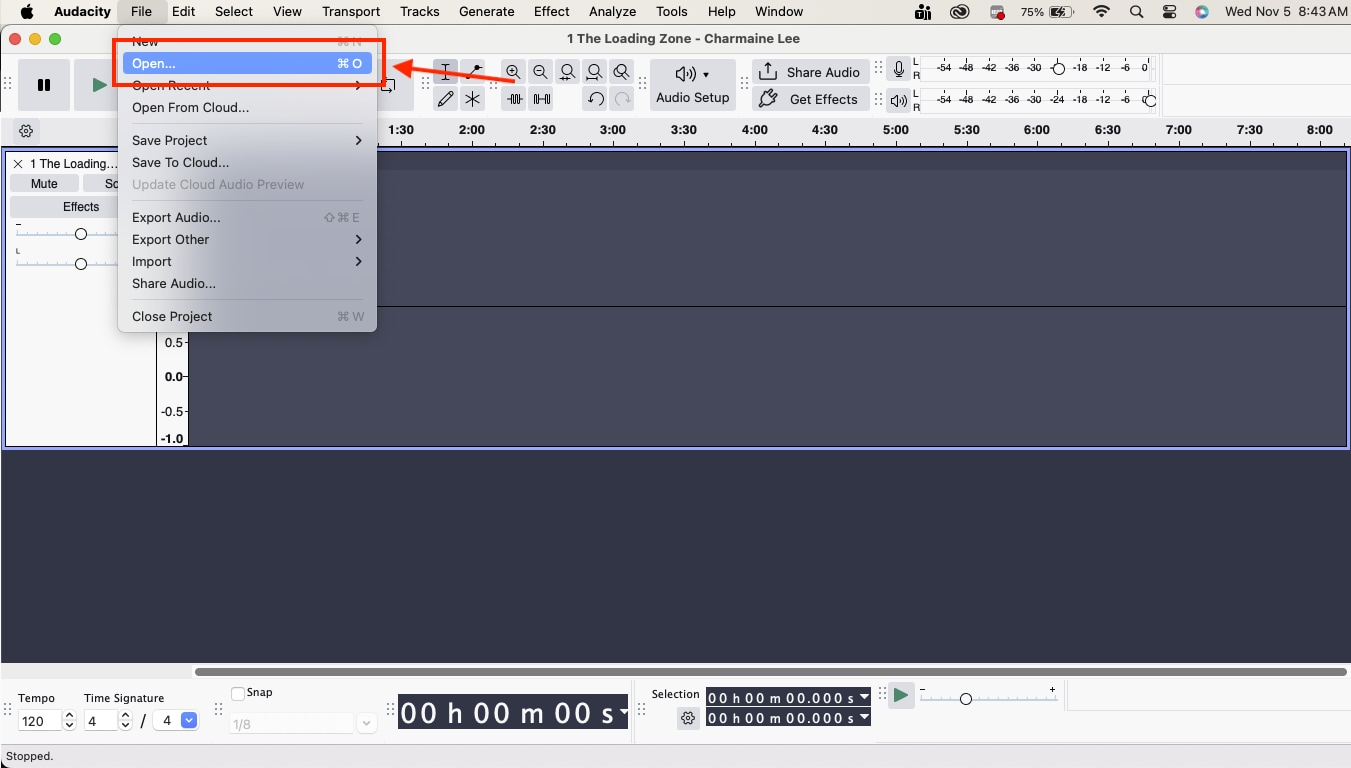
Step 1: Launch Audacity on your computer and go to File > Open to locate and load the Bandcamp WAV file that you have already downloaded from Bandcamp.
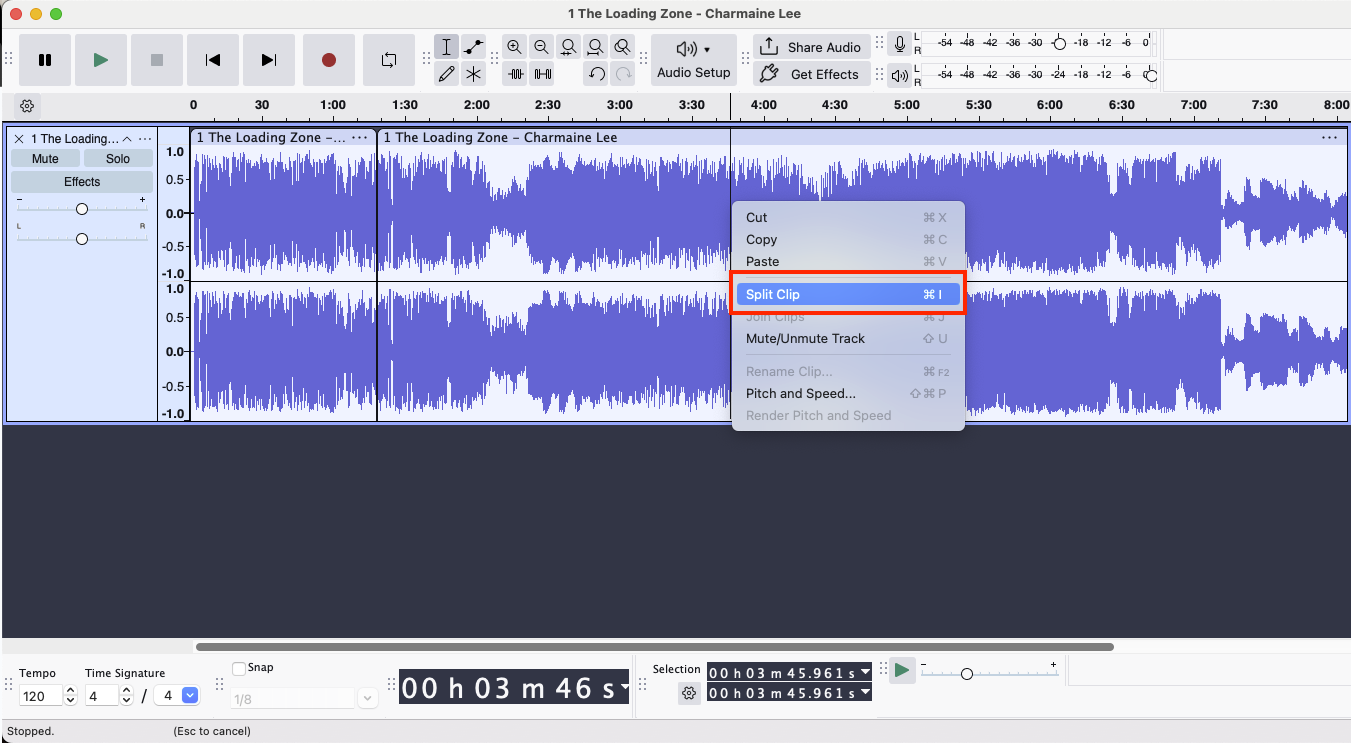
Step 2: Once the track appears on the timeline, you can make adjustments such as trimming or enhancing audio using built-in effects.
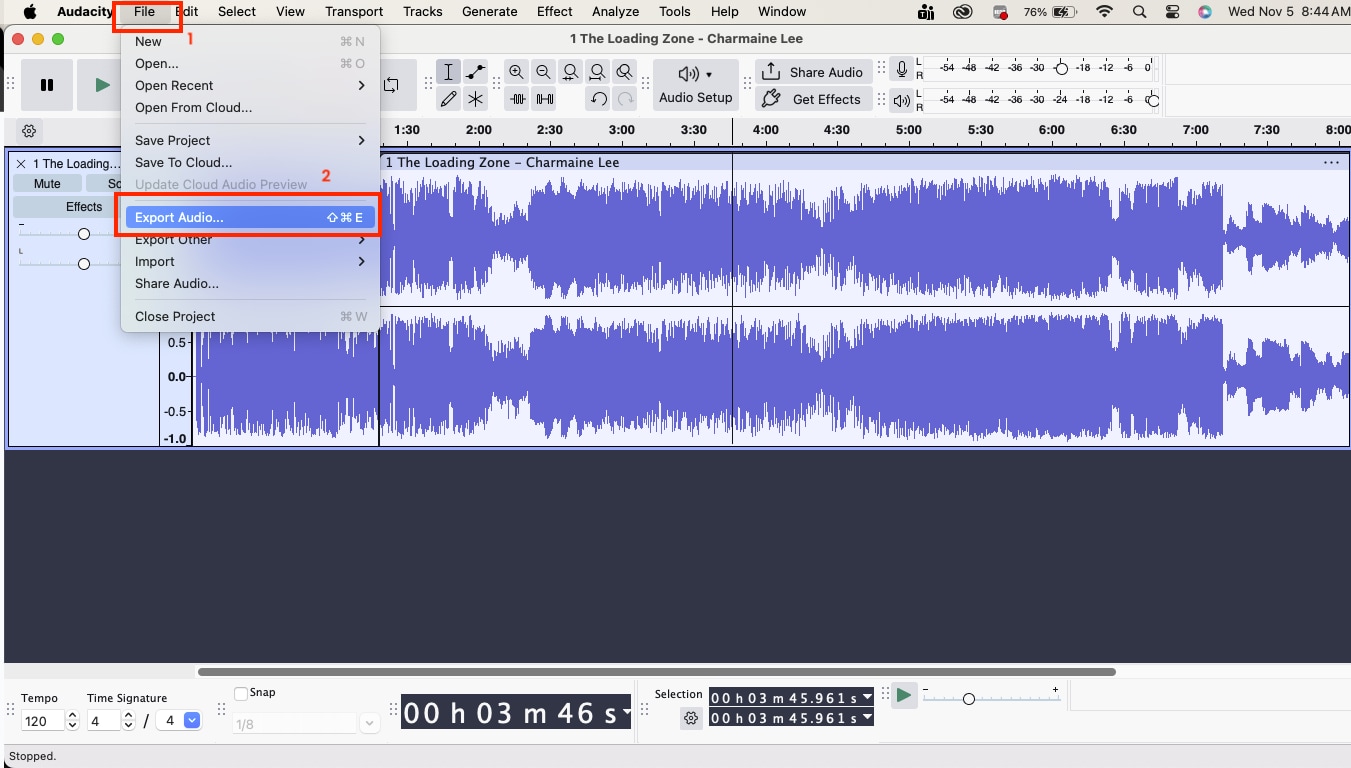
Step 3: When the file is ready, go to File > Export Audio and choose the save location. Audacity gives you two options: either on your local drive or in the cloud.
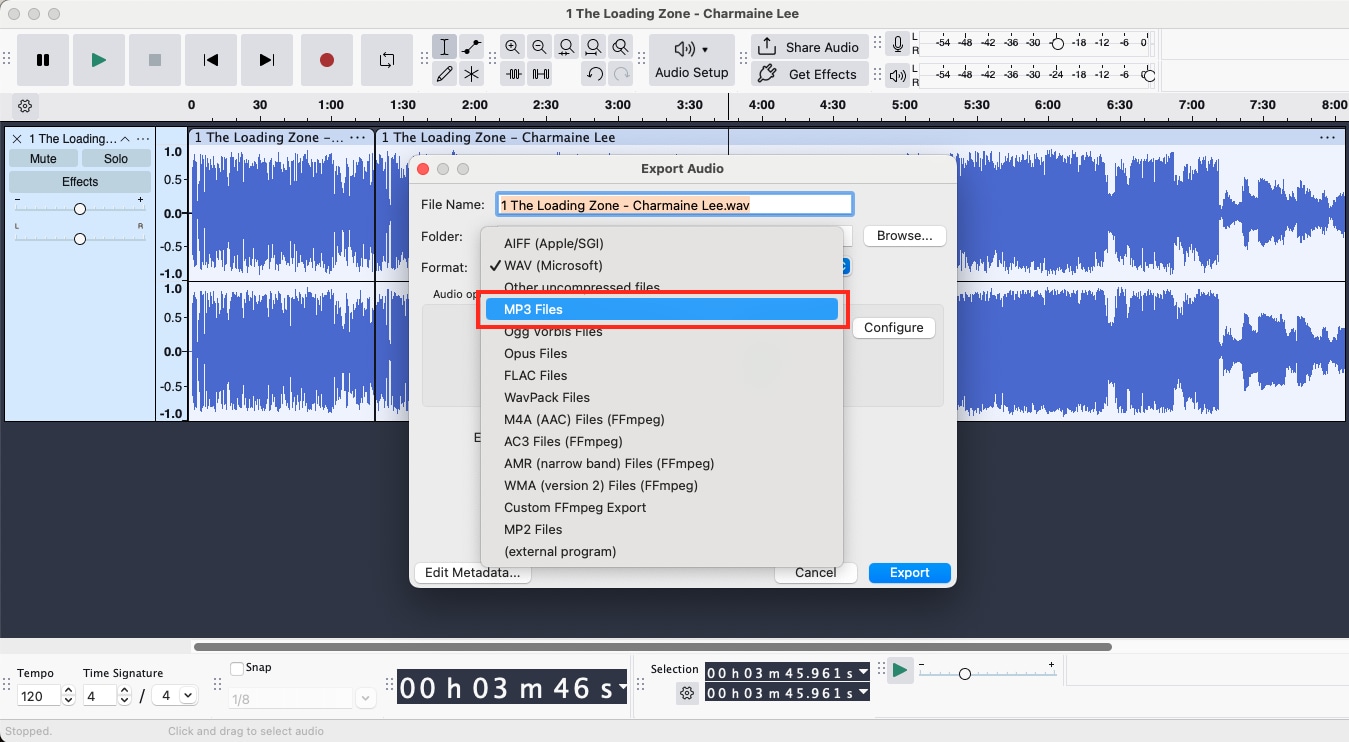
Step 4: In the Export Audio window, select MP3 Files as the format.
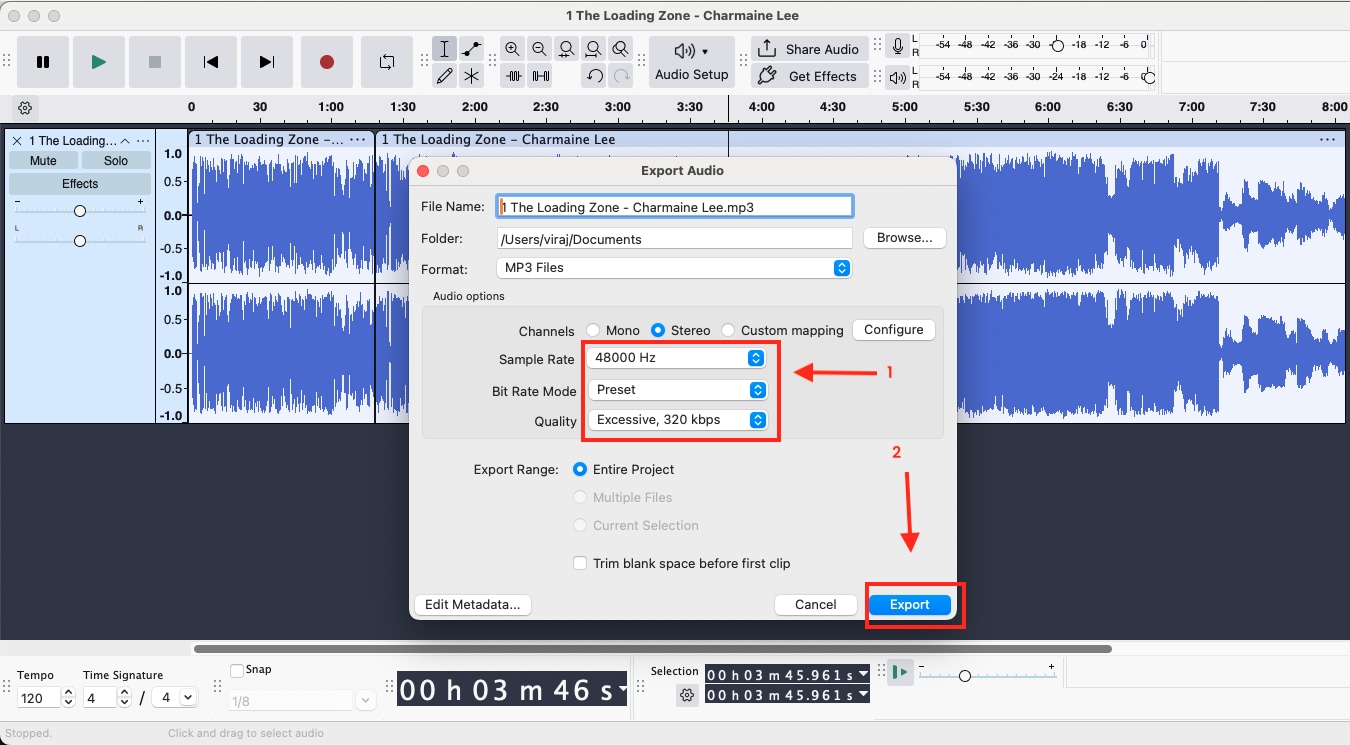
Step 5: Adjust the Quality to 320 kbps. You can also set the Sample Rate to 48,000 Hz for professional-grade output. Click Export to start conversion, and your WAV file will be saved as an MP3 in the chosen destination.
Method 2: Online Bandcamp to MP3 Converters
Online tools are the easiest option when you want to convert a few Bandcamp tracks without installing additional software. These web-based Bandcamp MP3 converters let you paste a Bandcamp URL, select MP3 quality, and download the audio file directly to your device. The most common online Bandcamp to MP3 converters are:
Tool 3 Bandcamp Downloader
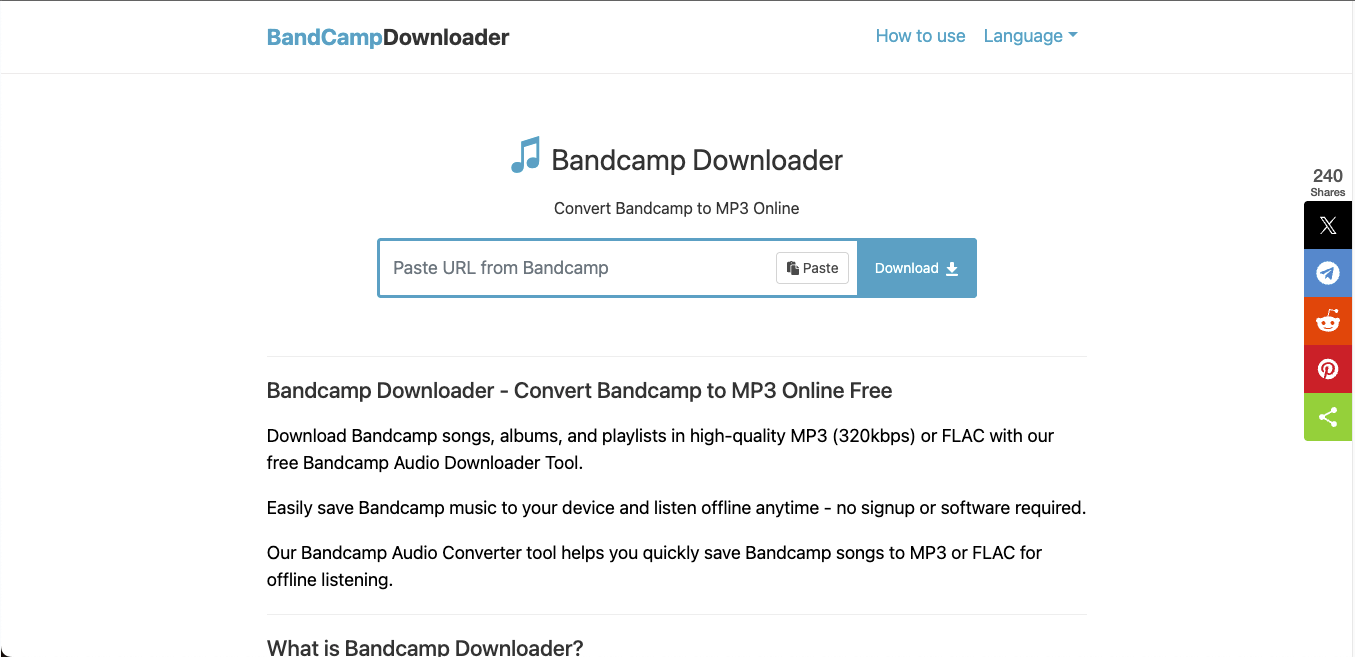
Bandcamp Downloader is one of the simplest online tools for converting Bandcamp tracks to MP3s without installation. It works directly in your browser and is ideal for users who want to save individual songs or playlists in high-quality 320 kbps MP3 format.
How to Convert Bandcamp to MP3 Online Using Bandcamp Downloader
By following these simple steps, you can easily convert Bandcamp to MP3:
Step 1: Copy the URL of the Bandcamp song, album, or playlist directly from the official Bandcamp website.
Step 2: Paste the link into the input box on the Bandcamp Downloader page.
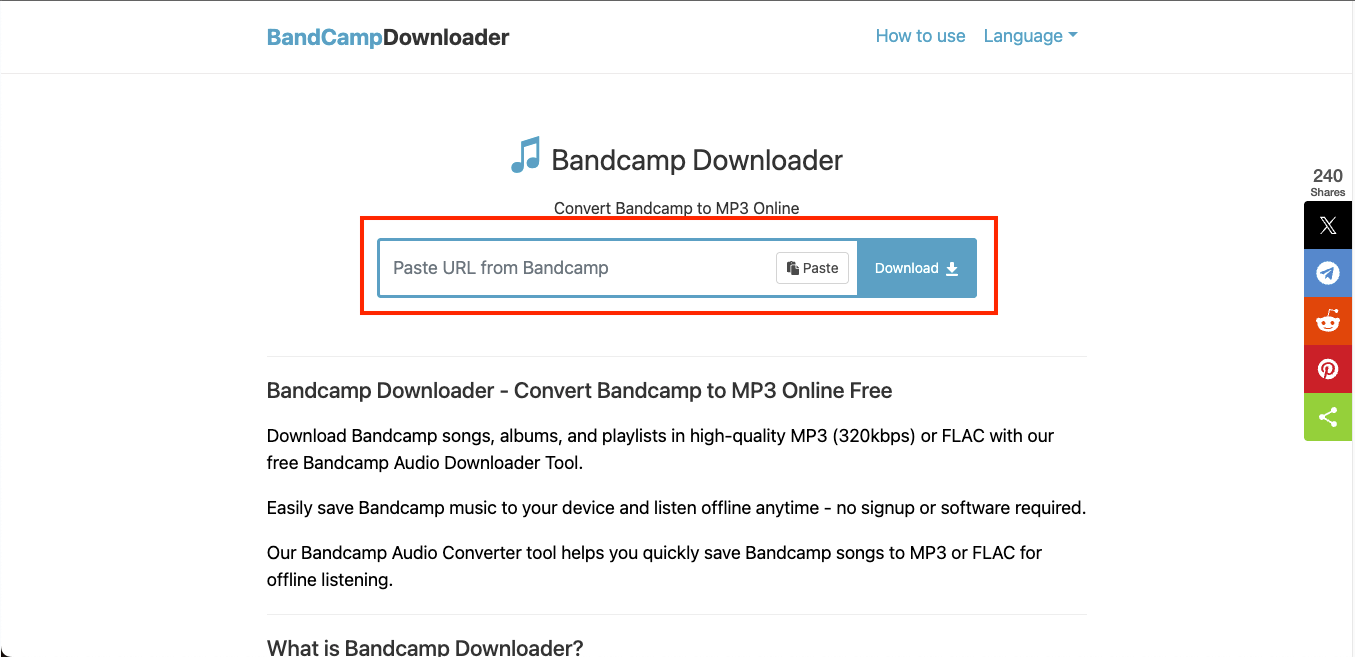
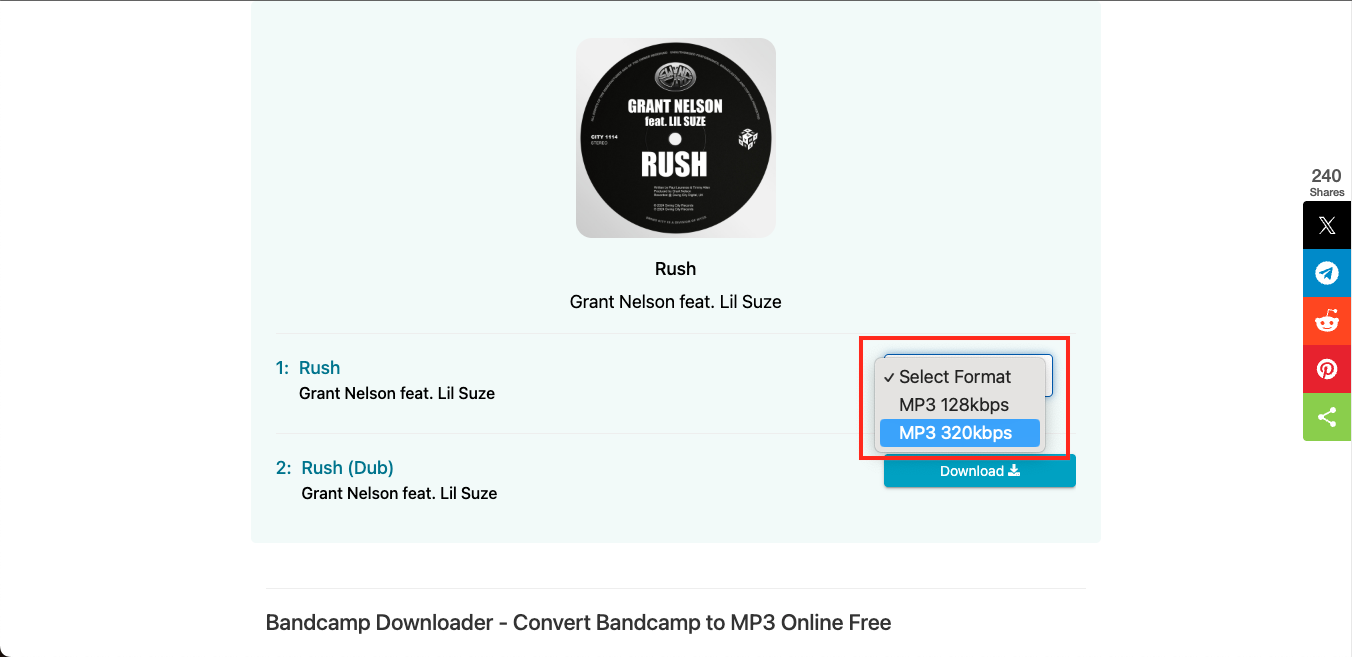
Step 3: Click "Download," then choose MP3 (320 kbps) as your preferred output format. The file will then be processed and immediately converted into MP3 in a few seconds, so you can download it.
Tool 4 Bandcamp Album Downloader
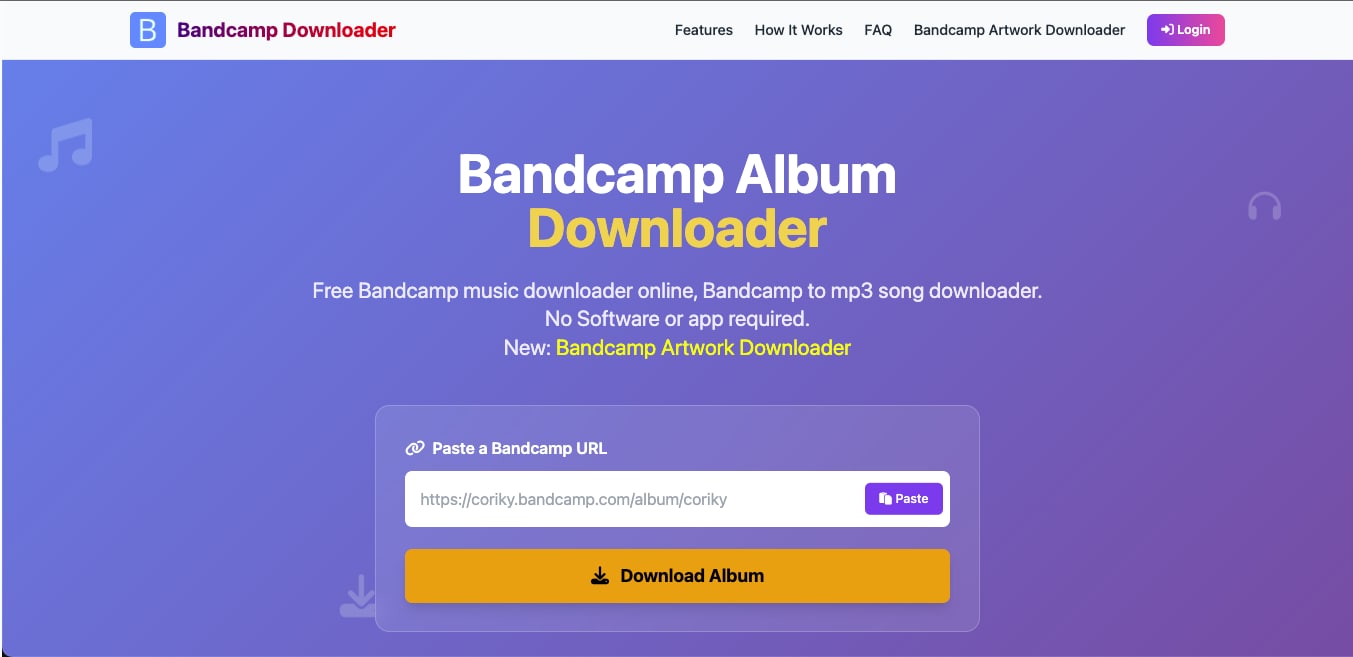
Bandcamp album downloader is a web-based tool that lets you download Bandcamp albums as MP3s. It helps you download the complete album directly in the highest quality, as a native Bandcamp download, in more than 700MB. If you want to download a single album, you should prefer tools like this to compress audio effectively without losing the quality. The platform maintains the original 44.1 kHz sample rate and supports multiple audio formats. It is one of the most dependable Bandcamp MP3 converters for personal use.
How to convert Bandcamp to MP3 Online
Here is how you can convert Bandcamp to MP3 by using Bandcamp Album Downloader:
Step 1: Copy the URL of the Bandcamp album from the official website.
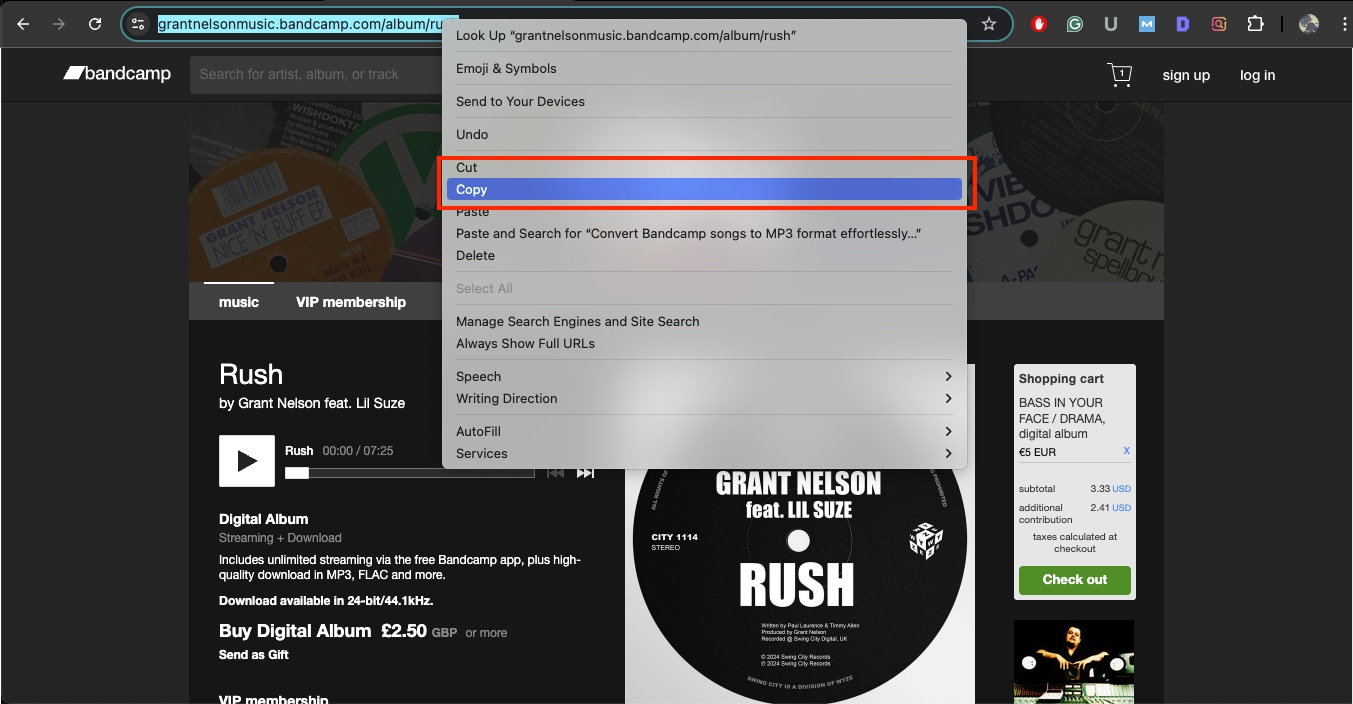
Step 2: Paste it into the input box on the Bandcamp Album Downloader page.
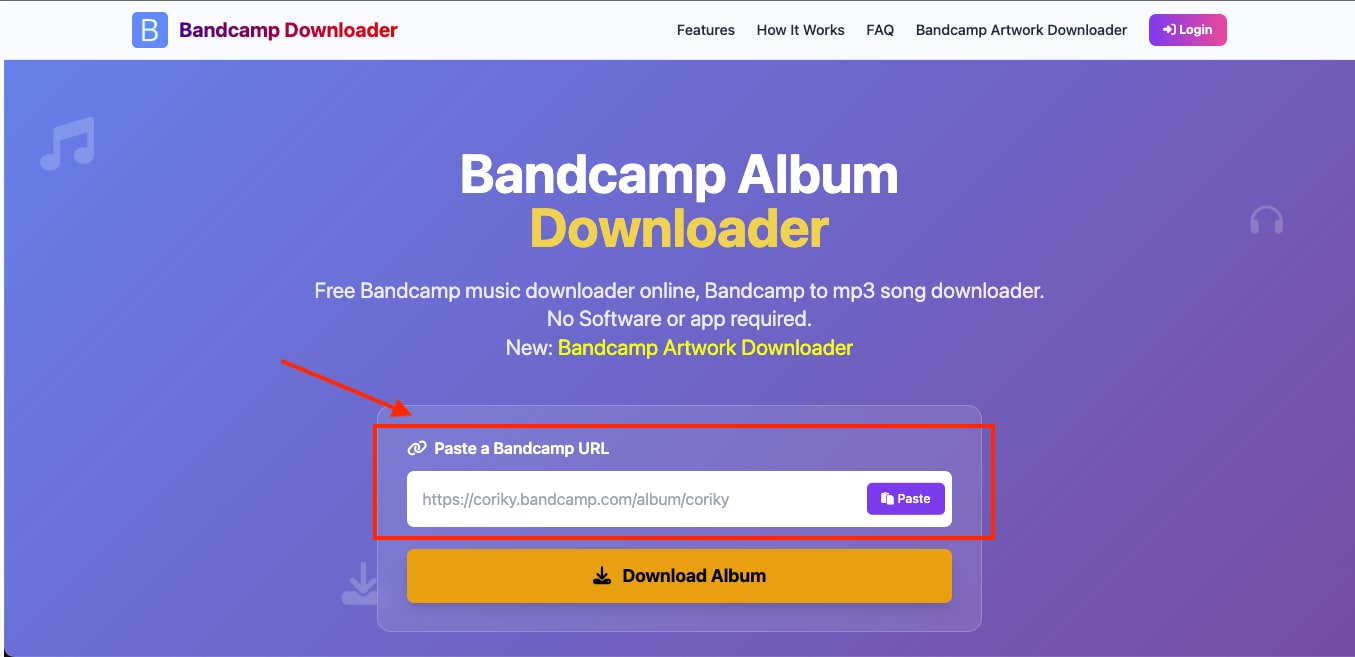
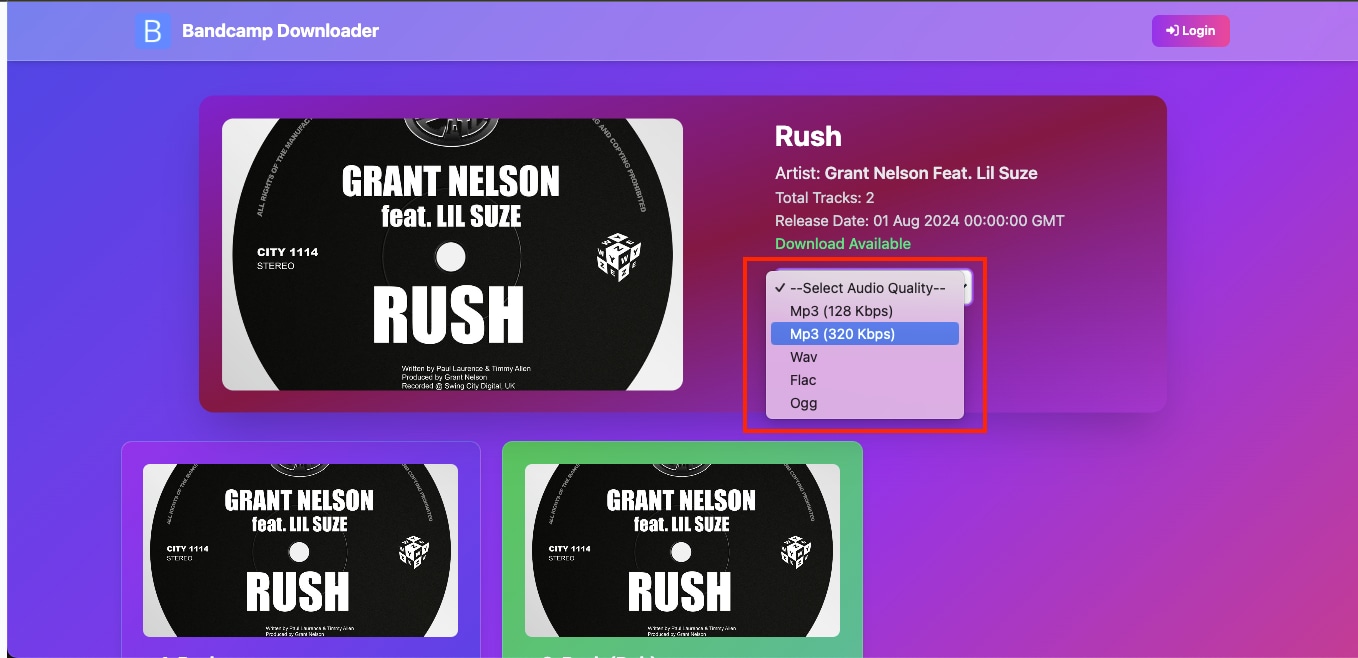
Step 3: Select the audio quality as MP3 (320 kbps) and click Download Album.
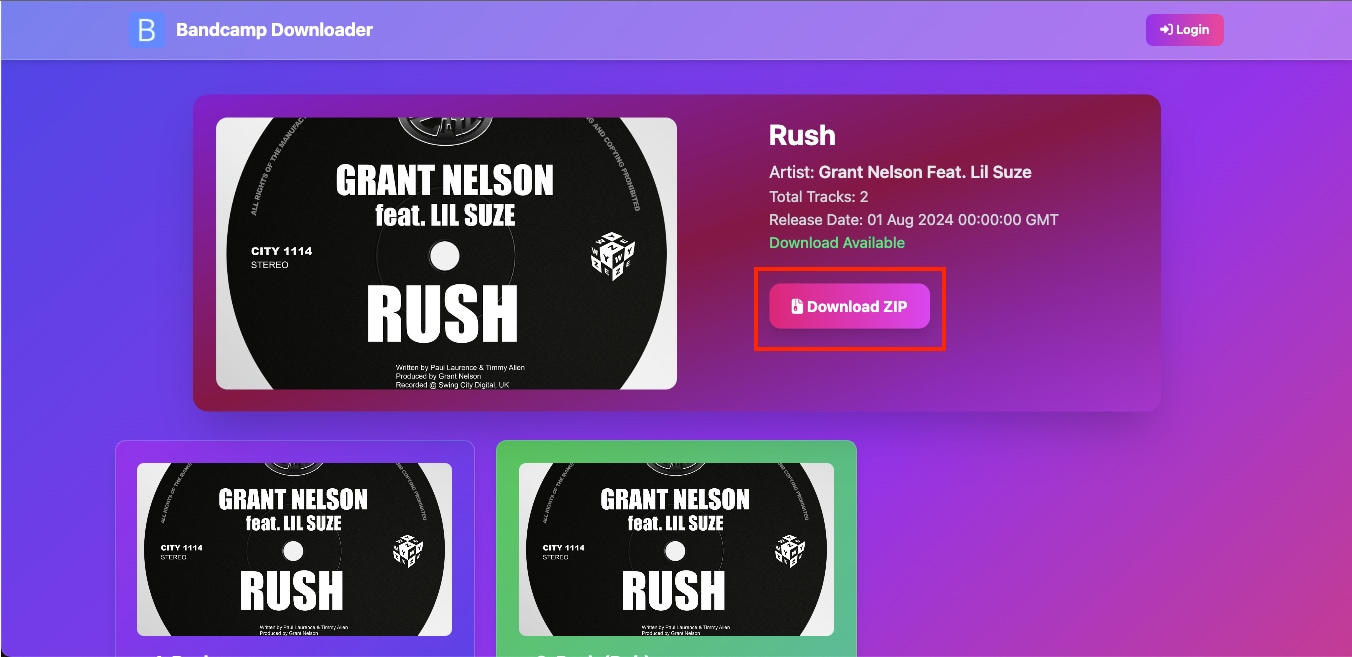
Step 4: The site automatically converts your album and provides a ZIP file that you can save to your device.
Method 3: Browser Extensions for converting Bandcamp Songs
Browser extensions can simplify the process by integrating download options directly on Bandcamp pages. However, not all extensions are reliable or safe, as some may violate Bandcamp's terms of service or include intrusive ads. Browser extensions depend on Bandcamp’s website structure. If Bandcamp updates its interface, some converters may break or behave unpredictably. Avoid extensions that ask for unnecessary permissions or redirect you to unknown pages.
Here are two of the online MP3 converters that you can safely use:
Tool 5 MP3 Converter
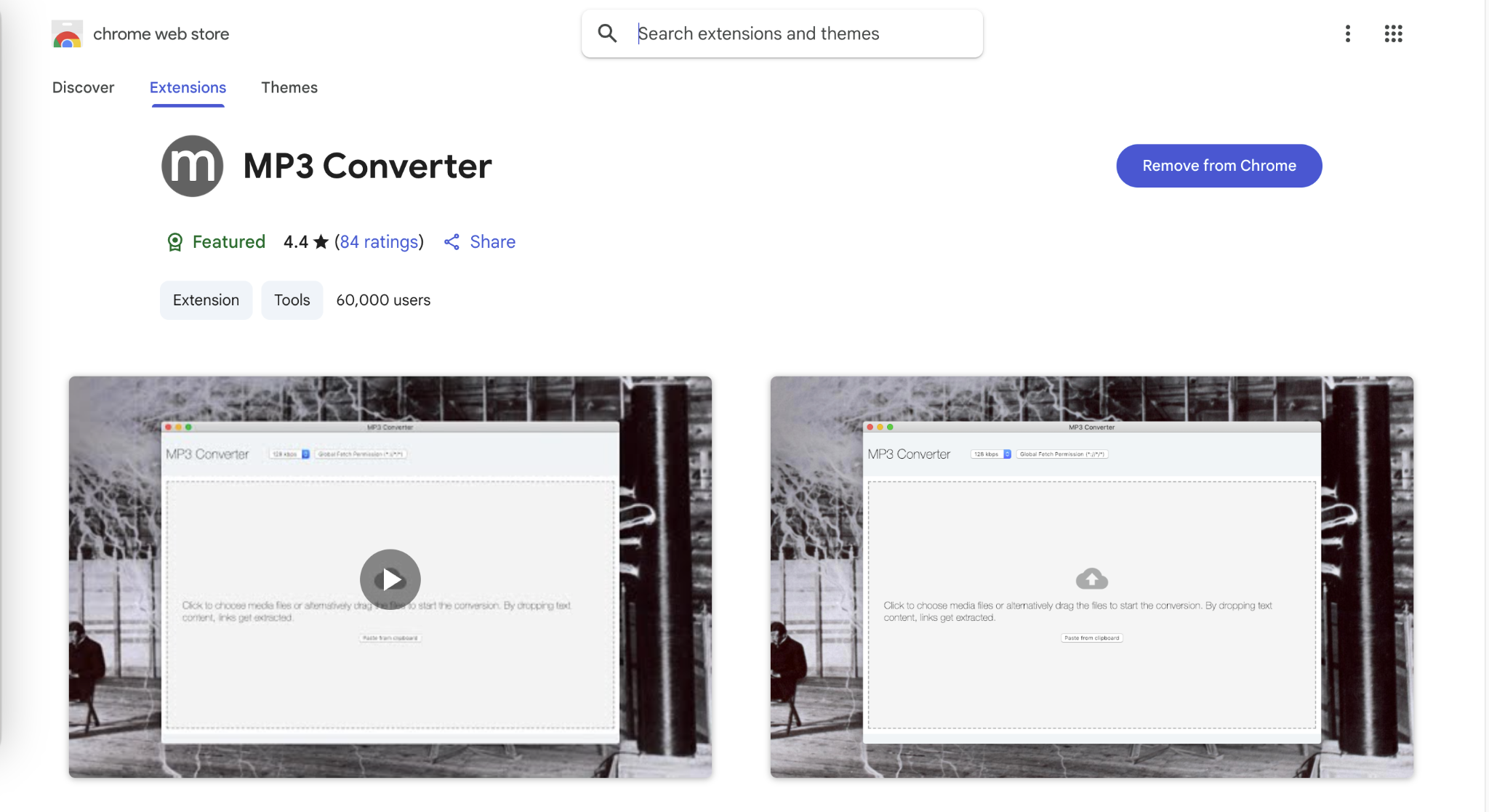
The MP3 Converter Chrome extension is a lightweight browser extension that lets users convert Bandcamp WAV or other audio files to MP3 directly in the browser. It runs on a pure JavaScript engine and does not rely on external software, making it ideal for users who want a quick, simple Bandcamp to MP3 converter without installing full applications.
How to Convert Bandcamp Music to MP3 Using MP3 Converter:
Follow this step-by-step guide to convert Bandcamp music to MP3 online:
Step 1: Open Google Chrome and launch the MP3 Converter extension from your toolbar.
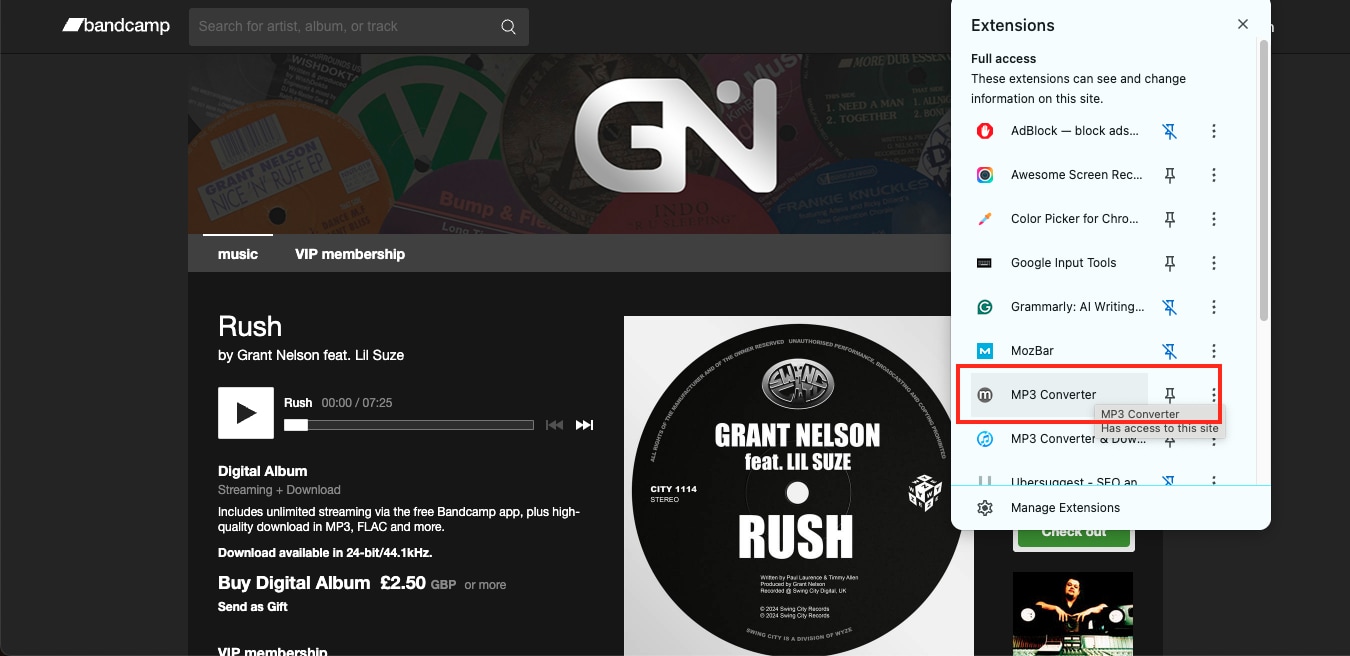
Step 2: Drag and drop the WAV file you downloaded from Bandcamp into the converter window, then select your preferred quality.
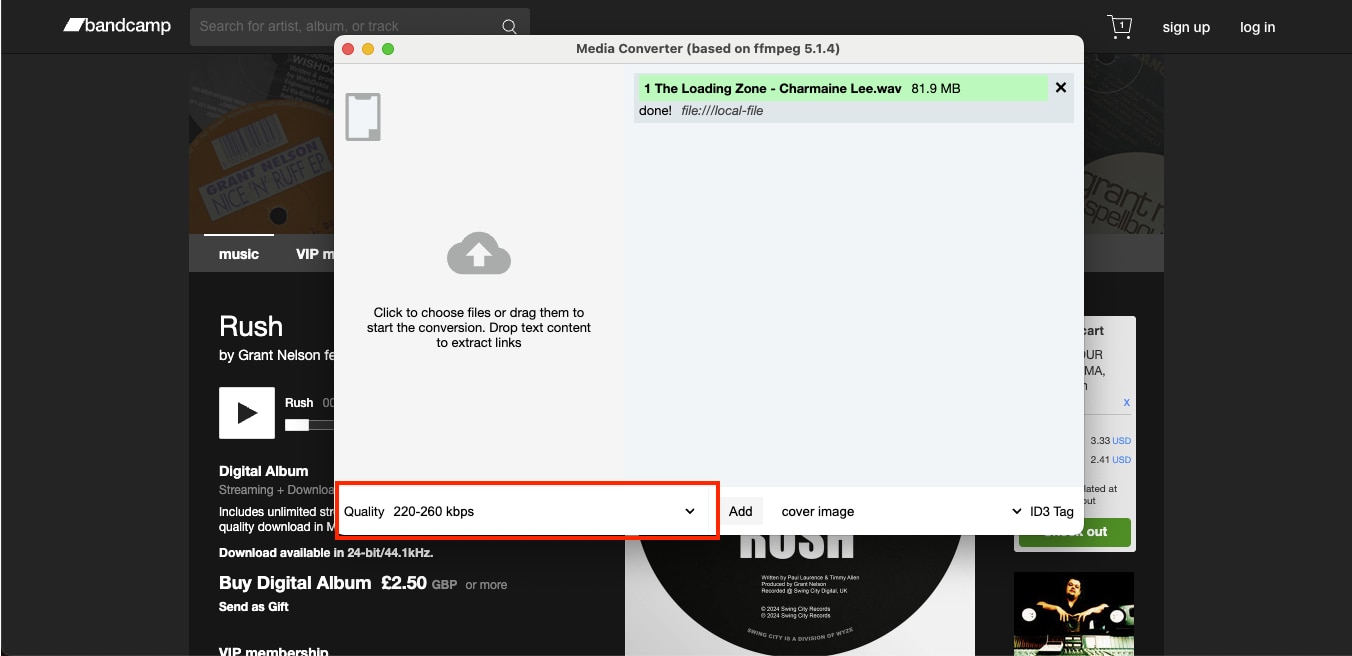
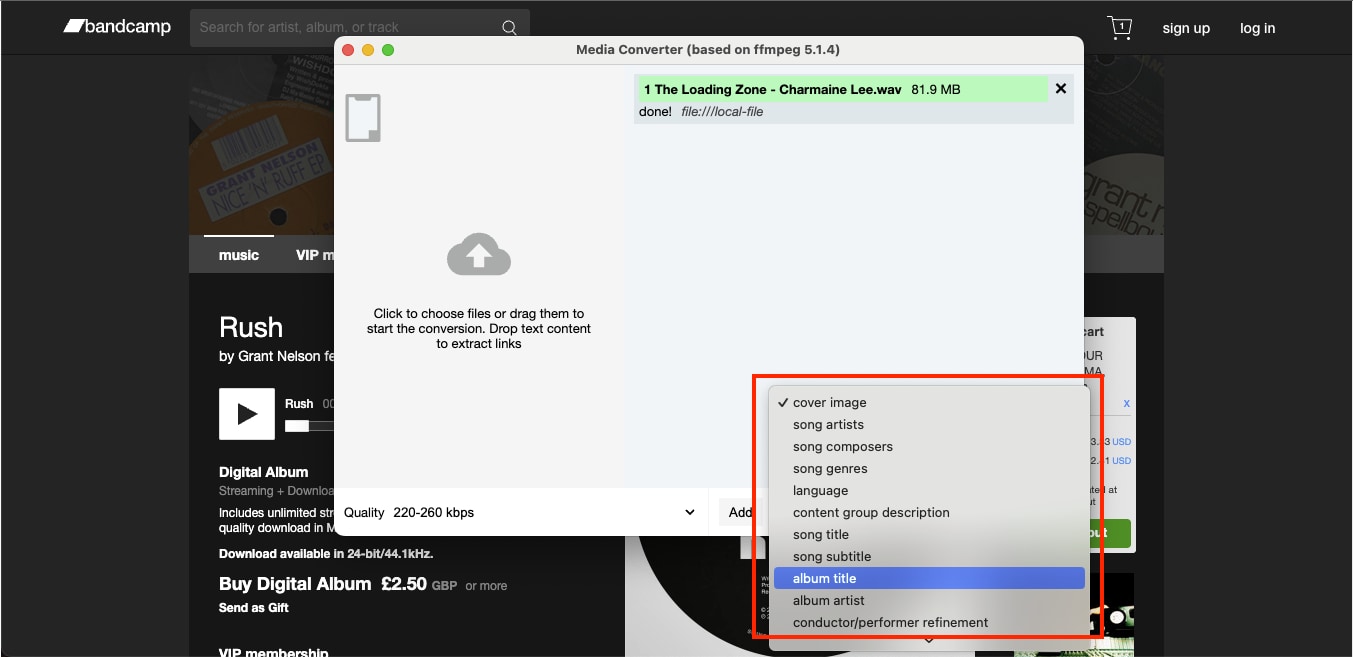
Step 3: You can add ID3 tags such as song title, artist name, genre, and language before conversion.
Step 4: Once the import is complete, the extension automatically converts and downloads the MP3 file to your local system.
Tool 6 MP3 Converter & Downloader
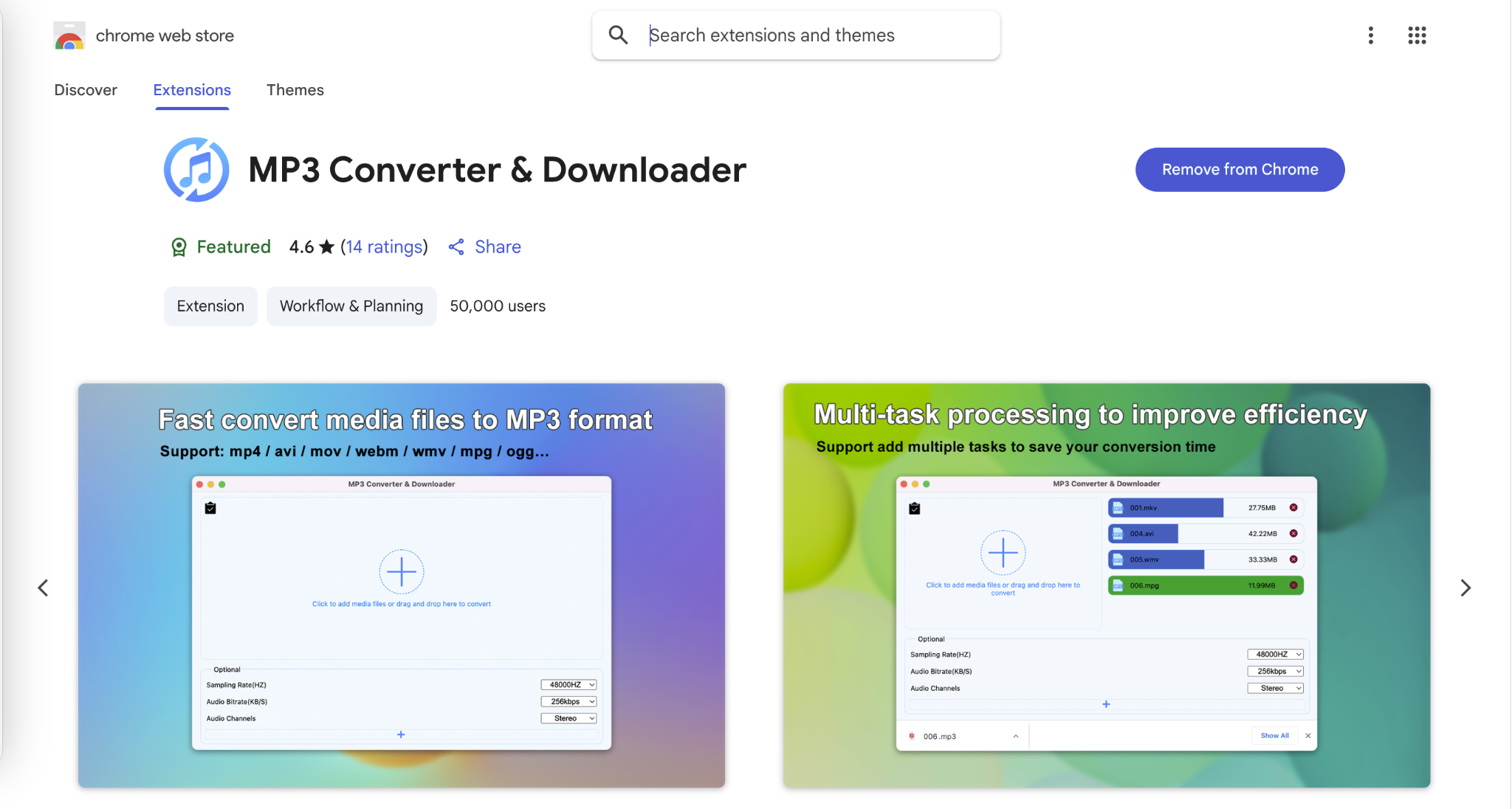
MP3 Converter & Downloader is another Chrome extension that lets users quickly convert both local and online audio files to MP3 format. It supports multiple media formats, including WAV, M4A, OGG, and MKV, making it suitable for converting Bandcamp tracks to MP3 for personal use.
How to Convert Bandcamp Music to MP3 Using MP3 Converter & Downloader
By following these steps, you can easily convert Bandcamp to MP3:
Step 1: Download and enable the MP3 Converter & Downloader extension from Chrome, then launch it from the extensions menu.
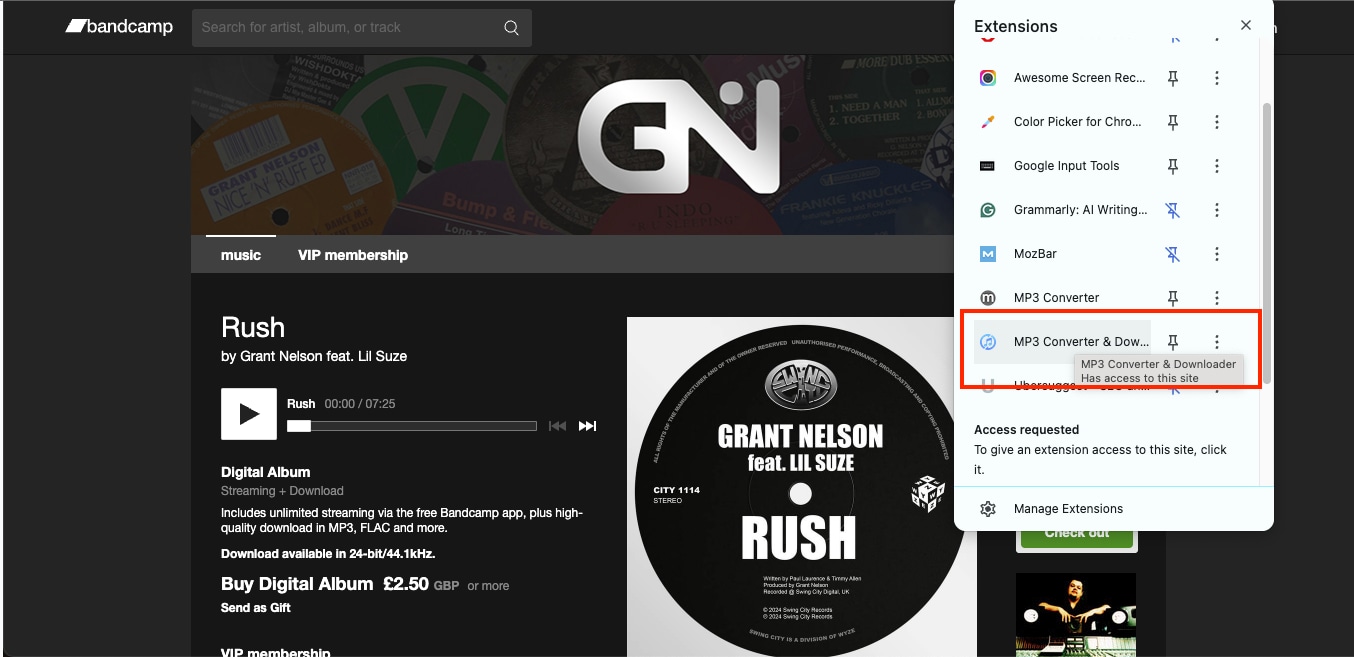
Step 2: Drag or import the WAV file downloaded from Bandcamp into the converter window.
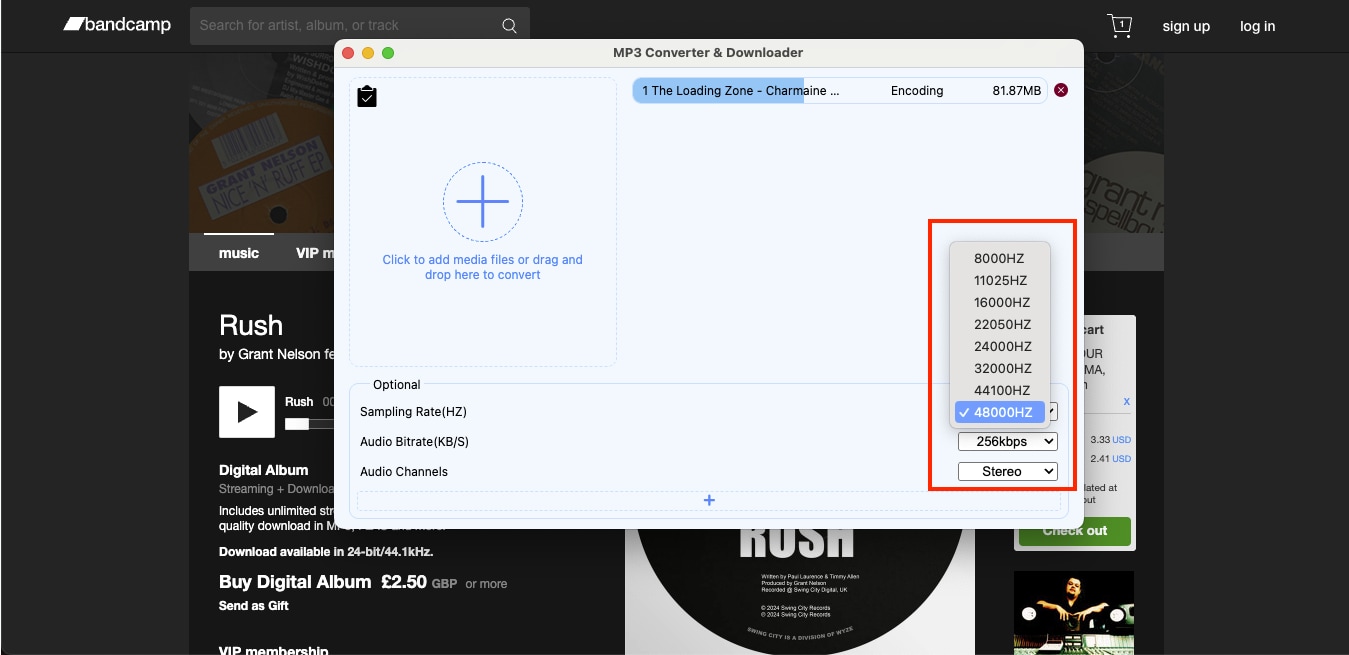
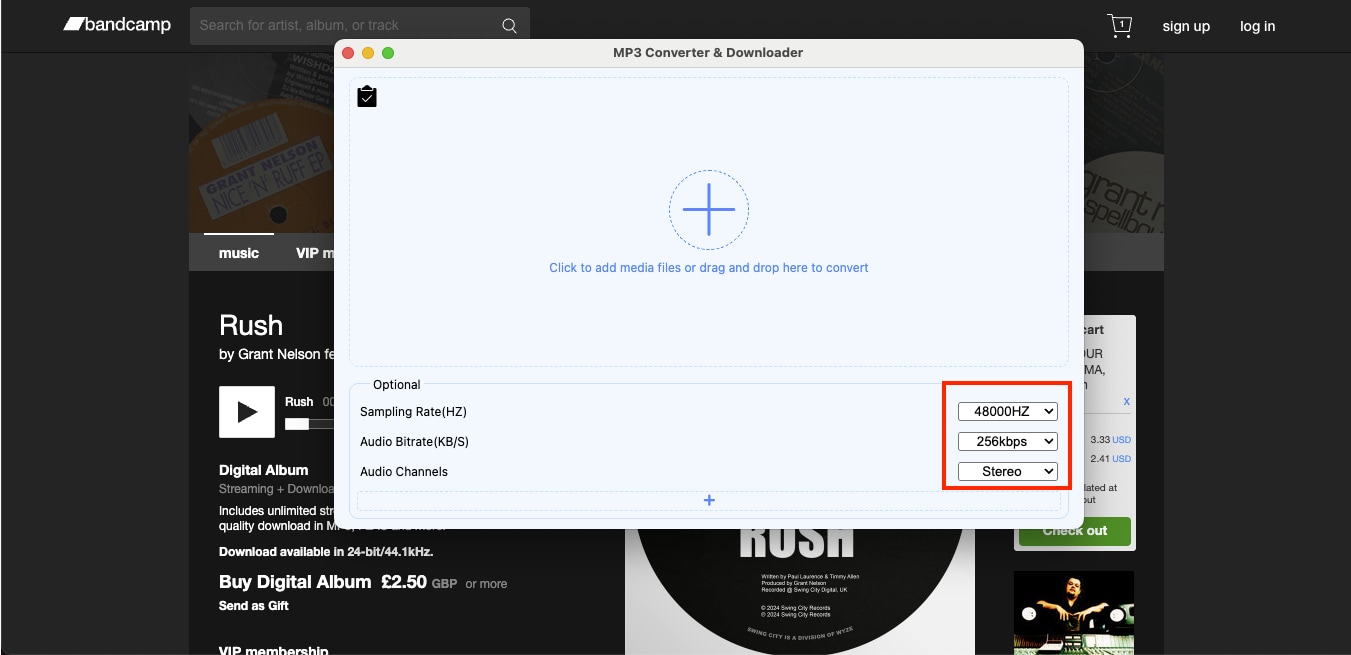
Step 3: Adjust the audio export settings, including bitrate (up to 320 kbps), sample rate (up to 48,000 Hz), and stereo or mono output.
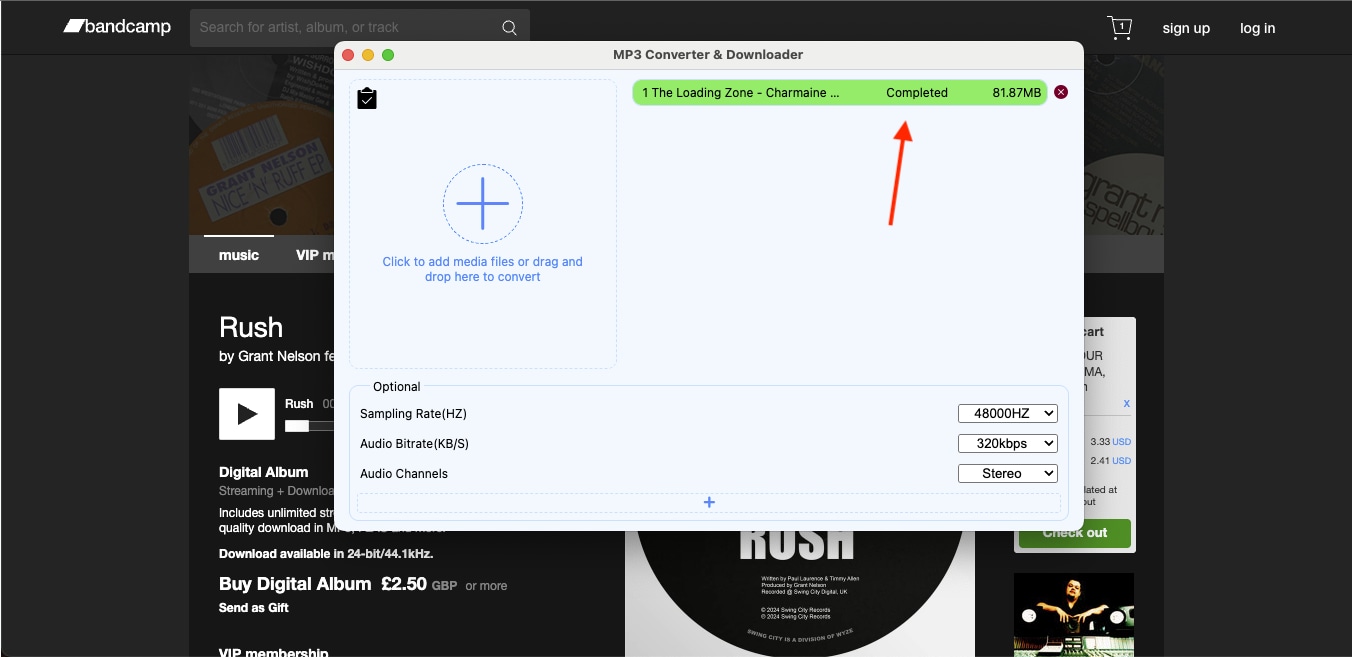
Step 4: Once encoding begins, the tool automatically processes the file and downloads the converted MP3 to your system.
Part 3: Best Bandcamp to MP3 Converter Tools (2025 Update)
With so many options available, finding the best Bandcamp to MP3 converter depends on what you value most. For instance, whether it is speed, quality, editing control, or simplicity. Below is a quick comparison of the six best tools we discussed, covering online converters, desktop software, and browser extensions.
Quick Guide: Best Bandcamp to MP3 Method by Conversion Style
| Tool Name | Free/Paid | Supported Formats | Convert from URL | Max Bitrate | Editing Features | ID3 Tag Support | Bitrate/Sample Rate Control |
| Wondershare UniConverter | Freemium | MP3, WAV, AIFF, ALAC, etc. | Yes | 320 kbps | Yes (Trim, Edit, AI) | Yes | Full control |
| Audacity | Free | MP3, WAV, FLAC | No | 320 kbps | Yes (Advanced) | Yes | Manual control |
| Bandcamp Downloader | Free | MP3, FLAC | Yes | 320 kbps | No | Basic (auto tags) | Limited |
| Bandcamp Album Downloader | Free | MP3, FLAC, WAV | Yes | 320 kbps | No | Limited | Limited |
| MP3 Converter (Chrome Extension) | Free | MP3 only | No | 256 kbps | No | Yes | Limited |
| MP3 Converter & Downloader | Free | MP3, M4A, OGG, MKV | No | 320 kbps | No | Yes (Multi-tag) | Partial |
Best Bandcamp to MP3 Converter
Part 4. Convert Bandcamp to MP3 320kbps – Ensuring High Quality
When you convert Bandcamp to MP3 at 320 kbps, the bitrate directly affects how rich and detailed your music sounds. While 128kbps MP3 files are smaller and faster to download, 320kbps offers higher fidelity and clarity, making it ideal for offline listening or studio playback with the best Bandcamp to MP3 converter tools.
A 320kbps MP3 uses constant-bitrate encoding. This allows more musical information to be preserved per second, especially in low frequencies and reverb tails, resulting in richer bass, clearer vocals, and more consistent sound across speakers and headphones.
Here's a quick difference between different bitrates:
How We Tested Bandcamp to MP3 Converters
We evaluated tools that convert Bandcamp tracks/albums to MP3 format, focusing on audio quality and workflow efficiency.
| Feature | 128kbps MP3 | 320kbps MP3 |
| Audio Quality | Standard quality; noticeable compression | High quality; near-CD sound clarity |
| File Size | Smaller (approx. 1 MB per minute) | Larger (approx. 2.4 MB per minute) |
| Bitrate | 128 kilobits per second | 320 kilobits per second |
| Recommended For | Podcasts, mobile streaming | Music playback, professional listening |
| Bandwidth Usage | Lower | Higher |
| Listening Difference | Slight loss of depth and bass | Full dynamic range and balanced tones |
Part 5: Is It Legal to Convert Bandcamp Music?
Legally speaking, downloading or converting music from Bandcamp is permitted only for personal use. As per Bandcamp's terms of service, it grants listeners the right to stream or download purchased tracks, not to redistribute, re-upload, or modify them for public use. Converting songs into MP3 or other formats for private listening is permissible, but sharing, selling, or using them in new content without permission from the copyright holder is considered copyright infringement.
Here's what's allowed and what's not:
Personal Listening: You can download or convert Bandcamp music that you have purchased for offline playback on your own devices for personal usage.
Artist-Approved Downloads: Some artists on Bandcamp offer free or paid downloads with usage rights specified by the artist.
Redistribution: Sharing, uploading, or using converted music in new videos, remixes, or projects without authorization is illegal.
Commercial Use: Monetizing or republishing Bandcamp tracks without a license violates copyright laws.
These conversions mentioned in the article are strictly for personal use only. Redistribution, uploading, or commercial use of converted files requires explicit permission from the copyright holder.
Conclusion
Converting Bandcamp to MP3 is simple when done responsibly and with the right tools. As mentioned in this detailed guide, you can start by copying the album or track URL, choosing a reliable converter, setting the bitrate to 320 kbps for the best sound quality, and downloading the converted file for personal listening. These steps help you convert Bandcamp to MP3 quickly, safely, and in consistent 320kbps quality.
For the fastest and most stable results, choose a converter that supports batch processing, custom bitrate settings, and metadata editing. Try Wondershare UniConverter, an all-in-one Bandcamp to MP3 solution that delivers high-quality, fast, and secure conversions while preserving your music's original quality.

