


While scrolling through Instagram, you come across a stunning travel reel, a tutorial you would love to keep for later, or a cinematic clip worth archiving in high resolution, but the platform doesn't let you save videos directly. That's where an Instagram video downloader 4K becomes essential. With creators uploading sharper, more detailed videos than ever, downloading them in 4K ensures every frame retains its clarity, which makes it ideal for editing and repurposing.
Thankfully, there are now multiple ways to make this process seamless. From online tools and browser extensions to professional desktop software, you can easily manage IG video download 4K tasks in just a few clicks.
In this article, we will explore these options in detail and help you decide which method delivers the best balance of quality, safety, and convenience. But before we proceed, here's a quick comparison table highlighting all the Best Methods to download Instagram Videos in 4K (Free & Safe) that we have discussed in this article:
| Tool | Platform | Resolution Control | Watermark-Free | Speed & Reliability | Best For |
| Wondershare UniConverter | Windows / macOS | Full 4K & Audio Control | Yes | Fast, stable, offline | Beginners, Professionals, and content creators |
| 4KStogram | Web-based | Limited | Partially | Moderate (depends on network) | Quick, one-time downloads |
| IGStories | Web-based | Limited | Partially | Moderate (depends on network) | Quick, one-time downloads |
| Turbo Downloader for Instagram | Chrome | Basic | Partial | Variable (depends on site changes) | Instant single-click saves |
How We Tested Instagram 4K Video Downloaders
To build this guide, we reviewed Instagram 4K video download methods based on resolution retention, watermark handling, download speed, safety, format control, and practical value for saving IG videos in high quality.
This section helps readers understand the testing criteria behind our Instagram 4K video downloader recommendations below.

Best Instagram Video Downloader 4K
In this article
- Part 1: Why Download Instagram Videos in 4K Quality?
- Part 2: Can Instagram Videos Actually Reach True 4K?
- Part 3: What are the best ways to download Instagram videos in high quality?
- Part 4: Which Instagram video downloader works best for high-quality saves?
- Part 5: Can you download private Instagram videos, and what rules should you know?
- Part 6: Troubleshooting Common 4K Instagram Video Download Issues
- FAQs about Instagram Video Download 4K HD
- Conclusion
Part 1: Why Download Instagram Videos in 4K Quality?
Downloading Instagram videos in 4K gives you the highest clarity the platform allows, so your saved clips stay sharp, detailed, and clean. It ensures you have a high-quality file that you can reuse, edit, or watch offline without any visual loss.
Here are the top reasons to save Instagram videos in 4K:
- Content Archiving: Keep your favorite Instagram Reels, tutorials, and short films safely stored in their original resolution.
- Editing and Repurposing: Reuse clips for personal or professional projects without losing image sharpness.
- Offline Access: Enjoy videos on flights, during commutes, or in low-network areas without quality compromise.
- Creative Reference: Analyze shooting styles, transitions, or color grading from high-definition samples.
- Marketing Insights: Study competitor or influencer content in clear detail for inspiration or campaign planning.
Part 2: Can Instagram Videos Actually Reach True 4K?
No, Instagram videos do not actually reach true 4K quality. The platform compresses every upload to maintain faster loading times and reduce data usage, so most videos are capped at around 1080p. So even if you shoot in 4K, the final output isn’t truly 4K, which is exactly why many people rely on Instagram video download HD 4K tools to preserve the highest possible quality before compression happens.
Here's a quick bitrate comparison across different resolutions so you can get a clearer idea about different resolutions and respective use cases:
| Resolution | Approx. Bitrate | Typical Use Case | Visual Quality |
| 720p (HD) | 2.5–4 Mbps | Standard mobile streaming | Moderate detail, visible blur on large screens |
| 1080p (Full HD) | 4–8 Mbps | Instagram feed and Reels | Good detail, slight compression |
| 2K (1440p) | 8–12 Mbps | High-end social uploads | Sharper edges, balanced color |
| 4K (Ultra HD) | 15–25 Mbps | Professional recording and playback | Exceptional clarity, no visible pixelation |
Part 3: What are the best ways to download Instagram videos in high quality?
When you want to download an Instagram video in 4K MP4 format, there are several ways to get it done safely and efficiently. From quick browser tools to professional desktop programs, each method offers unique advantages in terms of speed, quality, and control. Choosing the right approach for your IG 4K video download depends on how often you save videos and whether you need to manage watermark-free results.
Quick Guide: Best Instagram Video Downloader 4K by Use Case
Method 1: Use a Desktop App for 4K IG Video Downloads
For those who frequently download and manage multiple videos, desktop applications offer a more reliable, professional solution. Tools like Wondershare UniConverter offer enhanced stability, faster processing, and full-resolution output when you download an Instagram video in 4K MP4 format.
Wondershare UniConverter
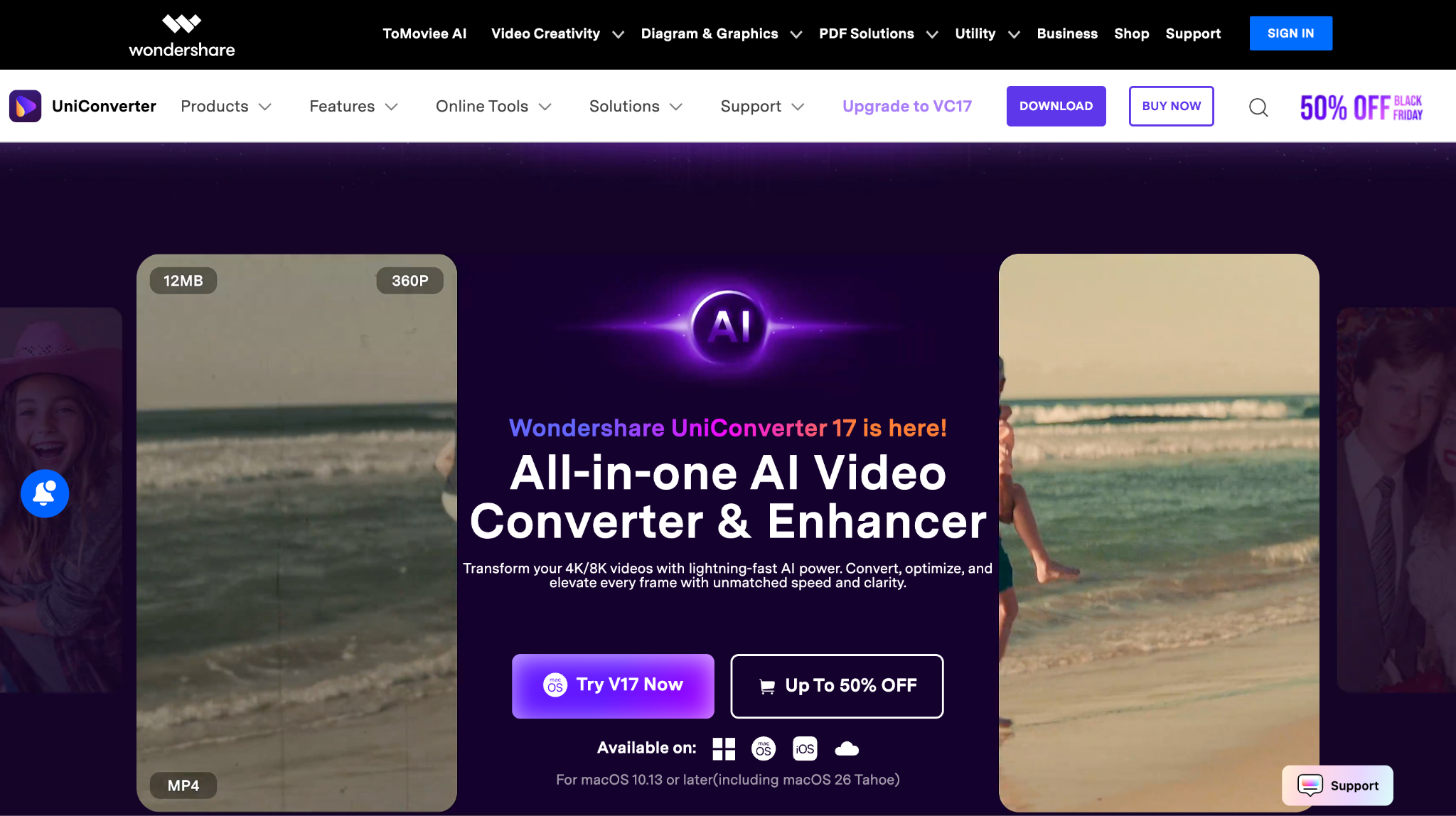
Wondershare UniConverter is a professional desktop solution that goes beyond basic downloading. It will allow you to directly download Instagram videos in 4K MP4 format, convert them into various file types, compress large clips without visible quality loss, and even remove watermarks from existing videos.
Before we explore UniConverter in detail, it's important to understand some of the most common advantages of using this all-in-one media suite.
(Disclaimer: Our tool is intended for personal use only. Users are solely responsible for using this tool to save videos or audios, including compliance with platform's terms of service and copyright laws and regulations. We are not liable for any consequences resulting from users' violation of any laws or infringement of others' rights.)
Best Instagram Video Downloader 4K
Key Features
- True 4K Downloads: With UniConverter, you can capture Instagram videos in their highest available resolution with a 4K codec without compression artifacts. You can also use its video enhancer as a quick solution.
- AI-Driven Editing Tools: You can even use built-in AI models to auto-enhance visuals, stabilize footage, and correct lighting, color, and sound balance.
- All-in-One Utility: It lets you download, compress, convert, and edit everything from a single dashboard, without switching between multiple tools. You can also trim the video with its free video trimmer online.
- Watermark Removal & Customization: You can easily remove or replace existing watermarks for professional use, with its watermark remover online.
- Batch Download & Conversion: Save multiple Instagram videos in one go, saving time for frequent users and editors.
How to Download Instagram Video 4K Online Free, no Watermark, with Wondershare UniConverter
Here are a few steps that would let you batch download Instagram videos 4K multiple links:
Step 1: Copy the Instagram reel link that you want to download.
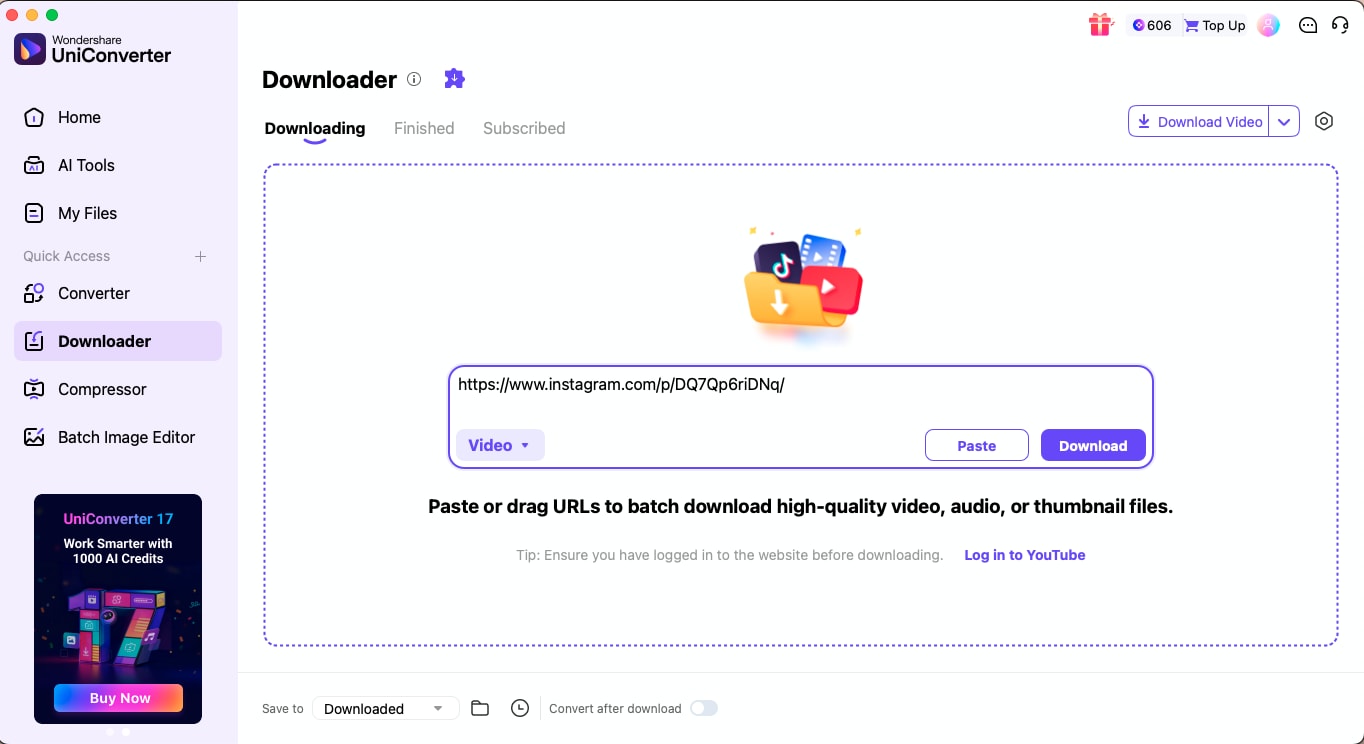
Step 2: Open Wondershare UniConverter and go to the Downloader section on the dashboard. Paste the copied Instagram video URL into the field provided.
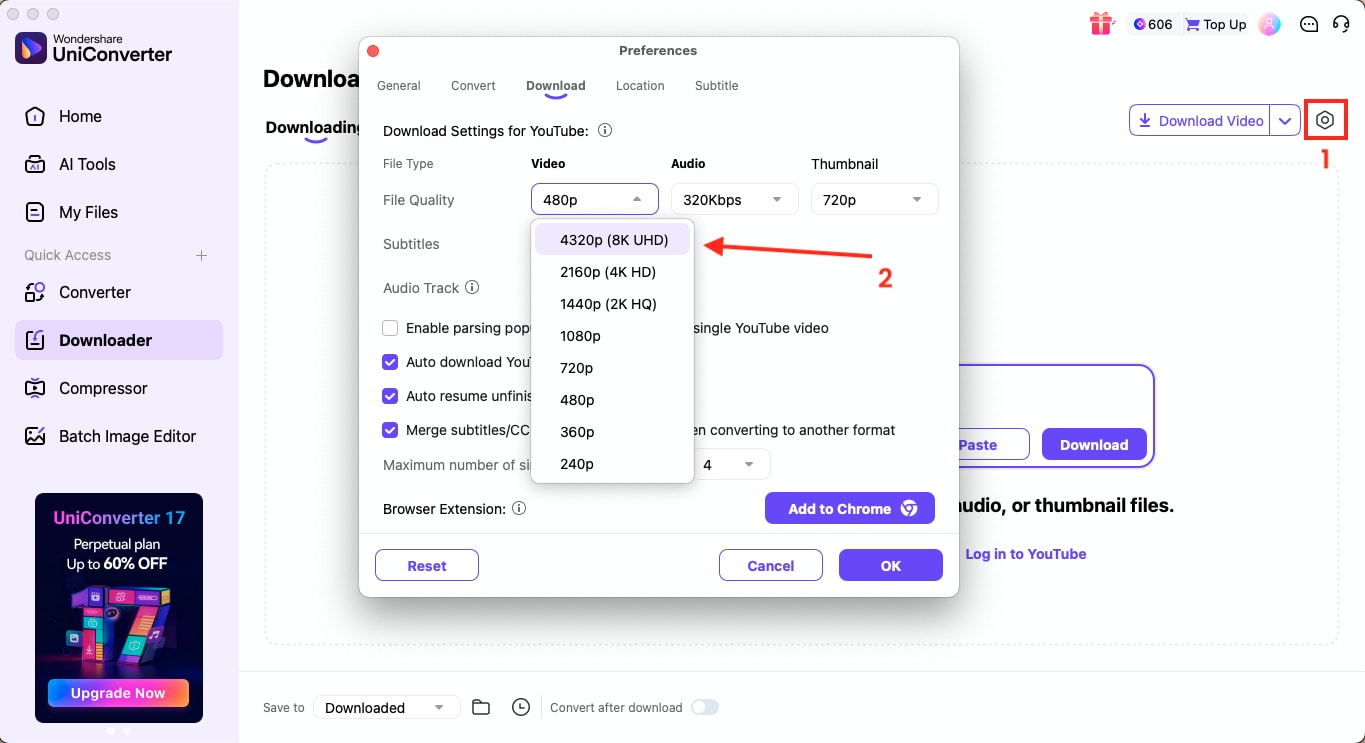
Step 3: Click the gear icon to open settings. Under the Video tab, choose 4K as your preferred output resolution. You can also adjust the audio bitrate or subtitle options if needed.
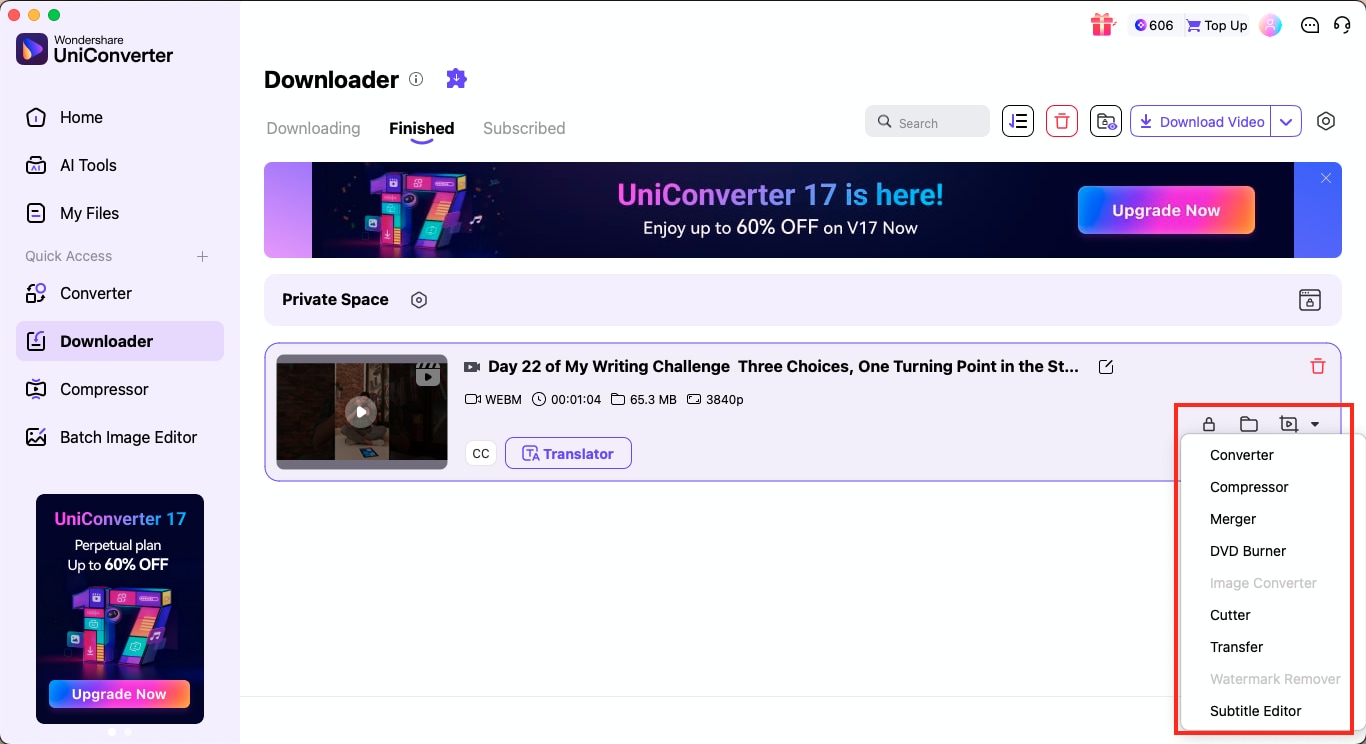
Step 4: Once your preferences are set, hit Download. The file will begin downloading, and once completed, it will appear under the Finished tab. From there, you can enhance, compress, trim, translate, or merge the downloaded video directly within UniConverter.
Method 2: Use an Online 4K Instagram Video Downloader (Quick & Free)
If you are looking for a fast and straightforward option, online websites can help you download an Instagram video 4K online for free with no watermark, without installing anything. These tools are designed for casual users who just want to grab a reel or post instantly.
Here are two of the most common online tools that help in downloading Instagram videos in 4K:
4KStogram
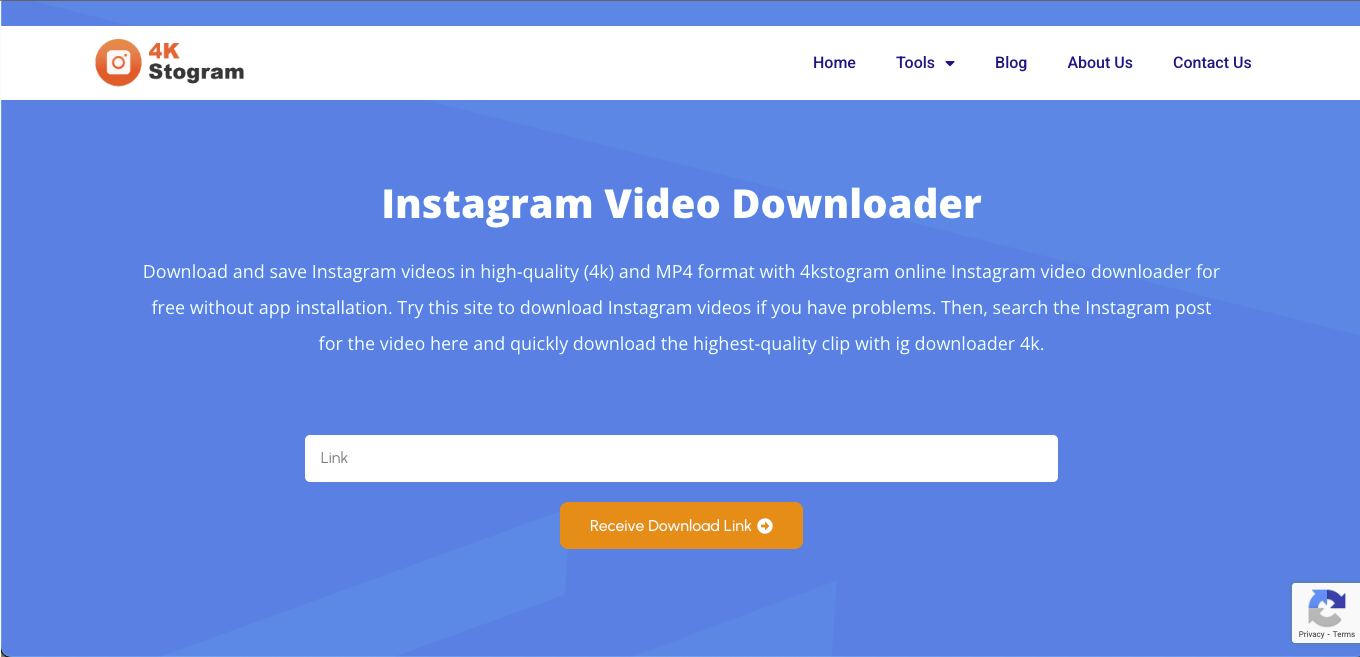
4KStogram is a lightweight, web-based downloader that lets you save Instagram clips in high-quality MP4 format without installing an app. It's one of the simplest platforms for downloading Instagram videos in 4K online, free of watermarks, with quick access from both desktop and mobile browsers. The interface is clean and requires only a video link, making it ideal for those who want an instant, hassle-free experience.
How to Use 4KStogram to Download an Instagram Video with No Watermark
By following this step-by-step guide, you can easily download an Instagram Video without a watermark:
Step 1: Copy the Instagram reel URL from your browser or app.
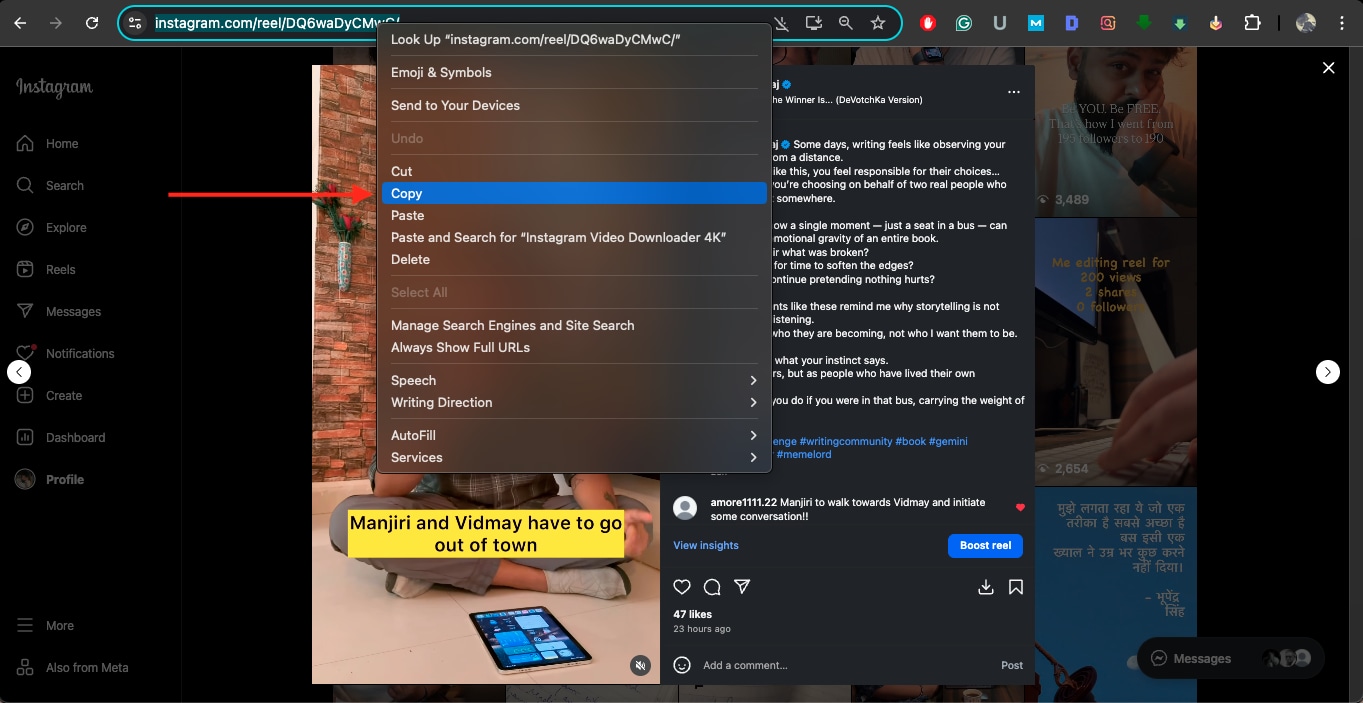
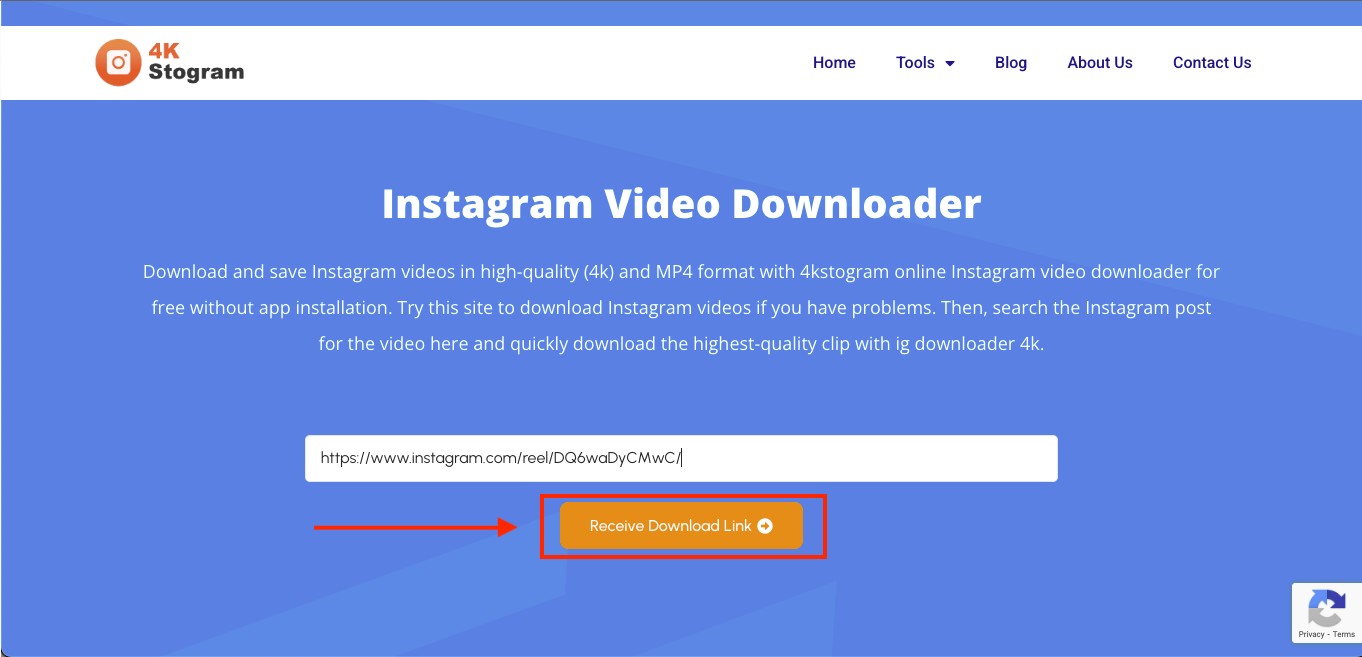
Step 2: Paste the link into the 4KStogram input bar and click "Receive Download Link."
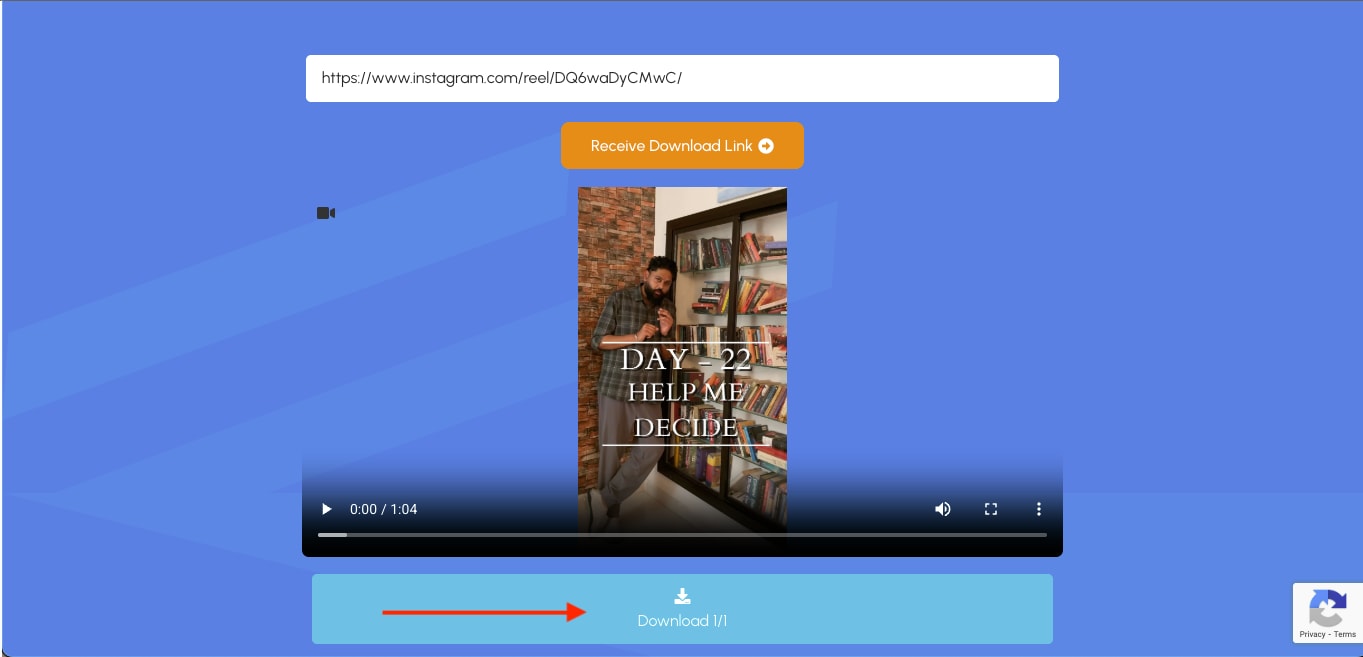
Step 3: Once the video is analyzed, click "Download" to save it to your device in MP4 format.
IGStories
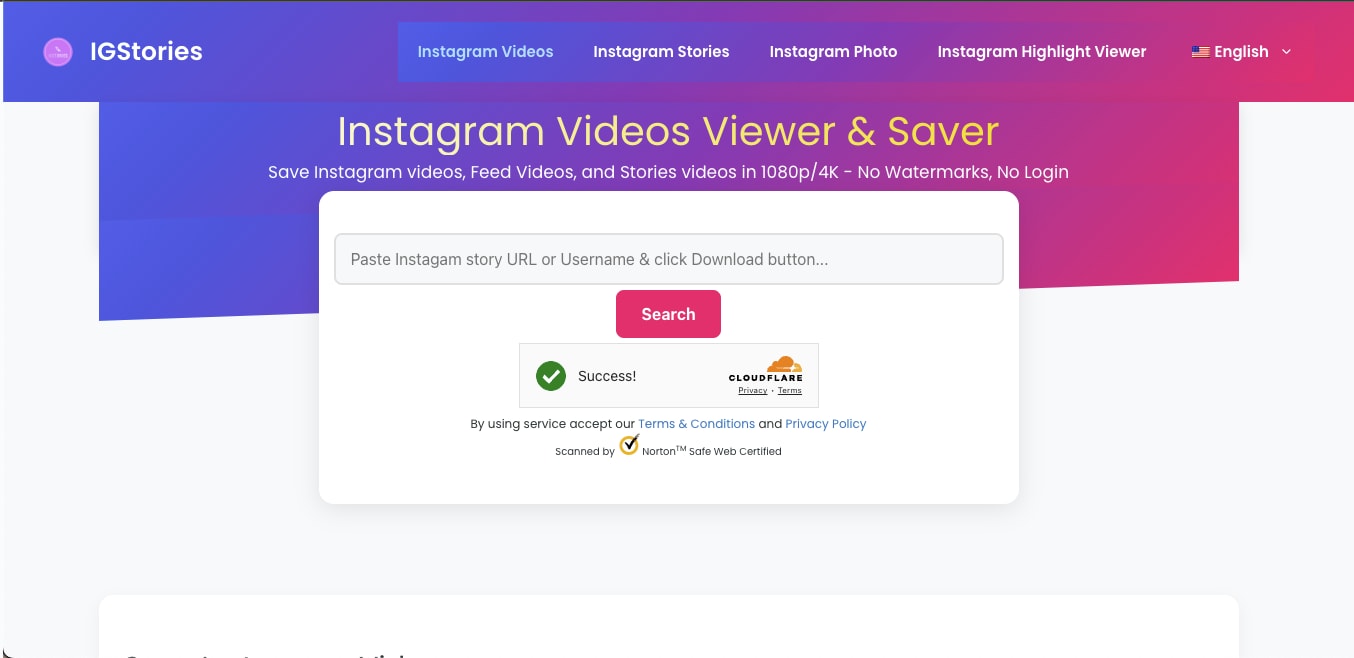
IGStories is another web-based platform that helps you save Instagram content in full resolution. It supports Reels, Stories, and feed videos in up to 4K quality and ensures completely private, safe downloads. With its simple interface and compatibility across iOS, Android, and desktop browsers, it's a convenient choice for those who want to download Instagram videos in 4K without watermarks.
How to Use IGStories to Download Instagram videos in 4K
Follow these steps to download Instagram videos in HD 4K:
Step 1: Copy the Instagram video or reel link from the post you wish to save.
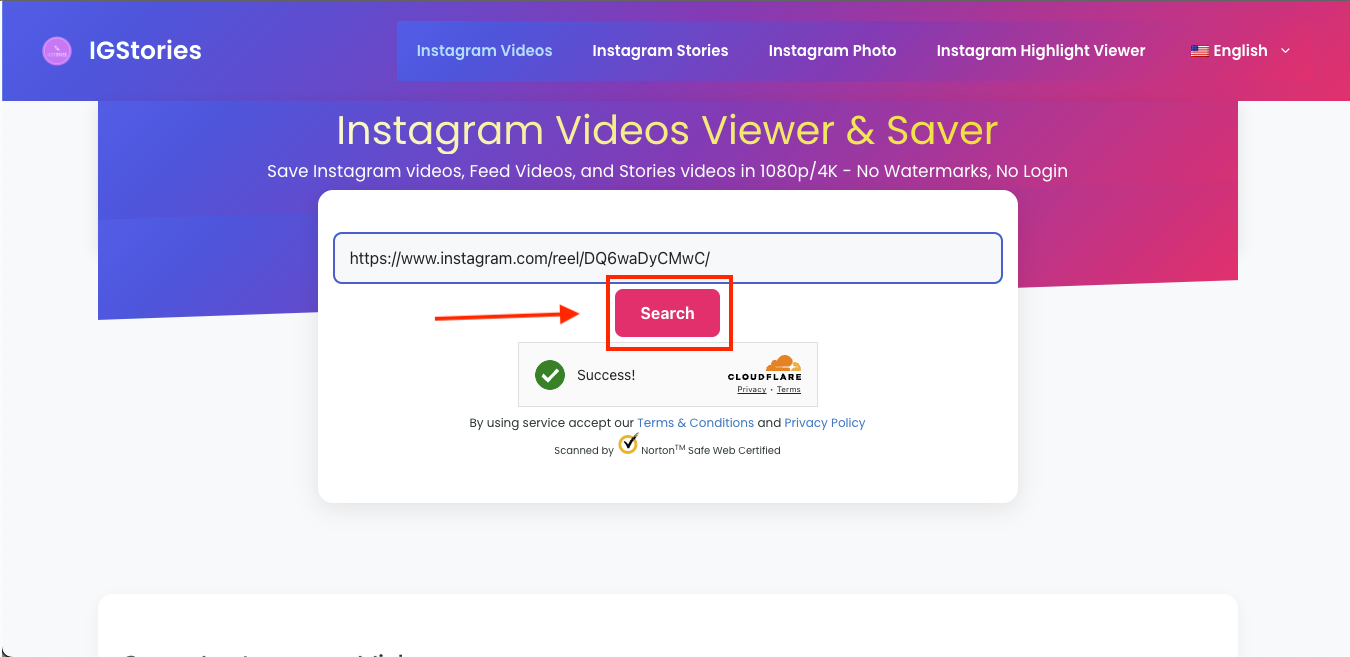
Step 2: Paste the link into the IGStories search bar and click on the "Search" button.
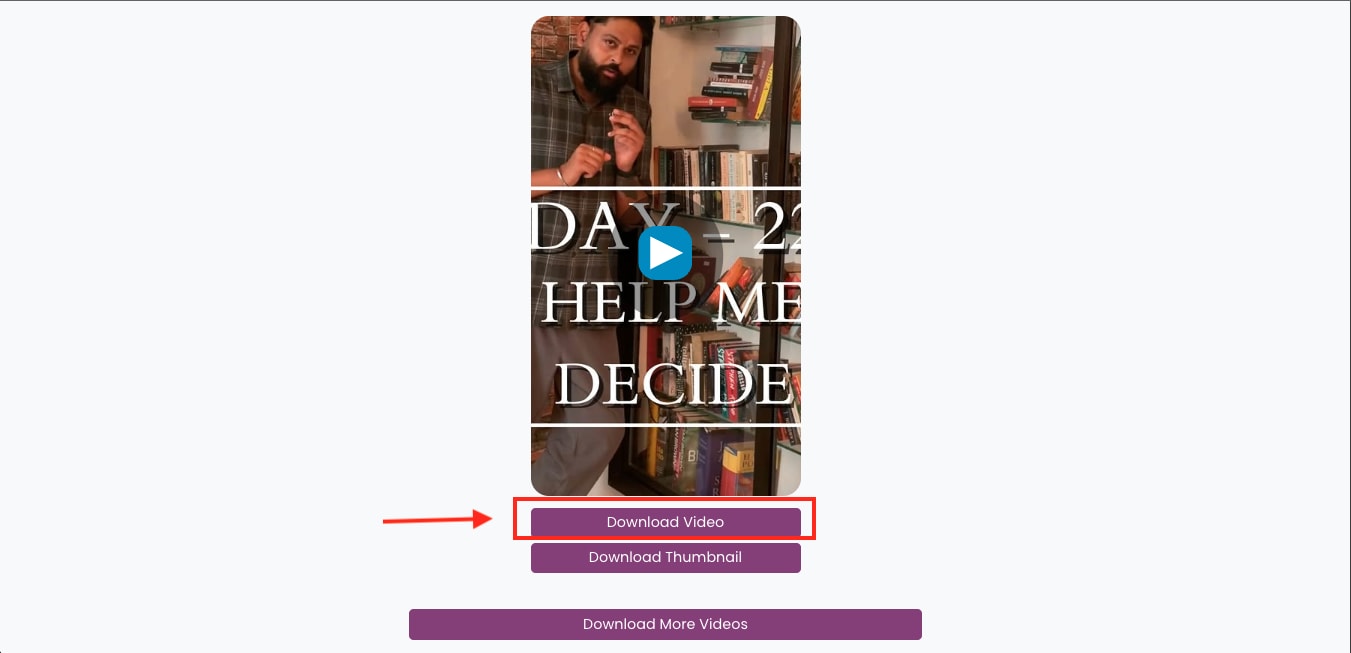
Step 3: Once the video has loaded, select "Download Video" to save it in 4K or another available resolution.
Method 3: Use a Browser Plugin for Quick IG Downloads
Another convenient way to save Instagram videos is by installing a browser plugin that integrates directly with your Instagram feed. These lightweight extensions make IG 4K video download as simple as clicking a button while scrolling. Though less advanced than full software tools, they are usually decent for quick, on-the-go downloads.
Turbo Downloader for Instagram
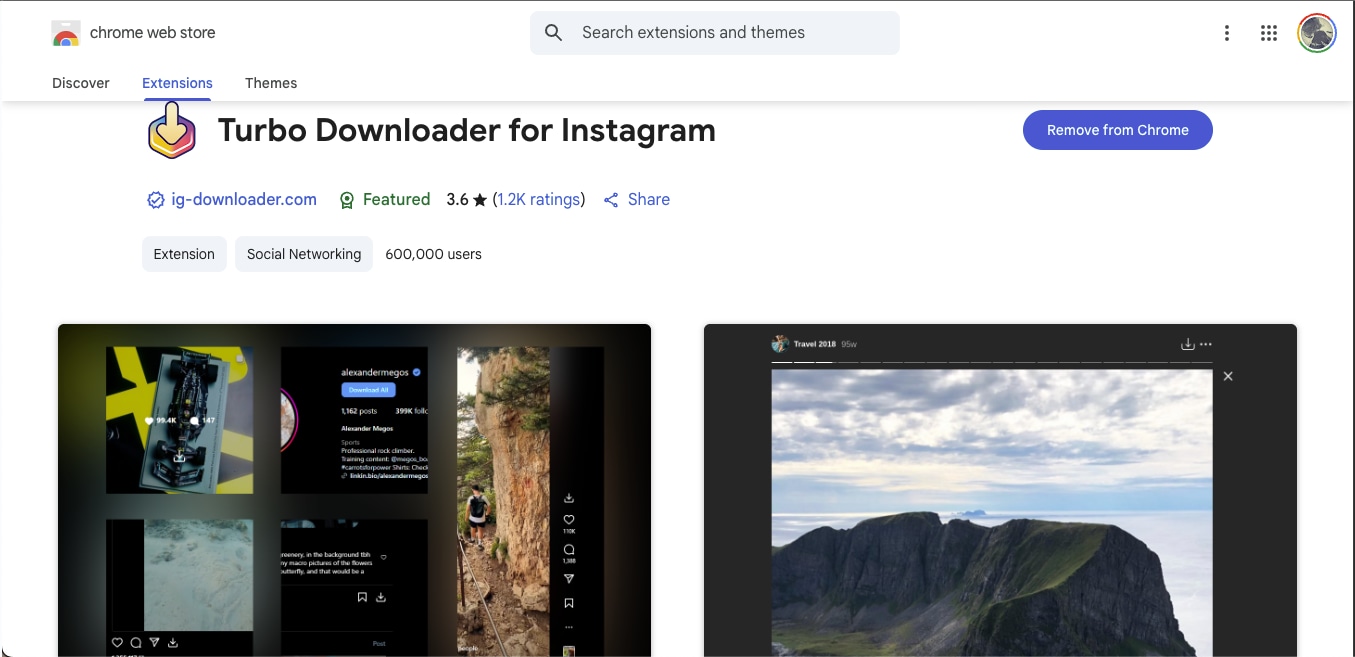
Unlike most Chrome extensions that stop working due to Instagram's frequent updates and API restrictions, Turbo Downloader for Instagram remains one of the few that still perform reliably. It integrates directly with your Instagram interface and adds a small download icon beneath posts, Reels, and Stories. This allows instant saving of individual videos or even full-profile downloads.
How to Download Instagram Videos in 4K Resolution Free Using an Extension
Here's how to download IG Reels in 4K UHD for free using a browser extension:
Step 1: Head to Google Chrome and install the extension by searching for it.
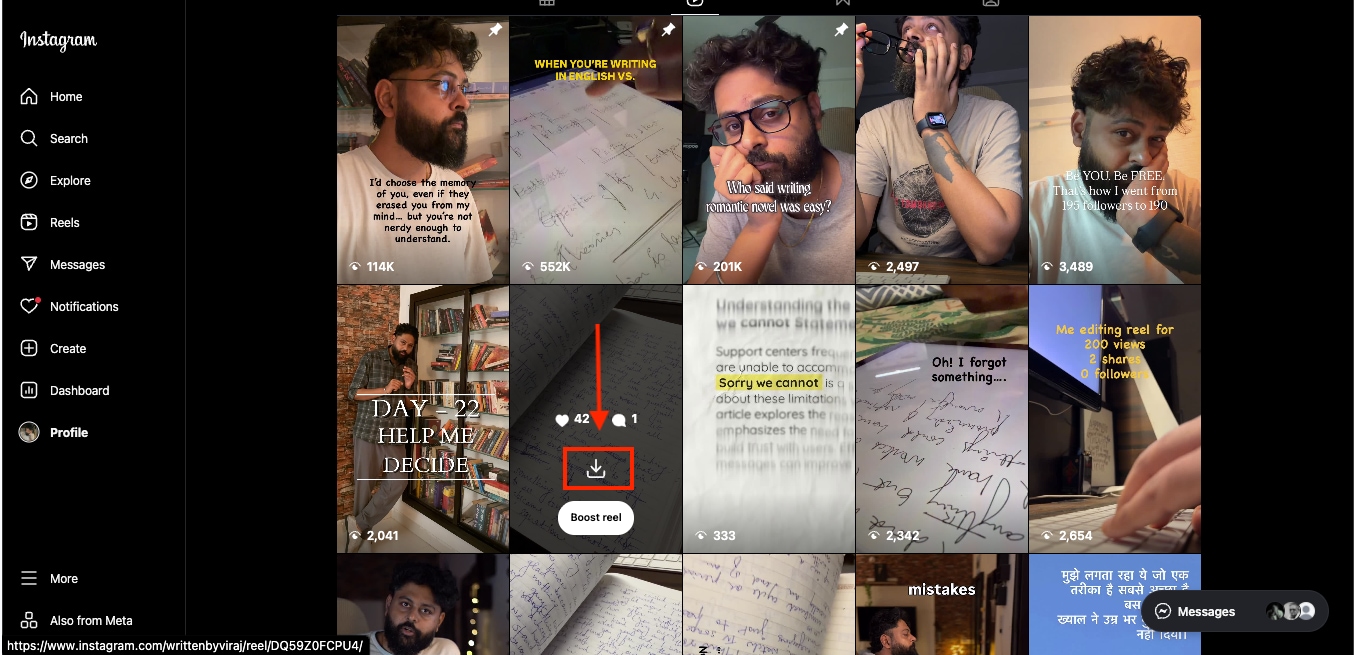
Step 2: Visit Instagram and reload your tabs once installation is complete. Now, hover over a Reel or post, then click the new download icon below it to start saving.
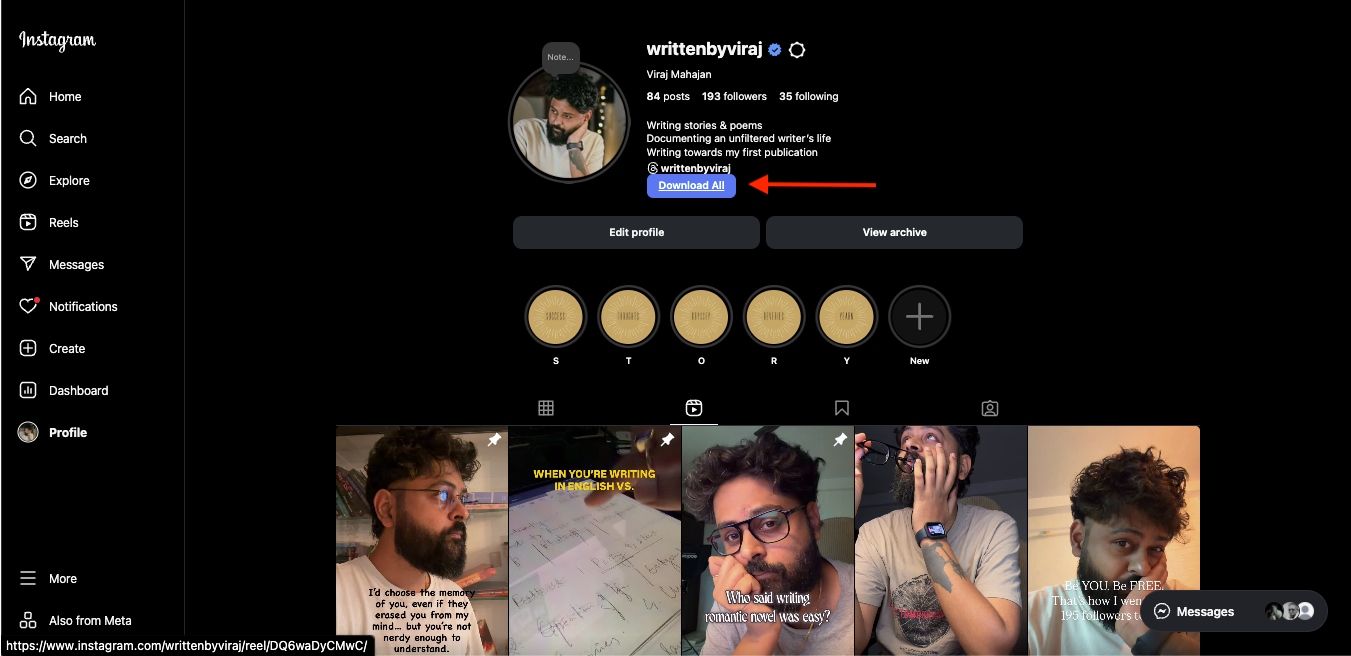
Step 3: To download an entire profile, go to the user's dashboard and click the "Download All" button to save all available posts and videos.
Part 4: Which Instagram video downloader works best for high-quality saves?
Many online tools claim to offer an Instagram video downloader HD 4K online with no watermark features, but only a few are genuinely safe and reliable. Since Instagram does not allow direct downloads, it's important to use platforms that protect your data and do not require personal logins. By choosing a safe Instagram video download 4K method, you can ensure that your content stays private while maintaining top-tier visual quality and security.
Here are some handy tips for secure, no-watermark Instagram downloads:
- Avoid Login-Based Tools: Always use trusted downloaders that never ask for your Instagram credentials. If a site or app requires a login, skip it immediately.
- Choose Platforms with HTTPS Encryption: Always check for the lock icon in the browser to confirm a secure, encrypted connection before downloading.
- Use Reliable Software Like UniConverter: Tools such as Wondershare UniConverter allow 4K downloads safely and watermark-free, with offline processing to ensure privacy.
- Check Permissions and Ads: Avoid downloaders that display excessive pop-ups or redirect you to third-party pages, which often compromise security.
- Download Only Public or Owned Content: Always respect copyright guidelines by saving videos that belong to you or are publicly available for reuse.
Part 5: Can you download private Instagram videos, and what rules should you know?
When downloading private Instagram videos in 4K, you need to be aware of Instagram's strict privacy and copyright policies. While tools technically allow saving private or restricted content, doing so without permission directly violates the platform's terms of service. Downloading responsibly means understanding what's legally and ethically acceptable before saving any media in 4K quality.
Here's what you should keep in mind:
- Private videos are protected by privacy settings
- Copyrighted material cannot be redistributed
- Consent is the deciding factor before attempting to download
- Third-party tools don't grant rights to private URLs
Disclaimer: The methods and tools discussed in this comprehensive article are meant strictly for educational purposes and personal backup use only. Always respect creators' rights and comply with Instagram's privacy guidelines.
Part 6: Troubleshooting Common 4K Instagram Video Download Issues
Even with a reliable 4K video downloader for Instagram, you may still face a few hurdles when saving content in high resolution. Factors such as upload quality, connection stability, and browser compatibility often affect results. Whether your Instagram video download link isn't generating properly or the output lacks sound, here are the most common issues and how to fix them.
No 4K Option Appears
Instagram compresses most uploads to 1080p, so true 4K might not be available if the original post was not uploaded in that resolution. Try using UniConverter's converter to upscale the 1080p video to a 4K video.
Download Fails or Audio Is Missing
If your download stops midway or plays without sound, clear your browser cache or switch to a desktop downloader like UniConverter for more stable performance. Also, verify that your internet speed is steady before retrying.
File Doesn't Play on Device
Some mobile players cannot process large 4K MP4 files. You can go ahead and convert the downloaded video using UniConverter into a more compatible format (like MOV or 1080p MP4) to ensure smooth playback.
Watermark or Overlay Appears Unexpectedly
Free online tools sometimes embed unwanted watermarks during processing. Always use verified, watermark-free tools like UniConverter for a clean final result.
Poor Visual Quality After Download
Low brightness, pixelation, or faded colors typically result from high compression during extraction. Use UniConverter's Video Enhancer to restore detail and sharpness, or re-download using a tool that supports full bitrate retention.
FAQs about Instagram Video Download 4K HD
Can I really download Instagram videos in 4K if they were uploaded in 1080p?
No, you cannot really download Instagram videos in 4K if they were uploaded in a lower quality, like 1080p. Instagram compresses all uploads to around 1080p, so what you download reflects the platform's quality limit. However, tools like Wondershare UniConverter can upscale footage, letting you experience near-4K clarity even if the original post wasn't a true 4K.
How to download Instagram videos in 4K on iPhone without a watermark?
You can use a no-watermark Instagram download tool, such as UniConverter's web converter or desktop app. Simply copy the Instagram video link, paste it into the downloader, and select 4K MP4 as the output format. Try avoiding third-party mobile apps that request account logins, as they are often unsafe and unreliable.
Is it safe to use free online Instagram video downloaders?
Yes, it is generally safe to use free online Instagram video downloaders, but it depends on the source. A safe Instagram video downloader 4K should never ask for login credentials or redirect to suspicious pages. Choose tools with HTTPS encryption and transparent privacy policies, or rely on trusted software like UniConverter that processes everything locally without storing your data.
Why is my downloaded video muted or cropped?
On Instagram, muting or cropping happens due to platform compression or mismatched aspect ratios during download. To fix this, use UniConverter's editing features to restore sound, adjust frame size, or reconvert the file into a consistent 4K format.
Conclusion
Saving your favorite Instagram video in ultra-high resolution ensures every frame remains as sharp and vibrant as it appeared online. With an Instagram Video Downloader 4K, you can preserve clarity, repurpose videos for creative projects, and store them securely for offline access. Using trusted software like Wondershare UniConverter adds another layer of reliability, offering watermark-free downloads, built-in compression, and AI-powered enhancements for perfect playback quality.

