


You have probably received a hilarious clip or an important reference video in your X (formerly Twitter) DMs and tried to save it, only to realize there is no direct download option. The platform makes sharing effortless, but gives you no easy way to keep the videos that matter. That’s where an X/Twitter DM downloader becomes useful, which would help you save videos shared in private conversations without any trouble.
In this comprehensive guide, you will learn how to use an X/Twitter DM downloader safely and effectively. Additionally, we will provide a detailed understanding of why you cannot directly download videos from X/Twitter DMs and how desktop software like Wondershare UniConverter helps you download and organize your DM videos with clarity and security.

Best Twitter DM Video Downloader
In this article
- Part 1: Why You Can’t Directly Download Videos from X/Twitter DMs?
- Part 2: How to Download Videos from X/Twitter DMs (Full Guide for PC & Mobile)?
- Part 3: Best X/Twitter DM Video Downloader Tools (2025 Review)
- Part 4: Legal, Privacy, and Security Guidelines for X/Twitter DM Downloads
- FAQs About Twitter DM Video Download
Part 1: Why You Can’t Directly Download Videos from X/Twitter DMs?
The reason you cannot download videos directly from X/Twitter DMs is that the platform doesn’t provide a native save or export option for private media. This restriction is intentional, designed to protect user privacy and prevent misuse of shared content.
Why There’s No Built-In Download Option in X?
X doesn’t include a native download button in DMs due to strict privacy rules and the platform's control over shared media. As stated above, every video sent through private messages is encrypted, which means that it’s viewable only within the app and not stored on a public server that users can access.
Platform restrictions that prevent downloads:
- Privacy Encryption: X encrypts all media in DMs, so only the sender and receiver can access it. Even temporary download links are not generated.
- No Public URLs: Unlike public tweets, videos shared in DMs don’t have publicly accessible links, keeping them locked within the platform.
- Copyright Protection: This restriction helps prevent users from saving and reposting videos without the original sender's or creator's permission.
- Closed Ecosystem: X operates within a self-contained structure that limits third-party apps from pulling data directly from private messages.
- Data Compliance: These policies comply with international privacy laws, such as GDPR, ensuring that personal communications and shared content remain confidential.
What You Can and Can’t Do with Media in X/Twitter DMs?
When you try to download a video from Twitter DMs, it’s important to understand how the platform handles shared media. Every photo, clip, or GIF sent through Direct Messages is hosted on X’s private servers rather than your device. This setup keeps chats secure but also limits what you can do with the content once it’s shared.
Videos sent in DMs stream directly from X’s servers, which simply means that you can view or forward them, but cannot save or transfer them elsewhere without using an external tool. Here’s what X allows and restricts inside DMs:
- As a registered user, you can send and watch videos up to the platform’s file-size limit.
- You can even share the same video with another user within the DM thread.
- However, you cannot download or export the file directly to your device.
- X/Twitter also limits you to accessing the video link’s original URL or metadata.
Why Do Users Look for External “Twitter DM Downloader” Tools?
Many users turn to a Twitter DM downloader to save privately shared videos on X for future use. The platform’s restrictions often make it difficult to save valuable clips, especially when they are part of important conversations, creative exchanges, or client approvals. External downloaders simplify this process by offering safe ways to extract and store media without compromising quality or privacy.
Common use cases where users rely on these tools:
- Content Creators and Editors: Content creators often receive raw footage, teaser clips, or collaborative ideas through DMs that need to be downloaded for editing and reuse.
- Marketing and Brand Teams: Marketing teams often look for the best Twitter DM video downloader to archive campaign materials or influencer submissions that arrive via private messages.
- Researchers and Journalists: Professionals like journalists can save reference videos or eyewitness clips sent privately for documentation and fact-checking.
- Educators and Professionals: Other international professionals can also download informative or instructional clips shared in group DMs for presentations or internal training.
Part 2: How to Download Videos from X/Twitter DMs (Full Guide for PC & Mobile)?
If you are trying to figure out the best Twitter DM video download methods, you should understand that the process depends on your device and preference. Since we clearly mentioned above that X doesn’t allow saving videos directly from private chats, you can use alternative methods to keep your shared clips.
Use an Online X/Twitter DM Downloader Tool
An X DM downloader is an online, web-based solution for quick downloads that doesn't require software installation. These tools let you paste a valid media link and instantly extract the video from your DMs, making them ideal for one-time downloads or lightweight workflows.
TwiDropper
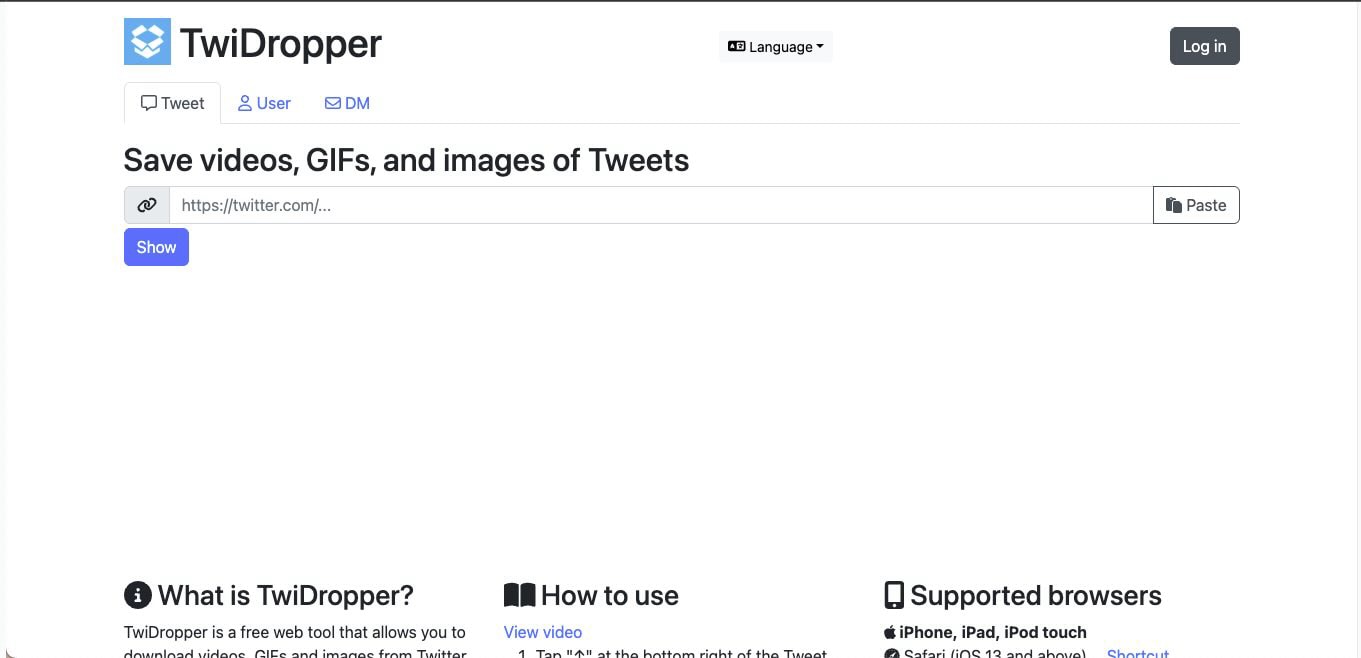
TwiDropper is one of the most reliable options for those who want an X DM downloader online without installing any software. It works directly in your browser, allowing you to log in securely with your Twitter account and download videos, GIFs, or images shared in your Direct Messages. The tool’s interface is clean and straightforward, which further makes it useful for quick saves on desktop or mobile.
How to Use TwiDropper to Download X DMs in Your System
Follow these steps to Twitter DM video download easily:
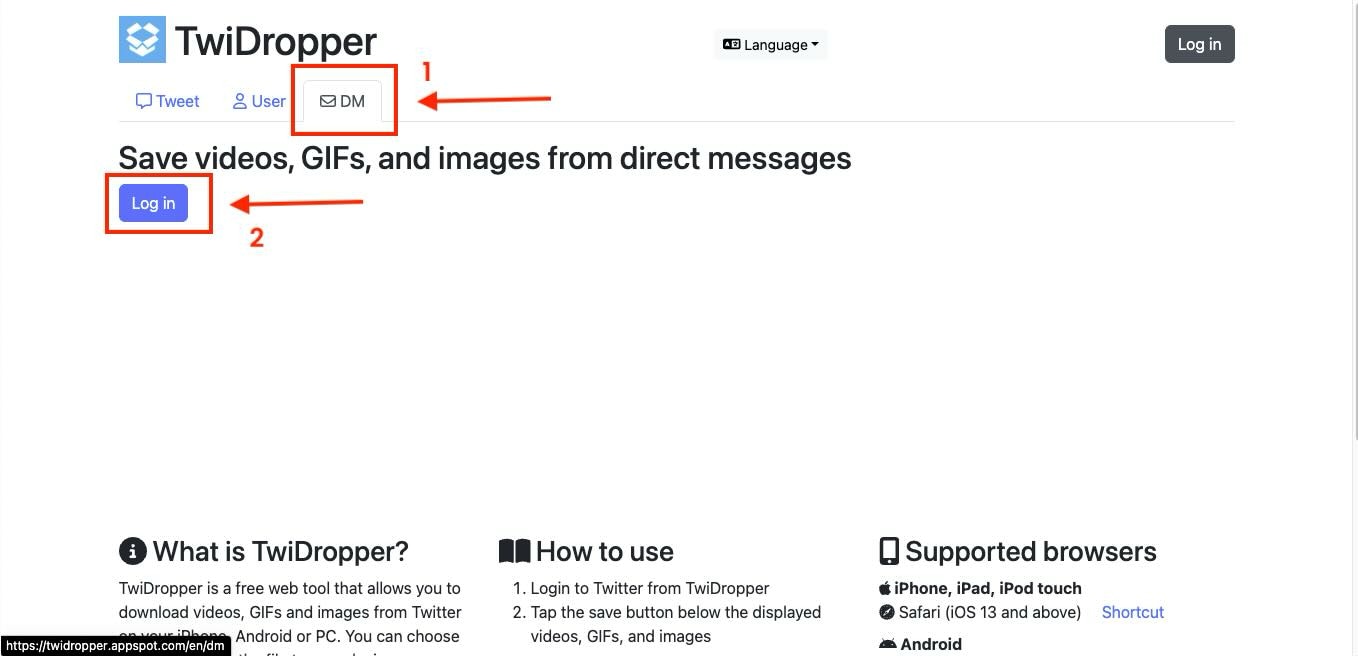
Step 1: Open TwiDropper in your preferred browser and click the DM tab next to the User option. From here, you can click on Log in.
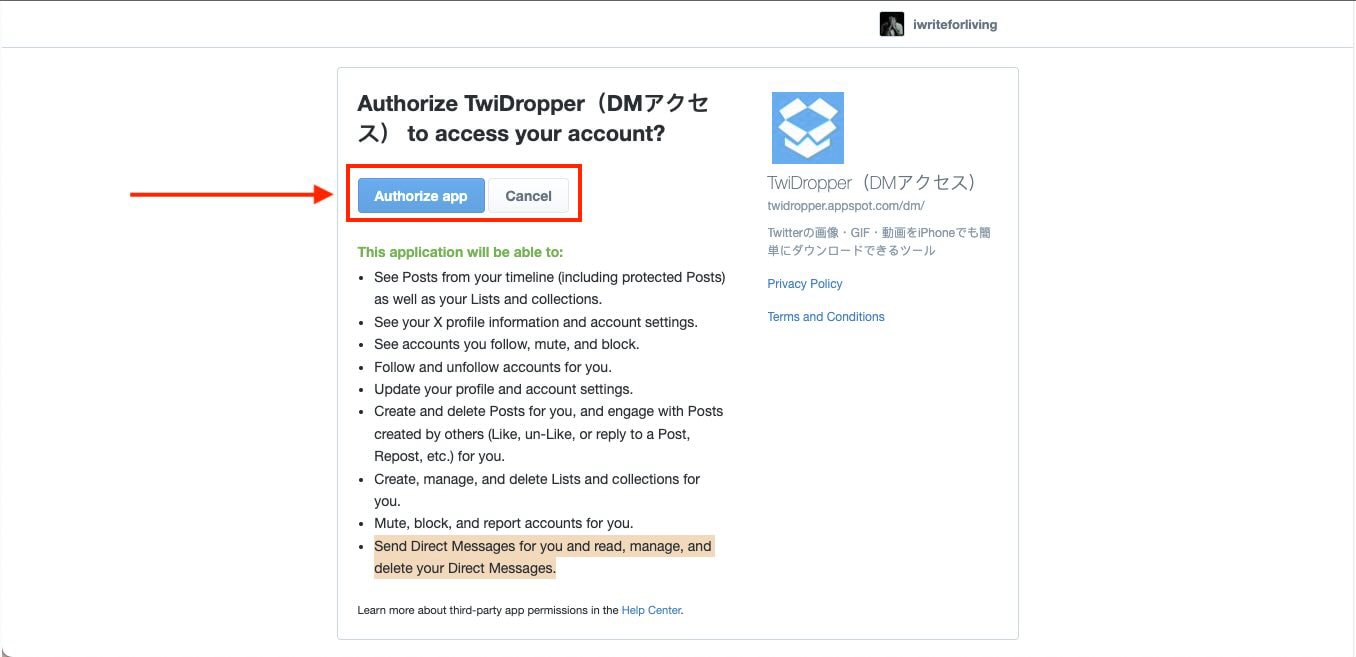
Step 2: Here, you need to authorize the app to access your X/Twitter account so it can send, read, manage, and delete Direct Messages.
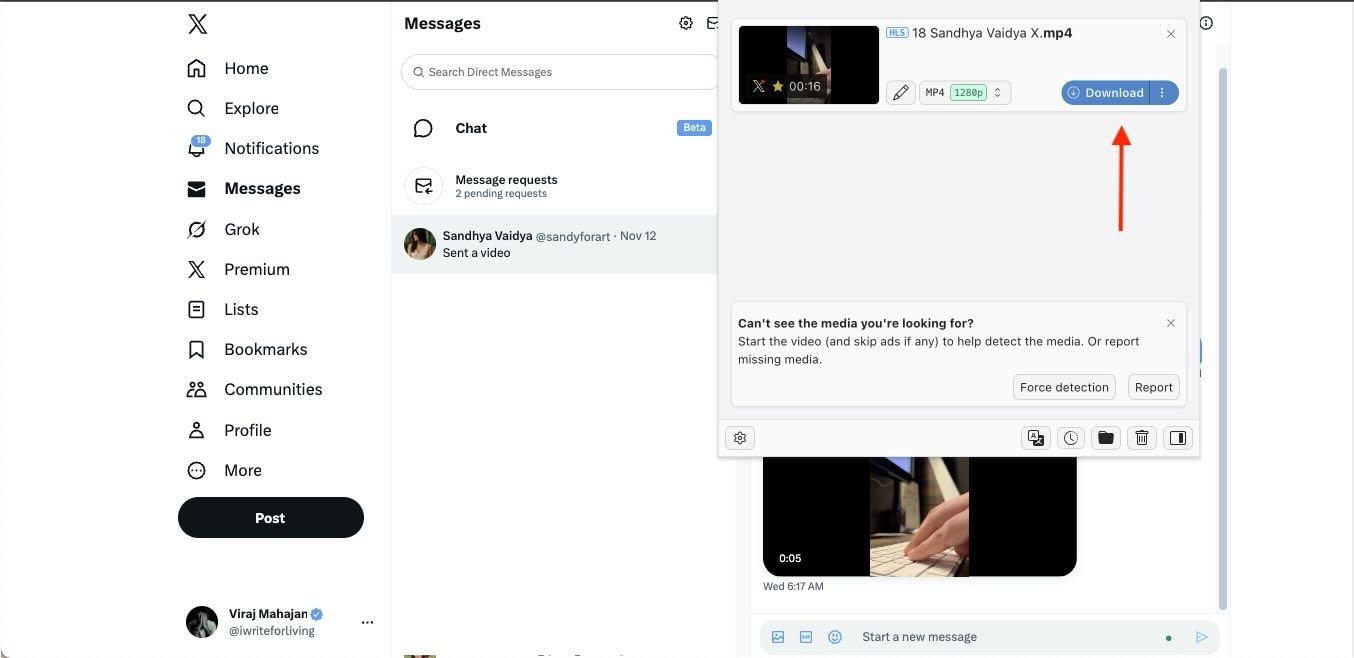
Step 3: Once the authorization is complete, return to TwiDropper and select the DM video you want to save. You can further choose the quality (HD, SD, or LD) and click Download.
Use a Browser Extension to Download Video From Twitter DMs
A Twitter DM downloader extension offers a more integrated experience for desktop users who frequently save media from X. If you use browsers like Google Chrome or Edge, then you will find that these extensions add direct download options within your Twitter interface. They are generally useful for those who manage multiple chats or handle regular DM-based exchanges, as they eliminate repetitive copy-paste steps.
Video DownloadHelper
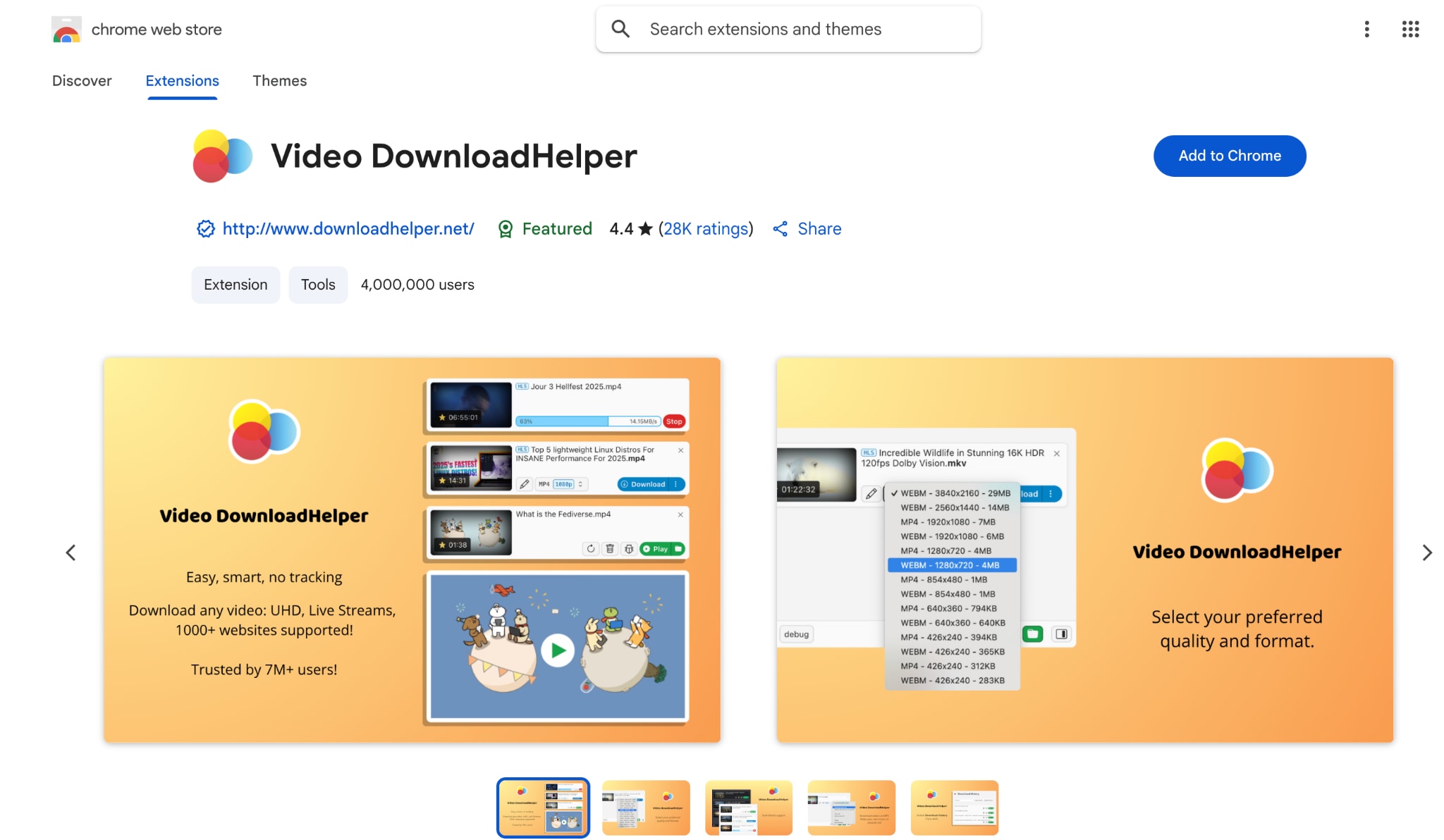
Video DownloadHelper is a powerful option for anyone who prefers a Twitter DM downloader extension over an online service. It works directly inside your browser and detects videos playing on the page, including clips inside your X Direct Messages. Once the extension is installed, it automatically fetches available media and lets you save it in different resolutions.
How to use Video DownloadHelper to Download Video From Twitter DMs
Here is how you can download Twitter DM videos:
Step 1: Install the Video DownloadHelper extension from the Chrome Web Store or Firefox Add-ons page.
Step 2: Open your Twitter account and navigate to the DM containing the video you want to save.
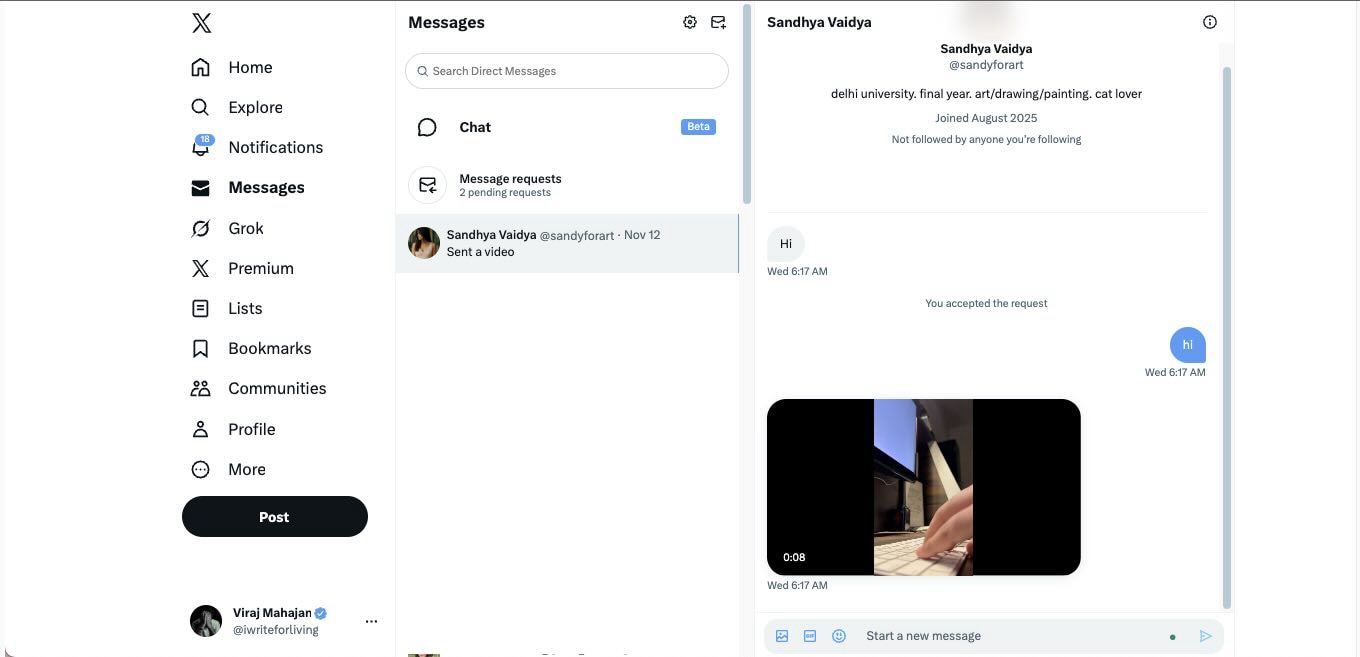
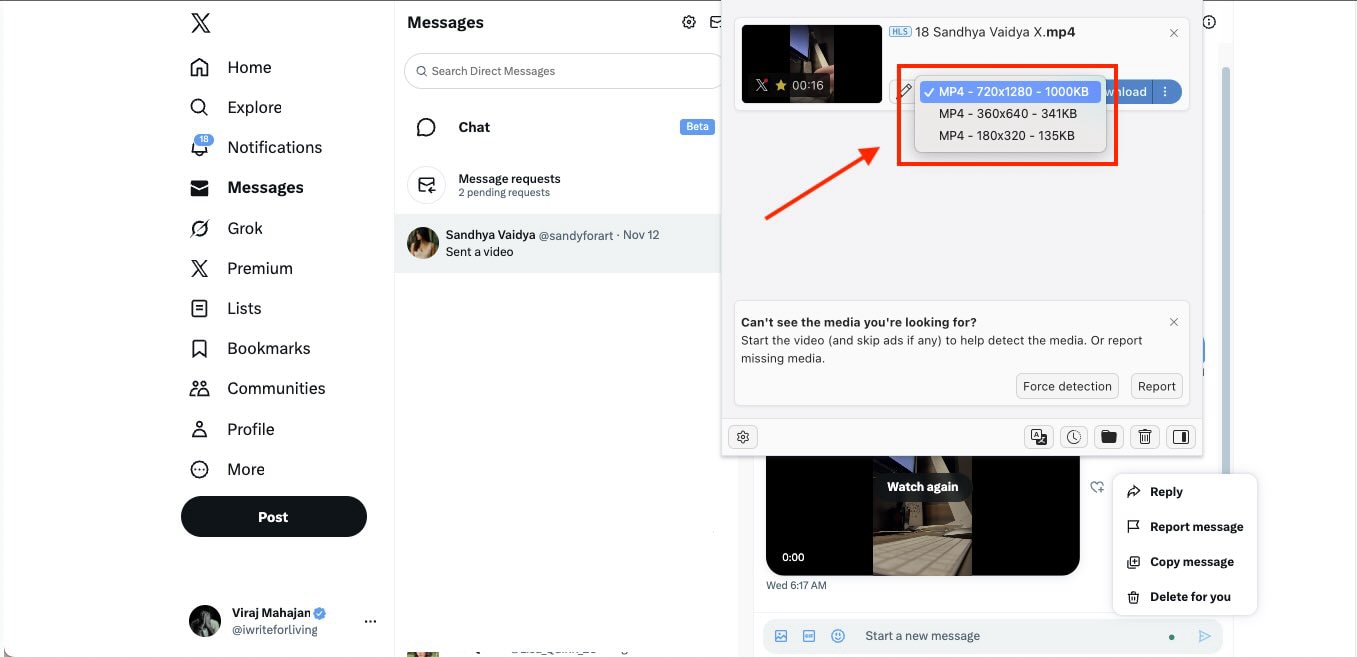
Step 3: Play the video for a few seconds, then click the DownloadHelper extension icon. It will automatically detect the file.
Step 4: Choose your preferred resolution and select the download option to save the video locally.
How to Download Twitter DM Videos Manually with UniConverter
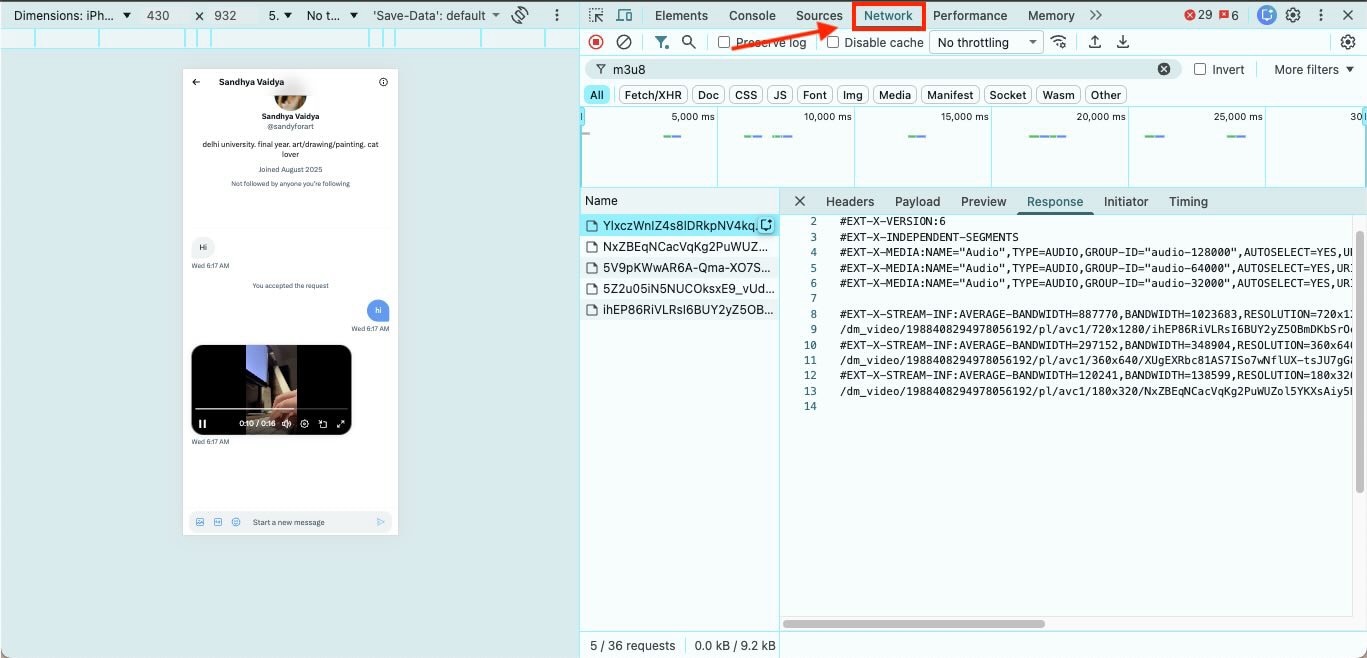
For users who want complete control over quality and file handling, learning how to download a Twitter DM video manually can be a powerful method. This approach is a bit technical because it requires fetching the video URL from your browser through Chrome’s Developer Tools.
It gives you a clean, direct link to the media, and when paired with UniConverter, you can download the file in your preferred resolution with excellent stability. This method suits users who want precision and are comfortable navigating a few extra steps.
(Disclaimer: Our tool is intended for personal use only. Users are solely responsible for using this tool to save videos or audios, including compliance with platform's terms of service and copyright laws and regulations. We are not liable for any consequences resulting from users' violation of any laws or infringement of others' rights.)
Best Twitter DM Video Downloader
How to Use This Developer Tool for Twitter DMs Downloading
Here’s how you can use developer tools to download Twitter DMs:
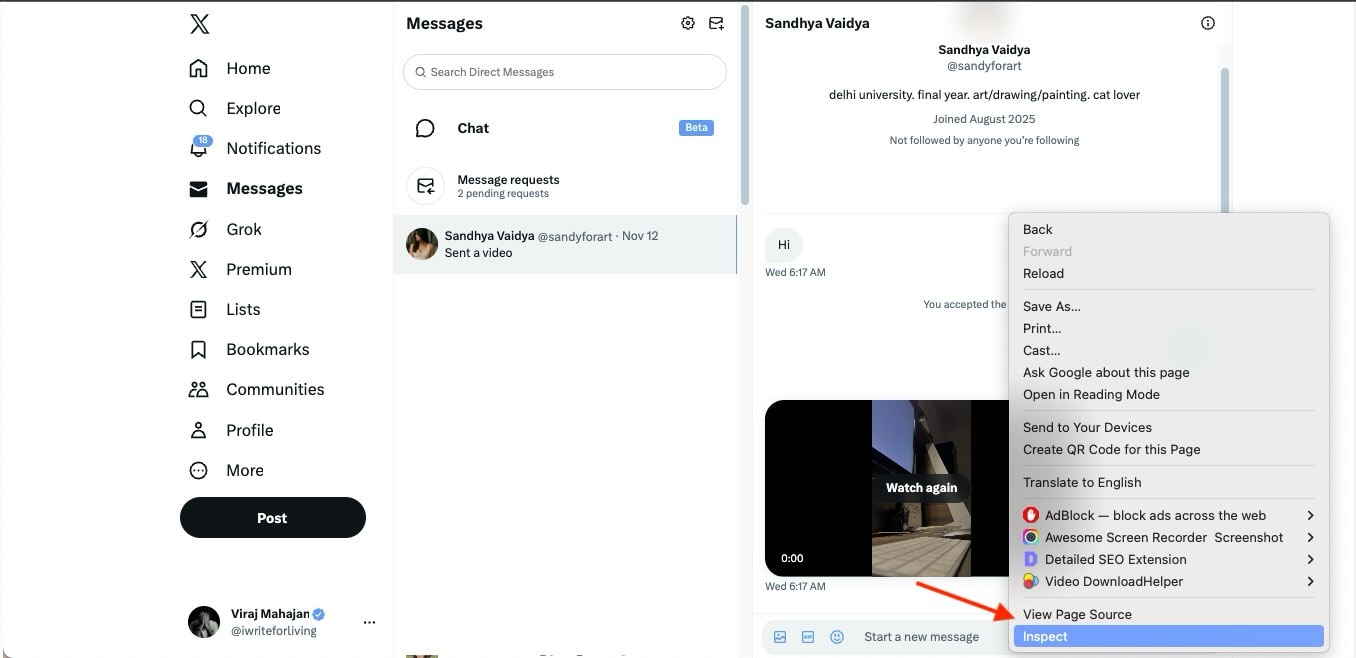
Step 2: In Developer Tools, click the Network tab, then filter results by typing m3u8 or selecting the Media option to reveal streaming files.
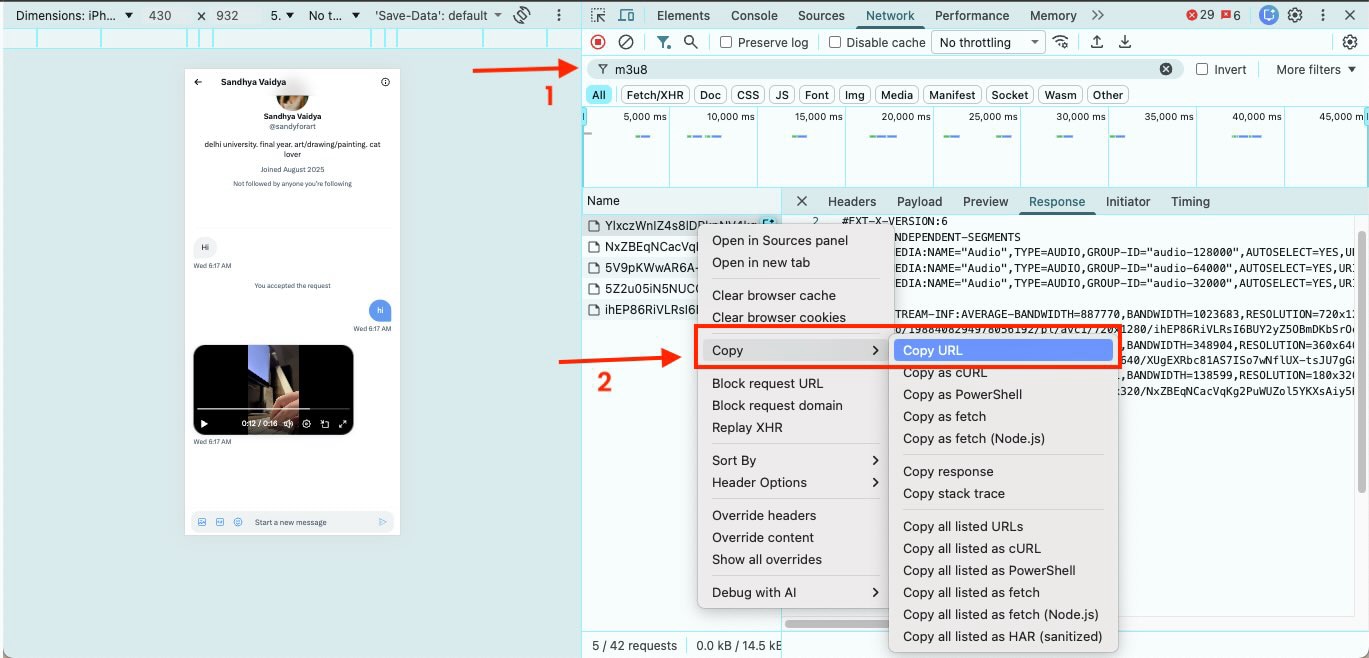
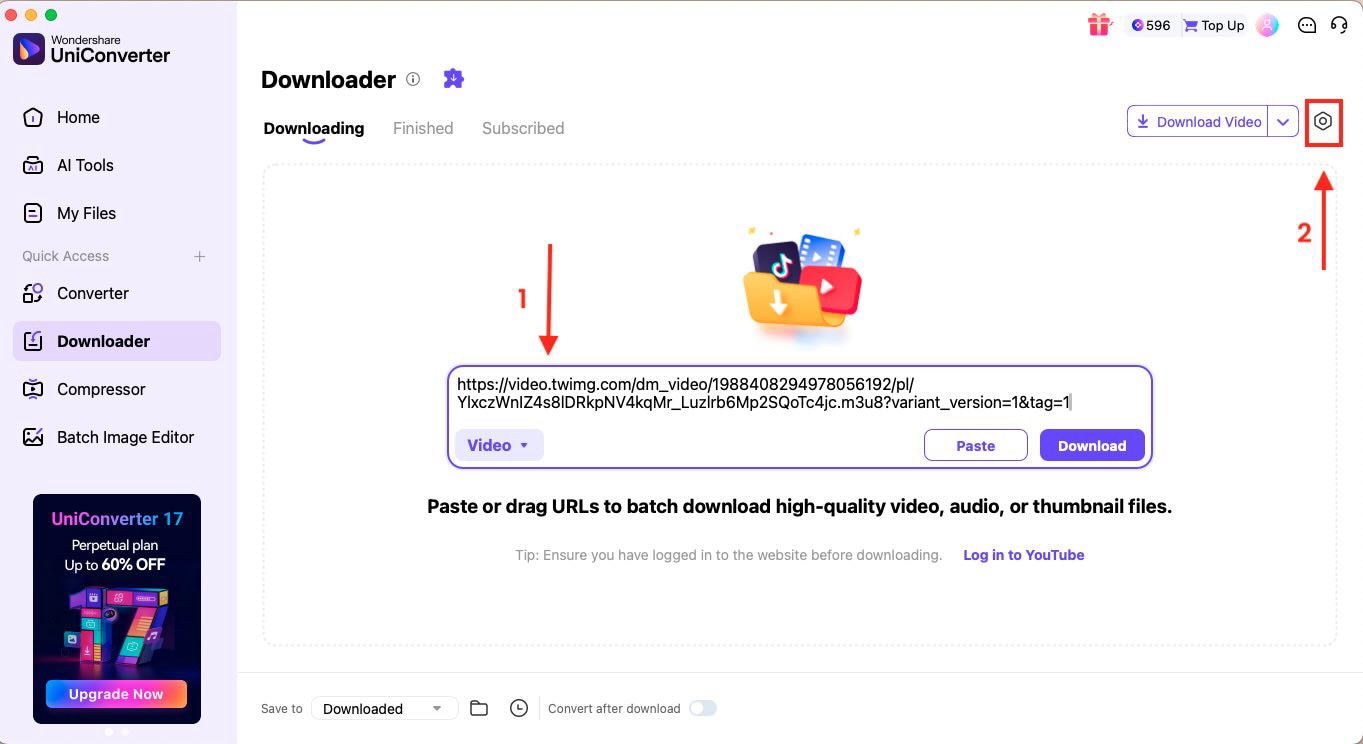
Step 4: Open Wondershare UniConverter and go to the Downloader section. Paste the copied URL, then click the gear icon to open Preferences and choose your desired video quality or format.
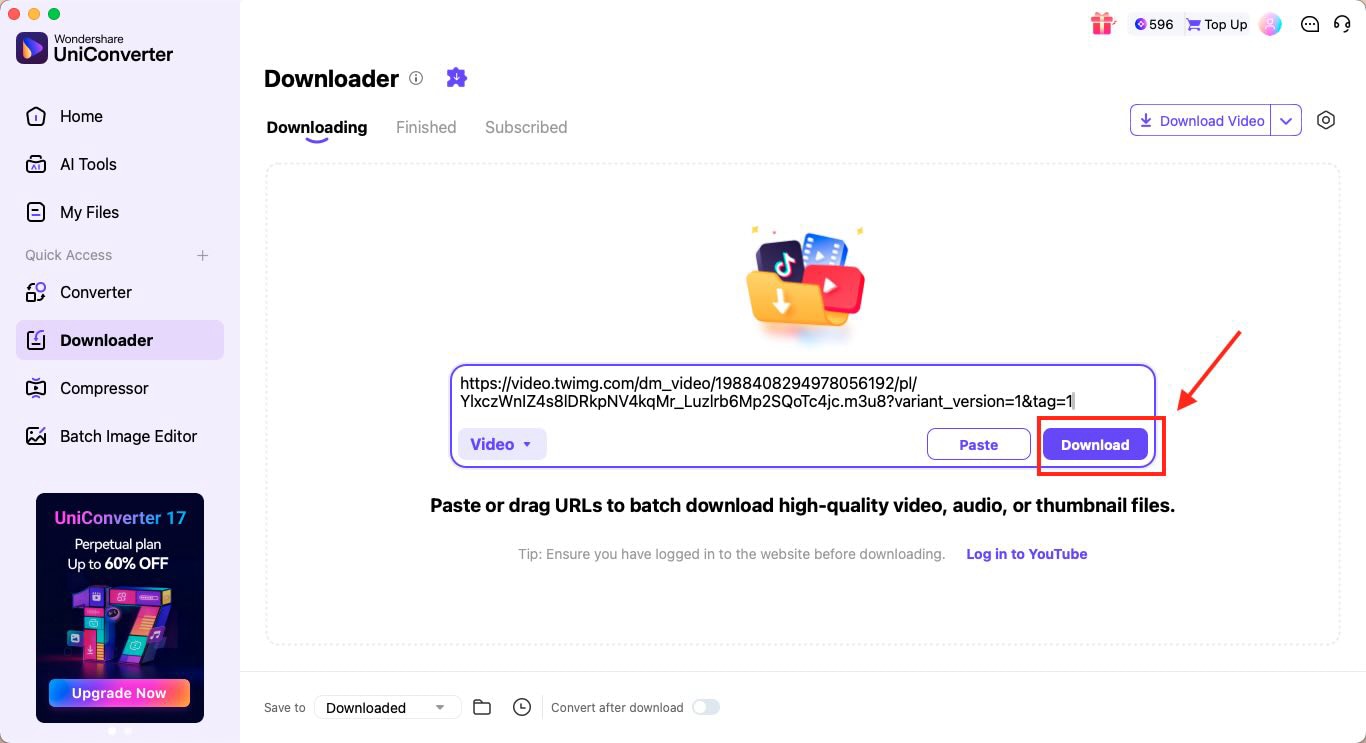
Step 5: Once everything is set, click Download to save the Twitter DM video to your device.
Use Screen Recording to Download X/Twitter DMs on Android & iPhone
If you want to download Twitter DM videos on mobile without using third-party tools, screen recording is the simplest workaround. Both iPhone and Android devices have built-in recorders that capture whatever is playing on your screen, including videos shared inside your X Direct Messages. This approach works ideally great for private or disappearing videos where download links are not accessible.
How to Save Videos From X DM with iPhone
Here’s how to save a video from X DM on your iPhone:
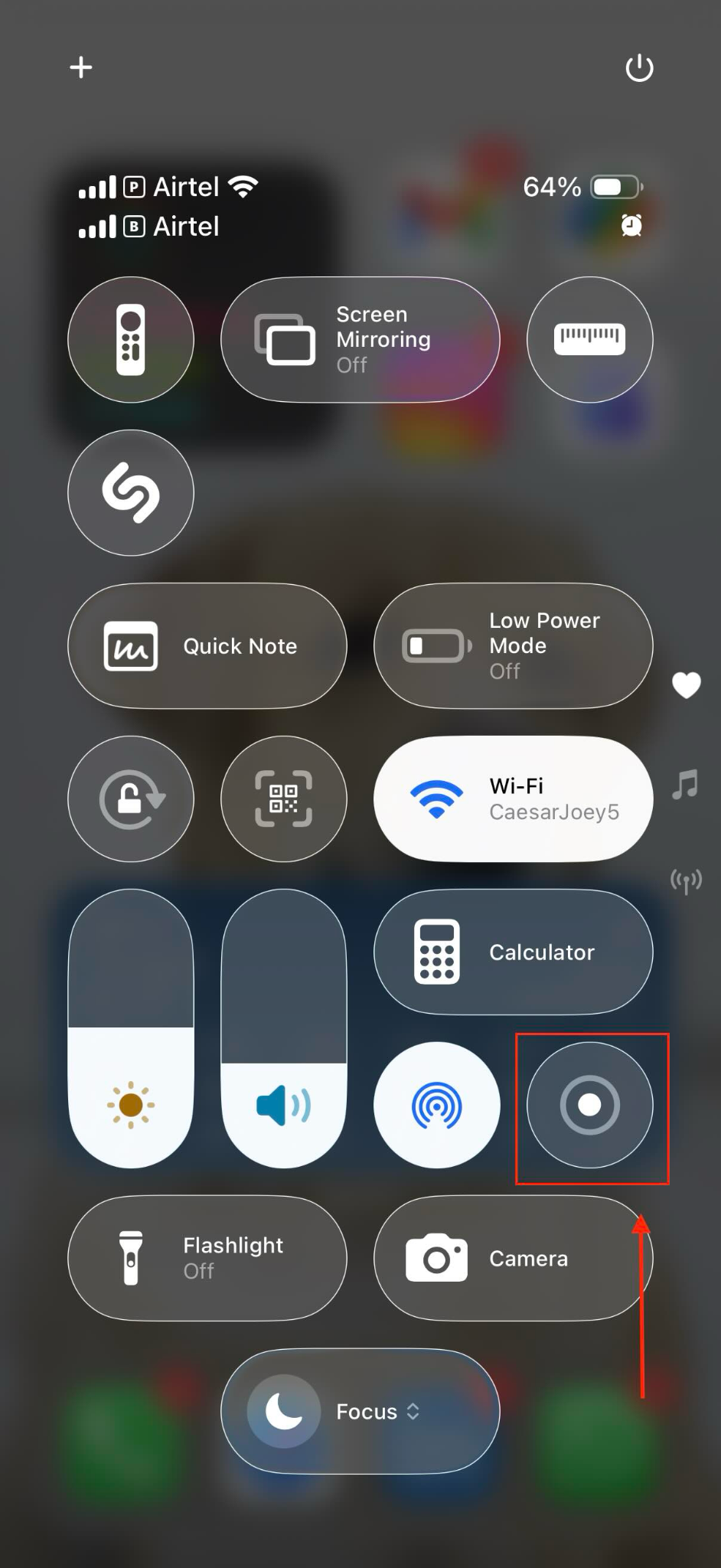
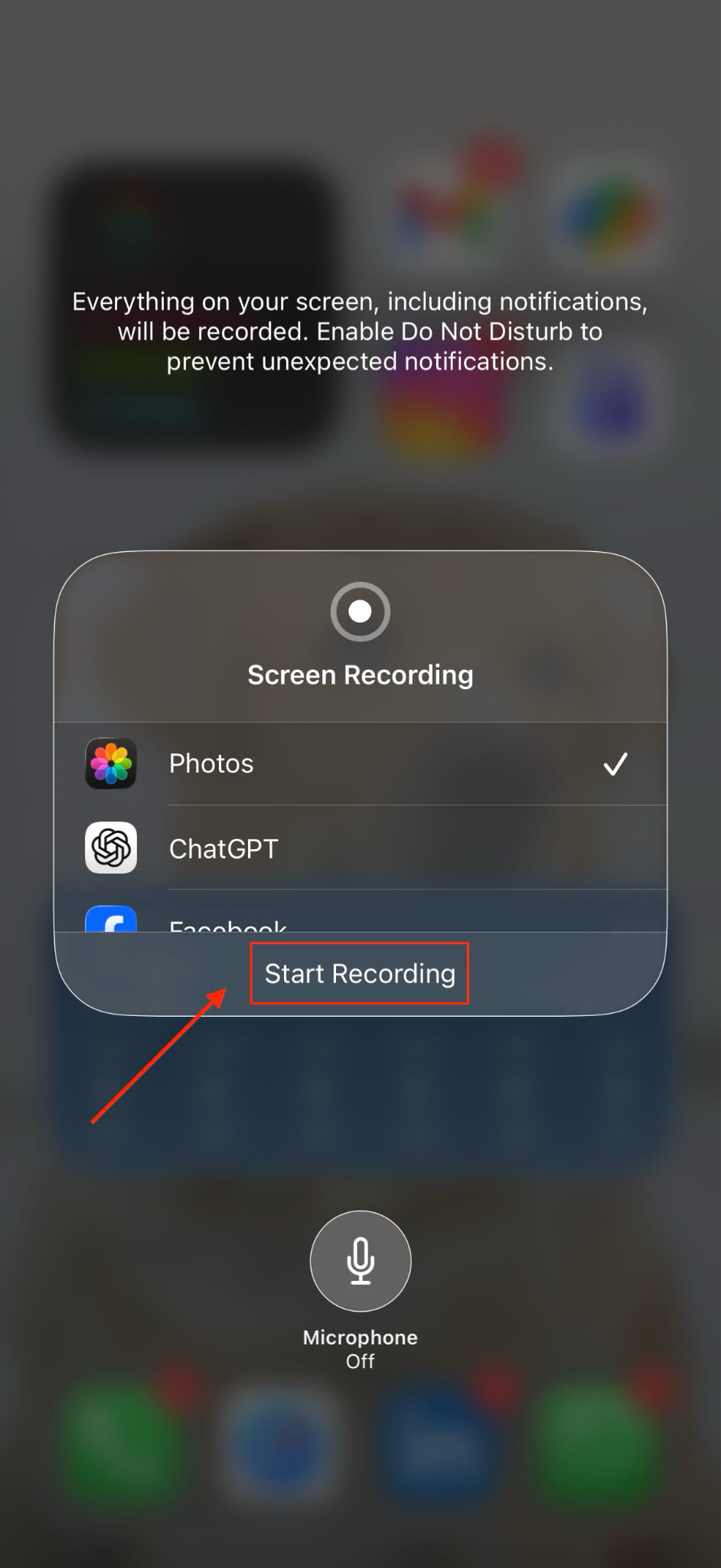
Step 1: Swipe down from the top-right corner of your screen to open the Control Center and tap the Record button to start screen recording.
Step 2: Head to your Twitter account and plan the DM video you want to save. While the screen recording is still active, let the video run fully.
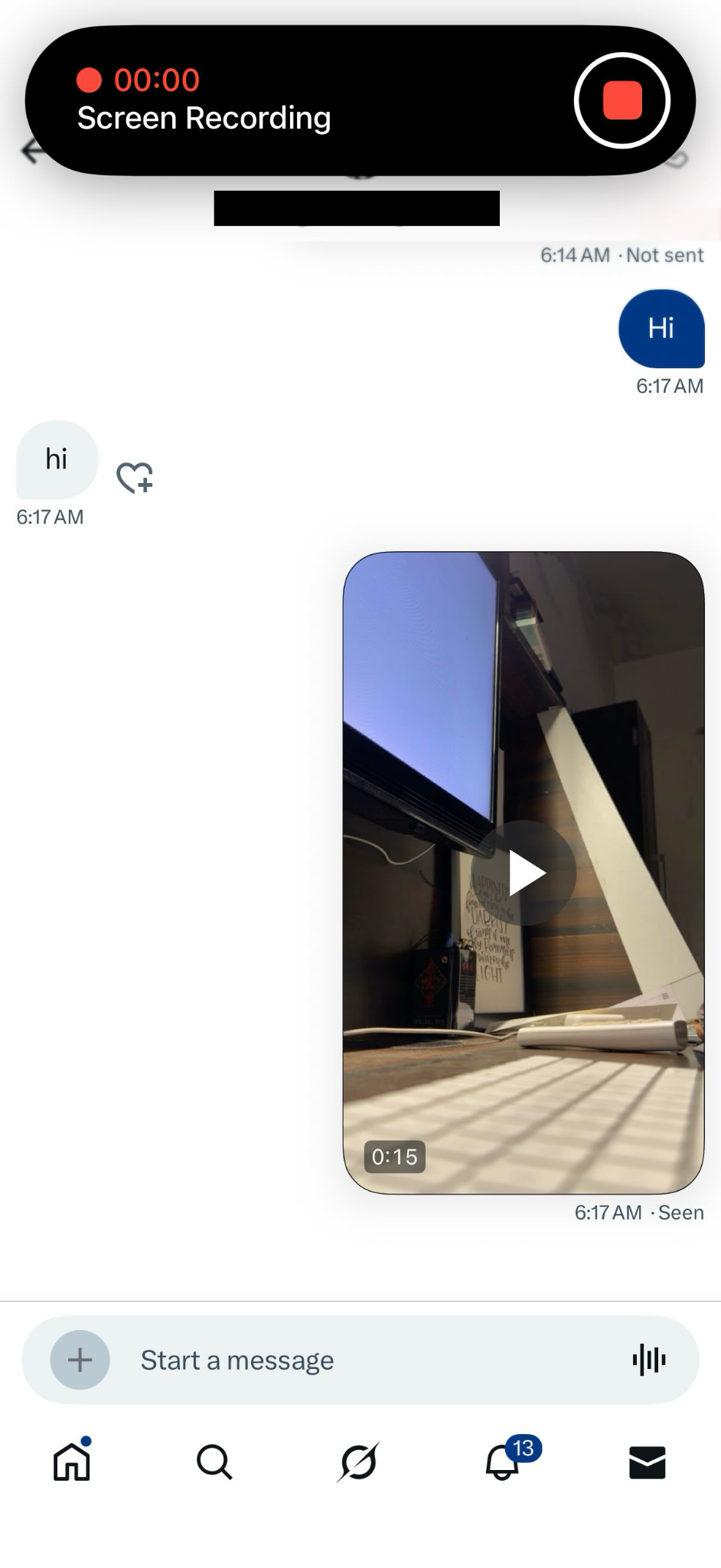
Step 3: Once the video is complete, tap the red recording bar at the top of the screen, then tap Stop to finish.
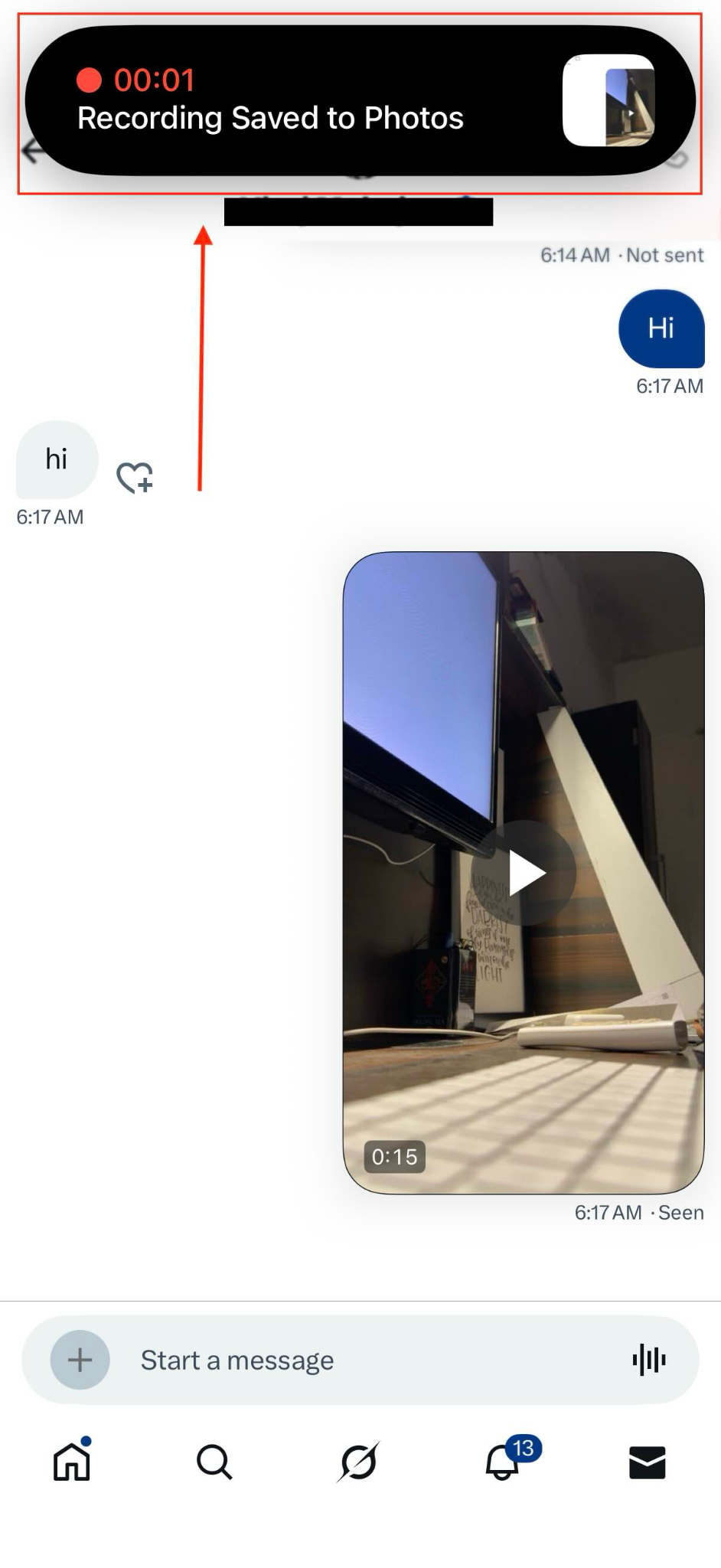
Step 4: The recording will appear in your Photos app, where you can change the resolution and trim the start and end parts that show you downloading the video using screen recording.
Android Screen Recording
Android phones follow the same basic flow as mentioned here for the iPhone devices. You will need to swipe down from the top of the screen to open Quick Settings, then tap Screen Recording. Once the Twitter video is played to the fullest, you can stop the recording.
Ask the Sender to Share X DM Video Directly
When all else fails, the most reliable way to handle a private Twitter DM video download is by simply asking the sender to share the video file directly. Many private or expired clips are restricted by X’s servers, which sometimes makes them impossible to download externally. You can go ahead and ask the sender to share the video clip in a format you can save or edit freely. It’s a simple and safe workaround that avoids privacy risks while maintaining clear communication with the sender.
- Politely ask the sender to share the video as a direct file instead of an in-app DM preview.
- Request the clip in MP4 format so you can save or edit it without compatibility issues.
- If the video was recorded on their phone, ask them to send the original file from their gallery to avoid compression.
- Suggest alternative methods, such as email, Google Drive, or WhatsApp, if the file is too large for DMs.
- If the clip has expired or is no longer visible, ask whether they can resend or reupload it.
Part 3: Best X/Twitter DM Video Downloader Tools (2025 Review)
Finding the best Twitter DM video downloader 2025 depends on how you prefer to save videos and which device you use most often. Some users want a quick browser tool, others prefer a dedicated desktop app for higher quality, and many need something that feels secure and consistent. The tools highlighted in this section represent the most reliable options based on speed, stability, and user safety. Each serves a different workflow, so the choice ultimately depends on what you value most.
What Matters Most When Choosing an X DM Downloader?
Choosing a safe Twitter DM downloader means looking beyond just convenience. Since DM videos involve private conversations, the tool you select should respect your data, work smoothly across devices, and provide clean, high-quality downloads. A good downloader should feel dependable every time you use it, whether you’re saving a personal clip or preparing content for a project.
Key things to look for:
- Privacy and security: The tool should not store credentials or track your downloads.
- Device Compatibility: It should work well on Windows, macOS, iOS, and Android, based on your setup.
- Stable Speed: Downloads should feel smooth and consistent, even for large files.
- Multiple Quality Options: HD, SD, and other resolutions should be available without quality loss.
- Ease of Use: The interface should be simple enough for quick, routine downloads.
- No Forced Ads or Redirects: Clean navigation reduces the risk of clicking unsafe elements.
Side-by-Side Comparison of the Top Tools for Private DM Downloads
When you look for private Twitter DM video download solutions, the goal is to find tools that balance privacy, quality, and ease of use. Each method we covered earlier approaches the problem differently, from quick online tools to browser extensions and full desktop software.
A comparison helps clarify which option fits your workflow and comfort level, especially when dealing with videos shared in private conversations. Below is a clear comparison of every tool mentioned in this article.
| Tool Name | Supported Platforms | Free Plan Available | Max Video Quality | Login Required | Speed of Download | Safety / Privacy Rating | Extra Features |
| TwiDropper | Web browser (Chrome, Safari, Firefox) on Windows, macOS, iOS, Android | Yes | HD (varies by file) | Yes | Moderate | Medium | Can save to device or Dropbox, supports images and GIFs |
| Video DownloadHelper | Chrome, Firefox, Edge on Windows, macOS, Linux | Yes | Depends on the source, typically HD | No | Fast | High (extension-based) | Auto detection, multiple formats, resolution choices |
| Developer Tools + UniConverter | Windows & macOS via UniConverter, Chrome for URL extraction | No (UniConverter has a trial) | Up to 8K, depending on UniConverter settings | No | Very fast | Very High | Format conversion, compression, batch downloads, and editing tools |
| Native Screen Recording (iOS & Android) | iPhone, iPad, Android devices | Yes | Depends on device, usually up to native screen resolution | No | Fast (real-time) | High | Quick recording, instant save to gallery, trim options |
Best Twitter DM Video Downloader
Part 4: Legal, Privacy, and Security Guidelines for X/Twitter DM Downloads
If you are wondering if it is legal to download Twitter DM videos, especially when the clip comes from a private conversation, the answer is that it’s generally allowed for personal use, but only when you have the sender’s permission and you’re not violating copyright or sharing the content without consent. It’s possible to save videos for personal reference, but the methods you choose and how you use the video determine what is lawful, ethical, and safe.
Understanding Legality: Copyright and User Consent
When discussing safe/legal boundaries for Twitter DM video downloads, the core idea is simple. You can save a video for personal offline viewing, but you cannot redistribute or repurpose it without the sender’s permission. Private DMs do not grant automatic rights to reuse or publish shared media. Following copyright laws and respecting user consent protects both you and the content creator.
What is allowed:
- Saving a DM video for personal use.
- Requesting consent before sharing or reposting the clip publicly.
- Downloading a video that the sender explicitly gives you permission to use.
What is not allowed:
- Reposting or distributing the video without permission.
- Using the video commercially without licensing or written consent.
- Editing or altering someone else’s DM content for public platforms.
Privacy Risks When Using Third-Party Tools
Using external tools always carries some level of risk, especially for Twitter DM video download safe/legal workflows. Some sites mimic downloaders but collect passwords, run hidden scripts, or serve malware. Any tool that requests direct login access must be handled carefully, as DM content includes private conversations. Choosing reputable platforms reduces the chance of phishing, data leaks, or unauthorized account activity.
Possible risks of downloading from third-party tools:
- Fake login pages are designed to steal credentials.
- Malware downloads are hidden behind fake buttons.
- Tools that track or store your DM media without permission.
- Extensions that request unnecessary access to browsing activity.
Safe practices that you can follow while downloading DM videos from X:
- Avoid entering your Twitter password on unfamiliar websites.
- Stick to trusted tools and verified extensions.
- Use desktop apps like UniConverter that do not require account logins.
- Check permissions before installing any extension.
Ethical Best Practices and When to Ask Permission
Even if downloading is technically possible, the ethical approach matters. DM conversations are private by nature, and a respectful Twitter DM video download safe/legal approach means prioritizing consent and transparency. Asking permission protects the sender’s privacy and supports healthier online communication.
Best practices to download X DM videos:
- Always ask before saving or reusing a video someone shared privately.
- Clarify how you plan to use the clip if it’s for work or public posting.
- Avoid screenshotting or recording sensitive content without consent.
- Honor the sender’s request if they prefer not to share the file directly.
FAQs About Twitter DM Video Download
1. Will the sender know if I download their DM video?
No, X/Twitter does not notify the sender if you choose to download video Twitter DM content through any method. Still, if the clip is personal or sensitive, it is better to ask for consent to keep your Twitter DM video download safe and respectful.
2. Can I download DM videos directly on the Twitter app?
No, the Twitter app does not offer a built-in save option, which is why users rely on alternatives like online or mobile X DM downloaders. You can download Twitter DM videos on mobile via screen recording, or use desktop tools like Wondershare UniConverter for higher-quality results.
3. What’s the best way to download private or old DM videos?
For private Twitter DM video download, the most dependable approach is asking the sender to share the original file or using a desktop tool like UniConverter for stable performance. If the video is old or the link has expired, direct sender sharing is often the only reliable solution.
4. Why does my downloader not detect any video?
Online tools sometimes fail to detect videos because DM content is encrypted. If an X DM downloader online cannot fetch the clip, try playing the video fully, switching browsers, or using manual extraction through Developer Tools. These options often work better for saving videos from X DM needs.
5. Are free X/Twitter DM downloaders safe to use?
Some free tools are safe, but not all. The key is choosing reputable platforms and avoiding sites that ask for direct logins. If you want the best Twitter DM video downloader 2025, pick a tool that protects privacy and does not store your data, and always consider whether it is legal to download Twitter DM videos and ensure consent before using or sharing the downloaded content.
Conclusion
X does not offer a built-in option to save videos shared inside Direct Messages, which is why users often turn to alternative methods to download video from Twitter DMs. You can still keep important or memorable clips using safe, legal methods such as screen recording, trusted desktop tools, or verified online downloaders. The goal is to choose solutions that protect your privacy and respect the sender’s consent at every step.
With the right X/Twitter DM downloader, saving videos becomes simple and secure. For the most stable experience and high-quality downloads, try Wondershare UniConverter when you need to keep a DM video for personal viewing or creative use.

