


Capturing a perfect moment only to find it ruined by harsh glass or flash bounce feels incredibly frustrating. Unwanted light spills easily obscure vital details in portraits, product displays, and landscapes. Fortunately, modern software makes it simple to salvage these compromised images. This guide explores the top desktop programs, mobile applications, and web platforms designed to fix complex lighting issues. Whether working in a studio or editing on the go, learning to remove reflection from photos transforms basic shots into polished masterpieces. Read on to discover the best tools to effortlessly take glare out of picture.
Table of Contents
Part 1: Why It's Crucial to Take Glare Out of Picture for Professional Results
Unwanted light bounces often obscure important details and wash out natural colors, making images look amateurish. Harsh spots on eyeglasses or windows draw the viewer's eye away from the main subject. In professional settings, such as e-commerce or portrait photography, maintaining clear and crisp visuals remains essential for building consumer trust.
Historically, attempting to take glare out of a picture required complex manual masking and hours of meticulous cloning. Today, modern automated tools eliminate these tedious processes. Smart algorithms analyze the light spread and reconstruct the hidden pixels seamlessly. Utilizing these advanced solutions ensures photographs maintain a high-quality, professional appearance without requiring extensive technical expertise.

Part 2: At-a-Glance Comparison: Which Tool Fits Your Needs?
Selecting the right software depends heavily on specific workflow preferences and budget constraints. This scannable table highlights 10 reliable options to help speed up the decision-making process.
| Tool Name | Platform | Best Feature | Pricing (Free vs. Paid) |
| UniConverter | Desktop / Web | All-in-one AI image enhancement | Free Trial / Paid options |
| Evoto.ai | Desktop | Automated batch portrait edits | Pay-per-export |
| Adobe Photoshop | Desktop | Advanced generative fill & cloning | Paid Subscription |
| Luminar Neo | Desktop | AI-driven light balancing | Paid Subscription |
| Zawa.ai | Web | Quick online blemish removal | Free / Paid tiers |
| OpenArt.ai | Web | AI generative reconstruction | Free Credits / Paid |
| CapCut Online | Web | Easy social media touch-ups | Free / Premium options |
| Airbrush | Mobile App | Smooth skin and flash correction | Freemium |
| Snapseed | Mobile App | Precise healing brush tool | Completely Free |
| Fotor | Mobile App / Web | One-tap magic eraser | Freemium |
Part 3: Top Tools to Remove Reflection from Photo
Finding the right software involves looking closely at core capabilities, ease of use, and overall cost. Below is a detailed breakdown of top desktop programs, online platforms, and mobile apps designed to remove reflection from photo.
Desktop Software for Professional Glare Removal
1. Wondershare UniConverter (Best Overall Desktop & Online Solution)
UniConverter serves as an exceptional multimedia processing toolbox, featuring an advanced AI image enhancer system. Designed for efficiency, this software easily eliminates reflections while preserving original lighting and textures. Professionals rely on its robust capabilities to clean up visual imperfections swiftly. The platform effectively balances high-speed batch processing with an intuitive interface, requiring zero prior editing experience to achieve excellent results.


All-in-One Multimedia Processing Tool

2. Evoto.ai
Evoto acts as a powerful photo editor, specifically targeting portrait photographers handling massive volumes of images. This advanced software automatically detects faces and eyeglasses to smoothly correct lighting anomalies across hundreds of pictures simultaneously. By utilizing intelligent batch processing, it significantly accelerates the editing workflow. Creators can effectively remove reflection from photo and achieve commercial-grade quality without spending hours on manual retouching.

Adobe Photoshop remains the dominant industry standard for deep, pixel-level manipulation and complex image retouching. Its sophisticated Generative Fill and advanced Healing Brush tools offer comprehensive control over severe lighting issues. Professionals turn to this program when standard automated fixes fall short, as it seamlessly rebuilds missing textures. Mastering this software ensures absolute precision, making it indispensable for high-end commercial photography.

4. Luminar Neo
Luminar Neo provides powerful, intelligent adjustments tailored specifically for creative photography and artistic enhancement. It simplifies complex tasks, such as relighting scenes or removing dust spots and light leaks, through an incredibly intuitive interface. The software acts as an excellent middle-ground between basic applications and complex professional suites. Photographers appreciate its ability to balance exposure seamlessly, resulting in beautifully corrected images.

Top Web Tools to Remove Reflection from Photo Online Free
5. Zawa.ai
Zawa offers a straightforward web interface designed for immediate touch-ups and quick branding enhancements. Individuals seeking to remove reflection from a photo online for free appreciate its fast processing times and clean layout. Operating directly within the browser, it serves as an ideal solution for quick fixes on public computers. The platform excels at reducing noise and restoring missing details without requiring heavy software installation.

6. OpenArt.ai
OpenArt utilizes generative technology to expertly reconstruct damaged or obscured parts of an image. By typing simple text prompts, editors instruct the system to erase bright spots and replace them with natural, matching textures. This innovative approach provides extensive creative control over the final output. It stands out as a highly effective method for restoring completely blown-out highlights in complex, detailed photographs.

Widely recognized for video editing, CapCut also features a robust online photo editor equipped with smart magic tools. These built-in features help effortlessly clean up images and eliminate visual distractions before posting to social platforms. The web-based version ensures quick access from any device, streamlining the content creation process. Its seamless integration with modern media workflows makes it incredibly convenient for active digital creators.

Dedicated Glare Removal App Options for Mobile (iOS & Android)
8. Airbrush
Airbrush operates as a highly popular glare removal app focused intensely on portrait and selfie enhancement. It features specific, dedicated tools designed to mattify shiny skin and tone down harsh flash impacts instantly. Mobile creators consistently praise its one-tap smoothing effects for delivering natural, studio-style finishes. The application flawlessly reduces distracting highlights while ensuring facial textures and essential details remain beautifully intact.

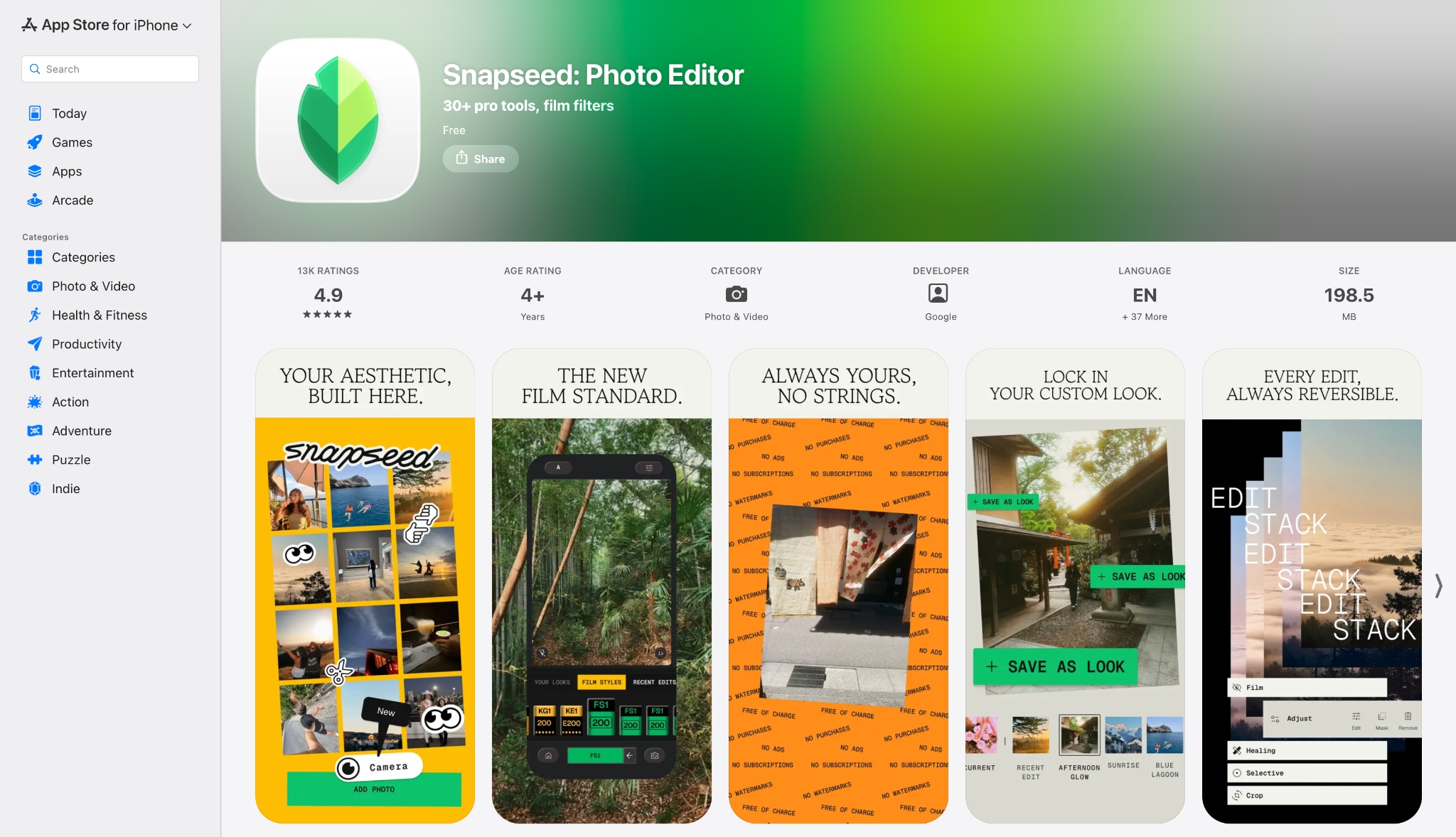
9. Snapseed
Developed by Google, Snapseed remains a popular choice among mobile photographers seeking advanced editing capabilities. Its highly precise Healing tool allows individuals to paint over bright spots carefully, seamlessly blending them into the surrounding background. The application successfully delivers desktop-level masking control directly on a smartphone. Offering a completely non-destructive workflow, it allows for meticulous adjustments without compromising the original file data.
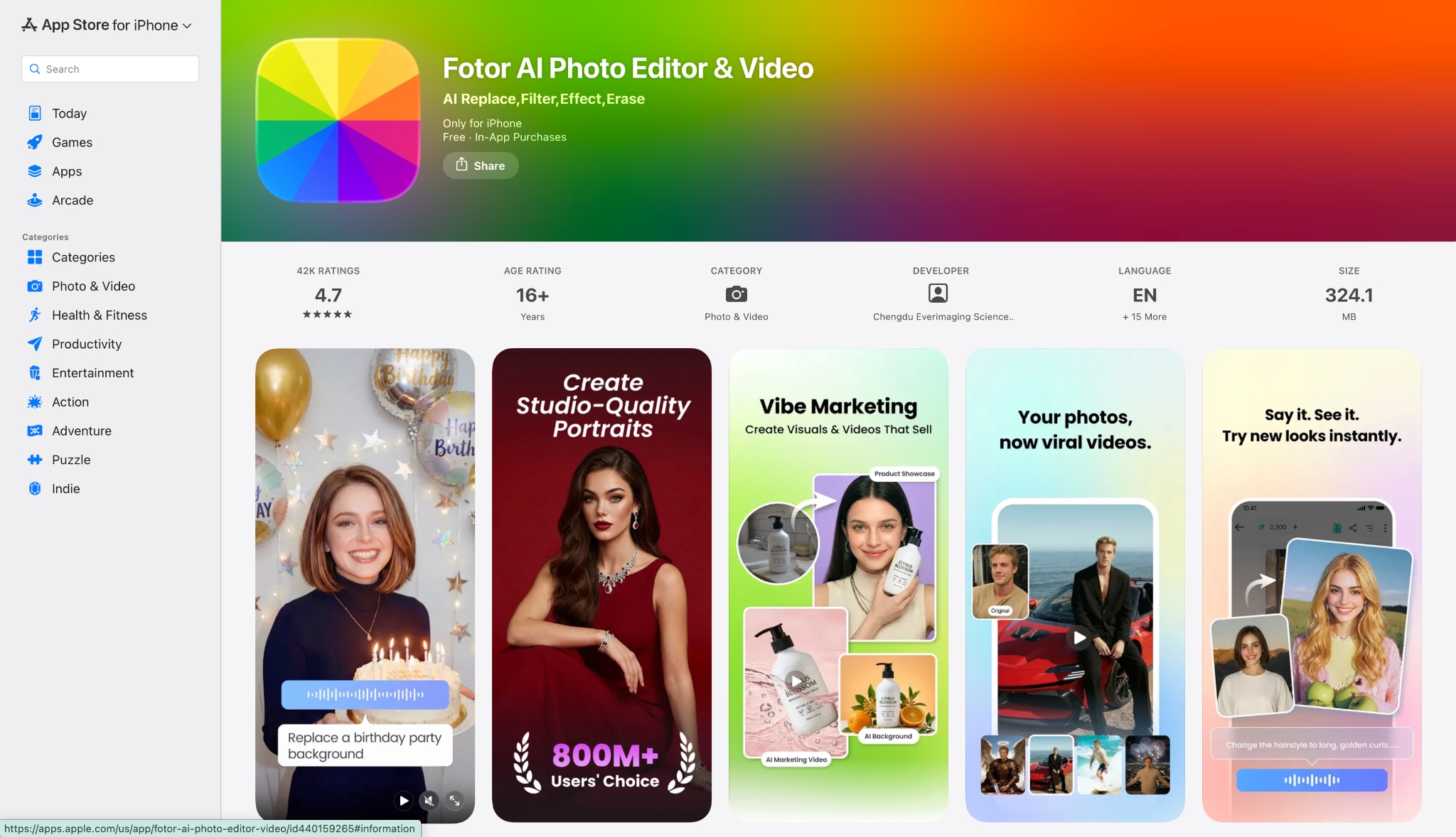
10. Fotor Mobile App
Fotor beautifully combines versatile graphic design elements with powerful, automated photo retouching tools. Its mobile application includes a smart magic eraser that instantly identifies and removes distracting highlights or unwanted objects. The platform serves as a highly reliable companion for dynamic mobile content creators requiring immediate results. Integrated cloud syncing further enhances productivity, ensuring seamless access to edited files across multiple personal devices.
Part 4: How to Choose the Right Tool for Your Needs
Selecting the ideal software depends largely on the specific project context and daily workflow requirements. Understanding these nuances helps save time and prevents unnecessary frustration during the editing process.
For Convenience: Web-based tools like Zawa.ai provide immediate, no-install fixes. These prove incredibly useful when working on a borrowed or public computer, allowing creators to remove reflection from photos online for free, seamlessly.
For On-the-Go Social Media: Mobile applications such as Snapseed or Fotor serve as excellent choices. These platforms remain ideal for quick portrait touch-ups right before posting to Instagram or TikTok.
For High Volume & Precision: Desktop software like Evoto or Photoshop handles batch processing effortlessly. Professional shoots require this level of raw file adjustment and masking control.
For Budget Constraints: Look for freemium models or web apps offering daily free credits. These options allow for occasional fixes without committing to a monthly subscription plan.
Best All-Rounder: Finding a balanced ecosystem simplifies the entire creative process. A tool like UniConverter offers straightforward functionality, merging web and desktop capabilities into one reliable package. Furthermore, it incorporates Batch Convert and Batch Compress features, heavily streamlining large-scale media management tasks.
Part 5: Common Use Cases for Glare Removal
Understanding when to apply these tools can significantly improve overall photographic quality. Different scenarios require varying levels of correction and precision.

Eyeglass Reflections: Harsh flash or ring light bounce often obscures a subject's face. Erasing these bright spots from lenses allows viewers to clearly see the person's eyes in professional portraits.
Window and Glass Surfaces: Shooting through storefronts, museum display cases, or car windows usually captures the photographer's reflection. Cleaning up these interior lights restores the focus entirely to the actual subject.
Product Photography: Glossy packaging, jewelry, and electronics easily suffer from blown-out highlights. Toning down these intense light spots makes the product look much more premium and highly appealing.
Restoring Old Photos: Digitizing vintage prints or polaroids using flatbed scanners frequently causes bright interference spots. Eliminating this scanner glare helps preserve cherished family memories accurately.
Oily Skin and Flash Glare: Flash photography outdoors or in dark rooms often highlights sweaty or oily skin. Removing these distracting, shiny areas helps achieve a smooth, matte skin tone easily.
Part 6: How to Remove Reflection from a Photo
Correcting images does not have to be a complicated ordeal. Using modern software, the entire process takes just a few clicks. The following steps demonstrate a standard workflow using a reliable desktop editor.
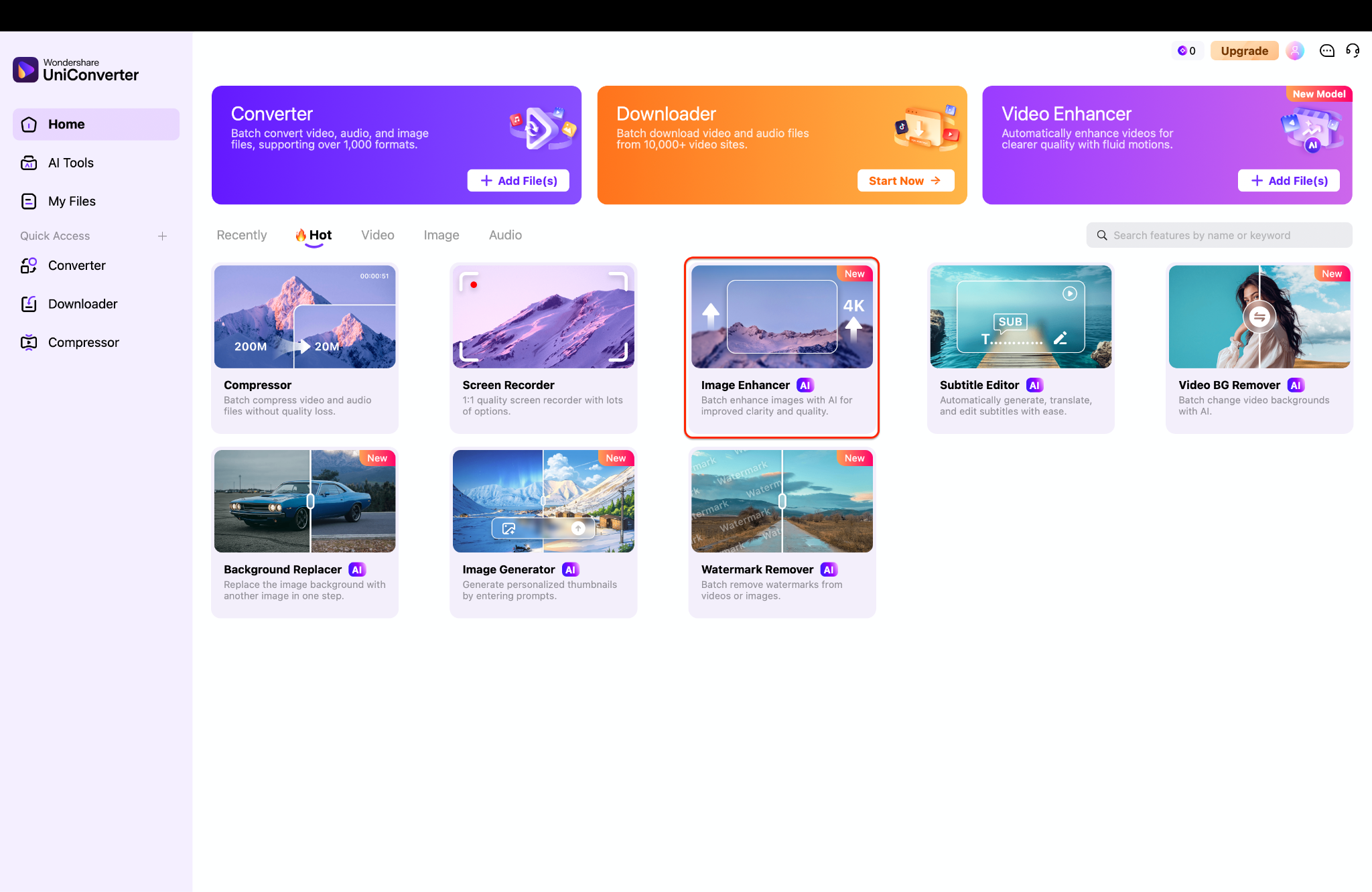
Step 1: Launch the Image Enhancer
Launch Wondershare UniConverter on your desktop to open the main dashboard. Locate the "Image Enhancer" tool displayed prominently among the available creative modules. Click this highlighted option to initiate the dedicated photo correction workspace.
Step 2: Import Media Files
Press the purple "+ Add Files" button in the center of the screen to import media. Alternatively, editors can drag and drop supported file formats directly onto the central folder icon.
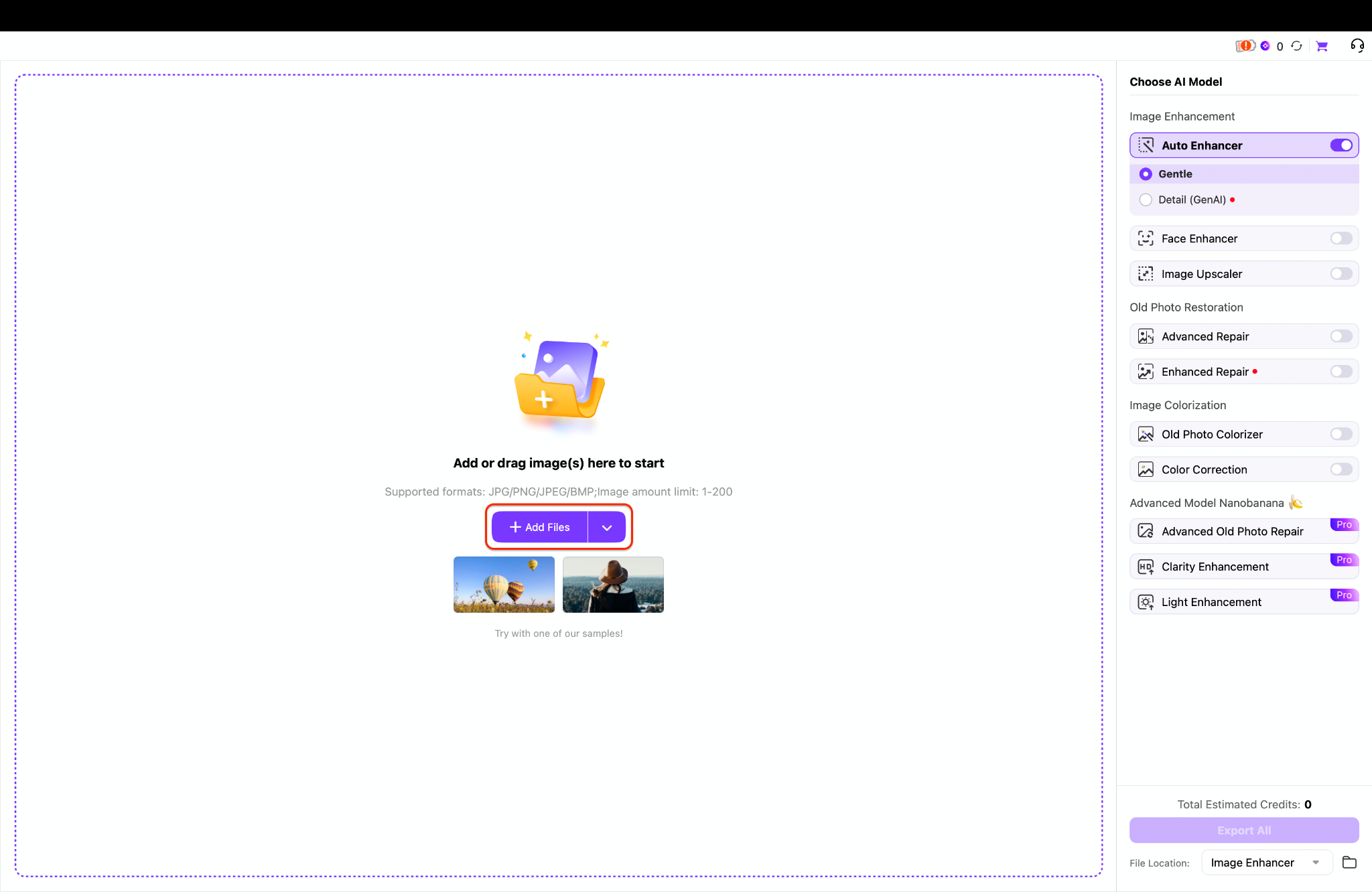
Pro Tip: Select up to 200 images at once during this stage to utilize the highly efficient batch processing capabilities.
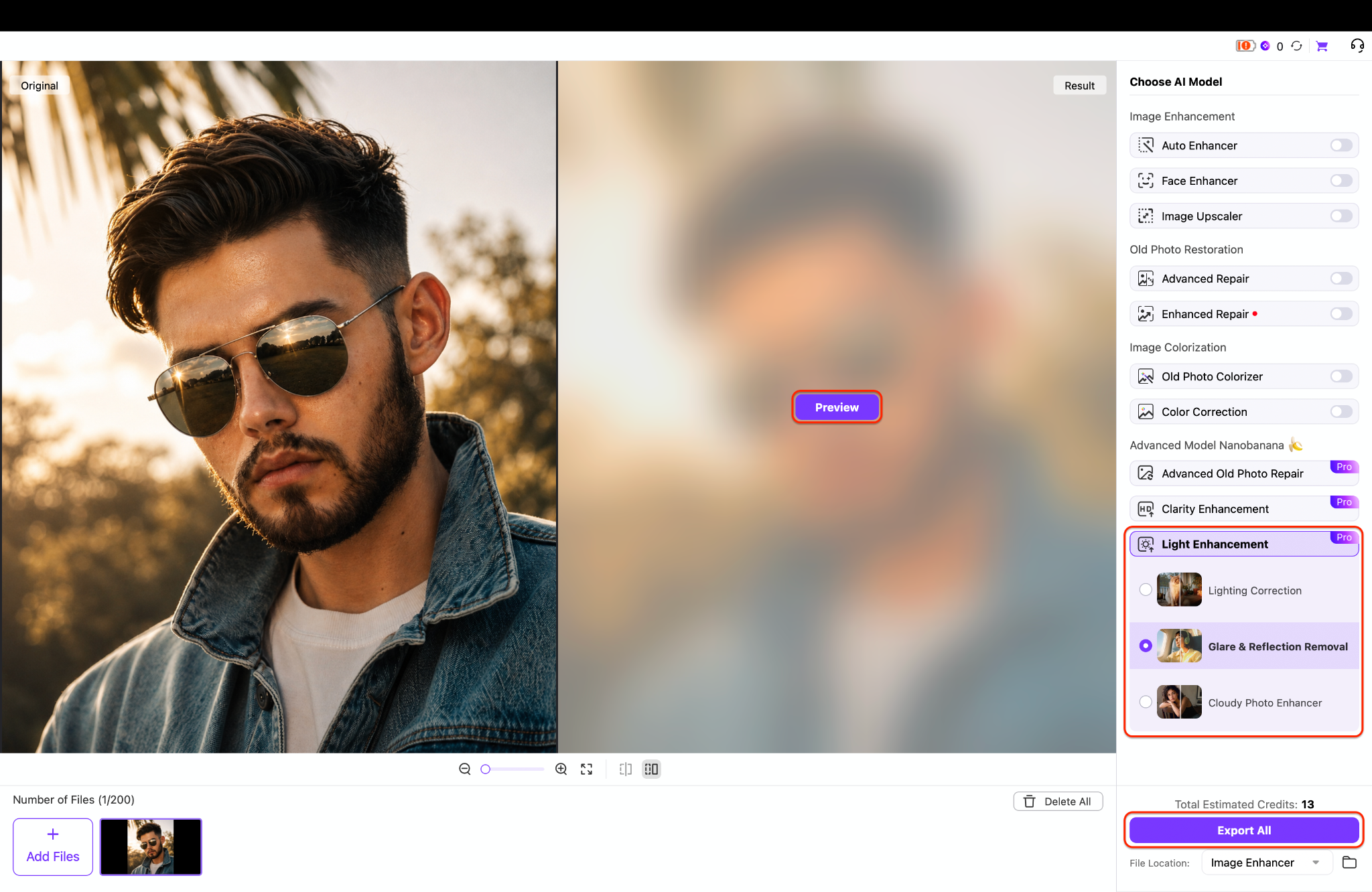
Step 3: Apply the Glare Removal Model
Navigate to the right-hand panel and expand the "Light Enhancement" category to reveal specific AI models. Choose the "Glare & Reflection Removal" option, then click "Preview" in the center to evaluate the software's adjustments. Finally, press the "Export All" button at the bottom right to save the perfectly corrected files to the local drive.
Part 7: Conclusion
Achieving a flawless image is now simpler than ever, thanks to modern automated technology. Whether dealing with shiny windows or bright flash spots, learning to remove reflection from a photo online for free elevates visual content instantly. Creators no longer need to discard great shots due to minor lighting flaws. For those seeking an efficient, user-friendly experience, exploring a reliable desktop solution makes a significant difference. UniConverter delivers a high-speed video converter and compressor boasting 20+ functions, making it ideal for handling 4K, 8K, and HDR files for all video enthusiasts and educators. Beyond basic fixes, users can explore the AI video enhancer for dynamic projects. Try it today for an effortless editing workflow.

