


In today's digital world, many users prefer downloading YouTube videos so they can watch them offline without buffering or internet interruptions. DVDVideoSoft Free YouTube Download is a popular tool designed to help users quickly save videos from YouTube in different formats and quality levels. With a simple interface and easy-to-use features, the software makes video downloading accessible even for beginners. Along with video downloads, users often rely on tools like the dvd video soft free youtube to mp3 converter to extract audio from YouTube videos and save it as MP3 files for music listening.
This guide will walk you through everything you need to know about dvdvideosoft free youtube download, including its features, system requirements, installation process, and step-by-step usage instructions.
In this article
- What Is DVDVideoSoft Free YouTube Download?
- Key Features of DVDVideoSoft Free YouTube Download
- How to Use DVDVideoSoft Free YouTube Download (Step-by-Step Guide)
- Is DVDVideoSoft Free YouTube Download Safe to Use?
- Best Alternatives to DVDVideoSoft Free YouTube Download
- Tips for Faster YouTube Video Downloads
- Conclusion
- FAQs
Key Takeaways
[Tool Capabilities] DVDVideoSoft supports multiple formats, batch downloads, playlist saving, and audio extraction for flexible use.
[Common Limitations] Free version restrictions, Windows-only support, and update dependency may affect performance and usability.
[Better Alternative] Wondershare UniConverter offers faster downloads, broader format support, and built-in editing for a complete workflow.
Part 1: What Is DVDVideoSoft Free YouTube Download?
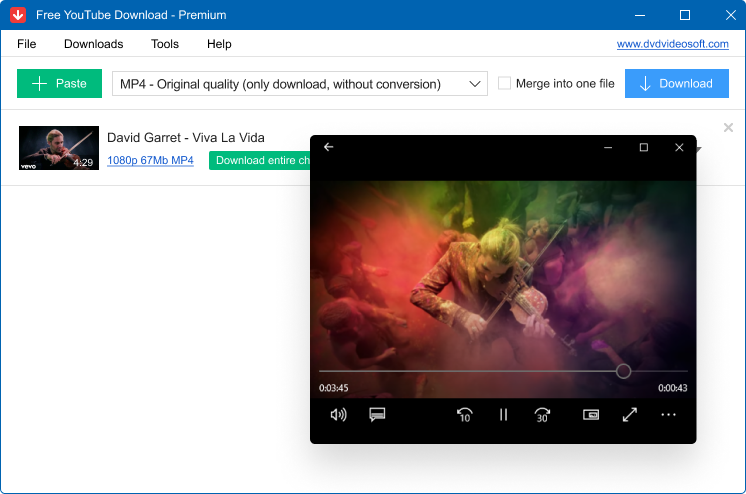
DVDVideoSoft Free YouTube Download is a desktop application designed to help users download videos directly from YouTube and save them on their computers for offline viewing. The software offers a simple interface where users only need to copy and paste a video link to start the download process. It supports multiple video resolutions and formats, allowing users to choose the quality that best suits their needs. This makes dvdvideosoft free youtube download a convenient solution for saving online videos quickly.
Developer Background
The software is developed by DVDVideoSoft, a company known for creating multimedia tools focused on downloading, converting, and editing digital media. DVDVideoSoft has been developing user-friendly applications for many years, and its products are widely used by people who want simple solutions for managing online videos and audio content.
Supported Platforms
DVDVideoSoft Free YouTube Download is primarily available for the Microsoft Windows operating system. It works on most modern Windows computers and is designed to run smoothly without requiring high-end hardware. This compatibility makes it accessible to a wide range of users who want an easy way to download videos.
What the Tool Is Mainly Used For
The main purpose of dvdvideosoft free youtube download is to allow users to download videos from YouTube and watch them offline anytime. It is commonly used for saving tutorials, music videos, educational lectures, and entertainment content. Users can also convert downloaded videos into audio formats using tools like the dvd video soft free youtube to mp3 converter, making it useful for creating MP3 files from YouTube videos.
Part 2: Key Features and System Requirements of DVDVideoSoft Free YouTube Download
Key Features of DVDVideoSoft Free YouTube Download
Download YouTube Videos in Multiple Resolutions
One of the main highlights of dvdvideosoft free youtube download is its ability to download videos from YouTube in different resolutions. Users can choose from various quality options such as 720p, 1080p, or even higher depending on the original video.
Batch Downloading Support
The software supports batch downloading, which means users can download multiple videos at the same time. Instead of saving videos one by one, you can paste several links and let the program download them automatically.
Convert Videos to Multiple Formats
Another useful feature is the ability to convert downloaded videos into different formats such as MP4, AVI, and other commonly used formats. This ensures that the videos remain compatible with various devices, including smartphones, tablets, and media players.
Extract Audio from YouTube Videos
The software also allows users to extract audio from YouTube videos and save it as music files. Many users combine this feature with the dvd video soft free youtube to mp3 converter to convert videos into MP3 format.
Subtitle Downloading
For videos that include subtitles, the tool provides an option to download them along with the video. Subtitles can be saved separately or embedded in the video file, making it easier for viewers to understand content in different languages.
Playlist and Channel Download Support
dvdvideosoft free youtube download also supports downloading entire playlists or even full channels from YouTube. Instead of downloading each video manually, users can save multiple videos from a playlist or channel in one process, saving time and effort.
System Requirements of DVDVideoSoft Free YouTube Download
Supported Operating Systems
DVDVideoSoft Free YouTube Download is mainly designed for computers running the Microsoft Windows operating system. It works well on most modern Windows versions, including Windows 7, Windows 8, Windows 10, and Windows 11.
Required Storage and RAM
The program does not require high-end hardware to function properly. A computer with at least 2 GB of RAM is usually sufficient for smooth performance, although more memory can help when downloading multiple videos at once.
Internet Connection Requirements
A stable internet connection is essential for downloading videos from YouTube using the dvdvideosoft free youtube download tool. Faster internet speeds allow videos to download more quickly and reduce interruptions during the process.
Pros and Cons of DVDVideoSoft Free YouTube Download
Pros
- Easy to Use Interface: One of the biggest advantages of dvdvideosoft free youtube download is its simple and beginner-friendly interface. Users only need to paste a video link from YouTube and choose the format to start downloading, making it convenient even for first-time users.
- Supports Multiple Formats and Quality Options: The software allows users to download videos in different resolutions and formats such as MP4 or AVI. It also supports audio extraction, which works well with tools like the dvd video soft free youtube to mp3 converter for saving music files.
- Batch Downloading Feature: Users can download several videos at once instead of saving them individually. This batch downloading feature helps save time when downloading playlists or multiple videos.
- Generally Positive User Feedback: The developer DVDVideoSoft has received many positive reviews from users who appreciate the software's functionality and support team. On review platforms like Trustpilot, the company holds around a 4.1/5 rating based on hundreds of reviews, indicating generally good user satisfaction.
Cons
- Free Version Limitations: The free version may include limitations such as watermarks or restricted features, which often encourage users to upgrade to the paid version.
- Occasional Software Updates or Compatibility Issues: Some users report that frequent updates are needed when YouTube changes its platform, which can temporarily affect downloads until the software is updated.
Part 3: How to Use DVDVideoSoft Free YouTube Download (Step-by-Step Guide)
Installing dvdvideosoft free youtube download is quick and straightforward, and the process usually takes only a few minutes. Since the software is lightweight, users can easily set it up on their computer without any complicated configuration. After installation, you can easily perform video downloading steps.
Steps Guide on Use DVDVideoSoft Free YouTube Download
Step 1: Visit the Official Website and Download the Installer
Go to the official website of DVDVideoSoft and locate the Free YouTube Download software page. Click the download button to get the installer file for your computer. The file will start downloading automatically and will be saved to your system.
Step 2: Run the Installer and Launch the Software
Once the download is complete, open the installer file and follow the on-screen instructions to complete the installation process on your Microsoft Windows PC. After installation finishes, launch dvdvideosoft free youtube download, and the software will be ready to use for downloading videos from YouTube.
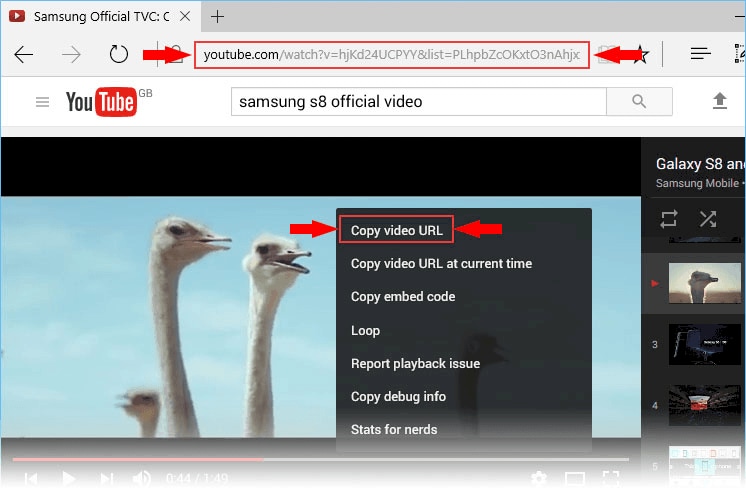
Step 3: Copy the YouTube Video URL
First, open YouTube in your browser and find the video you want to download. Copy the video link from the address bar or use the share option to copy the URL. This link will be used by dvdvideosoft free youtube download to locate the video.
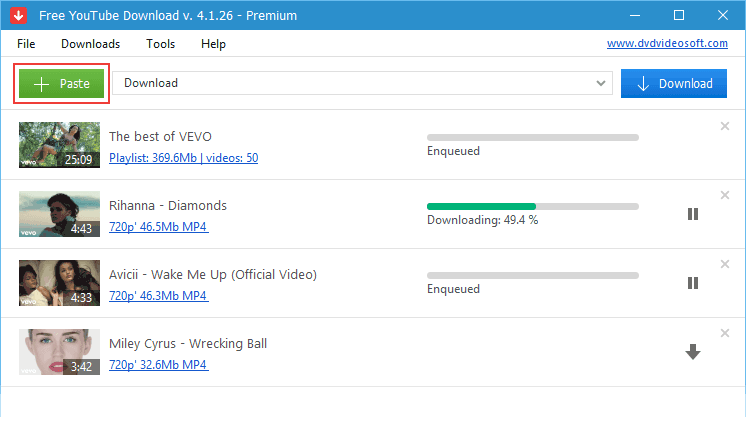
Step 4: Paste the Link into the Software
Launch dvdvideosoft free youtube download on your computer. Click the Paste or Paste URL button in the software interface, and the tool will automatically detect the copied video link.
Step 5: Choose Video Format and Quality
After the link is processed, select the video format and resolution you prefer. The software usually offers multiple quality options such as HD or Full HD depending on the original video. If you only want the audio, you can also convert it using the dvd video soft free youtube to mp3 converter option. Next, choose the folder on your computer where the downloaded file will be saved. Selecting a specific location helps you easily find your videos or audio files after the download is complete.
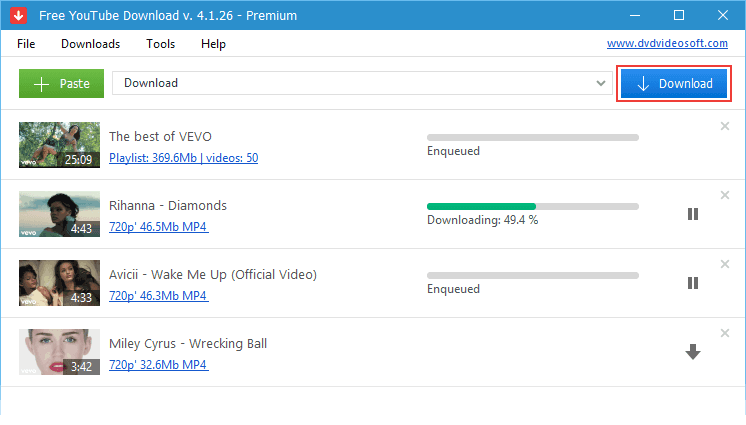
Step 6: Start Downloading the Video
Finally, click the Download button to begin saving the video to your computer. The software will start downloading the file from YouTube, and once the process finishes, you can watch the video offline anytime.
Part 4: Is DVDVideoSoft Free YouTube Download Safe to Use?
Security Considerations
In general, dvdvideosoft free youtube download is considered safe when downloaded from legitimate sources. The software is developed by DVDVideoSoft, a company known for creating multimedia tools for downloading and converting online videos. Their applications are commonly used by many users to download videos and audio from YouTube. However, as with any third-party downloader, users should still be cautious and ensure they install the program from trusted sources.
Official Download Source
To reduce security risks, it is important to download the software only from the official website of DVDVideoSoft. Downloading installers from unofficial websites or third-party sources may expose your system to modified files, bundled software, or malware. Installing the program directly from the developer's official platform ensures you receive the original and safest version of the tool.
Tips for Safe Installation
To install the software safely, follow these best practices:
- Download the installer only from the official DVDVideoSoft website.
- Scan the installer file with antivirus software before opening it.
- Avoid downloading the program from unknown or third-party websites.
- During installation, read each step carefully and decline any optional bundled offers.
- Keep the software updated to the latest version for improved security and performance.
Overall, dvdvideosoft free youtube download can be safe to use when installed from reliable sources and used responsibly. Following basic security practices will help protect your system while downloading videos or extracting audio using tools like the dvd video soft free youtube to mp3 converter.
Part 5: Best Alternatives to DVDVideoSoft Free YouTube Download
1. Wondershare UniConverter

Wondershare UniConverter is a powerful all-in-one video toolkit that offers downloading, converting, editing, and compressing features in a single program. It allows users to download playlist videos from thousands of websites, including YouTube, and convert them into many popular video and audio formats. It can easily convert YouTube videos into MP4 or MP3, etc. The software is widely used by content creators, students, and professionals who need advanced media tools. It also supports many video and audio files downloads from YouTube, TikTok, Instagram, Facebook, etc. Overall, UniConverter is a complete multimedia solution beyond just a YouTube downloader.
Key Features
- Download videos from 10,000+ websites
- Batch video downloading support
- Convert videos into 1000+ formats
- Built-in video editor and compressor
- One-click YouTube video or MP3 download mode
Bonus Tip 1: Download YouTube Videos with UniConverter
Videos from many platforms can be downloaded easily using the built-in downloader in Wondershare UniConverter. This feature allows you to save online videos directly to your computer for offline viewing. Follow the simple steps below to download and manage online videos using the software.
Step 1: Open Wondershare UniConverter and Select Downloader
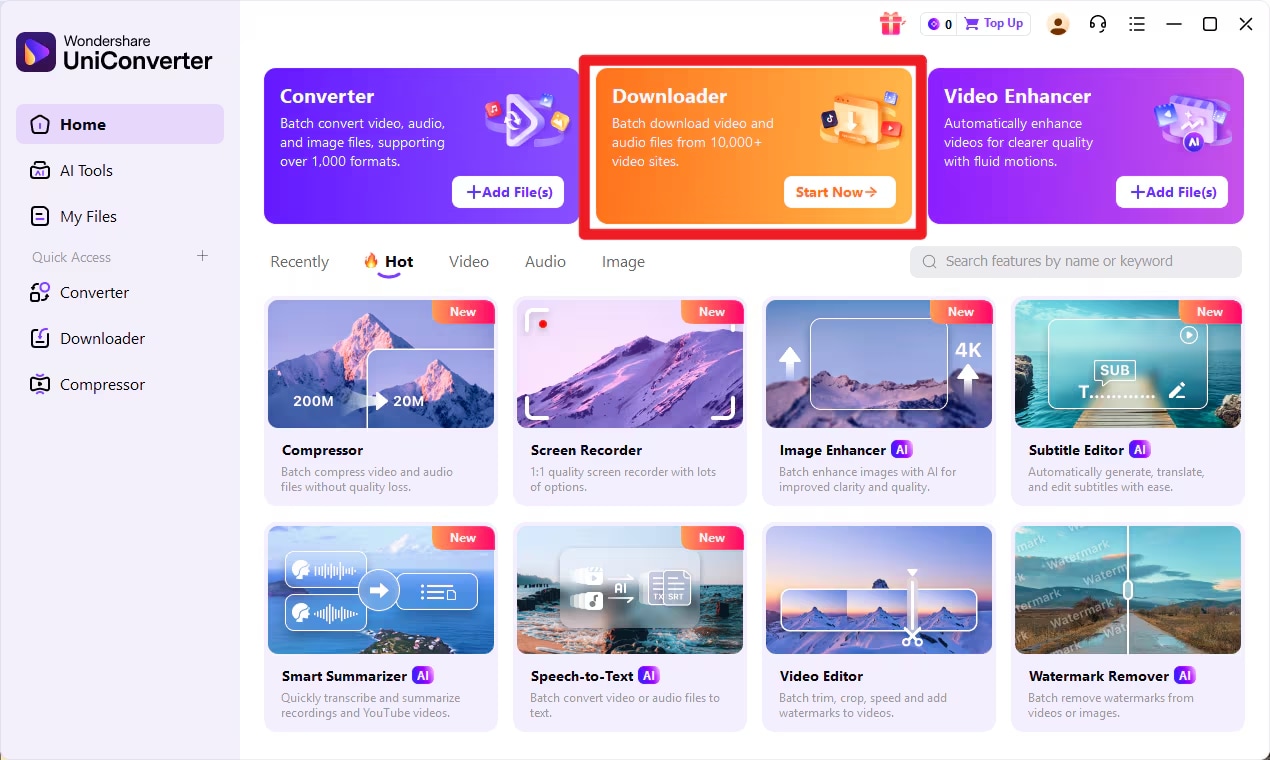
First, install and launch Wondershare UniConverter on your PC. Once the program opens, you will see several tools displayed on the main interface. Locate and click on the Downloader option to enter the video downloading section. This area allows you to paste video links and manage the download process easily.
Step 2: Copy the Video URL
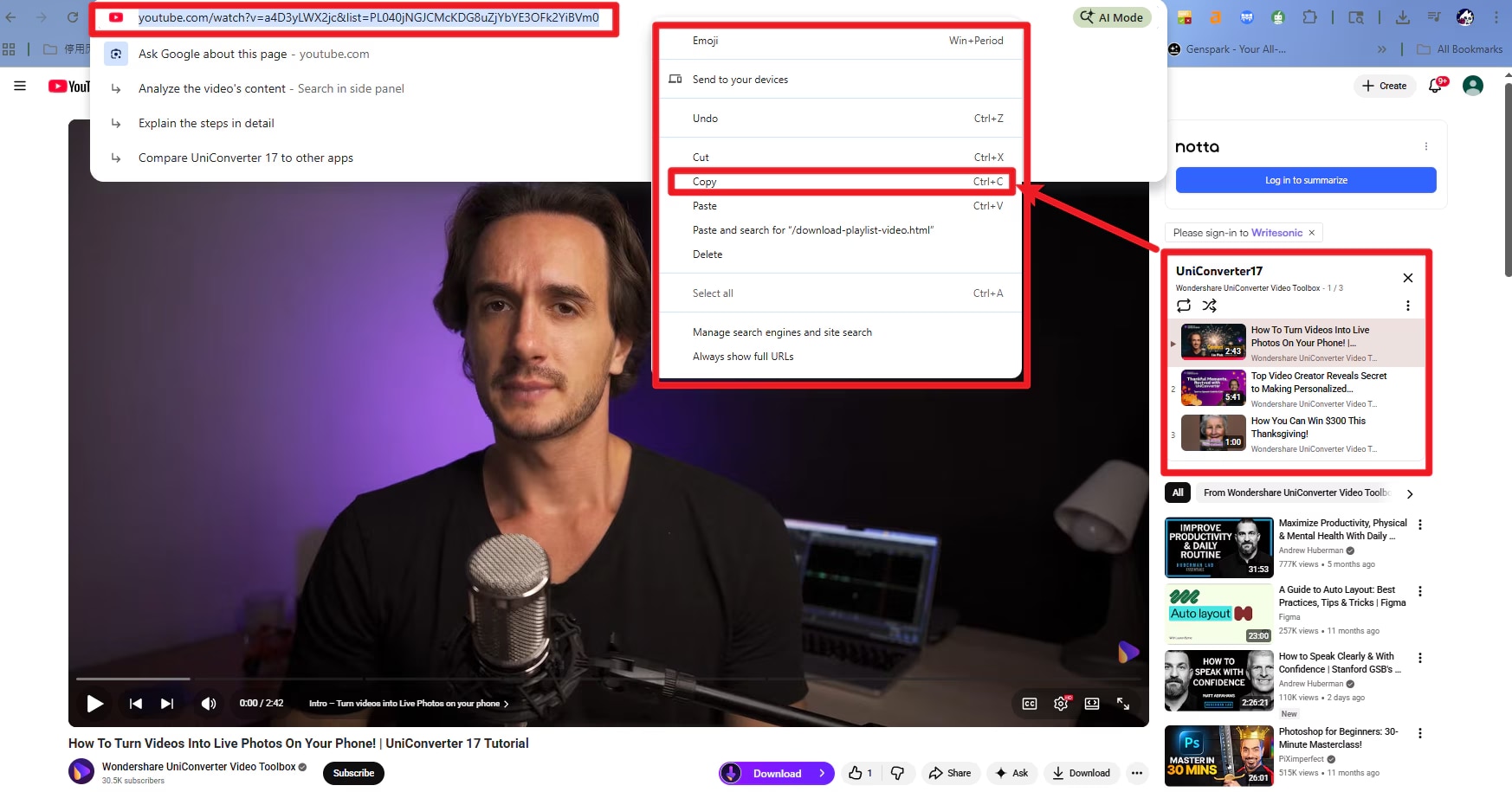
Next, open your web browser and visit the streaming or video website that contains the video you want to download. Play or open the specific video page and copy the URL from the address bar of the browser. Make sure the full link is copied correctly because UniConverter will use it to detect and download the video.
Step 3: Paste the URL and Choose the Download Format
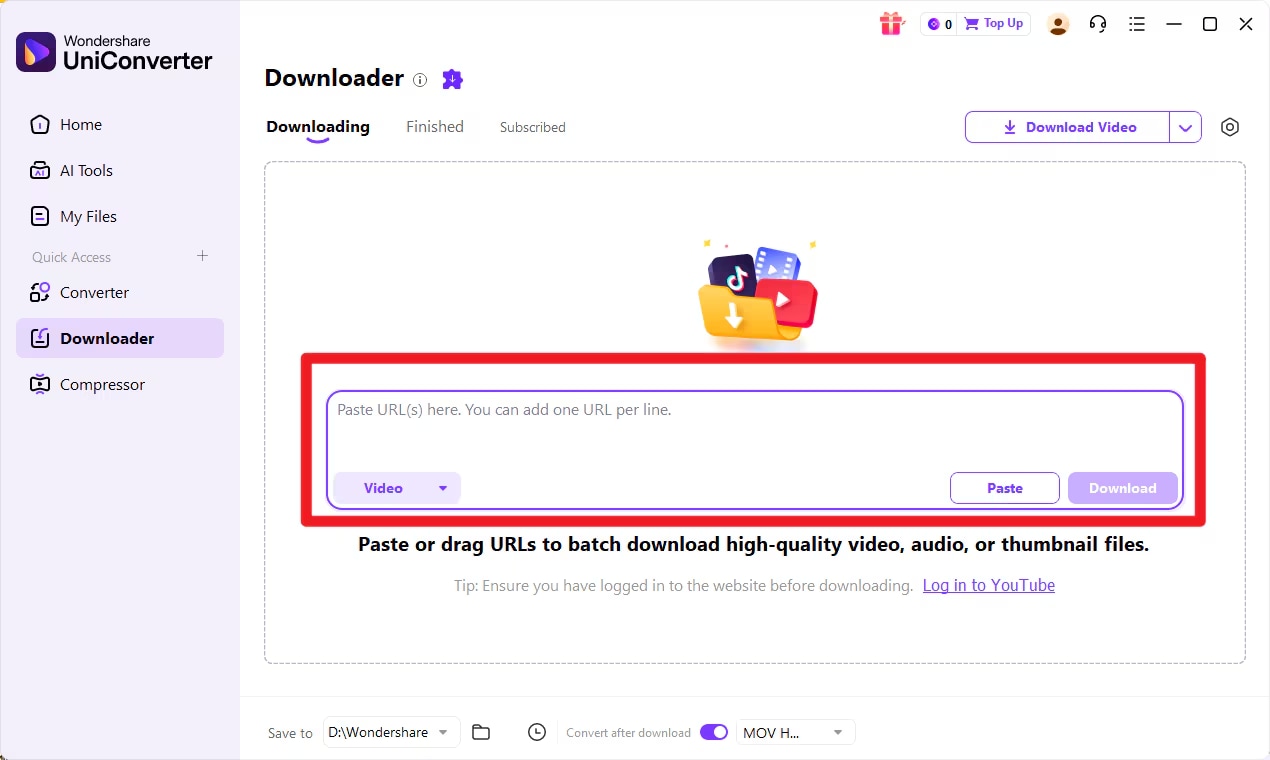
Return to the Downloader window in UniConverter and paste the copied video link into the input box. After pasting the URL, select the preferred format if the option appears, and then click the Download button to start the process. UniConverter will analyze the link and quickly begin downloading the video.
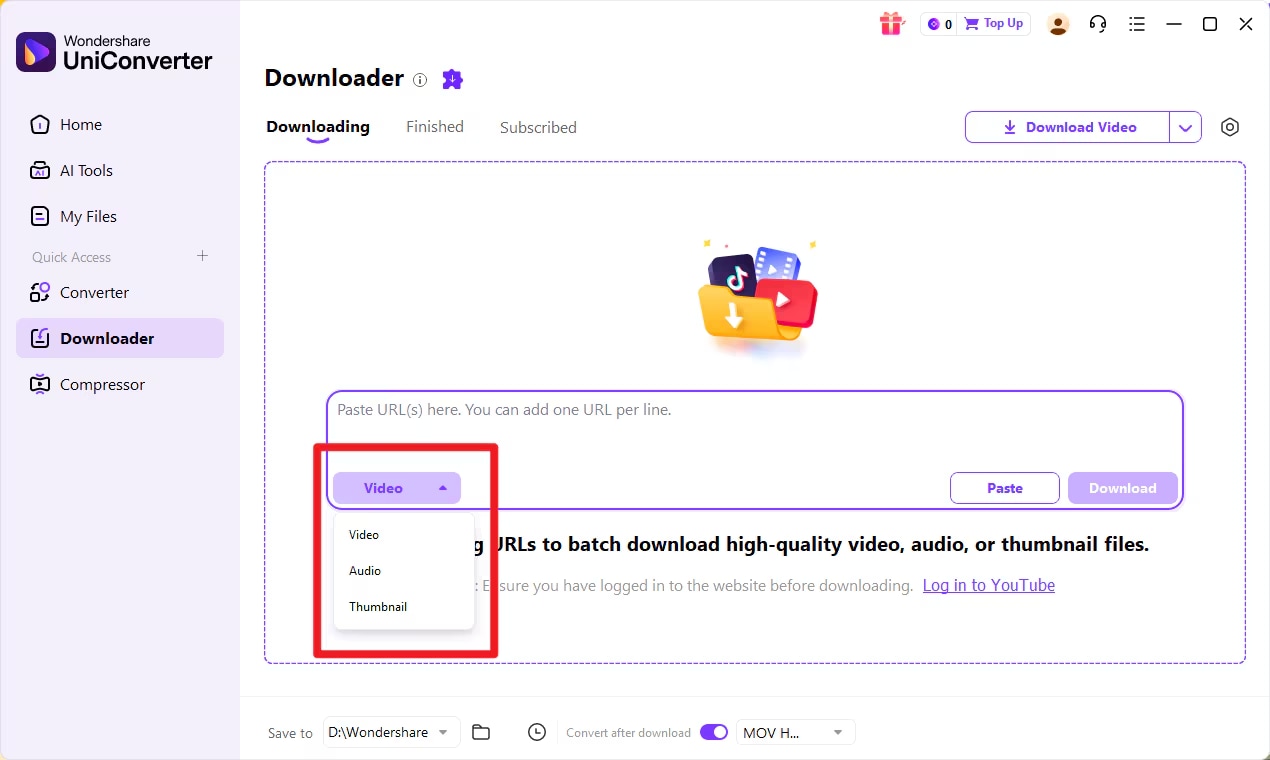
Additionally, UniConverter also supports downloading audio files and video cover images from URLs. You can choose the desired file type from the drop-down menu located on the left side of the downloader interface.
Step 4: Save and Manage the Downloaded Video
Once the download starts, UniConverter will analyze the link and display a progress bar showing the download status and remaining time. You can pause or resume the process anytime using the Pause and Resume options. If multiple files are being downloaded, the Pause All and Resume All buttons can help manage all downloads at once.
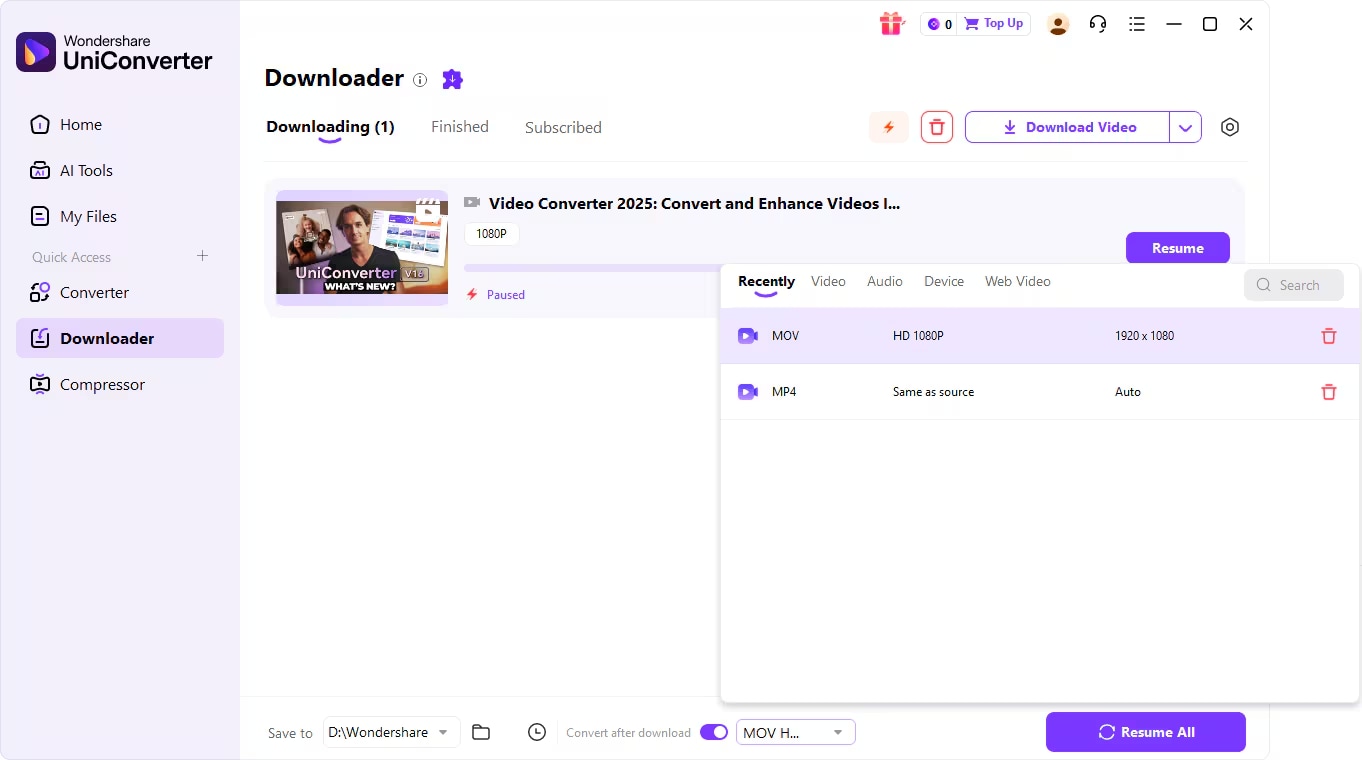
After the download is complete, you can find the saved videos in the Finished tab within the software. From there, you can open the File Location on your computer to access, organize, or move the downloaded videos as needed.

Better Alternative to DVDVideoSoft Free YouTube Download
2. 4K Video Downloader

4K Video Downloader is a popular tool designed specifically for downloading videos from YouTube and other streaming platforms. It allows users to save videos in high quality, including HD, 4K, and even 8K resolution when available. The software supports downloading playlists, channels, subtitles, and 360-degree videos. It also allows users to extract audio files from videos and save them in different formats. The interface is simple, making it easy to paste a link and start downloading quickly. It works on Windows, macOS, and Android devices, making it accessible across different systems. Due to its focus on high-quality downloads, it is widely used by people who want to save online content for offline viewing.
Key Features
- Download videos in up to 8K resolution
- Playlist and channel downloading
- Extract subtitles in SRT format
- Download 3D and 360-degree videos
- Supports multiple video platforms
- Batch video downloading
- Smart Mode for automatic settings
- Cross-platform support (Windows, macOS, Android)
3. YTD Video Downloader
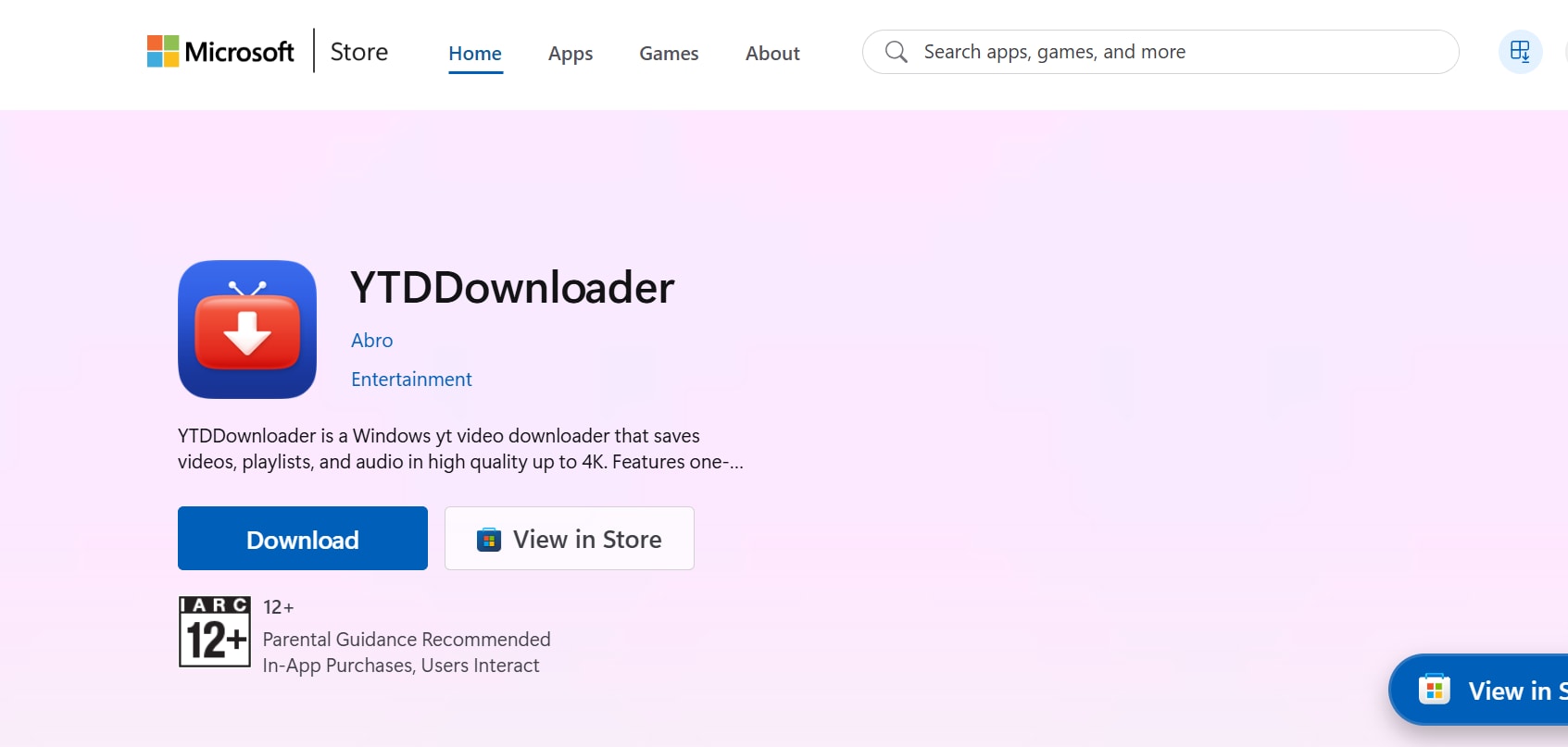
YTD Video Downloader is one of the older and well-known video downloading tools available for Windows and macOS. It allows users to download videos from YouTube and many other video streaming websites. The software also includes a built-in converter that allows users to convert downloaded videos into formats like MP4, AVI, and MOV. With its straightforward interface, users simply paste a video URL and start the download process. YTD also supports audio extraction, which is useful for creating MP3 files from YouTube videos. The program offers both a free version and a paid Pro version with additional features such as faster downloads and batch processing.
Key Features
- Download videos from multiple websites
- Built-in video converter
- Convert videos to MP4, AVI, MOV, and more
- Basic video player included
- Audio extraction to MP3
- Pause and resume downloads
- Simple URL paste download system
- Available for Windows and Mac
4. SnapDownloader
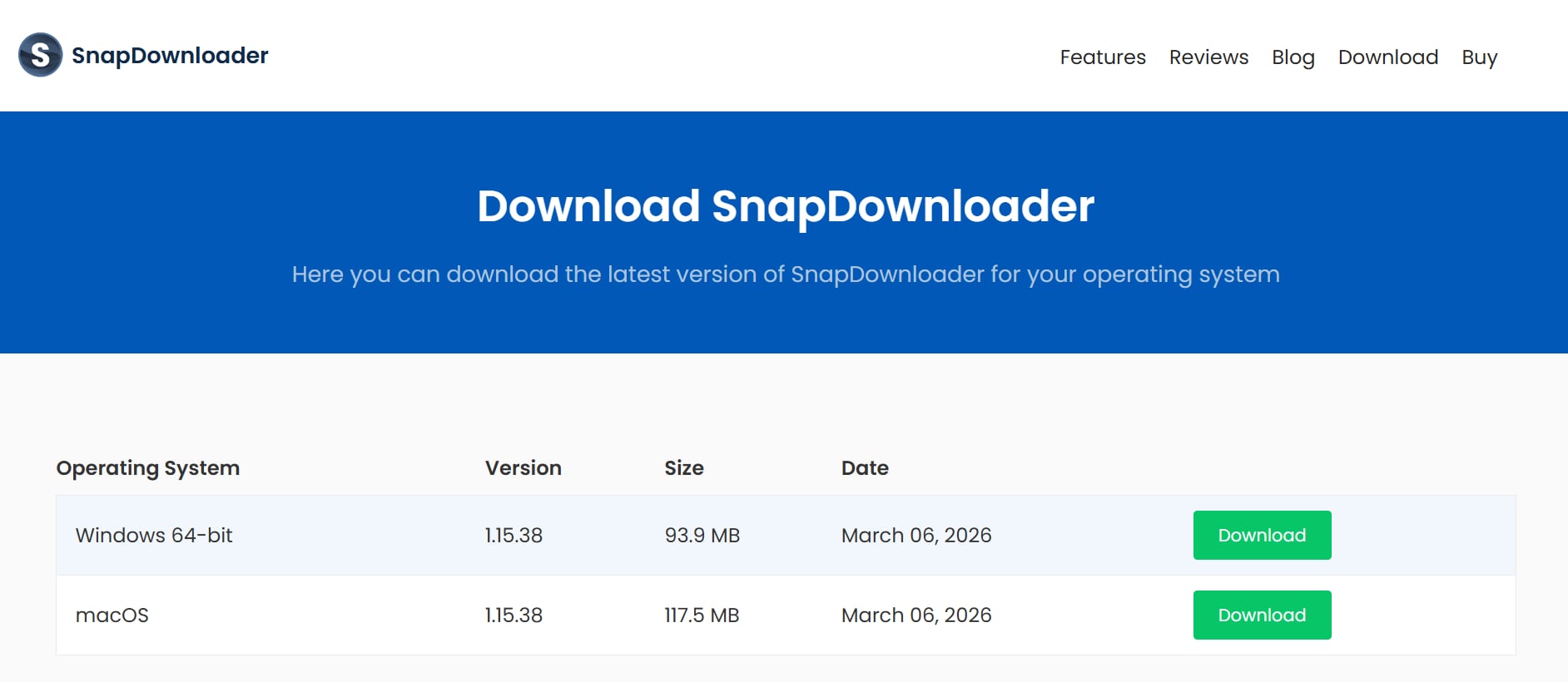
SnapDownloader is a feature-rich video downloader that supports more than 1,000 websites, including YouTube, Facebook, and TikTok. The software is designed to download videos in high resolutions such as 4K and 8K. It offers advanced features like scheduling downloads, trimming videos before saving them, and converting videos automatically into different formats. SnapDownloader also allows users to download entire playlists or channels with just a few clicks. The program focuses on high performance and fast downloading speeds. With a modern interface and powerful features, it is often considered one of the most advanced video downloader tools available.
Key Features
- Supports downloading from 1,000+ websites
- Download videos in 8K, 4K, and HD
- Batch downloading of multiple videos
- Built-in video trimming tool
- Automatic video format conversion
- Playlist and channel downloading
- Proxy setup for geo-restricted videos
- Schedule downloads for later
5. ByClick Downloader
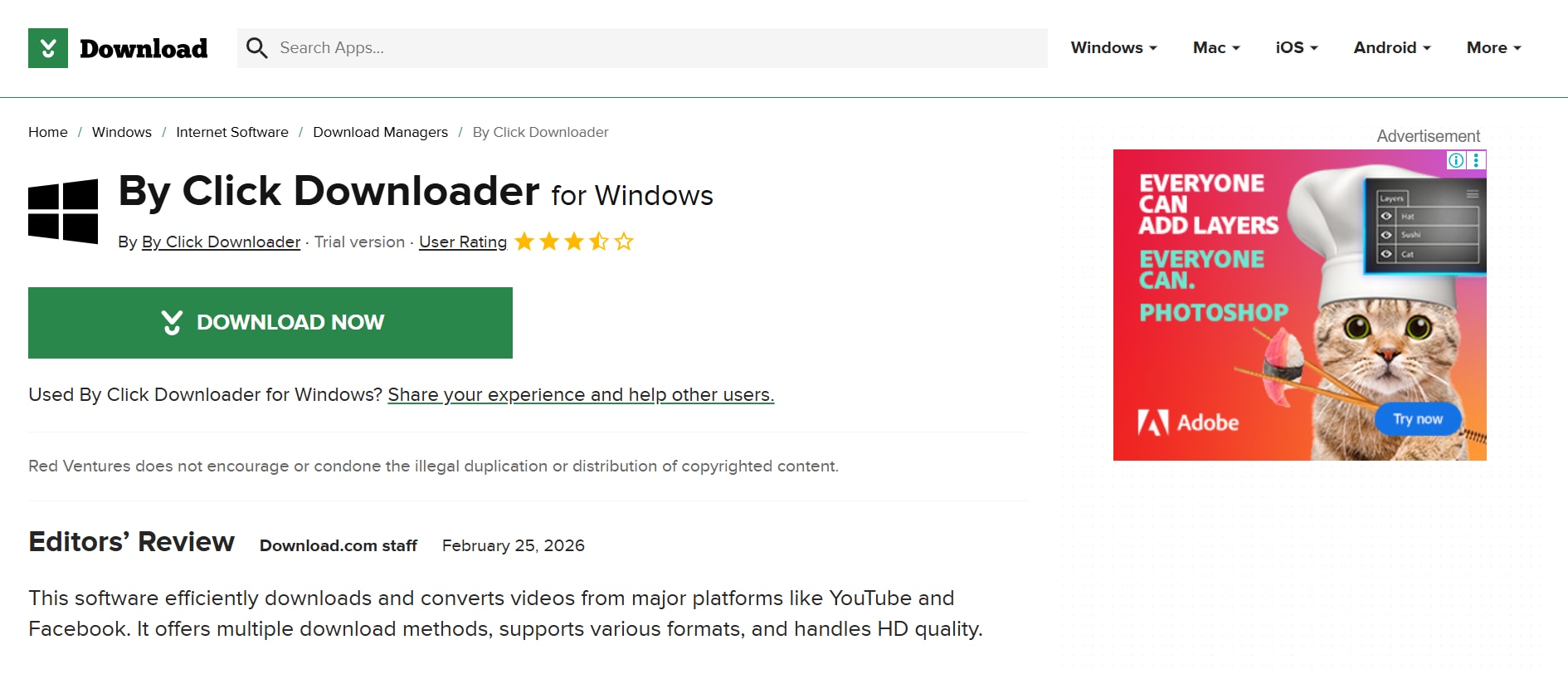
ByClick Downloader is a simple yet powerful tool designed to download videos and audio from YouTube and other popular platforms. It supports downloading videos in HD, 4K, and even 8K resolution depending on the source video. The software allows users to download entire playlists and channels in a single click. It also supports automatic detection of videos when you watch them in your browser, making downloads faster and easier. Users can convert videos into various formats such as MP4, MP3, AVI, and WAV. With a straightforward interface and quick download process, it is a convenient alternative to DVDVideoSoft Free YouTube Download.
Key Features
- Download videos from 40+ websites
- Download entire YouTube playlists and channels
- Convert videos to MP3, MP4, AVI, and other formats
- Supports HD, 4K, and 8K downloads
- Automatic video detection from browser
- Batch downloading capability
- Subtitle support
- Quick one-click download feature
Part 6: Tips for Faster YouTube Video Downloads
Downloading videos from YouTube can sometimes take longer depending on several factors such as internet speed, file size, and software settings. By following a few simple tips, you can significantly improve download speed and make the process smoother when using tools like dvdvideosoft free youtube download.
Use a High-Speed Internet Connection
A stable and fast internet connection is the most important factor for quicker downloads. Broadband or fiber connections generally allow videos to download much faster than slower networks.
Avoid Downloading Large Playlists at the Same Time
Downloading an entire playlist or multiple videos simultaneously can slow down the overall download speed. It is often better to download videos in smaller batches to maintain consistent performance.
Choose the Right Video Format and Quality
Higher resolutions such as 4K or 8K require larger file sizes and take longer to download. If speed is your priority, selecting formats like MP4 in 720p or 1080p can help reduce download time.
Close Unnecessary Applications
Running multiple programs that use internet bandwidth can slow down video downloads. Closing unused applications or browser tabs helps free up system resources and improves download speed.
Use a Wired Internet Connection
A wired Ethernet connection is usually more stable than Wi-Fi. If possible, connect your computer directly to the router to get more consistent and faster download speeds.
Conclusion
DVDVideoSoft Free YouTube Download is a simple and effective tool that allows users to download videos from YouTube for offline viewing. It offers useful features such as multiple resolution downloads, playlist support, subtitle downloading, and audio extraction through tools like the dvd video soft free youtube to mp3 converter. The software is especially suitable for beginners because of its easy interface and quick setup process. However, the free version may have some limitations and the tool mainly supports Windows systems. Users who need additional features such as advanced conversion or editing can explore alternatives like Wondershare UniConverter or 4K Video Downloader. Overall, it remains a reliable option for downloading YouTube videos quickly and building an offline video collection.
FAQs
-
1. Is DVDVideoSoft Free YouTube Download really free?
Yes, DVDVideoSoft Free YouTube Download offers a free version that allows users to download videos from YouTube and save them on their computers. However, the software follows a freemium model, meaning some advanced features may require a premium upgrade. The free version is still sufficient for basic video downloading and playlist saving. -
2. Can I download YouTube playlists with DVDVideoSoft Free YouTube Download?
Yes, the software supports downloading entire playlists and even channels from YouTube. Users can paste a playlist link, and the tool will automatically detect and download all videos included in that list. This feature helps save time when downloading multiple videos at once. -
3. What formats does DVDVideoSoft Free YouTube Download support?
The program supports several common video and audio formats such as MP4, AVI, MKV, WEBM, and MP3. Users can also choose different resolutions, including HD, 4K, or higher depending on the source video. These options make it easy to save videos in formats compatible with various devices. -
4. Is DVDVideoSoft Free YouTube Download safe to install?
Yes, the official version provided by the developer is generally considered safe and free from malware when downloaded from trusted sources. The program is designed to install without harmful software or intrusive pop-ups. However, users should always download the installer from the official website to avoid modified files. -
5. What is the best alternative to DVDVideoSoft Free YouTube Download?
Several tools can work as alternatives, depending on the features you need. Popular options include Wondershare UniConverter, 4K Video Downloader, and YTD Video Downloader. These tools offer similar features such as downloading YouTube videos, converting formats, and saving playlists for offline viewing.

