

Looking for an honest 4K Video Downloader Plus review in 2026 can feel confusing. The original version has been discontinued, pricing has changed, and many long-term buyers like you are questioning what "lifetime" really means. At the same time, the software remains one of the most searched YouTube video downloader tools for Windows and Mac.
This 4K Video Downloader Plus review breaks down what the tool actually offers today, its features, pricing tiers, safety profile, real-world performance, and limitations. It helps you to decide whether the tool fits your workflow or if a more capable alternative makes better sense.
In this article
- Part 1: What Is 4K Video Downloader Plus, and What Happened to the Original?
- Part 2: Key Features of 4K Video Downloader Plus
- Part 3: Is 4K Video Downloader Plus Safe to Use?
- Part 4: 4K Video Downloader Plus Pricing: Free vs. Paid Plans
- Part 5: 4K Video Downloader Plus Review: Performance in Real-World Testing
- Part 6: Pros and Cons of 4K Video Downloader Plus: Honest 4K Video Downloader Review
- Part 7: 4K Video Downloader Plus Reviews and User Ratings
- Part 8: 4K Video Downloader Plus Alternatives: Wondershare UniConverter
- FAQs About 4K Video Downloader Plus
Part 1: What Is 4K Video Downloader Plus, and What Happened to the Original?
4K Video Downloader Plus is a desktop video downloader available at 4kdownload.com. It allows you to download videos, playlists, channels, subtitles, and audio from YouTube and other supported platforms directly to Windows, macOS, or Ubuntu systems.
It focuses on high-resolution downloads, batch processing, and access to private or login-protected content through its built-in browser.
The original 4K Video Downloader was officially discontinued on February 1, 2026, and support ended permanently. Because of this change, any current 4K Video Downloader review now effectively refers to 4K Video Downloader Plus, which serves as the actively maintained replacement.
Part 2: Key Features of 4K Video Downloader Plus
After examining the current version in detail for this 4K Video Downloader Plus review, the focus is clearly on high-resolution downloads, bulk saving, and private content access. Below are the features that define how the software performs in practical use.
Download Up to 4K and 8K Resolution
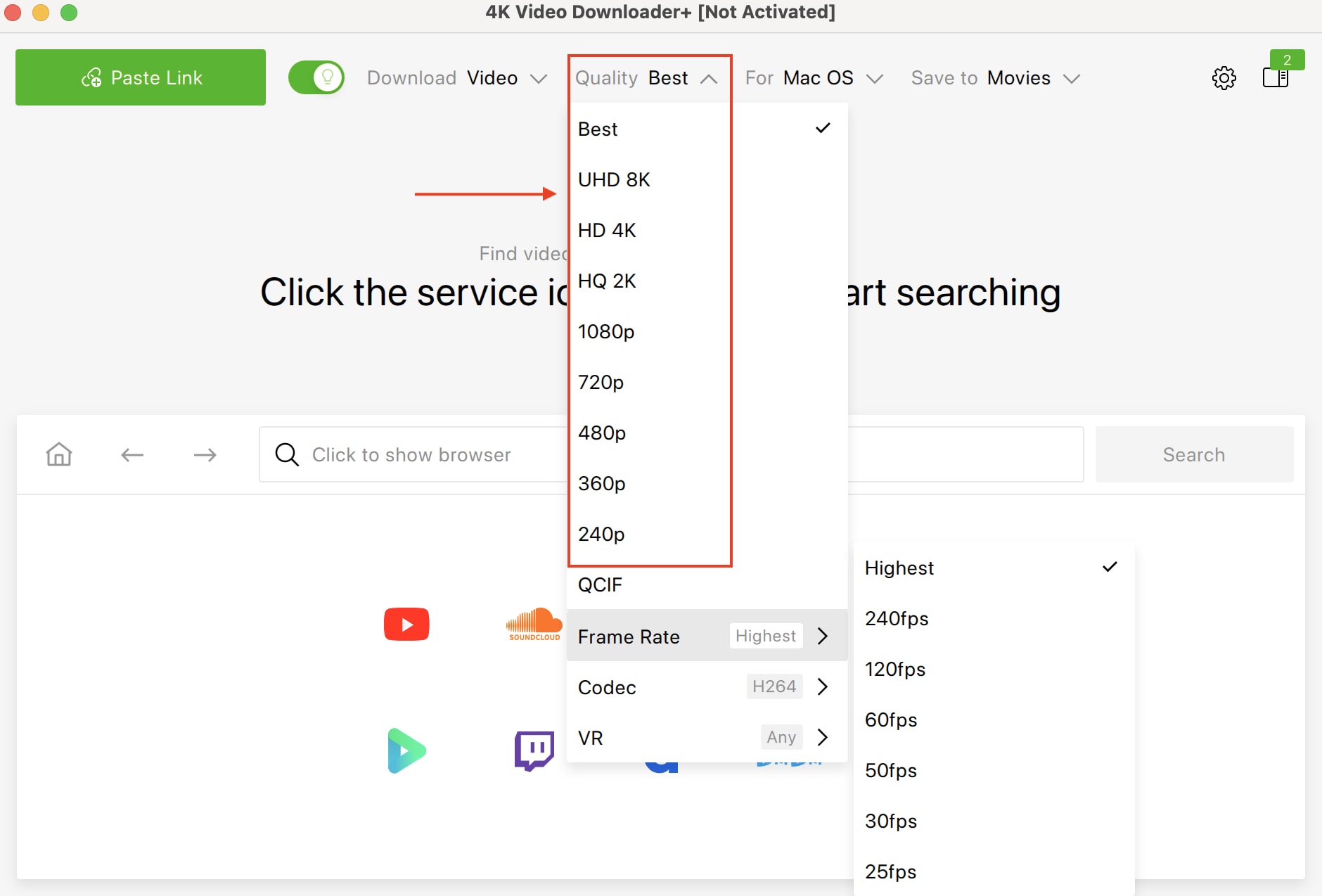
4K Video Downloader Plus advertises support for HD 720p, 1080p, 4K, and even 8K downloads where the source platform allows it. You can choose your preferred resolution before saving the file, along with format options such as MP4 or MKV.
In real-world conditions, 1080p downloads are consistently available and stable. However, independent testing across review platforms shows that 4K and 8K availability can be inconsistent, particularly for YouTube content.
Due to YouTube backend and API changes, many videos that display in 4K on the platform may only be downloaded at 1080p. If high-resolution output is critical, this limitation is worth keeping in mind.
Playlist and Channel Downloads
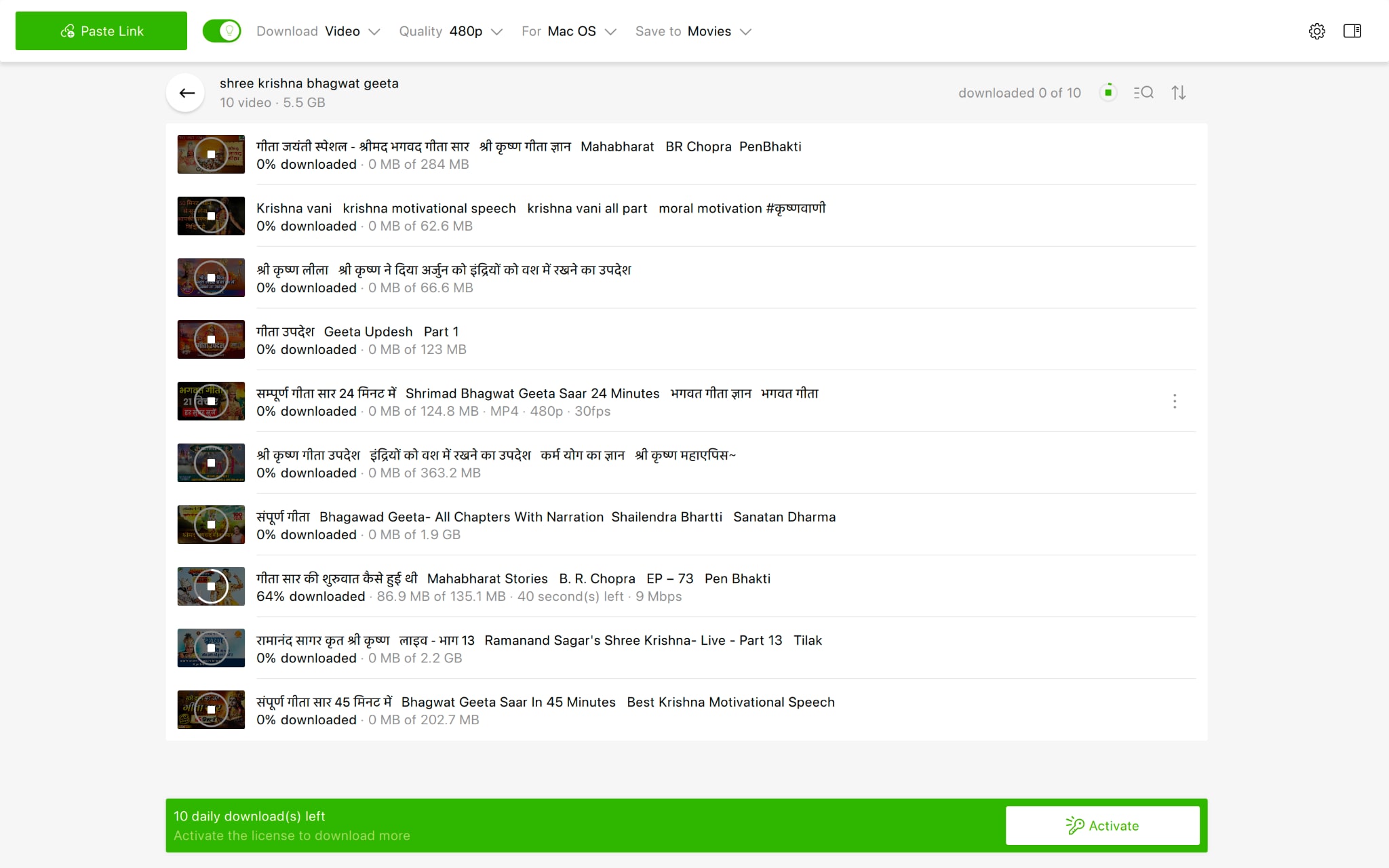
You can paste a YouTube playlist, channel URL, or even search results into the app and download multiple videos in one session. The software also supports saving Watch Later lists and Liked videos when logged in through the built-in browser.
The free plan limits playlist downloads to 10 videos per list. To download larger playlists or full channels without restrictions, a paid plan is required. Subtitle downloads for entire playlists are also tied to paid tiers.
For archiving creators or saving educational content in bulk, this feature remains one of the tool's main strengths.
Smart Mode for Faster Workflows
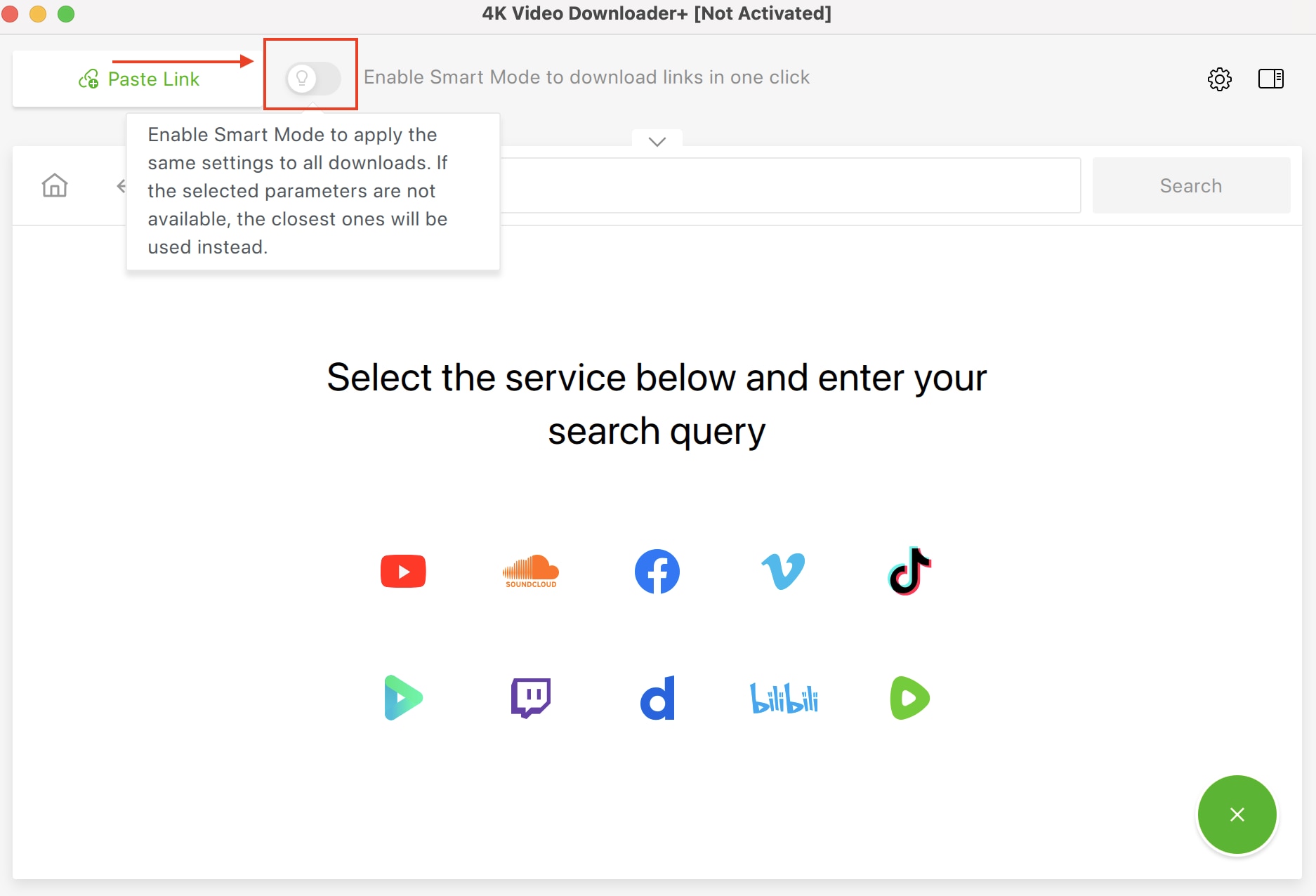
Smart Mode is designed to reduce repetitive setup. You select your preferred format, resolution, and output folder once, and those settings are automatically applied to every future pasted link.
If you frequently download content in the same format, Smart Mode removes the need to confirm settings each time. This noticeably speeds up workflow, especially when handling multiple links in sequence.
Among the built-in tools, Smart Mode is one of the more practical features for everyday use.
In-App Browser and Private Video Access
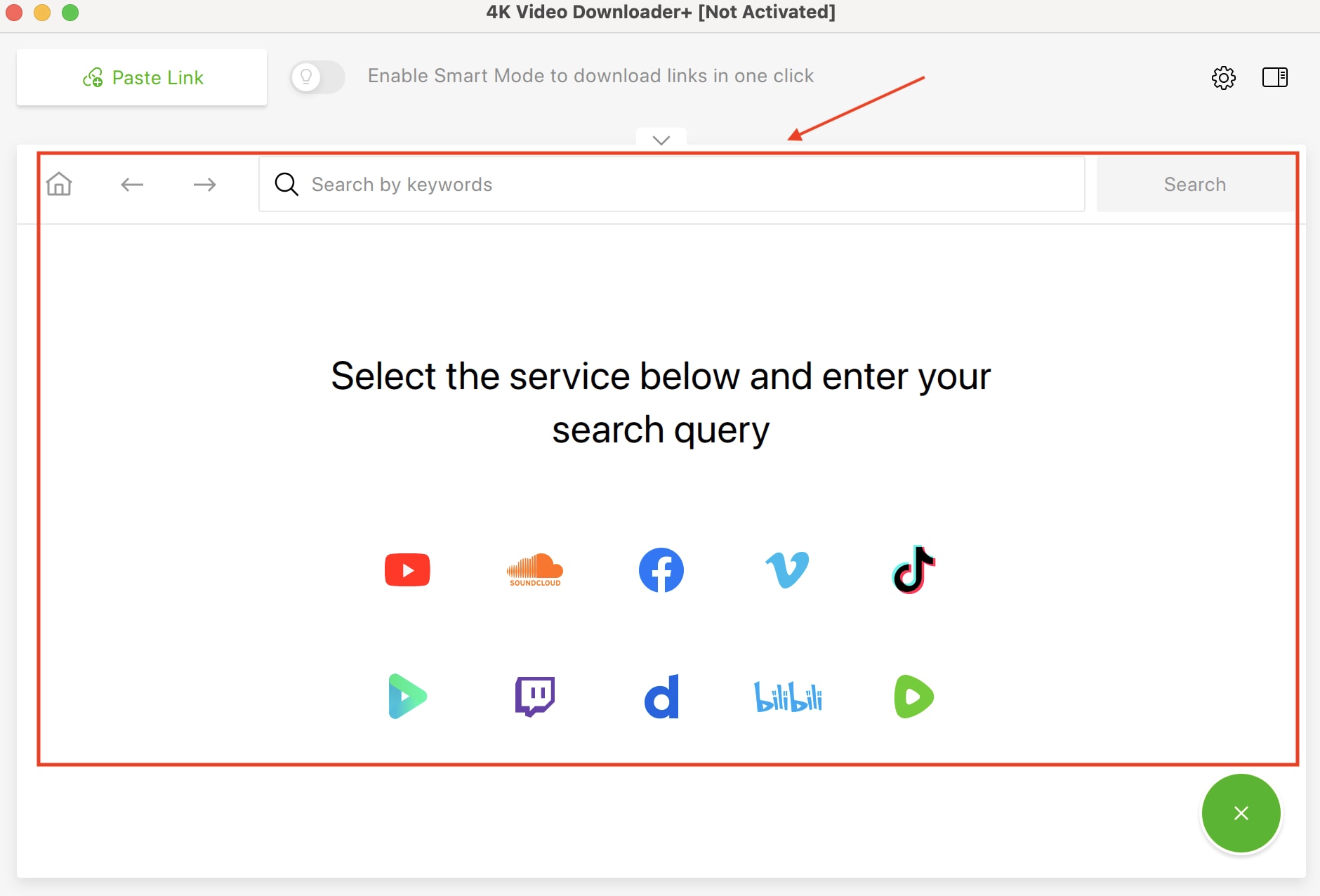
The integrated browser lets you log in to YouTube, TikTok, Facebook, Vimeo, Bilibili, and other supported platforms directly in the app. This gives you access to private playlists, age-restricted videos, Watch Later content, and login-protected media.
This functionality is restricted to paid license holders. Without a paid plan, login-based downloads are not available. The browser also supports proxy connections, which can help bypass certain network restrictions when properly configured.
Subtitle and Audio Extraction
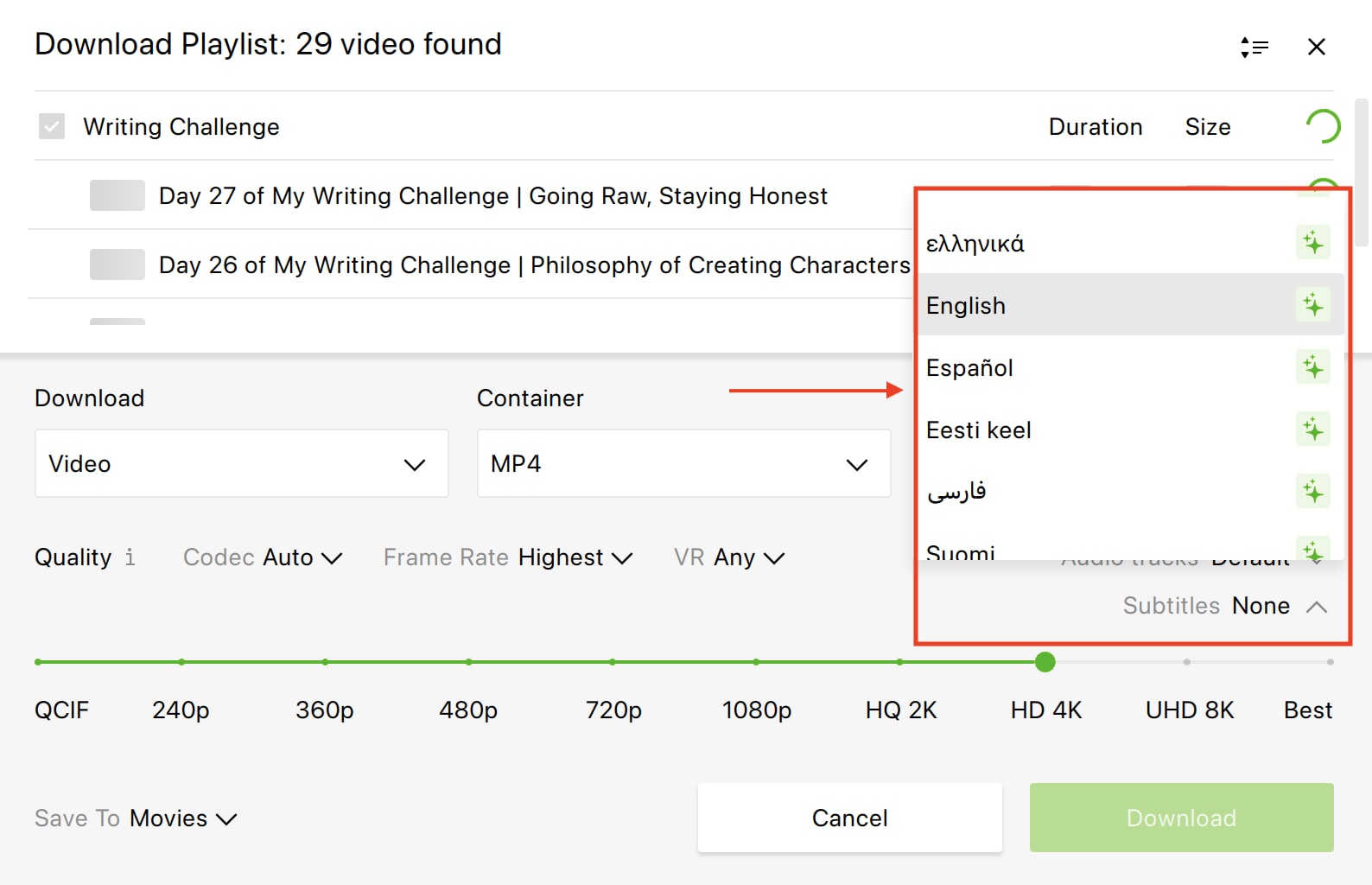
You can download subtitles in SRT format and select from multiple available languages when supported by the source video. Subtitles can be saved as separate files or embedded, depending on your settings and plan.
The software also allows audio extraction in formats like MP3 and M4A. Multi-language dubbed audio downloads are available only under the Pro plan, which is positioned for professional or commercial use.
If you mainly need audio files or caption archives, the paid tiers unlock the full capability of this feature set.
Part 3: Is 4K Video Downloader Plus Safe to Use?
Yes, 4K Video Downloader Plus is generally considered safe when you download it directly from the official 4kdownload.com site. The company states that the software contains no malware, adware, or spyware and recommends users check installers with tools like VirusTotal if in doubt. Independent site Scam Detector also shows the official domain has a high trust score and no signs of phishing or malicious content.
However, avoid downloading 4K Video Downloader Plus from third‑party sites or mirrors, as those can bundle unwanted software. Some users also note that the free version shows ads and that the app's clipboard monitoring behavior has raised discussion online. These are not threats but real user concerns worth noting.
Part 4: 4K Video Downloader Plus Pricing: Free vs. Paid Plans
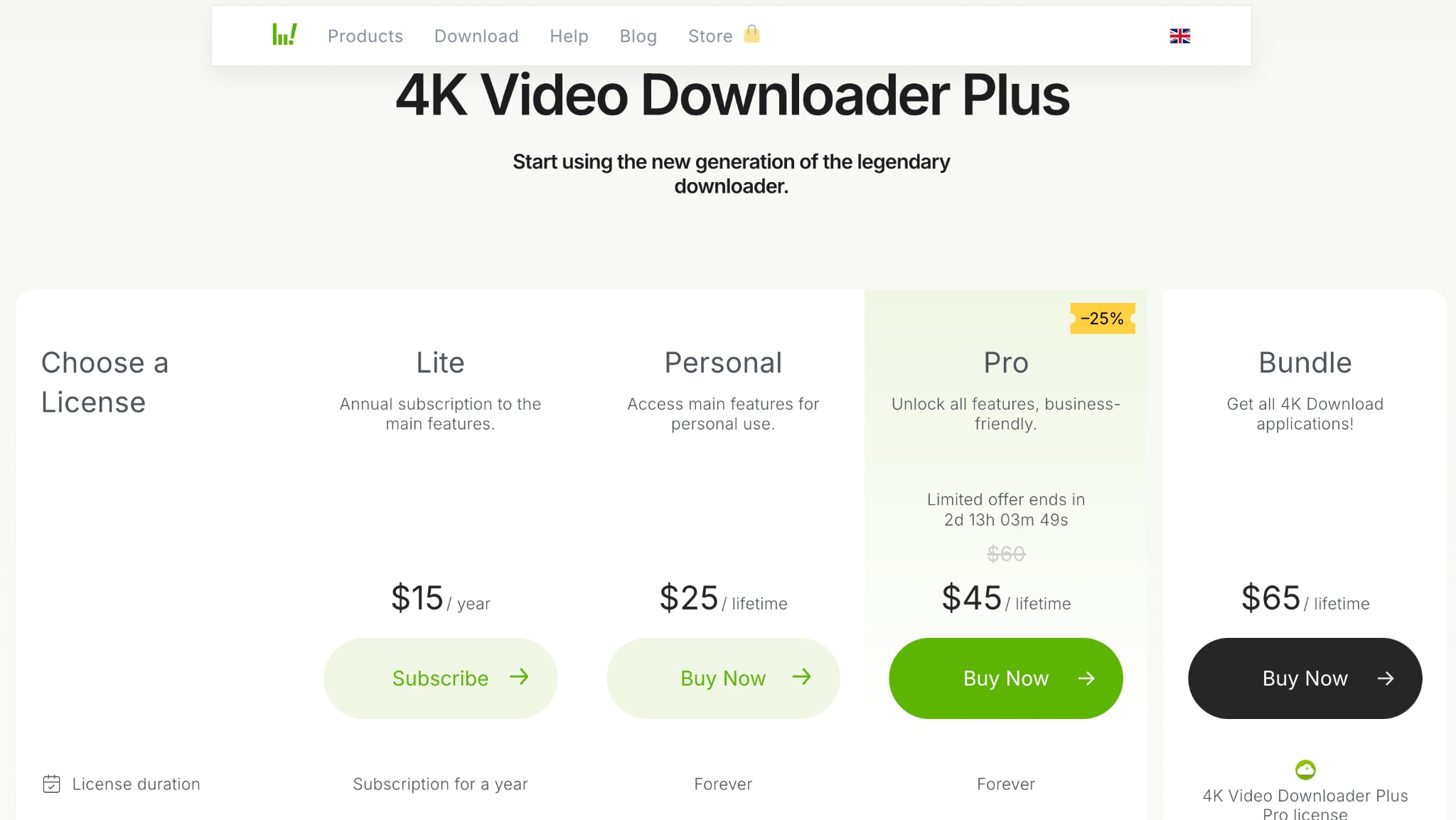
In this 4K Video Downloader Plus review section, pricing is based on the current official plan structure published on 4kdownload.com. The software offers one free tier, one annual subscription, and two lifetime license options.
| Plan | Price | Best For | Notes |
|---|---|---|---|
| Starter | Free | Basic personal use | Permanent access to basic features. No trial period and no card required. |
| Lite | $15/year | Personal users who want core paid features | Annual subscription to the main features. |
| Personal | $25/lifetime | Personal long-term use | One-time payment for permanent access to main features. |
| Pro | $45/lifetime | Professional or commercial use | Full feature access and commercial use permission. The official page currently shows this as a discounted price. |
Many buyers who held a "4K Video Downloader lifetime license" found that it did not carry over when support for that version ended on February 1, 2026. The company did not provide an automatic migration for those licenses to the new Plus version.
Given that history, the current lifetime license applies only to the current Plus version. While it grants ongoing access to features as they exist today, there is no formal guarantee it would transfer if the product is restructured again, a legitimate concern raised by community discussions online.
Part 5: 4K Video Downloader Plus Review: Performance in Real-World Testing
Download Speed
Using the free plan, a playlist containing 18 videos was tested. The YouTube video downloader allowed downloading only the first 10 videos due to plan limits, and the total time required was approximately 29 minutes.
For standard 1080p videos, speeds were stable and consistent. However, simultaneous downloads are limited in the free tier, which naturally affects throughput compared to paid plans that allow up to 7 concurrent downloads.
Video Quality Output
1080p downloads retained full visual clarity with no visible recompression artifacts. Bitrate and frame rate options (including 60 fps where available) were selectable before the download.
Although 4K and 8K options appear in the resolution menu, availability depends heavily on YouTube's backend access. In multiple cases, 1080p appeared as the highest downloadable resolution despite higher streaming availability.
System Resource Usage
On macOS with Apple Silicon, CPU usage remained moderate during active downloads. RAM consumption remained under control, and the system remained responsive for multitasking. The relatively large 879 MB installation footprint does not translate into heavy runtime resource usage.
Stability and Error Rates
Single video downloads completed without failure. Playlist downloads processed correctly within the free-tier cap. However, the built-in analysis phase occasionally paused for several seconds before resolving the video metadata. This did not cause crashes, but it may feel unresponsive during URL parsing. Updates typically address such behavior when platform-side changes occur.
Part 6: Pros and Cons of 4K Video Downloader Plus: Honest 4K Video Downloader Review
In this 4K Video Downloader Pro review, strengths and limitations become clearer when evaluated beyond the feature list. The points below reflect practical use, current plan restrictions, and recurring customer feedback.
Pros of 4K Video Downloader Plus
- The interface is straightforward. You can copy a link and paste it, or open YouTube directly inside the built-in browser. When browsing within the app, a download button appears on the video or playlist page, making the process feel integrated rather than separate.
- Playlist and channel downloads are well implemented. You can paste a full playlist URL or open it in the in-app browser and download multiple videos in sequence with format and resolution control.
- 1080p downloads are stable and maintain original clarity, frame rate, and codec options where available. Output quality is consistent for Full HD content.
- System performance remains steady during downloads. Even with multiple files being processed, CPU and memory usage stay moderate.
- A one-time payment option is available for Personal and Pro plans, avoiding forced recurring subscriptions.
Cons of 4K Video Downloader Plus
- Although 4K and 8K options appear in the resolution list, real availability is inconsistent. In many cases, downloads are limited to 1080p due to platform-side restrictions.
- The free plan is restrictive. It limits downloads to 10 per day and 10 per playlist, includes ads, and reduces simultaneous download capacity.
- The discontinuation of the previous version in 2026 raised concerns among lifetime license holders, affecting long-term confidence among some buyers.
- Site support is limited to major platforms. If you frequently download from niche or less common sites, compatibility may not always be available.
- The app focuses strictly on downloading. It does not include built-in video editing, advanced format conversion tools, or AI video enhancement features.
Part 7: 4K Video Downloader Plus Reviews and User Ratings
Here's a summary of genuine community and platform 4K Video Downloader Plus review from Trustpilot and Reddit discussions:
Overall Sentiment (Microsoft Store & Trustpilot)
- In independent review excerpts, the broader 4K Download ecosystem shows mixed user satisfaction: many praise ease of use and core functionality, while others report errors and inconsistent performance. Trustpilot reviews reflect both positive experiences downloading videos and subtitles easily, and frustration with errors and instability. Some users note that the free tier works well for basic needs, while others say paid features still fail at times.
Community Feedback (Reddit)
- Many long-time 4K Video Downloader Plus users highlight an easy setup and an intuitive workflow, but also frequent downgrades to daily limits and feature regressions post-Plus launch. (Reddit)
- A recurring pain point is the lifetime license issue: users who bought legacy "lifetime" keys found they didn't work with the new Plus product, leading to significant backlash online. (Reddit)
- Frustrations also include occasional crashes, slow parsing on Windows setups, and feature inconsistency following platform changes. (Reddit)
Microsoft Store Rating
- The app's public rating sits around 4.0/5 stars, reflecting this split between usable functionality and recurring support concerns.

Part 8: 4K Video Downloader Plus Alternatives: Wondershare UniConverter
If your needs go beyond simple video saving, exploring 4K Video Downloader alternatives becomes a practical next step. As this 4K Video Downloader Pro review shows, many users eventually look for more control over formats, file size, and output quality. That's where Wondershare UniConverter comes in.
Wondershare UniConverter is designed to simplify your workflow by combining video downloading with conversion, compression, recording, and enhancement tools in one interface. Instead of switching between multiple apps, you can download, convert to 1,000+ formats, compress large 4K/8K files, and even upscale or stabilize footage inside the same software.
Note: We resolutely oppose all forms of copyright-infringing downloads. This tutorial is only for downloading videos/audio materials of your own or that are allowed to save for offline use.

4K Video Downloader
| Feature | 4K Video Downloader Plus | Wondershare UniConverter |
| Video download | ✅ (15 sites) | ✅ (1000+ sites) |
| 4K/8K download | Inconsistent | Reliable |
| Format conversion | ❌ | ✅ (1000+ formats) |
| Video compression | ❌ | ✅ AI-powered |
| AI enhancement | ❌ | ✅ AI upscaling, stabilization |
| Subtitle download | Paid only | ✅ |
| Batch processing | Limited | ✅ High-speed batch |
| Pricing | $15–$60/lifetime | Flexible plans |
If you regularly work with video files and need more than just downloading, it's a practical upgrade. Try Wondershare UniConverter for free and see how it fits your workflow.
How to Download Videos with Wondershare UniConverter
Here is how you can download videos with UniConverter in the highest quality with ease:
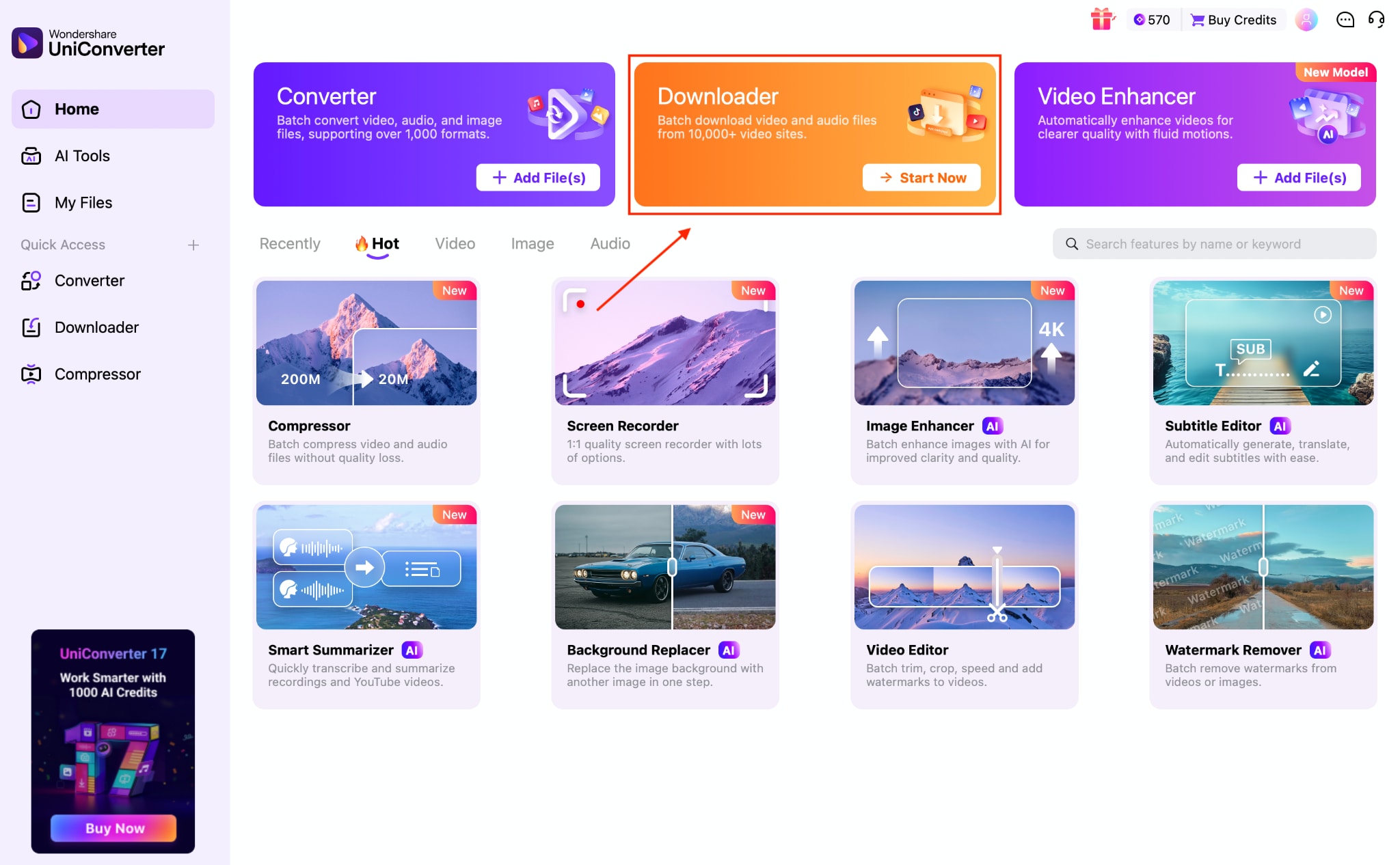
Step 1: On the Wondershare UniConverter's dashboard, click the" Downloader" option.
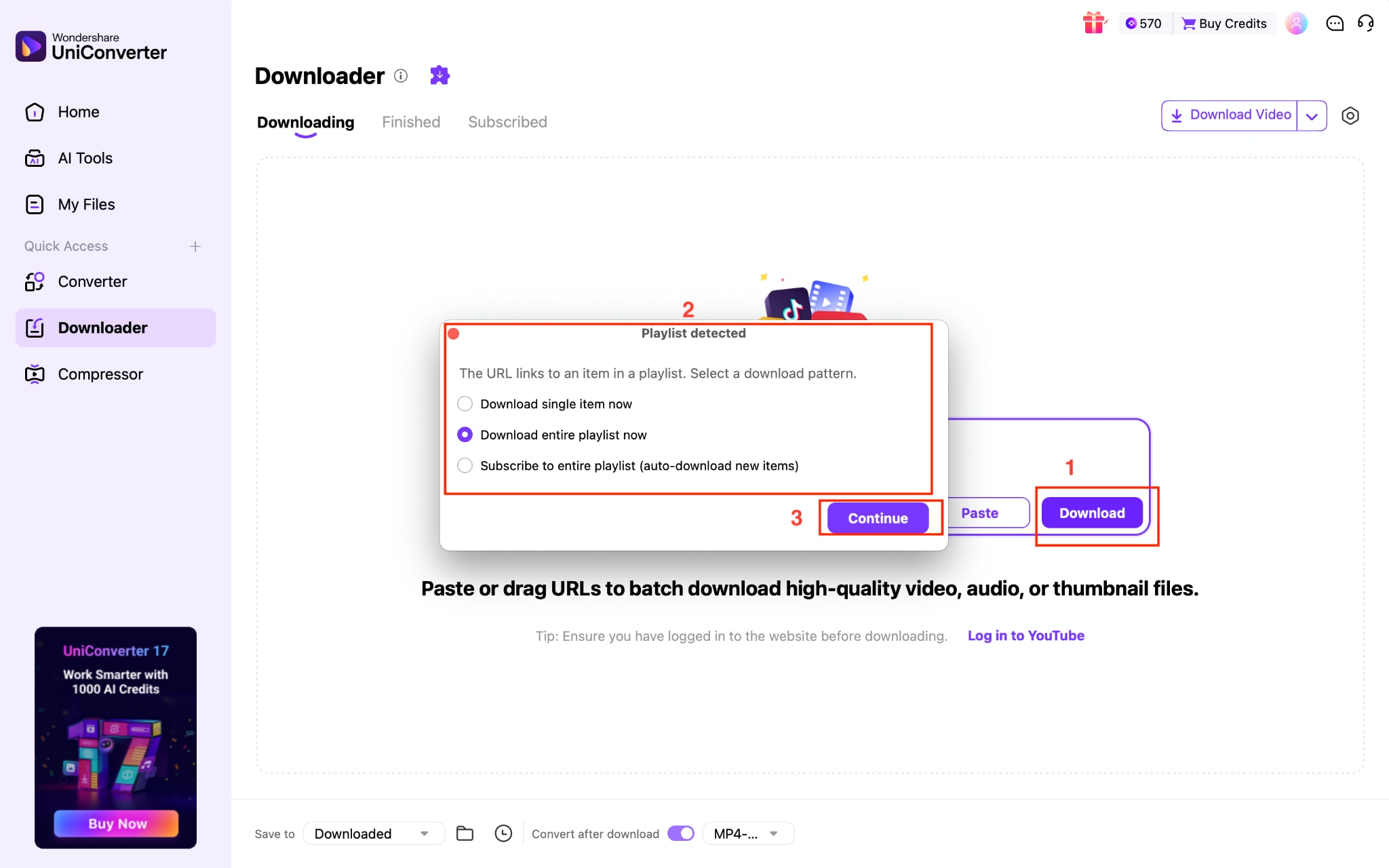
Step 2: Paste the complete playlist link or individual video links, then click the "download" button. It will ask whether you want to download the whole playlist or only a single video. Click “Continue.”
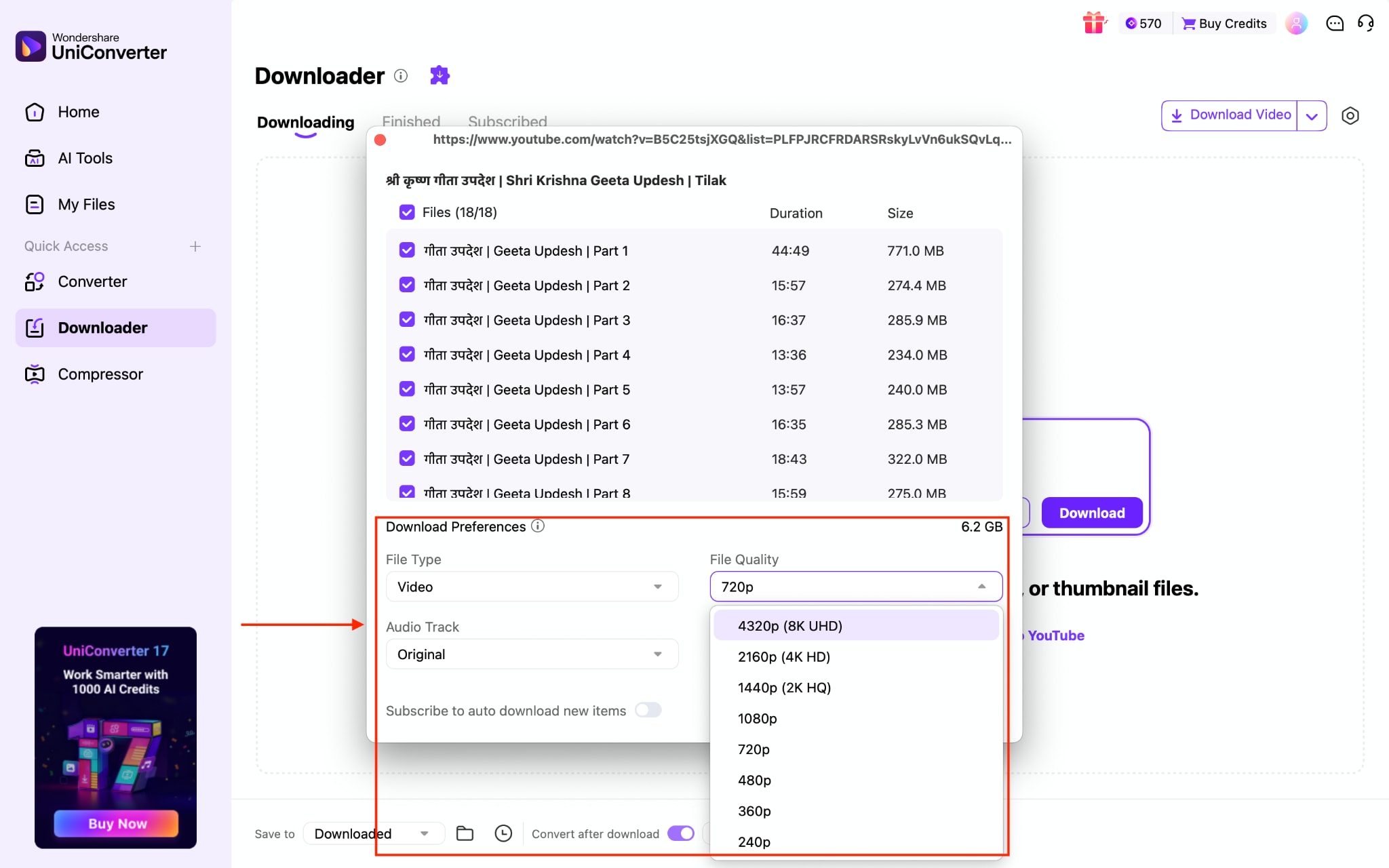
Step 3: A small screen will appear; here you can choose the video quality and other options, such as adding subtitles or only downloading audio.
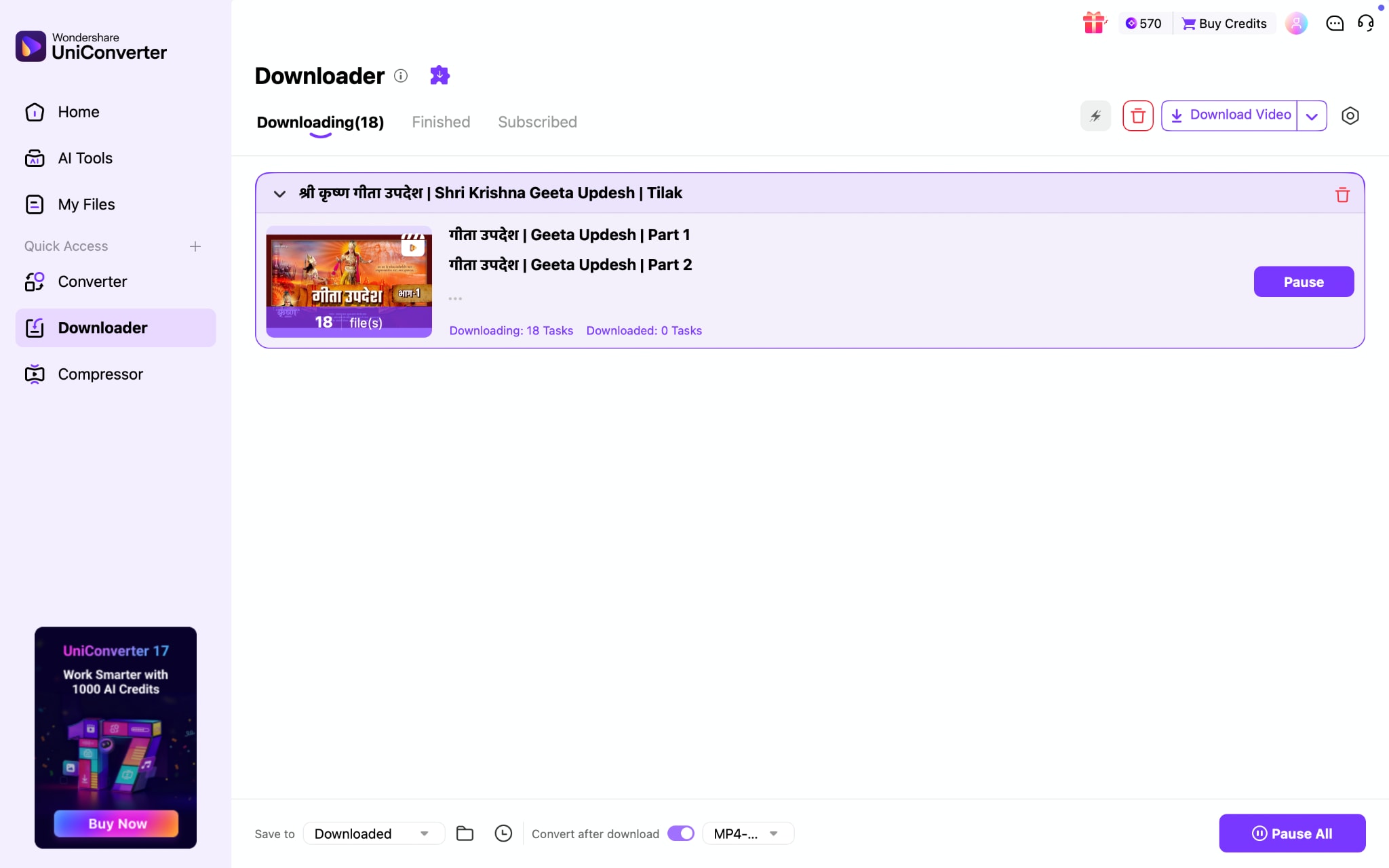
Step 4: The downloading process will start.
FAQs About 4K Video Downloader Plus
-
Is 4K Video Downloader Plus free?
Yes, 4K Video Downloader Plus offers a free Starter plan. However, the free version is limited compared with the paid plans, so it is better suited to light or occasional downloading rather than frequent bulk use.
-
What are the 4K Video Downloader Plus free limitations?
The free plan includes basic downloading features, but it comes with usage limits and fewer advanced options than the paid versions. If you need broader playlist support, fewer restrictions, or more professional features, the Lite, Personal, or Pro plan will be a better fit.
-
Why is 4K Video Downloader not working for some users?
If 4K Video Downloader is not working, the most common reasons are platform-side changes, outdated app versions, temporary parsing issues, or restrictions tied to specific videos and sites. In many cases, updating the software or switching to a more flexible 4K Video Downloader alternative can help.
-
How much is 4K Video Downloader Plus?
As of the latest check, 4K Video Downloader Plus offers a free Starter plan, a Lite plan at $15 per year, a Personal plan at $25 lifetime, and a Pro plan at $45 lifetime. Because pricing and discounts can change, it is still a good idea to confirm the latest 4K Video Downloader Plus price on the official website.
-
What is a good 4K Video Downloader alternative if I need more features?
If you need more than basic downloading, a good 4K Video Downloader alternative is one that also includes video conversion, compression, format control, or enhancement tools. This is especially useful for users who want a broader workflow instead of a downloader-only app.
Final Verdict: Should You Use 4K Video Downloader Plus?
This 4K Video Downloader Plus review shows a tool that performs reliably for basic 1080p downloads, small playlists, and occasional use. The interface is clean, and the one-time pricing model may appeal to buyers who prefer avoiding subscriptions. However, 4K availability remains inconsistent, free-tier limits are restrictive, and the lifetime license history raises reasonable caution.
If downloading is your only requirement, 4K Video Downloader Plus can work. If your workflow includes converting, compressing, enhancing video files, or any other media processing needs, Wondershare UniConverter offers broader control. Download Wondershare UniConverter and explore what it can do for you.

