


India is one of the most linguistically diverse countries and is home to thousands of languages. Although Hindi is one of the most dominant languages there, Marathi is quite popular. It sparks interest among content creators and businesses in adopting Marathi voice typing as a tool to improve communication and enhance user experience on their applications. Well, the good news is, technology has made it easy!
Many text-to-speech technologies allow you to convert Marathi voice to text or vice versa. This article provides a detailed guide to some of the best online, offline, and mobile-based tools offering this functionality.
In this article
- Use Cases Where Marathi Speech-to-Text Converters Can Help
- How to Batch Convert Marathi Speeches to Text with High Accuracy on PC
- Easy Way to Voice Type With a Real-time Web Tool
- How to Transcribe Marathi Speeches with Apps on Android or iPhone
- How to Dictate Marathi Speeches to Text with Chrome Extension
- Conclusion
- FAQs
Part 1. Use Cases Where Marathi Speech-to-Text Converters Can Help
Regardless of whether you’re a content creator or an international business targeting the Marathi-speaking market, voice typing in Marathi can be of great use. You can use it to create live captions and subtitles, audiobooks and podcasts, and make the content accessible.
Live Captions and Subtitles: Many online tools and apps utilize speech-to-text technology to convert spoken Marathi into written text. Creators and businesses can use it as live captions during meetings, presentations, or subtitles for videos. This potentially enhances viewer engagement and accessibility.
Content Creation for Audiobooks and Podcasts: The Marathi voice-to-text tools can convert spoken Marathi into a written text, which can be usable as a transcript for audiobooks and podcasts. Alternatively, you can repurpose the transcript into a blog post or article and make it accessible to those who prefer reading over listening.
Accessibility: One of the most valuable use cases of Marathi voice typing for businesses is to localize their content and make it accessible to broader audiences. You can easily transcribe the Marathi voices into a text that your target market understands. Also, this way, consumers feel valued, and it potentially boosts your brand credibility.
Part 2. How to Batch Convert Marathi Speeches to Text with High Accuracy on PC
Desktop tools can simplify content creation in Marathi or boost production, especially if you have long offline sessions to commit to. Wondershare UniConverter stands out as the most comprehensive and powerful tool for Marathi voice-to-text.
Designed for individuals, creators, and businesses, it not only transcribes your Marathi voice but also lets you clean it up, remove background noise, and batch process. Its Subtitle Editor feature automatically generates and adds subtitles to your videos. With a few clicks, you can customize the subtitles to enrich the viewing experience of audiences and captivate them.
Key Features
- Supports accurate speech-to-text conversion in Marathi and other languages like Hindi, English, Spanish, French, etc.
- The tool features a batch voice transcription ability.
- Its Audio Enhancer and Noise Remover features enhance the audio quality.
- It has a built-in spell-checker for easy edits.
Transcribing Marathi voice to text using Wondershare UniConverter is simple, and here are the steps:
Step 1: Access the Wondershare UniConverter on your desktop, where you’ll find four categories: Hot, Video, Audio, and Image. Head over to the “Audio” followed by the “Speech-to-Text” feature.

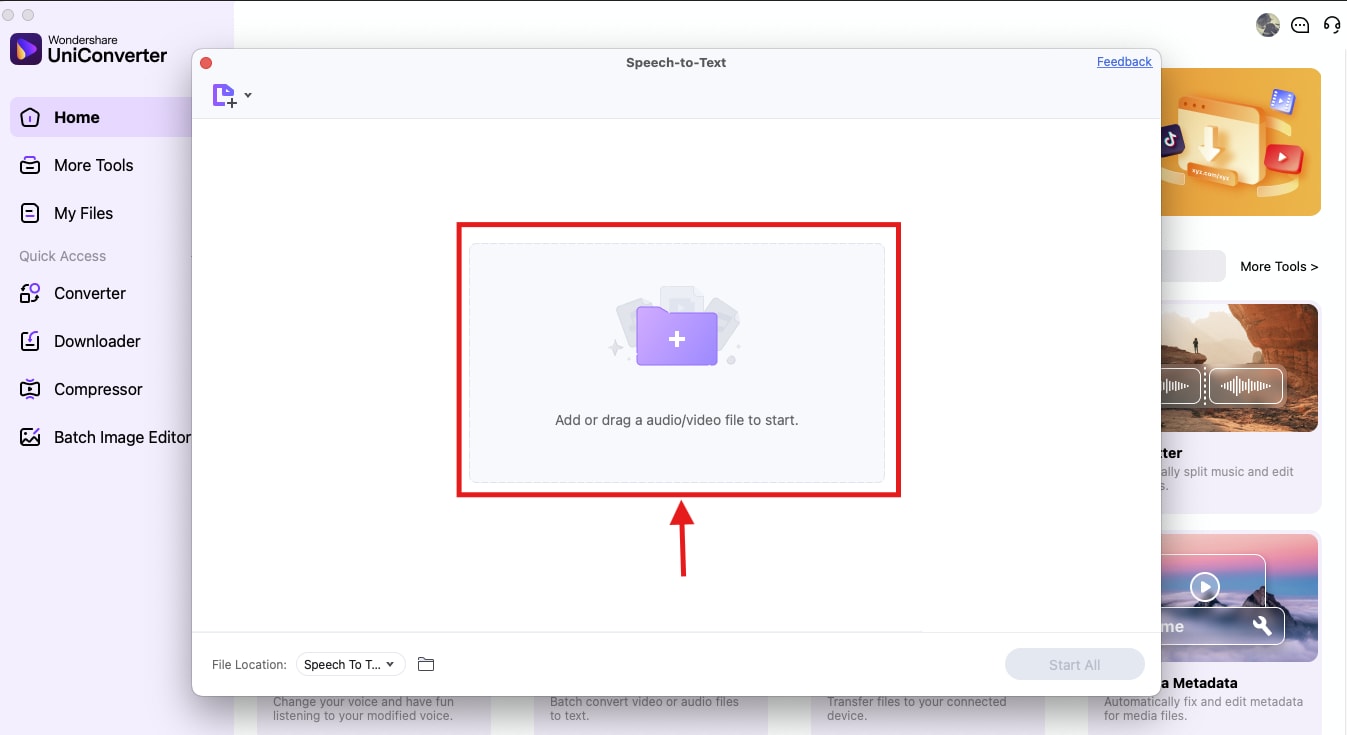
Step 2: Tap the “+” to upload the Marathi audio file you want to transcribe. You can drag and drop the file if needed.
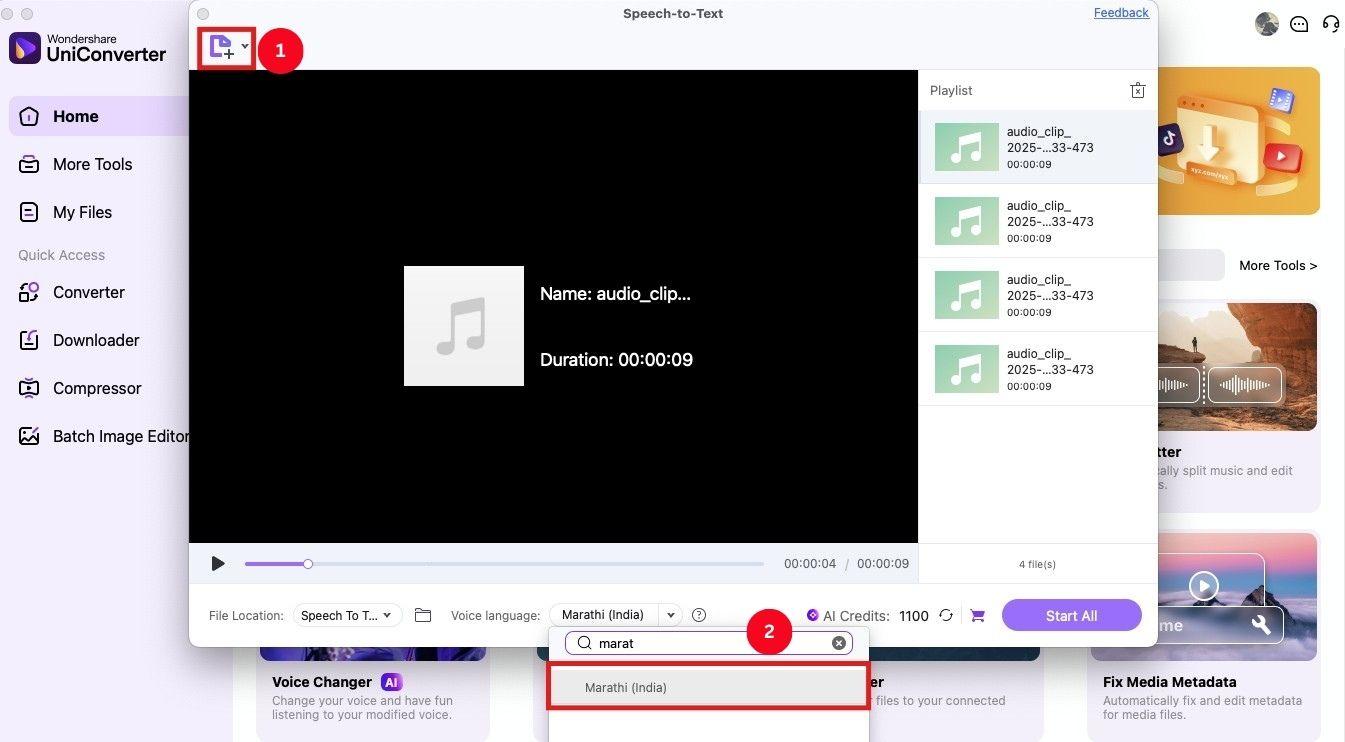
Step 3: Upload more Marathi audio by clicking on the “file+” icon at the top-left corner. Once the files are uploaded, select “Marathi” as the transcription language.
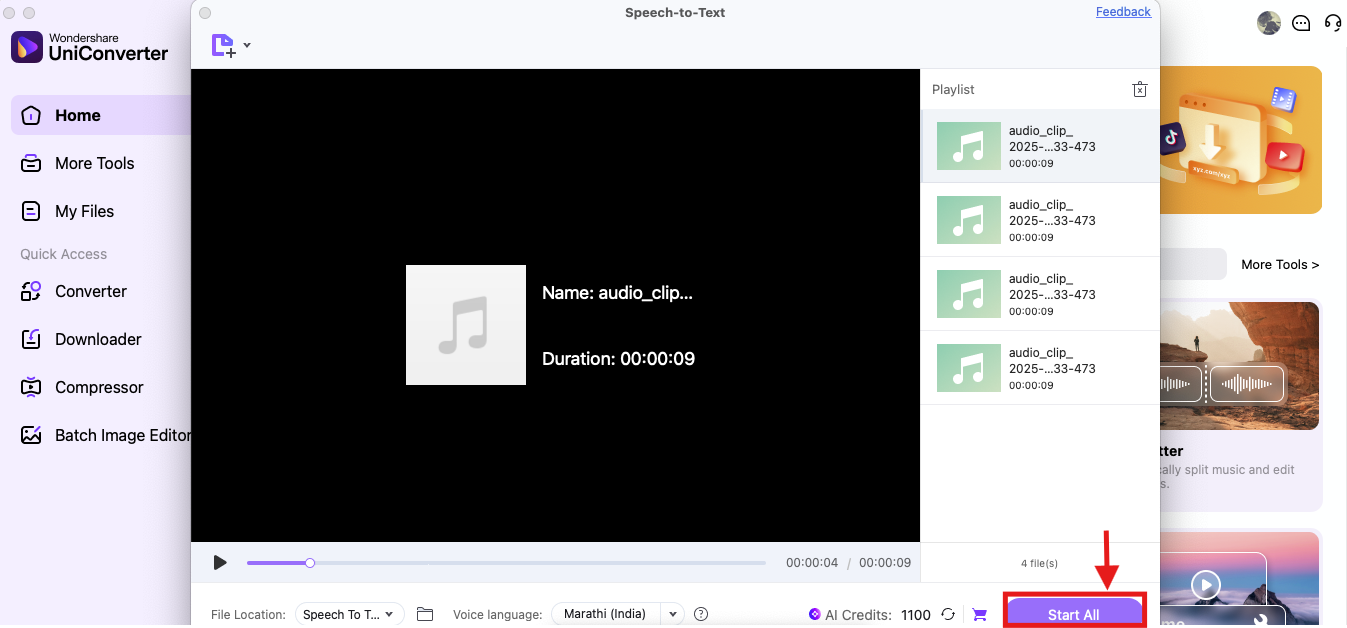
Step 4: Then, click “Start All” for the tool to process your audio. UniConverter will process the audio and download the transcripts as TXT files.
Part 3. Easy Way to Voice Type With a Real-time Web Tool
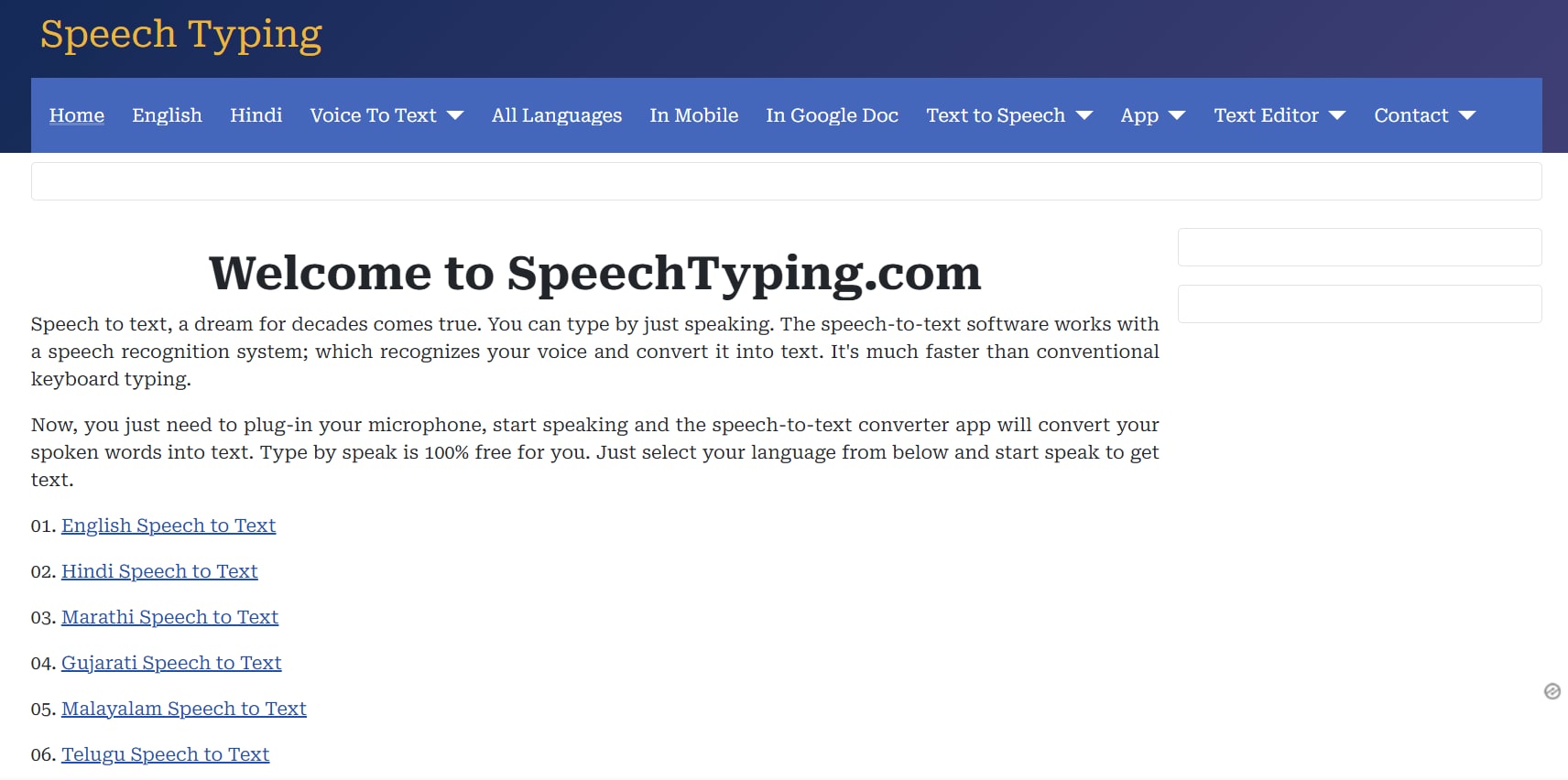
If you’re a content creator, student, or everyday user who wants to transcribe Marathi quickly and easily, web tools like Speech Typing can be helpful. The tool is simple to use, and as you speak into the microphone, it recognizes your voice and automatically types in Marathi. The best part is that it’s free and doesn’t require a login. However, you must speak clearly and slowly to get an accurate transcription every time.
Key Features
- The interface is simple, and it automatically detects and transcribes in Marathi.
- It can translate from Marathi to other languages.
- The tool supports 70+ languages, including regional languages like Gujarati, Malayalam, Tamil, Telugu, and Bangla.
- It supports voice commands for punctuation and symbols.
Here’s how to use the online Marathi voice typing tool and generate text:
Step 1: Access Speech Typing speech-to-text Marathi on your desktop. Scroll and click on “Start Now” to start dictating in Marathi. It’ll detect your voice and will start turning it into text.
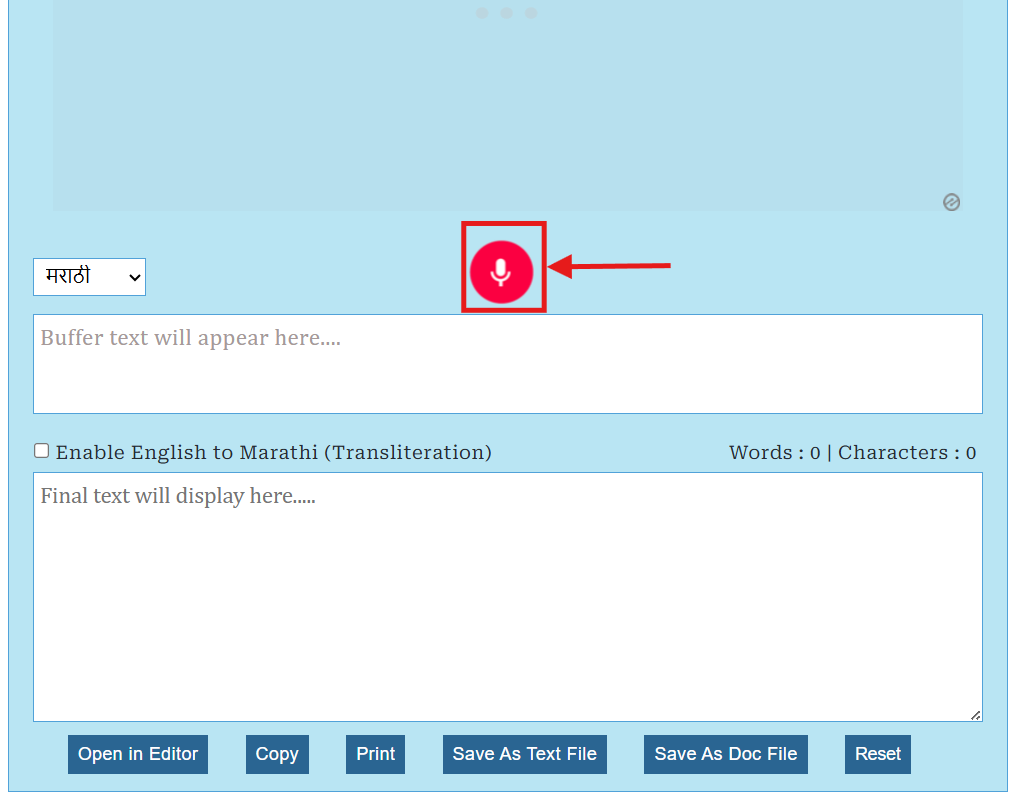
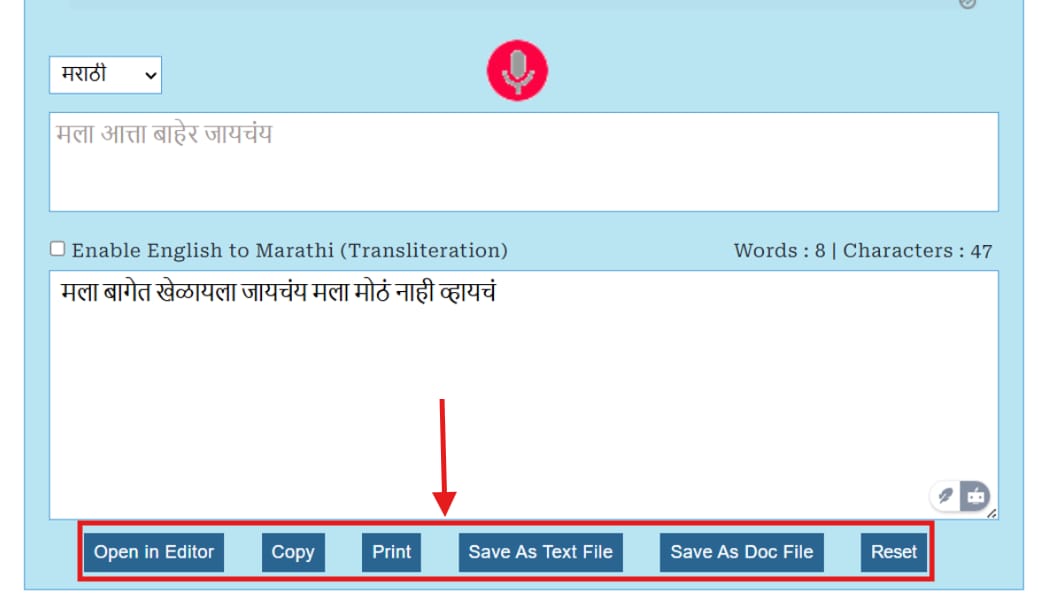
Step 2: Once you’re done, tap “Copy,” “Edit,” “Save,” or “Print” to save and export the text, as needed.

Easy to Use Marathi Media Transcriber
Part 4. How to Transcribe Marathi Speeches with Apps on Android or iPhone
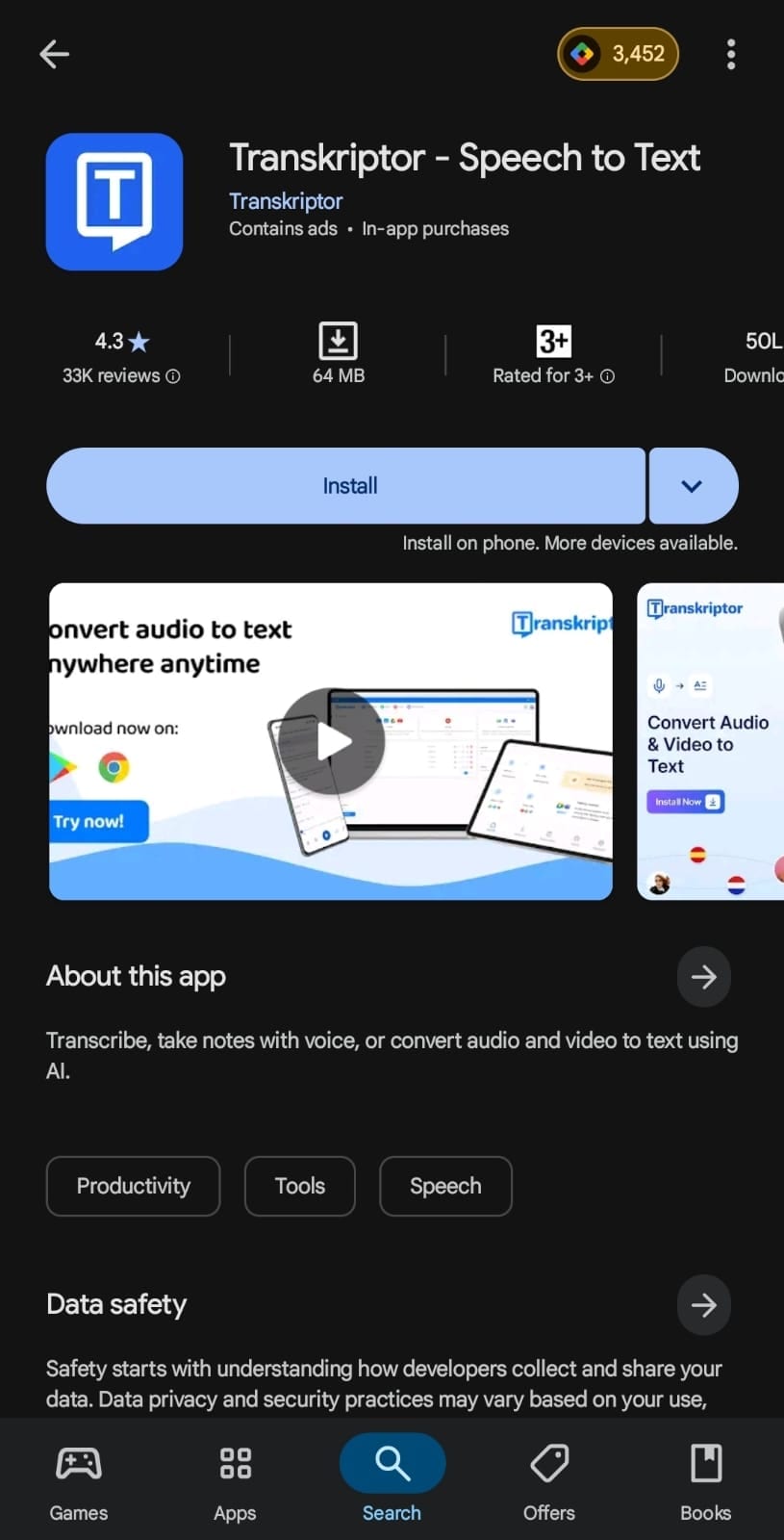
Mobile-based voice-to-text Marathi apps are always handy. They let you convert your audio into text quickly and often require less effort. If you prefer such over web apps, then Transkriptor can be a great option.
Designed for remote meetings, interviews, and other conversations, its straightforward interface allows easy upload of audio files, managing projects, and editing transcripts. Other than Marathi, it supports multiple languages and audio files.
The tool is pretty accurate. However, it lacks support for live transcription, so some may fear missing out on something important.
Key Features
- Other than Marathi, it supports transcription in 100+ languages like English, French, Chinese, and Portuguese.
- Its AI chat feature provides answers to any questions regarding the transcription.
- It records past transcriptions and provides necessary insights.
- There’s a dedicated space to write important tasks and reminders.
Now that you’ve got an idea of what Transkriptor offers, here’s how to use it to transcribe your Marathi audio:
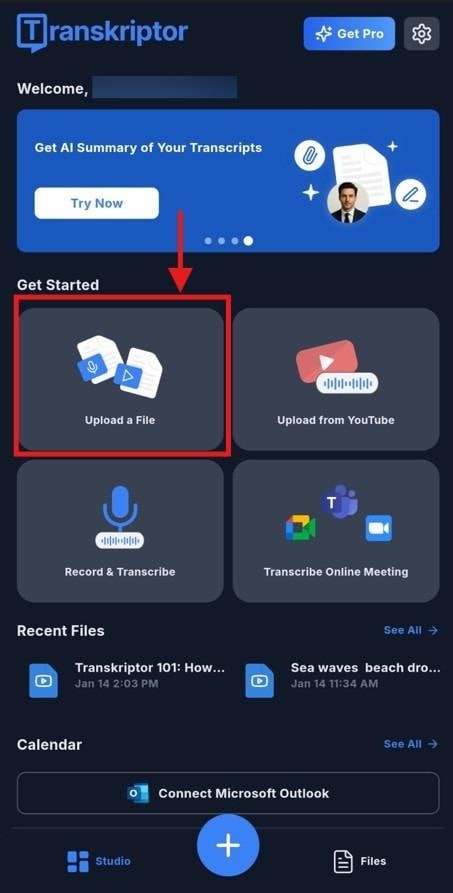
Step 1: Access Transkriptor on your mobile and head over to the “Upload a File” option.
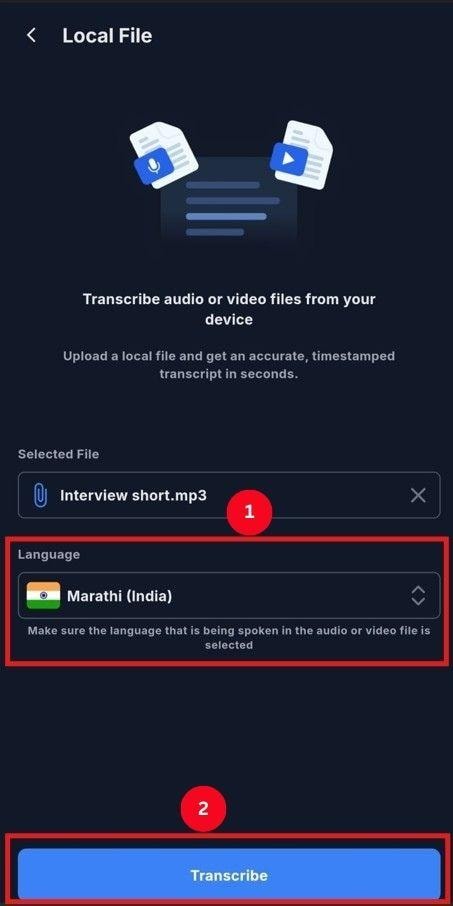
Step 2: Upload the Marathi audio file from the storage and select the language as “Marathi.” Then, tap “Transcribe.”
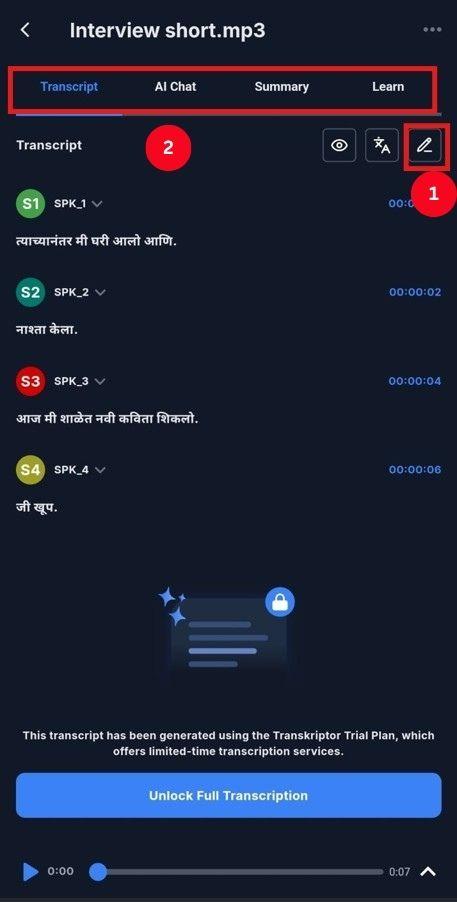
Step 3: It takes around a minute to transcribe the audio files (it may be more depending on your audio length). Once it’s done, it will display the transcript separated by speakers in the audio. Review it and tap the “Pencil icon (Edit)” to make edits. You can use its other features, like AI Chat and summary, to obtain a gist of the transcription.
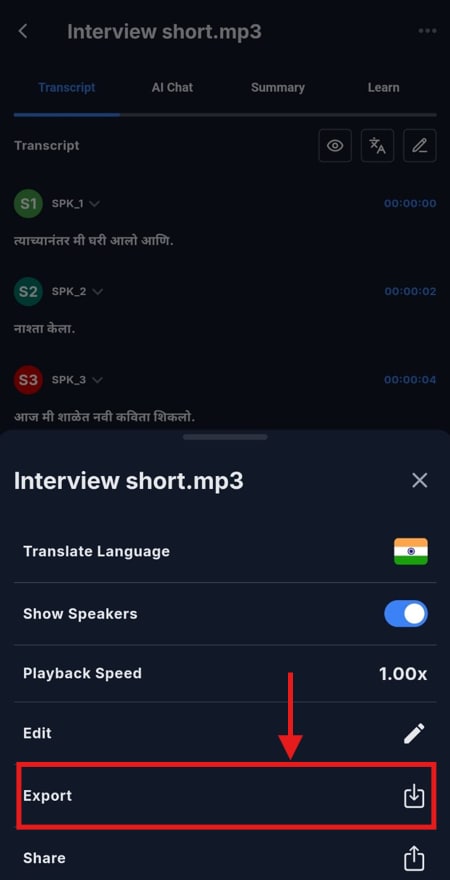
Step 4: Then, tap the three-dot icon at the top-right corner, and from the menu, select “Export” to save the transcript in your intended format.
Part 5. How to Dictate Marathi Speeches to Text with Chrome Extension
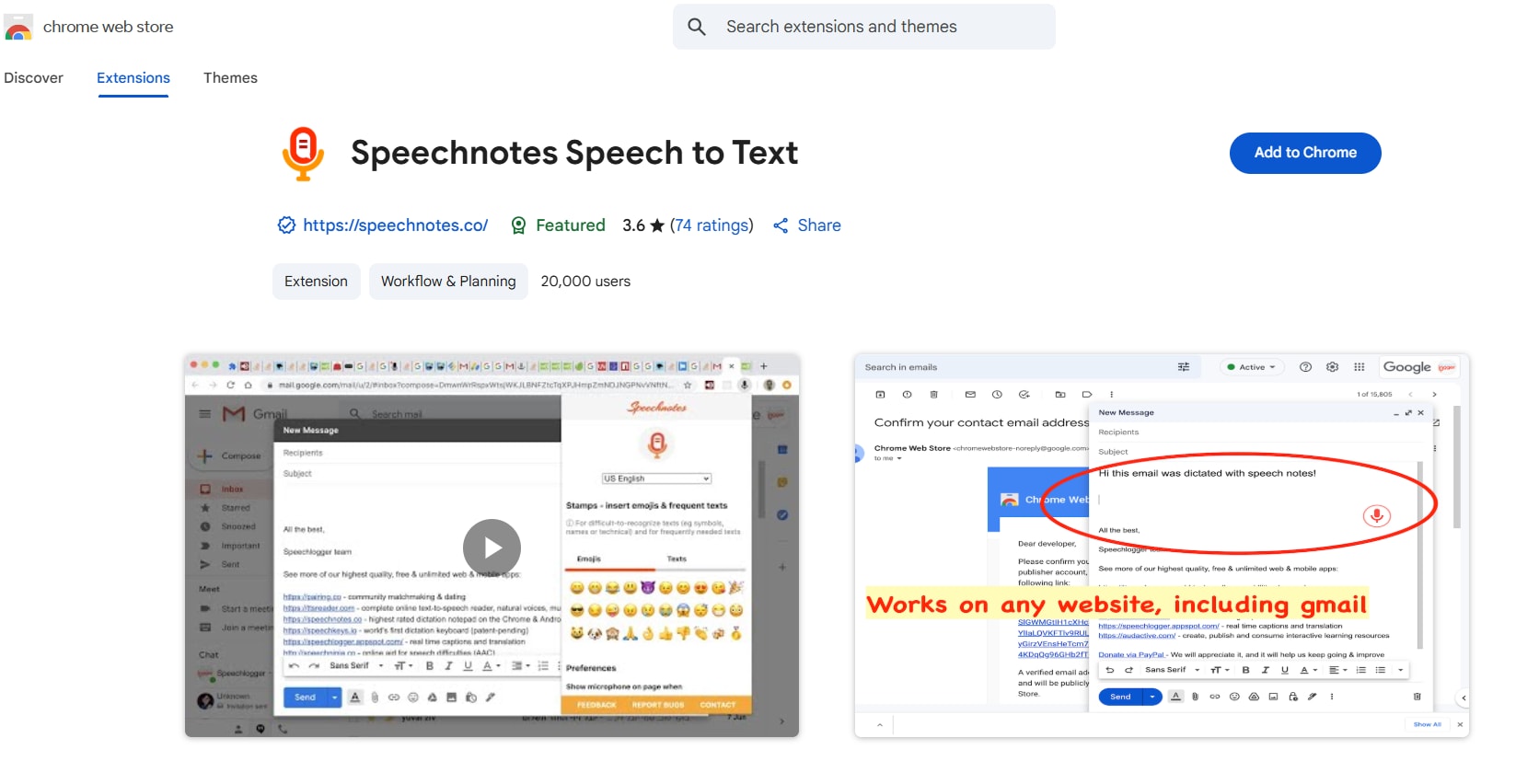
If you’re looking for a Chrome extension for voice typing in Marathi, then take a look at Speechnotes. Similar to the tools mentioned above, you have the flexibility to choose between multiple languages, including Marathi, French, Spanish, Japanese, and Korean.
It works across any page, be it Gmail, Google Search, or social media platforms, and supports real-time transcription. However, any background noise or lack of speech clarity can affect its transcription quality.
Key Features
- Supports voice commands for punctuation and formatting.
- It works on any platform, like Google Search, Gmail, or messaging platforms like WhatsApp, Facebook, etc.
- The tool supports over 100 languages, including Marathi, Spanish, Japanese, German, Mandarin, and more.
- It has a keyboard shortcut to start and pause speech recognition.
Here’s how to use Speechnotes to live transcribe your Marathi audio:
Step 1: Add the Speechnotes extension from the Chrome Web Store to your browser.
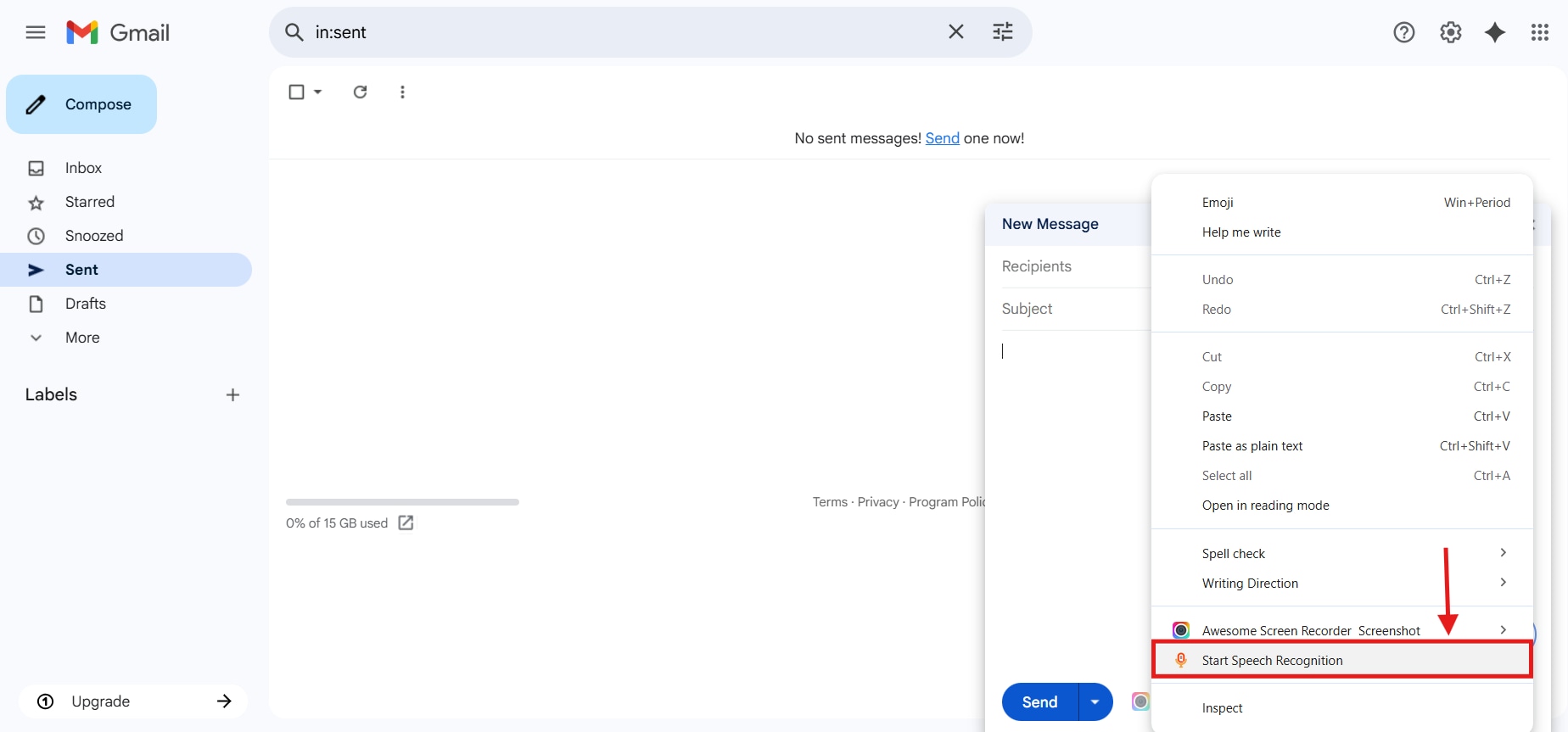
Step 2: Head over to the platform where you want to type, and right-click on the text box. Select “Speechnotes- Tap to Start” from the pop-up menu.
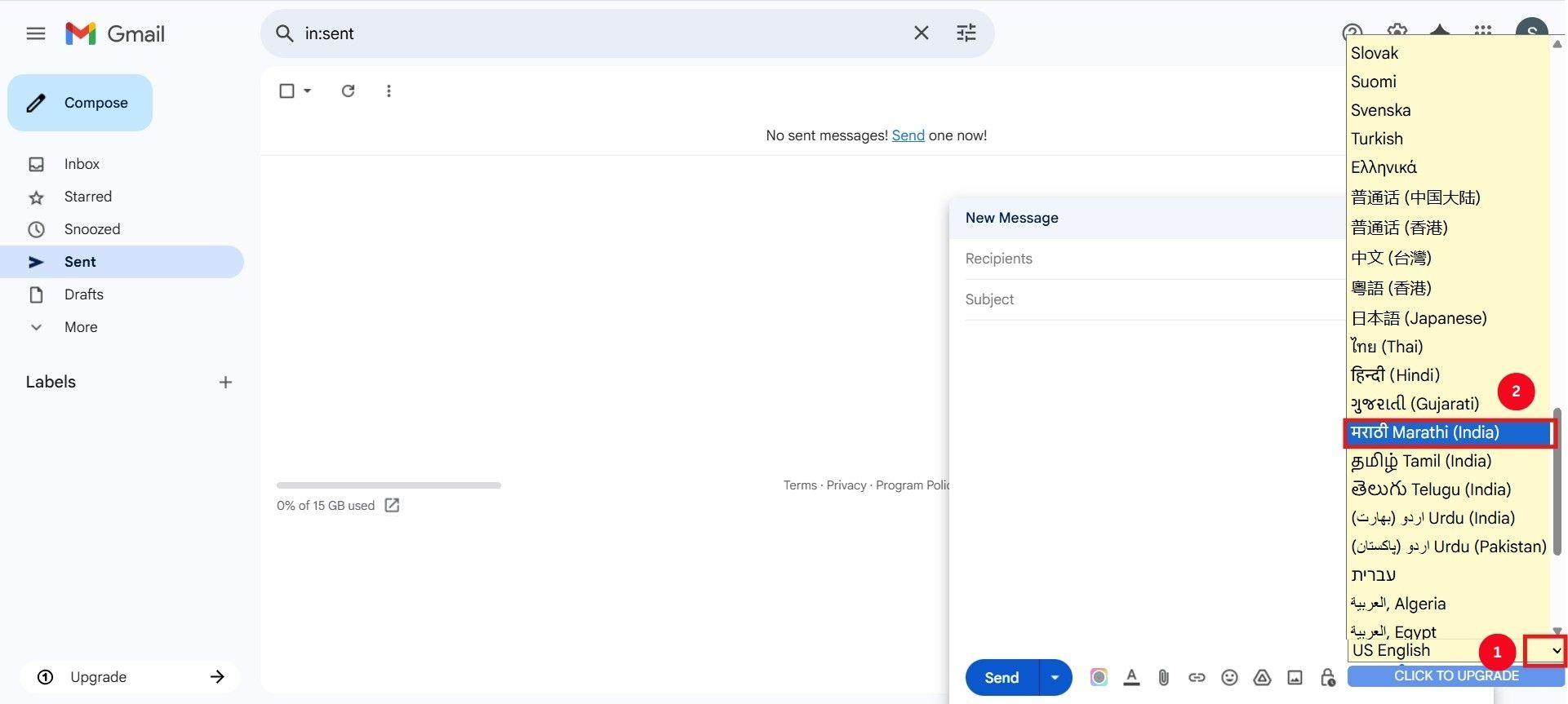
Step 3: Provide necessary permissions to the tool, hover over the “Microphone” icon, and click the language selection dropdown to choose the “Marathi” language.
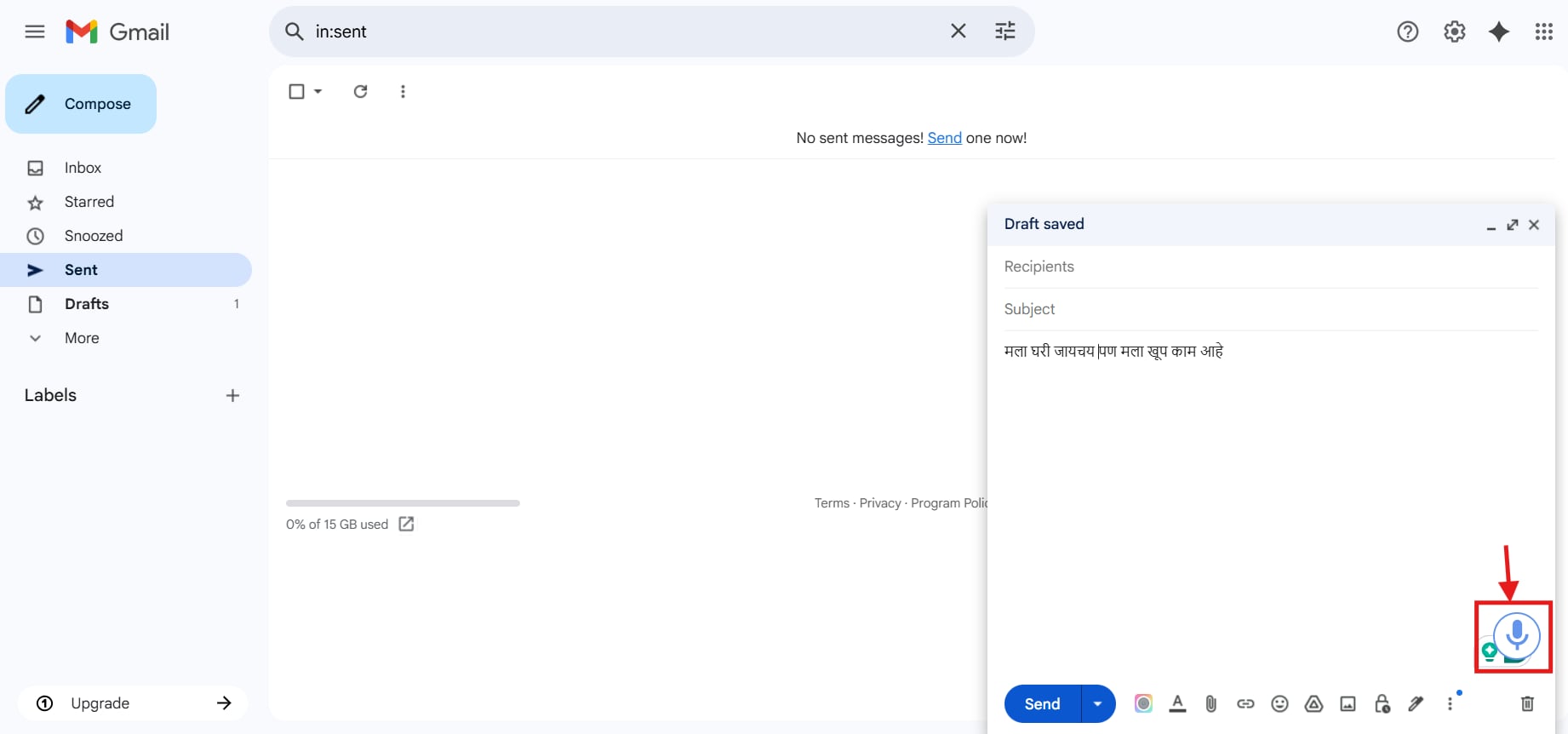
Step 4: Then, select the “Microphone” icon to start dictating. The tool is pretty quick to detect and type the text.
Easy to Use Marathi Media Transcriber
Conclusion
From streamlining everyday workflows to localizing the content, Marathi voice typing tools are transforming how we work. So, whether you’re a student jotting quick notes, a creator making subtitles, or a marketer repurposing their content, there’s a reliable Marathi voice-to-text tool suitable for your platform and purpose.
However, if you’re a professional with multiple audio files or video content, solutions like Wondershare UniConverter stand out with their batch processing abilities and advanced transcription accuracy. Let your voice do faster and smarter typing in perfect Marathi.
FAQs
-
Can I use Marathi voice typing offline?
Yes, many tools allow Marathi voice typing offline, but Wondershare UniConverter stands out as the best. It offers a fully featured offline usage, runs natively on Windows/macOS, and delivers an accurate transcription. -
Is there a mobile app that works well for Marathi voice typing?
Yes, there are multiple mobile-friendly tools for Marathi voice typing. But if you want a simple yet functional tool, try Transkriptor. It offers additional features, such as AI chat and a summary. -
What are the limitations of free Marathi voice typing tools?
Most free Marathi voice typing tools come with trade-offs, such as lower accuracy, ads, limited offline use, or no export features. So, it’s recommended to opt for feature-packed tools like UniConverter that generate accurate transcripts.

