
An xHamster video downloader is a tool that processes a video-page URL to save an available video file. Wondershare’s German UniConverter page lists xHamster among supported sites; its English guide documents the Downloader workflow. The sources do not establish that every xHamster video link works in the current release.
What to Check Before Downloading an xHamster Video
A video page and a downloadable file are different things: a page can play normally while the source does not expose a file that a particular downloader can process. Start with a video you own or have permission to save, and use any available download option offered by the source.
| Check | What to look for | Next step |
|---|---|---|
| Permission | Ownership or permission to save the video | Proceed only for authorized content. |
| Link | The individual video page, not a profile or search page | Copy its complete URL. |
| Availability | The page is accessible and has not been removed | Use an available source-provided download or test the eligible link. |
| Device | UniConverter Downloader is a Windows or Mac desktop feature | Install the appropriate desktop application. |
How to Download an xHamster Video with UniConverter
UniConverter puts the video URL, task status, and finished file in one desktop workflow. Its official Downloader guide documents the controls shown below. The illustrations use general example links and do not demonstrate an xHamster download.
Quick List: xHamster video download on PC or Mac
- Copy the xHamster video link
- Open the video downloader
- Paste the URL and set the save folder
- Start and monitor the download
- Find and check the saved video
- Copy the individual video URL. Open the xHamster video you have permission to save. Copy its complete page address, rather than a profile or category URL.
- Open UniConverter Downloader. Launch UniConverter on Windows or Mac and select Downloader from the Home screen or navigation.
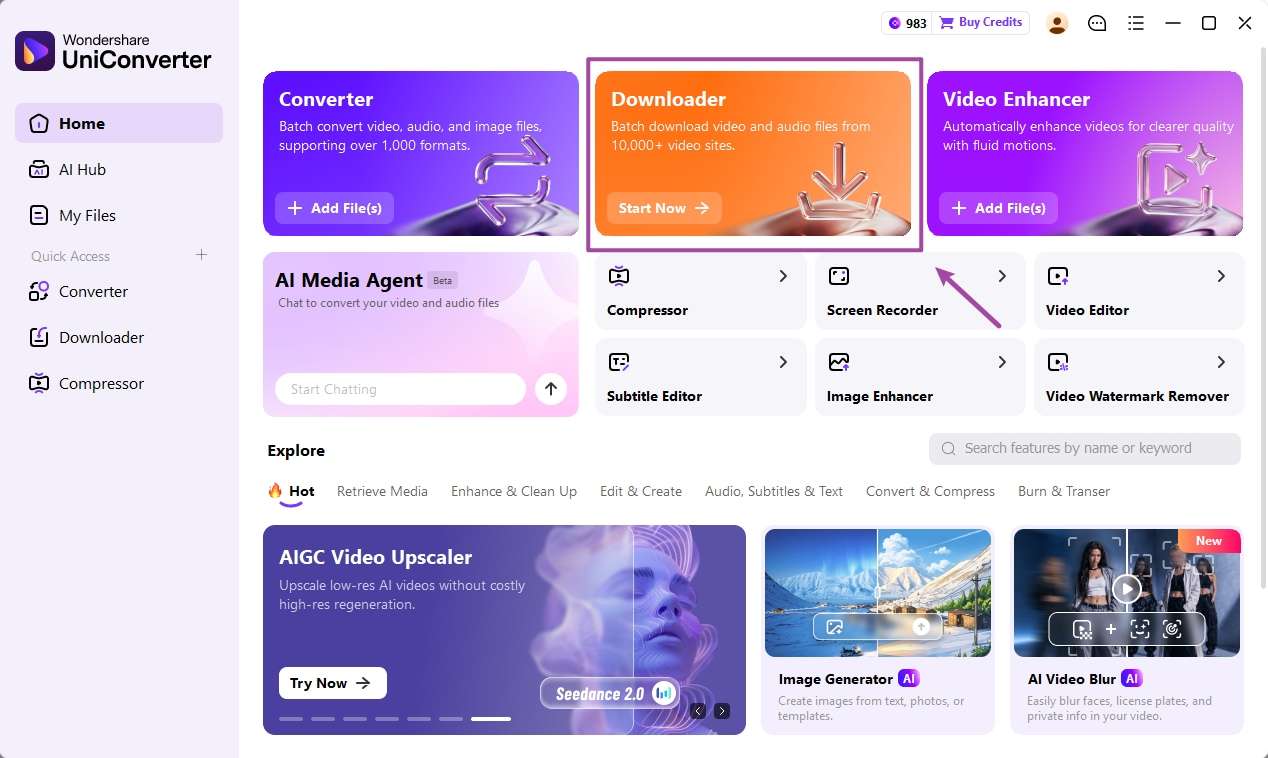
Official UniConverter Windows guide: open Downloader from the Home screen. Screenshot shows a general example. - Paste the link and select video. Paste the video URL into the input field, keep Download Video selected, and choose a Save to folder.
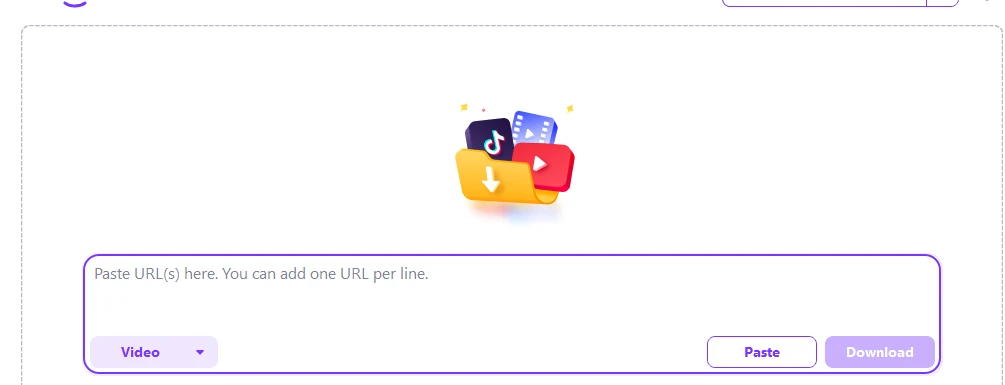
The URL field in UniConverter Downloader. This official example does not show an xHamster test. 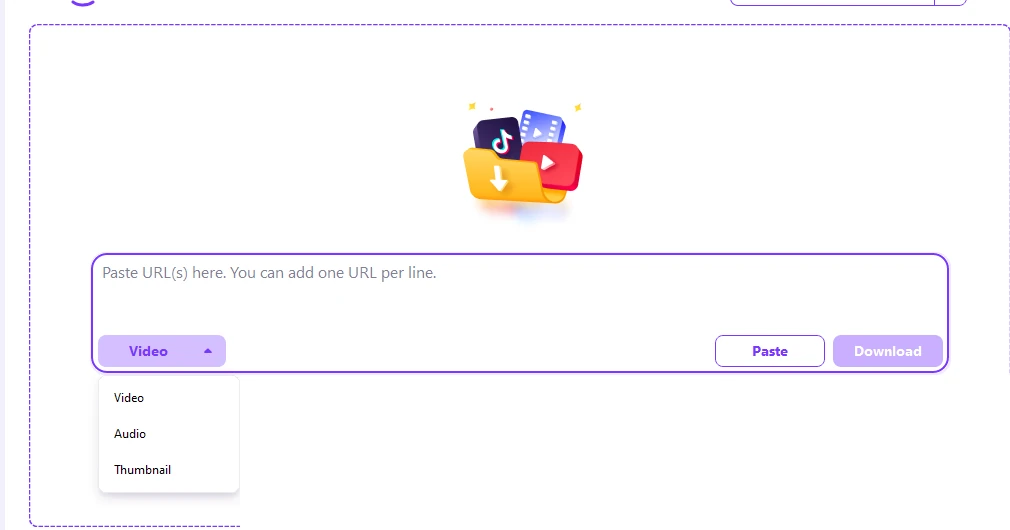
Select the video download task type. The screenshot illustrates the general interface. - Start and monitor the download. Click Download. If the link is supported, track the task in Downloading.
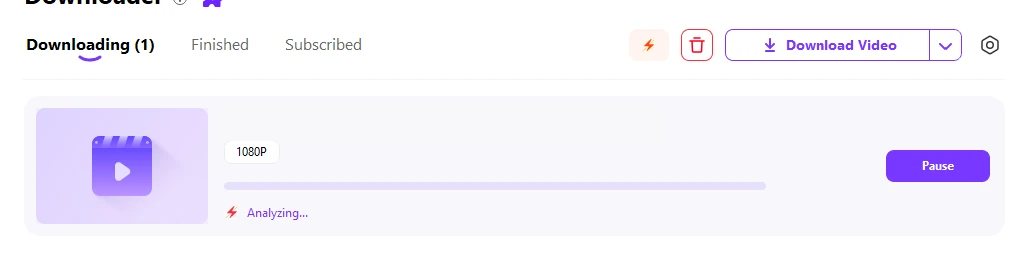
Downloading displays the status of a submitted task; the example is not an xHamster download. - Find and check the file. Open Finished, locate the saved file, and play it to check the image, sound, and duration.
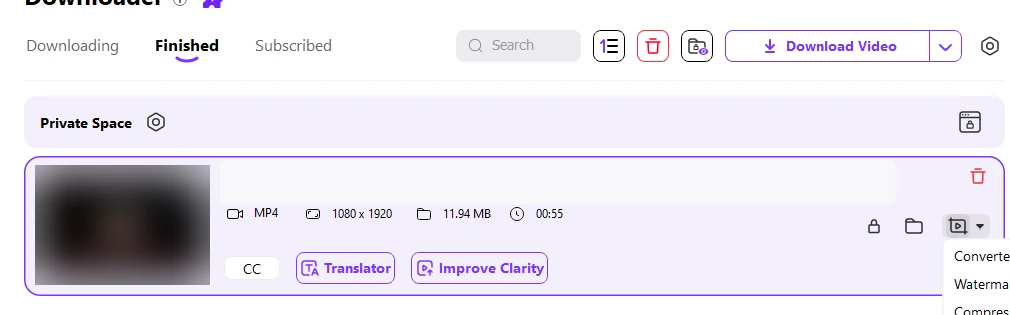
Finished lists completed downloads. The example is not evidence that a particular xHamster link works.
The result check is straightforward: the file should open, contain the intended video, and have the expected sound and duration.
How to Choose Video Quality and Format
The source determines which media is available. A larger resolution label cannot restore detail that was absent from the original. Choose from the options returned for the specific link, if the application offers a choice.
| Your goal | Choice | What to check |
|---|---|---|
| Keep source quality | Select the highest available resolution offered for the link. | Play the file and inspect detail and sound. |
| Play on another device | Choose MP4 when offered, or convert the saved file afterward. | Container and codec both affect playback. |
| Use less storage | Choose an available smaller file or compress a local copy. | Compare the compressed copy before deleting the original. |
Why an xHamster Video Download May Fail
A rejected URL is a link or compatibility issue; a file that downloads but fails to play is a playback issue. Use the symptom to choose the next action.
| What you see | What to check | Immediate action |
|---|---|---|
| URL is rejected | Is it an individual video page? | Copy the full video-page URL and try again. |
| No video is found | Is the page accessible, and does the source offer the video? | Check the original page. If the link remains unsupported, use an authorized source-provided option. |
| Task stops | Is the network connection working? | Reconnect and resume the task in Downloading. |
| Completed file is missing | Which folder is selected in Save to? | Open Finished and use the folder control. |
| Video has no sound or will not play | Does another player open it? | Try another player; convert the saved file only if it is a format compatibility issue. |
Do not use this workflow to bypass private access, DRM, or other access restrictions.
What to Do After Downloading a Video
Keep the original file until you have checked playback. If your device cannot open the file, consult the video downloader guide for the link-to-file workflow and use UniConverter’s Converter for a compatible local format. For a smaller file, use Video Compressor and compare the result against the original.
Looking for other platform-specific steps? Read the EroMe video download guide, PlayVids downloader guide, ThisVid download guide, or Eporner video downloader guide.
FAQ
-
Can UniConverter download xHamster videos?
Wondershare’s German UniConverter page lists xHamster among supported adult sites. The current English guide describes the Downloader workflow but does not verify every xHamster link. Submit an authorized individual video URL and check whether the app accepts it.
-
How do I download an xHamster video on Windows or Mac?
Copy an authorized individual video URL, open UniConverter Downloader, paste the link, select Download Video, and start the task. If supported, find the saved file in Finished.
-
Can I download an xHamster video as MP4?
Select MP4 if the downloader offers it for that video. If the saved file uses another format, use a video converter on the local file; conversion does not add missing detail.
-
Why is my xHamster video download not working?
Check that you copied the individual video page and that it remains accessible. If the link is rejected, the source or that specific link is not supported by the current downloader. Use an authorized source-provided option when available.
-
Can I download an xHamster video on my phone?
UniConverter Downloader described here is desktop software for Windows and Mac. On a phone, check whether the source provides a download option for the video you are authorized to save.
-
Where can I find the downloaded video?
In UniConverter, open Finished and use the folder control for the completed task. The Save to setting specifies the destination folder before downloading.
Product references: Wondershare UniConverter Windows Downloader guide; Wondershare Germany’s adult video tools page. The latter lists xHamster; it is not an independent test of the current release.