


You find a video you want to save for offline viewing while scrolling through Pinterest. Many users struggle with downloading content directly from Pinterest due to restrictions. Learning how to convert Pinterest to MP4 makes saving videos quick and easy. MP4 is widely compatible with devices, from smartphones to computers and media players.
This guide covers multiple safe methods to convert Pinterest videos efficiently in 2026. Each method includes tips to maintain video quality and avoid common errors. By the end, you can confidently save Pinterest videos in MP4 format anytime.

Best Pinterest to MP4 Converter
In this article
- Part 1. What Is Pinterest to MP4 Conversion?
- Part 2. 3 Best Ways to Convert Pinterest Video to MP4
- Part 3. How to Download Pinterest Videos in High Quality MP4
- Part 4. Best Pinterest to MP4 Converter Tools in 2026
- Part 5. Pinterest Video Download: Legal & Copyright Guidelines
- Part 6. Converting Pinterest MP4 for Different Platforms
- FAQs about Pinterest to MP4
Part 1. What Is Pinterest to MP4 Conversion?
These videos are usually saved in a Pinterest video format like M4V or MOV, which isn’t compatible with all devices. Pinterest to MP4 conversion transforms these files into the universally supported MP4 format. Converting ensures smooth playback while preserving quality. This gives users the freedom to enjoy videos anytime without relying on the platform’s interface.
Why Pinterest Videos Need MP4 Format
When downloading or sharing Pinterest videos, you may notice they don’t always play smoothly on every device. This is because the platform uses specific video formats that aren’t universally supported. Mentioned below are some of the reasons that highlight why this conversion matters:
- Pinterest Native Formats: Pinterest often uses .MOV or .M4V formats to optimize streaming quality and reduce file size. These formats are great for online playback, but can cause compatibility issues on some devices or software.
- MP4 Compatibility: MP4 works across nearly all devices, platforms, and video editors. The universal MP4 compatibility ensures smooth playback and flexibility for editing.
- Better Editing Support: Most video editing software prefers MP4. Editing Pinterest’s native formats can be tricky or require extra conversion.
- Wider Streaming Support: MP4 plays reliably on web browsers, mobile apps, smart TVs, and social media platforms, unlike some Pinterest-native formats.
Pinterest Video Quality Standards Explained
Pinterest applies specific standards to keep videos looking clear while loading quickly across devices. Pinterest video quality usually depends on how the creator uploads the content and how the platform optimizes it for streaming. Most Pinterest videos support resolutions like 720p and 1080p, which are the most common for smooth playback. In some cases, higher resolutions such as 2K and even 4K are supported.
Pinterest Official Upload Specs vs Actual Downloadable Quality
While Pinterest supports high-quality uploads, the downloadable version often depends on platform compression and the tool used. The table below highlights how the Pinterest video format compares at upload versus after download:
| Feature | Pinterest Official Upload Specs | Actual Downloadable Quality |
| Supported Resolutions | 720p, 1080p, 2K, up to 4K | Usually 720p or 1080p |
| Compression Level | Minimal at upload | Often compressed for streaming |
| Frame Rate | Up to 60 fps | Typically 30 fps |
| Audio Quality | High-quality AAC | Slightly reduced in some downloads |
| Quality Retention | Original source preserved | Depends on the downloader quality |
| Editing Readiness | Not editing-friendly | Fully editing-compatible |
Part 2. 3 Best Ways to Convert Pinterest Video to MP4
Now that you understand Pinterest video formats and quality limitations, the next step is choosing the right method. Depending on your device, internet access, and quality expectations, there are several reliable options available. Each approach offers different levels of speed, control, and output quality. In the following section, we’ll explore the 3 best ways to convert a Pinterest video to MP4:
Method 1: Download Pinterest Video to MP4 with Desktop Software (Professional)
For users looking for a comprehensive solution that has no file size restriction and performs conversion in high quality, Wondershare UniConverter is the right choice. This AI-powered multimedia tool allows users to convert their desired visual content into MP4 and many other formats. This Pinterest to MP4 converter also supports converting online audio files into different formats. Moreover, the dedicated downloading feature also lets you save images from online platforms.
This incredible tool allows users to select the location of the downloaded media in their device storage according to their preferences. Moreover, you can choose the resolution of the output from different options provided by the tool to get the highest quality visuals. Additionally, you can perform further enhancements using the tool, such as adding subtitles or changing the aspect ratio.
Best Pinterest to MP4 Converter
Coherent Features Offered By UniConverter
- Batch Download: Users get the ability to perform batch downloads of Pinterest videos using this incredible tool.
- Format Conversion: It provides support for the conversion of video and audio files into numerous formats of your choice.
- Video Editing: You can also edit videos, including trimming and cropping them to your preferences.
- Lossless Quality: The tool provides you with the conversion facility while keeping the original quality of the content maintained.
Step-by-Step Guide to Downloading Pinterest Videos Using UniConverter
As discussed, UniConverter allows users to successfully download and save Pinterest videos in high quality. Let us have a look at the step-by-step guide on how to use this tool:
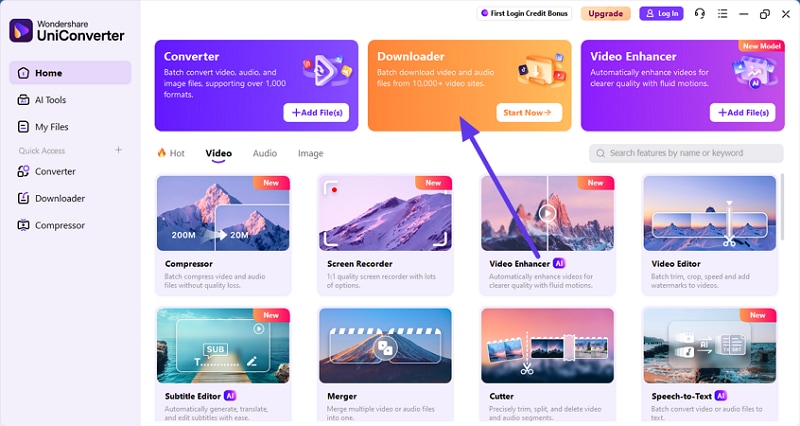
Step 1. Begin by Accessing the Downloader
To initiate the process, launch UniConverter on your device and select the “Downloader” tab located on the homepage.
Step 2. Paste Link to Pinterest Video
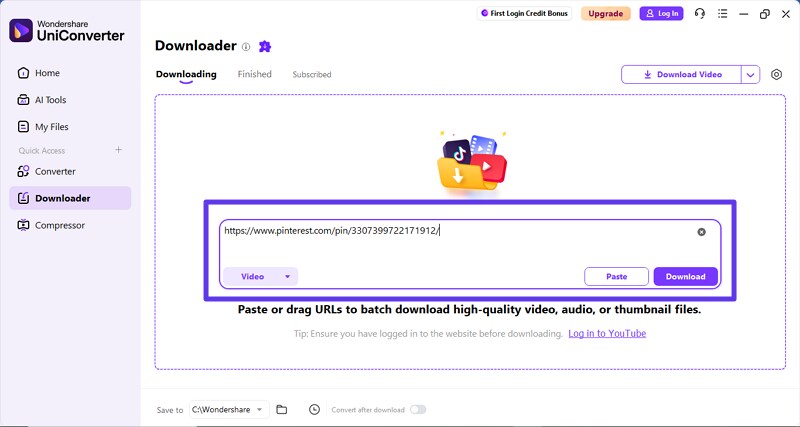
In the following interface, paste the link for the Pinterest video in the designated field. Choose the location of the file to be saved according to your preferences. Select the video option from the left side and press the “Download” button to begin the process.
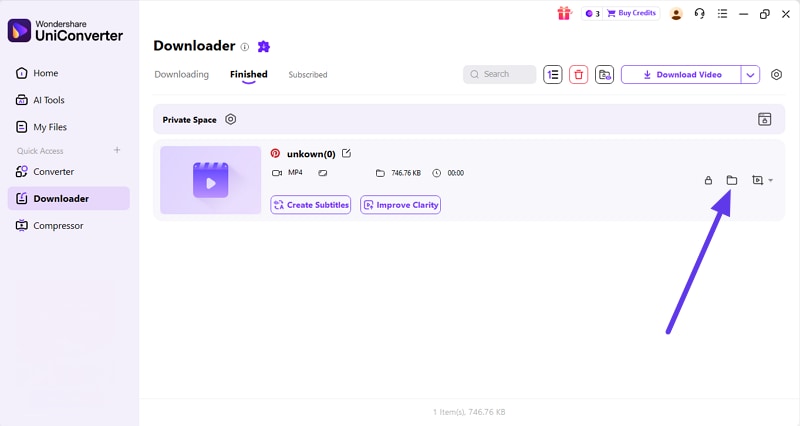
Step 3. Preview Downloaded Video
Once the process is completed, the downloaded video will appear under the “Finished” tab. You can access it by pressing the folder location option located at the bottom.
Free Online Tools vs. Professional Software: Which Works Best?
When it comes to saving Pinterest videos, users often wonder whether to rely on free online services or invest in professional software. For those aiming to download Pinterest MP4 in high quality, understanding the differences is important. The table below highlights key aspects to help you choose the right method for your needs:
| Features | Free Online Tools | Professional Software |
| Video Quality | Usually up to 1080p | Supports full original resolution, including 2K/4K |
| Conversion Speed | Quick for single, small videos | Fast, optimized for large and multiple files |
| File Size Limits | Often limited | No practical limits, handles large videos |
| Editing Tools | None | Built-in trimming, compression, and enhancement |
| Reliability | Can fail during peak usage | Stable performance with fewer errors |
| Ads & Pop-Ups | Frequent interruptions | Clean, ad-free interface |
Try UniConverter for free to enjoy fast, reliable, and high-quality Pinterest video downloads without file size limits.
Method 2: Use Online Pinterest MP4 Downloader (Fastest)
Using an online Pinterest MP4 downloader is the fastest way to save videos without installing any software. These tools work directly in your browser, making them ideal for quick downloads on any device. Mentioned below is the step-by-step breakdown of using any typical Pinterest MP4 downloader:
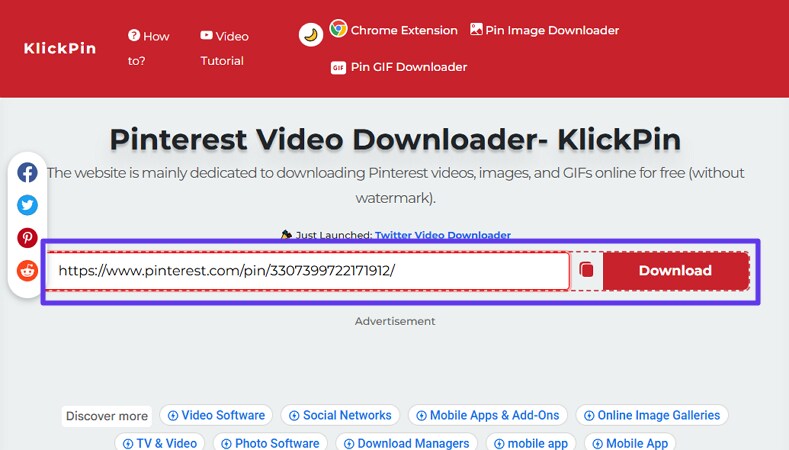
Step 1. Head to the platform and open the video that you want to save to your device. Now, copy its URL from the address bar to the clipboard. Now, head to the downloader website and paste the link in the designated field. Press the “Download” button to execute the process.
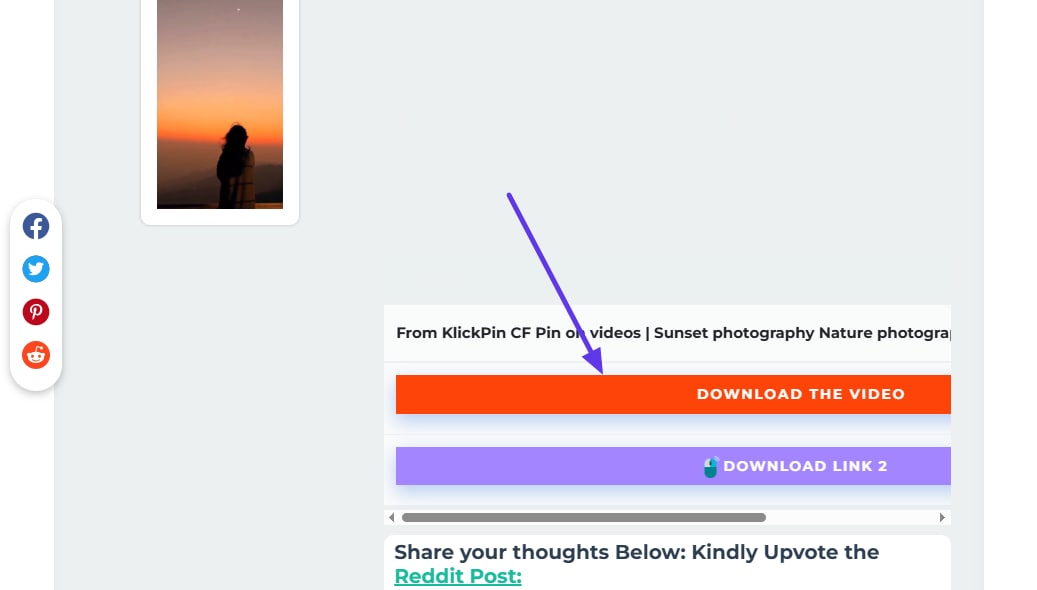
Step 2. In the following interface, the download link with video preview will be available. Press the “Download the Video” button to successfully save the content as an MP4 to your system.
Top Online Pinterest to MP4 Downloaders
Having learned how the online tools work, let us have a look at some of the options available online for the Pinterest link to MP4 conversion:
1. SavePin
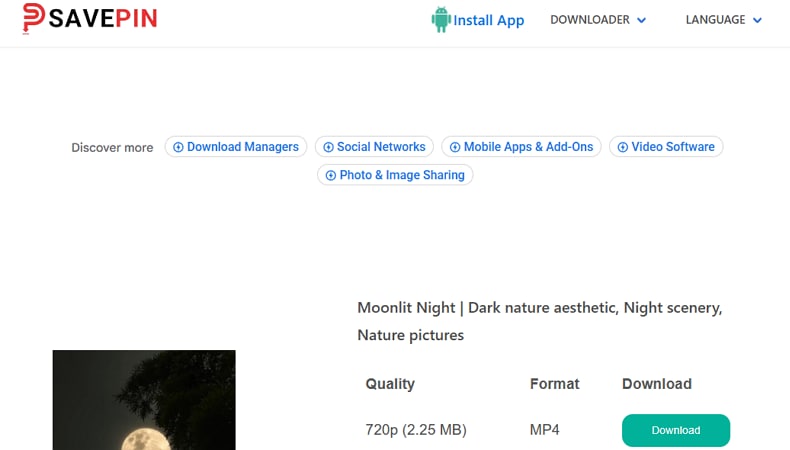
SavePin is a free online Pinterest to MP4 converter that makes downloading videos simple and fast. You just paste a public Pinterest link, and it quickly fetches the video in MP4 format with options like HD or 4K quality when available. There’s no need to sign up, install software, or deal with watermarks, and it works smoothly on all major browsers.
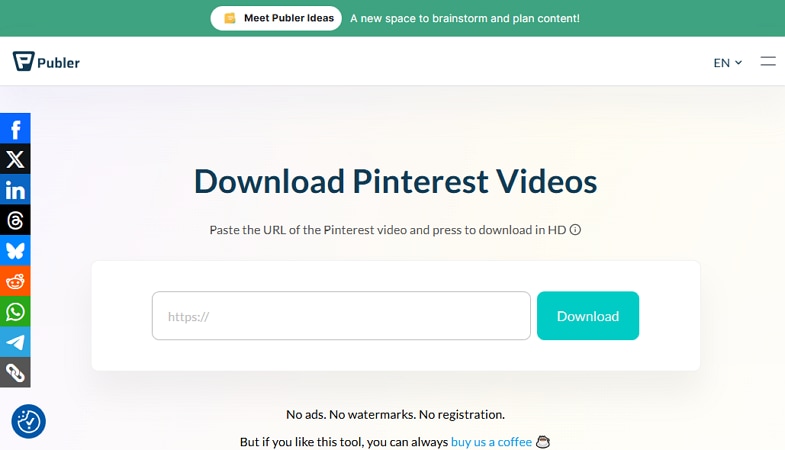
2. Publer
The tool offers a clean interface and lets you save Pinterest videos to MP4 in no time. It does not require any sign-up or login to access the download function. It’s simple, fast, and works smoothly for most public Pinterest video links. Moreover, you get the ability to access the platform in different languages.
3. SavePinMedia
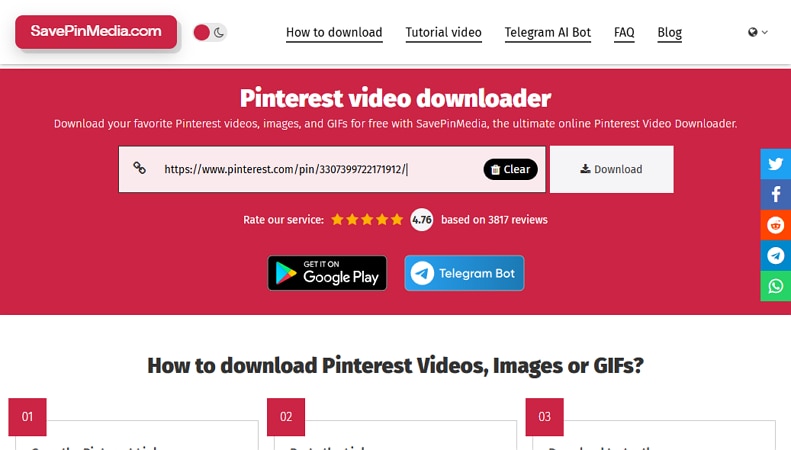
SavePinMedia is a free online Pinterest to MP4 downloader that lets you grab videos, images, and GIFs quickly. It works in any browser without registration or software. The tool offers high-resolution downloads in no time. The interface is simple and doesn’t add watermarks to saved files. Additionally, you get different resolution options to choose from according to your preferences.
Limitations of Using Online Pinterest Downloaders
Online tools are quick and easy, but they don’t always deliver a perfect experience. When converting a Pinterest link to mp4, things may seem smooth at first, yet small limitations can show up along the way. Provided below are some of the limitations that users might face while using these online tools:
- File Size Restrictions: Many online downloaders set limits on video size, especially for HD or 4K content. This can prevent you from saving longer or high-resolution Pinterest videos.
- Ads and Pop-Ups: Some tools display constant ads or unexpected pop-ups during the download process. These interruptions can be annoying and sometimes slow down your workflow.
- Quality Loss: Certain converters compress videos heavily to make downloads faster. This can result in a loss of sharpness, color accuracy, or overall clarity.
- Few Download Options: Most online platforms only offer a single MP4 output option. Users have little control over resolution, bitrate, or other quality settings.
- Performance Issues: During peak hours, servers may become slow or temporarily unavailable. This can lead to longer download times or failed conversions altogether.
Method 3: Browser Extension for Quick Downloads
If you prefer downloading videos directly while browsing Pinterest, browser extensions offer a convenient alternative. In this method, we’ll explore how a Pinterest video downloader MP4 extension makes quick downloads simple and efficient.
Who Benefits Most from Browser-Based Pinterest Downloaders?
Below are the key use cases where browser-based downloaders make the biggest difference:
- Content Creators: Creators who regularly save Pinterest videos for inspiration or repurposing benefit from quick, one-click downloads.
- Social Media Managers: Managing multiple campaigns becomes easier when videos can be saved instantly in MP4 format.
- Designers and Editors: Fast access to Pinterest videos helps streamline editing and creative workflows.
- Educators and Trainers: Downloading tutorials or visual examples supports offline teaching and presentations.
- Marketers: Quick downloads allow teams to analyze trends and reference video content efficiently.
Top Pinterest Video Downloader Extensions
Having learned about different use cases for browser-based Pinterest downloaders, let us explore some of the top options available:
1. Pinedia
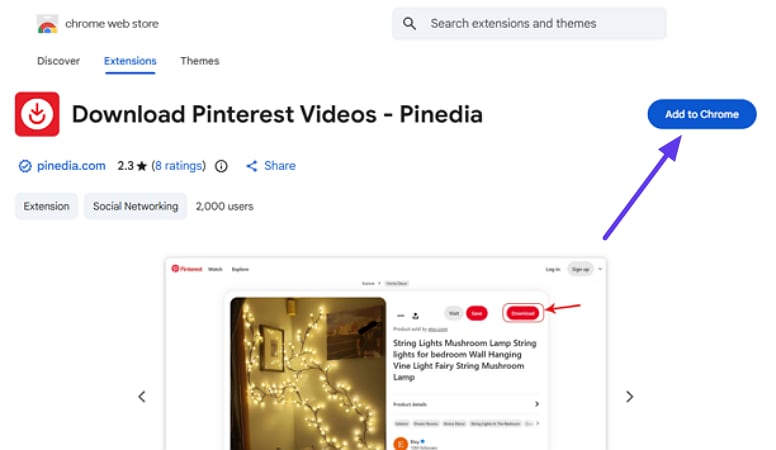
This extension adds a download button to your Pinterest page to save the video to your device. Users get the ability to save photos and videos as well using this extension. By pressing the Download button, the video is instantly saved to your system. The following are the steps for using this Pinterest to MP4 downloader extension:
Step 1. Access the extension on Chrome’s extension page and press the “Add to Chrome” button to add the extension to your browser.
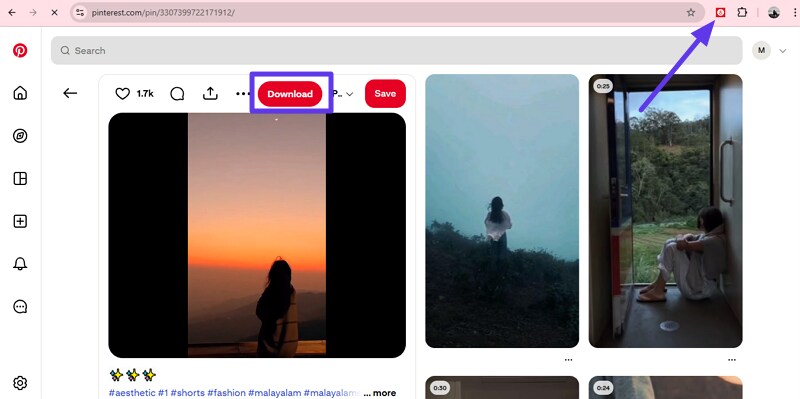
Step 2. Once the extension is added, open the video that you want to download on the Pinterest website. Enable the extension by clicking on its icon located in the top-right corner of the screen. Now refresh the page, and a "Download" button will appear. Press the button to successfully save the video to your device.
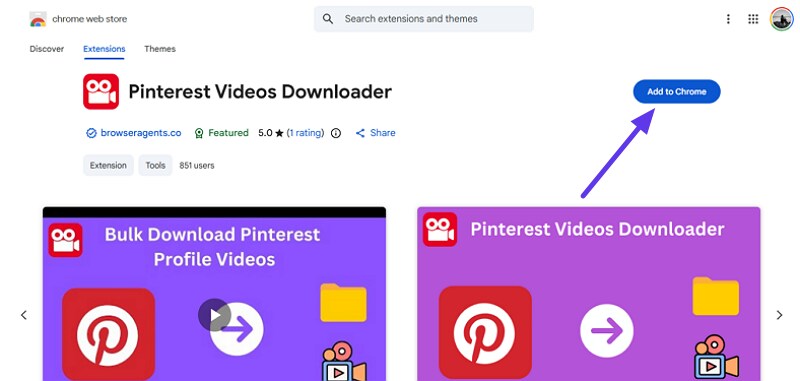
2. Pinterest Video Downloader
It is a browser add-on that helps you save videos and images from Pinterest directly in your Chrome toolbar. Designed for creators, bloggers, and social media managers, this tool works locally in your browser without logging into external services. It’s independent of Pinterest and emphasizes privacy, but you must still respect Pinterest video copyright and use downloaded media responsibly. To learn how to use this extension, read the steps provided next:
Step 1. To initiate the process, access the extension on the Chrome extension page and press the “Add To Chrome” option to download it.
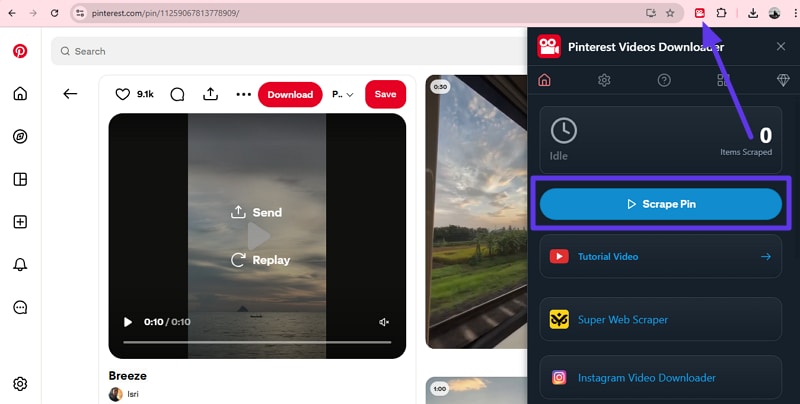
Step 2. Once added, head to Pinterest and open the video that you want to download. Now, click the extension icon from the top-right corner of the interface and press the “Scrape Video” option. Once the process is completed, the video will be successfully downloaded to your device in MP4 format.
Part 3. How to Download Pinterest Videos in High Quality MP4
After learning about the different methods of downloading videos from Pinterest, let us explore how to download Pinterest videos in HD quality:
Choosing the Right Resolution: 720p, 1080p, or 4K?
Choosing the right video resolution depends on your purpose, platform, and storage limits. Higher resolution means sharper visuals, but it also increases file size and processing time.
Resolution Recommendations by Use Case
- 480p: Suitable for quick previews, low-bandwidth viewing, or internal drafts.
- 720p (HD): Best for personal collections, tutorials, and lightweight sharing.
- 1080p (Full HD): Ideal for social media posts, marketing videos, and presentations.
- 1440p (2K): Good for semi-professional editing and high-quality archives.
- 4K (2160p): Recommended for professional editing, commercial use, and long-term storage.
When choosing a video resolution, it’s important to balance visual quality with file size. Higher resolutions capture more detail, but they also take up significantly more storage space.
Platform-Specific Pinterest Video Quality Specs
If you’re using a Pinterest 4K downloader, knowing platform-specific requirements helps you avoid unnecessary re-uploads or quality loss. The table below outlines recommended video specs for popular platforms:
| Platforms | Recommended Resolution | Aspect Ratio |
| 1080 × 1920 | 9:16, 1:1, 2:3, 4:5 | |
| YouTube | 1920 × 1080 (1080p) / 3840 × 2160 (4K) | 16:9 |
| Instagram Reels | 1080 × 1920 | 9:16 |
| TikTok | 1080 × 1920 | 9:16 |
| Up to 4096 × 2304 | 1.77:1 / 9:16 |
How to Avoid Watermarks When Downloading Pinterest Videos
This is a common question on Reddit, and the short answer is: it depends on the tool you use. Many free online downloaders add watermarks to videos as a way to promote their service or cover operational costs. While this is understandable, it can be frustrating if you want clean, reusable content. Choosing a Pinterest downloader without a watermark is the key to avoiding this issue.
Tools that Often Add a Watermark
Free web-based converters and some browser extensions may automatically embed logos or text into downloaded videos. This is especially common when downloading higher resolutions or longer clips.
Watermark-free Download Methods
Desktop software like UniConverter provides clean MP4 downloads without branding. These tools also preserve original quality and give better control over resolution and format. They are more reliable for creators who download frequently.
What are Idea Pins?
Idea Pins are made up of multiple short clips, which many free tools struggle to process. This often results in incomplete downloads or watermarked segments. Professional software like UniConverter can download these clips in batches without adding watermarks.
Disclaimer: Some free tools add watermarks to support their service. Always preview your downloaded video before using it publicly or professionally to avoid surprises.
Part 4. Best Pinterest to MP4 Converter Tools in 2026
If you’re looking for a reliable Pinterest MP4 downloader, this table highlights which tools offer the best speed, quality, and extra features:
| Platform | Batch Download | Format Conversion | Speed | Output Quality | Video Editing | |
| Wondershare UniConverter | Windows, Mac, Online | Yes | Yes (supports a vast number of formats) | Fast (Optimized) | High (up to 4K and original quality) | Yes (basic and AI-powered) |
| SavePin | Web-based | No | No | Normal | Good | No |
| Publer Video Downloader | Web-based | No | No | Normal | Good | No |
| SavePinMedia | Browser Extension | No | No | Fast | Good | No |
| Pinedia | Browser Extension | No | No | Normal | Standard | No |
| Pinterest Videos Downloader | Browser Extension | Yes Limited | No | Fast | Standard | No |
Part 5. Pinterest Video Download: Legal & Copyright Guidelines
Before downloading any Pinterest video, it’s important to understand the legal side. Pinterest video copyright belongs to the original creator, not the platform or the downloader. Pinterest simply hosts the content, which means ownership stays with the person who uploaded it. We believe in honest, user-focused guidance; so here’s what you really need to know about legal download practices:
When Downloading Pinterest Videos is Generally Acceptable
- Personal Learning: Downloading videos for offline viewing, note-taking, or personal inspiration is generally acceptable.
- Educational Use: Using Pinterest videos as reference material for research, presentations, or classroom learning falls under legal download scenarios.
- With Creator Permission: If the original creator explicitly allows you to use or save their content, downloading is authorized.
- Public Domain / Creative Commons: Videos marked as public domain or licensed under Creative Commons can usually be downloaded and reused, following license terms.
Common Questions from Reddit or Quora
“Can I use Pinterest videos on YouTube?”
In most cases, no, unless you have explicit permission or the video is licensed for reuse. Uploading copyrighted Pinterest videos to YouTube can result in copyright strikes or takedowns.
Understanding Creative Commons Licensing
Some creators allow reuse under Creative Commons licenses. These may require credit, restrict commercial use, or prohibit modifications. Always check the pin description or source link for licensing details. Before using any Pinterest video for legal download, it’s important to evaluate your intentions carefully. The following Fair Use Checklist helps ensure your usage is responsible, legal, and respectful of the original creator’s work:
- Educational, Commentary, or Transformative Use: Ensure your video usage adds commentary, criticism, or educational value rather than simply reposting it.
- Limited Portion of the Video: Use only the necessary segment to make your point instead of the full video.
- No Harm to Original Work: Your usage should not negatively affect the creator’s ability to monetize or share their content.
- Adding New Value or Context: Always provide analysis, explanation, or additional insights to make your use transformative and meaningful.
Part 6. Converting Pinterest MP4 for Different Platforms
Once you’ve successfully saved a video, the next step is making sure it works across your preferred platforms. When you download MP4 Pinterest videos, format compatibility can vary depending on where you plan to use them. This section explains how to optimize Pinterest MP4 files for different social platforms:
How to Optimize Pinterest MP4 for Instagram Reels
Instagram Reels require a vertical 9:16 aspect ratio with a resolution of 1080×1920 for best results. Pinterest MP4 videos are often square or horizontal, which can cause black bars or cropping issues. Using Wondershare UniConverter, you can easily resize, crop, or reframe videos to match Reel specifications. This ensures full-screen playback, better engagement, and a polished look without losing visual quality. Here is how you can change the size of the video using UniConverter:
Best Pinterest to MP4 Converter
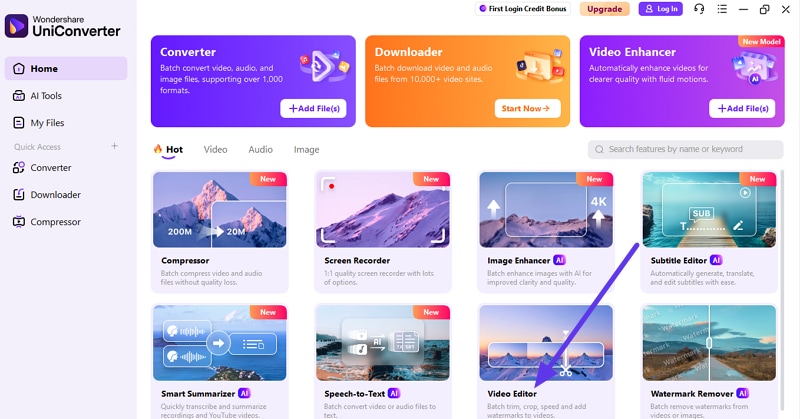
Step 1. Begin By Accessing the Video Editor
To begin, launch UniConverter on your device and locate the “Video Editor” feature from the homepage to click on it.
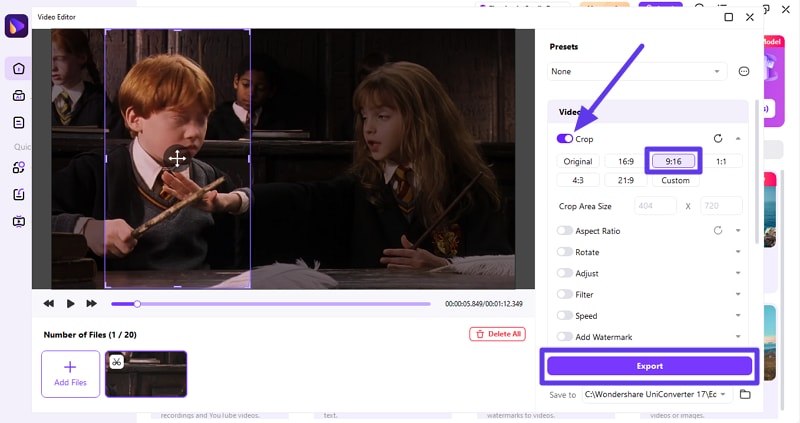
Step 2. Select Crop Feature and Choose Size
Next, import the downloaded video to the tool’s interface and enable the “Crop” option on the right. Choose the size ratio that best suits the Instagram reels and press the “Export” button located at the bottom.
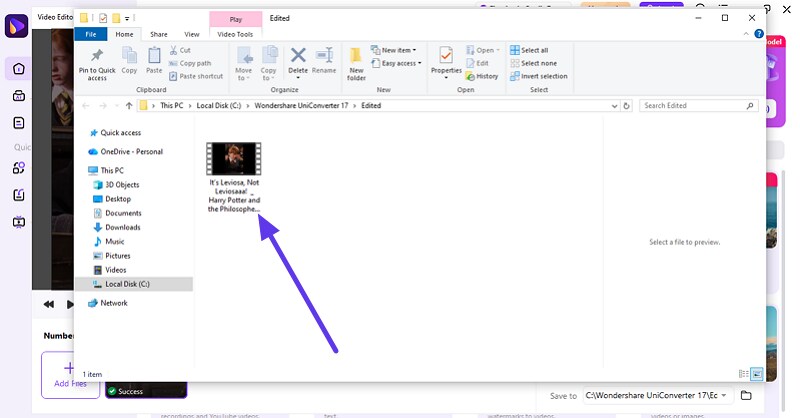
Step 3. Review Cropped File
Once the video is successfully cropped, it will be saved to your device’s storage, which you can review by clicking on the folder.
Convert Pinterest Videos for YouTube Shorts
Before uploading your saved videos, it’s important to optimize them for YouTube Shorts. Using a Pinterest MP4 converter like UniConverter, you can adjust videos to meet YouTube Shorts specs. Below are the key specs and considerations for YouTube Shorts:
- Aspect Ratio: 9:16 vertical format is mandatory for full-screen viewing on mobile devices.
- Resolution: 1080 × 1920 pixels is recommended for crisp and clear visuals.
- Video Length: Less than 60 seconds to qualify as a Short.
- File Size Limit: Maximum 2 GB per video for smooth upload.
- Audio Format: AAC or MP3 is preferred for clear sound quality.
- Frame Rate: 30 fps is standard, though 60 fps is supported for smoother motion.
Pro Tip: How to Add Value to Avoid Copyright Issues
When using a Pinterest video downloader MP4, it’s important to respect copyright while creating content that adds value. Transforming downloaded videos thoughtfully reduces legal risk and increases engagement. Here are key strategies you can apply:
- Commentary & Review: Add your own opinions, analysis, or critique to the original video content.
- Educational Overlay: Use the video as part of tutorials, lessons, or how-to guides with explanatory captions.
- Creative Editing: Trim, crop, or merge clips to create a new narrative or visual story.
- Voiceover Narration: Add narration to explain, expand, or interpret the video’s content.
- Subtitles & Captions: Include context or translations to make the video informative and accessible.
Save Pinterest MP4 to iPhone Camera Roll.
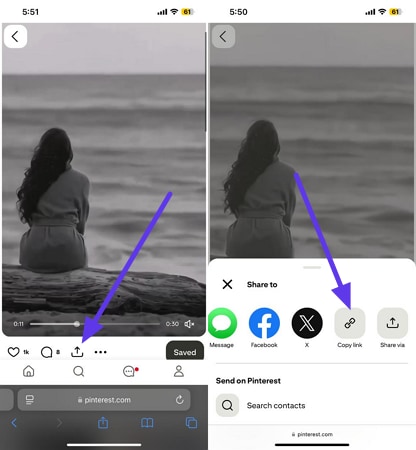
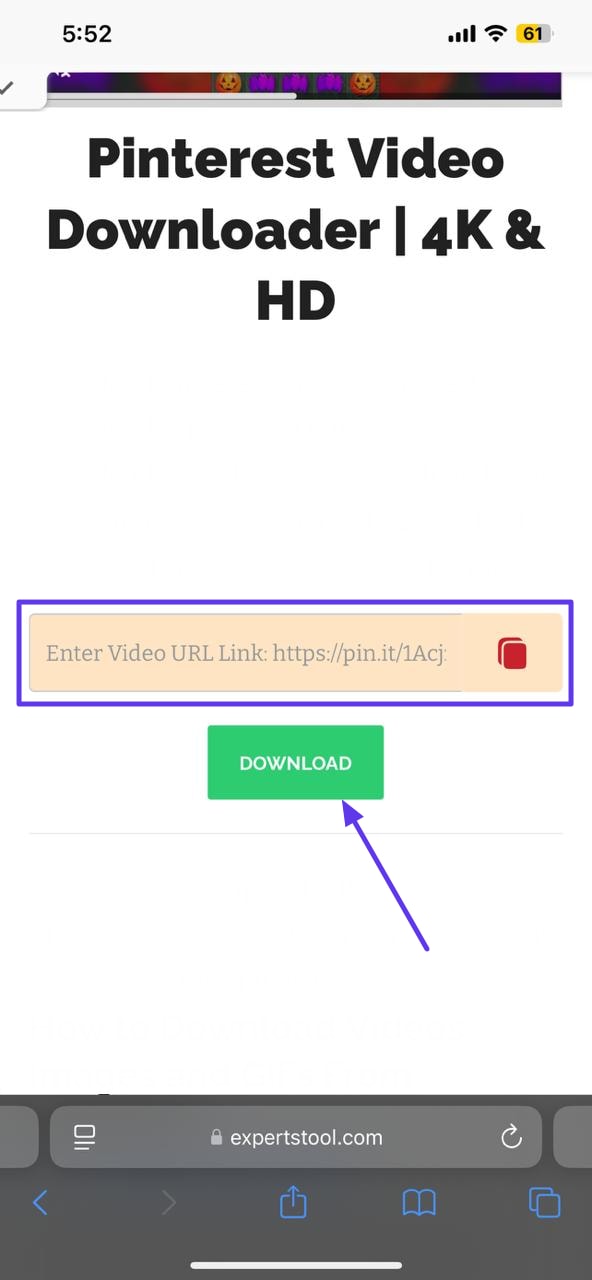
To keep your Pinterest videos handy on your iPhone, you can directly save them to the camera roll. This ensures easy access, offline viewing, and seamless sharing across apps whenever you need. Follow the steps mentioned below to learn how to save the video through the Safari browser on your iOS device:
Step 1. Open the Safari Browser and access Pinterest on it. Now, open the video and press the “Share” icon located below it. Tap on the “Copy Link” option to copy the link to the video.
Step 2. Open a Pinterest video downloader on the same browser and paste the link to the video in the designated field. Press the “Download” button, and the tool will start downloading the video to your device.
Android vs. iOS Video Download & Save Process
Before saving videos from Pinterest or other sources, it helps to understand how Android and iOS differ in handling downloads and saving to your device’s camera roll or gallery. Below is an up-to-date comparison of each platform’s process and limitations:
| Android | iOS | |
| Camera Roll/Gallery Access | Downloads often automatically show in Photos/Gallery without extra steps. | Users must tap Share → Save Video to move it into the camera roll. |
| App Permissions | Greater freedom; storage access is typically granted to browsers and file managers. | More restrictive; apps can’t write to Photos without explicit permission. |
| File System Visibility | Files saved in folders (Downloads, DCIM) are visible in most media apps. | Videos initially appear in Files, requiring a manual move to Photos |
| Ease of Use | Generally straightforward process | Users sometimes can’t save directly to the camera roll without intermediary steps. |
Conclusion
To sum it up, this article provided a complete guide on how to convert Pinterest to MP4 using different methods. While online tools and browser extensions work for quick downloads, they often come with quality and size limitations.
For consistent results, high-resolution output, and batch downloads, UniConverter stands out as a reliable choice. It offers faster processing, no file size restrictions, and professional-level quality, making it ideal for creators and frequent users.

