


Quick Answer: Best Way to Download Newgrounds Video in MP4 or MP3
The safest way to download Newgrounds video is to save only content you own, have permission to use, or content where the creator provides a download option. For one video, an online Newgrounds downloader or browser extension can be enough. For multiple files, format conversion, or MP3 extraction, a desktop tool such as Wondershare UniConverter is more practical.
- Best for MP4 video: use a desktop Newgrounds video downloader for stable saving and format conversion.
- Best for MP3/audio: first check whether the creator enables an official audio download; otherwise use a Newgrounds MP3/audio extractor only for permitted content.
- Best for quick online use: use an online Newgrounds downloader for one-off links, but avoid pop-ups, suspicious redirects, and tools that claim to bypass restrictions.
- Best for old Flash/SWF content: use a Flash emulator or archive method for playback, but do not bypass protected or private submissions.
Newgrounds is home to many independent videos, animations, songs, and classic Flash-style works. Because most pages do not show a universal download button, users often search for a safe Newgrounds downloader to save MP4 video, extract MP3 audio, or keep permitted content for offline viewing.
This guide compares desktop software, online tools, browser extensions, mobile options, and audio/GIF/SWF workflows so you can choose the right method without relying on unsafe download sites.

Best Newgrounds Downloader
In this article
- Quick Answer: Best Way to Download Newgrounds Video
- What Can You Download from Newgrounds?
- Is It Legal to Download Videos from Newgrounds?
- Best Newgrounds Downloader Methods Compared
- How to Download Newgrounds Audio or Convert Newgrounds to MP3
- How to Save Newgrounds GIF Animations
- Legacy SWF/Flash Content on Newgrounds
- FAQs about Newgrounds Downloader
What Can You Download from Newgrounds?
Newgrounds is home to many independent videos, animations, songs, games, artwork, and classic Flash-style works. Because different submissions use different media types, the right Newgrounds downloader depends on whether you want to save MP4 video, extract MP3 audio, keep an animated GIF, or play legacy SWF/Flash content offline.
Newgrounds does not provide a universal download button for every video, song, animation, or Flash-style work. Some creators may enable downloads for their own content, especially on audio pages, but many submissions are meant to be streamed or played on the page only. Always respect the creator’s permissions and avoid tools that bypass protected or restricted submissions.
| Content Type | Common User Intent | Recommended Method | Notes |
| Newgrounds video / movie | Download Newgrounds video to MP4 for offline viewing | Desktop downloader, online downloader, or browser extension | Use only for public, owned, or creator-permitted content. |
| Newgrounds audio / song | Download Newgrounds audio or convert Newgrounds to MP3 | Official audio download button if available, or permitted MP3 extraction | Audio pages may include a creator-enabled download option. |
| Animated GIF | Save Newgrounds GIF animation | Save image/GIF method or GIF capture extension | Some animations may be served as video instead of GIF. |
| Legacy Flash / SWF | Save or play classic Newgrounds Flash content | Flash emulator or archive playback method | Not every SWF can be downloaded or converted to MP4. |
Common reasons: Users usually download Newgrounds videos, songs, or animations for offline viewing, personal archiving, learning inspiration, accessibility, or keeping creator-permitted files available when an internet connection is unavailable.
Is it Legal to Download Videos from Newgrounds?
To stay on the safe side, let’s understand the legal aspects and when you can use the Newgrounds downloader.
Copyright and User-Generated Content
Most of the content on Newgrounds is created and uploaded by independent users and they hold the copyright for their work. Using someone’s video or a music track without their permission can violate copyright laws. You ought to know who owns the content before you begin trying to download or save any file.
Legal vs. Illegal Downloading Use Cases
Before reviewing the specific use cases, it’s helpful to understand how different actions may be categorized depending on permissions and copyright rules.
| Use Cases | Legal | Illegal |
| Personal Viewing with Download | Yes, if permitted by the creator | No, if not permitted or against terms |
| Share Content Publicly | No, unless the creator specifically allows | Yes, if done without permission |
| Commercial Usage | No, unless licensed | Yes, if copyright is violated |
| Archiving with Copyright Notice | Yes, if it is your own content or the creator clearly permits saving | No, if saved or shared without permission |
| Modifying for New Creative Work | Yes, only if allowed by license terms | No, if against copyright or the creator’s rights |
Can You Download Videos from Newgrounds Legally?
You should download Newgrounds videos, songs, or animations only when you own the content, have permission from the creator, or the creator/platform provides a download option. Newgrounds is built around user-generated work, so videos, music, games, and artwork usually belong to their original creators.
For personal offline viewing, use the safest available option and keep the file private. Do not re-upload, redistribute, modify, sell, or use downloaded Newgrounds content in a public or commercial project unless the creator’s license clearly allows it or you have direct permission.
Avoid any Newgrounds downloader that claims to bypass protected submissions, login restrictions, age gates, creator settings, or platform limitations. A safe downloader should help save permitted media files, not override a creator’s rights.
Best Newgrounds Downloader Methods Compared
How We Tested Newgrounds Downloaders
For this guide, we evaluated Newgrounds download tools based on format flexibility, download reliability, ease of use, and how practical each method is for saving videos, audio, or GIF-style content for offline access.
Format flexibility
We checked whether the tools support useful output types such as MP4, MP3, GIF, or other offline-friendly formats.
Download reliability
We reviewed whether each option detects media consistently and completes downloads without excessive failures or confusion.
Workflow simplicity
We compared how easy the steps are for regular users, including setup, link handling, and file access afterward.
Offline practicality
We also considered whether the final saved files are useful for replay, archiving, or light creative reuse across devices.
This page gives extra weight to format flexibility and easy offline use, since readers downloading from Newgrounds often want more than a one-format, one-purpose saving method.
| Method | Tool Name | Best For | Output Formats | Difficulty | Pros | Cons |
| Desktop Converter | Wondershare UniConverter | Batch video/audio tasks | MP4, MP3, MOV, WAV, and more | Easy | Multi-format, versatile | Requires install |
| Browser Extension | Video DownloadHelper | Web video/audio downloads | MP4, MKV, WebM, MP3 | Medium | Broad site support | Not for YouTube |
| Online Downloader | PasteDownload | Fast link-based downloads | MP4, MP3, GIF | Hard | No install, quick results | No editing, limited batches |
| Mobile App | All Video Downloader - V | Saving permitted video/audio on mobile | MP4, MP3, M4A | Easy | Works on phone/tablet and supports mobile offline saving | May show ads, fail on some links, or have limited batch control |
| GIF Downloader | Save as GIF | Saving animated GIF files | GIF | Medium | One-click GIFs | Not for WebP/GIPHY |
| Flash/SWF Downloader | Ruffle Flash Emulator | Legacy SWF/Flash files | SWF | Hard | Preserves old Flash | Some files are not downloadable |
How to Download Newgrounds Video to MP4
MP4 is usually the best format for offline playback because it works on Windows, Mac, iPhone, Android, tablets, smart TVs, and most media players. To download Newgrounds video to MP4, choose a method based on your device, file quantity, and format needs.
For batch downloads and format conversion, use a desktop Newgrounds downloader. For one public video link, a browser extension or online downloader can be enough. If you prefer a no-install method, you can also try manually saving a directly accessible public media file when saving is clearly allowed.
Recommendation: Use online tools for quick one-off downloads, but use desktop software when you need batch download, MP4 conversion, audio extraction, or a cleaner workflow without risky ads.
Method 1 – Use a Batch Desktop Newgrounds Downloader Tool (Windows & Mac)
When it comes to downloading videos on Windows or Mac, users find a tool that can help them download Newgrounds video. The Internet offers many downloadable tools, and this is where Wondershare UniConverter comes in as a trusted tool that helps you save videos right to your computer just by pasting links. This software preserves video quality and handles batch downloads, which makes it a practical option for offline viewing.
With UniConverter, you do not need to worry about confusing steps or a crowded screen, so anyone can save their favorite Newgrounds videos safely. UniConverter makes it possible to select any video quality you want for your downloads. You can also pause or resume downloads and manage them easily in the software’s clean interface.
(Disclaimer: Our tool is intended for personal use only. Users are solely responsible for using this tool to save videos or audios, including compliance with platform's terms of service and copyright laws and regulations. We are not liable for any consequences resulting from users' violation of any laws or infringement of others' rights.)
Best Newgrounds Downloader
Key Features
- Batch Downloading: Save several Newgrounds videos at once to help you build a large library quickly.
- Custom Quality Selection: Users can choose video resolution before download for more control over file size.
- Format Conversion: Convert your downloaded Newgrounds videos to many formats built into the same software.
- Pause and Resume Control: Start, pause, or continue downloads any time so you never lose video progress.
- Video Management Tools: Preview, organize, and locate your downloads easily in the simple built-in video manager.
- All-in-One Multimedia Processing: Beyond video downloading, UniConverter offers features such as converters, compressors, enhancers, and watermark removers, meeting all your needs.
Ultimate Guide to Download Newgrounds Video with UniConverter
Now, look at the steps below to see how to use this Newgrounds downloader and download videos without violating terms:
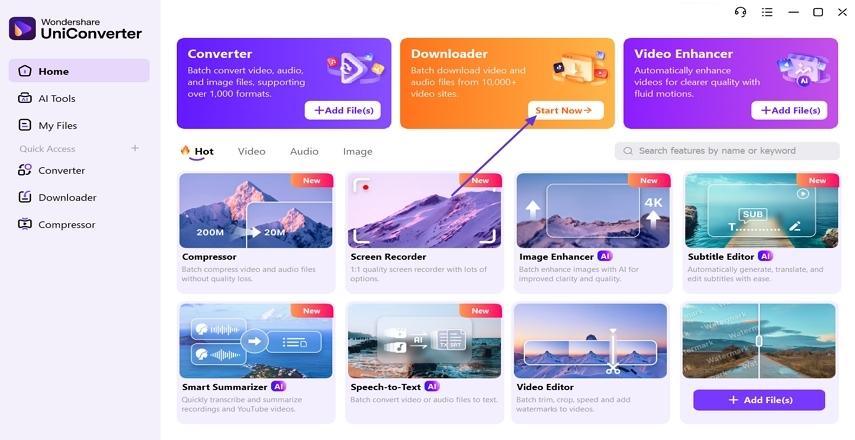
Step 1. Access the UniConverter Downloader
Once you enter the main tool, hit the “Start Now” button under the “Downloader” mode to proceed further.
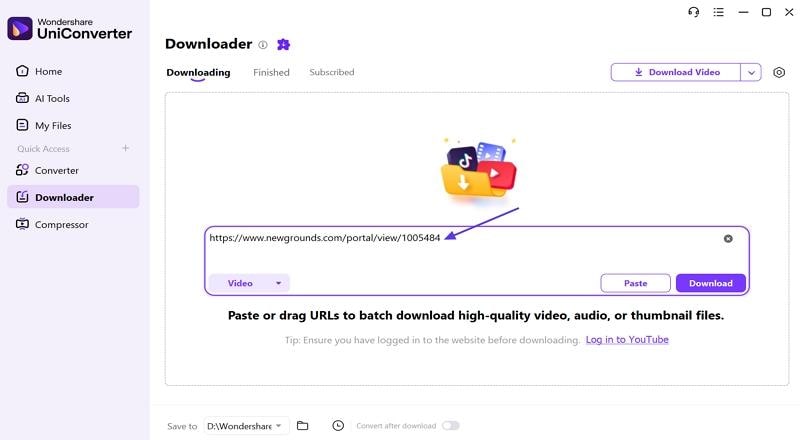
Step 2. Insert Newgrounds Video URL
Next, copy the Newgrounds video URL and paste it into the URL box on the UniConverter’s interface.
Step 3. Set Download Preferences
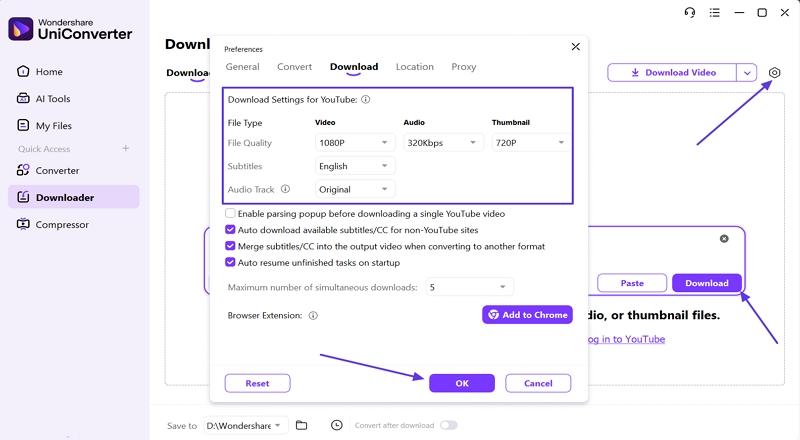
Click on the “Download Preferences” icon in the right corner and set the preferences. Once done, hit the “Ok” button and click on the “Download” button to start the download.
Step 4. Access Downloaded Video Location
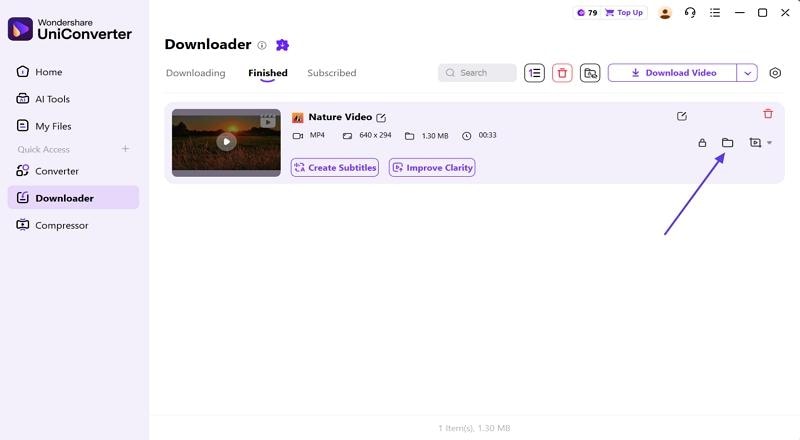
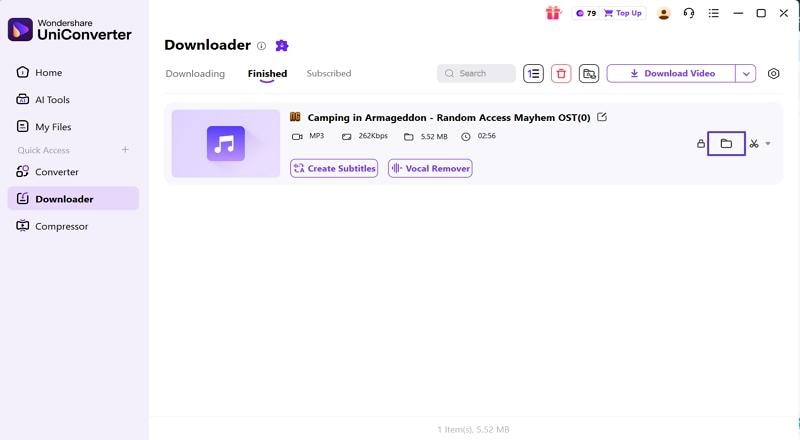
Click on the “Open File Location” icon to open the folder where the video is saved.


Method 2 – Use a Browser Extension (Chrome / Firefox) to Download Video from Newgrounds
After exploring the best desktop tool, let’s cover the Chrome extensions you can try to download Newgrounds video.
1. Video DownloadHelper
This is a popular Newgrounds downloader extension designed to save videos from a wide range of web platforms easily. With this extension, Newgrounds fans can extract, convert, and save their favorite creative content for simple offline viewing. It supports many video formats, which makes Newgrounds downloads practical and convenient.
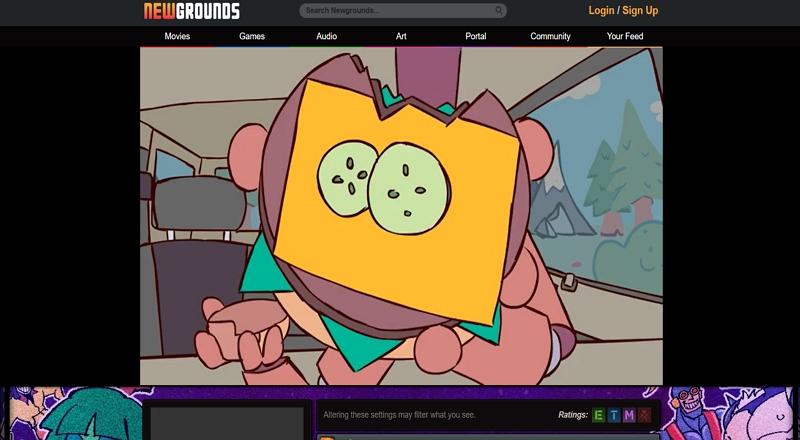
Step 1. First, add this extension to your Chrome browser and start playing the video at Newgrounds.
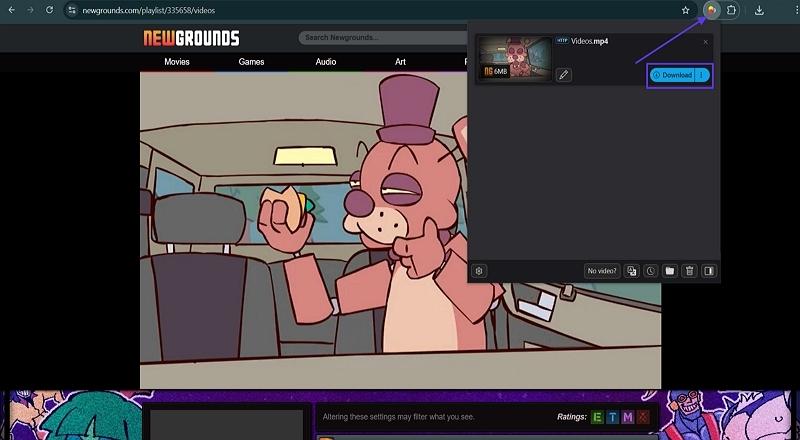
Step 2. Next, click on the “Extensions” icon and press the “Download” button once the video starts appearing. Your video will be downloaded to the preferred Downloads folder of your PC.
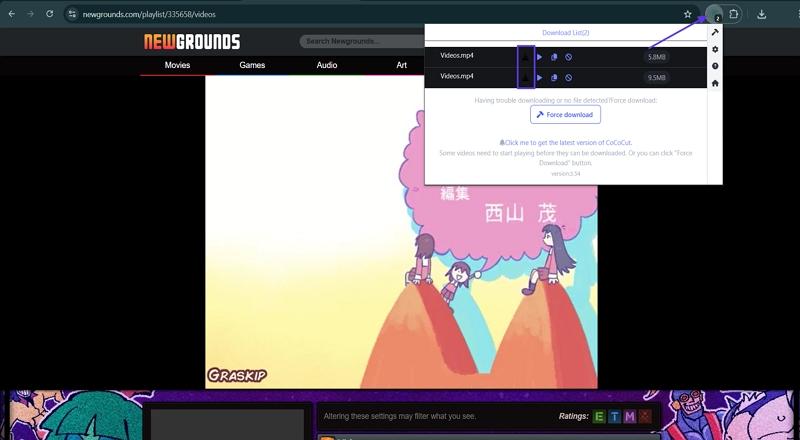
2. CocoCut - Video Downloader
A Newgrounds downloader online extension can simplify saving creative videos from your favorite platform in just a few clicks. This handy browser tool automatically finds and lists downloadable content, supporting a wide variety of formats and streaming types for Newgrounds users. Adhere to the instructions below to download the video available at Newgrounds with this extension:
Instructions. Once you add this extension to your browser, play the video on the Newgrounds platform. Next, click on the “Extensions” icon at the top right corner. There, you’ll see the video and click on the “Download” button to download the video.
Method 3 – Use an Online Newgrounds Downloader Website
Having discussed the best Chrome extensions, let us explore the online websites available for the Newgrounds video downloader online free without plugins.
1. PasteDownload
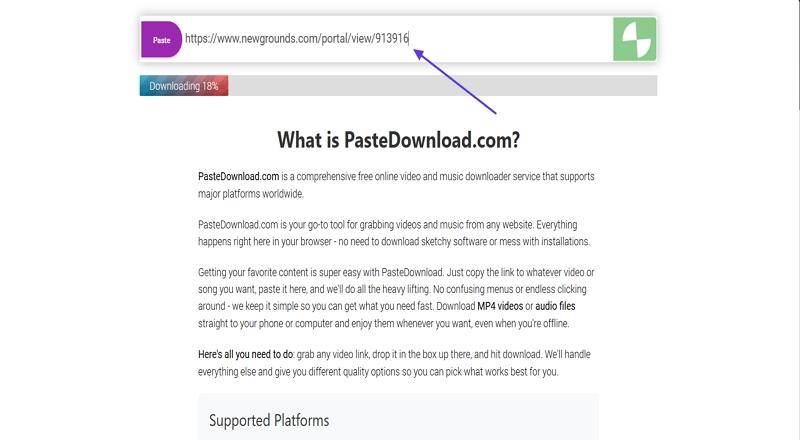
If you want to download video from Newgrounds without using extra software, online downloader websites offer the simplest solution for most users. These sites help you grab Newgrounds videos by just pasting a link. No installs or plugins are needed, so video saving feels hassle-free every time. Next, follow the steps below to download the videos available at Newgrounds with this tool:
Step 1. Once you enter the main interface, paste the video URL in the designated box, and the download will start automatically.
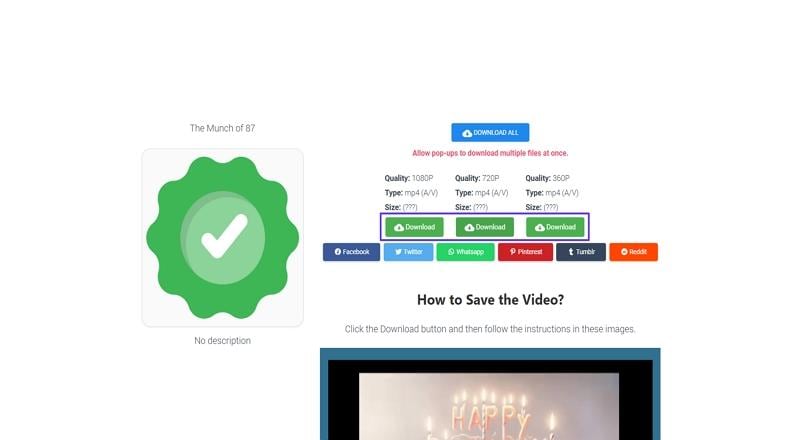
Step 2. Scroll down the website and press the “Download” button under the specific video quality you want to download.
2. Aquapp Studio
One of the Newgrounds video downloader online free sites provides instant video saving for anyone who prefers browser-based convenience. Just copy your Newgrounds video link and choose from several compatible formats and quality settings before you save. Now, go through the steps below to download a Newgrounds video with this tool:
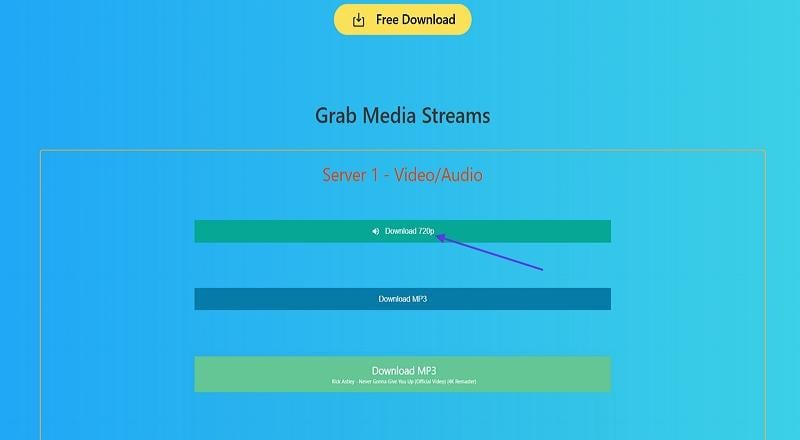
Step 1. Copy the Newgrounds video URL and paste it into the URL box on the Aquapp Studio interface. Next, hit the “Magnifier” icon to start searching the video.
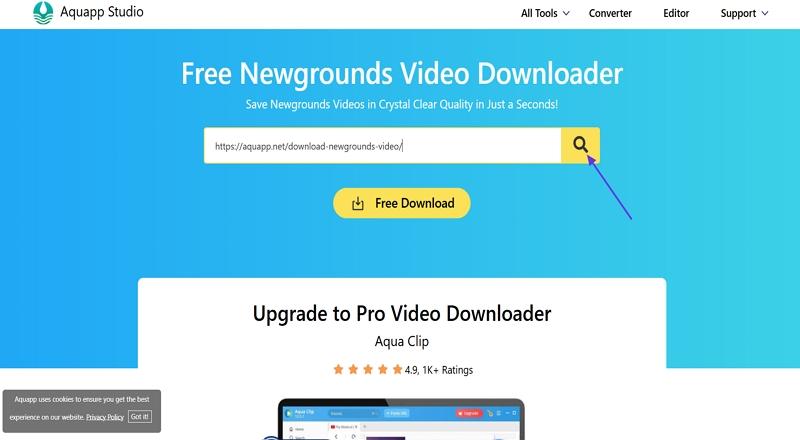
Step 2. Once the tool finds the video, click on the “Download 720p” button to start the downloading process.
Method 4 – Manually Save a Public Newgrounds Video File
In some cases, a public Newgrounds video may be available as a direct playable media file in the browser. This method is only suitable for content you own, creator-permitted content, or files that are clearly allowed to be saved. Do not use this method to bypass protected submissions, private pages, login restrictions, creator-disabled downloads, or any platform limitation.
Important: If a downloadable video file is not visible or cannot be saved normally, do not force the download. Use an official download option, ask the creator for permission, or watch the content on Newgrounds instead.
Step 1. Open the Newgrounds video page in your browser and play the video you are allowed to save.
Step 2. Right-click the page and choose “Inspect” or “View Page Source.” Then search for common media file formats such as .mp4 or .webm.
Step 3. If a direct playable media file is available and you have permission to save it, open the file in a new browser tab.
Step 4. Right-click the video and choose “Save video as” to save the Newgrounds video file to your device for permitted offline use.
Best for: Users who want a no-install method for a public, directly accessible Newgrounds video file. For batch downloads, MP4 conversion, or MP3 extraction, a desktop Newgrounds downloader is still more practical.
Method 5 – Download Newgrounds Video on Mobile iPhone & Android
After explaining convenient web tools, it’s time to learn how to download Newgrounds video on mobile using simple methods users can follow.
1. UC Browser (Android | iOS)
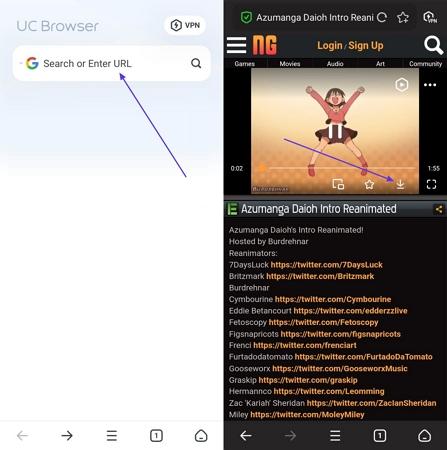
A smart way to download Newgrounds videos on mobile is by using reliable apps with integrated video-saving features. With browser options like UC Browser, users can grab clips directly from Newgrounds, manage their downloads, and choose multiple file formats with ease. Now, follow the instructions mentioned below to download videos:
Instructions. First, paste the video URL in the Search or URL box to search for the video. Once done, tap on the “Play” option to play the video and hit the “Download” option from the Media Control Panel to download the video.
2. All Video Downloader - V (Android | iOS)
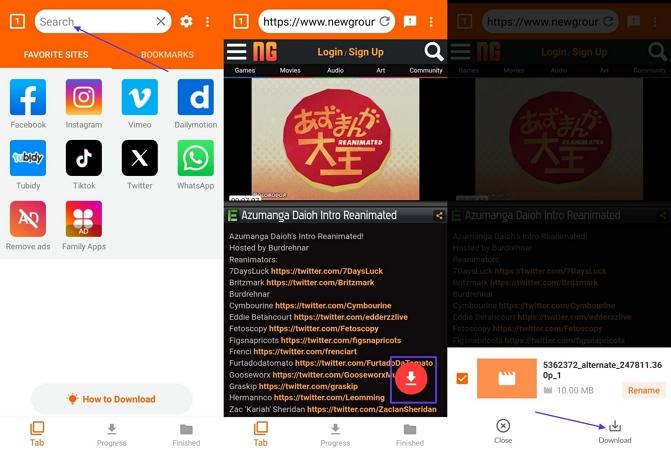
A reliable solution for fans seeking a Newgrounds audio downloader is to use all-in-one mobile apps for direct music and sound saving. These tools can automatically detect and extract audio tracks from Newgrounds content, offering users customizable options for format and quality. Go through the instructions below to download the Newgrounds videos with this tool:
Instructions. Copy the video link and paste it in the Search bar. Once you play the video, tap on the red “Download” button and hit the “Download” option again to start the download. This will automatically save your video in the Downloads folder.
How to Download Newgrounds Audio or Convert Newgrounds to MP3
If your main goal is audio, start by checking whether the Newgrounds creator has enabled an official audio download option on the audio page. When an official download is available, it is usually the safest way to save the song for permitted personal use.
If you need to extract audio from a permitted Newgrounds video, UniConverter can help you save the media and convert it to MP3, WAV, M4A, or other audio formats. This is useful for offline listening, archiving your own work, or converting creator-permitted content into a more compatible audio format.
Important: Do not use a Newgrounds audio downloader to copy, redistribute, remix, or monetize another creator’s music unless you have permission or the license clearly allows it.
Best Method for Newgrounds to MP3
| Audio Need | Best Method | Why |
| Download a creator-enabled song | Use the official Newgrounds audio download option if available | It respects the creator’s settings and keeps the original audio source. |
| Convert a permitted video to MP3 | Use UniConverter to download and extract audio | It supports MP3, WAV, M4A, and batch conversion on desktop. |
| Save one short audio link quickly | Use an online Newgrounds MP3 downloader carefully | No installation is needed, but reliability and safety vary by site. |
Best Newgrounds Downloader
Ultimate Guide to Download Newgrounds MP3 Files with UniConverter
Follow the steps given below to see how you can download Newgrounds content with UniConverter:
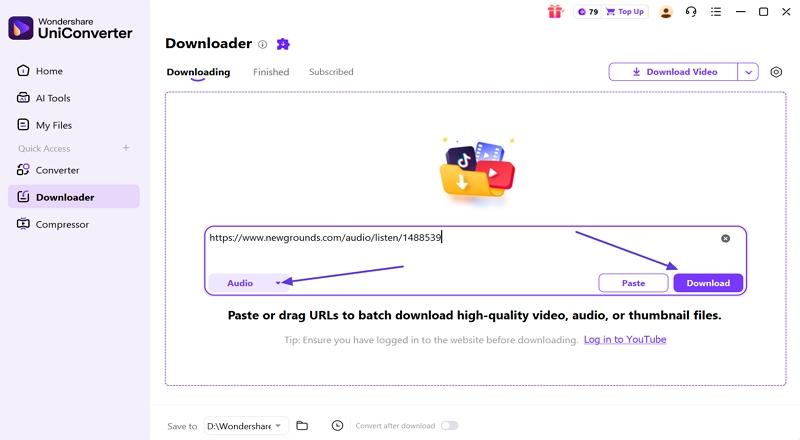
Step 1. Add Audio Link to UniConverter
Once you enter the main interface, paste the audio link in the designated box on UniConverter’s interface and choose the “Audio” option from the preferences. Now, hit the “Download” button to start the download.
Step 2. Access the Downloaded Audio File
Next, click the “Open File Location” icon to open the folder where the downloaded MP3 file is saved.
How to Save Newgrounds GIF Animations
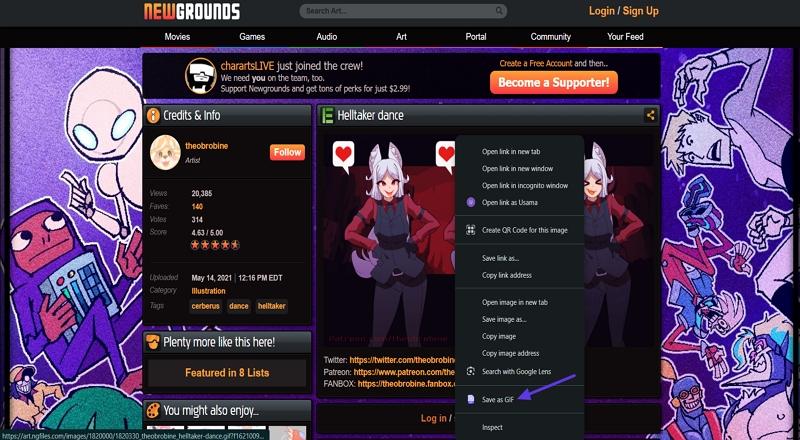
To save Newgrounds GIF animations easily, using a browser extension designed for this purpose is the quickest option. The Save as GIF extension lets you capture any GIF with just one click, preserving the animation in its native format and storing it with organized filenames on your computer. Follow the instructions below to see how you can download GIFs with this extension:
Instructions. After you install this extension, open the animated GIF on Newgrounds and “Right-Click” on it to view the context menu. Next, hit the “Save as GIF” option to download the animated GIF to the downloads folder automatically.
Legacy SWF/Flash Content on Newgrounds: Play, Save, or Convert?
Some older Newgrounds animations and games were originally built with Flash/SWF. A tool such as Ruffle is mainly a Flash emulator for playing old SWF content in modern browsers; it is not a guaranteed Newgrounds downloader and it may not download every Flash animation or game.
If the creator provides a downloadable SWF file or an archive source is available for content you are allowed to save, you may be able to keep the SWF file for offline playback. If you need MP4 playback, use screen recording or video conversion only for your own or permitted content.
Limitations: interactive Flash games, protected submissions, login-gated pages, and content without an accessible file may not be downloadable. Do not use tools that claim to bypass creator protection.
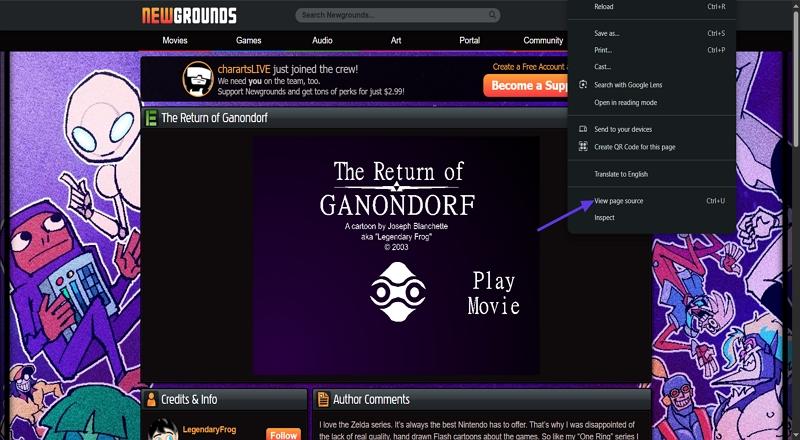
Step 1. Open the Flash animation on Newgrounds and “Right-Click” on a blank area of the page, then select “View Page Source” to see the website’s HTML code.
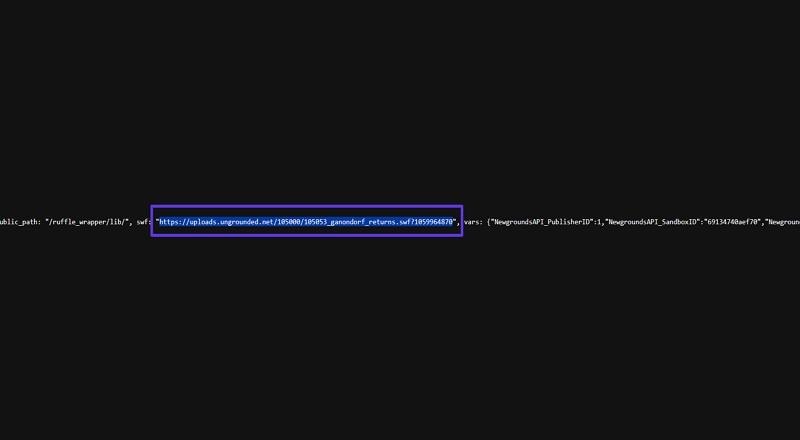
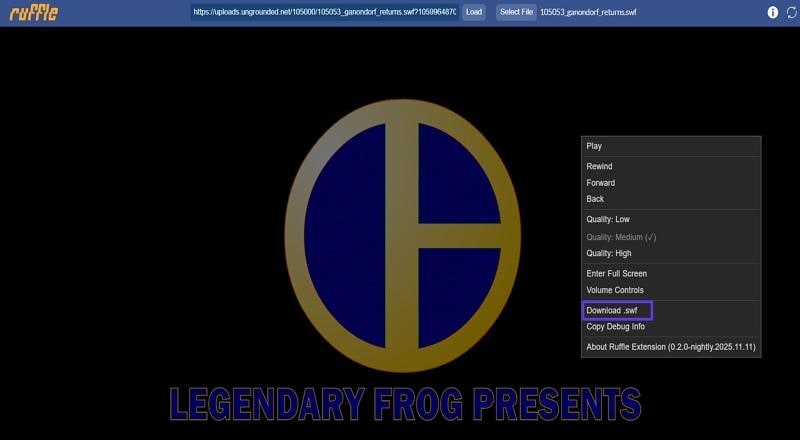
Step 2. Copy the SWF link from the page source, paste it in your browser’s address bar, and hit Enter. This will direct you to the Ruffle player page for that content.
Step 3. “Right-click” on the Ruffle page and select the "Download .swf" option to download the file directly to your device.
Conclusion
In conclusion, this article outlined safe ways to download Newgrounds video in formats like MP4, MP3, and GIF. The article provides guides for PC and mobile tools that let you save your favorite Newgrounds content for offline enjoyment. For the highest quality downloads and ease of use, UniConverter stands out as the most reliable solution. Try UniConverter today to simplify your Newgrounds video download and conversion needs!

