


OK.ru or Odnoklassniki is a popular Russian social networking site for sharing content and connecting with friends. Many users wish to download from OK.ru for offline viewing or saving favorite content. This article explains safe and reliable ways to download OK ru videos using online and software-based tools. But please note that the process of downloading copyrighted content that has not been authorized can result in legal violations.
Always ensure downloads are for personal and legal use only, respecting creators’ rights and the platform’s content policies. This guide will show you how to download OK ru videos, using easy methods.

Best OK.ru Video Downloader
In this article
- Part 1. Which OK.ru Downloader works best for your device and workflow?
- Part 2. Why do people Download videos from OK.ru?
- Part 3. Download OK.ru Videos with Desktop Tools (Stable & High-Quality)
- Part 4. How to Download OK.ru Videos Online (Free & Safe Methods)
- Part 5. How to Download OK.ru Videos on Mobile (Android & iPhone)
- Part 6. Common Problems When Downloading from OK.ru (and Fixes)
- Part 7. Legal & Safety Tips While Using OK Downloader
- FAQs about OK.ru Downloader
Quick Guide: Best OK.ru Downloader by Use Case
Part 1. Quick Comparison: Best Tools to Download from OK.ru
First, look at the comparison table to help you decide the best OK ru video downloader before the detailed guide.
| Tool | Platform | Output Formats | Speed | QualityAds / Pop-ups | Ads / Pop-ups | Batch Download | Safety Level | Best For |
| Wondershare UniConverter | Windows/Mac | MP4, MOV, MP3, others | ⭐⭐⭐⭐⭐ | 1080p / 4K / 8K | None | Yes | High | Professional users, stable performance |
| OKGrabber | Web Browser | MP4, GIF | ⭐⭐⭐ | 1080p | Yes | No | Low | Quick downloads, no install needed |
| Vidomon | Web Browser | MP4, AVI | ⭐⭐⭐ | HD / 4K | Yes | No | Moderate | HD downloads, no software |
| OK.ru Downloader | Chrome | MP4, MP3, WEBM | ⭐⭐⭐⭐ | 720p | Possible | No | Medium | One-click browser video saving |
| Video Downloader Unlimited | Chrome Extension | MP4 | ⭐⭐⭐ | HD | Yes | Yes | Medium | Multi-site and batch downloading |
| 4K Video Downloader | Windows/Mac | MP4, MKV, 3GP | ⭐⭐⭐⭐ | 4K | No | Yes | High | Playlists/channels, all sites, high quality |
| JDownloader | Windows/Mac | MP4 | ⭐⭐⭐ | Up to HD | No | Yes | Medium | Batch/automation, tech users |
| Video Downloader for OK.ru | Android | MP4 | ⭐⭐ | Up to 720p | Yes | No | Low | Simple mobile downloads |
Recommended OK.ru Downloaders by Use Case
Anyone seeking a tool to download Odnoklassniki videos should review the recommendations below to choose the best option for their workflow.
- For Everyday Users: Use OKGrabber online downloader to download single videos without installation or ads, making it simple for one-time or infrequent use.
- For Professionals or Educators: You can use UniConverter Desktop to take advantage of batch processing and built-in conversion support for complex or frequent workflows.
- For Browser Fans: Try OK.ru Downloader (IDL Helper) extension to download any video instantly while browsing, using the extension directly in your web browser.
- For Mobile Users: Use the Video Downloader for OK.ru app or the UniConverter mobile workflow. This approach makes saving videos to your smartphone easy for watching offline later.
Best OK.ru Video Downloader
Part 2. What Is OK.ru and Why People Download Videos from It
Having compared the OK video downloader tools, it’s helpful to understand what OK.ru is and why people want to save its video content.
Overview of the OK.ru Platform (Odnoklassniki)
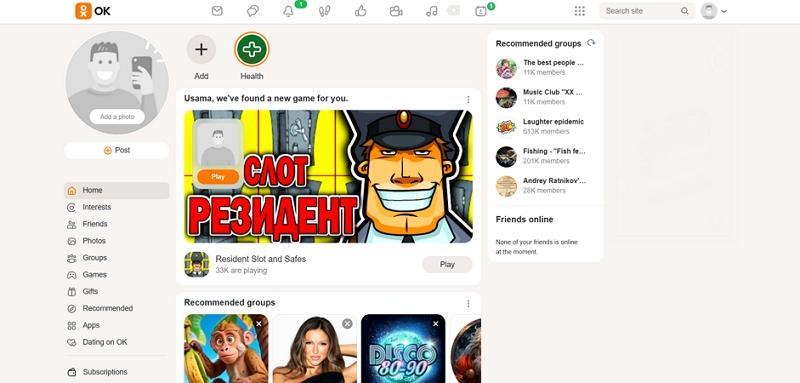
OK.ru or Odnoklassniki is a Russian website that was started in 2006 by Albert Popkov. Its primary content encompasses user-created videos, music playlists, and live-streaming shows to a wide and international audience. Their entertainment and cultural contents are shared with users all around the world, and thus, it is a social media where people watch and save content.
Reasons to Download OK.ru Videos
Now, look at the reasons below to see why people download OK ru videos.
- Offline Viewing: A significant number of users also download videos of OK ru so that they can watch them later without having to use the internet connection.
- Sharing with Friends: To make it easy to share the videos on messaging applications or during offline use, users save OK.ru videos.
- Saving Personal Memories: Users download family or event videos uploaded by friends to keep lasting memories safely on their devices.
- Educational Purposes: Learners and teachers download tutorials or lectures from OK.ru for classroom use or self-study.
- Content Reuse: Creators sometimes save OK.ru videos for reference, editing, or remixing in their own projects.
Part 3. Download OK.ru Videos with Desktop Tools (Stable & High-Quality)
Having discussed the online OK video downloader platforms, let’s explore the best downloader you can use on your Windows or PC.
Using Wondershare UniConverter to Download Odnoklassniki Videos (Windows/Mac)
While there are many tools available for downloading OK.ru videos, only a select few deliver high-quality results for every download. Among these, UniConverter stands out because it handles large files and ultra-high definition without hassle.
UniConverter is a robust video downloader that supports 4K and 8K video downloading to produce high-fidelity outcomes. This tool has the ability to save videos from more than 10,000 video sites. With just a video URL, you can download a video on UniConverter. Once the videos are downloaded, they can be found in the designated Finished tab.
(Disclaimer: Our tool is intended for personal use only. Users are solely responsible for using this tool to save videos or audios, including compliance with platform's terms of service and copyright laws and regulations. We are not liable for any consequences resulting from users' violation of any laws or infringement of others' rights.)
Best OK.ru Video Downloader
Key Features
- Ultra HD Download & Conversion: Supports downloading and converting videos in 4K and 8K resolutions while maintaining original quality.
- Batch Processing & Playlist Support: Allows users to download and convert multiple videos or entire playlists at once.
- AI Toolkit: Includes AI-based video enhancement, background remover, and auto subtitle generation and translation tools.
- GPU Acceleration: Utilizes advanced GPU technology for faster downloads, conversions, and smooth processing.
A Step-by-Step Guide to Using UniConverter for Downloading OK.ru Videos
Follow these steps to learn how to use UniConverter for downloading videos from OK.ru:
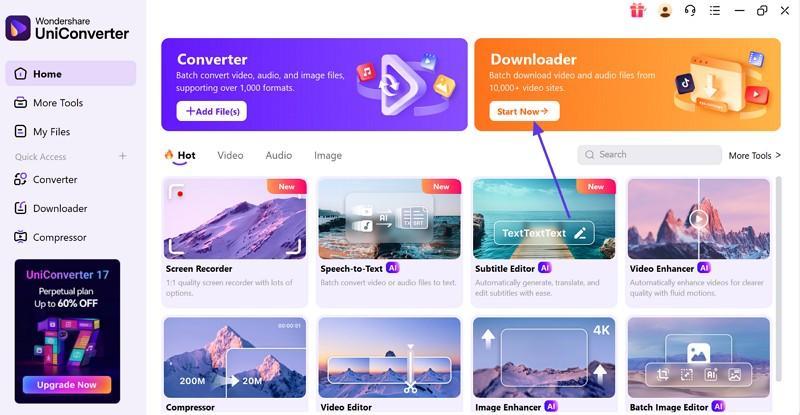
Step 1. Access the UniConverter Downloader
To start the process, open the “Downloader” mode of UniConverter from the top right of the screen.
Step 2. Paste the OK.ru Video Link
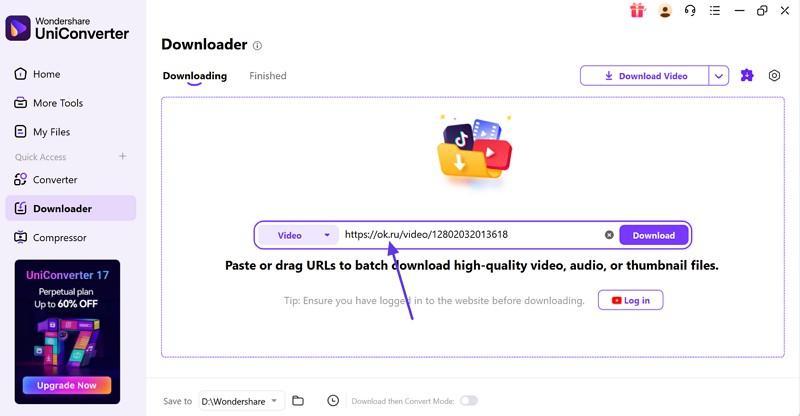
Copy the video URL from OK.ru and paste it in the designated field on UniConverter’s interface.
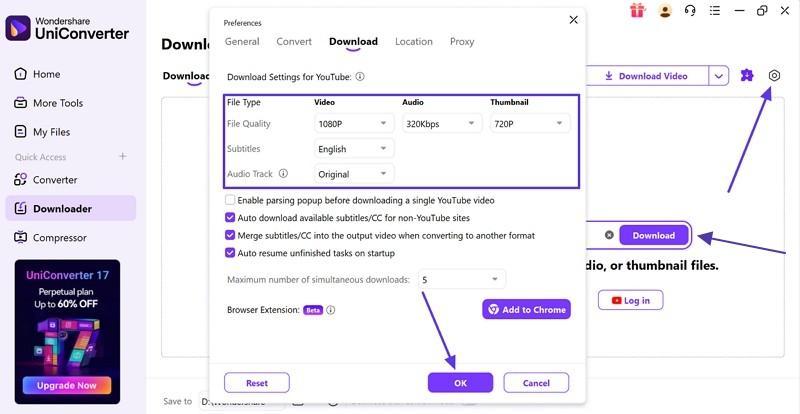
Step 3. Enter Download Preferences to Continue
From the “Settings” icon on the top right, open a “Preferences” window. Here, enter the video information and press the “OK” button to start the process. Lastly, hit the “Download” button to download the video.
Convert Downloaded OK Ru Videos to MP4 or Other Formats
Once you download the video with UniConverter, follow the steps below to convert OK ru to MP4:
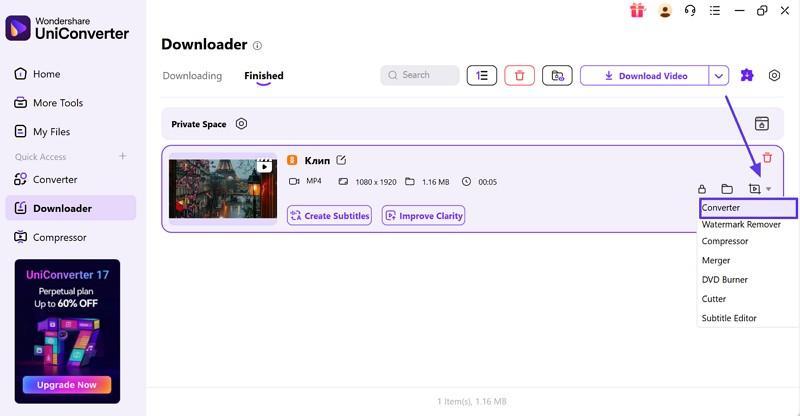
Step 1. Access the Converter for the Downloaded File
Once the video is downloaded, select the “Drop-down” menu at the bottom right of the video tab and select the “Converter” option.
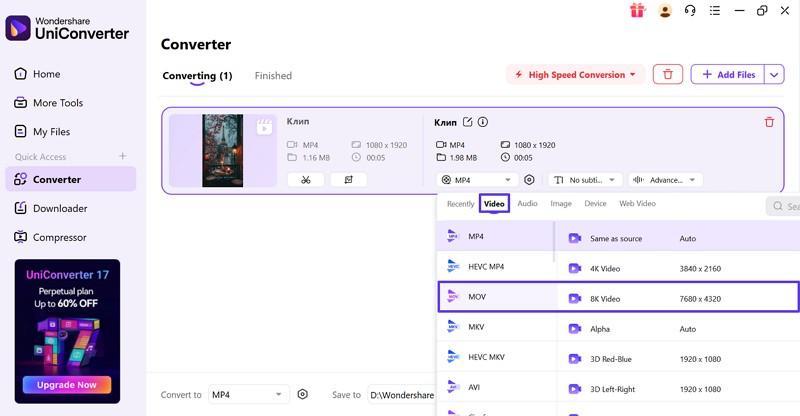
Step 2. Enter Video Conversion Specifications
When the next window opens, select the desired format, video quality, and resolution.
Alternative Desktop Software Options
Next, we’ll look at the alternatives for desktop OK downloaders to help you download the platform videos.
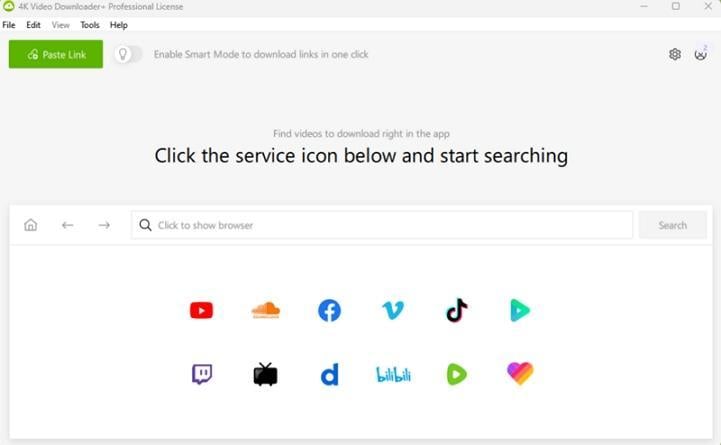
1. 4K Video Downloader
This desktop app is designed for effortless video downloading, working seamlessly across major platforms. Users enjoy quick saves from sites including YouTube, Vimeo, Facebook, and more, with a focus on ultra HD video and audio formats. All essential tools, playlists, subtitles, and private content support are built in for a complete user experience.
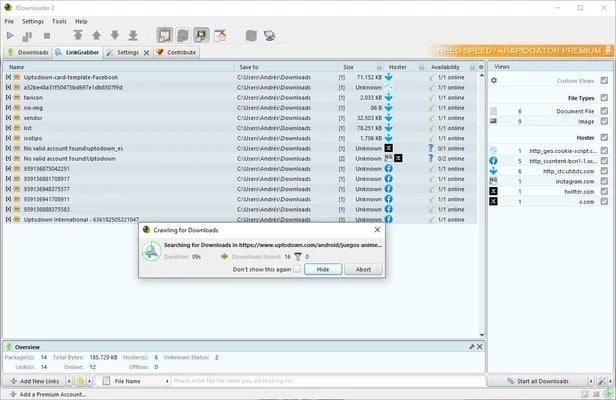
2. JDownloader
It allows users to automate and manage downloads from an unlimited number of sources, supports direct links, archives, and scripts. The open-source platform’s community plugins make handling complex or batch downloads simple, while bandwidth limits ensure uninterrupted browsing. This tool allows you to resume, schedule, and manage files for a stress-free downloading experience every day.
CTA: With all the options highlighted, it is evident that UniConverter provides the best offline platform experience for downloading and managing videos. Download UniConverter for free!
Part 4. How to Download OK.ru Videos Online (Free & Safe Methods)
If you’re looking for an efficient way to save your favorite moments, you might be searching for an OK ru video download online solution. Here are the safest methods to download OK.ru videos for free using online tools and trusted resources.
How do you download an OK.ru video online with a link?
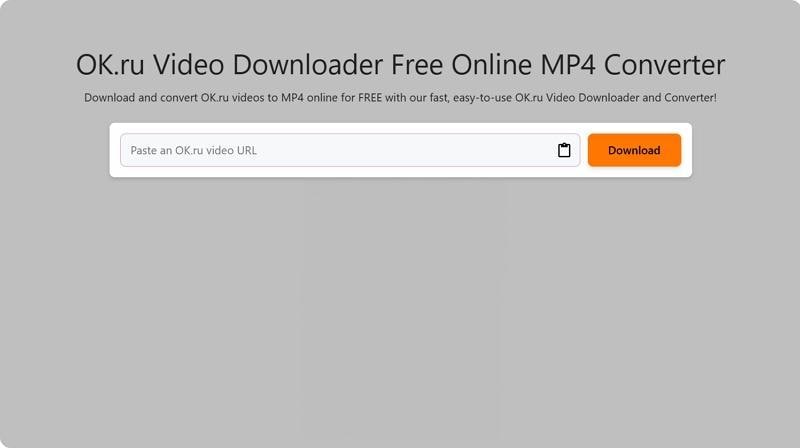
First, let’s see how you can download media content from an online OK ru downloader, OKGrabber:
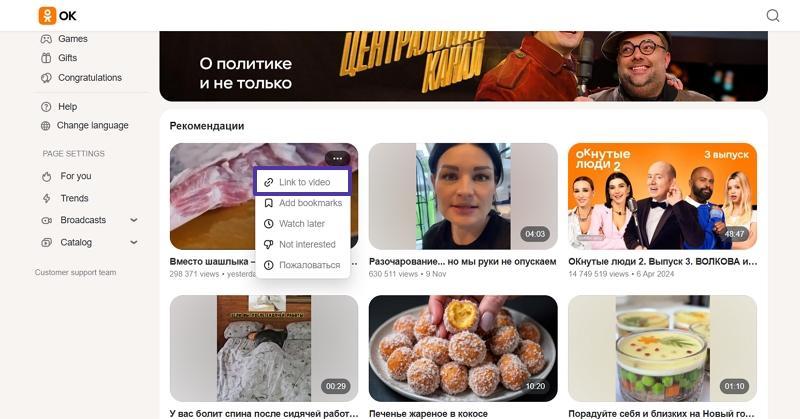
Step 1. Open the platform and click on the “Three-Dots” on the view to open the context menu. Next, hit the “Link to Video” option to copy the link.
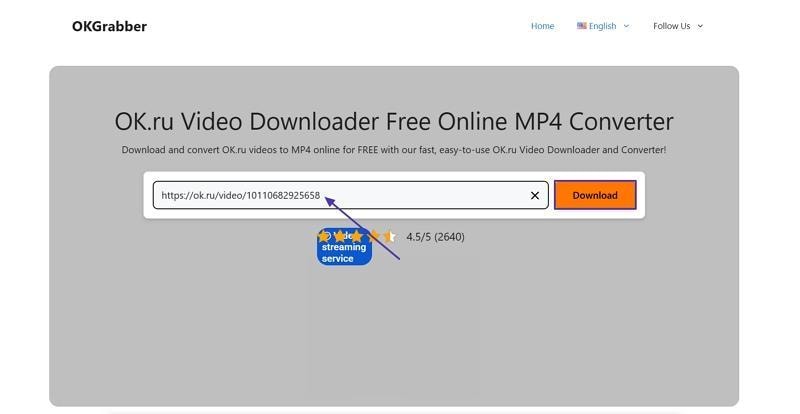
Step 2. Paste the link into the designated box in the online downloader and press the “Download” button to search for the video.
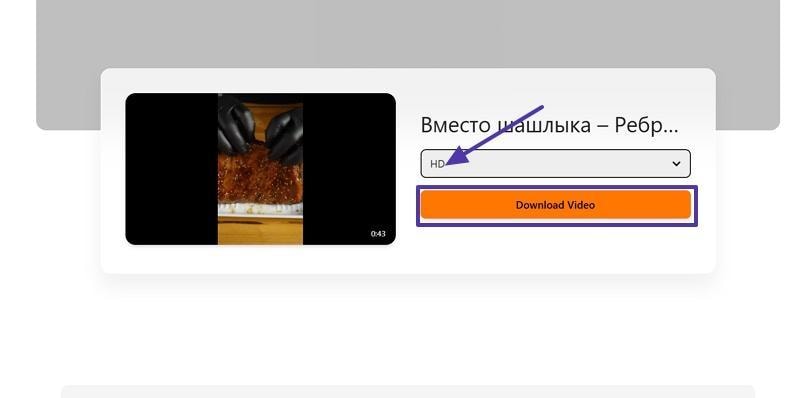
Step 3. Once the platform searches for the video, choose a resolution and hit the “Download video” option to download the video.
Recommended Online Tools for Quick Downloads
Now, let’s look at some online tools that can help you download OK.ru videos at their maximum resolution.
1. OKGrabber
This tool provides a secure and straightforward way to save videos from OK.ru directly to your device, without registration required. It supports various file formats and resolutions to let users choose their preferred quality before downloading. This tool ensures that your video content is downloaded quickly and ready for offline access.
Key Features
- Extracts embedded videos not hosted directly on the main servers for increased download options.
- Downloads animated GIFs as well as video content from posts for added versatility.
- Handles large files efficiently, downloading longer or high-resolution clips in data chunks for reliability.
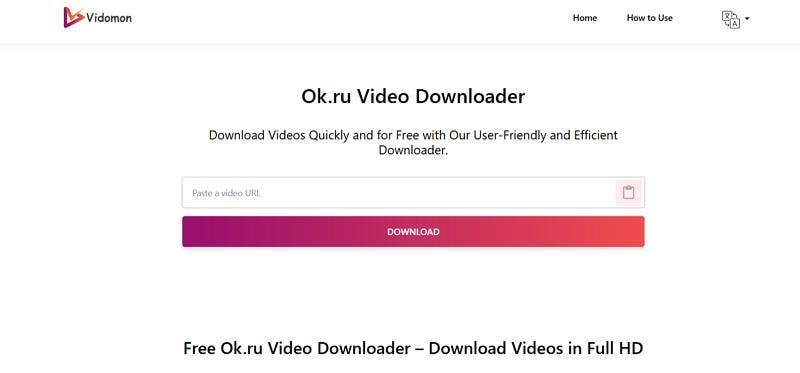
2. Vidomon
This is an OK downloader that lets you capture and save any video in seconds. Users can download clips in different formats and enjoy offline access whenever they want. Vidomon works on all devices and does not require registration or app installation for downloads.
Key Features
- Allows batch downloading by letting you queue multiple videos at the same time.
- Detects and downloads videos from both public and private OK.ru groups or pages.
- Preserves original video metadata, including upload date and title, during the download process.
Tips for Safe Online Downloading
Before downloading OK.ru videos, look at the tips below to keep your device safe and avoid common risks online.
- Always check site reviews before trusting an OK.ru downloader link.
- Scan downloaded files with antivirus software before watching any videos.
- Reject pop-ups or prompts demanding extra software installations or browser extensions.
- Never enter passwords or personal info on sites that claim to unlock protected videos.
CTA: For avoiding all related problems, it is preferred to use a convenient option that offers a simpler downloading environment. Use UniConverter right now!
Download OK.ru Videos with Browser Extensions (Fast One-Click Option)
For the fastest and easiest experience, using an OK video downloader extension allows instant access to OK.ru videos at the click of a button. Let’s see which extensions you can use and how they work.
How to OK Download Videos with a Chrome Extension
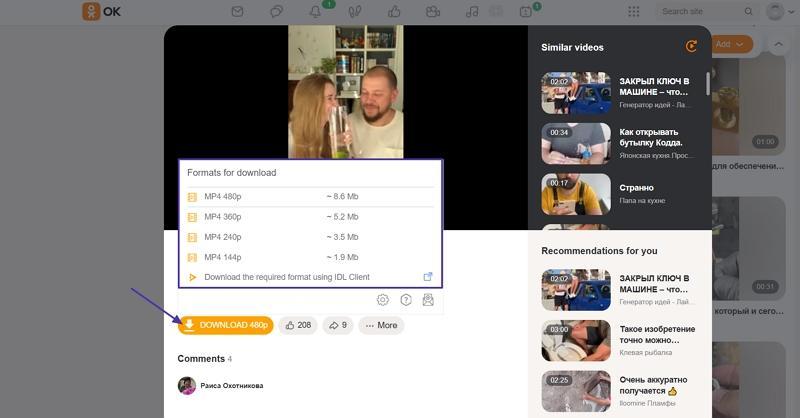
Follow the instructions below to download OK videos with the OK.ru Downloader extension:
Instructions. Once you install the Chrome extension, play the video on the OK platform. Then, hover your mouse pointer over the “Download” button and select the resolution you want to download. Lastly, press the “Download” button to start downloading the video.
Recommended Extensions for OK Ru Downloads
Now, we’ll explore the best OK Ru video download online extensions that help you download media content with a one-click process.
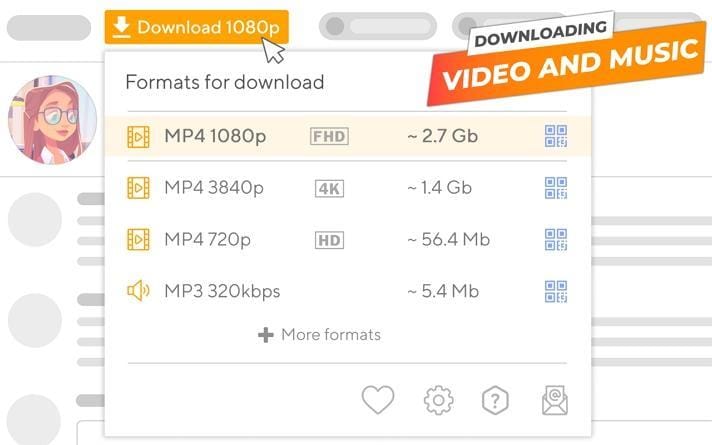
1. OK.ru Downloader
A Chrome extension built for media access, this tool integrates directly with your browser to download OK.ru videos in one click. It offers downloadable audio, screenshot capture, and saves content in your preferred format from any Odnoklassniki page. With privacy protection, the extension guarantees a safe and customizable download experience every time.
2. Video Downloader Unlimited
This Chrome extension helps users download videos from dozens of social networks and hosting platforms. Supports various formats, including MP4 and HLS streams, through a simple toolbar icon and one-click download process. It offers compatible playback and privacy controls for a smoother offline viewing experience every time.
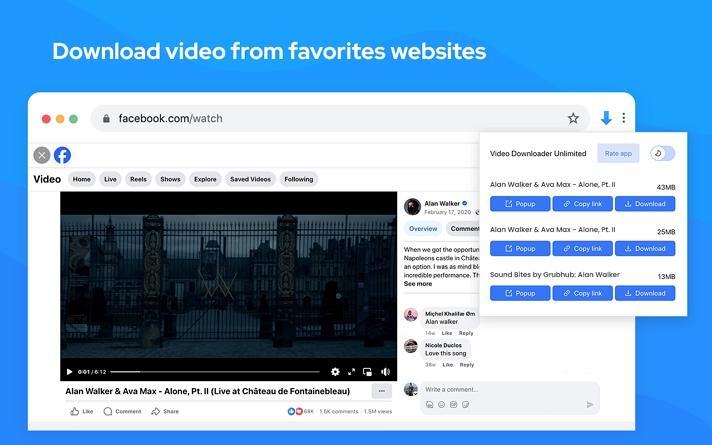
Note: Always download extensions from official web stores to ensure your browser’s security and protect your data from potential risks.
How We Tested OK.ru Video Download Methods
In this guide, we reviewed OK.ru download methods based on success rate, saved video quality, ease of use, device coverage, and whether each option is practical for repeat downloads.
Download success rate
We checked whether each method can consistently save OK.ru videos without broken links, failed tasks, or unstable results.
Output quality
We compared whether downloaded videos stay clear enough for offline watching and playback on common screens and devices.
Ease of use
We reviewed how simple the workflow feels, including link handling, button clarity, and how quickly users can finish the download.
Platform compatibility
We considered whether the method works well on desktop, browser-based, and mobile environments for broader everyday use.
This gives readers a clearer picture of which options are more stable, practical, and worth trying before the comparison section below.
Part 5. How to Download OK.ru Videos on Mobile (Android & iPhone)
If you want a simple way to download Odnoklassniki video files on your phone, several mobile apps now provide quick solutions for both Android and iPhone users.
Download from OK.ru on Android Devices
Now, let’s explore the best OK downloader app for your Android device.
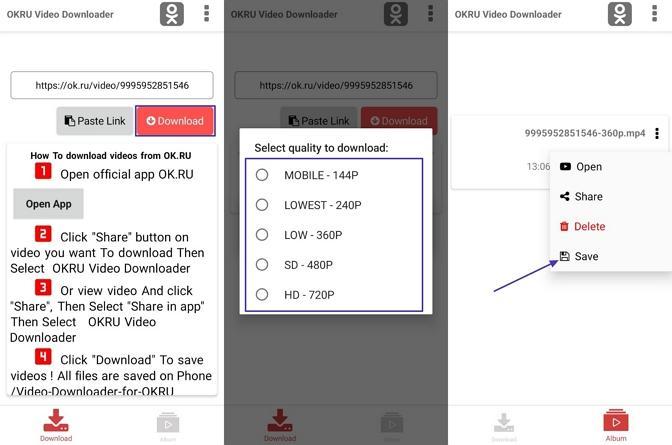
1. Video downloader for OK.Ru
An OK ru video downloader for Android that enables downloading videos in your preferred quality. It automatically saves completed downloads to a dedicated album with easy access on both phones and tablets. All downloaded content is managed with privacy controls and developer support, with a safe experience for users. Adhere to the instructions below to see how you can download the video:
Instructions. First, paste the link in the designated app box on the app’s interface and tap on the “Download” option. Next, choose the resolution and tap on the “Download” option again to start searching. Once the app searches for the video, hit the “Save” option to download the video.
Download from OK.ru on iPhone/iPad
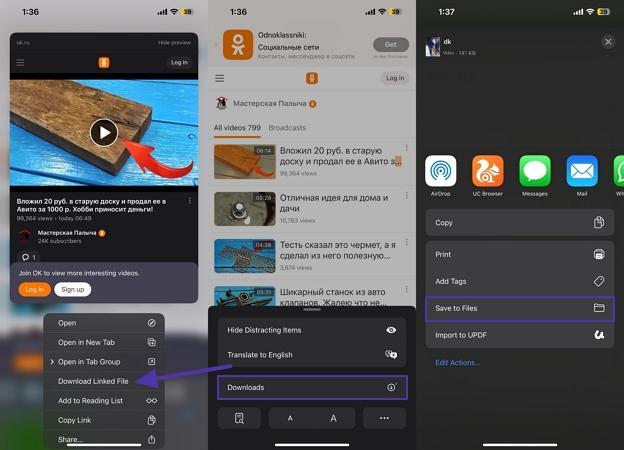
iOS limits direct video downloads from most browser sites. The best option is web-based downloaders through Safari. Alternatively, you can use UniConverter desktop software to save OK.ru videos and then transfer them to your device. This makes the task very easy, and there is no need to download additional applications to your iPhone and iPad.
Saving Tip
To save an OK.ru video in Safari to your Files app, tap and hold the video. Next, select "Download Linked File" if the option appears and open the downloaded file using Safari’s blue arrow icon at the top. In your downloads list, tap the video, press the Share button, and select “Save to Files” so you can access it offline in any folder.
Tips for Mobile Download Safety
Before you install any mobile app to download OK.ru videos, see the tips below for safer practices and protection from malware and risky APKs.
- Avoid installing APKs from unknown websites, since they may contain hidden malware or outdated software.
- Check user reviews, ratings, and the developer’s name before downloading any app.
- Use a trusted antivirus or try a tool like VirusTotal to scan APK files for safety before installing.
Part 6. Common Problems When Downloading from OK.ru (and Fixes)
Here are a few challenges often faced by users trying to save videos from OK.ru, along with simple solutions to each one.
Why Some OK.ru Videos Don’t Download
Geo-block, account login needed, or private settings stop downloads. Check your access, login status, or ask the uploader for permissions. Not every video is public, so not every tool or country will allow simple video downloads on the first try.
Video Plays but Won’t Save — Troubleshooting Tips
A non-working link, active VPN, or old software often blocks saving. Double-check the original URL and refresh your tool. You can switch off VPN/proxy settings to resolve problems that stop a video from downloading to your device.
Audio Missing or Format Not Supported
Some videos use separate audio tracks or new codecs that basic tools miss. Try a converter for better results. Automatic merging and format conversion with UniConverter lets both video and audio play smoothly across common devices and apps.
Part 7. Legal & Safety Tips While Using OK Downloader
When you use OK ru video download online tools and mobile apps, stay informed and protect your rights by following the tips below.
- Personal Use Only: Always download Odnoklassniki videos strictly for personal viewing purposes. Sharing or re-uploading copyrighted content without consent can lead to legal consequences.
- Avoid Unverified Sources: Stay away from pop-up sites and unknown browser extensions claiming to offer OK.ru downloads. These often carry malware or phishing risks.
- Use Trusted Tools: Choose reputable downloaders like UniConverter or other verified apps. They provide safer downloads and better protection from data theft or viruses.
- Check Copyright Permissions: Before saving any OK.ru video, ensure it’s not copyrighted or restricted. Using copyrighted material without permission violates content ownership laws.
- Update Security Software: Keep your antivirus and browser updated when downloading OK.ru videos. This prevents malicious files or harmful redirects from compromising your device.
Conclusion
When you download OK ru videos, it can be done through three main methods: online downloaders, browser extensions, desktop applications, and mobile apps. Online tools offer quick access without installation, while extensions add convenience through one-click downloads within browsers. However, desktop software like UniConverter stands out for its superior speed, reliability, and advanced safety features. Compared to other options, UniConverter ensures consistent quality and secure downloads.

