


Many users want to download Wistia videos so they can learn offline or keep backups. Wistia is a popular business video platform, but often there is no download button, and strict permissions make this hard. This leaves users frustrated when they want to save important lessons or presentations but cannot find a simple download feature.
In this guide, you will find out 5 proven ways to download video from Wistia and explore solutions even when links or download permissions are hidden.

Best Wistia Video Downloader
In this article
- Part 1. Understanding Wistia Video Downloads: What You Need to Know
- Method 1 – Download Video from Wistia in Batch with High Quality [Recommended]
- Method 2 – Wistia Video Downloaders Online Free (No Software)
- Method 3 – Download Wistia Videos Using Browser Extensions
- Method 4 – How to Download Wistia Video Manually (Without Any Tool)
- Method 5 – Using Developer Tools to Download Wistia Videos
- Part 7. Comparing Wistia Video Download Methods: Which One to Choose?
- Part 8. Legal and Ethical Considerations
- FAQs about Wistia Video Downloader
Part 1. Understanding Wistia Video Downloads: What You Need to Know
Before exploring Wistia video download methods, let’s understand how this platform works and why videos hosted there are often protected.
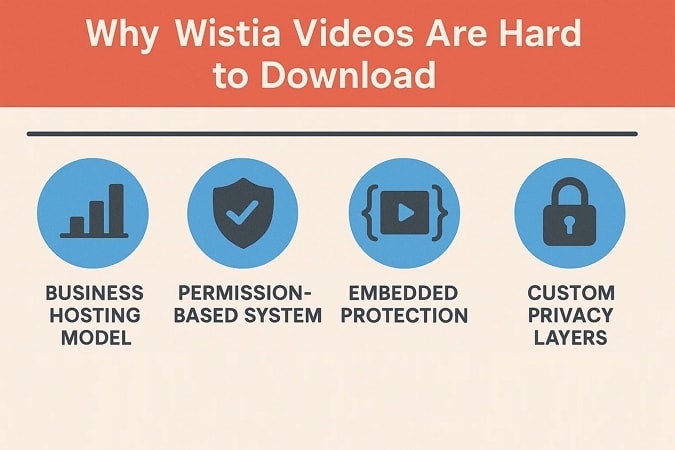
Why Wistia Videos Are Hard to Download
Wistia videos can be challenging to download because the platform is built to keep business content secure. Let’s explore the reasons Wistia videos are so hard to download and why you struggle each time.
- Business Hosting Model: Wistia’s private hosting structure keeps video files exclusive to official viewers and approved partners.
- Permission-Based System: The download option stays hidden unless the owner grants access using dashboard settings and special sharing modes.
- Embedded Protection: Embedded Wistia videos are secured by source-hiding codes that block plugins and tools from capturing direct download links.
- Custom Privacy Layers: Email restrictions and domain limits create real barriers for viewers who want to save files unlawfully.
Is It Legal to Download Wistia Videos?
Having discussed how Wistia videos are protected, let’s look at the laws and ethics every user should remember.
Copyright and Fair Use
Downloading videos from Wistia without permission violates copyright laws, including for personal use or backup. Fair use policies are strict and only allow educational and non-commercial downloading in rare cases. Using videos outside proper boundaries can lead to copyright complaints or account restrictions.
When Downloading is Permitted Ethically
You may save videos if the owner gives explicit download rights or you are the original creator. Downloads are allowed for personal learning when clearly permitted by the video owner’s settings or the platform.
What Video Quality Can You Download?
Wistia video quality options affect both your viewing experience and download choices, so let’s see the available choices you can expect from this platform.
Available Resolutions and File Size Considerations
Users can choose from Wistia video quality options like 4K, 1080p, 720p, or 360p when available. Higher resolution downloads require more bandwidth and storage space, so always consider the file size before downloading.
Original File Format vs Converted Formats
To select the video quality, let’s compare the original file with the 4K Wistia download or MP4 format available for saving.
| Format Type | Description | Best For |
| Original File | Highest quality as uploaded, large file size | Editing, Archival |
| HD MP4 | Compressed, great quality, plays on most devices | Presentations |
| SD MP4 | Smallest file, quick download, lower viewing quality | Mobile, Quick View |
Method 1 – Download Video from Wistia in Batch with High Quality
The fastest way to download videos from Wistia is by choosing a reliable tool that works for every user. Wondershare UniConverter stands out among all its competitors due to the ability to download high-quality videos in 4K resolutions and choose the output format before saving them.
Why UniConverter Is The Best Wistia Video Downloader Tool
This is the best Wistia video downloader that handles Wistia links directly and captures content in 4K or custom formats without needing browser extensions. Videos can be downloaded in 4K quality and can be changed in terms of resolution and frame rate depending on your needs. Whether you want to trim audio or merge separate clips, UniConverter offers these abilities in a single package.
Unlike other video downloaders, it supports metadata editing and automatic compression for easy archiving. It converts files into more than 1000 formats and supports fast upscaling with artificial intelligence. Users benefit from enhancements like color boost, portrait sharpening, and the ability to compress videos while preserving important details.
(Disclaimer: Our tool is intended for personal use only. Users are solely responsible for using this tool to save videos or audios, including compliance with platform's terms of service and copyright laws and regulations. We are not liable for any consequences resulting from users' violation of any laws or infringement of others' rights.)
Best Wistia Video Downloader
Key Features
- Batch Processing: You can download or convert multiple Wistia videos simultaneously for faster workflows.
- High-Speed Conversion: Offers an advanced high-speed conversion feature with a GPU acceleration option.
- Automatic Subtitle Extraction: Users can download and sync subtitles or audio tracks if they are available within the video source.
- Compression: The tool compresses videos while keeping the quality high for sharing and storing feasibility.
Step-by-Step: How to Download Wistia Video with UniConverter
Being completely aware of the features of the best Wistia downloader tool, you’ll be wondering how to use it. Follow the steps below to see how you can download videos with UniConverter:
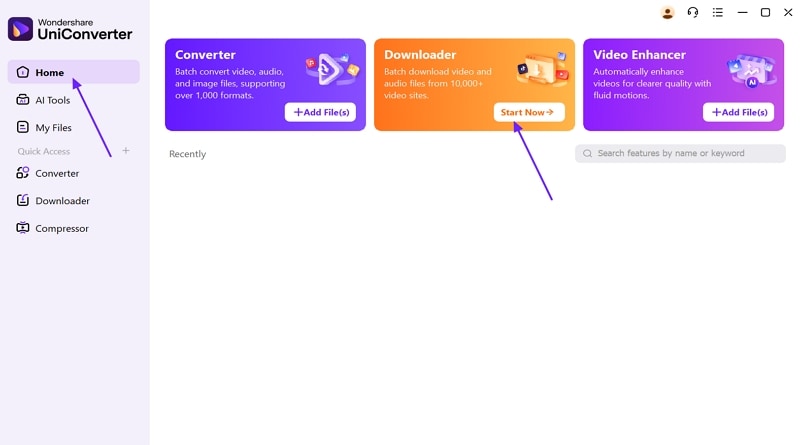
Step 1. Access UniConverter Downloader Tool
First, go to the “Home” tab from the panel on the left and select the “Downloader” tool to proceed further.
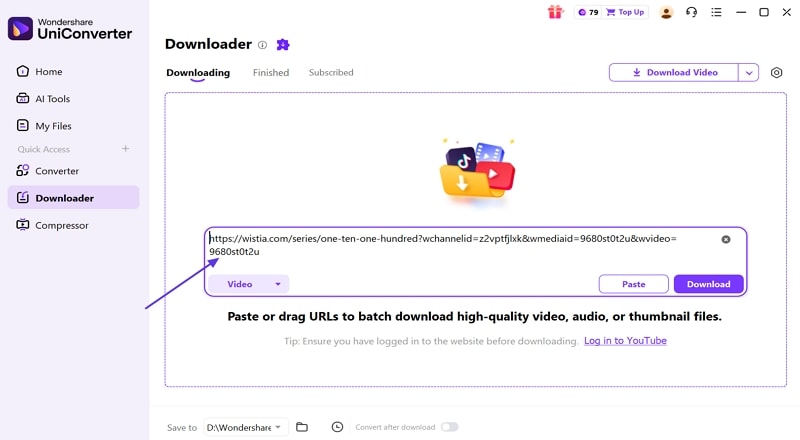
Step 2. Add the Wistia Video URL in UniConverter
Copy a video URL and paste it into the designated URL box on UniConverter’s interface.
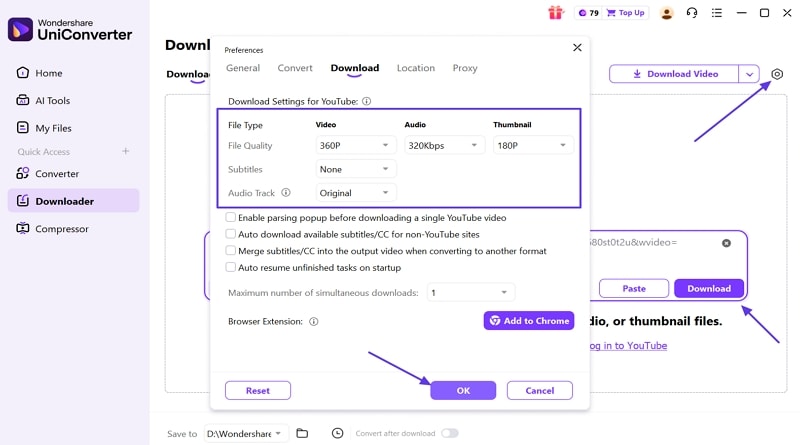
Step 3. Adjust Download Preferences
Now, hit the “Download Preferences” icon in the right corner and adjust the settings as per your needs. Select the “OK” button to apply settings and click on the “Download” button to begin downloading.
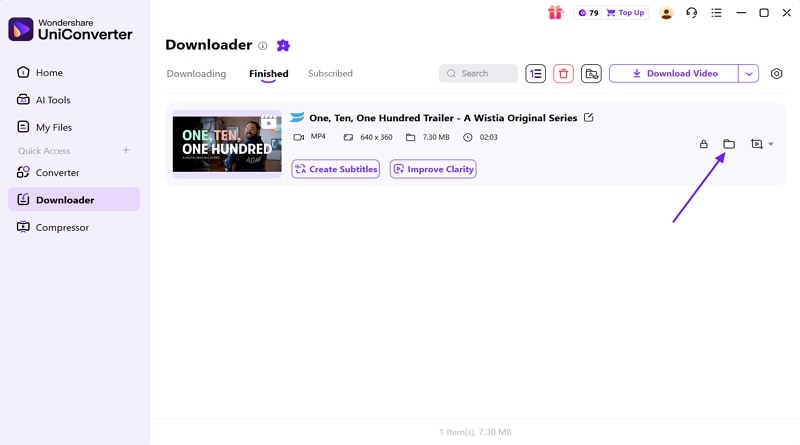
Step 4. Access Downloaded Folder
Once the video is downloaded, hit the “Open File Location” option to open the folder where the Wistia video is saved.
CTA: For easy Wistia video downloading, UniConverter provides a very simple, yet extensive downloading facility to its users with quality control. Do try it for free!
Method 2 – Wistia Video Downloaders Online Free (No Software)
For users who want to download Wistia video online for free, there are several fast methods with no software required. This approach is perfect when you only need a single video or want a quick solution directly through your browser.
Top 3 Free Online Wistia Video Downloaders
Let’s explore the top three online platforms that you can use to download Wistia videos without any complex installations.
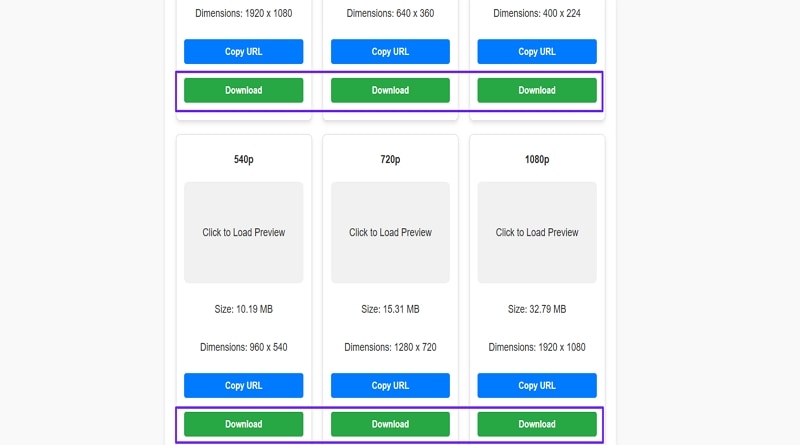
1. Wistia Video Downloader
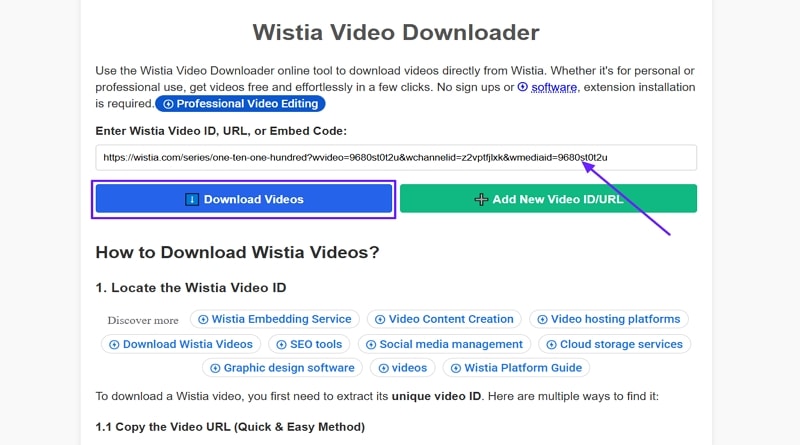
A user-friendly website makes downloading Wistia videos online quick and accessible for everyone in just a few steps. This tool supports multiple resolutions, including 4K Ultra. Most browsers and devices work with the platform to let users save Wistia videos wherever they prefer. Now, follow the steps below to download Wistia videos with this platform:
Step 1. First, copy the Wistia video link and paste it into the platform URL box. Next, hit the “Download Videos” button to start downloading.
Step 2. Now, press the “Download” button under the resolution you want to download. The file will be saved in the Downloads folder.
2. Aquapp Studio
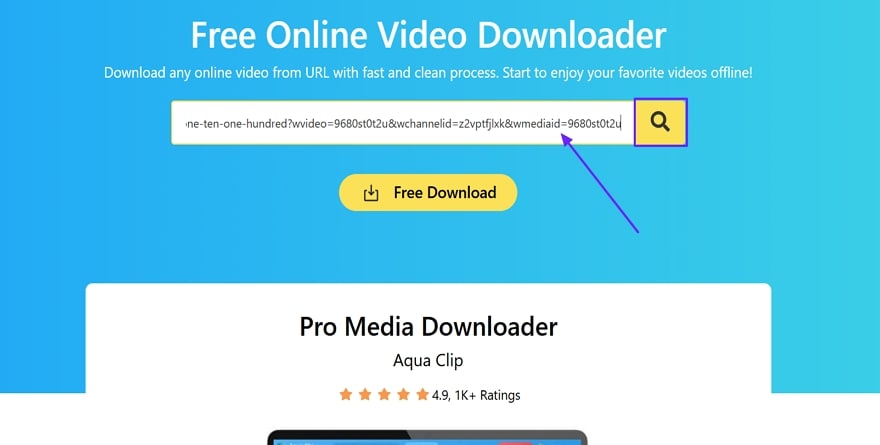
A free Wistia downloader that saves videos directly from the browser makes life a lot easier for users. Aquapp Studio helps people grab Wistia and other site videos in MP4 and many popular formats. It's simple controls guide you through format selection, customizable quality, and conversion options for each downloaded video. Go through the steps below to see how you can download Wistia videos online:
Step 1. Paste the Wistia video URL in the dedicated URL box on the main interface and hit the “Magnifier” icon to search the video.
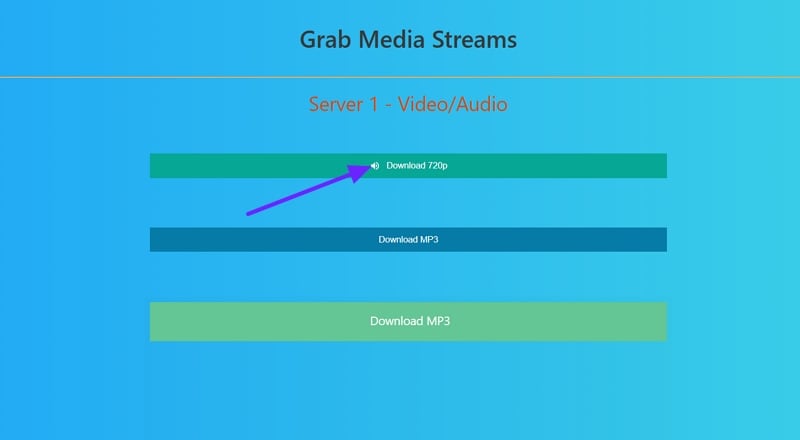
Step 2. Now, hit the “Download 720p” button to download the video to your system.
3. AmoyShare
This Wistia video downloader online gives you a simple way to grab content by pasting the video URL. It supports batch downloading, playlist support, and subtitle extraction for fast video saves from countless supported websites. Instant HD or MP4 downloads work in any browser or on any device, with no registration or hidden hurdles required. Adhere to the steps below to download Wistia videos from this website:
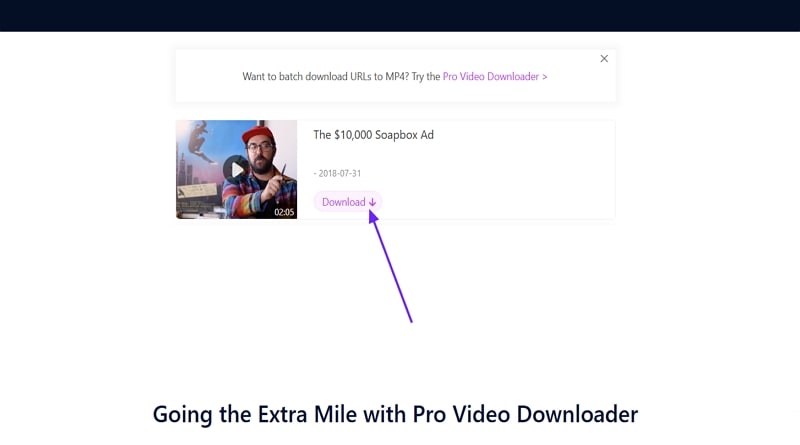
Step 1. First off, copy and paste the video URL into the main interface URL box. Next, hit the “Download” button next to the box to start searching.
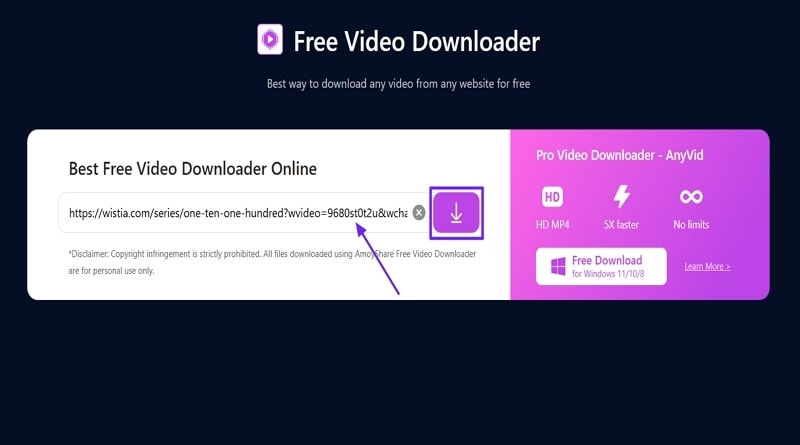
Step 2. Once the tool finds the video, click on the “Download” button again to save the video to your device.
Method 3 – Download Wistia Videos Using Browser Extensions
Popular browser extensions make it easy to use a Wistia downloader on Chrome, Firefox, and other browsers, but not all are safe. Let's explore the top extensions for downloading Wistia videos, with a close look at privacy and reliability concerns.
Best Chrome Extension for Wistia Video Download - Wistia Video Downloader
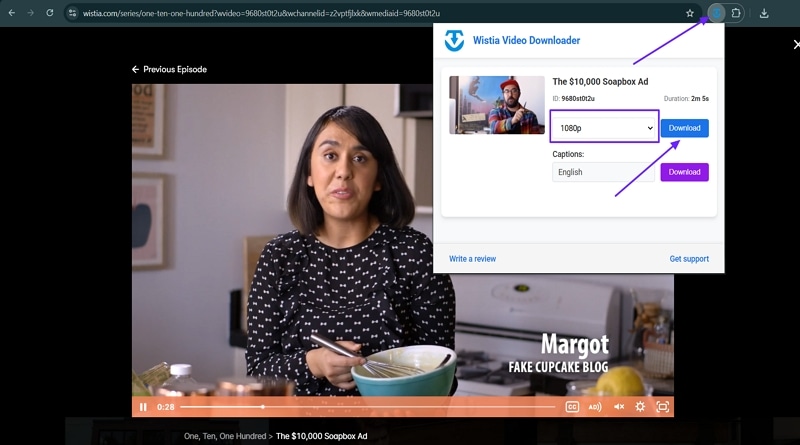
Anyone searching for a Wistia video downloader Chrome extension often wants a solution built right into their browser for quick access. This extension adds a download button so every Wistia video can be downloaded in any available resolution. It supports 240p up to 8K, as well as caption grabbing for diverse needs. If you're thinking about how this extension works, follow the instructions below:
Instructions. After adding the extension to your Chrome, play the Wistia video and click on the “Extensions” icon in the top right corner. Choose the appropriate resolution and hit the “Download” button to download the video.
Best Firefox Add-on for Wistia Video Download - Video DownloadHelper
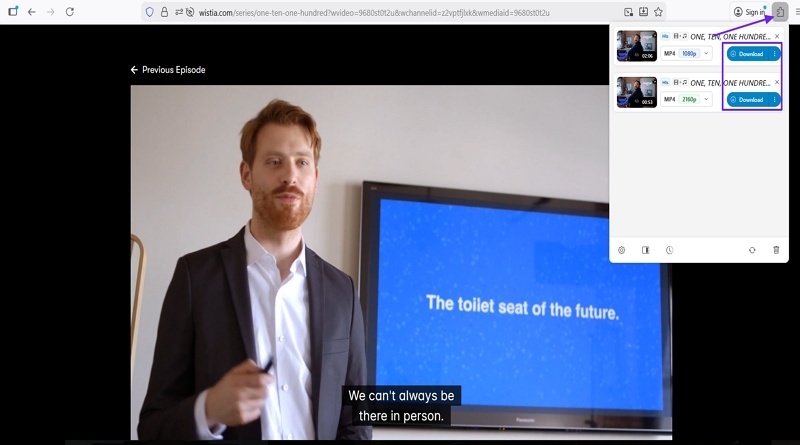
Those needing an easy way to save media on Firefox often turn to this extension for quick results. Video DownloadHelper helps users download Wistia and many other streaming videos, with support for MP4 and gallery saving. You can also convert files, extract audio, and sort download variants with simple controls for every site. Follow the instructions below to download the Wistia videos with this Firefox Wistia downloader:
Instructions. Add this add-on to your Firefox extension and play the Wistia video. Now, hit the “Extensions” icon, and it will show the video currently playing. Select the resolution and click on the “Download” button to save the video to the Downloads folder.
Safety Tips When Using Browser Extensions
When trying a new Wistia video download Chrome extension or Firefox add-on, consider the tips mentioned below to keep your device protected from privacy risks.
- Review extension permissions and avoid any extension asking for unnecessary browsing data access.
- Only install extensions from official browser stores to reduce the chance of malware.
- Consider standalone software or manual tools for less vulnerability to hidden threats.
Method 4 – How to Download Wistia Video Manually (Without Any Tool)
Anyone wondering how to download Wistia video without tools can simply use the built-in browser options for a direct solution. Manual methods involve viewing the webpage source code and tweaking links; there’s no need for extra apps or extensions. This quick strategy is best for users who want private access to their own Wistia content.
Extracting the Wistia Video URL from Page Source
Go through the simple steps below to see how you can save the Wistia videos via page source:
Step 1. Right-click on the video and press the “Copy Link and Thumbnail” option.
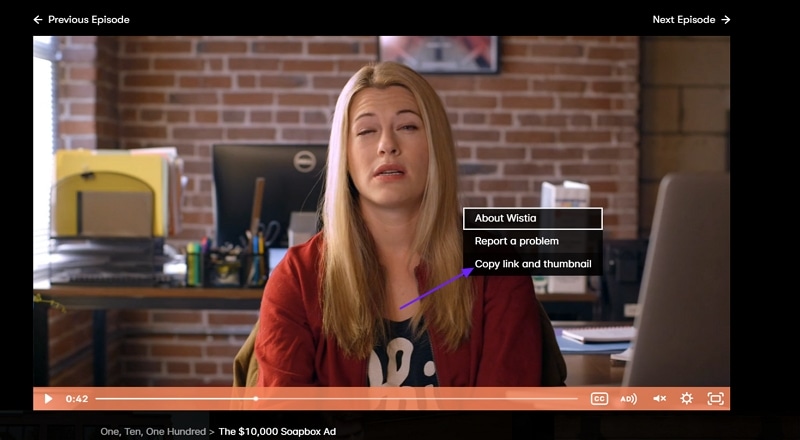
Step 2. Now, locate and copy the code after “wvideo=” and open “fast.wistia.net/embed/iframe/CODE” in a new tab.
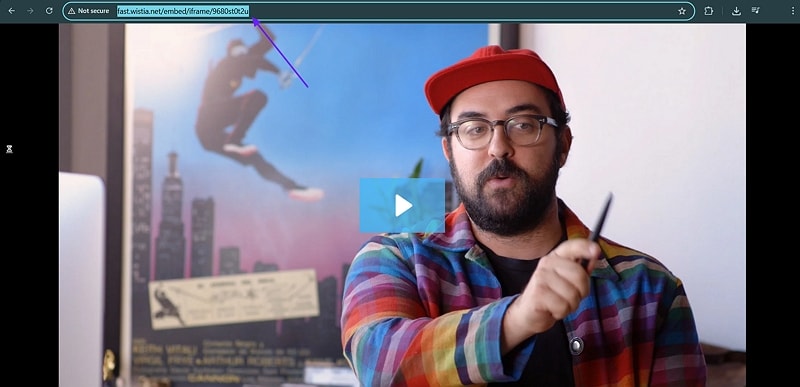
Step 3. Press the “Ctrl+U” keys for Windows and “Cmd+Option+U” for Mac to open the source page. Search for “"type":"original"” and copy the “.bin” link.
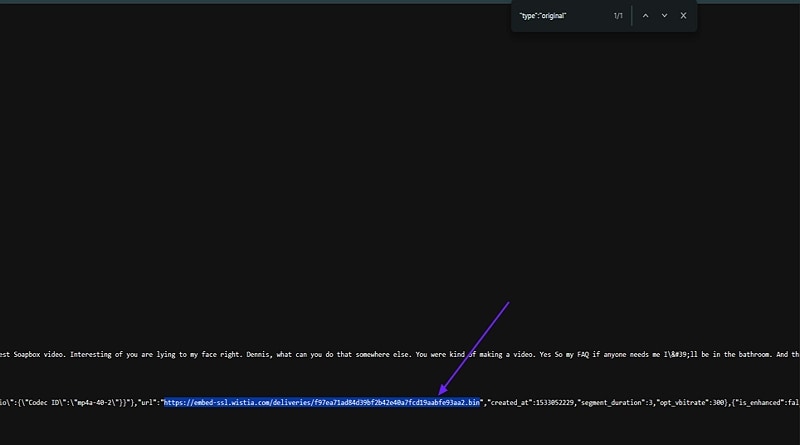
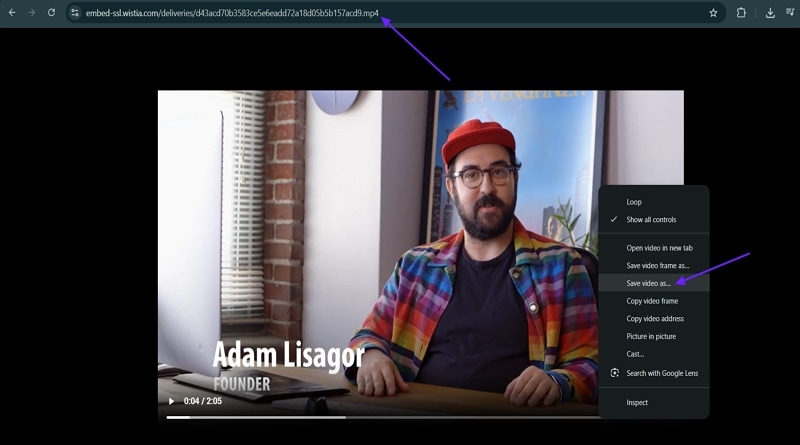
Step 4. Replace “.bin” format with “.mp4” format and open the URL in a new tab. Right-click on the video and press the “Save Video As” option to save it manually.
When to Use This Method
If you want to extract Wistia video URL before downloading, this manual method provides control in any locked environment.
- Use this when installation is blocked by school or work rules.
- Choose manual download if privacy is important for sensitive videos.
- Learn video architecture by extracting the Wistia video URL yourself.
Method 5 – Using Developer Tools to Download Wistia Videos
Those wanting to download Wistia video developer tools often choose this method for privacy or technical control. You can capture multiple Wistia video formats and qualities without extra installation, using built-in inspection options. This is a solid approach for people who want more direct control over their video assets.
How to Use Browser Developer Tools
Now, follow the steps below to download the Wistia videos with developer tools:
Step 1. Right-click the video and press the “Inspect” option from the context menu.
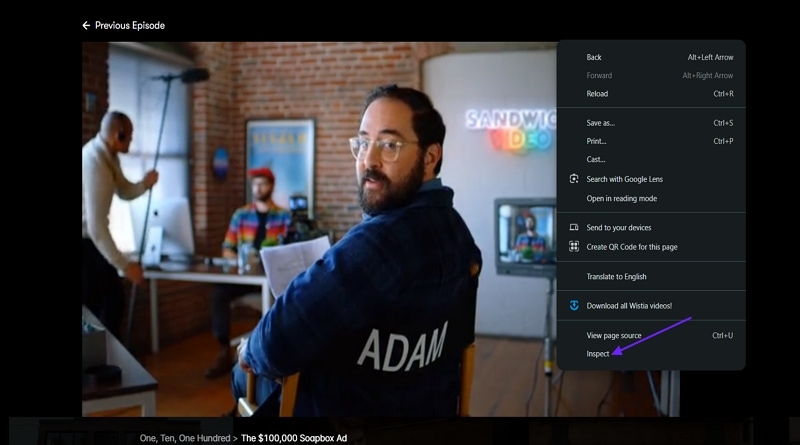
Step 2. Now, hit the “Network” tab and search for “.ts” files.
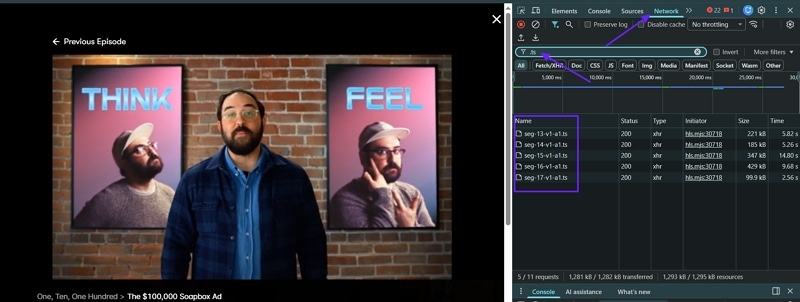
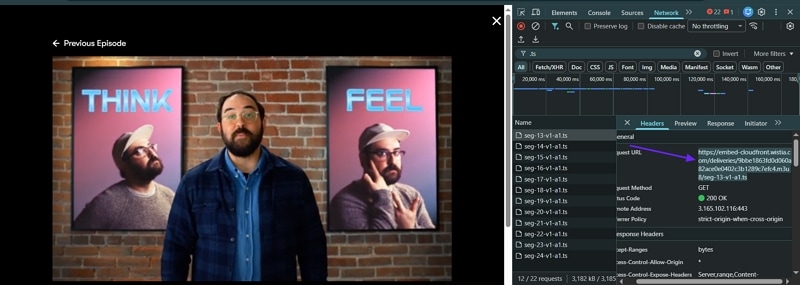
Step 3. Click on the “.ts” files and copy the “Request URL” from them and paste it in the new tab to download it. Repeat this for all “.ts” files.
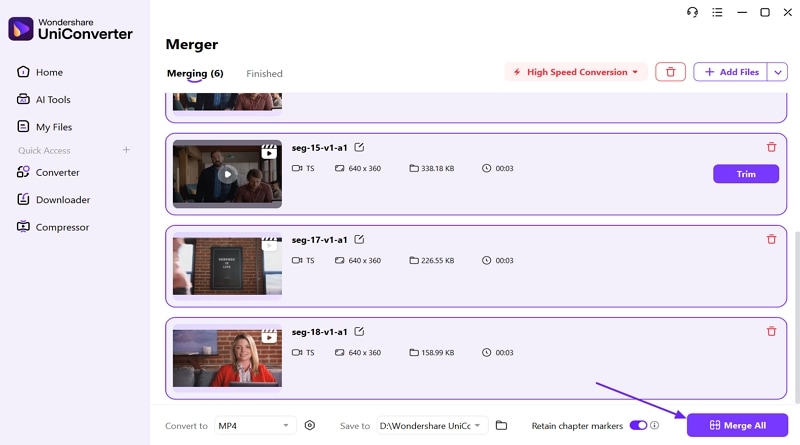
Step 4. Next, import all files in the UniConverter’s Merger tool and press the “Merge” button to attach all clips.
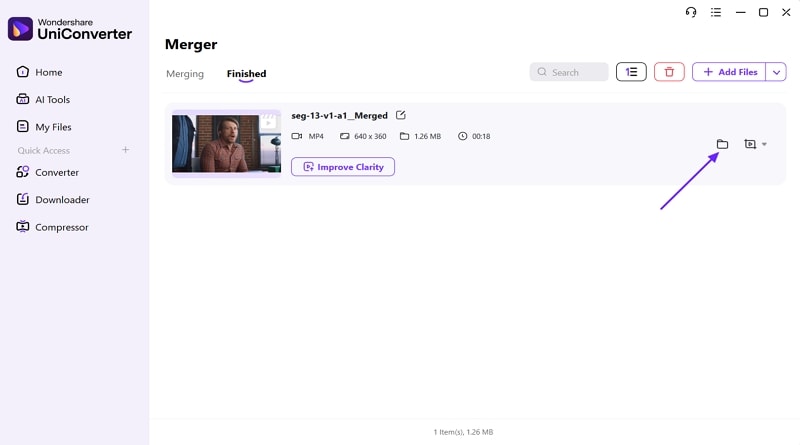
Step 5. Lastly, press the “Open File Location” option to open the folder where the final video is saved.
Pros and Cons of Developer Tools Method
Let’s look at the benefits and shortcomings of choosing the Wistia video segments download method.
Part 7. Comparing Wistia Video Download Methods: Which One to Choose?
If you're going to opt for a method to download embedded Wistia videos, let's compare each method to help you choose the best option for your needs.
| Method | Ease of Use | Cost | Batch Download | Quality Options | Best For |
| UniConverter | ⭐⭐⭐⭐⭐ | Paid/free trial | Yes | 4K, 1080p, 720p, 360p | Frequent, high-volume use |
| Online Tools | ⭐⭐⭐ | Limited free usage | No | Mostly 720p, 360p | Quick, single downloads |
| Browser Extensions | ⭐⭐⭐ | Free | No | 1080p, 720p | In-browser convenience |
| Manual Method | ⭐ | Free | No | Original only | No-software environments |
| Developer Tools | ⭐ | Free | No | Original (manual merge) | Advanced users |
Our Recommendation Based on Your Needs
Having compared the best Wistia video downloader options, here’s the recommendation tailored for different needs.
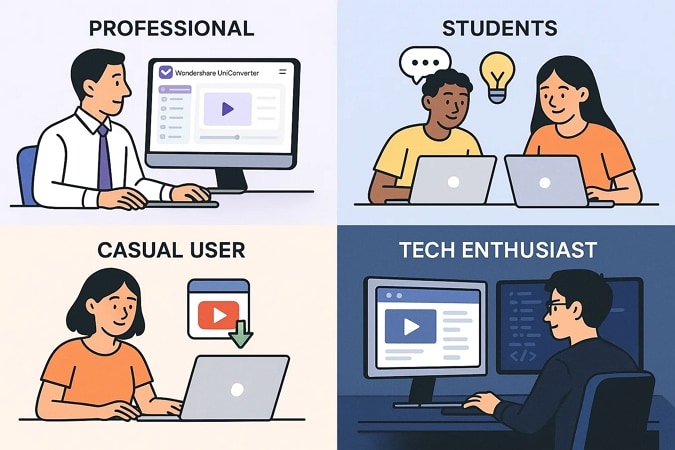
- For Educators and Professionals: Wondershare UniConverter is best for batch processing, high reliability, and a full range of features. It handles large projects and provides strong output quality.
- For Budget-Conscious Students: Online tools or the manual method work well, since they’re free, simple, and let you access basic quality without extra costs.
- For Quick One-off Downloads: Browser extensions are ideal for casual or occasional downloads with seamless integration and multiple resolution options.
- For Tech Enthusiasts: The manual or developer tools method gives direct access and customization to users who like control and aren’t afraid of technical steps.
Part 8. Legal and Ethical Considerations
Having compared all download methods, now it’s time to address Wistia copyright and ethical issues that every user should keep in mind.
Understanding Copyright Laws for Video Downloads
Fair use covers educational or critical downloads, but only with respect for original rights. Classroom exemptions apply in limited scenarios and cannot be used for broad sharing. Commercial use or distribution outside agreed permissions is always prohibited.
When Is It Okay to Download Wistia Videos?
Now, let’s understand when it is legal to download Wistia video files while respecting copyright and usage rights.
- Content You Own: Downloading your videos is always allowed if you are the creator of those original files, as you retain ownership and full control.
- Authorized Educational Materials: When your school or organization provides download access, saving educational Wistia videos for classroom learning is permitted and appropriate.
- Public Domain Content: If a Wistia video has been placed in the public domain by the owner, you can safely download and use it without legal concerns.
- Content with Explicit Permission: Whenever the video owner or copyright holder gives you written permission, downloading that specific Wistia content is fully acceptable.
Respecting Content Creators
After reviewing how creators use Wistia’s platform and how Wistia copyright protections work, we will now address how to support creators and respect permissions.
- Many choose Wistia for its copyright controls, branded environment, and privacy settings that keep work secure and ad-free.
- Engaging through official channels helps maintain fair credit, accurate analytics, and protects the creator’s copyright interests.
- When access is restricted, always reach out to creators for download permission to show respect for their rights and distribution.

Best Practices for Downloaded Content
There are important best practices to follow after receiving download permission for Wistia content.
- Personal Use Only: Downloaded Wistia videos should be watched and referenced privately, not shared for public use or broadcast.
- Don't Redistribute Without Permission: Sharing, uploading, or distributing the downloaded content requires explicit written consent from the owner or platform manager.
- Credit Original Creators: Mention and acknowledge the creator’s name whenever using downloaded Wistia material for school, work, or external publications.
- Follow Platform Terms of Service: Ensure all usage and downloads comply with Wistia’s official policies and the conditions of your granted permission.
Conclusion
In conclusion, to download Wistia video files, we have outlined browser tools, extensions, manual extraction, batch software, and online apps as key options. Most of these deliver original video quality, often lacking editing features. UniConverter stands out for batch downloads, MP4 conversion, and subtitle support. Always choose the method that suits you and remember to follow legal and ethical guidelines for each download.

