


Doodstream has become one of the most popular video hosting platforms for sharing and watching high-quality videos online. However, many users face constant playback issues, such as buffering and slow loading speeds. That is why people opt for Doodstream downloaders, which allow users to save videos directly to their devices for seamless viewing.
In this guide, you will explore various downloaders, both online and offline options, along with their guides to efficiently download dood video.
Quick Guide: Best Doodstream Download Method by Device and Download Volume
| Methods | Ease of Use | Cost | Batch Download | Quality Options | Best For |
| UniConverter | Very Simple | Freemium | Yes | Highest Quality up to 4K, Conversion formats available | Batch downloads, creators, and users needing advanced tools |
| Video DownloadHelper (Extension) | Simple | Free | No | HD, multiple formats | Users who want a reliable browser-based downloader supporting many sites |
| Doodstream Downloader (Extension) | Simple | Free | No | HD, selectable quality | Users who need a simple Chrome-only Doodstream download button |
| YT1Save | Simple | Free | No | MP4, MP3, 3GP, WebM, HD | Quick one-link online conversions without installation |
| PasteDownload | Simple | Free | No | Original Video Quality | Users wanting clean downloads from Doodstream mirror domains |
| Doodstream Video Downloader (Android) | Moderate | Free | No | SD, HD (selectable) | Mobile users who want one-tap Android downloads |
| Browser Developer Tool (Advanced) | Complex | Free | No | Original Quality | Tech-savvy users extracting direct source URLs |
| Saving Directly With Premium Version | Moderate | Basic: $7.99/month Silver: $37.99/6 months Gold: $77.99/year | No | Original Quality | Heavy users who want ad-free downloads inside Doodstream |

Best Doodstream Downloader
In this article
Part 1. Why Do Doodstream Videos Buffer, and When Does Saving Them Help?
Doodstream is one of the most popular platforms where 5.9 million users post and view videos, thus making it a top option. It is a popular streaming platform because it has HD streaming and can also play in high-quality, even at 720p, 1080p, and 4K resolutions. Additionally, it has a user-friendly interface that allows its users to earn money through their channels by uploading their videos.
You can also access its advanced features, such as ad-free viewing, subtitles in any language, and video downloads, by buying its premium version.
Top Reasons to Download Doodstream Videos
Upon knowing the basics of the Doodstream streaming service, let's explore why users prefer downloading dood videos:
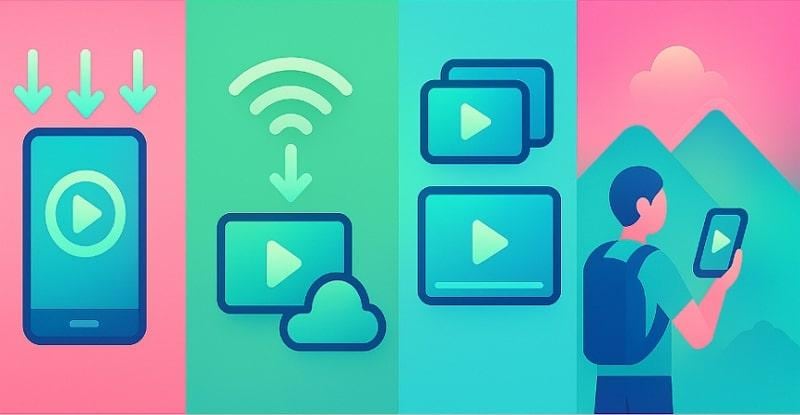
- Watch Videos Offline: After downloading, you can watch videos offline from anywhere, without worrying about an internet connection.
- Save Bandwidth: When you have a limited internet package, it is beneficial as you can download it once and stream it multiple times.
- Create Backup Copies: Downloading videos ensures you have a backup of your essential data, helping you avoid data loss.
- Avoid Streaming Interruptions: Downloaded videos are helpful to ensure smooth video playback without annoying pauses.
- Access Videos Easily: While traveling or staying in a remote area without internet, you can still watch downloaded videos easily.
Part 2. What Are the Most Practical Ways to Save Doodstream Videos on Different Devices?
Wondering how to download Doodstream videos safely and efficiently? Here are five trusted methods to help you:
Method 1: Desktop Doodstream Downloaders for Faster Batch Downloads
Suppose you are a content creator who frequently streams and explores videos on Doodstream. Unfortunately, you cannot download videos with the free account. In this situation, we recommend using Wondershare UniConverter, which lets you download numerous videos simultaneously. Furthermore, it allows you to convert the video into various available formats.

Within this tool, you simply insert the desired video link, and it will instantly download it for you. Furthermore, it also provides you with a Chrome extension to download your videos directly.
(Disclaimer: Our tool is intended for personal use only. Users are solely responsible for using this tool to save videos or audios, including compliance with platform's terms of service and copyright laws and regulations. We are not liable for any consequences resulting from users' violation of any laws or infringement of others' rights.)
Best Doodstream Downloader
Key Features
- Batch Downloading: Uniconverter lets you download and convert multiple videos in a single go, saving extra manual work.
- Screen Recorder: If you are unable to download videos due to regional restrictions, use a screen recorder to record videos directly.
- Video Enhancer: Users can opt for its efficient video enhancer, which lets them upscale the video visuals without ruining the actual quality.
- All-in-One Multimedia Processing Tool: You can process all your video/audio/image files in batch with UniConverter.
Stepwise Guide to Use Wondershare UniConverter for Dood Video Download
Upon hearing these advanced features of UniConverter, let's explore a stepwsie guide to download Doodstream video to MP3:
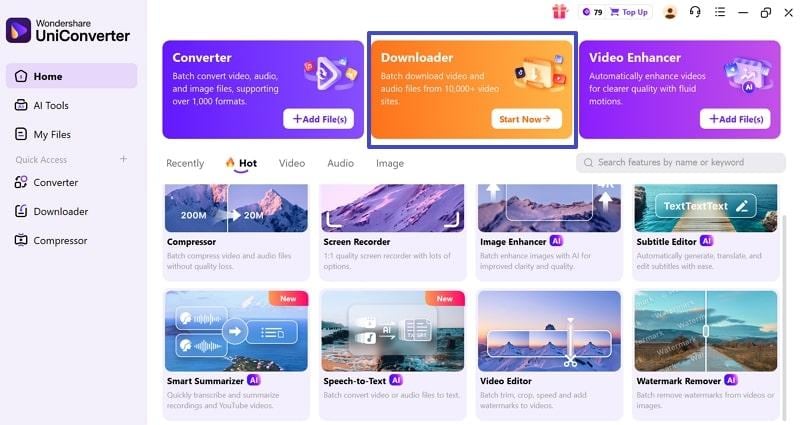
Step 1: Click on the “Start Now” button in the Downloader Tab
Upon accessing the tool, click on the “Start Now” button within the “Downloader” tab to enter its interface.
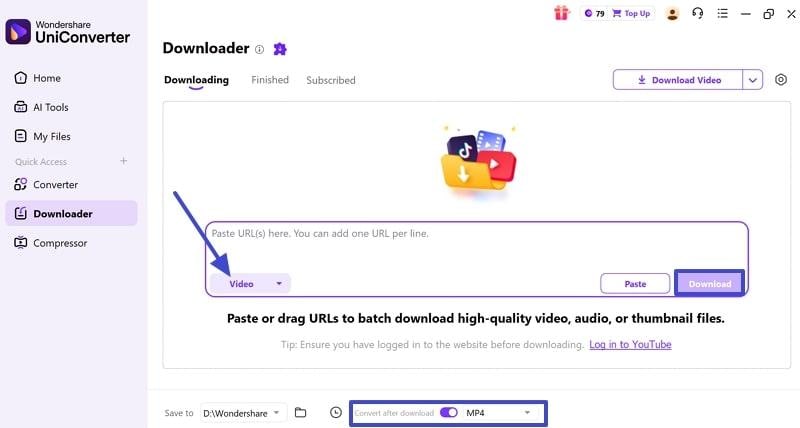
Step 2: Paste the Doodstream Video URL and hit the Download Button
Here, enter the Doodstream video URL, choose the desired output format, and hit the “Download” button.
Step 3: Render the Downloaded Video to the Device Folder
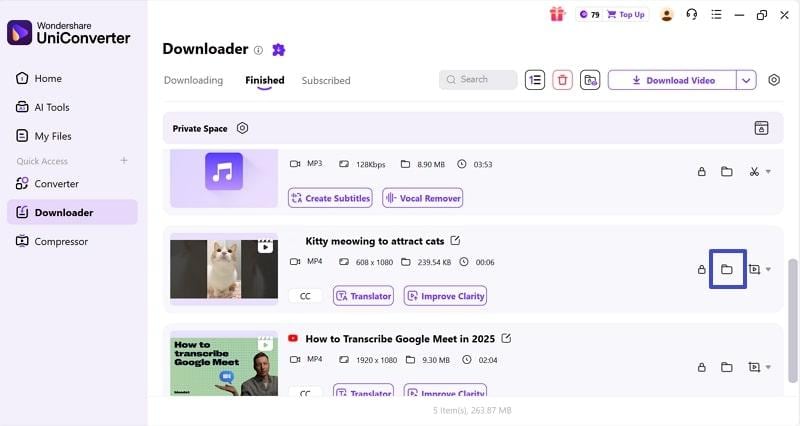
Finally, your desired video is downloaded automatically, click on the file icon to locate it on your device.
Method 2. Doodstream Downloader Browser Extensions
If you don't want to deal with switching apps, browser extensions are a great option. These tools provide a download button next to each video so you can download them directly. So, let's explore the download Doodstream Chrome extensions below:
1. Video DownloadHelper (Chrome/Firefox)
As an efficient tool, it can download videos from 1000+ websites. This tool also supports platforms that use streaming technologies such as DASH, HLS, and MPD. Furthermore, it enables high-definition video downloads and lets you choose the format you prefer.
How to Download Doodstream Chrome with Video DownloadHelper
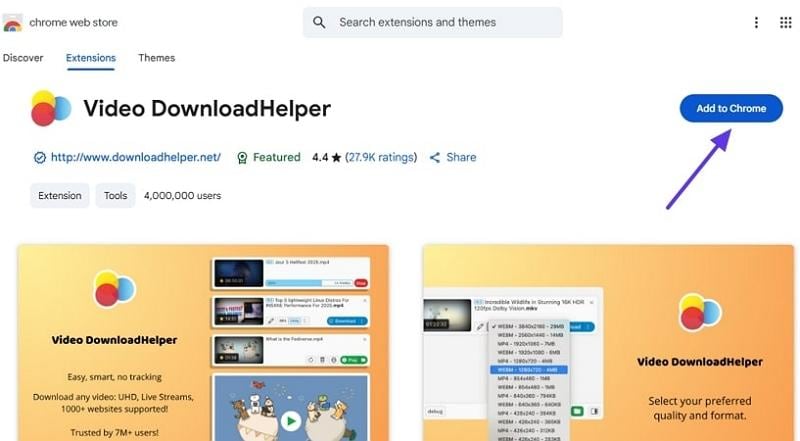
Step 1: Access the Chrome store and download the Video Download Helper extension by clicking the “Add to Chrome” Button.
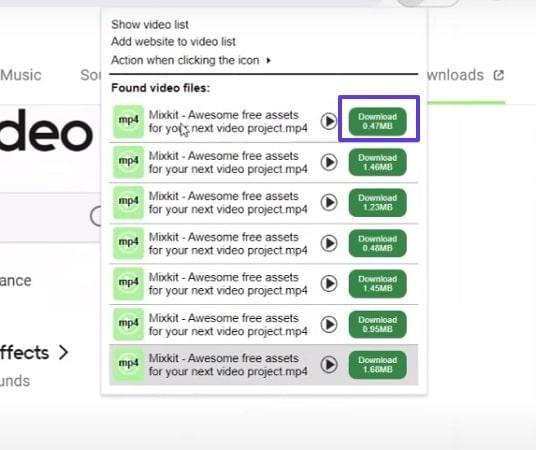
Step 2: When you open the desired site, click the extension to see a list of available videos. Click the “Download” button to download it to the device.
2. Doodstream Downloader (Chrome Web Store)
This Doodstream video downloader extension provides an intuitive workflow by offering a single download button. This tool ensures efficient download speeds while maintaining video quality regardless of video size. Furthermore, it is preferred by users as it does not track their browsing or collect personal data.
Detailed Stepwise Guide To Use Doodstream Downloader
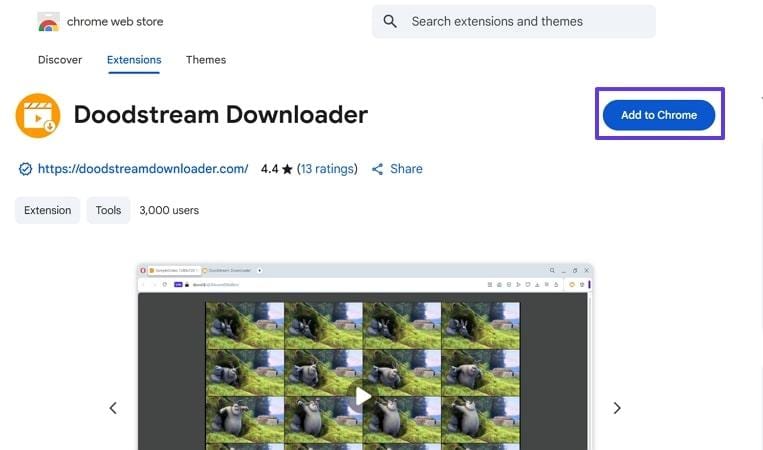
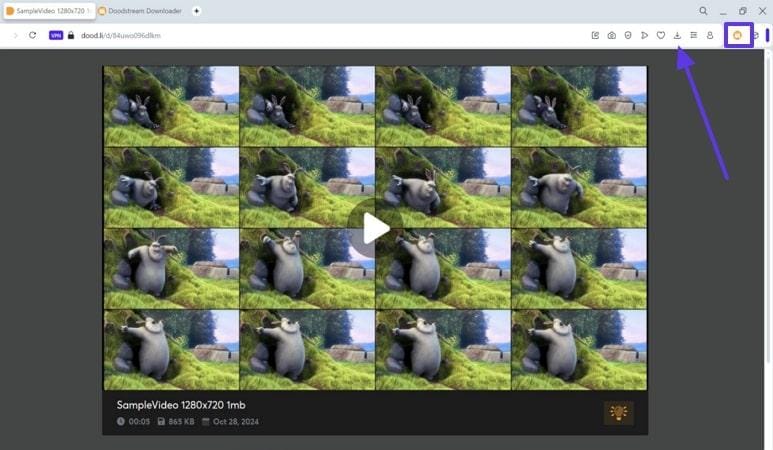
Step 1. From the Chrome webstore, search for “Doodstream Downloader” and hit the “Add to Chrome” button to download it.
Step 2. Now, when you open the Doodstream website, select the desired video and click the “Download” icon to save it to the device's folder.
Method 3: Doodstream Downloader Online Free Tools
Besides Chrome extensions, you can also access online web tools from anywhere easily. It is considered one of the quickest ways, so have a look at the following reliable Doodstream downloader online:
1. YT1Save
Being an online tool, it lets you download numerous Doodstream videos without any limit. Users paste their video links and choose the desired quality. Moreover, it provides multi-format support, including MP4, MP3, 3GP, WEBM, M4A, and more.
Stepwise Guide To Download Doodstream Online Free with YT1Save
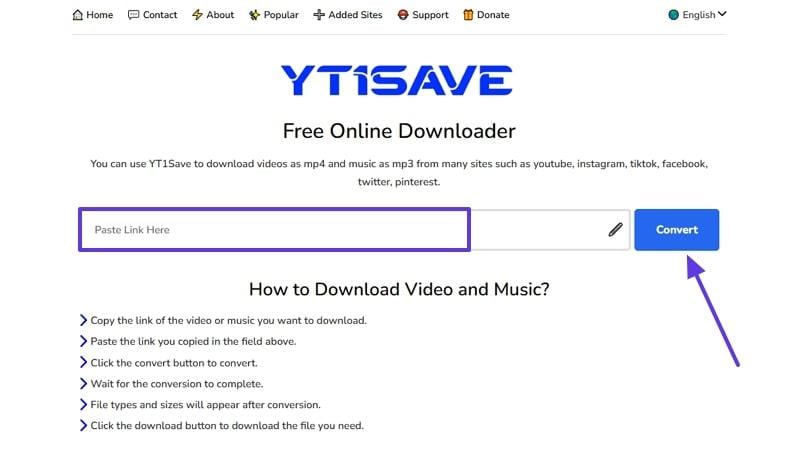
Step 1. Initiate by copying the Doodstream video link, then go to the YTSave website. Here, paste the link in the “Paste Link Here” bar and click the “Convert” button.
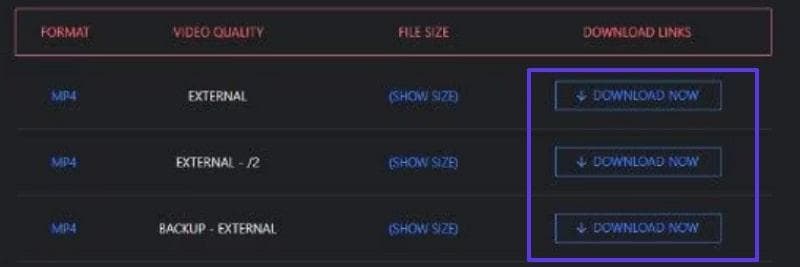
Step 2. Here, you can find links to videos of varying quality; click the “Download” button to download Doodstream videos.
2. Pastedownload
Pastedownload web-based tool is capable of working with all the Doodstream mirror websites. This Doodstream video downloader downloads the videos with their original quality to maintain their overall clarity. Furthermore, it automatically detects its mirror domains, making it easier for you.
Stepwise Guide to Use Pastedownload for Doodstream Video Download Online
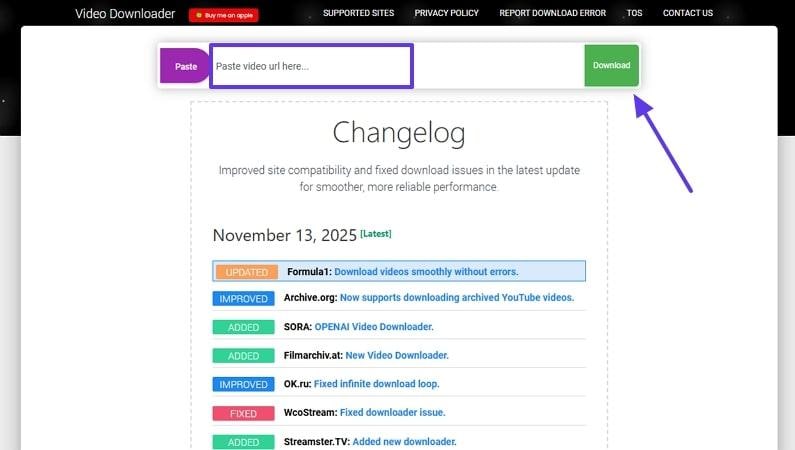
After copying the Doodstream video link, access the “Pastedownload” website. Here, enter the URL in the tab and click the “Download” button to render on the device.

Best Doodstream Downloader
Method 4: Mobile Apps for Downloading Doodstream Videos
Now, if you are the one who doesn't have access to a PC, then using a mobile app is a perfect solution. So, let's explore this section to know how to download Doodstream videos with the mobile app:
Doodstream Video Downloader (Android)
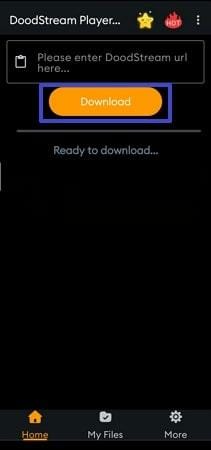
This tool lets you download unlimited Doodstream videos with a single click. Users can even select the desired outcome file size for the downloaded videos. Furthermore, this app dont require any login or personal info, which makes it secure.
Detailed Stepwise Guide To Use Doodstream Video Downloader for Android
Instruction: Open the mobile app, paste your desired video link, and tap the “Download” button. Afterwards, choose the desired quality and save it directly to the device.
Important Tip: When downloading any mobile app, make sure you get it from the official app stores. Moreover, to achieve complete accuracy, ensure you choose the app with the highest rating and positive feedback.
Method 5: Browser Developer Tools to Download Video from Doodstream (Advanced Method)
If you’re a tech-savvy user looking for a direct way to download Doodstream videos, then you can opt for browser developer tools. Within this method, you simply open your browser-based tools by clicking the F12 key. However, remember that this method requires technical knowledge and can not be used by beginners.
Expert Guide To Using Browser Developer Tools to Save from Doodstream
Step 1. Access your required video across Doodstream and start playing it.
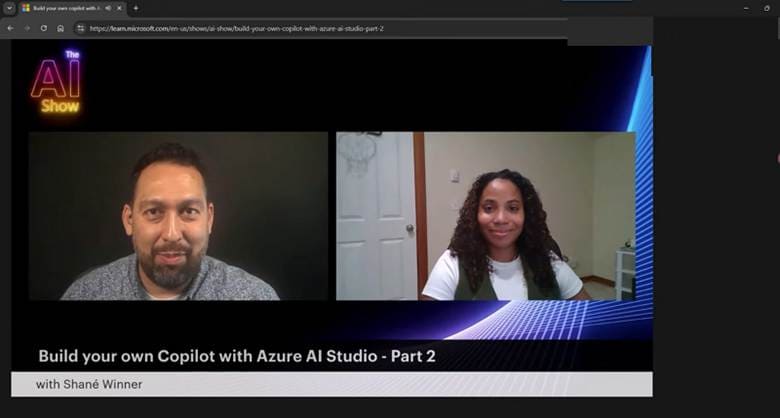
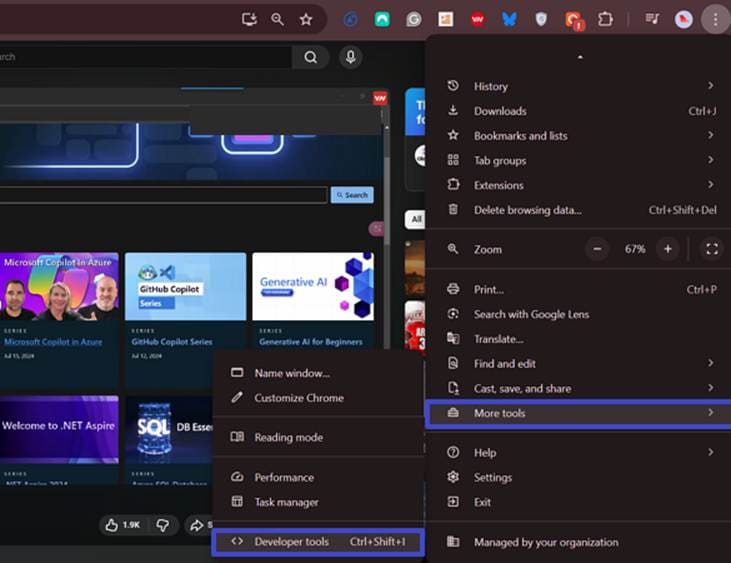
Step 2. While the video is playing, click the “3 Dots” icon, select “More Tools,” and hit the “Developer Tools” option.
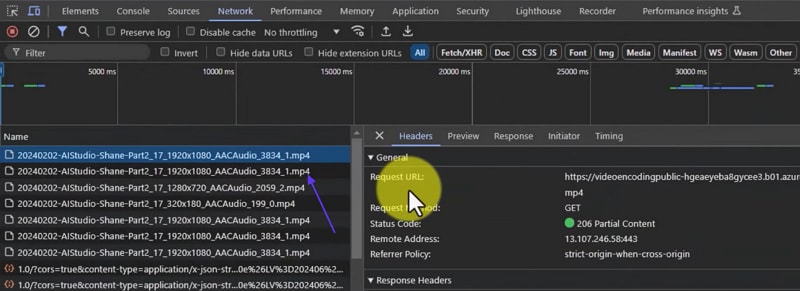
Step 3. As another window pops up within the browser, navigate into the “Network” tab and choose the “Filter” icon to monitor the links appearing on the window.
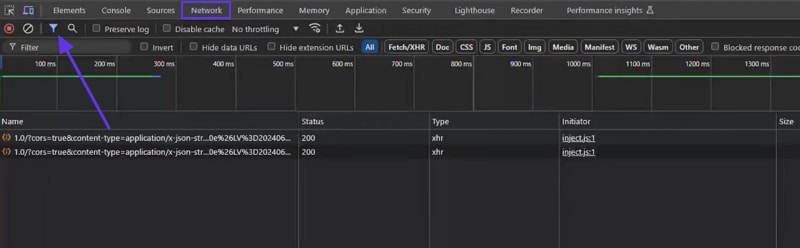
Step 4. If nothing appears, let the video play and some links will start showing up across the window automatically. Review the links and try to figure out the ones ending with “.mp4” format. It is quite possible that the video and audio files are available for separate downloads, which can be merged later by any appropriate tool. Right-click on any link to access and download it manually across your computer.
When to Use This Method
After knowing about this Doodstream downloader online free method, let's explore its usage scenarios:
- Other Methods Fail: Sometimes, online tools are unable to locate a file, so the browser developer tools are used to find and download it manually.
- Highest-Quality Source File: Unlike other tools that limit format quality, you can use these tools to download the highest-quality videos.
- Direct Access to Video URLs: Developer Tools allow you to extract the exact video source URL for use in command-line tools.
Method 6: Download Dood Videos Directly with the Premium Version
Users can also save Doodstream videos directly in the app by upgrading to its premium version. With this version, you can enjoy streaming your videos smoothly without ads. Furthermore, the videos uploaded by creators will not expire due to inactivity. However, most people prefer using a third-party downloader rather than buying its premium account.
Detailed Stepwise Guide To Download Video with Premium Doodstream
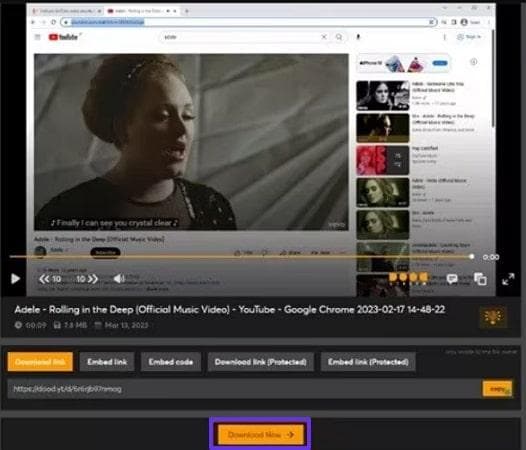
Step 1. After purchasing the Doodstream premium package, open the Doodstream platform. Open the video, then click the “Download Now” button below it.
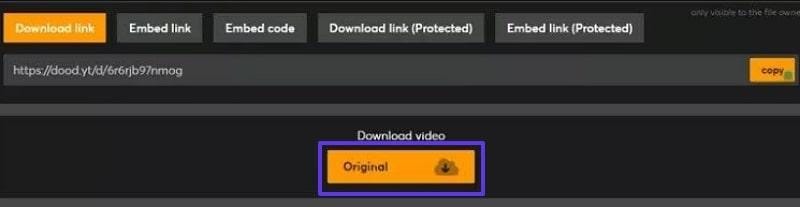
Step 2. Here, click the Original button to save the video to the device folder instantly. Once the download finishes, ensure to change the file name as the video names automatically expire after 8 hours.
Part 3. Is Downloading from Doodstream Safe and Legal?
Now that you know how to download Doodstream videos, let's discuss whether it's truly safe and legal to avoid copyright cases:
- Content Rights: Downloading from Doodstream is only legal if you have obtained its permission or the content is public.
- Platform Compliance: Doodstream claims to comply with DMCA and global copyright directives, so users have to follow its terms and services.
- Reputable Tools and Caution: Always use reputable software to download Doodstream videos, as some expose your devices to malware.
- Legality Varies: Local laws vary from country to country, as it is banned in India, so ensure you check your regional terms and services.
- Respect Intellectual Property: The safest approach is to download only your own original content or use other users’ content with their permission.
Conclusion
In summary, people can now easily download their desired Doodstream videos using Doodstream downloaders. In this article, we have provided several download methods to make it easier for you. Among these methods, we recommend UniConverter, which offers an efficient downloader and other features.

