


Want to save a TKtube video but unsure about advertising, free tools, or mobile compatibility?
TKtube download methods generally fall into browser-based tools, mobile apps, and desktop software. A browser tool may suit one eligible link, while a desktop workflow can make task management, conversion, and enhancement easier when those additional functions are needed.
Quick recommendation: choose a TKtube download method by considering convenience, source compatibility, security, and what you need to do with the file afterward rather than assuming one tool works for every video.
- For an occasional browser task: check Offliberty’s current source support
- For a phone-based workflow: check Clipbox+ availability and compatibility
- For desktop tasks and subsequent conversion or enhancement: consider UniConverter
- For multiple files: check the current capabilities of 6Buses before relying on batch support
Online tools, phone apps, and desktop applications offer different workflows. Compare supported URLs, advertising, available quality, and follow-up conversion or enhancement. This guide also covers permissions, failed downloads, playback problems, and improving a supported local file’s appearance.
This article explains technical options for authorized content and does not encourage downloading copyright-infringing material. Using TKtube and saving its videos requires compliance with applicable law, the rights holder’s permissions, and the platform’s terms.
Is TKtube Available in 2026?
TKtube may be reachable in some environments, but page loading and playback can differ by region, device, browser, and connection. This guide does not establish universal current availability.
A particular video may be removed, fail to play, or be unsupported by a downloader. Distinguish between reaching the website, playing a video, and saving an authorized copy.
| Item | Status | What to check |
|---|---|---|
| Website access | Depends on your environment | Browser, connection, and regional availability |
| Video playback | Varies by video | Deleted content and loading errors |
| Video saving | Depends on tool and URL support | URL recognition, available quality, and output options |
| Saving on a phone | May vary by app and page | Current app support and misleading advertisements |
Before choosing a tool, check that the individual video page opens and that you have permission to save it. Then use a method documented as supporting that source.
A desktop media toolkit: supported video, audio, and image conversion, URL downloading, editing, recording, and compression. Feature availability varies by version and plan.


Part 1. What Is TKtube? Key Features and Background
If you have not used TKtube before, start with the nature of the platform and the conditions that matter for viewing or saving its videos.
TKtube: An Adult Video-Sharing Platform
TKtube, also written as TK Tube or TKtube.com, is an adult video-sharing website. Check the source and rights status of each video rather than assuming that every upload is authorized.
The source article describes three broad categories of uploads; these descriptions are not proof of any particular video’s origin or rights.
Videos described as originating from FC2
Original privately produced uploads
Commercial material that may have been uploaded without permission
TKtube-related searches may use the spellings TKtube, TK Tube, or TKtube.com. The source article emphasizes Japanese-language content, but its claims about the relative size of different national catalogs have not been independently verified here.
TKtube Access and Account Requirements
Some videos may be viewable without registration. Access requirements and the availability of individual uploads can change, so check the current page before relying on an account-free workflow.
Resolution varies by upload. An HD or 1080p label on one video does not establish a minimum quality for the entire site or guarantee smooth playback on your connection.
No measured comparison of TKtube’s catalog size or page speed is available in this guide. Compare the actual videos and playback behavior relevant to your task.
If an authorized direct download is not provided, a compatible tool such as Uniconverter may be an option for a supported URL; neither compatibility nor download permission should be assumed.
Comparison of TKtube and Related Platforms
| Service | Free access | Account requirements | Japanese-language content | Download options | Catalog size |
|---|---|---|---|---|---|
|
TKtube (TK Tube) |
Check current free-access conditions | May not be required for some pages | Available content varies |
Check the individual video A compatible external tool may be needed for authorized saving |
Not independently verified |
| Pornhub | Some free content may be available | Some features may require an account | Varies by catalog | Check current plan and video conditions | Not independently verified |
| xVideos | Check current free-access conditions | May not be required for some pages | Varies by catalog | Check the individual video | Not independently verified |
|
FC2 Video Adult section |
Some content may require payment | An account may be required | Available content varies | Check the individual video | Not established here |
These platforms may contain adult content. Follow the applicable minimum age and access requirements.
Do not use adult-content services if you are below their required minimum age.
How Does TKtube Differ from FC2 Video?
TKtube may lead you to compare it with FC2 Video. Both can include adult material, but account requirements, pricing, content ownership, and permitted saving options differ by service and video.
| Comparison point | TKtube | FC2 Video |
|---|---|---|
| Access | Some pages may be viewable without registration | An account or login may be required |
| Pricing | Some videos may be free to view | Free and paid content may coexist |
| Content type | User uploads and material with varying origins | Videos supplied by uploaders or sellers |
| Official saving options | Check the individual page and platform terms | Depends on the video and service conditions |
| Important checks | Verify rights and avoid deceptive advertisements | Check purchase terms and permitted use |
Do not save or redistribute paid or rights-unclear material without authorization. Before viewing or saving, identify the provider and review the relevant service conditions.
Part 2. Risks and Practical Precautions Before Using TKtube
Consider three areas before using a video-sharing site: content rights, device security, and personal information.
Copyright and authorization risks
Malicious advertisements and unwanted software
Privacy risks while browsing or installing tools. Appropriate settings can reduce exposure, but no combination of tools guarantees complete safety.
The following sections explain these issues and five practical checks to make before downloading.
2.1 Copyright and Upload Permissions
User-uploaded platforms can contain commercial material shared without the rights holder’s permission. A video’s availability is not proof that viewing, copying, or redistribution is authorized.
Copyright rules differ by country. The original article’s references to specific Japanese statutory provisions are not carried over as legal conclusions for a global English audience.
Personal-use exceptions, where they exist, have conditions. Do not assume that labeling a download personal makes it lawful.
Knowingly saving unauthorized material can create legal risk. Check permission and applicable law before downloading, and do not bypass access controls.
Copyright and Permission Checklist
| Action | Permission question | Risk consideration |
|---|---|---|
| Streaming in a browser | Check the source, terms, and applicable law | Depends on the material and jurisdiction |
| Knowingly downloading infringing material | Do not proceed without authorization | Potential copyright liability |
| Viewing or saving privately produced content | Confirm the creator’s permission and consent | Depends on the material and jurisdiction |
| Distributing a saved file to others | Separate distribution rights may be required | Additional copyright and privacy risks |
For a specific legal question, consult a qualified adviser in the relevant jurisdiction. This table is a permissions checklist, not a country-specific legal ruling.
2.2 Advertising Risks and Five Practical Precautions
Video pages may display advertising before or during playback. Some advertising networks or redirects can expose users to malicious or deceptive pages. A misleading click may lead to a fake installer or phishing prompt. The following precautions reduce exposure but do not make any website risk-free.
Precaution 1: Keep Security Protection Active
Use your device’s maintained security protection and check its current status.
Real-time protection can help identify threats; do not dismiss alerts or disable it to force a download.
Precaution 2: Review Browser Advertising Controls
Use a reputable, supported content blocker if appropriate for your browser and region.
Check its current official listing and permissions; it cannot guarantee that every malicious advertisement will be blocked.
Precaution 3: Check the Address Before Opening a Page
Use a known address or a trusted bookmark to reduce exposure to lookalike sites; a bookmark does not establish a site’s safety.
Precaution 4: Consider an Authorized Local Copy for Later Viewing
Desktop option: Wondershare Uniconverter
Local playback can avoid repeatedly loading the original website, but the downloading process and saved file still need security checks.
Check current source support rather than assuming that a broad website-count claim includes every TKtube URL.
Precaution 5: Scan Unfamiliar Downloaded Files
Check the file type and scan unfamiliar files before opening them; a scan reduces risk without guaranteeing safety.
 Generic English UniConverter interface; not a tested download from this article’s platform.
 Review privacy, permissions, and file safety
2.3 Online Viewing and Offline Playback: Different Risks
An authorized offline copy may reduce repeated visits to a website and its advertising. That changes the exposure during later playback, but does not establish that obtaining or opening the file is safer overall.
Online viewing may load page scripts and advertisements each time. Their behavior depends on the website and your browser’s controls.
By comparison, a local video can play without reopening the source page. Downloader installation, original access, local-player behavior, and file safety remain separate considerations.
Online Viewing vs. Authorized Offline Playback
| Comparison point | Online viewing in a browser | Offline playback of a saved file |
|---|---|---|
| Website advertisements | May appear during browsing or playback | The original page need not be reopened |
| Malware exposure | Depends on advertisements, redirects, browser security, and files opened | Depends on the downloader, file, and local player |
| Data usage | Streaming usually uses data each session | The initial download uses data; later local playback may not |
| Playback quality | Source quality and connection both matter | The saved file’s quality and device compatibility matter |
| Connection requirements | Usually requires an active connection | A supported local file can play offline |
| Privacy and records | Browser, network, and service records may exist | Downloaded files, application history, and device records may still exist |
⚠️Download only material you are authorized to save. Personal-use intent does not override copyright, privacy, or platform conditions.
2.4 What If TKtube Will Not Open or Loads Slowly?
TKtube may fail to load or play a video because of connection conditions, regional availability, browser behavior, or a site problem.
Before troubleshooting a downloader, confirm that the individual page opens and that the video plays through an authorized viewing method.
If the browser reports that the page or server cannot be reached, review why TKtube is not opening and what to check alongside the checks below.
| Symptom | Possible cause | What to check |
|---|---|---|
| Page does not open | Changed address, regional availability, or a connection issue | Compare another supported browser or permitted connection |
| Video does not play | Removed content, player error, or a browser interaction | Check whether another authorized video behaves the same way |
| Slow loading | Server load, connection speed, or cached site data | Wait and retry; review affected-site cache if needed |
| Many advertisements or redirects | Page design or advertising behavior | Avoid suspicious controls and unnecessary notification permissions |
A downloader cannot necessarily resolve a page that is unavailable. Check the viewing environment first, then review source compatibility before choosing a different authorized saving method.
Part 3. Four TKtube Downloader Options Compared
The following comparison retains the four tools discussed in the source article. Current compatibility with an individual TKtube page must be checked rather than assumed.
Four TKtube Download Methods: Comparison
| Comparison point | UniConverter | Offliberty | Clipbox+ | 6Buses |
|---|---|---|---|---|
| Price | Paid features with a trial; check current limits | Check current free-use conditions | Check current free-use conditions | Paid features with a trial; check current limits |
| Operating system | Win / Mac | A supported browser; device compatibility varies | iOS / Android | Win / Mac |
| Supported sources | Check current official compatibility information | Not independently verified | Varies by release | Not independently verified |
| Maximum download resolution | 8K | HD | Depends on the source and current tool | 4K |
| Advertising and security | Official-source installation and security checks still matter | Advertising or redirects may be present | Review current app permissions and behavior | Review current app permissions and behavior |
| Installation | Desktop installation required | No installation for a browser service | Mobile app installation required | Desktop installation required |
| Editing and conversion | Available in supported desktop tools | Check the individual video | Check the individual video | Varies by catalog |
| AI video enhancement | Check supported models, resolutions, and plan limits | Check the individual video | Check the individual video | Check the individual video |
▼ Which TKtube Download Method Fits Your Task?
TKtube downloading depends on whether you want an occasional browser task, a phone-based workflow, or desktop file management and follow-up processing.
| Goal | Method to consider | Reason |
|---|---|---|
| Try one authorized link | A compatible browser tool such as Offliberty | No desktop installation when the web service supports the source |
| Work entirely on a phone | A compatible app such as Clipbox+ | Mobile file management where the app is available |
| Manage downloads on a computer | UniConverter | Keep supported conversion and compression in the desktop workflow |
| Organize several saved videos | Desktop software | Easier handoff to local folders and format conversion |
| Improve a low-quality local file’s appearance | UniConverter Video Enhancer | Continue with supported local enhancement after saving |
An occasional browser task may not require a full desktop application. If you repeatedly manage files or need conversion, compression, or enhancement, a desktop toolkit may simplify the handoff. Source support and permissions remain essential whichever route you choose.
3.1 Wondershare UniConverter: Desktop Downloading and Local Media Processing
|
UniConverter is a desktop media application with a Downloader for supported online sources. This guide does not independently verify every TKtube URL or a universal supported-site count. Alongside downloading, it offers supported local video enhancement, video and audio conversion, compression, editing, DVD burning, depending on version and platform. Check the feature you need before choosing a plan. A desktop workflow can reduce repeated interaction with a website’s advertisements after a permitted file is saved. It does not eliminate malware risk or guarantee that a source video is supported. |
|
| Item | Details |
|---|---|
| Operating system | Windows and macOS: check current system requirements |
| Supported sources | Source compatibility varies by service and individual URL |
| Maximum download resolution | Available source quality determines download options |
| AI video enhancement | Check current enhancement models and output limits |
| Video editing | Supported trimming, cropping, subtitle, and effect tools vary by version |
| Format conversion | Review supported input and output formats for your task |
| DVD burning | Supported where the current version offers it |
| Advertising and security | Depends on source and security checks |
| Price | A trial may be available; check current paid-feature and usage conditions |
Who Should Consider UniConverter?
- • Readers who regularly manage authorized video files
- • Readers who prefer official desktop software and want to review its security settings
- • Readers who need to enhance or edit supported local files afterward
- • Readers who organize videos on a computer
- • Readers who use several supported video sources
3.2 Offliberty: A Browser-Based Option
|
Offliberty is described in the source as a simple browser-based service for supported online media. Its URL-input workflow may suit readers who want to download an authorized video without installing a desktop application, if the service supports that source. Do not assume reliable TKtube support from the tool’s name alone. Check the result returned for an individual permitted video; a simple occasional task may be a better fit than relying on it for recurring work. |
|

| Item | Details |
|---|---|
| Operating system | Browser-based access; verify compatibility on your particular device |
| Supported sources | Current source count and TKtube support are not independently verified |
| Maximum resolution | Depends on the available source and returned options |
| Installation | No installation for the web workflow |
| Website advertisements | Review current advertisements and redirects |
| Price | Check current free-use conditions |
Who Should Consider Offliberty?
- • Readers checking one authorized video URL
- • Readers who prefer to avoid installing another app
- • Readers comparing current free options for a small task
- • Readers who want a straightforward browser workflow
3.3 Clipbox+: A Mobile File-App Option
|
Clipbox+ is a mobile app discussed in the source for downloading and managing supported files. Check its current official availability in your region and on your device. The source describes video saving and locked folders, but TKtube compatibility and privacy controls must be confirmed in the installed version. A folder lock is not a guarantee of encryption or complete privacy. Source compatibility can change. That is a reason to check the current listing and page support, rather than rushing to download content before a hypothetical future change. |
|

| Item | Details |
|---|---|
| Operating system | Check current iOS and Android requirements in official listings |
| Supported sources | Verify each source and individual URL; do not infer universal adult-site support |
| Maximum resolution | Depends on the source and current tool |
| Locked folders | Check current password and access-control features |
| Installation | Install only from an appropriate official source |
| Advertisements | Review current app behavior and purchase options |
| Price | Check current free and paid feature terms |
| Download count | No independently verified current total is available here |
Who Should Consider Clipbox+?
- • Readers who need an authorized phone-based workflow
- • Readers who want to manage access to saved files
- • Readers who do not use a desktop computer
- • Readers who want a visual mobile interface
3.4 6Buses: A Desktop Option to Investigate
|
The source article describes 6Buses as a Windows and Mac downloader. Its current official availability, supported-site count, TKtube compatibility, and claimed 4K capability are not independently established here; verify them before installing or paying. It also describes batch and multi-threaded tasks. Check whether the current application actually offers these functions for your particular source. If you mainly need download management rather than editing or enhancement, a dedicated downloader may fit. Compare the official current feature list with an all-in-one desktop toolkit rather than relying on historical claims. |
|

| Item | Details |
|---|---|
| Operating system | Check current official Windows and macOS requirements |
| Supported sources | Current supported-source count and individual site support need verification |
| Maximum resolution | 4K(2160p) |
| Batch downloading | Supported where the current version offers it |
| Download speed | Check whether the current release offers parallel tasks |
| Compression and recording | Check current feature availability |
| AI enhancement | Not independently verified |
| Advertising and malware exposure | A desktop app still requires security and permission checks |
| Price | Paid features with a trial; check current limits |
Who Should Consider Investigating 6Buses?
- • Readers comparing several authorized video sources
- • Readers checking whether a high-quality source option is available
- • Readers who need managed multi-file tasks
- • Readers who want desktop organization without extensive editing tools
3.5 Choosing a TKtube Downloader by Task
Choose according to your device, source compatibility, required functions, and budget. None of the four names establishes universal compatibility or complete security.
Suggested task fit
- UniConverter: supported desktop downloads and follow-up local processing
- Offliberty: an occasional supported browser task
- Clipbox+: a supported mobile file workflow
- 6Buses: investigate current desktop batch capabilities before relying on them
| Your situation | Option to assess |
|---|---|
| Desktop downloads and local file management | UniConverter |
| A phone-only workflow | Clipbox+ |
| Try one eligible link without paying for a full toolkit | Offliberty |
| Manage several supported URLs | 6Buses |
| Improve a low-quality local file’s appearance | UniConverter Video Enhancer |
| Reduce exposure through careful source and security checks; zero risk cannot be promised | UniConverter |
| Create a DVD from files you are authorized to use | UniConverter |
Part 4. How to Use UniConverter for a Supported TKtube URL
For one occasional eligible video, a browser tool or mobile app may be sufficient. If you want to limit repeated website visits, convert a saved file to MP4, or improve a local video’s appearance, a desktop application may provide a simpler handoff between tasks.
For this use case, UniConverter combines supported URL tasks with local conversion, compression, editing, and enhancement. It is most relevant to readers who need to process the file after saving it, rather than those who only need one browser-based action.
The following section explains UniConverter’s authorized, supported-URL download workflow. Individual TKtube compatibility must be checked in the application.
4.1 Downloading with UniConverter: Two Main Stages
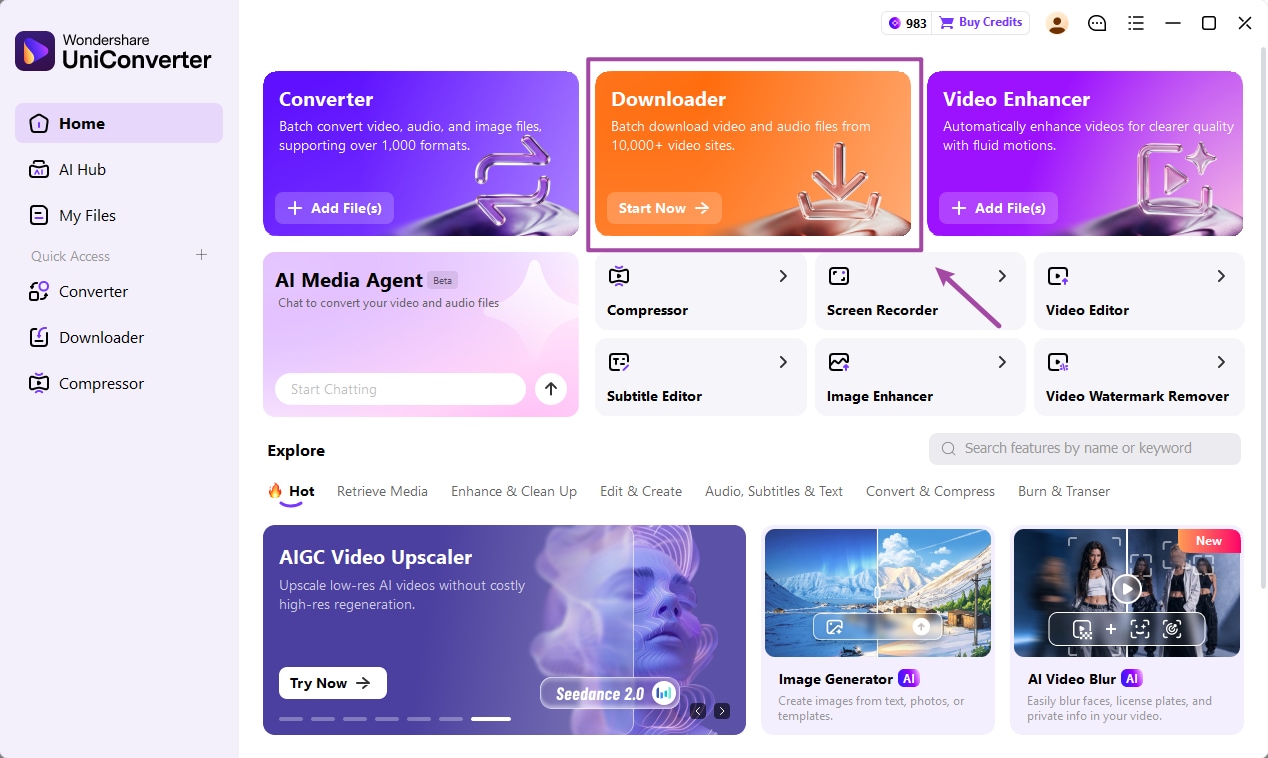
Step 1. Open Downloader from Home or the navigation menu
Generic English UniConverter interface; not a tested download from this article’s platform.Step 2. Copy the complete video-page URL, paste it into Downloader, select Video, check the save location, and start the supported task
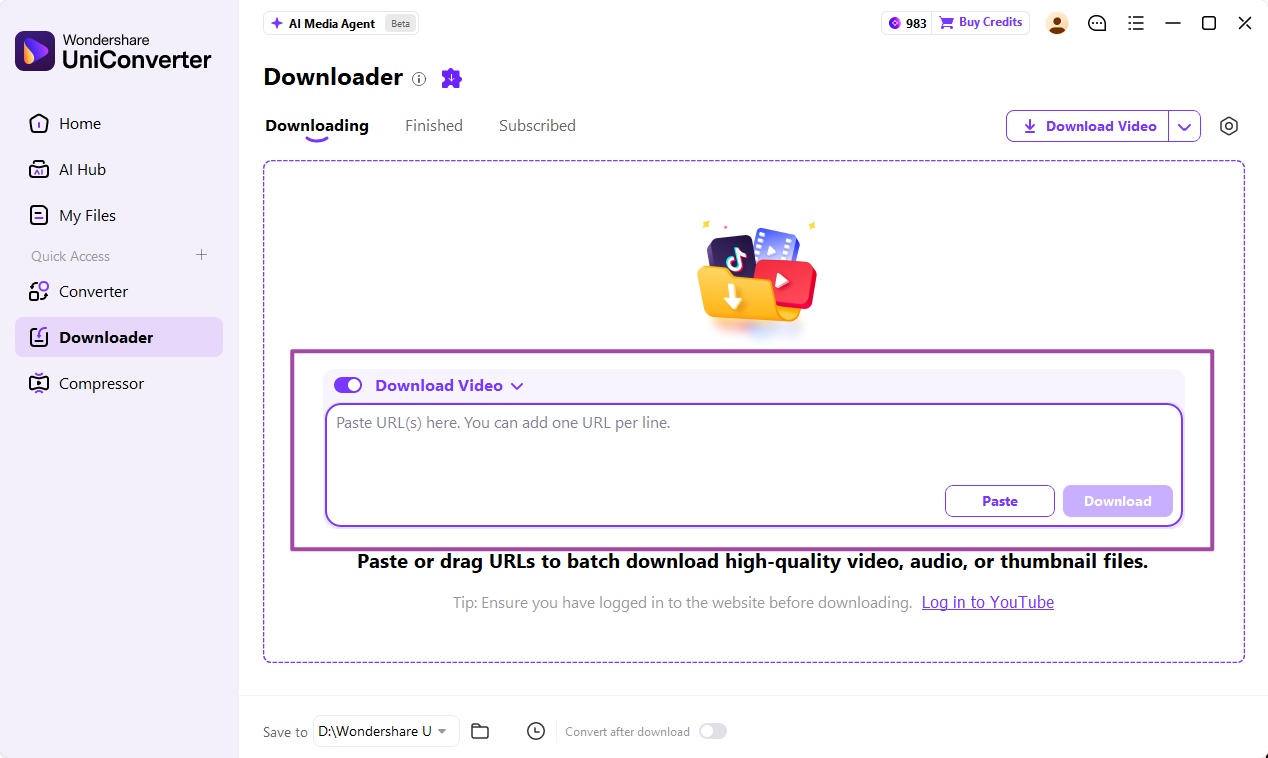 Generic English UniConverter interface; not a tested download from this article’s platform.
Wait for the task to complete, then open Finished and play the saved file. Pasting a URL alone does not establish a successful download.
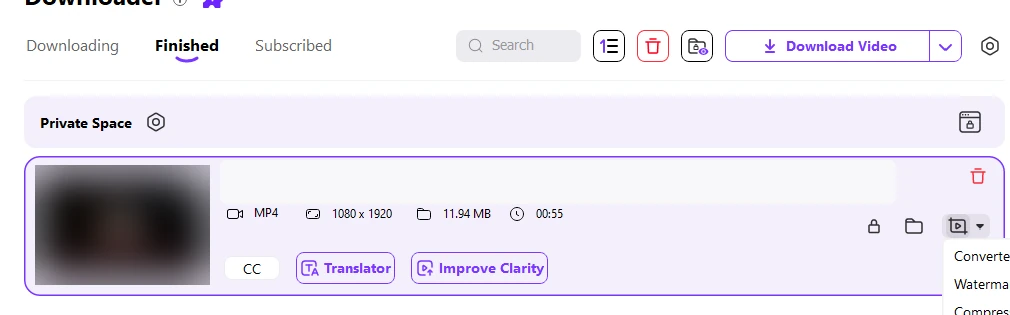 Generic English UniConverter interface; not a tested download from this article’s platform.
If the saved file will not play, distinguish between incomplete downloading, an unsupported player, and actual file damage. Use the troubleshooting section below before assuming that repair is needed.
4.2 Improving a Low-Quality Local Video with Video Enhancer
Source quality varies by upload. A low-resolution, noisy, or heavily compressed video may remain difficult to watch even after a successful download. This is a property of the source, not necessarily a downloader fault.
For an authorized local file, an enhancement tool may improve perceived clarity. It cannot recover the exact original detail that was never present, and results depend on the defect and settings.
Use the following general workflow, checking the models and controls available in your installed version.
Step 1. Open Video Enhancer in UniConverter
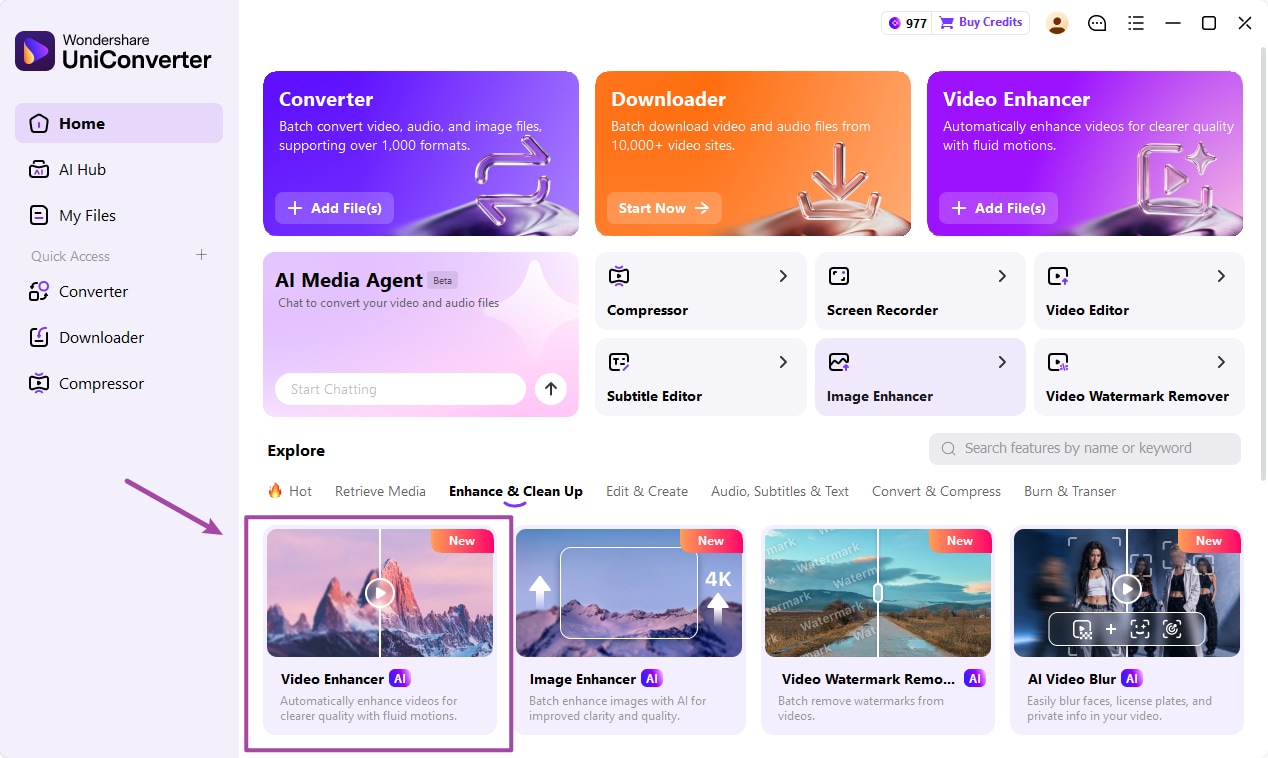 Generic English UniConverter interface; not a tested download from this article’s platform.
Step 2. Import the supported local video by dragging it into the workspace or using the available import control
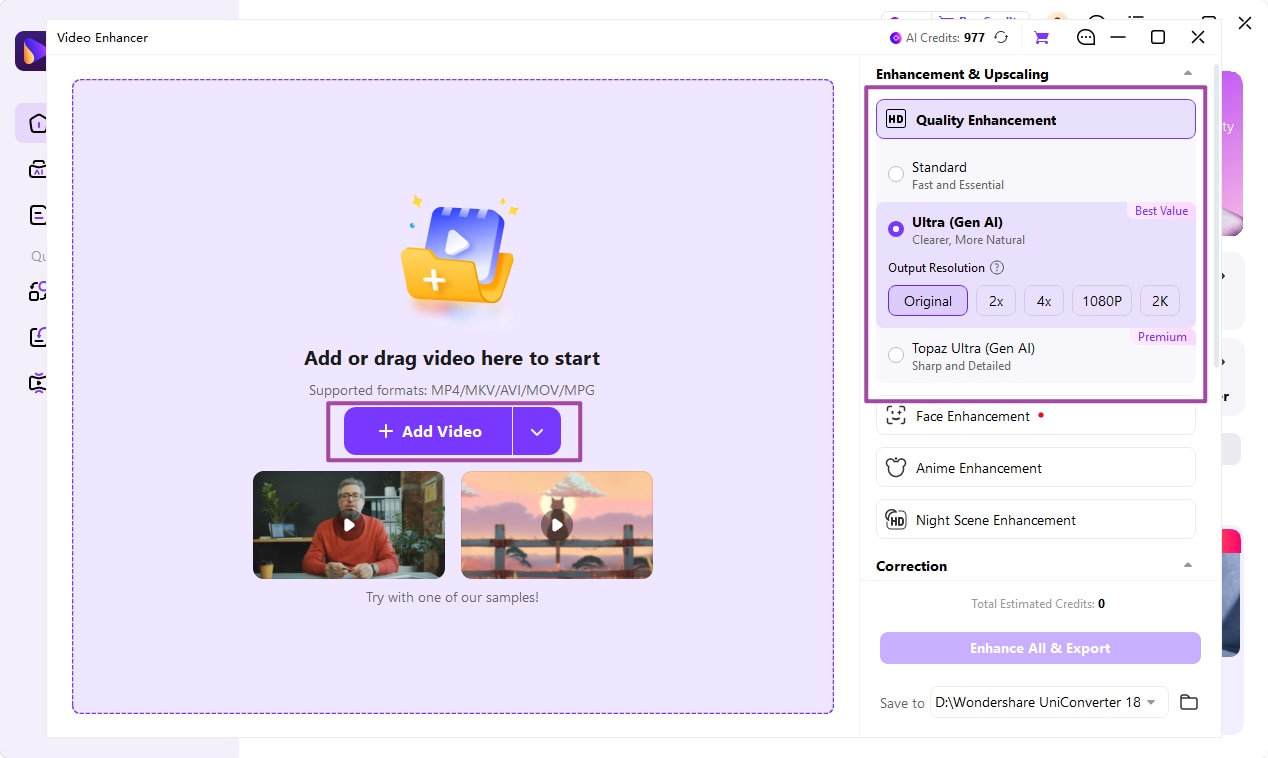 Generic English UniConverter interface; not a tested download from this article’s platform.
Step 3. Choose the model or settings that match the problem, preview the result, and export only after checking it
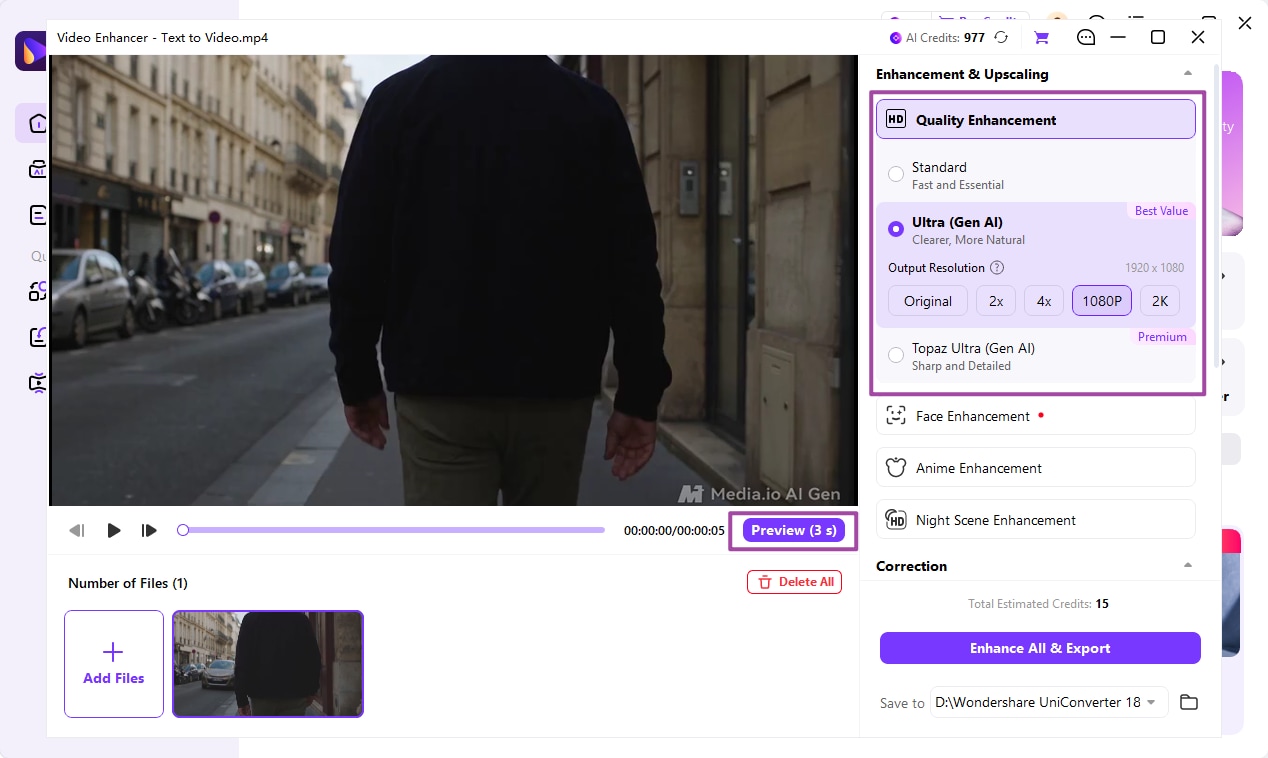 Generic English UniConverter interface; not a tested download from this article’s platform.
The source article describes the following categories. These are task descriptions; exact current model names and output limits must be confirmed in the installed English UI.
|
Video enhancement |
Improve perceived clarity where the source and selected model allow |
|
Denoising |
Reduce visible noise while checking for loss of texture |
|
Video upscaling |
Increase output dimensions where supported; a larger frame does not guarantee restored detail |
|
Frame interpolation |
Generate intermediate frames where supported; review motion artifacts rather than assuming a fixed universal FPS limit |
Use a preview to compare faces, fine texture, edges, and motion before exporting the full video. Keep the original file so you can compare results.
Related Guides
Related desktop video download workflow
Related video troubleshooting workflow
Related video-file management workflow
Part 5. TKtube Download Not Working: Desktop, Chrome, and iPhone Checks
A failed task can come from the source page, the copied address, application compatibility, device security, or the completed file’s playback requirements.
Start with these five areas: incomplete URL, unavailable server or video, outdated downloader, a security alert, or a file that is incomplete or unsupported by the player.
Troubleshoot the cause rather than promising a fixed repair time. Some failures cannot be resolved by the user because the source is unavailable or unsupported.
Common Causes to Check First
If a TKtube download fails, separate a source-page issue from a tool issue and a device or connection issue before changing settings.
| Cause | Typical symptom | What to do |
|---|---|---|
| Source-page problem | Video removed or not playable | Compare another video you are authorized to access |
| Incomplete URL | Analysis error or unrecognized address | Copy the complete individual page address again |
| Website change | A previously supported link stops working | Check official updates and current compatibility |
| Advertisements or redirects | Unrelated pages open or controls are obscured | Avoid deceptive controls and compare a supported desktop workflow |
| Security warning | Transfer stops or a file is quarantined | Read the alert and investigate before allowing anything |
1. Check an Incorrect or Incomplete URL
One possible cause of a failed task is an incomplete video-page URL. A truncated address may not identify the video correctly. Check the address before assuming that the application is at fault.
URL Checklist
Step 1. Open the individual TKtube video page in your browser
Step 2. Select the complete address in the address bar
Step 3. Use Ctrl+A and Ctrl+C on Windows, or Command+A and Command+C on Mac, to select and copy it
Step 4. Paste it into a text editor and compare it with the complete address of the page you opened
Example structure in the source article: https://tktube.com/videos/[video-ID]/ — do not treat it as a guaranteed current pattern for every page
Avoid a shortened or truncated address such as tktube.com/...; preserve the complete actual URL and protocol
Step 5. Paste the checked address into Downloader and retry only if the video is supported and saving is permitted
2. Check a Temporary Server or Source Failure
If TKtube or the individual video is temporarily unavailable, even a correctly copied address may not start a download. In that case, switching local settings may not help. You may need to wait and try again later, while respecting any source restrictions.
Source-Availability Checklist
Step 1. Check whether the website opens through a permitted connection
Step 2. Check whether the individual video plays normally
→ If playback fails: a source or connection problem is possible; it is not proof of a server outage
→ If playback works: check downloader support and task settings, while noting that playback does not establish download compatibility
Step 3. Wait before trying again if a temporary service problem seems likely
Step 4. If a browser issue persists, review the affected site’s cached data before clearing it
In Chrome, use Settings and the available Privacy and security controls to review site data; labels can vary by version
Step 5. Check the official current UniConverter release and retry a supported URL if appropriate
Traffic, maintenance, source changes, and connection problems can all affect access. Do not infer a particular server location or outage cause from one failed request.
3. Update an Outdated Downloader
A change to a website’s media delivery may stop an older downloader from recognizing a URL. Check official updates for UniConverter or your chosen tool, but do not assume that updating guarantees support for a changed TKtube page.
UniConverter Update Checklist
On Windows
Step 1. Open UniConverter
Step 2. Locate the application menu in your installed version
Step 3. Look for its Help or update-check function, if available
Step 4. Follow the official update prompt when a newer release is offered
Step 5. Restart after installation and retry the supported task
On Mac
Step 1. Open UniConverter
Step 2. Check the UniConverter application menu for an update-check option if your version provides one
Step 3. Follow the official installation instructions when an update is available
Step 4. Restart and retry; menu labels and update behavior can differ by version
4. Review Security and Content-Blocking Alerts
A blocked task may reflect a genuine threat, a network rule, or an application interaction. Read the alert and verify the official installer and requested connection. Do not automatically add broad exclusions or turn off protection to make a download work.
Security-Tool Checks
| Tool | What to review |
|---|---|
| Windows Defender | Review Windows Security’s protection history and the reported file or connection before taking action |
| Norton | Review Norton’s alert and program-control information; allow only a verified, appropriate connection |
| ESET | Review ESET’s alert details and official troubleshooting guidance before changing a rule |
| uBlock Origin | Review uBlock Origin’s current site settings and logs without treating every blocked script as necessary or safe |
5. Diagnose a Downloaded File That Will Not Play
A completed-looking task may still produce an incomplete file, or the player may not support its codec. Test the file and distinguish compatibility from damage before trying repair software.
Playback Troubleshooting
| Cause | Symptom | What to do |
|---|---|---|
| Unsupported player or codec | An error appears or the picture does not display | Try a maintained player that supports the file, such as VLC |
| Unsupported format for the target application | The target device or app does not recognize the file | Convert a complete, supported local file to an appropriate MP4 format in UniConverter |
| Interrupted download | Unexpectedly small or incomplete file | Retry the authorized supported download and check completion |
| File damage | Broken frames, corruption, or interrupted playback | Keep the original and assess a documented repair tool; repair is not guaranteed |
6. A Chrome Extension Cannot Detect TKtube Video
An extension may show no video, omit its download control, or stop working after a browser or source-site change. Check the extension’s current official support rather than assuming that it recognizes every media stream.
Update Chrome and the extension, check that the authorized video page opens, and compare its behavior in another supported browser. Reviewing extension permissions and reloading the page may help isolate a browser issue.
If the site itself is unavailable, investigate source access first. Changing extensions cannot restore a deleted video or overcome a permitted-access restriction.
7. Chrome Will Not Save a TKtube Video
Review the affected site’s cache and cookies, extension behavior, download destination, and browser security alerts. Check available space and whether the intended folder can be written to.
If saving worked previously, a browser, extension, or site change may be involved. Compare another supported browser to determine whether the issue is specific to Chrome.
When the video page itself will not open, diagnose that first. Browser download settings cannot necessarily fix an unavailable source.
8. TKtube Saving Does Not Work on iPhone
An iPhone may not support a desktop browser extension or the same save controls used on a computer. First check whether the authorized video page opens in Safari or Chrome.
If a file was saved but cannot be found, inspect Files and the browser’s configured download location. If the issue is connectivity, compare another permitted connection while respecting network and platform rules.
If TKtube itself is unavailable, check source access before trying additional saving apps. Do not install unknown profiles or disable device protection to force a download.
Part 6. TKtube Download FAQs
Q1. Is Downloading TKtube Videos Legal?
Permission, copyright, the platform’s terms, and local law determine whether a download is allowed. Knowingly saving unauthorized material may create legal risk. Personal-use intent does not automatically make a download lawful.
Q2. Can I Save a TKtube Video on a Phone?
A compatible mobile app or a permitted site download may work for an individual video. Availability and source support can change. For desktop file management and subsequent conversion, a supported PC or Mac workflow may be more convenient.
Q3. Should I Use a Free Tool or Desktop Software?
An occasional compatible browser task may be sufficient for one authorized file. A desktop toolkit can be useful when you need task management and subsequent editing, conversion, or compression. Price alone does not determine security or compatibility.
Q4. Why Is My TKtube Download Failing?
Possible causes include an incomplete URL, removed or restricted content, a site change, unsupported media, an outdated tool, a connection problem, or a security alert. Start with the individual page and copied URL, then check official tool support.
Q5. What Can I Do About Poor Video Quality?
First check whether a better authorized source option exists. Conversion settings may affect compatibility or compression, and enhancement may improve perceived clarity, but neither can reproduce exact detail absent from the source.
Q6. Which TKtube Download Options Are Free?
The source article mentions Offliberty and Clipbox+ as options to investigate. Check their current availability, terms, and actual TKtube support; this guide does not establish that either provides a working free download for every video.
Offliberty’s browser workflow avoids desktop installation, but a source may return no usable result. Check the current service rather than relying on a historical supported-site count.
For Clipbox+, check the official mobile listing, supported sources, and current file-management or folder controls in your region.
For desktop task management, you can also assess UniConverter’s trial. Read current usage and paid-feature conditions before relying on it for your task.
Q7. Has TKtube Shut Down?
Failure to reach it from one environment does not establish a shutdown. A changed address, outage, regional availability, browser issue, or connection problem may produce similar symptoms. This guide does not independently establish the site’s current status.
Q8. What Should I Check If TKtube Will Not Open?
Compare another supported browser and permitted connection, review affected-site data, and retry later if a temporary service issue is possible. A removed video cannot be restored simply by switching download tools.
Q9. What If I Cannot Save a TKtube Video on iPhone?
Check that the authorized page opens in Safari or Chrome. If a file was saved, inspect Files and the browser’s destination. Desktop Chrome extension instructions generally cannot be applied unchanged to iPhone.
Q10. Can I Save TKtube Videos in High Quality?
That depends on the available original video and compatible tool options. Selecting a larger output size does not create missing source detail. If appropriate, process an authorized local file with an enhancement tool and compare its preview.
Q11. What Precautions Should I Take Before Saving?
Avoid unauthorized or illegally uploaded material. Check the source’s permission and terms before saving, and obtain any additional rights needed before sharing, republishing, or selling a file. Also review downloader and file safety.
Q12. Why Does a Chrome Extension No Longer Work?
Chrome updates, extension changes, source-site changes, and page-loading problems can affect detection. Update from official sources, review compatibility, and compare another supported browser to isolate the issue.
Q13. What If Chrome Still Will Not Save the Video?
Check site data, extensions, the download folder, storage, and security alerts. If the site itself is unreachable, investigate the source and connection before changing Chrome’s saving controls.
Conclusion: Choose an Authorized TKtube Download Method
This guide covers TKtube background, rights and security checks, four source-article tool options, a supported desktop workflow, local enhancement, troubleshooting, and common questions.
Before saving, establish that the video is authorized for download and that the platform’s conditions permit your use. Avoid unauthorized uploads and do not assume that a visible video is free to copy.
For an occasional compatible link, a browser tool may be enough. For a phone-only task, assess an officially available mobile app. For desktop file management and subsequent conversion, compression, or enhancement, UniConverter may fit when the relevant source and file are supported.
If TKtube downloading fails, check the complete URL, page playback, source permissions, and official tool support before trying another authorized method.