


Are you struggling to find a free photo editor that balances simplicity with professional-quality results? Many users waste hours testing multiple tools, only to feel limited by features, inconsistent output, or hidden costs.
This article dives deep into PxBee, explaining what it is, who it’s for, and how it compares to popular editors like Fotor. You’ll also discover its strengths, weaknesses, and whether it’s the right fit for your editing needs. Plus, we cover an alternative professional batch image processing tool for users seeking more advanced options. By the end, you’ll have a clear roadmap to choosing the editor that saves time and delivers reliable results.
In this article
Part 1: What is Pxbee?
PxBee is a free AI-powered photo editing tool that offers users a set of image-enhancing features such as background removal, background changing, resolution enhancement, and other editing capabilities.
Ownership & Company
PxBee is owned by Everimaging Ltd., the same company that owns and operates Fotor. This is evident from PxBee’s own site and from Fotor’s legal/licensing pages, where PxBee is listed as one of the “Fotor Signature Services.”
Founding & Relationship with Fotor
Fotor (founded in 2012 by Tony Duan) is a photo-editing and design platform under Everimaging, offering tools for creation, editing, collage, etc.
PxBee appears to be one of several services under the Fotor/Everimaging umbrella. In Fotor’s Terms of Service, PxBee is explicitly mentioned as part of the “Signature Services” belonging to Fotor/Everimaging.
While there’s not much public detail about PxBee being separately “founded” by someone other than Everimaging, the close branding, shared ownership, and legal mentions suggest PxBee is a product line or brand extension of Everimaging / Fotor rather than a fully independent startup. (There is no strong evidence that PxBee has a different founder.)
Additional Background on PxBee
PxBee was launched in 2018 as one of the brands under Everimaging Ltd.
The company running PxBee is Everimaging Ltd. / Chengdu Everimaging Science & Technology Co., Ltd. which is also the company behind Fotor.
Fotor was founded in 2012 by Tony Duan. It has since grown into an image editing / design platform that houses multiple tools / services, including PxBee.
What is Not (Clearly) Known
There's no strong independent source confirming that PxBee has a separate founder from Fotor beyond Everimaging’s ownership. All available documentation treats it as a signature service or product of Everimaging / Fotor.
There's limited public information on the specific individual(s) (if any) behind PxBee's development team beyond the general Everimaging / Fotor engineering / design staff.
Key Features of PxBee
- HD photo converter – Instantly enhance low-resolution images into crisp, high-definition quality for professional use.
- Image extender – Expand and extend photos without losing clarity, making them suitable for banners, posters, or large-scale printing.
- Watermark remover – Effortlessly erase unwanted watermarks or text overlays while preserving the natural look of the image.
- Background remover – Automatically remove or replace backgrounds to create clean product images or professional visuals.
- AI image enhancer – Improve brightness, contrast, and sharpness with AI-powered fine-tuning.
- Batch editing – Process multiple images at once, saving time for marketers and businesses handling bulk visuals.
- Resize and crop tools – Adjust dimensions quickly for social media, e-commerce listings, or web publishing.
- Creative editing options – Add text, stickers, shapes, or titles to personalize images for campaigns or branding.
Part 2: Who Pxbee is For?
Choosing the right photo editor depends on your goals, whether it’s selling products, building a brand, or simply improving personal photos. PxBee caters to a wide range of users with tools that balance professional quality and ease of use:
E-commerce sellers
Perfect for online shop owners who need clean, watermark-free product photos. With background removal and HD photo conversion, sellers can create professional product listings that build trust and boost sales. The image extender makes it easy to adapt visuals for banners or ads, while batch editing saves valuable time for bulk uploads.
Social media managers & marketers
PxBee makes it easy to design eye-catching, correctly sized visuals for Instagram, Facebook, TikTok, and more. Features like image extender and resizing ensure that creatives are optimized for engagement. The watermark remover helps polish branded content, while AI enhancers keep every post looking sharp and on-trend.
Bloggers & content creators
Whether it’s enhancing article images, refining Pinterest pins, or designing YouTube thumbnails, PxBee helps creators produce high-quality visuals that stand out. The AI tools reduce editing time while keeping content professional. With the HD converter, even older or low-quality images can be upgraded, and the text/sticker features add creative flair to blog visuals.
Everyday users
From family portraits to vacation snapshots, anyone can use PxBee to enhance personal photos effortlessly. Its intuitive interface makes professional-level editing accessible without needing advanced design skills. Users can remove distractions like watermarks or backgrounds, and apply filters or resizing to make images social-media ready instantly.
Part 3: Pros and Cons of Pxbee
Every tool has its strengths and drawbacks, and PxBee is no exception. From AI-powered convenience to certain free-plan limitations, understanding both sides helps you decide if it’s the right fit. Let’s explore the pros and cons in detail:
Pros of PxBee.com
Simple and accessible interface
PxBee is built for beginners and professionals alike, with no steep learning curve to worry about. Since it runs in a browser, there’s no need to install software on your device. It supports Windows, Mac, and mobile systems for maximum flexibility. You can even edit instantly without creating an account, making it quick and convenient.
AI-powered editing tools
PxBee’s AI enhances photos with features like HD conversion, watermark removal, and background editing. The tools handle even complex details like hair and transparent edges with impressive accuracy. AI image extender and enhancer add creative options that were once advanced-only. This makes professional-quality edits possible for anyone, regardless of skill.
Fast and efficient results
Tasks like background removal, upscaling, or watermark erasing are completed in seconds. This speed is ideal for e-commerce sellers, marketers, and content creators working on tight schedules. Batch editing support on premium plans helps manage larger workloads easily. The efficiency makes it one of the fastest tools for quick, reliable editing.
Generous free plan
Users can try out PxBee’s main features without spending money, making it ideal for casual or personal projects. Students and hobbyists benefit from having professional-quality edits at no cost. The free plan includes essential AI tools for everyday use. For advanced needs, upgrading unlocks higher resolution and commercial licensing.
Cross-platform compatibility
PxBee works smoothly across desktops, laptops, tablets, and smartphones through its browser-based design. You’re not limited by operating systems, making it adaptable for any workflow. This flexibility is useful for editing on the move, whether at work or travel. It ensures that professional-level editing is always within easy reach.
Cons of PxBee.com
Restrictions in the free version
The free tier exports often include watermarks or lower resolutions, limiting them for professional work. Commercial usage rights are not included, requiring users to purchase a license. This makes the free plan more suited to personal use or trials. Professionals will need to upgrade for full-quality and business-ready outputs.
Limited manual control
Although the AI is powerful, it sometimes makes automatic choices that users cannot fine-tune. Advanced editing functions like layers, brushes, or masks are missing here. This restricts creative freedom for designers who prefer precise control. As a result, professionals may still rely on tools like Photoshop for detailed projects.
Possible AI artifacts
AI tools are efficient but occasionally misinterpret edges or fine details in photos. Background generation may produce unrealistic or unnatural results at times. These artifacts can force users to redo edits or switch to other editors. While fast, the AI’s occasional inaccuracies reduce consistency in professional work.
Privacy and data concerns
Since images must be uploaded online, sensitive content may pose security risks. Users should carefully review PxBee’s privacy policy before editing confidential photos. The reliance on server-side processing can make some users cautious. Businesses handling private data might need stricter security assurances than PxBee provides.
Internet dependency
Being a cloud-based tool, PxBee requires a stable internet connection for every edit. Offline use is impossible, which limits flexibility for remote or travel scenarios. Users in areas with weak connectivity may struggle with reliability. This dependency can be a significant drawback compared to offline photo editors.
Part 4: Comparison Between Pxbee Photo Editor and Fotor (With Example)
When choosing between PxBee and Fotor, it’s important to understand how each tool fits different editing needs. PxBee is fast and AI-driven, while Fotor offers a broader creative suite with more flexibility. Let’s look at both tools and their feature differences to see which one suits your workflow best.:
PxBee Photo Editor
PxBee is a free, web-based AI photo editor built for quick and automated editing. It focuses on essential functions like HD photo conversion, image extension, watermark removal, and background replacement. The tool is lightweight, requires no installation, and is ideal for e-commerce sellers, content creators, and casual users who want instant results without advanced editing complexity.
Fotor
Fotor, also owned by Everimaging Ltd., is a more comprehensive photo editing and design platform. Unlike PxBee, it combines editing with advanced features like retouching, HDR effects, collage making, and graphic design templates. Fotor also includes AI tools, but its strength lies in being an all-in-one solution for both photo editing and content creation, catering to professionals and businesses that need versatility.
Feature coverage differences
When comparing PxBee.com and Fotor, both tools excel in their own domains, but their focus and user appeal differ significantly. PxBee is all about speed and AI-driven automation, while Fotor positions itself as an all-in-one creative suite. Let’s explore how their features stack up against each other:
| Feature | PxBee | Fotor | Winner |
|---|---|---|---|
| Primary Strength | AI-powered speed & automation for specific tasks. | An all-in-one creative suite for editing & design. | Tie (Different focus) |
| Background Removal | Flagship feature: Fast, accurate, and highly reliable for professional use. | Strong AI-based tool, but treated as one of many features. | PxBee |
| AI Image Enhancement | Specializes in this: Excellent one-click noise reduction, deblurring, and upscaling. | Offers strong enhancement tools, but often within a more complex interface. | PxBee |
| AI Image Generation | Focused on outpainting and background generation for existing images. | Broad spectrum: Text-to-image, AI portraits, and extensive style templates. | Fotor |
| Editing & Design Tools | Limited to utility-driven functions. No manual tools (e.g., curves, brushes). | Extensive suite: Full photo editing tools and thousands of design templates. | Fotor |
| Ease of Use | Ultra-simple and lightweight. Minimal learning curve, built for speed. | User-friendly but can feel heavier and more complex due to its vast feature set. | PxBee (for simplicity) |
| Best For | Professionals who need speed and reliability for specific tasks (e.g., e-commerce). | Creators and marketers who need an all-in-one platform for editing and design. | — |
Image processing output comparison with example
To understand how PxBee and Fotor perform in practice, let’s test their most popular features using the same sample image—a slightly blurred product photo with a watermark in the corner and a tight crop that needs extending. Let’s explore how each tool handles HD conversion, image extension, and watermark removal:
HD Photo Converter (Upscaling)
- PxBee: One-click enhancement removes noise, sharpens edges, and delivers a high-resolution output in seconds. The result looks clean and ready for e-commerce listings.
- Fotor: Provides strong AI enhancement with options for extra fine-tuning. While results are sharp, the process requires navigating more menus, making it slightly slower for quick fixes.
Image Extender (Outpainting)
- PxBee: Expands the photo background with smooth blending, keeping the subject intact and maintaining natural color transitions. Ideal for product displays on white or plain backgrounds.
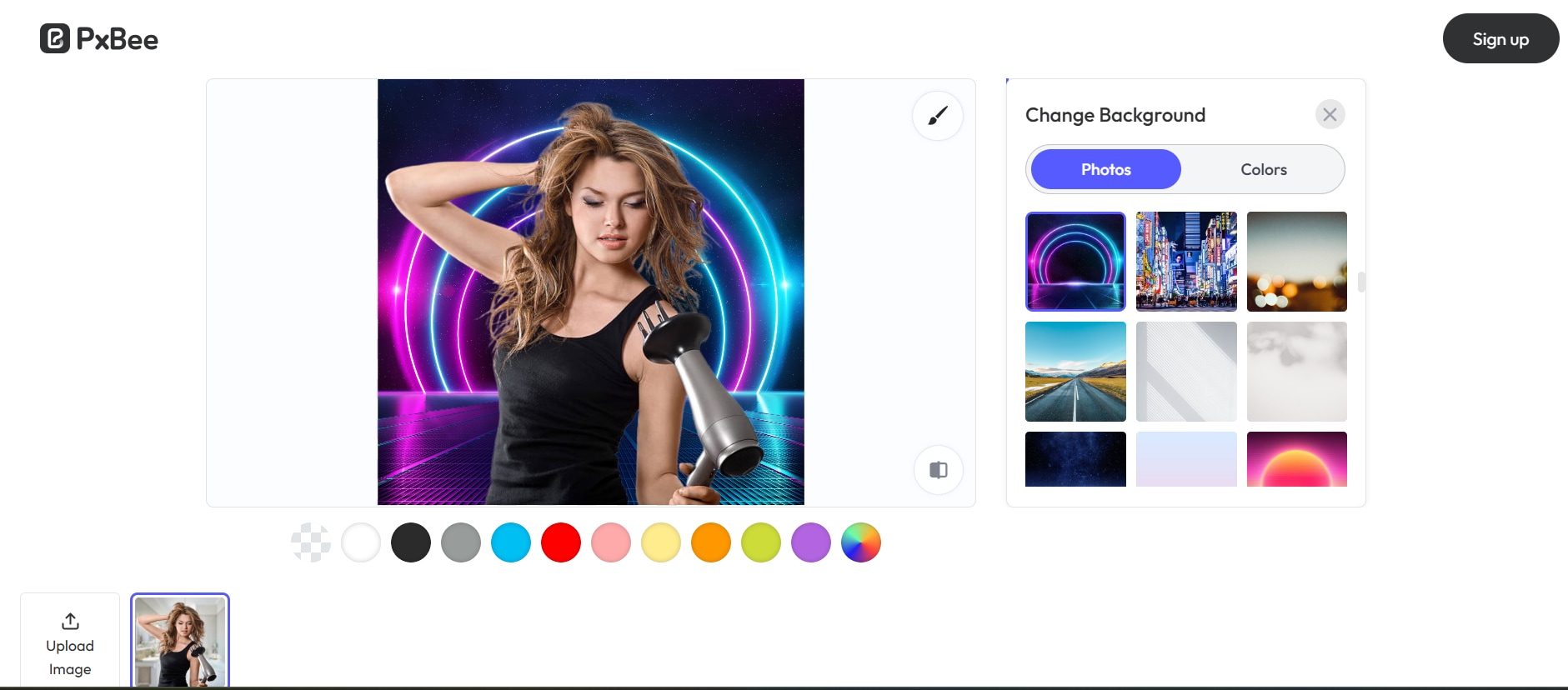
- Fotor: Offers more creative extension options, including styled backgrounds, patterns, or textures. It gives more flexibility for marketing visuals but may not always look as seamless for plain product needs.
Watermark Remover
- PxBee: Excels in clean removal with minimal distortion, especially for logos or small watermarks. The tool is optimized for this use case and works quickly.
- Fotor: Also removes watermarks effectively but may leave traces if the watermark overlaps with complex details. Works best when paired with manual touch-ups.
Verdict:
- For speed and raw precision, PxBee outperforms in HD conversion and watermark removal.
- For creative freedom and design flexibility, Fotor takes the lead in background extension and styled outputs.
Part 5: Another Alternative Professional Batch Image Processing Tool
For users handling large volumes of images, UniConverter is a professional-grade batch image processing tool that goes far beyond basic editing.
Unlike PxBee and Fotor, which focus primarily on single-image edits or creative design features, UniConverter is built for efficiency and scale. It supports batch photo editing function like resizing, compression, format conversion, watermarking, filters, cropping, and exposure adjustments—all in one streamlined workflow.
This makes it ideal for e-commerce sellers, photographers, social media managers, and marketers who need to process hundreds or thousands of images quickly without compromising quality. With its intuitive interface and automated features, UniConverter ensures consistent results across all images while saving significant time.
Feature Comparison: PxBee vs Fotor vs UniConverter
| Feature | Supported in PxBee? | Supported in Fotor? | Supported in UniConverter? |
| Batch Resize Compress Convert | Yes | Yes | Yes |
| Batch Apply Filters & Effects | No | No | Yes |
|
Batch Watermarking/ |
No | No | Yes |
| Batch Cropping | No | No | Yes |
| Batch Adjustments (Exposure, etc.) | No | No | Yes |
Now let’s explore step by step guide to batch enhance photos in UniConverter
Steps to Batch Enhance Photos in UniConverter
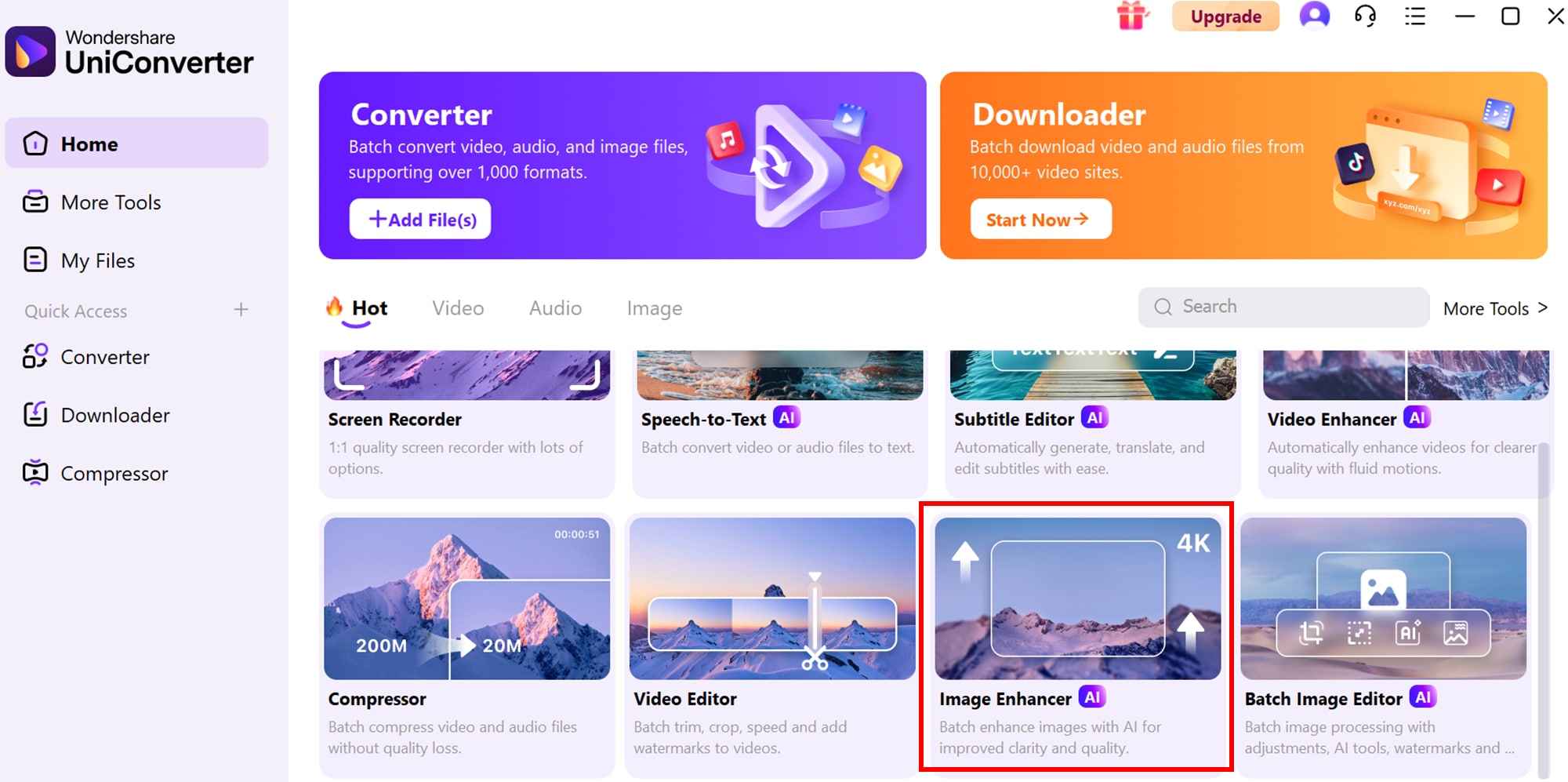
Step 1: Install UniConverter and open the Image Enhancer tool
Begin by installing Wondershare UniConverter on your device. Once launched, go to the “More Tools” tab on the left sidebar and select the “Image Enhancer” option under the Image section. This opens the dedicated interface for batch image enhancements.
Step 2: Import your images
In the AI Image Enhancer dialog box, click “Add Files/Folders” to upload the images you want to improve. UniConverter supports multiple formats, allowing you to add a mix of JPEG, PNG, TIFF, and other common file types for seamless batch processing.

Step 3: Enhance and export
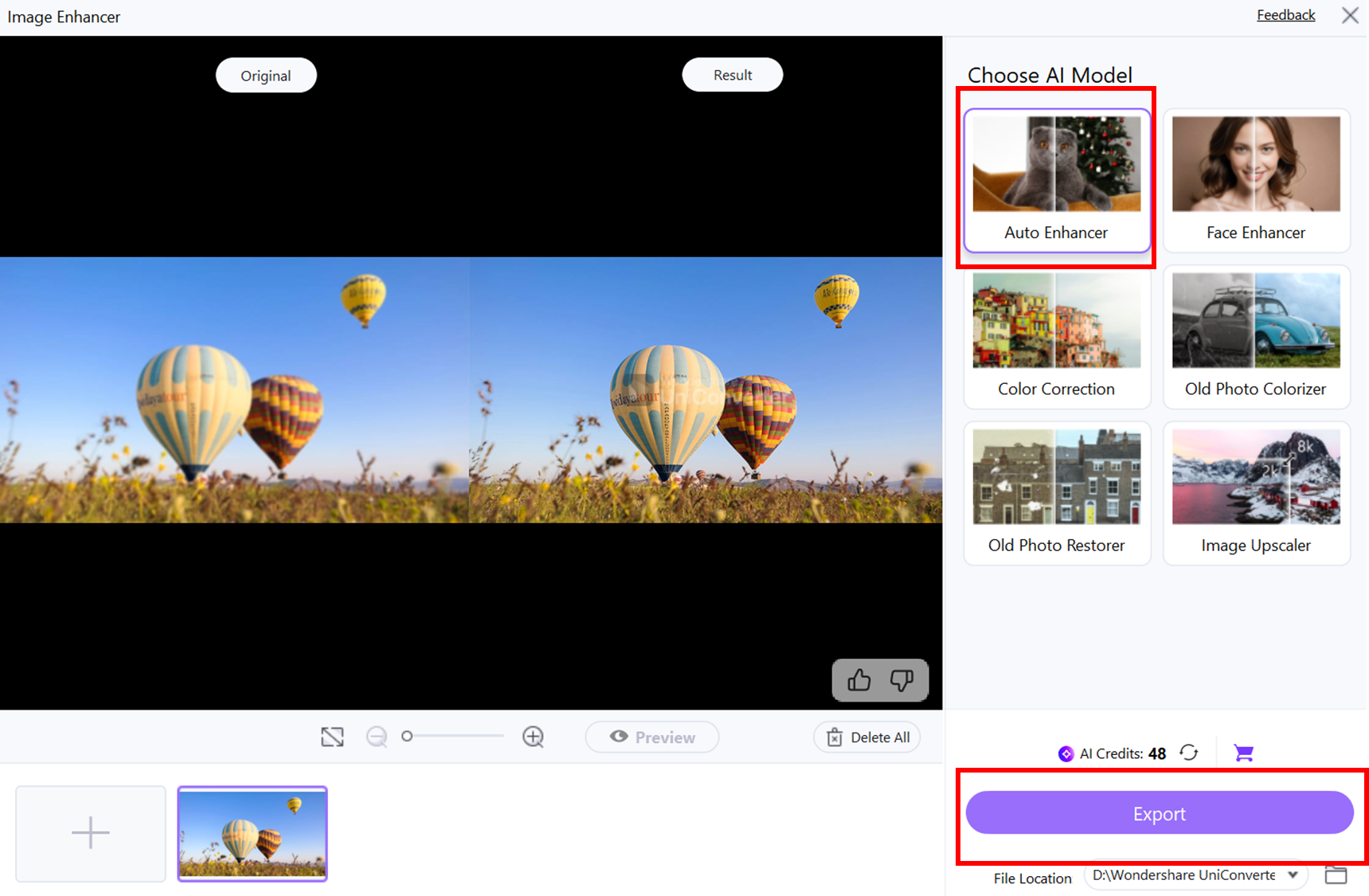
Choose the “Auto Enhancer” option to let UniConverter automatically enhance all uploaded images using AI. After the process completes, click “Export” to save the improved images directly to your device. All edits are applied consistently across the batch, ensuring high-quality results in one go.
Conclusion
PxBee and Fotor are both excellent tools, each catering to different needs—PxBee for fast, AI-driven edits and Fotor for versatile, all-in-one design and photo editing. For users handling large volumes of images, UniConverter stands out as a professional batch processing solution, offering resizing, compression, watermarking, filters, cropping, and AI enhancements efficiently. By understanding the strengths and limitations of each tool, you can select the right platform for your workflow, whether it’s quick product photo edits or comprehensive creative projects.

Easy to Use Stereo Computer Sound Recorder
FAQs
-
1. Can I use PxBee or Fotor for commercial projects?
PxBee and Fotor require paid plans for commercial licensing, especially for high-resolution exports or branded content. Always check each tool’s licensing terms before selling or distributing edited images. Using the paid plans ensures that your visuals remain legally compliant for professional or business use. -
2. Which tool is best for bulk photo editing?
PxBee and Fotor excel at single-image edits but are limited in handling large volumes at once. For batch resizing, watermarking, and AI enhancement across multiple images, UniConverter is the ideal choice. This makes it perfect for e-commerce sellers, marketers, and photographers managing hundreds of images efficiently. -
3. Do these tools support AI-powered enhancements?
Yes, both PxBee and Fotor leverage AI technology. PxBee focuses on quick fixes like HD conversion and background removal, while Fotor offers AI generation, enhancement, and creative templates. These AI features save time and help produce professional-quality results without advanced editing skills. -
4. Can I edit images without creating an account?
PxBee allows editing without registration, making it convenient for quick tasks. Fotor requires sign-ups to access its full suite of features, including AI tools and templates. This means PxBee is ideal for instant, one-off edits, while Fotor is better for ongoing projects. -
5. Are these tools suitable for social media content creation?
Absolutely. PxBee is perfect for product photos and simple posts, while Fotor provides creative flexibility for posts, banners, and thumbnails, helping marketers and content creators craft engaging visuals efficiently. Using these tools can save hours of manual work and ensure your content maintains a professional look across platforms.

