


What if you captured the perfect moment, only to notice a bright date stamp in the corner or a watermark blocking the details? These marks immediately take away from the photo you wanted to keep or share.
You can fix this instantly using modern tools that remove the stamp from the photo without damaging the quality. Whether the stamp came from your camera, a scanned document, or a downloaded image, these solutions help you clean it up in just a few steps.
This guide walks you through the best tools to remove a stamp from a photo in 2025, with step-by-step guidance to help you get clean, professional results.
In this article
- What Causes Photo Stamps
- Best 10 Photo Stamps Removers Online & Offline for All Devices 2025
- At-a-Glance Comparison Table for Top 10 Photo Stamp Removers
- How to Remove Stamps with Dedicated Software? (For High Quality & Batch Jobs)
- Pro Tips for a Flawless Result When Removing Photo Stamps
- Conclusion
- FAQs
Part 1. What Causes Photo Stamps?
Photo stamps usually appear because of built-in device settings, app overlays, or the way an image is saved or scanned. Here are the most common reasons you see them in your photos:
Camera and Smartphone Settings
Most cameras and phones have a built-in setting that stamps the date and time right onto your photo. You might not even notice it until a bright timestamp appears in the corner of an otherwise perfect shot. Many Nikon and Canon cameras keep "Print Date" or "Date Stamp" turned on by default. On Android and iPhone, some camera apps also add their own timestamp overlays. The fix is easy. You can turn these settings off so future photos stay clean and you never need a photo stamp remover again.
Software and App Overlays
Saving images from apps like TikTok, Instagram, or Snapchat often adds watermarks or timestamps, too. Third-party camera apps do it as well, sometimes adding their own logo unless you upgrade. These software overlays make sense for branding, but they get annoying fast when you want a clean photo for personal or professional use.
Scanning Process
If you are scanning old printed photos, the scanner might add metadata stamps, or the photo may already have a date printed on it from years ago. Older film and disposable cameras often burned the date directly onto the print. Once scanned, these stamps become part of the digital image and need a stamp remover from photo editors to clear them out.
Screenshots and System Overlays
Screenshots can also carry unwanted details. Your phone or computer might show the time, battery level, or app labels in the captured image. Gaming screenshots often include HUD elements or developer logos that you might want gone for a clean look.
Part 2. Best 10 Photo Stamps Removers Online & Offline for All Devices 2025
Removing date stamps, logos, or unwanted marks is now a simple task with any photo stamp remover. Whether you're restoring old photos or preparing images for work, these tools help you clean up pictures quickly on any device.
Photo Stamp Remover: Desktop Tools (Windows & Mac)
Desktop photo stamp remover software gives you greater editing power and greater accuracy when removing date and time from a photo. These tools work offline, handle large batches easily, and are ideal for cleaner, more polished results.
1. Wondershare UniConverter

Wondershare UniConverter stands out as a comprehensive tool. It removes stamps from photos and watermarks with its AI-based watermark remover, available online and offline. UniConverter detects and removes text, logos, timestamps, approval marks, and other stamp clutter from images without introducing visual noise. What sets UniConverter apart is its batch processing capability. You can upload up to 100 photos at once and remove the date stamp from a photo in a single step.
Wondershare UniConverter supports importing and editing files in over 1000+ formats, so there's no limit to the input formats you can work with. Whether you're dealing with a single family photo or cleaning up product images for your e-commerce store, UniConverter's user-friendly interface makes the process straightforward. You need to simply drag and drop your files, adjust the brush size to select the stamped area, and let the AI handle the rest.
| Feature | Details |
| Batch Process Support | Yes (up to 100 images) |
| Starting Price | $99.99/year |
| Supported Device | Windows, Mac, Online |
| Offline Support | Yes |
| Safety Review | 4.5/5 |

Easy to Use AI Photo Stamp Cleaner
2. HitPaw

HitPaw stamp background remover is an AI-powered tool that removes watermarks, logos, and stamp-like marks from photos and videos. The software offers five different AI-powered removal modes: AI Model, Matte Filling, Color Filling, Smooth Filling, and Gaussian Blur. It gives you flexibility based on your specific needs. You can use the tool to remove emoji stamps, logo tags, or any sticker-like marks while restoring your backgrounds.
What makes HitPaw particularly useful is its automatic detection feature. The AI algorithm analyzes the structure of your image and identifies watermarks without requiring you to manually select them. This is especially helpful for beginners who want quick results.
| Feature | Details |
| Batch Process Support | Yes |
| Starting Price | $12.99/month |
| Supported Device | Windows, Mac, Online |
| Offline Support | Yes |
| Safety Review | 4.3/5 |
3. Softorbis

SoftOrbits photo stamp remover is a dedicated tool designed to remove watermarks, date stamps, logos, and other unwanted objects from photographs. The software uses a combination of intelligent algorithms, including inpainting, quick remove, hole filling, and texture generation, to eliminate distractions seamlessly. It offers both automatic and manual modes, letting you choose whether to let the software detect and remove watermarks or select them yourself.
The desktop application utilizes your computer's GPU to run the AI model locally, ensuring your images stay private and processing remains swift. SoftOrbits also provides batch processing capabilities, making it efficient to clean up multiple images at once.
| Feature | Details |
| Batch Process Support | Yes |
| Starting Price | $1.99/month |
| Supported Device | Windows |
| Offline Support | Yes |
| Safety Review | 4.4/5 |
Stamp Background Remover: Online Tools (Browser-Based)
Online photo stamps remover tools are great for quick edits without installing anything. Just open your browser, upload your photo, and remove stamps in a few clicks from any device.
4. Kazw

Kaze AI offers a specialized photo stamp remover powered by AI that removes stamps and seals flawlessly. The tool is designed for effortless removal. You need to just upload your image files and let the AI do the rest. It supports up to 20 images at once and works with all major image formats, including JPG, PNG, and WEBP.
The results look professional, saving hours of manual editing. The web-based tool requires no downloads or installations, making it accessible from any device with an internet connection.
| Feature | Details |
| Batch Process Support | Yes (up to 20 images) |
| Starting Price | 4.95/month |
| Supported Device | Any browser (Online) |
| Offline Support | No |
| Safety Review | 4.2/5 |
5. AIEASE

AIEase offers a free online watermark remover. The tool quickly analyzes, detects, and removes image watermarks, including text, logo, signature, or stamp watermarks, without damaging the image background. What sets AIEase apart is its dual-mode approach: automatic AI detection for simple watermarks and a manual brush tool for more precise removal of stubborn marks.
The platform handles the edges of the removal area with precision, delivering clear, sharp images without blurriness. AIEase supports various file formats, including PNG, JPG, JPEG, WEBP, and BMP. The tool is completely free throughout editing and downloading, with no watermarks, ads, or hidden fees.
| Feature | Details |
| Batch Process Support | Yes |
| Starting Price | $7.99/month |
| Supported Device | iOS, Android, Online |
| Offline Support | No |
| Safety Review | 4.0/5 |
6. Pixelbin

Pixelbin is an AI-based photo stamp remover that removes unwanted logos and marks from images. The platform automatically detects and removes watermarks, delivering clean images without any manual steps. It excels at removing various watermark types, including logos, stamps, and signatures, while maintaining the original image quality.
What makes Pixelbin particularly versatile is its support for multiple file formats (WEBP, JPG, JPEG, PNG, HEIC, PDF) and files up to 25 MB. The platform offers both a web-based version and mobile apps for editing on the go. For businesses, Pixelbin offers bulk watermark removal, allowing you to edit multiple images in a single step.
| Feature | Details |
| Batch Process Support | Yes |
| Starting Price | $22/billed once |
| Supported Device | All browsers, iOS, Android |
| Offline Support | No |
| Safety Review | 4.2/5 |
Photo Stamp Remover: Mobile Apps (iOS & Android)
Sometimes all you need is a quick touch-up on the go, and mobile photo stamps remover apps make that easy. These apps let you remove stamps, watermarks, or date marks right from your phone, making them useful for casual photos, social media posts, or real-time edits while travelling.
7. Fotor

Fotor provides a free photo stamp remover that's available both online and as a mobile app. The AI-powered tool instantly recognizes and removes unwanted date stamps, location stamps, name stamps, and other types of watermarks from your photos while preserving their original quality. Fotor uses AI to intelligently replace the removed stamp area with matching textures, colors, and patterns from the surrounding area.
The platform supports various image formats, including JPG, JPEG, and PNG, and you can input pictures from cameras, iPhones, Android devices, or other sources. The mobile app is especially convenient for on-the-go editing without needing complex software.
| Feature | Details |
| Batch Process Support | Limited |
| Starting Price | $8.95/month |
| Supported Device | iOS, Android, Online |
| Offline Support | Yes (via app) |
| Safety Review | 4.3/5 |
Easy to Use AI Photo Stamp Cleaner
8. Snapseed

Snapseed is a complete and professional photo editor to remove the time stamp from a photo. With 29 tools and filters, Snapseed offers features like Healing, Brush, Structure, HDR, and Perspective, all designed for precise photo editing. The Healing tool specifically lets you remove unwanted neighbors, date stamps, or other objects from group pictures.
The app opens both JPG and RAW files and lets you save personal looks for future photos. The gesture-based editing interface is perfectly designed for touchscreen devices, making it intuitive once you get the hang of swiping vertically to select attributes and horizontally to adjust intensity. Best of all, Snapseed is completely free with no ads or in-app purchases.
| Feature | Details |
| Batch Process Support | No |
| Starting Price | Free |
| Supported Device | iOS, Android |
| Offline Support | Yes |
| Safety Review | 4.0/5 (Google Play) |
9. Picsart AI Photo Editor

Picsart is an all-in-one AI-powered design studio that offers a Remove Object feature ideal for erasing stamps from photos. The app quickly cleans up pictures and removes unwanted objects from the frame, whether it's a date stamp, watermark, or photobomber.
The app includes AI Enhance to improve image quality, Background Remover to switch backdrops, and AI Replace for instant transformations. Picsart supports both photo and video editing, making it a versatile choice for content creators. The free version offers basic editing features, though premium tools require a subscription.
| Feature | Details |
| Batch Process Support | Limited |
| Starting Price | $2.24/month |
| Supported Device | iOS, Android, Web |
| Offline Support | Yes |
| Safety Review | 4.1/5 (Google Play) |
10. Remove Unwanted Object

Remove Unwanted Object by BG.Studio is a free Android application that lets you remove unwanted objects, people, stickers, text, stamps, and logos from your photos. The app uses a simple workflow: pick a photo from the camera or gallery, select objects you want to remove (highlighted in red), press the process button, and watch the magic happen.
The app is particularly useful for removing telephone wires, power lines, surface breaks, scratches, pimples, and skin blemishes. It's also effective at erasing human-made objects, such as street signs and trash cans. While the app is free, it does contain ads and in-app purchases for additional features.
| Feature | Details |
| Batch Process Support | No |
| Starting Price | Free (ad-supported) |
| Supported Device | Android, Chromebook |
| Offline Support | Yes |
| Safety Review | 3.8/5 (Google Play) |
Part 3. At-a-Glance Comparison Table for Top 10 Photo Stamp Removers
Here is the comparison table comparing tools that can remove stamps from photos online, offline, and on mobile, so it will help you pick the right photo stamp remover:
| App Name | Supported Formats | Unique Edge | Best For |
| UniConverter | 1000+ formats (JPG, PNG, WebP, BMP) | Batch processing up to 100 images; AI detection | High-quality batch jobs & professionals |
| Kaze AI | JPG, PNG, WEBP | Professional-grade AI stamp removal | Quick online stamp removal |
| Fotor | JPG, JPEG, PNG | Mobile and web availability; texture matching | On-the-go editing on any device |
| AIEase | PNG, JPG, JPEG, WEBP, BMP | No watermarks | Budget-conscious users |
| Pixelbin | JPG, PNG, WEBP, HEIC, PDF | Bulk removal; automatic detection | E-commerce & business users |
| Snapseed | JPG, RAW | 29 tools; completely free | Mobile photographers |
| Picsart | Common image formats | All-in-one AI editing suite | Content creators & social media users |
| HitPaw | MP4, MOV, AVI, JPG, PNG | 5 AI removal modes; video support | Video and photo watermark removal |
| SoftOrbits | All standard image formats | Local GPU processing; multiple algorithms | Windows desktop users |
| Remove Unwanted Object | Standard image formats | Simple tap-to-remove interface | Android users wanting quick edits |
Part 4. How to Remove Stamps with Dedicated Software? (For High Quality & Batch Jobs)
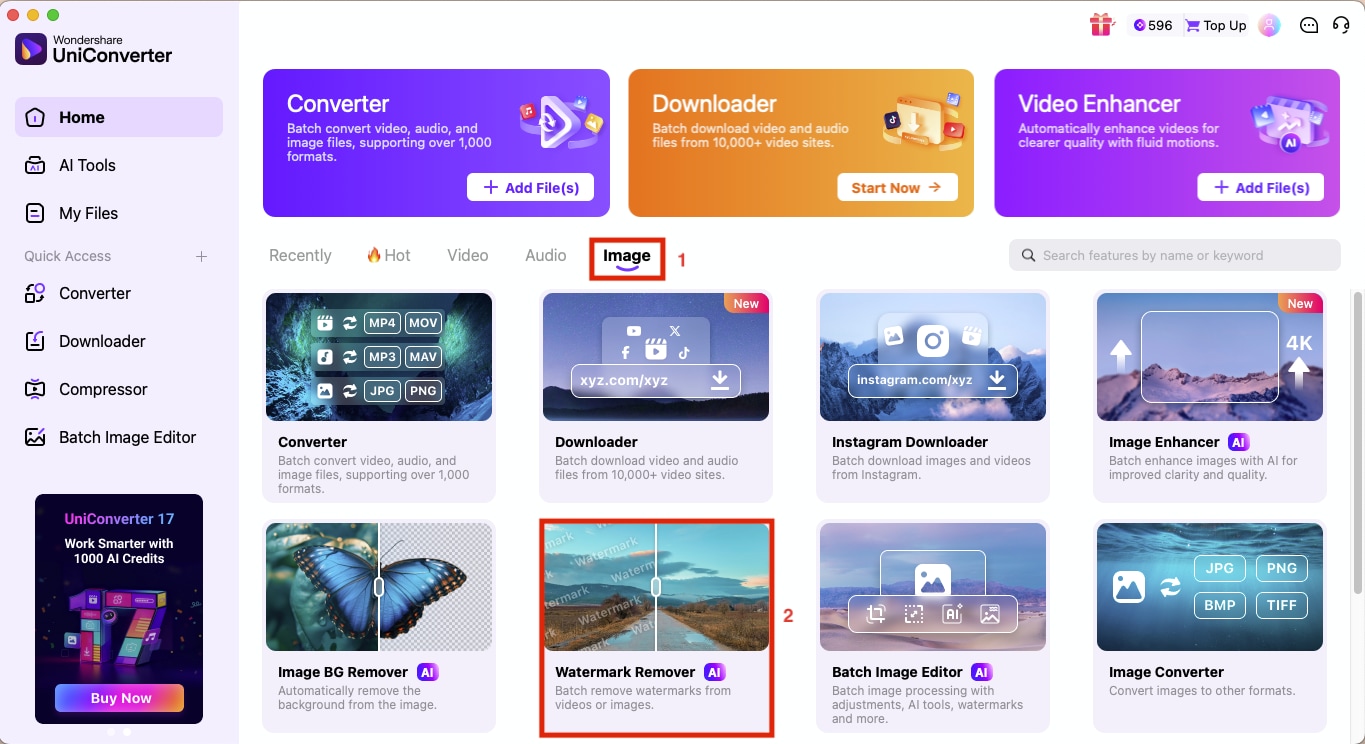
To remove stamps from photos, you can use the Wondershare UniConverter desktop app, and for a single photo, you can use the Wondershare UniConverter Watermark Remover Online. So let's first learn how to remove stamps from an image on a desktop:
Step 1: On the homepage, navigate to "Image > Watermark Remover."
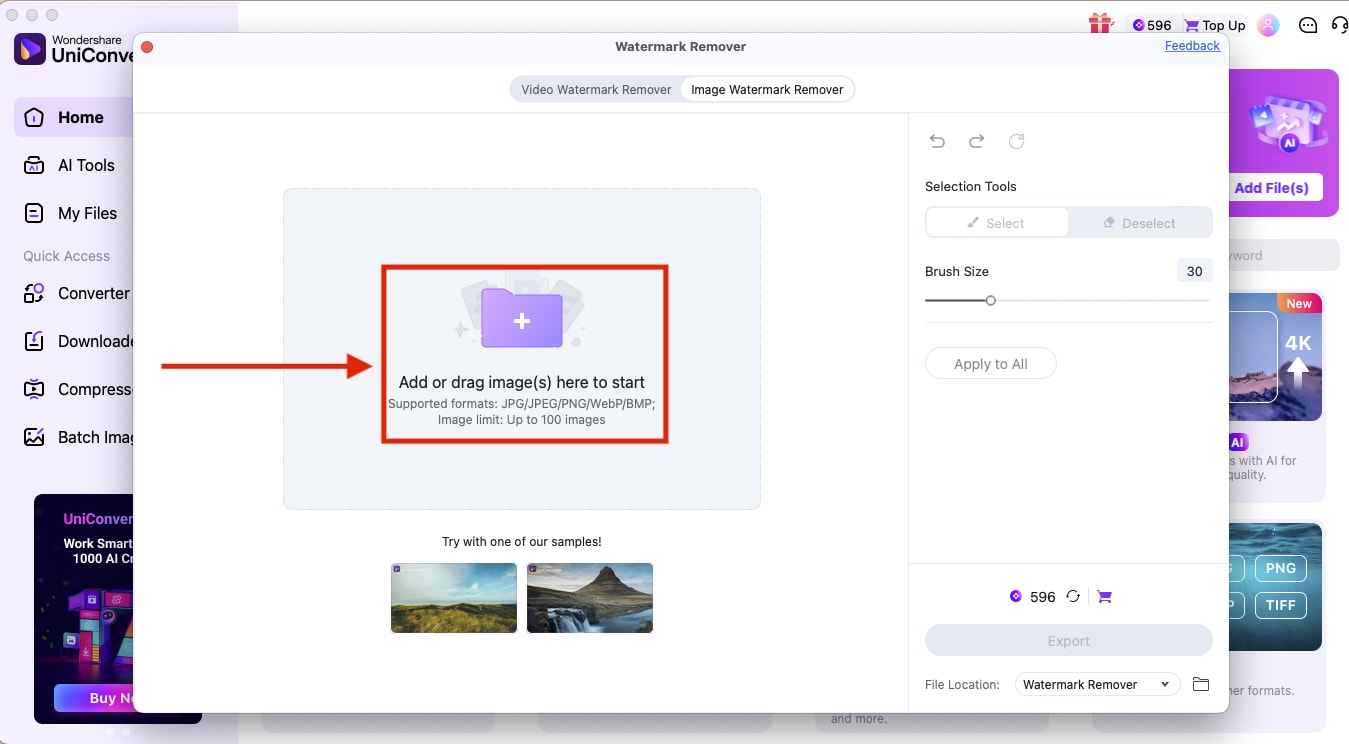
Step 2: Click "Add or drag image," then upload multiple images or simply drag and drop.
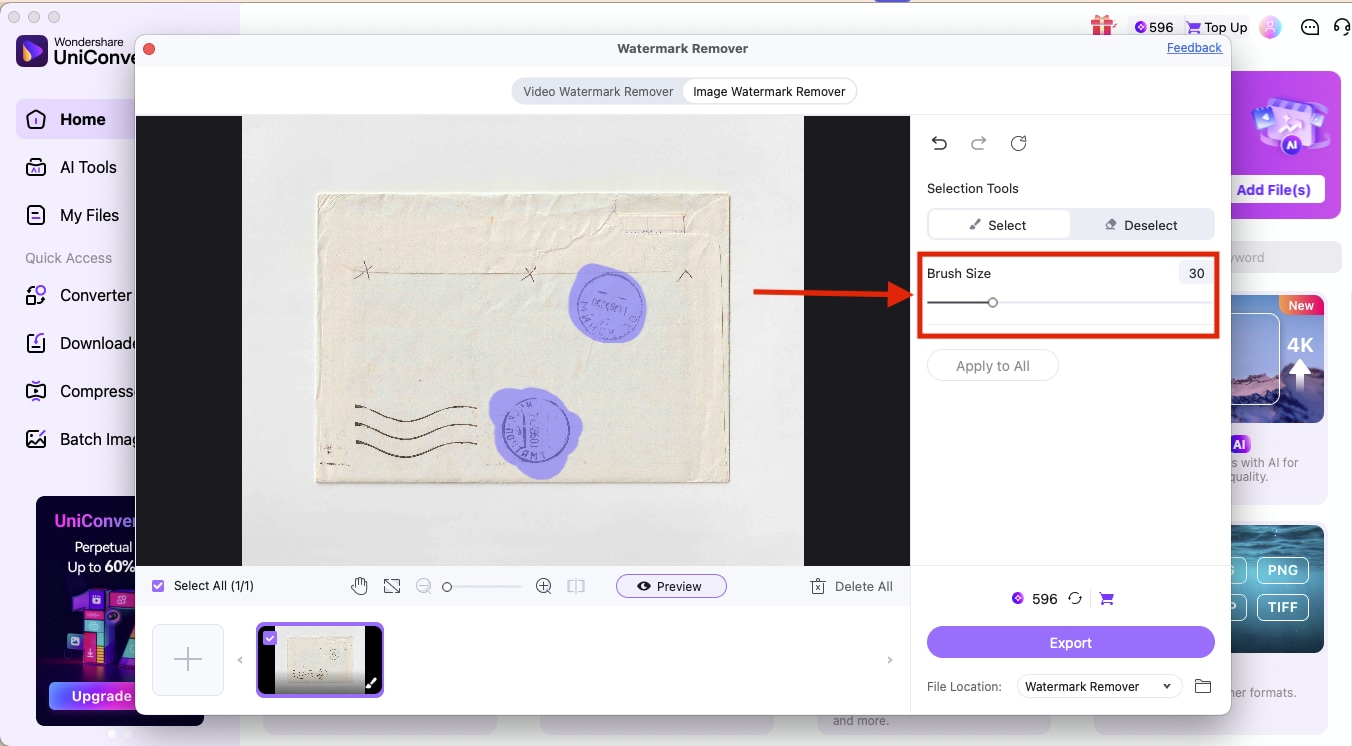
Step 3: Adjust the brush size and hover the brush over the stamps you want to remove.
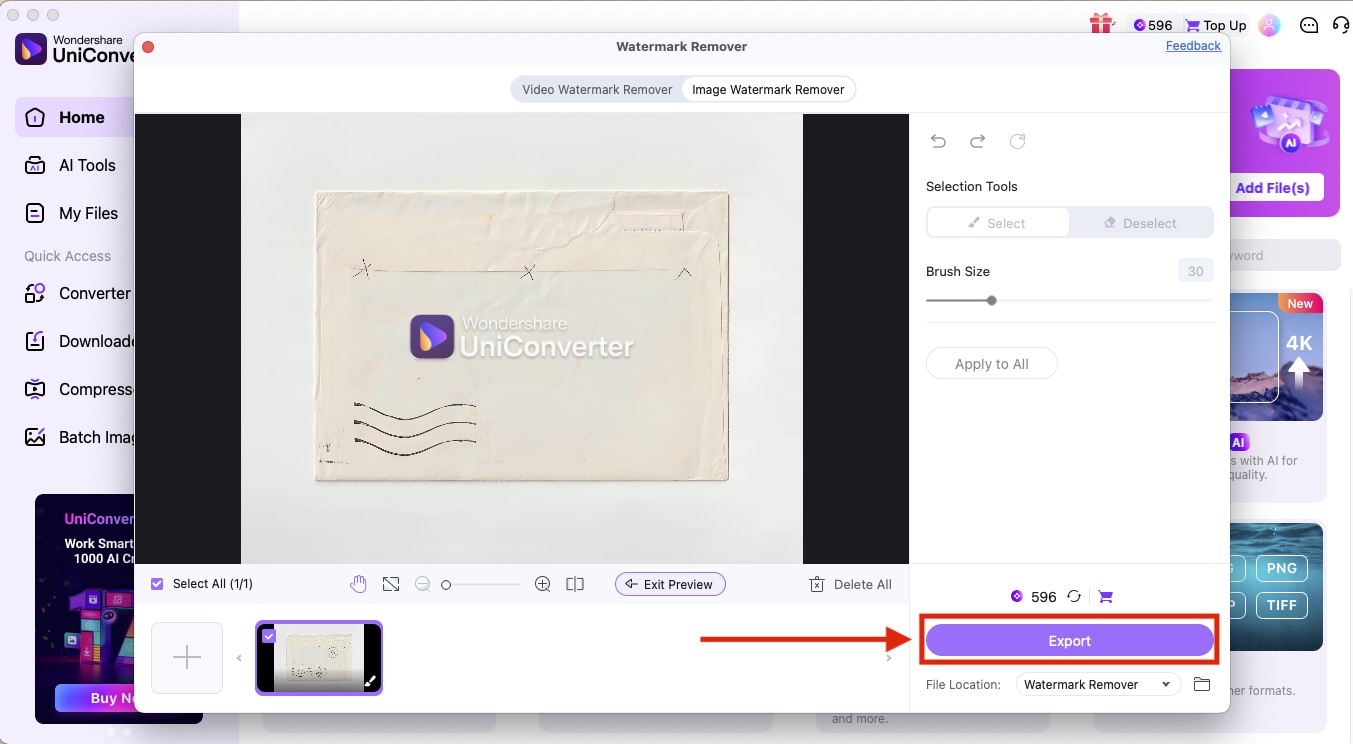
Step 4: You can also preview the image before downloading. Once satisfied, click on "Export."
How to Remove a Stamp From a Photo Online with Wondershare UniConverter Watermark Remover
Here is how to use the photo stamp remover online to get quick and quality results:
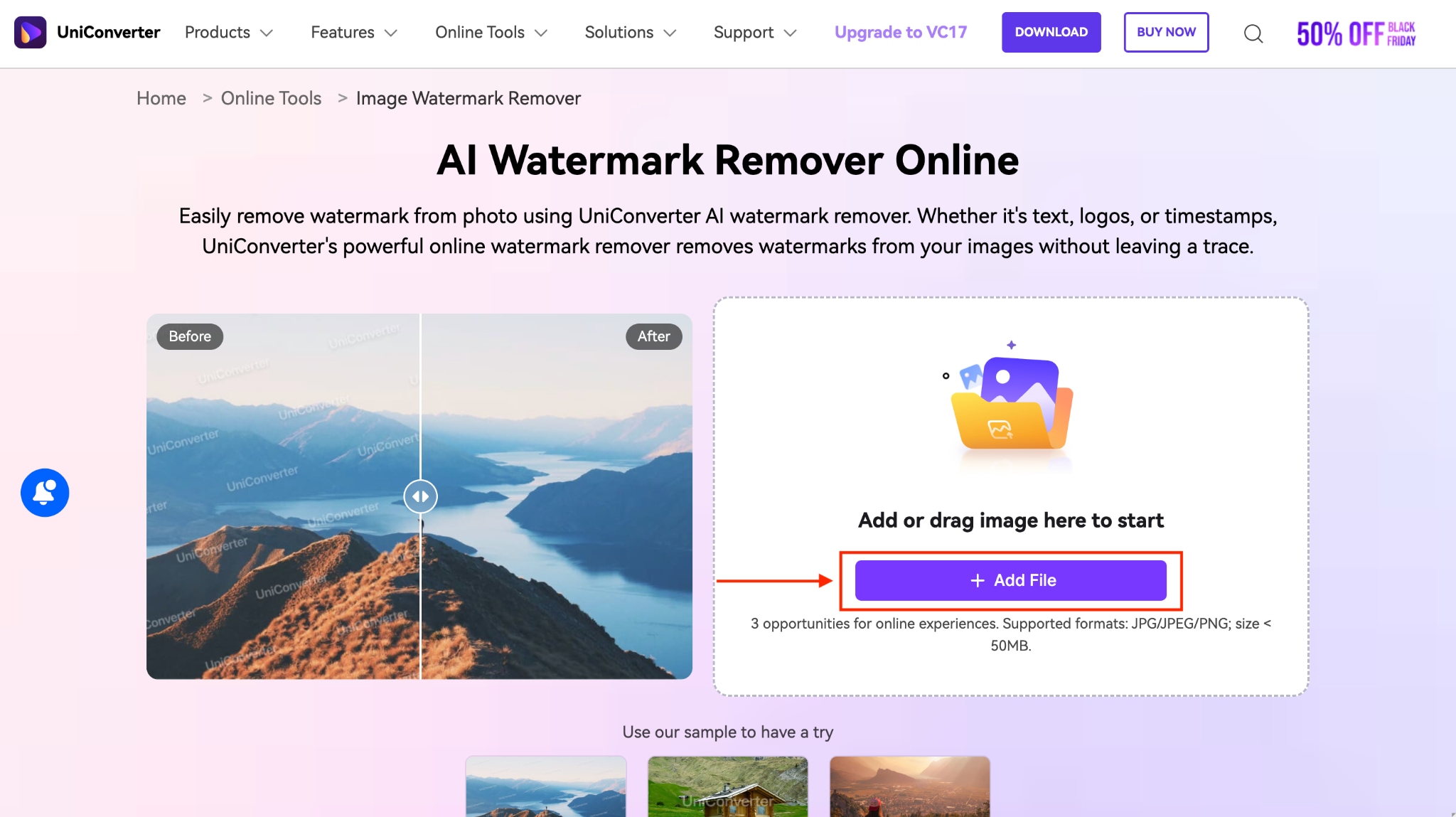
Step 1: Visit the official Wondershare UniConverter AI Watermark Remover Online site and click on the "Add File" button.
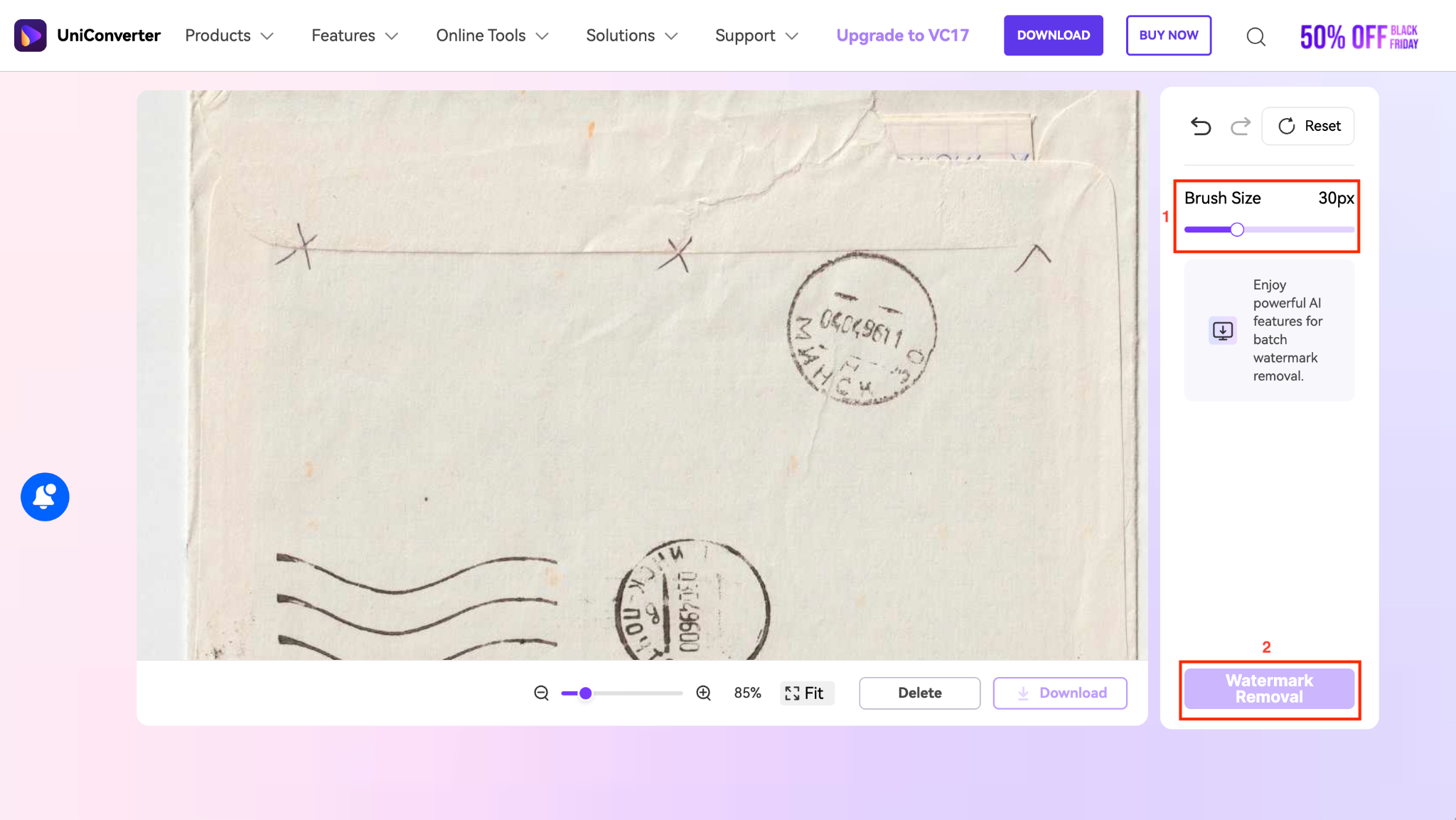
Step 2: Upload the image, adjust the brush size, select the area you want to remove the stamp from, and click "Watermark Removal."
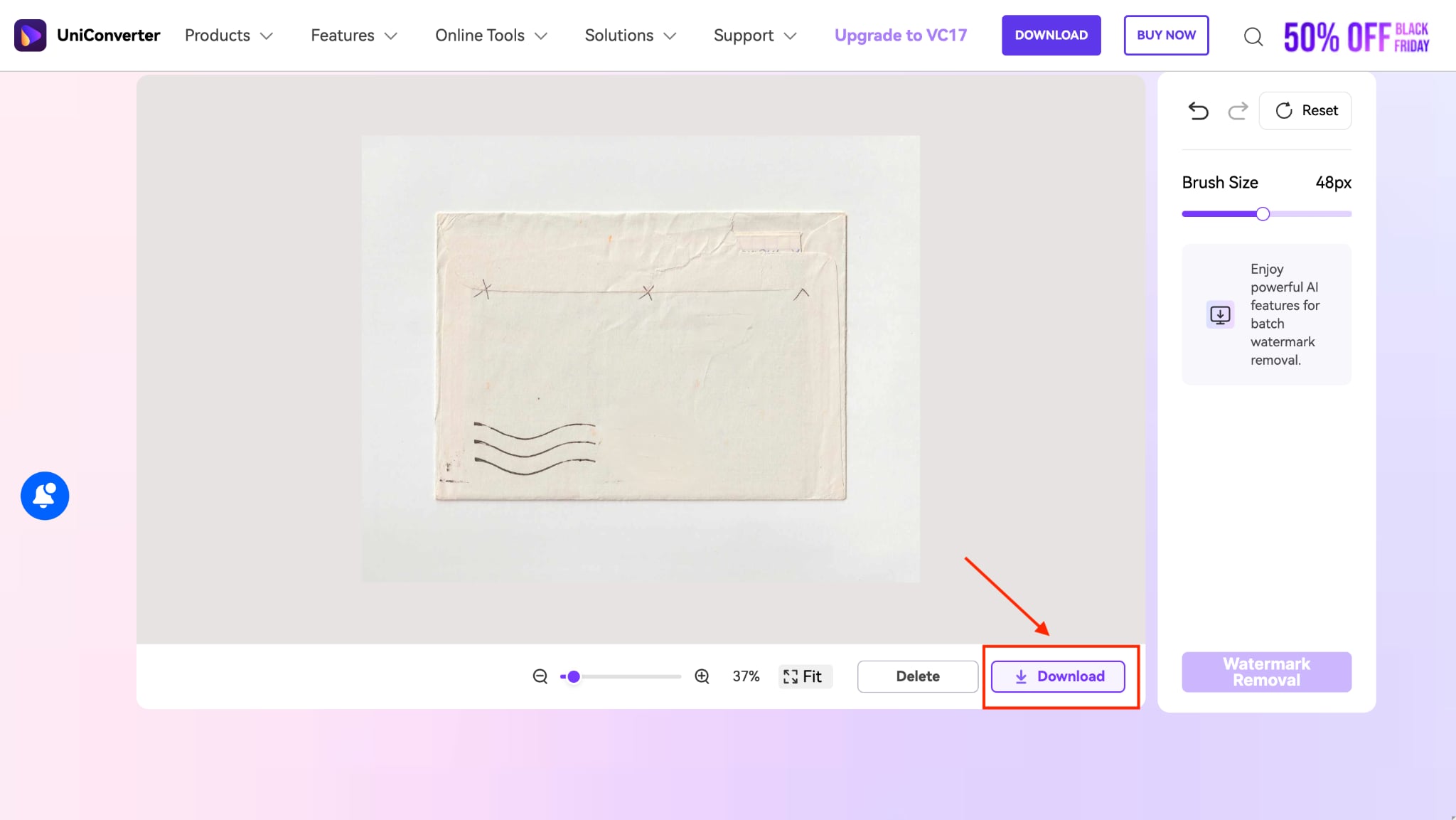
Step 3: After a few seconds, you will get a stamp-free photo. To download, click on the "Download" button.
Easy to Use AI Photo Stamp Cleaner
Part 5. Pro Tips for a Flawless Result When Removing Photo Stamps
These expert tips will help you overcome the "fear of ruining photos" and achieve professional-looking results every time. Here are the tips to remove stamps from a photo easily:
Tip 1: Work on a Copy
Never edit your original file directly. Always create a duplicate before you start removing stamps. This ensures you have a backup if something goes wrong during the editing process. In most applications, you can simply save a copy before making changes, or use non-destructive editing features that preserve your original.
Tip 2: Zoom In for Precision
For precise editing and cleaner edges, zoom in on the stamp area before selecting it. Working at 100% or higher magnification helps you see exactly where the stamp borders end and the original image begins. This attention to detail makes the difference between obvious edits and seamless removals.
Tip 3: Use the Right Brush Size
Match the brush size to the stamp for best results. A brush that's too large will remove more background than necessary, while one that's too small requires multiple passes and may leave traces. Start with a brush slightly larger than the stamp's thickest section and adjust as needed for edges.
Tip 4: Handle Complex Backgrounds with Clone Stamp
For complex backgrounds with patterns, textures, or details (such as bricks, leaves, or fabric), consider using the Clone Stamp tool to manually sample similar areas. Automatic AI tools may struggle with intricate backgrounds, so manually selecting nearby pixels to clone over the stamp often yields better results. Constantly re-sample different areas to prevent obvious repetition patterns.
Conclusion
Getting a clean, professional-looking photo is simple with the right photo stamp remover tools. Whether you're dealing with date stamps, time stamps, watermarks, or approval marks, modern AI editors make the process fast and precise. You no longer need advanced editing skills or complicated workflows, just upload your image, mark the area, and let the tool restore your photo naturally.
If you want one of the most reliable ways to remove a stamp from photos, try Wondershare UniConverter for accurate and effortless stamp removal.
FAQs
-
1. Can I remove date stamps from old film photographs?
Yes, you can remove date stamps from scanned old film photographs using UniConverter. It works particularly well because it intelligently reconstructs the background texture after removing the stamp. For best results, scan your photo at a high resolution first, then use the healing or AI removal tool to eliminate the date stamp. -
2. Is removing watermarks from photos legal?
It depends on the context. Removing watermarks from your own photos, licensed images you've purchased, or images where you have permission is legal. However, removing watermarks from copyrighted content without authorization can violate intellectual property laws. Always ensure you have the right to modify the content before removing watermarks. -
3. Will stamp removal tools blur my photo?
No. Quality tools like UniConverter use advanced AI algorithms that remove stamps without leaving blur or quality loss. The AI analyzes surrounding pixels and intelligently fills the gap, maintaining image sharpness. Lower-quality tools may cause blurring, so choose reputable software for the best results. -
4. Can I batch remove stamps from multiple photos at once?
Yes, with UniConverter, you can process up to 100 images simultaneously. This is especially useful for photographers cleaning up event photos or e-commerce sellers preparing product images. -
5. What's the best free tool to remove stamps from photos?
Wondershare UniConverter is the best free tool for removing stamps from photos with ease and intelligence. You can remove stamps from 3 photos daily online and from multiple images for 3 days in the desktop app. It maintains image quality and keeps results sharp.

