


Downloading videos from Bluesky (Bsky) has become a common need for users who want to enjoy content offline. As Bluesky rapidly evolves in 2025, many are seeking free, simple ways to save these videos to their devices. Whether you're looking to archive memorable posts or keep up with trends, using the right methods is essential.
This guide walks you through the latest, most effective ways to download Bluesky videos safely and conveniently. If you are eager to learn more about Bluesky video download, read the detailed article to the end.

Best Bluesky Video Downloader
In this article
- Part 1. What Is Bluesky and Why Do People Want to Download Videos from It
- Part 2. Why You Can't Download Bluesky Videos Directly
-
Part 3. The Best Bluesky Video Download Tools Online and Offline
-
Part 4. Converting and Editing Bluesky Videos after Download
- Part 5. Legal and Ethical Considerations When Downloading Bluesky Videos
- Part 6. Best Practices for High-Quality and Safe Bsky Video Downloads
- FAQs about Bluesky Video Download
Part 1. What Is Bluesky and why do People Want to Download Videos from It
Bluesky (Bsky) is a new decentralized social media platform designed to give users more control over their online experience and data. Recently, it has added support for video content, making it increasingly popular among both creators and audience. It was initially incubated by Twitter and is known for its unique experience. Now, users explore ways to download videos from Bluesky due to the following reasons:

- Offline Viewing: Videos on Bluesky require an internet connection to stream, so users need platforms to download them for offline viewing.
- Saving Favorites: Many users find videos they can relate to, so to download their favourite videos, they need efficient tools.
- Reposting: Some users and content creators wish to share interesting or valuable Bluesky videos on other social media platforms.
- Preservation: Since this platform is dynamic, videos are automatically deleted after a while, so downloading them is a better option.
Part 2. Why You Can't Download Bluesky Videos Directly
Unlike some social platforms, Bluesky has built-in privacy and security features that prevent direct video downloads, so let's explore its reasons:

- No Native Download: Bluesky’s interface is streamlined to focus on content sharing but lacks a built-in option for video downloads, so users opt for Bluesky downloaders.
- Technical Reason: Being built on the AT protocol, this architecture intentionally avoids making content easily downloadable without clear user consent.
- Copyright and Content Protection: Bluesky aims to protect creators' rights and prevent unauthorized distribution of content, including downloading.
- Platform Security: By restricting downloads, the platform reduces abuse, maintains server integrity, and guards against the creation of hateful re-posts.
Part 3. The Best Bluesky Video Download Tools Online and Offline
Now that you know the basics, let’s explore the best Bluesky video downloader for PC, Web and Mobile, both online and offline:
1. Quick Comparison of Top Bluesky Video Downloaders
| Tool/App | Supported Formats | Platforms | Key Features | Quality Options | Pricing | Best For |
| Wondershare UniConverter | MP4, AVI, MOV, MKV, MP3 and many more. | Windows, Mac | Download + Convert + Edit videos; batch support; no ads | Up to 4K/8K | Freemium | Batch saving & all in one media processing |
| SnapDownloader | MP4, MP3, AVI, WMA, AAC | Windows, Mac | Download + Convert; batch downloads; trim videos | Up to 8K, HD, 4K, 720p | Paid, 48h free trial | Batch/auto download, |
| Bluesky Video Downloader (Web) | MP4, TS | Web browser | Copy URL, select format, no watermark, easy steps | HD, SD | Free | Simple one-off downloads |
| Neulink Video Downloader (Web) | MP4 | Web browser | Paste link, one-click download, no login needed | HD, SD | Free | Quick web downloads |
| Blusky Video Downloader (Chrome Ext. | MP4, TS | Chrome extension | Download from URL, MP4/TS choice, no ads, Easy install | HD, SD | Free | Browser-based |
| Blusky Media Downloader (Chrome Ext.) | MP4, images, GIFs | Chrome extension | Download video/image, Multi-file. | HD | Free | Bulk browser downloads |
| All Video Downloader app | MP4, MOV, AVI, MP3, others | iOS, Android | Multi-site, Paste link, Simple interface | HD, SD, source-based | Free, may have ads/in-app purchases | Mobile, multi-site catch-all utility |
| Blusky Video Downloader app | MP4 | HD | Free, may have ads | HD | Free, may have ads | Video browsing |
2. Download and Convert Bsky Videos on Desktop
If you prefer managing your downloads on a computer, here’s how you can easily download and convert Bluesky (Bsky) videos directly from your desktop:
1. Wondershare UniConverter
A freelance digital marketer often tracks trending Bluesky posts for creative inspiration and client content. One day, she finds several public videos with strong viral appeal and wants to use those videos on various platforms. In this situation, we recommend using UniConverter, which provides a batch downloader to download unlimited Bluesky to MP4 videos.
Wondershare UniConverter can download Bluesky HD videos without watermark and convert them into multiple formats. It allows you to choose between a broad variety of audio and video formats, such as MP4 in 4K, and HD. Furthermore, it also provides a batch processing system letting you download all the videos simultaneously. Upon hearing these features UniConverter is considered a most efficient Bluesky Downloader for both Windows and Mac.
Best Bluesky Video Downloader
Key Features
- Video Enhancer: One can enhance the overall visuals of videos by simply inserting them in the Uniconverter tool.
- Subtitle Editor: It provides you with a specific subtitle editor that lets you add desired subtitles within the videos.
- Smart Summarizer: It helps summarize videos for the most efficient and streamlined workflow of lectures and meetings.
Expert Guide to Use UniConverter Downloader to download high-quality Bluesky video to MP4
After exploring its main key features, let's explore its detailed guide to use this high-quality Bluesky video downloader:
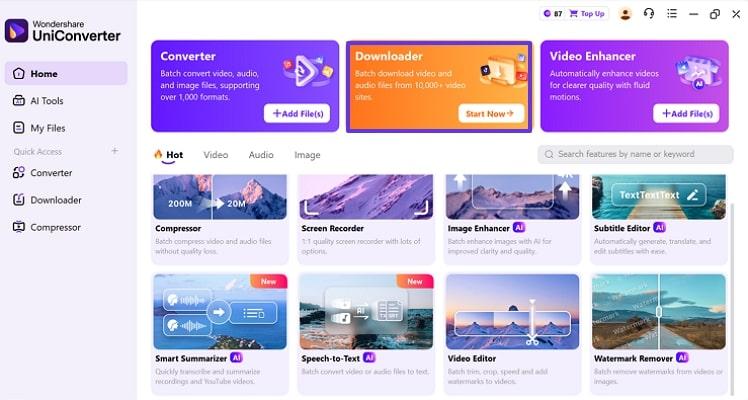
Step 1. Access the Downloader Tool Available
Upon entering the tool, click on the “Downloader” button available at the top of the interface.
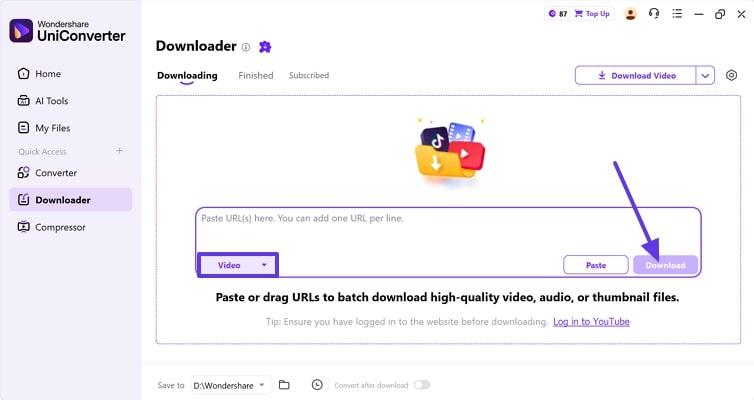
Step 2. Insert the URL and Hit the Download Button
Paste the Bluesky video URL in the prompt section and hit the “Download” button to initiate the procedure
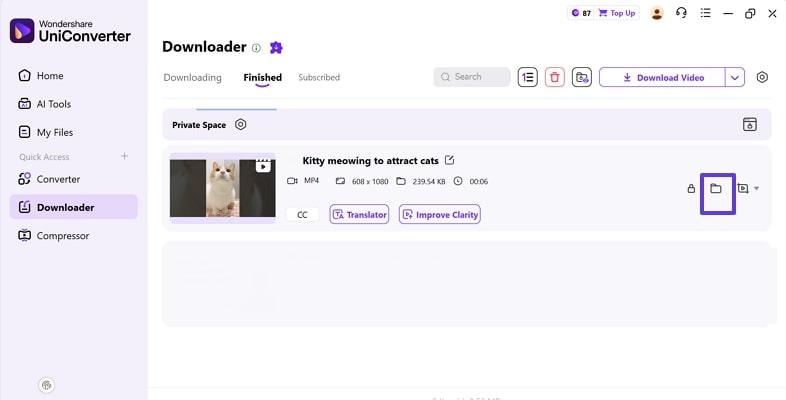
Step 3. Locate the Downloaded Video in the Device
As your video is downloaded, it will automatically get saved in the desired device folder, which you can also locate by clicking the File icon.
Tips: At this point, as your video is downloaded to your device, you can further edit it using its other tools like Video Enhancer, Compressor or Editor. This will make your video visually perfect for further uploading on your social platforms.
2. SnapDownloader
Being an advanced video downloader, it lets users paste up to 100 Bluesky video links at once and download them simultaneously. While downloading, you can also choose the desired file format, such as MP4, MP3, AVI, and more. Furthermore, this efficient tool provides a Bluesky video downloader for Mac/Windows, offering fast download speeds and allowing you to schedule downloads for ease.
Detailed Stepwise Guide To Use SnapDownloader for Bsky Video Download:
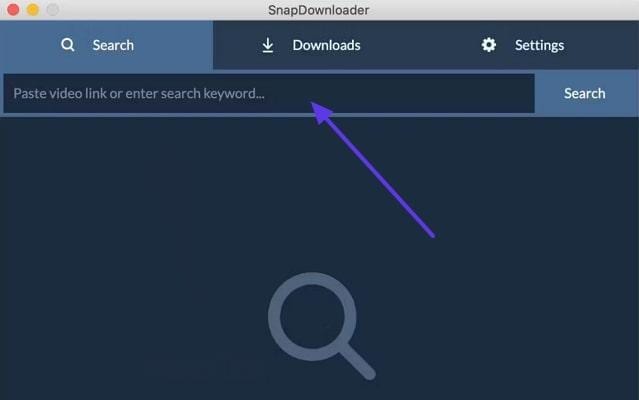
Step 1. Initiate by copying the post's URL from Bluesky and accessing the "SnapDownloader" desktop tool. Upon entering the tool, paste the desired URL within the search bar and click the "Search" button.
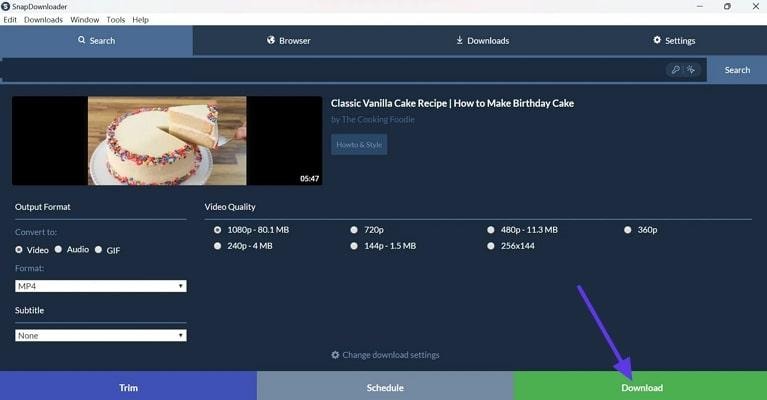
Step 2. As it searches your video, select the desired "Output Format," “Subtitle,” and required “Video Quality.” After choosing the desired settings, tap on the "Download" button to save it, and you can also schedule this download for later.
3. Use Free Online Bluesky Video Downloader
If you just want to download videos from Bluesky quickly without installing software, online tools are perfect. Go through the following best Bluesky video downloader online, best for users who want to download without any watermark, making them ideal for editing or sharing.
1. Bluesky Video Downloader
Being a completely free tool, users simply paste their video URLs, and do not require users to create an account. It allows users to choose between MP4 and TS when saving videos, ensuring flexibility. Furthermore, this downloader provides quick video processing with SSL encryption for user security.
Quick Guide To Use Bluesky Video Downloader Online
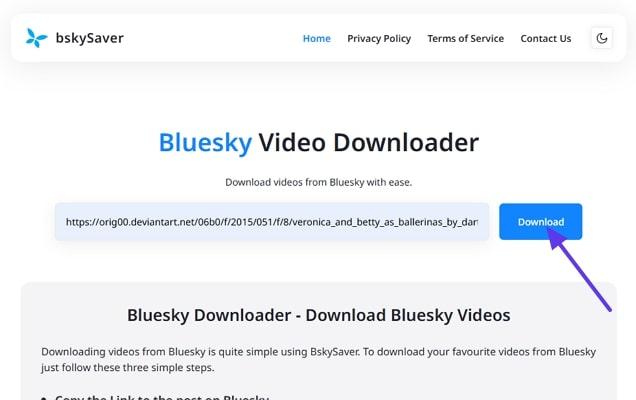
Step 1. Upon accessing the tool, paste the desired URL of Bluesky videos and hit the "Download" button.
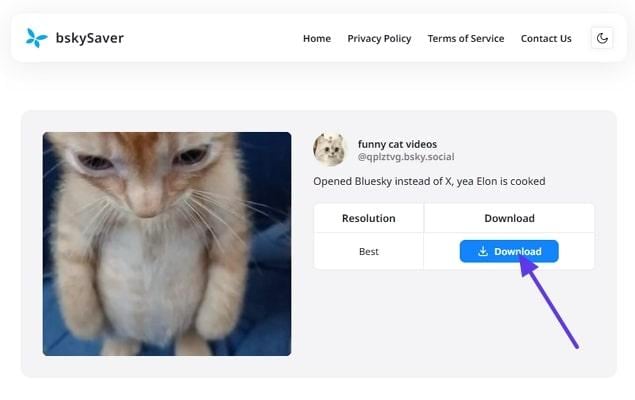
Step 2. Now that your video is being synced, you can export it by clicking the "Download" button.
2. Neulink Video Downloader
The free Bsky video download tool enables users to download Bluesky videos in high definition, preserving the original post's video quality. In addition to videos, Neulink Video Downloader allows users to download images and GIFs from Bluesky posts. It works on both desktop and mobile browsers, allowing wider compatibility.
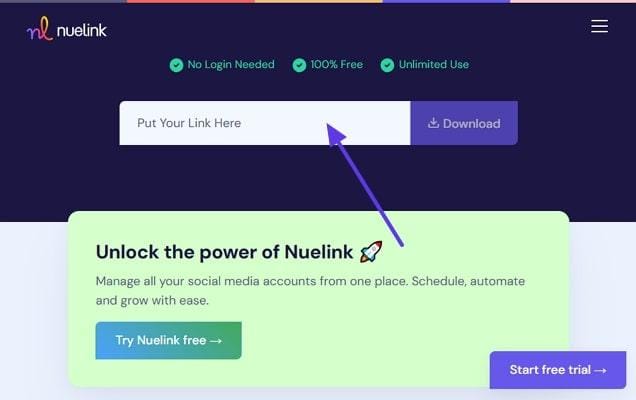
Expert Stepwise Guide To Use Neulink Video Downloader
Step 1. Upon accessing the tool, insert the desired Bluesky video link and hit the “Download” button.
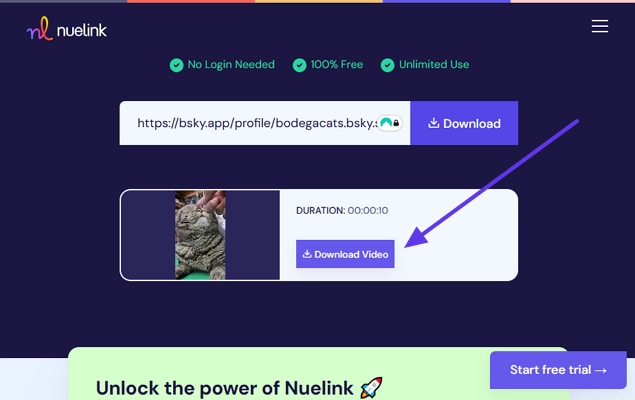
Step 2. As your video is being synced, click on the “Download” button to get it saved to the device.
4. Try a Bluesky Video Downloader Browser Extension
Besides online downloading options, if you want to explore Chrome extension for downloading Bluesky videos, read the following:
1. Blusky Video Downloader
This extension lets users save Bluesky videos easily in high-quality MP4 format, ensuring broad device compatibility. In addition to MP4, users can choose to download videos in TS format if needed, providing flexibility. Users simply download this extension and paste the desired URL, and it will instantly download the required video.
Detailed Guide To Use Blusky Video Downloader Browser Extension
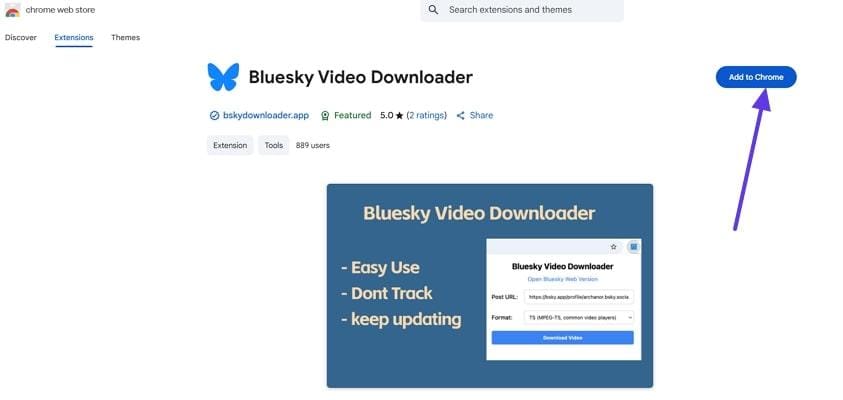
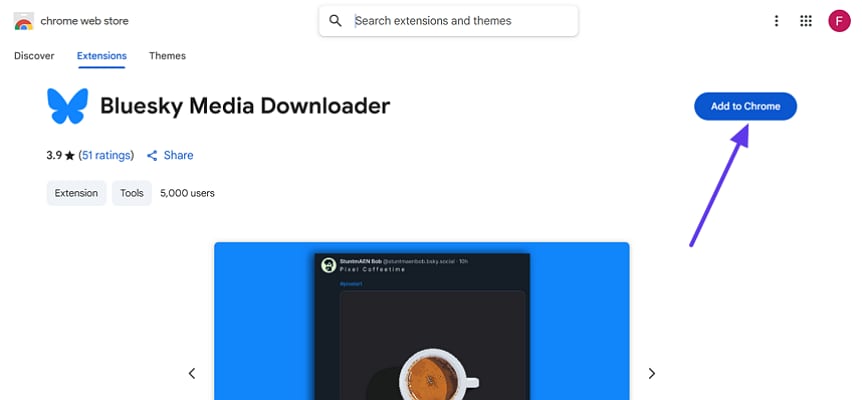
Step 1. Go to the Chrome webstore, search for Blusky Video Downloader extension, and hit the “Add Chrome” button to download it.
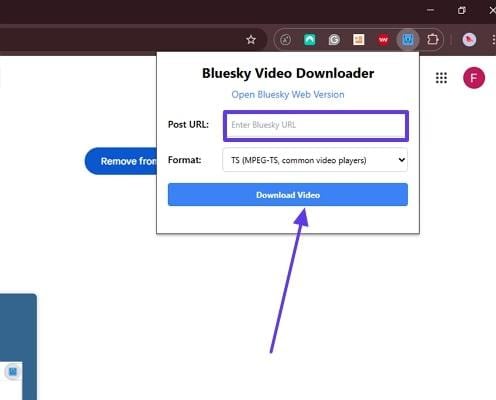
Step 2. Paste the desired video URL into the extension to download high-quality BluSky video MP4 instantly.
2. Blusky Media Downloader
Blusky Media downloader adds a direct download button to the Bluesky interface. This step makes it easy to save high-quality MP4 video instantly. Users can download several images and videos from a single Bluesky post. This extension works smoothly with the Bluesky web app, allowing users to download videos.
Guide To Use Blusky Media Downloader
Instructions. Download the desired extension and access the website. It will show a download button, though you can directly download Bluesky video in MP4.
5. Use a Mobile App to Download Bluesky Videos (iPhone & Android)
For those who don’t want to switch between multiple tools or tabs, explore the following Bluesky video downloader apps. In this section, we have provided a detailed procedure on how to save Bluesky videos on both iPhone/Android using these dedicated apps:
Legal Tip: Before downloading, ensure you review the mobile app's permissions and only grant access for basic video saving. Furthermore, avoid apps that request unnecessary access to your device, data, or account information.
1. All Video Downloader
This app lets users paste Bluesky post links and download videos directly within seconds from their phone. All the videos are saved in MP3 format, which can later be used easily on any platform. It provides a simple workflow by simply pasting the desired URL. Furthermore, it also provides a web tool that lets you download the videos directly without any installation.
Expert Stepwise Guide To Use All Video Downloader
Instructions. Access the app, paste the URL of Bluesky videos, and tap on the save video option to start the saving procedure. It will instantly save the video to your mobile storage for later usage.
2. Blusky Video Downloader
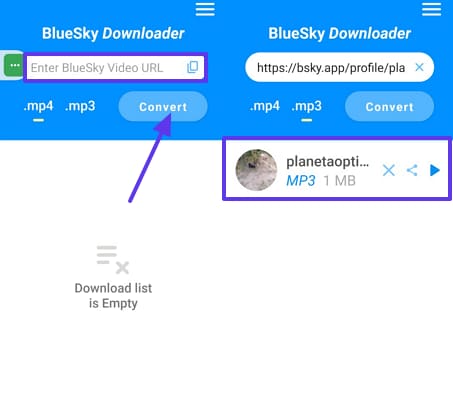
This mobile Bluesky downloader lets you simply paste the video URL, and it will save the video for you instantly within seconds. One can use these downloaded videos and lets you switch between ending "For You" videos and the "Follow" feed for accounts.
Detailed Guide To Use Blusky Video Downloader
Instructions. Access the Bluesky Video Downloader app and paste the copied Bluesky video URL within the search bar and hit the “Convert” button.

Part 4. Converting and Editing Bluesky Videos after Download
After finishing your Bluesky video download, you might want to convert it to MP4 or edit it for sharing. So, in this situation, UniConverter, Bluesky to MP4 converter is one of the ideal solutions that lets you convert file formats, add subtitles, and compress them. So, let's explore their detailed stepwise guides to use these methods below:
Best Bluesky Video Downloader
Convert Bluesky videos to MP4 with UniConverter
Now, after exploring this efficient tool, if you want to convert Bluesky video to MP4, then read the following step-by-step guide below:
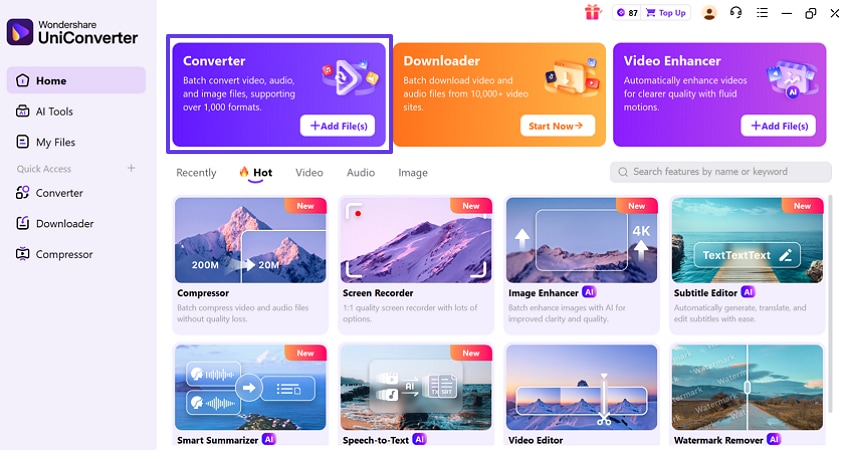
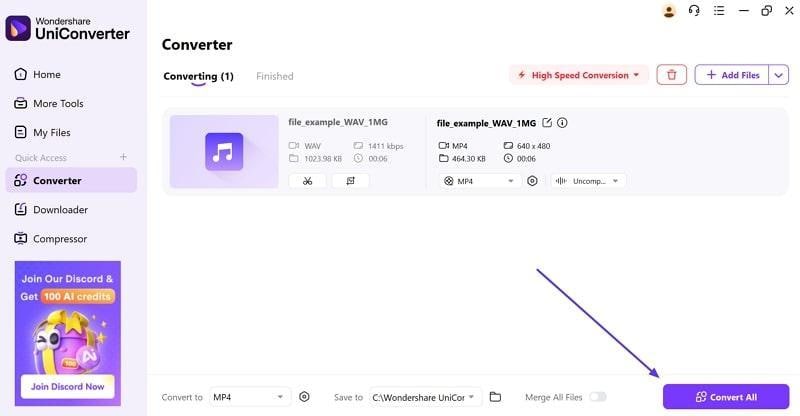
Step 1. Access the Tool and Select Converter Mode
Open the program and go to the “Home” tab from the panel on the left. Select the “Converter” tool and import your file by clicking on the “+Add File(s)” button.
Step 2. Choose the MP4 Format for the Output File
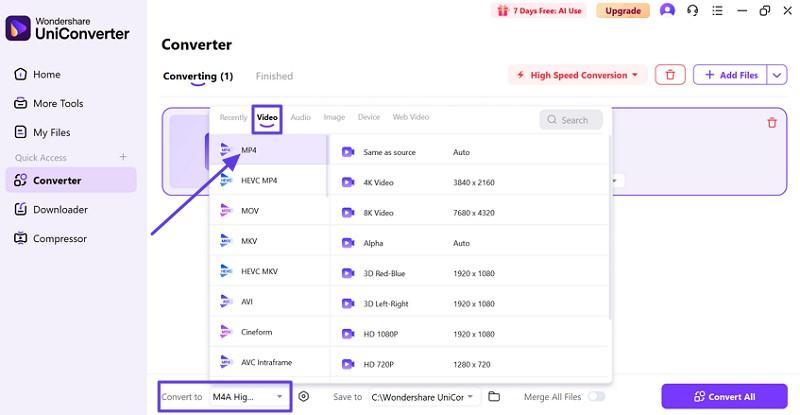
When your file is added, expand the “Convert to” menu and choose the “MP4” format option under the “Video” section.
Step 3. Start the Conversion Process
Once you have specified the format, click on the “Convert All” button to start the conversion process.
Compress downloaded Bluesky videos
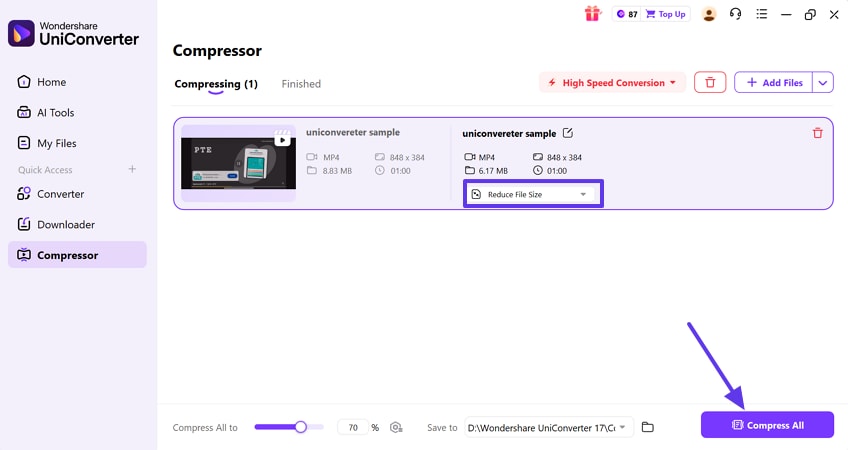
Step 1. Access the “Compressor” tool from its main homepage, and insert the desired video here. Following this, choose the desired file size by clicking on the “Reduce File Size” menu and hitting the “Compress All button.
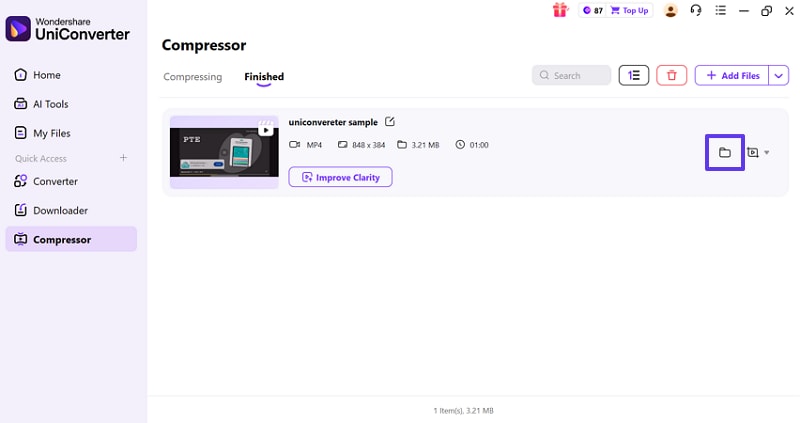
Step 2. Here, your file is compressed, which will automatically get saved to the device folder.
Edit Bluesky videos with Video Editor
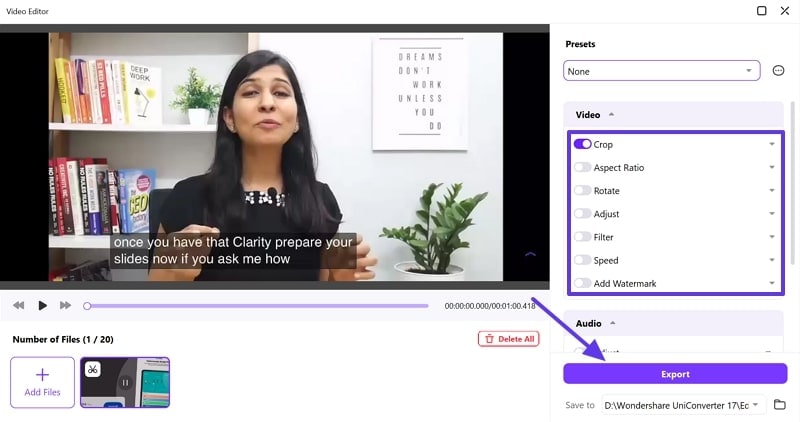
Instructions. Open the “Video Editor” tool and insert the targeted video here. Afterwards, enable the desired setting like “Crop, Adjust, or Speed” feature and hit the “Export” button to get it saved automatically.
Add subtitles to Bluesky videos
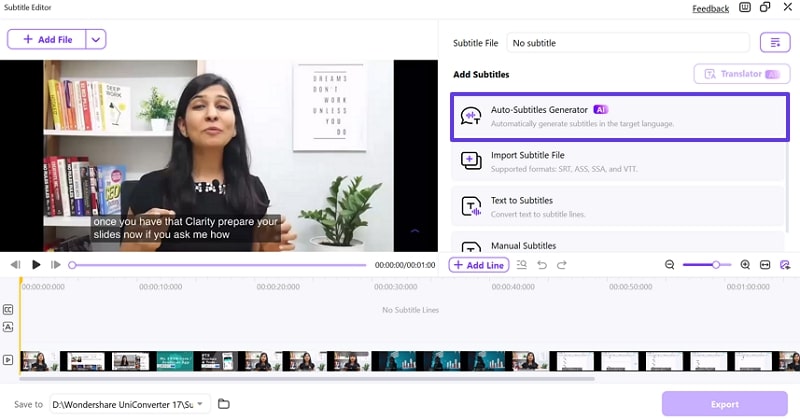
Step 1. Launch the Subtitle Editor tool, add the targeted video, and choose the “Auto-Subtitle Generator” feature.
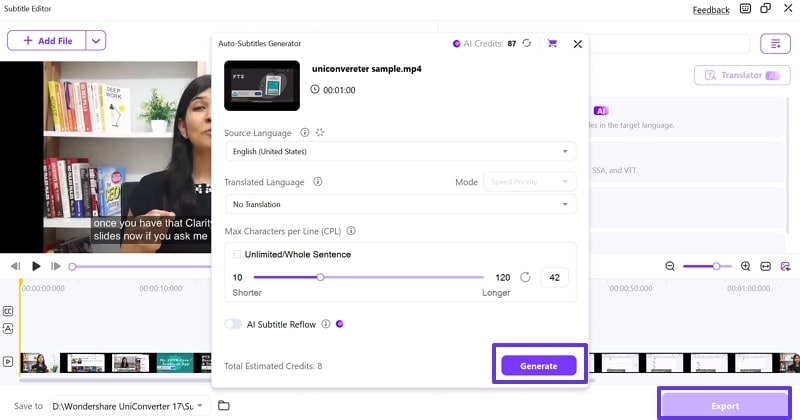
Step 2. Choose the “Source Language,” “Translated Language,” and hit the “Generate” button to create subtitles. Afterwards, hit the “Export” button to get the subtitle saved to the device.
Part 5. Legal and Ethical Considerations When Downloading Bluesky Videos
If you are curious to know whether you can download Bluesky videos legally, read the following section below:

- Public Posts: You can legally download videos that are public on Bluesky as they are intended for public usage.
- Copyrighted Material: Avoid downloading and reusing videos that are clearly copyrighted, such as brand clips and music.
- Personal Use: Using downloaded content for personal viewing, archiving, or commentary is generally permitted.
- Private or Restricted Posts: Do not download videos from private accounts, posts limited by the creator, or private content.
Part 6. Best Practices for High-Quality and Safe Bsky Video Downloads
After hearing legal considerations, if you want to download Bluesky hd videos, then keep these best practices in mind:

- Use Official Reputable Downloaders: Always choose trusted and well-reviewed tools such as UniConverter to avoid malware, privacy risks, or data leaks.
- Maintain HD Video Quality: Make sure you select the highest available video resolution, such as HD, 4K, or 8K, during the download process.
- Organize and Rename Files: After downloading Bluesky videos, rename the files to meaningful titles and store them in organized folders.
- Use Batch Downloads: For bulk downloads, use desktop apps or extensions that support batch/download queue features.
- High-Quality Videos MP4: Ensure you choose the highest available resolution, like HD,4K or 8K, for downloading high-quality videos
Conclusion
Summing up, in this article, we have narrowed down all reliable Bluesky video downloaders along with their guides. These tools make it easy to download Bluesky videos or convert Bluesky to MP4 effortlessly. From all of them, we recommend using Wondershare UniConverter today which is a one-stop solution to quickly download, convert, and edit Bluesky videos in HD quality.

