

The increasing demand for AI audio is hard to miss: text-to-speech, voice cloning, and even AI-generated cover songs are now part of content creation. Among the many best tools out there, Replay AI stands out as a free option, especially for creators who want realistic voices for voice cloning and to create new songs without any hassle. With Replay AI text-to-speech, you can turn your simple text into human-like audio, or you can also experiment with unique voice cloning features. But here is a catch: many of you don't know how to get the most out of Replay AI. To help you with it, in this guide, we will break down its usage process step by step.
In this article
Part 1. What Is Replay AI?
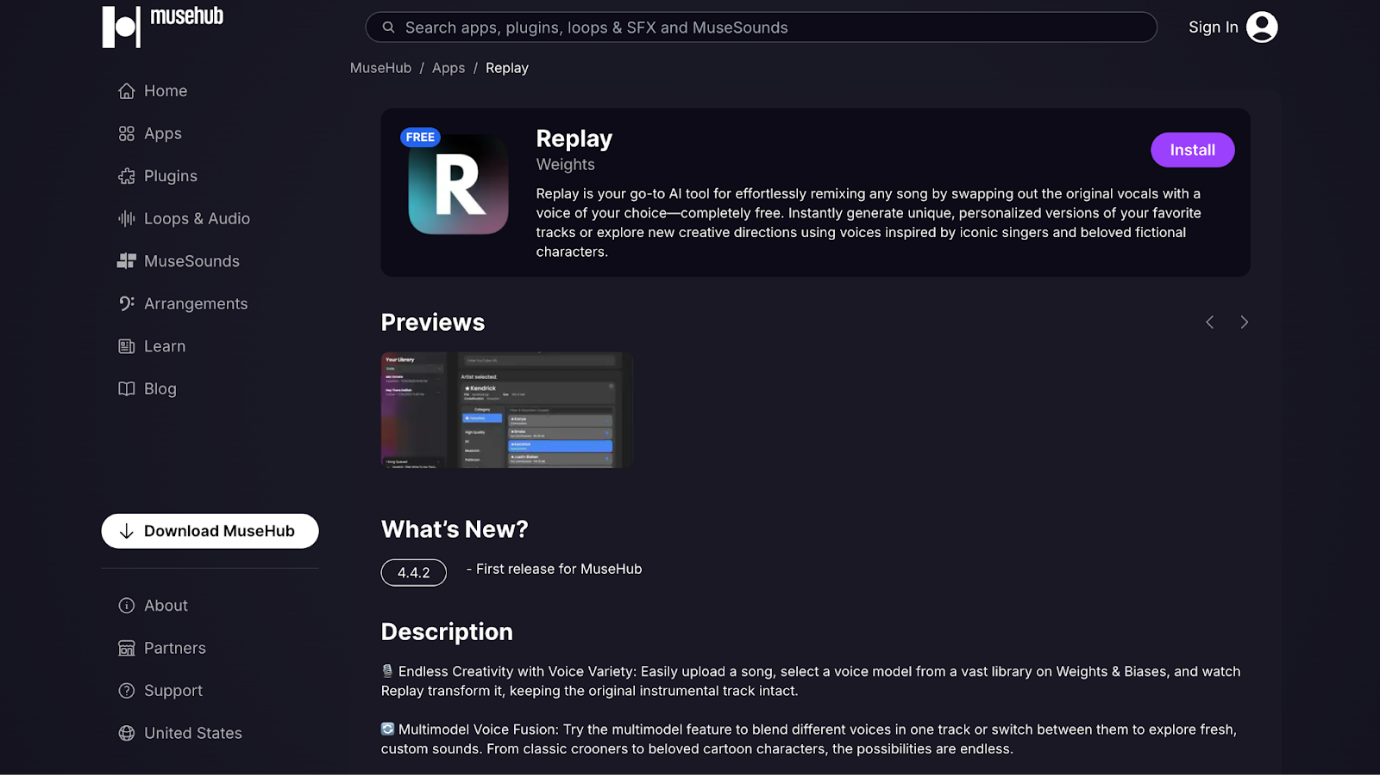
Replay AI is basically a desktop app that lets you remix any song by swapping out the vocals with whatever voice you want. You could make Squidward sing your favorite pop song or have Samuel L. Jackson narrate your presentation.
The coolest part of Replay AI is that it is completely free with no sneaky subscription fees hiding anywhere. You need to simply download from MuseHub, and you own it forever. The app connects to a huge library on Weights & Biases where you can find voice models of famous singers, cartoon characters, and all sorts of creative voices.
Key Features
- Access to a massive library of voice models on Weights & Biases, from classic crooners to beloved cartoon characters.
- Blend different voices in one track and switch between them to create unique and custom sounds.
- Automatic relative pitch adjustment ensures new voices fit seamlessly with the original vocal range.
- Convert speech to different voices, or go from a text prompt to fully produced music snippets.
- It lets you store your audio locally without cloud uploads for complete privacy.
- You can train your own voice models right from your GPU.
- It works with various audio formats such as MP3 and WAV.
What makes Replay AI text-to-speech different from other tools is that everything happens right on your computer. No uploading your files to some cloud server where who knows who might hear them. It is all local processing, which means your audio stays private and secure on the machine.
The Replay AI experience is pretty unique because it is community-driven. People are constantly creating and sharing new voice models, so you are always finding fresh voices to play with.
Part 2. Replay AI Text-to-Speech: How It Works
By taking these simple steps, you can convert your written text to speech quickly with Replay Voice AI:
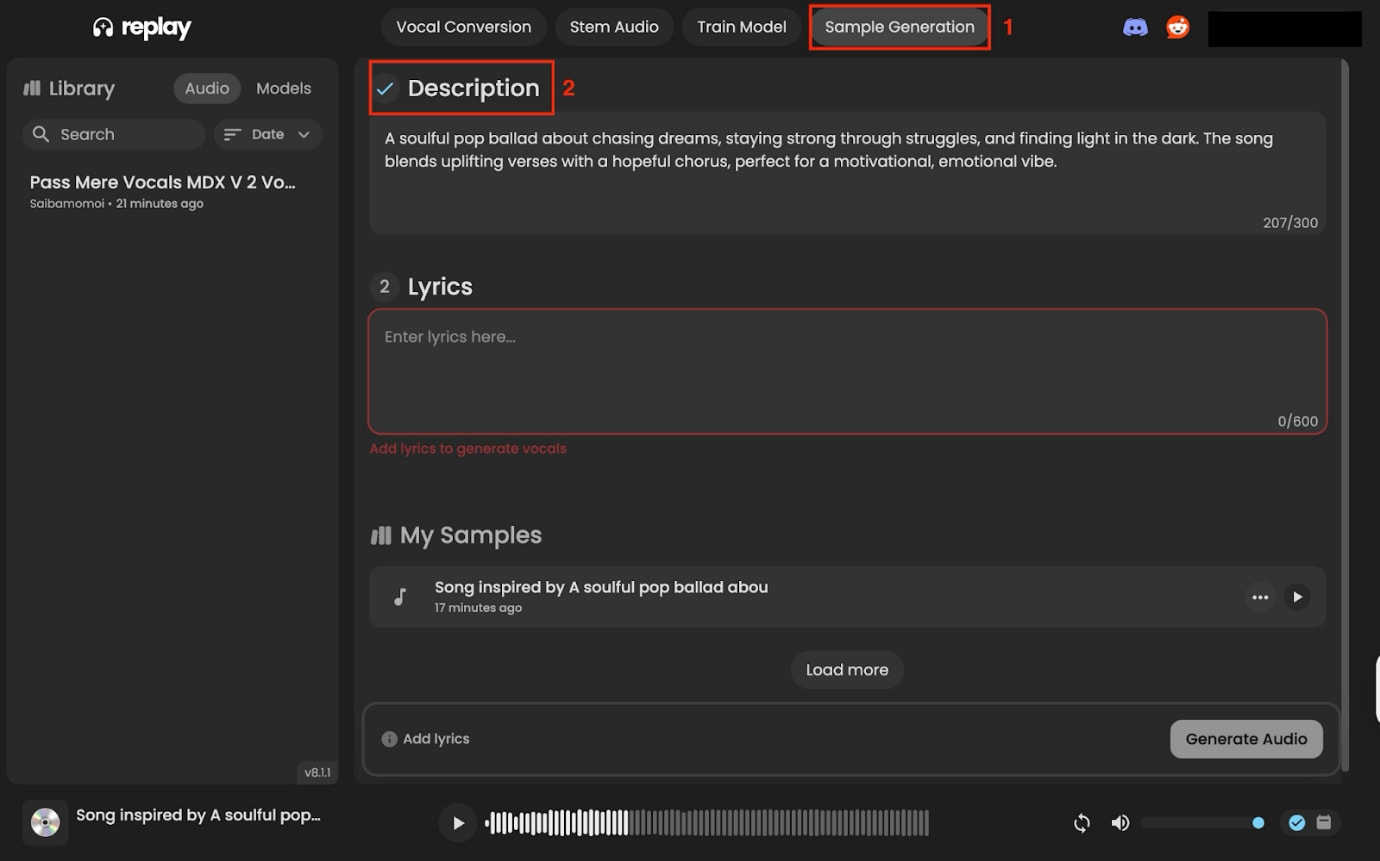
Step 1: Visit the official website on MuseHub and download the app. On the homepage, navigate to "Sample Generation" and write down a short description of the song that explains the type of song in under 300 characters.
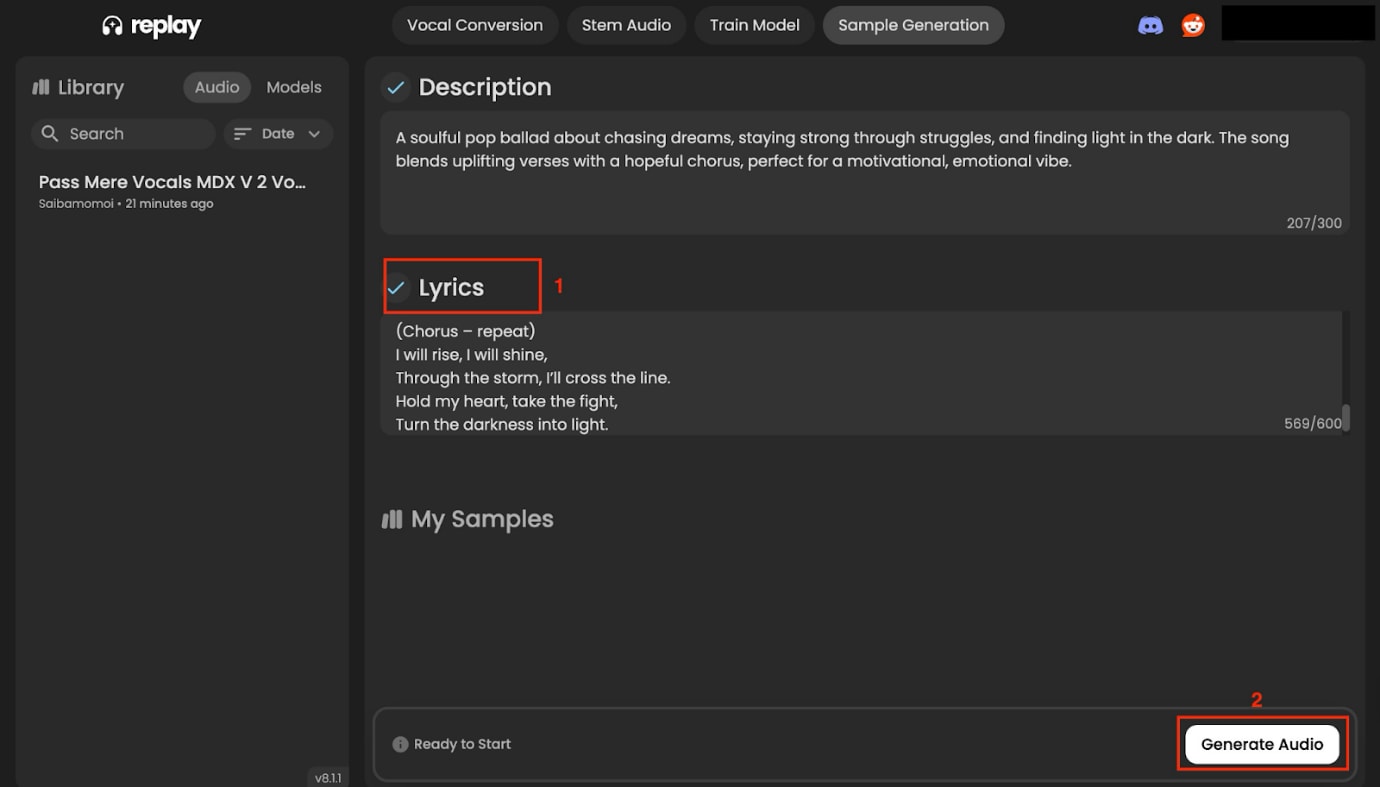
Step 2: Now enter your lyrics under 600 characters and click "Generate Audio."
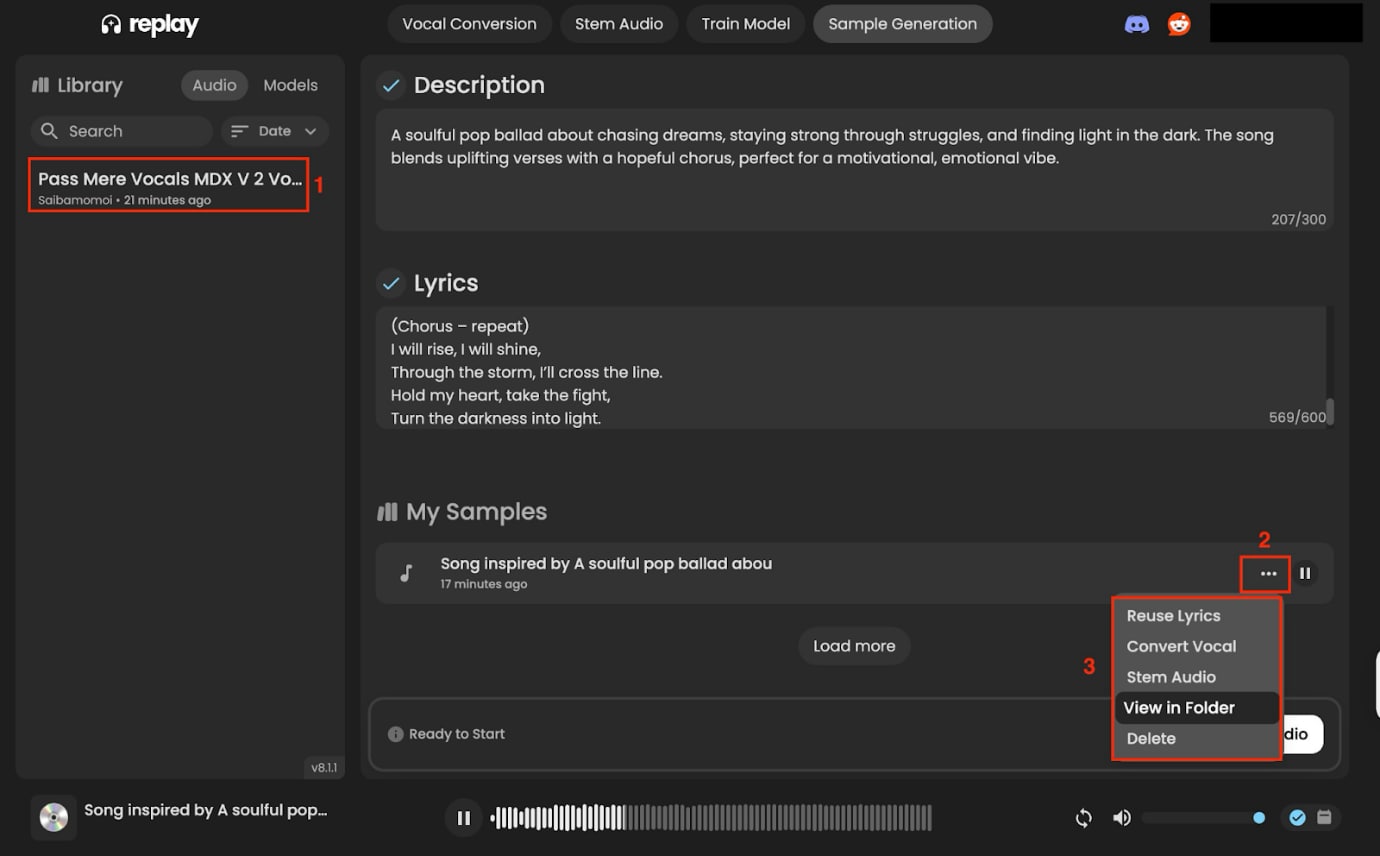
Step 3: After processing for a few minutes, click on the song in the left-hand side menu. Now listen to the audio, click three dots, and click "View in Folder" to save the file in your system.
Note: Replay AI's text-to-speech feature mainly focuses on creating a cover song from scratch and is not suitable if you are looking to convert your meeting notes or class lectures into a professional voice.
Part 3. Replay AI Voice Cloning & Creative Uses
Here is the simple step-by-step guide to use Replay AI voice cloning and later explore its creative use cases:
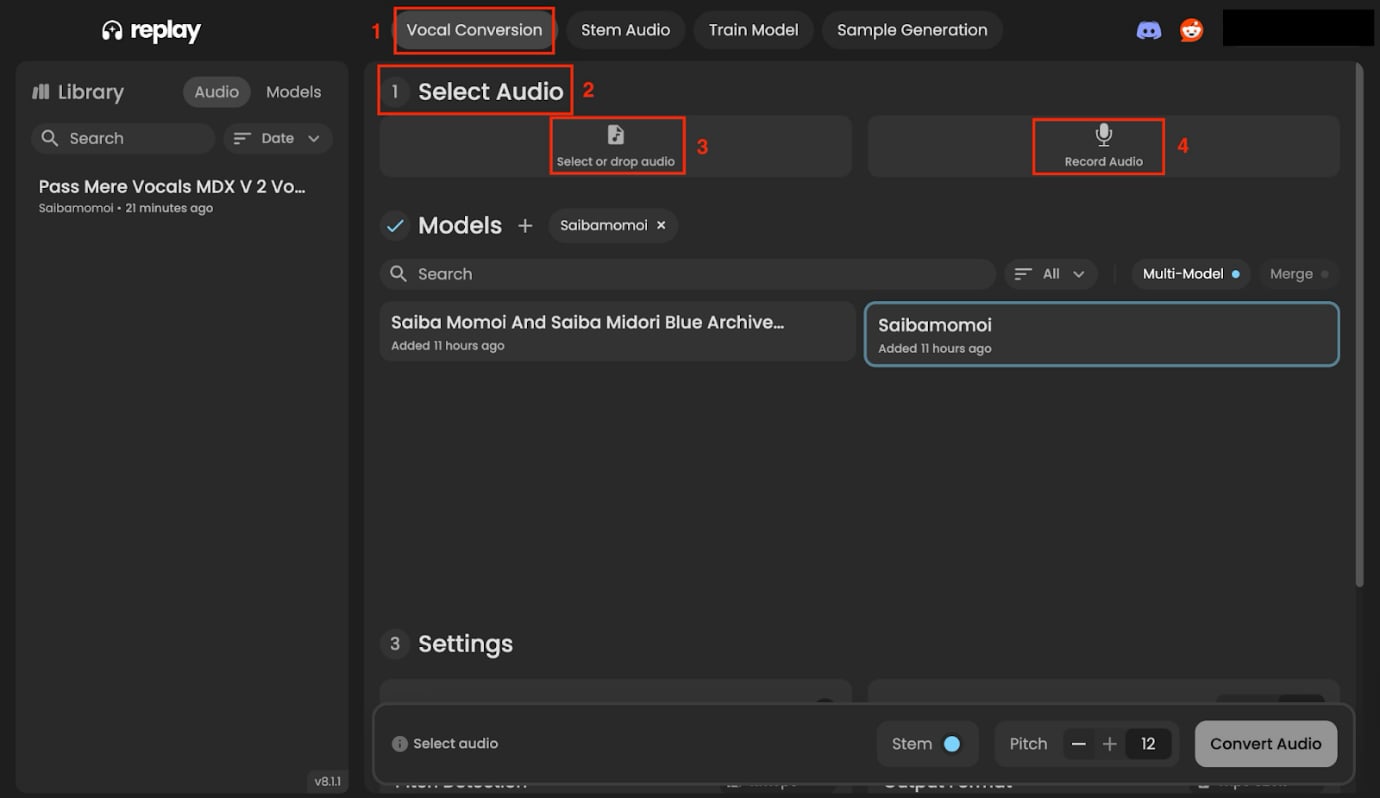
Step 1: On the dashboard, navigate to "Vocal Conversion" and click "Select Audio." Here, you can upload the audio or record it simultaneously using the “Record Audio” option.
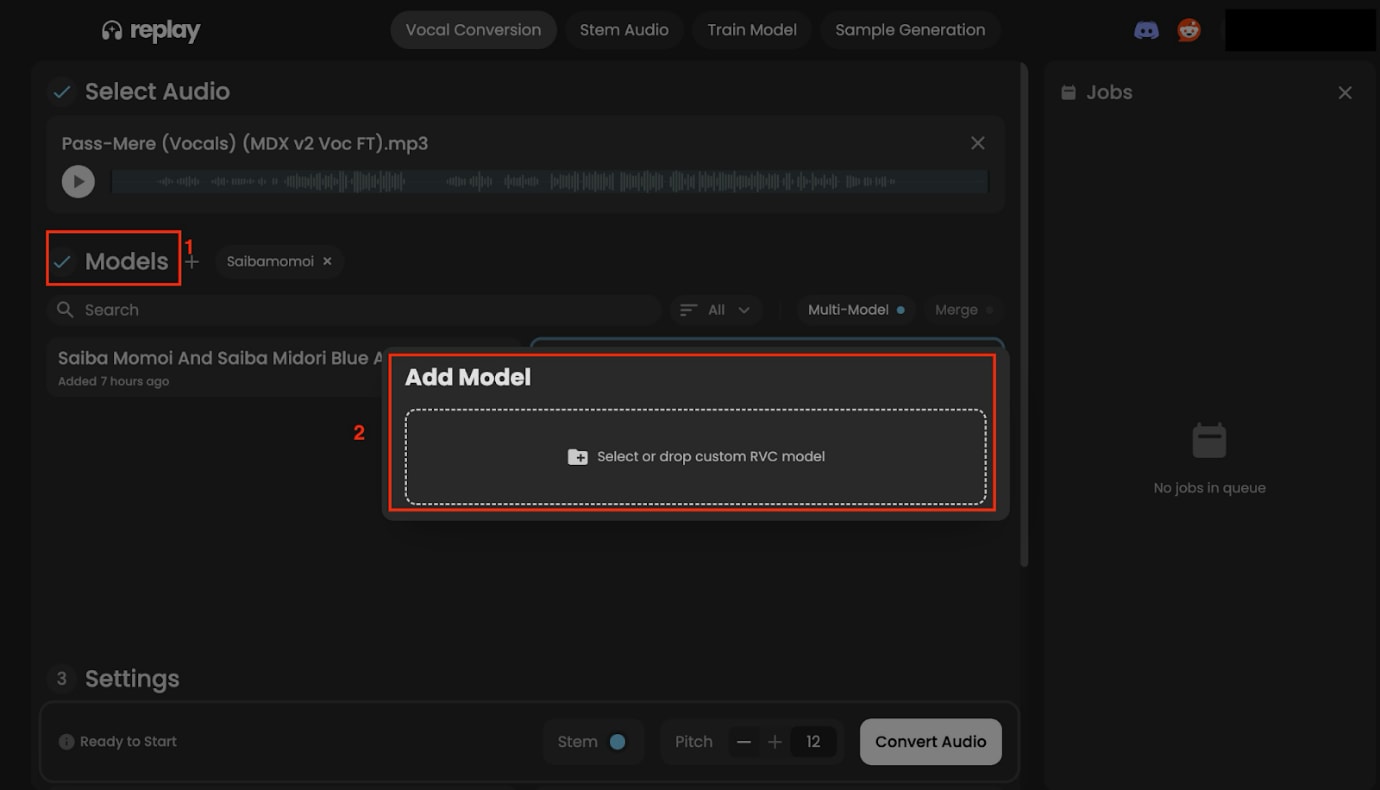
Step 2: After uploading your original audio, tap "Models" and click on "Select or do custom RVC model."
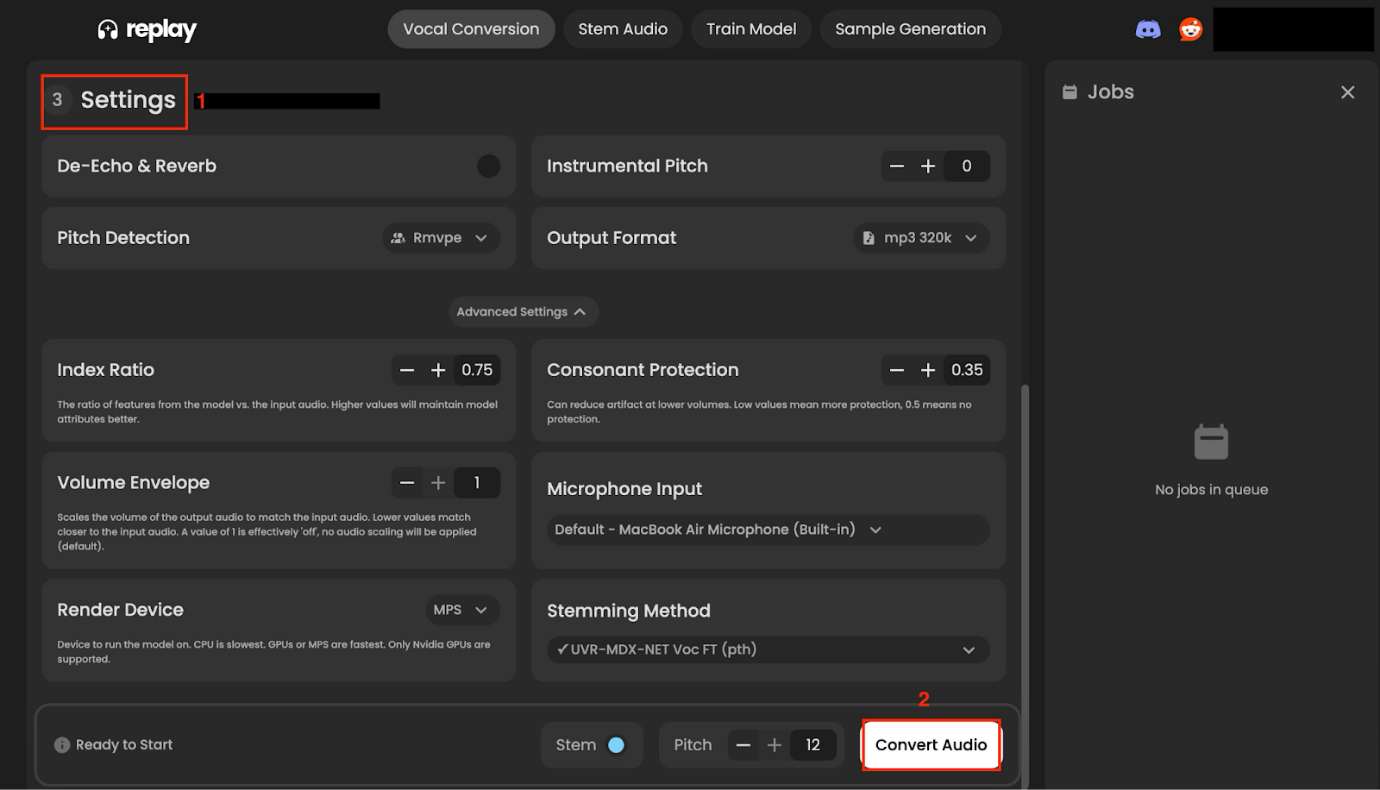
Step 3: Now scroll down a little and click "Settings" to adjust the pitch, echo, and other settings, and click "Convert Audio."
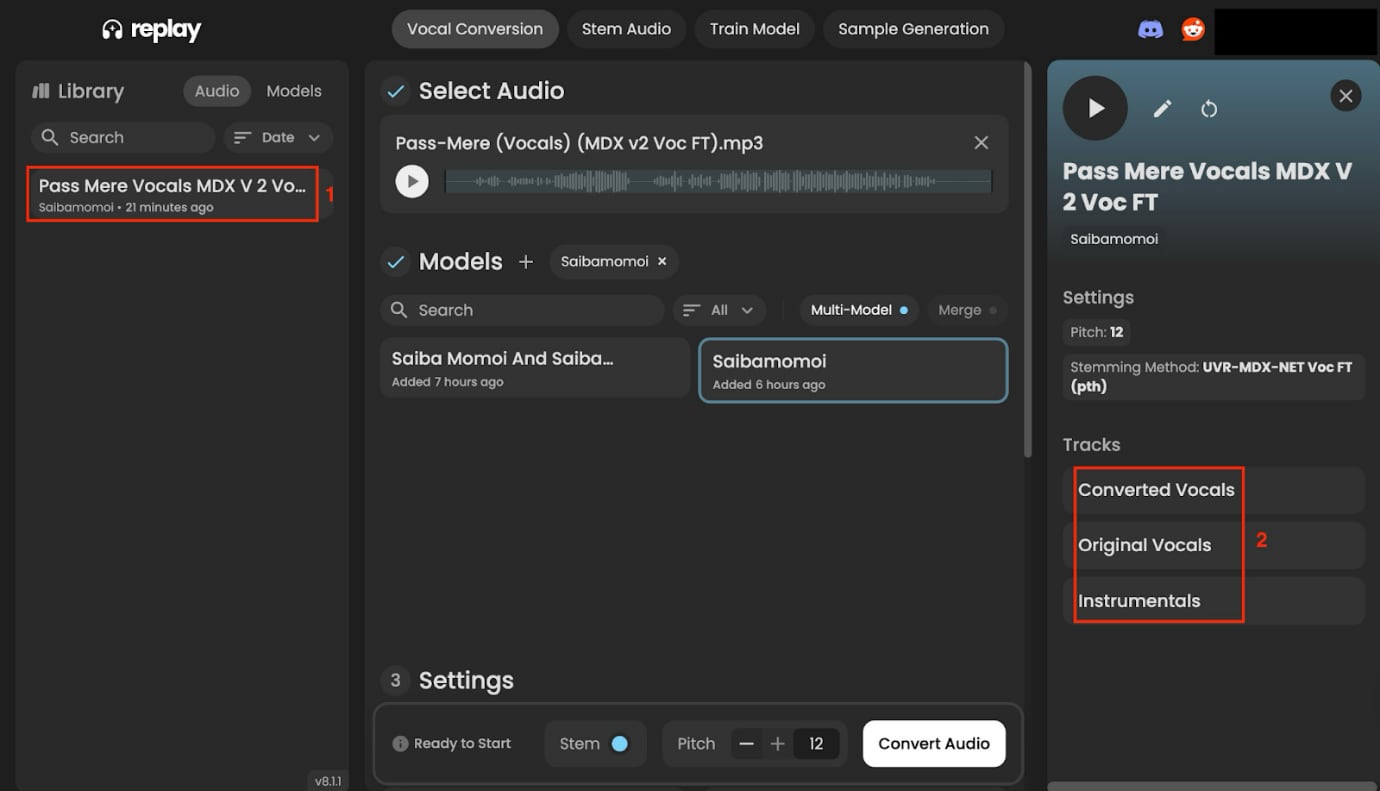
Step 4: Under the Library section on the left-hand side, click the converted song to listen to the final audio. Now click on "Converted Vocals," "Original Vocals," or "Instrumentals" to download.
Use Cases
- YouTube and TikTok Covers: Content creators would love its AI covers. They can take trending songs and have them "sung" by anime characters or famous actors.
- Multi-model Voice Fusion: This is probably the most creative feature. You can actually blend different voice models in one track or switch between them mid-song. Just imagine a duet between Darth Vader and Mickey Mouse: that is the level we are talking about.
- Fan Content and Remixes: Communities have popped up around creating covers with specific characters. There are entire Discord servers dedicated to sharing voice models and collaborating on projects.
Part 4. Strengths and Limitations of Replay AI
Let's be real about what this tool can and can't do for you. Every platform has its sweet spots and deal-breakers, so here's the honest breakdown.
Strengths of Replay AI
The biggest win is obviously that Replay AI is completely free. While other tools charge $20-50 per month. This gives you professional-level voice cloning without spending a dime. For students, hobbyists, or anyone on a tight budget, this is very helpful.
The local processing is another huge plus. Your audio never leaves your computer, which is perfect for businesses or creators working with sensitive content. No worrying about privacy policies or data breaches.
The creative flexibility is insane. Where else can you get access to thousands of voice models ranging from professional newsreaders to cartoon characters? The community keeps adding new models, so there is always something fresh to try.
Limitations of Replay AI
The installation process is a bit of a mess. When you download the app, it takes a long time and gets stuck when asking to download AI components, or the updates break features that were working fine before.
You will need a decent GPU for the Replay AI app to work correctly. If you have an older computer or you are running on integrated graphics, you are probably out of luck.
The app primarily gives output in WAV and MP3 formats; if you need MP4, you need to find another converter tool to meet your requirements.
This tool might feel overwhelming, especially when you need to choose the models from Weights. Beginners may feel stuck on the voice cloning feature.
Part 5. More than Replay AI: Wondershare UniConverter Fits In
Wondershare UniConverter is well-suited with its 13 language support and various human-like voices for both voice cloning and text-to-speech features. Replay AI is a great option if you only want to create remixes and songs, but for global reach and more usage of text-to-speech, UniConverter makes its own place. And its 3-day free trial lets you explore all audio and video features for free. Here are some unique features of UniConverter that make it a comprehensive tool:

All-in-One Multimedia Processing Tool
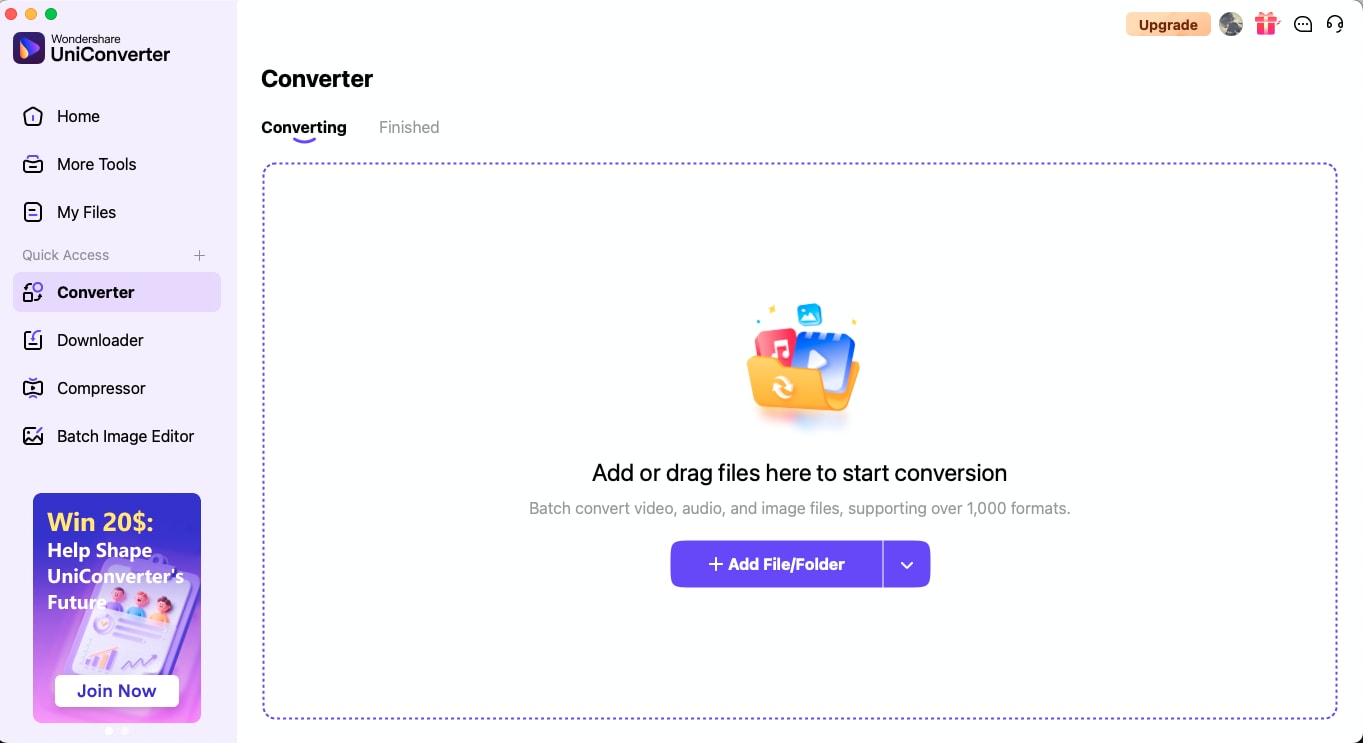
1. Converts Replay outputs (WAV/MP3) into MP3, AAC, MP4: With Wondershare UniConverter, you can convert the image, audio, and video formats in bulk at once. All you need to do is upload multiple files at once and choose the output format. When you get your voice-cloned audio from Replay AI in WAV format, upload it to UniConverter, and choose the desired format, like AAC, MP4, OGG, and more.
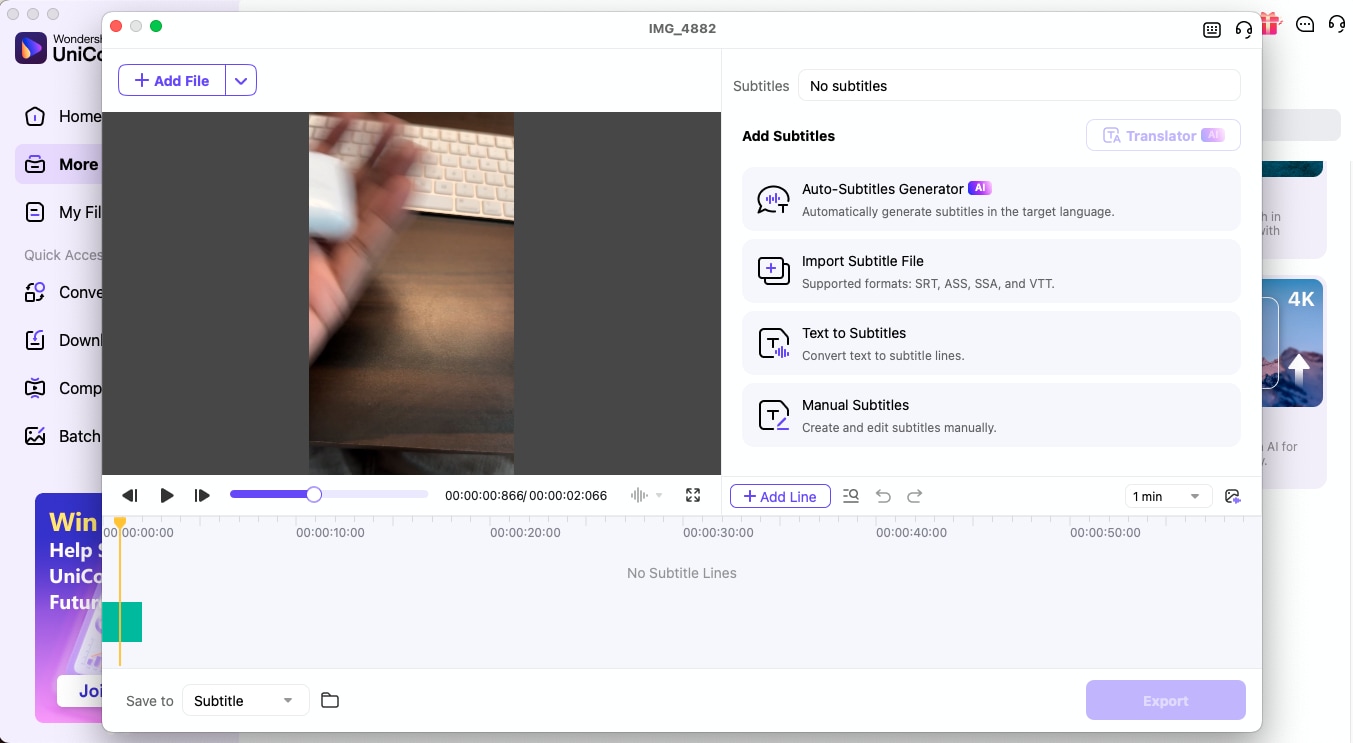
2. Adds Subtitles and Translations: Its subtitle generator lets you add subtitles in multiple languages. You can choose an auto subtitle generator, manual subtitles, and add text to subtitles. What makes it unique is that it also lets you translate the subtitles into 15+ languages.
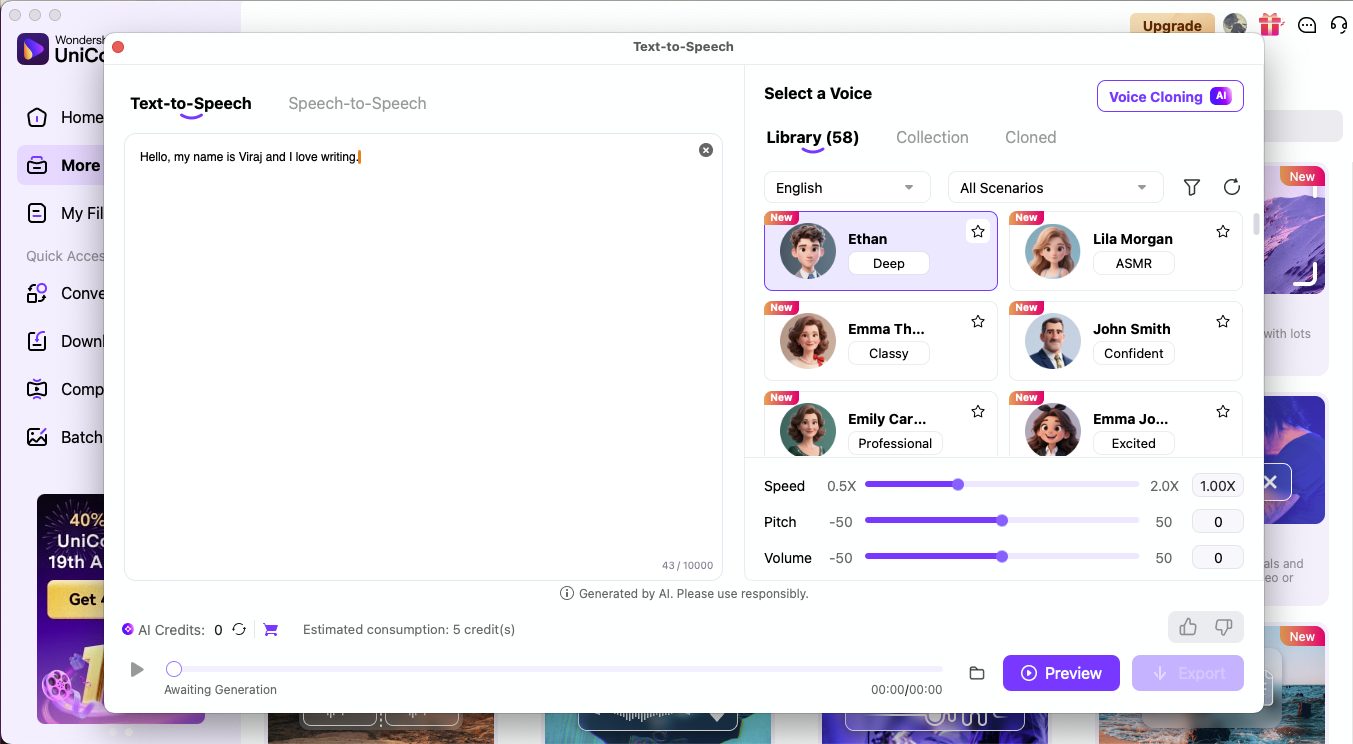
3. Provides Professional-Grade TTS: It supports 13 languages and different voices with different tones that fit every kind of content easily. You can choose a language and voices and adjust speed, pitch, and volume as per the requirement. After completing the process, you can first preview it and then download it.
Conclusion
Replay AI is honestly a game-changer for anyone who wants to play around with voice cloning and text-to-speech without spending a fortune. Yeah, it's got some rough edges with installation issues and hardware requirements, but the creative possibilities are absolutely worth it. The fact that it's completely free and processes everything locally makes it perfect for experimenting and learning.
Wondershare UniConverter fills in all the gaps by providing professional finishing, format conversion, and business-grade features. Together, these tools give you everything you need for both creative experimentation and professional audio production. If you're into content creation, music remixing, or just want to have some fun with AI voices, definitely give Replay a shot!

