

The need to translate Spanish audio to English is a necessity in breaking communication barriers. From meetings to training sessions and broadcasts, accurate audio translation ensures smooth interaction. When using the translation tools, users fail to ensure accuracy and confidence in the translated audio.
This article will guide you on how to translate Spanish audio to English with the best online tools and apps. Among these, you’ll get to know why UniConverter stands out as the professional choice for users.
In this article
- Part 1. How Spanish-to-English Audio Translation Works
- Part 2. How to Translate Spanish Audio to English with Best Tools & Softwares
- Part 3. Comparison Table of Spanish to English Audio Translator (Quick Overview)
- Part 4. Choosing the Right Tool for Your Needs
- FAQs about Spanish to English Audio Translation
Part 1. How Spanish-to-English Audio Translation Works
To start off, first understand how a translation tool functions when translating Spanish to English audio. It transcribes the Spanish language to text and translates it to English text with AI or human translators. There are several tools that produce a natural-sounding translation along with natural voiceovers.
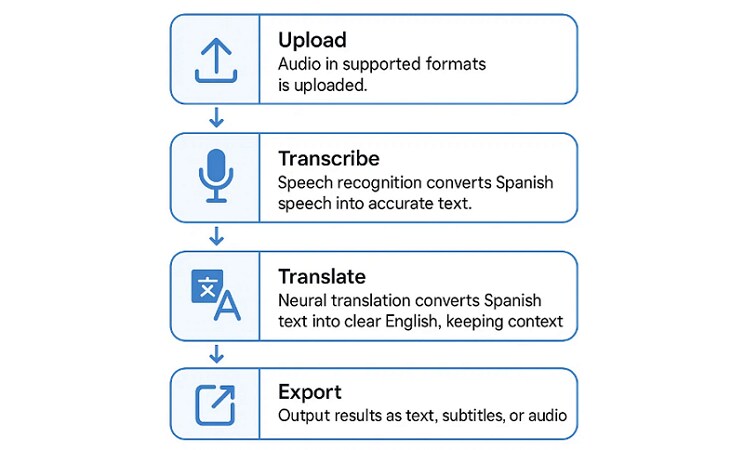
The key behind accurate translation lies in the transcriptions that translation tools use as the input. To understand the importance of these transcriptions, review the highlighted reasons below:
- Keeps the Original Meaning Clear: Accurate transcriptions maintain nuances, idioms, and tone to ensure accurate translation. This transparency ensures that the original meaning and message are not distorted.
- Prevents Missing or Skipped Content: Transcriptions record all spoken information and reduce the chances of missing any. Therefore, the result is complete and unbiased to the original audio material.
- Helps with Research and Checking Terms: It allows users to verify technical terms, names, or industry-specific vocabulary before translating. This ensures translations are accurate and context-relevant.
- Gives Context and Dialogue Accuracy: Transcriptions retain the structure, tone, and context of the conversations to keep the flow of the dialogue and speaker intent. This results in translations that are understandable and according to the original conversation.
- Allows Review for Better Quality: With a clear transcription, it is possible to undergo multiple reviews and edits and then translate it into high-quality. It enables the AI or human translators to cross-verify, polish, and guarantee the end product.
Distinction Between Real-Time Voice Translation and Pre-Recorded Audio Translation
Upon understanding the importance of Spanish-to-English translation by voice, find out how real-time voices differ from pre-recorded ones:
| Dimension | Real-Time Translation | Pre-Recorded Translation |
| Processing Speed | Sub-second response (<300ms-1s) | 2-5x faster than real-time for batch processing |
| Latency Requirements | Ultra-low latency (<1-3 seconds end-to-end) | No real-time constraints |
| Accuracy Level | 85-95% depending on conditions | 95-99%+ with human verification |
| Context Analysis | Limited to partial segments | Full documents/conversation context |
| Error Correction | Minimal real-time correction | Comprehensive post-processing available |
Part 2. How to Translate Spanish Audio to English with Best Tools & Softwares
There are many apps, software, and online tools that help translate audio to another language. To translate Spanish voicemail to English, let us go through this section to find the best options.
1. Desktop Professional Software for Audio Translation from Spanish to English (High Accuracy & Privacy)
When working on a business project with sensitive audio, it is not preferred to go with online tools. Here, desktop solutions turn out to be the best option to translate Spanish to English audio:
1. Wondershare UniConverter (Recommended)
Best For: Professionals in media and entertainment who work with subtitles and podcasts.
UniConverter stands out for its innovation in accurate translation and conversion. It features an AI Subtitle Editor with support for 134 languages. While recognizing Spanish dialects with precision, it translates it to English audio and generates accurate subtitles. It shows consistency with batch processing, which makes it a convenient option for large projects.
Not only this, UniConverter converts 25+ video and 16+ audio formats and operates 4K and 8K content. It provides high-quality multimedia with trimming, cropping, shot removal, and effects.

Best Video/Audio Translator
Guide to Translate Spanish Sound to English With UniConverter
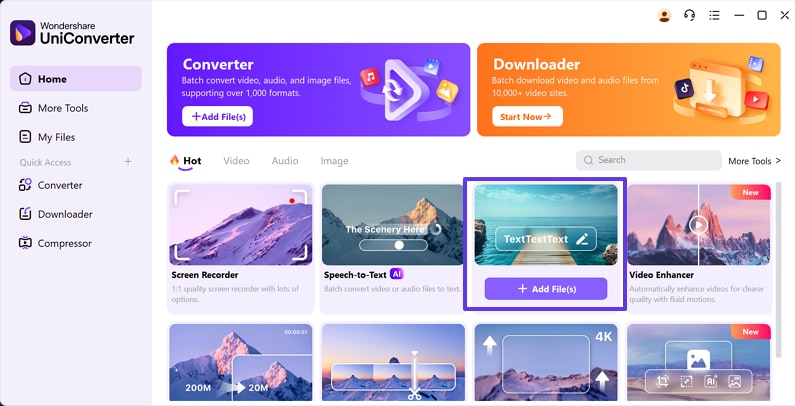
Step 1. Launch the Tool and Choose Subtitle Editor
With the tool access, choose “Subtitle Editor” and click on “+ Add File” to upload your file for subtitles.
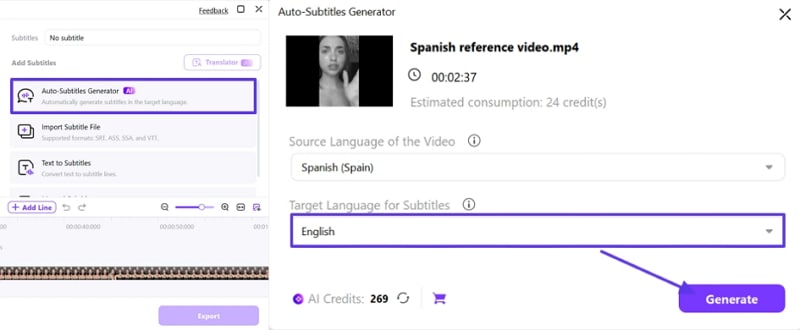
Step 2. Select Language to Generate Subtitles
Go for “Auto Subtitles Generator” for automatic generation of subtitles. With your “Target Language” chosen, hit the “Generate” button to initiate the process.
Step 3. Preview and Export the File to the Device
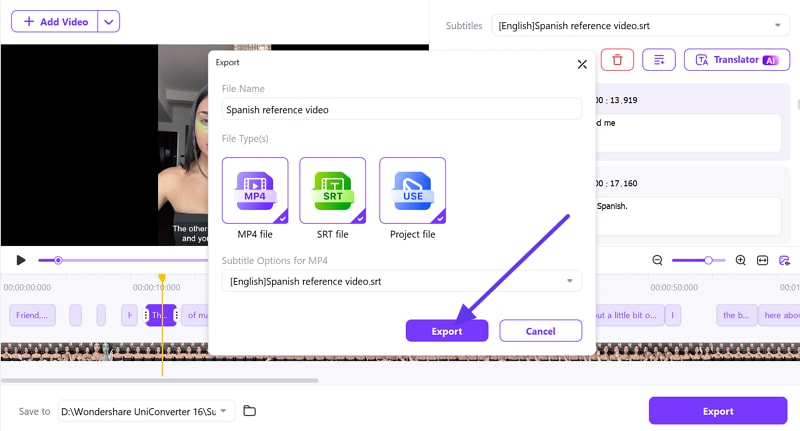
First preview the final result, if it is satisfactory, then click on the “Export” button for the pop-up menu. Select “File Type” and again choose “Export” to download it to your device.
2. Descript
Best For: Teachers and e-learning creators handling course audios.
This is a Spanish audio translator that simplifies audio and video creation through text-based editing. It offers automatic transcription, captioning, translation, voice cloning, and screen recording. With tools like Studio Sound and team collaboration, it makes media production faster and accessible for all creators. So, consider the following steps if you want to perform your task with Descript:
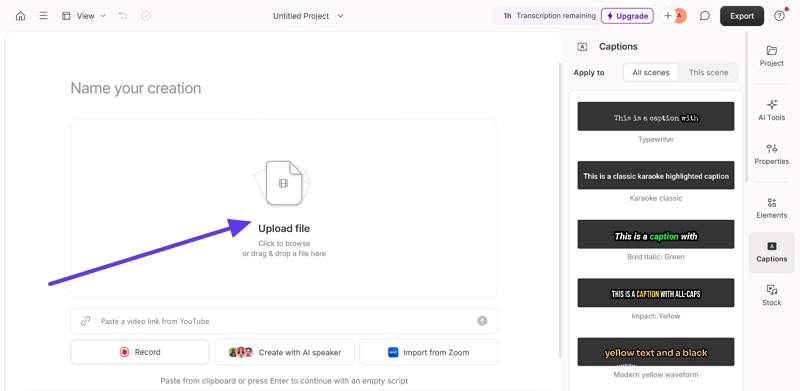
Step 1. First, open the tool and click on “Upload File” to edit your file by selecting the “Caption” feature from the right side panel.
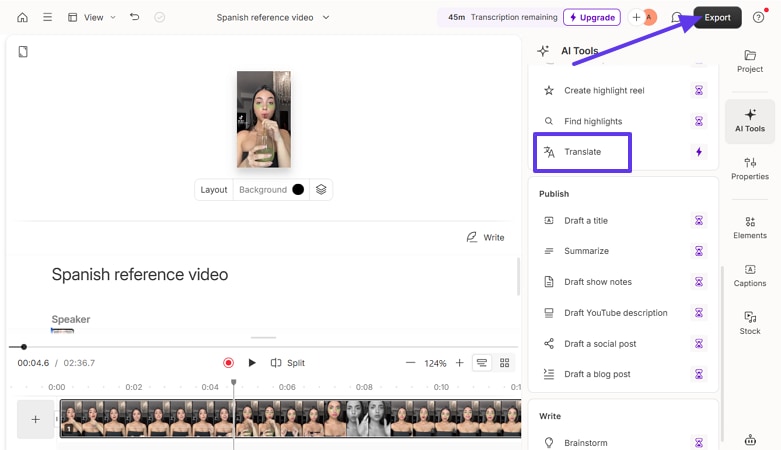
Step 2. Here, choose the “AI Tools” option from the side panel and go to the “Translate” option. Select the “English” language, click “Generate,” and then click “Export” to download the results to your device.
3. Murf AI
Best For: Creators producing reels and social media content.
Murf AI is a cloud-based platform that helps creators generate professional voiceovers. It supports dubbing, translation, and even tools to translate spoken Spanish. Users can customize pitch, tone, and emotion, which makes the project engaging and multilingual in minutes. Its seamless integration with tools like Canva and Articulate ensures faster workflow. Getting started with Murf AI is very simple; just follow these steps to create your project.
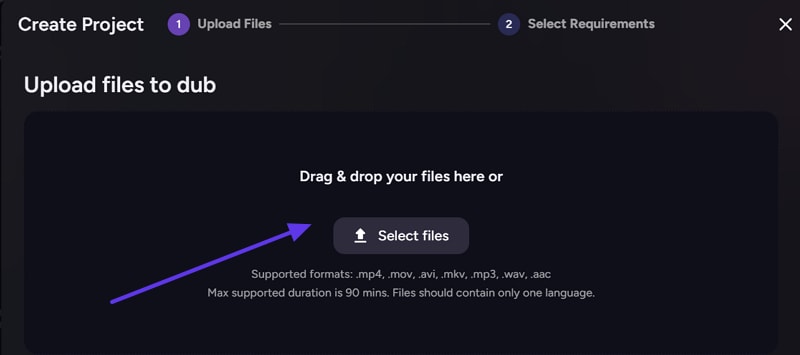
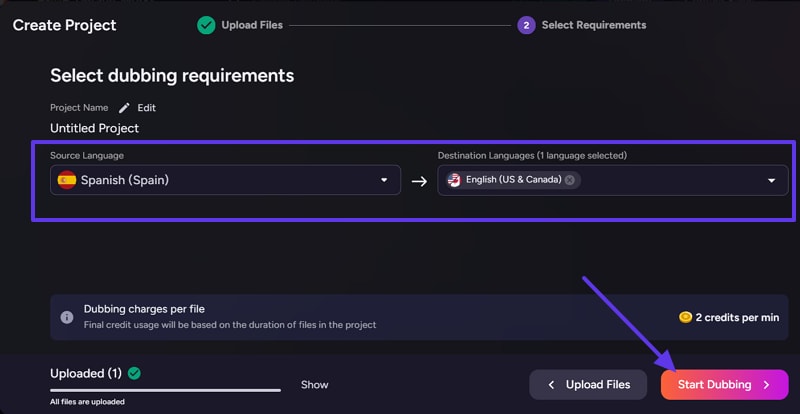
Step 1. Access the tool, select “AI Dubbing,” and then click “Select File” to upload your Spanish audio.
Step 2. Next, choose the “Source Language” and “Target Language,” then click “Start Dubbing” to translate your audio.
2. Mobile Apps for Spanish to English Translation by Voice (Casual Use & Travel)
For instant execution, mobile apps serve best in translating audio to another language. Provided next are some of the most accessible options Android and iOS users can look into.
Tool 1. Google Translate App (Android | iOS)
Best For: People who require immediate translation of the signs.
It is a free Spanish voice translator app that supports over 130 languages worldwide. Driven by neural machine translation, Google Translate provides precise outputs for various inputs. This can also save your favorite translations for quick access. If you want to translate your Spanish-language audios into English, then consider the steps below:
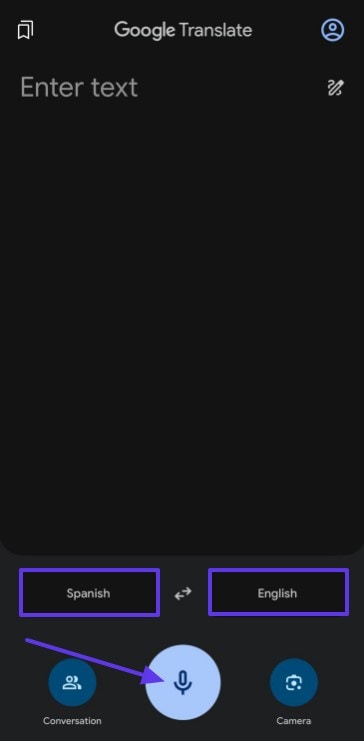
Step 1. To begin, select “Source Language” and “Target Language,” locate the “Microphone” icon to access the “Speak Now” option.
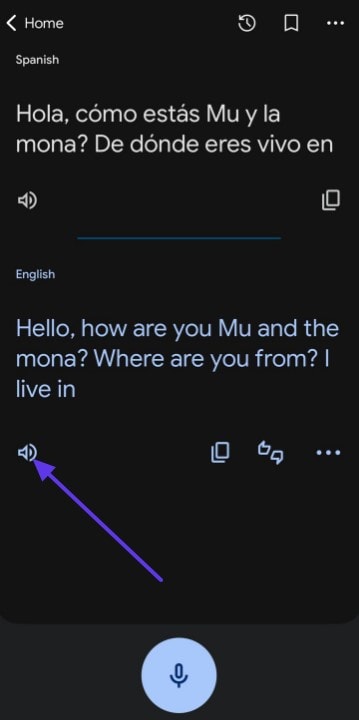
Step 2. Call out your Spanish phrase, and the app will transcribe your speech. Read the English translation displayed on screen and tap the “Speaker” icon to hear it.
Tool 2. iTranslate Voice (Android)
Best For: Pronunciation practice and conversational skill development.
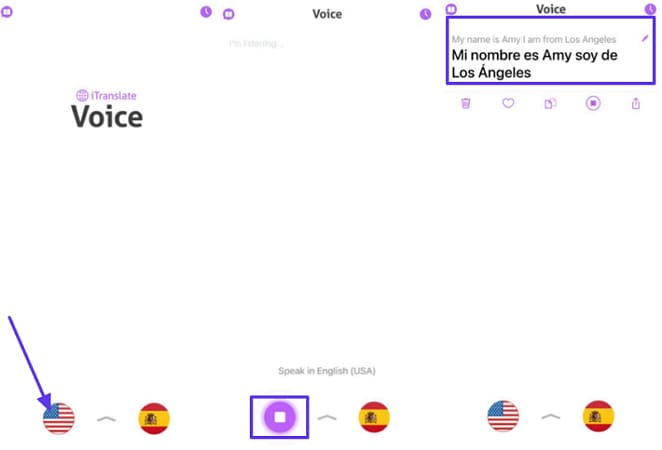
Unlike other applications, iTranslate Voice allows you to choose male or female voices. Furthermore, conversations are automatically transcribed, which can be exported, copied, or shared. The app features voice translation in 41 different languages, as shown in the guide to translate voice Spanish:
Instructions. Choose the appropriate language for translation using the "Flag" icon at the bottom. Following this, press the "Speaker" icon for speaking or receiving the English translation.
3. Online Spanish to English Audio Converter (Creators & Subtitles)
Apps provide a quick remedy but require installation, which calls for an internet connection. To save the hassle, head to the following online solutions to figure out using the top Spanish to English audio converters:
1. Kapwing
Best For: Agencies and remote creators who require collaborative editing.
Kapwing creates translations in multiple languages, which can be shared across different platforms. It allows the generation of auto-subtitles through AI, with the conversion of spoken content to text. After generating English translations below, you can adjust parameters like font adjustments, background changes, and more:
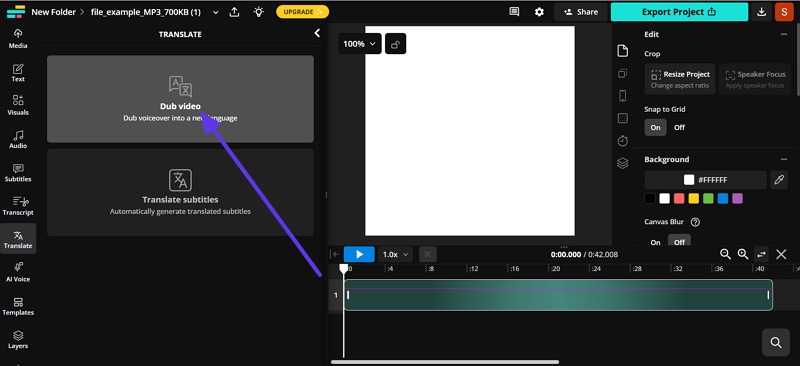
Step 1. To upload your audio, click the “Choose a Video” option, then select the “Dub Video” option on the new interface.
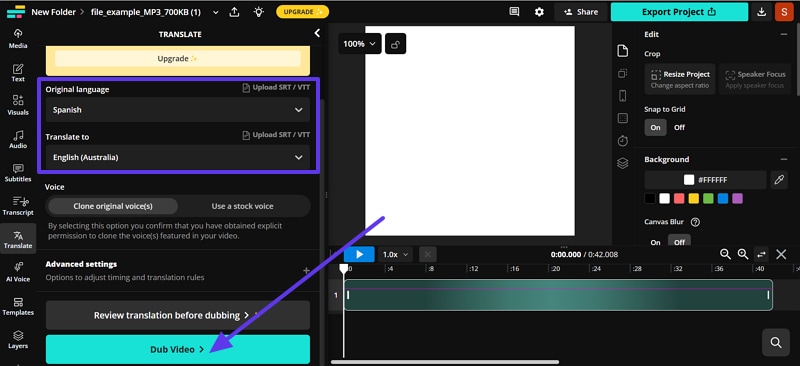
Step 2. Choose your source and target languages, along with other settings, before pressing “Dub Video.” With the audio translated to English, choose “Export Project” to save your outcomes.
2. VEED.io
Best For: Users seeking a single platform for video editing and translation.
Offering you the facility to translate audio in 125+ languages with 99.9% accuracy, the tool is easy to use. This Spanish audio translator generates and translates subtitles that can be exported as SRT, TXT, or VTT. Furthermore, VEED ensures natural voice cloning for maintaining authenticity, as explored in this guide:
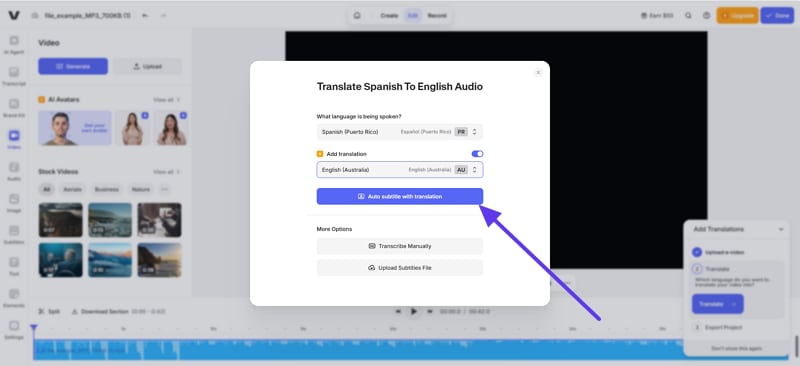
Step 1. Upload your audio, choose the “Target” language, and click “Audio Subtitle with Translation.”
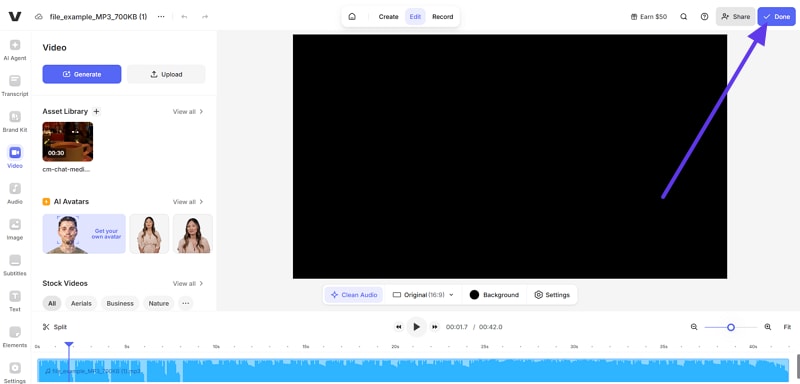
Step 2. When the audio file is translated to English, pick the "Done" button or opt for the "Share' button to export it.
3. HappyScribe
Best For: Legal, medical, and academic professionals who require 99% accuracy.
This online tool is referred to as a professional transcription and subtitling site. It combines the power of AI and human correctness with support for 120+ languages. Featuring such hybrid services, creators, educators, and professionals consider using this. They can transcribe, add subtitles, or even translate in high-quality, as guided below:
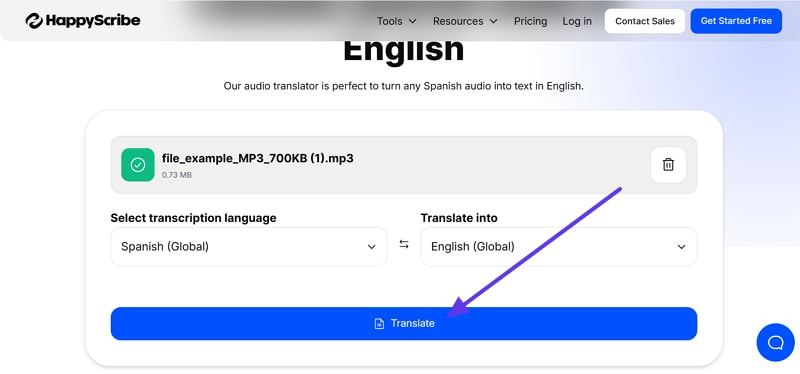
Step 1. After uploading the audio, confirm the languages and choose “Translate” to translate spoken Spanish.
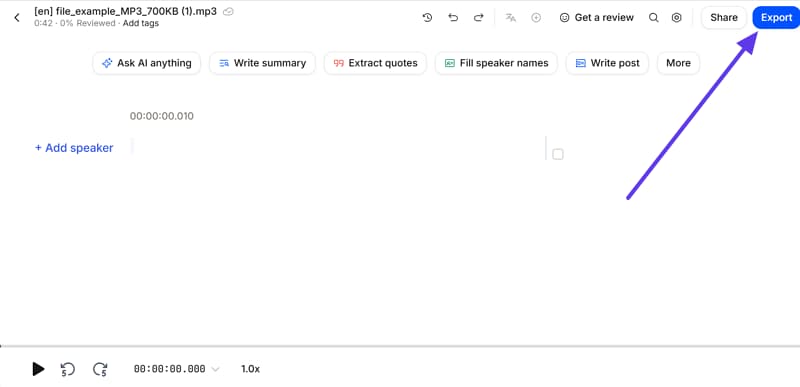
Step 2. As the tool offers you English-translated audio, hit the "Export" button to save it to your device.
Part 3. Comparison Table of Spanish to English Audio Translator (Quick Overview)
The list has been exhaustive, making the selection of the best translator difficult. For easier selections, look into this comparison of the best Spanish audio translator tools:
| Tool/Software | Platform | Best Use Case | Pros | Cons |
| Google Translate App | Mobile/Web | Every day use & travel; quick sign, menu, and conversation translation | Free, instant text/voice/image translation; offline packs available; constant AI updates | Literal translations, lacking cultural nuances, struggle with accents and noisy environments |
| Wondershare Uniconverter | Deskstop | Professional in media/ entertainment handling subtitles, documentaries, and podcasts | Supports 134 languages, including Spanish dialects, with features such as batch processing | Basic AI thumbnail generator; requires paid license |
| iTranslate Voice | Mobile | Pronunciation practice & real-time conversational skill development | Specialized for spoken translation; 250+ predefined phrases; offline use for travelers | Limited to 40+ languages, ads are in the free version. Lacks camera translation |
| Kapwing | Online | Creators needing subtitles/dubbing with collaborative editing | 180+ AI voices; supports SRT, VTT, TXT export; team collaboration tools | Requires a strong internet connection free plan limits exports to 5 minutes with a watermark |
| VEED.IO | Online | Quick video editing + subtitle generation for social content | Combines editing, effects, translation; multiple subtitle formats; HD/4K export | Limited language support; lacks regional dialects; weak customer support |
| HappyScribe | Online | Professionals (legal, academic, medical) requiring 99% accurate transcription | AI + human accuracy; 120+ languages; enterprise-grade security | Only 10 minutes free; human transcription is very expensive ($120 per hr) |
| Descript | Deskstop | Teachers & e-learning creators handling captions, translation, and screen recording | Text-based editing; automatic transcription/translation; Studio Sound; team workflow | Performance lags on long projects; voice cloning may sound unnatural in long narrations. |
| Murf AI | Desktop/Cloud | Creators producing voiceovers for reels, explainers, and social media content | 200+ voices in 20+ languages; dubbing, translation. Canva integration | Free plan limited; export/sync issues in larger projects |
Part 4. Choosing the Right Tool for Your Needs
When using the mentioned tools for Spanish to English audio translation, review the given points and determine which tool suits your needs:
| Use Case | Description | Features | Ideal For |
| Casual, On-the-Go Use | Mobile apps as Spanish audio translator, anywhere, with no setup. | Convenient User-friendly Accessible | Travel, conversations, learning |
| Content Creators | Online platforms to translate Spanish audio into English for content creation. | Fast AI-powered transcription.Translation. Subtitle generation | Social media content creators |
| Business, Education, and Professional Projects | All-in-one solution, like UniConverter, for precise, high-quality translations. | Secure. Supports batch processing.AI voiceovers. Subtitle generation. Multi-format exports. | Business, educational, corporate work |
Conclusion
To sum up, audio translation from Spanish to English helps people connect and understand better worldwide. It makes learning, traveling, and business easier for anyone who needs support. You can use mobile apps for quick help or subtitles for online videos. Professional tools provide accuracy for important projects in schools, companies, or global work. Wondershare UniConverter stands out as a trusted choice with reliable translations.

