

Football fans often choose football match highlights when they do not have time to watch a full game live. Many users also want to download football match highlights for offline viewing, so they can replay key moments anytime. The safest way is to start with official or licensed sources, while tools like UniConverter can help make downloading football highlights more convenient.
Table of Contents
Part 1:What Are Football Match Highlights?
Football match highlights are short video recaps that show the most important moments of a game. Instead of watching the full 90 minutes, fans can quickly catch up on goals, assists, saves, penalties, red cards, and other decisive moments in just a few minutes.
In most cases, football highlights come in two main forms. Short highlights usually focus only on the biggest moments and final result. Extended highlights include more buildup play, missed chances, tactical changes, and key sequences that help viewers understand how the match developed.
This is why highlights are so popular. They save time, make it easier to follow multiple matches, and work well for fans who mainly watch on phones, tablets, or laptops. For many users, football highlights are the most practical way to stay updated during busy league weekends, international tournaments, or packed match schedules.
They are also highly searchable because viewers do not just want to stream them once. Many people want to download football match highlights so they can save memorable clips, rewatch major moments, or watch offline without buffering.

Part 2:Where to Watch Football Match Highlights
If you want reliable football highlights, official sources should always come first. These platforms are usually safer, clearer, and more stable than unknown third-party sites. They are also more likely to provide accurate match titles, better video quality, and legal viewing access.
Common official sources include:
- Official broadcaster platforms
- League and tournament websites
- Official YouTube channels
- Club websites and apps
- Licensed sports streaming apps
Broadcasters often upload football match highlights soon after the final whistle. League and tournament platforms may also publish official recap videos, especially for major competitions. Club media channels are another useful source, particularly for supporters who want match-specific content from their favorite teams.
Official YouTube channels can also be valuable because they often provide easy access to football highlights in a familiar format. In some cases, these channels may be the fastest place to find short recap clips, while broadcaster apps may offer longer or more polished versions.
When choosing where to watch football match highlights, it helps to check:
- whether the source is official or licensed
- whether the clip is short or extended
- whether the platform works on your device
- whether offline viewing or download options are available
- whether the video quality is good enough for replay
If your goal is not only to watch but also to download football match highlights, starting with the right platform matters even more. Some official services already offer built-in offline viewing, which is usually the safest option.

Part 3:How to Download Football Match Highlights
For many users, streaming alone is not enough. They want to download football match highlights for offline use, repeated viewing, or personal organization. The best way to do that depends on the platform, because some services allow offline viewing while others only support online playback.
The first step is always to check whether the official platform already provides a download or offline feature. If it does, that is usually the safest and easiest method.
Here are the most practical ways to download football highlights.
Use Official Offline Viewing Features
Some sports apps and licensed platforms let users save football highlights for offline playback. This may not always create a permanent file, but it still gives users the ability to watch later without needing a live internet connection.
Before using this feature, check:
- whether it is available in your region
- whether it works on mobile, desktop, or both
- whether saved clips expire after a certain time
- whether quality settings can be adjusted
For many users, this is enough. If the goal is simply to watch football match highlights later during travel or when the network is unstable, official offline access is usually the best route.
Use Authorized Download Options When Available
Some official sites or apps may provide a download button or a clear save option. If that feature exists, it is better to use it than to depend on random third-party sites. Authorized downloads are more likely to give you:
- better file quality
- safer access
- fewer playback issues
- correct labeling
- more reliable results
Decide Between Desktop and Mobile
Desktop downloading is often better for users who want to store multiple clips, sort files by team or competition, or build a longer-term football highlights archive. Mobile downloading is more convenient for casual offline viewing and quick replay.
Desktop is more useful when you want to:
- keep multiple highlight clips
- organize files by date, match, or tournament
- save videos for longer-term access
- adjust or convert files later
- Mobile is better when you want to:
- watch football highlights quickly on the go
- save space-efficient clips for travel
- use app-based offline playback
- keep the process simple
Choose the Right Quality Before Saving
Not every highlight clip needs the highest possible resolution. A large file may not be necessary if you mostly watch on a phone. On the other hand, if you want clearer viewing on a laptop or TV, a higher resolution may be worth choosing.
In most cases:
- HD is enough for everyday viewing
- Full HD gives a better balance of quality and file size
- 4K is best for larger screens but uses much more storage
For short football highlights, a well-optimized HD or Full HD file is usually the most practical choice.

Part 4:Is It Legal to Download Football Match Highlights?
This is an important question because many users search for download football match highlights without fully considering the source. Just because a clip is visible online does not always mean it is free to download or reuse without restrictions.
There is a major difference between:
downloading from an official or licensed platform that supports offline access
downloading from an unofficial site that republishes copyrighted sports clips without permission
Official platforms are generally the safer option because they are more likely to hold the rights to distribute the video. Unofficial sites may offer convenience, but they often create legal, quality, and security risks.
Football highlights are usually protected content. Rights may involve:
- broadcast footage
- commentary
- editing and recap packaging
- league or tournament branding
- distribution ownership
This is why official platforms remain the best recommendation. They reduce uncertainty and provide a more trustworthy user experience.
Unofficial sites can also create practical problems, such as:
- fake download buttons
- pop-up ads
- incomplete clips
- mislabeled videos
- poor image quality
- malware or software risk
So if your goal is to download football match highlights safely, licensed platforms and official workflows are still the smartest place to start.
Part 5:Best Format and Quality for Saved Football Highlights
Once you save a clip, format becomes important. The best downloaded football highlight is one that plays smoothly, looks clear enough, and does not take up unnecessary storage space.
MP4 Is the Best Choice for Most Users
For most devices, MP4 is the most practical format. It is widely compatible, easy to transfer, and works well across desktops, laptops, phones, tablets, and smart TVs.
MP4 is a strong choice because it offers:
- broad device support
- smooth playback
- easy storage and transfer
- compatibility with most video tools
If users download football match highlights regularly, MP4 is usually the safest standard format.
HD vs 4K for Football Highlights
Some users want the highest possible quality, but that is not always necessary. For most highlight clips, HD is enough. It looks clear on phones and laptops and keeps file sizes manageable.
Choose:
- HD for normal offline viewing
- Full HD for better detail without excessive storage use
- 4K for premium viewing on larger screens
If you are saving only a few high-value clips, 4K may make sense. But for regular football highlights libraries, HD or Full HD is usually more practical.
Think About File Size
Even short football highlights can become large if saved in higher quality. That matters if you download several clips every week. In most cases, the best choice is the one that balances image quality and storage efficiency.
| Feature | HD (720p) | Full HD (1080p) | 4K (2160p) |
|---|---|---|---|
| Best for | Phone / tablet viewing | Laptop / general use | Large screen / TV |
| File size | Small | Medium | Large |
| Visual clarity | Good for small screens | Sharp and balanced | Highest detail |
| Storage efficiency | ★★★★★ | ★★★★ | ★★ |
| Best use case | Everyday offline replay | Regular highlight archive | High-value clips / premium setup |
| Recommended format | MP4 | MP4 | MP4 |

Part 6:How UniConverter Helps You Download Football Match Highlights
In this topic, UniConverter works best as a download-focused tool. Instead of positioning it mainly as a video editor, it is more natural to present it as a practical solution for users who want to download football match highlights and keep them available offline.
This makes sense because many users do not just want to watch clips once in a browser. They want to save football highlights to a computer, rewatch them later, and build a small collection of memorable match moments.
The main value of UniConverter here is simple:
- download football highlight videos more conveniently
- keep clips available for offline viewing
- save videos locally for easier replay
- organize highlight files more flexibly
After downloading, extra features like conversion, compression, and trimming can still be mentioned, but they should remain secondary to the main download use case.
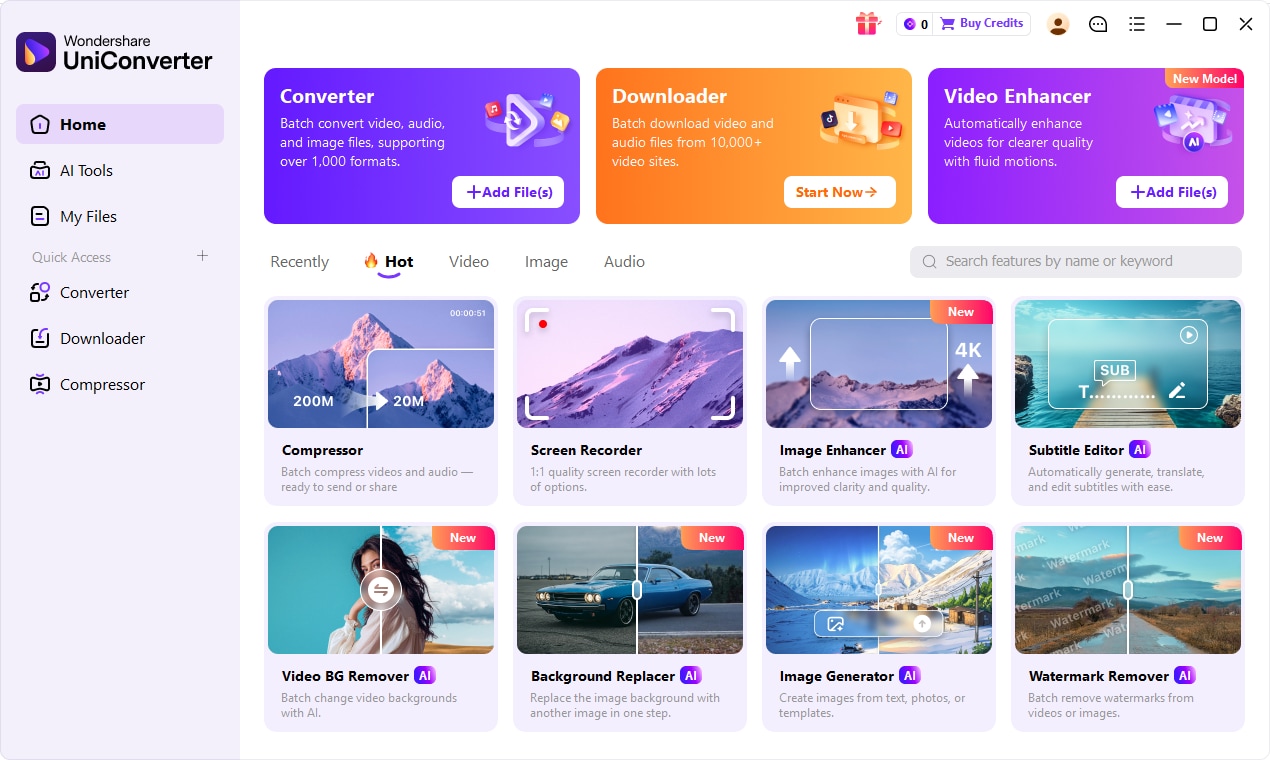

All-in-One Multimedia Processing Tool

How to Download Football Match Highlights With UniConverter
If readers want a simple tutorial, this section can directly show how UniConverter fits into the process.
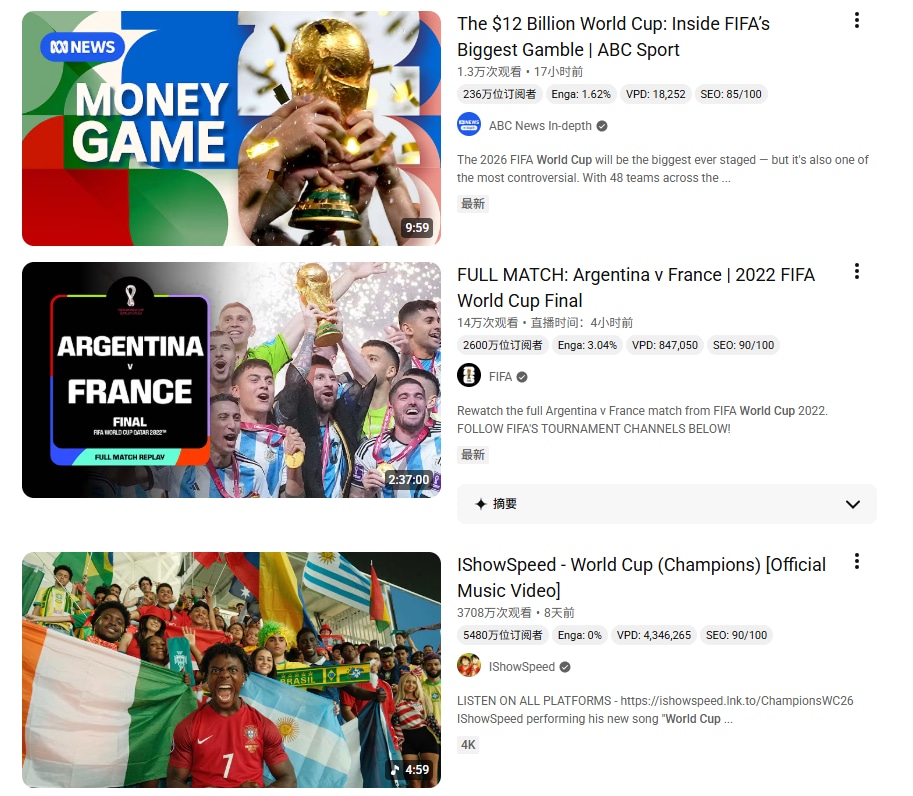
Step 1. Find the Football Highlight Video You Want to Save
First, open the official platform, broadcaster page, sports video channel, or other licensed source where the football highlight clip is available. Then copy the video link.
This is the best starting point because official sources are generally more reliable and safer than unknown third-party sites.
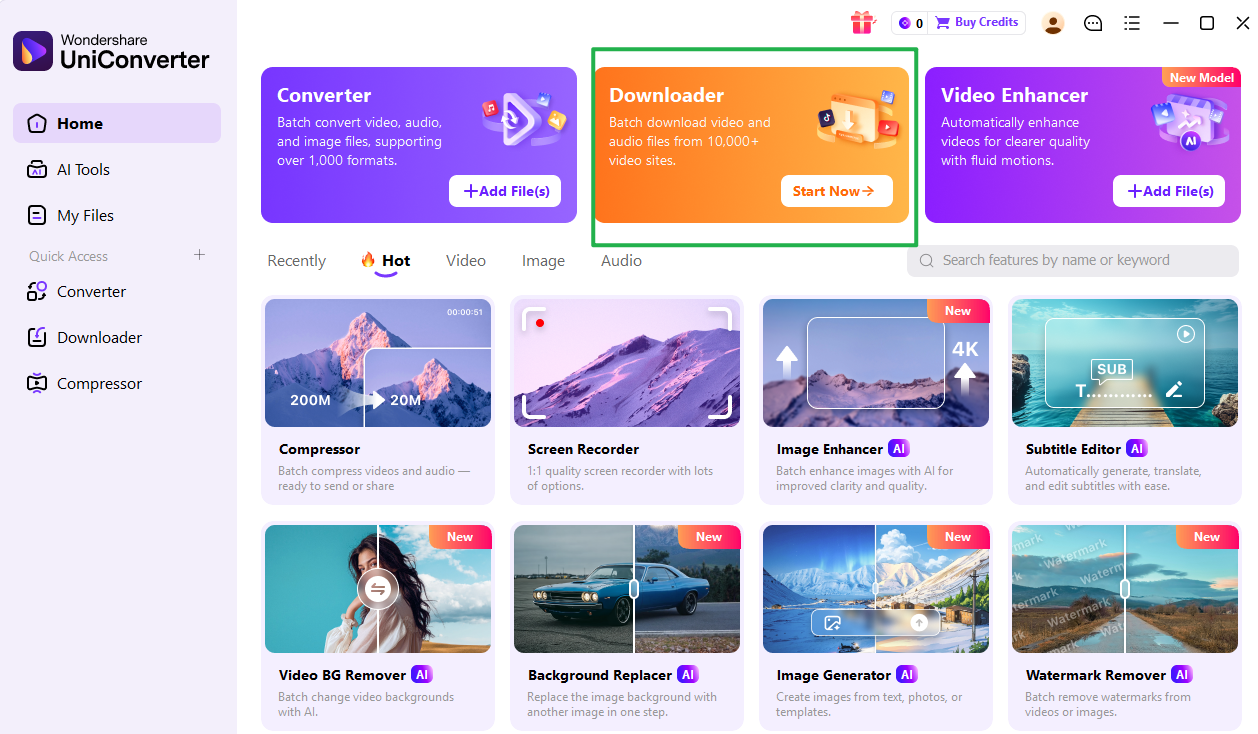
Step 2. Open UniConverter and Go to the Downloader Feature
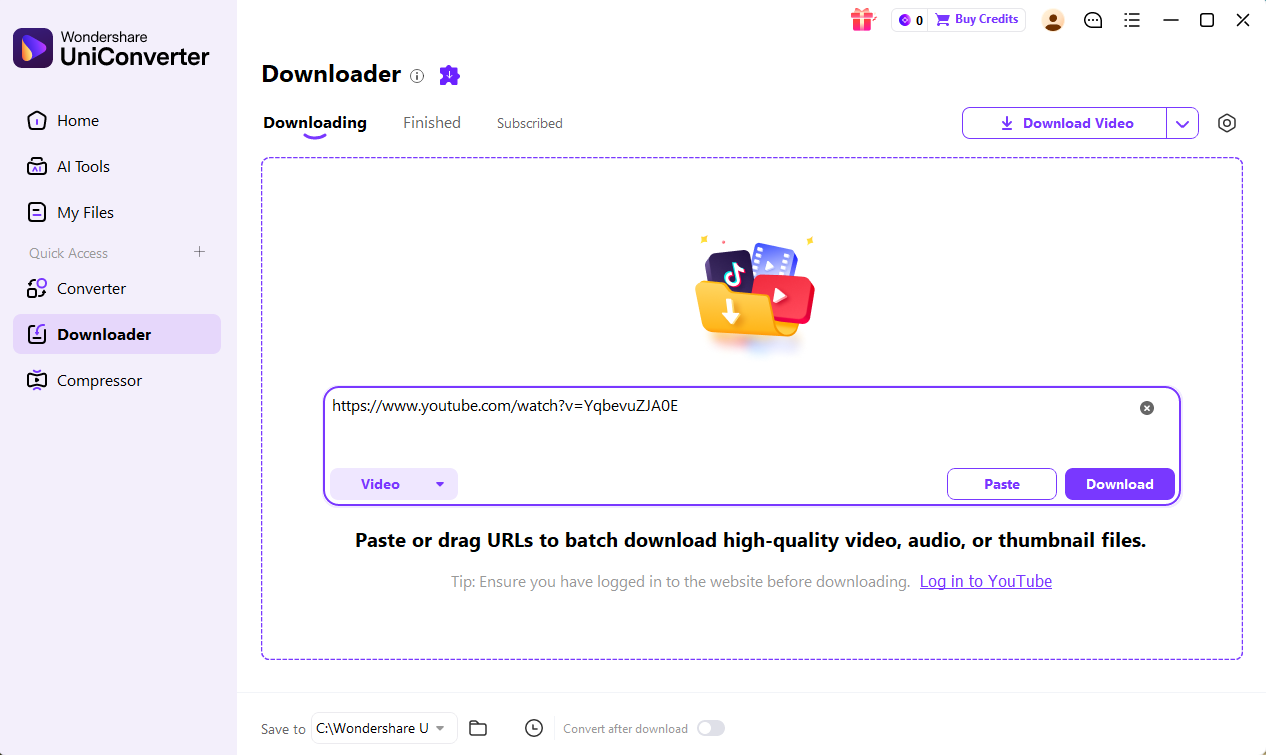
Launch UniConverter on your computer and open the Downloader section. This is the main feature for users who want to download football match highlights instead of only streaming them online.
Once you are in the downloader area, you can paste the copied video link into the input field.
Step 3. Paste the Football Highlights URL
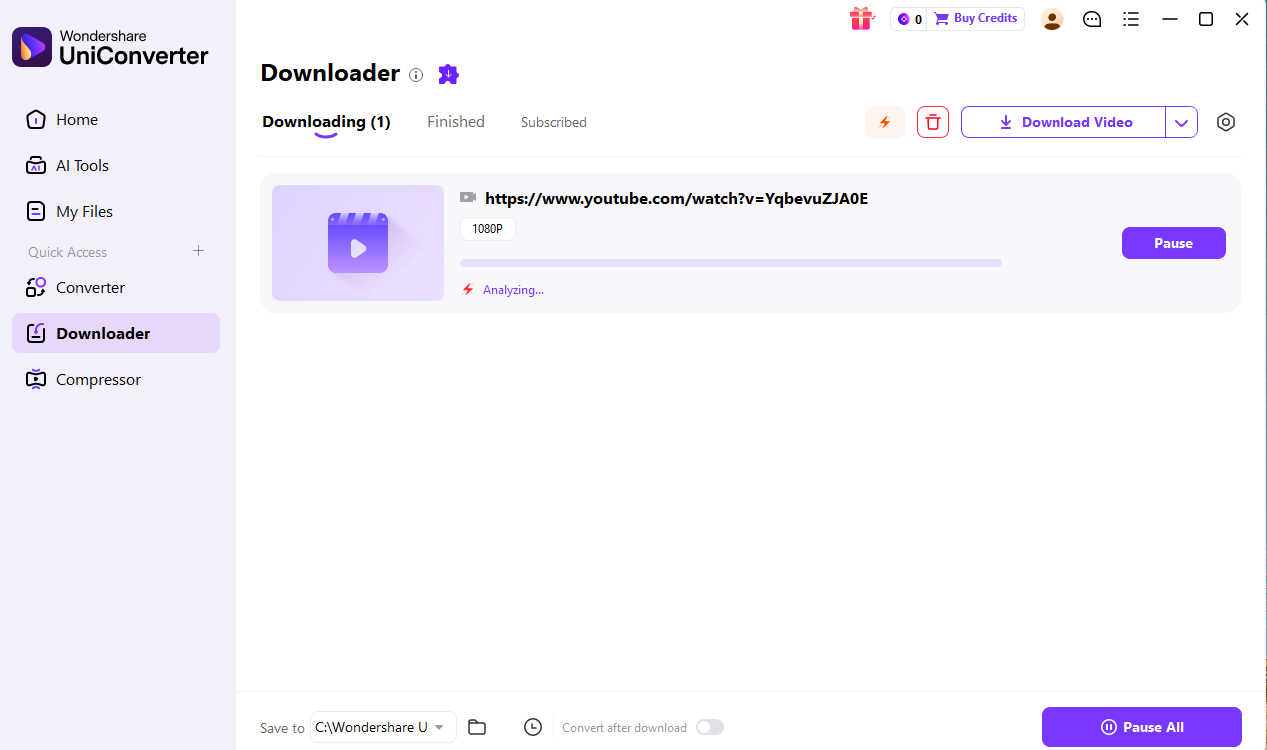
Paste the highlight video URL into UniConverter. The software will analyze the link and detect the available video information.
At this stage, users can usually confirm whether the clip can be saved and what quality choices are available.
Step 4. Choose the Video Quality and Format
Select the most suitable quality for your needs. In most cases, MP4 is the best option because it works well across phones, tablets, desktops, laptops, and TVs.
If you want smaller files, choose a lower resolution. If you want sharper playback on a larger screen, choose a higher-quality version when available.
Step 5. Start the Download
Click the download button to save the football highlight clip to your computer. Once the process is complete, the file can be watched offline anytime.
This is useful for users who want to replay goals, save standout moments, or keep football highlights available without depending on an internet connection.
Step 6. Play or Organize the Downloaded Highlight
After downloading, users can organize clips by club, competition, match date, or tournament. This makes it easier to build a personal football highlights collection and find saved clips later.
Other Useful UniConverter Features After Downloading
Although downloading is the core feature in this article, UniConverter can also help with a few supporting tasks after the file is saved.
These include:
- converting highlight videos into more compatible formats
- compressing large files to save storage space
- optimizing files for smoother mobile playback
These functions are useful, but they should remain secondary. The main reason to mention UniConverter in this article is still its role in helping users download football match highlights more conveniently.
Tips for Downloading Football Highlights More Efficiently
A few simple habits can improve both the download process and the viewing experience.
Choose Official Sources First:This remains the most important rule. Official platforms are safer, cleaner, and more stable than unknown download sites.
Pick the Right Resolution:Do not automatically select the largest file. If you mostly watch on a phone, HD may already be enough.
Organize Clips Early:If you save highlights regularly, sort them by league, club, match date, or tournament from the beginning.
Watch Your Storage:Downloaded football highlights can add up quickly, especially if you save Full HD or 4K clips often.
Think About Replay Needs:Some users only want a short-term offline copy. Others want to keep favorite football highlights long term. Your actual use case should guide your format and quality choices.
Part 7:Conclusion
For many fans, football match highlights are the fastest and easiest way to follow the sport. They save time, focus on the most important moments, and fit much better into daily life than full-match viewing. That is why more users now want to download football match highlights instead of relying only on streaming.
The safest approach is to start with official and licensed sources. Broadcasters, leagues, tournaments, clubs, and authorized sports platforms usually offer better-quality football highlights and fewer legal or technical risks than unofficial sites. If offline viewing is available, it should always be the first option to consider.
For users who want a more flexible desktop workflow, UniConverter fits naturally as a download-focused tool. Its main role here is helping users download football highlights for offline viewing more conveniently, while extra functions like conversion and compression remain useful secondary benefits.
In short, if your goal is to save key match moments and replay them anytime, the best path is official content first and practical download tools second.

