

Creating music from a simple idea can feel like a maze, from picking the right instruments to getting the vibe just right. It often takes hours to turn a concept into a track you actually like. An AI music generator from text makes this process seamless, letting you turn plain words into fully structured music in minutes, with control over mood, genre, and length.
In this guide, you’ll find practical ways to compose music from text across PC, web, and mobile. Step-by-step methods, key features, workflow tips, and editing tricks are all covered so you can generate, refine, and polish tracks that sound professional without the usual hassle.
In this Article
Part 1: Different Ways to Compose Music Using an AI Music Generator from Text
An AI music generator from text lets you turn simple written prompts into structured tracks with melody, rhythm, and production elements. Below are practical ways to compose music from text across desktop, web, and mobile platforms.
Method 1: How to Compose Music using an AI Music Generator from Text [PC & Mac]
If you want an AI music generator from text that works directly inside a video editor, Wondershare Filmora is a practical starting point. Instead of switching between separate tools, you can generate background music while editing your footage. Just describe the vibe, pick a mood or genre, and let the system create a track that matches your timeline length.
Wondershare Filmora is especially useful when you need quick, royalty-free music without spending hours browsing stock libraries. From short social clips to longer YouTube videos, it helps turn a simple text idea into a ready-to-use soundtrack within minutes.
Key Features
It can generate music based on text prompts, mood, genre, and video type, enabling better alignment between the soundtrack and the visual tone.
It offers Smart BGM Generation that automatically matches the music duration to the exact length of your video.
It allows direct control over editing, including volume adjustment, fade-in/out, and audio balancing, all within the same workspace.
How to Generate Text to Music with AI Offline
Follow these simple steps to generate music from text:
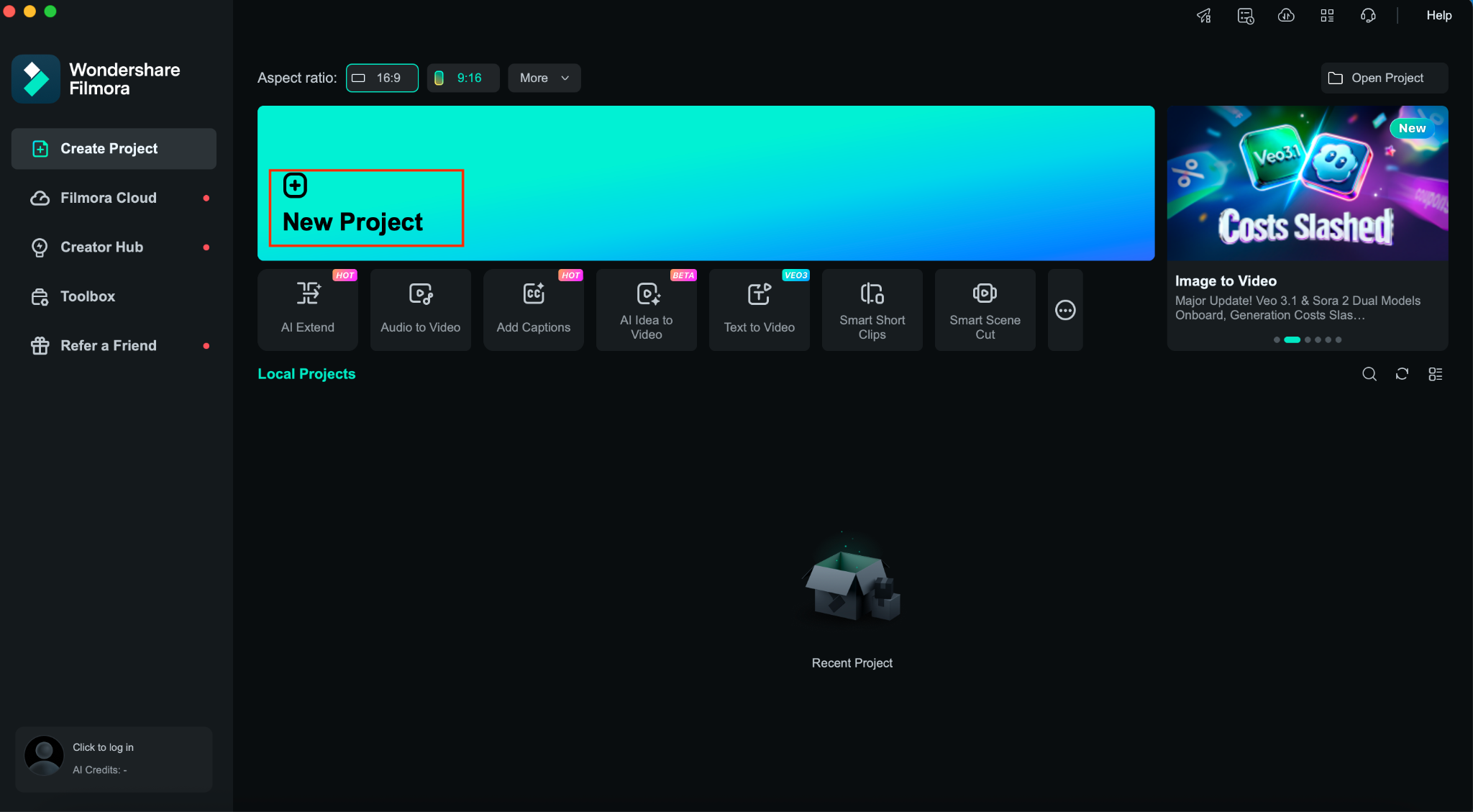
Step 1: On the Filmora dashboard, click “Add Project.”
Step 2: Navigate to Audio > AI Music.
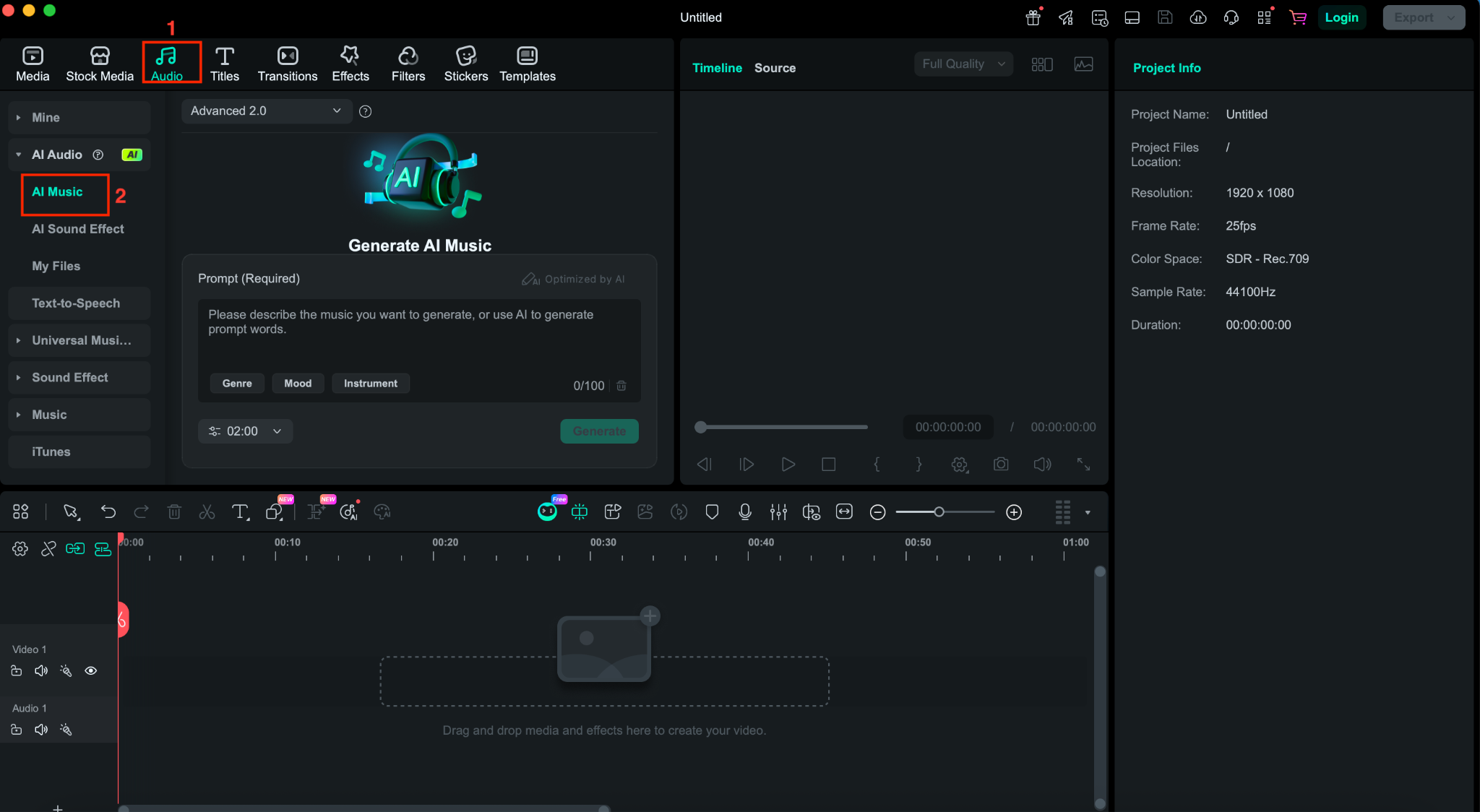
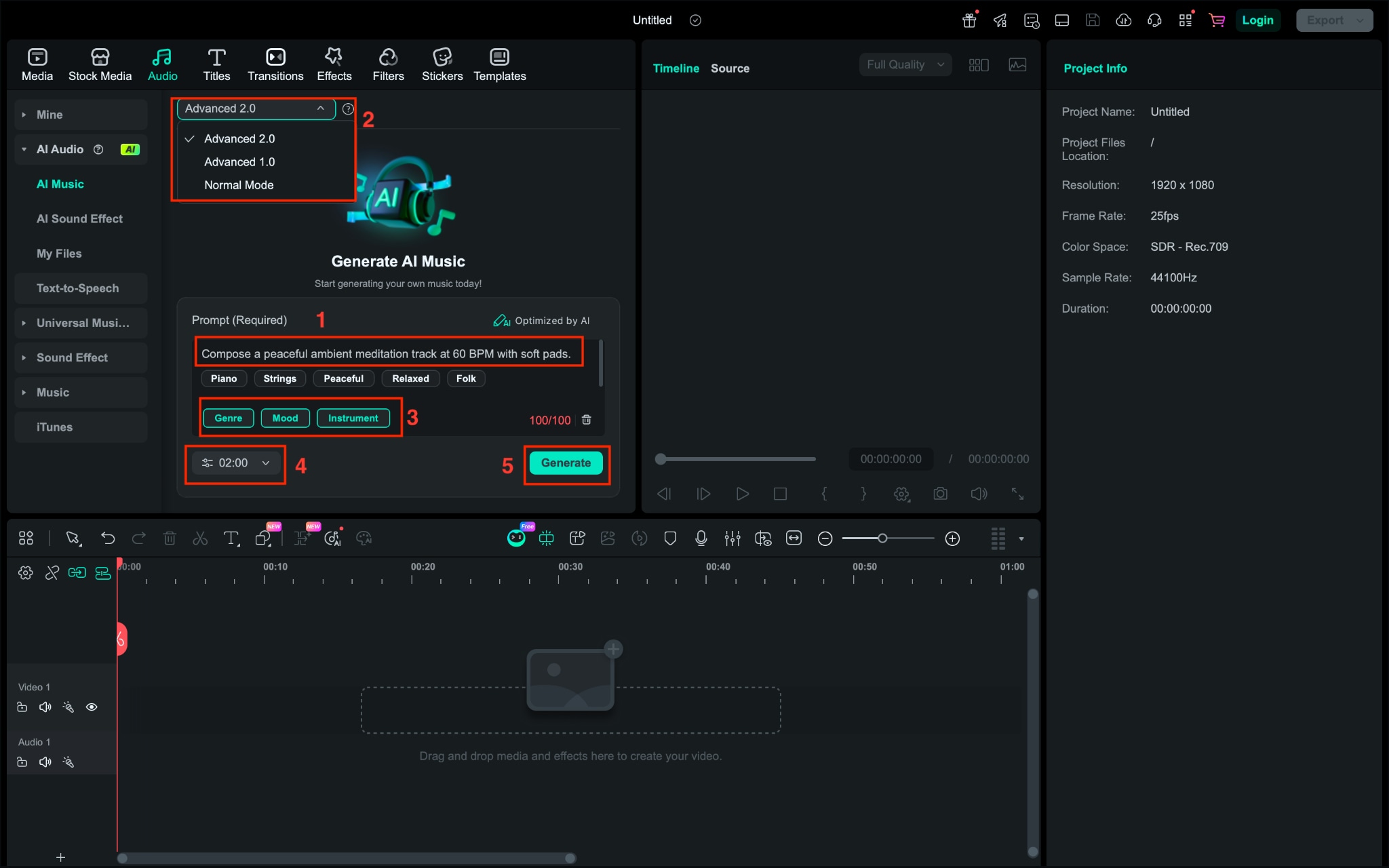
Step 3: Write down the prompt, choose a model, instrument, genre, mood, duration, and click “Generate.”
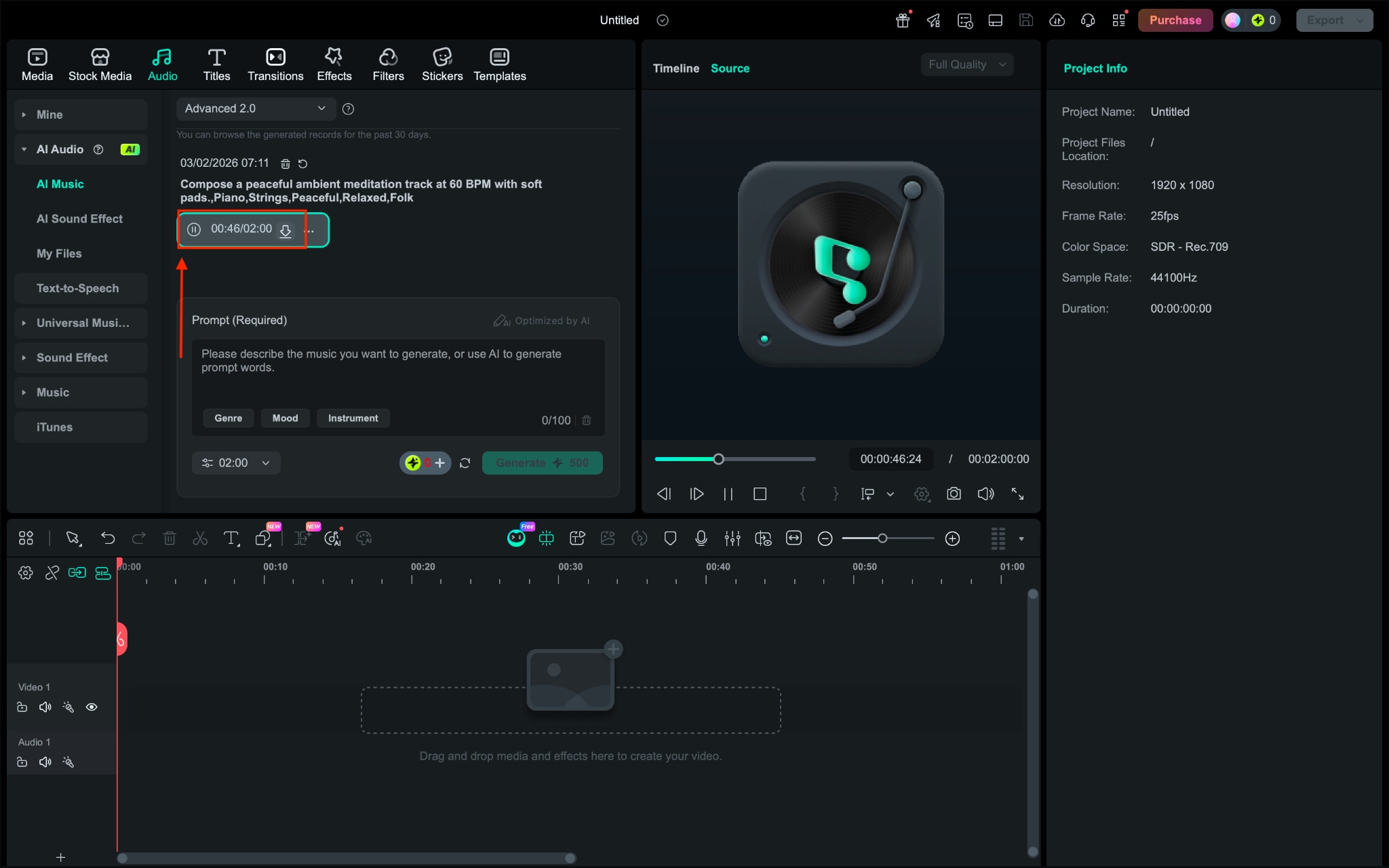
Step 4: Listen to the song and click the “Download” icon to save the music offline.
Best for: Content creators, vloggers, and marketers who want to generate royalty-free background music from text directly inside a video editing workflow without switching tools.
Method 2: How to Compose Music using an AI Music Generator from Text [Online]?
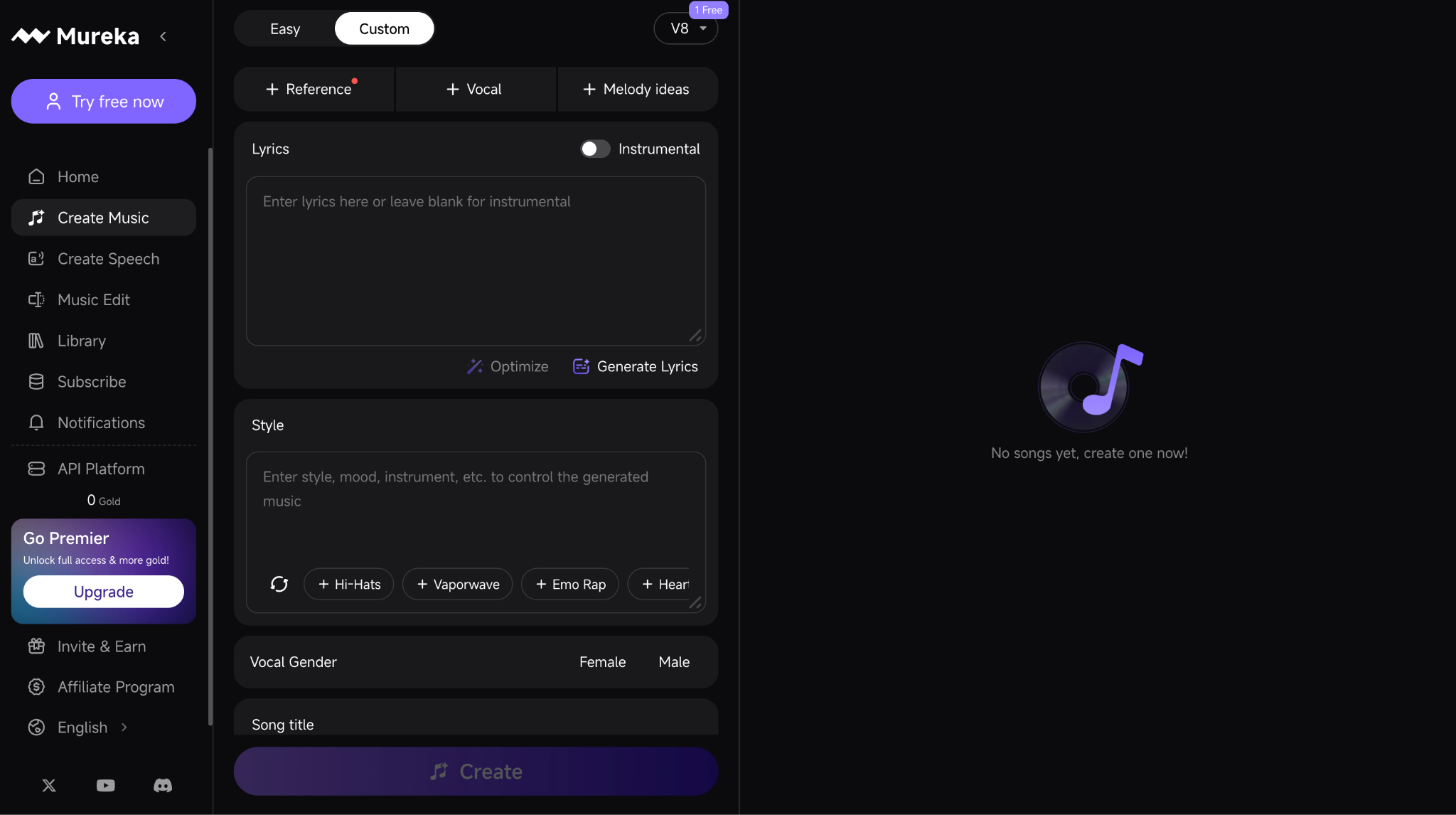
Mureka.ai is a web-based AI music generator from text that lets you turn simple descriptions or prompts into full songs with instrumentation, rhythms, and vocals. At its core, the system processes your natural language prompts, interprets mood/style cues, and builds music tracks you can export in formats like MP3 and WAV, with options for speech and voice cloning on paid tiers.
Although its AI models can produce creative outputs with multiple musical elements (melody, harmony, drums), many people report mixed results; some find the tool capable of fast idea prototyping, while others highlight inconsistencies in prompt accuracy and audio quality.
Key Features
Generate music directly from text prompts using advanced AI models that build tempo, instrumentation, and mood from your description.
Export tracks in common audio formats like MP3 and WAV, with options for stems and instrumental versions on higher plans.
Advanced creative tools, including voice cloning, text-to-speech, region editing, and reference-inspired creation, are available when you subscribe to higher tiers.
How to Generate Text to Music with AI Online
Follow these steps to generate music from text:
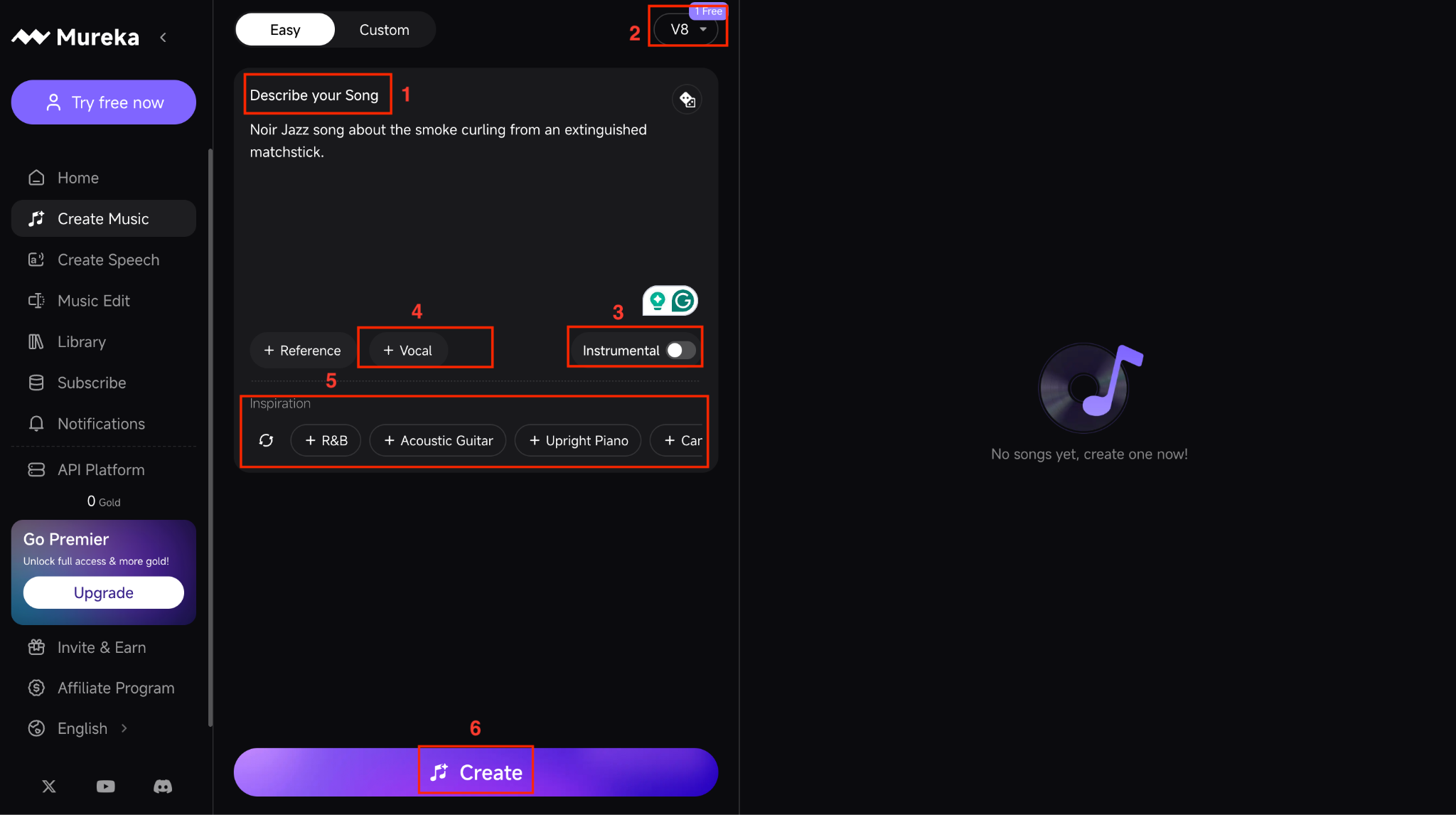
Step 1: On the dashboard, click the “Create Music” option from the right menu. Choose from the “Easy” and “Custom” options to create music.
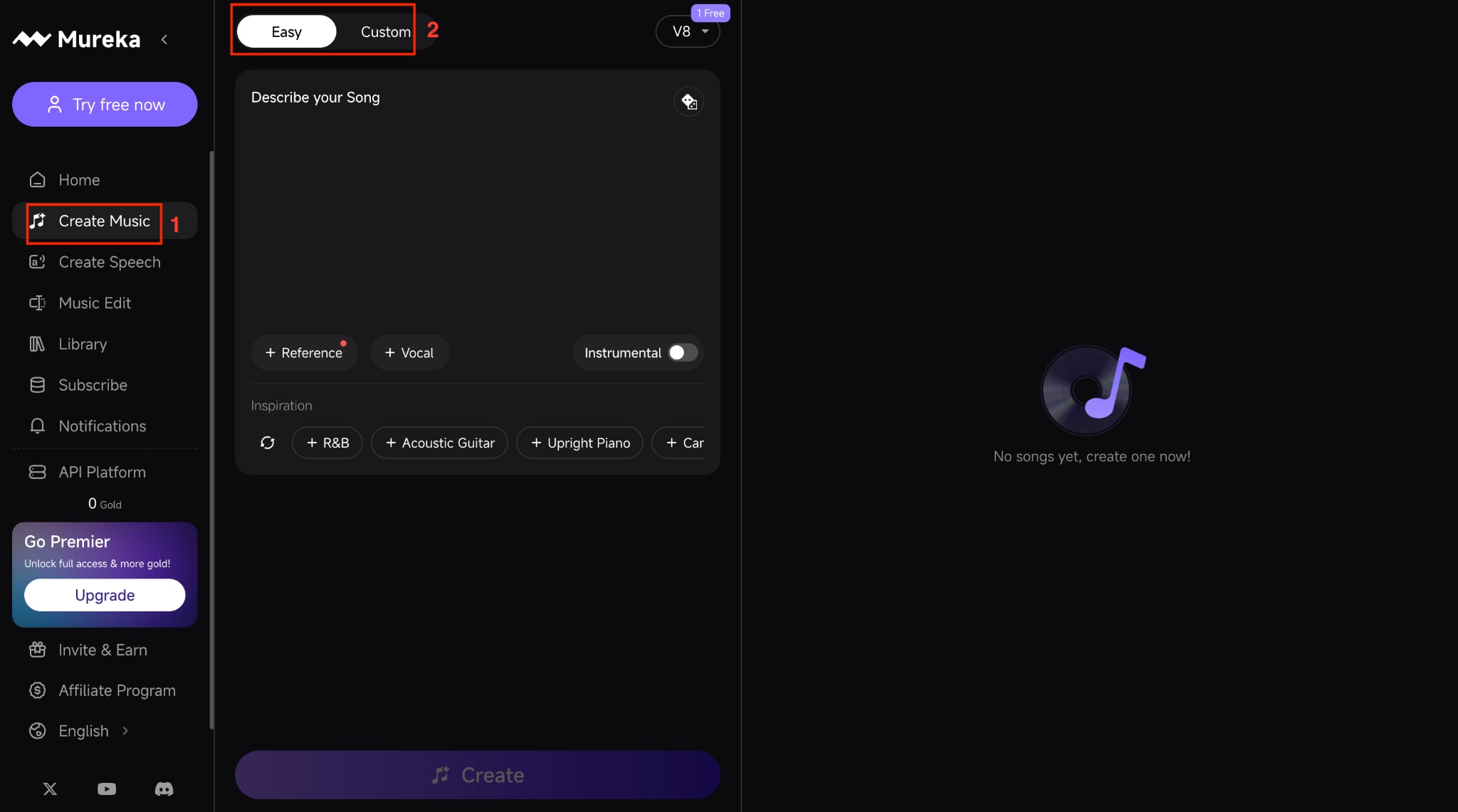
Step 2: Under Easy, describe your song, choose a model from the upper right corner, enable instrumental if you want only an instrumental song, and choose vocal. You can also add inspirations like R&B, Acoustic Guitar, Happy, and more. Once done, click “Create.”
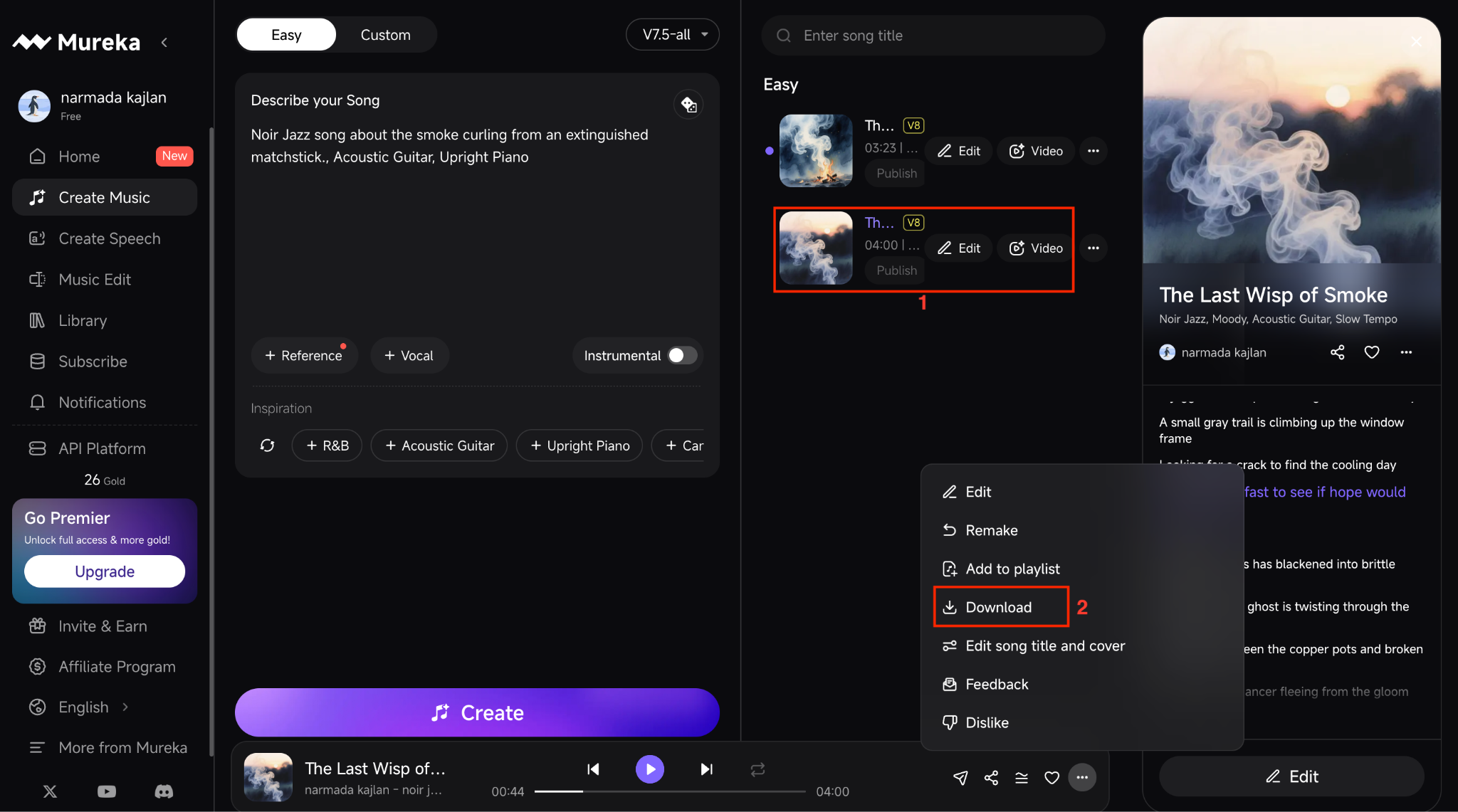
Step 3: Your song will be ready within a minute. Play the song to listen, directly publish, download, or you can edit it further. You can also add the video.
Best For: Creators and musicians who want to quickly turn text prompts into full instrumental or vocal tracks online without installing software.
Method 3: How to Compose Music using an AI Music Generator from Text (Android & iPhone)?
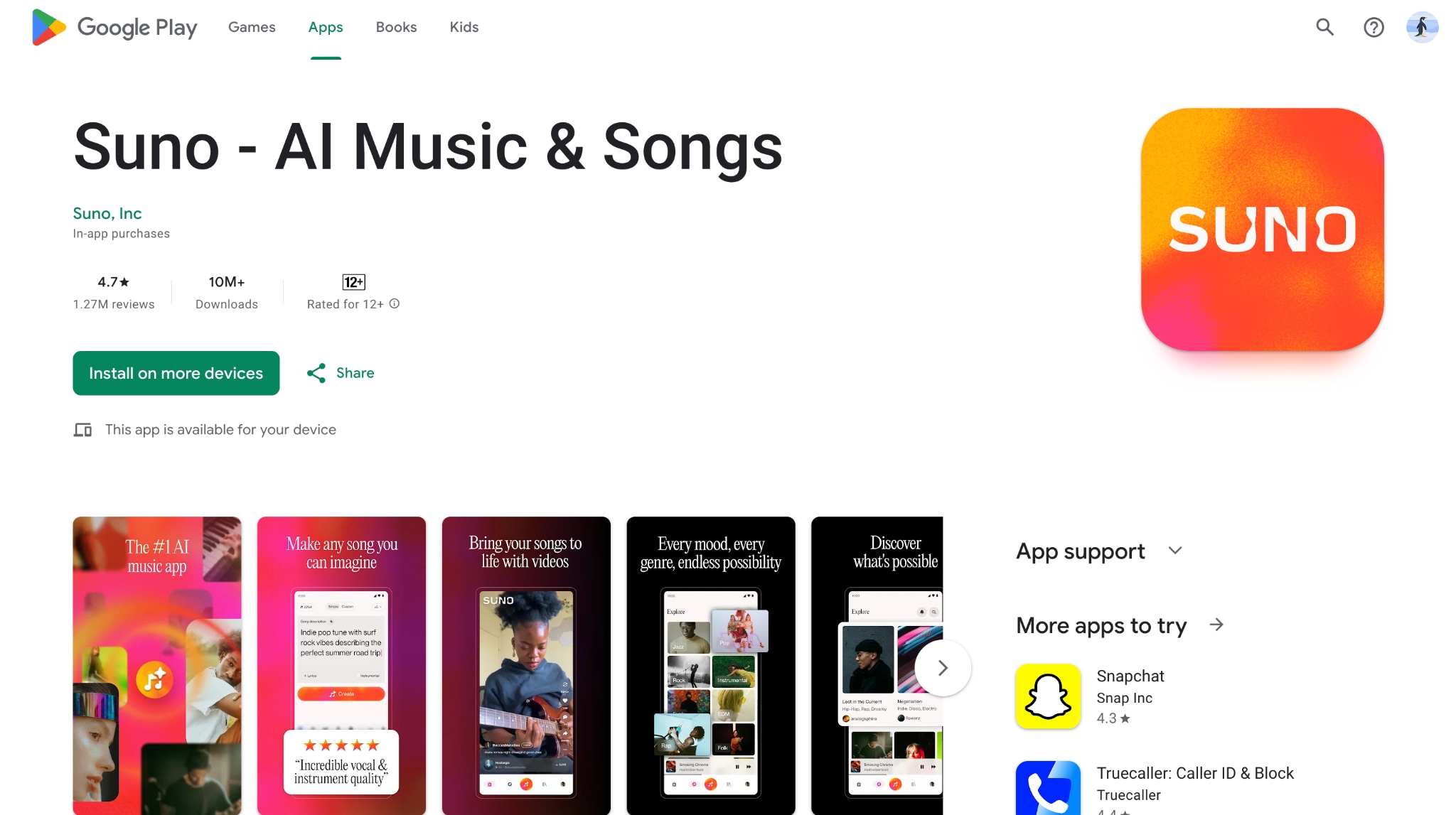
If you’re looking for text-to-music with AI directly from your phone, Suno- AI Music & Songs brings full song generation into a mobile app. Instead of needing studio software, you can type a prompt, hum a melody, or even upload audio, and the system produces a complete track with vocals, structure, and production elements.
Suno- AI Music & Songs is designed for fast, on-the-go creativity. Whether the goal is a fun rap about your day or a more polished pop track, Suno turns short prompts into listenable songs within minutes, and lets you manage playlists and explore music created by others in the app.
Key Features
It generates fully produced songs from text prompts, images, videos, or recorded audio directly on mobile.
It includes an AI lyric writer that creates structured verses, hooks, and choruses based on your theme.
It allows editing control, such as adjusting vocals, refining song structure, and organizing tracks into playlists.
How to Generate Text to Song on a Mobile Phone
Here is the step-by-step guide to convert text to music using Suno- AI Music & Songs:
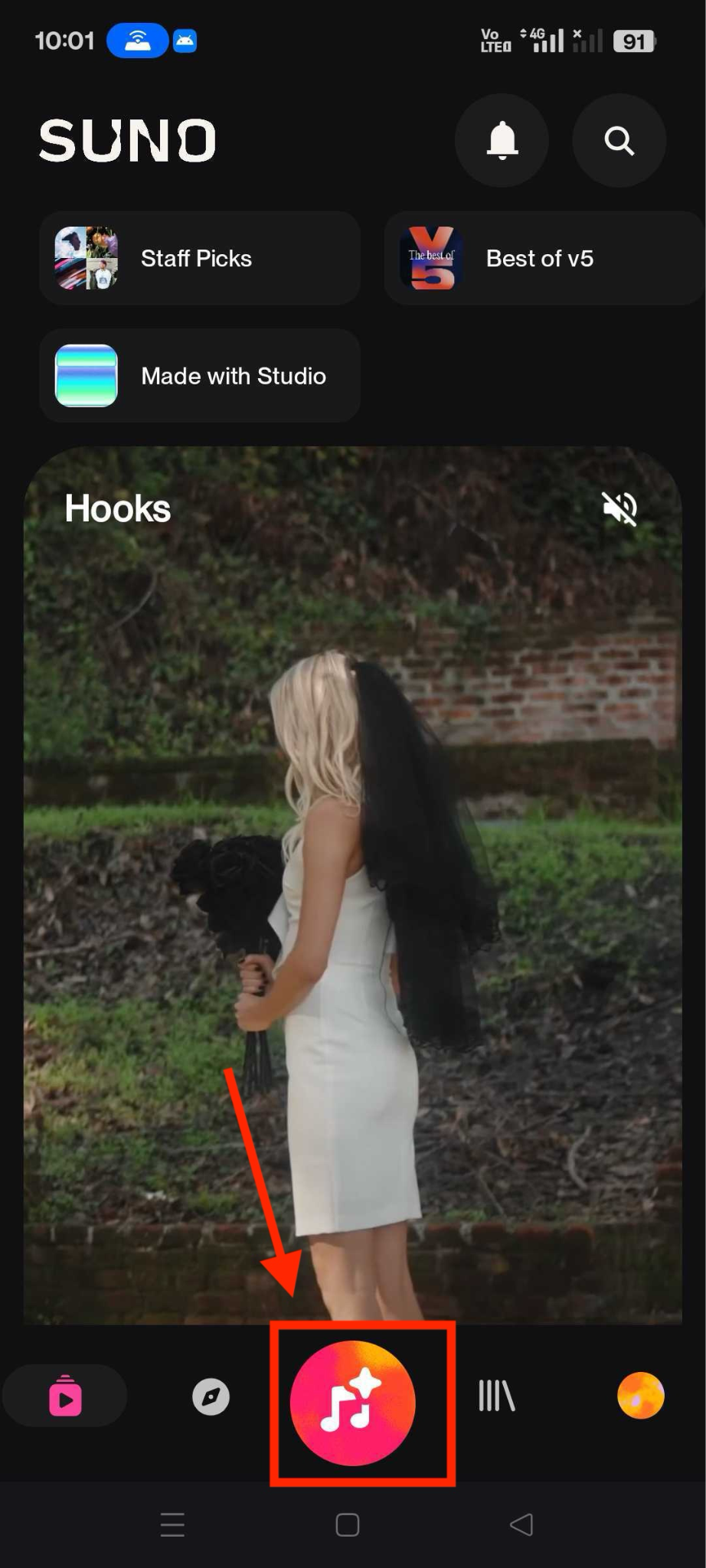
Step 1: On the app’s dashboard, click the music icon in the bottom center.
Step 2: Choose from the Simple and Custom options for generating a song. Under Simple, write down the song description in one line.
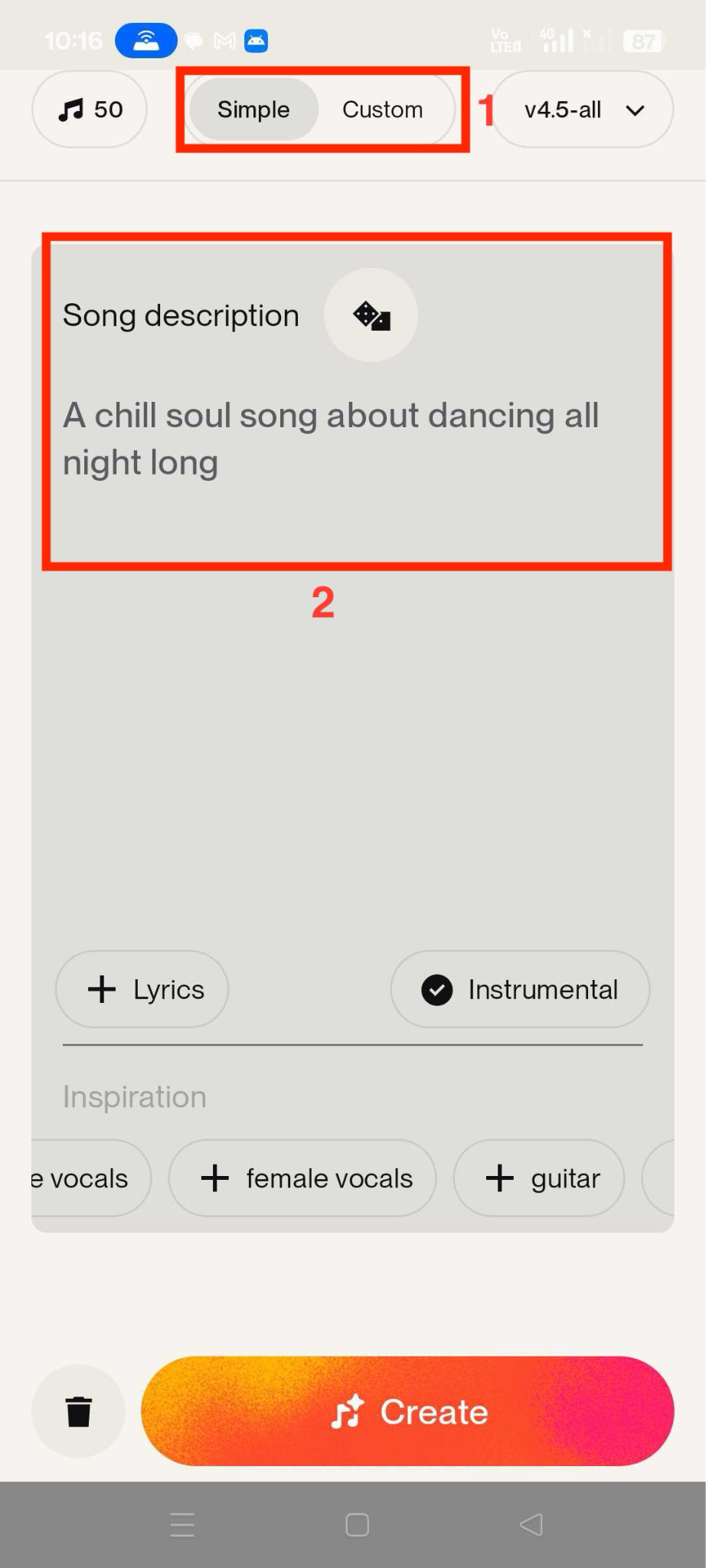
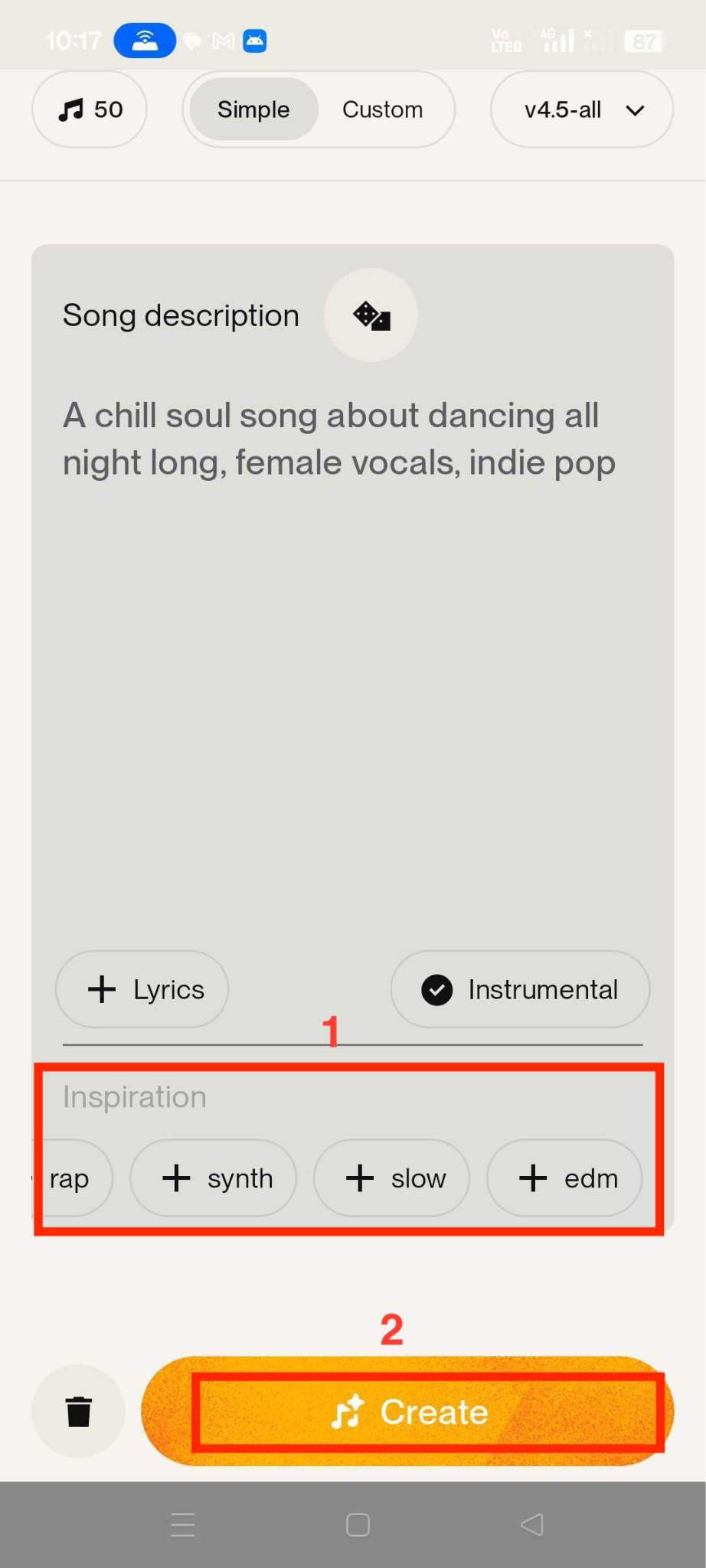
Step 3: Add inspirations and click “Create.”
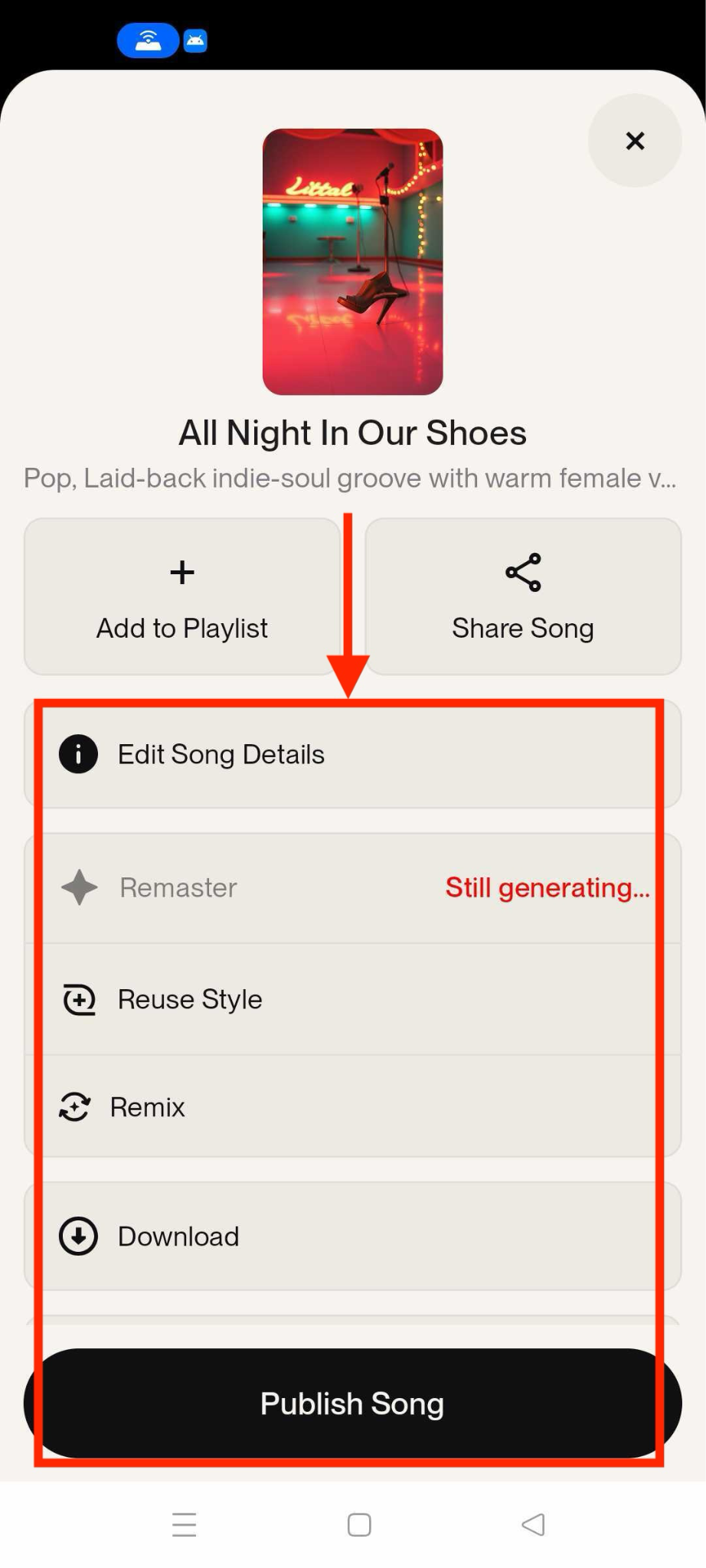
Step 4: In the download library, click “three dots,” and here you can download, remix, edit song details, and publish the song.
Best for: Creators who want to turn quick ideas into full vocal songs from their phone without using traditional music production software.
Part 2: Online vs. Offline vs. Mobile AI Music Generator: Which One Should You Choose?
Choosing between online, offline, and mobile tools depends on how you create and where you work. Whether you need timeline-matched background music inside Wondershare Filmora, browser-based song generation with Mureka.ai, or full vocal tracks on the go with Suno AI, each AI music generator serves a different production workflow and level of creative control.
| Criteria | Wondershare Filmora (AI Music) | Mureka.ai | Suno- AI Music & Songs |
| Platform type | Desktop video editor for Windows & macOS. | An online AI music platform accessed via a web browser. | Web studio in browser plus dedicated mobile apps (iOS and Android). |
| Access mode | Requires installing Filmora on PC/Mac. | No installation required for music creation; log in, generate on the website, then download files. | Use directly in the browser or install the “Suno – AI Songs & Music” app from App Store/Google Play. |
| Main focus | Royalty‑free background music that matches the video's mood and duration for editing projects. | Full songs and background tracks from prompts for creators, marketers, and musicians. | Turning ideas into full songs and beats (lyrics, vocals, instruments) from prompts, voice, or media. |
| Text‑to‑music from prompts | Not explicitly described as text‑prompt based on the main AI Music page; focuses on mood/genre/theme selection for auto‑generated BGM. | Yes, generates music from text prompts plus style, mood, genre, and tempo controls. | Yes, generates complete songs from text prompts, lyrics, or short descriptions. |
| Generates full songs with vocals | No, designed primarily for instrumental background tracks for videos. | Yes, supports songs with vocals and lyric generation tools. | Yes, produces fully‑produced vocal songs with lyrics, structure, and instrumentation. |
| Export/download formats | Supports exporting audio in formats such as MP3, AAC, OGG, AIFF, WAV, and FLAC within video projects. | Allows downloading tracks in MP3, WAV, and MP4; higher tiers offer stems and instrumental versions. | Free: download MP3; paid tiers add WAV and video export, with higher plans offering more advanced options. |
| Commercial rights | AI‑generated background music is royalty‑free and cleared for commercial use in videos. | Outputs are royalty‑free with full commercial rights, depending on the plan. | Free plan is for personal/non‑commercial use; Pro and Premier plans grant commercial rights and broader usage. |
No matter which AI music generator from text you choose, the first draft isn’t always perfect. You might notice background noise, robotic vocals, uneven volume levels, or sections that feel too long for your video. That’s completely normal with AI-generated tracks. The good news is you don’t need to regenerate the entire song. With the right audio editing tool, you can trim, clean, enhance, or even transform the output into something more polished and production-ready.
Best For by Use Case
- Wondershare Filmora: Best for creating background music directly inside a video editing workflow.
- Mureka.ai: Best for generating full songs online from text prompts without installing software.
- Suno AI Music & Songs: Best for creating vocal songs quickly on mobile or on the go.
Part 3: How to Edit, Clean, and Transform AI-Generated Audio?

All-in-One Multimedia Processing Tool

If your AI-generated songs do not feel closer to your expectations and sound more AI, then instead of generating a new track from scratch, it’s often smarter to refine what you already have. Wondershare UniConverter is built for that exact stage of the workflow.
Wondershare UniConverter focuses on cleaning, adjusting, and reshaping AI-generated audio to make it sound clearer and more balanced. From removing background noise to trimming sections or modifying vocals, it helps turn a rough AI draft into a more polished final version.
Here’s how you can practically improve your AI-generated track using three core tools:
How to Remove Noise from AI-Generated Audio?
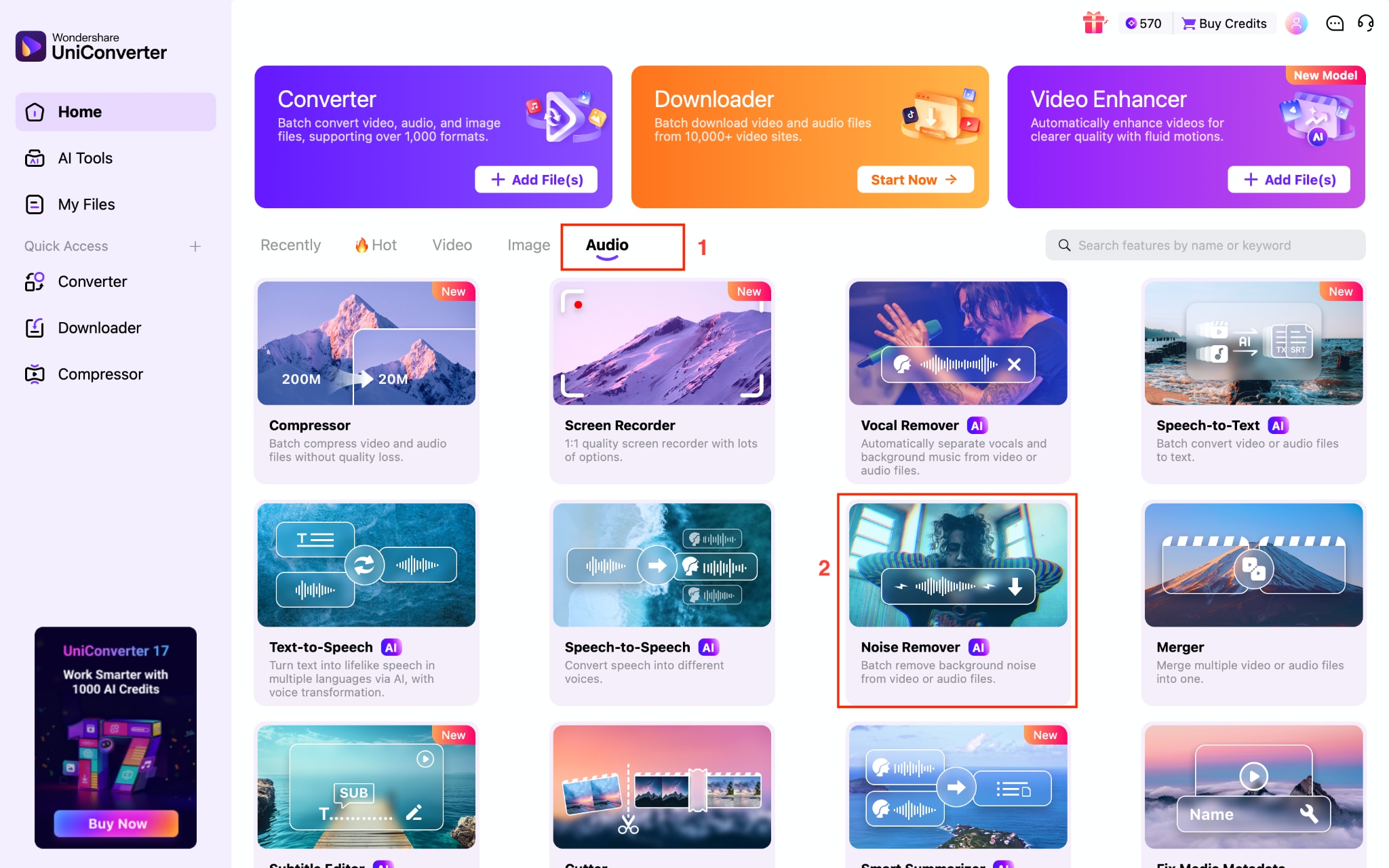
Sometimes AI tracks contain hiss, echo, or low background hum. Using Noise Remover improves clarity instantly.
Step 1: Open UniConverter, navigate to Audio > Noise Remover.
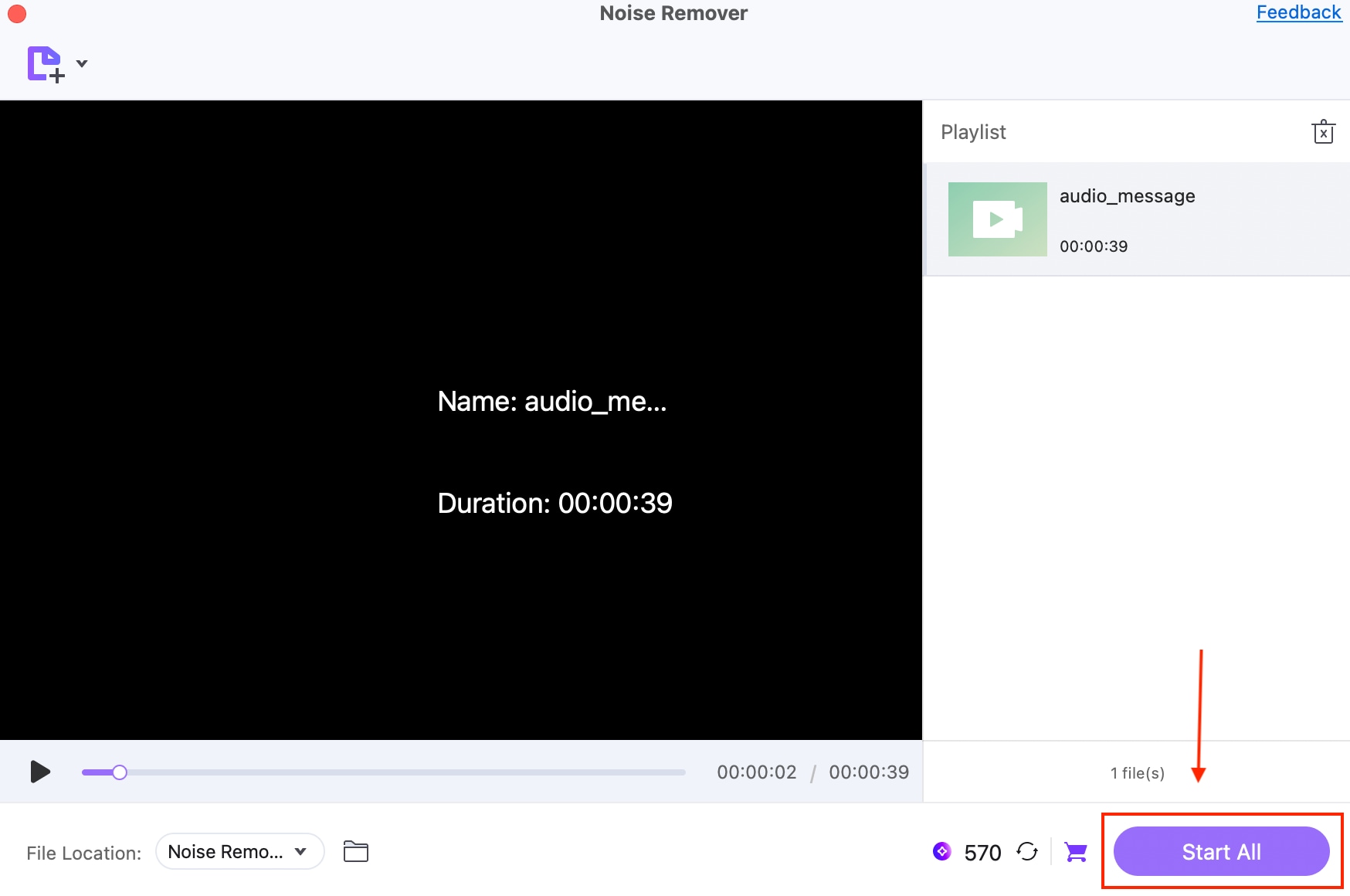
Step 2: Upload the file and click the “Start All” button, and the export will start.
How to Trim or Cut AI Music?
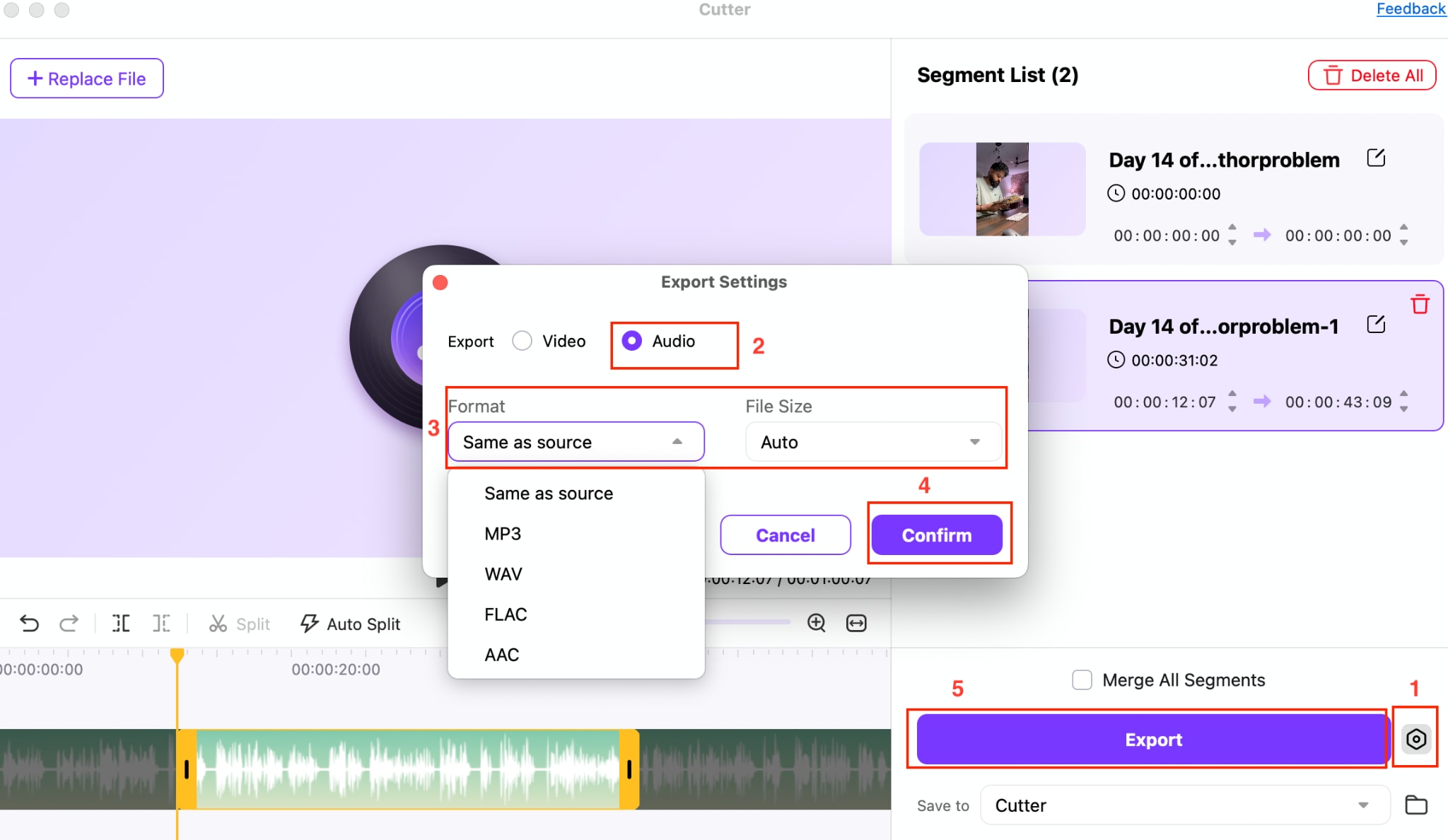
If the intro is too long or you only need a chorus for reels or ads, trimming solves it quickly. Here are the steps to use Cutter:
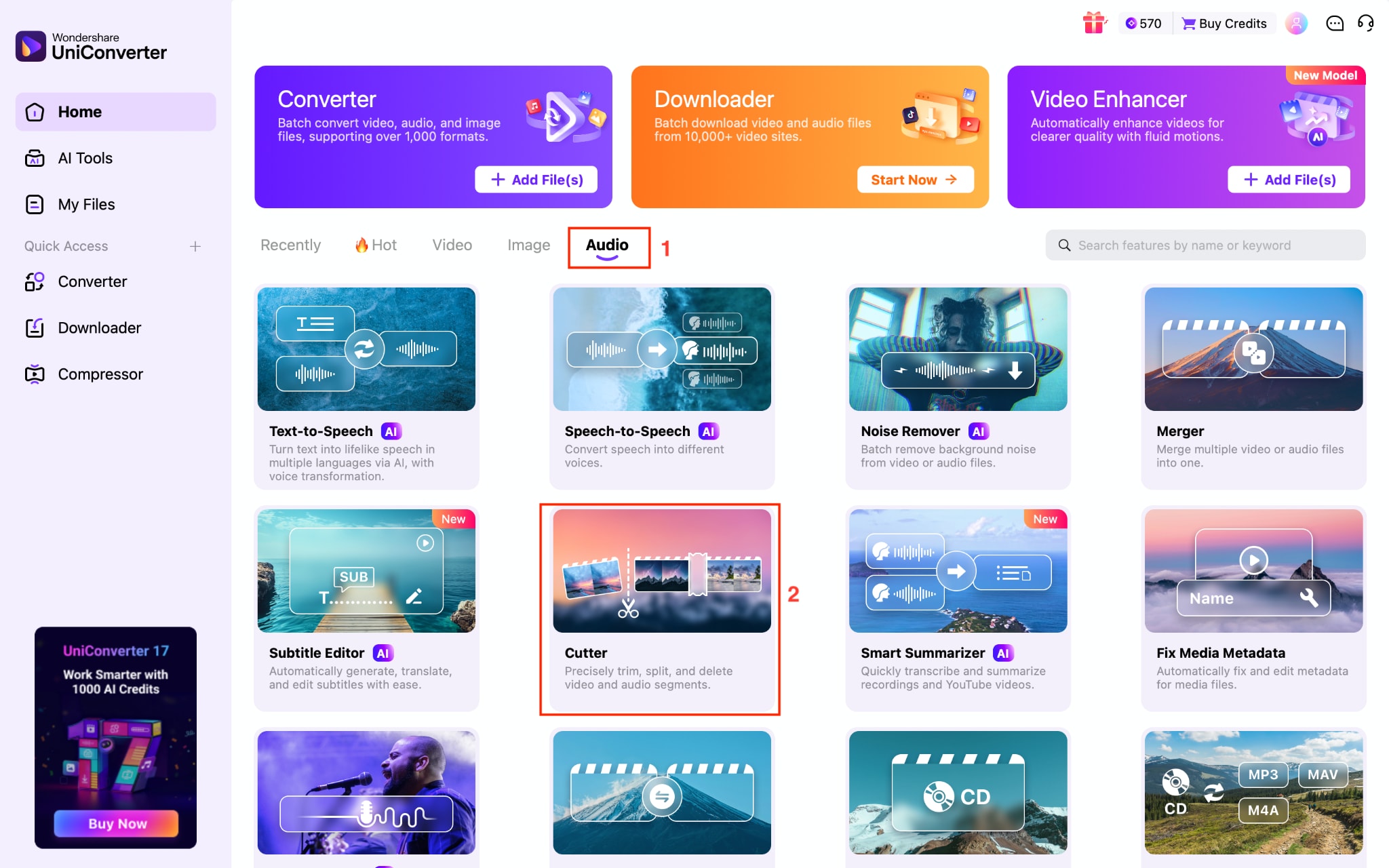
Step 1: Navigate to the “cutter” option under the Audio section and upload your AI-generated song.
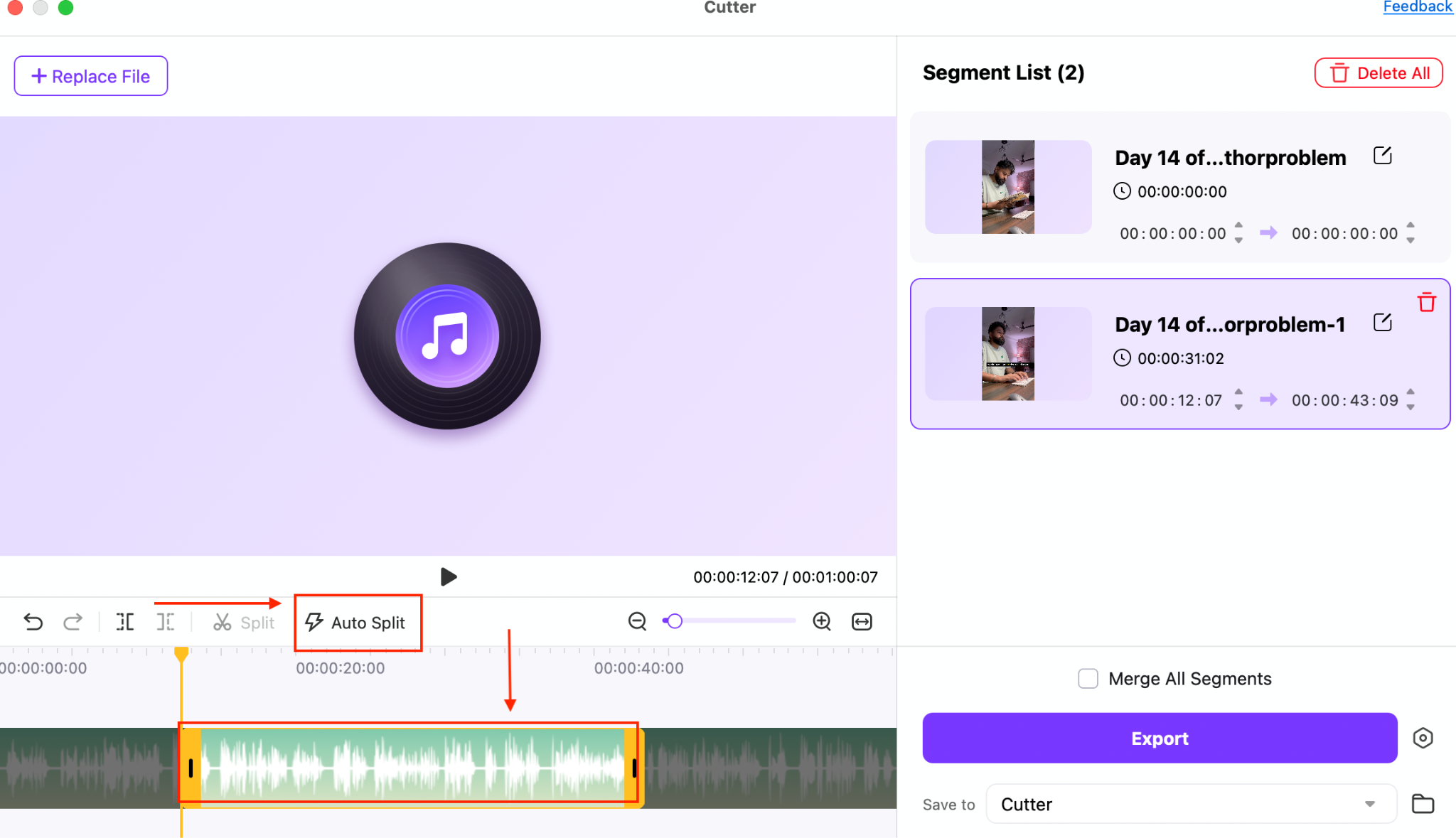
Step 2: Cut manually or click on the Auto Split option.
Step 3: Click the “Settings” icon next to the “Export” button, select your preferred format and audio file size, then click Confirm. After that, click Export to complete the process.
Part 4: Copyright, Ownership, and Licensing Considerations While Using AI Music Generators
AI music generation makes composition simple, but ownership and usage rights aren’t always straightforward. The legal status of AI-generated content varies by country and depends on the extent of human creativity involved. Before you publish, monetize, or use AI music in client work, it’s important to understand how copyright and licensing typically apply.
Human Input Affects Copyright Protection: In many jurisdictions, copyright law protects works that involve meaningful human creativity. If a song is generated entirely by AI with minimal creative direction, ownership rights may be limited or unclear. Adding original lyrics, editing structure, or refining composition strengthens your claim.
Platform Terms: Every AI music generator operates under its own licensing framework. Some grant full commercial rights to paid subscribers, while free plans may restrict monetization, redistribution, or client usage.
Commercial Use Often Requires a Paid Plan: Even if you can download a track for free, business usage, such as YouTube monetization, advertising, or branded content, may require an active subscription.
Similar Risks Should Not be Ignored: AI models are trained on large datasets. While outputs are generated dynamically, there is still a small risk that a track may resemble an existing copyrighted song, especially in mainstream genres.
Conclusion
Creating music from text prompts saves time and opens up new creative possibilities. An AI music generator from text allows you to produce full tracks quickly, whether on desktop, web, or mobile. Each tool offers unique advantages, from generating background music directly in a video editor to producing complete vocal songs on the go. The first version of your track is only a starting point, and small refinements can make a big difference.
Cleaning up audio, adjusting vocals, and trimming sections ensures your music sounds polished and professional. With the right workflow, AI-generated tracks can match any project’s requirements. Wondershare UniConverter makes it easy to edit, enhance, and finalize your music for immediate use.

