


In today's visually driven digital world, images are a crucial part of web content. Whether you're a designer gathering inspiration, a researcher collecting data, or simply archiving a website's visuals, the ability to download all pics from a website in one go can be incredibly useful. This guide will walk you through various methods, from user-friendly software like UniConverter and simple browser extensions to more advanced techniques, ensuring you can efficiently download all images on a page that you need.
In this article
- Part 1. Comparison Table of Different Ways to Download Pictures from Websites
- Part 2: Methods to Download All Pictures from a Website
- Part 3. Bonus: How to Easily Batch Download HD Instagram Photos
- Part 4: Things to Consider Before Downloading All Images
- Part 5: Use Cases of Downloading All Website Images
- Part 6: Best Practices for Organizing Downloaded Images
- Conclusion
- FAQs
Key Takeaways
[Bulk Download Needs] Downloading all images from a website saves time and effort, solving manual saving issues for research, design, or archiving tasks.
[Quick & Easy Methods] Tools like Imageye, Download All Images, Extract.pics, and ImageCyborg enable fast, no-install downloads, but may face ads, limits, or security risks.
[Advanced Control] Developer tools and PC software like Vovsoft provide more control and large-scale downloading, though they require technical skills or are platform-limited.
[Professional Workflow] Wondershare UniConverter offers fast batch downloading, format conversion, and multi-media support, ideal for users needing efficiency, quality, and all-in-one functionality.

Part 1: Comparison Table of Ways to Download All Pictures from a Website
With so many options available—from browser extensions to advanced desktop tools—it can be hard to choose the right one. The comparison below breaks down each method clearly, helping you find the best solution based on your needs, skill level, and workflow.
| Metric |
Browser Extensions (Imageye, Download All Images) |
Developer Tools |
Online Downloaders (ImageCyborg, Extract.pics) |
Image Downloader App (Android) |
PC Downloaders (Vovsoft) |
UniConverter |
| Best For | Quick bulk downloads while browsing | Advanced users needing original files | No-install quick extraction | Quick image search & download on mobile | Large-scale bulk downloading | Professional batch downloading & multi-media support |
| Unique Strengths |
One-click extraction, filter by size/resolution, browser-integrated |
Access to original/high-res files, no installation required |
Works on any device, simple URL-based downloading |
Built-in image search, mobile-friendly, quick HD downloads |
Keyword + URL download, supports search engines |
Batch download from links or profiles, supports images, videos, and audio in one tool |
| What They Don’t Support | Struggles with protected/dynamic sites, browser limitations | No automation, time-consuming, no batch | Ads, privacy risks, unreliable on complex sites | No full webpage extraction, limited batch download | Windows only, limited preview, may miss dynamic content | Not free (premium tool), requires installation |
| Ease of Use | ⭐⭐⭐⭐⭐ | ⭐⭐ | ⭐⭐⭐⭐ | ⭐⭐⭐⭐⭐ | ⭐⭐⭐⭐ | ⭐⭐⭐⭐⭐ |
| Batch Download | ✅ Yes | ❌ No | ✅ Yes | ❌ Limited | ✅ Yes | ✅ Yes (advanced batch processing) |
| Safety | ⭐⭐⭐ | ⭐⭐⭐⭐ | ⭐⭐⭐ | ⭐⭐⭐☆ | ⭐⭐⭐⭐ | ⭐⭐⭐⭐⭐ |
| Platform Support | Chrome-based browsers | All major browsers | Web-based (all devices) | Android | Windows only | Windows & Mac |
Part 2: Methods to Download All Pictures from a Website
There are numerous ways to get all images from a website, ranging from simple, user-friendly tools to more technical approaches. The method you choose will depend on your comfort level with technology, the number of images you need to download, and any specific features you require. This section will explore a variety of techniques, empowering you to effectively download all images from a url and build your desired image collection.
Method 1: Browser Extensions
Popular Browser Extensions for Downloading Images
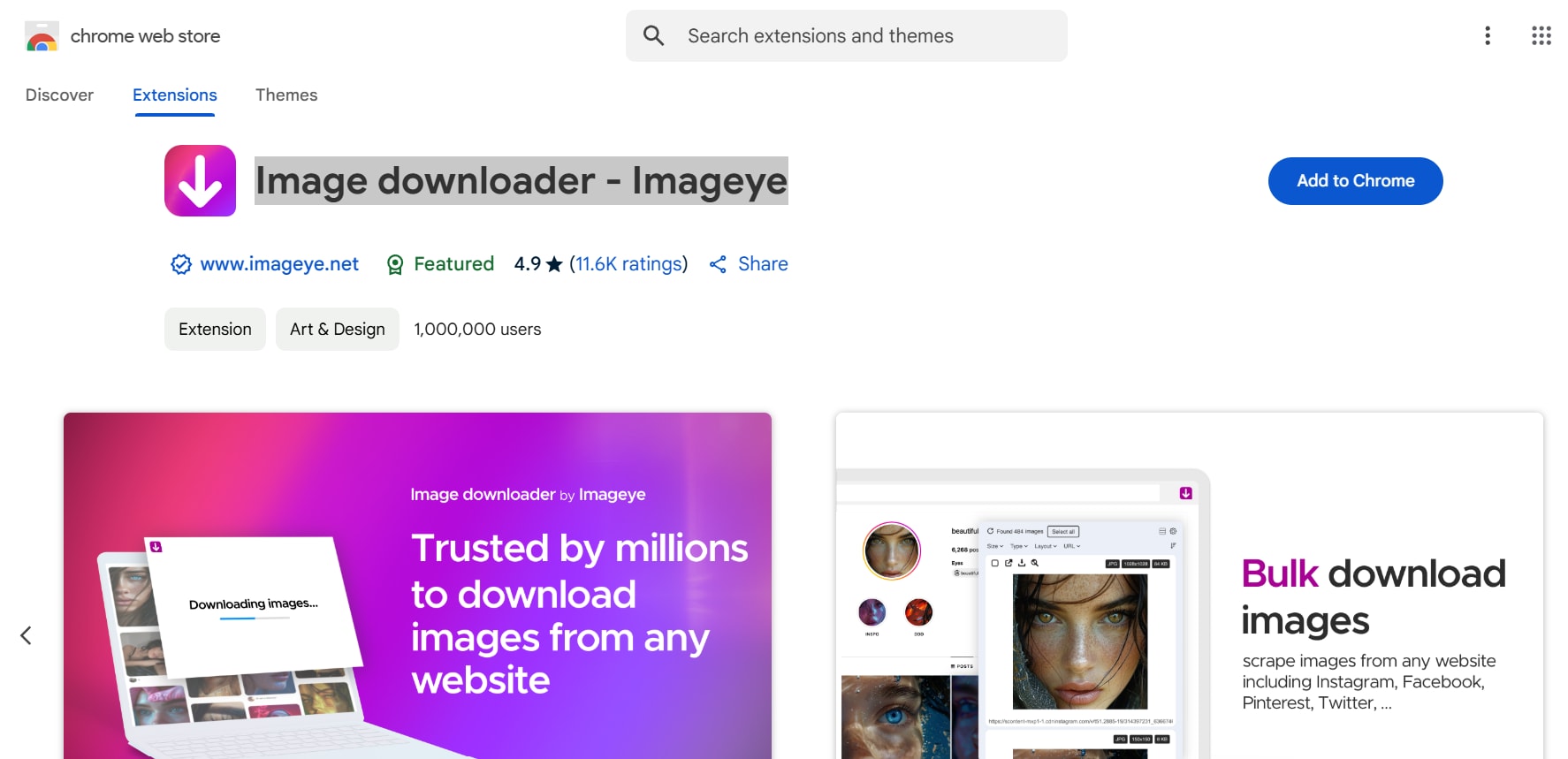
Imageye – Image Downloader
Imageye is a powerful Chrome extension designed to download all images from a webpage quickly. It scans an entire webpage, detects available images, and allows users to filter by resolution, format, and size. With its user-friendly interface and batch downloading capabilities, Imageye makes it easy to extract all images from a website efficiently.
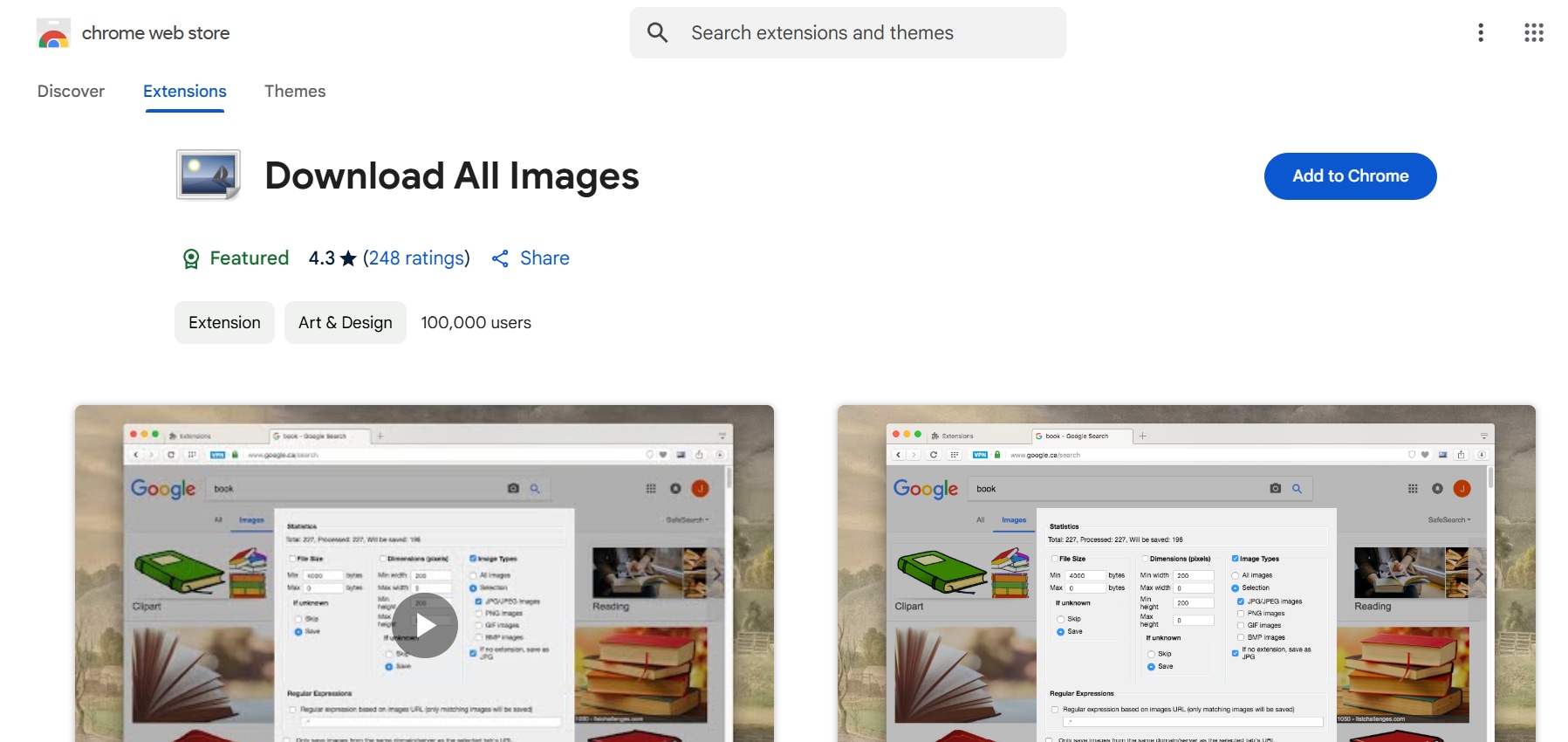
Download All Images
Download All Images is a versatile browser extension that lets users save all pictures from a website in one click. It automatically detects all images on a webpage and provides options to filter them by format, resolution, and file type. This extension is ideal for users who need to bulk download images from a web page with minimal effort.
Steps to Download Images Using a Browser Extension
Step 1: Install the Extension
Open your browser and go to the Chrome Web Store or Firefox Add-ons page. Search for an image downloader extension like Imageye or Download All Images, then click Add to Browser and confirm the installation.
Step 2: Open the Website and Activate the Extension
Navigate to the webpage containing the images you want to download. Click on the extension icon in the browser toolbar to scan and detect all available images on the page.
Step 3: Select Images and Download
Preview the detected images and select the ones you want to save. Choose the preferred file format and resolution if the extension provides options. Click Download, and download all images on a page on your device.
Method 2: Using Developer Tools
For users with some technical knowledge, browser Developer Tools provide a way to extract all images from a website without using additional software or extensions. This method allows users to locate image URLs directly from a webpage’s HTML code and download them manually. It is particularly useful for accessing images that are not easily downloadable through right-click methods.
Steps to Download Images Using Developer Tools
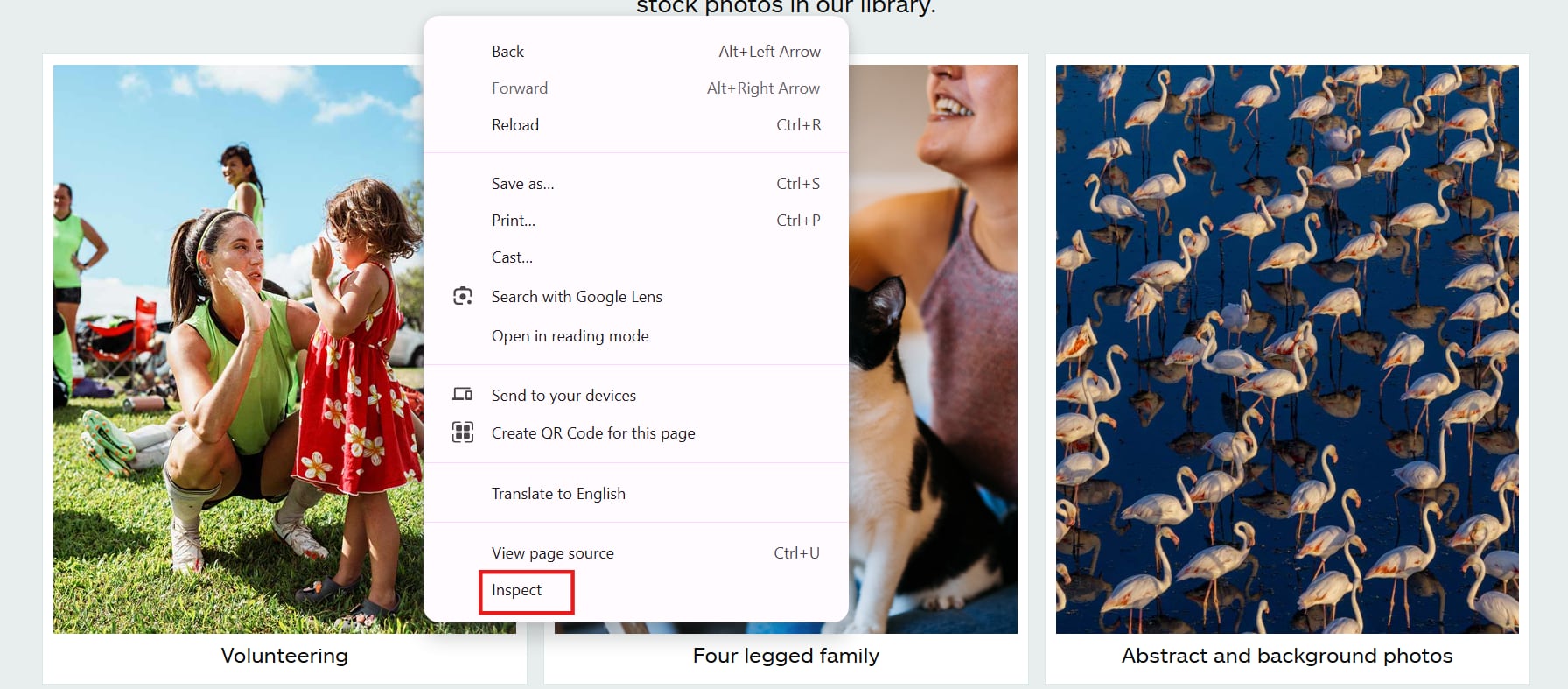
Step 1: Open Developer Tools and Access the Network Tab
Right-click anywhere on the webpage and select Inspect (Chrome) or Inspect Element (Firefox) to open Developer Tools. Alternatively, press F12 or Ctrl + Shift + I (Windows) / Cmd + Option + I (Mac). Once open, navigate to the Network tab and refresh the page to load all elements.
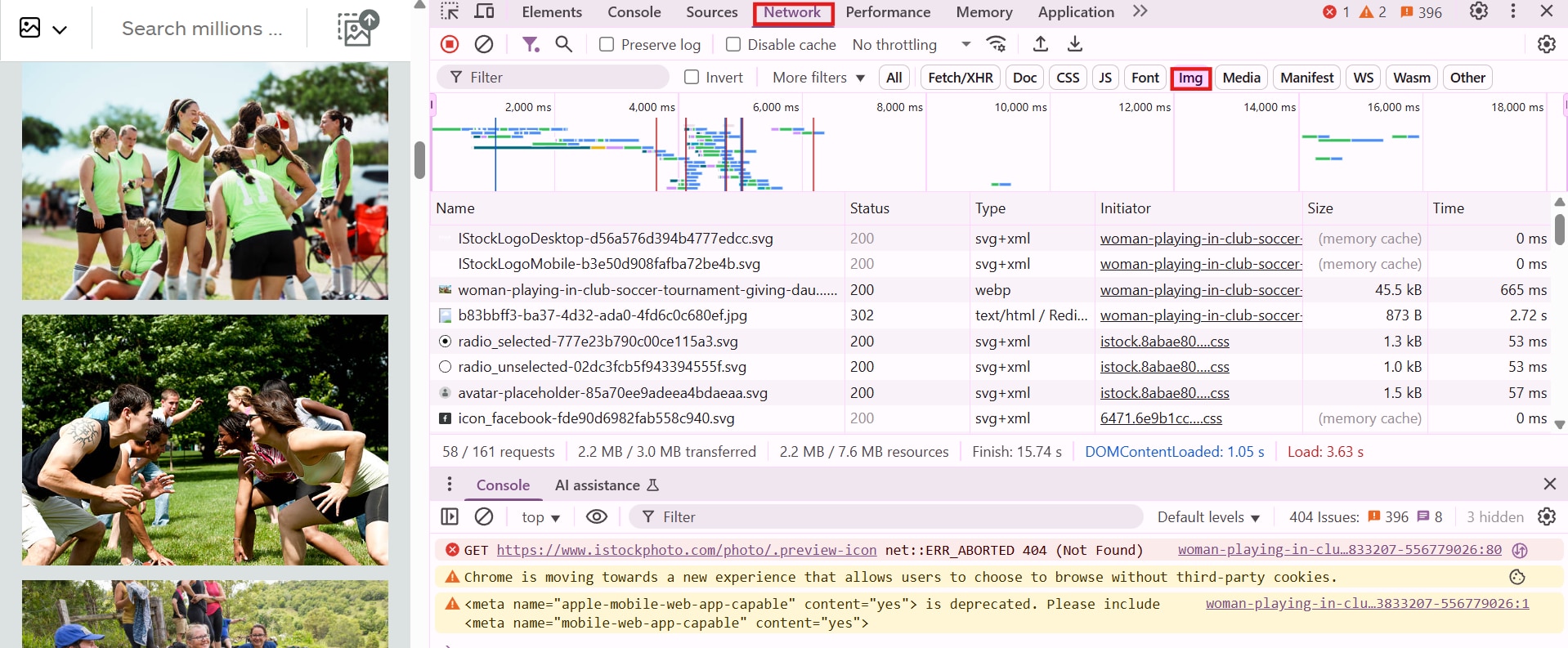
Step 2: Filter and Locate Image Files
In the Network tab, find the Filter bar and click on Img to display only image files. Scroll through the list to locate the images you want to download. Hover over the image URLs to preview their resolution and format.
Step 3: Open and Save Images
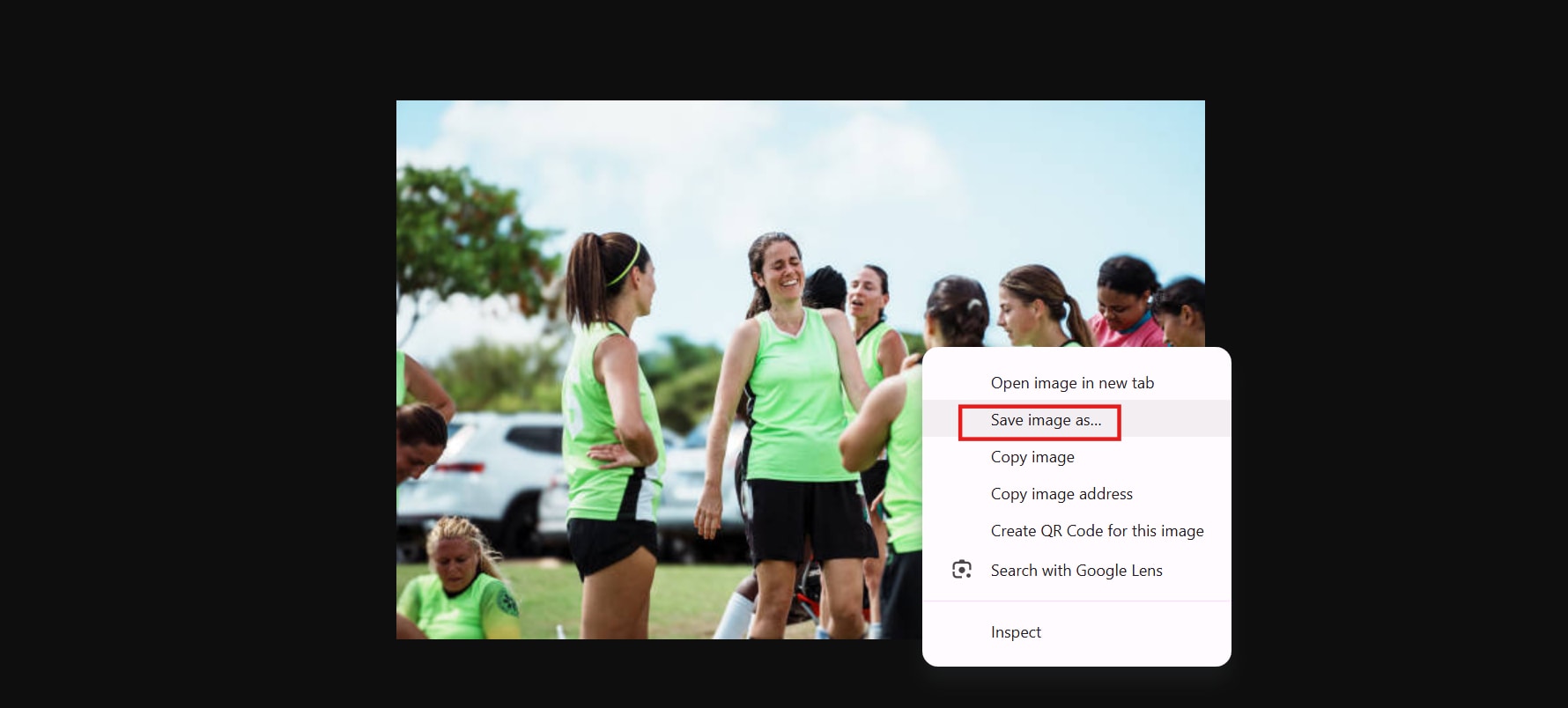
Right-click on any image file and select Open in New Tab to view it in full size. Once the image is displayed, right-click again and choose Save Image As to download all pics from website to your device.
Method 4: Using Online Downloaders
For users who want a quick and simple way to download all images from a website, online downloaders provide an efficient solution. These tools work directly from a web browser, eliminating the need for software installation. With just a webpage URL, online downloaders can scan and extract all available images for easy downloading.
Popular Online Image Downloaders
Extract.pics
Extract.pics is a simple online tool that allows users to extract all images from a url quickly. By entering a web page URL, it scans and displays all available images for selection. The tool supports multiple file formats and enables users to save all pictures from a website easily. It works across different browsers without requiring an account or software installation.

ImageCyborg
ImageCyborg is an advanced online downloader that allows users to download all pictures from a website in one click. It provides fast processing, maintains high-resolution image quality, and supports bulk downloads. The tool is ideal for users who need to save large numbers of images without manually selecting each one.

Steps to Use an Online Image Downloader
Step 1: Open the Online Downloader
Go to a website like Extract.pics or ImageCyborg in your web browser. These tools allow users to extract and download images from a webpage quickly.
Step 2: Paste the Website URL
Copy the link of the web page containing the images and paste it into the search bar of the online downloader. Click the Extract or Start button to begin scanning the page for images.
Step 3: Select and Download Images
Once the tool lists all available images, select the ones you want to save. Click the Download button to store them on your device in the preferred format.
Method 3: Using Mobile Downloaders
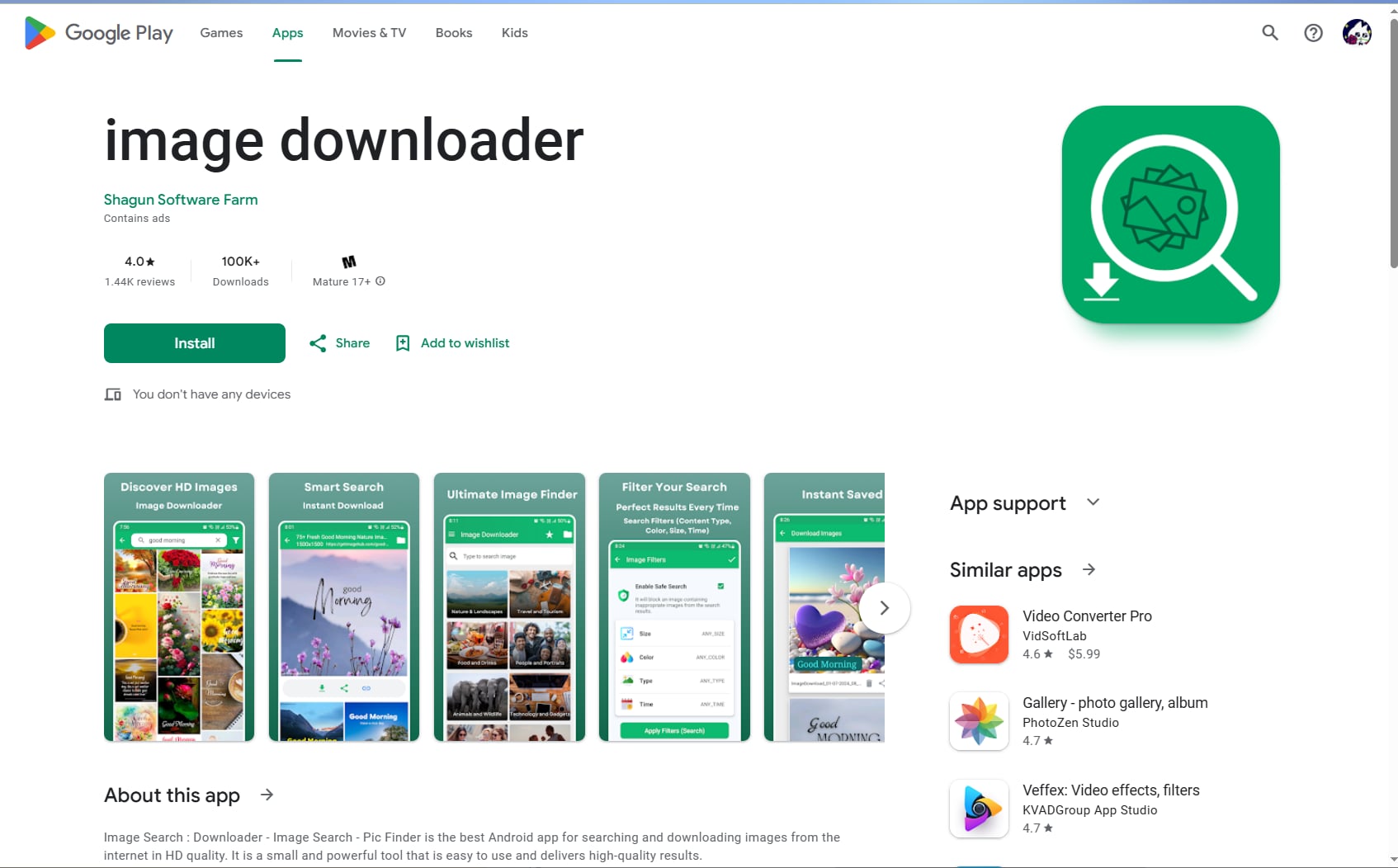
Image Downloader is a simple Android tool designed for users who want to quickly search and download images directly to their device. It download all pics from website like a mini search engine, allowing you to find HD images by keyword, filter by size or color, and download instantly.
It’s ideal for casual users who need images for wallpapers, social media, or inspiration without using a browser. However, since it relies on search results rather than direct website extraction, it’s better for general image discovery than precise bulk downloading.
Steps to Download Images with Vovsoft Picture Downloader
Step 1. Search for Images
Open the app and enter a keyword in the search bar to find images.
Step 2. Select an Image
Browse results and tap the image you want to view in full size.
Step 3. Download All Pics from Website
Tap the download button to save the image to your device gallery.
Method 4: Using PC Downloaders
Vovosoft
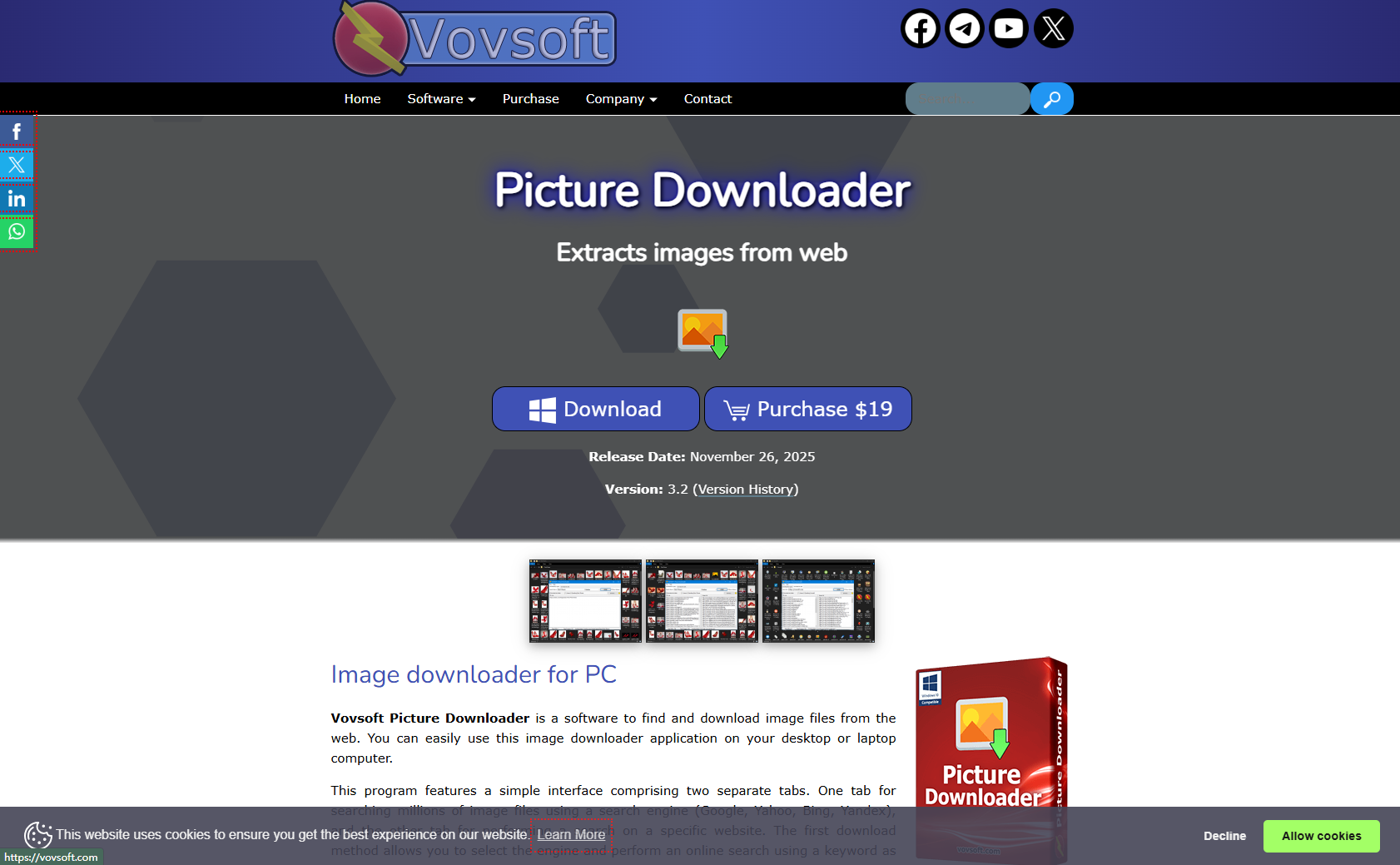
Vovsoft Picture Downloader is a lightweight Windows-based tool designed to help users download images in bulk from websites or search engines with minimal effort. Instead of saving images one by one, it allows you to extract multiple images at once by simply entering a URL or keyword. The software supports various formats like JPG and PNG and offers basic filtering options to refine results. With its simple interface and fast processing, Vovsoft is ideal for users who need a quick and straightforward solution for download all pics from website efficiently without dealing with complex settings or browser limitations.
Steps to Download Images with Vovsoft Picture Downloader
Step 1: Install and Launch the Software
Download Vovsoft Picture Downloader from the official site, install it on your Windows PC, and open the program.
Step 2. Choose Download Method
Use either:
- Keyword search (via Google, Bing, etc.), or
Enter a website URL to extract images from a specific page.
Step 3: Select and Download Images
Set your download folder, choose file types (JPG, PNG, WEBP, etc.), and apply filters to refine results. Click Start to scan and download images in bulk. The tool will automatically collect and save them to your selected folder.
Part 3. Bonus: How to Easily Batch Download HD Instagram Photos
UniConverter
Wondershare UniConverter is an all-in-one solution for downloading Instagram images in batch, designed to solve common problems like manual saving, low-quality downloads, and limited access to full profiles. Instead of downloading images one by one, UniConverter Instagram Downloader allows you to paste an Instagram profile link and bulk download all photos quickly and in original quality.
Available on both Windows and Mac, it ensures smooth performance across devices. Beyond images, UniConverter also supports Instagram video downloads, Instagram Reels saving, Instagram Feed saving, and Instagram Story downloads, giving users a complete toolkit for managing IG content. With fast processing, batch capabilities, and high-quality output, it’s ideal for creators, marketers, and everyday users who need efficient and reliable Instagram downloads.

Best Image Downloader
Features:
- Batch Image Downloading: Download multiple images simultaneously from a website or a list of URLs, saving significant time.
- URL-Based Downloading: Directly input website or image URLs to initiate downloads.
- Image Format Conversion: Convert downloaded images to various formats (e.g., JPEG, PNG, BMP, TIFF) if needed.
- Video Downloading and Extraction: In cases where images are embedded within videos, UniConverter can download the video and potentially extract still images.
- User-Friendly Interface: Intuitive design makes it accessible to both beginners and experienced users.
- High-Speed Downloads: Optimized for efficient downloading, minimizing waiting time.
Steps to Download Images Using UniConverter
Step 1: Open UniConverter and Access the Image Downloader
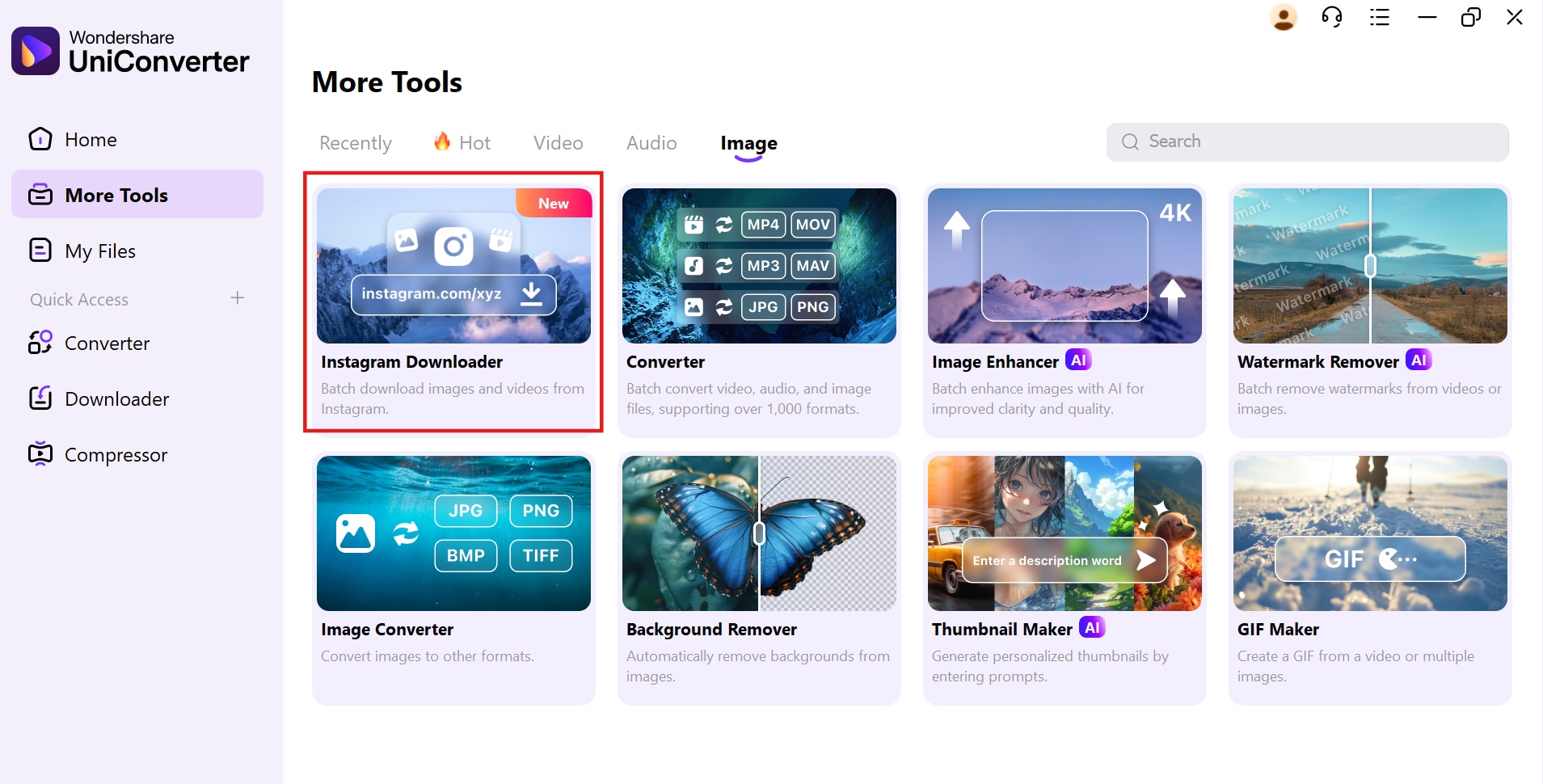
Launch UniConverter on your computer and go to the Home screen. Click on the Instagram Downloader option under the Image tab to access the tool. This feature allows users to download all images from a web page efficiently.
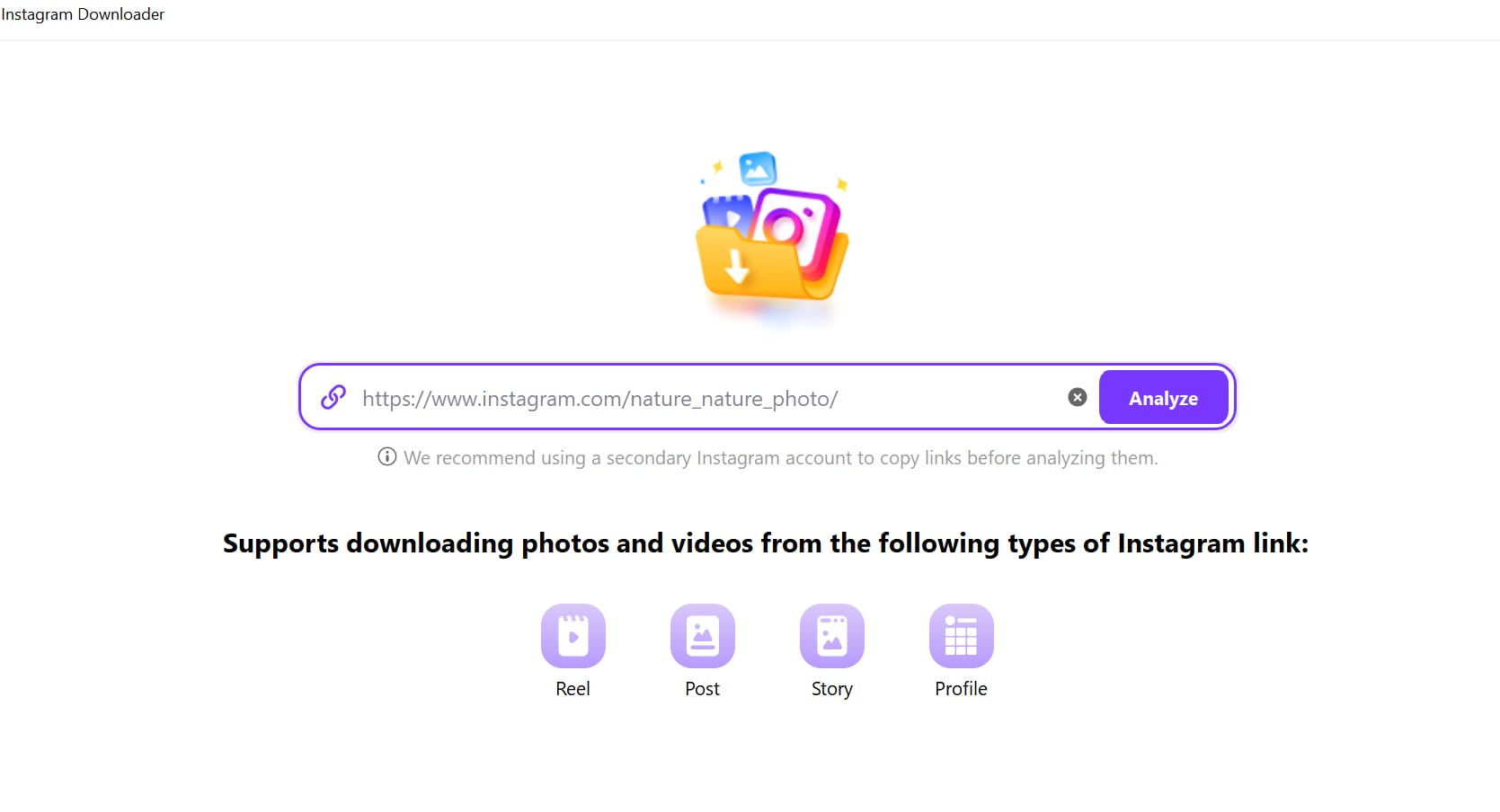
Step 2: Paste the URL and Analyze
Copy the link of the Instagram post or profile you want to download images from. In UniConverter, paste the link into the provided input field. Then, click "Analyze" or a comparable button to allow UniConverter to process the link and identify the downloadable images.
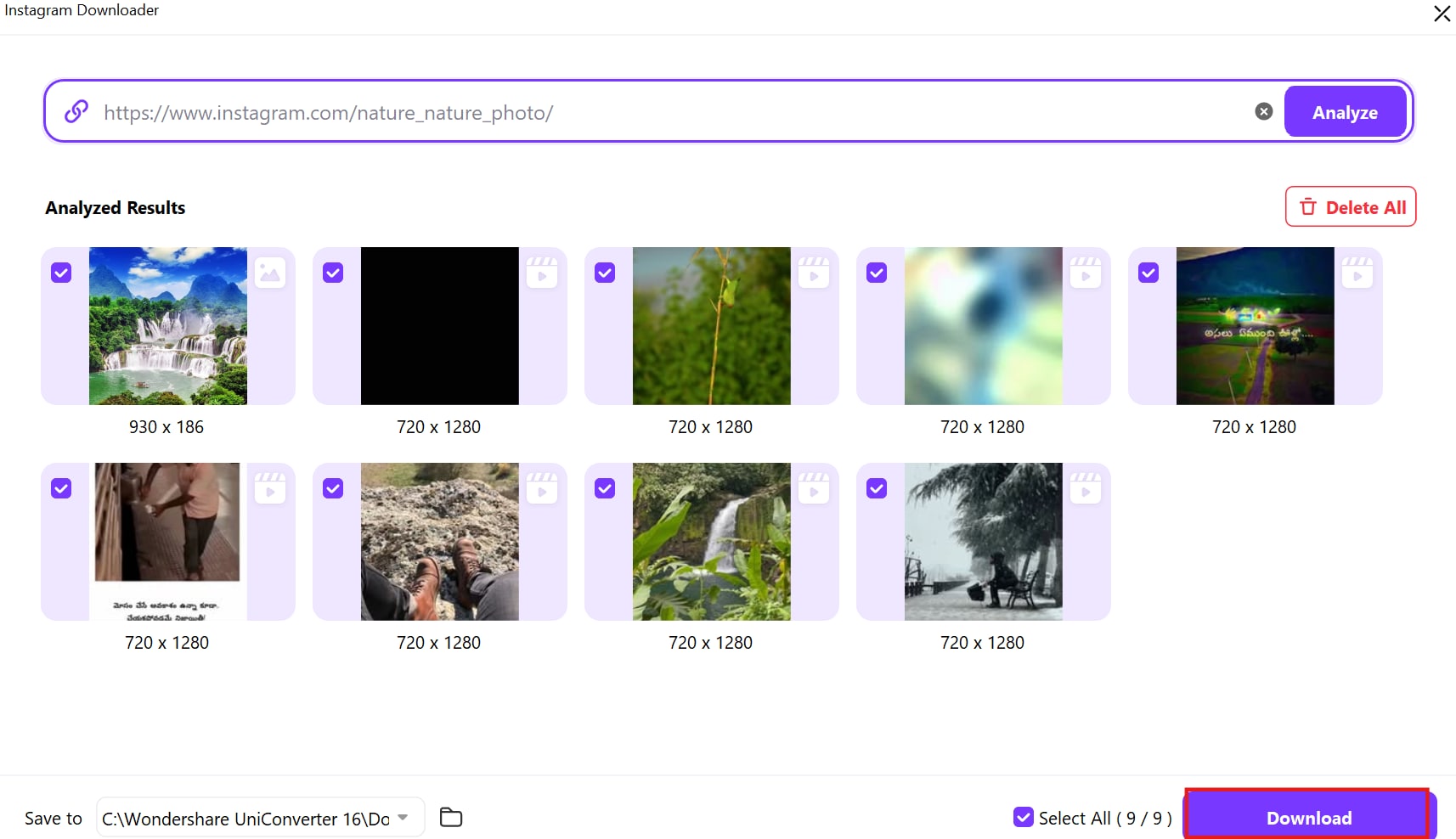
Step 3: Select Images and Download
After the link is analyzed, select the desired download options, such as the output folder. Choose the images you want to save then click the "Download" button, and UniConverter will save the Instagram images directly to your chosen location.
Part 4: Things to Consider Before Downloading All Images
Before you start pulling all images from a website, it is important to understand certain factors that can affect the downloading process. From website permissions to storage concerns, these aspects ensure a smooth experience when you download all pictures from a web page. Considering these factors will help you avoid legal issues and optimize image quality.
- Website Permissions: Some websites have copyright restrictions or policies that prohibit unauthorized downloads. Before you rip all images from a website, check the site's terms of service to ensure compliance. Downloading protected content without permission may violate legal guidelines and result in restrictions.
- Image Quality: Websites often use compression techniques to reduce file sizes, which may lower image resolution. When you download all images from a site, you might not always get the original quality. If high-resolution images are necessary, consider using tools that preserve image details or seek alternatives like official media downloads.
- Storage Space: Downloading a large number of images can quickly consume storage, especially if they are in high resolution. Ensure your device has enough free space to store the files without affecting system performance.
- Data Consumption: Bulk image downloads can use significant bandwidth, especially when dealing with high-resolution files. If you have a limited data plan, consider using Wi-Fi or breaking the download into smaller batches.
- Website Load: Avoid overloading the website's server by downloading too many images at once, especially if the site is not built for bulk downloads.
Part 5:Use Cases of Downloading All Website Images
There are several advantages to extract all images from a website, whether for personal use, research, or design projects. Having quick access to images without needing an internet connection can be highly beneficial. Below are key reasons why download all images on a page can enhance efficiency and workflow.
- Offline Access: Downloading images allows users to access visual content even when there is no internet connection. This is especially useful for presentations, travel, or any scenario where online access is limited. Having offline access ensures that images remain available whenever needed.
- Archiving: Creating a visual archive helps preserve important website content that may change or be removed over time. Archiving ensures that valuable images and references are always accessible. This can be particularly useful for researchers, businesses, or individuals tracking website updates.
- Design Inspiration: Designers and creative professionals often look to websites for inspiration. Saving images in bulk makes it easier to analyze design trends, color schemes, and visual elements. Collecting images from various sources helps build mood boards and refine creative ideas efficiently.
- Research and Analysis: Researchers and educators frequently gather images for documentation, comparison, or study purposes. Downloading images in bulk simplifies the process of analyzing visual data and creating reports. It also helps in studying patterns, trends, and historical website changes.
- Backup: A backup of important images ensures that they are not lost if the original source is modified or removed. Businesses, content creators, and website owners can use bulk downloads to maintain records of their media. Having a local copy of images provides security and peace of mind.
Part 6: Best Practices for Organizing Downloaded Images
After successfully downloading all images from a website, organizing them properly ensures easy access and efficient file management. Without a structured system, images can become difficult to locate, especially when dealing with bulk downloads. Implementing best practices can help users sort, rename, and store their images systematically.
- Create Folder Structures: Organize images into categorized folders based on their source, project, or content type. For example, if you extract all images from a website for research, separate them into folders like "Logos," "Infographics," and "Backgrounds" for easy retrieval.
- Rename Files for Better Identification: Many downloaded images have generic names, making it difficult to identify them later. Renaming images with descriptive titles, such as "Website-Logo.png" or "Product-Image1.jpg," helps in recognizing them without opening each file.
- Convert Images to the Desired Format: Some websites store images in less common formats like WebP. If needed, convert them to standard formats like PNG or JPG for better compatibility. Many image downloader tools offer built-in conversion features to simplify this step.
- Use Metadata and Tags: Adding metadata or tags to images can improve searchability, especially when handling a large collection. Metadata such as date, category, or usage rights helps in efficiently managing and filtering images when needed.
- Backup Important Downloads: If the images are valuable for future use, store a backup on an external drive or cloud storage. This prevents data loss and ensures accessibility across multiple devices.
Conclusion
In this guide, we've explored various methods to efficiently download all pics from a website, ranging from user-friendly browser extensions to more technical developer tools. We covered the importance of considering copyright, storage, and website terms, as well as the benefits of offline access and archiving. For a seamless experience, UniConverter stands out, offering batch downloading, URL-based extraction, and format conversion. Beyond downloading, UniConverter offers an image converter to change file formats effortlessly and a GIF maker to create custom animations from images. Whether you're a designer, researcher, or simply archiving visuals, choose the method that best suits your needs and leverage UniConverter to enhance your workflow and creative projects.
FAQs
-
1. Which is the best method to download all pictures from a web page?
The best method depends on your needs. Dedicated software is ideal for batch downloads, browser extensions offer convenience, and developer tools allow manual extraction for advanced users. -
2. Are there any free tools to download all images from a site?
Yes. Many free online tools and browser extensions allow image downloading. However, advanced features like batch processing and format conversion are usually available in premium tools. -
3. Is it legal to download all images from a webpage?
It depends on copyright laws and the website’s terms of service. Public domain images are generally safe to use, but copyrighted content requires permission before reuse. -
4. Can I download all photos from a web page on mobile?
Yes. Mobile users can use browser-based tools, apps, or online downloaders. However, desktop tools typically provide more powerful batch downloading capabilities. -
5. Can I use tools to download images from social media platforms like Instagram?
Some tools support downloading media via URL. However, you should always follow platform policies and ensure you have permission before saving or using the content.

