


Apple’s Worldwide Developers Conference (WWDC) 2025 was a much-anticipated one, as it saw the release of iOS 26. The update brings call screening, Visual Intelligence, and most importantly, new Liquid Glass design updates for Camera, Photos, Safari, and more. Other than the big makeover, its camera and photos app is expected to get major performance-based upgrades that will elevate its usability and user experience.
iOS 26 is currently available to use in its beta version, and users have already reported bugs and media sharing issues. This guide discusses everything the latest update brings, the potential issues, and a working solution.
In this article
- Why is the New iOS Version Called iOS 26?
- Is the iOS 26 Beta Version Available for All iPhone Users?
- iOS 26 Camera, Photos, and Image Playground – What to Expect
- Comparison of Camera and Photo App to Old iOS Systems
- Persistent Problems for Sharing Media With iOS 26
- How to Smoothen Your Video & Image Sharing from iOS With UniConverter?
- Conclusion
- FAQs
Part 1. Why is the New iOS Version Called iOS 26?
iOS versions were named iOS 16, 17, and so on, to signify the major releases of the operating systems. These are just marketing names for general audiences. But, in iPhone settings, you’ll find the internal build number alongside iOS 17 or 18. These are technical identifiers for Apple developers and specify the exact compilation of the OS, including minor fixes and beta revisions.
Recently, Apple has adopted a new policy to align its operating system version number with the current calendar year. So, rather than iOS 19 after iOS 18, its latest update is named iOS 26. However, the internal build number will follow the same order.
The new iOS update is scheduled to officially launch in September 2025, but most of its features will be available in 2026. It will go all the way through to September 2026, when the next update (iOS 27) will be ready.
For consistency, the company will move the software update of all its platforms to the numbering scheme as well. For example, iPad OS 26, watchOS 26, visionOS 26, macOS 26, etc. However, this might not apply to the iPhone naming scheme, so after iPhone 16, you can expect the launch of iPhone 17 this fall.
Part 2. Is the iOS 26 Beta Version Available for All iPhone Users?
No, the iOS 26 Beta version isn’t available to all iPhone users. A user must fulfill the following criteria to get access to the beta version:
Device Compatibility: Only iPhone 11 and newer generation models (including iPhone SE 2nd generation) can run the latest iOS version, and not iPhone XR, XS, and XS Max. You can check the list of compatible models on Apple’s official website.
Apple Intelligence Features: iOS 26 is bringing 20+ new Apple Intelligence features and improvements in a single release. Some examples include live translation for calls and messages, voicemail summaries, Apple Maps upgraded search, image creation upgrades, etc. The Apple Intelligence features, however, require an iPhone 15 Pro or later, or a device with an A17 Pro chip or newer, to function. These have the necessary powerful hardware, like the Apple Neural Engine, to support the advanced capabilities of Apple Intelligence.
Registration: iOS 26 is accessible to those enrolled in Apple’s Beta Software Program and the compatible devices. To do this, you need to sign up for the program at beta.apple.com. Then, access Settings > General > Software Update > Beta Updates and select iOS 26 Public Beta to download and install the beta update.
Part 3. iOS 26 Camera, Photos, and Image Playground – What to Expect
One of the first things that you’ll see in the Apple iOS 26 update is the revamped interface. Its liquid glass design language provides the app icons, menus, and widgets with a clear and frosted-glass appearance. Even the camera has adopted the look, where buttons are more rounded and float over the background, and there are pop-out menus. Not only the looks, but the revamped Apple Intelligence is expected to add to the performance of the camera and Photos app.
Camera: The iOS 26 update may see more computational photography powered by the Neural Engine. That is, you may expect the usuals, such as an improved Night mode, for a better low-light performance. Also, a Smart Scene Detection feature might be available. Here, the camera will automatically detect the subject and apply a tailored look to bring out the best of its qualities. Other than that, you can expect other features like rapid shooting and lens correction.
Photos: Apple iOS 26 is expected to bring smart features to the Photos app, as in Google Photos. Features like removing background objects and auto-enhancing portraits are already there, but you might see a deeper integration of Generative AI for editing. For example, you can expand images beyond borders, create new objects, and more. Other than that, iOS 26 might auto-organize albums according to objects, moments, pets, or locations.
Image Playground: The latest update brings some major improvements to the image playground. The generated image will now look more natural, the style blends with backgrounds, and it is better at reflecting emotions. As iOS 26 is still in the beta stage, you can see an expansion to video generation and other AI features in its final launch.
Part 4. Comparison of Camera and Photo App to Old iOS Systems
Here’s a tabular comparison of predicted camera and photo app features in iOS 26 and existing iOS 18 features:
| Area | iOS 18 | iOS 26 |
| User Interface | The Unified Photos view offers more direct access to settings | Liquid Glass design with fewer controls in the viewfinder |
| AI Editing Capabilities | Remove unwanted objects and basic editing features | Create and add new objects, expand images beyond borders, and more. |
| Camera Modes | Slo-mo, Pano, Portrait, Timelapse, and Spatial | Improved Night Mode, Smart scene detection |
| Supported File Formats | MP4, MOV, HEIC, JPEG, PNG, MP3, and AAC | Not officially released yet |
| Image Playground | Creating custom AI images and avatars on iPhone. | Improved AI for more realistic people and advanced customization options for Genmoji. Also, expect video generation and other AI features. |
| Video Compression Options | No in-app compression features | Built-in options to reduce size by selecting a lower resolution and frame rate in Camera settings |
| Organization | Split-screen layout with an automatic collections area at the bottom. | Auto-organize albums according to objects, moments, pets, or locations |
Part 5. Persistent Problems for Sharing Media With iOS 26
iOS 26, in its early stages, is experiencing some persistent media sharing issues related to codec compatibility, file size, and others. These are detailed as follows:
Codec Compatibility: iOS 26 will continue to utilize codecs like HEVC (H.265) and ProRes for video compression to save storage. This can cause playback and sharing issues with the older devices (iPhones with iOS 16 or older) or non-iOS platforms that don’t support it.
File size and Format: Large media files, encoded by HEVC, can be problematic to share via messaging apps or email due to size limitations or a lack of file format support.
General Performance: Many users have reported overall performance issues with iOS 26 beta, including lag, slow animations, and unexpected crashes. This could impact media playback and sharing.
Part 6. How to Smoothen Your Video & Image Sharing from iOS With UniConverter?
The new codecs (HEVC, ProRes) are often unreadable on older devices or non-Apple platforms, so the way out is to convert them before sharing. Wondershare UniConverter can be an easy way to do that. It supports the new codecs, and its image converter can batch convert them to JPG, PNG, WEBP, and other popular formats with a clean drag-and-drop interface. Plus, its AI tools, like image enhancer and background remover, help polish your images before conversion and make them ready for anything.
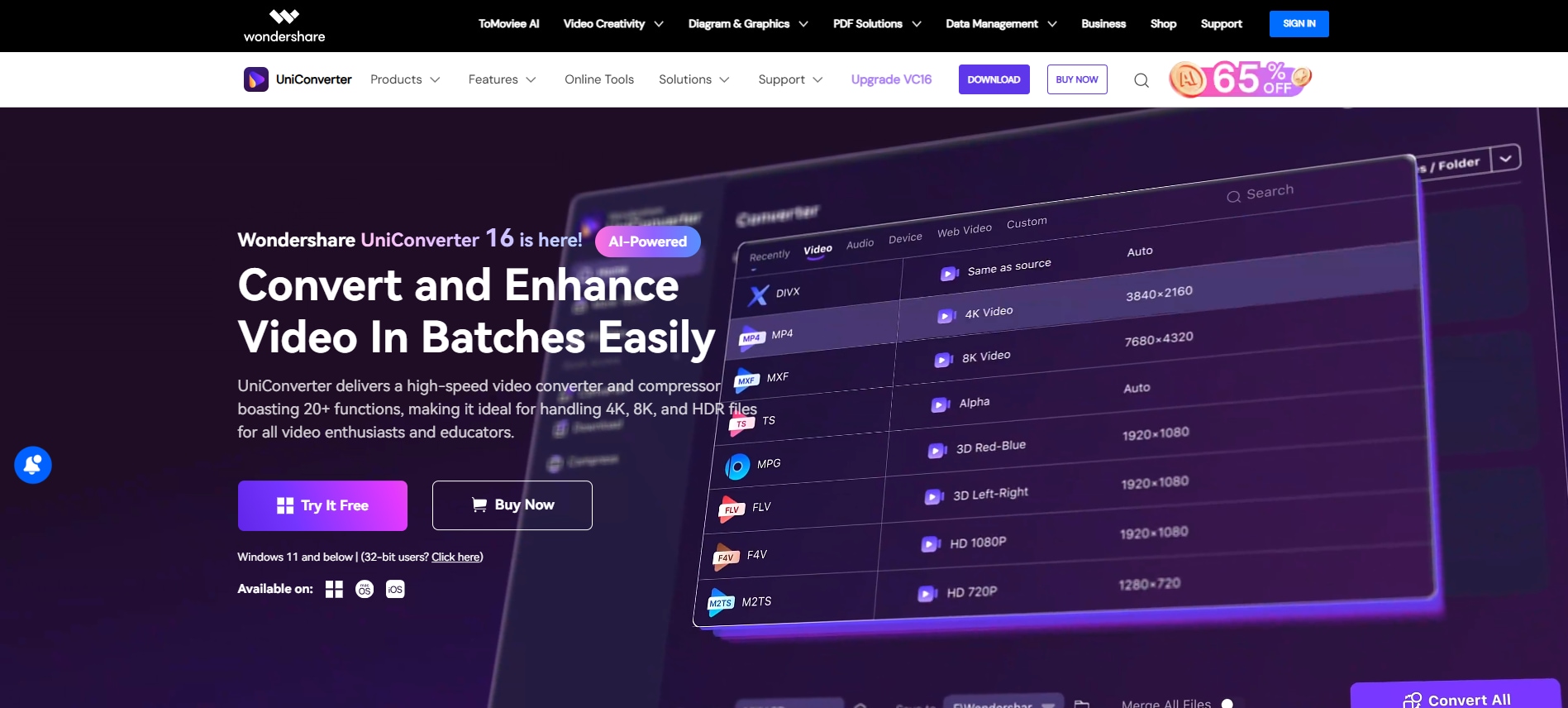
Key Features
With its AI Image Enhancer, you can improve the clarity of your photo and preserve even the tiniest details.
Use its background remover feature to clean the background of your images.
Its AI Video enhancer can increase video resolution or upscale video to 4K or 8K without quality loss.
You can batch convert your media files into your preferred format within seconds.
How to Batch Convert Images on Desktop using UniConverter
Here’s a step-by-step guide to batch convert your iPhone images into your preferred format quickly:
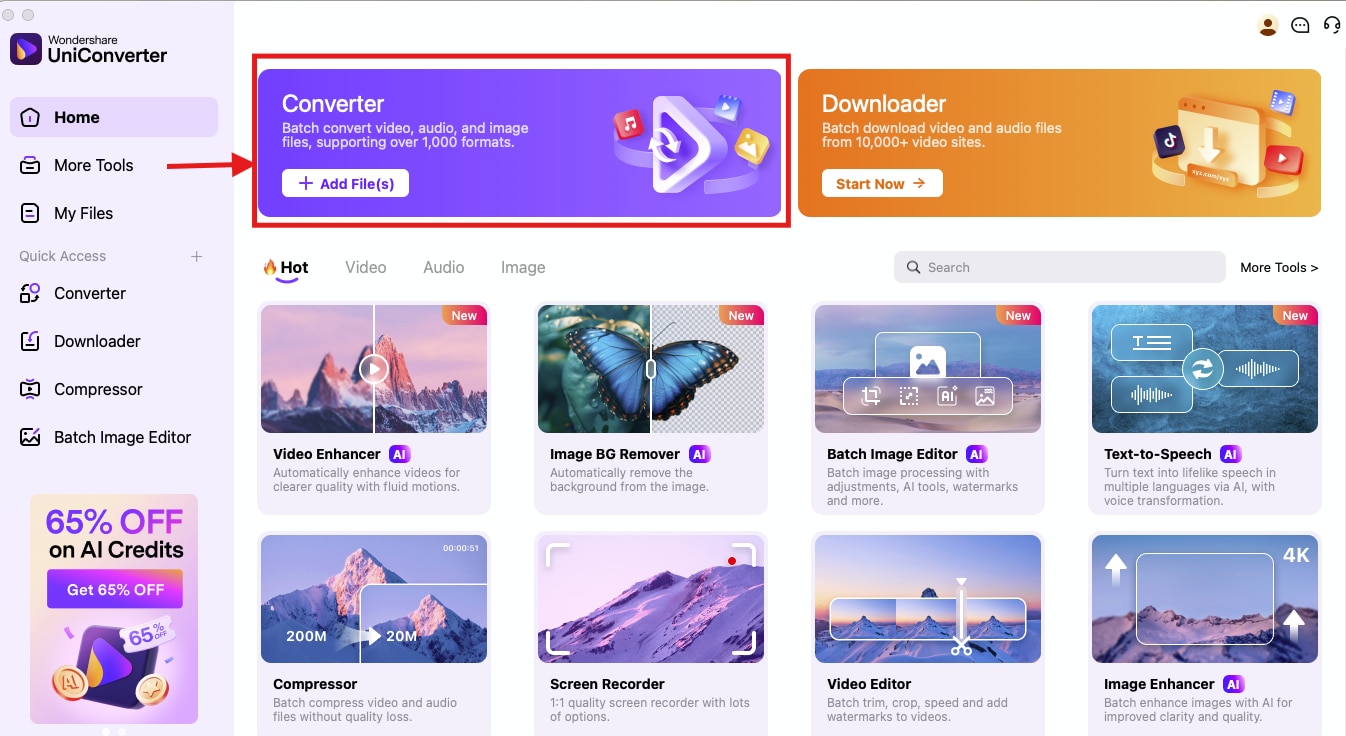
Step 1: Access the UniConverter homepage and click “Converter.”
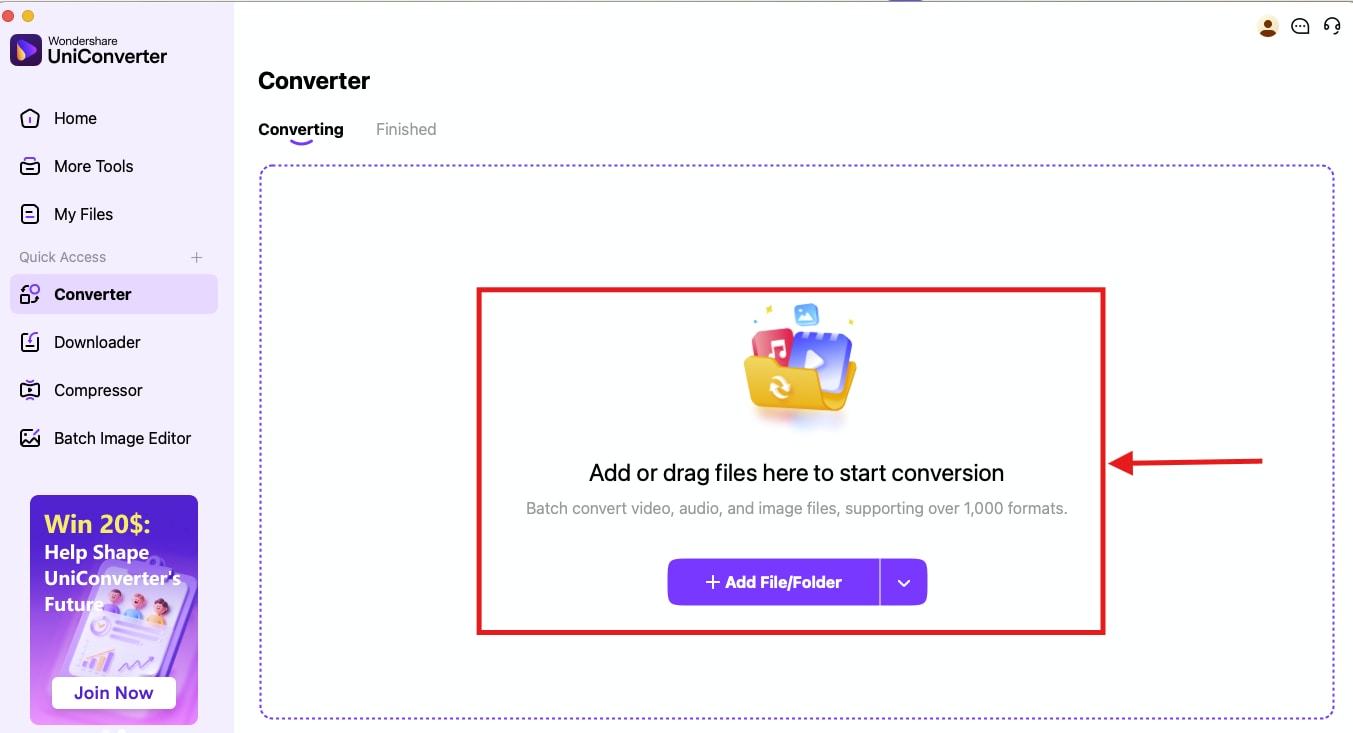
Step 2: On the next screen, click on “Add Files/Folder,” or you can drag and drop the files.
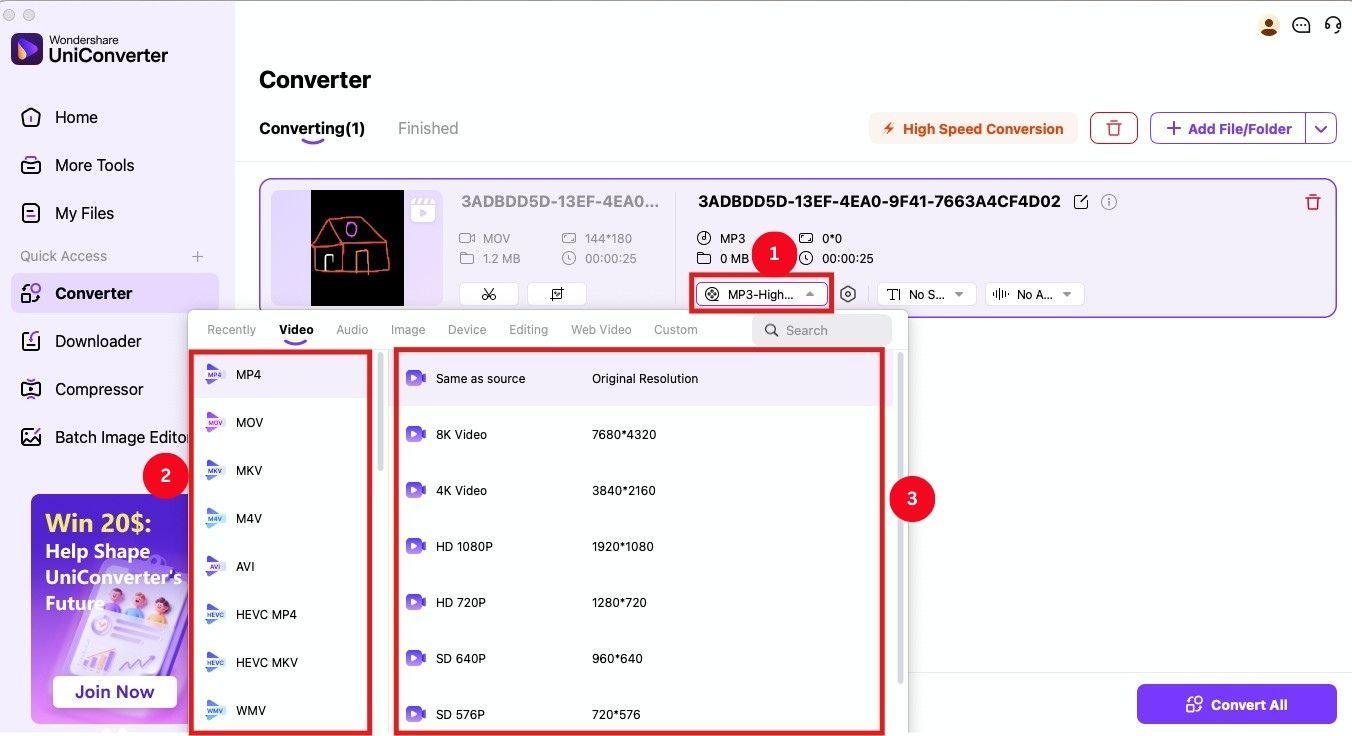
Step 3: For video files, click the “Video” and choose MP4, or your preferred file format. Then, select the resolution as 8K, 4K, etc.
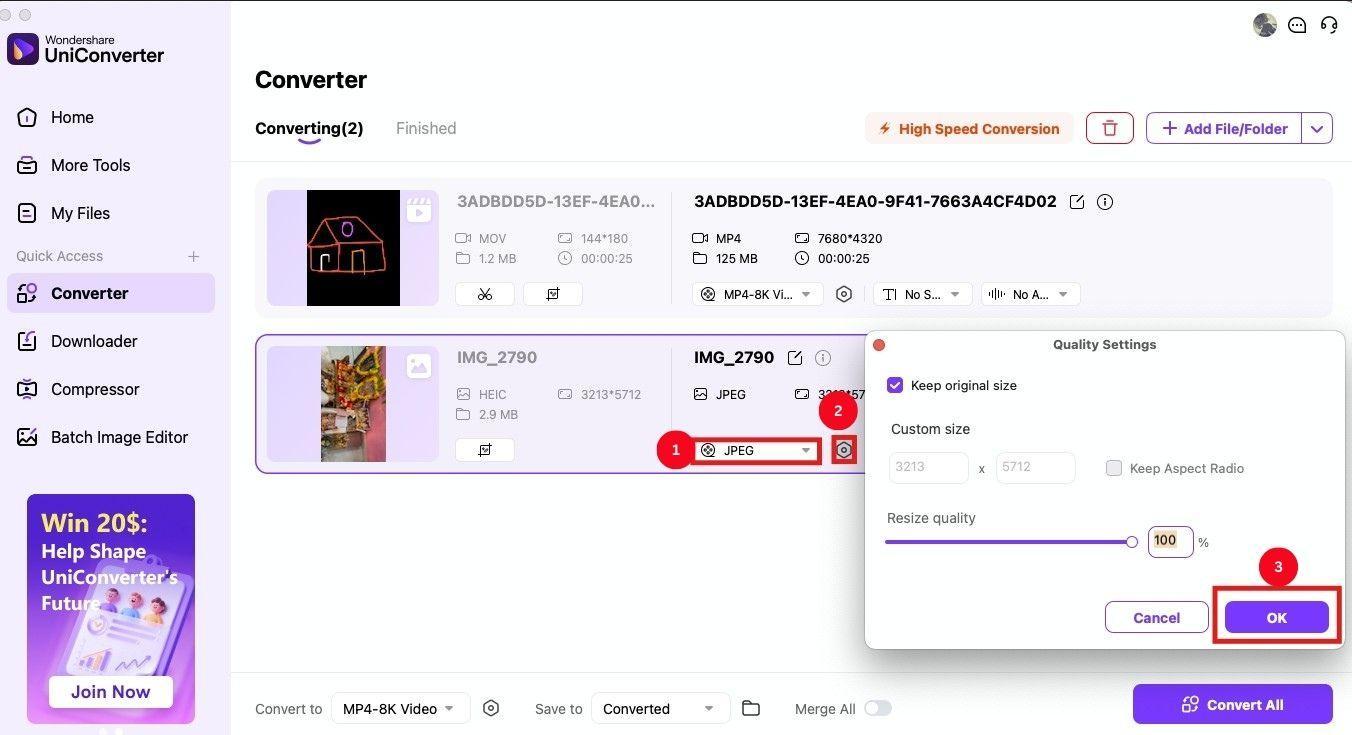
Step 4: For an image, select the output format from the file format dropdown as “JPEG” or your preferred option. Then, click the settings icon to tweak the size, aspect ratio, and resize quality. If you’re happy with it, click “Ok.”
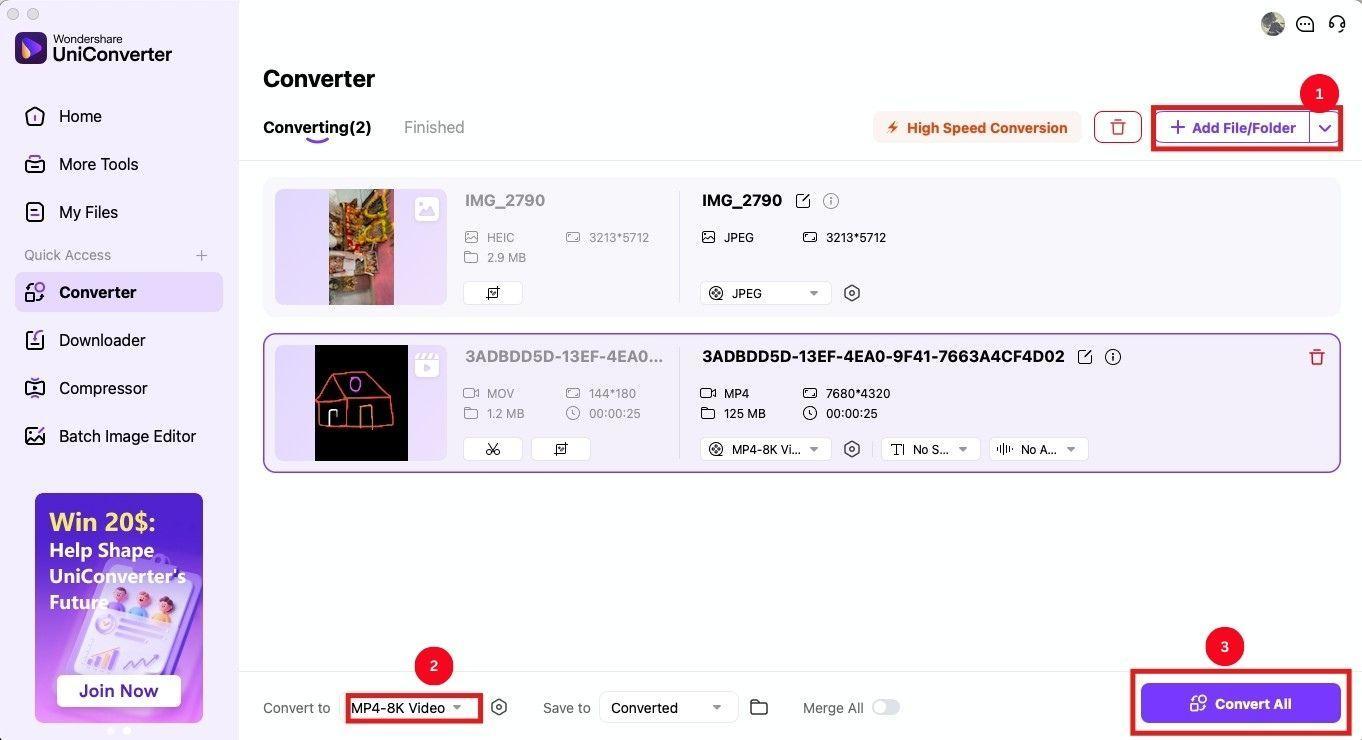
Step 5: Similarly, click “Add file/Folder” to add multiple media files, and change the download format. Once done, click on the “Convert All” option to convert and download the images.
Conclusion
The new and much-anticipated iOS 26 will bring several new display and feature updates for users. Camera and photo apps are expected to see major improvements in terms of interface and generative AI features. You will be able to take better pictures and organize them better. But what’s concerning is the new codecs and persisting media sharing issues. In that case, you can use Wondershare UniConverter to convert the media files and share them with older iPhones and other devices.
FAQs
-
1. Is iOS 26 released?
No, iOS 26 is currently running its beta 7 for iPhone and was announced at Apple’s Worldwide Developers Conference on June 9, 2025. It is expected to make an official launch after September 2025. -
2. Which phones will get iOS 26?
iOS 26 will be compatible with iPhone models starting from the iPhone 11 series and newer, including iPhone SE (2nd generation and later). The upcoming series will all support the latest update. -
3. Why is iOS jumping to 26?
Apple is numbering all its operating systems with the year going forward, so 26 in iOS 26 represents its launch between September 2025 and September 2026. Everything released this year will use the same number, that is, iPad OS 26, macOS, watchOS 26, and so on. -
4. What should I do before installing the beta?
Always make a full backup in case you need to revert to an earlier version, as some users struggled with restoring backups across versions or found their devices sluggish after updates. -
5. What devices run iOS 26 smoothly?
There are reports that iOS 26 beta runs better on older devices like the iPhone 12, while users of newer models (like iPhone 16 Pro Max) have experienced more lag or instability. Some 4GB RAM devices (like iPhone SE) seem “mostly fine” for daily use, but waiting for later public betas is recommended for improved stability.

