
MP4
- >Convert Other Format to MP4
-
- Convert MOV to MP4
- Convert AVCHD to MP4
- Convert AVCHD to MP4 on Mac
- Convert WMV to MP4
- Convert DVD to MP4
- Convert URL to MP4
- Convert OGG to MP4
- Convert M4V to MP4
- Convert VOB to MP4
- Convert VHS to MP4
- Convert MTS to MP4
- Convert Video_TS to MP4
- Convert SRT to MP4
- Convert Windows Movie Maker to MP4
- Convert AVI to MP4
- Convert MKV to MP4
- Convert MP3 to MP4
- Convert MOV to MP4 Android
- Convert iTunes Movies to MP4
- Convert IFO to MP4
- >Convert MP4 to Other Format
- >Other MP4 Tips
15 Most Helpful MP4 to DVD Converters for Windows and Mac [2026]
by Christine Smith • 2026-10-27 15:43:08 • Proven solutions
An MP4 to DVD converter should help you create the disc your player can actually use. This comparison separates DVD authoring and burning tools from video converters and legacy software, so you can choose an appropriate Windows or Mac workflow.
Already chosen your software? Follow our step-by-step guide to converting MP4 to DVD for the burning workflow.
MP4 to DVD Software: Compare the Main Options
| Software | Platform | DVD workflow and menus | Free or paid? | Best fit / main limit |
|---|---|---|---|---|
| Wondershare UniConverter | Windows / Mac | DVD, ISO, or DVD folder; menu templates | Commercial software; check trial and plan terms | Preparing several MP4 clips and a menu in one workflow; disc capacity still limits the project |
| DVDStyler | Windows / Linux; Mac installer listed separately | DVD authoring and burning with interactive menus | Free, open source | Custom menus without a software license fee; check the available installer against your OS |
| WinX DVD Author | Windows | Video DVD creation with menus and subtitles | Free | A Windows-focused DVD workflow; no native Mac edition |
| DVD Flick | Windows | DVD authoring with menus, audio tracks, and subtitles | Free, open source | A basic DVD project; check compatibility before relying on this older application |
| Freemake Video Converter | Windows | Video-to-DVD workflow with menu options | Freemium; paid packs unlock features | Users who already use Freemake; verify required menu features and output restrictions first |
| AnyMP4 DVD Creator | Windows / Mac editions | DVD disc, folder, or ISO with menu customization | Commercial software; trial terms apply | Dedicated DVD authoring; choose the correct platform edition |
| Movavi Video Converter | Windows / Mac editions | Video preparation; a separate burning tool is needed to write a disc | Commercial software | Existing Movavi users; do not assume the converter includes a complete DVD authoring workflow |
Which should you choose? For a guided MP4-to-DVD workflow with editing and menu options, consider UniConverter. For free authoring, compare DVDStyler with WinX DVD Author on Windows. For Mac, confirm the exact macOS version and installer support before downloading. The legacy entries below are not equivalent to currently supported recommendations.
Playable DVD-Video or a Data DVD?
A data DVD stores MP4 files much like a removable drive; a player must support the stored file format to play them. DVD authoring creates the DVD-Video structure and navigation used by conventional DVD players. Converting MP4 to a VOB file alone is not the same as authoring a complete playable disc.
Before You Burn MP4 to DVD
- For a physical disc, use a DVD-writing drive, not a read-only drive, and blank media supported by the drive and target player.
- If you do not have a burner yet, choose software that can save a DVD ISO or folder; writing it to a physical disc remains a separate step.
- Check the project's duration and capacity indicator, leave working space for temporary files, and preview the menu and video order.
- Match the TV standard and aspect ratio to the target playback setup. Do not assume that changing a file extension will improve compatibility.
Free does not always mean unrestricted: distinguish open-source software from a free download or limited trial. Before committing to a tool, check whether the required DVD output, menu features, watermark removal, or project length needs a paid license. Physical media and a writer are separate costs.
Watch Videos to Learn Which Video Formats Does a DVD Player Support?
- Part 1. Windows MP4 to DVD Software and Compatibility Notes
- Part 2. Mac MP4 to DVD Options and Legacy Compatibility Notes
- Part 3. MP4 to DVD FAQs and Troubleshooting
Part 1. Windows MP4 to DVD Software and Compatibility Notes
- Wondershare UniConverter
- Freemake
- DVD Flick
- Free DVD Burner for Windows
- Sothink DVD Maker
- ConverterLite
- RZ DVD Creator
- WinX DVD Author
- AnyMP4
- Movavi Video Converter — Video Preparation
- AVS Video Converter — Windows Only
1. Wondershare UniConverter - Guided DVD Workflow
Key Features:
 Wondershare UniConverter - MP4 to DVD Converter for Windows/Mac
- Prepare video files and use DVD Burner to author a DVD; standalone VOB conversion is a different task.
- Add multiple supported video files, including MP4, to one DVD project, or save an ISO or DVD folder.
- Customize DVD with free DVD templates and DVD parameters like Aspect ratio, TV standard, quality, etc.
- Edit videos with advanced video editing functions, like trimming, cropping, adding watermarks, subtitles, etc.
- Preview your DVD project before writing the disc.
- Choose DVD output settings to suit the intended player and disc.
- Available for Windows and Mac; check the current system requirements before installing.
 Check system requirements and license terms before installing.
Developer: Wondershare Company
Download Link: https://videoconverter.wondershare.com
License: Commercial software with a trial. Check the current plan and DVD feature availability before purchasing.
Steps on how to Convert MP4 to DVD with Wondershare UniConverter:
Here is a summary of how to convert MP4 to DVD in 3 steps. You can find details below:
- Step 1: Import MP4 files to this MP4 to DVD converter.
- Step 2: (Optional) Adjust DVD Settings per your needs.
- Step 3: Choose the disc, ISO, or DVD-folder destination and burn.
Step 1 Import MP4 files to this MP4 to DVD converter.
After downloading and installing this DVD maker, you can launch it. Open DVD Burner, then click Add Files to add MP4 files from the pop-up window, or directly drag and drop your MP4 videos into it.
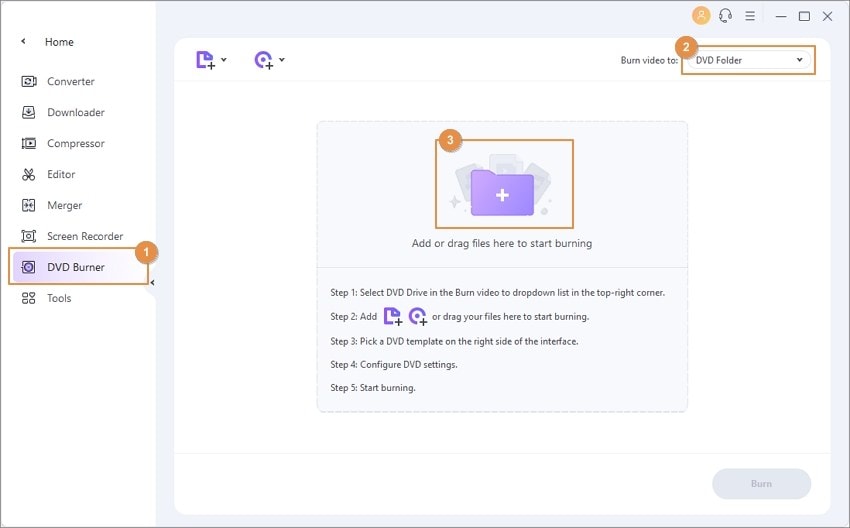
Note: You can add multiple MP4 files to one DVD project. Keep the total duration within the capacity and quality setting shown by the application.
Step 2 (Optional) Adjust DVD Settings per your needs.
Choose a DVD menu template, then set the DVD label, menu type, aspect ratio, TV standard, and quality based on your needs. Alternatively, you can use the default parameters.
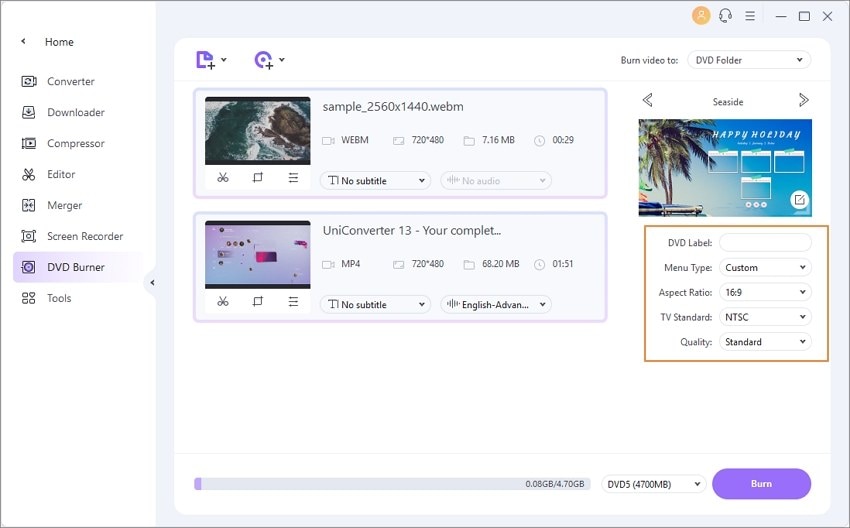
Note:
1. If you'd like to customize your MP4 video before burning, just click the Editing buttons under the imported video thumbnails. Then just play your talent using the advanced video editing features, including trimming, cropping, adding watermark and subtitles; learn more about DVD preparation and burning steps >.
2. You can also set customized settings of your DVD, including the aspect ratio (16:9, 4:3), the DVD quality (Standard, High quality, or Fit to disc), and the DVD format (DVD folder, ISO files, or DVD).
Step 3 Choose the Output and Burn.
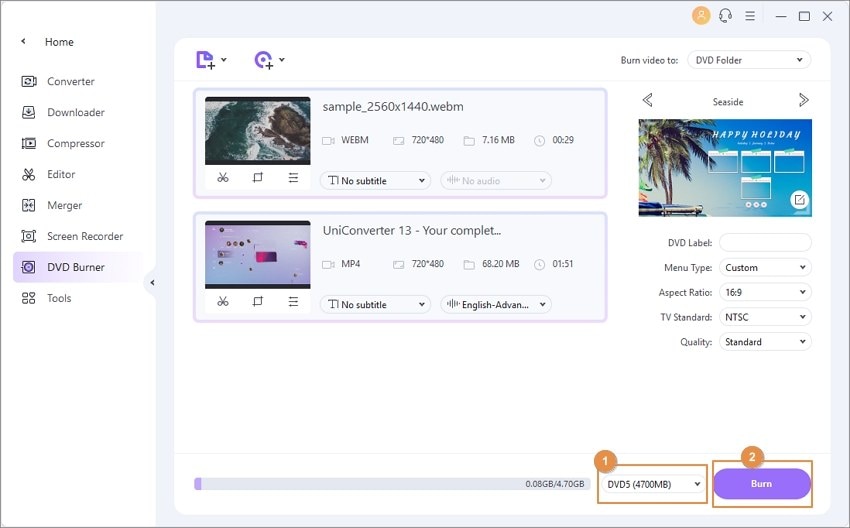
For a physical DVD, insert compatible blank media and select your DVD writer as the destination. For an ISO or DVD folder, select that output and a save location instead. Click Burn, wait for completion, and test the result in the intended player. For a fuller walkthrough, see our step-by-step guide to converting MP4 to DVD.
Watch Video Tutorial to Convert MP4 to DVD on Windows 10

Tips
For the reverse workflow, move to How to Convert DVD to MP4 >> to learn more.
2. Freemake Video Converter
Best for / limitation: Windows users who already use Freemake. Free download availability does not establish unrestricted DVD output.
Key Features:
- Convert local video files to a DVD project on Windows.
- Choose available menu options for the project.
- Check which advanced menu features require a paid pack.
- Preview the output and review any trial or branding restrictions before burning.
Developer: Ellora Assets Corporation
Download Link: https://www.freemake.com/how_to/how_to_convert_mp4_to_dvd_free
License / availability: Freemium; current paid-pack terms apply.

3. DVD Flick
Best for / limitation: Basic Windows authoring; check this older application on your current system before starting a large project.
Key Features:
- Create DVD video from supported source files.
- Add menu navigation, extra audio tracks, and subtitles.
- Free and open-source DVD authoring.
Developer: Dennis Meuwissen
Download Link: https://www.dvdflick.net/
License / availability: Free, open source.

4. Free DVD Burner for Windows — Legacy Listing
Best for / limitation: Current official availability, installer safety, and supported Windows versions could not be confirmed. Do not rely on the old freeware claim when choosing a new tool.
Key Features:
- Legacy listing retained for readers comparing older software.
- Confirm an official installer, OS support, and DVD-Video output before use.
License / availability: Legacy product; previous price or free-use claims are not a current offer.

5. Sothink DVD Maker — Legacy Listing
Best for / limitation: Current official licensing and OS support could not be confirmed. Prefer an authoring tool with accessible current documentation.
Key Features:
- Legacy listing retained for readers comparing older software.
- Confirm an official installer, OS support, and DVD-Video output before use.
License / availability: Legacy product; previous price or free-use claims are not a current offer.

6. ConverterLite — Legacy Listing
Best for / limitation: Current installer availability and complete DVD authoring support could not be confirmed. A conversion preset alone does not establish playable-disc support.
Key Features:
- Legacy listing retained for readers comparing older software.
- Confirm an official installer, OS support, and DVD-Video output before use.
Developer: Converter Lite
License / availability: Legacy product; previous price or free-use claims are not a current offer.

7. RZ DVD Creator — Legacy Listing
Best for / limitation: The vendor describes DVD creation, but current licensing and supported OS versions need confirmation before purchase.
Key Features:
- Legacy listing retained for readers comparing older software.
- Confirm an official installer, OS support, and DVD-Video output before use.
Developer: RealZeal Soft, Inc.
Download Link: https://www.rzdvdcreator.com/dvd-creator.html
License / availability: Legacy product; previous price or free-use claims are not a current offer.

8. WinX DVD Author
Best for / limitation: A free Windows DVD-authoring workflow; no native Mac edition.
Key Features:
- Author MP4 and other supported local videos to DVD on Windows.
- Create a DVD menu and add supported subtitle files.
- Choose project settings before writing the disc.
Developer: Digiarty Software
Download Link: https://winxdvd.com/dvd-author/
License / availability: Free, according to the official product page.

9. AnyMP4 DVD Creator
Best for / limitation: Dedicated menu-based DVD authoring; confirm platform-specific features.
Key Features:
- Author supported videos to DVD disc, folder, or ISO.
- Customize menu templates and navigation.
- Select the Windows or Mac edition for your system.
Developer: AnyMP4 Studio
Download Link: https://www.anymp4.com/dvd-creator/
License / availability: Commercial software; check current edition and trial terms.

10. Movavi Video Converter — Video Preparation
Best for / limitation: Video preparation rather than a guaranteed end-to-end DVD authoring solution. Movavi explains the separate disc-writing step.
Key Features:
- Convert video files as a preparation step.
- Use the output settings supported by your installed edition.
- Use a separate authoring or burning application when the project requires it.
Developer: Movavi
Download Link: https://www.movavi.com/videoconverter/
License / availability: Commercial software; current trial restrictions apply.

11. AVS Video Converter — Windows Only
Best for / limitation: Windows users only; it is not a Mac DVD burner.
Key Features:
- Windows application; the vendor states that macOS and Linux are not supported.
- Includes video conversion and a video-DVD workflow on Windows.
- Use the correct Windows installer and consult current feature documentation.
Download Link: https://store.avs4you.com/
License / availability: Check current AVS licensing and feature terms.

Part 2. Mac MP4 to DVD Options and Legacy Compatibility Notes
- Wondershare Free Video Converter for Mac — Legacy
- Movavi Video Converter for Mac — Video Preparation
- Voilabits DVD Creator for Mac — Legacy
- MacX Video Converter Pro — Discontinued
1. Wondershare Free Video Converter for Mac — Legacy Listing
Best for / limitation: This legacy product should not be treated as proof of free DVD burning in the current UniConverter edition. For a current workflow, consult the UniConverter Mac DVD guide.
Key Features:
- Legacy listing retained for readers comparing older software.
- Confirm an official installer, OS support, and DVD-Video output before use.
Developer: Wondershare
Current DVD guide: Burn videos to DVD on Mac
License / availability: Legacy product; previous price or free-use claims are not a current offer.
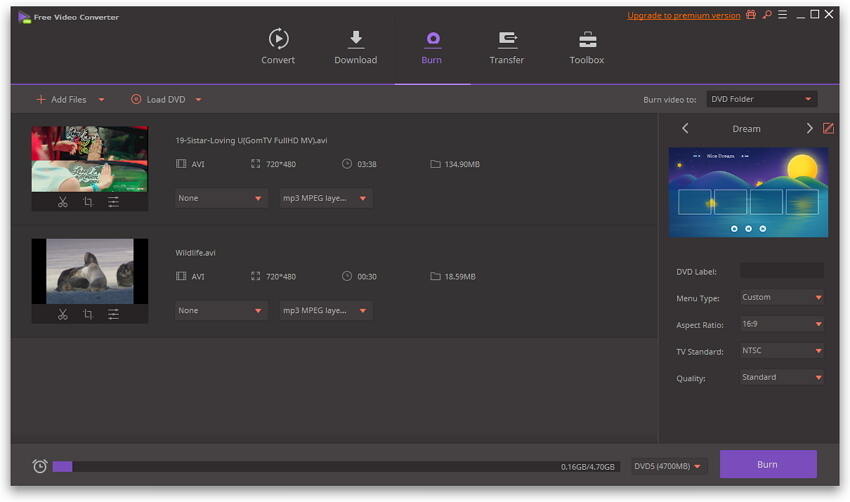
2. Movavi Video Converter for Mac — Video Preparation
Best for / limitation: Video preparation rather than a guaranteed end-to-end DVD authoring solution. Movavi explains the separate disc-writing step.
Key Features:
- Convert video files as a preparation step.
- Use the output settings supported by your installed edition.
- Use a separate authoring or burning application when the project requires it.
Developer: Movavi
Download Link: https://www.movavi.com/videoconvertermac/
License / availability: Commercial software; current trial restrictions apply.

3. Voilabits DVD Creator for Mac — Legacy Listing
Best for / limitation: Current official availability and compatibility with recent macOS versions could not be confirmed. Avoid treating this legacy listing as a current recommendation.
Key Features:
- Legacy listing retained for readers comparing older software.
- Confirm an official installer, OS support, and DVD-Video output before use.
Developer: Voilabits, Inc.
License / availability: Legacy product; previous price or free-use claims are not a current offer.

4. MacX Video Converter Pro — Legacy Listing
Best for / limitation: Digiarty confirms that this product is no longer downloadable or actively maintained. It should not be selected as a current Mac DVD burner; see the vendor support notice.
Key Features:
- Legacy listing retained for readers comparing older software.
- Confirm an official installer, OS support, and DVD-Video output before use.
Developer: Digiarty Software, Inc.
License / availability: Legacy product; previous price or free-use claims are not a current offer.

Part 3. MP4 to DVD FAQs and Troubleshooting
1. Can Windows Media Player convert MP4 to a playable DVD?
Windows Media Player can burn a data DVD, but it does not author a DVD-Video disc with DVD menus. A data disc plays only on devices that support its files. Use DVD authoring software when your target is a conventional DVD player.
2. What is the best MP4 to DVD converter for Windows and Mac?
Choose according to the target computer and output. UniConverter is an option for a guided DVD, ISO, or DVD-folder workflow. DVDStyler offers free authoring, while WinX DVD Author is a free Windows alternative. Check current OS compatibility, menu features, and license limits before selecting a tool.
3. Is there a free MP4 to DVD converter without a watermark?
DVDStyler is free and open source, and DVD Flick describes its software as free without limitations. Check the supported platform and available installer before use. For commercial trials, verify DVD output and branding restrictions instead of assuming that a free download means unrestricted burning.
4. Can I convert MP4 to DVD online?
A browser-based format conversion does not by itself create and write a playable DVD. The workflow needs DVD authoring and, for a physical disc, access to a compatible DVD writer. Check that a service provides the actual DVD output you need rather than just another video file.
5. Can I create a DVD ISO without a DVD burner?
Yes. Software that supports DVD ISO output can author the project and save the image on your computer without a physical writer. To play it on a standalone DVD player, you still need to write that image to compatible media using a DVD burner.
6. Can I put several MP4 videos on one DVD?
Yes. Add the clips to the same DVD-authoring project, arrange their order, and configure the menu. The total duration and quality setting must fit the selected disc; support for several files does not mean unlimited capacity.
7. Will converting HD or 4K MP4 to DVD keep the original quality?
A standard DVD-Video is a standard-definition format. An HD or 4K MP4 therefore needs resizing and encoding for this output, so it will not retain the original resolution. Keep the original MP4 separately if preserving the source quality is important.
8. Why will my burned DVD not play on a DVD player?
Check whether you authored DVD-Video or only copied MP4 files as data. Then check the player's supported disc type, the selected TV standard, disc finalization where required, and the condition of the media. Test the disc on the intended player before making more copies.
For the complete burning walkthrough, follow our step-by-step guide to converting MP4 to DVD. On Mac, also consult the Mac DVD-burning guide.
Reference Notes
This comparison uses published product documentation, not an in-house speed test. Features and licensing can change; legacy tools are marked where current support could not be confirmed.
- Microsoft: data DVDs and Windows Media Player
- DVDStyler: authoring features
- AVS: supported platform
- Digiarty: MacX Video Converter Pro support status
- Freemake: freemium licensing
Conclusion:
Choose a tool that authors the DVD output you need and supports your current operating system. UniConverter is worth considering when you want video preparation, menus, and DVD output in one workflow. Compare the free alternatives and license limits above, then preview and test your first disc before producing additional copies.
- How to Burn iTunes Movie to DVD Flawlessly
- How to Copy DVD to DVD on Windows/Mac
- How to Burn BBC iPlayer to DVD Easily
- 2 Ways to Burn iMovie to DVD Easily on Mac/Windows
- How to Convert MP4 to DVD Online Effortlessly
- Best 4 DVD Makers: How to Make a DVD Free on Windows/Mac
- Top 6 Free DVD Burners: How to Burn Videos to DVD Easily on Windows/Mac


Christine Smith
chief Editor