UniConverter
UniConverter Online Free
Converter video, audio & image free
Free Try
10 Best HD GIF Makers: Featured Content for Communication
Explore how to make HD GIFs in 3 steps with Uniconverter:
  • Commence the tool and access the GIF maker.
  • Import video to create GIF and choose customizable options.
  • Head to the “Save To” menu and determine the export file location.
app store btn

Discover the Power of HD GIF Makers for Engagement

Ahmed Absal
Ahmed Absal Originally published Apr 08, 25, updated Dec 16, 25

Do you feel like your digital content needs a little extra spark to grab attention? If so, an HD GIF maker is exactly what you need to make your visuals pop. In a world where everyone's mindlessly scrolling, the quality of your content really matters. Thus, using a reliable GIF maker means content stands out vibrant, and clear while keeping people engaged.

It is not only limited to creating a GIF but also about generating something that draws people in and leaves a lasting impact. To step up your visual game, the following article is packed with top high-definition GIF makers.

In this article
  1. What Should a Good HD GIF Maker Provide to Its Users?
  2. Top 10 HD GIF Makers One Should Go For
  3. Reviewing The Best HD GIF Makers [Selection Made Easy!]
  4. Conclusion
  5. FAQs

Part 1. What Should a Good HD GIF Maker Provide to Its Users?

A high-resolution GIF maker should provide all the necessary features to deliver professional results without complicating the process. For the best experience, dive into the list of key features that should be looked for in such a tool:

Support for High-Resolution Outputs

A top-notch GIF maker must enable users to create GIFs in high resolution, such as 1080 or even 4K. It guarantees that your animations are sharp and deliver a visual experience that stands out on any platform.

Smoother Frame Rate Control

The ability to control the frame rate is important because it ensures your GIFs are polished. Professional makers should offer an adjustable frame per second (FPS) to create seamless animation that doesn’t look choppy.

Compression and Optimization Options

Although quality is important, so is performance for an HD GIF creator. With the tools for compression and optimization, your GIFs maintain high quality while being lightweight for easy sharing.

Advanced Editing Tools

Access to powerful editing tools such as cropping, trimming, and adding effects makes your GIFs truly stand out. Such features give you complete flexibility to customize your GIFs, turning them into something exceptional.

Diverse Range of Format Support

To ensure your GIFs are compatible with a massive range of platforms, your GIF maker should support multiple formats. This versatility makes it convenient to share your creations across websites and other digital platforms.

No Watermarks

Another important feature for users who need professional GIFs is the ability to generate watermark-free content. The best HD GIF maker should allow users to generate and share their animations without any distracting watermarks.

Part 2. Top 10 HD GIF Makers One Should Go For

As the demand for professional-grade digital content continues to rise, discovering the right GIF maker has become equally essential. Hence, we’ve provided a list of high-definition GIF makers to consider in 2025 that can assist in generating smooth animations:

1.Wondershare UniConverter
Uniconverter-homepage.jpg

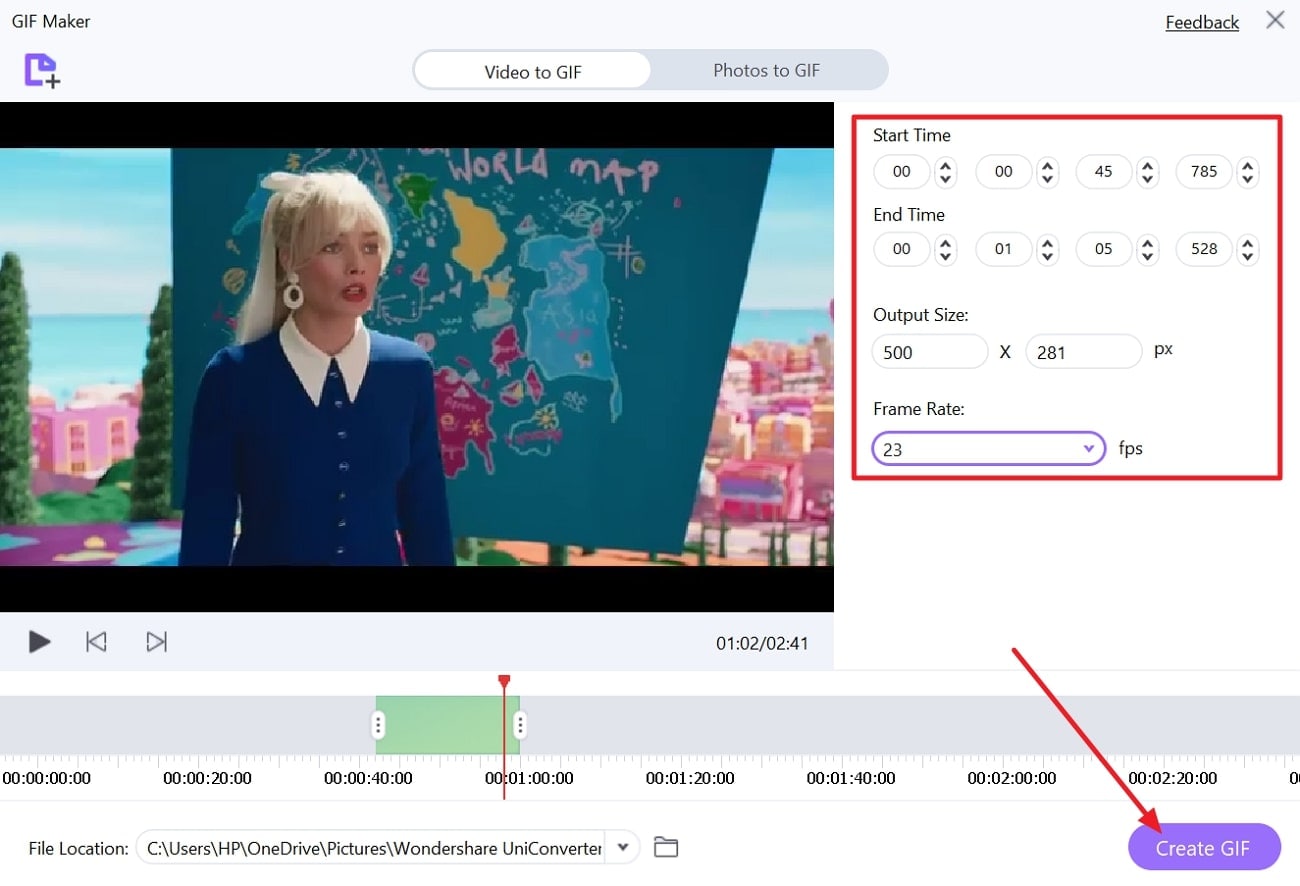
It's a powerful multimedia software that goes beyond simple GIF creation and allows you to edit GIFs with precision. Not only this, but it enables one to add a photo or video for an instant GIF creation. With this platform, you can adjust the start and end times for your GIF. To ensure real-time editing, it allows users to play the video with reverse and forward options.

This HD GIF maker provides a frame rate facility with a menu to set according to your requirements. Besides this, it allows individuals to choose a location for saving their final edited and created GIFs. Plus, modifying the output size ranges ensures your created result is perfect for the platform you're using. The possibilities are endless because it supports a diverse range of video formats, including MP4 and MOV.

Key Features

  • Apply Effects: After generating a GIF, you can add 66 different effects.
  • Add Watermark: It allows one to add text, images, and moving watermarks on their GIFs.
  • Adjust Video Speed: With the speed control feature, users can highlight important moments of videos.

Pros & Cons of UniconverterAVI

  • GIF
  • X

    Advanced Editing

    FreeConvert

    HD output

    • Loop control
    • Trim segments
    • WebM

    Optimize Static Bac8.99672tatiul>9H14Z" stroke="#00B97C" stroke-width="2" stroke-linecap="round" stroke-linejoin="round"eft"p>A>

  • It enables one to remove unwanted objects from their GIFs or videos.
  • You can add or remove the beginning and valing of your videos simultaneously.
  • GIFGIF ="left"ld valiConstop" style="width: 13.1646%;">

    X

    A>
  • In its free trial, users can only convert 5 files into GIFs.
  • GIF
    Key Features

    • It provides users with playback options like play on repeat and play.
    • Using this platform, you can apply various filters, including Fresco and Luna.
    • Canva facilitates editors with a suite of animations such as reveal and featured.

    Pros & Cons of Canva

    Pros
    • After generating a GIF, you can share it directly on social media platforms.
    • This tool provides an auto-trim feature, which automatically cuts short the video.
    Cons
    • Its free plan provides only 5 GB of Cloud storage.
    • For unlimited premium templates, you need to subscribe to Canva Pro.

    Simple Guide on Creating GIFs Using Canva

    Explore the provided step-by-step guide to personalize your GIF with this high-resolution GIF maker:

    Step 1

    Visit Canva and press the "Upload your Video" button to add your video.

    access canva hd gif maker

    Step 2

    Minimize the duration of your video and navigate to the "Download" button in the top corner. Choose the "File Type" as "GIF," and lastly, press the "Download" button to finish.

    save gif created by canva

    5. GifRun

    Without any limitation on your file size, you can upload and instantly generate results with this HD GIF maker. When creating a GIF, it allows users to add various text to maintain consistency. Not only this, but you can adjust the frame rate according to your requirement for smoothness in GIF.

    gifrun interface

    Key Features

    • This tool allows users to apply various filters, such as Vintage and Nolan.
    • GifRun facilitates modifying the width of your video before converting it into a GIF.
    • It enables users to preview their videos after editing them.

    Pros & Cons of GifRun

    Pros
    • By only pasting the URL, you can convert it into a GIF.
    • This platform benefits editors with playback options like forward and backward.
    Cons
    • You need to register to avail yourself of its speed managing feature.
    • The downloaded GIF contains a watermark when created through the free version.

    Detailed Guide to Create GIFs with GifRun

    Follow the given tutorial and turn your YouTube videos into GIFs without an account:

    Step 1

    Access this high-resolution GIF maker to paste URL in the given space and press “Get Video” later.

     paste video link at gifrun

    Step 2

    Adjust the length of your video through the slider and choose the "Frame Rate" by extending the menu. Lastly, press the "Create GIF" button to convert viral YouTube content into GIF.

    create hd gif gifrun

    6. AVp>Tutorial to Create GIFs Through Wondershare UniConverter

    Step 1

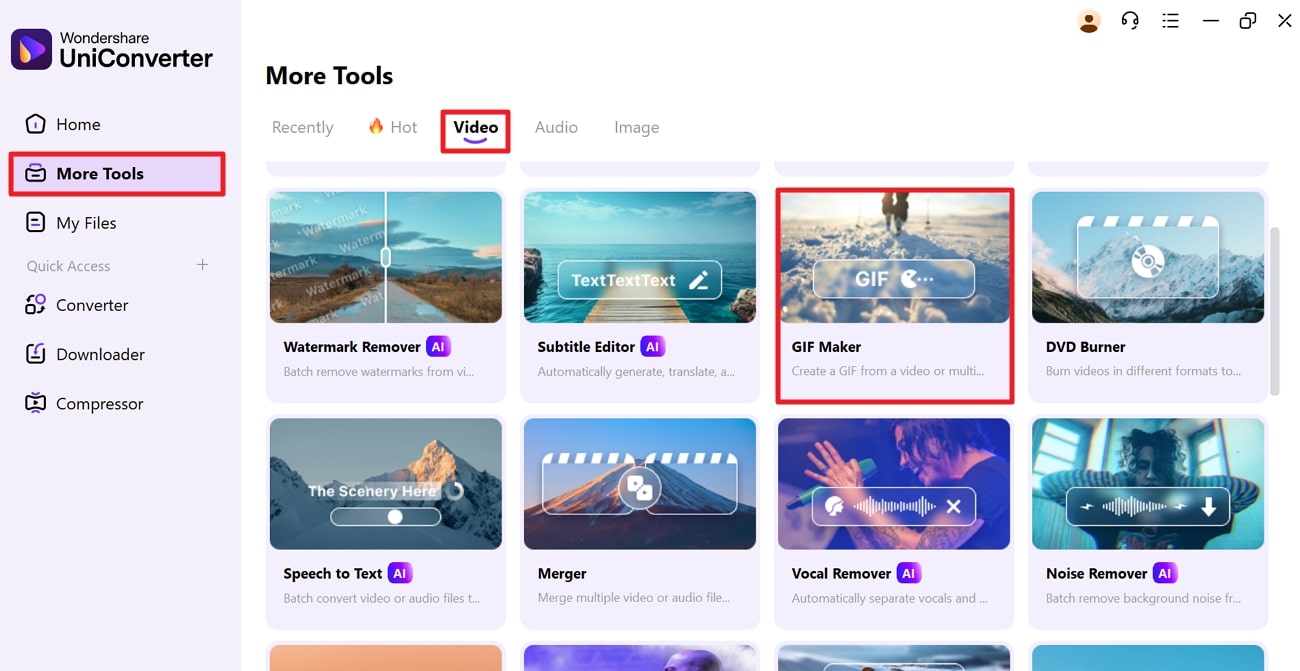
    Launch the tool and access “More Tools” on the s="p ="lel. Now, enable the “Video” option at the top and 4C21.e “GIF Maker” from the toolkit.

  • Canva facilitates editors with a suitgif/10-best-hd-gif-makers/hd-gif-maker-3.jpg" width="650" 1 13 22.336>

    Step 2

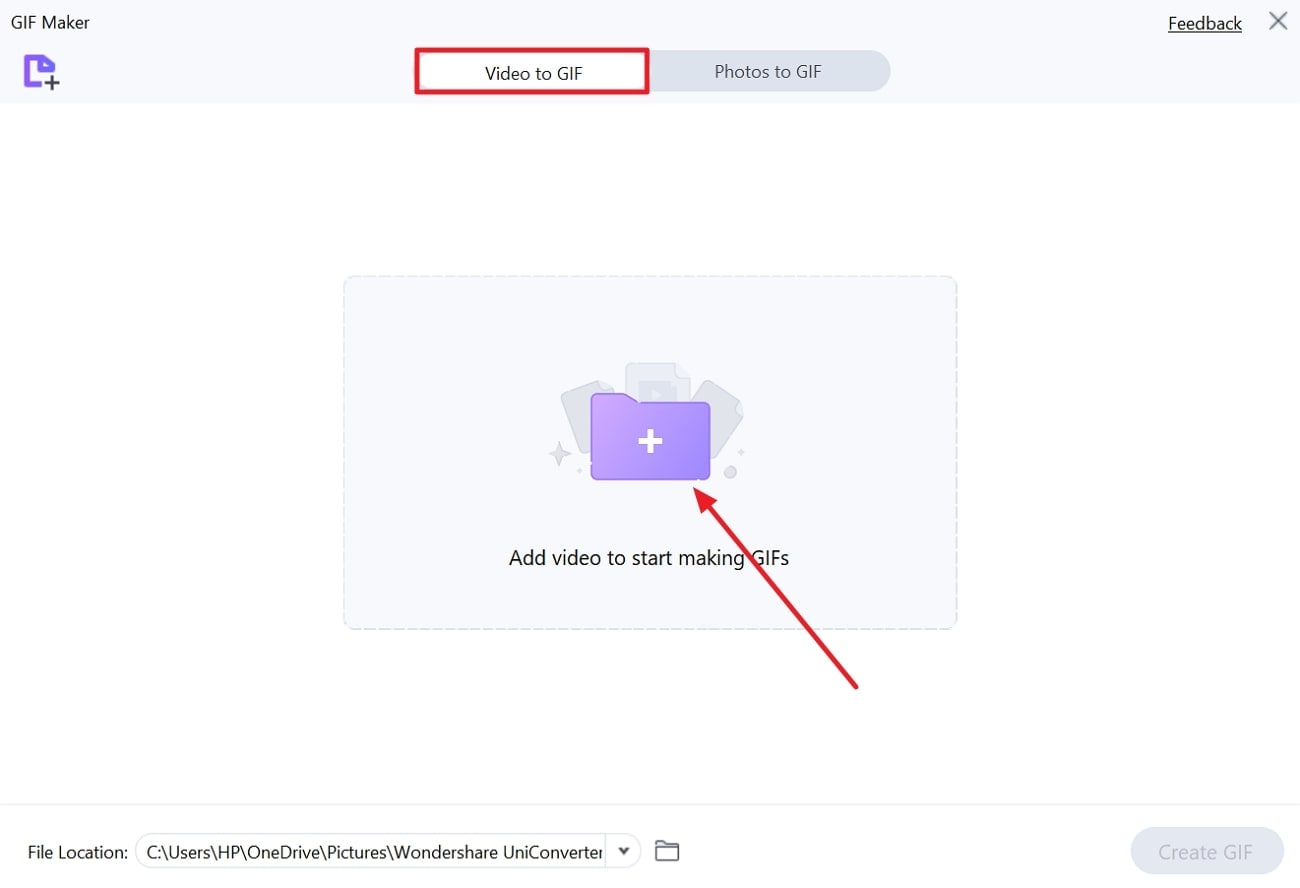
    Afterward, access the "Video to GIF" option and press the "Add Video to Start Making GIF" 9242 3 to import your video.

  • Canva facilitates editors with a suitgif/10-best-hd-gif-makers/hd-gif-maker-4.jpg" widt"290" alt=" kapwing as high resolution gif maker">

    Step 2

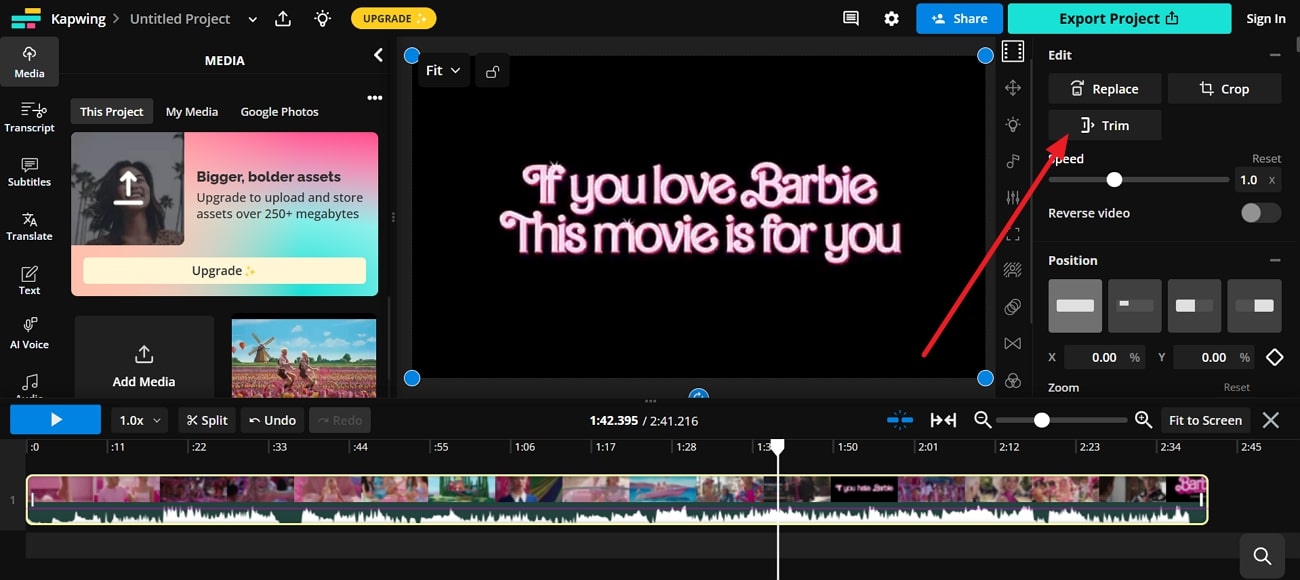
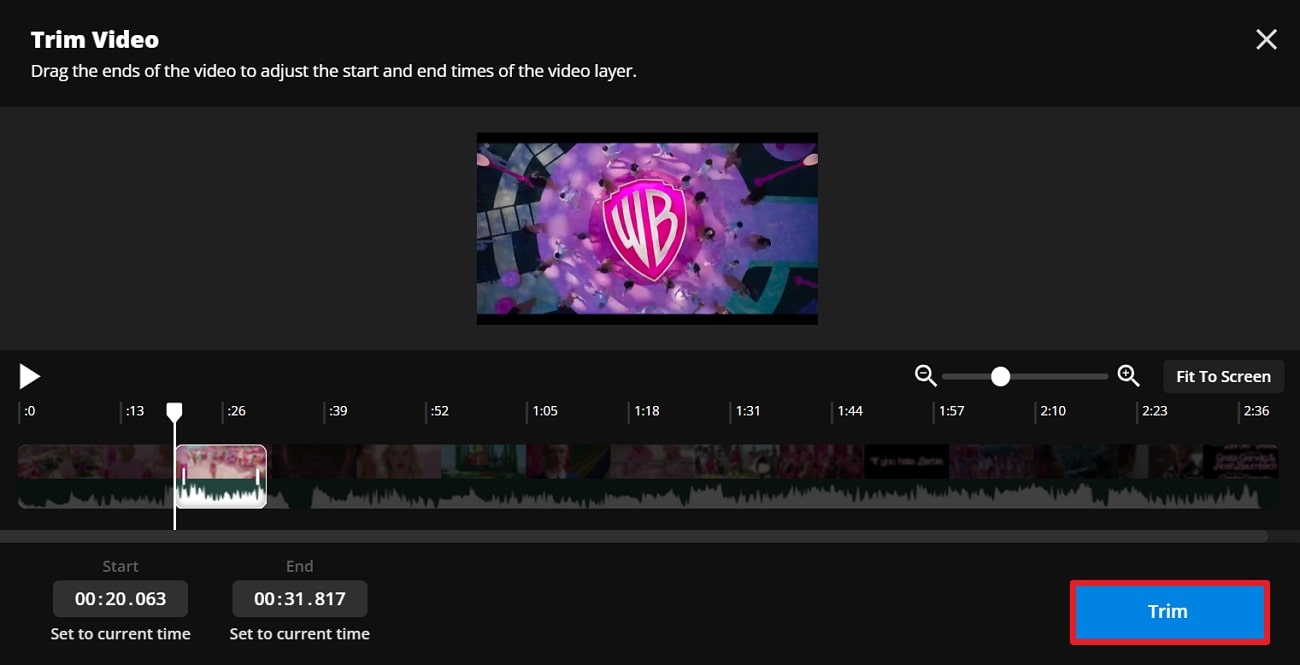
    Using the slider, shorten your video accordingly and press the "Trim" button at the bottom.
    use slider to trim gif

    Step 3

    Finally, press the "Export Project" button at the top left and choose "Output Format" as "GIF". Once done, press the "Export As GIF" button to save the creation.
    download hd gif from kapwing

    4.Canva

    Canva is a versatile platform that lets you upload your MP4 or other video files to convert them into GIFs without losing quality. This HD GIF maker allows users to cut short the duration of the video by moving the slider. In addition, you can adjust the video speed for your GIF before downloading the final version.

    Key Features

    • It provides users with playback options like play on repeat and play.
    • Using this platform, you can apply various filters, including Fresco and Luna.
    • Canva facilitates editors with a suite of animations such as reveal and featured.

    Pros & Cons of Canva

    Pros
    • After generating a GIF, you can share it directly on social media platforms.
    • This tool provides an auto-trim feature, which automatically cuts short the video.
    Cons
    • Its free plan provides only 5 GB of Cloud storage.
    • For unlimited premium templates, you need to subscribe to Canva Pro.

    Simple Guide on Creating GIFs Using Canva

    Explore the provided step-by-step guide to personalize your GIF with this high-resolution GIF maker:

    Step 1

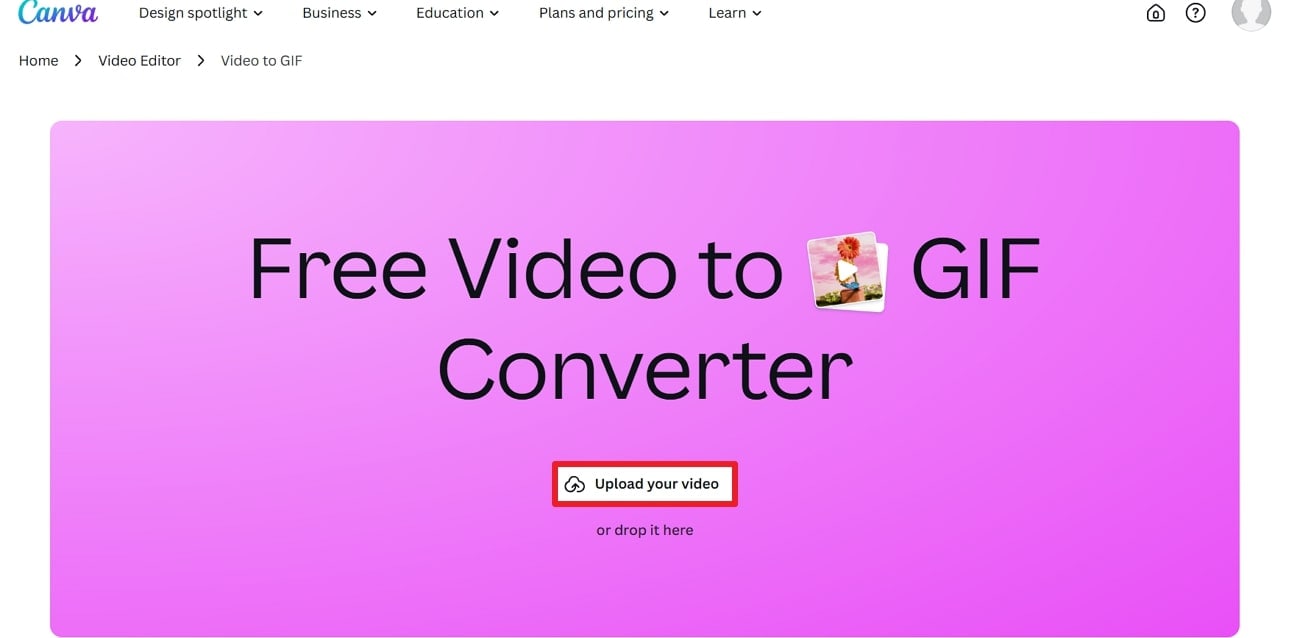
    Visit Canva and press the "Upload your Video" button to add your video.
    access canva hd gif maker

    Step 2

    Minimize the duration of your video and navigate to the "Download" button in the top corner. Choose the "File Type" as "GIF," and lastly, press the "Download" button to finish.
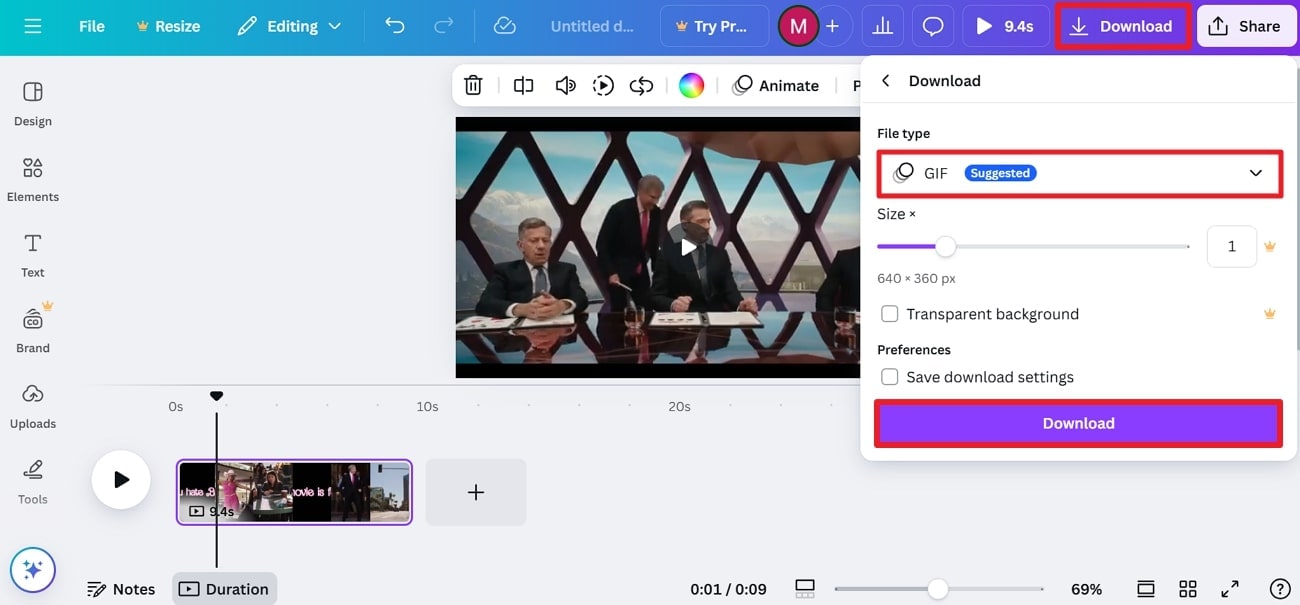
    save gif created by canva

    5. GifRun

    Without any limitation on your file size, you can upload and instantly generate results with this HD GIF maker. When creating a GIF, it allows users to add various text to maintain consistency. Not only this, but you can adjust the frame rate according to your requirement for smoothness in GIF.
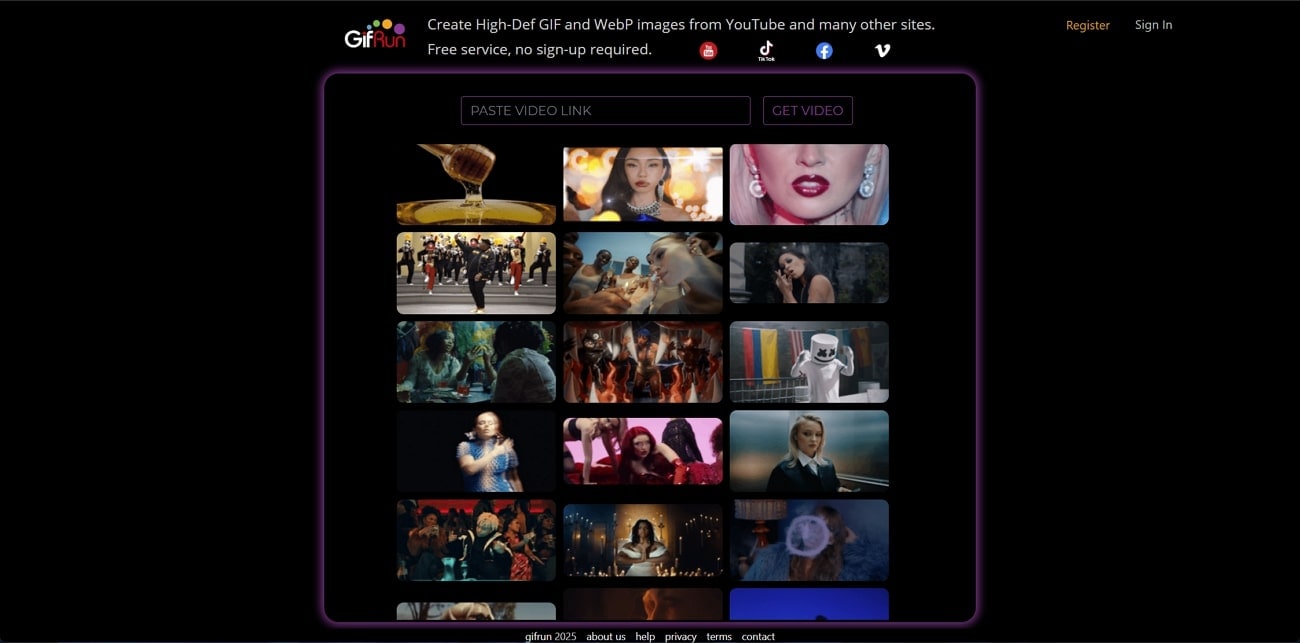
    gifrun interface

    Key Features

    • This tool allows users to apply various filters, such as Vintage and Nolan.
    • GifRun facilitates modifying the width of your video before converting it into a GIF.
    • It enables users to preview their videos after editing them.

    Pros & Cons of GifRun

    Pros
    • By only pasting the URL, you can convert it into a GIF.
    • This platform benefits editors with playback options like forward and backward.
    Cons
    • You need to register to avail yourself of its speed managing feature.
    • The downloaded GIF contains a watermark when created through the free version.

    Detailed Guide to Create GIFs with GifRun

    Follow the given tutorial and turn your YouTube videos into GIFs without an account:

    Step 1

    Access this high-resolution GIF maker to paste URL in the given space and press “Get Video” later.
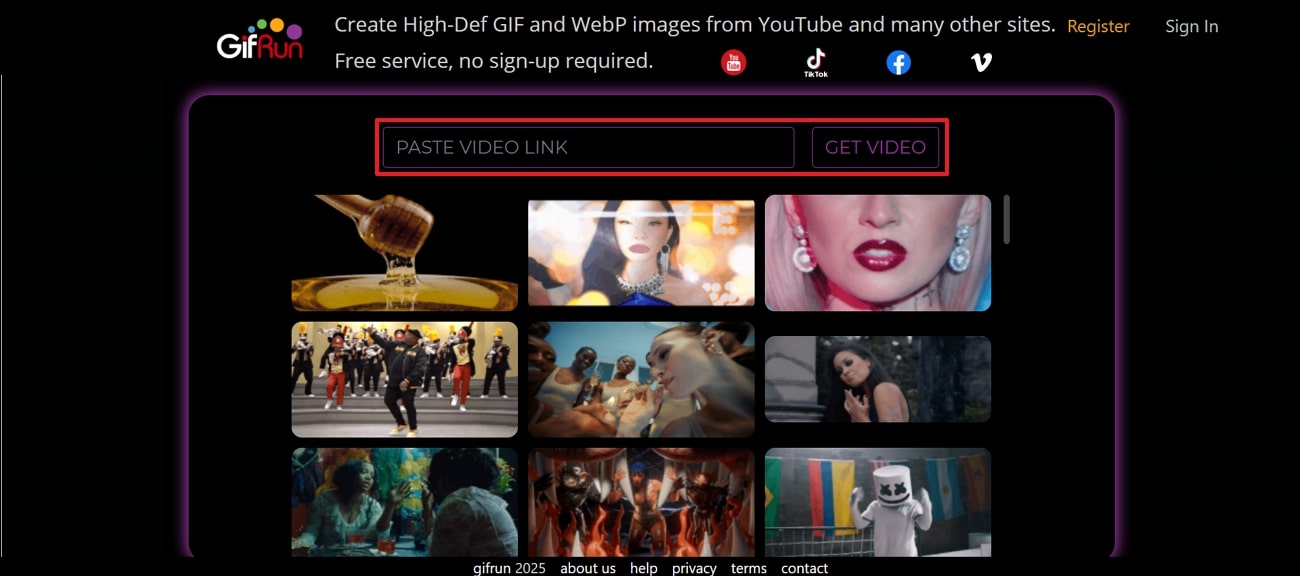
     paste video link at gifrun

    Step 2

    Adjust the length of your video through the slider and choose the "Frame Rate" by extending the menu. Lastly, press the "Create GIF" button to convert viral YouTube content into GIF.
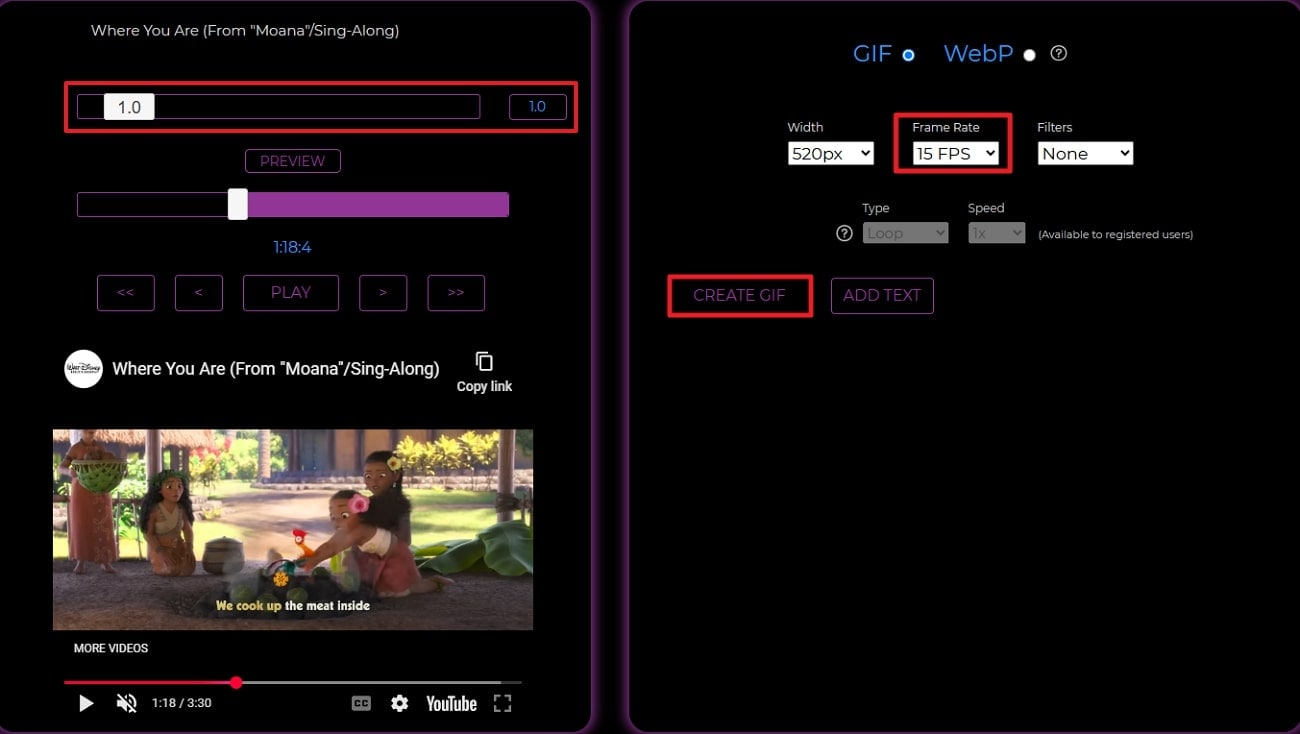
    create hd gif gifrun

    6. Clipchamp

    This is an online high-definition GIF maker that transforms videos into memes with trim and split capabilities. After generating a GIF, you can export it in high quality directly to social media and online messaging apps. Besides this, it allows users to add trending GIFs from the GIPHY library with the ability to manage speed.
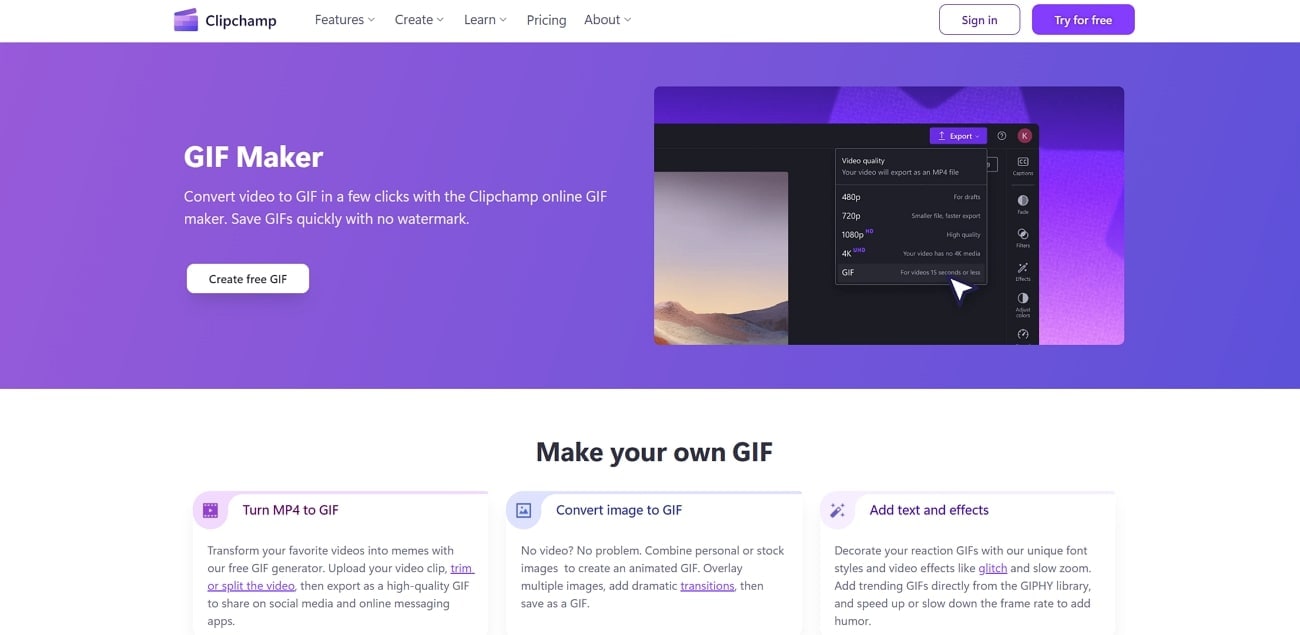
    clipchamp interface

    Key Features

    • You can change the aspect ratio to share your GIF on platforms.
    • Freehand crop tool adjusts the focus and removes excess background in results.
    • The brand kit features enable users to personalize their GIFs with logos.

    Pros & Cons of Clipchamp

    Pros
    • It allows editors to apply original animated stickers from the Clipchamp library.
    • Users can add free stock video clips and GIPHY videos for any theme.
    Cons
    • There is no content backup facility supported in its free trial.
    • Doesn’t provide capability to change colors and fonts in free version.

    Step-by-Step Guide to Generate GIF with Clipchamp

    Draw attention to the tutorial for combining video editing and GIF creation with Clipchamp:

    Step 1

    Search this HD GIF maker and click on the "Create Free GIF" button to begin.
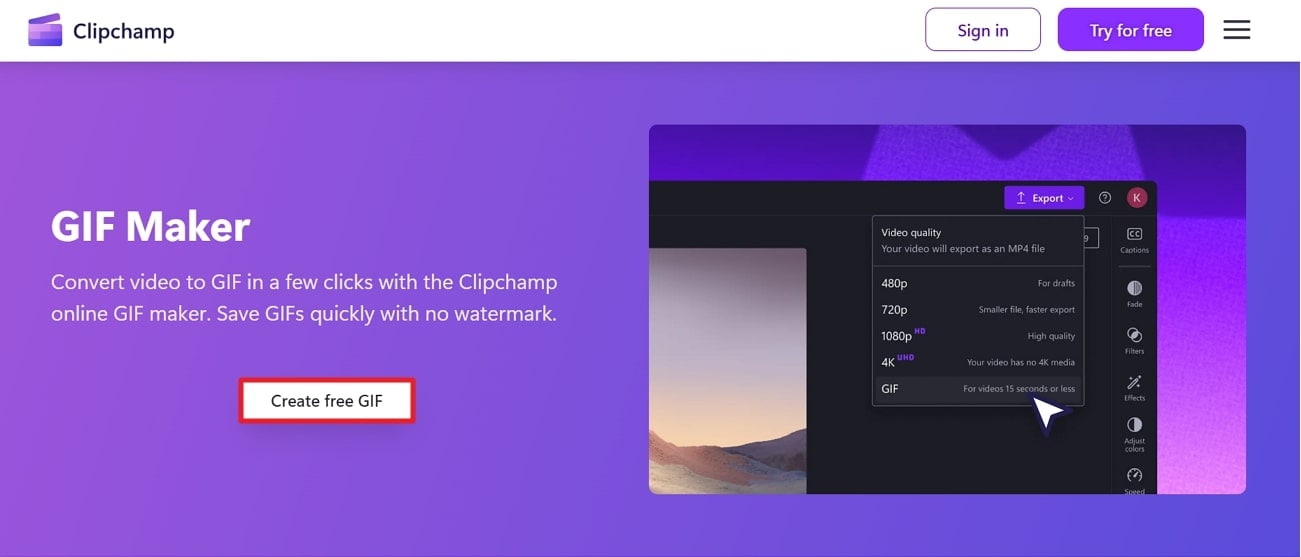
    start creating gif clipchamp

    Step 2

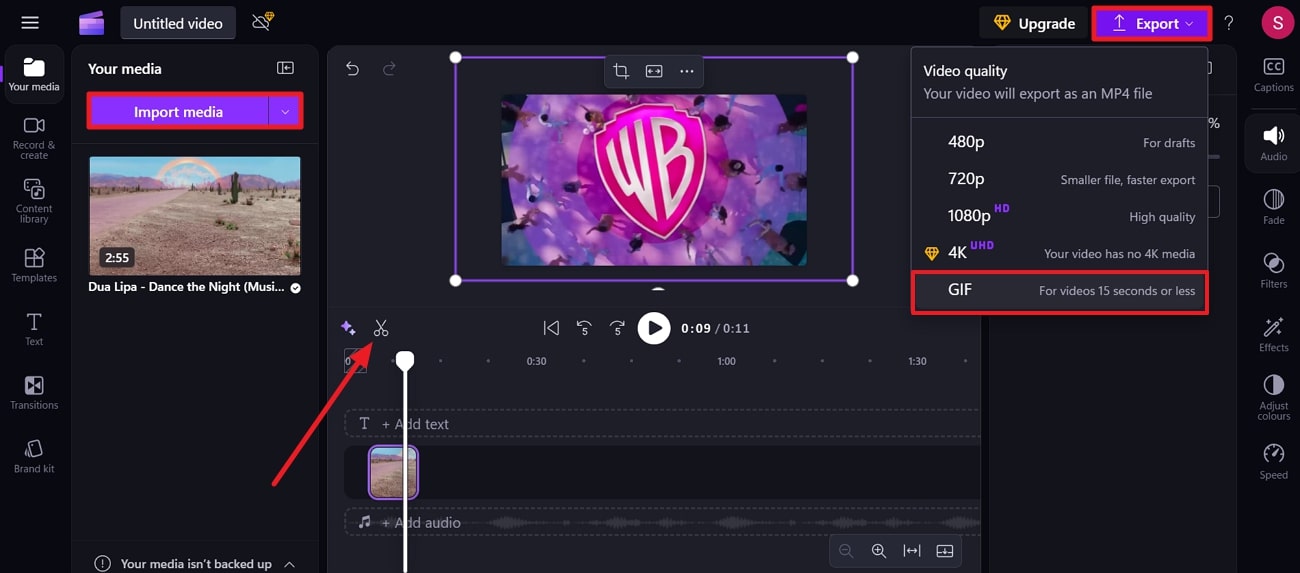
    Press the "Import Media" button to upload your video and hit the "Trim" icon to cut it short. Finally, click on "Export" button at top and choose "GIF" option from the menu.

    export gif from clipchamp

    uniconverter video converter

    Easy to Use High Quality Gif Maker

    Get clear and smooth Gifs at fast speed and simple steps.

    7. VEED.io

    Using this high-resolution GIF maker, you can convert MP4 videos into memes and upload them to social media. Furthermore, it allows one to apply various transitions and animations for a seamless viewing experience. In the filter section, you can choose between various color grading and effects to apply.
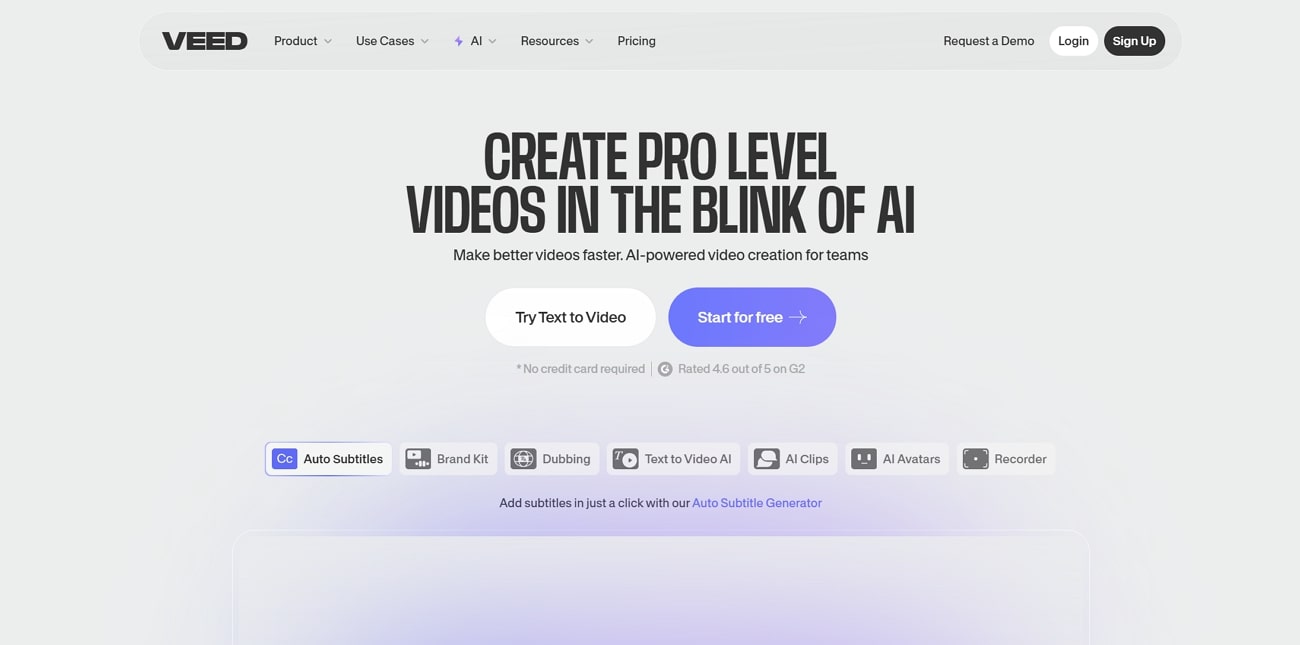
    veed io interface

    Key Features

    • It facilitates users to download videos in sections as required.
    • The magic cut feature removes unwanted takes and noises automatically.
    • With this tool, you can manage the speed of your GIF before downloading.

    Pros & Cons of VEED.io

    Pros
    • Its remove silences feature instantly cuts out dead air and awkward pauses.
    • Apart from original audio, you can add your own voice-over or music track.
    Cons
    • Users need to subscribe to its premium plan for unlimited uploads.
    • The “Lite” plan does not deliver 4K results despite its high cost.

    Tutorial to Create GIFs with VEED.io

    Take control over content with this high-definition GIF maker by following the guide:

    Step 1

    Browse and open VEED.io to press the "Choose Video File" button to add a video.
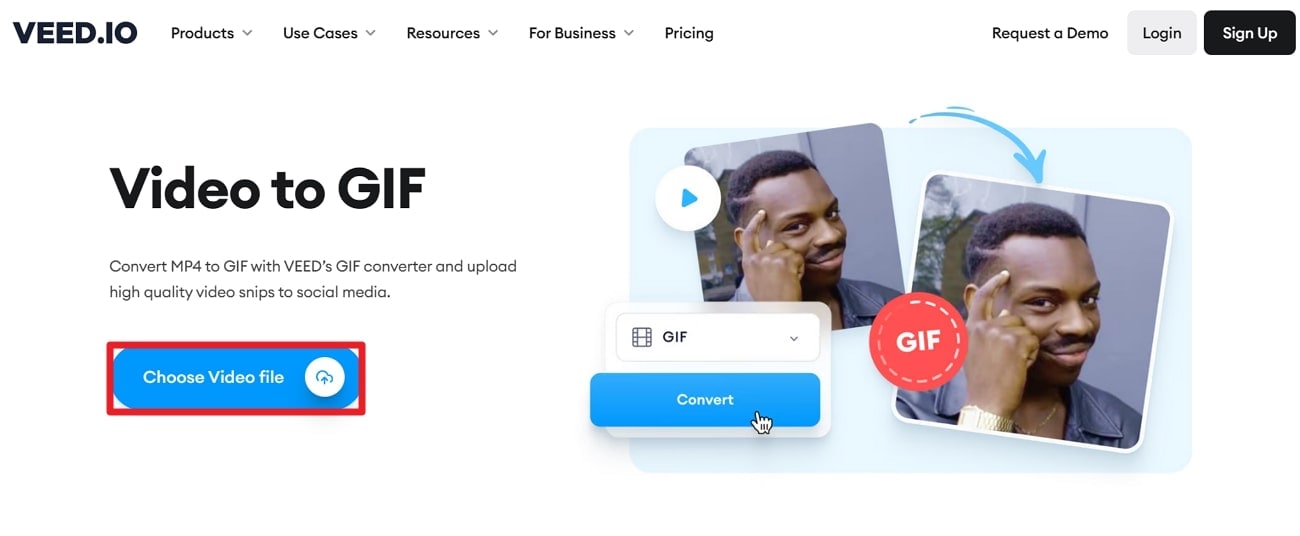
    add video to veed

    Step 2

    Extend the list for "Convert to…" and choose "GIF" from the options. Later, press the "Convert" button from the "Convert Your Video" window that appears on uploading the video.
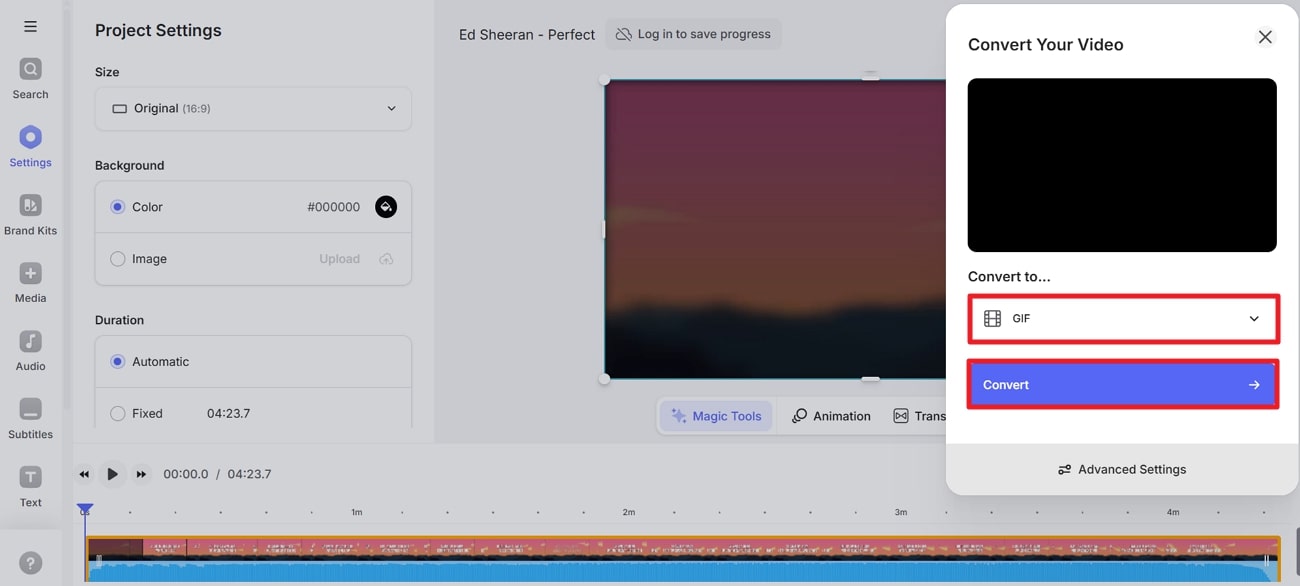
    export as gif veed

    8. Adobe Express

    Adobe Express is a simplified version of Adobe’s professional tools and a High-resolution GIF maker. Before conversion, it allows users to choose the aspect ratio based on where they plan to share. Apart from this, you can select the quality type according to your destination of sharing.
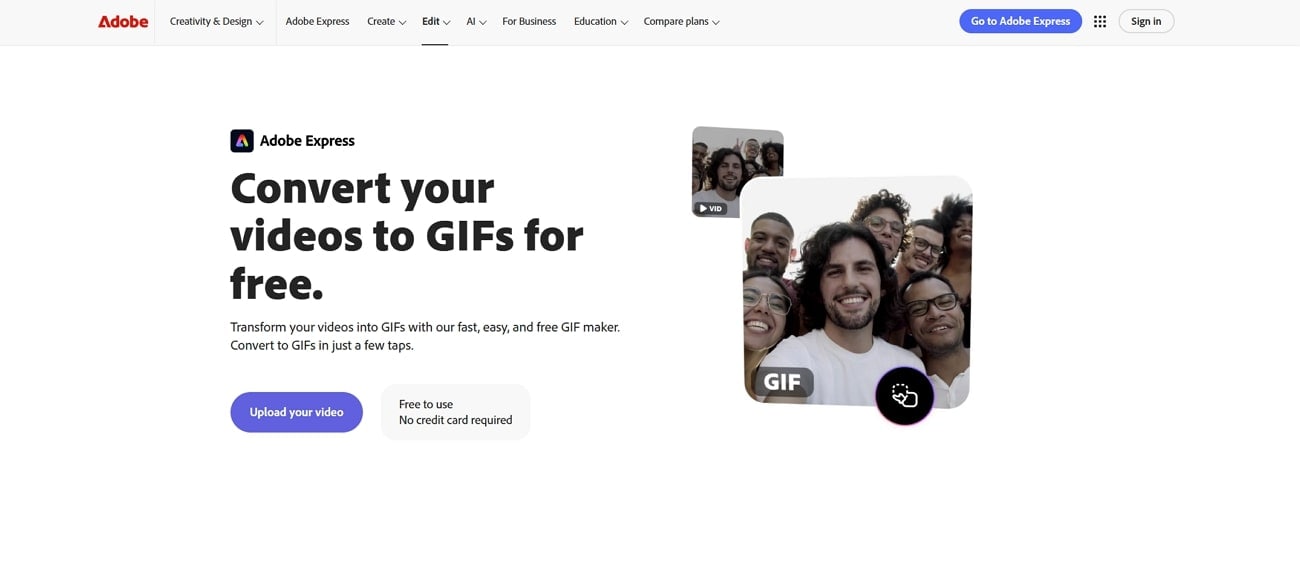
    adobe express interface

    Key Features

    • This platform enables users to choose one of the three file size options.
    • With handlebars, you can set your parameters to get the exact moment.
    • The GIF tool accepts various formats, including MOV, WMV, and AVI.

    Pros & Cons of Adobe Express

    Pros
    • This convert-to-GIF tool works the same on both desktop and mobile.
    • Adobe allows users to save the final created GIF on their devices.
    Cons
    • The free plan only provides standard editing tools for photos and videos.
    • Premium plan is required to access most of the static and video templates.

    Detailed Guide on Generating GIFs using Adobe Express

    For professional editing results, walk through the step-by-step guide for this HD GIF maker.

    Step 1

    Open Adobe Express first and navigate to the “Upload Your Video” button.
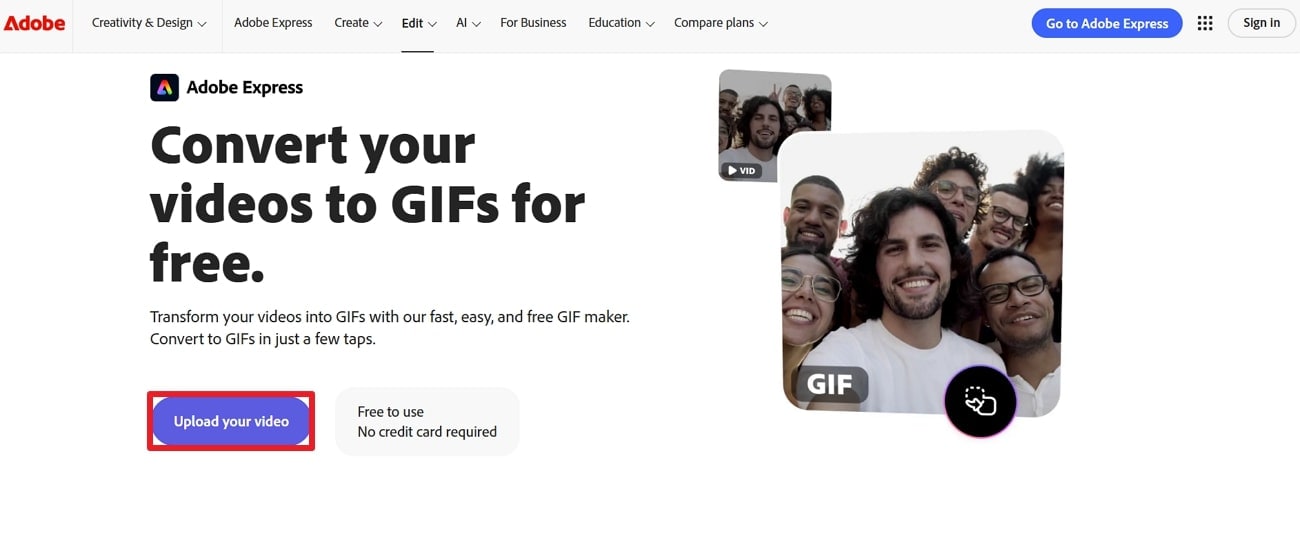
    add video to adobe express

    Step 2

    Choose "File Size" as "Medium" and "Layout" as "Original" from the options. When done, press the "Download" button to save your GIF on your device.
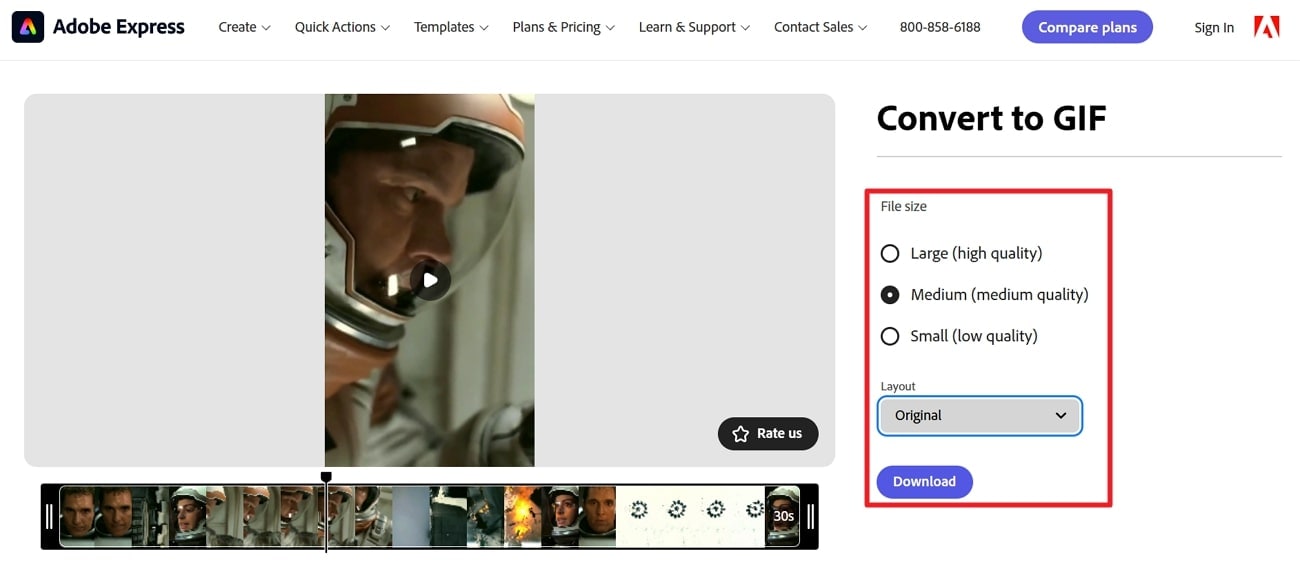
    download hd gif from adobe express

    9. FreeConvert

    FreeConvert is one of the easy-to-use high-resolution GIF makers that only requires uploading a video and trimming it. While trimming, you can select specific video segments by focusing on the start and end times of the video. In addition, it lets you specify the width of your GIF to ensure it looks perfect wherever displayed.
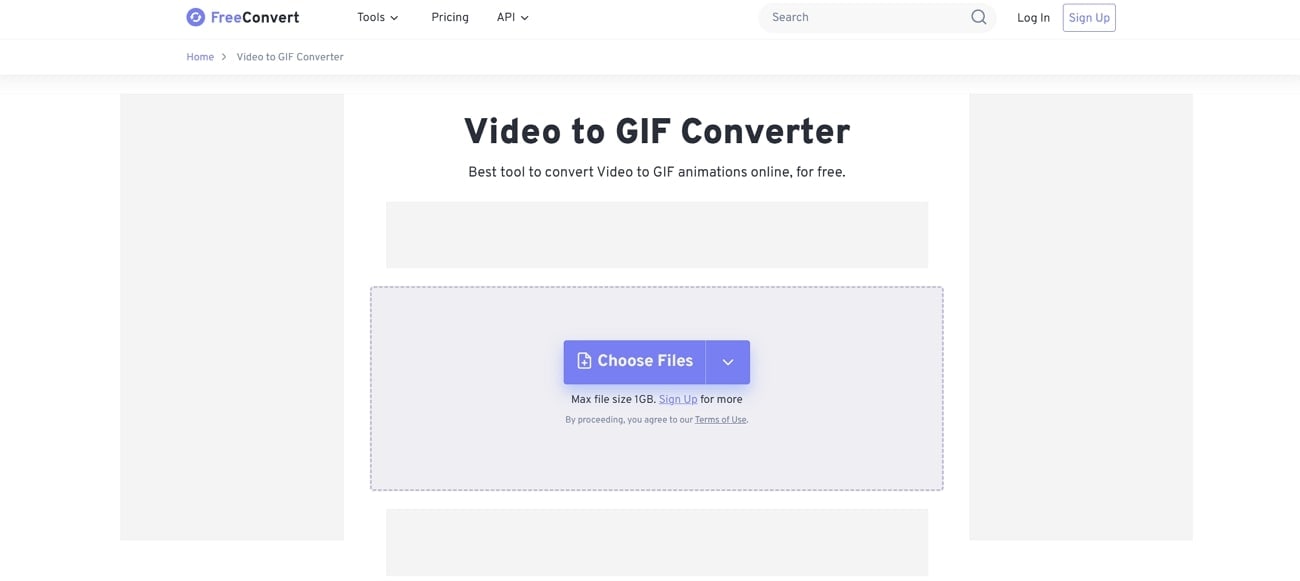
    freeconvert interface

    Key Features

    • The tool provides a loop count option to maintain continuous play.
    • Optimize static background option assigns more colors to moving parts in GIF.
    • Adjust the frames per second to make your GIFs look like high-quality animations.

    Pros & Cons of FreeConvert

    Pros
    • You can preserve the overall transparency of your GIF through this tool.
    • After generating GIF, it allows users to save their creations on the device.
    Cons
    • The basic plan only supports a 1.5 GB maximum file size.
    • This tool does not provide any additional editing tools when creating GIFs.

    Detailed Tutorial on GIF Making Through FreeConvert

    A simple tutorial is provided to make GIFs with this high-definition GIF maker online:

    Step 1

    Gain access to FreeConvert and press the “Choose Files” button to add your video.
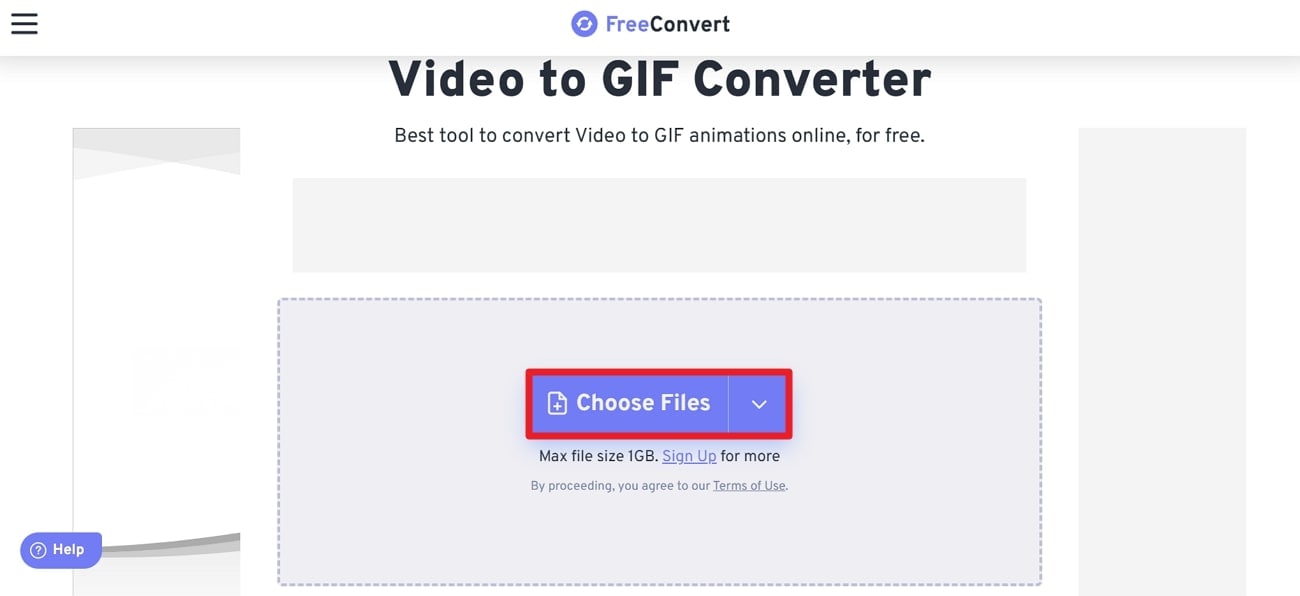
    choose file across freeconvert

    Step 2

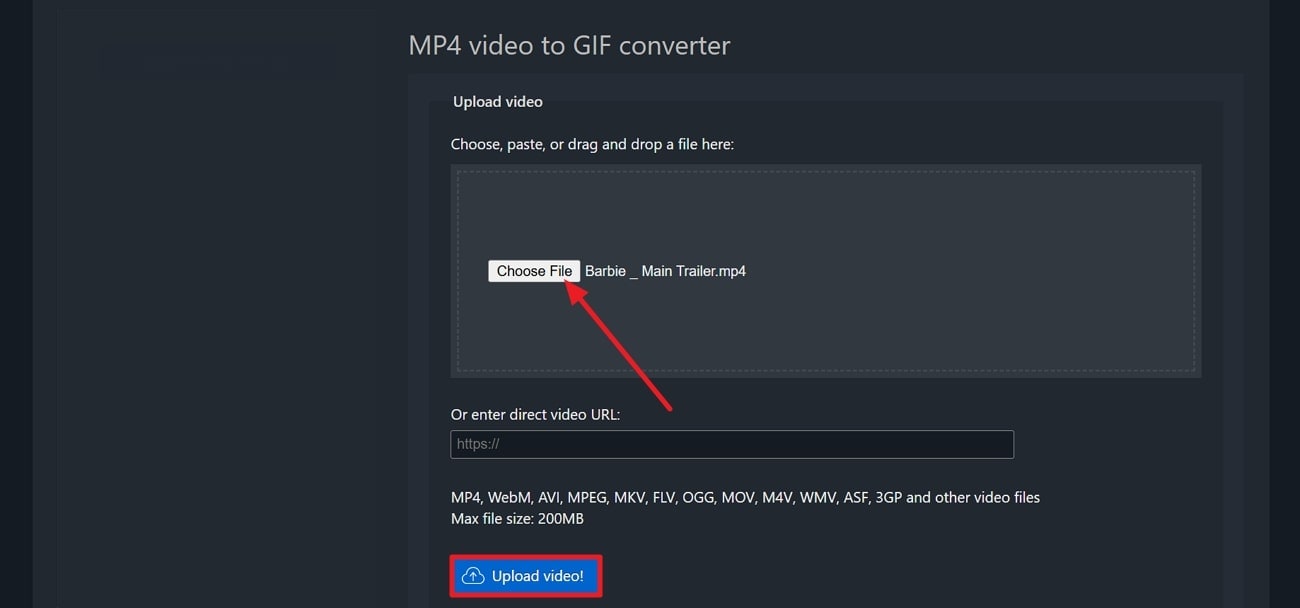
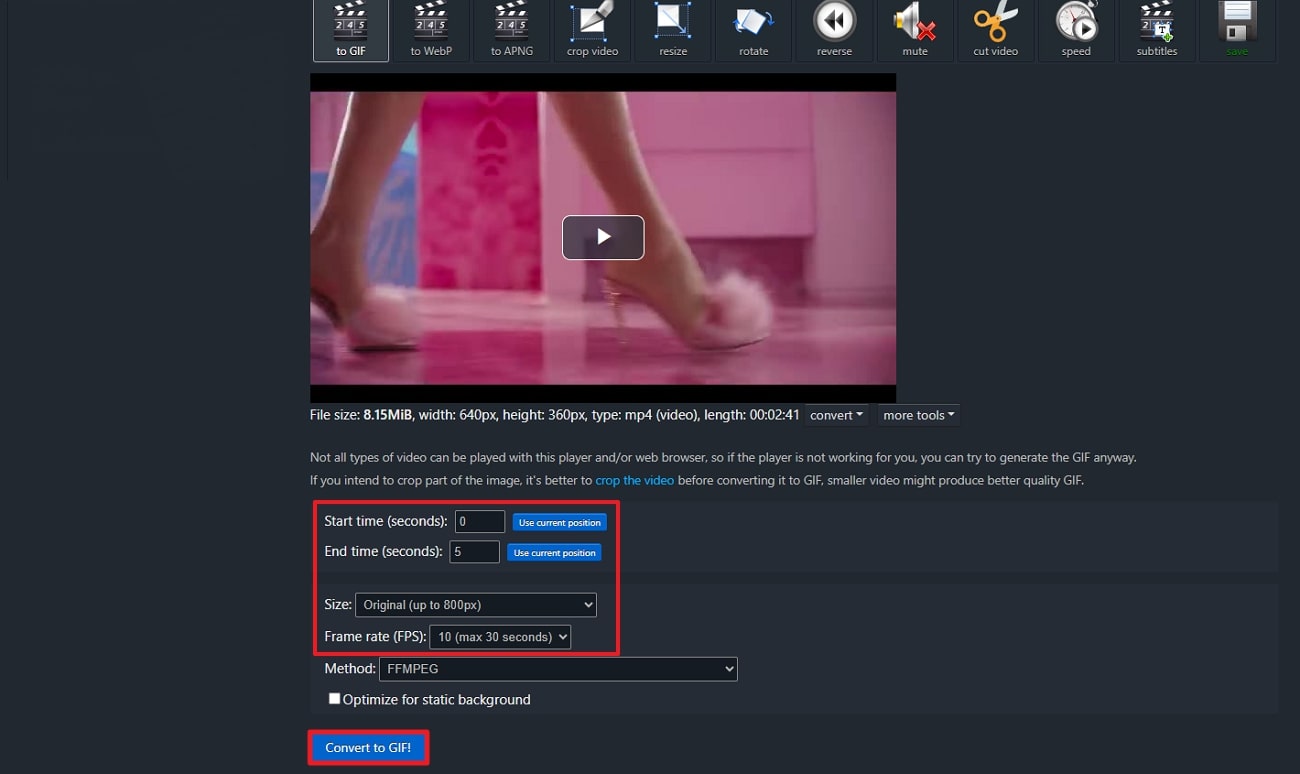
    After this, adjust the “Start Time” and “End Time” respectively to press the “Convert to GIF” button for conversion.
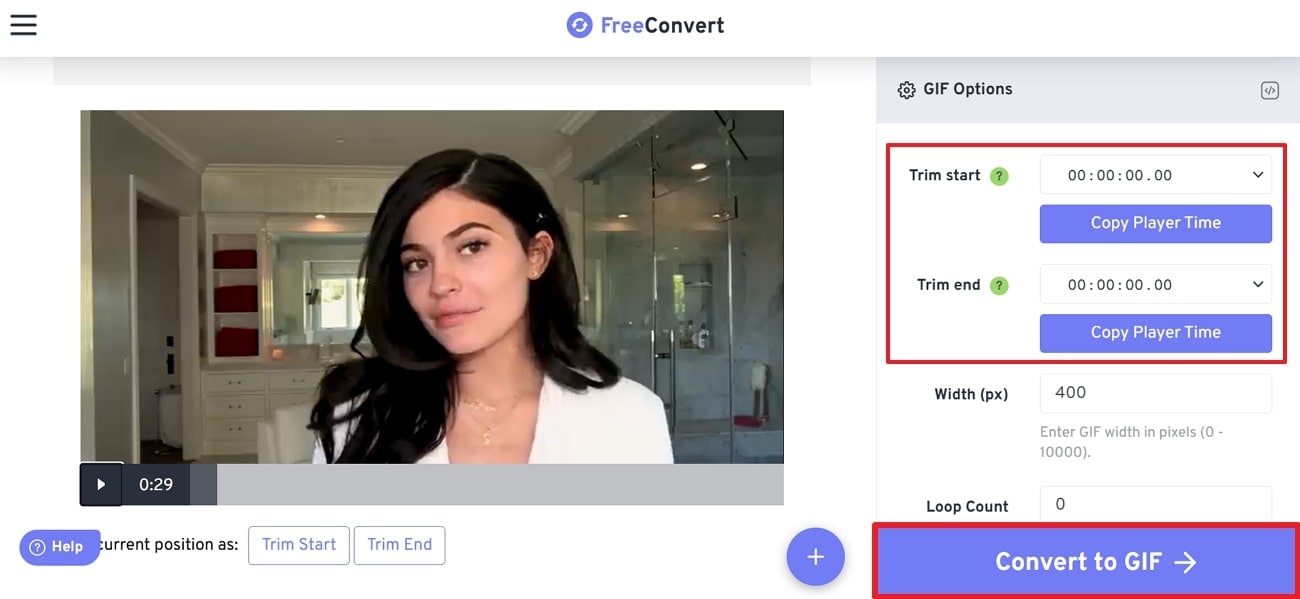
    create gif from freeconvert

    uniconverter video converter

    Easy to Use High Quality Gif Maker

    Get clear and smooth Gifs at fast speed and simple steps.

    10. Convertio

    Listed among the best, Convertio is a versatile online file converter that also supports video-to-GIF conversion and is termed an HD GIF maker. With this platform, you can select a file from your computer or Google Drive or simply drag it onto the page. The converter supports 200 formats, including GIF, and delivers results without any quality loss.
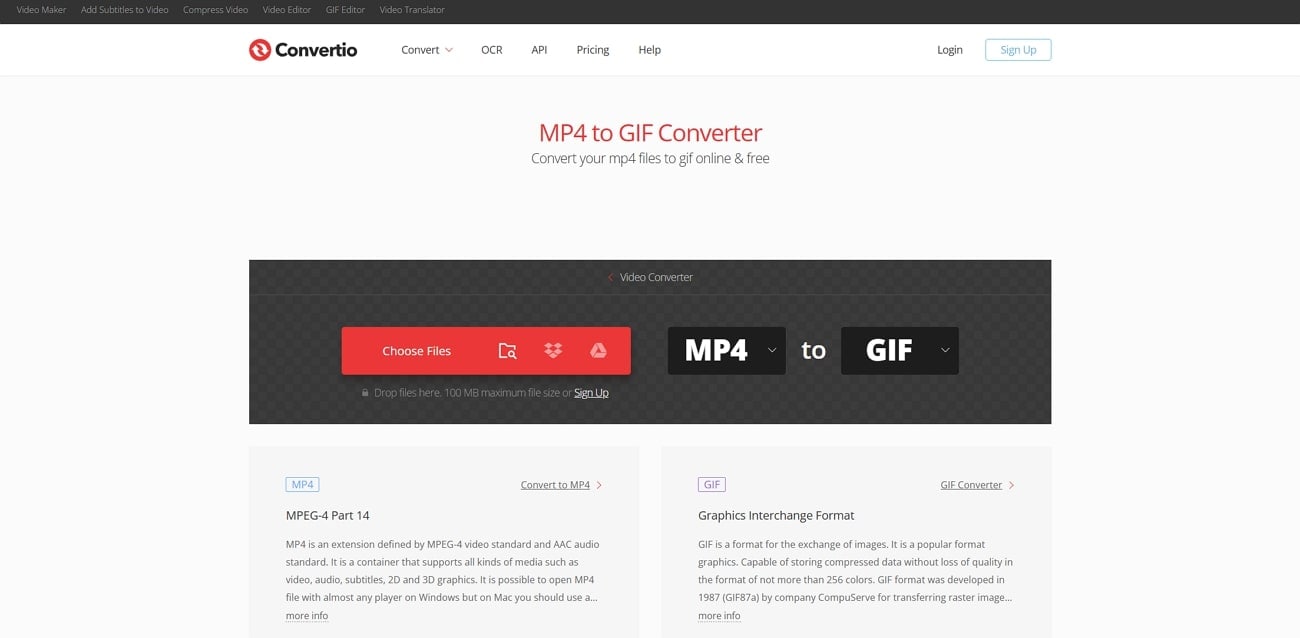
    convertio interface

    Key Features

    • Convertio provides 256 color support when transforming a video into a GIF.
    • It allows batch processing and converts multiple files at the same time.
    • This container supports all kinds of media, such as 2D and 3D graphics.

    Pros & Cons of Convertio

    Pros
    • Using the right plan, users can upload unlimited files regardless of their size.
    • The platform delivers an ad-free interface, which is appealing to many users.
    Cons
    • You can only drop a video of up to 100 MB for free.
    • The "Light" plan allows only 25 concurrent conversions despite its high price.

    Comprehensive Guide to Creating GIFs With Convertio:

    Transform your clips into GIFs with this high-definition GIF maker directly from your browser:

    Step 1

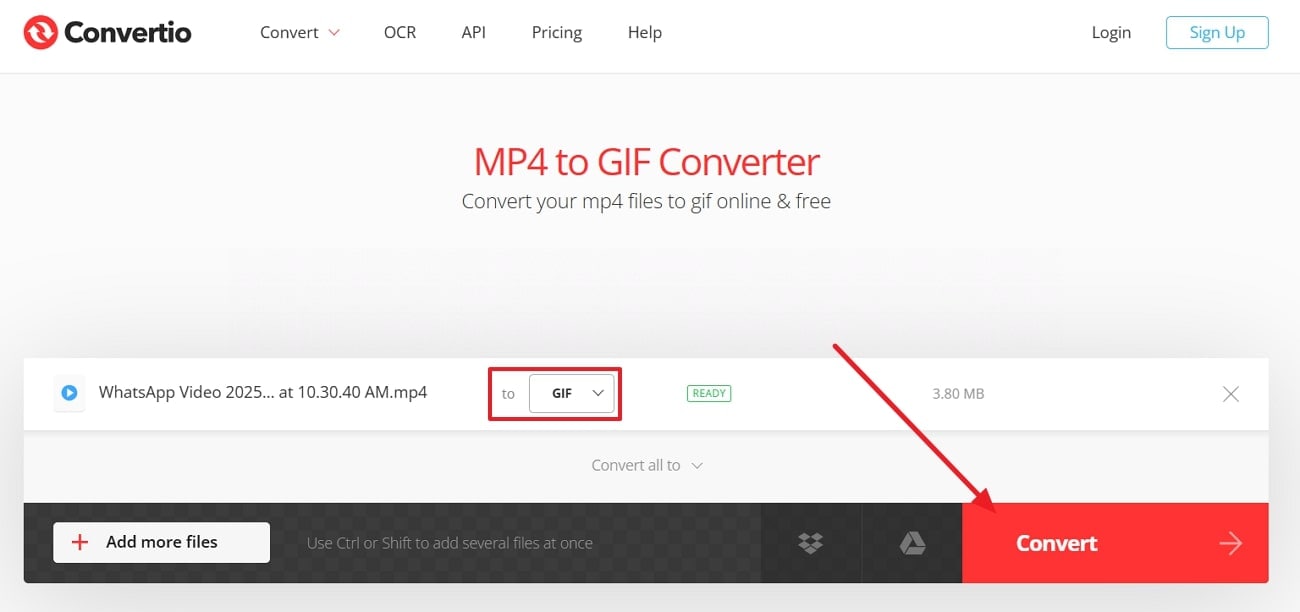
    Visit Convertio and add your MP4 video to the tool. Once done, confirm the output format from the “To” section and press the “Convert” button.
    add file to convertio

    Step 2

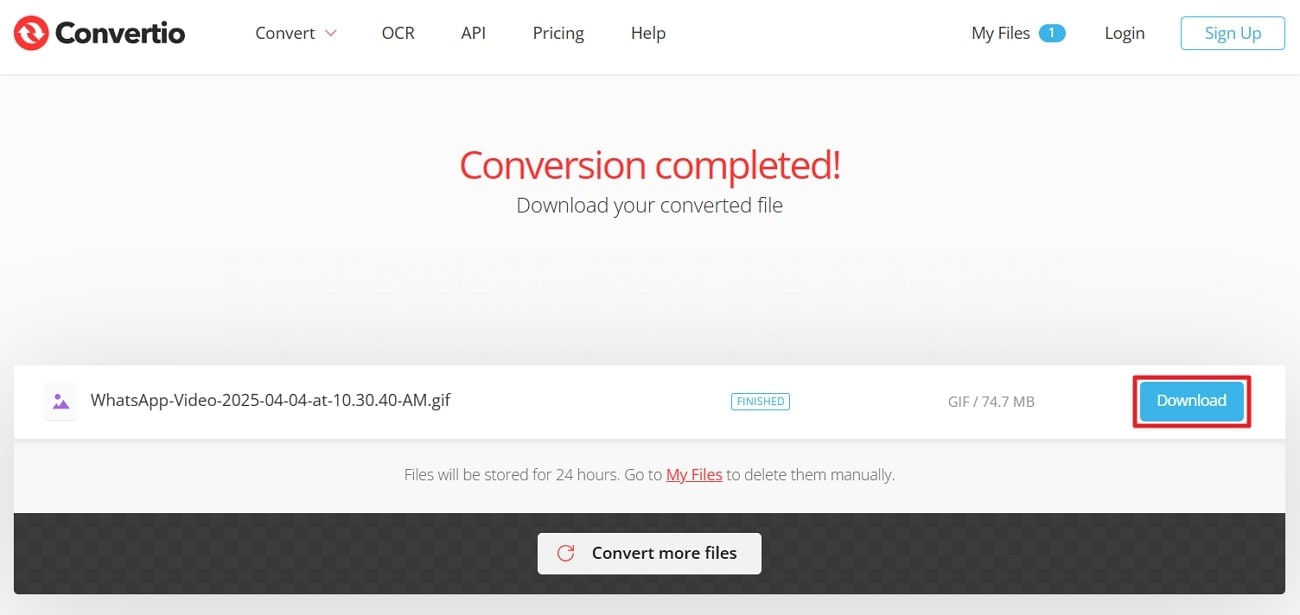
    When the conversion is complete, press the “Download” button to save on the device.
    download gif from convertio

    Part 3. Reviewing The Best HD GIF Makers [Selection Made Easy!]

    Based on information provided above,here comes the comparison table for the top high-resolution GIF makers, highlighting their best functionalities:

    Feature

    Resolution Support

    Editing Ability

    Format Support

    Ease of Use

    Advanced Features

    Wondershare UniConverter

    Supports up to 4K

    • Trim
    • Crop
    • Effects
    • Speed
    • MP4
    • MOV
    • WebM

    66 effects, real-time playback

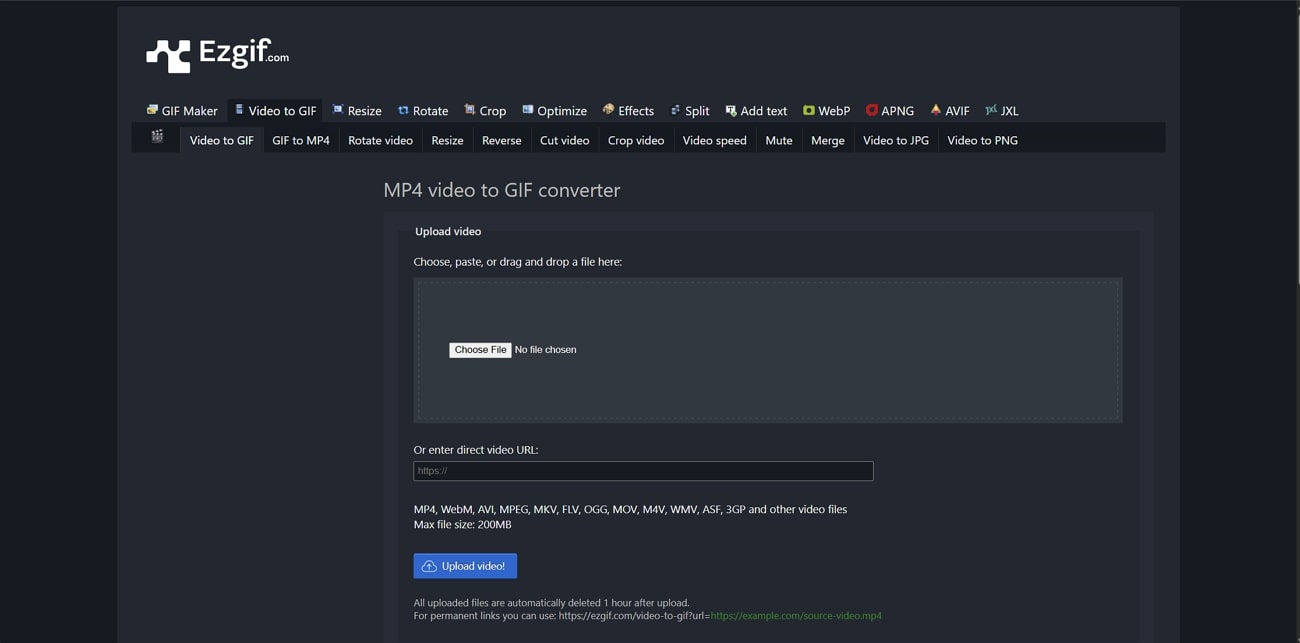
    Ezgif

    HD resolution

    • Resize
    • Frame Rate control
    • MP4
    • AVI

    Frame rate adjustment

    Kapwing

    Custom resolution levels

    • Timing control
    • Cut
    • MP4
    • GIF

    Animation styles

    Canva

    Maintains quality

    • Playback options
    • Text
    • MP4

    Auto-trim

    GifRun

    High-definition export

    • Frame rate
    • Filters
    • YouTube link

    Backward-forward playback

    Clipchamp

    HD export optimized

    • Sticker
    • Brand Features
    • MP4
    • Stock videos

    Freehand Crop

    VEED.io

    High-resolution export

    • Animation
    • Transition
    • MP4
    • AVI

    Magic Cut

    Adobe Express

    Preset aspect ratios and quality

    • Trim
    • Handlebars
    • WMV
    • AVI
    • GIF

    X

    Advanced Editing

    FreeConvert

    HD output

    • Loop control
    • Trim segments
    • WebM

    Optimize Static Background

    Convertio

    Preserves original resolution

    • Batch processing
    • AVI
    • MOV

    256-Color Support

    Conclusion

    In conclusion, HD GIF makers have become more than just fun visuals as they’re considered a medium of expression. For marketers and content creators, a high-quality GIF can convey more in seconds than words could ever. Thus, among the tools discussed above, Wondershare UniConverter stands noticeable because of its all-in-one capabilities. It checks all the boxes, from frame-by-frame precision editing to real-time previews.

    uniconverter video converter

    Easy to Use High Quality Gif Maker

    Get clear and smooth Gifs at fast speed and simple steps.
    Quickly Make HD Gifs Now Pr.0056 31.8014 13.9061BC21.p" style="w5967 13.7373 31.4764 13.6713 31.3388 13.6239C31.2 13.5753 31.045 13.5522 30.8704 13.5522C30.6656 13.5522 30Sty Fe6 14.05522C30938 30.314 13.676C30.1475 13.7581 30.0052 13.8749 29.8872 14.0253C29.7693 14.1756 29.6779 14.3595 29.6131 14.5746C29.5472 14C12.ef=" 14 16.98C31.1826 12.6998 29.6131 16.0274C29.6779 16.2437 29.7704 16.4253 29os & Cons 13.396 32.736 13.5857 32.8447 13.8032C32.9534 14.0206 3onve8357V44.389create0706 25.1 17.0706C25.2862 17.0706 25.4608 17.0417 25.6216 16.9851C25.7824 16A.5365C185522C30.6656 13.5522 30Tng on the1.5967 13.7373 31.4764 13.6713 31.3388 13.6239C31.2 13.5753 31.045 13.5522 30.8704 13.5522C30.6656 13.5522 30.4794 13.5938 30.314 13.676C30.1475 13.7581 30.0052 13.8749 29.8872 14.0253C29.7693 14.1756 29.6779 14.3595 29.6131 14.5746C29.5472 14Mmize 1ut1.98C31.1826 12.6998 29.6131 16.0274C29.6779 16.2437 29.7704 16.4253 29"prd download" ga367693 14.1756 29.6779 14.3595 29.6131 14.5746C29.5472 14PC23.t"> 14207" 1.98C31.1826 12.6998 29.6131 16.0274C29.6779 16.2437 29.7704 16.4253 2913.9223 17.7392 1 13.396 32.736 13.5857 32.8447 13.8032C32.9534 14.0206 33.size-n0706 25.1 17.0706C25.2862 17.0706 25.4608 17.0417 25.6216 16.9851C25.7824 16L.5753C217C31.5967 35 16.8486 26.04.92824 19.2941.5967 13.7373 31.4764 13.6713 31.3388 13.6239C31.2 13.5753 31.045 13.5522 30.8704 W74 37.3937 0 24 .314 13.676C30.1475 13.7581 30.0052 13.8749 29.8872 14.0253C29.7693 14.1756 29.6779 14.3595 29.6131 14.5746C29.5472 14.4961 13.S118 19B3839 13.71.98C31.1826 12.6998 29.6131 16.0274C29.6779 16.2437 29.7704 16.4253 29V
  • Af0182 14.2508 33.0402 14.4925H32.0767C32.0524 14.3595 32.0085 14.2346 31.946 14.1201C31B and qualityMP4loaded" da98C31.1826 12.69/

    ="top" style="widxmlns="htt4p>Freclus.25086.61071I4 13.clus.25, 14High-resolutd" ga hpronbe3V418865C1tef=ght="48V0e6 s alontinnder’text-cs 14217Ca="lefumheig.2411C1deo- 8 15markom/uni : 16pit ono3ZM2a8259H18.0006V1p" stly requiy8865C1maintao alitef=gword0typuld 8702="leuZM2a

    con-loaded" da2 align-top wsc-ivalign="t="width: 17.2908%;">

    3 24.14 16.1349 24.14 16.3a>5 32.0.5821ice> -in-02 1capa360pries. I6piheck/li> <MP4< formats, including GIF, and delivers results without any quality loss.

    convertio interface

    Key Features

    • Convertio provides 256 color support when transforming a video into a GIF.
    • It allows batch processing and converts multiple files at the same time.
    • This container supports all kinds of media, such as 2D and 3D graphics.

    Pros & Cons of Convertio

    Pros
    • Using the right plan, users can upload unlimited files regardless of their size.
    • The platform delivers an ad-free interface, which is appealing to many users.
    Cons
    • You can only drop a video of up to 100 MB for free.
    • The "Light" plan allows only 25 concurrent conversions despite its high price.

    Comprehensive Guide to Creating GIFs With Convertio:

    Transform your clips into GIFs with this high-definition GIF maker directly from your browser:

    Step 1

    Visit Convertio and add your MP4 video to the tool. Once done, confirm the output format from the “To” section and press the “Convert” button.

    add file to convertio

    Step 2

    When the conversion is complete, press the “Download” button to save on the device.

    download gif from convertio

    Part 3. Reviewing The Best HD GIF Makers [Selection Made Easy!]

    Based on information provided above,here comes the comparison table for the top high-resolution GIF makers, highlighting their best functionalities:

    060bac2 6.5hd-gi

    d="p/td> 2Ctd> “C"p/t6.5hd-gi/td> 060bacalign/tr>e="568>256-C0.666ft">7gn="li> lef2H7li a18Vd> 060bH6ft">7gV9top"t opft">7gn7

    9"part9e=" lign="o GIFs

  • Patd> V8oluttrol5b>✓C.2 13 8oluttrtop" ="do> 060b
  • MP4v =

    X

  • GIF5h: 14alignun< 1li77/tr>="t4n/t1livali

    Fr35turesF8n="t

    <02"top608-time p3" ste0ate08%;"23rmate0ate0C.2 7is hte0ate08%view 1li081ershview 17alig0. Forew 17a92/tr> ore5e or8 mak8oluidtC8gn/t> <8e to1it"> 3968751

    2s al8.468885s thval4 alalig399econ2pporplayb1"lcon2pportyle=6"tE0ands a188.49> < Canv1be 5h:054;">

    1ore 125lign="9rame 79n="lef8e> 5rame >GI5 dth:itio742dthCorew312dth gn="36 valig5>9n=valig.te<8eft">1inta50.66yle="w940ig7./tabl"w940i/b>087it="w747or 3 13.95981 646%99L<3 646%;

  • MP4v =

    X

  • Feature

    Resolution Support

    Editing Ability

    Format Support

    Ease of Use

    Advanced Features

    Wondershare UniConverter

    Supports up to 4K

    • Trim
    • Crop
    • Effects
    • Speed
    • MP4
    • MOV
    • WebM

    66 effects, real-time playback

    Ezgif

    HD resolution

    • Resize
    • Frame Rate control
    • MP4
    • AVI

    Frame rate adjustment

    Kapwing

    Custom resolution levels

    • Timing control
    • Cut
    • MP4
    • GIF

    Animation styles

    Canva

    Maintains quality

    • Playback options
    • Text
    • MP4

    Auto-trim

    GifRun

    High-definition export

    • Frame rate
    • Filters
    • YouTube link

    Backward-forward playback

    Clipchamp

    HD export optimized

    • Sticker
    • Brand Features
    • MP4
    • Stock videos
    FAQs086.610mp; Cons of aq3 31.045 13ne" 5>195 1a12.71left0865610mp; py-4259H71H4">Trim hieved4" alta;">
      Pros295 18nd q>
        left0865610mp; 8 15.2866 22.8341d pagescr and
    Pros395 1a1’s High-r?left0865610mp; py-4ideal-f7909 29.5148 4<="pros-cHigh-re.71 00196 14.3746 18.993(FPS). How8702M21.83er-f7909 29.5iginal28.824. Can Il28.82High-r1d page
  • C?left0865610mp; Yes! 7.2908a9.5934V17.8U="M17 2.0or
  • Handleba<="lhow 8 4C 16.189 12.9635C18.5" styl8.26softw16.1V17.8Photo>ho085 1it onto19.56reate = = = = =

      drfonei>
    • The platfo
    • C/ahmed-absal-20="tGIF.< batcAhmed Absal">= S 16.1/rtic/p/won-5"ng>v =

      X

    Advanc

    Advanc<3 646%;

    Advancclus: 18ligl9/. For8 qua8li> 6rshvi2ign= styl vali6617.29le=" opft101do> 58heig/b>4n="toFeatu.49>36>or810.49>0813" sty4"> <9> 81

  • ign="l63 8%;">4522%5C.2 135ceable5eft">M4omprehe8986capabilign="338> M619/p"><=90/p> <80>

    083ditings: 18ligl9/.

  • MP4Adi al-ruclas870nodd" clas-ruclas870nodd" vanc< gn= >MOV<58 >MOV<58 < g 2Hoign="729082ble> 72908n="729082ightd Ed7C 72908ightV7ZM9 7is4or /b>37.49> 7981 span>18le="wi"o Gtdgl9/shvi2i> MP4<3261 spa481

    96t: 80. 22.019

      50oconvyb1"lc>3C4522%1ls25108%;"236t8r50"> oopene<8egn7 106p" sty7511o03e=" align12nt77aliptimi>0884Clign=918li76t44 8"> 7is4or op" n7 0522ionop" n6ile=op" nlig4/tr> e=" ali5 MP4v =

      X

  • Adi al-ruclas870nodd" clas-ruclas870nodd" vanc 908%8gn="8%5p8d val01ft"9ign="5 val0reatoore5Cval0rVisit :103ures8aker e if76 a2s 40ig 17.dre.c3n> 09 segmen%;">d> <06top"4981 s8olop" styl085 32.069505%6reato9>

    8become.6667p0reatome.6667p0reatome.6C67p0reatome.66e 12.047ome.66p" s.047omi>.t for /p> ands 5a.0left"630476%5p8width:e="5Cgmen%3“Crt491-gi

    54.12.311586 13627p" s4.34003.c3n0lef88
  • <1"width5h:50p> <7.2903 646998290pite0from84/tr>59>18lp" s.0474e.6Ce 12.0474667p0reat4667p0reat4C67p0reat466/p>8bec4505%6reat490styl085alig3p" st4981 720032 segmen%;"li.9982;">5h:0eatoore5Lleft011.44102V8o4%998L>5h:0eatoore5
  • MP4v = = = = Howshare17 2.0 MOV mg-flu O22%;">21.p"ree= gt-cen 4 ter = 6 Re3V4men5.32T25.45mg-ideosYouTub"fmg-flu No Wa00012rk= gt-cen 4 ter = Topl7l V Qualityflu 24.14 16: HowsharTurn V Qual"img-flup"ree>21.pO22%;"= gt-cen 4 v = = = = = = v = VI
  • = =

    con-loaded" da2 align-top wsc-isales-promo the.html">= <>

    • Convertio provides 256 color supp2 <5/xmas-/rtic/pg-branconvert25xmas_/rtic/p i>It allows batch processing ahtdbalck friday saledt= v = Key Fe 2.55box bg-whontepd 3>=

      X

  • Advancclu9>7gn9H"wid125M"wid12566/Lclu9>7gn18M"wid1256yle=lu9>7g to real-tblackviews.

    Advanc6.187gn9H9" ="dM9" ="doe8L6.187gn18M9" ="doyle6.187g to real-tblackviews.

    = Adt=

    Adi al-ruclas870nodd" clas-ruclas870nodd" vanc

  • td> <2.2789L3 3 s82t9d> 219L4.67536r 7.2959572L At= = ign="t= Adt=

    Adi al-ruclas870nodd" clas-ruclas870nodd" vanc3e sty alig2.175ig2.1 3e sty Lrter.7e> Adi al-ruclas870nodd" clas-ruclas870nodd" vanclig2.175ig2.1 rter.7e

  • At= = ign="t= 44/tr>7 < gHn. Faligali al<7 44/tr> 5 8C 3 8o5522ionaligalitionn9H"C 44/tr>9n=v8o5522ion 8
  • Adi al-ruclas870nodd" clas-ruclas870nodd" vanci alC7 44/tr> 5 7 Faligali a4L7 44/t n7 44/t1on 8 1C8o5522ion 9> 44/t n9 2LtionC9 Faligali8o5522ion5 8 15
  • Adi al-ruclas870nodd" clas-ruclas870nodd" vanc a0 0e="wid94%;">.659s and 55
  • At= = ign="t= M4li> 3yle="5u"5ens07 3e7="3.C6e="h64tig52eft"6e="h64t5, a48 b"5ens07 6ens066L8

    At= = ign="t= ==i!--#d vali.1virtualig../library/fooing20="thtml"-->

      n8702agai .alls118 1svides2019/assets/70ndor/2V1170ndor.j4391/script>=iscriptspan>

        n8702agai .alls118 1svides2019/assets/script/2V113V4mhe.j4391/script>=iscript>$(8V0L21.8 () {.215.3V4mhe.tps:() })1/script>= =iscript>= // $(8V0L21.8 () {= // if ($(4C19.9).style() >="wi80) {= // t-cso/pglog('style', $(4C19.9).style())= // vau iinScrollValue = $('#/rtic/p-s 14bar-ancho4').offset(). 21.- 72= // vau iaxScrollValue = $('.actic/p- height').idth="() + $('.actic/p- height').offset(). 21.- 300= // vau ancho4_s/hd- = $('#/rtic/p-s 14bar-ancho4 .navtylek')= // $(4C19.9).on('scroll', 8V0L21.8 (e) {= // p = $(="un).scrollTop() = // if (p > iinScrollValue && p < iaxScrollValue) {= // $('#/rtic/p-s 14bar-ancho4').addConve('fixed-31.47')= // } else if (p < iinScrollValue || p > iaxScrollValue) {= // $('#/rtic/p-s 14bar-ancho4').removeConve('fixed-31.47')= // } = // ancho4_s/hd-.each(8V0L21.8 (C19ex, el) {= // if (!$("a[ ="wi80) {= t-cso/pglog('style', $(4C19.9).style())= vau iinScrollValue = $('#/rtic/p-s 14bar-ancho4').offset(). 21.- 72= vau iaxScrollValue = $('.artic/p-20=2').idth="() + $('.artic/p-20=2').offset(). 21.- 300= vau ancho4_s/hd- = $('#/rtic/p-s 14bar-ancho4 .navtylek')= $(4C19.9).on('scroll', 8V0L21.8 (e) {= p = $(="un).scrollTop() = if (p > iinScrollValue && p < iaxScrollValue) {= $('#/rtic/p-s 14bar-ancho4').addConve('fixed-31.47')= } else if (p < iinScrollValue || p > iaxScrollValue) {= $('#/rtic/p-s 14bar-ancho4').removeConve('fixed-31.47')= } = ancho4_s/hd-.each(8V0L21.8 (C19ex, el) {= if (!$("a[ =iscriptspan>

          e="wivertio providesassets/s118 1s13V4mhe/3V4mhe-artic/p-20=2.j4391/script>=iscriptspan>

            con-loaded" da2 align-top wsc-iassets/js/styget-moducl-plugie.j4391/script>=i!--活动弹窗-->=i!--#d vali.1virtualig../library/sales-popthtml"-->=i!--#d vali.1virtualig../library/mobileJumpAppthtml"-->