



Working with Photoshop often requires viewing your artwork from different angles. Right? Learning how to rotate canvas on Photoshop can help you draw and edit with more control. When you rotate canvas in Photoshop, you can see your work from new perspectives without changing the actual image data.
Many artists need to flip canvas in Photoshop to check for drawing errors or get a fresh look at their composition. Whether you need to rotate the canvas in Photoshop for better drawing angles or flip canvas Photoshop style to check symmetry, these techniques are essential skills for digital artists and photographers alike.
The good news is that learning to rotate photoshop canvas or how to flip canvas in Photoshop is quite simple. This guide covers all the methods to rotate and flip your canvas, from basic rotations to advanced techniques and shortcuts.
In this article
Part 1: Rotate Photoshop Canvas Using Rotate View Tool
The Rotate View Tool is the quickest way to rotate canvas in Photoshop without making permanent changes to your image. This tool is perfect when you need to temporarily change your viewing angle while drawing or editing.
Many artists choose to rotate the canvas in Photoshop while drawing because it helps create smoother lines and curves. The human wrist has natural drawing angles, and rotating your canvas helps work with these angles instead of against them.
How Rotate View Tool helps:
- Allows non-destructive rotation of your view
- Makes drawing curved lines easier
- Helps you see composition problems
- Doesn't affect the final image orientation
- Speeds up your workflow with keyboard shortcuts
Steps to rotate Photoshop canvas using Rotate View Tool:
- From the toolbar, select the Rotate View tool. Now click and drag across your canvas. Rotate it as you wish.

- Use the "Rotate Angle" option in the top control panel. This is helpful for rotating in exact angles. Click "Reset View" to return to normal orientation.

Part 2: How to Rotate Canvas In Photoshop Using a Specific Rotation Angle
Sometimes you need to rotate canvas in Photoshop by exact amounts. Using the Image Rotation menu gives you precise control over how to rotate the canvas in Photoshop by specific degrees or standard angles.
Unlike the temporary Rotate View tool, this method actually changes your image data. This is useful when you need to permanently rotate photos that were taken at an angle or correct the orientation of scanned images.
Benefits of using specific rotation angles:
- Ensures perfect alignment with exact degree control
- Permanently rotates your image for saving and export
- Corrects crooked horizons in photographs
- Straightens scanned documents
- Allows for standard 90°, 180° rotations with one click
Steps to flip canvas in photoshop using specific angles:
- Go to Image > Image Rotation. Choose from preset options (90° CW, 90° CCW, 180°).
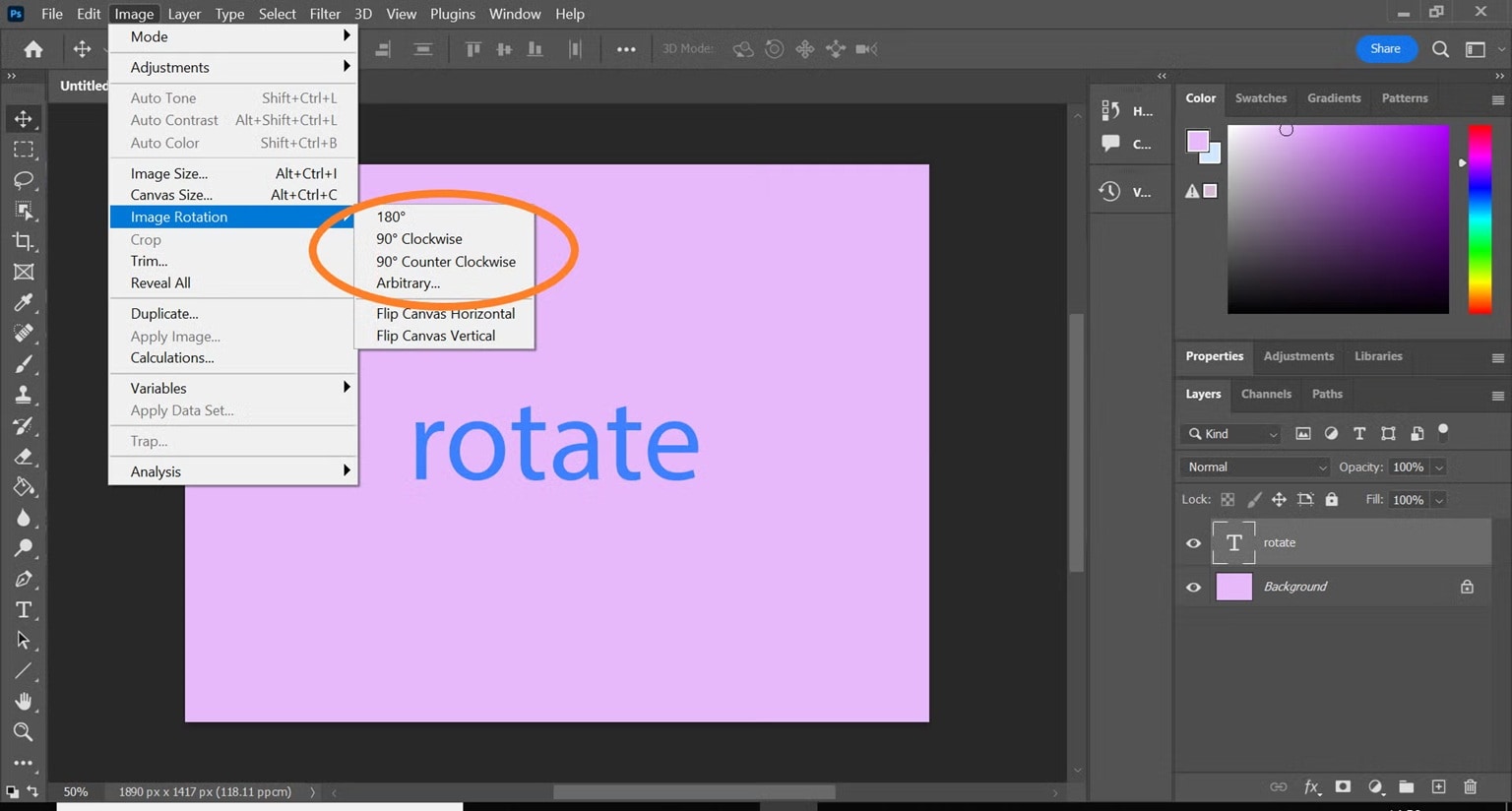
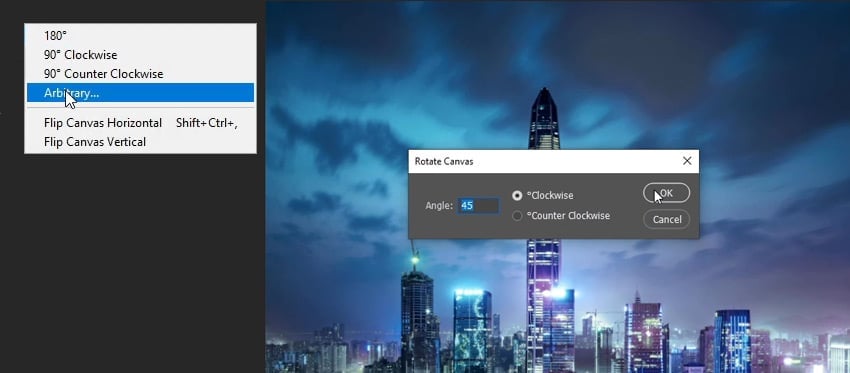
- Select "Arbitrary..." for custom angle rotation. Enter your desired angle in degrees. Click OK to apply the rotation.
Part 3: How to Rotate/Flip Canvas on Photoshop Using Scrubby Slider
The Scrubby Slider provides an efficient and interactive way to rotate the canvas in Photoshop, offering real-time visual feedback. This method combines precision with the simplicity of an intuitive interface.
Learning how to rotate canvas on Photoshop using the Scrubby Slider gives you both control and speed. It's especially useful when you're not sure what exact angle you need and want to see the results as you adjust.
How Scrubby Slider helps:
- Provides a real-time preview as you adjust
- Works great with a stylus or mouse
- Offers more precise control than free rotation
- Lets you try different angles quickly
- Can be used alongside other transformation tools
Steps to use Scrubby Slider for Photoshop canvas rotation:
- Choose your layer or image, then press Ctrl+T (Windows) or Command+T (Mac) to activate Free Transform. Move your cursor to a corner until it turns into a curved arrow.
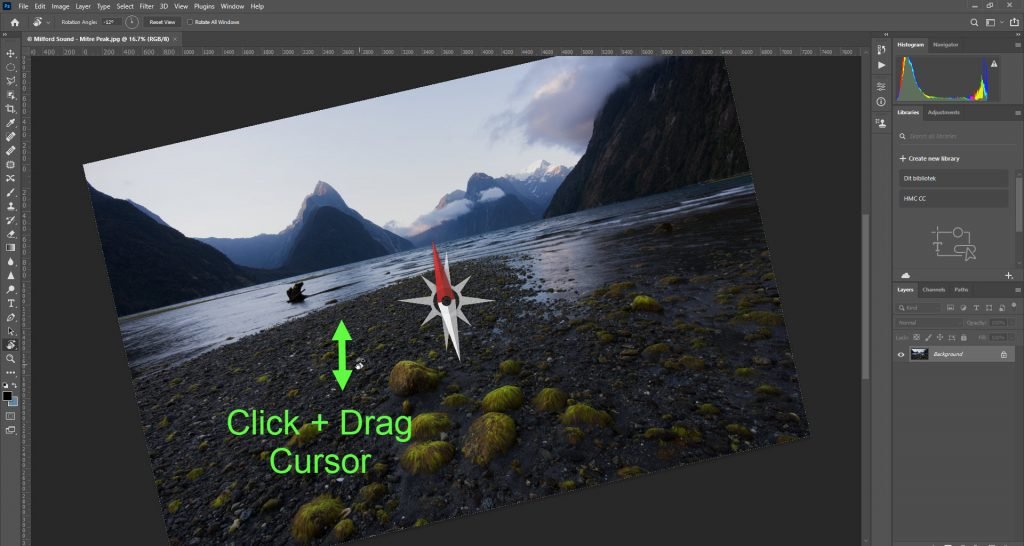
- Drag to rotate freely, holding Shift to snap in 15° steps. Double-click inside or press Enter when you're happy with the result.
Part 4: Batch Rotate Images with Ease
When you need to rotate or flip multiple images at once, switching to a batch processing tool like UniConverter can save you hours of work. This powerful alternative helps when you need to rotate canvas in Photoshop for dozens or hundreds of images.
UniConverter's batch photo editor includes robust rotation features that work just like Photoshop but can process multiple files simultaneously. This is perfect for photographers who need to correct the orientation of an entire photoshoot or graphic designers working with large image sets.
The Photoshop flip canvas techniques we've covered work great for single images, but batch processing opens new possibilities for efficiency.

Batch Image Editor
How UniConverter helps with batch rotation:
- Processes multiple images simultaneously
- Preserves image quality during rotation
- Includes options to flip canvas Photoshop style
- Saves hours compared to rotating images individually
- Maintains file organization with bulk naming options
Steps to batch rotate images with UniConverter:
Step 1
Download and install UniConverter. Launch the program. Select Batch Image Editor.

Step 2
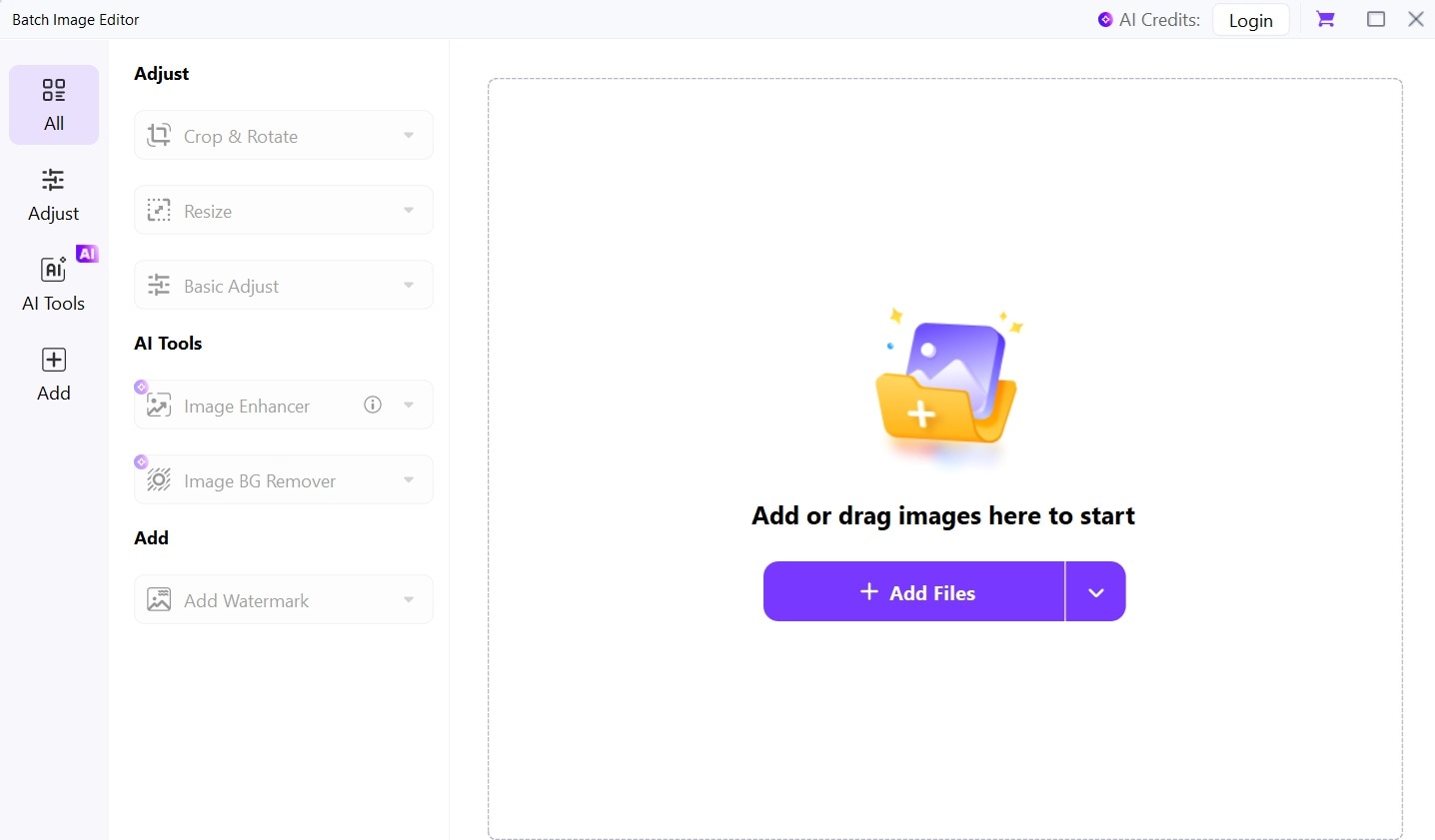
Add multiple images by clicking "Add Files."
Step 3
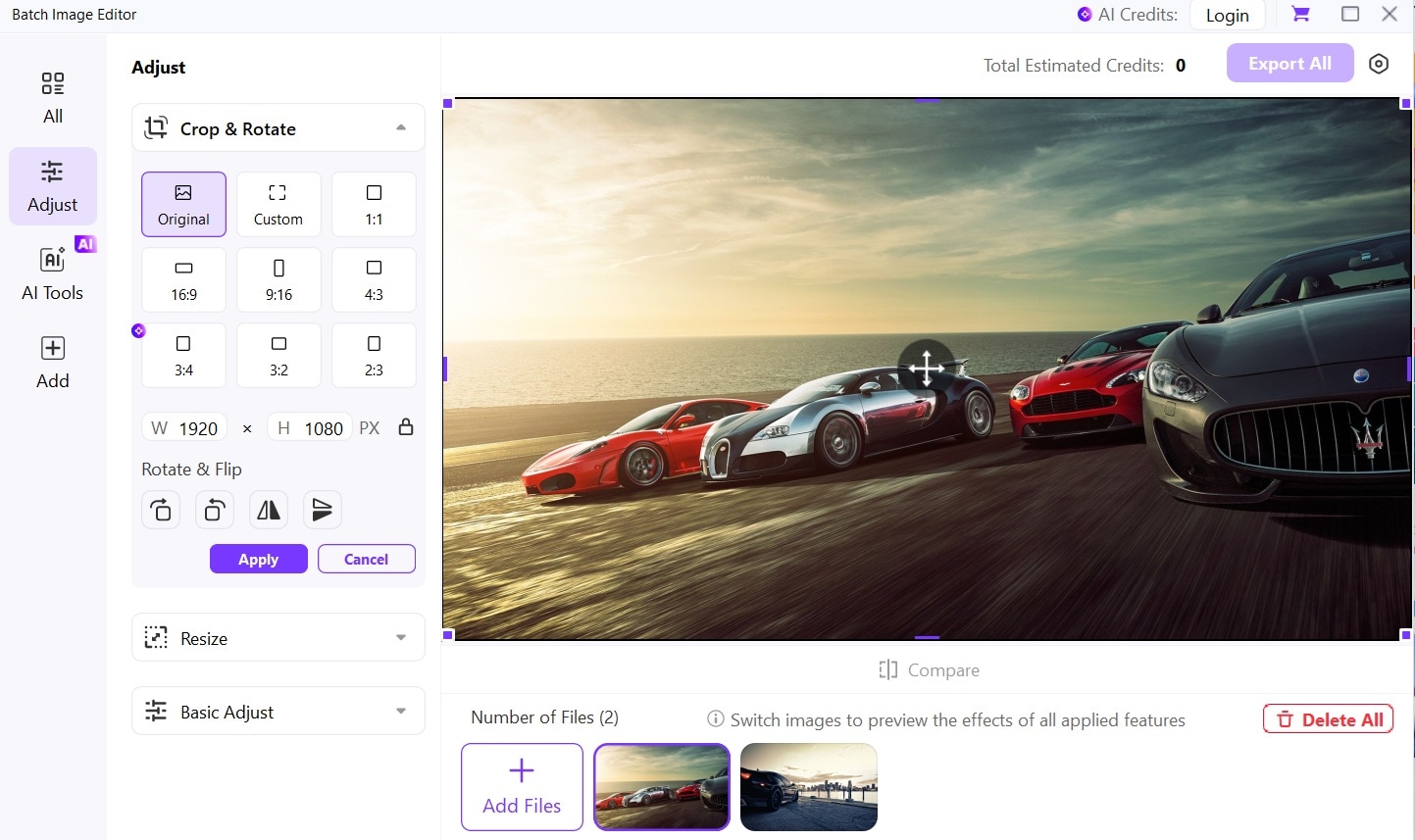
Select all images. Click Adjust on the left menu bar. Select Crop and Rotate. Choose the "Rotate" option.
Step 4
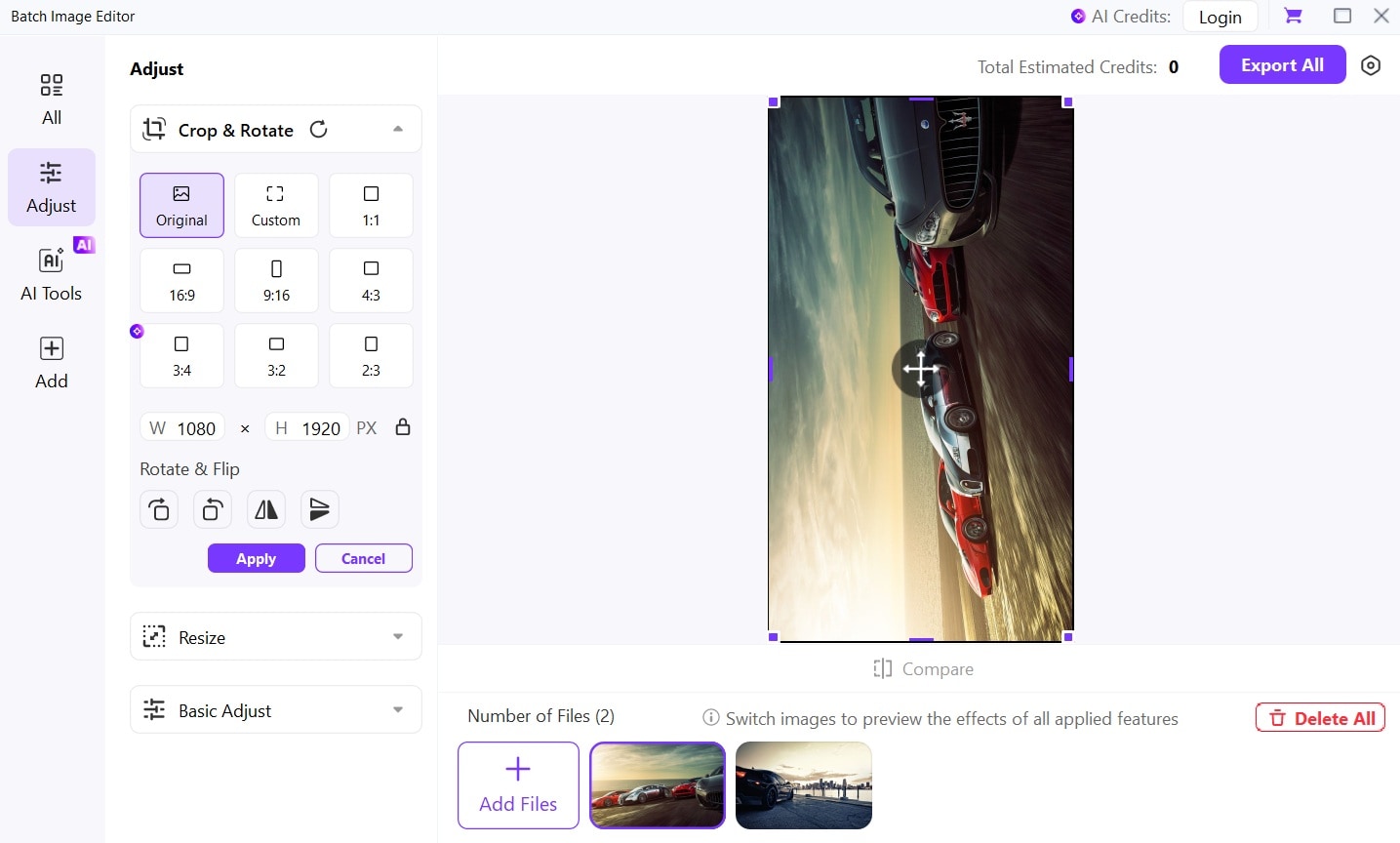
Click "Apply" and then "Save" to process all images at once.
Bonus: How to Rotate Canvas In Photoshop Back to Normal?
After using various methods to rotate canvas in Photoshop, you'll often need to return to the standard orientation. Resetting your canvas is just as important as knowing how to rotate it in the first place.
Returning your canvas to normal ensures your final image has the correct orientation for sharing, printing, or further editing. Photoshop offers several quick ways to reset your view or undo rotations.
Benefits of knowing how to reset canvas rotation:
- Ensures proper orientation for final output
- Prepares files for standard printing or web display
- Maintains consistency across multiple images
- Prevents accidental saving of rotated views
- Allows quick comparison between rotated and standard views
Steps to return canvas to normal orientation:
- For Rotate View Tool rotations: Press Escape or click "Reset View."

- For permanent rotations: Go to Image > Image Rotation > 180° (or appropriate angle)
- For Free Transform rotations: Press Ctrl+Z (Windows) or Command+Z (Mac) to undo
- Double-check your image orientation before saving
- Use View > Fit on Screen to see your entire image in its current orientation
Conclusion
Learning how to rotate canvas in Photoshop opens up new possibilities for your creative workflow. Whether you need to flip canvas in Photoshop to check your drawing, rotate the canvas for better drawing angles, or batch process multiple images, these techniques will save you time and improve your results.
The next time you work on a project, remember these methods for how to flip canvas in Photoshop or how to rotate the canvas in Photoshop. Practice using the Rotate View tool, Image Rotation menu, and Free Transform to find what works best for your specific needs.
With these Photoshop flip canvas and rotation skills mastered, you'll work faster and create better art.

