


With over 6 million podcast titles, Spotify has become the leading platform for podcast discovery. However, many users want to use a Spotify podcast downloader for offline listening, cross-device compatibility, or data saving during travel.
This raises the question: “Can we download and convert a Spotify podcast to MP3?”.
Well, the reality right now is like this:
- Limited offline listening – Spotify Premium users can download podcasts, but you can only listen to those files in the app.
- No MP3 export option – You can’t move downloaded podcasts to another device or media player.
- Data usage concerns – Streaming podcasts consume mobile data, which isn’t ideal for travel or limited data plans.
So, how can you legally download Spotify podcasts to MP3 without breaking any rules?
This guide explores free and legal methods to do just that.
🚀 Quick Navigation - Choose Your Method
Quick Note
Saving Spotify podcasts as MP3 requires balancing audio quality, ease of use,
and legal compliance.
- Desktop tools like Wondershare UniConverter provide more stable recording and higher audio quality, making them suitable for users who prioritize consistency and offline playback.
Part 1. Is Spotify Podcast Downloader Legal?
Downloading Spotify podcasts can be tricky if you don't know how their policies and guidelines work. You can still download and convert a Spotify episode to MP3, but you need to know the following rules.
1. Spotify's Terms of Service: Music vs. Podcasts
Downloading, converting Spotify to MP3, and sharing those files online is not legal. However, there is a slight difference sometimes between music tracks and podcasts.
With music tracks, or songs, Spotify rarely gives permission to convert podcast to mp3 for free and reuse them for various reasons. Spotify’s policy prohibits these actions.
When it comes to podcasts, in many cases the authors or creators allow redistribution and post their podcasts on the public domain. This means that, if the creator permits it, you can freely download and convert their Spotify podcast to MP3.
2. When Is Downloading Spotify Podcasts Legal?
To sum up, here is when it’s completely fine to download Spotify podcasts to MP3 on your device.
- The creator provides permission – Some podcasts are freely available on official websites or YouTube.
- The podcast is in the public domain – Some educational or classic content has no copyright restrictions.
- Personal offline use – Downloading any podcast for personal listening (without redistribution) is typically fine.
3. Avoid Illegal Methods
Something that you never want to do when trying to convert a Spotify podcast to MP3 is to use piracy tools.
Piracy tools that claim to “unlock” Spotify’s encrypted files violate copyright laws. Google and other search engines also penalize illegal tools that breach E-E-A-T (Experience, Expertise, Authoritativeness, and Trustworthiness) guidelines.
Having said that, what are the best free and legal ways to convert Spotify podcasts and download them to MP3?
Part 2. How to Download Spotify Podcasts as MP3 Legally
Before getting started, it’s important to know that Spotify doesn’t host downloadable podcast files directly. Most podcasts come from external RSS feeds where the original audio is stored. By accessing these sources first, you can download episodes more reliably and legally. The steps below show exactly how to convert podcast to mp3.
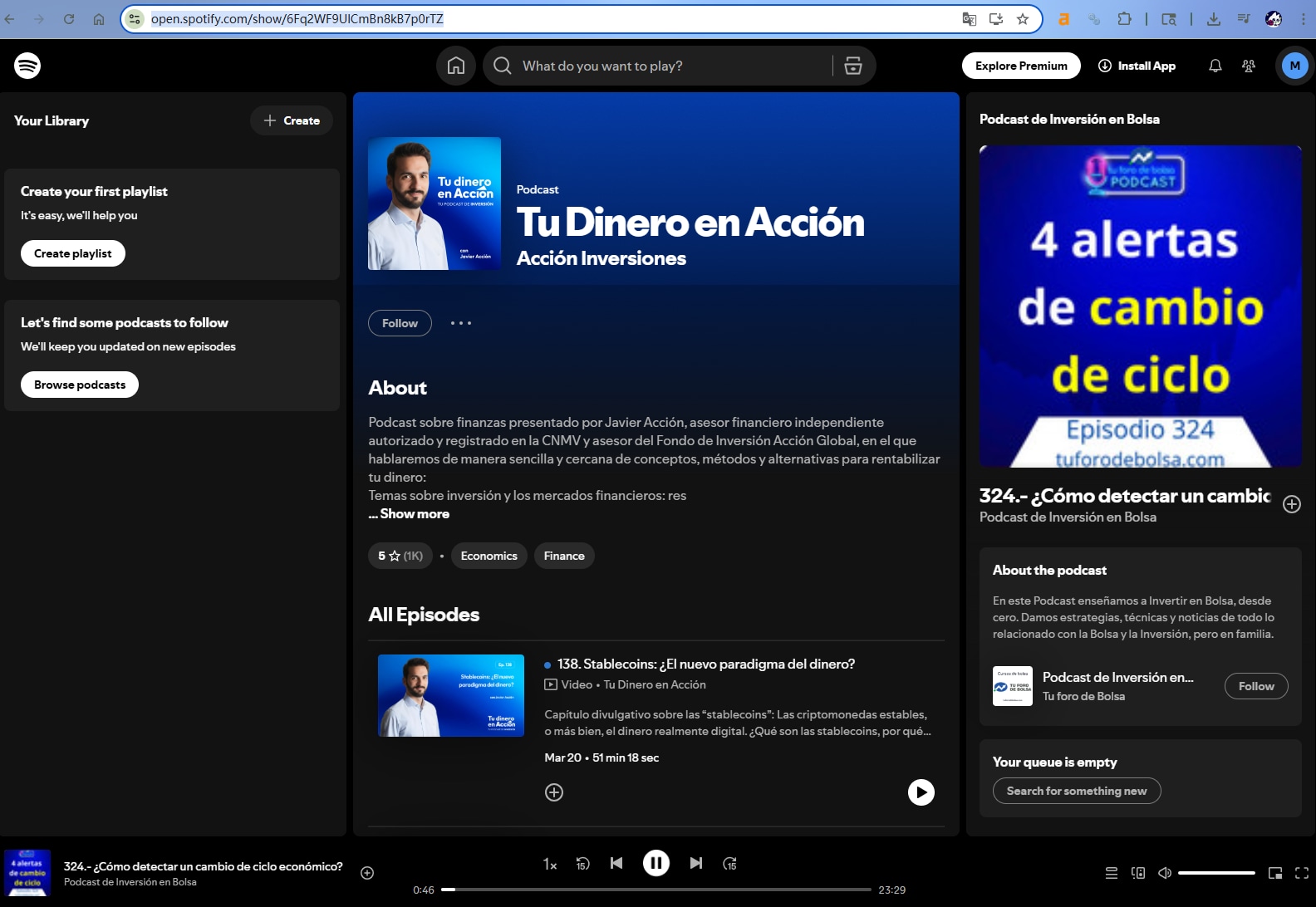
Step 1: Copy the Spotify Podcast Link
Go to Spotify, open the podcast episode, click “Share” → “Copy Link.”
This gives you the reference point for the episode.
Step 2: Find the Podcast RSS Feed (via Listen Notes)
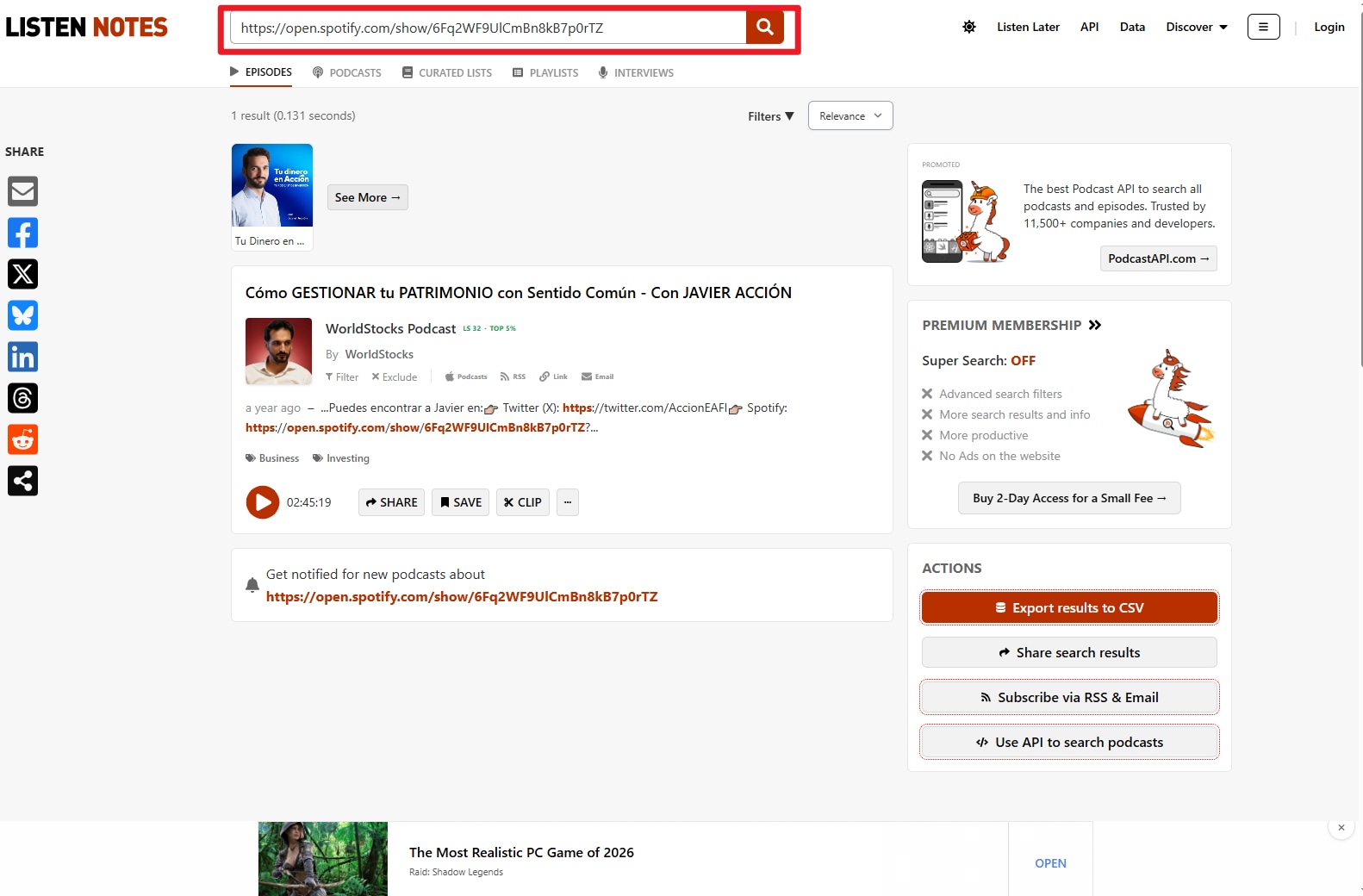
Paste the Spotify link (or search the podcast title) on Listen Notes.
Once you find the show, locate and copy its RSS feed URL — this is the original distribution source of the audio.
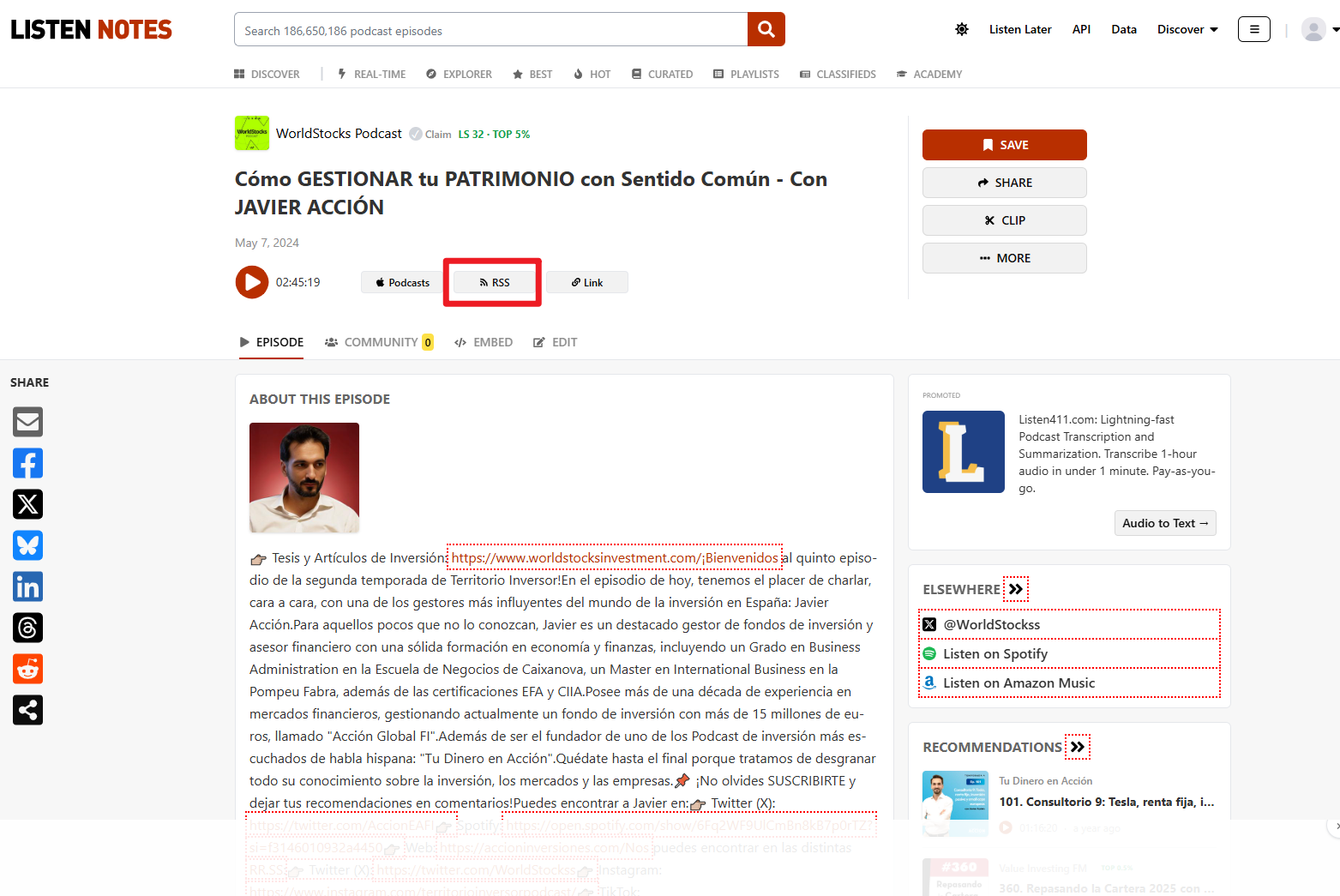
Step 3: Click the RSS Feed
Go to Listen Notes and paste the RSS feed link (not just the Spotify URL).
Saspod will parse the feed and list all available episodes with their original audio files.
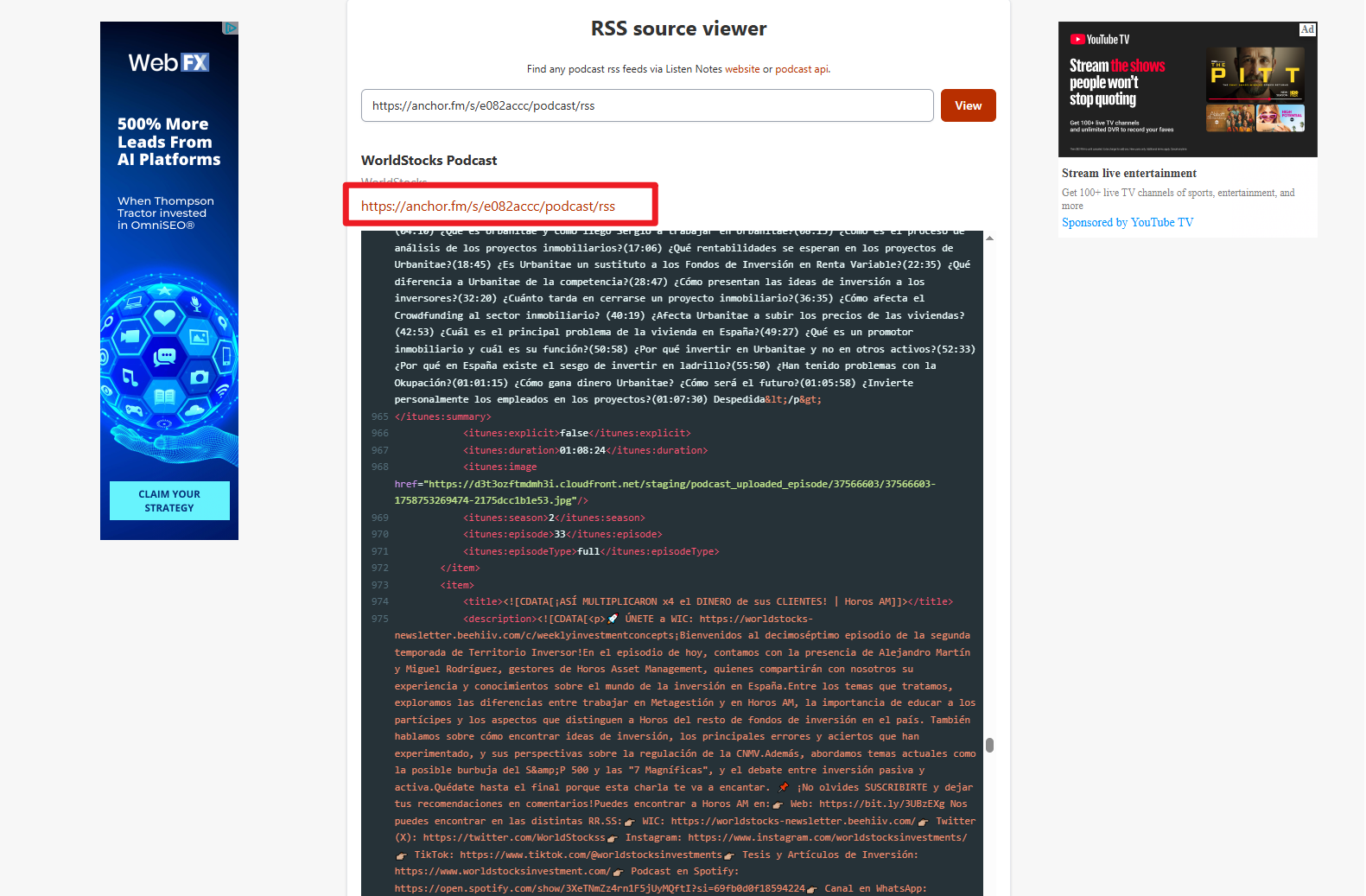
Step 4: Click the Original Episode Audio Link
Once processed, Listen Notes displays available episodes from the feed. Find your target episode and access the original audio file link (usually MP3 format).
Click the audio file link to jump to the source code.
Step 5: Locate the Audio File
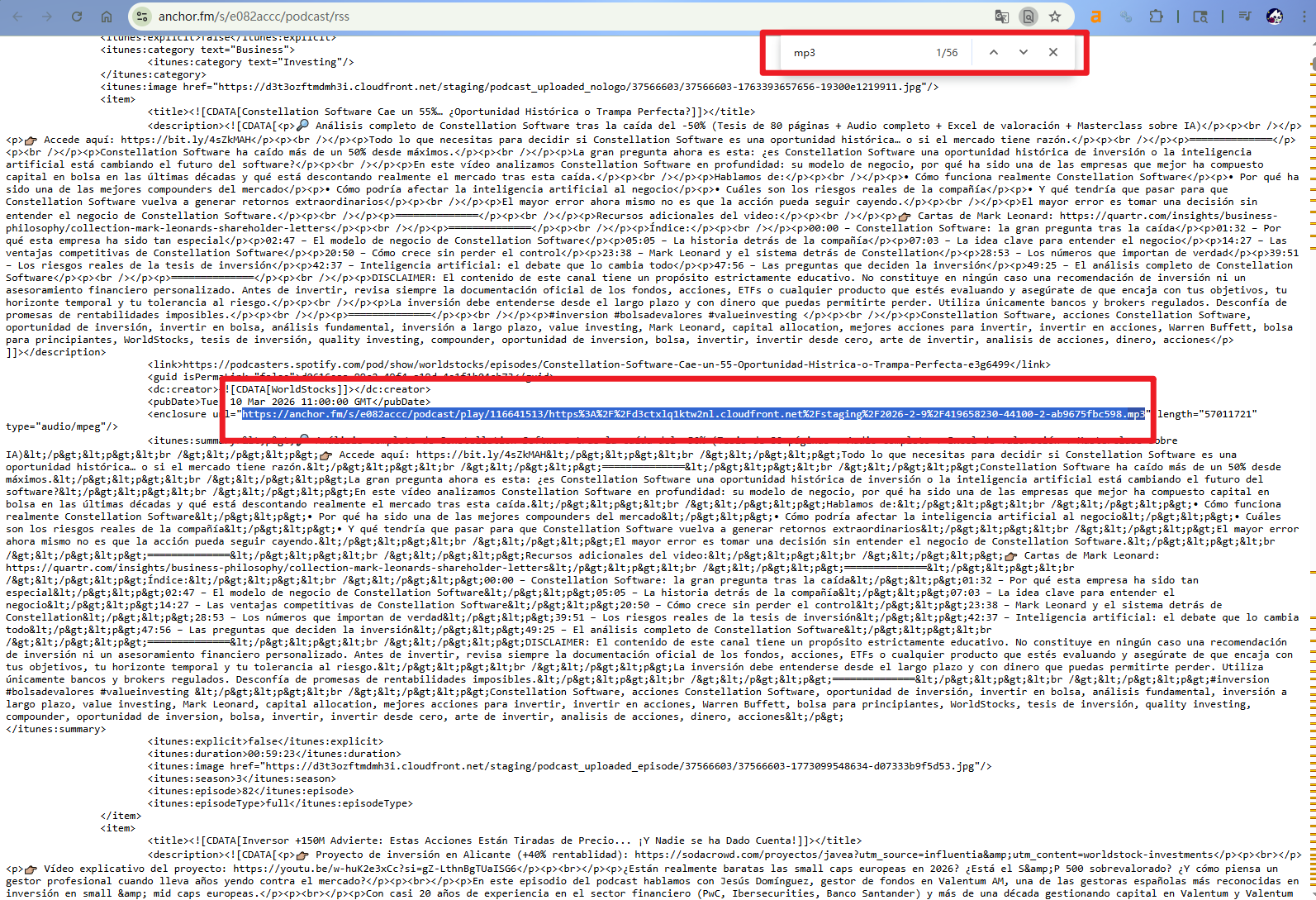
Tab Ctrl+F to find the .mp3 file, and copy the MP3 file link.
Step 6: Download the MP3 File
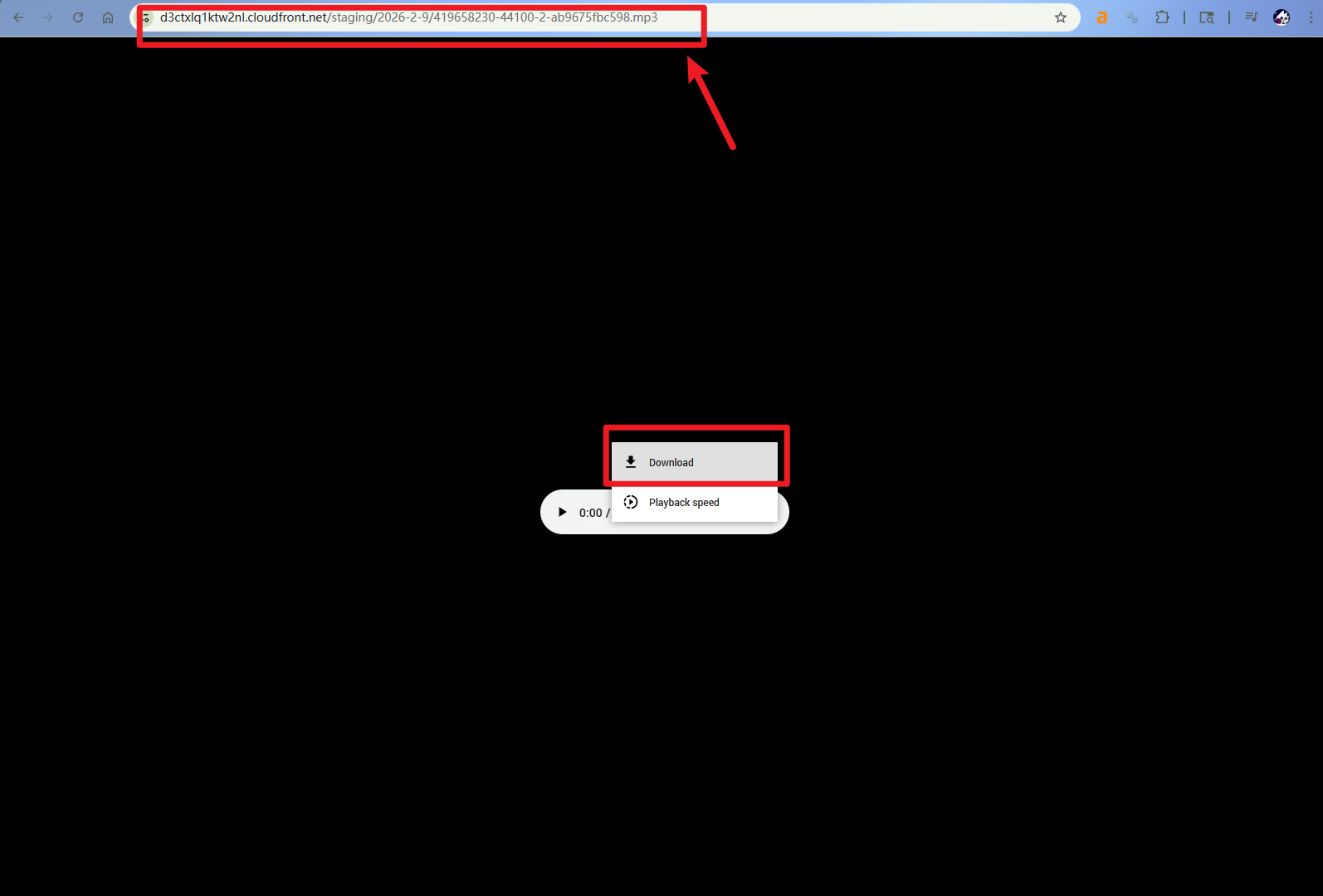
Open a new session and paste the audio link to your brower, and browserright click to choose 'Download' to download Spotify podcast to MP3.
Since the file comes from the creator’s feed, there’s no DRM and no conversion needed.
Part 3. Save Spotify Podcast to MP3 Free without Quality Loss
UniConverter is a very powerful tool that allows you to record Spotify podcasts or convert podcast to MP3 completely free and legally. All you have to do is download the tool for free, use a simple feature inside, and save your Spotify podcasts to your computer.
Before we proceed with the simple steps, you should get familiar with UniConverter and its capabilities. The Screen Record feature that we’ll be using to convert Spotify podcasts is just one part in its powerful multimedia tool arsenal. The recorder offers a super smooth 4K game recording experience for Windows users without latency , and can offer high fidelity audio recording function with auto mic denoising. It also supports stereo audio recording with ease.
This software can help you convert videos, compress images, enhance audio and video, completely manipulate files, and record Spotify podcasts without quality loss. Because of this, it might just be the only solution you need to download Spotify podcast to MP3 from this guide.

Best Spotify Podcast to MP3 Converter
How to download Spotify podcast to MP3:
Step 1. Free Download Free Download the free software from here, install, and open it.
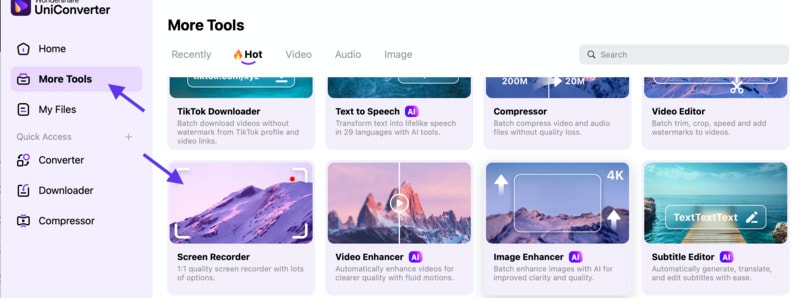
Step 2. Click on More Tools & Screen Recorder
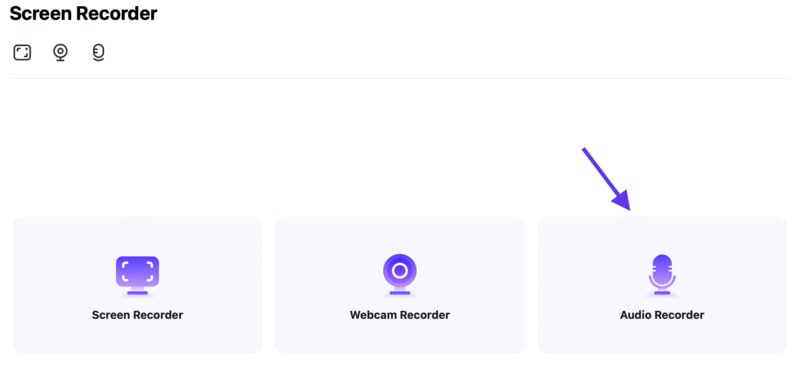
Step 3. From here, select the Audio Recorder box
Step 4. Now, the default settings should be perfect for this process. If not, adjust the format and the audio driver boxes.
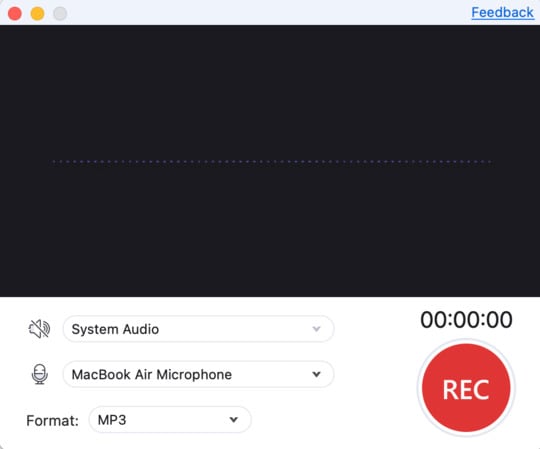
Step 5. Finally, click on “REC” and start playing the Spotify podcast that you want to convert to MP3.
Part 4. Use Spotify Podcast to MP3 Converter Online
A very fast and free Spotify podcast downloader to MP3 online tool that you can use is Paste Download. Before you proceed, please make sure, once again, that you have permission from the creator. Or, simply use the podcasts you download for personal offline use.
Paste Download is a simple Spotify podcast to mp3 converter online where you just paste the podcast link, it converts podcast to MP3, and you can download Spotify podcast to MP3 to your computer.
Steps to download Spotify podcast to MP3 online free:
Step 1. Go to the platform by pasting this url: "https://pastedownload.com/spotify-mp3-downloader/" in your browser.
Step 2. Open Spotify and copy the link to your podcast

Step 3. Paste the link to PasteDownload and wait for it to convert podcast to mp3.
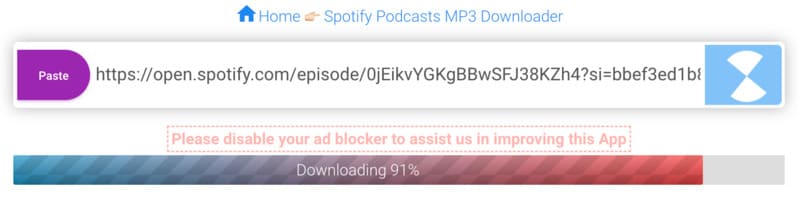
Step 4. Now, click on the Download button.
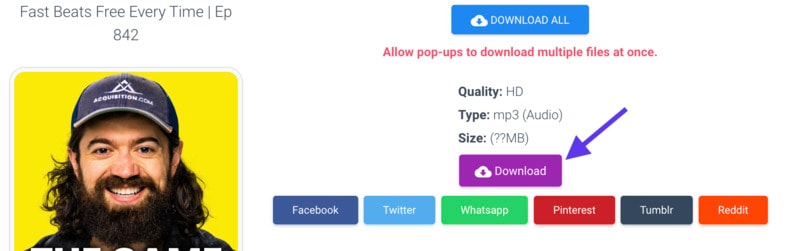
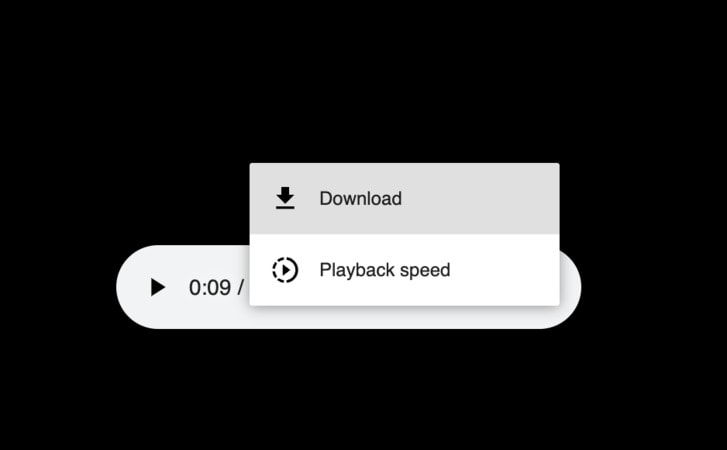
Step 5. Finally, a new window will pop up. Click on the Three Dots > Download.
Part 5. Download Spotify Podcasts to MP3 on Your Mobile
Downloading Spotify podcasts as MP3 directly on mobile devices can be tricky due to App Store and Google Play policy restrictions. Most apps that claim to convert Spotify content are either removed quickly or operate in a grey area. As a result, tools like SpotiFlyer are often only available as APK files, which may pose security and privacy risks.
A Safer Alternative: Use Your Mobile Browser
Instead of installing third-party apps, a more reliable approach is to use your mobile browser. Since many podcasts are originally distributed through external sources, you can access and download them without needing any app at all.
This method works on both Android and iOS, and doesn’t require installation or permissions.
How to Download on Mobile (3 Steps)
Step 1. Open a Browser
Launch Chrome, Safari, or any browser on your phone and go to a trusted online downloader (such as PasteDownload).
Step 2. Paste the Podcast Link
Copy the Spotify podcast episode link and paste it into the tool’s input box.
Step 3. Download the MP3 File
Tap the download button and save the file directly to your device. The podcast will be stored locally for offline listening.
Why This Method Is Better
Using a browser-based solution avoids installing potentially unsafe apps while still allowing you to save podcast audio quickly and conveniently. It’s simple, cross-platform, and works anywhere with an internet connection.
Part 6. Why Browser Extensions Usually Don’t Work for Spotify Podcasts
Finding a browser extension that can convert and download podcasts from Spotify Web Player is extremely difficult. These extensions no longer exist or work since they’ve been causing Spotify lots of headaches.
Even if you find traces of some of these extensions, going to the chrome store will instantly reveal that they no longer exist.
Having said this, your safest and fastest option is to rely on legal, free, and powerful tools like UniConverter to download and convert Spotify podcasts to MP3 as many as you want.
Part 7. Comparison Table: Which Method Is Best?
With several ways to download Spotify podcasts as MP3, choosing the right method depends on your priorities—whether that’s audio quality, safety, ease of use, or device compatibility. Below is a quick comparison to help you decide.
| Method | Ease of Use | Audio Quality | Safety | Speed | Device Support | Best For |
| RSS Feed (Manual Method) | Medium | ⭐⭐⭐⭐⭐ | ⭐⭐⭐⭐⭐ | Medium | All devices | Legal, original MP3 downloads |
| UniConverter (Audio Recorder) | Easy | ⭐⭐⭐⭐⭐ | ⭐⭐⭐⭐⭐ | Slow (real-time) | Windows & Mac | Lossless recording & reliability |
| Online Tool (PasteDownload) | Very Easy | ⭐⭐⭐ | ⭐⭐⭐ | Fast | All (Browser) | Quick downloads without installation |
| Mobile Browser Method | Easy | ⭐⭐⭐ | ⭐⭐⭐ | Fast | Android & iOS | On-the-go downloading |
| APK Apps (e.g., SpotiFlyer) | Medium | ⭐⭐⭐⭐ | ⭐ | Medium | Android only | Advanced users (risk involved) |
Which Method Should You Choose?
For best quality and legality: The RSS feed method is the most reliable since it uses original audio files provided by creators.
For ease and all-in-one features: UniConverter is ideal if you want a stable, high-quality solution without dealing with links or feeds.
For quick, no-install downloads: Online tools like PasteDownload work well, but may come with ads and slight quality loss.
For mobile users: The browser-based method is the simplest and safest option to convert Spotify podcast to MP3 across both iOS and Android.
Best Spotify Podcast to MP3 Converter
FAQs about Spotify Podcast Downloader to MP3
Can you download Spotify podcasts to MP3?
Yes, you can download Spotify podcasts to MP3 using several methods. The most effective approaches include high-quality audio recording software like UniConverter, online converters like PasteDownload, or mobile browser solutions. However, mobile apps and browser extensions are generally not effective for the purpose to convert podcast to mp3.
How to convert Spotify podcast link to MP3?
To convert a Spotify podcast link to MP3:
- Copy the podcast episode URL from Spotify (right-click → Share → Copy link)
- Open an online converter like PasteDownload in your browser
- Paste the link into the converter tool
- Wait for the conversion process to complete
- Click download to convert Spotify podcast to MP3 to your device
What is the best Spotify podcast to MP3 converter online free?
The best Spotify podcast to MP3 converter online free options include:
- PasteDownload - Fast and user-friendly interface
- Y2Mate - Supports multiple audio formats
- 320YTmp3 - Good for high-quality conversions
However, these online tools may result in some quality loss compared to desktop software like UniConverter.
How to download podcast from Spotify to MP3 on mobile?
To download podcast from Spotify to MP3 on mobile:
- Open your mobile browser (Chrome, Safari, etc.)
- Navigate to an online converter like PasteDownload
- Copy the Spotify podcast link from the app
- Paste it into the online converter
- Download Spotify podcast to MP3 directly to your phone
Note: Dedicated mobile apps for Spotify downloading are often unreliable or violate app store policies.
Conclusion
If you don't have Spotify Premium or if you simply want to save Spotify podcasts to MP3 for offline use, you can always use the tools and methods we talked about in this article to find a suitable Spotify podcast downloader download a Spotify podcast to MP3 and enjoy listening to it whenever you want, wherever you want.
So, go ahead and follow the steps to get this done today.

