


Finding a real 320 kbps MP3 download is not just about choosing a high number. The source quality, download method, and file permissions all matter. Some sites label files as “320 kbps” even when the original audio is low quality, while others may include pop-ups, fake buttons, or copyright risks.
This guide compares the safest ways to get high-quality MP3 files, including official music stores, artist-approved free downloads, online MP3 converters, and UniConverter for batch 320 kbps MP3 downloads on PC.
In this article
Can You Really Download True 320 kbps MP3?
Yes, but only when the source audio is high enough in quality and the download method actually exports MP3 at 320 kbps. A file labeled “320 kbps” is not always true high-quality audio. If the original track was compressed at 128 kbps or recorded in poor quality, converting it to 320 kbps only makes the file larger—it does not restore lost sound detail.
| Source type | Can it provide real 320 kbps MP3? | Best use case | Watch out for |
|---|---|---|---|
| Official music stores | Often yes, depending on the store and track | Buying high-quality music for long-term ownership | Not every store labels bitrate clearly |
| Artist-approved free downloads | Sometimes, depending on the uploaded file | Free and legal music downloads | Quality varies by artist upload |
| Desktop batch downloader | Yes, when the source and output settings support it | Downloading or converting many authorized files at once | Do not upscale low-quality files expecting better sound |
| Online MP3 converter | Sometimes, usually advertised as “up to 320 kbps” | Quick one-off conversion in a browser | Ads, pop-ups, unstable quality, and copyright restrictions |
Why download music in 320 kbps MP3 quality
Before choosing where to download music, it helps to know why 320 kbps MP3 is the go-to option for high-quality sound. This bitrate delivers richer clarity and depth than lower-quality files, making your music feel closer to studio-level audio. If you’re upgrading old tracks or building a new library, 320 kbps keeps your collection sharp and future-ready — so let’s explore why it matters:
Superior Sound Clarity and Detail
320 kbps MP3 preserves more of the original audio data, giving you crisp highs, clear vocals, and vibrant instrument separation. You can hear subtle details—like breaths, strings, and ambient effects—that lower bitrates often lose. This makes your music richer, sharper, and far more engaging.
A Richer, Deeper Low End (Bass)
High-bitrate MP3 files deliver fuller, more controlled bass that doesn’t muddy the rest of the track. The low-end feels stronger and more textured, especially in genres like EDM, hip-hop, and rock. With 320 kbps, the bass stays powerful without sacrificing overall clarity.
Fewer Noticeable Artifacts and Distortion
Compared with lower-bitrate MP3 files, 320 kbps MP3 usually reduces common compression issues such as muffled highs, thin vocals, or metallic artifacts. It is still a lossy format, but it keeps more detail than 128 kbps or 192 kbps MP3, making it a better choice for everyday high-quality listening.
Strong Listening Quality Across Devices
Whether you listen through phone speakers, car audio, headphones, or a home speaker system, 320 kbps MP3 offers a reliable balance of quality and compatibility. It is not the same as lossless audio, but it is easier to store, transfer, and play across almost any device or media player.
Compatibility-Ready for Your Music Library
Keeping music at 320 kbps helps your library stay useful across phones, computers, car stereos, media players, and editing tools. While lossless formats are better for archiving, 320 kbps MP3 remains a practical option when you want smaller files, broad compatibility, and strong everyday sound quality.
Future-Proofing Your Music Library
Storing music at 320 kbps ensures your collection stays relevant as devices improve and sound standards rise. You won’t have to re-download or upgrade files later because they’re already high quality. It’s a smart long-term choice for anyone building a durable digital music library.

Easy to Use Batch 320 kbps MP3 Downloader
Best Ways to Download 320 kbps MP3 Legally and Safely
There are several ways to get a 320 kbps MP3, but they are not equally safe or reliable. The best choice depends on whether you want legal music ownership, a free artist-approved download, a quick online MP3 conversion, or a batch desktop workflow. Use the comparison below to choose the right method before downloading.
| Method | Best for | 320 kbps availability | Batch support | Safety note |
|---|---|---|---|---|
| Official music stores | Buying music legally and keeping permanent files | Often available, depending on the platform and track | No | Safest option for music ownership |
| Artist-approved free platforms | Free legal music downloads | Varies by artist upload | No | Check the download license before reuse |
| Streaming app offline downloads | Legal offline listening inside the app | High or lossless quality may be available, but files usually stay inside the app | Yes, inside the app | Not the same as owning an MP3 file |
| UniConverter desktop downloader | Batch 320 kbps MP3 downloads and conversions on PC | Available when the source and output settings support it | Yes | Use only for media you own or have permission to download |
| Online MP3 converter | Quick one-off MP3 conversion without installation | Usually “up to 320 kbps” | Usually limited | Avoid pop-ups and unauthorized copyrighted content |
Official Music Stores for 320 kbps MP3 Downloads
Beatport: A strong option for DJs and electronic music fans who want high-bitrate downloads from an official store. If you search for “Beatport downloader 320kbps,” the safer route is still to buy directly from Beatport instead of using unknown third-party downloaders.
Bandcamp: Many artists let listeners download purchased music in multiple formats, including MP3 and lossless options. It is a better choice when you want to support artists directly and keep a long-term music library.
Amazon Music purchases: Useful for buying individual tracks or albums legally. Audio quality may vary by item, so check the download details before assuming every file is exactly 320 kbps.
7digital: A long-running digital music store that can be useful for DRM-free music purchases in supported regions.
Free and Legal Music Download Sources
SoundCloud: Some artists enable an official download button for their tracks. Only download tracks where the creator has made downloading available.
Audiomack: Some artists allow downloads inside Audiomack. Use official download options instead of third-party “Audiomack downloader 320kbps” sites.
Free Music Archive: A useful source for Creative Commons and royalty-free music. Always check the license terms before using a track in a video, podcast, or commercial project.
YouTube Audio Library: A practical source for creators who need music for video projects, especially when they want a safer alternative to ripping copyrighted songs.
Streaming Services with High-Quality Offline Listening
Spotify: Spotify Premium supports higher-quality streaming and offline downloads inside the app, including Very High quality settings where available. This is convenient for listening, but it does not give you a normal MP3 file to keep outside Spotify.
Apple Music: Apple Music supports AAC and lossless ALAC options. It is excellent for high-quality listening, but downloaded tracks remain inside the Apple Music ecosystem instead of becoming standard MP3 files.
Tidal, Deezer, and Qobuz: These services are better for users who care about lossless or high-resolution listening. They are not the same as free MP3 download sites, but they are safer options for legal high-quality playback.
How to Batch Download 320 kbps MP3 on PC with UniConverter
If you need to download or convert multiple authorized media files into 320 kbps MP3, a desktop workflow is usually more stable than a browser-based converter. Wondershare UniConverter is useful for users who want batch processing, cleaner output settings, local file management, and fewer pop-up risks than random online MP3 download sites. It is best for music collections, playlists you have permission to save, creator assets, lecture audio, and other media files you legally own or can download.
| Need | Online MP3 converter | UniConverter desktop |
|---|---|---|
| One short file or link | Convenient for quick use | Works, but installation may be more than you need |
| Batch 320 kbps MP3 downloads | Often limited or requires one-by-one downloads | Better fit for batch processing on PC |
| Stable output settings | Quality options may vary by site | Lets you control MP3 output settings more consistently |
| Ad-free workflow | Many free sites include ads or pop-ups | Cleaner desktop workflow |
| Large music library management | Not ideal | Better for repeated conversion and organization |
Key Features
- Batch download or convert authorized media files to MP3
- Supports 320 kbps MP3 output when the source quality allows it
- Works with many video and audio formats for conversion workflows
- Useful for managing large music, lecture, or creator audio libraries
- Local desktop workflow helps reduce browser pop-up and redirect risks
- Built-in audio trimming and editing tools for simple post-processing
How to Download 320 kbps MP3 in Batch Using UniConverter
Step 1: Open UniConverter and Choose Downloader
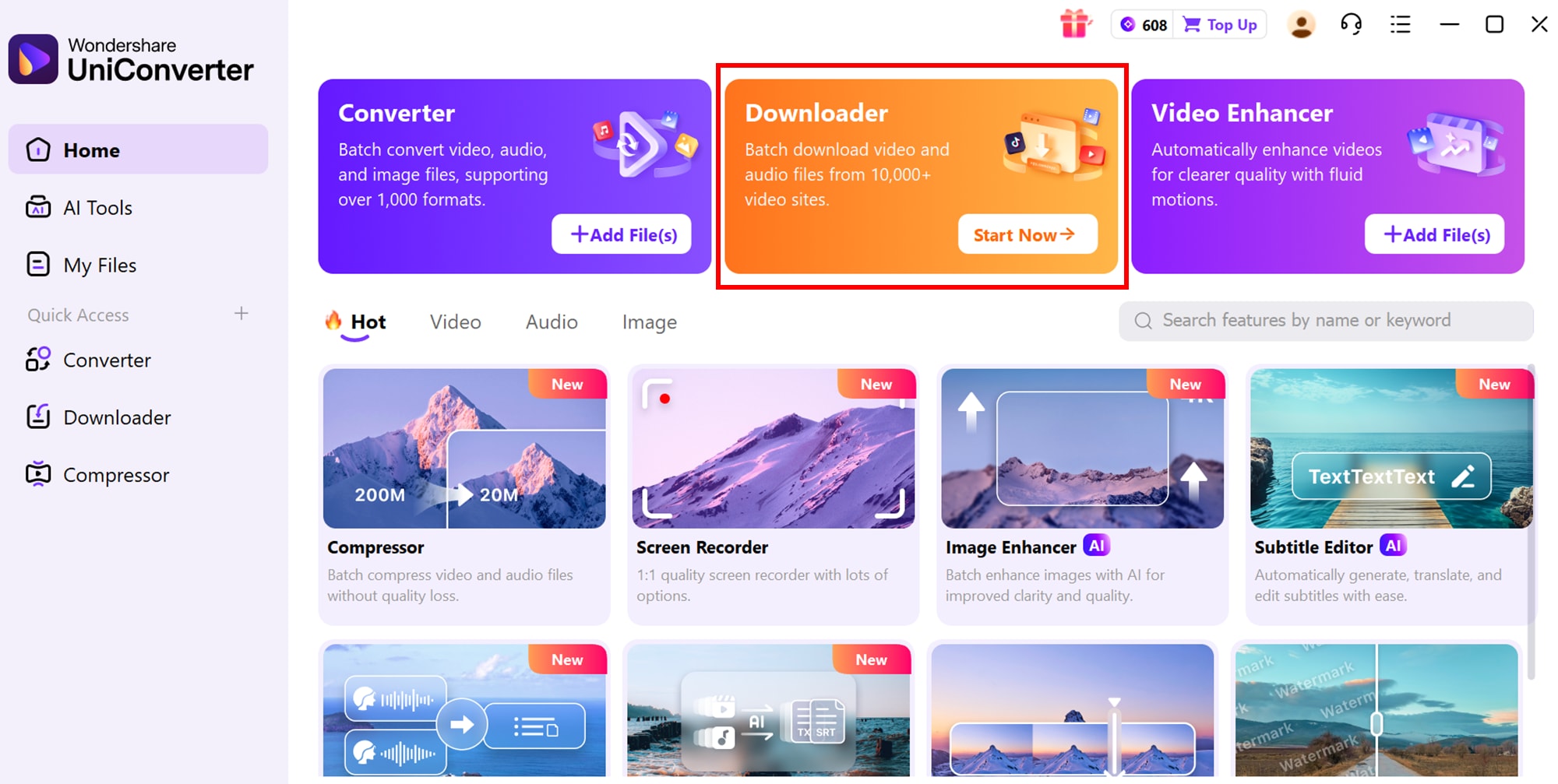
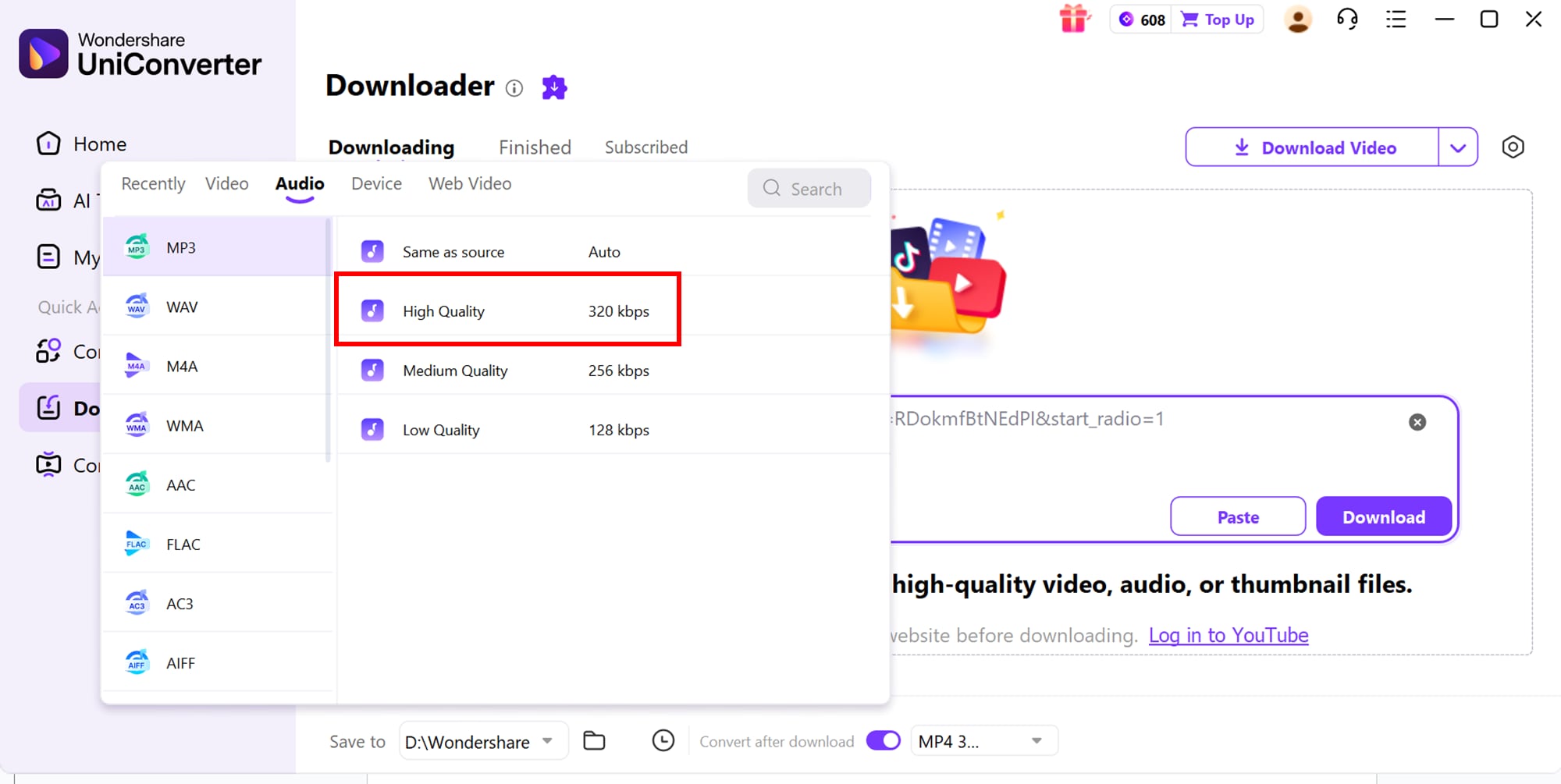
Step 2: Add Multiple Authorized URLs and Choose MP3 320 kbps
Paste the media links you are allowed to download, then choose MP3 as the output format and select 320 kbps when available. For best results, start from high-quality source audio instead of trying to upscale a low-bitrate file.
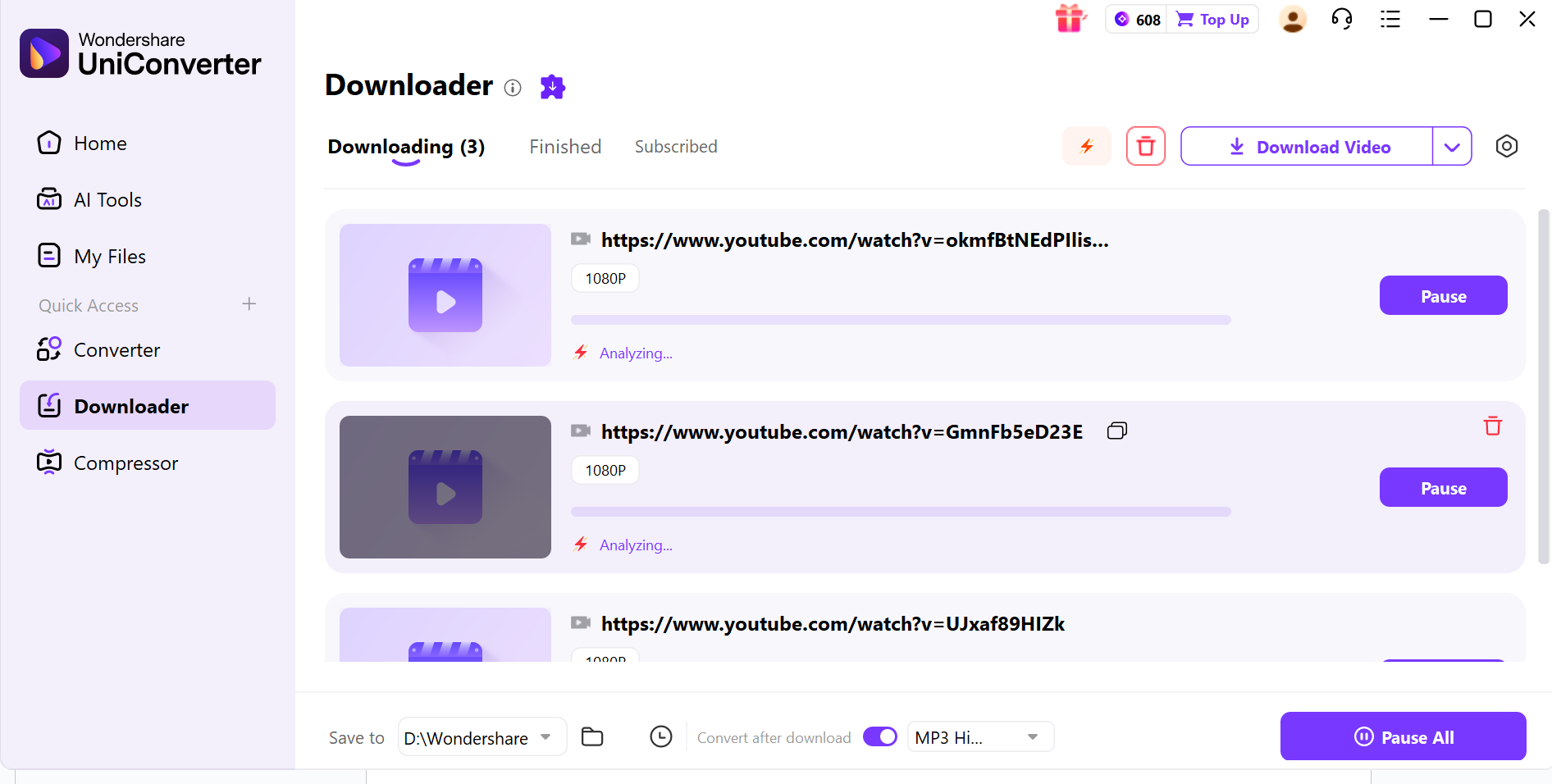
Step 3: Start the Batch Download or Conversion
Click Download to process the batch. After the files are saved, review the output folder and organize the MP3 files by album, playlist, project, or use case.


Batch 320 kbps MP3 Downloader for PC
How to Download 320 kbps MP3 Online for Free
An online 320 kbps MP3 converter can be useful for a quick one-off task when you do not want to install software. This method works best for files, videos, or links you own, created yourself, or have permission to download. Online tools may advertise “up to 320 kbps,” but the final quality still depends on the original audio source and the tool’s actual export options.
Before Using a Free Online 320 kbps MP3 Downloader
- Use it only for media you own, created, or have permission to download.
- Avoid sites with aggressive pop-ups, forced extensions, or suspicious download buttons.
- Check whether the tool really offers MP3 320 kbps output instead of only labeling the file as high quality.
- Do not expect a low-quality source to become high-quality after conversion.
- For multiple files, use a desktop batch workflow instead of repeating one-by-one online downloads.
Use an Online MP3 Converter for One-Off 320 kbps Downloads
Tools like Y2Mate-style online converters are mainly suitable for quick, occasional MP3 conversion. The common workflow is simple: paste an authorized URL, choose MP3, select the highest available bitrate, and download the file after conversion. Because online converter availability, ads, and quality options can change, always review the page carefully before clicking any download button.
Key Features of an Online 320 kbps MP3 Converter
- Works in a browser without software installation
- Useful for quick single-file or single-link MP3 conversion
- May offer MP3 quality options up to 320 kbps
- Accessible on desktop and mobile browsers
- Best for occasional use, not large music library workflows
How to Download 320 kbps MP3 Online
Step 1: Open the Online MP3 Converter and Paste an Authorized URL

Step 2: Select MP3 and Choose the Highest Available Bitrate
Choose MP3 as the output format and select 320 kbps if the option is available. Remember that “320 kbps” is only meaningful when the original audio has enough quality to support it.

Step 3: Download the Converted MP3 File Carefully
After conversion, click the real download button and avoid pop-up ads or unrelated software prompts. If you need to process many files, switch to a batch desktop tool for a cleaner workflow.

320 kbps MP3 vs Other Audio Quality Options
If you are deciding whether 320 kbps is worth it, it helps to compare it with other common formats and listening scenarios. Not every user needs lossless audio, but not every source labeled “320 kbps” is equally useful either.
| Format / Quality | Best For | Main Advantage | Main Trade-Off |
|---|---|---|---|
| 128 kbps MP3 | small files, casual listening | lighter storage use | noticeably lower sound quality |
| 320 kbps MP3 | offline music libraries, broad device compatibility | strong balance of quality and file size | still lossy, depends on source quality |
| AAC 256 kbps | Apple ecosystem and modern streaming | efficient quality at lower bitrate | not as universally expected as MP3 by all users |
| FLAC / Lossless | audiophile archives and editing | no lossy compression loss | much larger file sizes |
Conclusion
Downloading music in true 320 kbps MP3 quality doesn’t have to be confusing—what matters is choosing the method that fits your listening style, device, and long-term needs. If you prefer fast, secure, and high-quality batch processing, a desktop tool like Wondershare UniConverter offers a cleaner workflow with stable output settings and local file management. For quick one-off tasks, online MP3 converters can be convenient, but they should only be used for media you own, created, or have permission to download.
Official stores, artist-approved downloads, streaming services, and royalty-free music libraries also give you safer ways to build a high-quality music collection. The best 320 kbps MP3 download method depends on whether you want legal ownership, free authorized music, quick online conversion, or batch desktop processing.
Easy to Use Batch 320 kbps MP3 Downloader
FAQs About 320 kbps MP3 Downloads
-
1. Is 320 kbps MP3 still worth downloading in 2026?
Yes. 320 kbps MP3 is still a practical balance between sound quality, file size, and device compatibility. It is not lossless, but it is good enough for most phones, car audio systems, Bluetooth speakers, and casual listening setups. -
2. What is the safest way to download 320 kbps MP3?
The safest way is to use official music stores, artist-approved free downloads, royalty-free libraries, or media files you own. For batch workflows, use a trusted desktop tool and only process content you have permission to download or convert. -
3. Can I convert a 128 kbps MP3 to 320 kbps and improve the quality?
No. Converting a low-bitrate file to 320 kbps does not restore audio detail that was already lost. It usually only increases the file size. To get better quality, start from a high-quality source file or an official high-bitrate download. -
4. What is the best 320 kbps MP3 downloader for batch downloads?
For multiple files, a desktop workflow such as UniConverter is usually more practical than an online converter because it supports cleaner batch processing, local file management, and more consistent output settings. -
5. Can I download 320 kbps MP3 online for free?
Yes, but only for media you own, created, or have permission to download. Free online converters are convenient for one-off tasks, but quality options, ads, and availability can vary by site. -
6. Is YouTube to 320 kbps MP3 download legal?
It depends on the content and permission. Do not download copyrighted music or videos without authorization. Use YouTube Audio Library, your own uploads, Creative Commons content, or media where the rights holder clearly allows downloading. -
7. Is 320 kbps MP3 better than lossless audio?
No. 320 kbps MP3 is a high-quality compressed format, while lossless formats such as FLAC or ALAC preserve more original audio data. However, MP3 is smaller and more universally compatible, which makes it easier to use across devices.

