

When listening to a great song online, it gets frustrating to discover that you cannot download it. Streaming media often restricts offline viewing, and many online converters appear unreliable. The problem is not only associated with convenience, but also in finding a reliable way to store your favorite tracks. That is why the MP3 downloader from link may be a good solution.
These tools will help you get the background music you need for a project or even just to listen to the tracks. In this article, we will discuss why and when it is useful to download audio from url and which tools are the best to use.
In this article
Part 1. Why Do People Need to Download Audio from a URL?
Downloading audio directly from a URL is not just about convenience; it solves real-life challenges and makes audio content accessible. The following section will cover the 5 reasons why you might need a tool for audio download from a link:
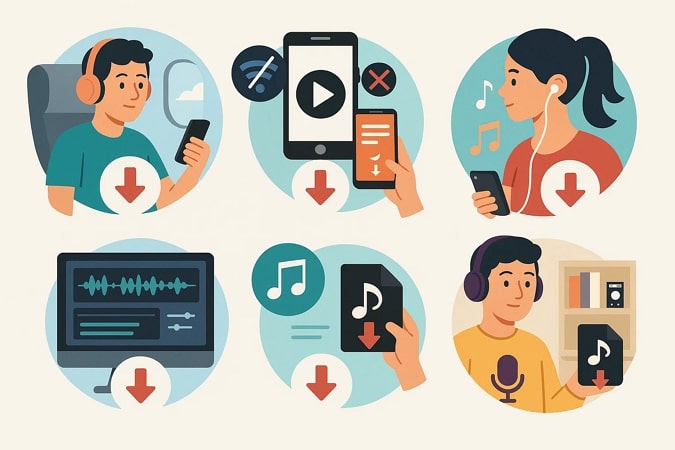
Offline Listening:Streaming needs a stable internet connection that is not always present when travelling or in remote areas. By downloading audio, you will never have to worry about buffering or signal drop when you want to listen to your music or podcast.
Saving Mobile Data: Online audio accessibility needs a lot of mobile data, particularly when the audio files are of high quality. Audio can be downloaded so that it can be listened to repeatedly without incurring extra data charges.
Creating Personalized Playlists: You can create playlists of songs to use to make custom playlists to fit your activities, like during workouts or travel. You will never be deprived of the correct soundtrack to train or take a long trip.
Reusing Audio for Different Projects: Audio clips are commonly required by professionals, students, and creators to edit or use as background. Downloading a URL will allow one to reuse the files without the need to have consistent access to the internet.
Archiving Rare or Exclusive Content: In some cases, such as interviews, indie music, or lectures, some audio material may be available online only temporarily. Downloading enables you to save a copy that will not disappear later on.
Part 2. Is It Safe and Legal to Download MP3 from a Link?
Although saving audio from urls seems to be a convenient way to download music, there are safety and legal concerns that are raised by such an idea. It is essential to understand when it can be used and when it can expose you to risk before you click on download:
Copyright Ownership: The majority of songs, podcasts, or recordings you discover via an audio download URL are under copyright protection. Downloading without the permission of the creators or distributors may infringe the rights of the creators or distributors.
Fair Use Exceptions: Short clips can be downloaded in fair use, e.g., to comment on, criticize, or educate. Fair use is, however, restricted and does not apply to downloading of whole songs or albums to entertain oneself.
Personal vs. Commercial Use: The potential risks associated with using a track to listen to it offline are normally lower than the risks associated with using it commercially. As soon as you recycle or share the file, you may be punished by the law.
Licensed Free Content: Not all audio is restricted, as most of the platforms provide royalty-free, Creative Commons, or licensed content. It is always important to ensure that the usage rights have been observed before using an audio download URL as a source of infringement.
Regional Laws Penalties: The laws regarding copyright can differ per country, but in most of them, there are strict laws against illegal downloading. Here is a country-by-country breakdown of copyright laws and penalties for downloading audio using URLs:
| Country | Key Law | What It Means for Users |
| United States | DMCA (Digital Millennium Copyright Act) | Downloading copyrighted audio without permission is illegal; fair use applies only in limited cases. |
| United Kingdom | Copyright, Designs and Patents Act 1988 | Personal copying from unauthorized sources is not allowed, even for private use |
| Canada | Copyright Act (Bill C-11) | Limited personal copying is permitted, but downloading from illegal sources is prohibited. |
| Germany | Urheberrechtsgesetz (Copyright Act) | Strict enforcement, illegal downloads can lead to fines; only licensed services are safe |
| Australia | Copyright Act 1968 | Downloading without authorization is illegal, but format-shifting for personal use may be allowed. |
Quick Guide: Best Way to Download MP3 from a Link
- Best overall: Wondershare UniConverter
- Best for playlists: Wondershare UniConverter
- Best for fast online use: Online MP3 downloader tools
- Best for quality: Wondershare UniConverter
Part 3. Finest MP3 Downloader from Link You Should Try
In case you need a stable tool to download audio from URL, UniConverter can be the best option. It provides users with a very fast and stable means to convert video and audio links into high-quality MP3 files. The platform has support to download media files from more than 10,000 websites, showing its wide compatibility.
As a fully-featured tool, it allows playlist capturing, helping users save entire music collections in a single action. Security and performance are among the key advantages of UniConverter’s downloader as users don’t have to worry about their data. For further convenience, the tool offers direct transfer to iPhones, Android devices, and USB drives through its built-in device management toolkit.
How We Tested MP3 Downloaders from Link
We compared tools based on output quality, compatibility, efficiency, and safety for repeated offline use.
Audio Quality
MP3 output and listening quality.
Compatibility
Support for common links and sources.
Efficiency
Batch support and repeat usability.
Safety
Ads, redirects, and trust signals.

Batch MP3 Downloader
Key Features
- Batch Processing: It supports batch downloading, so multiple links can be processed at once, significantly saving time.
- Various Format Support: Users can select output formats, such as WAV and AAC that can be used to support different playback devices and media needs.
- Audio Cutter: Once you have converted to MP3, you can edit your tracks down to the exact size you want to keep only what you want.
- File Merger: The file merger enables you to simply merge several audio files and create a single file.
- High Quality Audio: You can store music in MP3 format with quality settings up to 320 Kbps, which gives a clear and rich audio.
A Detailed Stepwise Guide to Convert a Link to Audio with UniConverter
Now that you know the features of this link to audio downloader, you might also want to know how to use it. Below are comprehensive steps to convert your link into an audio using this tool:
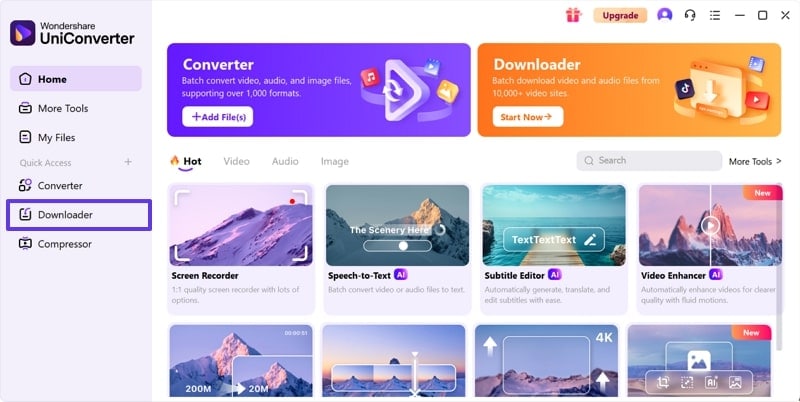
Step 1. Access UniConverter and Pick Downloader Tool
open UniConverter and choose the “Downloader” tool to proceed with the conversion process.
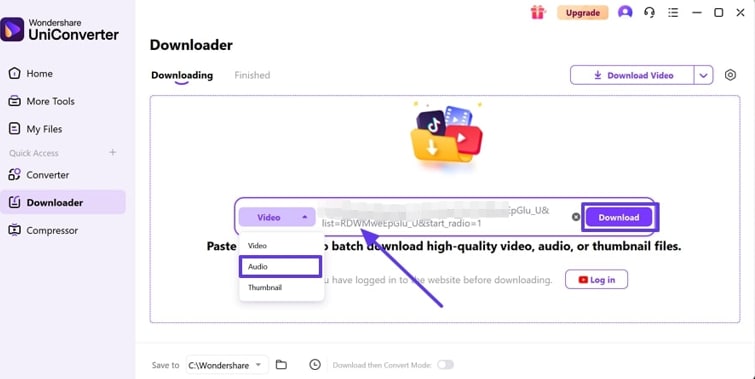
Step 2. Insert Link and Choose Audio Option
Next, click the “Video” button and choose the “Audio” option from the expanded list. Following up, paste the link of your desired video or audio that you want to download as MP3 and hit the “Download” button.
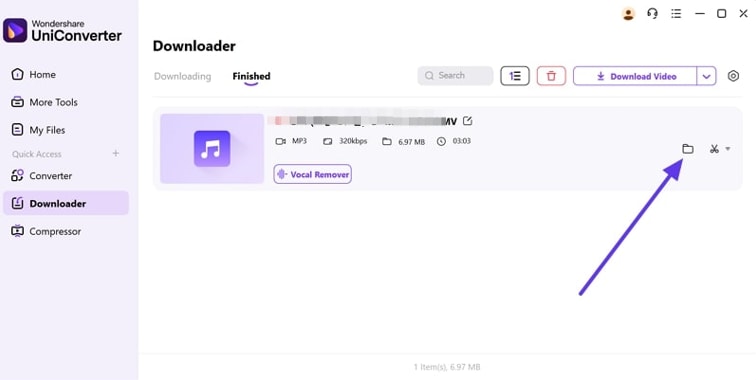
Step 3. Select the File Destination and Export It
Once the conversion is completed, press the “File” icon and choose the location where you want to download the newly generated MP3 file.


Part 4. Other 9 MP3 Downloader by Link You Can Try in 2026
If you don’t want to stick to just one option, there are plenty of other tools that let you download audio with a link quickly and easily. In this section, we’ll look at some of the best alternatives you can try in 2026 for smooth and reliable downloads:
1. AceThinker URL to MP3
To download audio from links, this tool is designed for fast and hassle-free audio downloading from thousands of websites without installation. Users can simply paste a link, select the preferred format, and instantly convert content from various sites. The downloader offers flexible format choices, MP4A and more, and you can do it by following these steps:
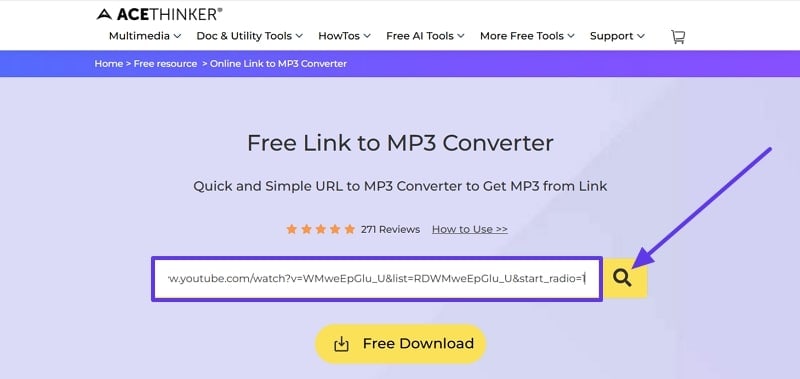
Step 1. Launch the tool from the browser to paste your URL in the “Link” box and hit the “Search” button beside it.
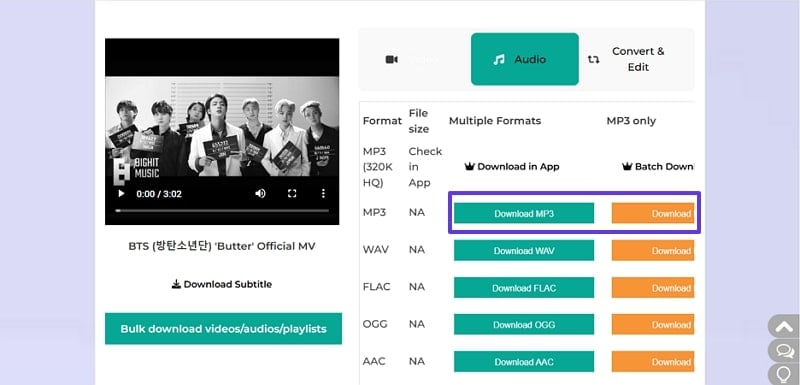
Step 2. When the conversion is done, scroll down and press the “Download MP3” button to save the video in your target format.
2. OKmusi
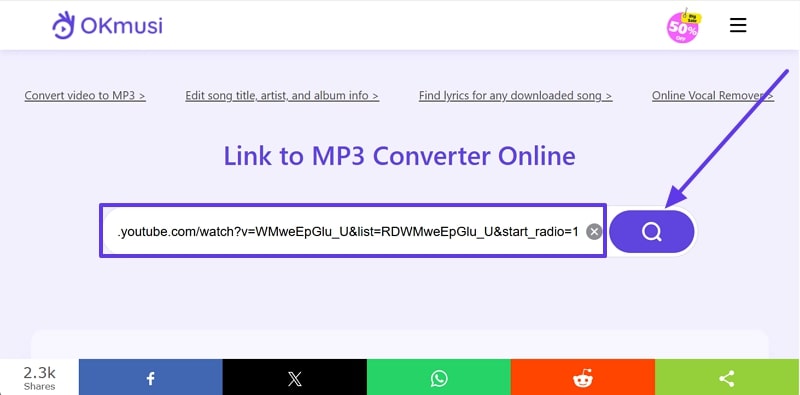
When you want to download an MP3 by URL,this is another browser-based option that you can use to convert any music or video link to high-quality MP3 audio. Its standout feature is broad compatibility: users can paste a link from over 900 platforms, including SoundCloud and more. By following the given guidelines, you can download tracks in 320kbps with OKmusi:
Instructions. Open the tool and grab your link from the desired website to paste it in the “URL” box. Once you paste the link, press the “Search” icon to initiate the conversion process. As the MP3 audio is ready, use the “Download” button to save it to your device.
3. Y2Mate
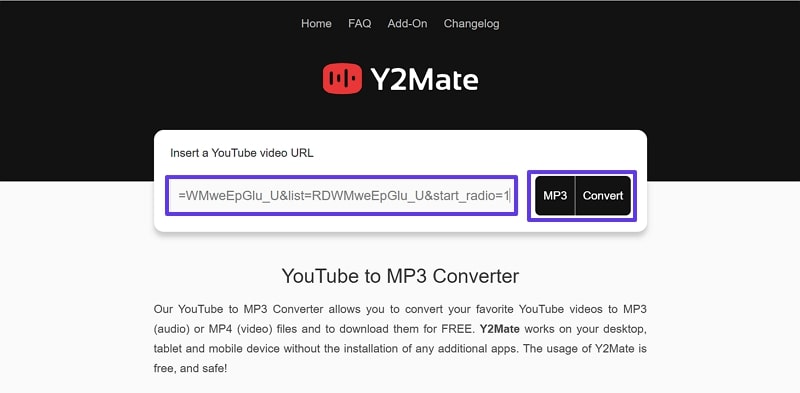
Regarding the link to the audio file conversion, Y2Mate is a popular online tool offering fast, convenient downloading and conversion of videos and audio formats. It supports platforms like YouTube, Dailymotion, and many more to get your desired MP3 format. Users can paste a video URL by following the given steps and choose from a wide range of formats, including MP3:
Step 1. Open the tool in your browser and enter the link in the “Insert a YouTube Video URL” field. Once done, choose the “MP3” option and click the “Convert” button to start the conversion.
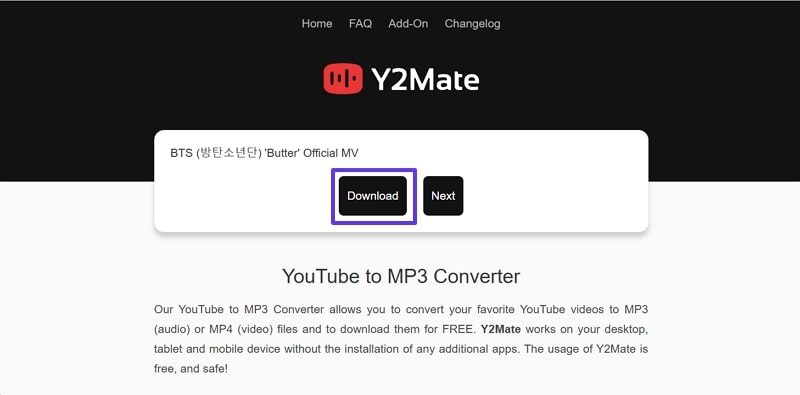
Step 2. When the process is done, choose the “Download” button from the next screen to save the audio on your device.
4. Video to MP3 - Extract audio
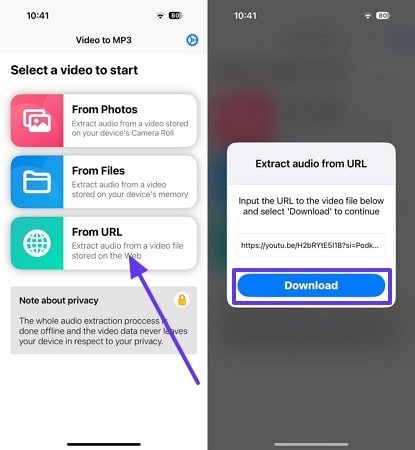
For the URL to the audio file conversion, the Video to MP3 extractor tool offers a fast and straightforward way to grab audio from any video file. This application supports formats like MP4 and more, allowing you to convert any file to MP3. Follow the given steps and simply upload a video, choose your output format (MP3 or WAV), and extract audio instantly:
Instructions. Get the app installed and launched to select the “From URL” choice on the home screen. Grab your link and paste it on the “Extract Audio from URL” pop-up screen and hit the “Download” button.
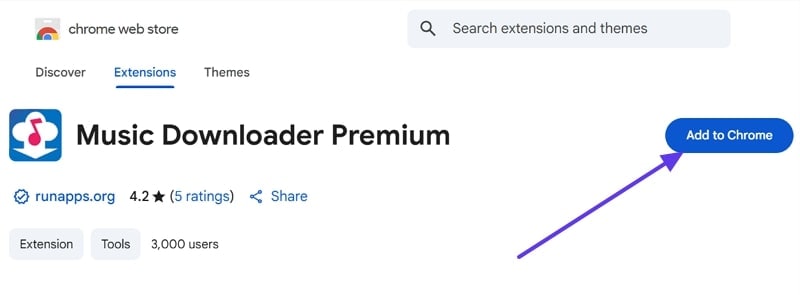
5. Music Downloader Premium
This MP3 downloader from link is a multi-purpose browser extension to let users easily find, download and manage music audio from numerous websites. It supports all kinds of formats, MP3 and OGG, for simple and smooth conversion. The automatic scanning monitors all browsed sites for playable audio and adds tracks, and here is how you can download it:
Step 1. Search and insert the extension by clicking the “Add to Chrome” button for easy access.
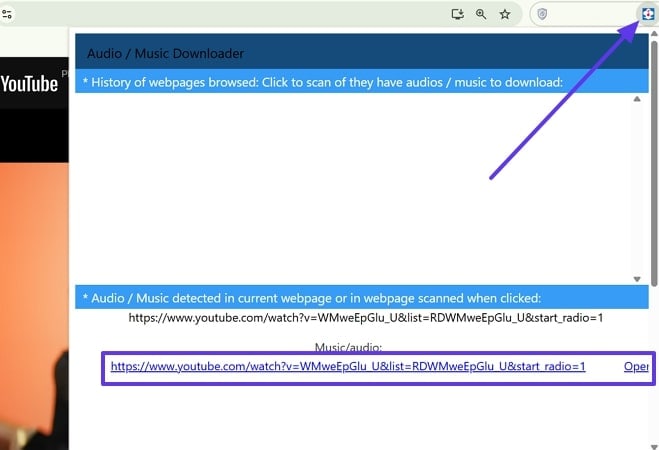
Step 2. Next, open the webpage from which you want to download and open the extension to let it detect.
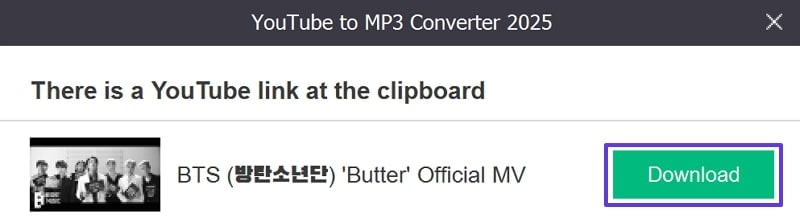
Step 3. After a while, a pop-up will appear and press the “Download” button from there to save the converted MP3.
6. YouTube Music Downloader
This tool helps users convert and download YouTube videos to MP3 for offline listening without installation. Its standout feature is direct playlist downloading, so users can grab entire music lists as MP3 files while preserving original order and metadata. To learn how to do an audio download from the link, follow the given instructions:
Note: Only download YouTube content that you own or have permission to use. Unauthorized downloading may violate copyright laws and YouTube’s Terms of Service.
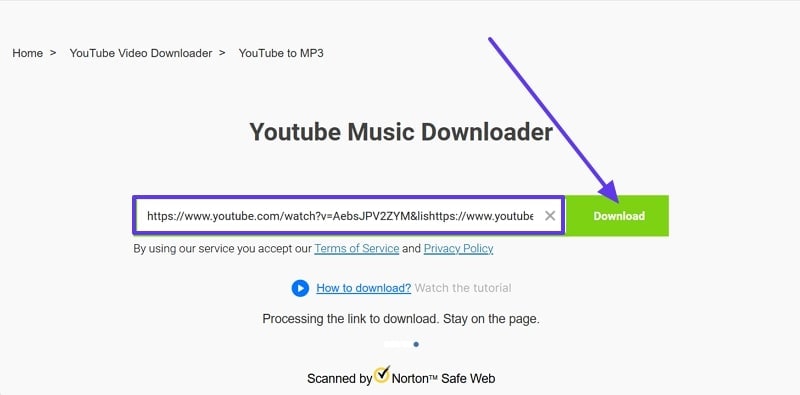
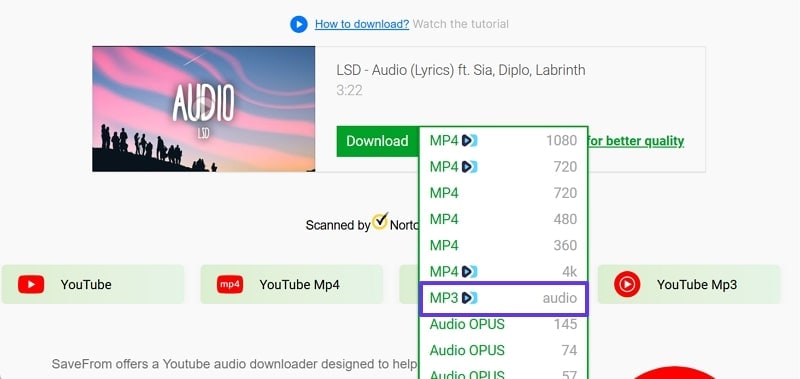
Step 1. Open the tool, paste the link in the required URL box, and hit the “Download” button.
Step 2. Next, expand the format list beside “Download” to pick the “MP3” option and save it on your device.
7. Any MP3 Converter -Extract MP3
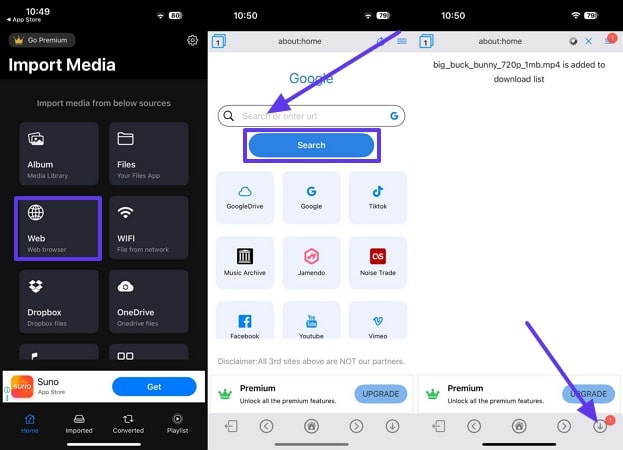
This audio downloader from URL is a standout mobile app designed for rapid and high-quality audio extraction from over 150 video and audio formats. Users can convert both local and online videos to MP3 and other popular formats and share extracted tracks via social media or other apps. By following the given guide, you can even do the batch conversion:
Instructions. Launch the application and select the “Web” option from the main interface. Paste the link in the “Search or Enter URL” link box and hit the “Search” button. The video will go in the “Download” section, and save your newly converted MP3 file.
8. YouTube To MP3 Converter
YouTube To MP3 Converter applications enable users to effortlessly extract premium audio from YouTube videos and store it as MP3 files. This MP3 downloader from link works on Windows, Mac, and mobile devices and features direct video to audio conversion by simply copying and pasting. With the stepwise instructions given below, select the audio quality you prefer, with options often going up to 320kbps for rich sound:
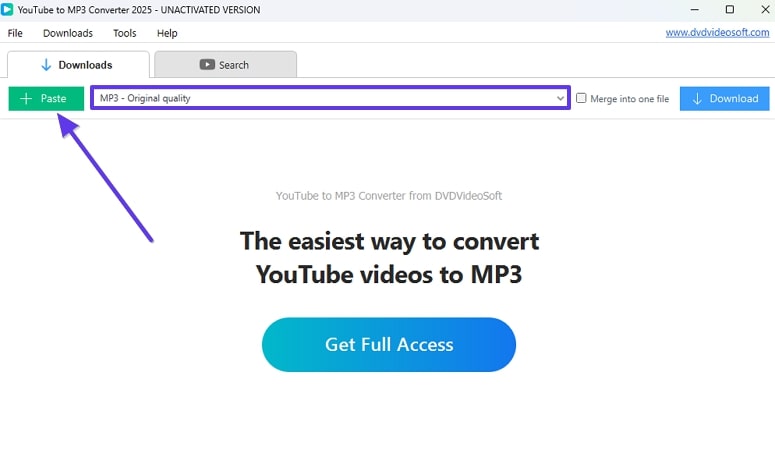
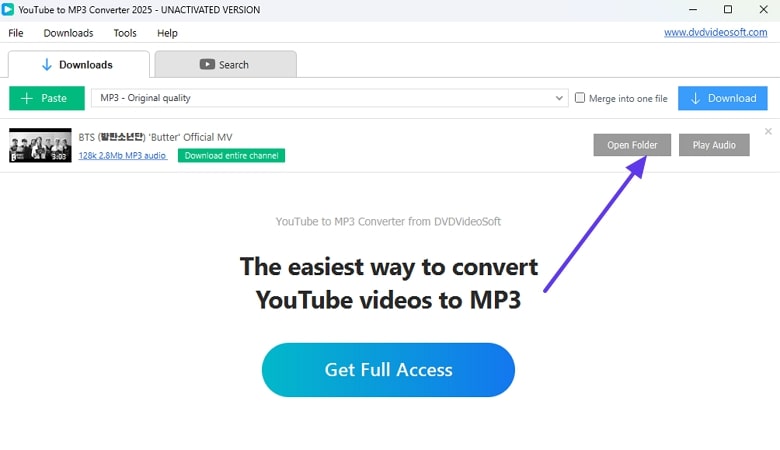
Step 1. Upon opening the downloaded tool, press the “Paste” button to bring the link you have copied from your target site, and choose the “MP3” option beside it.
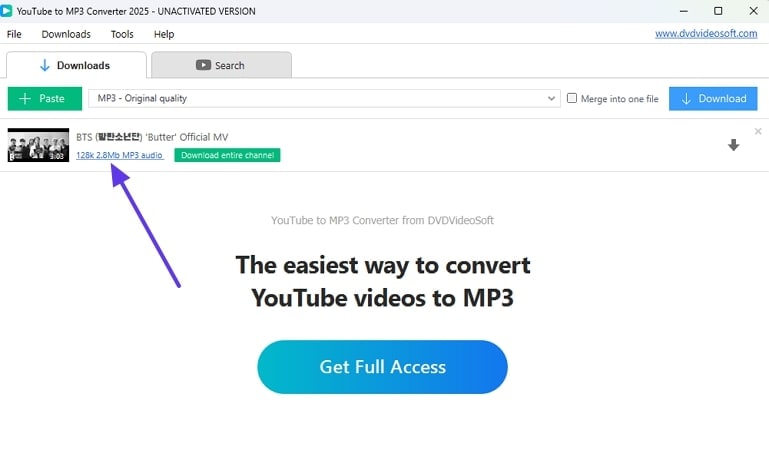
Step 2. Now, press the MP3 audio file created by the tool after the conversion is complete.
Step 3. Afterward, click the “Open Folder” button to choose the location where you want to download the file.
9. VLC Media Player
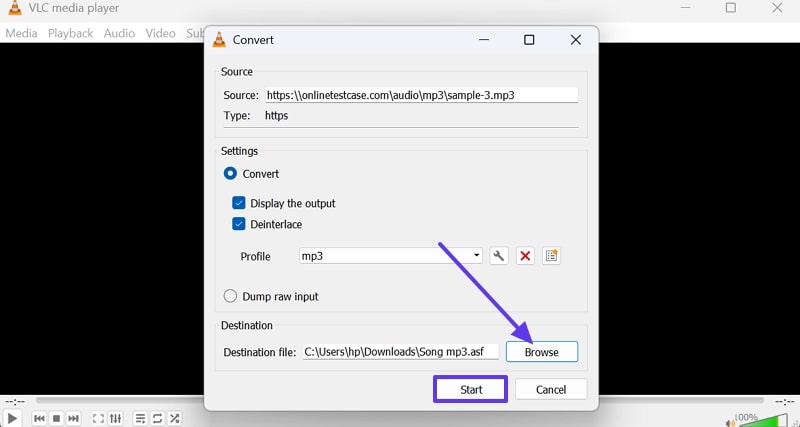
VLC Media Player is a free, open-source application well-known for its compatibility with a wide variety of audio and video formats. Beyond playback, VLC offers built-in tools for video and audio recording, media file conversion, and subtitle management. To download audio with a link, it offers networks, and you can get your MP3 audio by doing these steps:
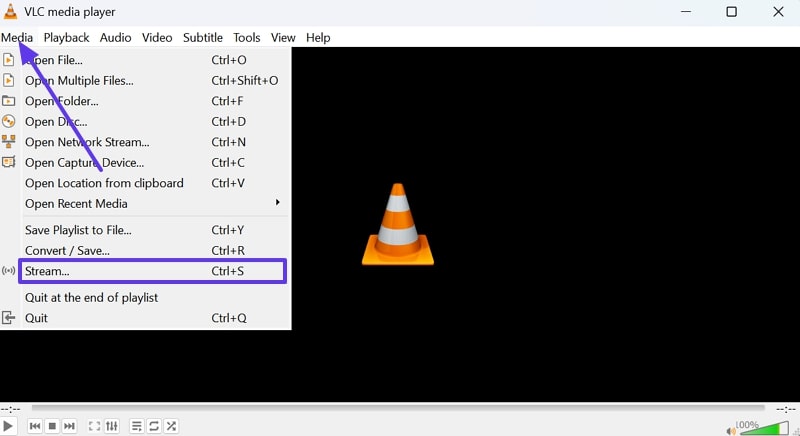
Step 1. Access the tool on your device and press the “Media” tab to choose the “Stream” option from the extended list.
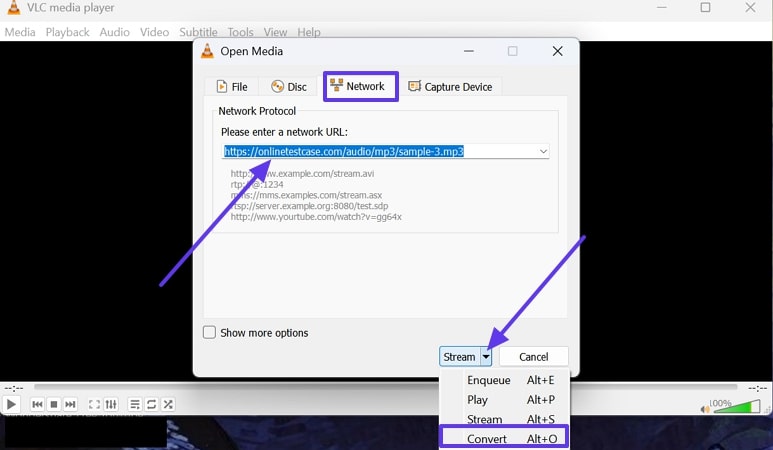
Step 2. Afterwards, press the “Network” tab from the pop-up menu screen and paste the link into the “Please Enter a Network URL” box. Once done, click the “Downward” arrow beside Stream and choose the “Convert” option from there.
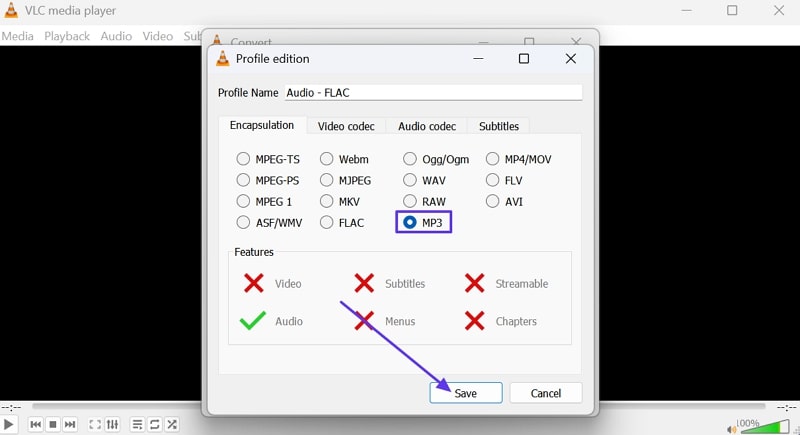
Step 3. From the “Convert” menu screen, click the “MP3” option to choose the format and press the “Save” button.
Step 4. Moving forward, press the “Browse” button to select the location where you want to save the file and hit the “Start” button.
🎵 Complete MP3 Downloader Comparison 2026
Download song from link with confidence. We've tested 10 leading tools to help you choose the best MP3 downloader for your needs.
| Tool Name | Platform | Batch Download | Max Quality | Sites Supported | Download Speed | Price | User Rating |
|---|---|---|---|---|---|---|---|
| 🏆 Wondershare UniConverter | Windows/Mac | ✅ | 320 kbps | 10,000+ |
2.3s
|
Free Trial | |
| Y2Mate | Web Browser | ❌ | 320 kbps | 50+ |
8.7s
|
Free | |
| OKmusi | Web Browser | ⚠️ Limited | 320 kbps | 900+ |
12.4s
|
Free | |
| AceThinker URL to MP3 | Web Browser | ❌ | 256 kbps | 1000+ |
10.1s
|
Free | |
| Video to MP3 - Extract | iOS/Android | ❌ | 256 kbps | 100+ |
15.2s
|
Free (Ads) | |
| Music Downloader Premium | Chrome Extension | ⚠️ Limited | 320 kbps | Auto-detect |
Varies
|
$4.99 | |
| YouTube Music Downloader | Web Browser | ✅ | 256 kbps | YouTube only |
9.8s
|
Free | |
| Any MP3 Converter | iOS/Android | ⚠️ Pro only | 320 kbps | 150+ |
11.5s
|
$9.99 | |
| YouTube to MP3 Converter | Windows/Mac | ✅ | 320 kbps | YouTube only |
7.2s
|
Free/Pro | |
| VLC Media Player | All Platforms | ❌ | 320 kbps | Network URLs |
Manual
|
Free |
Ready to Download Song from Link?
Based on our comprehensive testing, Wondershare UniConverter offers the best overall combination of speed, compatibility, quality, and features. Start with the free trial today.
Conclusion
In conclusion, finding the right MP3 downloader by link tool can make all the difference when it comes to speed and convenience. While there are many options available, Wondershare UniConverter stands out as the best choice thanks to its fast conversion speeds. So, if you want an all-in-one solution for downloading, converting, and managing your audio, UniConverter is the tool worth trying in 2026.

