

MP3 Juice is still widely used for quick, free music downloads in 2026. Its clean layout and simple steps make it easy for first-time users. Yet the experience is often interrupted by heavy ads, sudden pop-ups, and unexpected redirects. These issues can affect safety, slow downloads, and reduce trust. Users also report mixed audio quality and inconsistent performance across devices.
A detailed MP3 Juice review helps readers understand what to expect before clicking anything. This guide explains how MP3 Juice works, what features it offers, and which safety risks matter most. It also covers common problems, reliability issues, and practical tips for safer browsing in 2026.

Best MP3 Juice Alternative for Safe MP3 Downloads
In this article
Part 1. What Is MP3 Juice and How Does It Work?
MP3 Juice is an online search and conversion website designed for audio extraction. The platform allows users to find songs by entering titles or links. It does not usually host original music files on its servers. Instead, it searches publicly available sources and converts video content into audio files. However, users should understand legal and copyright rules before downloading any material.
How MP3 Juice Download Works
The MP3juice download process follows a search and convert workflow model. First, users type a song title or paste a video link. The system scans indexed public video sources for matching results. After selecting a preferred file, the platform begins converting the video into MP3 format.
Once the conversion finishes, a download button appears for saving the file. This method is commonly known as a YouTube to MP3 conversion model. That said, users should confirm content rights before choosing to download music from MP3 Juice.
Key Features of MP3 Juice
Before choosing any online converter, it is important to understand its functional strengths. Below are the commonly highlighted features of MP3 Juice:
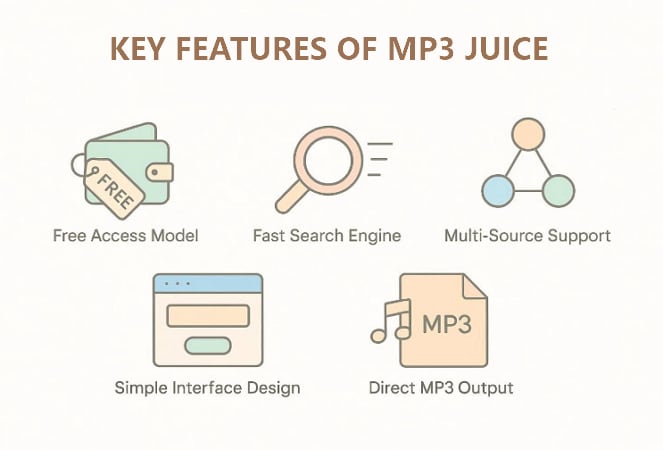
- Free Access Model: Users download songs without signing up or paying any money.
- Fast Search Engine: The site finds matching songs from public sources very quickly.
- Multi-Source Support: It pulls music from different websites to offer more choices.
- Simple Interface Design: The layout is clear, so users can search and download easily.
- Direct MP3 Output: The tool gives MP3 files that work on most phones and computers.
MP3 Juice Ninja and Other Mirror Sites
MP3 Juice Ninja and similar domains are commonly described as mirror websites. These mirrors appear when original domains face restrictions, bans, or removal actions. Operators create alternative addresses to maintain global platform accessibility. However, not every mirror provides the same safety or reliability standards. Some cloned sites contain aggressive advertisements, misleading download buttons, or harmful redirects. Users should carefully verify the website address before starting any download process.
Part 2. Is MP3 Juice Safe and Legal to Use?
Many users ask whether downloading music from MP3 Juice is safe and legal. MP3 Juice works as a search and conversion tool, not a licensed music store. That matters because legality depends on copyright rules, while safety depends on the risks on the site.
Is MP3 Juice Legal to Use?
Free MP3 download sites often operate in a legal grey area. Most commercial songs are copyrighted, and downloading them without permission may break local laws. Moreover, MP3 Juice does not typically provide proof of licensing or download rights for the files.
Is MP3 Juice Safe to Use?
Safety risks mainly come from ads, pop-ups, and redirects these days. Fake buttons can lead to risky pages or unwanted downloads, especially on clone or mirror sites. For safer use, avoid unknown mirrors, verify the URL, and never install extra software from pop-ups.
Streaming License vs. Download Ownership
Before judging legality, review the table below to understand what you actually get with music access:
| Aspects | Streaming License | Download Ownership |
| Legal access type | Licensed streaming access while subscribed | Licensed download file after purchase |
| What you get | Play songs in the platform app | Keep a copy for personal listening |
| Offline listening | Offline mode inside the same app | File saved on your device or library |
| Device compatibility | Limited to that service’s apps | Works across most music players/devices |
| Access after cancellation | Access may stop when the subscription ends | You usually keep purchased downloads |
| File format control | Limited control over formats | Often MP3/FLAC/AAC options (varies) |
| DRM restrictions | Often DRM-protected | May be DRM-free or DRM-limited (varies) |
| Best use case | Discover music and stream daily | Build a music library you keep |
Part 3. How to Use MP3 Juice to Download Music Free
With the basics covered, let’s explore how to use MP3 Juice to download music. To determine how this tool works, follow the steps below:
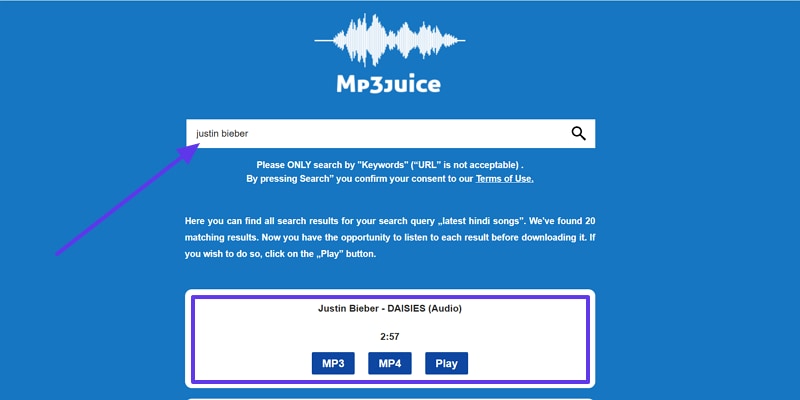
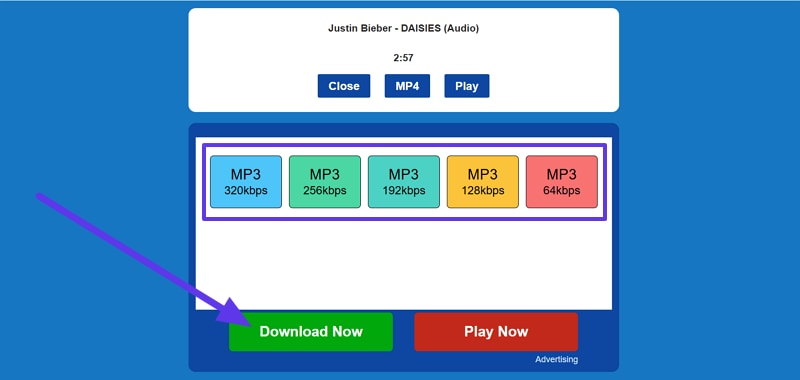
Step 1. To start, navigate to the MP3Juice homepage and enter the artist or song name in the "Search bar". After this, the result card shows the "Track title" and options like "MP3", "MP4", or "Play."
Step 2. In the next panel, choose the “MP3 quality” and press the “Download Now” button to start downloading the music.
Note: Only download audio you own or for which you have permission to use.
Part 4. Pros and Cons of MP3 Juice
MP3Juice can be convenient when you need quick audio downloads. However, it also brings reliability and safety trade-offs for users. If you are considering using MP3 juice for free music download, start by reviewing the following practical upsides first:
Advantages of MP3Juices Free Music Download
- No Account Required: Most pages do not require sign-up, which feels quick and convenient. It also reduces the need to share emails or personal details.
- Free Access: There is usually no upfront cost to try the service. However, free may come with ads or other trade-offs.
- Simple Interface: The layout is often basic, with search and a few action buttons. So, this makes it easier for first-time users to navigate.
Disadvantages of MP3 Juice Free Downloads Music
Even if MP3juice download music looks simple, the downsides mentioned below matter just as much:
- Legal Grey Area: Many free MP3 sites may host or link to copyrighted tracks without permission. That can create copyright risk depending on the content and your region.
- Unstable Domains: Working URLs can often change due to takedowns, blocks, or clones. This causes downtime, broken pages, and inconsistent access for users.
- Heavy Ads: Pop-ups, redirects, and “look-alike” buttons can increase risk and frustration. Some ads may lead to low-trust pages or misleading prompts.
- No Quality Guarantee: File quality can vary, and labels like bitrate are not always reliable. Thus, metadata, trimming, or audio artifacts can also be inconsistent.
Part 5. Best MP3 Juice Alternative for Free Music Download
Suppose you need one clean MP3 for offline study, but pop-ups ruin everything. UniConverter solves that by keeping downloads and conversions inside a desktop app, not risky browser tabs. As the best MP3 Juice alternative, it skips redirect traps and gives stable format control. Furthermore, you pick MP3 settings, process files quickly, and store results neatly for later listening.
Moreover, the software supports URL-based downloads where allowed, plus fast MP3 conversion for audio you already own. You can batch process multiple items, trim clips, and keep output quality consistent. Progress is clear, exports are organized, and files transfer easily to phones. It fits creators and everyday listeners who want reliable offline audio without messy websites.
Disclaimer: Only download or convert audio you own, have permission to use, or that is royalty-free or public domain. Downloading copyrighted music without authorization may be illegal in your country.
Best MP3 Juice Alternative for Safe MP3 Downloads
Key Features
- Batch Video/Audio Saving: Save videos or audios that you are permitted to download in bulk and of high quality.
- Multiple AI Features: Enables a bunch of AI features for video/audio/image processing.
- Metadata Editing: Edit title, artist, and album tags so offline MP3s stay organized, searchable, and correctly displayed everywhere automatically.
- Audio Trimming: Trim unwanted intros, silence, or ads before saving, creating clean clips for study, workouts, or travel.
- Device Transfer: Transfer exported MP3s directly to phones, reducing cable confusion and avoiding extra sync tools or apps.
Guide to Download Music with UniConverter
UniConverter makes offline audio downloads cleaner, faster, and easier to manage. Thus, adhere to the steps below to download music safely with UniConverter:
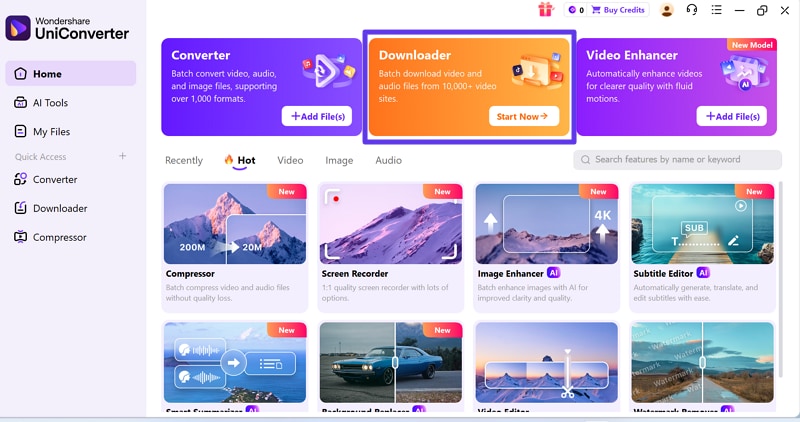
Step1 Launch the Downloader Module to Proceed.
To start, navigate to the “Downloader” option on the home page of UniConverter to continue.
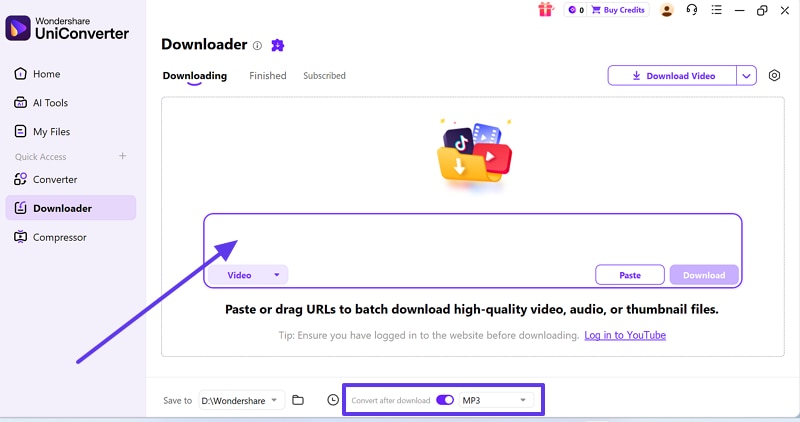
Step2 Input Source Link and Choose the MP3 Format
Now, paste a URL from a legal source in the “Prompt” field, then select the “MP3” option beside “Convert after download” at the bottom.
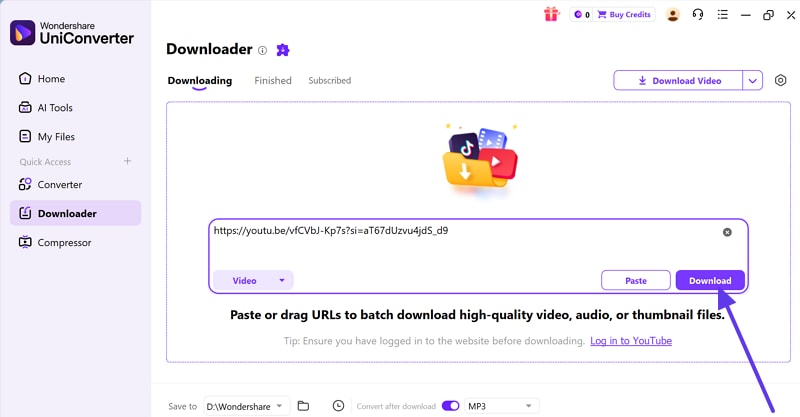
Step3 Start the Downloading Process
Lastly, click the “Download” button and wait until the file saves in the default folder.
Conclusion
To conclude, MP3 Juice can deliver fast conversions, yet safety and legality depend on what you download. This MP3 Juice review covered how the site works, common ads, redirects, and reliability issues seen in 2026. For better security, use licensed or permitted sources and avoid risky mirror domains. If you need clean offline MP3s, UniConverter is a safer choice.

