

Free music downloads are easy to search for, and chances are you’ve come across MP3Paw during that process. Many users typing MP3Paw music download into Google end up visiting mp3paw.com without fully knowing how the platform operates or what risks may exist.
In this guide, you’ll get a practical review of MP3Paw free music downloads based on real usage. We’ll break down its features, discuss safety concerns you should be aware of, and outline more reliable alternatives. Read the article till the end to know all about this audio downloading tool in detail.

Download MP3 Music Safely Without Ads
In this article
- Part 1. What is MP3Paw?
- Part 2. What Happened to the MP3Paw Old Version?
- Part 3. How to Free Download Muisc on MP3Paw
- Part 4. How to Use MP3Paw on Android
- Part 5. MP3Paw Not Working — What to Try
- Part 6. Is MP3Paw Safe? An Honest Look at the Risks
- Part 7. Best MP3Paw Alternatives for Safe MP3 Music Download in 2026
- Part 8. MP3Paw vs. Alternatives: Quick Comparison
- FAQs about MP3Paw Music Download
Part 1. What is MP3Paw?
MP3Paw, also written as “MP3paw” and accessible at www.mp3paw.com, is a free online music search and download website. Many users discover it while searching for MP3Paw music download options online. You can search for songs by entering the track name or artist in the search bar, and download them. The site also allows you to preview available tracks before downloading them.
After selecting a file, you can download it in MP3 format. Some downloads are offered in different bitrates, which is the amount of audio data processed per second. Higher bitrates usually result in better sound quality and larger file sizes. MP3Paw appeared around 2019 and gained popularity quickly. Over time, it began switching domains frequently, which has affected its consistency.
MP3Paw Pros and Cons at a Glance
If you’re evaluating the Paw MP3music downloader, it helps to see its main advantages and drawbacks at a glance. The table below summarizes the key points for quick reference:
| Pros | Cons |
| Free to use without any subscription fees | Frequent pop-up ads and browser redirects |
| No registration or login required at all | Potential exposure to malware or viruses |
| Quick access to songs from search results | Domain availability is often unreliable |
| Download files in multiple quality options | Legal issues with copyrighted content |
| Simple and easy-to-use search interface | Downloaded files may have inconsistent quality |
Audio Quality Reality Check: Does MP3Paw Actually Deliver 320kbps?
MP3Paw often displays a 320kbps download option, which suggests high audio quality. Bitrate, measured in kilobits per second (kbps), refers to the amount of audio data encoded each second. In general, higher bitrate files preserve more sound detail and produce clearer playback. However, bitrate alone does not guarantee true high-quality audio if the original source is already compressed.
Most audio files on MP3Paw com come from YouTube or similar platforms. YouTube streams are usually compressed at 128kbps or 192kbps AAC. When MP3Paw converts these into 320kbps MP3files, it re-encodes already compressed audio. This increases file size but does not improve actual sound quality. Even if the file shows 320kbps, the listening experience typically mirrors the original lower-quality source.
Part 2. What Happened to the MP3Paw Old Version?
If you’re searching for the MP3Paw old version, you’ve likely noticed that the original mp3paw.com domain is no longer consistently accessible. The website that initially gained popularity under that primary domain does not remain reliably active today. Instead of operating from a single stable address, the platform now appears under multiple mirror domains.
Currently, versions of the site can be found on domains such as v3.mp3paw.link, mp3paw.nu, and mp3paw.org.za. These mirror sites often replicate the same interface and functionality as the earlier version. However, domain availability may vary by region and timing. This pattern of shifting between domain names is commonly referred to as “domain hopping.” It is frequently seen among websites that face copyright takedown requests or legal complaints.
Part 3. How to Free Download Muisc on MP3Paw
MP3 Paw does not require you to create an account or log in before searching or downloading. It typically offers quality options ranging from 64kbps to 320kbps, depending on availability. The steps below outline how users typically complete an MP3 Paw song download using the site’s search and download features:
Step 1. Access any of the mirror websites of MP3Paw on your web browser and access the search bar located on the homepage.
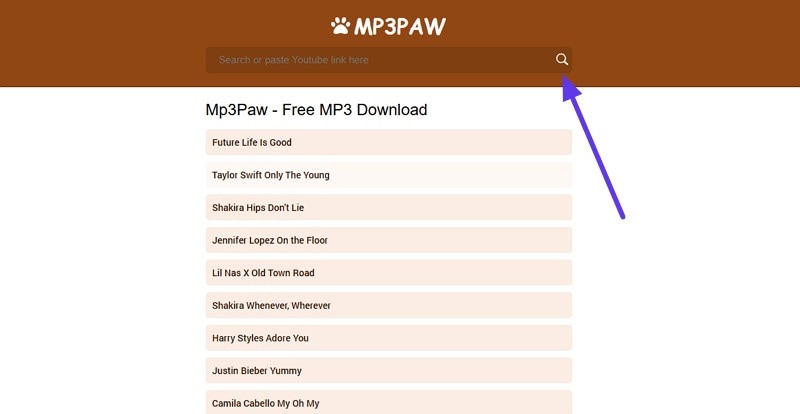
Step 2. Next, paste the link to the YouTube video within the search bar and press the “Search” icon on the right. You can also use the search bar to directly search for music of your choice. The tool will fetch the video for you instantly with different quality options. Now, choose the audio quality and press the “Download” button on the right.
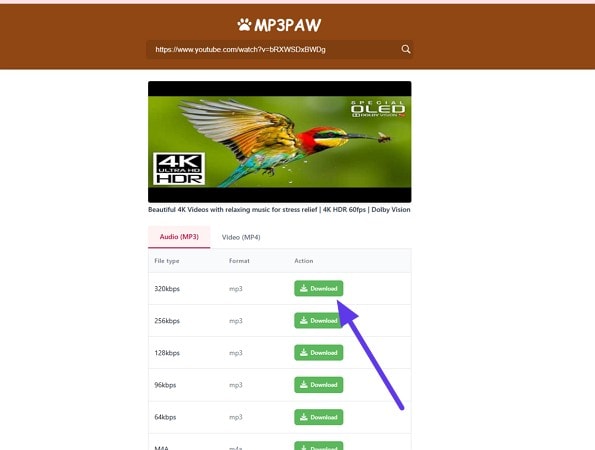
Step 3. In the following window, press the “Download Now” button to save the audio successfully to your device.
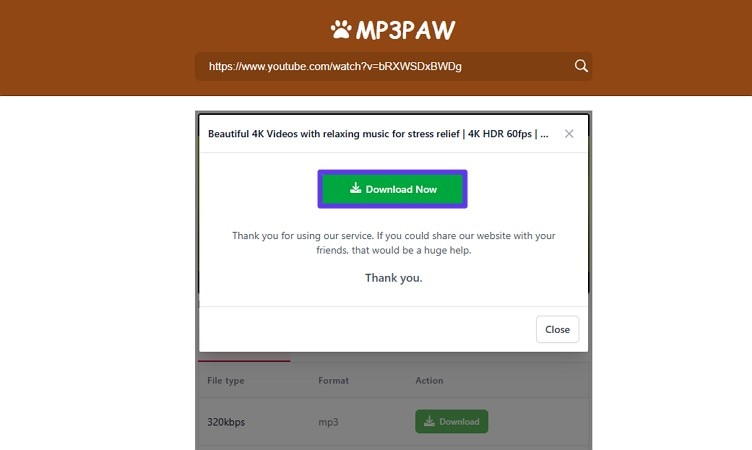
Note: The search results are generally pulled from YouTube and other web sources, which are then converted into downloadable MP3 files.
Part 4. How to Use MP3Paw on Android
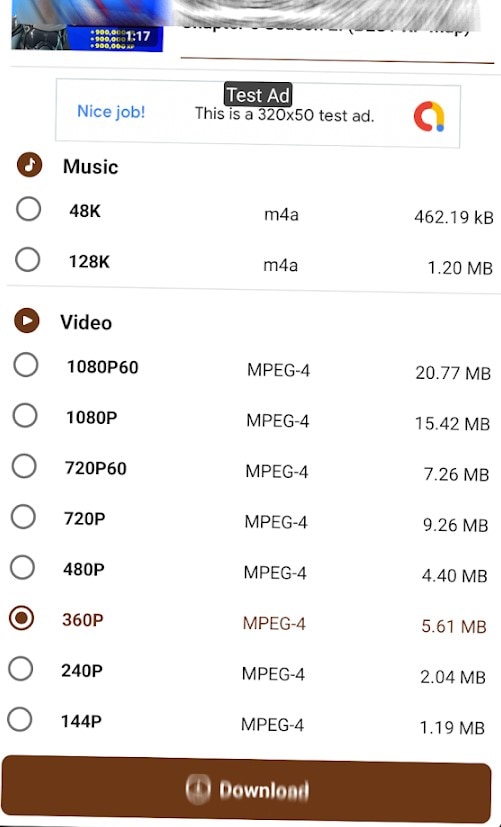
MP3 Paw is available as an Android app, but it is only listed in limited regions on Google Play. If it is accessible in your country, you can install it directly from the Play Store and use it similarly to the web version. After opening the app, enter the song name in the search bar, select a result, choose a bitrate option, and tap download. An account is usually not required.
However, user feedback on the Android app is mixed. Many reviews mention excessive ads, slow performance, and occasional download failures. Some users also report frequent pop-ups that interrupt navigation. Because availability varies by region, performance may also be inconsistent.
Part 5. MP3Paw Not Working — What to Try
If you’re trying to use MP3Paw music download features and the site won’t load or respond properly, you’re not alone. Many users report occasional access errors, blank pages, or failed downloads. Since the platform operates across changing domains, technical issues can happen. Here are a few practical steps you can try before giving up.
- Switch to a Different Mirror URL: If one domain is not loading, try accessing MP3Paw through another mirror site. Because the platform operates on multiple URLs, one version may be active while another is temporarily down.
- Check Your Internet Connection: A slow or unstable connection can prevent the site from loading correctly. Restart your router or switch networks to see if performance improves.
- Disable Browser Extensions: Some ad blockers or script-blocking extensions may interfere with site functionality. Temporarily disable them and refresh the page to test if this resolves the issue.
- Try a Different Browser: Compatibility issues can sometimes cause loading problems. Opening the site in another browser can help determine whether the problem is browser-specific.
Part 6. Is MP3Paw Safe? An Honest Look at the Risks
When asking whether an MP3Paw music download site is safe, the answer depends on how you define risk. The platform functions as a free, ad-supported download site, which introduces certain security, privacy, and legal considerations. Below is a factual breakdown of the main concerns associated with the site:
Malware and Aggressive Ads
MP3Paw relies on advertising to operate, which means you may see pop-up ads, redirects, and script-based promotions while browsing. Some ads have been flagged by security tools as potentially risky. Review platforms like ScamAdviser have given certain MP3Paw domains low trust scores. Although this does not confirm malware, aggressive ad networks can increase exposure to misleading pages or unwanted downloads.
Privacy Concerns
Like many free ad-supported platforms, MP3Paw may collect basic browsing data such as IP addresses, device information, and on-site activity. This data can be used for advertising or analytics purposes. Users are generally advised not to enter personal information or create accounts with sensitive details. One must not download additional software prompts that appear unrelated to the music file itself.
File Authenticity and Quality Risks
Files offered for download on MP3Paw may not always match the original source in quality or accuracy. Some tracks can be mislabeled, shortened, or converted at lower bitrates than advertised. In certain cases, audio files may include added intros or altered metadata.
Is MP3Paw Legal to Use?
If you’re considering using MP3Paw free download features, it’s important to understand the legal context before proceeding. The platform provides access to music files that are typically sourced from streaming services. While the process may seem simple, the legal implications depend on copyright laws and platform policies in your country.
- Copyright Infringement: Downloading copyrighted music without permission from the rights holder is generally considered copyright infringement in many countries. Laws vary by region, but unauthorized distribution or downloading can carry legal consequences.
- Platform Terms of Service Violations: MP3Paw commonly extracts audio from platforms such as YouTube. Downloading or converting content from YouTube without authorization may violate YouTube’s Terms of Service.
- Liability for Redistribution: Sharing downloaded files with others can increase your exposure to legal issues. Redistribution of copyrighted content without proper licensing may be treated more seriously under copyright law.
- Unverified Content Sources: MP3Paw aggregates files from multiple sources, some of which may not be authorized to distribute the music. Using files from these sources can inadvertently involve you in copyright infringement.
- Regional Legal Restrictions: Some countries have stricter laws regarding digital downloads. Even if MP3Paw works in your browser, local regulations may make downloading certain content illegal.
Part 7. Best MP3Paw Alternatives for Safe MP3 Music Download in 2026
If you’re tired of unreliable MP3Paw free download sites and want safer ways to save music offline, there are better options available. Some focus on quality and stability, while others offer legal access or broader library support. Mentioned below are some of the safest options that you can try:
Wondershare UniConverter — A Safer Desktop Option for Music Downloading
Managing music downloads through unstable websites like MP3Paw can become frustrating over time. UniConverter offers a different approach by functioning as a desktop media processing tool installed directly on your computer. It handles video and audio conversion and downloading. Moreover, users can also use this tool to compress the size of their media files without compromising the quality.
Instead of relying on browser-based tools, you can download and convert music files in a controlled environment. Due to the processing happening locally, the output quality stays consistent with your selected settings, and your files remain organized on your system.
Download MP3 Music Safely Without Ads
Highlights of Wondershare UniConverter
- Audio Conversion (MP3/AAC/FLAC): Convert audio files into MP3, AAC, or FLAC with adjustable bitrate options.
- URL-Based Downloading: Paste links from YouTube and other supported platforms to download and convert media directly.
- Batch Processing: Process multiple files at once, useful for playlists or large collections.
- No Ad-Related Risks: After installation, you avoid pop-ups and browser-based advertising interruptions.
How to Download Music with Wondershare UniConverter
Now that you have learned about this incredible tool, let us have a look at how to use it. Follow the steps provided next to learn how to convert the YouTube video into MP3 and download it to your device using UniConverter:
Step 1. Begin By Accessing The Downloader
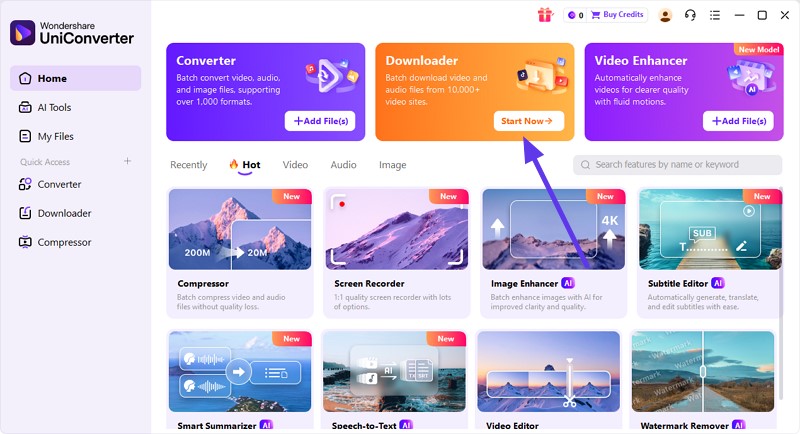
To start, launch UniConverter on your device and locate the "Downloader" tab to click on it from the homepage.
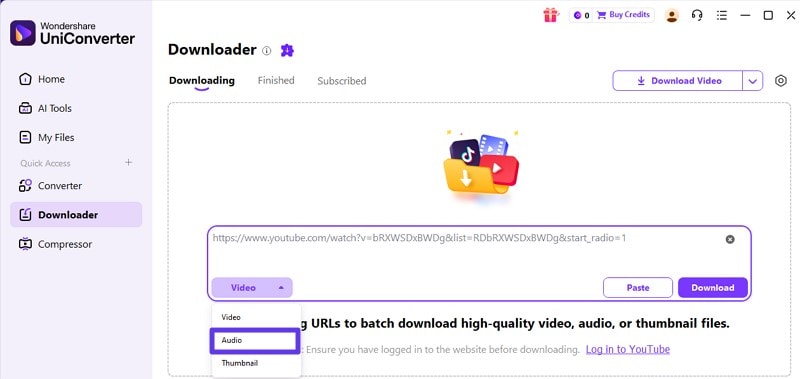
Step 2. Paste The Link
In the following interface, paste the link of the music you wan to save in the designated field. Now, expand the “Video” option and select “Audio” from the drop-down menu.
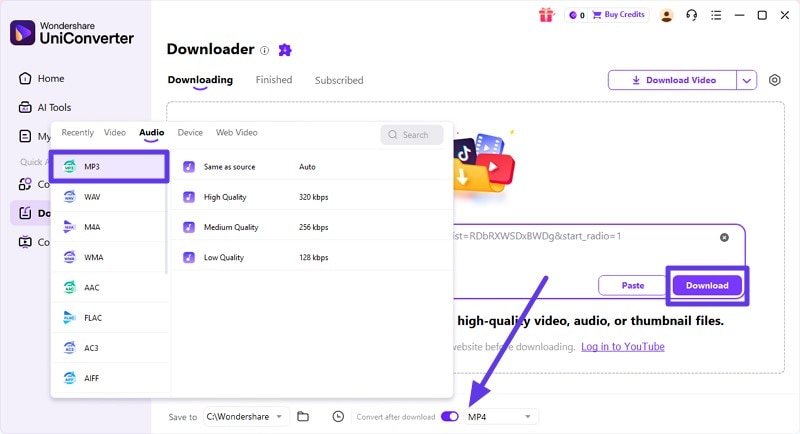
Step 3. Choose Audio Format
From the menu at the bottom, expand the options and choose “MP3” as the format. Now select the destination folder for the downloaded file and press the “Download” button to begin.
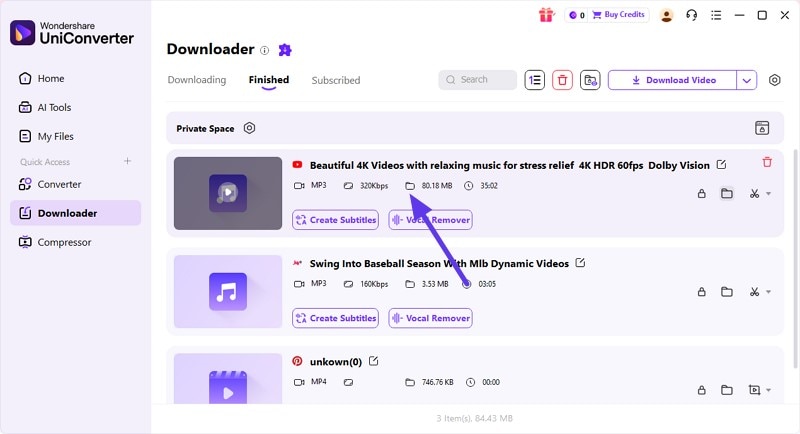
Step 4. Review Downloaded Audio
Once the process is completed, you can review it within the "Finished" section of the interface. Press the folder to access the audio within your system.


Note: This approach keeps audio quality consistent with your selected bitrate settings. It also avoids third-party ad redirects, pop-ups, and other browser-based security risks. This provides a safer and more controlled environment for managing your music downloads.
Free Online Alternatives to MP3Paw
If MP3Paw isn't loading properly or you're concerned about its reliability, exploring other browser-based tools makes sense. Here are some of the online options that will help you get the task done:
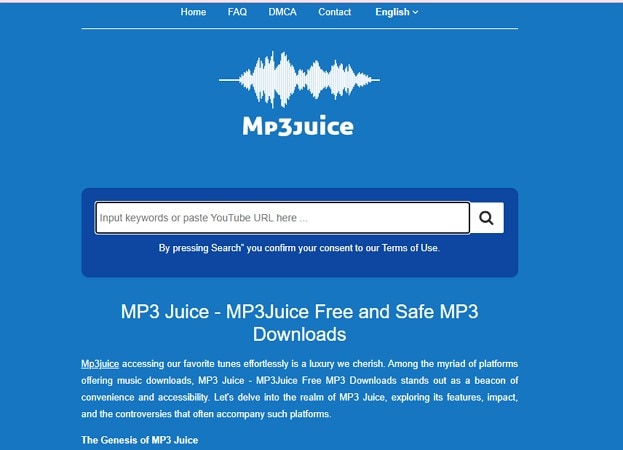
1. MP3Juice
It is a free browser‑based platform that lets you search for and download MP3 music files by song name or artist, without registration. Users can stream or download tracks quickly, but like other free download sites, it may show aggressive ads and redirects. Moreover, the audio quality and legal status can vary depending on the source.
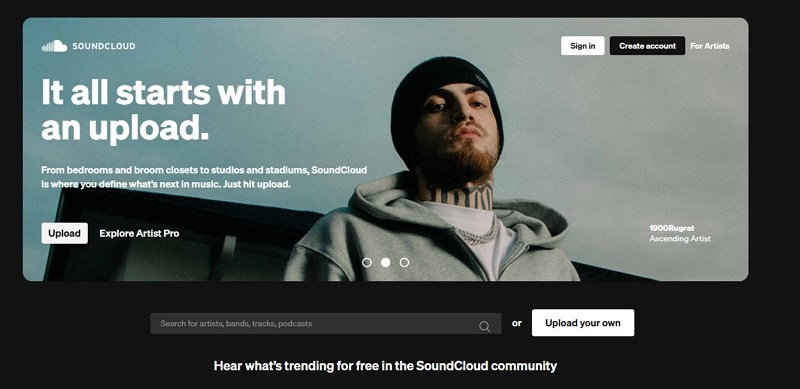
2. SoundCloud
SoundCloud is a well‑known platform for discovering and listening to music online for free. You can stream millions of tracks uploaded by creators without paying. However, not all songs are available for download, and quality may depend on how artists upload their files. While free to use, downloading directly often requires the artist’s permission or a paid plan.
Part 8. MP3Paw vs. Alternatives: Quick Comparison
If you’re comparing the MP3Paw music downloader with other available options, it helps to evaluate them side by side. The table below highlights key differences for you to choose the right option:
| Tool | MP3Paw | UniConverter | MP3Juices | SoundCloud |
| Free/Paid | Free | Free Access with Paid Features | Free | Free with Paid Tiers |
| Audio Quality | Variable | Stable with selectable bitrate | Variable | Stable streaming |
| Safety Level | Low | High | Low | Moderate |
| Ads | Yes | No | Yes | Limited |
| Batch Download | No | Yes | No | No |
| Supported Sources | YouTube and a few other | YouTube and a vast number of other platforms | YouTube and a few other | SoundCloud only |
| Music Search Supported | Supported | Not Supported | Supported | Supported |
Conclusion
All in all, this article provided a detailed review of MP3Paw free music downloader, covering how it works, what happened to its original domain, and the real concerns users should consider. While MP3Paw offers fast access to free music downloads, it comes with trade-offs, including aggressive ads or inconsistent audio quality.
For occasional, low-risk use, accessing a working mirror URL with a reliable ad-blocker may be enough. However, if you regularly download music and want stable performance with consistent output quality, use Wondershare UniConverter. It delivers a more controlled and predictable experience for its users.

