
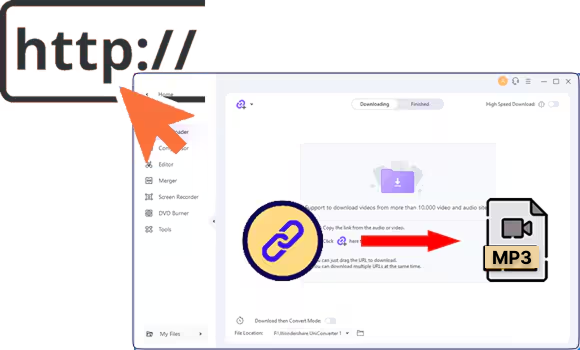

Downloading entire SoundCloud playlists as MP3 or ZIP files is a powerful way for users to enjoy music offline and back up their collections. SoundCloud doesn't allow native downloads, so users turn to other tools. So, in this article, we will cover all legitimate ways to download SoundCloud playlists, including online tools and extensions.

SoundCloud Playlist Downloader
In this article
- Why do people download SoundCloud playlists for offline listening?
-
H2. Best Tools to Download SoundCloud Playlists (Step-by-Step + Comparison)
- H2. Format and Quality Tips for SoundCloud Album Download
- H2. Legal & Ethical Considerations
- FAQs about Downloading Playlist from Soundcloud
Why do people download SoundCloud playlists for offline listening?
A SoundCloud playlist is a personalized collection of tracks created by artists, organized by theme and genre. Most people love to download SoundCloud playlists as MP3, so let's dive into what the reasons are behind this hype:
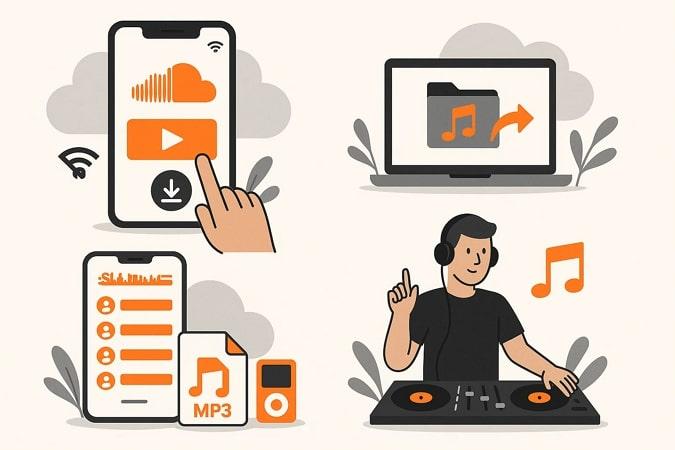
- Offline Access: Downloading playlists enables uninterrupted listening, especially when traveling or experiencing poor internet connectivity.
- Backup: Saving your playlists keeps your favorite songs even if they become unavailable after a specific time period.
- Portability: Downloaded playlists (MP3/ZIP) can be played on any device or media player, not just within SoundCloud.
- Digital Preparations: DJs and performers can easily extract and organize tracks for mixing and live sets.
Best Tools to Download SoundCloud Playlists (Step-by-Step + Comparison)
To know how to download a SoundCloud playlist for free, there are 3 efficient ways, including online websites, browser extensions, and softwares, so let's explore:
Quick Guide: Best SoundCloud Playlist Download Method by Music Workflow
Option 1 – What’s the best desktop software for downloading SoundCloud playlists?
Best For: Reliable, ad-free experience and managing large libraries.
Unlike online tools, professional software provides more advanced features to download SoundCloud playlist MP3. For your ease, we have listed down the most efficient desktop tools that you can consider using:
1. Wondershare UniConverter
Suppose a DJ is planning a set for a Saturday night club and wants to curate a playlist of trending SoundCloud tracks. However, the issue is that SoundCloud doesn't provide its native downloader so in this situation, we recommend using UniConverter. This tool lets you download unlimited audio tracks by inserting several URLs.
Besides audio downloads, it also lets you download videos and thumbnails from various streaming services. Furthermore, it enables you to set a later time to download your audios and videos automatically. While downloading your audios, you can also convert them to other available formats, making this one solution for managing your downloads.
(Disclaimer: Our tool is intended for personal use only. Users are solely responsible for using this tool to save videos or audios, including compliance with platform's terms of service and copyright laws and regulations. We are not liable for any consequences resulting from users' violation of any laws or infringement of others' rights.)
SoundCloud Playlist Downloader
Advantages of UniConverter
- Batch Downloads: It provides you with a batch downloader to let you download all the audios or videos simultaneously.
- Multi-format Conversion: This tool provides wide support for different file formats, including MP3, WAV, and MP4.
- Metadata Retention: Uniconverter is capable of recovering complete metadata, including the singer's name, audio title, and audio.
Detailed Stepwise Guide To Use UniConverter For Downloading SoundCloud Playlists
Now, if you are eager to download a SoundCloud playlist to MP3, then read the following detailed guide:
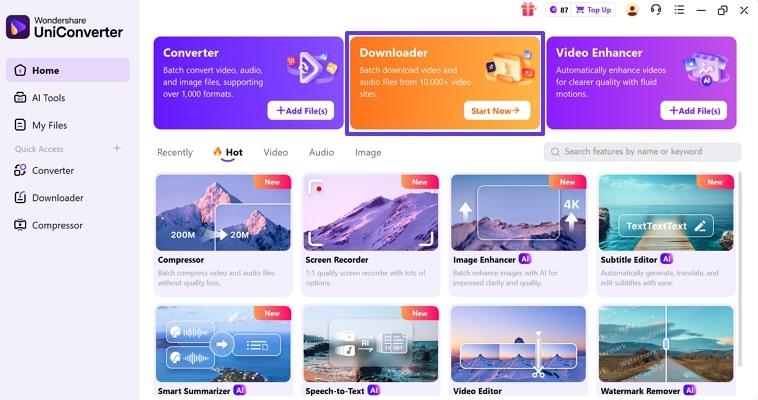
Step 1. Access the Downloader Tool
Upon entering the tool, tap on the “Downloader” icon available on the main interface.
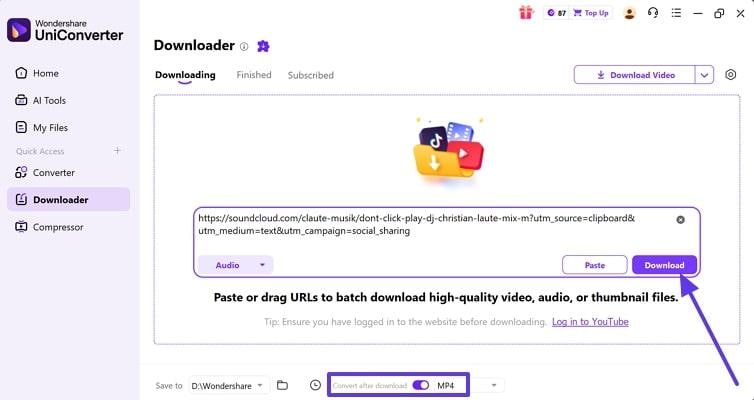
Step 2. Insert the Audio URL and Choose Format
Here, add the copied URL, choose the desired target format, and hit the "Download" button.
Step 3. Locate the Downloaded File
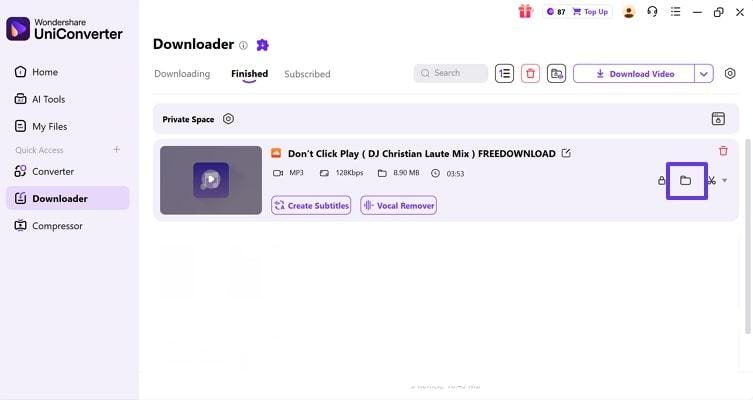
Finally, the audio file is downloaded in MP3 format and located by clicking the “File” icon.
2. 4K Video Downloader
Users can download both individual SoundCloud tracks and whole playlists directly to their device. It lets you convert SoundCloud music to MP3, M4A, or OGG formats. This downloader allows access to bulk downloading by pasting multiple links at once. One can save audio up to 28 kbps and 320 kbps within the MP3 format.
Comprehensive Guide To Use 4K Video Downloader for SoundCloud Album Download
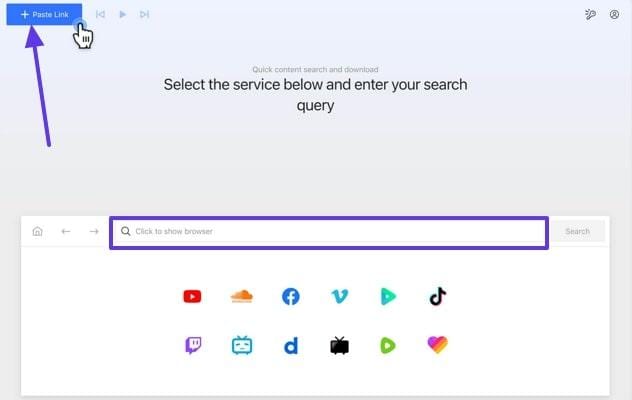
Step 1. Click on the “Paste Link” button to paste the SoundCloud URL within the browser tab and click the “Search” button.
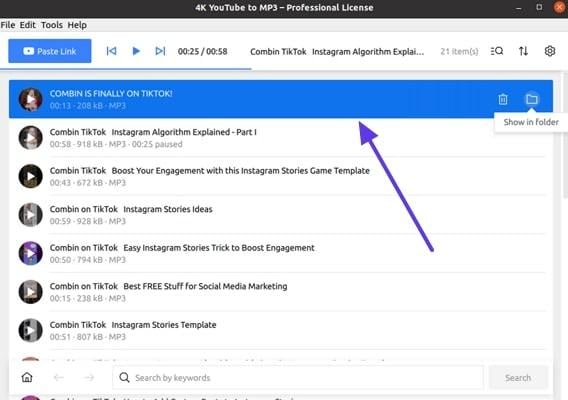
Step 2. After a while, it will show you the whole playlist automatically downloaded to the device.
3. DRmareSoundCloud Converter
To download a SoundCloud MP3 playlist, this tool lets you simply download playlists by searching on SoundCloud. It processes entire playlists or albums in one go, saving extra time for heavy users. This tool allows for preserving original quality for professional results.
Stepwise Guide To Use DrmareSoundCloud Converter Tool
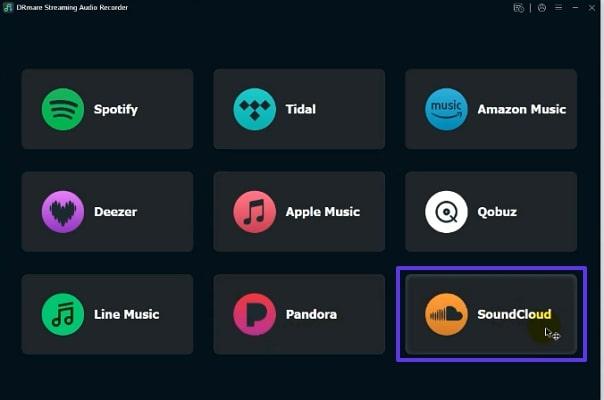
Step 1. Access the tool and choose the SoundCloud platform to access its playlists.
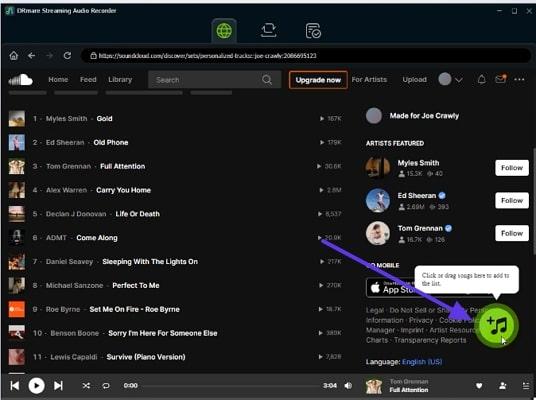
Step 2. After opening the desired playlists, click on the “Music” icon to download them.
Option 2 – Which websites can download SoundCloud playlists online?
Best For: Users who need quick and hassle-free access
Online downloader websites are free, browser-based tools that let users convert and save entire playlists by simply pasting their links. We’ll go through some of the most prominent online SoundCloud MP3 playlist downloaders in the following section:
1. KlickAud
Without any registration or paying a penny, users can opt for this tool instantly. This web-based tool is capable of working from any device, including Windows, Mac, Android, or iOS. Users simply copy their playlist URL from SoundCloud and download it in seconds. Furthermore, it lets you download both individual and bulk videos, making it easier for users.
Detailed Guide on How to Use the KlickAud Online Tool to Download Soundcloud Album:
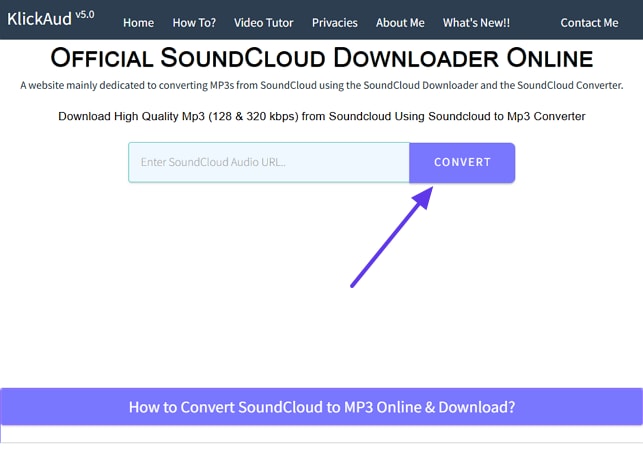
Step 1. After copying the SoundCloud URL, access the downloader and paste its URL within the bar and hit the “Convert” button.
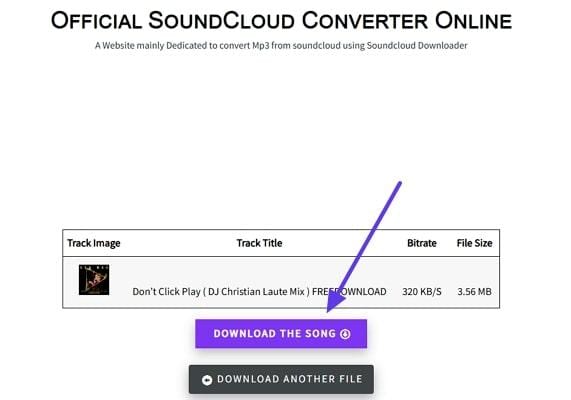
Step 2. After a while, it will show your SoundCloud MP3, which you can download by clicking the "Download the Song" button.
2. SCloudDownloader
With this web-based downloader, users can download a SoundCloud playlist as a ZIP, which is available to the owner. SCloudDownloader allows users to save both single tracks and playlists in MP3 format for offline listening. This tool provides a streamlined procedure by simply pasting the URL, and it will download in MP3 format.
Use SCloudDownloader to Save SoundCloud Playlist Online
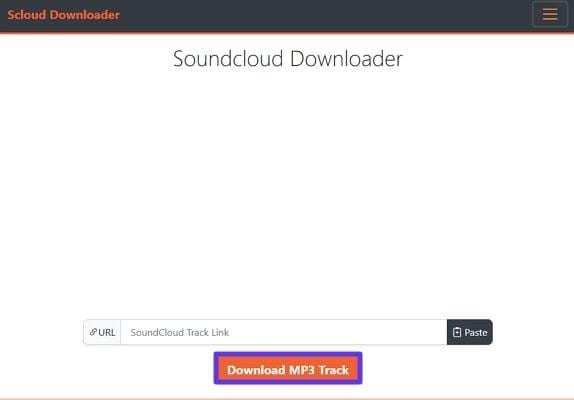
Step 1. Launch the tool, paste the copied URL within the URL tab, and hit the "Download MP3 Track" button to start the downloading process.
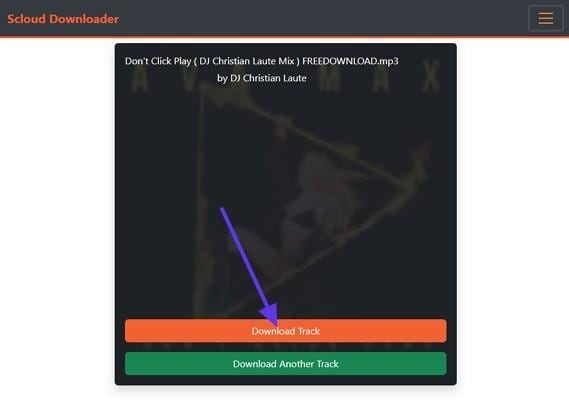
Step 2. Once your audio has been fetched in MP3 format, click on the “Download Track” button to get it saved to the device folder.
3. SoundCloudMP3 Downloader
This SoundCloud MP3 playlist downloader lets you download both individual SoundCloud songs and bulk downloads. Users can download their audios in high quality, typically up to 320kbps for premium sound. Like other competitors, it provides a streamlined process by adding the copied link and downloading it instantly.
How To Download Playlist from SoundCloud with Online SoundCloudMP3 Downloader:
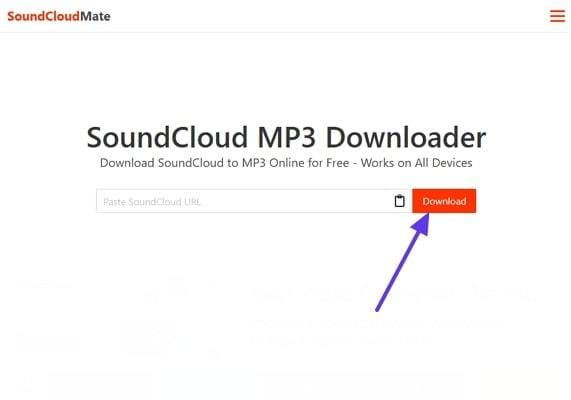
Step 1. Enter the web-based tool and paste the desired song URL within the “Paste SoundCloud URL” tab and click the “Download” button.
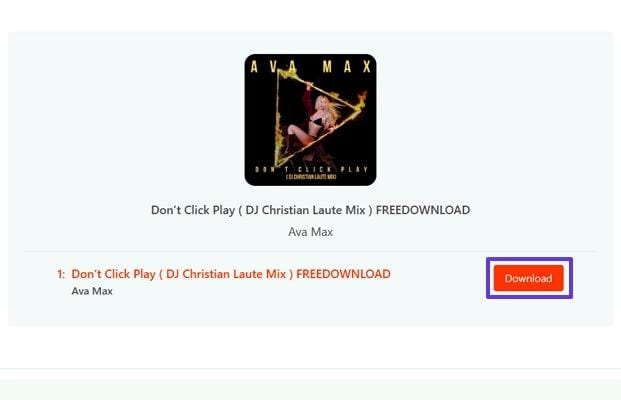
Step 2. As the SoundCloud content has been fetched, click on the “Download” button to save it to the device.
Option 3 – Can browser extensions download SoundCloud playlists more easily?
Best For: Users who want maximum convenience and direct integration
By using Browser extensions for SoundCloud, you can directly download your songs without leaving SoundCloud. Let us have a look at the following reliable playlist downloader SoundCloud extensions:
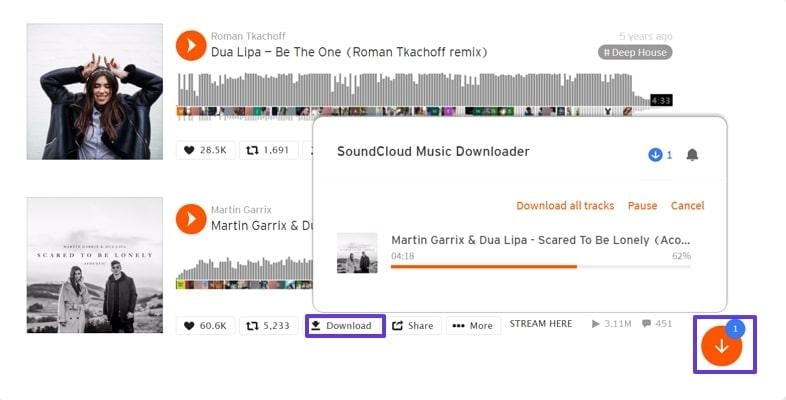
1. Addoncrop SoundCloud Downloader (Chrome/Edge)
This extension lets you download the SoundCloud audio directly by tapping its “Download” button beneath each audio track. It is capable of delivering the MP3 file up to 320 kbps for superior sound quality. Moreover, this extension automatically extracts the metadata, including artist name, album, and song title, along with the video.
Detailed Guide To Use the AddonCrop SoundCloud Downloader Extension
Instructions. Download the extension from the webstore and enable it. Following this, open the SoundCloud interface and hit the “Download” icon beneath the audio track to download it.
2. SoundCloud Downloader Free (Firefox)
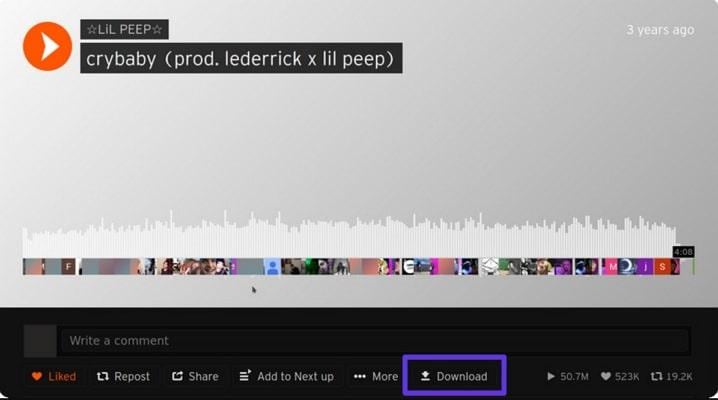
This SoundCloud playlist downloader ZIP downloads the files directly with SoundCloud's own API, so you don't have to access unsafe sites. This extension adds a "Download" button beneath every audio track to let you download it instantly. With this tool, downloads are possible from both public and private tracks for which the user has access rights.
Guide To Use SoundCloud Playlist Downloader Extension fro Firefox
Instructions. After enabling this extension, click on the "Download" button under the targeted SoundCloud track to download it to the device.
3. SoundCloud MP3 Downloader (Opera)
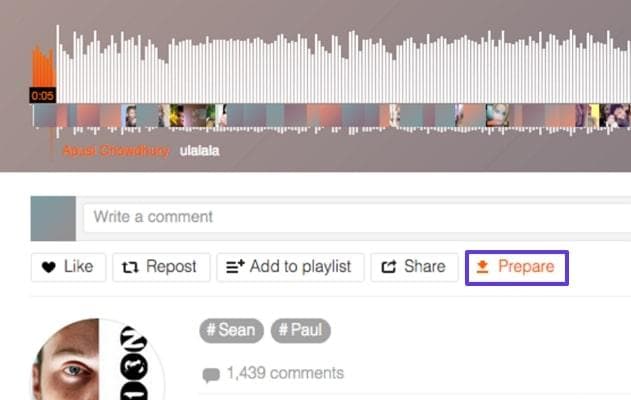
It adds a "Prepare" button under the SoundCloud audio, making it easy for users to download it. This playlist downloader for SoundCloud, can download both single and bulk audio, making it an ideal choice. It is fully integrated in Opera and does not require additional software installations or external sites. The overall workflow of this tool is quite smooth and easy to use for every user.
Detailed Guide To Use SoundCloud MP3 Downloader
Instructions. Upon adding the extension to your Opera browser, click on the “Prepare” button shown beneath the songs. Following this, click on the "Download" button available in the pop-up menu.
Option 4 – How can you save SoundCloud playlists offline on mobile?
Besides using PCs, if you want to download your favorite SoundCloud tracks with the SoundCloud playlist downloader app, then go through the following section:
1. Sounloader For SoundCloud (iPhone)
This specific tool lets you download SoundCloud audio tracks directly without leaving the site. Users can simply search for the required audio track and hit the download button against it. You can also browse videos by specifying a genre within the search bar.
Instructions: Access the app, choose the desired soundtrack either by scrolling through it or searching in search bar. Afterwards, hit the “Download” button beside the audios to let them be saved in the desired folder.
2. SoundLoader: MP3 Downloader (Android)
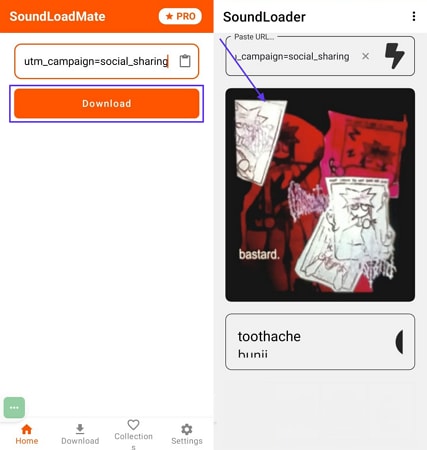
To download soundtracks instantly, add the desired audio URL within this SounCloud playlist download tool, and it will download it for you. The downloaded tracks can be easily played offline, letting you enjoy music anywhere, even in airplane mode. It offers a straightforward design that allows all users to manage downloads with just a few taps.
Instructions: Initiate by copying the desired soundtrack link from the SoundCloud platform. Afterwards, insert the desired link, and click on the “Download” button to get the soundtrack saved to your device.

Download SoundCloud Playlist MP3 Tools Comparison Table
| Feature/Tool | UniConverter | 4K Video Downloader | DRmareSoundCloud Converter | KlickAud | SCloudDownloader | SoundCloudMP3 Downloader | Addoncrop (Chrome/Edge) | SoundCloud Downloader Free | SoundCloud MP3 Downloader | SoundLoader For SoundCloud (iPhone) | SoundLoader: MP3 Downloader (Android) |
| Platform | Desktop | Desktop | Desktop | Web | Web | Web | Extension | Extension | Extension | iOS | Android |
| Batch Playlist Support | Yes | Yes | Yes | Yes | No | Yes | No | No | No | No | No |
| Max Audio Quality | 320 | 320 | 320 | 320 | 128-320 | 320 | 320 | Original | 320 | 320 | 320 |
| Output Formats | MP3, WAV, other 1000+ formats | MP3, M4A | MP3, FLAC, WAV | MP3 | MP3 | MP3 | MP3 | MP3, more | MP3, M4A | MP3 | MP3 |
| Metadata | Full | Full | Full | Partial | Minimal | Some | Full | Full | Full | Basic | Basic |
| Safety | High | High | High | High | High | High | High | High | High | Medium | Medium |
| Price | Freemium | Free/Paid | Free | Free | Free | Free | Free | Free | Free | Free | Free |
SoundCloud Playlist Downloader
Format and Quality Tips for SoundCloud Album Download
MP3 at 320 kbps is ideal for most users because it offers an excellent balance between sound quality and file size. At the highest, MP3 studies find that casual users struggle to distinguish it from original files. In most cases, DJs also use the 320 kbps MP3s for gigs and streaming, as it provides wider compatibility. So lets explore following section to know basic formats:
- MP3 320 kbps: This format provides a nearly CD-like quality which is around 10% size of WAV. It’s universally playable, quick to download, and easy to share.
- WAV: It is original studo format which is not compressed and store maximum audio details. WAV format is normally 5x to 10x larger than MP3 format.
- FLAC: It is an offline compressed file which provides WAV similar quality but with smaller file size. It is mostly used for archiving, and licensing in high set-ups.
As you are aware that MP3 format is ideal, so we recommend using Wondershare UniConverter. This tool ensures to download SoundCloud playlist to MP3 and set desired bitrate at 320kbps. Furthermore it preserves overall metadata including artist’s name and album art.
Legal & Ethical Considerations
Beyond the technical performance of SoundCloud playlist downloader software, understanding the legal and ethical boundaries is crucial:
- Legality & Copyright: Always download tracks that are legitimately made available by the creator for that purpose.
- SoundCloud’s Options: SoundCloud offers Go and Go+ subscriptions, giving users the ability to save tracks offline.
- Licensed Use: Download tracks only for your own offline usage or use when you have permission from the author.
Conclusion
Summing up, in this article, we have provided the 9 most efficient tools to download SoundCloud playlist with ease. However, we recommend using UniConverter, which lets you batch download and convert your SoundCloud audios to MP3 in just one click. Furthermore, it provides 320kbps quality and full metadata retention making it ideal for casual users.

