

Do you have a favorite audio clip on Soundgasm.net and wish you could save it for offline listening? This article on Soundgasm download reveals how to use a reliable Soundgasm downloader to safely download Soundgasm audio without compromising quality or security.
You’ll learn the best methods to download Soundgasm audio, convert them to MP3 for versatile playback, and avoid common pitfalls such as fake download buttons and privacy risks.

Best Soundgasm Downloader
In this article
- Part 1. What is Soundgasm?
- Part 2. What should you know before downloading audio from Soundgasm?
- Part 3. Is Soundgasm Safe to Download From?
- Part 4. How to Download Soundgasm Audio: Three Methods
- Part 5. How can you convert Soundgasm audio to MP3 without losing quality?
- Part 6. Common Problems & Solutions for Soundgasm MP3 Download
- Part 7. What are the legal and privacy risks of downloading from Soundgasm?
- FAQs about Soundgasm Download
Part 1. What is Soundgasm?
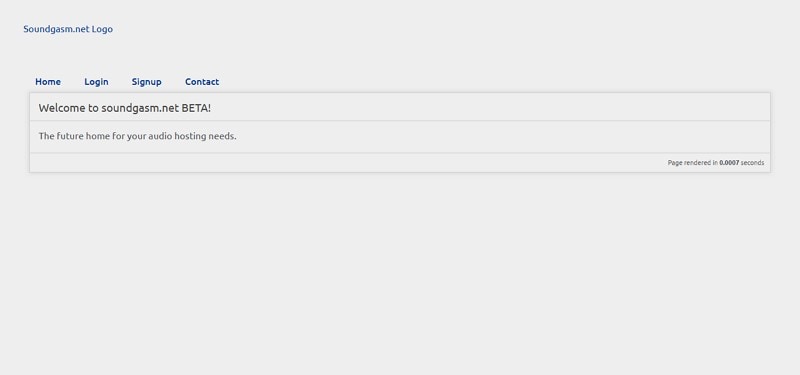
For people wondering what Soundgasm actually is, it is a minimalist, browser-based platform designed for uploading and streaming voice-based audio content. It prioritizes simplicity and speed, allowing users to upload audio files quickly. The Soundgasm audio clip is hosted on a dedicated page with an easy-to-use player and shareable links. The platform thrives on community-led discovery through social groups rather than centralized algorithms.
Why Users Might Want to Download Audio from Soundgasm
- Offline Listening: Downloading allows access to favorite audio clips anytime without an internet connection.
- Device Compatibility: Saved audio files can be played on any media player or device, including smartphones.
- Archival and Backup: Downloading provides a personal backup of rare or favorite audio content.
- Customization: Downloaded audio allows users to create personalized playlists freely.
Part 2. What should you know before downloading audio from Soundgasm?
When considering downloading audio from Soundgasm, it’s important to keep a few key points in mind to ensure a smooth experience:
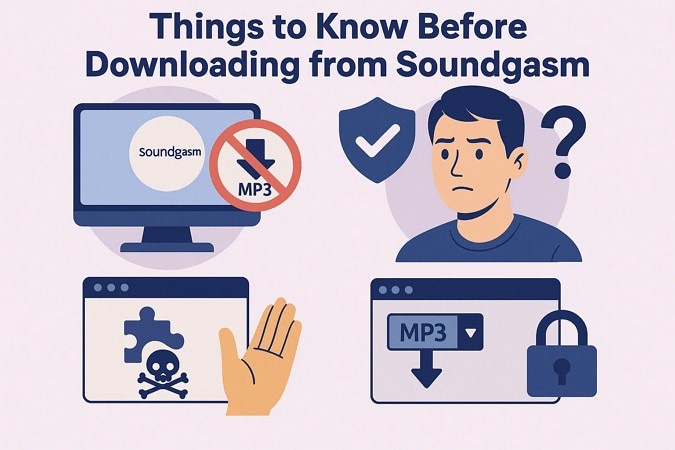
- Soundgasm doesn’t provide an official or native download option, so users often rely on third-party tools or extensions.
- Always verify the legal rights before downloading audio to respect content creators’ ownership, and learn about the question: Is Soundgasm safe?
- Be cautious when using unknown download tools, as some may contain adware or malware that compromises your device’s security.
- Browser extensions offering Soundgasm MP3 downloads may pose privacy risks or require excessive permissions.
Part 3. Is Soundgasm Safe to Download From?
Soundgasm is a legitimate and safe platform for streaming voice-based audio content, with a strong trust score and secure HTTPS connections. The primary safety risks do not stem from Soundgasm itself but from third-party download tools users might employ. Overall, while Soundgasm is safe, caution is needed when downloading through external applications.
If you opt for browser extensions for downloading audio from the internet, you might know that this also comes with risks:
- Browser extensions may request broad permissions, including access to download files and read your browsing data.
- The “Soundgasm Downloader” extension could gain the ability to modify or monitor files on your device.
- Some extensions silently collect personal information without explicit user consent.
- Outdated or unmaintained extensions are vulnerable to exploitation by hackers.
- Excessive permissions increase the risk of unauthorized access to sensitive data.
Best Practices to Observe for Downloading Audio
When it comes to safely using Soundgasm downloader and browser extensions for downloading or managing Soundgasm audio, following best practices is essential to protect your data and device:
- Use Trusted Software: Always download tools and extensions from reputable sources or official marketplaces to reduce the risk of malware.
- Update Antivirus: Keep your antivirus and security software up to date to detect and block potential threats effectively.
- Avoid Entering Sensitive Information: Never input passwords, credit card details, or personal data into unverified tools or extensions.
- Review Permissions: Before installing an extension, carefully check the permissions requested and reject those asking for excessive or unrelated access.
Part 4. How to Download Soundgasm Audio: Three Methods
Having discussed all the aspects of using and downloading audio from Soundgasm, let us have a look at the methods to download the audio file from the platform:
Quick Guide: Best Soundgasm Downloader by Use Case
Method 1: Download Soundgasm Audio on PC
If you do not want to use the online and Chrome extension due to the risks they hold, you can opt for offline tools to download Soundgasm audio files successfully. Learn about the top tool in the section below that will help you download the audio files effortlessly:
1. Wondershare UniConverter
One of the most reliable offline tools that lets users download and save audio and video files in the highest quality is UniConverter. This multimedia tool provides an extensive set of features for users to download and convert their media files effortlessly. Moreover, users get the ability to paste the link to an online media and then successfully save it to their device in their desired formats.
Besides downloading and first change, UniConverter also lets users edit and modify their audio and video files effortlessly. The tool offers various AI-powered features to let you enhance the overall quality of your media. Its user-friendly interface makes the download and conversion process easier for users without basic skills.
(Disclaimer: Our tool is intended for personal use only. Users are solely responsible for using this tool to save videos or audios, including compliance with platform's terms of service and copyright laws and regulations. We are not liable for any consequences resulting from users' violation of any laws or infringement of others' rights.)
Best Soundgasm Downloader
Comprehensive Steps for Using UniConverter for Soundgasm Audio Download
Having learned about this Soundgasm to MP3 converter tool, you might be wondering how to use it. Provided below is a step-by-step guide on how to effortlessly use this incredible tool:
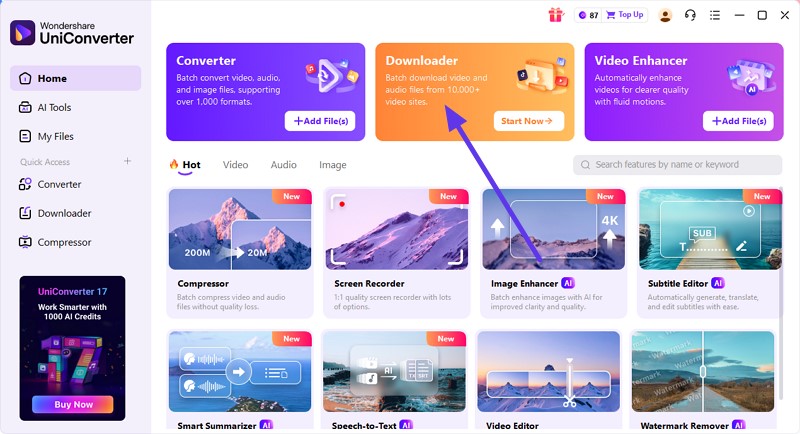
Step 1. Start By Accessing the Downloader
After installing and launching the tool on your device, head to its homepage and click on the “Downloader” tab.
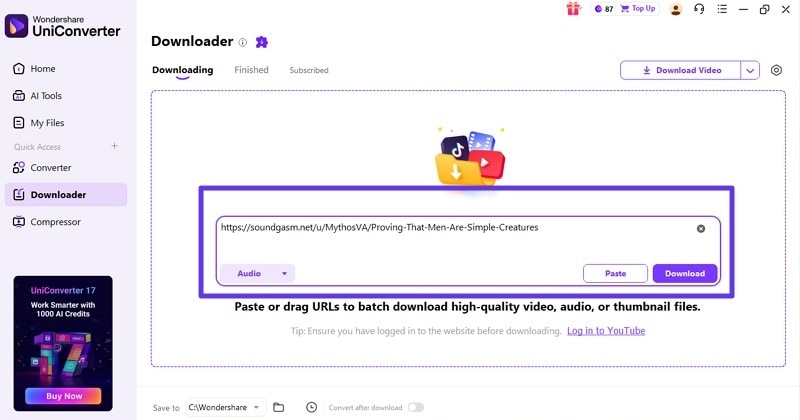
Step 2. Paste the Link of the Audio
In the following interface, paste the link to the Soundgasm audio in the provided field and hit the “Download” button.
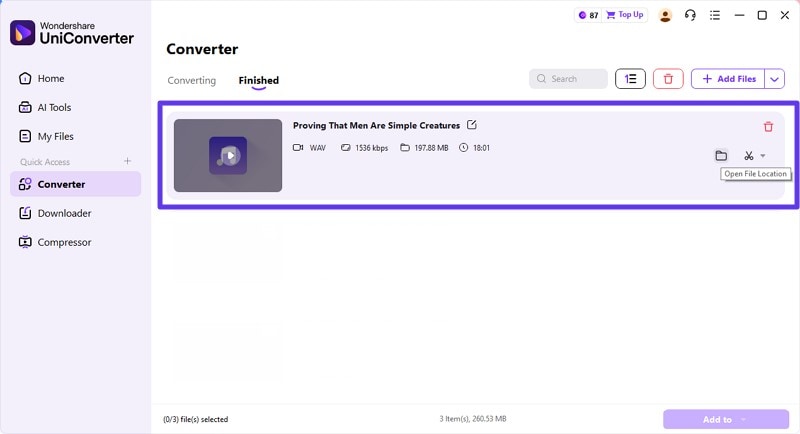
Step 3. Preview the Downloaded File
Once the audio is downloaded, you can see the file within the “Downloaded” section and access it on your device using the “Folder” icon on the right.
2. 4K Video Downloader
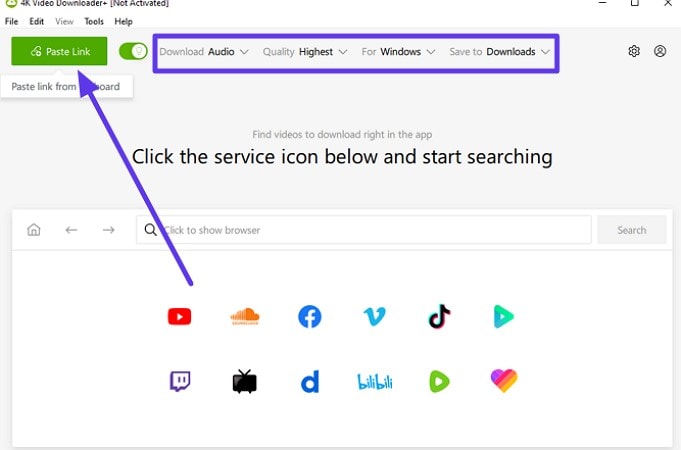
This offline video downloader also provides the utility of downloading audio files to your device. Users can simply paste the link, and the tool will instantly begin the downloading process. To learn how to use this Soundgasm MP3 download tool, read the steps mentioned next:
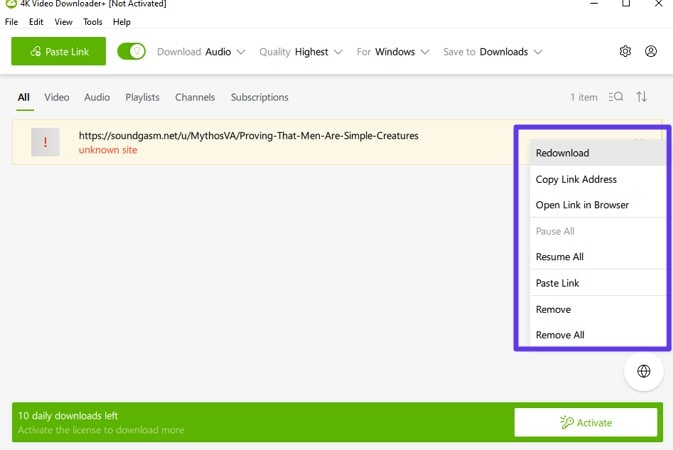
Step 1. After launching the tool on your device, press the “Paste Link” button to paste the link to the Soundgasm audio. Turn the toggle on for “Audio” and select the quality to begin the process.
Step 2. Once downloaded, the file will appear within the interface, and you can press the "Three Dots" icon to perform further actions on it.
Method 2: Soundgasm Audio Downloader Online Tools
The first method is to use online tools to download Soundgasm audio to your device. Mentioned below are some of the top options that you can use to download the audio files without installing software:
1. SaveTube
SaveTube is a free online audio downloader that converts and downloads Soundgasm audio links to MP3 format for easy offline listening. The platform does not require any installation or registration, ensuring privacy and convenience. If you want to learn how to use this online tool to download Soundgasm audio to your smartphone, read the steps mentioned below:
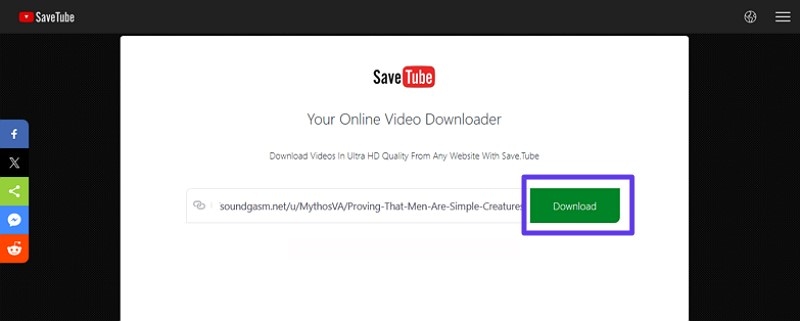
Step 1. To initiate the process, open SaveTube in your device's browser and paste the link into the text box on the homepage. Once the link is fetched, press the "Download" button located on the right.
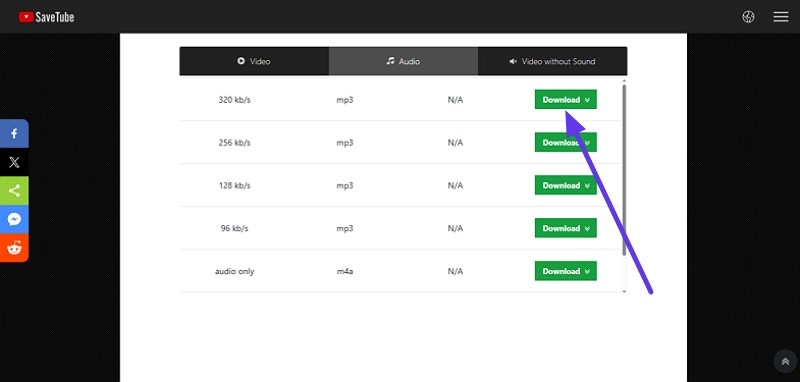
Step 2. Once the download links are available, choose the audio file quality and click the "Download" button on the right to save the audio .
2. PasteDownload
PasteDownload.com is a free Soundgasm audio downloader online tool to download Soundgasm audio easily without any software installation. It supports various formats and aims to preserve the original audio quality. It requires no registration or software installation, making it convenient for quick downloads. To learn how to use this online tool for downloading Soundgasm audio, read the steps mentioned below:
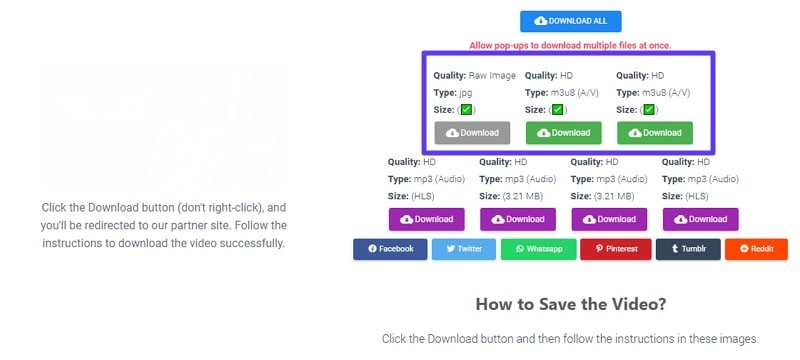
Step 1. After accessing the tool, head to the main interface and paste the link to the Soundgasm audio. As soon as you paste the link, the tool will begin to fetch the media.
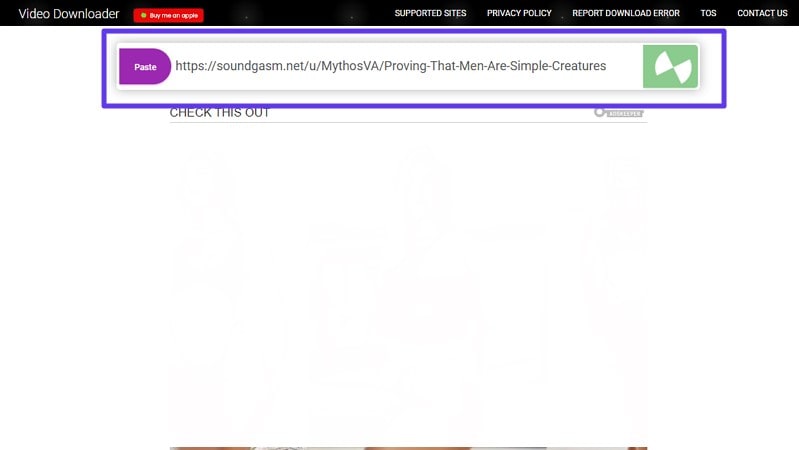
Step 2. When the audio file is successfully fetched, select the format of the output from the options provided. Locate and press the “Download” button to successfully download the audio file to your device.
Method 3: Browser Extension for Soundgasm Download
Another method to successfully save your favorite Soundgasm audio to your device is by utilizing web browser extensions. Mentioned below are the most reliable browser extensions that can help you download audio files:
1. Soundgasm Download Button
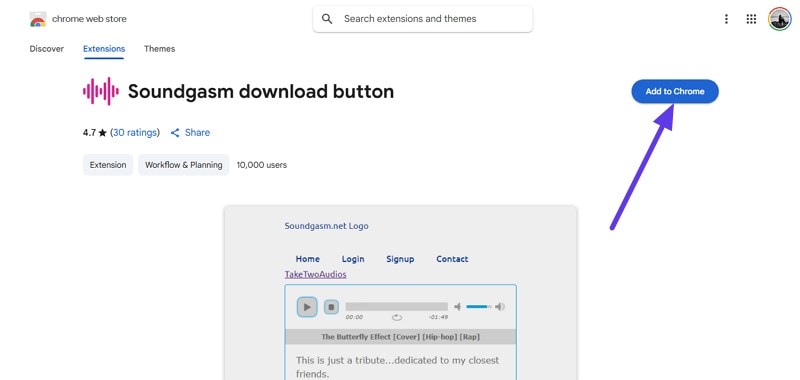
This is one of the Chrome extensions designed to add a convenient "Download" button directly on Soundgasm.net audio files. It allows users to quickly download their favorite tracks along with metadata like the track name and the artist's username. The Soundgasm download button extension is praised for its ease of use and effectiveness. Follow the steps mentioned below to learn how to use this extension for downloading Soundgasm audio:
Step 1. Access the Chrome Extensions page and search for the Soundgasm Download Button extension. Once located, press the “Add To Chrome” button located within the interface.
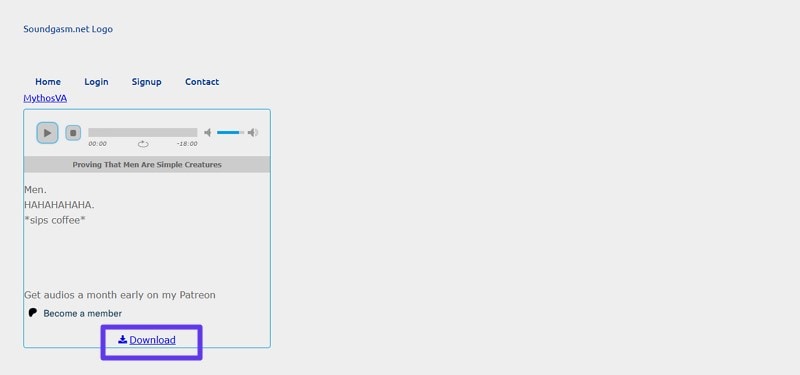
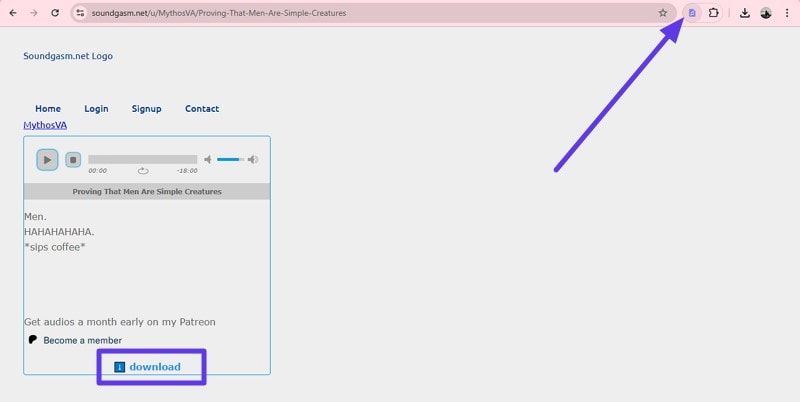
Step 2. Pin the extension on the top-right corner of the Chrome window and open the audio file within the Soundgasm platform that you want to download. A “Download” button will now be available below the audio file, which you can press to download the selected audio to your device.
2. Soundgasm Audio Downloader
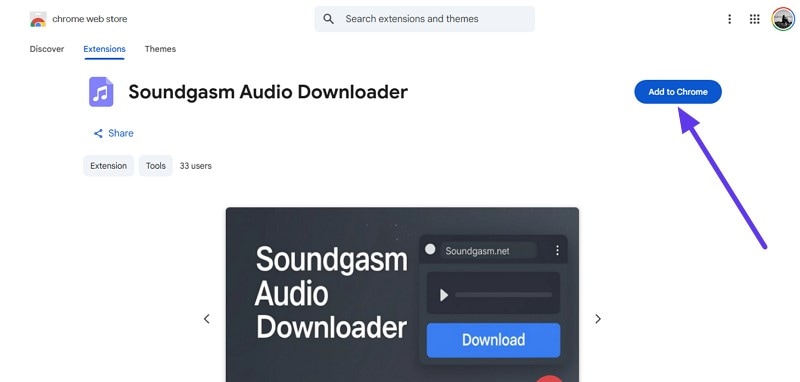
Another Chrome extension focused on providing downloading capabilities directly on Soundgasm is Soundgasm Audio Downloader. It offers straightforward functionality to save audio files without leaving the website, streamlining the user experience for Soundgasm to MP3 listeners. If you do not know how to add this extension to your Chrome browser and use it, read the steps mentioned below:
Step 1. After locating the extension within the Chrome extension page, click on the “Add to Chrome” button located on the right.
Step 2. Once the extension is pinned, access the Soundgasm website and open the audio. Click the “Download” button, which is now enabled below the file, to save the audio successfully to your device.
Part 5. How can you convert Soundgasm audio to MP3 without losing quality?
If you want to make your downloaded audio more versatile, you can convert the audio into another format using the converter feature offered by UniConverter. Follow the steps mentioned below to learn how to convert Soundgasm to MP3 using this tool:
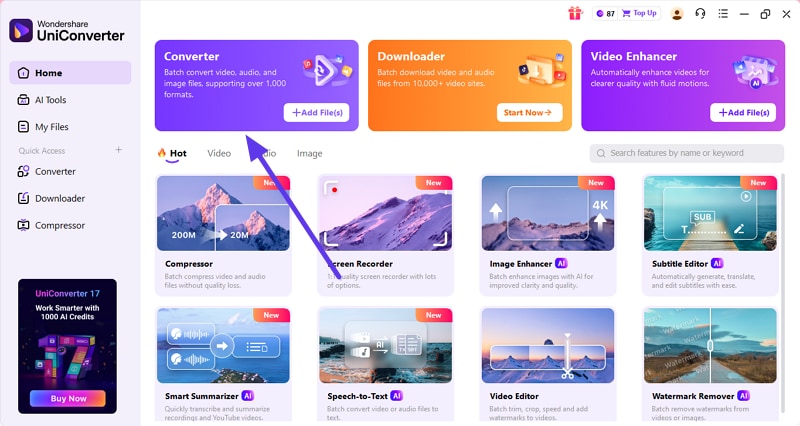
Step 1. Access the Converter
After launching UniConverter, access the “Converter” feature from the homepage.
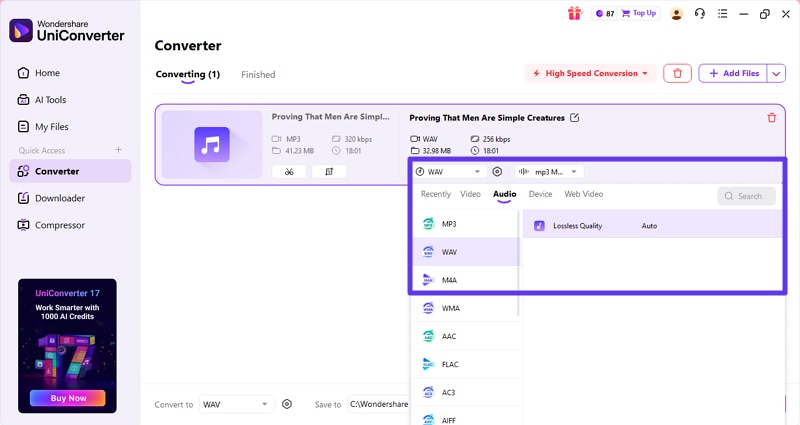
Step 2. Choose Format and Convert
Now, select the format from the options provided and hit the “Convert” button.
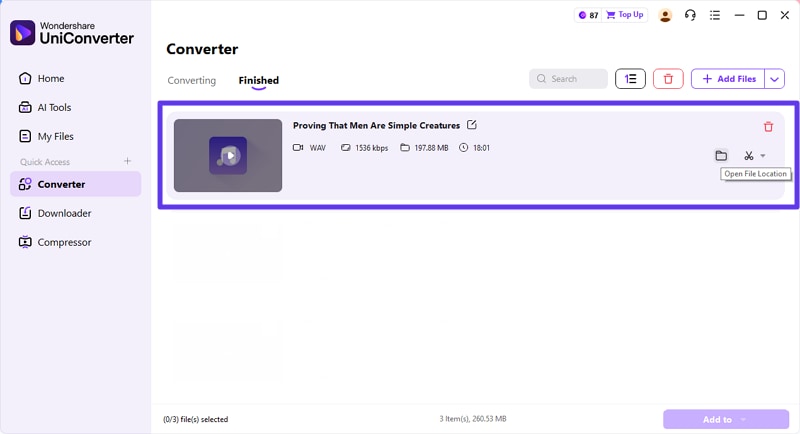
Step 3. Preview and Access the Converted File
Once the file is converted, preview it under the “Finished” section within the interface.
Part 6. Common Problems & Solutions for Soundgasm MP3 Download
After learning about all the methods for how to download from Soundgasm in detail, let us discuss some of the common problems you might face during the process. Along with the problems, the solutions are also discussed below:
- Link Not Working or File Not Found: Sometimes, platform updates or changes to page structure break existing download links. If this happens, an alternative method is to use screen recording software to capture the audio in real time.
- Browser Extension Detects Nothing: Some Soundgasm pages have protections that block browser extensions from detecting audio files. In such cases, switching to a desktop method, like using a dedicated downloader software, is recommended.
- Low Quality or Incompatible Format: Downloaded files may sometimes be lower quality or in formats not supported by the desired devices. Using universal converters like Wondershare UniConverter or similar tools can convert these files to high-quality MP3s.
- Popups and Fake Download Buttons: Beware of misleading buttons that imitate download options. Use trusted websites or tools and verify URLs to avoid scams or malware.
Part 7. What are the legal and privacy risks of downloading from Soundgasm?
When downloading audio from Soundgasm, it’s important to understand the legal and ethical responsibilities involved. Provided next are some of the download Soundgasm legal issues which you must take into notice:
- Downloading Soundgasm audio for personal use means saving files for private listening without sharing them publicly.
- Before downloading, verify whether the uploader has authorized downloads or specified usage rights.
- Soundgasm hosts content protected by copyright laws. Unauthorized redistribution of copyrighted audio can lead to legal penalties.
- Always respect the rights of original content creators. Avoid sharing or remixing audio without permission.
Conclusion
In summary, the article provided three efficient methods to perform Soundgasm downloads for audio files. The article provided a detailed step-by-step guide for each method for using these Sundgasm downloaders. However, one of the most reliable solutions that lets you download these audio files in high quality is UniConverter. Try UniConverter’s free trial today to simplify your Soundgasm download and conversion needs.

