Key Features of Free Video Converter
Convert Popular Video and Audio Formats for Free
Use the browser-based converter on this page for quick conversions of common video and audio formats. For larger local workflows, UniConverter Desktop adds broader format and codec support, batch conversion, output presets, and more control over resolution and export settings.
Popular video formats include MP4, MOV, MKV, AVI, WMV, M4V, WebM, VOB, 3GP, and more. Audio workflows include formats such as MP3, WAV, AAC, FLAC, AC3, and AIFF. The desktop Converter supports the broader format and codec matrix listed in the technical specifications.
View all supported formats and codecs >

Convert for Devices and Platforms with Desktop Presets
UniConverter Desktop includes output presets for phones, tablets, TVs, and other playback targets, helping you choose a compatible format without manually configuring every setting. Presets cover common iOS and Android devices as well as popular TV and media-device workflows.
Desktop output presets can also help prepare local video files for common web and social publishing workflows. For a quick browser conversion, use the upload tool at the top of this page; for batch jobs and more detailed output control, use UniConverter Desktop.
More Control Before You Convert on Desktop
A desktop conversion workflow often needs a little preparation before export. UniConverter lets you make practical adjustments to local files before converting them, so the output is closer to the result you actually need.
For example, you can merge clips, trim unwanted sections, crop the frame, adjust playback speed, and review output settings before conversion. Compression and other dedicated media tools remain available when the job goes beyond format conversion.
The desktop Converter also supports subtitle, audio, watermark, and basic effect adjustments as part of local conversion workflows. Use dedicated UniConverter tools when you need specialized tasks such as AI enhancement, speech processing, or advanced compression.

Free Online Converter vs. UniConverter Desktop
Both workflows convert media files, but they are designed for different jobs. Use the online tool for quick browser-based conversion and the desktop Converter when you need batch processing or deeper output control.
| Need | Online Converter | UniConverter Desktop |
|---|---|---|
| Quick one-off conversion | Best fit | Supported |
| Install required | No | Yes |
| Batch local files | Designed for quick browser tasks | Best fit |
| Broader format and codec controls | Basic online workflow | Available |
| Resolution and output presets | Basic output choices | More detailed controls and presets |
| Repeated local workflows | Good for occasional tasks | Better for frequent conversion work |
Free-version limits can apply to desktop workflows. Use the current Free vs. Paid comparison on this page for plan-specific details.
More UniConverter Tools

Add and Edit Subtitles
Among other merits, subtitles make videos considerably more engaging, and our platform allows you to add or edit subtitles for the videos you converted for free. Viewers are likelier to watch your videos once they see subtitles embedded in them.

Convert Speech to Text
Do you know some tools can convert your videos into text? Our speech-to-text tool transcribes speech from a video and makes it easily accessible for use in any way you wish.

Convert Video to GIF
Making GIFs has never been easier because, with our converter, you can snip any part of a video and turn it into a GIF in mere seconds. Plus, customize the frame rate, duration, and output size.

Crop, Trim, and Edit Clips
You can use our software to trim videos to a particular length, crop out unwanted sections or elements, and even increase or decrease the frame rate for smoother playback on specific screen sizes.

Enhance Any Video with AI
Leverage the power of artificial intelligence to edit old videos and make them look modern. The dedicated AI Video Enhancer provides separate workflows for improving clarity, reducing noise, restoring detail, and enhancing motion when conversion alone does not solve a quality problem.

Convert Images
If you’ve ever needed to use one image in multiple formats, use UniConverter's image converter to convert a picture into several formats, including the most widely used and popular ones, like PNG, BMP, TIFF, WEBP, SVG, EPS, and others.
How to Convert Video Online for Free
1. Upload a file
Add a video or audio file to the browser-based converter at the top of this page.
2. Choose the output
Select the available output format and settings that fit your playback or editing goal.
3. Convert and save
Start the conversion, then save the converted file when processing is complete.
How to Batch Convert Videos with UniConverter Desktop

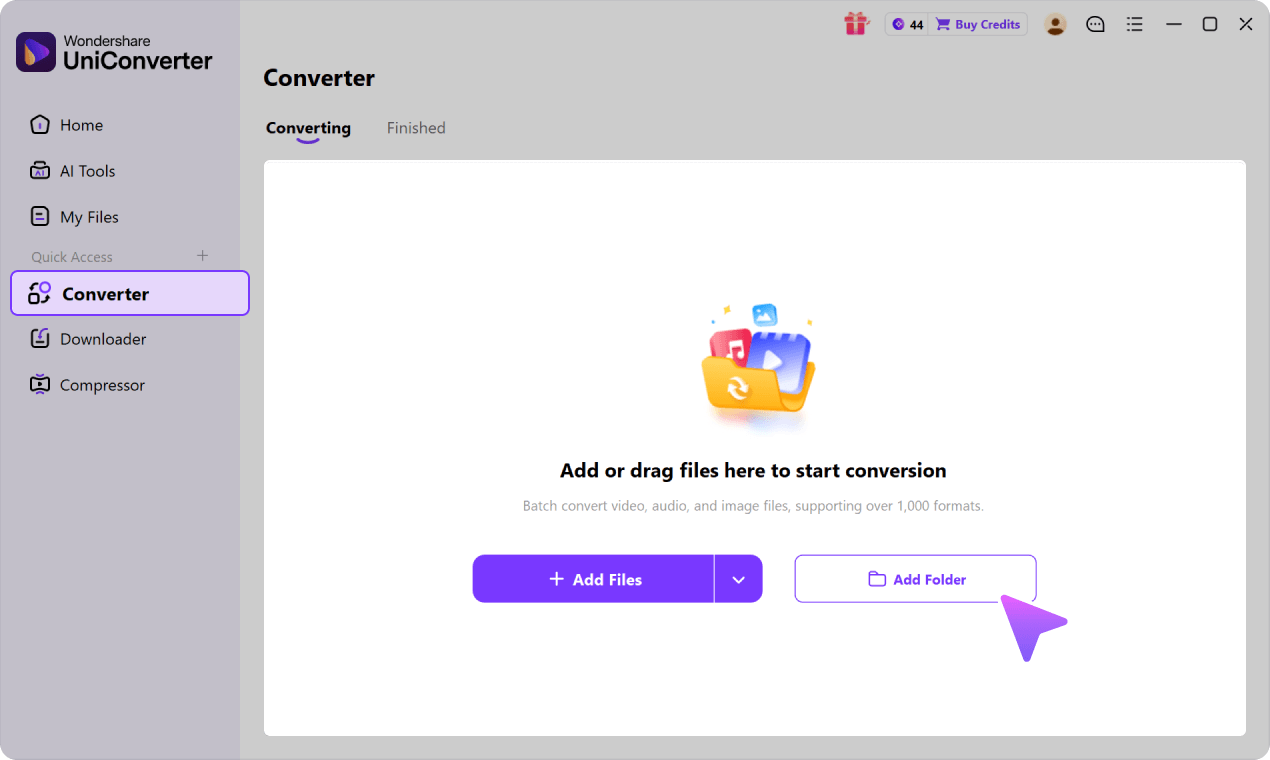
Open the video converter, then click on the “+” sign in the middle of the interface (it’s the same for both Windows and macOS). You can also drag and drop the video files onto the converter.

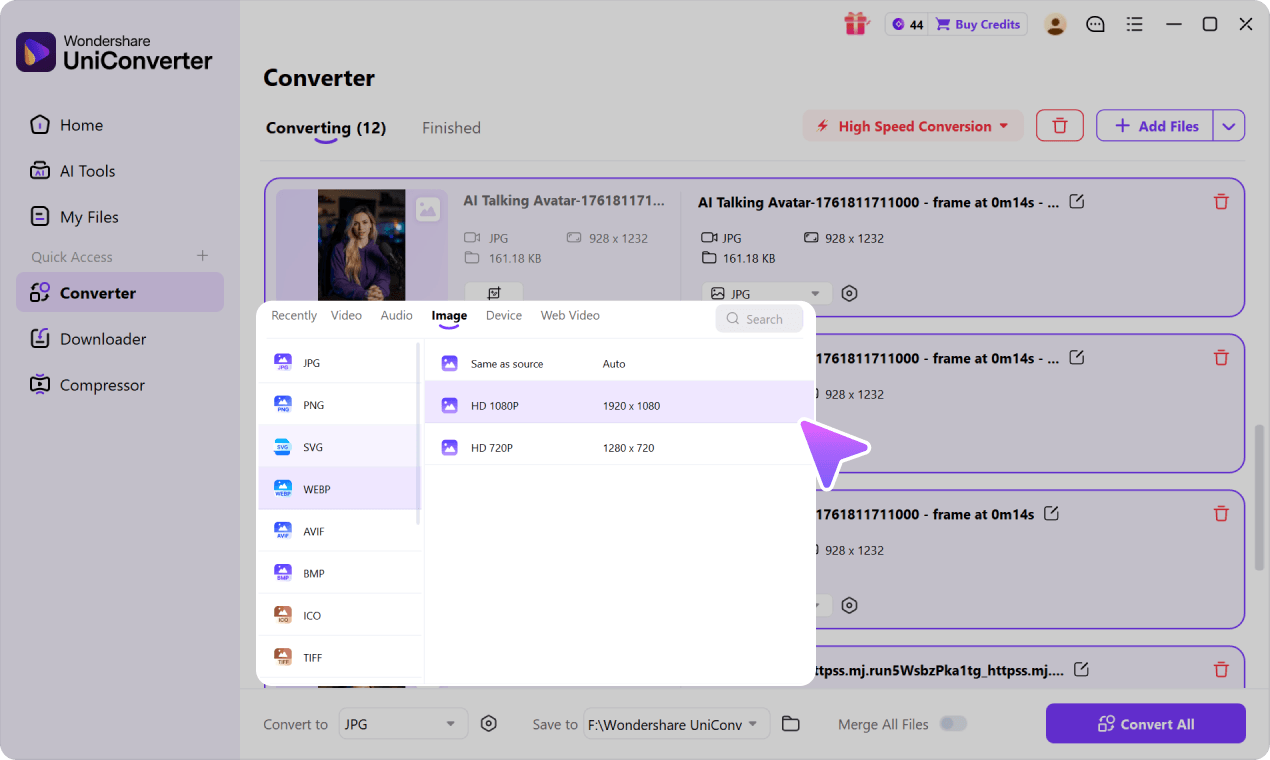
Do you see the “Settings” icon? Click it and select the video tab. You’ll see a list of formats on the left panel, so pick the one you want, then choose a resolution from the options listed on the panel to the right.

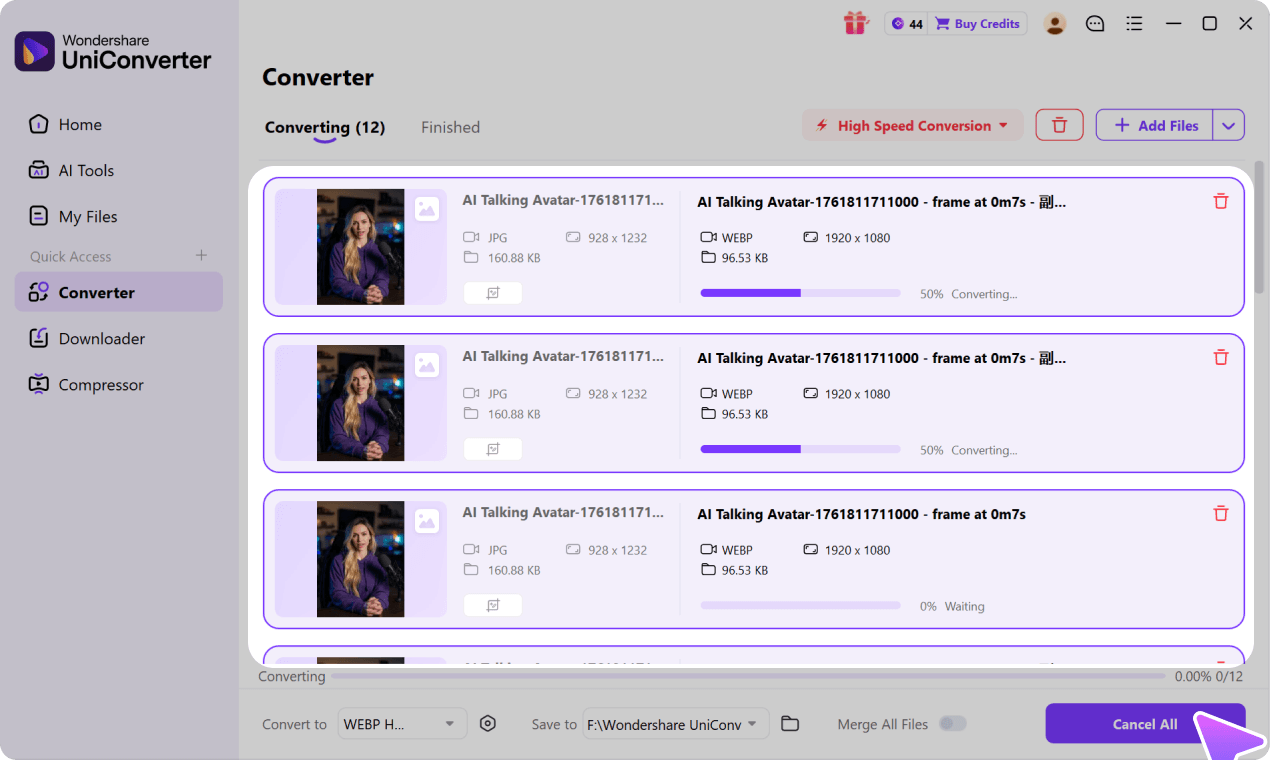
Click “Convert” to initiate the process. Once the video has been converted, you’ll see it in the “Finished” tab. You can either use it the way it is or further edit it by enhancing, compressing, removing vocals, etc.

Explore More Format Conversion
Free VS Paid Video Converter
While Wondershare’s Free Video Converter is a great tool, you can derive even more use for it by upgrading and accessing all the unique, premium features it offers without any limits!
|
Convert
|
||||||||||||||||||||||||||||||||||||||||||||||||||||||||||||||||||||||||||||||||||||||||||||||
|
||||||||||||||||||||||||||||||||||||||||||||||||||||||||||||||||||||||||||||||||||||||||||||||
|
Compress
|
||||||||||||||||||||||||||||||||||||||||||||||||||||||||||||||||||||||||||||||||||||||||||||||
|
Video Edit
|
||||||||||||||||||||||||||||||||||||||||||||||||||||||||||||||||||||||||||||||||||||||||||||||
|
Other Tools
|
||||||||||||||||||||||||||||||||||||||||||||||||||||||||||||||||||||||||||||||||||||||||||||||
|
AI Tools
|
||||||||||||||||||||||||||||||||||||||||||||||||||||||||||||||||||||||||||||||||||||||||||||||
|
||||||||||||||||||||||||||||||||||||||||||||||||||||||||||||||||||||||||||||||||||||||||||||||


|
Convert
|
|||||||||||||||||||||||||||||||||||||||||||||||||||||||||||||||||||||||||||||||||||||||||||||||||||||||||||||||||||||||||||||||||||||||||||||||||||
|
|||||||||||||||||||||||||||||||||||||||||||||||||||||||||||||||||||||||||||||||||||||||||||||||||||||||||||||||||||||||||||||||||||||||||||||||||||
|
Compress
|
|||||||||||||||||||||||||||||||||||||||||||||||||||||||||||||||||||||||||||||||||||||||||||||||||||||||||||||||||||||||||||||||||||||||||||||||||||
|
Video Edit
|
|||||||||||||||||||||||||||||||||||||||||||||||||||||||||||||||||||||||||||||||||||||||||||||||||||||||||||||||||||||||||||||||||||||||||||||||||||
|
Other Tools
|
|||||||||||||||||||||||||||||||||||||||||||||||||||||||||||||||||||||||||||||||||||||||||||||||||||||||||||||||||||||||||||||||||||||||||||||||||||
|
AI Tools
|
|||||||||||||||||||||||||||||||||||||||||||||||||||||||||||||||||||||||||||||||||||||||||||||||||||||||||||||||||||||||||||||||||||||||||||||||||||
|
|||||||||||||||||||||||||||||||||||||||||||||||||||||||||||||||||||||||||||||||||||||||||||||||||||||||||||||||||||||||||||||||||||||||||||||||||||
7 Best Free Video Converters in 2026
The following seven tools cover desktop and browser-based conversion workflows that remain relevant in 2026.
Compare platform support, format flexibility, batch workflows, and output controls before choosing one.
Last reviewed: September 2026. Free-tier limits and supported features can change, so verify current plan details on each provider's official site.
Wondershare Free Video Converter
A desktop video converter for Windows and Mac with batch conversion and broad format support.
Wondershare Free Video Converter combines common format conversion with local batch workflows and additional media tools. The program is compatible with both Windows and Mac systems and allows converting your videos to a host of popular formats. This free file converter also facilitates batch processing, screen recording, fixing metadata, videos to MP4/MP3, video transfer, DVD burning, and other functions. You can also upgrade to the premium version to remove all the limits for a better experience.
Steps on How to Convert Videos to MP4/MP3 in Batch:
Step 1: Load video files to Wondershare Free Video Converter.
Free download, install, and open Wondershare Free Video Converter on your PC. On the Convert tab, click on the +Add Files button to import video files from your PC. The drop-down menu enables users to add a folder or files from a connected device or camcorder. Alternatively, you can also drag and drop the files.

Step 2: Choose MP4/MP3 as the target format.
Click and open the Output Format menu from the bottom, go to the Video or Audio tab, choose an output format from the list in the left panel, and select your preferred resolution from the right.

Step 3: Convert videos to MP4 or MP3.
Select the location on your PC where you wish to save the converted file at the Output tab. Click the Start All button on the bottom-right corner to convert videos to MP4 format or MP3 format in batch.

DVDVideoSoft
Free file converter for Windows with support to only several popular output formats: MP4, AVI, MPEG, and MP3.
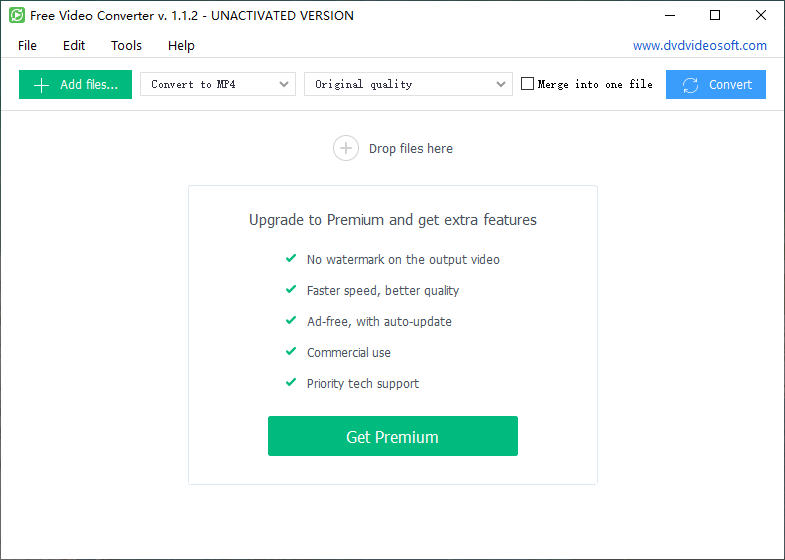
DVDVideoSoft is free-to-use software that features a simple interface. The program supports converting your videos in a wide range of formats to some popular formats in a quick, simple manner. Thus, using the free audio converter, you can create files to be played on iPhone and iPad. The program is compatible with Windows 10, 8, 7, Vista, and XP SP3. This free MP4 video converter software also can change the quality of the video to fit on your device. Simply add the desired videos, select the output file, and convert them using this movie converter.
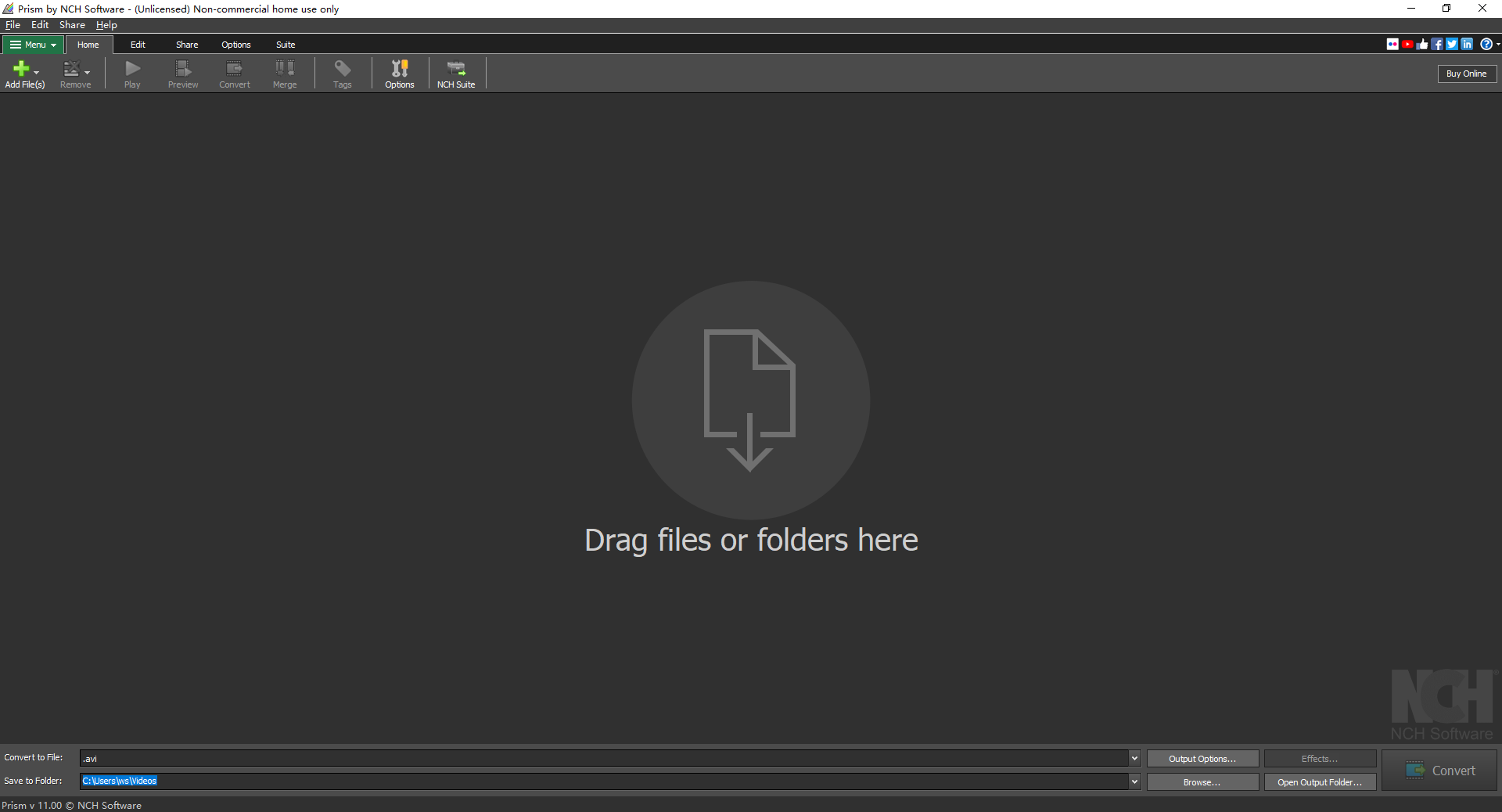
Prism Video File Converter
Free video to audio converter supports converting videos to other video or audio formats in a simple manner.
Prism Video File Converter is another widely used program that facilitates converting videos to tens of formats in good quality. The program is compatible with Windows and Mac systems. The videos can also be converted into device-specific formats. You can also extract as well as convert the files from your DVD. For users with multiple files, batch processing is also supported. The process of conversion is fast, and there is also an option to preview the output file. FLV encoding and adjustment of output file parameters are added features. The limit of this free video converter is that it only supports videos as input formats, and it can't support audio input like MP3 to MP4 or MP3 to WAV.
Any Video Converter
With the support of more than 100 input formats and 160 output formats, Any Video Converter is safe, fast, and easy to use.
This is an excellent video conversion without any ad, spyware, or malware. The program supports a wide range of input and output formats, in addition to supporting device-specific conversion. You can also extract audio files from your videos as well as CDs. The software allows downloading audio and video files from an array of online sites, Vimeo, Metacafe, Dailymotion, and others. To keep your important videos safe and create some storage space, you can burn them to a DVD using the program. Additional features include high video encoding efficiency, video editing, and NVIDIA NVENC accelerated encoding. But for the free version, you're limited to only converting the first 3 minutes of your file; you need to buy the premium version to remove this limit, so it is not a real free video converter.
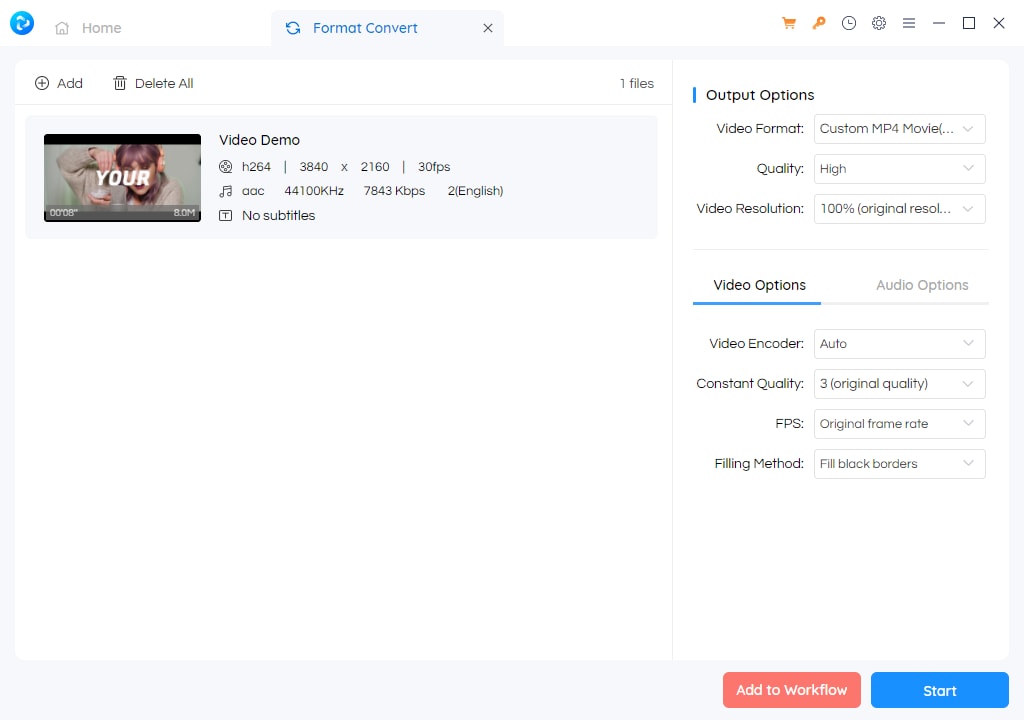
Handbrake
A free and open-source video transcoder that supports converting your videos to MP4 and MKV format.
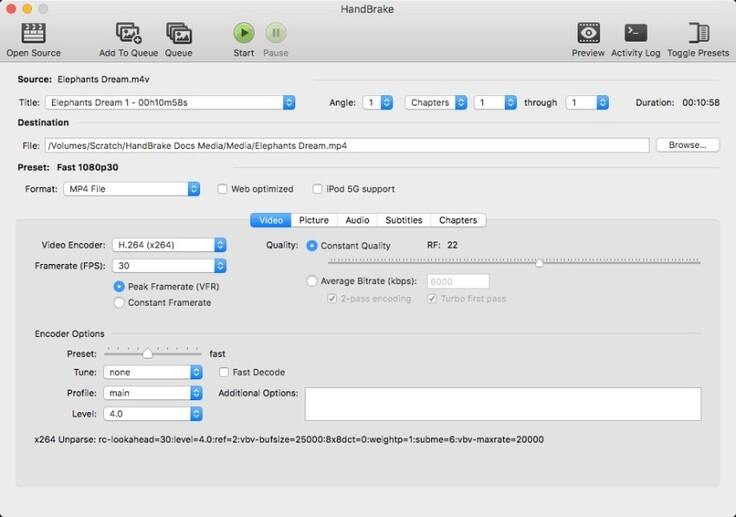
This free-to-use video converter is compatible with Windows PC and allows converting almost all types of videos to MP4 and MKV format with support for an array of encoders. Using the free video converter to MP4, you can also convert videos from Blu-ray and DVDs. There is an option for live static and video preview to check the output file. Additional features include batch scanning, title/chapter range selection, chapter markers, support for VFR and CFR, video filtering, average bit rate video encoding, and others. A lot of people have a query- Is Handbrake safe? The answer is yes, as the software has been approved to be completely safe to download and install. The disadvantage is that it can't support audio conversion, and the video output format lacks in options with only MP4 and MKV.
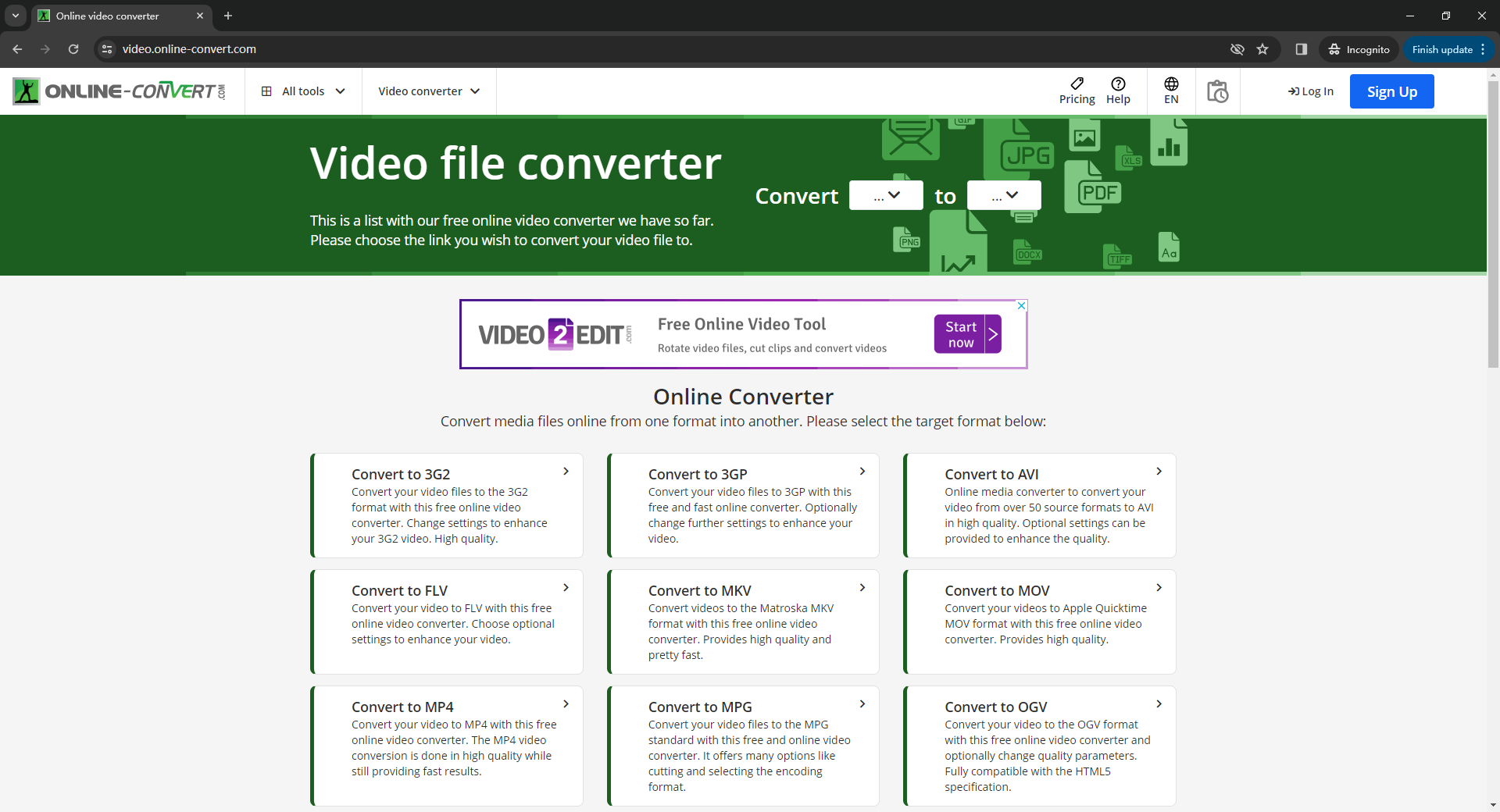
Online-Convert
An online video converter allows adding files from PC, URL, or cloud storage for conversion to an array of formats.
Online-Convert is a popularly used video conversion tool that is free to use and works from your browser window without any need for software download or installation. Using this online video converter, you can add local files in a browser-based workflow and configure supported output settings before conversion. The software has a feature to edit the output file parameters like screen size, bit rate, frame rate, audio codec, and others. The conversion settings can also be saved for future files if you need them. Once converted, the videos can be directly downloaded from the interface itself. But likewise, Online Convert will be limited by Internet speed, just like all of the online video converters. Free-tier limits can change, so check the current service rules before converting larger files.
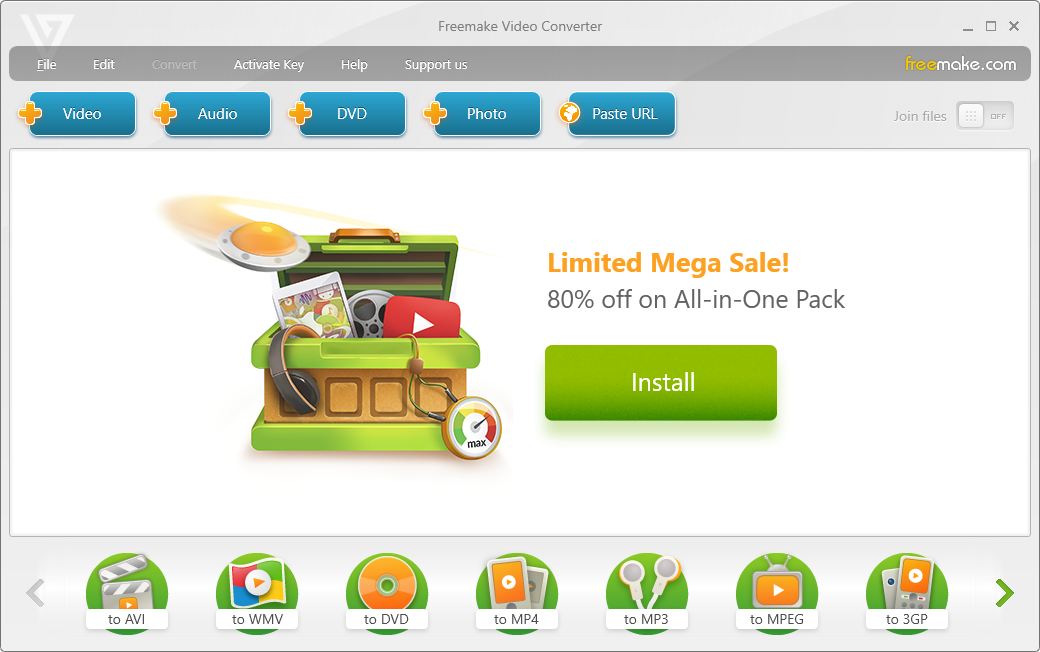
Freemake Video Converter
Free to use video converter software with support of over 500 formats.
Freemake Video Converter, as the name, suggests that you can get the video converter for free download. It enables users to convert videos in more than 500 formats, including MP4, MP3, WMV, AVI, MKV, DVD, 3GP, MOV, and others, but it can't support converting video to MP3 and other audio formats. Multiple files can be added to the program for conversion, while available features can vary between the free and paid versions.
Comparison of 7 Best Free Video Converters in 2026
| Software/Features | Wondershare Free Video Converter | Freemake Video Converter | DVDVideoSoft | Handbrake | Prism Video File Converter | Any Video Converter | Online-Convert |
|---|
| It's Free or Not | Free with premium version | Free with premium version | Free with premium version | Free without premium version | Not really free with trial version | Not really free with trial version | Free with a premium version |
| Supported Input Video Formats | 1000+ formats, mainly-used formats like MP4, MOV, MKV, M4V, FLV, DIVX, AVI, , MPG, MPEG, VOB, 3GP, 3G2, WMV, ASF, RM, RMVB, DAT, OGV, WEBM, DVR-MS, VRO, MXF, MOD, TOD, M4P, MTS, M2TS, M2T, TP, TRP, TS, TS, DV, NSV, WTV, TIVO, , etc. | 500+ formats, AVI, MP4, WMV, MKV, DVD, MPG, 3GP, FLV, TOD, MTS, MOV, M4V, RM, QT,TS,AMV, AVCHD, AVS, BIK, BNK, CAVS, CDG, DPG,DXA, EA, FFM, FILM, FILM_CPK, FLC, FLH, FLI, FLM, FLT, FLX, GXF, H261, H.263, , MJ2, MJPG, MKM, etc. | 45 formats, MP4, AVI, MKV, WMV, DPG, GXF, M4P, WMA, DAT, MTS, 3G2, M2TS, VOB, MOV, TIVO, TV, M4V, DVR-MS, MXF, MPEG, 3GP, ASF, DV, SWF, RM, TOD, DIVX, M2T, P2I, RIF, MOD, MPG, OGV, NSV, MPEG, FLV, VRO, WTV, M4V, RMVB, TP, WEBM, TS, F4V, HLV. | Most of the popular formats don't have detailed tech specs. | 47 formats, AVI, MPG, MPEG, VOB, ASF, WMV, OGM, MP4, 3GP, DV, APNG, etc. | 48 formats, AVI, FLV, MPG, MP4, M4V(without DRM), M2V, SWF, 3GP, 3G2, 3GPP, MOV, TS, TP, TRP, M2TS, MTS, MKV, DV, WMV, MOD, TOD, ASF, DAT, F4V, VOB, RM, RMVB, DivX, XviD, MXF, H.261, H.263, , NUT, NC, NSV. | 36 formats, 3G2, 3GP, 3GPP, AMV, ARF, ASF, AVI, CED, CPI, DAV, DIR, DIVX, DVSD, F4V, FLV, H264, IFO, M2TS, M4V, MKV, MOD, MOV, MP4, MPEG, MPG, MSWMM, MTS, MXF, OGV, PDS, RM, SRT, SWF, TS, WMV, WEBM. |
| Supported Input Audio Formats | MP3, WAV, M4A, M4B, M4R, APE, AAC, AC3, MKA, AIFF, AA, AAX, AMR, FLAC, AU, CUE, MPA, AP3, RA, RAM, OGG, WMA | MP3 | MP3, M4A, FLAC, MP3, WMA, AMR, APE, MKA, AIF, AU, WAV, OGG, AIFF, CAF, MP2, AC3, RAM, AAC, RA, M4A. |  |
|
|
3GA, AA, AAC, AAX, AIF, AIFC, AIFF, AMR, APE, ASX, AU, AUP, AWB, CAF, CDA, FLAC, GSM, IFF, FAR, KOZ, M3U8, M4A, M4P, M4R, MID, MIDI, MMF, MP2, MP3, MPA, MPC, MPGA, OGG, OMA, RA, RAM, WAV, WMAC. |
| Supported Output Video Formats | 1000 formats, mainly used formats like MP4, AVI, WMV, MOV, MKV, M4V, MPEG, , , FLV, F4V, SWF, 3GP, 3G2, ASF, DV, VOB, OGV, DIVX, XVID, WEBM, MXF, TS, TRP, Vimeo, Facebook, etc. | AVI, WMV, DVD, MP4, MPEG, 3GP, MKV, FLV. | MP4, AVI, MPEG. | MP4, MKV. | 3GP,ASF,AVI,DV,FLV,GIF,MKV,MOV,MP4,M4V,MPG,OGV,RM,SWF,VOB,WEBM,WMV,DIVX,XVID,AMV. | WMV, MPG, /MPEG-4, DivX, XviD, MPEG-1, MPEG-2, AVI, 3GP, 3G2, FLV, F4V, SWF, DV, VOB, HTML5, WebM, MP4, OGV, . | 3G2, 3GP, AVI, FLV, MKV, MOV, MP4, MPGE-1, MPGE-2, OGV, WebM, WMV. |
| Supported Output Audio Formats | MP3, WAV, M4A, M4B, M4R, APE, AAC, AC3, MKA, AIFF, AA, AAX, AMR, FLAC, AU, CUE, MPA, AP3, RA, RAM, OGG, WMA. | Not available for a free version | MP3 | |
MP3, WAV. | MP3, OGG, WAV, AAC, WMA, AIFF, CAF, AMR, RA, AU, MP2, AC3, M4R, M4A, FLAC. | AAC, AIFF, FLAC, M4A, MMF, MP3, OGG, OPUS, WAV, WMA. |
| Support 4K/FHD Video Output |  |
|
Only 1280*720, 1920*1080 | |
|
|
|
| Merge Files into One | |
|
|
|
|
|
|
| Compress Videos | |
|
|
|
|
|
|
| Support Flash Video Output | |
|
|
|
|
|
|
| Batch Add Files for Conversion | |
|
|
|
|
|
|
| Load DVD Files | |
|
|
|
|
|
|
| Load ISO/IFO Files | |
|
|
|
|
|
|
| Support 3D Conversion | |
|
|
|
|
|
|
| Support VR Conversion | |
|
|
|
|
|
|
| Convert Video/Photos to GIF | |
|
|
|
|
|
|
| Directly Add Files from iPhone, iPad, Cameras | |
|
|
|
|
|
|
| Lossless Conversion Technology | |
|
|
|
|
|
|
| GPU Acceleration | |
|
|
|
|
|
|
| Customize and Save the Output Formats | |
|
|
|
|
|
|
| Convert Files to Different Formats in Batch | |
|
|
|
|
|
|
| Download Subtitles/CC | |
|
|
|
|
|
|
| Download 4K/8K Videos | |
|
|
|
|
|
|
| Download And Convert in One Click | |
|
|
|
|
|
|
| Burn DVD | |
Bad support, and the burned DVD can't be played on DVD Player. | |
|
|
|
|
| Transfer Converted Files to Devices Directly | |
|
|
|
|
|
|
| Burn Blu-ray DVD | |
|
|
|
|
|
|
| Record Full Screen/Desktop Activities | |
|
|
|
|
|
|
| Trim Video | |
|
|
|
|
|
|
| Trim Video into Several Segments | |
|
|
|
|
|
|
| Crop Video | |
|
|
|
|
|
|
| Set Video Effect like Saturation, Contrast, Brightness | |
|
|
|
|
|
|
| Apply Special Filters | |
|
|
|
|
|
|
| Edit and Add Image or Text Watermark to Video | |
|
|
|
|
|
|
| Add and Customize Subtitles to Video | |
|
|
|
|
|
|
| Preview Editing Videos | |
|
|
|
|
|
|
| Adjust Audio Volume | |
|
|
|
|
|
|
| Automatically Remove Black Bars When You Change Video Aspect Ratio | |
|
|
|
|
|
|
| Audio Recording | |
|
|
|
|
|
|
| Microsoft Recording | |
|
|
|
|
|
|
| Set Priority of the Conversion Files | |
|
|
|
|
|
|
| Sort Files by Converting and Converted. | |
|
|
|
|
|
|
| Do Other Tasks While Converting | |
|
|
|
|
|
|
| Set Task Scheduler When Conversion Completes | |
|
|
|
|
|
|
| Play Source Files | |
|
|
|
|
|
|
| Edit Metadata Info | |
|
|
|
|
|
|
| Customize Video Resolution | |
|
|
|
|
|
|
| Customize Video Bit Rate | |
|
|
|
|
|
|
| Customize Video Frames | |
|
|
|
|
|
|
| Set Video Encoder | |
|
|
|
|
|
|
| Customize Audio Sample Rate | |
|
|
|
|
|
|
| Customize Audio Bit Rate | |
|
|
|
|
|
|
| Set Audio Channel | |
|
|
|
|
|
|
| Set Audio Encoder | |
|
|
|
|
|
|
| Online Auto Upgrade | |
|
|
|
|
|
|
| Multiple Languages | |
|
|
|
|
|
|
| Download | Try IT Free |
FAQs about Free Video Converter
-
1. Which is the best free video converter?
There is no shortage of free desktop or online video converters, and selecting the right one is important to ensure lossless quality conversion with needed features. Listed below are key features that must be present in any good conversion tool.
-
Compatibility with multiple platforms.
-
Support a wide array of video and audio formats.
-
Video editing before conversion.
-
Lossless quality file conversion.
-
Fast conversion speed.
-
Useful extras such as video recording, DVD workflows, and basic editing tools.
The best choice depends on the job. Wondershare Free Video Converter combines an online upload option with a desktop workflow for local conversion, while the desktop version is better suited to batch processing and deeper output controls. Compare format support, free-tier limits, speed, platform compatibility, and export settings before choosing a converter.
-
-
2. How do I convert videos to MP4 for free?
When it comes to videos, MP4 is the most widely used format that is compatible with all types of devices and players. Moreover, being compressed in nature, MP4 occupies less storage space. Thus, it is a preferred video format over others. There are a number of desktop and online software that allows to video convert to MP4 in decent quality. One of these is Wondershare Free Video Converter as mentioned in the above parts of the article. The steps for converting video to MP4 are also listed in Part 1 of the article. Using similar steps, you can also convert WMV to MP4, convert AVI to MP4, and many other formats.
-
3. How to capture video from sharing sites?
Use the official export or offline-viewing options provided by a service whenever they are available. If you are authorized to capture a video, you can record it to a local file and then convert that local file to another format with a video converter. Avoid tools or workflows that bypass access controls or platform restrictions.
-
4. Can VLC convert video files?
VLC is one of the most popular video players that is compatible with all types of platforms and supports playing a wide range of video formats. In addition to this, this versatile player also supports other functions like editing, video conversion, and others. VLC can be used to convert all types of video files to a number of video and audio formats like MP4, MP3, WebM, OGG, WMA, and others. The process is quick and simple.
Steps for converting videos using VLC:
Step 1: Open VLC Media Player on your PC and open Media > Convert/Save…
Step 2: Click on the +Add button to import videos from the PC. Click on Convert/Save... button. A new pop-up window will open from where choose desired output format from the list of supported formats under the Settings option.
Step 3: Choose destination location on your PC and click on the Start button to proceed with the conversion process.
-
5. How to convert an audio file into a video?
If your audio file format is not compatible with your player, you can convert it to other audio format or can also convert it to compatible video formats. Additionally, you can also create some special videos with your favorite songs by converting audio to video format. In all the above situations, there is a need for a good audio to video converter. Wondershare Free Video Converter is an excellent conversion tool that facilitates fast audio to video conversion without any quality loss.
Steps to convert audio to video using Wondershare Free Video Converter:
Step 1: Open Wondershare Video Format Converter on your PC and click +Add Files on the Convert tab. Load audio files that need to be converted.
Step 2: Choose the desired video format and its resolution from the list of supported format.
Step 3: Convert audio to video and save at the desired location on your PC.
In addition to Wondershare, there are some other desktop converters like DVDVideoSoft for MP3 conversion as well as online programs that allow converting audio files to video format.
-
6. How do I convert a video to audio in Windows Media Player?
In addition to playing an array of video formats, Windows Media Player supports file conversion. Using the application, you can also convert your video files to audio format. So if you need only the audio part of your MP4 file, converting MP4 to MP3 using Windows Media Player.
Steps to convert video to audio using Windows Media Player:
Step 1: Launch Windows Media Player on your PC and open the desired video to be converted. The selected video will automatically start playing. Click the Menu button to move to the home screen of Windows Media Player.
Step 2: Hit on Organize and select the Options button. From the new window, select the Rip Music button. Choose the converted file destination. Next, choose the desired audio output format.
Step 3: Finally, click OK to start the video to MP3 conversion process.
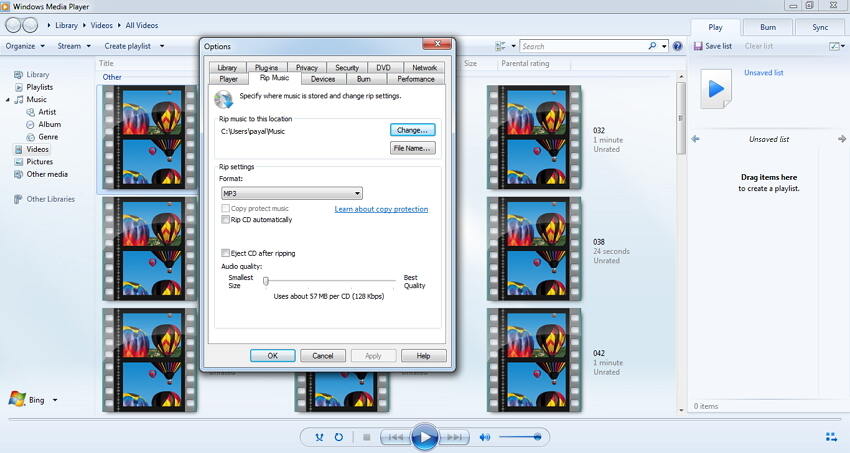
Windows Media Player supports converting video to MP3 and WAV, but can't support other audio formats. So if you want to convert video to other formats like M4A, AAC, AC3, Wondershare Free Video Converter proves to be a good audio converter for converting all types of videos to an array of audio formats. The process is super fast with less quality loss. Thus, it is absolutely a decent MP3 converter.
-
7. Is Wondershare Video Converter free? Is Any Video Converter free?
Wondershare UniConverter offers a free desktop version, but usage limits can apply compared with paid plans. Any Video Converter also offers a free tier, while its limits can vary by version. Check the current official plan details before converting large files or relying on advanced features.
-
8. What is the difference between the online and desktop video converter?
The online converter is designed for quick browser-based conversion without installing software. UniConverter Desktop is better suited to batch local files, broader format and codec controls, output presets, and repeated conversion workflows.
-
9. Can I batch convert multiple videos for free?
Batch conversion is available in UniConverter Desktop, while free-version limits can apply. Check the current Free vs. Paid comparison on this page before starting a large batch job.