

After upgrading your headphones, you begin searching for a reliable FLAC download source online. You want music that sounds exactly like the original studio recording, with no distortion or missing details. FLAC, which stands for Free Lossless Audio Codec, is a high-quality audio format that compresses files without losing any sound data. Unlike MP3 and other lossy formats, FLAC preserves every instrument layer, vocal nuance, and background detail perfectly.
Due to this superior quality, many users actively look for trusted FLAC download options. They want deeper bass, clearer highs, and a more immersive listening experience. A lossless music download also ensures long-term audio quality for archiving, collecting, or professional editing purposes. In this guide, we will explore the best FLAC music downloader tools that help you download lossless music free, safely, and efficiently, without compromising sound quality.
Note: We resolutely oppose all forms of copyright-infringing downloads. This tutorial is only for downloading materials that are allowed to save for offline use.

Download FLAC Audio in Batch
In this article
- Part 1. What Is FLAC and Why Choose Lossless Audio?
- Part 2. Best FLAC Music Downloader Software[Lossless Batch Downloading]
- Part 3. Sites to Download FLAC Music (Paid & Free)
- Part 4. Is It Legal to Download FLAC Music?
- Part 5. Common Problems When Downloading FLAC Files
- FAQs about FLAC Music Download
Part 1. What Is FLAC and Why Choose Lossless Audio?
Now that you understand why so many users search for reliable FLAC download options, it’s important to first understand the format itself. Before choosing any downloader, you should know what FLAC actually is and why lossless audio makes such a difference.
What Does FLAC Mean?
FLAC stands for Free Lossless Audio Codec. It is an open-source audio format designed to compress sound files without reducing their original quality. Unlike common formats such as MP3, FLAC preserves every detail of the recording while reducing file size for easier storage.
Codec: To understand FLAC better, it helps to define the term codec. A codec is a technology for encoding and decoding digital data. In audio, a codec compresses sound files to make them smaller and then decompresses them during playback so you can hear the music properly.
What is Compression Without Quality Loss?
FLAC uses lossless compression, meaning no sound data is permanently removed. When the file is played, the audio is restored exactly as it was originally recorded. That is why many audiophiles prefer a FLAC audio download for pure, high-fidelity listening and long-term music collection.
FLAC vs MP3: What’s the Difference?
Now that you understand what FLAC is and how it works, the next logical question is how it compares to MP3. The comparison table below clearly highlights how FLAC and MP3 differ in terms of different functions:
| Aspects | FLAC | MP3 |
| Compression Type | Lossless compression (no data removed) | Lossy compression (removes some audio data) |
| Bitrate | Variable; typically 700–1,100 kbps | Usually 128–320 kbps |
| Audio Quality | Original studio-quality sound | Slight to noticeable quality loss |
| File Size | Larger files due to full data retention | Smaller files due to data compression |
| Sound Detail | Preserves full dynamic range and subtle details | Reduces background details and depth |
| Editing Flexibility | Ideal for editing without quality degradation | Quality decreases further after re-editing |
Who Should Use FLAC Format?
If you’re considering a FLAC audio download, it’s important to know who will benefit most from this high-quality, lossless format. Here’s a breakdown of users who should consider choosing FLAC:
Audiophiles: Music lovers who want every note, beat, and vocal nuance exactly as the artist intended.
DJs and Music Creators: Professionals who need original, lossless tracks for mixing, sampling, or production without quality loss.
Users with High-End Audio Equipment: Those with premium headphones, speakers, or home audio systems that can reproduce the full spectrum of sound.
Archivists and Collectors: People who want to preserve music in its original quality for long-term storage.
Sound Engineers: Professionals who require precise audio for mastering or editing purposes.
Part 2. Best FLAC Music Downloader Software
When it comes to choosing the best FLAC music downloader for desktop, UniConverter is a powerful and user‑friendly option. It allows you to download music from supported platforms using direct URLs and convert files into high-quality FLAC format. Before using this method, you must first have the music URLs ready, as the software works by analyzing and processing the links you provide.
UniConverter supports fast processing speeds, making it ideal for users who want instant downloads. Beyond downloading, it also includes built‑in audio editing features for users who want to enhance the audio or remove any unwanted parts. For desktop users who want more control over quality and file management, this tool offers a practical and efficient solution.
Download FLAC Audio in Batch
Key Features Offered by UniConverter
- Batch Download Support: Download multiple audio files at once without repeating the process manually. This saves time when building a large FLAC library.
- Multiple Audio Quality Options: Choose from different quality settings, including high-quality and lossless formats. This gives you control over file size and sound clarity.
- Built-In Media Player: Preview downloaded files directly within the software. You can quickly check audio quality without switching to another app.
- Audio Cutter: Trim unwanted sections from tracks with a simple editing tool. This is useful for creating ringtones or short clips.
Comprehensive Steps for Downloading FLAC Audio With UniConverter
Use Case: Imagine you’ve found a full album online and want every track saved in high-quality FLAC for offline listening. Instead of downloading songs one by one, you can streamline everything using a single workflow. Below are the comprehensive steps for downloading FLAC audio with UniConverter, including how to efficiently handle full FLAC album downloads:
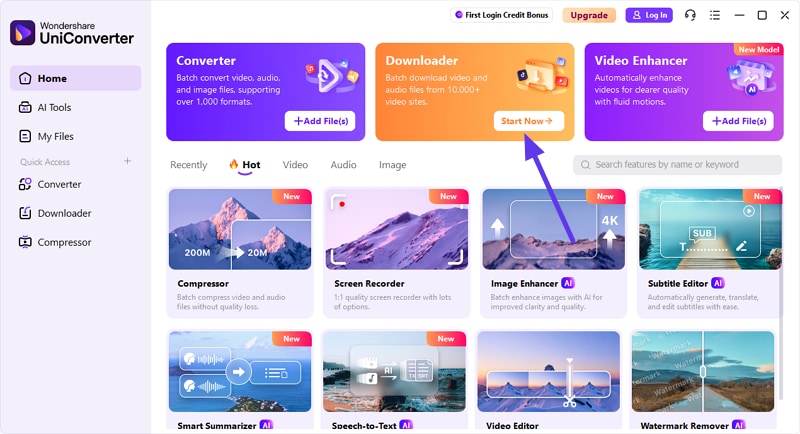
Step 1. Access UniConverter Downloader
To begin, launch UniConverter on your device and select the “Downloader” tab from the homepage.
Step 2. Paste Link Select Audio
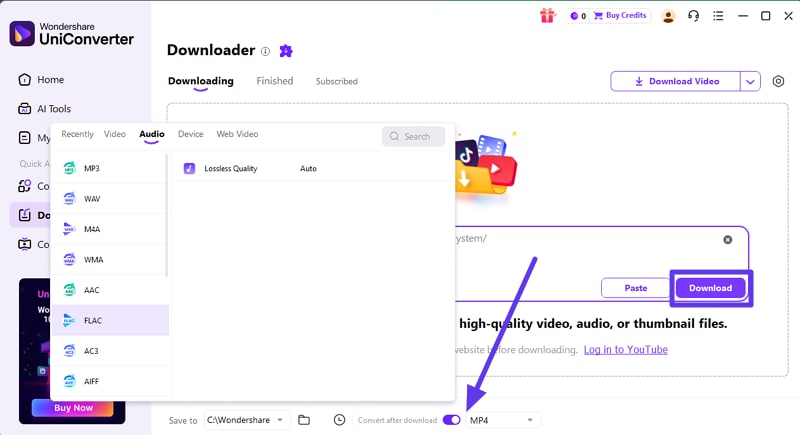
In the following interface, paste the links to the audio files and select the format as “FLAC” by expanding the drop-down menu located at the bottom. Now select the destination folder and press the "Download" button to execute the process.
Step 3. Review Downloaded Audio
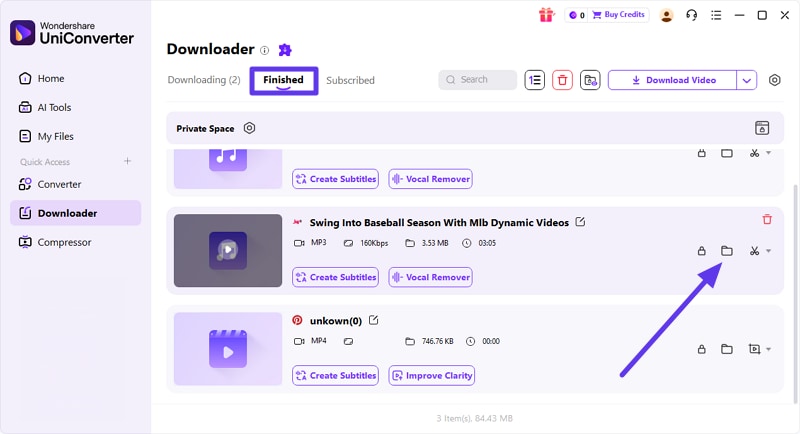
Once the download is completed, review the audio files within the “Finished” tab. Access the files in the device storage by clicking on the folder icon.
Bonus: Convert FLAC to MP3 Without Losing Metadata
Sometimes conversion becomes necessary when you want smaller file sizes or better compatibility with older devices. While FLAC delivers superior quality, MP3 files are smaller and more widely supported across different platforms.
With Wondershare UniConverter, you can easily convert FLAC files to MP3 without losing important metadata. The software preserves ID3 tags such as song title, artist name, album artwork, genre, and track number during conversion. This ensures your music library remains organized and displays correctly in any media player.
Steps For Converting FLAC to MP3 With UniConverter
As discussed, you can convert FLAC audio files into MP3 with UniConverter while preserving the quality. To learn how to convert this audio format, read the steps provided below:
Step 1. Acquire the Converter Function
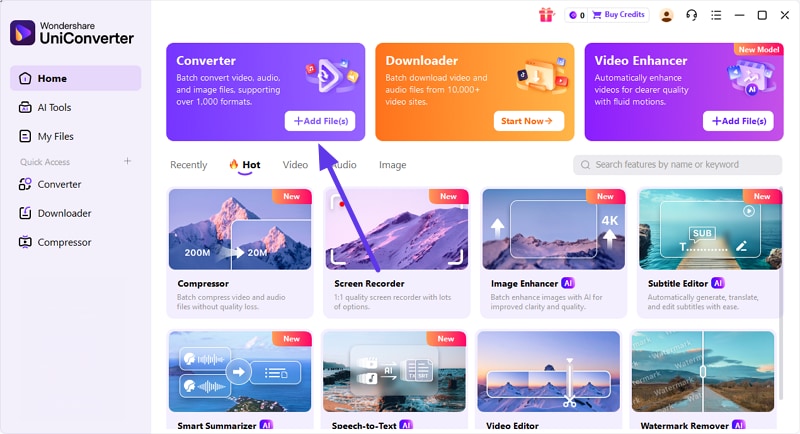
After launching the tool on your device, choose the “Converter” option from the homepage. Now, import your FLAC audio by pressing the “Add Files” button.
Step 2. Choose Format Press Convert
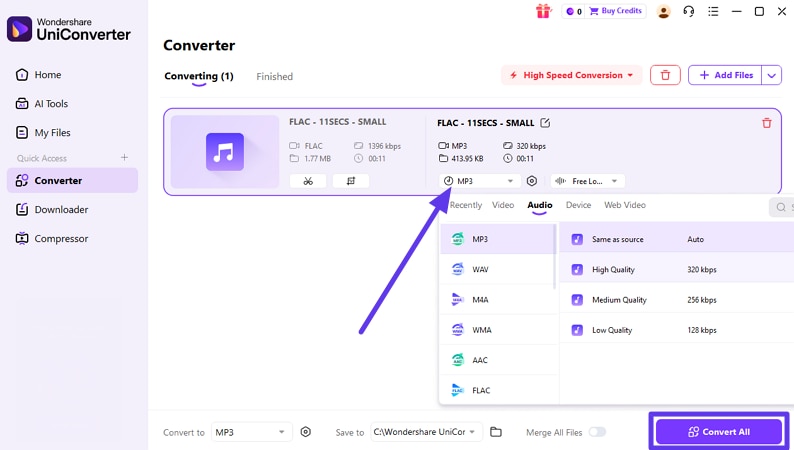
Next, select the format by expanding the drop-down menu and choosing "MP3." Now select the quality and press the "Convert All" button to begin the process.
Step 3. Access Converted File
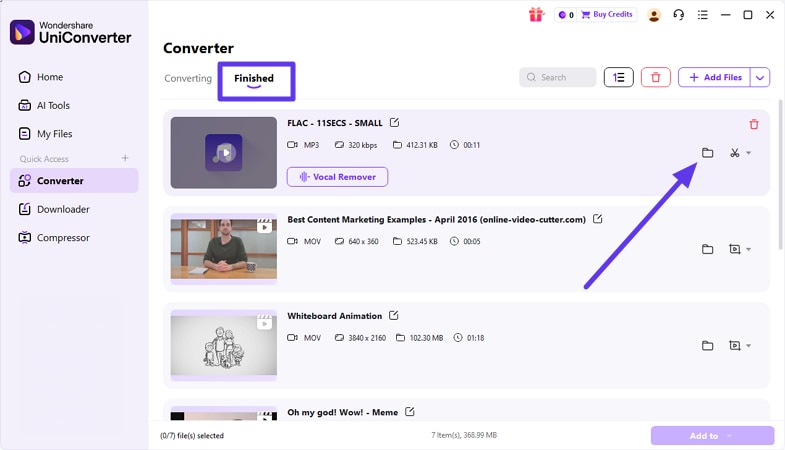
Once the files are converted, access them within the “Finished” tab and click the folder icon to locate them within the device.
Part 3. Sites to Download FLAC Music (Paid & Free)
Many users search online without realizing that not every source is authorized or secure. If you’re wondering where to find FLAC files without risking malware, refer to the following section:
Quick Comparison Between FALC Music Downloaders Mentioned Later:
Here’s a clear comparison of the major platforms where you can safely download FLAC files and other lossless music, including free archives and public‑domain sources:
| Platform | Pricing | Catalog Size | FLAC Support | Region Availability |
| HDtracks | $14 - $28/track | Medium-large, hi-res focus | Yes (hi-res FLAC) | Global |
| Qobuz | Studio: $10.83/month Sublime: $14.99/month |
100 million+ tracks | Yes (CD & Hi-Res FLAC) | Global |
| Bandcamp | Pro for Artist: $10/month Label Accounts: $20/month |
More than 50 million tracks | Yes | Global |
| 7digital | Starting from $0.99/track | Over 30 million | Yes (16/24-bit FLAC) | Limited to countries such as the UK, Canada, New Zealand, and more. |
| Internet Archive | Free | Millions of audio items | Yes | Worldwide |
| Jamendo | Free | 600000+ songs | Yes | Worldwide |
| Public Domain Music | Free | Varies | Yes | Usually Worldwide |
Where Can I Get FLAC Files Safely?
Before you start downloading FLAC files, it’s crucial to know how to get them safely. Following the simple precautions mentioned below can help you enjoy high-quality, lossless music without risking your device:
- Check Licensing: Always confirm that the music is legally available for download. Look for clear copyright information or Creative Commons details on the website.
- Avoid Suspicious Pop-Ups: Stay away from sites filled with aggressive ads or automatic redirects. These can lead to malware or fake download buttons.
- Verify File Authenticity: Make sure the file format and size match standard FLAC specifications. You can also scan the file with antivirus software before opening it.
- Review Website Reputation: Search for user reviews or community feedback about the platform. A trusted website usually has consistent positive ratings and transparency.
Download FLAC Audio in Batch
Paid FLAC Music Download Sites
Below, we’ll explore some of the most reliable paid FLAC music download sites that deliver high-quality audio:
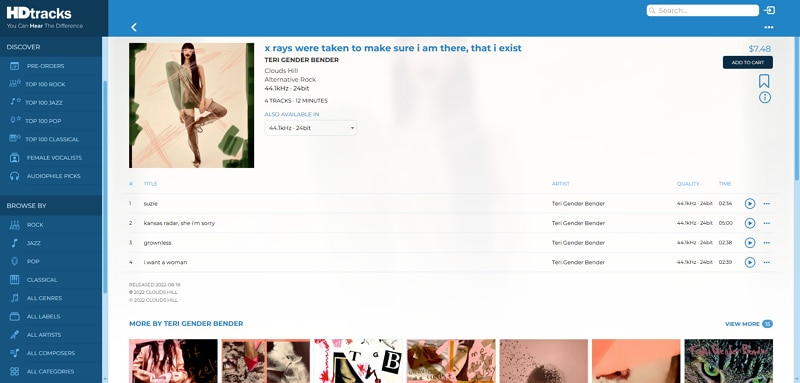
1. HDtracks
HDtracks is an online music store specializing in high‑resolution audio downloads for audiophiles and music lovers. It offers lossless and high‑definition formats like FLAC and ALAC from major and independent artists. Unlike free download sites, HDtracks provides legally licensed music with detailed quality options, letting you purchase and download tracks with superior sound fidelity.
Key Features
- Users can search for music through various discovery options, such as pre-orders, best-sellers, and new releases.
- Songs are categorized into different genres such as rock, jazz, pop, etc.
- Different sizes and bitrates are available for a single track.
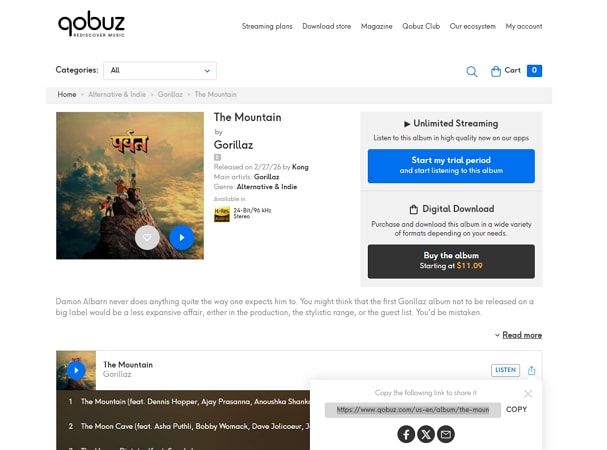
2. Qobuz
When it comes to premium lossless streaming and downloads, Qobuz stands out as a top-tier platform for audiophiles. Unlike many mainstream services, Qobuz focuses heavily on high-resolution audio, offering downloads of FLAC files in CD quality and even up to 24-bit. Moreover, the platform allows users to purchase and permanently download albums or individual tracks in true lossless quality.
Key Features
- Users get unlimited streaming by simply signing up for the account.
- You can share the selected track to different platforms by simply copying and pasting the link.
- It offers mobile apps for iOS and Android that let you download FLAC files to your phone.
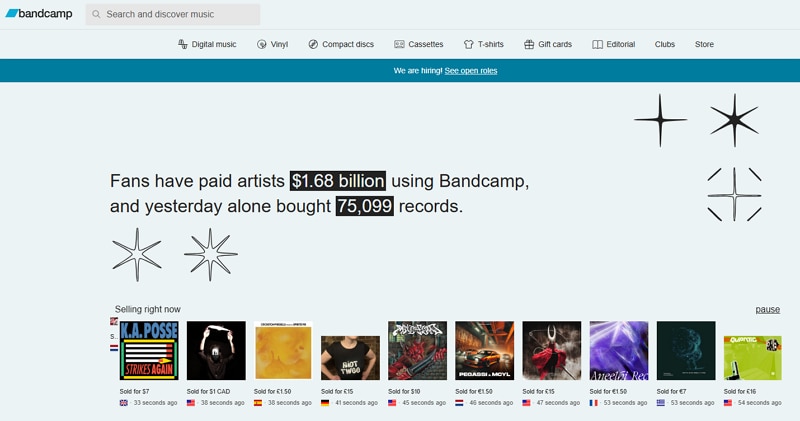
3. Bandcamp
Built for independent artists and dedicated fans, Bandcamp is a platform where musicians sell their music directly to listeners. You can stream tracks for free and purchase downloads in multiple formats, including lossless format options like FLAC. It’s widely used for supporting artists while accessing high-quality, DRM-free music files.

Key Features
- Download is available in 16-bit/44.1kHz. for people who prefer this audio quality.
- Send the FLAC audio you bought to someone through this platform.
- Embed a FLAC audio album with other tracks to build our library.
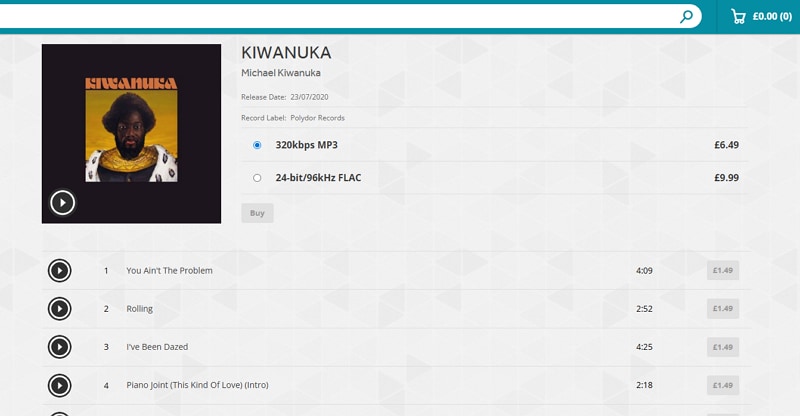
4. 7digital
7digital UK is a digital music download store where you can purchase and own tracks rather than stream them. The service sells songs in common formats like MP3 and offers FLAC songs download options in 16‑bit and 24‑bit FLAC. This gives you access to lossless audio files when available. As it’s a paid store, downloads are DRM‑free and legally licensed.
Key Features
- Users can preview and listen to the FLAC audio before buying or adding it to the cart.
- Songs are organized category-wise, making it easier for you to search.
- The search bar within the interface lets you instantly search for specific FLAC audio.
Free FLAC Music Download Options
While paid platforms offer guaranteed quality and artist support, some listeners still look for cost‑free alternatives. Below, we’ll look at free FLAC music download options that provide access to lossless tracks:
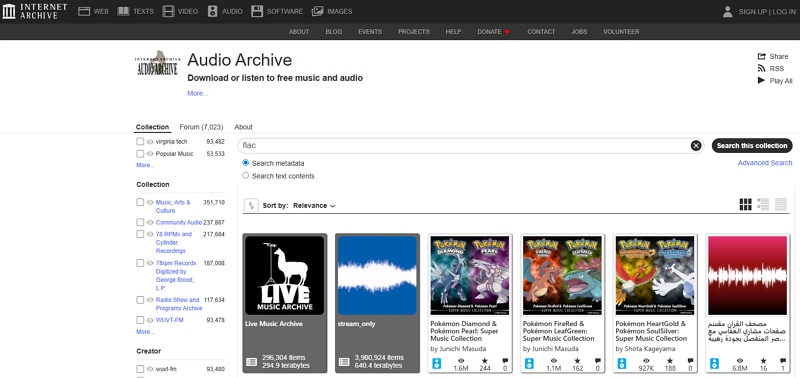
5. Internet Archive
One of the best places to download FLAC files for free and legally is the Internet Archive’s audio collection. It’s a huge nonprofit digital library with music, live recordings, radio shows, and more. Due to the Archive's focus on public domain and Creative Commons‑licensed content, you can often find unique or older recordings that aren’t hosted elsewhere.
Key Features
- Supports multiple audio formats for download, including MP3 and lossless files when available.
- Lets users stream audio directly from the site without downloading first.
- Features community‑uploaded recordings and historical audio archives.
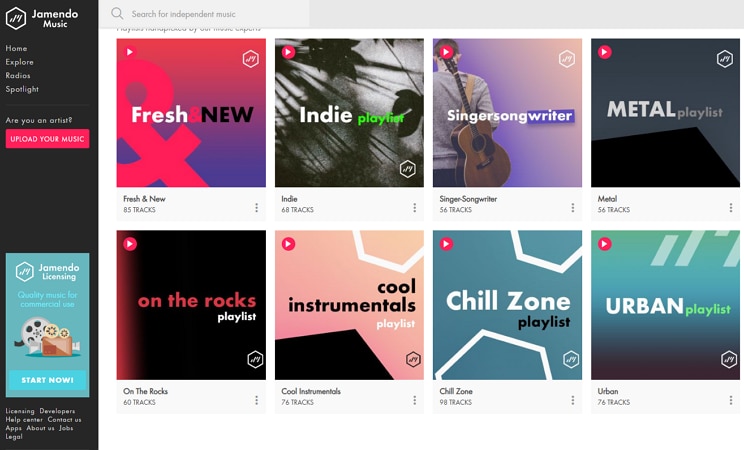
6. Jamendo
Jamendo is a popular platform for discovering independent artists and streaming legal music worldwide. It allows users to download tracks for personal use, often under Creative Commons licenses. While it may not always be the best FLAC music downloader for high-resolution needs, it remains a safe and legitimate option for expanding your collection. The platform focuses on indie music, making it ideal for exploring new and emerging talent.
Key Features
- Tracks can be downloaded for personal listening without copyright concerns.
- Commercial licensing options are offered for business and creative projects.
- Curated playlists help users discover trending and themed music easily.
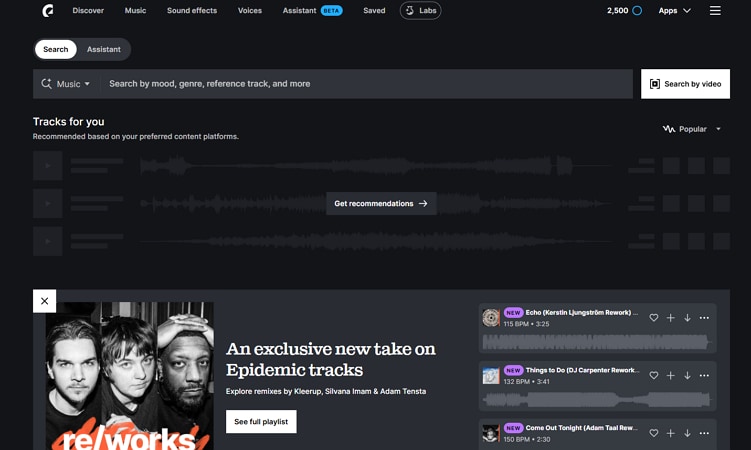
7. Public domain music
Public domain music refers to works that are no longer protected by copyright. Works usually enter the public domain when the copyright term expires. This makes it a great source for free, legal music you can enjoy or reuse without restriction when you download FLAC files. Epidemic Sound is one such public domain music library provider that lets you save files to their devices without any cost.
Key Features
- Advanced search filters to find tracks by genre, mood, or tempo.
- Some tracks provide separate stems for vocals or instruments.
- Safe integration with platforms like YouTube to avoid copyright claims.
Part 4. Is It Legal to Download FLAC Music?
Before you start building your lossless music library, it’s important to consider copyright and licensing issues. Many users wonder whether it is legal to download FLAC music from various websites, especially free sources. Understanding the rules can help you enjoy high-quality audio without risking legal trouble.
Copyright Rules Explained Simply
Understanding copyright is key when dealing with FLAC music. Not all downloads are legal, and knowing the difference helps you stay safe and ethical.
Legal vs. Illegal Downloads
Downloading music from authorized stores, public domain sites, or platforms offering Creative Commons licenses is legal. Conversely, downloading copyrighted tracks from unauthorized websites or torrents is illegal and can result in fines or other legal consequences.
Streaming vs. Downloading
Streaming music from licensed platforms is generally legal because the service pays royalties to artists. Downloading, however, transfers a copy to your device, so it must come from a source that has the right to distribute it legally.
How to Avoid Copyright Issues
Before proceeding with any FLAC songs download, make sure you understand how to stay within copyright laws. Taking these precautionary steps can protect you from legal risks and ensure artists are properly credited and compensated:
- Use Licensed Platforms: Always download music from websites that clearly state they have distribution rights. Legal platforms ensure artists receive royalties for their work.
- Check Usage Rights: Read the terms of use carefully before downloading any track. Some music may be free for personal use but restricted for commercial projects.
- Avoid Unauthorized Torrents: Torrent sites often share copyrighted material without permission. Downloading from such sources can lead to legal consequences and security risks.
- Understand Creative Commons Rules: Some tracks are shared under Creative Commons licenses with specific conditions. Make sure you follow attribution or non-commercial requirements if mentioned.
- Verify Copyright Status: Confirm whether the music is public domain or still protected by copyright. Copyrighted content requires proper authorization before downloading.
Part 5. Common Problems When Downloading FLAC Files
While exploring different free FLAC music sites, you may run into a few unexpected issues. A few of the common problems are addressed in the section below:
Why Is My FLAC File Not Playing?
- Unsupported Player: Not all media players support FLAC playback. Make sure your player is compatible with lossless audio formats.
- Codec Issues: Missing or outdated codecs can prevent FLAC files from playing correctly. Installing the proper codec pack usually resolves this.
- Corrupted Download: An incomplete or interrupted download can make the file unreadable. Try re-downloading the track from a reliable source.
- File Extension Errors: Sometimes the file extension may be incorrect or changed. Ensure the file ends with “.flac” to be recognized by your player.
Why Are FLAC Files So Large?
- Lossless Compression: FLAC uses a lossless format, which compresses audio without removing any original sound data. Because no information is discarded, the file retains full studio-quality detail, making it larger than MP3 or other lossy formats.
- Storage Recommendations: Since FLAC files take more space, it’s best to store them on devices with higher storage capacity or external drives. Using SSDs or cloud backups can help manage your growing lossless music library.
- Longer Tracks Take More Space: Songs with extended durations or live recordings naturally result in larger FLAC files. Albums with multiple long tracks can quickly consume several gigabytes.
- High Bitrate and Sample Rate: Files encoded at higher bitrates or sample rates (like 24-bit/192 kHz) are significantly larger. This preserves audio detail but increases storage requirements.
How to Fix Corrupted FLAC Downloads?
- Re-download the File: Delete the corrupted FLAC file and download it again from the original source. This helps ensure the file is complete and avoids errors caused by interrupted transfers.
- Verify Checksum: Compare the file’s checksum (MD5 or SHA) with the value provided by the website. Matching checksums confirm that the download is intact and unaltered.
- Check Your Media Player Compatibility: Ensure your audio player supports FLAC and high-resolution audio playback. Using outdated or incompatible players can cause errors when opening large or high-quality files.
- Update or Reinstall Audio Codecs: Install the latest audio codecs or update your media player software. This ensures proper decoding and prevents playback issues with FLAC files.
Conclusion
To wrap it up, this article provided a detailed review of choosing the right FLAC music downloader for high-quality listening. Lossless music downloads preserve every detail of the original recording and provide an overall immersive sound experience. While exploring different platforms, always prioritize safe and legal sources to avoid copyright issues and security risks.
If you prefer a simple and controlled workflow, using a reliable desktop tool can make the process easier. UniConverter is a practical option. This is useful when you already have music URLs ready for download and conversion. Its straightforward interface and batch processing features simplify the entire process. Start building your lossless library today with confidence and clarity.

