

If you are looking for a reliable way to download Mixcloud to MP3 for offline listening, this guide covers every working method — including online Mixcloud downloaders, 320kbps extraction tools, browser extensions, and softwares like UniConverter.
We also explain what quality you can expect from Mixcloud and how to legally save tracks for personal use.
Disclaimer: Downloading from Mixcloud should only be done for personal use and when the creator allows offline saving. We do not support copyright-infringing downloads.

Mixcloud Downloader
In this article
- Why People Want to Download Mixcloud as MP3
- Download Mixcloud to MP3 with Premium
- Download MP3 From Mixcloud on Windows/Mac
- Use an Online Mixcloud Downloader to MP3 (No Installation Needed)
- Download Mixcloud to MP3 with Browser Extension
- A Quick Comparison of Mixcloud Downloader
- Mixcloud to MP3 320kbps: What’s Possible?
- Is It Legal to Download from Mixcloud?
- FAQs About Mixcloud Downloader
Quick Picks: Best Mixcloud to MP3 Tools
Some users just want a fast one-track download, while others need more stable desktop handling, better quality control, or batch downloads.
Part 1. Why People Want to Download Mixcloud as MP3
Before we explore the methods, we’ll find out why one might need to download Mixcloud to MP3 below:
- Offline Availability: Users can enjoy their favorite songs without needing an internet connection in this lightweight and convenient format. It is an affordable option for listening to music in areas with unreliable or expensive data.
- For Personal Archives: You can make a personal library of mixes and shows with constant access to the content even after removal from Mixcloud. The MP3 support on various platforms ensures that your archive is accessible across devices and software.
- Device Compatibility: Car stereos, MP3 players, and most smartphones recognize this format, enabling smooth play on them and eliminating the restriction on the app. When you're not restricted to the Mixcloud app or website, it widens the use and accessibility across platforms.
- Custom Editing for Playlists: Various audio editing software can be used for trimming, merging, or rearranging the playlists. The audio quality is also preserved during the editing and transfer process, and your customized mixes will continue to sound great.
- Uninterrupted and Ad-free Listening: While you listen to downloaded songs, the annoying hurdle of ads and slow connectivity issues can be avoided entirely. You also gain the freedom to enjoy music anytime, even in offline or low-signal environments.
Part 2. Download Mixcloud to MP3 with Premium
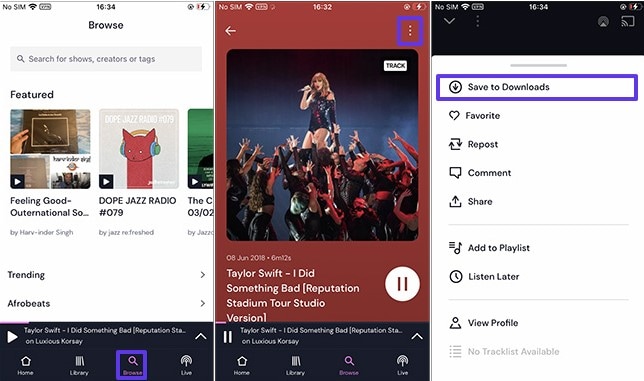
While you look for Mixcloud to MP3 downloader tools, you can use the its premium version if you have active Mixcloud Premium or Creator subscription in app. You need to simply download the Mixcloud mobile app and log in with the credentials of your paid subscription to download the MP3 tracks. This can be done through mentioned steps after which your downloaded audio will appear in the “Downloads” section of your library.
Instructions. Go to the Mixcloud app and log in with your credentials. Find your favorite songs by typing in the search bar in the “Browse” section and pressing the “Enter” key. Open the song and click on the “Three dots” at the top, and select the “Save to Downloads” option in the pop-up. The downloaded video can be accessed in the app later on.
Part 3. Download MP3 From Mixcloud on Windows/Mac
Apart from direct downloads, there are other Mixcloud to MP3 downloader tools that you can use, which are given below:
1. UniConverter
While searching for a reliable Mixcloud downloader for MP3 Mixcloud tracks, Wondershare UniConverter can be a good choice. Its Downloader feature allows you to download Mixcloud to MP3 320kbps, along with WAV and other format options. Besides, it also supports SoundCloud to MP3, Youtube to MP3 conversion, and more. By using its edit feature, you can further trim audio and remove unwanted parts after recording.
What set this tool apart from other option is that it is more than a simple downloader, offering you Converter, Compressor, Merger, and Cutter tools to further tailor the MP3 files. Users can merge the files while picking the desired format. If the audio file is bigger, its Compressor can reduce the file size up to 10 times the original size.
Mixcloud Downloader
A Step-by-Step Guide on Extracting Mixcloud to MP3 with UniConverter
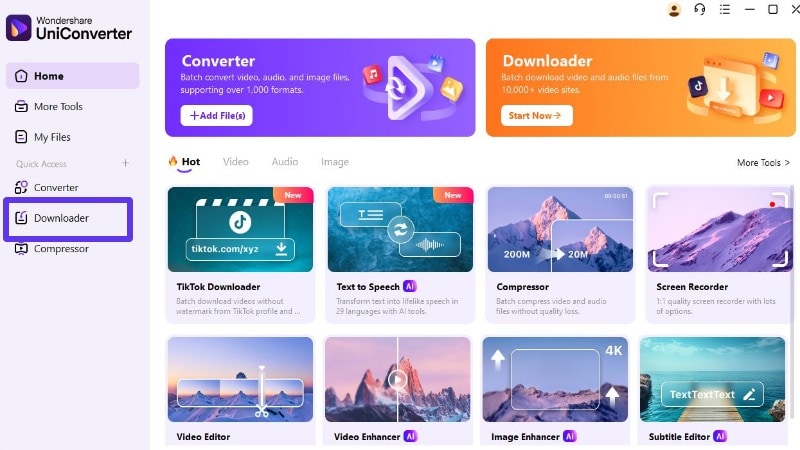
Step 1. Access UniConverter and Select the Downloader
Once you have launched the app, find the “Downloader” in the home page.
Step 2. Copy and paste Mixcloud link
You will see the Add URL space in UniConverter. Paste the copied Mixcloud URL into the provided field.
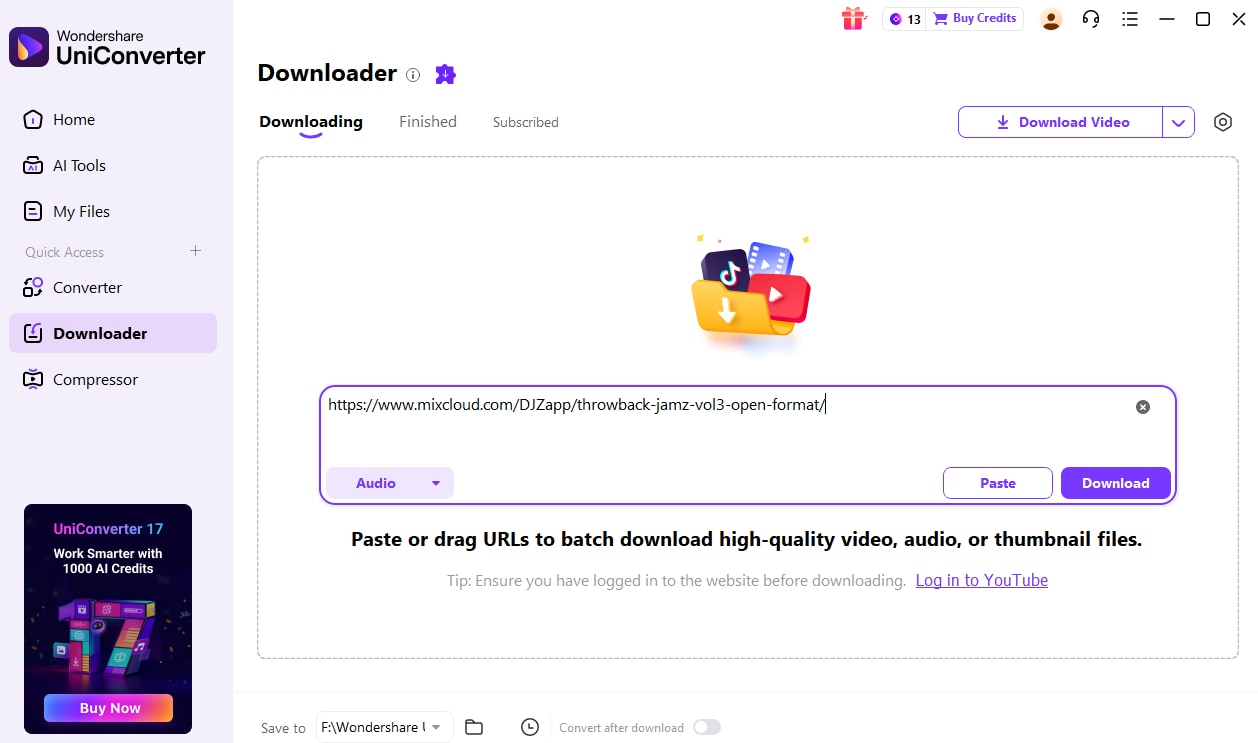
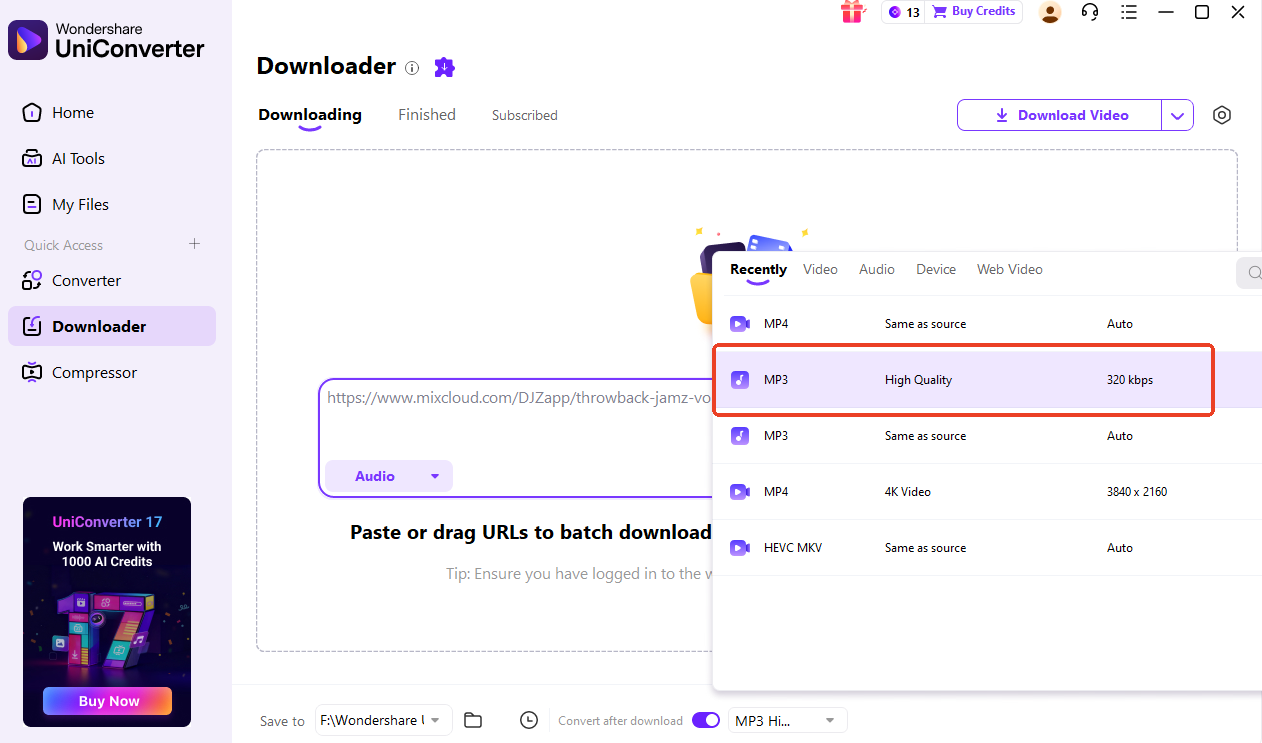
Step 3. Set Format and Start Downloading
Enable "Convert after download" mode and choose the downloaded formats and quality option. Tap the Download button to start the audio download and extraction process. Then, wait. It usually takes a moment to download Mixcloud MP3.
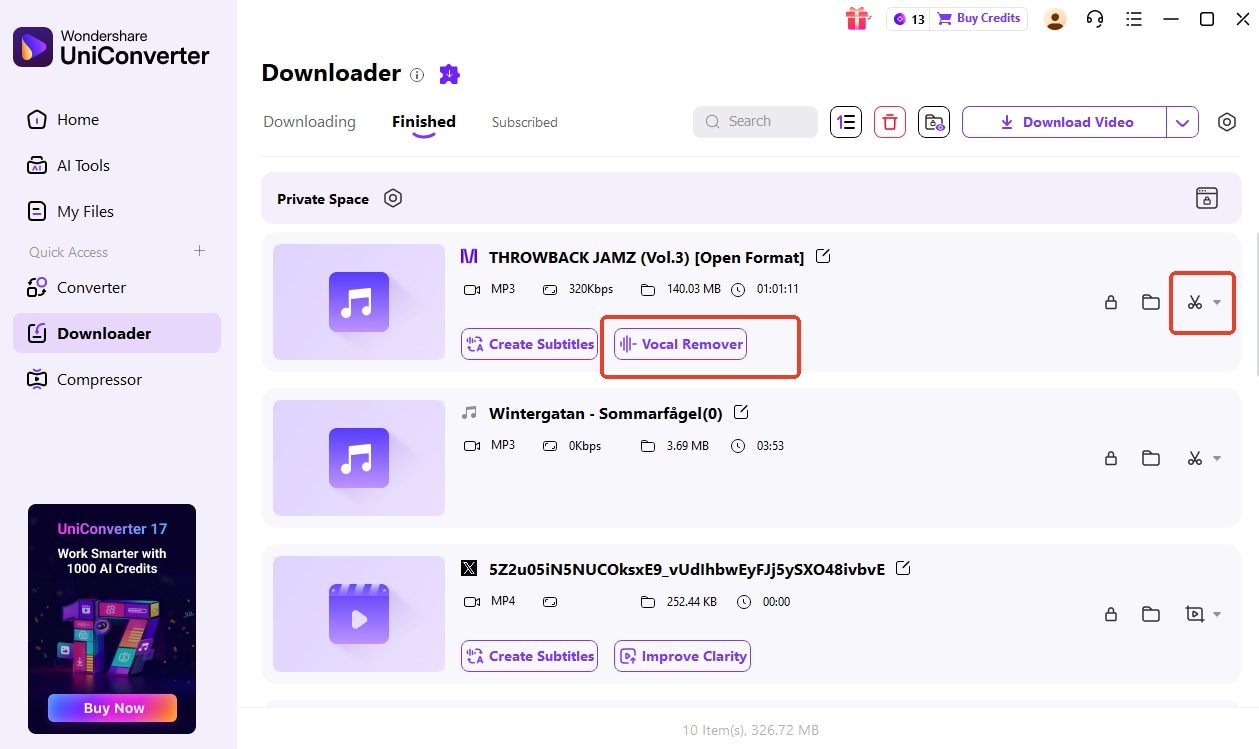
Step 4. Access the MP3 File or Edit Further
Once your audio is downloaded, access it by clicking on the “Folder” icon. Alternatively, further edit the video file by pressing the “Scissor” icon, or seperate vocal from background music with Vocal Remover feature.
2. Allavsoft
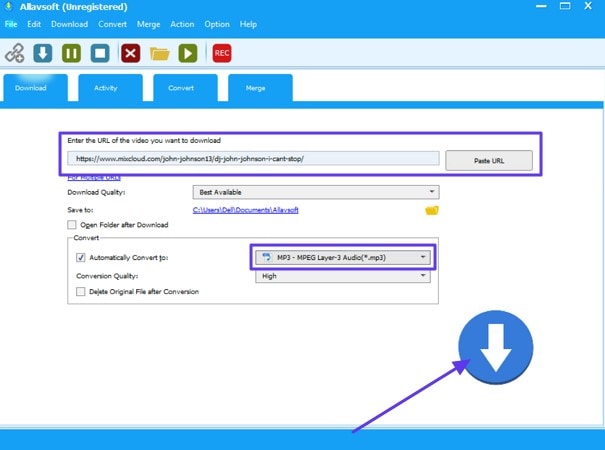
As a specialized video and music downloader, this tool supports over 1000 websites, including Mixcloud. It also features a built-in preview function for viewing files before saving them. You can find support for various other formats like FLAC, WAV, and AAC in the process. Once you have decided to use this Mixcloud to MP3 downloader, follow these steps to get fast results:
Instructions. Open the Allavsoft app and add the Mixcloud music URL in the “Paste URL” bar. Check the “Automatically Convert to” box and click on the “General Audio” option from the menu before selecting the “MP3” option from the following menu. Finally, hit the “Download” icon to save the converted Mixcloud to an MP3 file.
Part 4. Use an Online Mixcloud Downloader to MP3 (No Installation Needed)
Once you have explored the Windows/Mac apps, go through the online free Mixcloud downloader tools:
1. MixCloud MP3
MixCloud MP3 is an online tool designed to generate MP3 audio files of podcasts and soundtracks. While supporting various audio qualities, this program allows an instant download simply by pasting the Mixcloud audio link. It also preserves important metadata within the file, including the artist’s name and the titles of the tracks. Learn to download your favorite Mixcloud to MP3 by these simple and easy steps:
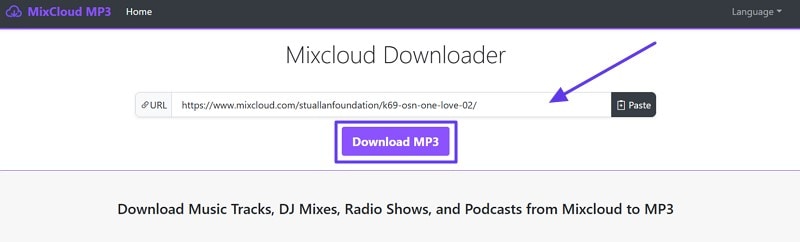
Step 1. On the Mixcloud Downloader page, paste the URL in the “MixCloud Track Link” search bar and click on the “Download MP3” button.
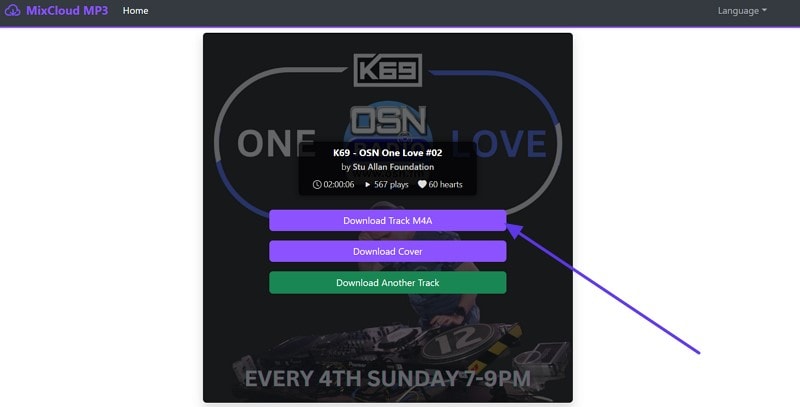
Step 2. On the next screen, choose the “Track M4A” to save the audio track to your device.
2. Mixcloud Downloader.net
In your search for a reliable Mixcloud to MP3 downloader, try this solution with a batch downloading option. It enables a straightforward workflow and gives the option to share your file on Twitter or Facebook as well. Downloads are supported in both mobile and web browsers, expanding their overall accessibility and reach. Once you’re ready to use this easy online tool, follow the given guide to carry out the download process:
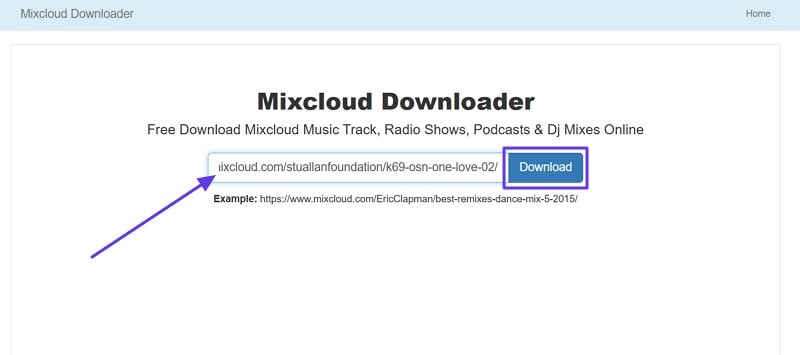
Step 1. On the tool page, paste the link in the “Paste the URL link here” bar and press the “Download” button.
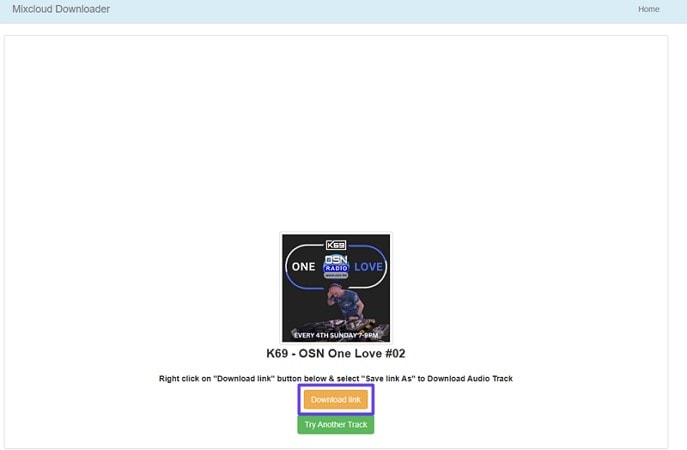
Step 2. Next, click on the “Download Link” button to complete the download process.
3. Savelink.info
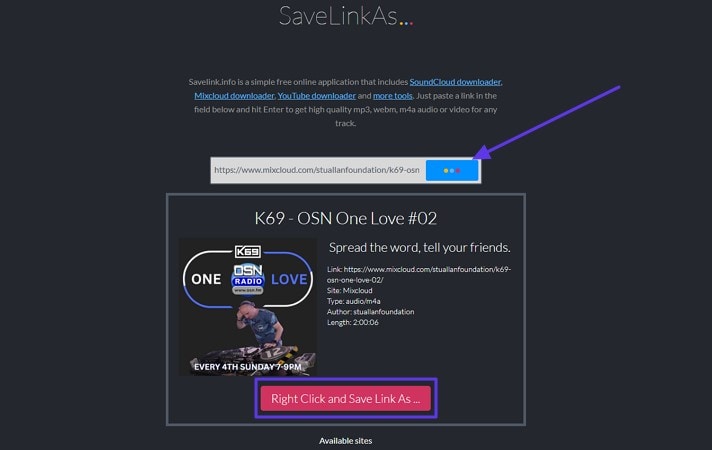
The easiest platform to download Mixcloud as MP3 is Savelink.info with a section dedicated to Mixcloud. It lets you save links for later reading and organization to avoid browser overload. With special features like data encryption and protection from third-party interference, it is one of the secure platforms for retrieving online content. Here’s how you can save your favorite tracks and shows using this platform:
Instructions. Paste the URL in the search bar and click on the “Three Dots” icon to proceed. After that, click on the “Right Click and Save Link As” to complete the download process.
Part 5. Download Mixcloud to MP3 with Browser Extension
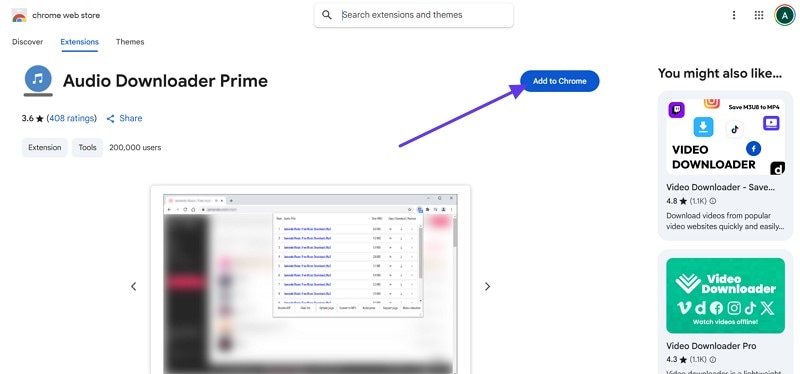
After having looked through various tools, consider using a browser extension like Audio Downloader Prime to download the Mixcloud tracks. It can be a lightweight tool for easier downloads without visiting a third-party website. This free extension is available for Chrome and Firefox, directly detecting and listing audio streams on any page. Now that you know what it offers, here’s how to use it to download MP3 from Mixcloud:
Step 1. Go to the landing page and click on the “Add to Chrome” button to add the extension to the browser.
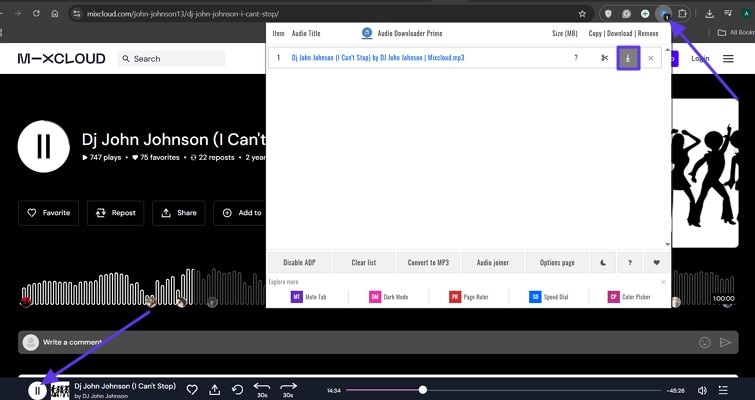
Step 2. Visit the Mixcloud site after adding the extension, and it will display all available tracks that can be downloaded. You can download your desired soundtrack with the “Download” icon within the extension window.
A Quick Comparison of Mixcloud Downloader
How We Tested Mixcloud to MP3 Downloaders
For this guide, we evaluated Mixcloud downloaders based on audio quality, bitrate options, download reliability, editing flexibility, and how practical each method is for offline listening and personal audio management.
Audio quality
We checked whether each downloader preserves usable sound quality and supports higher-quality exports such as 320kbps when available.
Format & bitrate options
We compared MP3 output choices, additional audio formats, and whether users have enough control over final file settings.
Download stability
We reviewed how consistently each tool handles Mixcloud links, completes downloads, and avoids broken or delayed extraction.
Workflow value
We also considered batch support, trimming or conversion extras, and whether the downloader works well for repeat-use audio workflows.
This page gives extra weight to stable extraction and usable audio quality, since users downloading from Mixcloud usually care about both reliable saving and practical playback quality.
| Tool | Platforms | Pricing | Batch Download | Max Output Quality | Editing Tools | Speed & Stability |
| UniConverter | Windows/Mac | Freemium | Up to 320kbps MP3 | Stable & Fast | ||
| Allavsoft | Windows/Mac | Paid | Up to 320kbps | Moderate stability | ||
| MixCloud MP3 | Web | Free | 128kbps–320kbps (inconsistent) | Depends on server load | ||
| MixcloudDownloader.net | Web | Free | 128kbps | Good but not always reliable | ||
| Savelink.info | Web | Free | 128kbps | Slow, ad-heavy | ||
| Audio Downloader Prime | Chrome/Firefox | Free | Varies (depends on stream) | Fast detection but inconsistent | ||
| Mixcloud Premium (official) | iOS/Android | Subscription | App-quality only (no MP3 export) | Very stable, but limited |
Mixcloud Downloader
Part 6. Mixcloud to MP3 320kbps: What's Possible?
Many users search for a way to download Mixcloud to MP3 at 320kbps, but it’s important to understand how Mixcloud handles audio quality. Most Mixcloud streams are delivered at around 128kbps MP3, and even when a creator uploads a higher-quality file, Mixcloud may still recompress it during playback.
This means that tools claiming to provide “Mixcloud MP3 320kbps” often upscale the audio rather than deliver true 320kbps quality. You can still save recordings at 320kbps using a screen recorder or audio recorder, but the actual sound quality depends on the original Mixcloud stream. If the source is 128kbps, increasing the bitrate will not improve clarity.
Part 7. Is It Legal to Download from Mixcloud?
The legality of downloading Mixcloud content depends on how you use the audio and whether the creator has granted permission. Mixcloud is primarily a streaming platform, and most DJ sets and podcasts are licensed for online playback only. This means that downloading or converting Mixcloud to MP3 without authorization may violate copyright laws in certain regions.
To stay safe, always use downloads for personal offline listening and respect the rights of artists, DJs, and content owners. If a creator enables offline listening through Mixcloud Premium, you can legally use that feature. However, third-party Mixcloud downloader tools should only be used when you are allowed to save the content.
Conclusion
To conclude, downloading Mixcloud to MP3 can be essential for enjoying your favorite DJ sets or podcasts at times. We have explored various ways to download Mixcloud as MP3 using different software and online tools. Among all the tools explored, we recommend using Wondershare UniConverter, which can save your Mixcloud track in MP3 format for later use.

