
If you're looking for how to separate vocals from a song for karaoke, remixes, or clearer voice edits, you're not alone. Today’s tools make it easier than ever to split voice from music without losing sound quality. Whether you're on desktop, mobile, or using browser-based tools, learning how to separate music from vocals is an essential skill for content creators, podcasters, and DJs alike.
This guide shows how to remove voice from a song in Audacity, extract vocals online, and compare tools that offer precise vocal isolation. Let's break down how to remove voice in Audacity and more.
In this article
Part 1. How to Batch Remove Voices from Audio on Desktop
When you're working with large amounts of audio files and need to batch remove vocals, desktop tools offer both speed and precision. One of the most recommended options is UniConverter Vocal Remover, an AI-powered feature designed to separate vocals from background music quickly and accurately. Whether you're preparing karaoke tracks or podcast background audio, this tool streamlines the entire process without compromising audio quality.
Step-by-Step Guide to Use UniConverter Vocal Remover:
Step 1: Launch UniConverter and Navigate to Vocal Remover
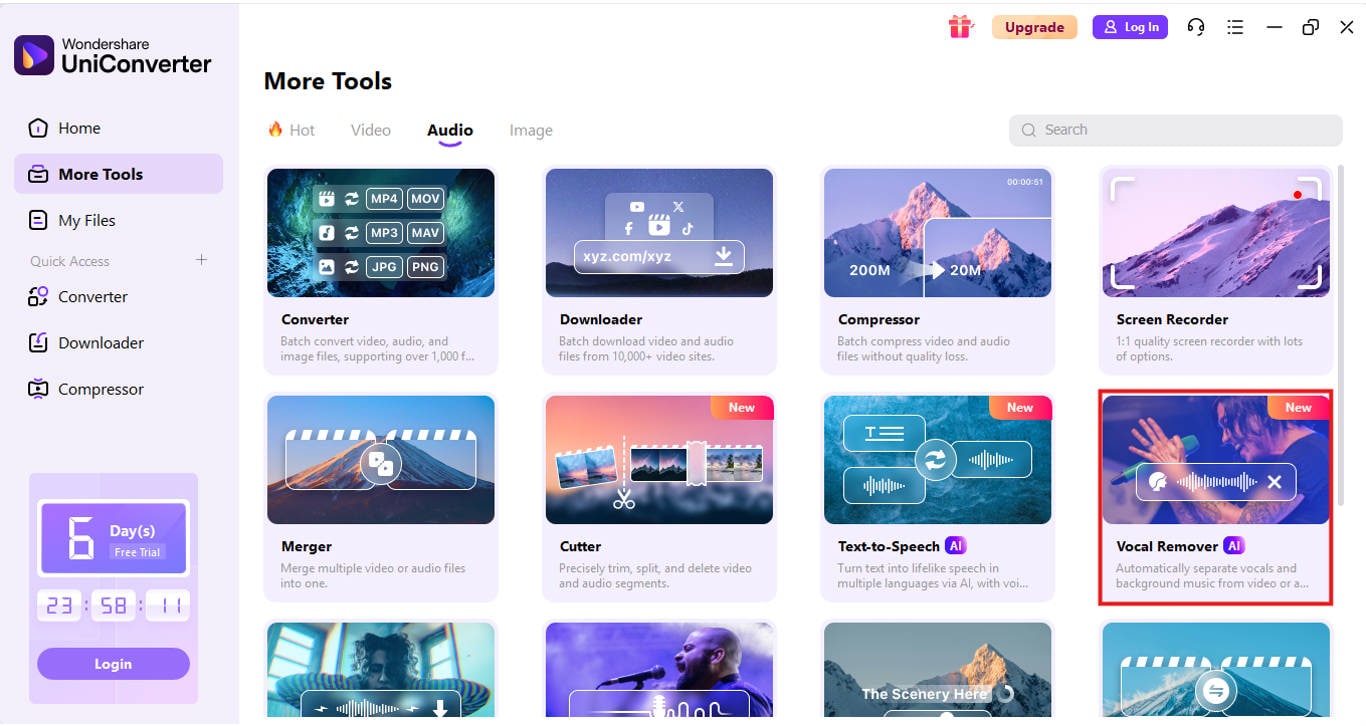
After installing and launching UniConverter, head to the More tools tab on the left panel. Click on Vocal Remover to open the vocal isolation workspace.
Step 2: Upload Your Audio Files
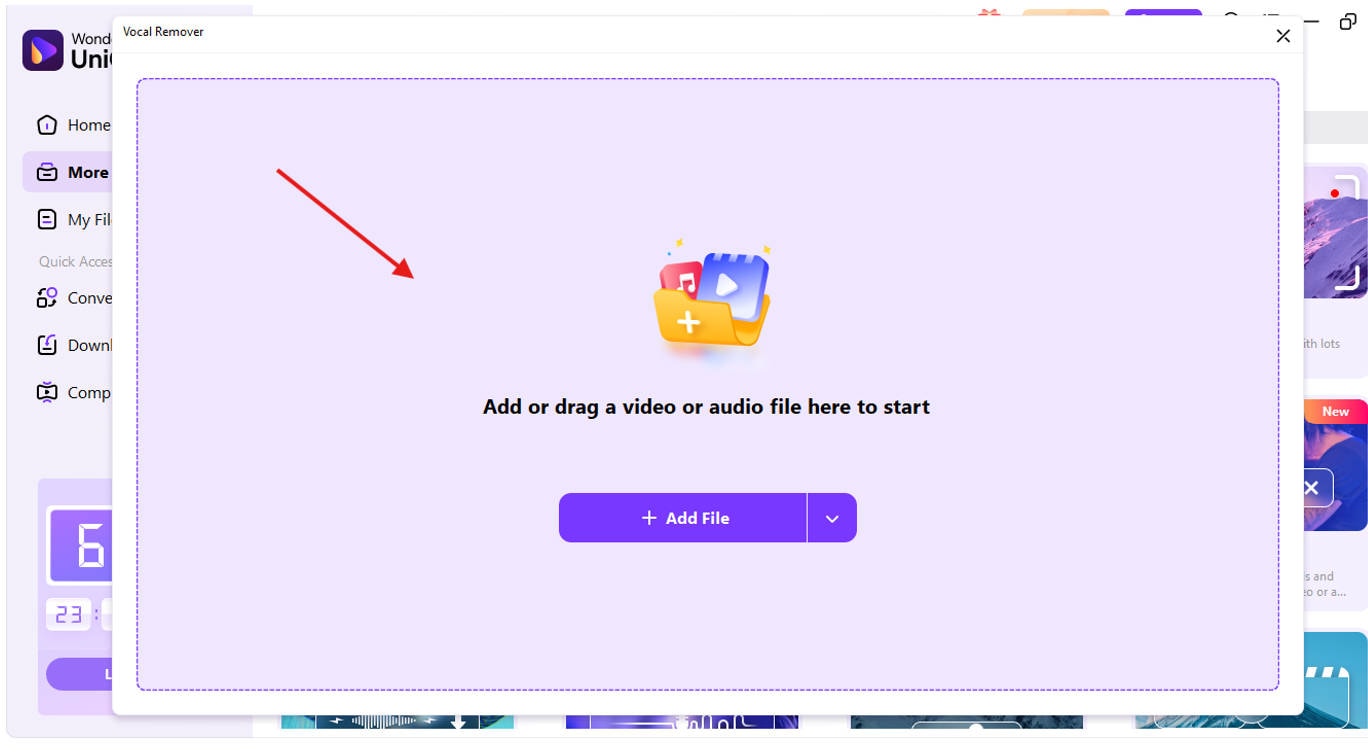
Click on the + Add Files button and select multiple audio files you want to process. The tool supports MP3, WAV, M4A, and over 1000 other formats—ideal for batch processing.
Step 3: Let the AI Detect and Separate Vocals
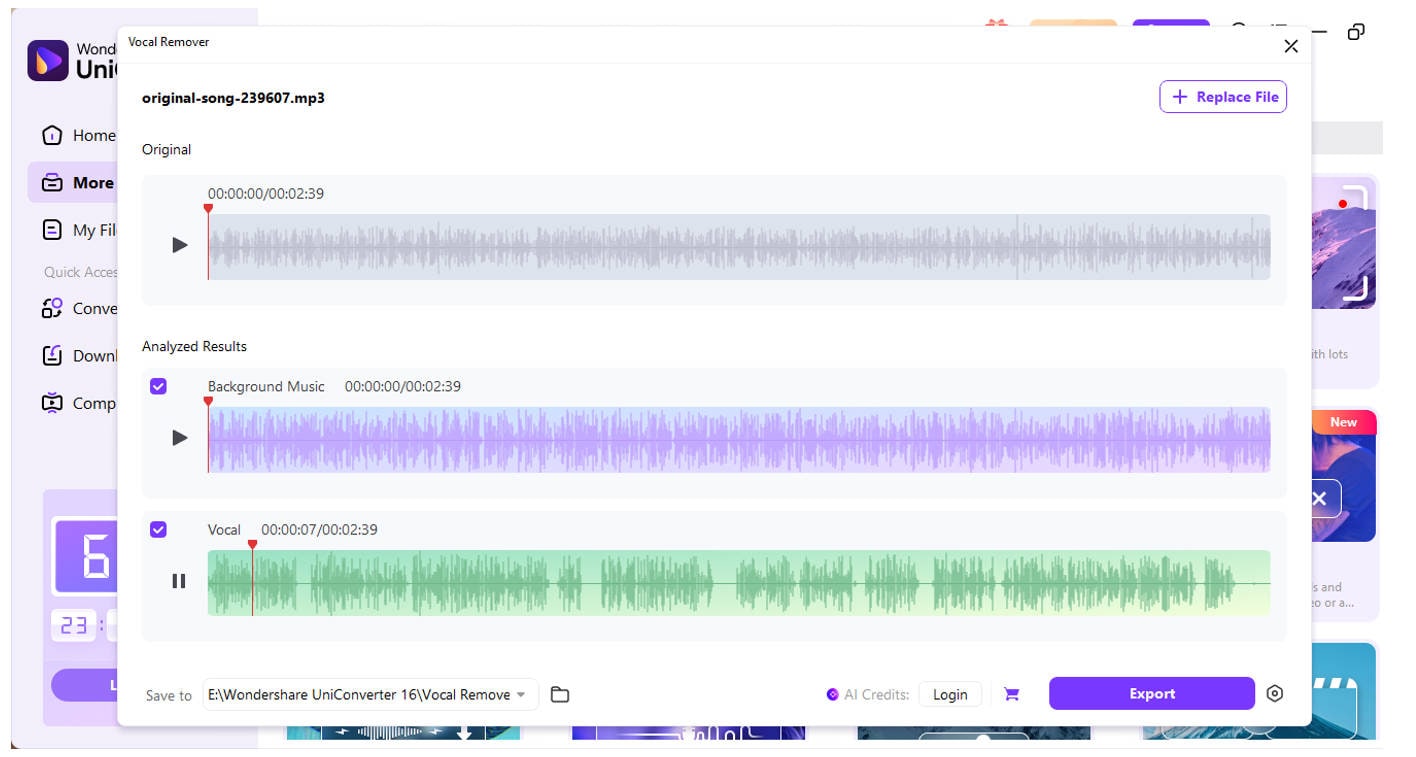
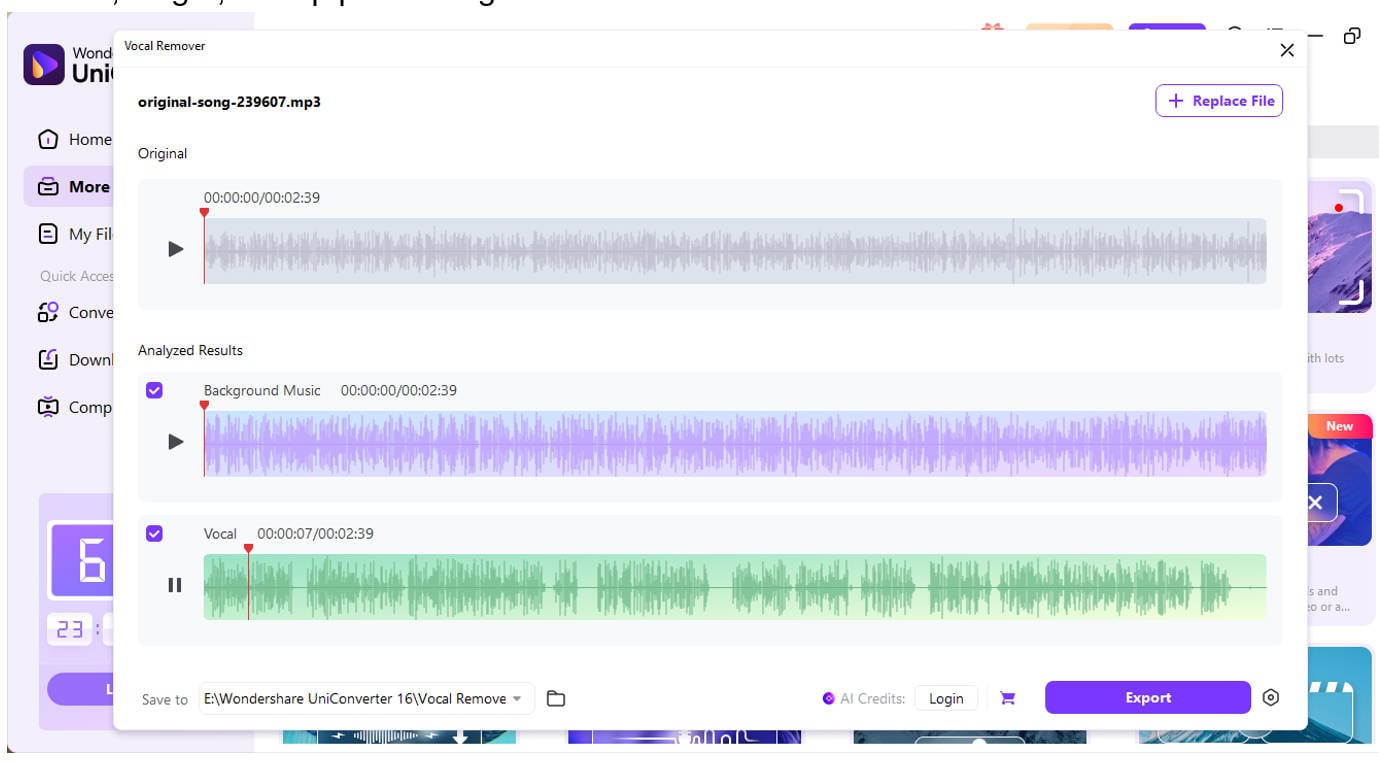
Once uploaded, UniConverter automatically scans the file using AI algorithms. It separates the vocals from the instrumental track within seconds.
Step 4: Preview and Fine-Tune
Click the play icon to preview both the separated voice and instrumental. You can adjust volume, length, or skip parts using the in-built audio editor if needed.
Step 5: Export Your Audio
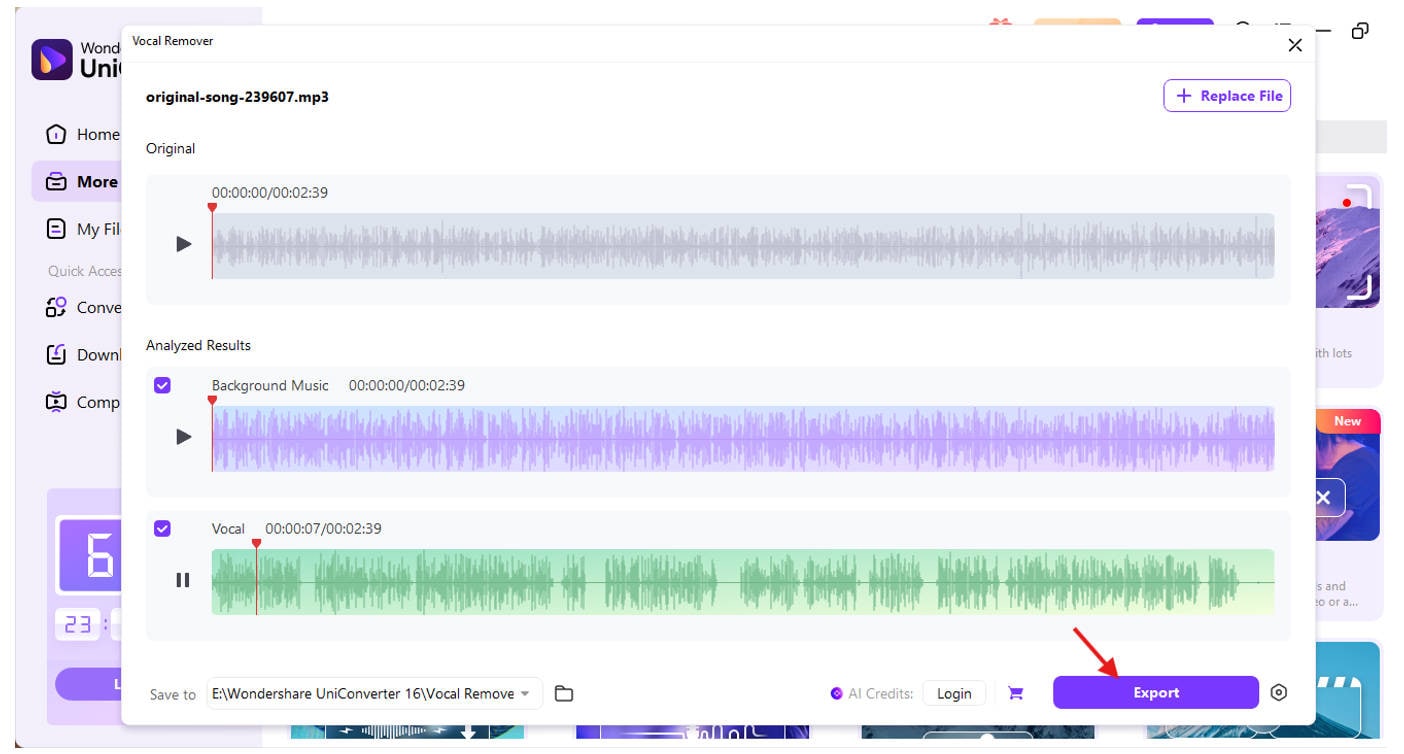
Choose your export settings such as bitrate, output format (MP3, WAV, etc.), and destination folder. Also make sure to check the box which file do you want, whether it is background music or vocal or both of them. Click Export to save all files at once.
Key Features of UniConverter Vocal Remover:
Batch Voice Removal: You can remove voices from multiple audio files in one go, saving hours of repetitive work. This feature is particularly beneficial for DJs or podcast editors who handle large folders of tracks.
High-Quality AI Voice Separation: Unlike basic tools, UniConverter uses advanced AI models to detect and isolate vocals even in complex audio mixes with high precision.
Multi-Format Compatibility: It supports over 1000 audio and video file formats, so you won’t need to convert files separately or worry about compatibility.
Lossless Output Quality: Maintains original clarity and tone during export so that the instrumental or vocal tracks don’t degrade after separation.
Instant Preview and Custom Output Settings: Before saving, you can preview how both stems sound and adjust bitrate, resolution, and audio format for precise control.
This makes UniConverter one of the best answers for how to separate vocals from a song, especially when you're dealing with multiple files or need professional-grade results fast. Unlike online tools that might limit file size or fail with high-complexity audio, desktop solutions like this ensure you get reliable, high-quality output every time.

Easy to Use Batch Vocal Remover for Win and Mac
Part 2. How to Remove Voices from Audio with Mobile App
If you're using a smartphone or tablet and wondering how to separate vocals from a song, there are numerous mobile apps that can accomplish the task with just a few taps. Whether you're on iOS or Android, vocal remover apps are now smart enough to extract vocals from music while retaining instrumental clarity. These tools are perfect for quick edits, karaoke setups, and social media content creation.
One of the most reliable apps for this task is Moises: The Musician’s App- Available on both Android and iOS, it uses AI to separate the voice from a song in just a few seconds.
Step-by-Step Guide Using the Moises App:
Step 1: Download and Launch Moises
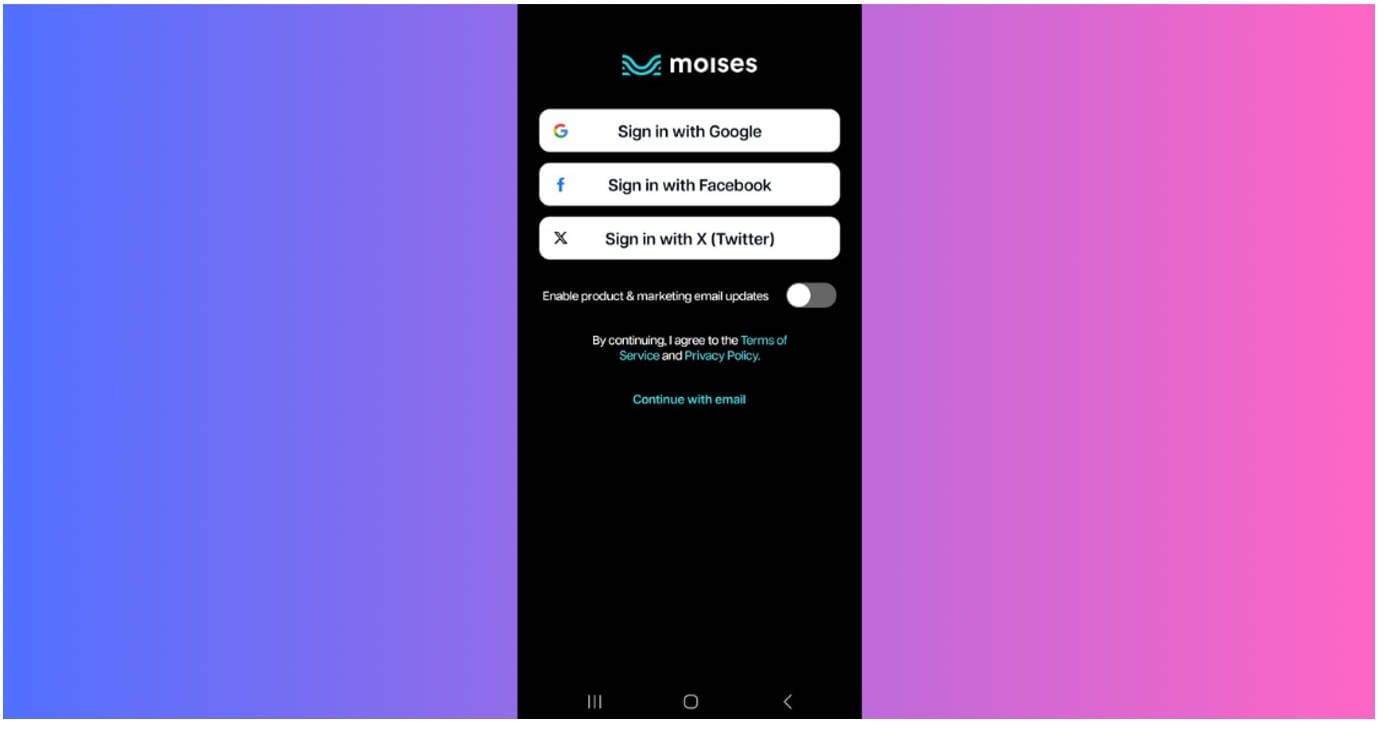
Go to the App Store or Google Play and search for “Moises: AI Music Editor.” Install and open the app, then create an account or sign in with Google/Apple.
Step 2: Import the Song File
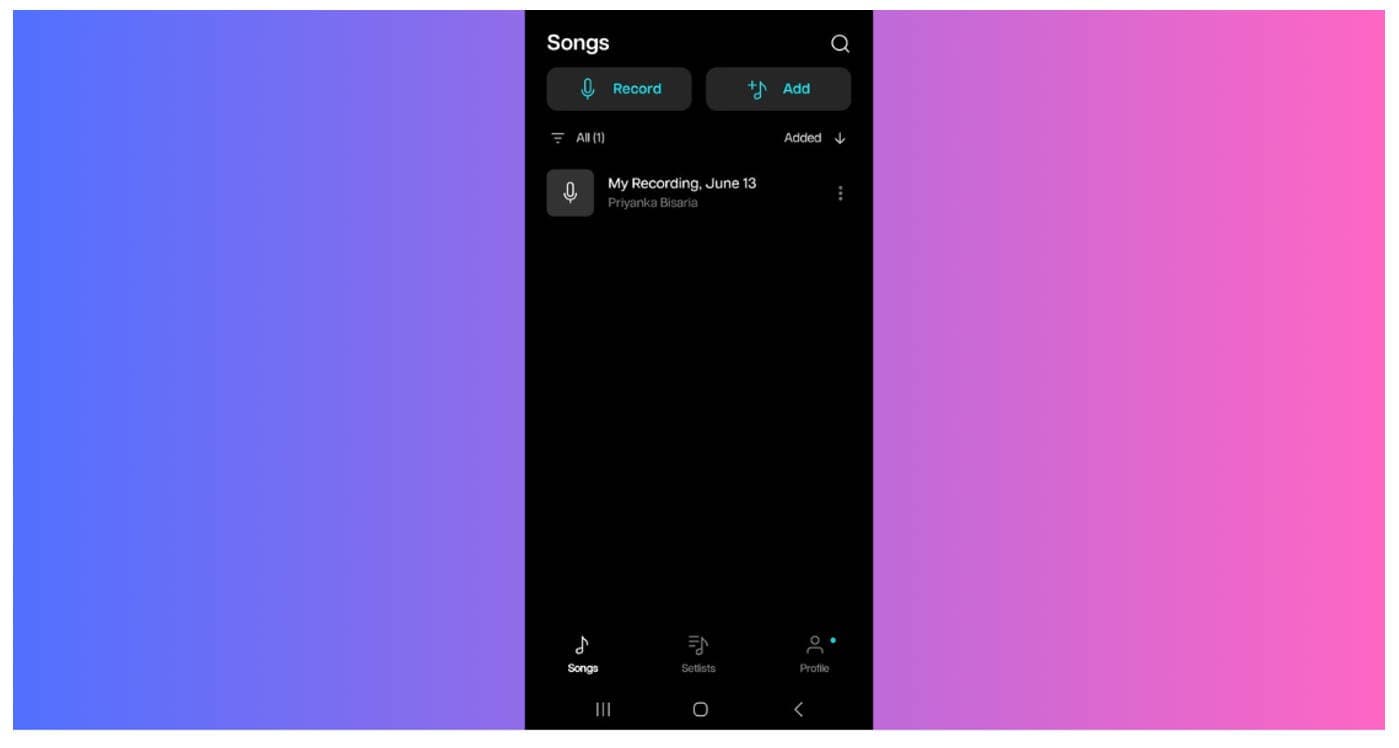
Tap on the "+" or "Import" button. You can upload audio files from your device, Google Drive, Dropbox, or even a YouTube link to remove vocals from a song in Audacity-like precision but on mobile.
Step 3: Choose Separation Type
Select “2 Stems – Vocals and Instrumental” to split voice from music. The app processes the file using cloud AI, which takes a few seconds.
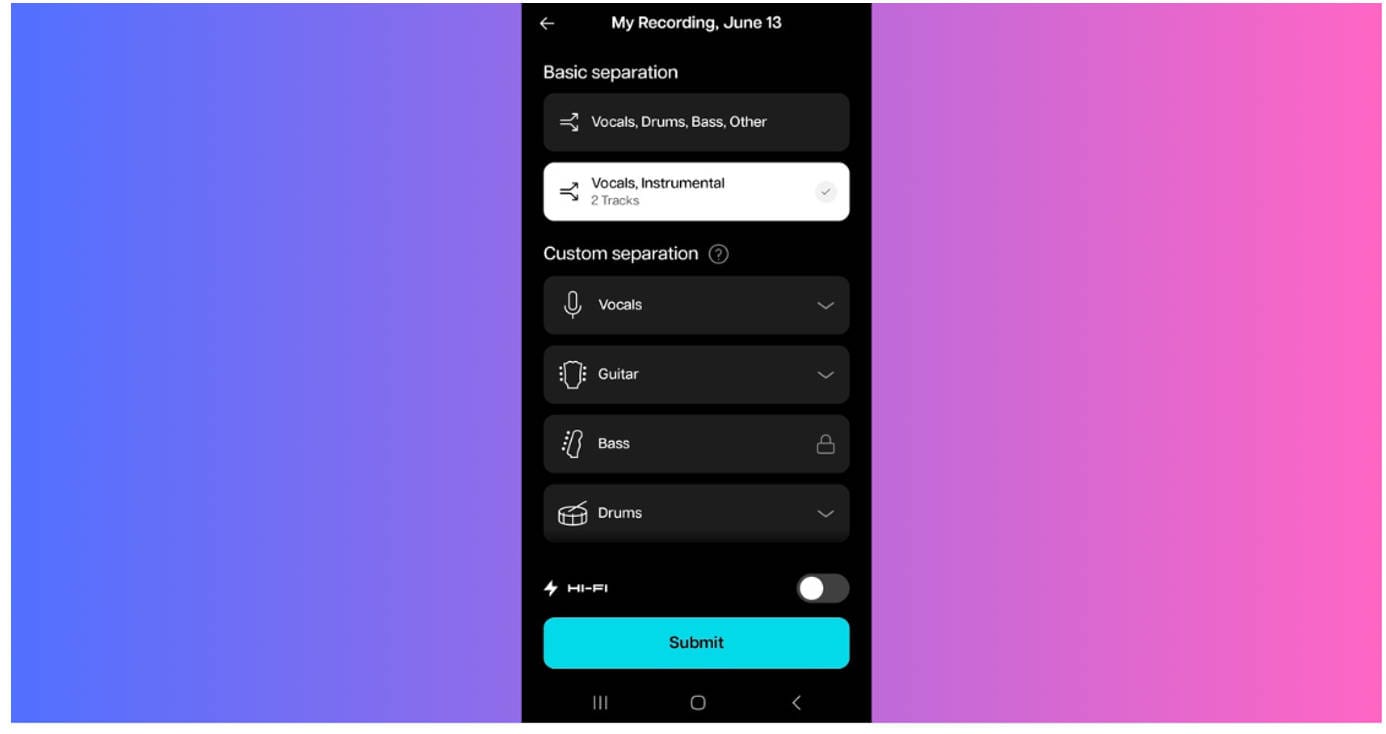
Step 4: Preview and Customize
Once processed, you can preview the isolated vocal and instrumental tracks. Adjust volume, tempo, and pitch if needed—perfect for those learning how to extract vocals from music for remixes or practice.
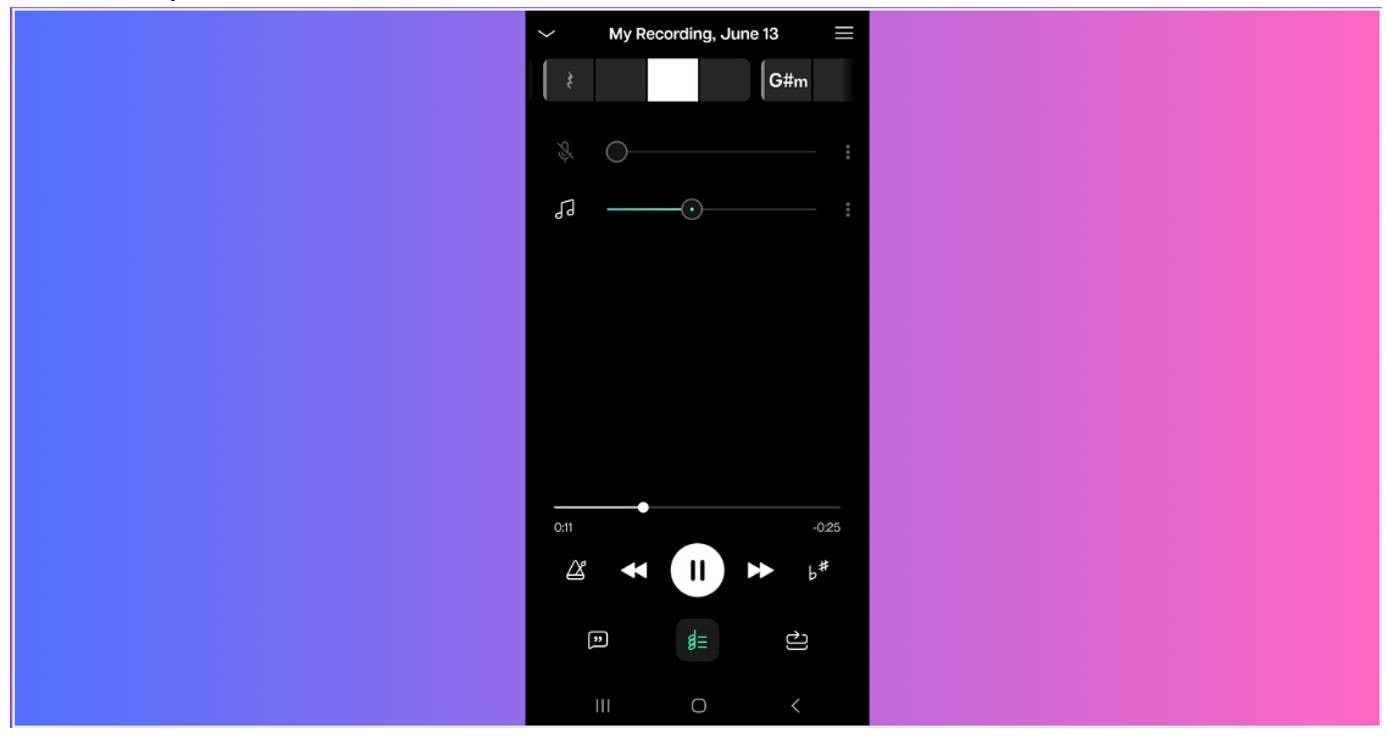
If you're exploring how to separate vocals for remix purposes, Moises makes it easy to isolate stems and then export them to your DAW (digital audio workstation). You can boost specific frequencies, apply effects, or reorder segments—perfect for DJs, remix artists, or anyone producing custom tracks from existing songs.
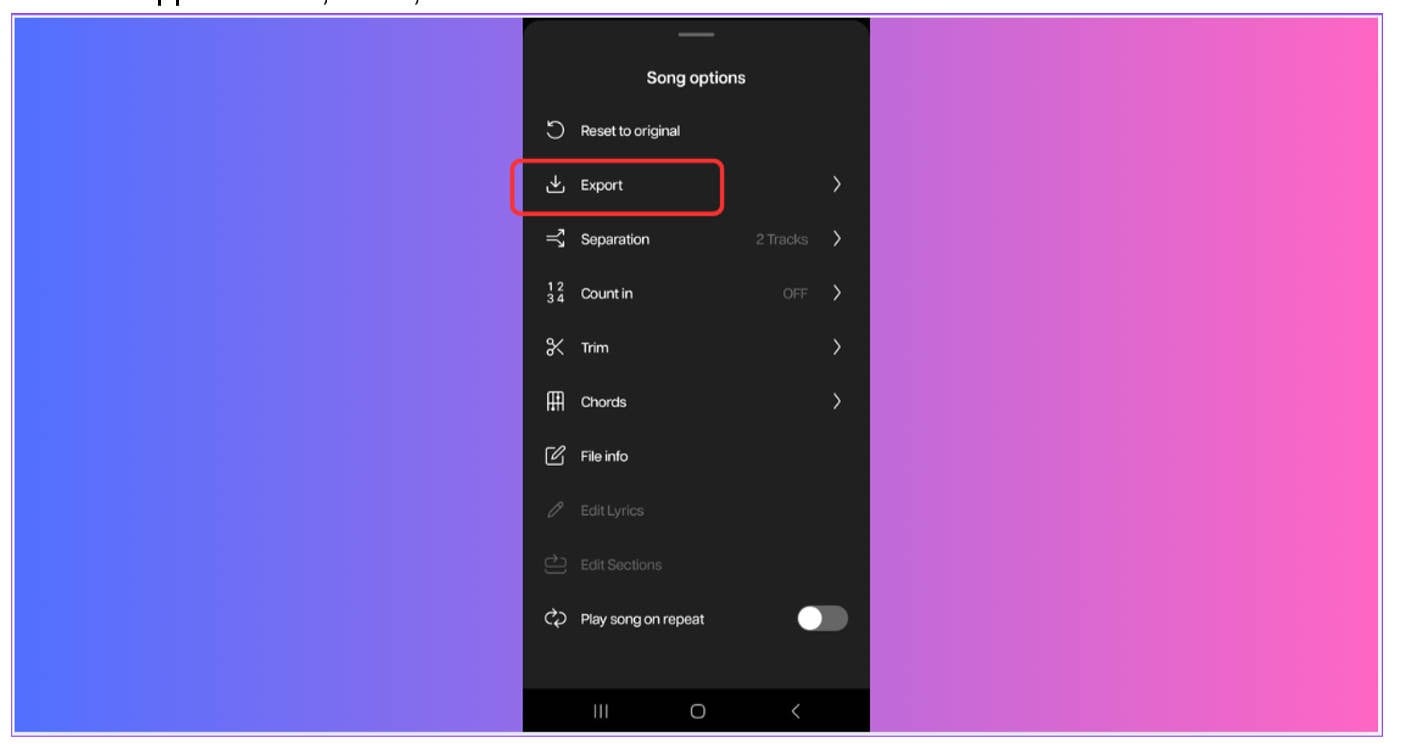
Step 5: Export Your File
Click “Export” and choose whether to download just the instrumental, just the vocals, or both. Moises supports MP3, WAV, and other formats.
This app is especially great if you want to know how to strip vocals from a song Audacity-style, but without needing a computer. It’s quick, accurate, and offers batch processing with a premium plan.
From live DJ sets to mobile karaoke setups, this tool is perfect for users asking how to remove the vocals from a song in Audacity but need a mobile alternative. It’s also ideal for podcasters who want to extract vocals in Audacity style edits but on the move.
Part 3. How to Remove Voices from Audio on Web Page
If you don’t want to download any software or app, using a browser-based tool is the best way to separate vocals from a song online. Web tools offer flexibility, no installation, and compatibility across devices—making them ideal for casual users, creators, or students looking to split voice from music quickly. Whether you’re using Chrome, Firefox, or Safari, these platforms let you remove voice from a song in Audacity-like quality—but from the cloud.
One highly recommended tool is Media.io Vocal Remover. It’s a simple and powerful platform that allows you to extract vocals from music in minutes using AI—perfect for those who want to avoid installing heavy software like Audacity but still get professional-level results.
Step-by-Step Guide Using Media.io Vocal Remover
Step 1: Go to Media.io Vocal Remover
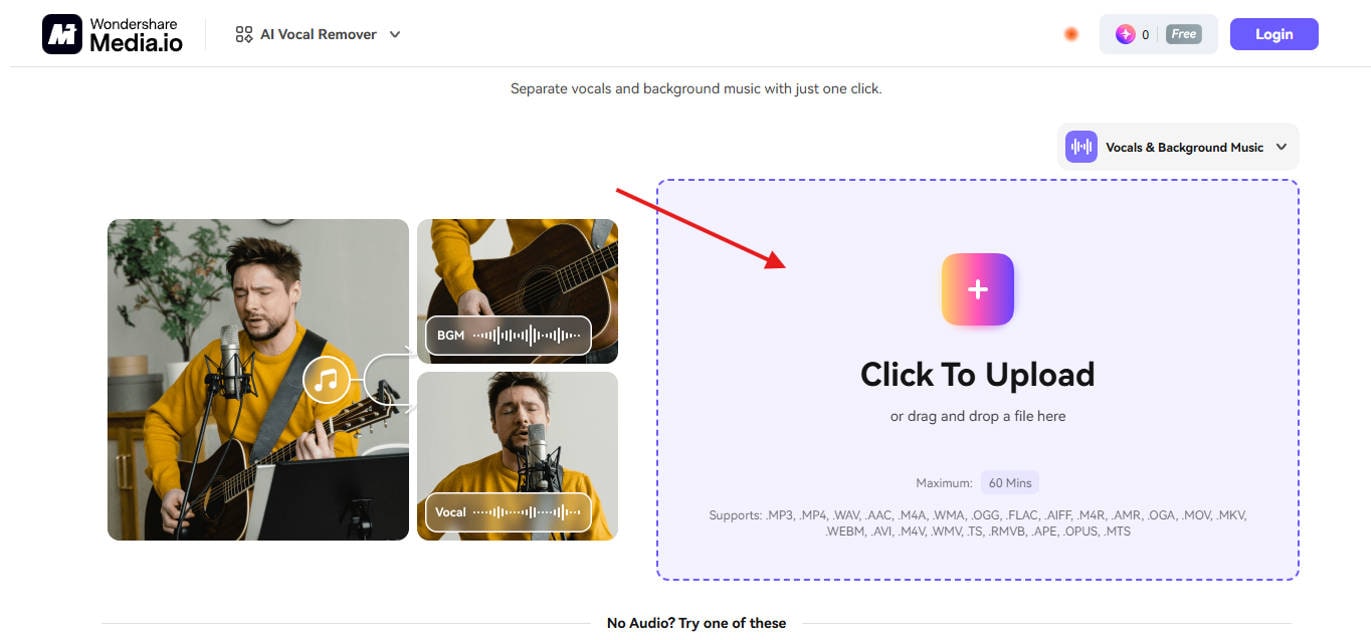
Open your browser and visitmedia.io. This is where you’ll upload your audio file for AI-based vocal separation.
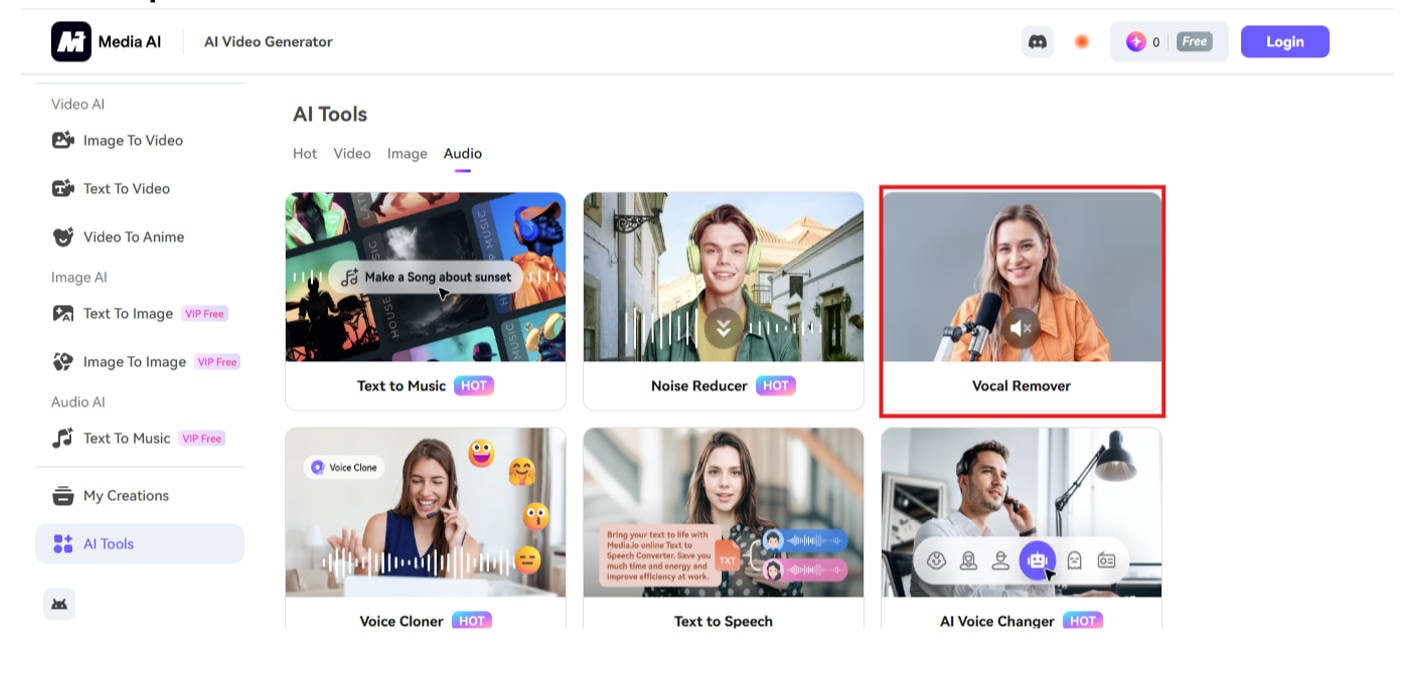
Step 2: Upload Your Audio File
Click on the “Upload Audio” button. Drag and drop or select your music file. Supported formats include MP3, WAV, OGG, and more—ideal if you’re figuring out how to remove vocals from a song Audacity-free.
Step 3: AI Processing
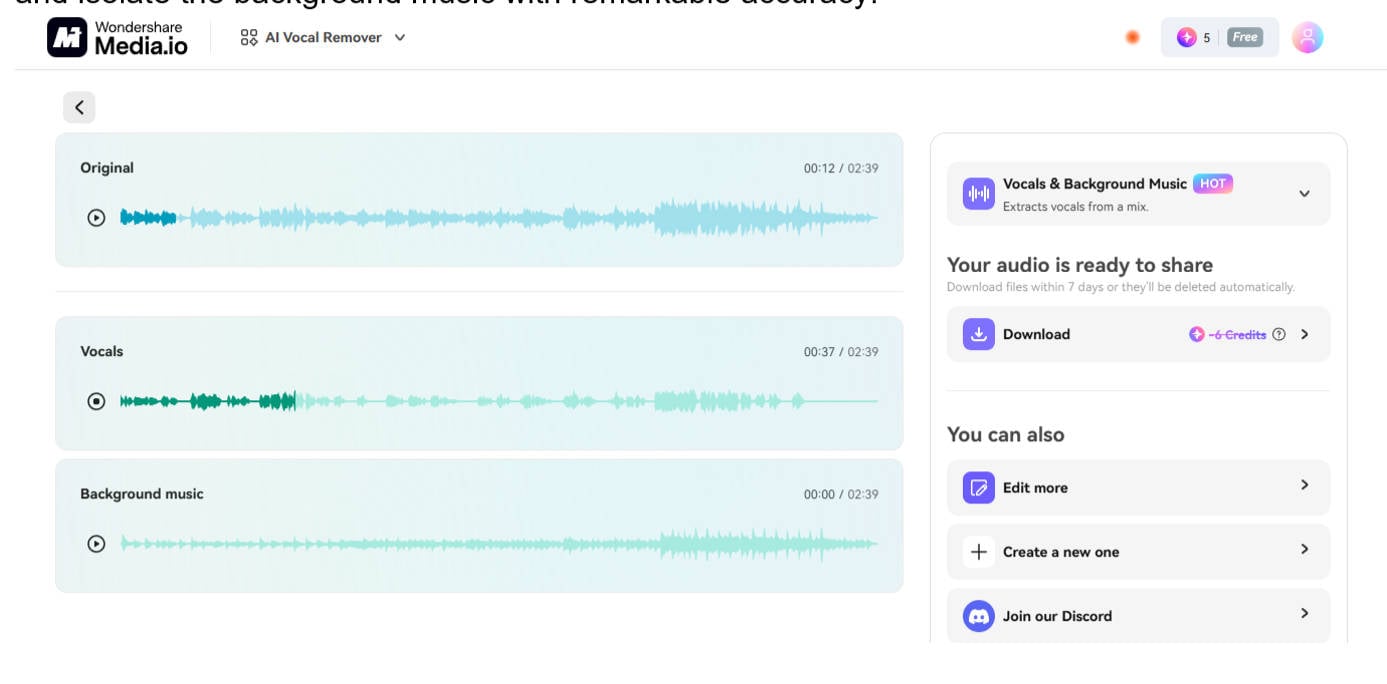
Once uploaded, Media.io will automatically process your file to extract vocals from a song and isolate the background music with remarkable accuracy.
Step 4: Preview the Output
The tool will generate two separate tracks—instrumental and vocal. You can preview both directly in your browser, which is especially useful if you’re testing how to remove voice from a song in Audacity without installing anything.
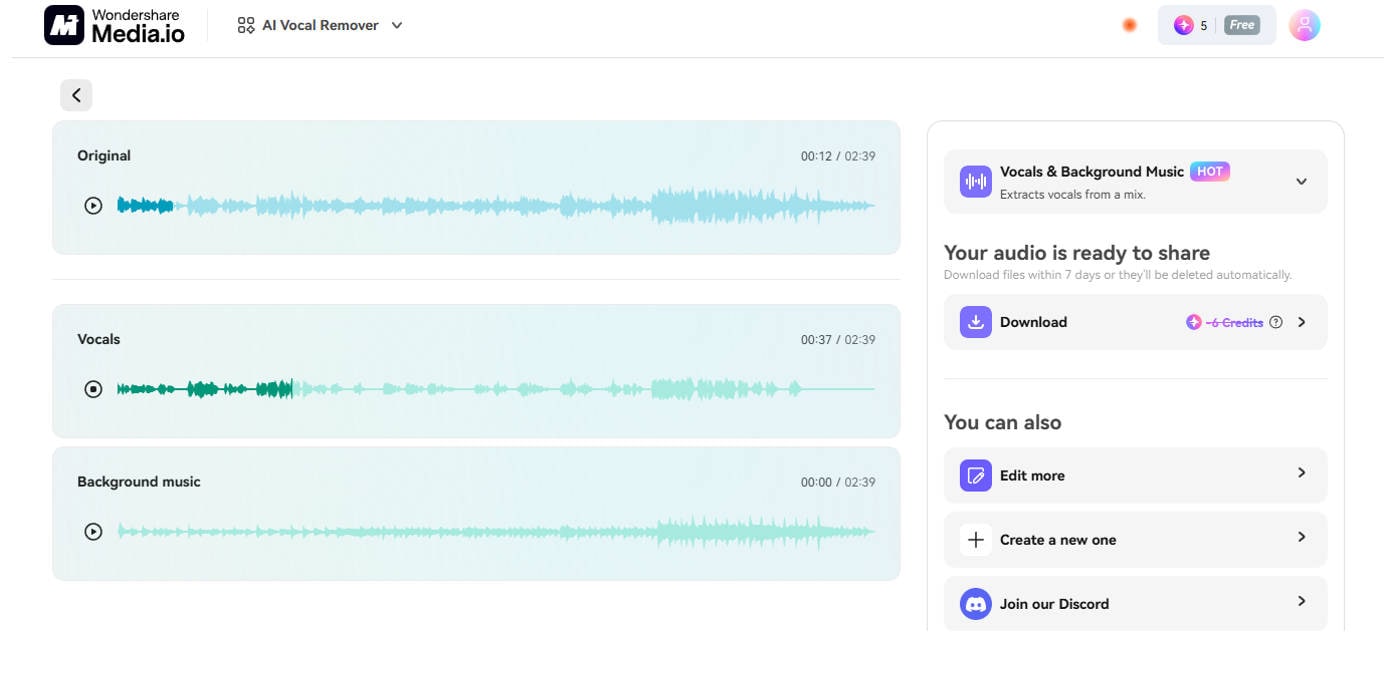
Many users also wonder how to mute vocals from a song instead of fully removing them. Media.io lets you adjust the vocal track’s presence, fade it out, or keep it for remixing—great for DJs or ambient music projects where balance is key.
Step 5: Export the File
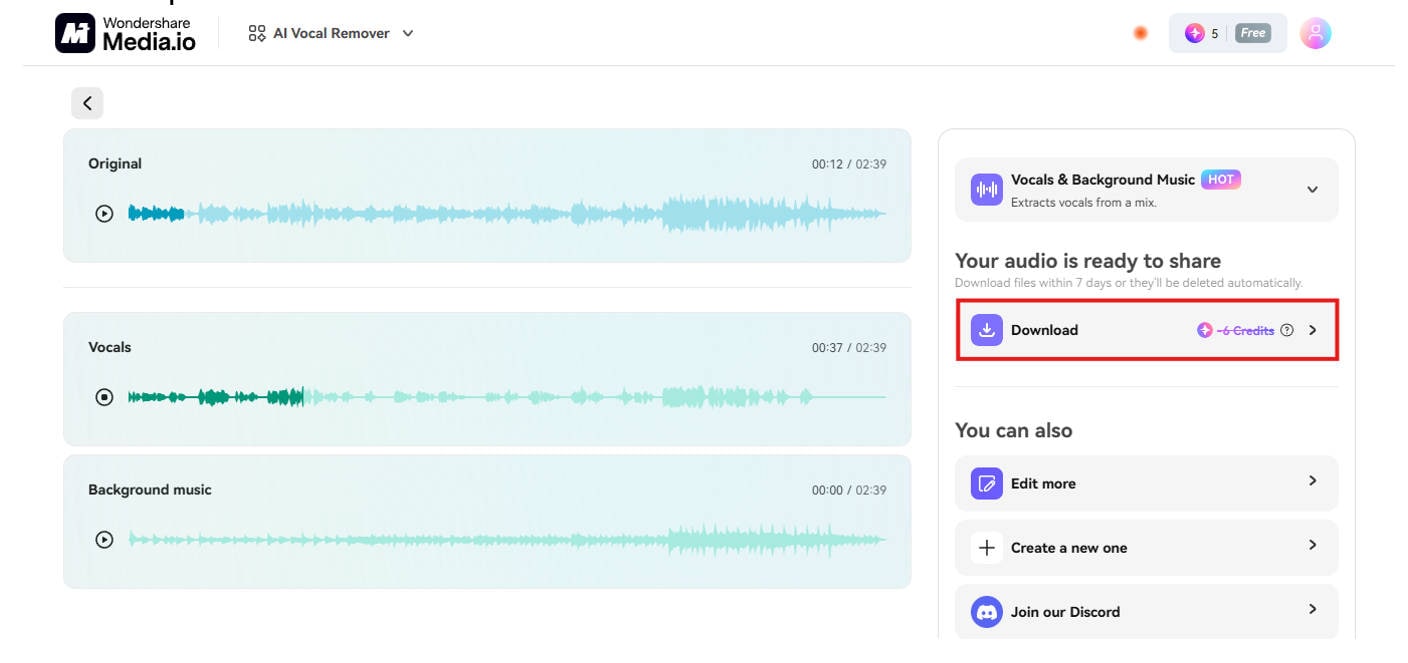
Choose your preferred file format and download the separated tracks. You don’t need to create an account for basic exports, but signing up gives you access to HD audio, batch processing, and other premium features.
These web tools are also great if you're asking how to remove vocals from a song Audacity-style, but need something faster and more accessible. Many of them even allow how to remove voice from a song in Audacity alternatives that support YouTube audio extraction.
Web-based vocal removers are perfect for those who want to extract vocals in Audacity fashion but without installation headaches. They're fast, smart, and beginner-friendly—whether you’re prepping karaoke tracks or learning how to remove voice from a song Audacity-free.
Easy to Use Batch Vocal Remover for Win and Mac
Part 4. How to Remove Voices from Audio with Chrome Extension
Using a Chrome Extension to separate vocals from a song is one of the quickest methods for users who frequently work with audio in their browser. These tools offer convenience, fast access, and seamless integration into platforms like YouTube or SoundCloud—perfect for anyone asking how to remove vocals from a song Audacity-style without opening separate apps.
A highly rated Chrome extension for this purpose is AI Vocal Remover Chrome Plugin. With this, you can split vocals from music directly from streaming platforms or locally uploaded tracks. Whether you want to remove voice from a song in Audacity or just need a tool that can act instantly, this is a great solution.
Step-by-Step Guide Using AI Vocal Remover Chrome Extension
A powerful and easy-to-use Chrome extension for those looking to remove voice from a song without installing heavy software is the AI Vocal Remover plugin. It lets you split vocals from music directly from streaming platforms or local files—perfect for users who want results as fast as Audacity but without the learning curve.
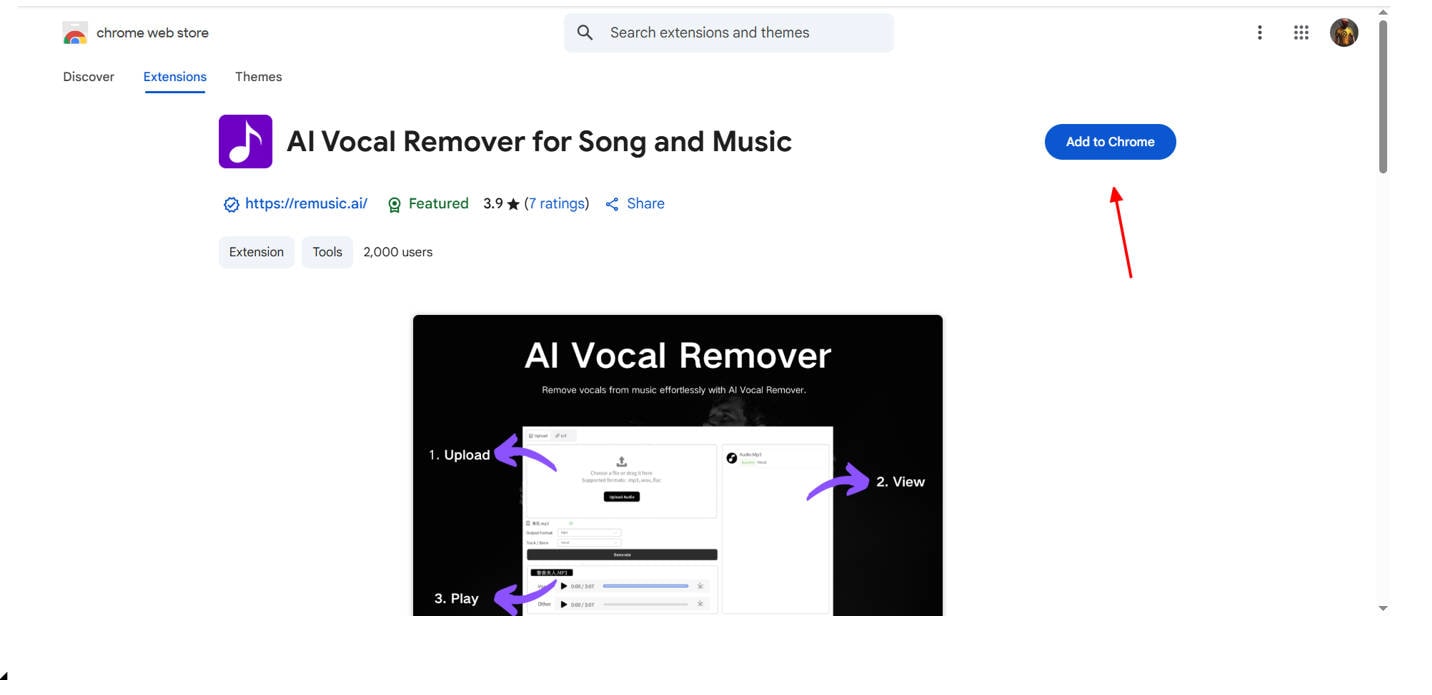
Step 1: Install the AI Vocal Remover Extension
Head to the Chrome Web Store, search for “ AI Vocal Remover,” and click “Add to Chrome” or whatever your browser is. Once installed, you’ll see the extension icon near your browser's address bar—ready for use anytime you need to separate vocals from a song.
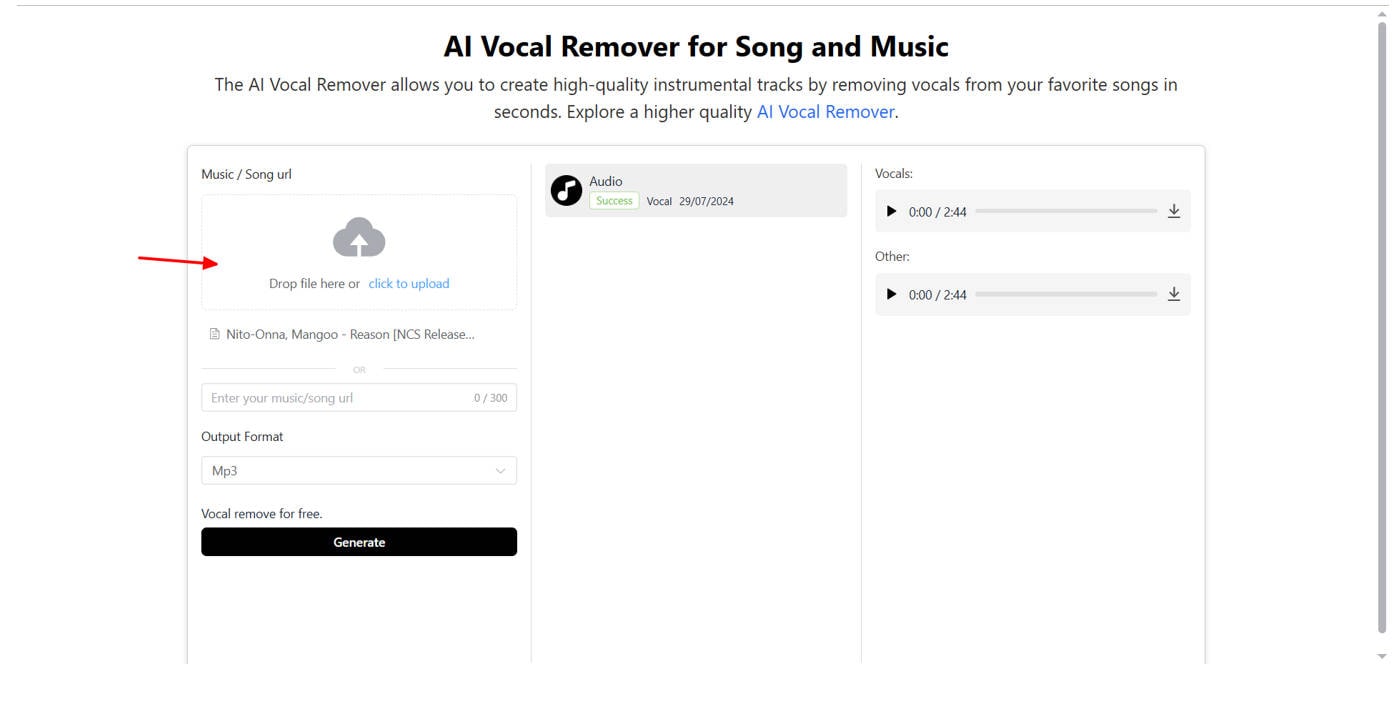
Step 2: Upload or Capture Audio
You can either upload your own audio file (like MP3 or WAV) or capture audio directly from the active webpage. This is extremely handy if you're a creator or editor who wants to extract vocals from music without downloading extra tools.
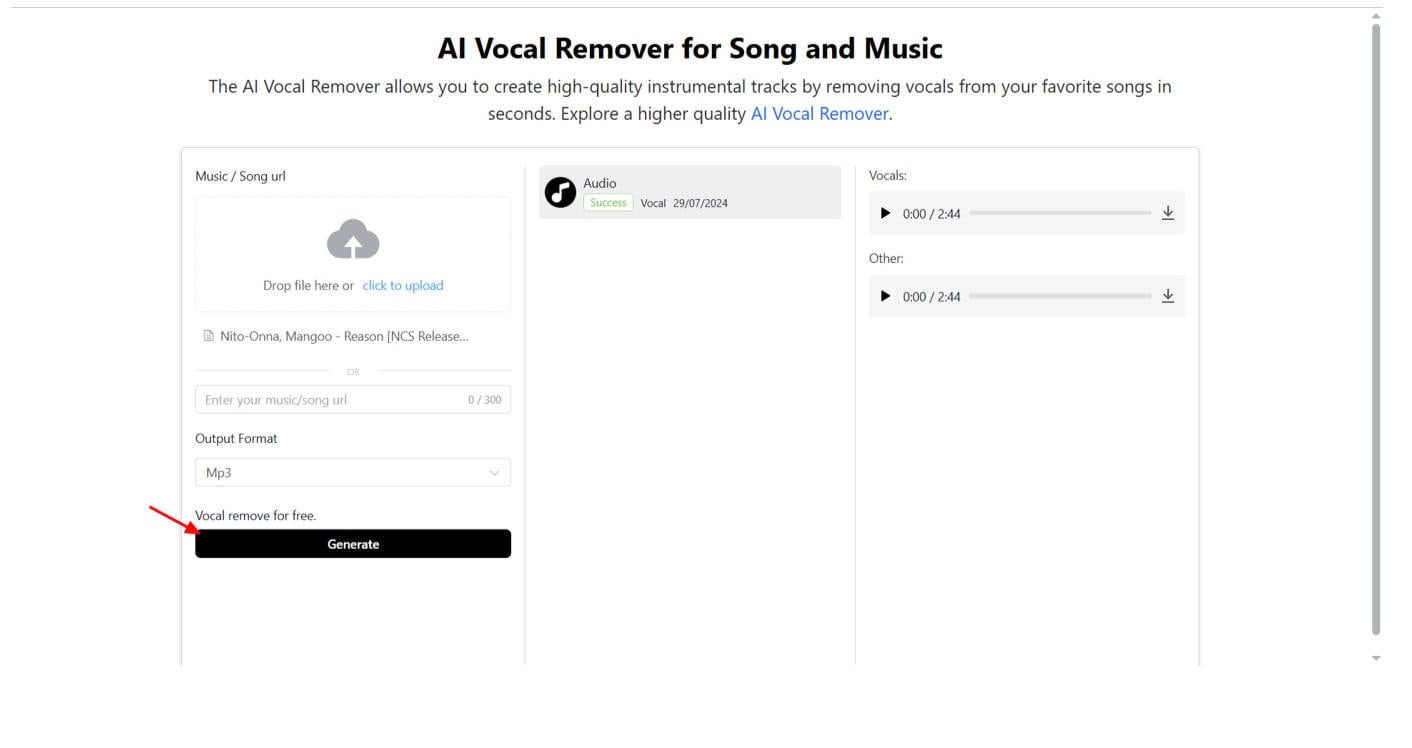
Step 3: Begin Vocal Separation
Hit the “Generate” button. The built-in AI algorithm will analyze the track, identify vocal and instrumental layers, and extract vocals from a song while maintaining the original audio quality. It’s an ideal shortcut for those who often wonder how to remove voices from a song in Audacity—but want a much simpler solution.
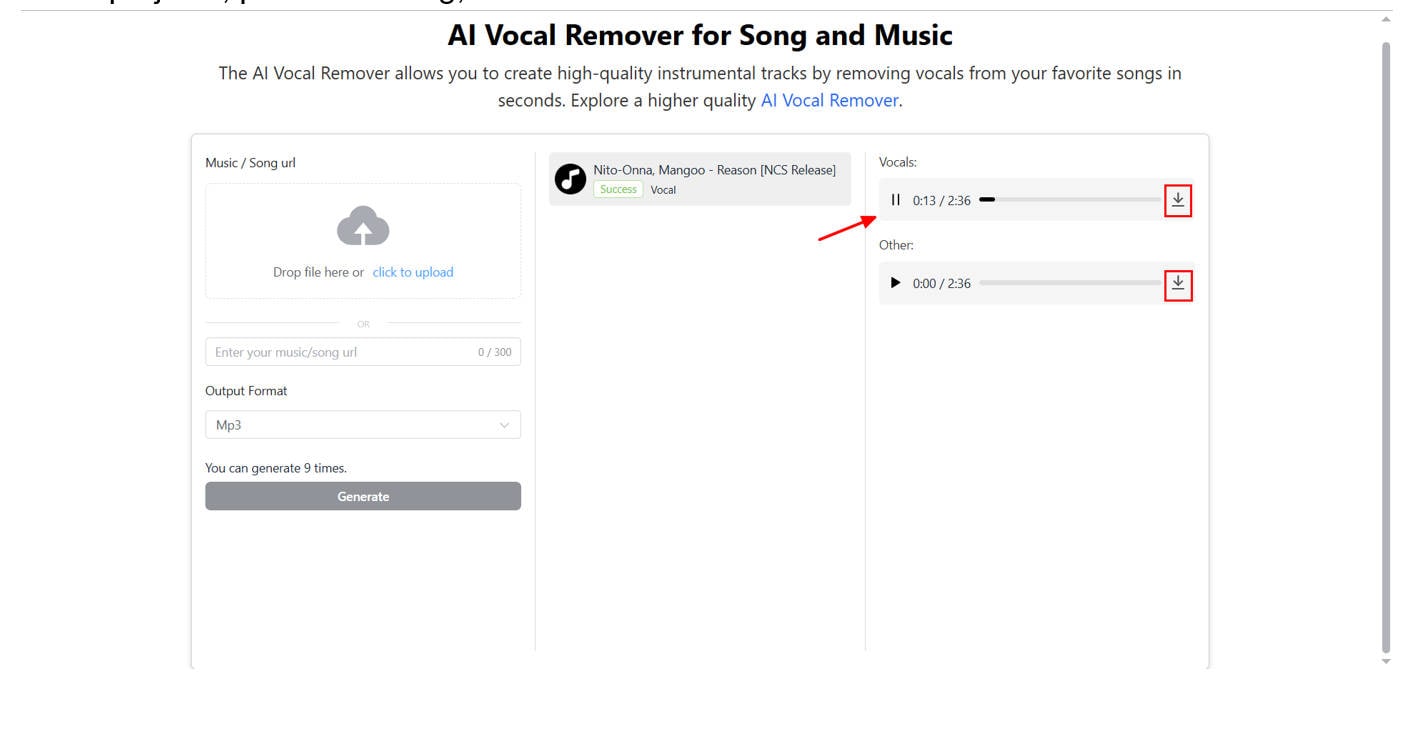
Step 4: Preview and Download
After the AI processes your file, you’ll get a preview of both vocal and instrumental tracks. You can then download either or both in your preferred format. This is perfect for karaoke, remix projects, podcast editing, or even voice isolation for social media.
This method answers the common query: how to remove voice from a song Audacity-style, but directly within your browser using extensions. It’s a go-to for YouTubers and educators looking for lightweight, integrated tools.
Chrome extensions like this one are powerful alternatives to standalone software for those exploring how to split vocals from music, especially when combined with AI automation. For anyone asking how to remove voice in Audacity, this is the streamlined, browser-first version.
Part 5. Quick Comparison of 4 Tools Above
To help you decide which method works best for your needs, here’s a side-by-side comparison of the five tools we’ve discussed. Whether you're looking to separate vocals from a song, use Audacity to remove vocals, or extract voice tracks online or via mobile—this chart highlights the key differences.
|
Tool / Platform |
Price |
Format Limitation |
File Size Limit |
Processing Speed |
Best For |
|
UniConverter (Desktop) |
Free + Paid |
Supports 1000+ formats |
High (no major limits) |
Fast with batch support |
Pro users needing to split voice from music in bulk |
|
Moises Mobile App |
Free + Paid |
Common formats (MP3, WAV) |
Limited in free version |
Fast |
Mobile users wanting to separate vocals from a song |
|
Media.io (Web Tool) |
Mostly Free |
MP3, WAV, OGG, etc. |
Up to 100MB (free tier) |
Fast with AI |
Beginners and creators wanting to remove voice from audio online |
|
AI Vocal Remover Chrome Extension |
Free + Paid |
Online capture/upload |
Depends on browser cache |
Fast & Real-Time |
YouTubers and streamers removing vocals in-browser |
Each tool provides different advantages depending on your device and experience level. For example, Audacity how to remove vocals gives you granular control, while AI Vocal Remover Chrome Extension lets you isolate vocals from online videos without leaving your browser.
Whether you’re searching how to separate vocals from a song Audacity-style or need to extract vocals from music in just a few clicks, this comparison should help clarify which tool aligns with your project needs.
Conclusion
Now you know how to separate vocals from a song using a range of tools—from desktop apps like UniConverter and Audacity to mobile and web-based solutions. Whether you're editing a remix, preparing karaoke tracks, or just experimenting with sound, learning how to remove voice from a song is easier than ever. Tools like Audacity help you master the process manually, while AI-based platforms simplify it with one click. No matter your device, there's a perfect solution for how to strip vocals from a song. Take control of your audio projects with confidence and clarity.
Easy to Use Batch Vocal Remover for Win and Mac
FAQs
-
1. How to separate vocals from a song for karaoke?
Use tools like UniConverter or Audacity to split the vocal and instrumental tracks. These tools let you export the karaoke version easily. -
2. How to remove vocals from a song in Audacity?
Import your song, go to “Effect” “Vocal Reduction and Isolation,” and select “Remove Vocals.” Then export the track without vocals. -
3. How do you separate vocals from a song using a mobile app?
Apps like Moises or Lalal.ai offer vocal separation on both iOS and Android. Upload the audio and download the isolated vocals or instrumentals. -
4. Can I extract vocals from music using a browser?
Yes, websites like VocalRemover.org or Media.io allow online vocal removal without installing software. They're quick and user-friendly. -
5. What’s the best Chrome extension to remove voice from songs?
Try “AudioRemover for Chrome” or similar extensions that extract vocals or mute them directly in-browser without needing downloads. -
6. Is there a way to keep the voice but remove the background music?
Yes, advanced AI tools let you isolate vocals and discard instrumentals. This works well for interviews or podcasts with music overlays.