


If you have perfect audio, video, or a song and want the MP3 without needing editing software, signing up, or a subscription, then Y2Mate is the solution. But the moment you search for Y2Mate, you hit the wall of lookalike sites, aggressive pop-ups, and download buttons, making it hard to know what is safe.
Y2Mate YouTube to MP3 converter is a free online tool that extracts audio from YouTube videos and downloads it as an MP3 file. Paste the YouTube link, select MP3 as the format, and download the result. This guide walks you through how to use Y2Mate's YouTube-to-MP3 converter, explains where Y2Mate's real risks come from, and more.
Before diving deep into the details, here is the quick answer to your queries:
| Question | Short Answer |
| Is Y2Mate safe? | Generally, yes, but many mirror sites contain misleading ads and fake download buttons. |
| Is Y2Mate free? | Yes, most Y2Mate mirrors are free to use. |
| Does Y2Mate require installation? | No. It runs in a web browser. |
| Is there an official website for Y2Mate? | No single verified domain exists in 2026. |
| Best alternative | Wondershare UniConverter is for users who want a safer desktop experience. |
In this Article
- Part 1: How We Tested Y2Mate YouTube to MP3 Converter
- Part 2: How Do You Convert a YouTube Video to MP3 with Y2Mate
- Part 3: Y2Mate Key Features and Supported Formats
- Part 4: Y2Mate Stops Working: Fixing the Most Common Problems
- Part 5: How Safe Is Y2Mate, and How Do You Use It Securely
- Part 6: What's a Safer Alternative to Y2Mate for YouTube to MP3
- Part 7: Y2Mate vs. Wondershare UniConverter: Quick Comparison Table
- Part 8: Who Should Use Y2Mate YouTube to MP3 Converter
- Conclusion
- FAQs
Part 1: How We Tested Y2Mate YouTube to MP3 Converter
To evaluate Y2Mate fairly, we tested the complete conversion workflow instead of relying on feature lists or vendor claims. Our goal was to understand how the tool performs for someone downloading YouTube videos as MP3 files for everyday use.
We evaluated Y2Mate using multiple publicly available mirror sites and compared the experience against a dedicated desktop converter, Wondershare UniConverter. During testing, we focused on conversion reliability, ease of use, audio quality, safety, and overall user experience.
Our Testing Criteria:
| Evaluation Area | What We Tested | Why It Matters |
| Ease of Use | Number of steps required to convert a YouTube video to an MP3 | Determines whether first-time users can complete the process without confusion. |
| Conversion Performance | Processing time for short and long YouTube videos | Shows whether the tool remains responsive across different video lengths. |
| Audio Output | Available bitrate options and playback quality of downloaded MP3 files | Helps determine whether the converted audio matches user expectations. |
| Reliability | Success rate when converting different YouTube links across multiple mirror sites | Identifies whether the service works consistently despite changing domains. |
| Safety | Pop-ups, redirects, fake download buttons, and browser notification requests | Evaluates the potential security risks users may encounter. |
| Overall Value | Comparison with Wondershare UniConverter for features, stability, and user experience | Helps determine which tool is better suited for occasional versus regular use. |
What we Found:Our testing found that Y2Mate converts most public YouTube videos to MP3 quickly without requiring an account or software. However, the user experience varies across mirror sites, with some showing intrusive ads, fake download buttons, or notification prompts.
For occasional conversions, Y2Mate is convenient. For users who want greater consistency, security, and advanced features, a dedicated desktop tool like Wondershare UniConverter offers a more reliable experience.
Part 2: How Do You Convert a YouTube Video to MP3 with Y2Mate
Follow these simple steps to convert a YouTube video to MP3 with Y2Mate online:
Step 1: Copy the URL of the YouTube video you want to convert.
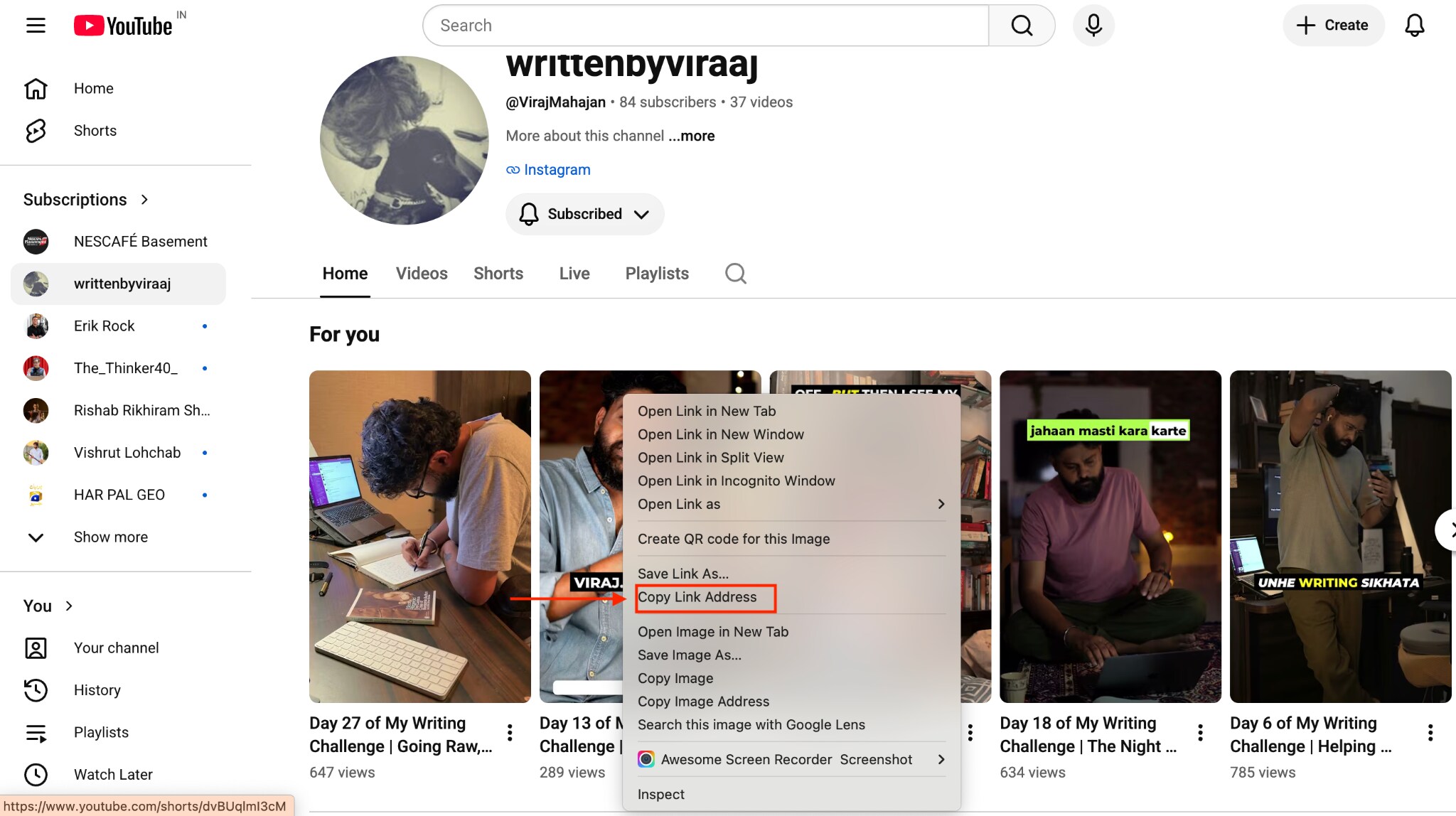
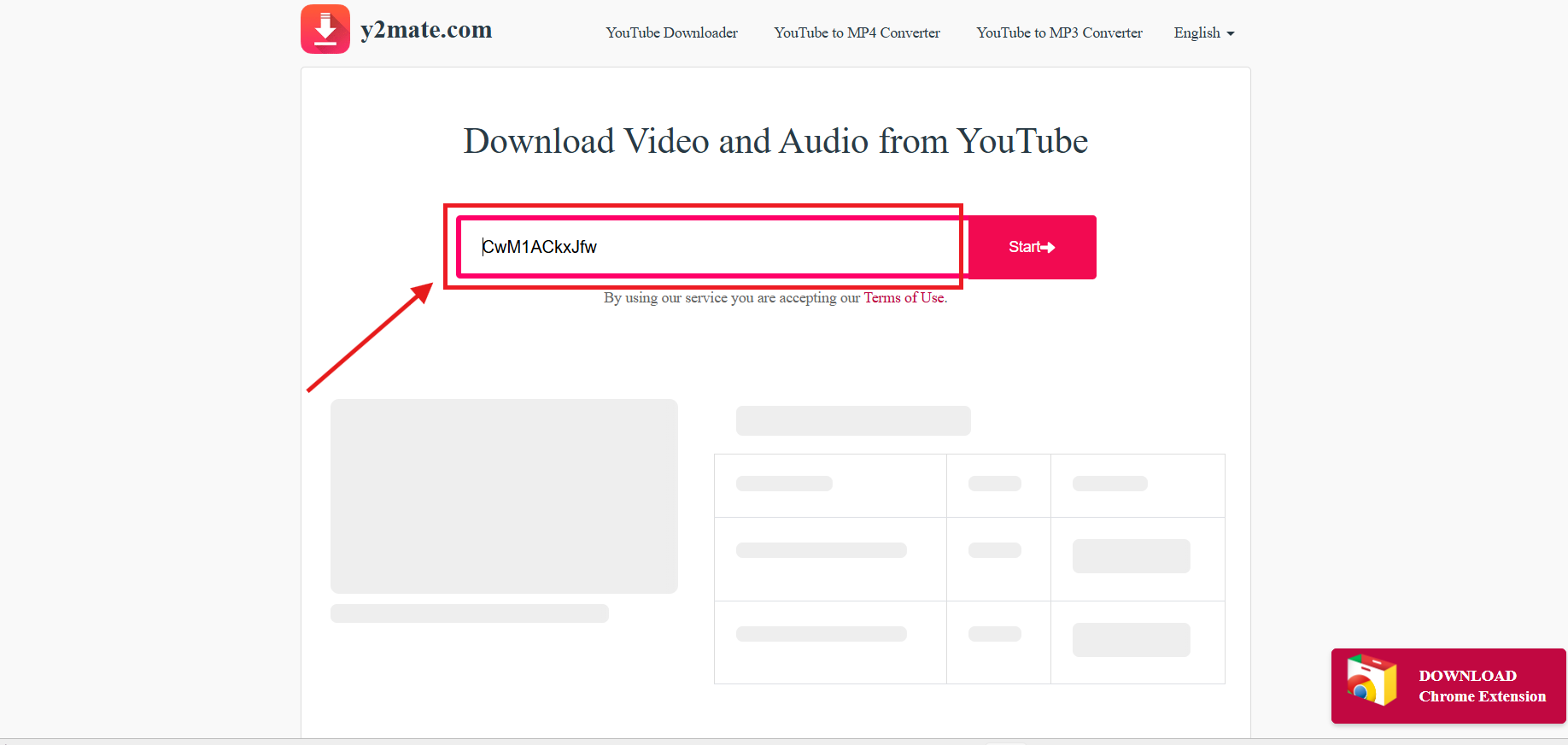
Step 2: Open a Y2Mate website that you trust and have verified beforehand, and paste the video link into the search box.
Step 3: Wait while the site processes the video and pulls up the available format. Select MP3 as your output format.
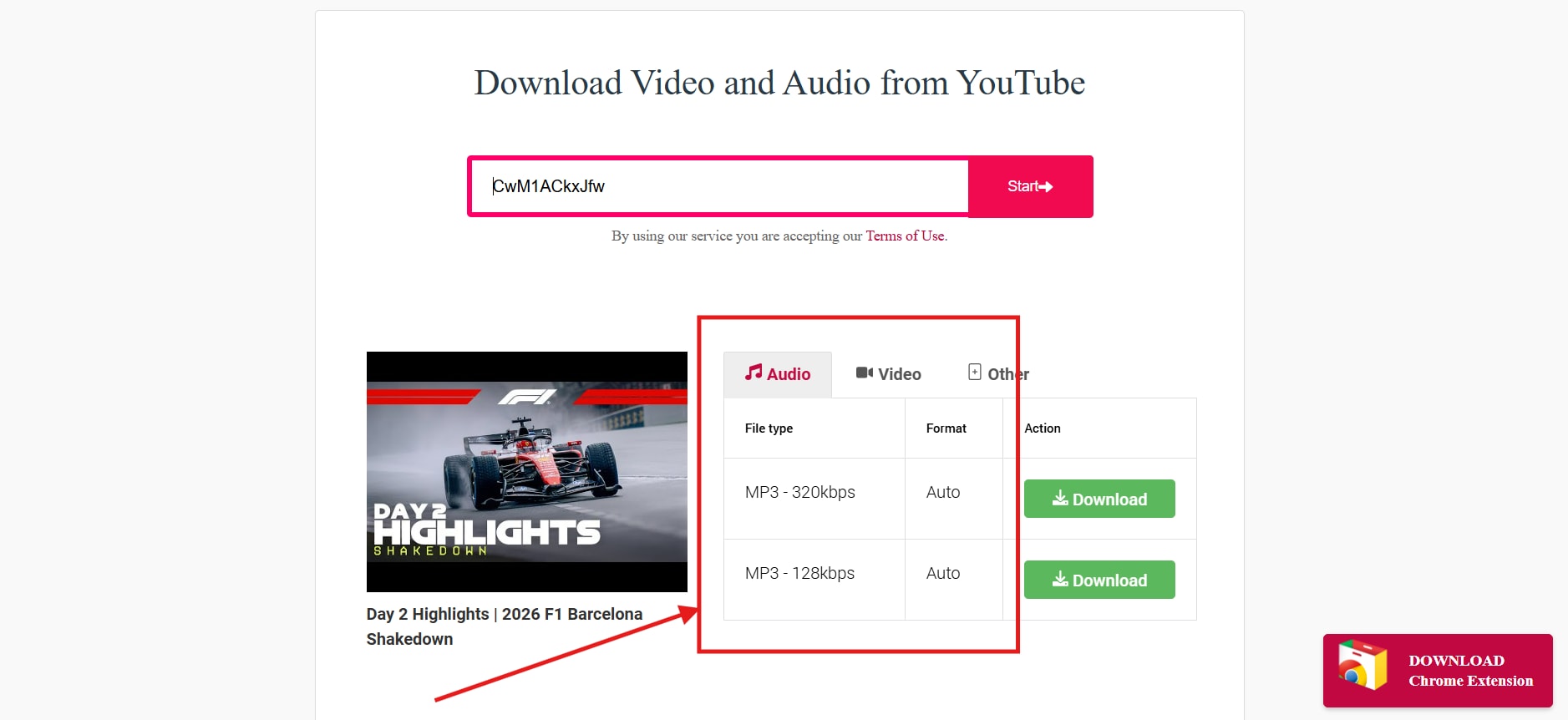
Step 4: Click Download and save the MP3 file.
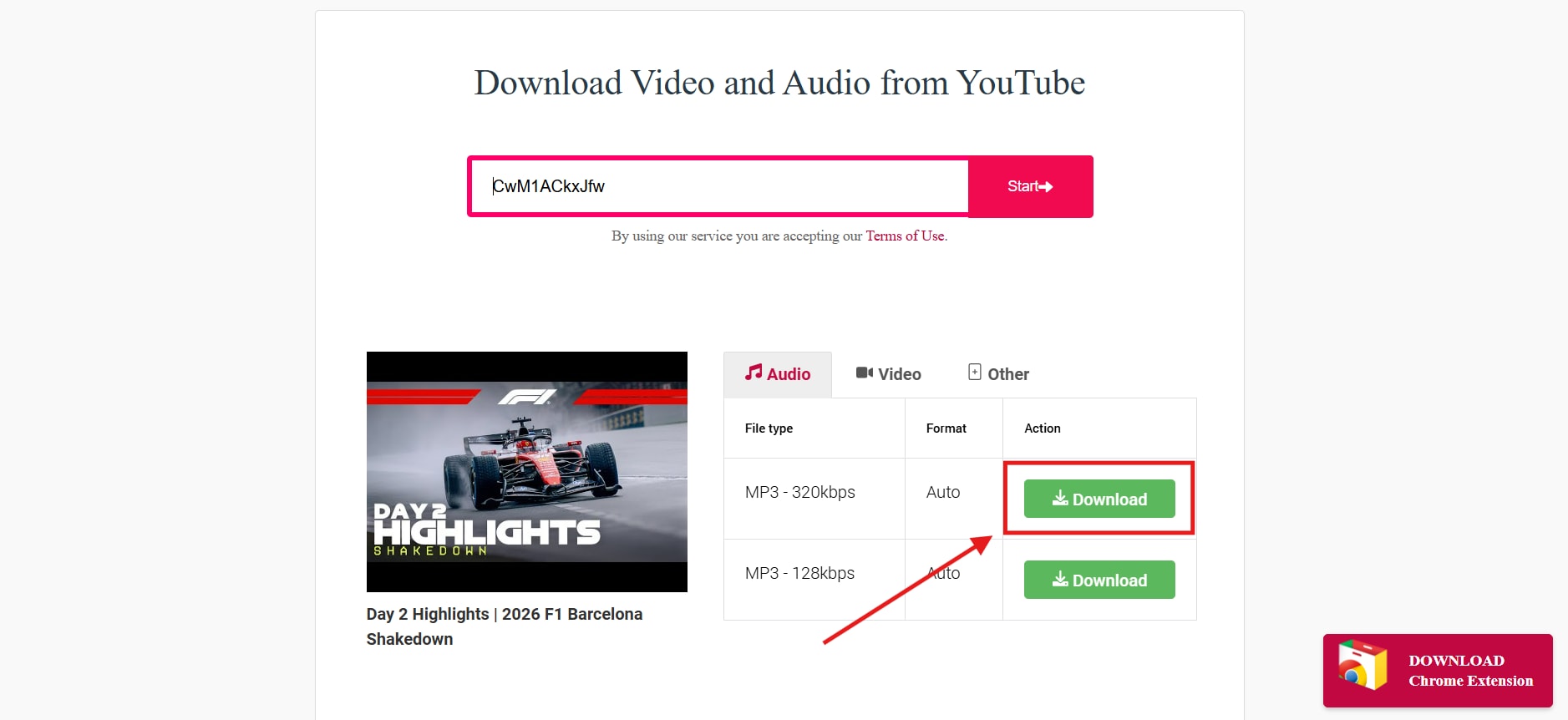
One thing you need to know before you start: Y2Mate does not have a single, universally recognized official domain in 2026. The name has been copied across dozens of mirror sites, each with its own layout, ad network, and download buttons. Because of that, this guide describes the general workflow instead of pointing you to a specific URL. Treat any site running under this name with caution, and confirm you're on a version you recognize before pasting a link.
How to Pick the Right MP3 Quality
The right MP3 quality depends on what you're doing with the file. For casual listening, 128 kbps works fine and keeps the file small. For music you care about or content you plan to reuse, go with 320 kbps for the closest match to the original audio.
Here's a quick breakdown:
128 kbps: Small file size, noticeable quality loss on complex audio like layered music. Good for spoken word, podcasts, and quick listens.
192 kbps: A solid middle ground. Most listeners won't hear a difference from the source on regular headphones or speakers.
320 kbps: The highest standard MP3 bitrate. Best for music, DJ sets, or anything where audio fidelity matters.
A higher bitrate means a larger file and a longer conversion, so factor that in if you're converting something long, like a full lecture or a two-hour set.
Part 3: Y2Mate Key Features and Supported Formats
Y2Mate's main feature is converting YouTube videos into downloadable audio and video files without requiring any installation. Beyond the basic MP3 conversion, most versions of the service support a handful of other formats and functions.
Typical features across Y2Mate sites include:
- MP3 audio extraction, usually with a choice of bitrates up to 320 kbps
- MP4 video downloads in multiple resolutions, depending on what YouTube offers for that video
- Support for a handful of other formats, such as M4A, WEBM, or 3GP, on some mirrors
- No account or software installation required
- A browser-based interface that works on both desktop and mobile
Keep in mind that feature sets vary by mirror. One version might offer 320 kbps MP3 output and playlist support, while another caps at 128 kbps and supports only single videos. Since these sites aren't run by a single central team, you can't assume consistency across them.
Pros and Cons of Y2Mate YouTube to MP3 Converter
Here are some pros and cons of Y2Mate you should know before converting the YouTube video to MP3:
| Pros | Cons |
| Free to use | No official verified website |
| No installation required | Pop-ups and misleading ads |
| Supports MP3 and MP4 | Features vary across mirrors |
| Works on desktop and mobile | No customer support |
| Fast for single downloads | Limited reliability for frequent use |
Part 4: Y2Mate Stops Working: Fixing the Most Common Problems
Y2Mate most often stops working due to server overload, an outdated or dead mirror link, or a browser blocking the site's scripts. These issues stem from the fragmented, mirror-heavy nature of the service rather than from a single company maintaining a single stable product.
Here's how to troubleshoot the most common problems:
Conversion stuck or never finishes: The server may be overloaded. Wait a few minutes and try again, or try a shorter video first to confirm the site is working.
Download button does nothing: Some mirrors bury the real download link under several fake buttons or ads. Look for a plain-text link or a button matching your video's file name, and avoid anything styled like a flashing "Download Now" banner.
Site won't load at all: The specific mirror may be down or blocked in your region. This happens often since these domains change frequently, and some get taken down or restricted.
Video URL not recognized: Make sure you copied the full YouTube link, including the "https://" prefix, and that the video isn't private, age-restricted, or region-locked.
Pop-ups take over your screen: Close the tab immediately rather than clicking anything. A pop-up blocker or ad blocker extension prevents most of these from appearing in the first place.
If you keep running into these issues, that's usually a sign it's time to consider a more stable, dedicated conversion tool instead of chasing a working mirror.
Part 5: How Safe Is Y2Mate, and How Do You Use It Securely
Y2Mate itself isn't typically the direct source of malware, but the advertising and pop-up ecosystem surrounding it poses real risks. Security researchers who've tested the service consistently point to intrusive ads, deceptive download buttons, and browser notification spam as the main threats, not the conversion function itself.
One challenge with Y2Mate is that there's no single, widely recognized official domain in 2026. The original service has been copied across numerous mirror sites, each with its own interface and advertising practices. Cybersecurity reviewers at outlets like SafetyDetectives and Comparitech have documented that clicking the wrong ad or download button on these sites can lead to adware, potentially unwanted programs, or browser hijacking, where your homepage or search engine gets changed without your permission.
If you decide to use a Y2Mate site, take these precautions:
- Verify the site carefully before pasting in any link. Check that the layout looks familiar and that the URL doesn't contain any unusual spelling or extra characters.
- Never click on banner ads, flashing buttons, or pop-ups that open new tabs. Close them immediately.
- Don't allow browser notifications if the site asks for permission. This is a common route for ad spam.
- Run a reputable antivirus or anti-malware scan on your device regularly, especially after using ad-heavy sites.
- Use an ad blocker to reduce the number of deceptive buttons you encounter.
- Double-check the downloaded file's name and extension before opening it, since some mirrors disguise unwanted programs as MP3s.
Because there's no central authority maintaining Y2Mate, your safety depends heavily on which specific mirror you land on and how careful you are with clicks.
When Is It Legal to Convert YouTube Videos to MP3?
Converting a YouTube video to MP3 is generally legal when you own the content, the content is in the public domain, or it's released under a license like Creative Commons that permits downloading. It becomes a legal gray area, and often a violation of YouTube's own terms, when you convert copyrighted music or videos without permission from the rights holder.
YouTube's Terms of Service restrict users from accessing, reproducing, or downloading content except as expressly permitted by YouTube or the copyright owner. That means using a third-party converter on copyrighted material, even for personal use, technically breaches YouTube's terms regardless of whether local copyright law treats personal use leniently.
A few practical distinctions worth keeping in mind:
- Your own uploads: Downloading your own content is fine. It's yours.
- Public domain or Creative Commons content: Generally safe to download, as long as you follow any attribution requirements tied to the license.
- Licensed official downloads: Services like YouTube Premium offer legitimate offline downloads that don't involve third-party converters.
- Copyrighted music or videos owned by someone else: Downloading these without permission risks both a YouTube Terms of Service violation and, depending on your country and how you use the file, potential copyright infringement.
Part 6: What's a Safer Alternative to Y2Mate for YouTube to MP3
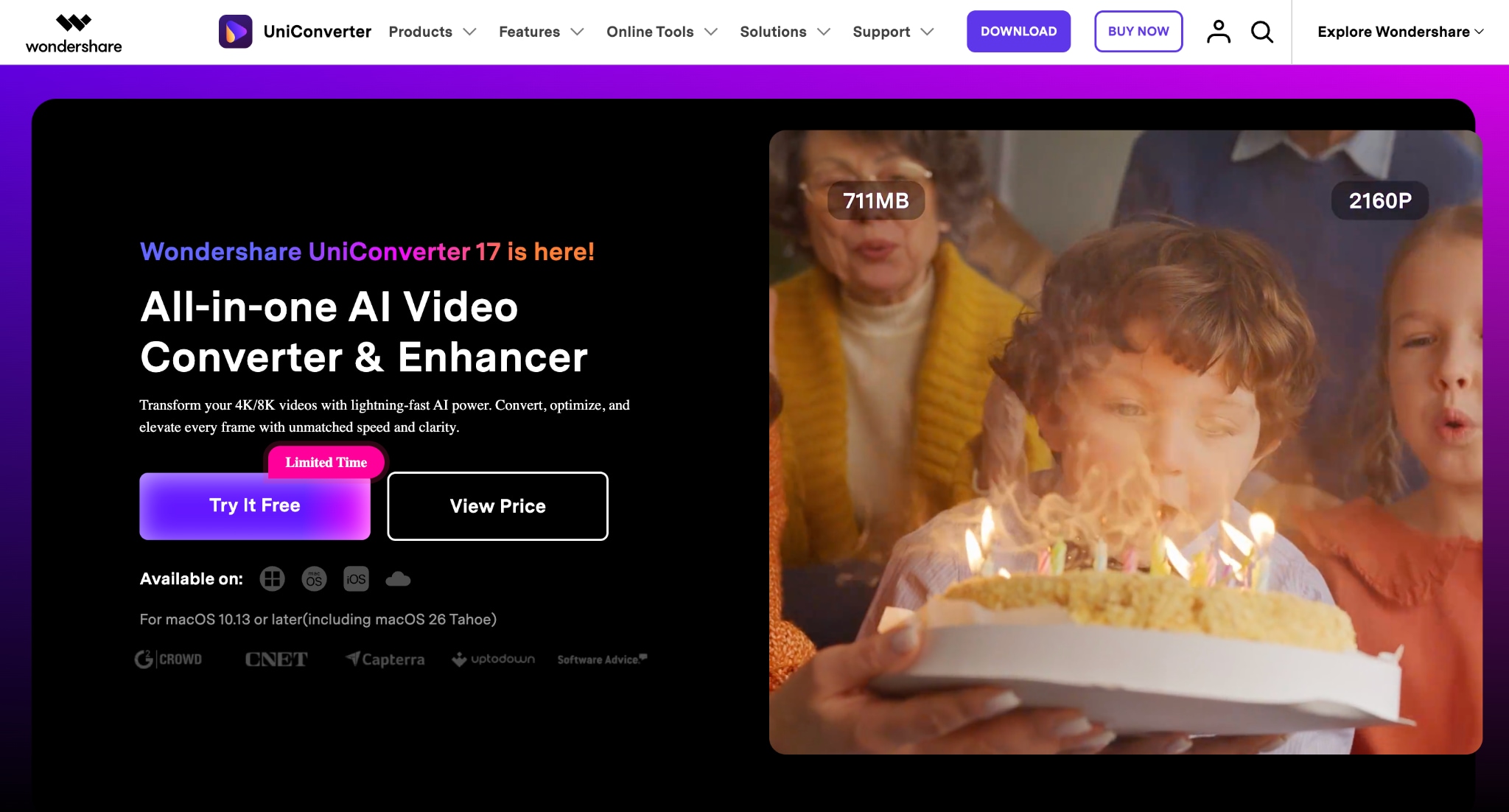

All-in-One Multimedia Processing Tool

If your goal is simply to save audio from a YouTube video, Y2Mate gets the job done. The downside is everything around the download. Depending on the site you land on, you may run into pop-ups, misleading ads, redirects, or fake download buttons.
If you would prefer a cleaner, more reliable experience, Wondershare UniConverter is a good alternative. It is desktop software for Windows and Mac that converts videos and audio into more than 1,000 formats. Since everything runs locally on your computer, you do not have to deal with browser ads or worry about using the right Y2Mate domain.
Beyond MP3 conversion, UniConverter also lets you compress videos, trim clips, record your screen, edit videos, generate subtitles, and organize media files. If you regularly work with video or audio, having these tools in one place can save time.
Key Features of Wondershare UniConverter
Convert YouTube videos to MP3 and other audio formats with just a few clicks.
Support for over 1,000 file formats, including MP3, WAV, AAC, FLAC, MP4, MOV, and AVI.
Batch conversion lets you convert multiple files simultaneously.
High-quality audio output, with options to choose different bitrate settings.
Fast conversion speeds make it practical for larger files and playlists.
Built-in editing tools to trim audio or video before exporting.
Video compression to reduce file size without noticeable quality loss.
How to Convert a YouTube Video to MP3 with UniConverter
Take these simple and safe steps to convert your YouTube video on a desktop:
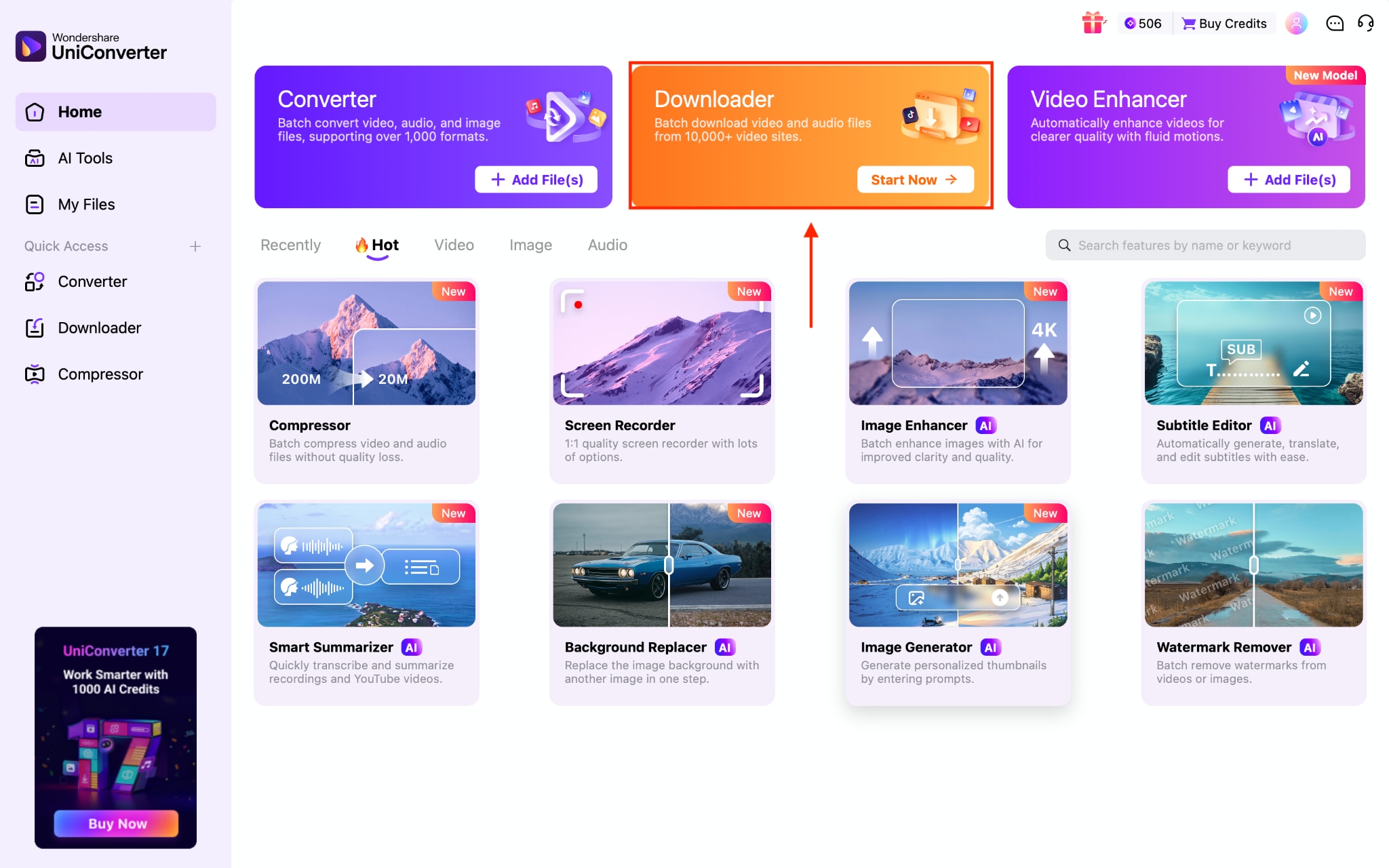
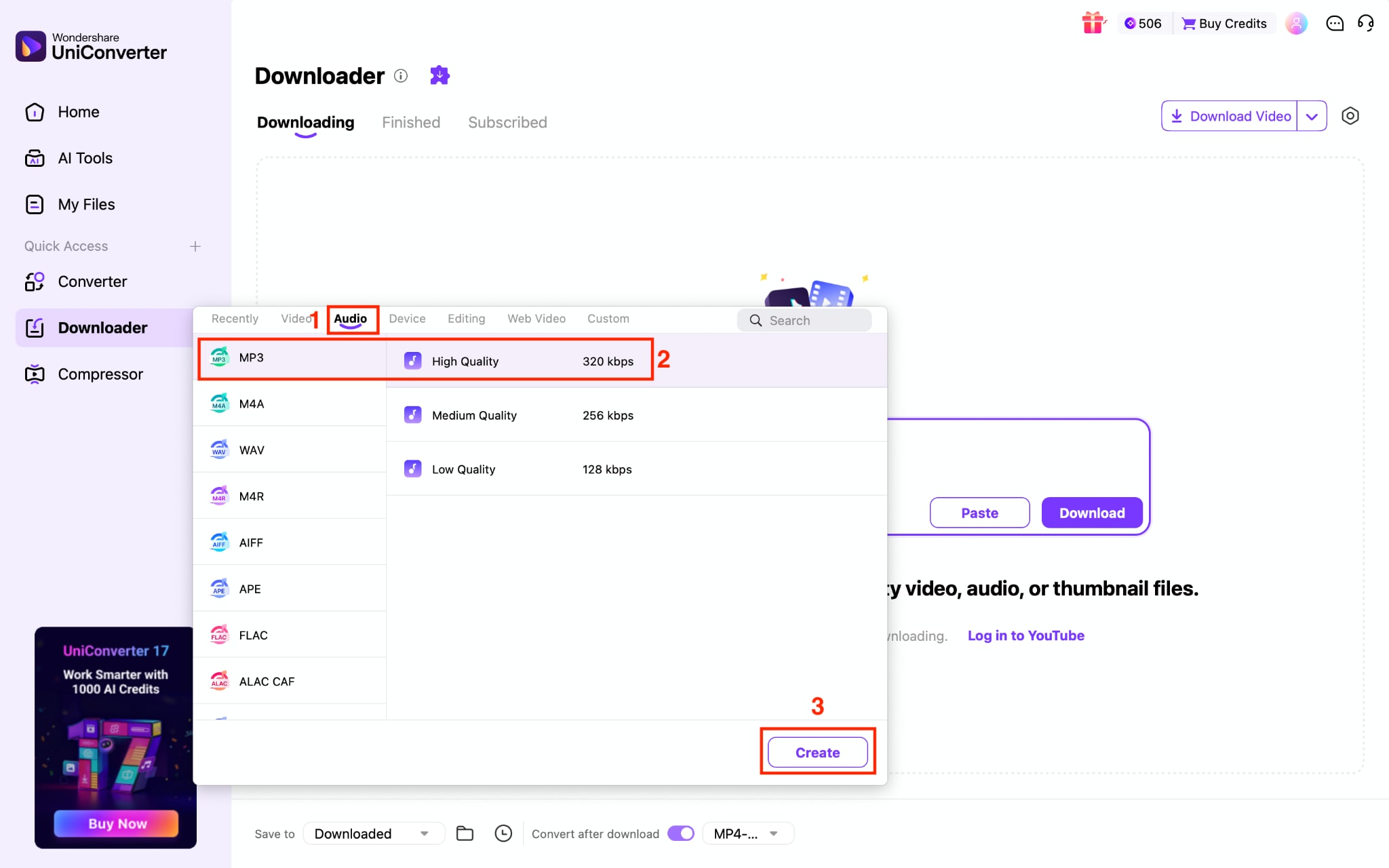
Step 1: On the Wondershare UniConverter dashboard, click the "Downloader" option.
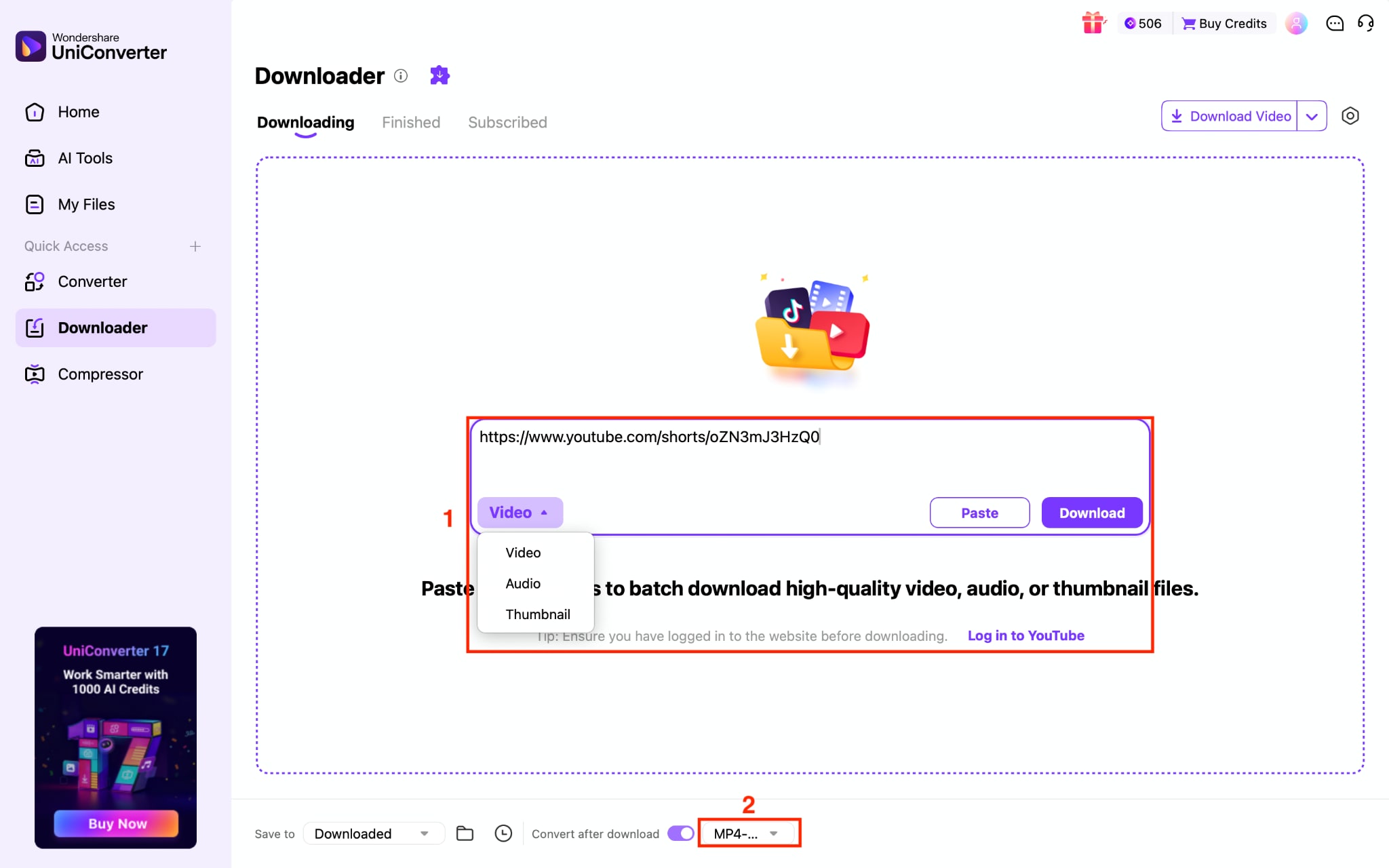
Step 2: Paste the link and enable conversion after the download button is located at the bottom.
Step 3: Choose the MP3 format under the Audio section and click the "Create" button.
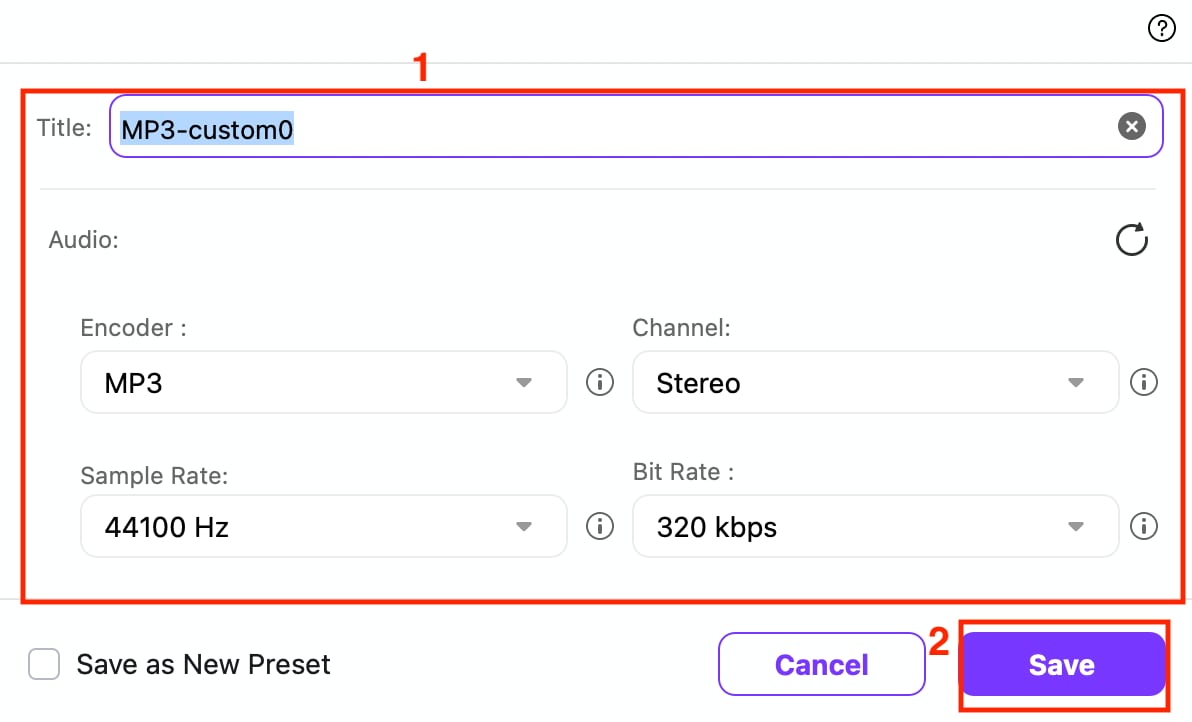
Step 4: When you click "Create,” a pop-up comes and lets you create a title, adjust sample rate, bit rate, and once done, click "Save."
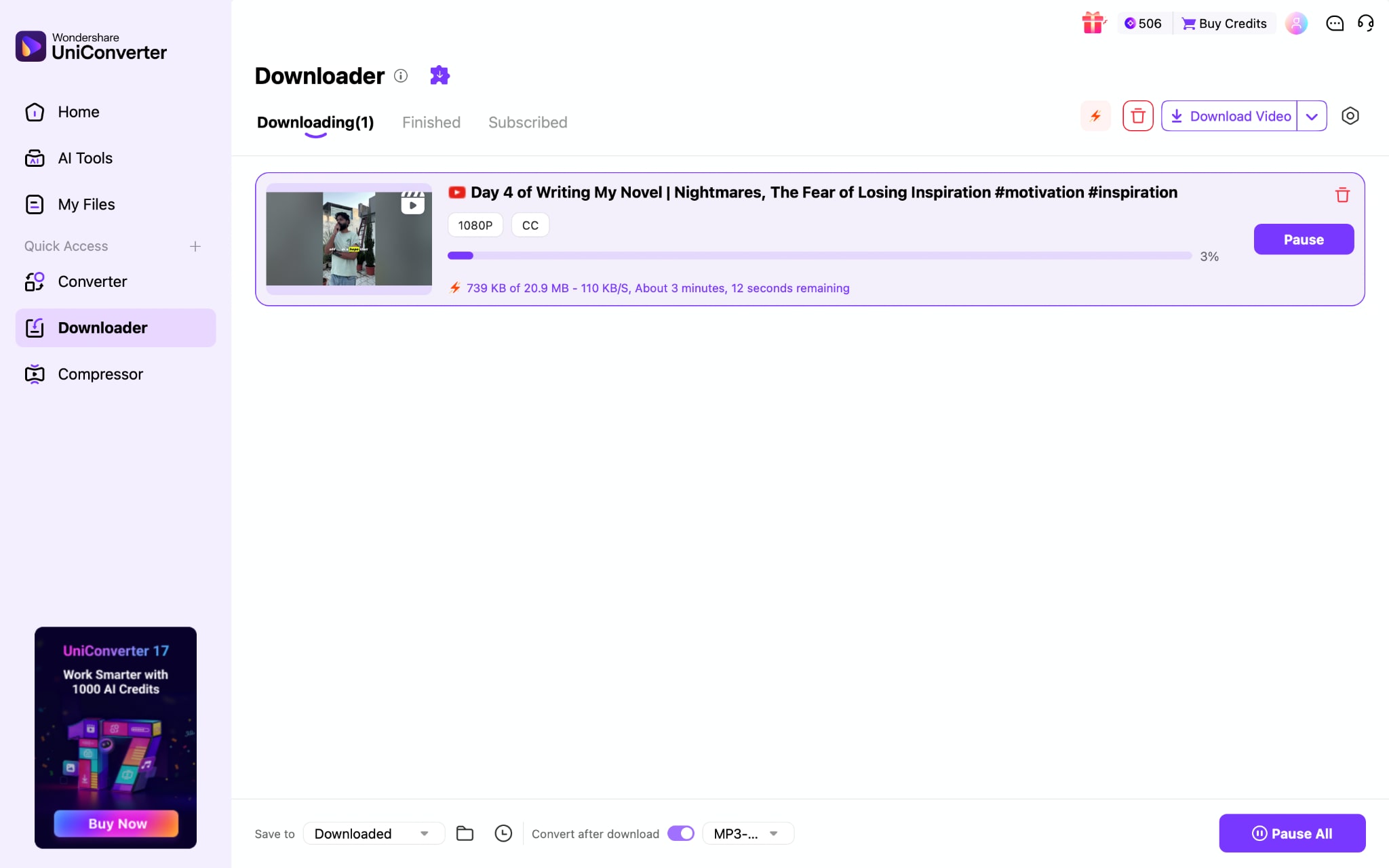
Step 5: Once done, click the "Download" button to start the download.
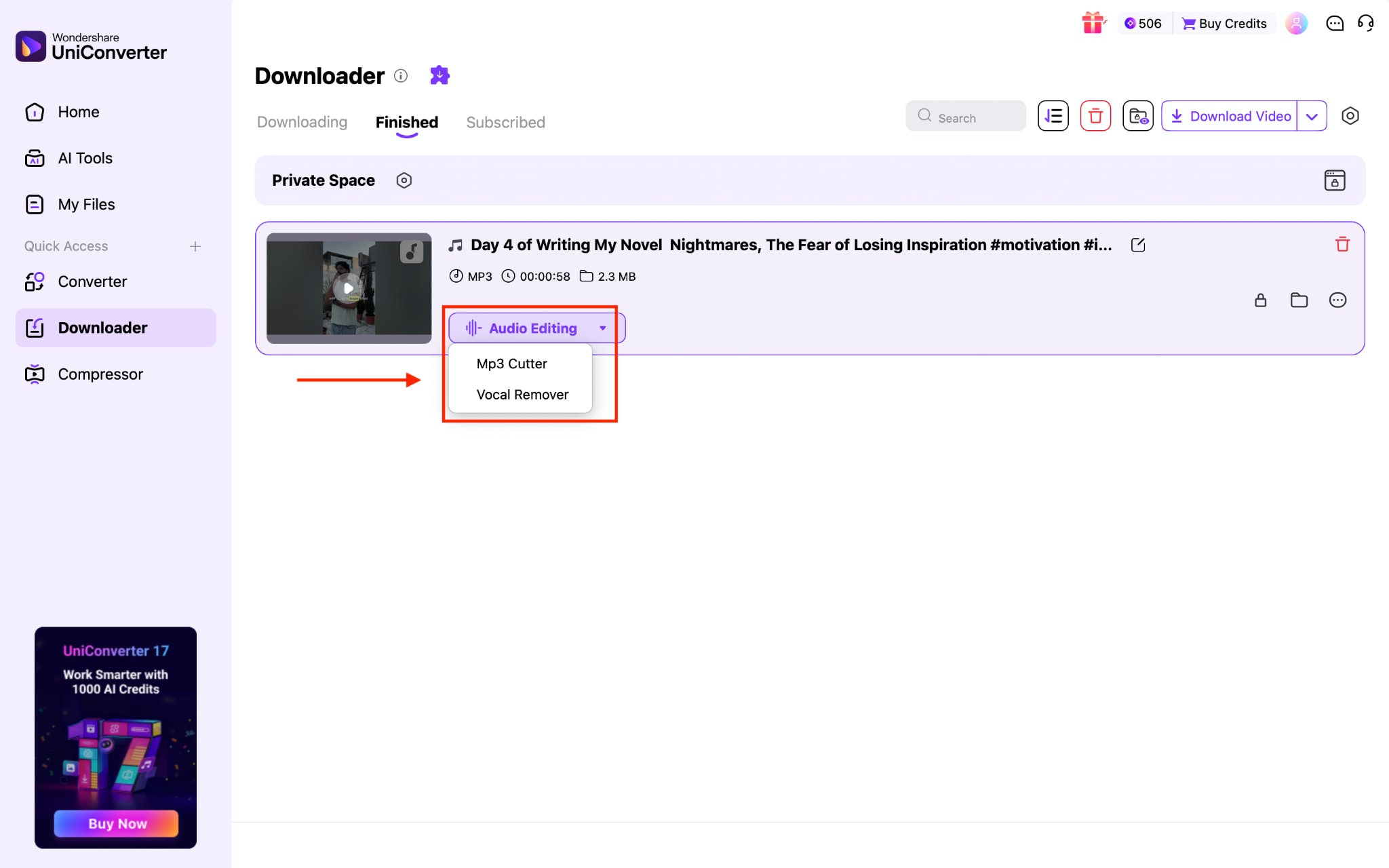
Step 6: After the download finishes, you can use MP3 cutter and Vocal Remover on the same video.
Part 7: Y2Mate vs. Wondershare UniConverter: Quick Comparison Table
Here's how the two compare on the factors that actually matter when choosing a YouTube-to-MP3 tool.
| Factor | Y2Mate | UniConverter |
| Official website | No single verified domain; many mirrors | Yes, the official Wondershare site |
| Ads and pop-ups | Frequent, often deceptive | None, since it's installed software |
| Malware risk | Present through ad networks and fake buttons | Low comes from a verified vendor |
| Max MP3 quality | Up to 320 kbps (varies by mirror) | Up to 320 kbps |
| Batch conversion | Inconsistent across mirrors | Yes |
| Installation required | No, browser-based | Yes, a desktop app for Windows and Mac |
| Extra editing tools | None | Trimming, compression, subtitles, watermarks |
| Cost | Free | Free trial, paid plans |
| Customer support | None | Chat and email support |
Part 8: Who Should Use Y2Mate YouTube to MP3 Converter
While Y2Mate works well for certain situations, it is not the best choice for every user. Here's when it makes sense to use Y2Mate, and when a dedicated converter like Wondershare UniConverter is likely to be the better option.
| Use Case | Recommended Tool | Why |
| Downloading a single MP3 occasionally | Y2Mate | Quick browser-based conversion without installing software. |
| Converting multiple videos at once | Wondershare UniConverter | Supports reliable batch downloads and conversions, saving significant time. |
| Users concerned about security | Wondershare UniConverter | Desktop software eliminates misleading ads, redirects, and fake download buttons commonly found on mirror sites. |
| High-quality music downloads | Tie | Both can produce high-bitrate MP3 files when the source audio supports it, though UniConverter offers more consistent output settings. |
| Editing audio after downloading | Wondershare UniConverter | Includes trimming, compression, subtitle generation, and other built-in media tools. |
| One-time, no-installation conversions | Y2Mate | Convenient if you only need a quick download and are comfortable navigating mirror sites safely. |
| Frequent content creators or professionals | Wondershare UniConverter | Better suited for regular workflows thanks to stable performance, customer support, and additional editing capabilities. |
Recommendation
If you only need to extract audio from a YouTube video once in a while, Y2Mate offers a fast, browser-based solution. However, if you regularly convert media, value a consistent user experience, or want to avoid the uncertainty of mirror sites, a dedicated desktop application like Wondershare UniConverter is the more dependable long-term choice.
Conclusion
Y2Mate remains one of the quickest ways to convert YouTube videos into MP3 files without installing software. However, its reliance on mirror sites means the experience isn't always consistent or secure. If you only need an occasional download, it can be a convenient option when used carefully. For frequent conversions, batch processing, and a more reliable workflow, a desktop solution like Wondershare UniConverter is the better long-term investment.

