


DNxHD has long been a trusted codec in professional post-production, especially within Avid Media Composer. It’s built for editing, not delivery. But in real-world workflows, you often need formats that are more universal, more compressed, and more web-friendly. That’s where DNxHD conversion comes in—like getting a DNxHD clip to play on your phone, sharing a file with a client who only uses QuickTime, sending a lightweight review cut to a producer on a laptop, or exporting a DNxHD sequence that won’t upload to YouTube.
This is where DNxHD conversion becomes essential—whether to MP4 for playback, MOV ProRes for editing, or HEVC for smaller file sizes without big quality loss. Below we break down what DNxHD is, when and why conversion is needed, and why UniConverter is the best solution.
In this article
- What is DNxHD Codec and Its Use Cases
- Common Problems and Fix for Converting DNxHD
- Pros, Cons, and Considerations to Convert DNxHD
- Quick Comparison: Tools for Converting DNxHD
- Easiest Solution: Convert DNxHD with UniConverter
- The Future of DNxHD – Still Relevant or Becoming Obsolete?
- Conclusion
- FAQs
Part 1: What is DNxHD Codec and Its Use Cases
Understanding DNxHD
DNxHD (Digital Nonlinear Extensible High Definition) is a high-bitrate, intra-frame codec designed for professional video editing workflows. Unlike distribution codecs (H.264/HEVC), DNxHD prioritizes editing efficiency with low CPU overhead and frame-accurate playback.
Key Features of DNxHD
- Editing-Friendly: Each frame is stored independently, making it easier for editors to scrub and cut.
- High Bitrates: Available in profiles like 36 Mbps (proxy), 120 Mbps, 185 Mbps, and beyond.
- Broadcast Quality: Approved for many TV and cinema workflows.
- Cross-Platform: Commonly stored in MXF (Avid systems) or MOV (cross-NLE).
Use Cases of DNxHD
- Professional Editing – Editors prefer DNxHD for smoother playback in Avid Media Composer, Premiere Pro, and Resolve.
- Broadcasting – Major TV stations use DNxHD as a mastering or delivery format.
- Film Production – Camera workflows and dailies often transcode RAW footage into DNxHD for easier handling.
- Collaborative Projects – Teams share DNxHD files across studios for consistent quality.
- Archiving – Some post houses archive masters in DNxHD for stability and longevity.
Despite these strengths, DNxHD is not ideal for playback, streaming, or sharing online, which is why conversion is crucial.
Part 2: Why Convert DNxHD and Common Challenges
DNxHD excels in editing suites but quickly becomes a roadblock when you step outside of professional post-production. Many creators encounter this the moment they try to share a DNxHD master file with a client, upload it to social media, or play it on a regular device. The codec was designed for editors—not viewers—and that’s where conversion comes in.
Why Convert DNxHD?
- Playback Compatibility: DNxHD won’t play natively on many devices (smartphones, smart TVs).
- Online Sharing: Platforms like YouTube, TikTok, or Instagram do not accept DNxHD uploads.
- File Size Issues: High-bitrate DNxHD files can be massive—hard to store or transfer.
- Editing Limitations: Non-Avid workflows sometimes reject DNxHD, especially on older software.
- Collaboration Needs: Clients or team members often request MP4 or ProRes instead.
Common DNxHD Conversion Challenges
- Quality Loss – Bad converters compress too much, losing visual detail.
- Slow Speed – DNxHD decoding is CPU-intensive without GPU acceleration.
- Audio Sync Issues – Some DNxHD files have uncommon audio codecs.
- Large Exports – Converting DNxHD to less efficient formats may inflate file size.
- Batch Conversion Needs – Handling multiple DNxHD clips at once can be time-consuming.

Fast & Reliable DNxHD Converter
Part 3: How to Choose the Best DNxHD Converter Tool
When selecting a DNxHD converter, professionals and casual users alike should focus on a few crucial criteria. Not all converters are created equal—some sacrifice quality for speed, others provide flexibility but are too technical for beginners.
Key Considerations
- DNxHD Support – Not all converters recognize DNxHD natively.
- Speed & GPU Acceleration – Essential for 4K/8K DNxHD workflows.
- Format Range – Ability to output MP4, ProRes, HEVC, MOV, etc.
- Batch Processing – Saves time when converting multiple files.
- Customizable Settings – Adjust bitrate, resolution, and codecs.
For example, an indie filmmaker might shoot in DNxHD but edit in Premiere Pro. HandBrake can convert their files to MP4, but it won’t give them ProRes or DNxHD rewraps. FFmpeg is powerful enough to do anything—but only if you know the command line. UniConverter, by contrast, offers one-click presets and supports all pro codecs, making it usable for both beginners and seasoned editors.
|
Tool |
Platform |
DNxHD Support |
GPU Acceleration |
Batch Conversion |
Output Formats |
Pricing |
|
Online + Desktop |
✅ Full |
✅ Yes |
✅ Yes |
MP4, MOV, HEVC, ProRes, MKV |
Freemium |
|
|
Desktop |
⚠ Limited |
✅ Yes |
✅ Yes |
MP4, MKV |
Free |
|
|
Desktop |
✅ Full |
✅ Yes |
✅ Yes |
Any (manual setup) |
Free |
|
|
Desktop |
✅ Full |
✅ Yes |
✅ Yes |
MP4, MOV, AVI, MXF |
Paid |
|
|
Online |
✅ Yes |
❌ No |
✅ Yes |
MP4, MOV, WebM |
Paid |
Part 4: Why Choose UniConverter for DNxHD Conversion (Step-by-Step Guide)
For editors who work with Avid or Final Cut Pro, UniConverter ensures that your DNxHD files can be re-encoded into editing-friendly formats like ProRes or CineForm without quality loss. For content creators and businesses, it converts DNxHD into MP4 H.264 or HEVC, formats that upload seamlessly to YouTube, Instagram, or corporate LMS platforms. And for archivists, UniConverter makes it easy to compress massive DNxHD libraries into efficient MKV or HEVC containers while preserving quality.
This combination of speed, flexibility, and professional focus is why UniConverter has become a favorite among videographers, post-production teams, and even casual users who just want their files to play everywhere.
Why UniConverter is the Best for DNxHD Conversion
- Wide Format Support – Convert DNxHD to MP4, MOV, HEVC, ProRes, CineForm, and more.
- NVIDIA Accelerated Speed – Up to 130x faster conversion with GPU acceleration.
- All-in-One Workflow – Convert, compress, edit, add subtitles, burn to DVD.
- Free Online + Desktop Power – Quick web conversion or full desktop suite.

How to Convert DNxHD with UniConverter
Desktop Version:
Step 1: Install and Launch UniConverter
Download UniConverter Desktop for Windows or Mac. Install and open the program.

Step 2: Import DNxHD Files
Click Add Files or drag your DNxHD clips into the main window. Batch import is supported.

Step 3: Select Output Format
Choose from MP4 (H.264 for universal use), MOV (ProRes for editing), HEVC (smaller size), or MKV (archiving).

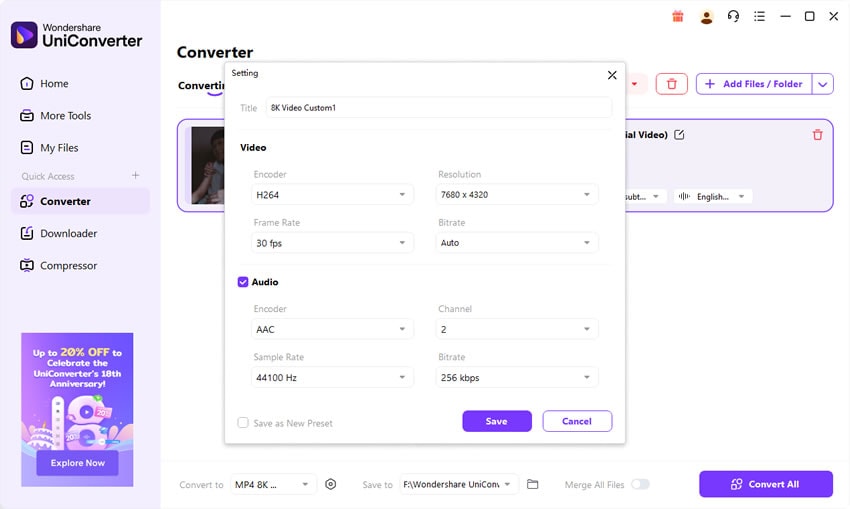
Step 4: Customize Settings
Adjust bitrate, resolution, frame rate. Enable GPU acceleration for faster processing.

Step 5: Start Conversion
Select your output folder and click Convert. Files will be processed and ready for playback or editing.

Fast & Reliable DNxHD Converter
Part 5: Pro Tips for the Best DNxHD Conversion Results
- Pick the Right Codec for Your Goal – MP4 (H.264) for universal playback, ProRes or DNxHD for editing, HEVC for smaller but high-quality files.
- Balance Bitrate and Resolution – For 1080p, 8–12 Mbps works well; for 4K, use 20–35 Mbps.
- Maintain Frame Rate – Keep the original FPS to avoid jitter.
- Check Audio Settings – Use AAC for compatibility, or WAV/PCM for editing.
- Use Batch Conversion – Save hours when handling multiple clips.
- Enable GPU Acceleration – NVIDIA, AMD, and Intel GPUs can drastically cut conversion times.
- Archive a Master Copy – Keep one high-quality DNxHD or ProRes master.
- Match Platform Requirements – YouTube prefers MP4 H.264, broadcasters may require ProRes/DNxHD.
- Check Color Space – Confirm Rec.709 or higher settings are preserved.
Part 6: The Future of DNxHD – Still Relevant or Becoming Obsolete?
Why DNxHD Still Matters
DNxHD remains valuable in Avid Media Composer environments where it was originally developed. Its intra-frame compression makes editing smooth, allowing frame-accurate playback and fast color correction. Broadcasters also rely on DNxHD MXF files as part of their delivery standards, and post houses often store DNxHD masters for archival stability. In controlled editing pipelines, DNxHD is still trusted because of its predictability and consistency.
Limitations and Competition
The codec’s weaknesses are significant outside professional setups. DNxHD files are large and inefficient, often reaching gigabytes for short clips, making them impractical for casual creators or cloud storage. It also lacks hardware acceleration, meaning most consumer devices cannot play DNxHD natively. At the same time, ProRes dominates Mac-based editing, HEVC offers smaller files with good quality for distribution, and AV1 is emerging as the next-generation streaming codec supported by major tech companies.
Future Outlook
Avid attempted to extend DNxHD with DNxHR, which supports 2K, 4K, and 8K workflows. While useful, adoption remains slower compared to competing codecs. Looking ahead, DNxHD will likely persist for another 5–10 years in broadcast and editing, but outside that space, it will steadily decline.
Pro Tip: Keep DNxHD for editing/archival, but convert to MP4 or HEVC for delivery and sharing.
Fast & Reliable DNxHD Converter
Conclusion
DNxHD remains a powerful, editing-focused codec but is impractical for delivery and everyday playback. Converting DNxHD to the right format—MP4 for universal playback, ProRes for editing, or HEVC for smaller sizes—ensures your files stay usable, shareable, and future-proof. UniConverter delivers the ideal balance of conversion speed, wide format support, and easy-to-use controls.
FAQs
-
1. What’s the best format to convert DNxHD into for general playback?
MP4 (H.264 + AAC) is the safest choice—it works on smartphones, PCs, TVs, and all major platforms. -
2. Should I use ProRes or DNxHD for editing in Premiere or Final Cut?
Both are editing-friendly. If you’re on Avid, stick with DNxHD. For cross-platform workflows, ProRes is more widely accepted. -
3. Why is my DNxHD file so large, and can conversion reduce it?
DNxHD uses high bitrates for editing efficiency. Converting to HEVC can cut file size by up to 50% while preserving quality. -
4. My DNxHD file won’t play on VLC or Windows Media Player—what’s wrong?
Many players lack native DNxHD support. Converting to MP4 H.264 ensures universal playback. -
5. Does converting DNxHD affect video quality?
It depends on your settings. Use high-quality presets or constant quality mode in UniConverter to minimize loss. Always keep a master copy for future conversions.

