Creating truly realistic AI images can be challenging, especially when results turn out distorted, poorly lit, or simply unrealistic. Many users struggle with trial-and-error prompting, inconsistent textures, and visuals that don’t look natural. Nano Banana Pro was designed to solve these frustrations with smarter rendering, physics-aware details, and highly realistic outputs.
This Nano Banana Pro tutorial helps you learn the tool step-by-step, whether you're new to AI or already experienced. It walks you through features, workflow, prompt structure, and enhancement tips to create professional-quality images with ease. By the end, you’ll feel confident generating photorealistic content without guesswork or endless revisions.
In this article
- What is Nano Banana Pro? (Understanding the Basics)
- Top Features That Make Nano Banana Pro Stand Out
- Nano Banana Pro vs Nano Banana: What's New?
- How to Use Nano Banana Pro: Step-by-Step Tutorial
- Prompt Templates to Make Realistic Real-world Images with Nano Banana
- Tools That has integrated Nano Banana Pro Models (With Free Trial)
- Bonus: How to Enhance Nano Banana Pro Generated Images for Better Visual
- Conclusion
- FAQs
Part 1: What is Nano Banana Pro? (Understanding the Basics)
What is Nano Banana Pro?
Nano Banana Pro is Google's upgraded, state-of-the-art AI image generation and editing model. It is designed to transform text and multi-modal inputs into high-fidelity, highly controlled visual assets. Nano Banana Pro is the popular codename for the official model, Gemini 3 Pro Image.
Release Date: The model began rolling out on November 20, 2025.
Relationship to Gemini 3 Pro: It is built directly on the Gemini 3 Pro multimodal architecture, leveraging its advanced reasoning, real-world knowledge, and language understanding to produce visuals that are more accurate and context-aware.
Evolution from Nano Banana 1: It is the successor to the original Nano Banana (which was the codename for Gemini 2.5 Flash Image). The key upgrade is its transition from a consumer-grade, fun-focused tool (with features like figurine-style edits) to a system capable of enterprise-grade work, offering 4K resolution and studio-quality controls over lighting, focus, and composition.
Key Positioning: It targets both professional creators and advanced users by offering features like:
Crisp, legible, multilingual text embedding (for infographics and branding).
Integration with Google Search for real-time, factual grounding.
The ability to blend up to 14 reference images while maintaining character consistency for up to five subjects.
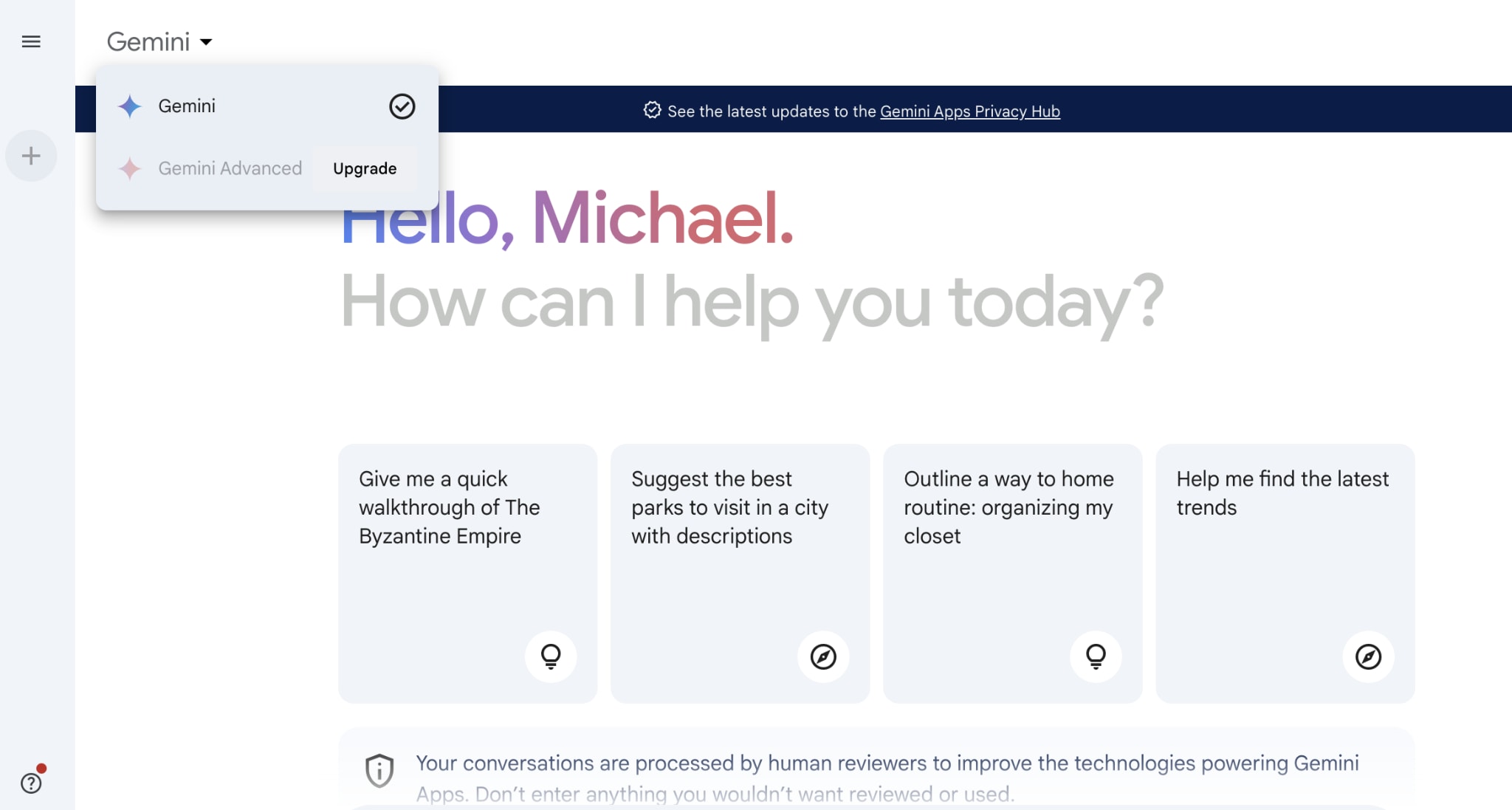
Nano Banana and the Gemini Model Behind it
The relationship between "Nano Banana" and "Gemini" is one of an internal codename becoming a widely recognized public name.
Is Nano Banana a Gemini Model?
Yes, both Nano Banana models are variants of the Gemini family of AI models, specifically tuned for image tasks.
Clarification of the Naming Convention:
Codename vs. Official Product Name: Nano Banana is the codename that originated from internal Google testing but quickly caught on with the public. Google later confirmed the official product names are Gemini 2.5 Flash Image (for the original) and Gemini 3 Pro Image (for the Pro version).
Google's Fruit-Based Naming Tradition: This naming practice follows a historical trend at Google, which has previously used fruit names for various internal projects and Android versions (e.g., Apple, Strawberry, Android KitKat, Lollipop).
Part 2: Top Features That Make Nano Banana Pro Stand Out
Nano Banana Pro (Gemini 3 Pro Image) represents a significant leap forward in generative AI, moving from simple generation to offering precise control and real-time factual accuracy:
Feature #1: Revolutionary Text Rendering
Nano Banana Pro can accurately embed complex, legible text directly into images, addressing a long-standing limitation in previous models.
How it Works: The model uses its advanced Gemini 3 Pro reasoning core to understand the context and meaning of the text, not just its shape. This enables multi-language support across Latin, Cyrillic, CJK (Chinese, Japanese, Korean), and more.
Use Cases: Perfect for professional assets like posters, marketing mockups, high-fidelity UI design concepts, and realistic signage.
Best Practices: For the clearest results, provide the font style (e.g., "Art Deco font," "minimalist sans-serif," "handwritten script") in your prompt.
Limitations: While greatly improved, generating very small, tiny text or highly complex, intricate calligraphy still requires careful prompting and may show minor artifacts.
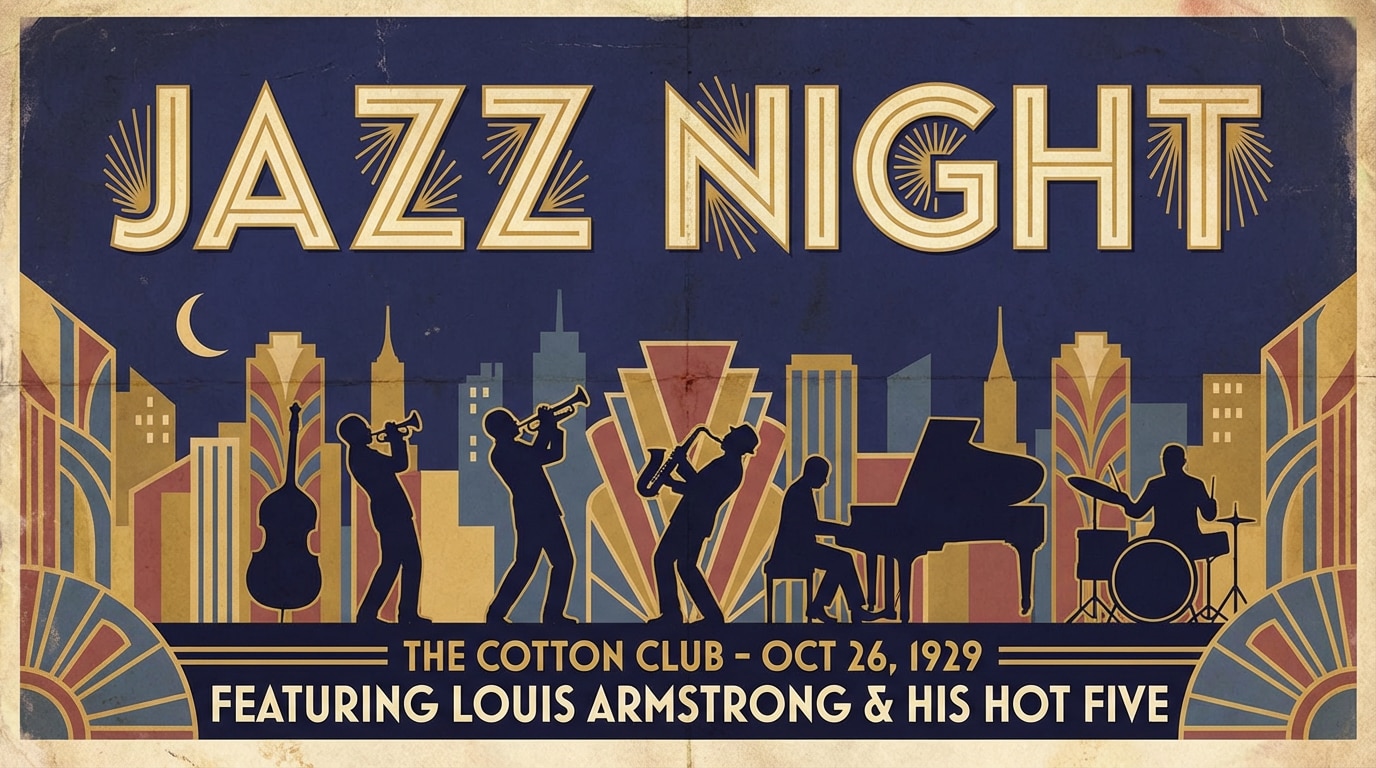
Example Prompt: "Create a vintage concert poster with 'JAZZ NIGHT' in bold art deco font, set against a dark blue background."
Specific Use Cases:
Creating a social media post with a motivational quote overlaid clearly on a landscape image.
Designing a product label mockup with specific ingredient lists that must be readable.
Feature #2: Real-Time Google Search Integration
This feature allows the model to access up-to-the-minute information via Google Search and incorporate that data into the generated image.
What You Can Create: Weather infographics, visualizations of current sports data (like scores or player stats), recipe visualizations based on current trending ingredients, or images grounded in recent news events.
Accuracy Considerations: The resulting image is only as accurate as the real-time data pulled by the Search tool. The model is designed to cite the source data used for verification.
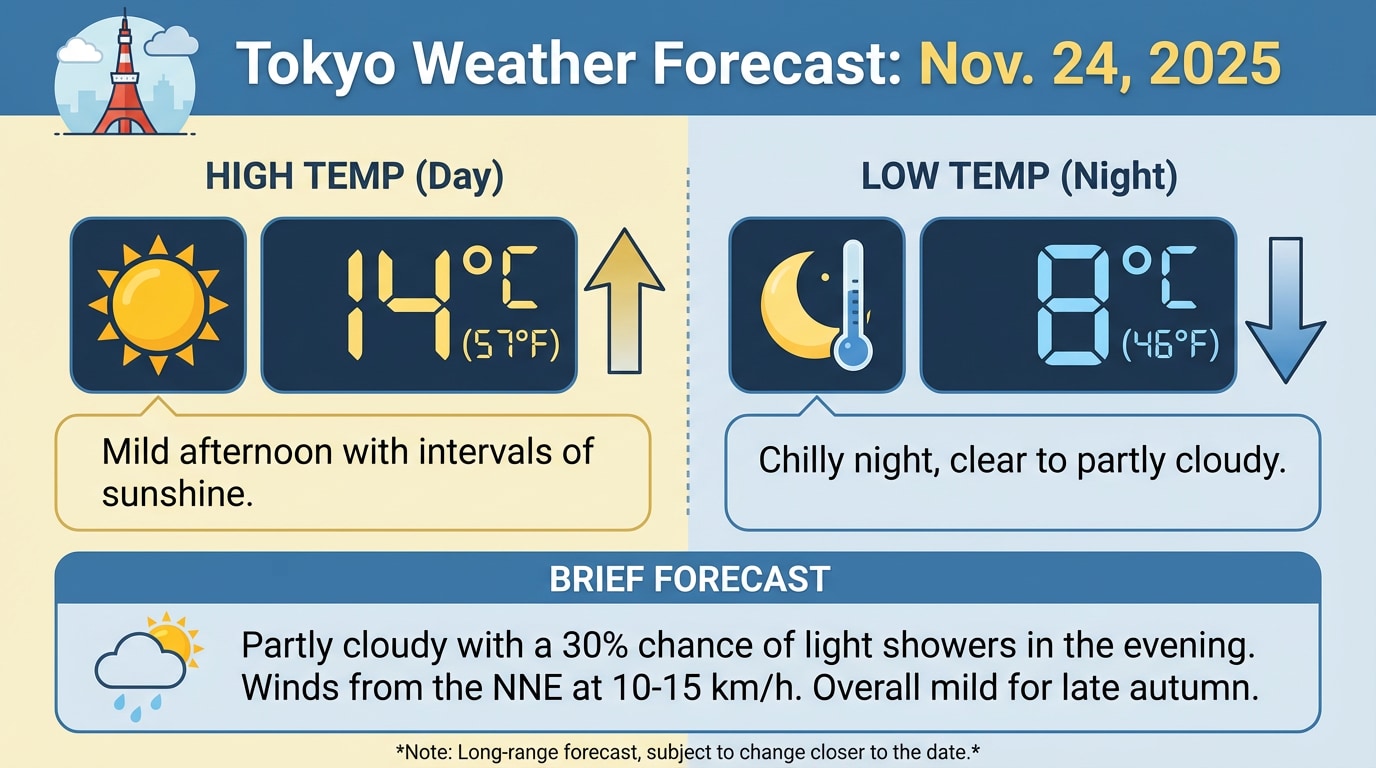
Example Prompt: "Create an infographic about Nov.24,2025 weather in Tokyo showing the high and low temperature and a brief forecast."
Specific Use Cases:
Generating a dynamic news graphic showing the current stock price chart of a major tech company.
Creating a map-based image that highlights the current travel restrictions for a specific country based on real-time data.
Feature #3: Advanced Image Blending (14 Images)
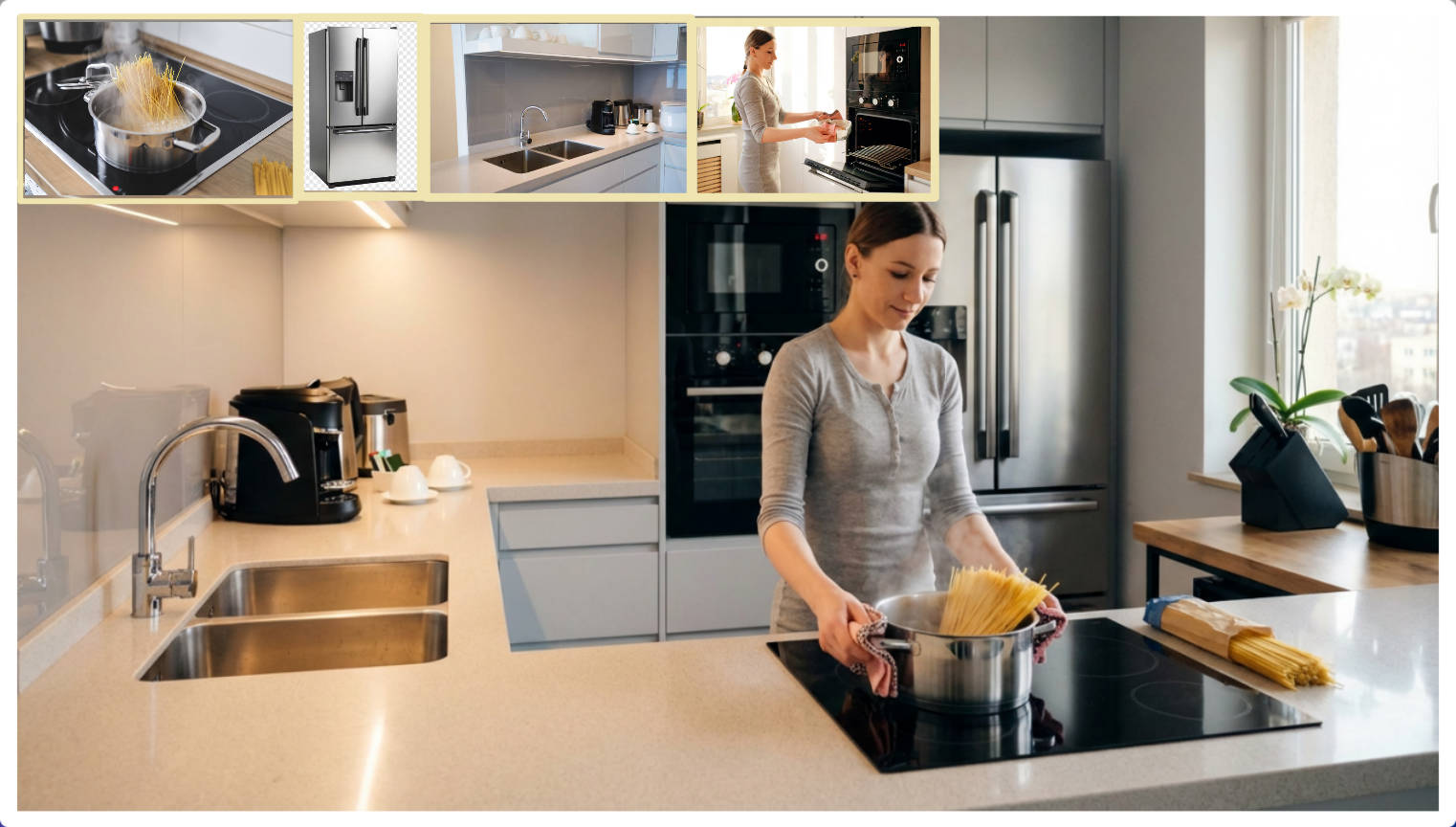
Nano Banana Pro can blend up to 14 separate input images or visual references into a single, cohesive output, maintaining the unique characteristics of each source.
How to Combine Multiple Inputs: Users upload or reference the images, and the prompt instructs the model on how to combine them (e.g., "Use the background from Image 1, the product from Image 2, and the lighting from Image 3").
Maintaining Character Identity: This is a major breakthrough, allowing the model to consistently generate a character or subject across different scenes, poses, and outfits.
Fashion/Product Visualization Applications: It is a powerful tool for e-commerce, allowing users to:
Show a product in various lifestyle settings without needing new photoshoots.
Create virtual models wearing new clothing designs, maintaining the model's face and body shape across different garments.
Example Prompt: "Combine these 4 photos into a single, cohesive lifestyle scene on a modern kitchen counter."
Specific Use Cases:
Architectural Visualization: Combining raw building plans, material textures, and environmental photos to create a final rendering.
E-commerce Retargeting: Generating hundreds of unique lifestyle photos for a single product across various demographics and settings.
Feature #4: Professional Editing Controls
The model offers granular control over traditional photographic and cinematic elements, effectively turning the AI into a virtual camera and lighting rig.
Camera Controls: You can specify angles (low angle, bird's-eye view), control focus (sharp foreground, blurred background), and apply bokeh effects for a shallow depth of field.
Lighting Controls: Fine-tune the mood with specific lighting terms like Golden Hour, dramatic chiaroscuro (strong contrast), rim lighting, or even just the precise angle and intensity of a key light.
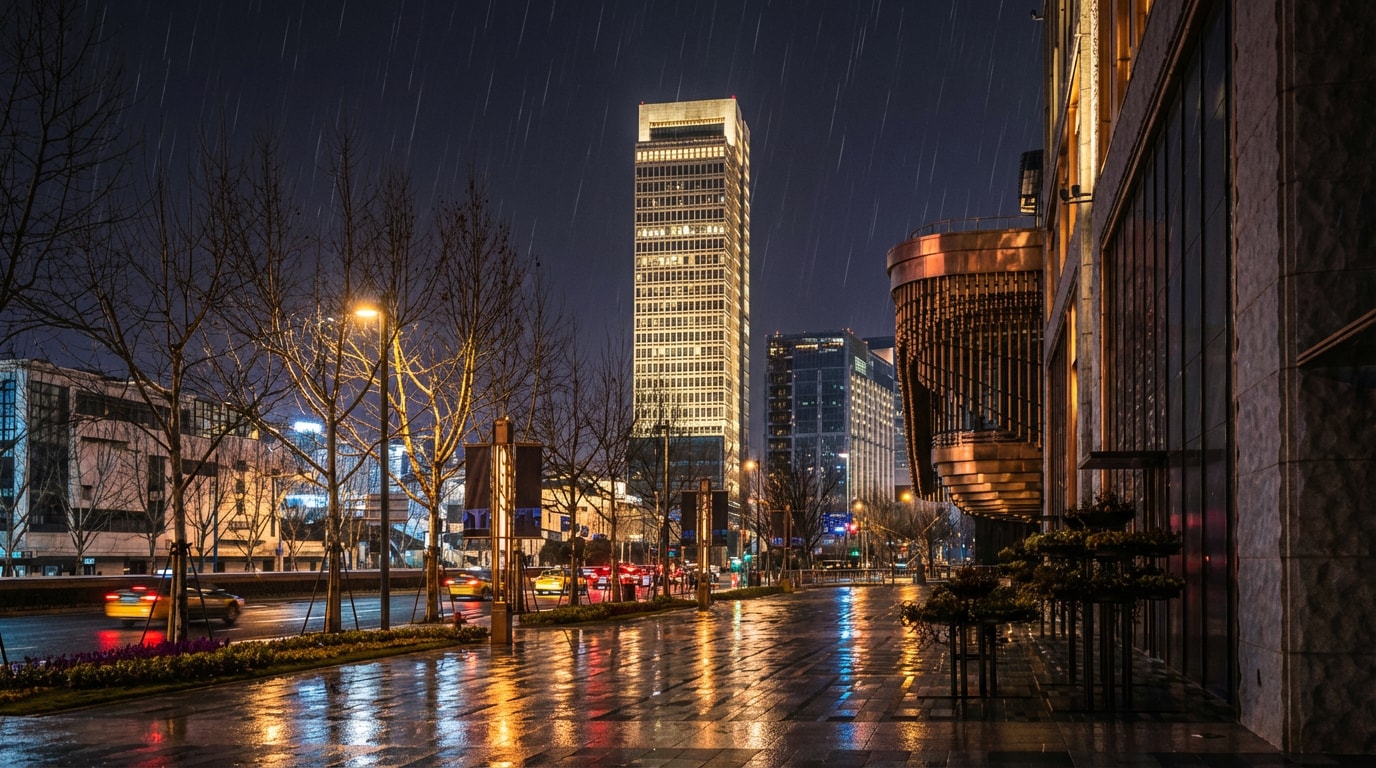
Scene Transformation: Easily alter the environment, such as switching a daytime scene to nighttime or changing the weather from sunny to moody and overcast.
Example Prompt: "Change this daytime scene to nighttime with city lights glowing and add a subtle rain effect."
Specific Use Cases:
Advertising: Quickly test how a product looks under different lighting conditions (e.g., studio light vs. natural light) before a photoshoot.
Filmmaking Storyboarding: Generating scene mockups by specifying cinematic parameters like cinematic aspect ratio and lens distortion.
Part 3: Nano Banana Pro vs Nano Banana: What's New?
The jump from Nano Banana to Nano Banana Pro represents one of the biggest improvements in Google’s image-generation ecosystem. While the original Nano Banana (based on Gemini 2.5 Flash) focused on fast, fun image outputs, Nano Banana Pro is engineered for precision, realism, and professional-grade creative workflows. It introduces a new reasoning-backed architecture, sharper rendering, stronger text generation, and dramatically improved control over style, consistency, and detail.
Whether you're creating product photos, cinematic scenes, branding visuals, or character-based storytelling, Nano Banana Pro offers deeper creative flexibility and reliability—closing gaps that earlier models struggled with.
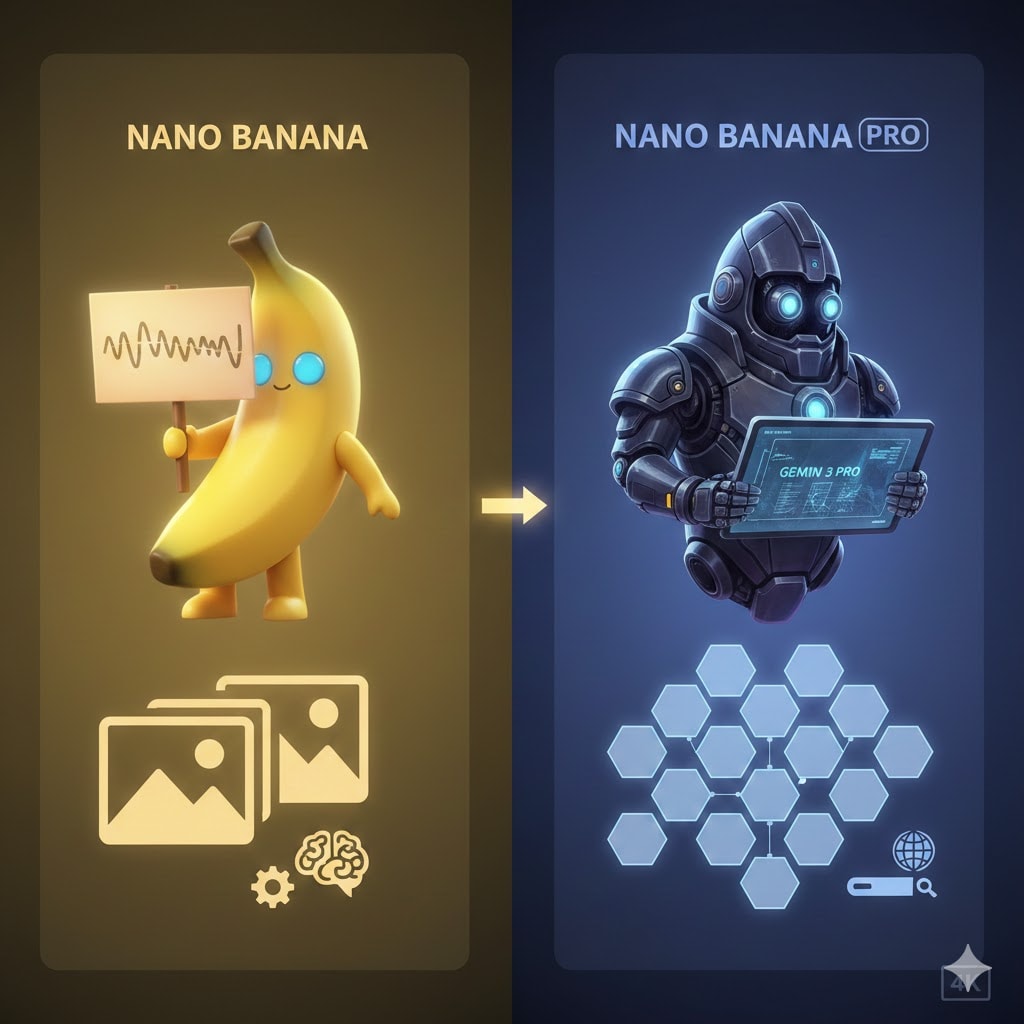
Nano Banana Pro vs Nano Banana 1: Head-to-Head Comparison
Nano Banana was a great entry-level generator, but Nano Banana Pro takes the experience to the next level with advanced realism, better scene logic, and higher resolution. The biggest shift is the hybrid Reasoning LLM + Diffusion system, meaning the model doesn’t just create—it understands context, instruction tone, lighting intention, and environment structure before rendering.
This leads to cleaner results, fewer distortions, and less trial-and-error for users.
Nano Banana Pro vs Nano Banana 1 Key Differences at a Glance
| Feature / Category | Nano Banana (1st Gen) | Nano Banana Pro (Latest) |
|---|---|---|
| Architecture | Fast Diffusion only | Reasoning-driven LLM + Diffusion |
| Max Resolution | 1K (1024x1024 pixels) | Native 2K (2048x2048) + 4K Upscaling |
| Text Rendering | Poor, distorted, unstable | Strong readable text with better typography |
| Input Image Support | Limited upload | Up to 14 reference images |
| Character Consistency | Basic and inconsistent | Consistent rendering of up to 5 people |
| Output Control | Minimal adjustable parameters | Advanced creative control (pose, lighting, physics, perspective) |
| Use Case | Fun/general creativity | Professional-grade content and production use |
Part 4: How to Use Nano Banana Pro: Step-by-Step Tutorial
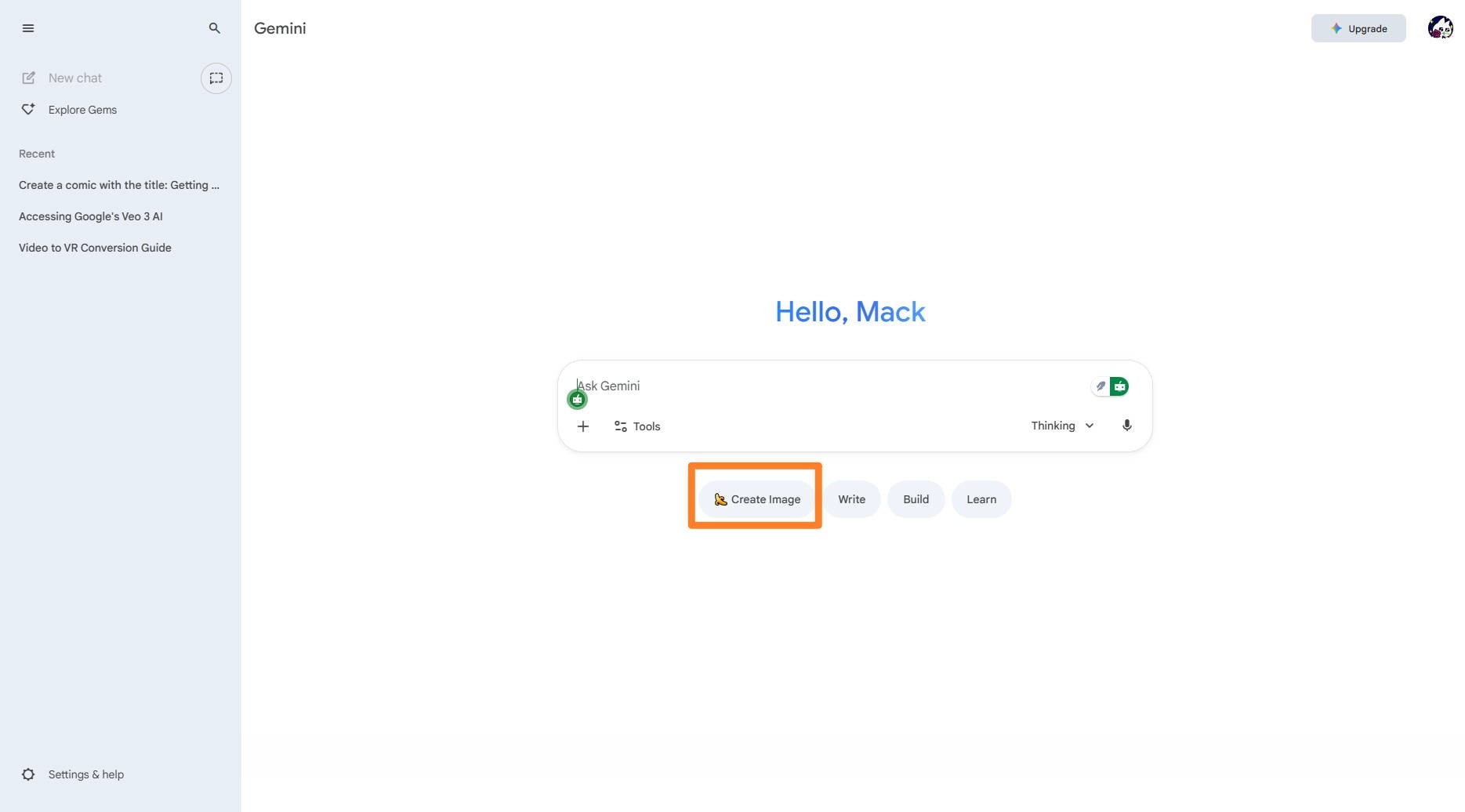
Nano Banana Pro (Gemini 3 Pro Image) is typically accessed directly within the Gemini web app or mobile app. The key step is selecting the correct model, often labeled as the "Thinking" model, to activate the Pro-level capabilities.
Here is a simple guide to creating your first high-resolution image:
Step 1: Open the Gemini App and Select the Pro Model
Access the App: Navigate to the Gemini web app on your desktop or open the Gemini mobile app.
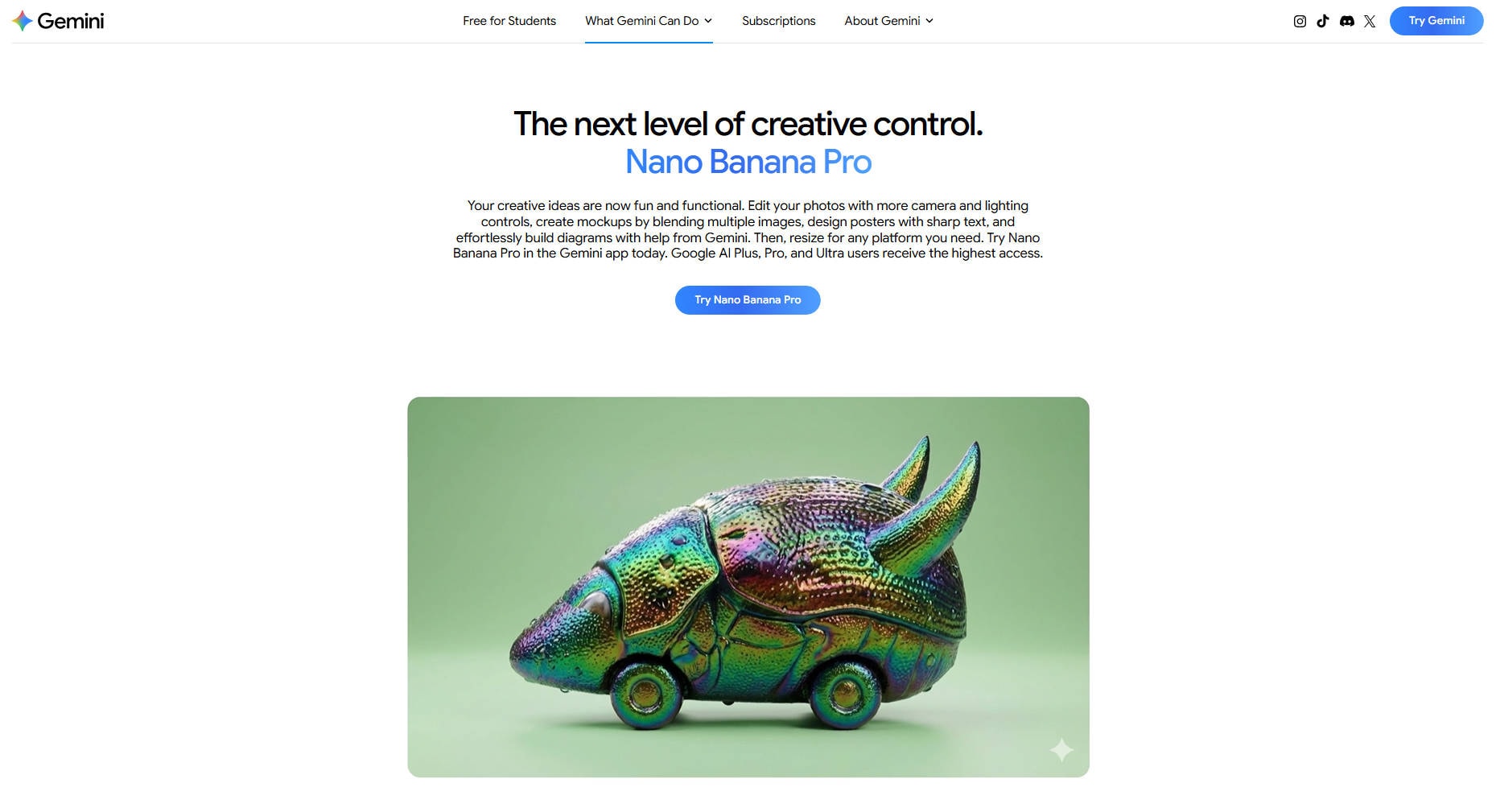
Select Pro Mode: Look for the model selection area in the prompt bar. Tap or click to ensure the underlying technology is Gemini 3 Pro Image. Note: If you are a free-tier user, you may have a limited number of Pro generations before the system reverts to the standard Nano Banana model.
Step 2: Upload Reference Images (Optional but Recommended)
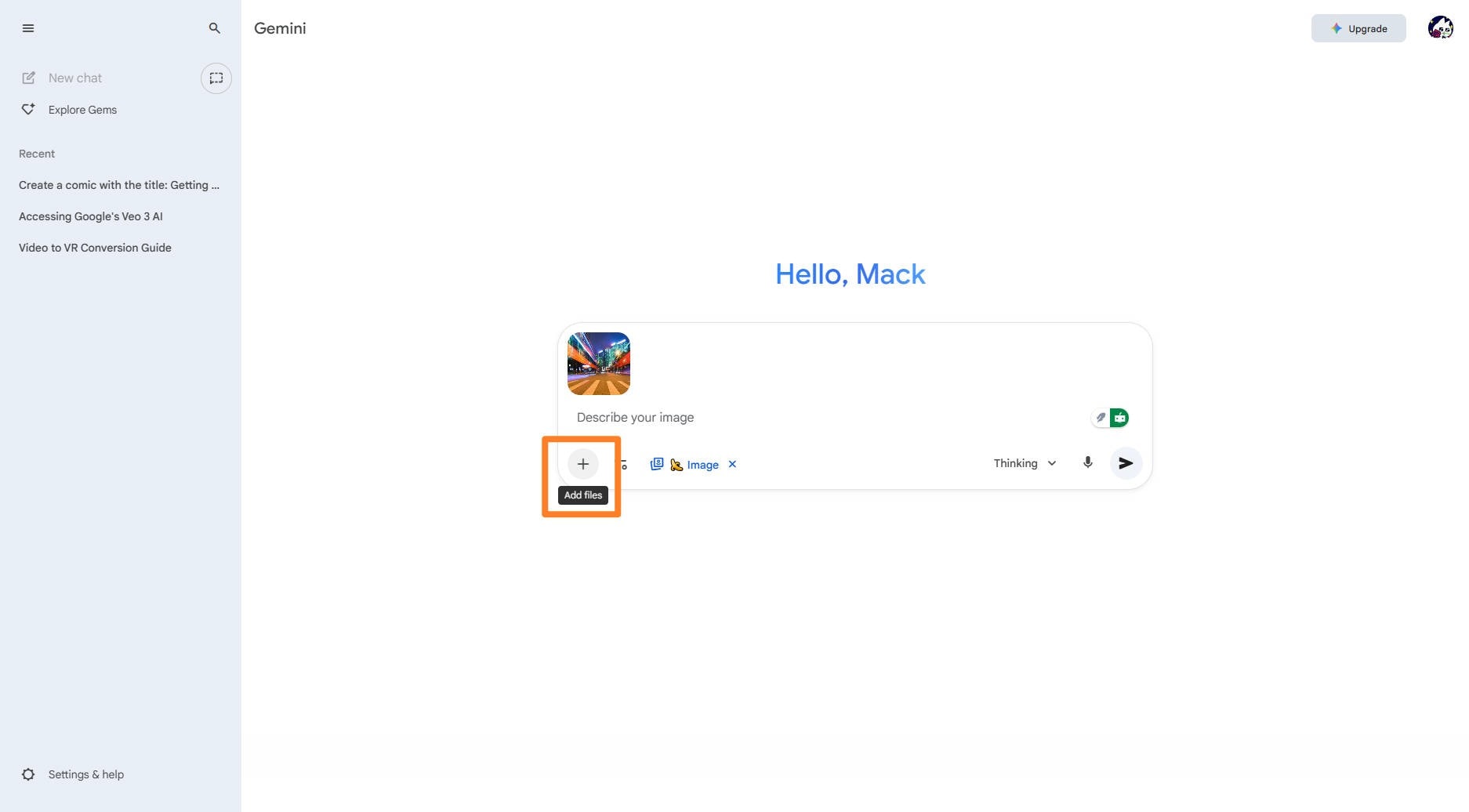
For advanced features like Character Consistency or Multi-Image Blending, upload your input images before writing the prompt.
Upload: Click the image icon (often a picture frame or paperclip) to upload up to 14 reference images (PNG or JPG).
Purpose: These images serve as visual guides for style, characters, and composition.
Step 3: Write Your Specific, Detailed Prompt
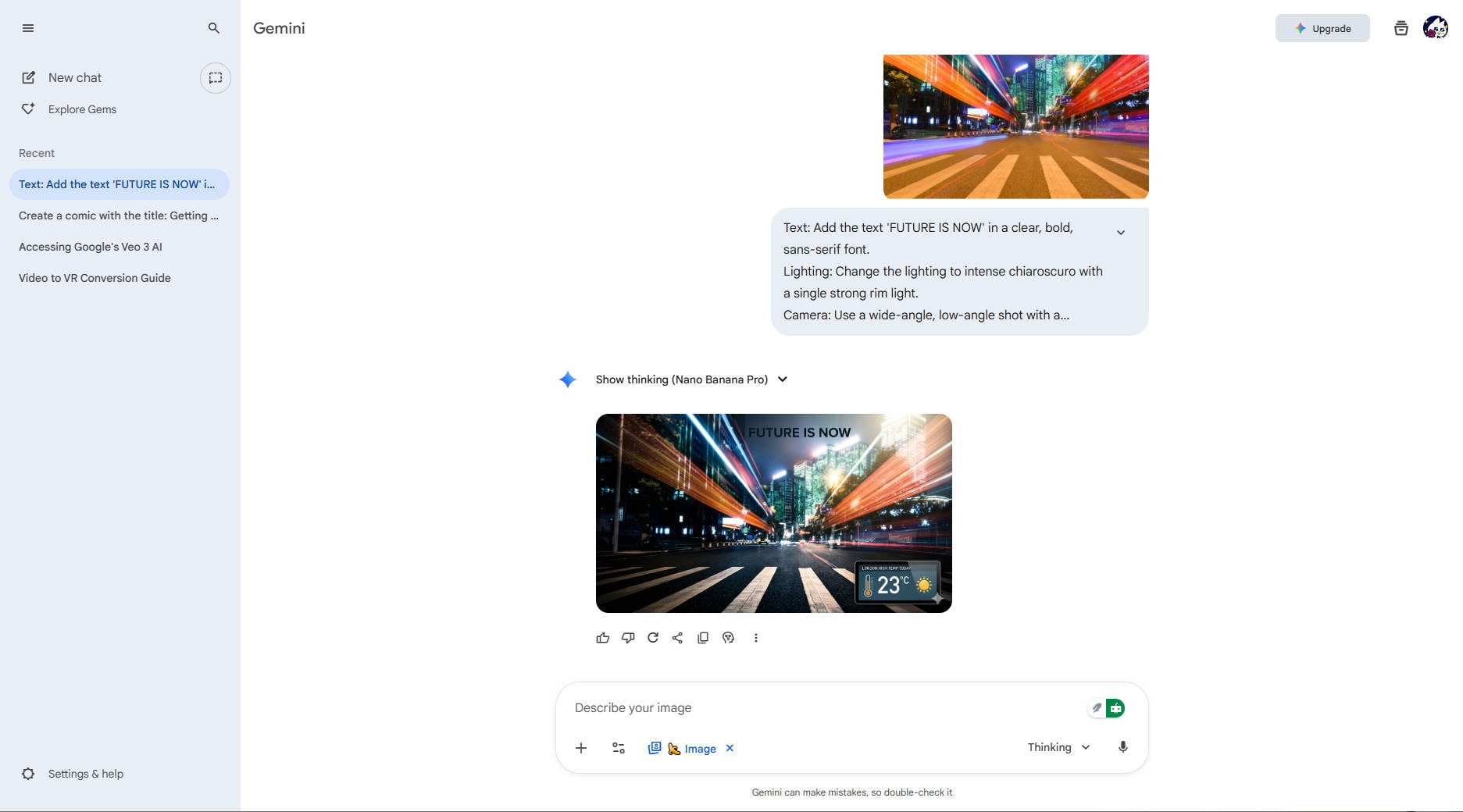
The quality of Nano Banana Pro's output depends heavily on the detail you provide. Use the advanced features in your prompt.
Inclusion of Detail: Include Subject, Action, Location, and Style.
Pro Control Keywords: To leverage the Pro features, be specific with:
Text: "Add the text 'FUTURE IS NOW' in a clear, bold, sans-serif font."
Lighting: "Change the lighting to intense chiaroscuro with a single strong rim light."
Camera: "Use a wide-angle, low-angle shot with a shallow depth of field (bokeh)."
Data (Grounding): "Create an infographic about today's high temperature in London."
Step 4: Adjust Settings and Generate
Before hitting "Generate," confirm your desired output settings.
Resolution: Select the desired output resolution (2K or 4K).
Aspect Ratio: Choose the format (e.g., 1:1 for square, 16:9 for video/desktop banner).
Generate: Click the Submit/Generate button. Nano Banana Pro will use its advanced reasoning to plan the visual layout before rendering the high-fidelity image.
Step 5: Review, Refine, and Export
Review: Examine the generated image and the variations provided.
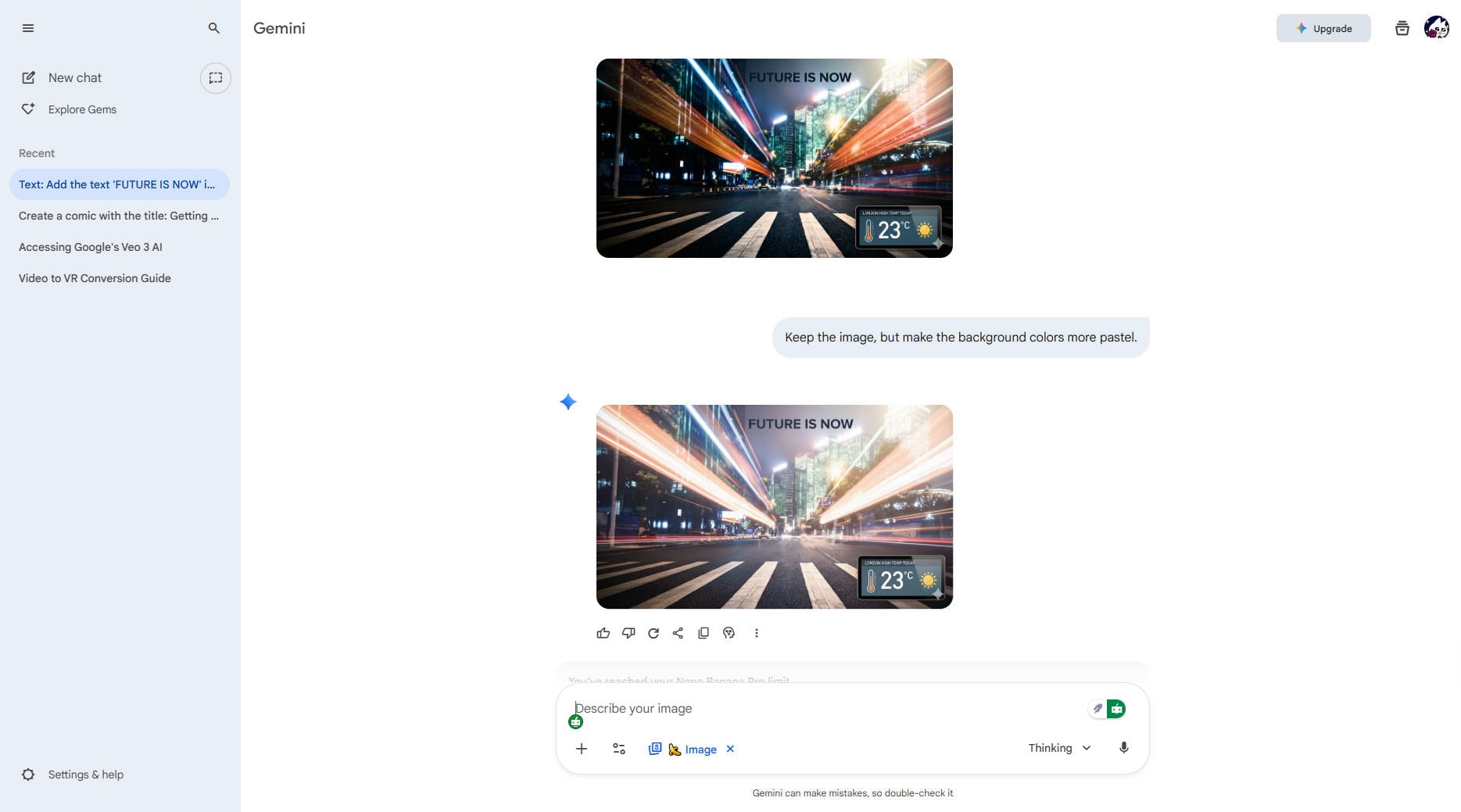
Refine: Use conversational prompts to make precise edits without regenerating the entire image:
Example Refinement Prompt: "Keep the image, but make the background colors more pastel."
Example Refinement Prompt: "Move the character slightly to the left and add a small, glowing icon to their jacket."
Export: Once satisfied, select the image and download it in your chosen high-resolution format (PNG or JPG).
Part 5: Prompt Templates to Make Realistic Real-world Images with Nano Banana
Nano Banana Pro excels at realism, lighting accuracy, physics-aware placement, and consistent subject rendering—making prompts more predictable and easier to refine. Below are ready-to-use templates you can copy and customize for photography, branding, product renders, and commercial visuals. These templates are designed to help you get lifelike results with minimal editing.
1. Product Photography Prompt Template (Studio Realism)
Prompt: A high-resolution studio photo of a luxury wristwatch placed on a reflective black marble surface. Soft diffused lighting, crisp shadows, sharp metal reflections, macro depth of field, high clarity, realistic textures, 85mm lens style, professional commercial product photography, 2K output.
2. Lifestyle Portrait Template (With Character Consistency)
Prompt: A natural portrait photo of a young woman with long dark hair wearing a beige sweater, laughing while holding a coffee cup in a cozy café. Soft morning sunlight, warm tones, visible skin texture, bokeh background, Canon EOS R6 style, consistent appearance for future images.
3. Architecture & Interior Template
Prompt: A modern minimalist living room with floor-to-ceiling windows, soft daylight, oak wood flooring, white linen sofa, ceramic décor, accurate shadows and reflections, realistic materials, shot on a wide-angle 18mm lens.
4. Fashion & Model Photography Prompt
Prompt: A runway photo of a model wearing a dark green satin dress, detailed fabric texture, cinematic lighting, accurate motion blur, clean background, Vogue editorial style, 2K output.
5. Text-Control Template — Create Signs, Labels & Packaging (NEW Capability in Nano Banana Pro)
Nano Banana Pro now renders clean, readable text—something older models struggled with.
Prompt: A clean commercial product mockup of a matte white reusable water bottle standing on a neutral background. Printed text on the bottle should say: “HydraFlow Pro — Stay Fresh”. Centered typography, crisp edges, no distortion, soft studio lighting, realistic shadows, 2K resolution.
Pro Tip: Always wrap the desired text in quotation marks " " to signal exact content formatting.
Part 6: Tools That has integrated Nano Banana Pro Models (With Free Trial)
In the wake of Google releasing Nano Banana Pro, several platforms quickly moved to embed the model into their creative workflows. Below are four standout options worth checking.
1. Adobe Firefly
Adobe Firefly has officially integrated Nano Banana Pro (Gemini 3 Pro Image), allowing users to generate hyper-realistic visuals directly from Adobe’s creative ecosystem. With features like Generate Image and Prompt to Edit, creators can refine lighting, poses, backgrounds, and realism without needing external tools. One standout advantage is how Nano Banana Pro now handles text—Firefly makes packaging, posters, signage, and branded content far more accurate than earlier AI models. During the rollout phase, Creative Cloud Pro and Firefly plan users receive unlimited generations until December 1, making it one of the most cost-efficient ways to experiment with professional-grade AI content. If you’re already inside Adobe’s ecosystem, this pairing feels seamless.
2. Adobe Photoshop
Photoshop now includes Nano Banana Pro inside its Generative Fill and Edit with Prompt workflow, bringing a massive upgrade to precision-based editing. Users can remove objects, redesign scenes, or generate brand-new visuals with realistic textures, shadows, and consistent characters—all without leaving a PSD file. One of the biggest enhancements is the ability to generate images with correct, readable text directly inside a canvas, which was previously unreliable with earlier AI models. For designers who want full control over layers, masks, and refinement, this integration bridges AI automation with professional manual editing tools. It’s ideal for mockups, concept art, product images, and advertising.
3. Media.io AI Image Generator
Media.io was one of the first online platforms to roll out support for Nano Banana Pro, offering a simple web interface where users can produce realistic AI images without technical setup. The platform supports free trial credits, making it beginner-friendly and accessible for creators who want to test quality before subscribing. With Nano Banana Pro built-in, Media.io can now generate photorealistic product shots, branded packaging, portraits, and lifestyle scenes with better text accuracy and lighting control. The tool is especially useful for marketers, e-commerce brands, and bloggers who need fast visual output without complex software.
4. Higgsfield AI
Higgsfield AI offers another smooth way to test Nano Banana Pro directly in the browser, with a fast generation experience and free credits for new users. The platform focuses heavily on scene accuracy and realistic composition, making it suitable for product photography, storytelling characters, and creative digital campaigns. One of its strongest advantages is how well it handles text rendering and multiple reference images—up to several characters can remain consistent across different prompts and scenes. For users who want high-resolution results without a complex learning curve, Higgsfield offers a lightweight but powerful workflow.
Part 7: Bonus: How to Enhance Nano Banana Pro Generated Images for Better Visual
Even though Nano Banana Pro generates high-quality and realistic images, some outputs may still require finishing touches—especially if you plan to use them for printing, advertising, or large-format social content. Enhancing sharpness, resolution, and clarity ensures your visuals stay crisp across every platform. This is where UniConverter becomes extremely helpful. UniConverter includes a powerful 8× AI Image Enhancer, allowing you to upscale low-resolution or slightly soft Nano Banana Pro images without losing detail. The enhancement engine sharpens textures, boosts clarity, and maintains natural skin tones—making it ideal for product photos, branding visuals, portraits, and commercial assets.
How to Enhance Your Nano Banana Pro Image with UniConverter (Step-by-Step)
Step 1: Upload Your Image
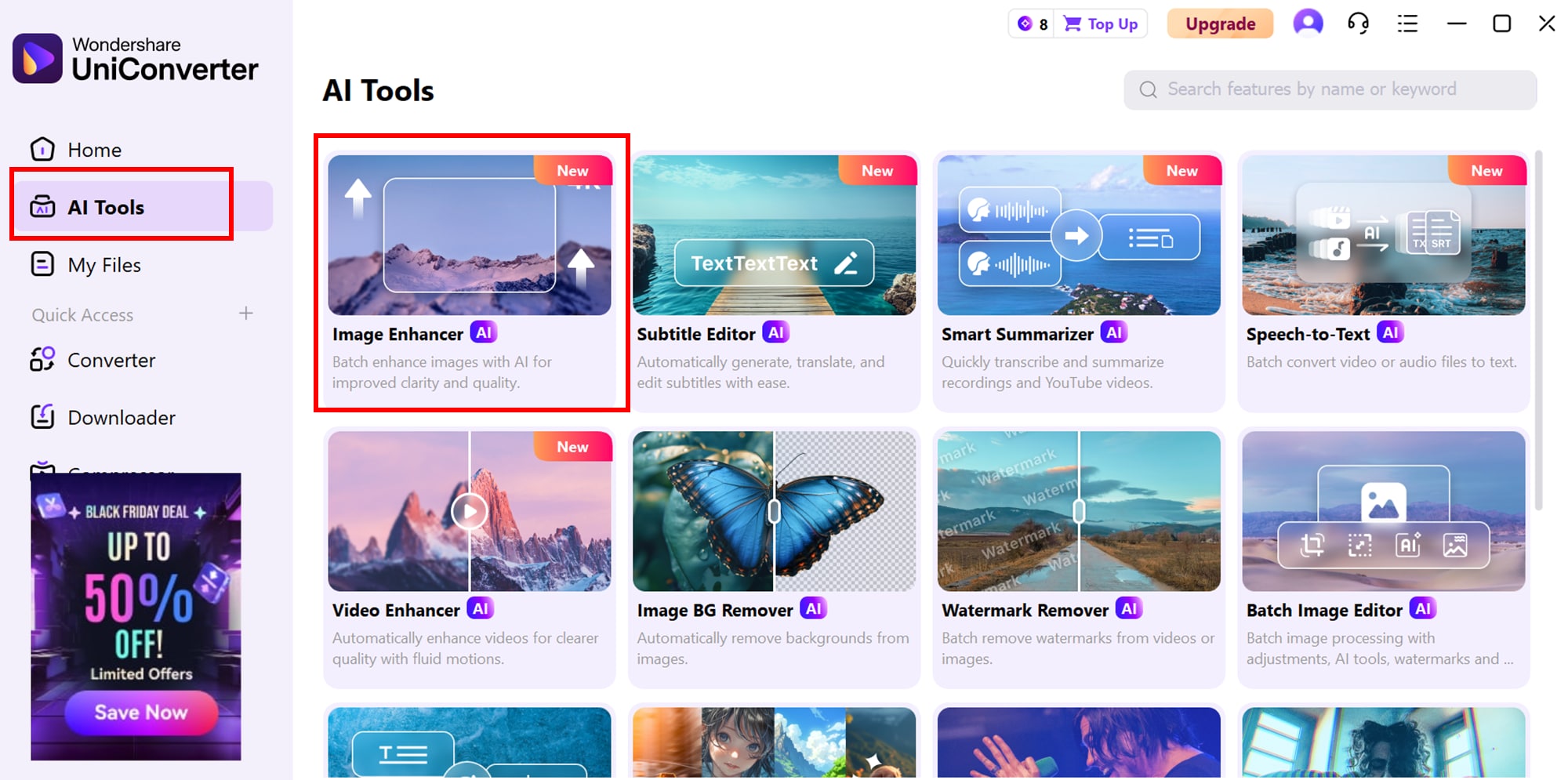
Open UniConverter, go to AI Tools → Image Enhancer, and import your Nano Banana Pro image. Drag-and-drop works too, making the start fast and effortless.
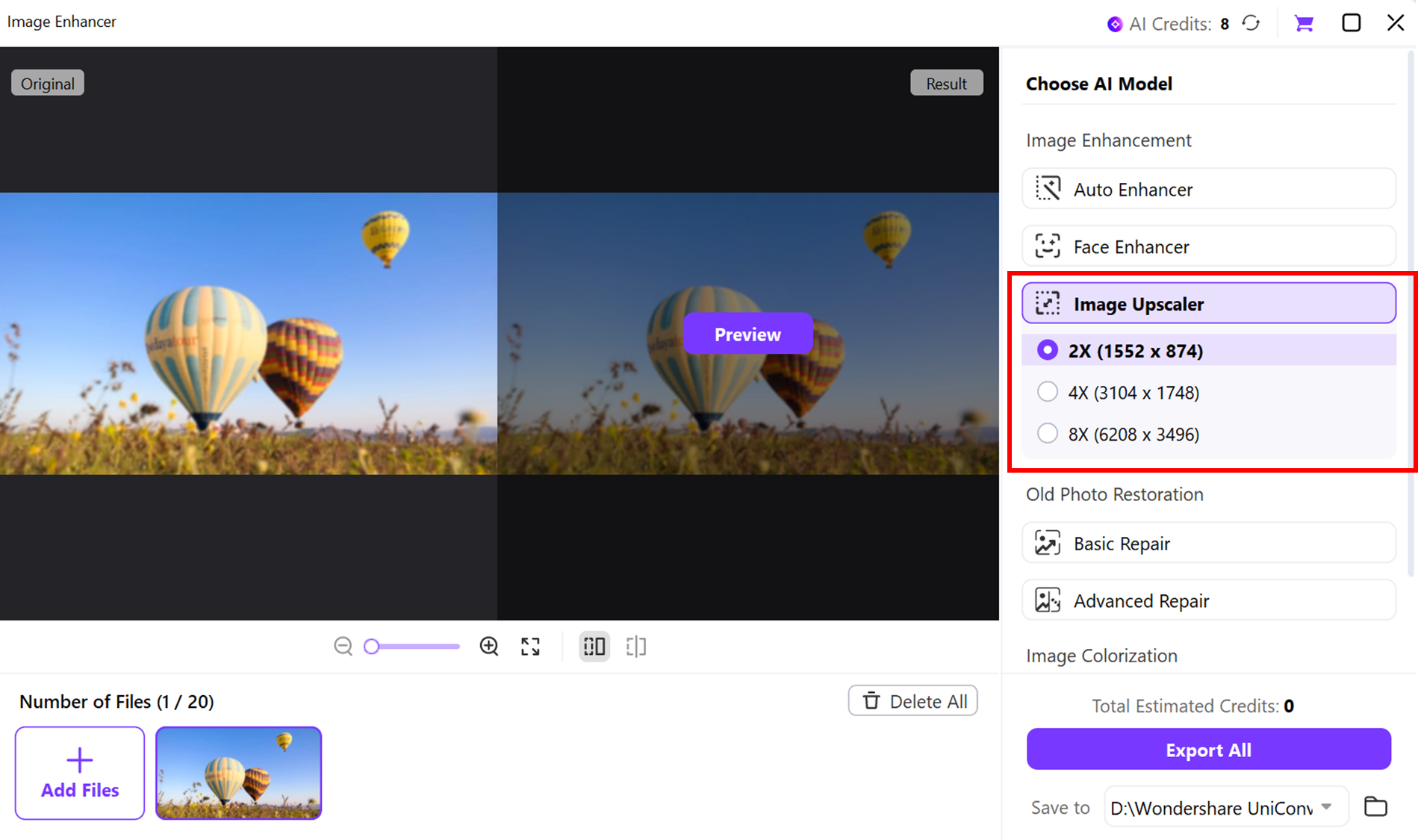
Step 2: Select Enhancement Level (2×, 4×, or 8×)
Choose your desired upscale strength. For social media, 2× is usually enough, while product shots, portraits, or print visuals benefit from 4× or 8×. UniConverter automatically adjusts clarity, texture sharpness, and lighting details.
Step 3: Preview and Export
Use the Before/After preview to confirm improvements, then click Export to save the enhanced final image in JPG or PNG format—ready for posting, printing, or editing further.
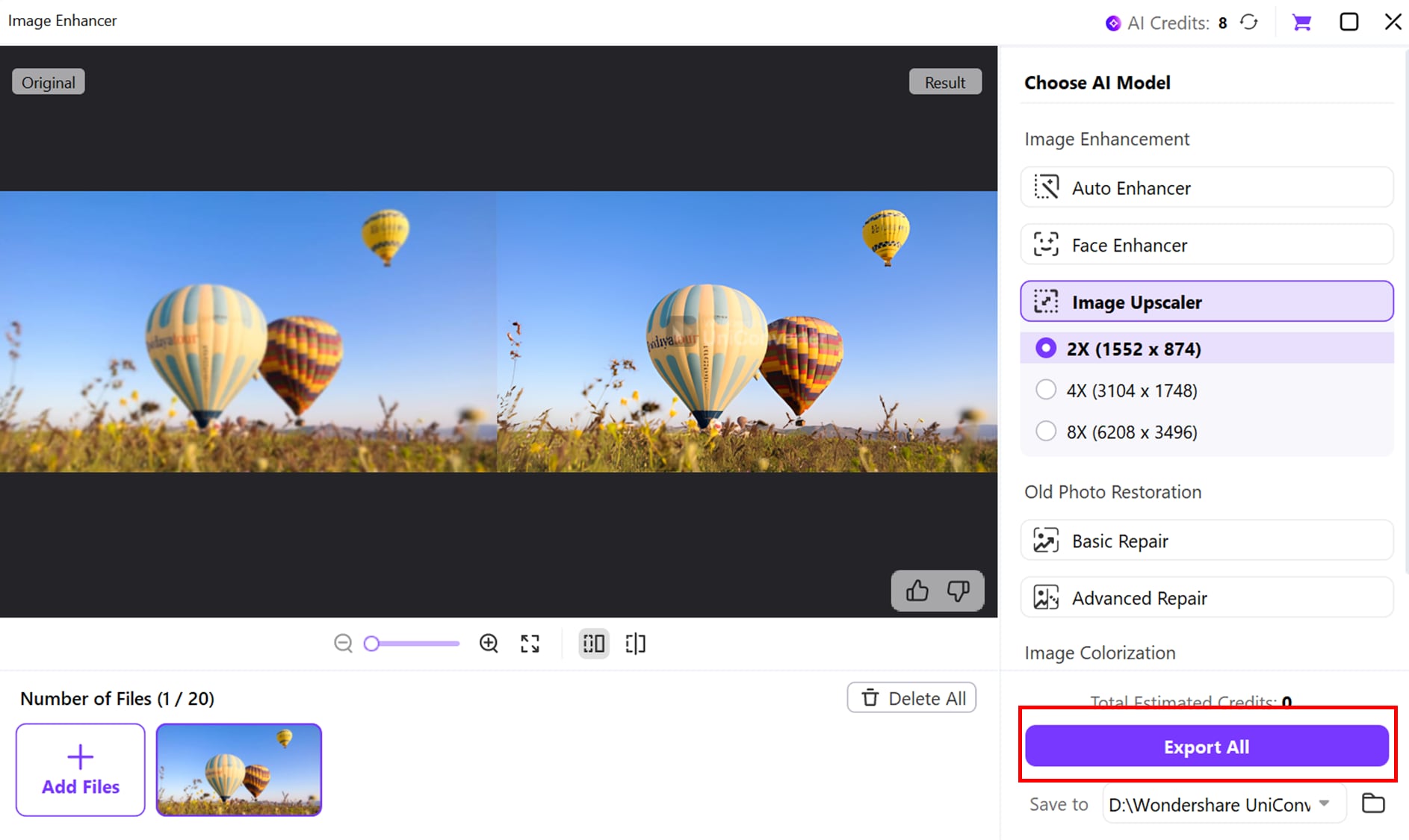

Image Enhancer for AI-Generated Photos
Bonus Tip: Resize Images for Social-Ready Quality (3-Step Guide)
Sometimes your image looks great but isn’t perfectly sized for platforms like Instagram, TikTok, or YouTube. UniConverter’s Image Resizer helps you optimize dimensions without losing sharpness.
Follow these 3 quick steps:
Step 1: Open the Image in UniConverter Editor
Go to Batch Image Editor → Resize, then upload your enhanced Nano Banana Pro image.
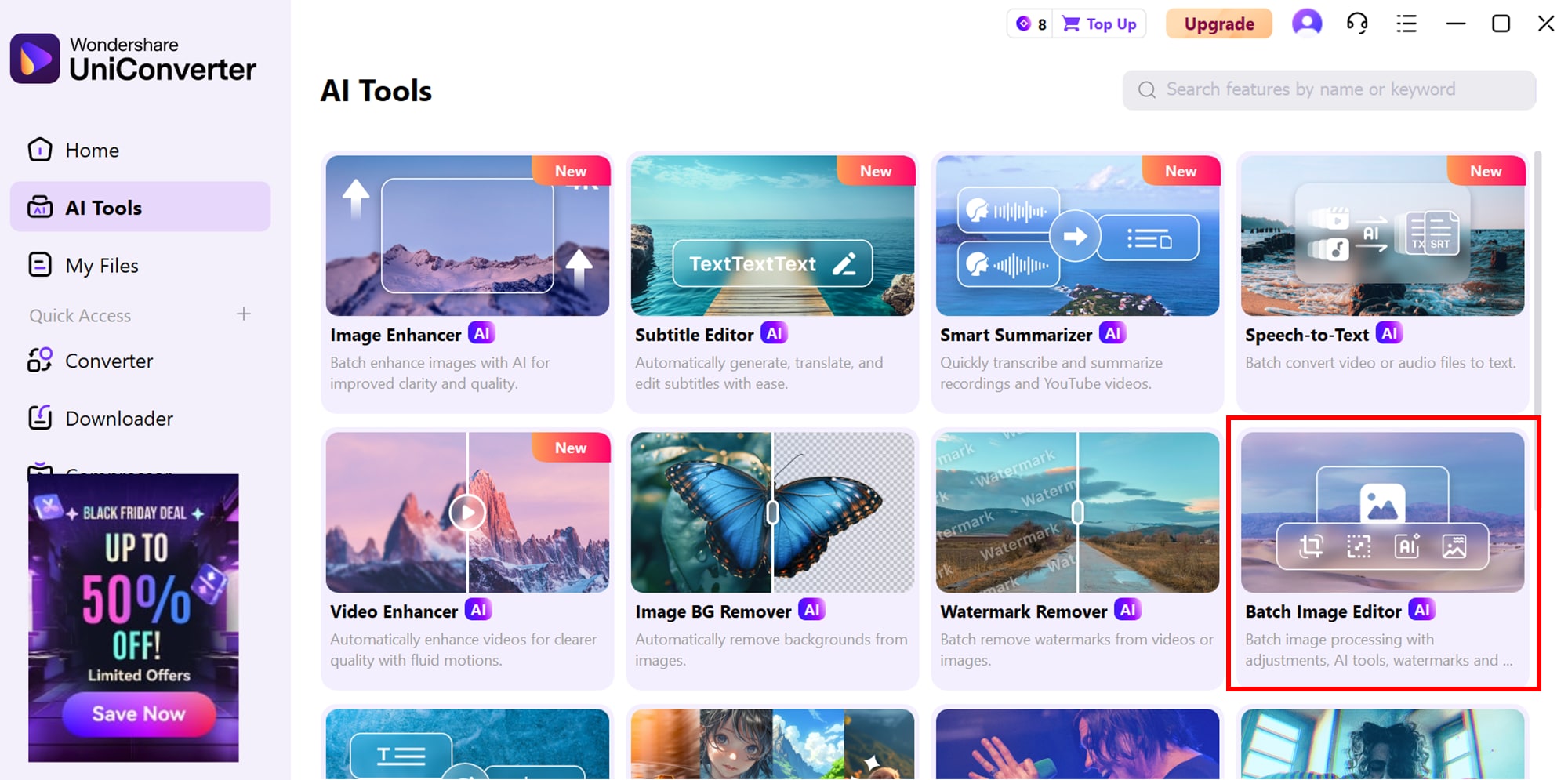
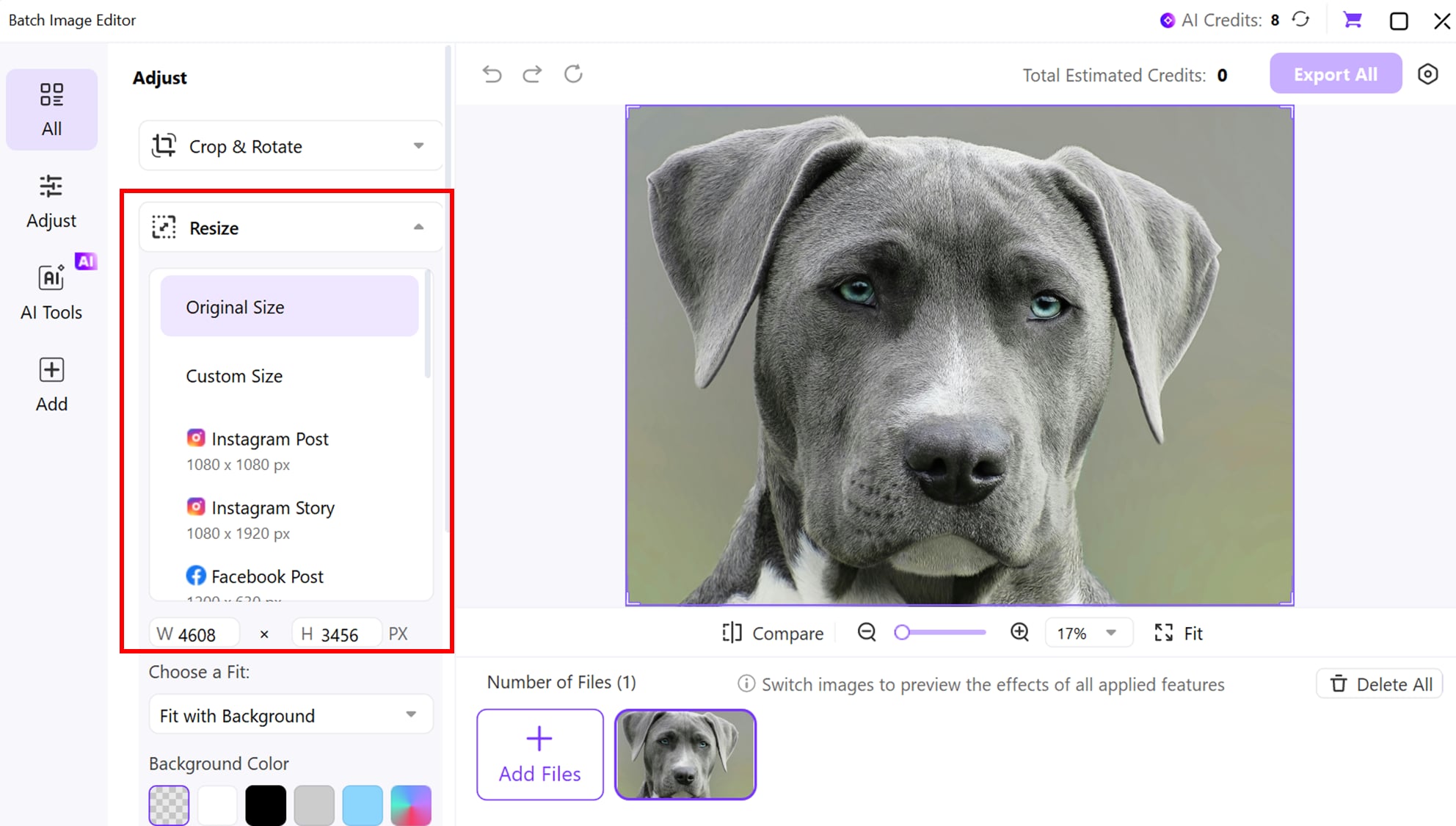
Step 2: Apply a Social Media Preset
Choose from built-in platform presets like:
Instagram Square: 1080 × 1080
TikTok / Reels Vertical: 1080 × 1920
YouTube Thumbnail: 1280 × 720
This ensures the correct aspect ratio with no distortion.
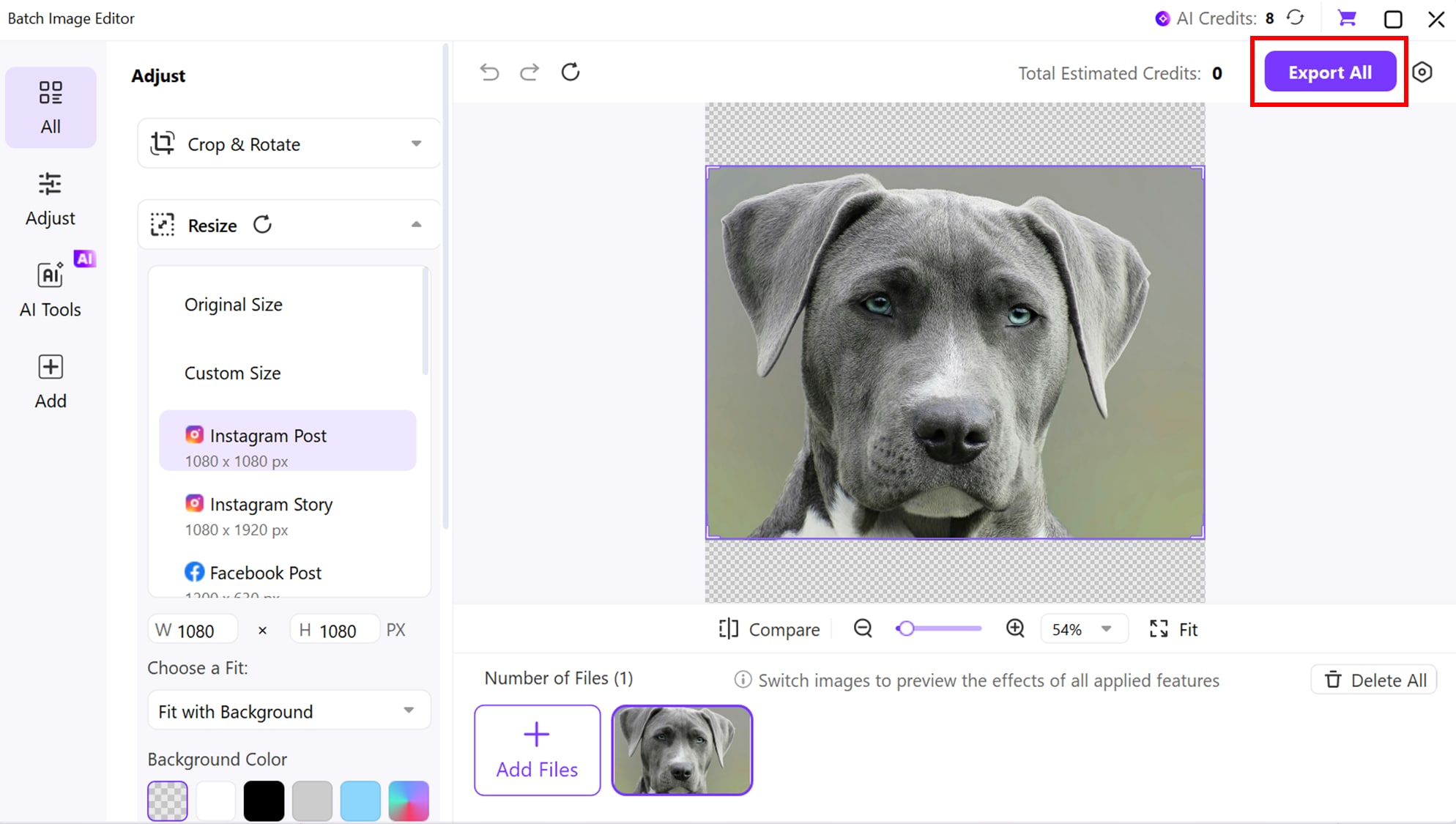
Step 3: Preview and Export
Confirm framing, click Save/Export, and your image is now perfectly formatted for posting — crisp, correct size, and platform-ready.
Conclusion
Nano Banana Pro marks a major shift in AI image generation by offering realistic visuals, cleaner text rendering, and consistent characters—all powered by its advanced reasoning-based model. With the right Nano Banana Pro prompts, users can now create product shots, portraits, branding graphics, and cinematic scenes that look close to real photography. This makes it one of the best AI image tools available today.
As you explore the model, remember that polishing output is still important, especially for professional use. Tools like UniConverter make it easy to upscale, refine clarity, and resize images for print or social platforms. Together, Nano Banana Pro and UniConverter give creators a complete workflow from concept to final, ready-to-publish visuals.
FAQ
-
1. Is it illegal to remove the Gemini watermark?
It's not "illegal" in a criminal sense, but it is a direct violation of Google's Generative AI Prohibited Use Policy, which you agree to when using the service. This can result in penalties, such as account suspension. -
2. If I pay for Gemini Advanced, will the watermark be removed?
No. The Gemini Advanced subscription gives you access to more powerful models and features, but does not remove the "AI" watermark from generated images. -
3. Why does Google add the Gemini AI watermark?
Google adds the watermark to ensure transparency and provenance. It's a safety feature that clearly identifies the content as AI-generated, which helps combat misinformation and deepfakes. -
4. What is the best alternative for watermark-free AI images?
For the highest artistic quality, a paid Midjourney plan is the top choice. For a powerful and generous free option for still images, Leonardo.Ai is fantastic (though your free images are public). -
5. What is a C2PA watermark?
This is an invisible watermark used by tools like DALL-E 3 and Adobe Firefly. It embeds "Content Credentials" into the image's metadata, proving its origin as AI-generated. It's not visible to the naked eye but can be read by specific software.