


Nano Banana image generator is what the community lovingly calls Google Nano Banana, which is actually Google's powerful image generation and editing tool formally named Gemini 2.5 Flash Image. It combines lightning-fast text-to-image creation with easy, conversational editing and the ability to seamlessly blend multiple images—making your creative process smoother from start to finish. Think of it as a next-level AI Photoshop alternative that you can jump into right away through the Gemini app, Google AI Studio, or the Gemini API, all backed by transparent pricing and wide availability wherever Google services reach.
Table of Contents:
Part 1. What is Nano Banana?
"Nano Banana" refers to the native image generation and editing capabilities inside Google's Gemini family, formally introduced as Gemini 2.5 Flash Image and optimized for real-time, multi-turn image creation, targeted edits, style transfer, and character consistency from simple natural language prompts. The model supports multi-image blending, allowing creators to combine elements from multiple inputs while preserving lighting, perspective, and identity—features that make it a powerful Google AI image generator for story-driven or brand-consistent visual work. All images created or edited are marked with SynthID's invisible watermark to signal AI provenance, aligning with responsible AI best practices in creative pipelines.
Why is it called "Nano Banana"?
Before Google publicly named the model, "Nano Banana" circulated in AI circles on LMArena, Reddit, and Discord as a lighthearted codename for the system that kept topping informal head-to-head image-editing trials, often recognized only after users voted on results in blind "battle" formats standard to LMArena. The nickname stuck as Googlers and community watchers posted banana-themed teasers and references—culminating in a wave of social speculation around banana emojis from senior leadership and a same-day upgrade announcement for Gemini editing capabilities. Even after the official reveal, the "Nano Banana" moniker remains a convenient shorthand for Gemini 2.5 Flash Image's playful yet serious leap in creative control, speed, and consistency.
Release timing: Aug 25–26, 2025

Google's developer blog introduced Google Nano Banana, officially known as Gemini 2.5 Flash Image, on August 25, 2025, with pricing, distribution, and feature highlights for immediate access via API and AI Studio. The Gemini API release notes list August 26, 2025, as the launch entry for the "2.5 Image Preview," reflecting the rollout cadence across Google's developer endpoints shortly after the announcement. Mainstream tech coverage through August 27 framed it as available in the Gemini app environment, aligning practical availability across consumer-facing and developer channels in that two-day window.
Part 2. Who is Nano Banana Designed for?
Google Nano Banana, also known as Gemini 2.5 Flash Image, is perfect for anyone who wants stunning images without the hassle of complicated software. Here's who will find this powerful Google AI image generator and Gemini image editor especially useful:
Content creators: If you need fast, polished visuals for social media posts, stories, or thumbnails, Nano Banana acts like your creative sidekick. As a friendly social media AI photo editor, it understands everyday language, allowing you to focus on your ideas rather than the technical details—making it a great AI Photoshop alternative.
Photographers, marketers, and small business owners: Want to keep your brand consistent with easy background swaps or stylish product photos? Nano Banana makes refreshing catalogs, ads, and lookbooks a breeze—no complicated masking or design experience needed.
Designers and illustrators: When you want to bring your vision to life quickly by mixing different styles and ideas, Nano Banana helps you blend images and fine-tune details with ease. It's like having an intelligent assistant who truly gets your creative flow—one of the standout features of this next-gen Google AI art generator.
Developers and tool builders: Building apps or creative tools? The Gemini API provides a flexible, pay-as-you-go approach to integrating powerful AI-powered image generation and AI image editing capabilities directly into your products. It's scalable, reliable, and ready to boost your creative workflows.
Plus, with options like the Nano Banana free trial, it's easy to explore and test this excellent tool. And if you're comparing options, the buzz around Nano Banana vs. Photoshop shows it's a fast, friendly, and innovative choice—especially for those looking to elevate their work with Nano Banana for content creators.
Part 3. Is Nano Banana Free to Use? Pricing ,Trials and Access
Google enables hands-on evaluation through the Gemini app and Google AI Studio. At the same time, the Gemini API exposes pay-as-you-go economics for production use with a clear per-image rate. Official pricing: $30 per million output tokens and, for images, 1,290 output tokens per 1024×1024 image—equating to approximately $0.039 per image, which is displayed directly in the announcement. Google's cloud pricing documentation provides a broader context on tokenized image billing and typical per-image token counts by enumerating image token assumptions and per-image billing patterns used across related models.
Platform and channel overview
Below is a concise overview of what's public at launch. Note that Adobe's "free 20 / unlimited paid" integration was limited-time through September 1, as per Adobe's announcement, and may change after the promotion.
Gemini app (web/mobile): Available to free and paid users in supported regions as part of the Gemini experience.
Google AI Studio: Free to try and prototype with immediate access to Gemini 2.5 Flash Image features.
Gemini API: ~$0.039 per 1024×1024 image at $30 per million output tokens (1,290 tokens per image).
Adobe Firefly: Up to 20 generations for free-plan users and unlimited for paid users through the September 1 integration window; Firefly Boards (beta) and Text to Image are supported.
Adobe Express: Integration is available in the same window, enabling Gemini 2.5 Flash Image inside Express, along with Firefly features.
Third-party platforms: Platforms such as Bylo.ai and Kie.ai offer free previews and low-friction testing environments, along with developer APIs that are available at their own pricing.
If per-image token economics are relevant, Google's cloud documentation clarifies typical token counts, such as 1,290 tokens per 1024×1024, which aligns with the $0.039 figure in Google's launch materials for Gemini 2.5 Flash Image.
How to Get Access to Nano Banana?
The Gemini 2.5 Flash Image is accessible in three primary ways: through the consumer Gemini app experience, Google AI Studio's model playground, and the Gemini API for developers and enterprises. Regional availability follows Google's standard product/service support footprint; for example, the Times of India described the feature as "available for all Gemini users" at rollout, while Google's developer and cloud pages route usage through supported regions and standard data residency rules. Newcomers can also try the model on hosted third-party sites, such as Bylo.ai or Kie.ai, to preview capabilities without an initial cloud configuration, which is especially helpful for quick experiments and stakeholder demos.
Part 4. How to Generate Images with Nano Banana for Better Results?
This workflow adheres to best practices outlined in Google's prompt guides and API documentation, enabling both beginners and experts to achieve consistent, controllable results without requiring micromanagement of layers or masks.
Steps Guide in How to Generate Images with Nano Banana
Step 1: Start Your Creation Journey
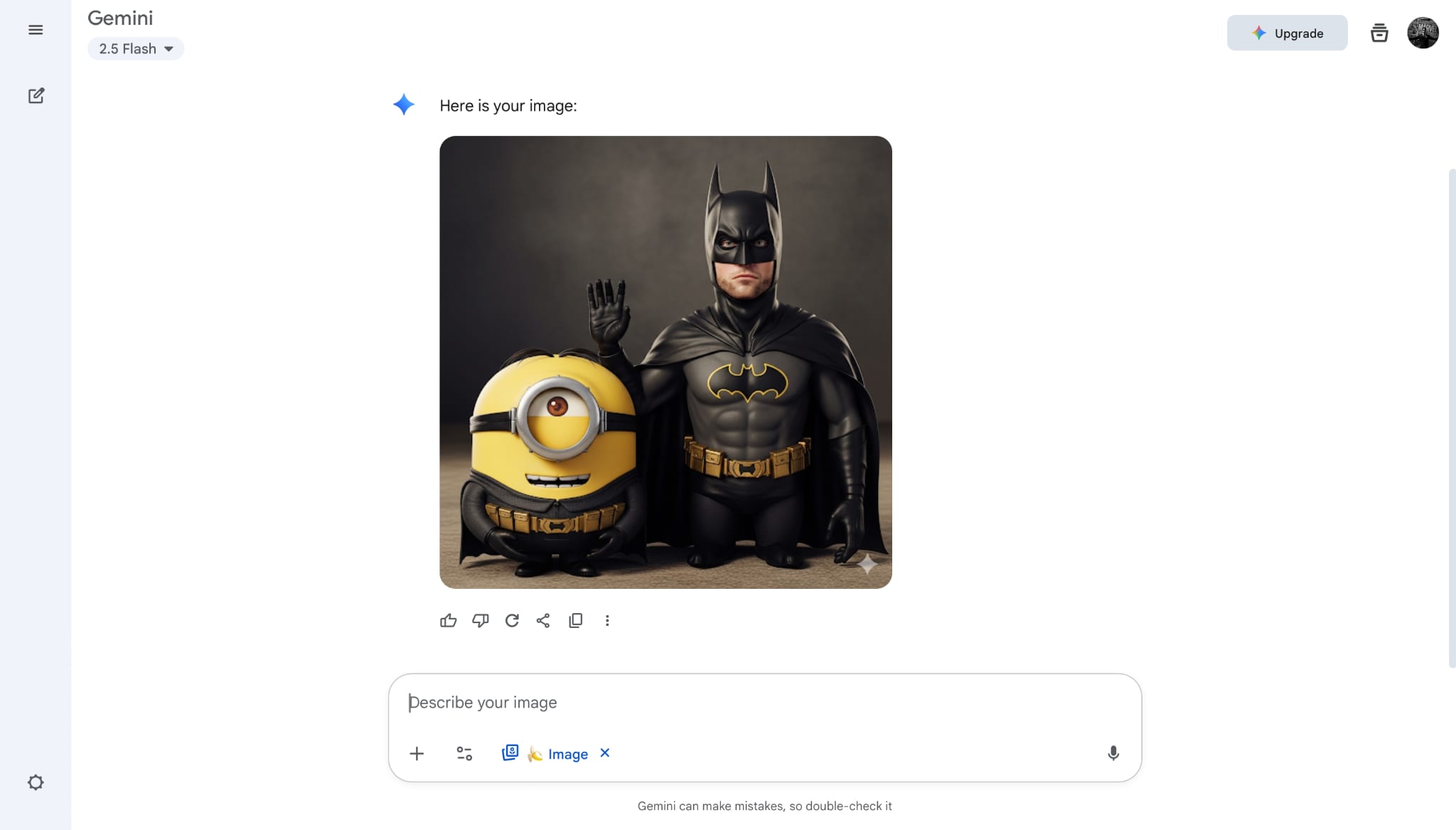
Begin by opening the Gemini app or Google AI Studio, where you can either upload a photo you'd like to edit or enter a detailed text prompt to generate an image from scratch. Google AI Studio's build mode makes it easy to experiment, remix, and test ideas without needing any coding skills. This user-friendly setup helps you jump straight into creativity, whether you have a clear vision or want to explore new ideas.
Step 2: Communicate Your Vision Clearly
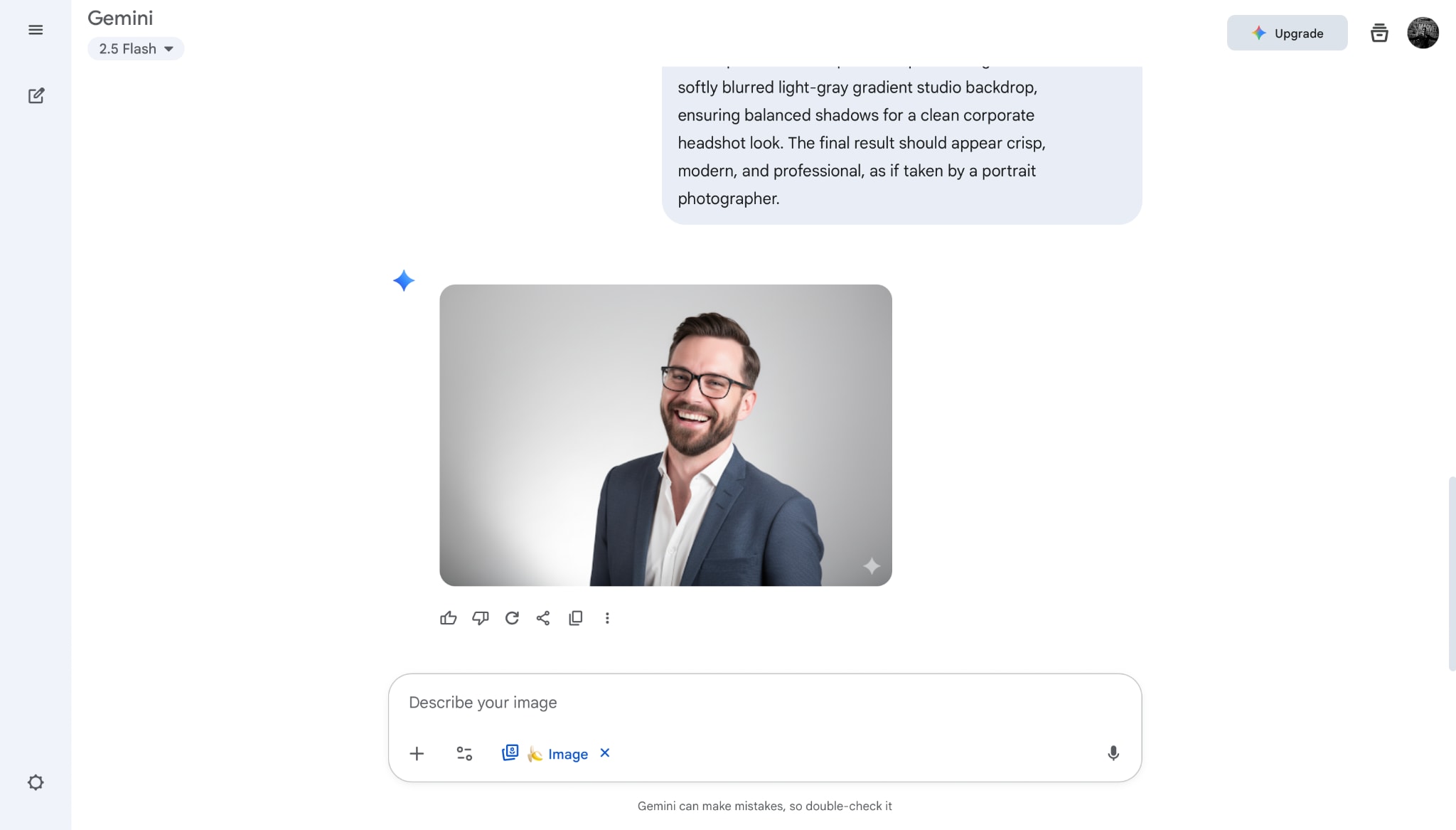
Use straightforward, descriptive prompts that specify the subject, scene details, lighting conditions, and exactly what changes you want to see. If you're editing an existing image, clearly indicate which elements should be altered and which should remain unchanged to maintain consistency in identity and overall composition. Providing precise instructions ensures the AI understands your vision and delivers polished, cohesive results.
Step 3: Refine and Combine Creatively
Build upon your initial creation by chaining edits naturally—start with a background change, then adjust colors or lighting, and finally add or remove objects as needed. Take advantage of multi-image fusion by uploading multiple images to blend different elements seamlessly, such as placing a product into a vibrant, staged scene. Once satisfied, export your work; every output includes an invisible SynthID marker, helping maintain professional standards for authenticity and content disclosure.
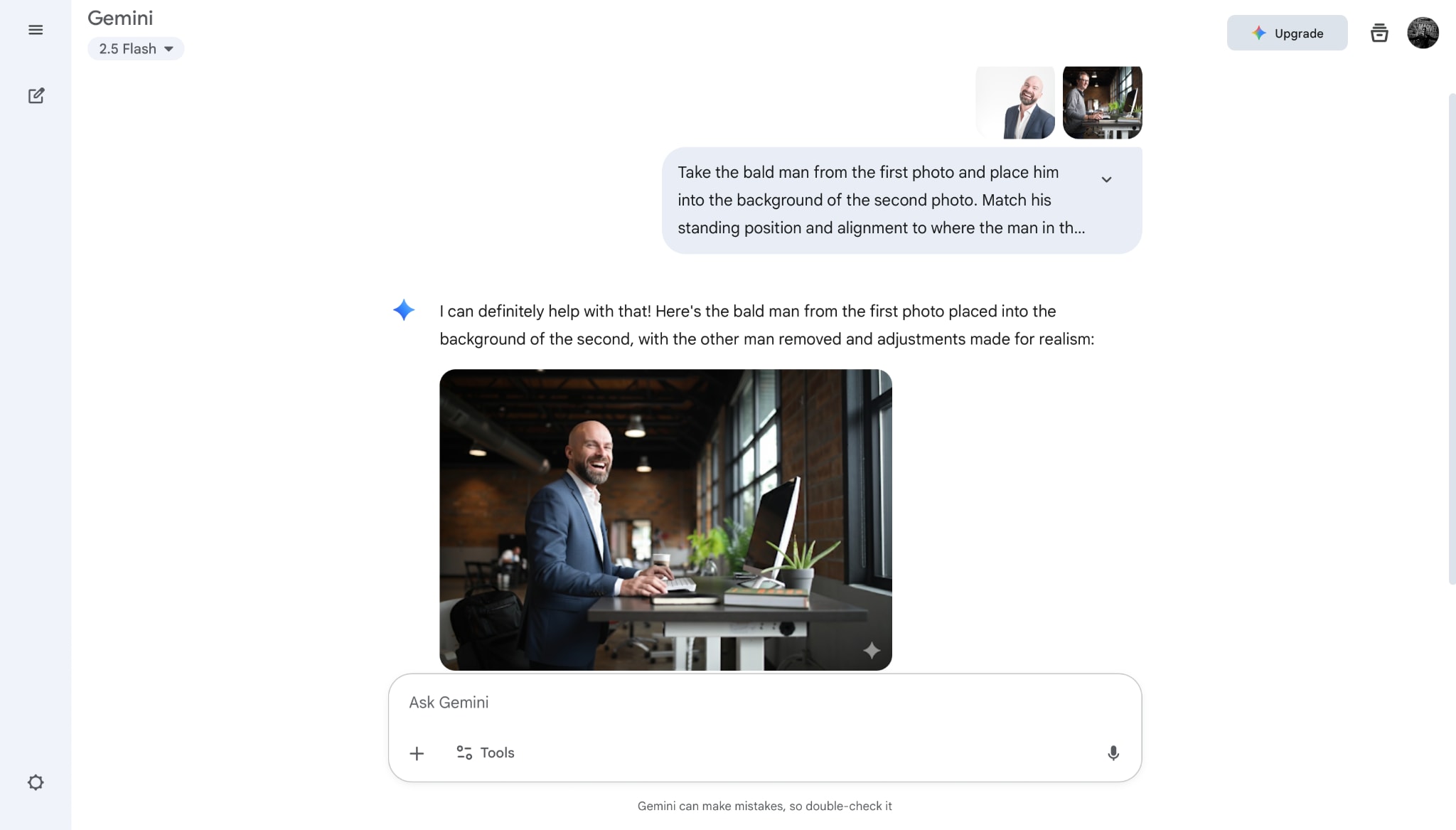
Tips for better results
Describe intent, not just keywords—Google emphasizes that providing detailed instructions about the change, context, and "keep the rest unchanged" constraints minimizes drift and preserves identity and lighting.
Provide reference images for style or composition when possible; multi-image inputs help the model infer the target aesthetic and spatial alignment without guesswork, improving photorealism and continuity.
Actionable Prompts You Can Copy and Paste
Part 5. Nano Banana vs Photoshop: Which is Right for You
If you're wondering how Google Nano Banana, also called Gemini 2.5 Flash Image, stacks up against the classic Photoshop, you're not alone. Photoshop is renowned worldwide for its pixel-perfect editing, detailed typography, and mastery of layered design. But when it comes to speed, ease of use, and innovative AI tools, Nano Banana stands out as a fresh and friendly AI Photoshop alternative that understands your natural language prompts and delivers impressive results quickly.
For everyday tasks like swapping backgrounds, adding or removing objects, or maintaining a consistent look across multiple images, Nano Banana works lightning-fast—often producing polished edits in just seconds. These edits can take professionals hours in Photoshop. This is why conversations around Nano Banana vs Photoshop usually highlight that Photoshop is best for detailed, hands-on work. At the same time, Nano Banana shines as a powerful social media AI photo editor that helps you move faster and create more.
| Aspect | Nano Banana (Gemini 2.5 Flash Image) | Photoshop |
| Interface | Conversational prompts; edit specific elements; preserves style/identity automatically | Manual layer/mask workflows; plug-ins and selections require expertise and time |
| Speed & iteration | Seconds per change; supports multi-turn edits and multi-image fusion natively | Minutes to hours depending on complexity; skilled hands required for comparable composites |
| Consistency | Strong character and style consistency across series; good for branded sets and narrative arcs | Consistency depends on creator's diligence across layers and documents |
| Generation | A smart Google AI image generator that can create fresh, world-aware images from scratch | Limited native generation; relies on filters, assets, or third-party models |
| Responsibility & watermarking | Invisible SynthID watermark embedded by default | No default AI watermarking; responsibility features vary by workflow and plug-ins |
If you're a creator looking for a fast, friendly, and easy way to produce eye-catching visuals, Nano Banana is a game-changer. It's a next-gen Gemini image editor that packs professional-level power without the frustration, making it ideal for Nano Banana for content creators and anyone who wants to work smarter, not harder. Plus, with the Nano Banana free trial, you can try out all those cool features risk-free and see for yourself how this Google AI art generator can transform your creative process.
Part 6. Practical Use Cases of Using Nano Banana to Edit Images
With prompt-based image editing, Nano Banana turns complex visual tasks into simple instructions. From removing distractions to reimagining entire scenes, users can transform images faster and more creatively than ever before.
Use Cases of Editing Images Using Nano Banana
Remove Unwanted Objects from Images
With a simple prompt, Nano Banana helps remove unwanted objects, people, or distractions from images in seconds. Whether it’s a passerby in a travel photo or clutter in a product shot, this feature keeps the focus exactly where it belongs—clean, polished, and professional.
Change or Replace Image Backgrounds
Nano Banana makes background changes effortless. By describing the background you want, users can instantly swap dull or messy scenes for clean, creative, or branded environments. It’s a fast way to refresh portraits, product photos, and marketing visuals without complex editing steps.
Add New Objects or Elements to an Image
Need to enhance a visual or tell a stronger story? Nano Banana lets users add new objects, people, or design elements through text prompts. This makes it easy to customize images, enrich compositions, and create more engaging visuals without starting from a blank canvas.
Enhance Image Quality and Visual Details
Nano Banana helps breathe new life into images by enhancing clarity, lighting, and color through simple prompts. From sharpening details to improving overall image quality, this use case is perfect for upgrading low-resolution photos and making visuals look crisp and professional.
Extend Images and Expand Backgrounds
When images don’t fit your layout, Nano Banana can extend backgrounds naturally with prompt-based instructions. Users can adjust aspect ratios or add missing space without awkward cropping, making it easy to create banners, thumbnails, and platform-ready visuals.
Generate Multiple Image Variations
With Nano Banana, one image can become many. Users can generate multiple variations by prompting different styles, colors, or moods. This is ideal for creative exploration, A/B testing, and quickly finding the version that best connects with your audience.
Transform Images into New Styles or Formats
Nano Banana makes it easy to reimagine existing images. By prompting style or format changes, users can turn photos into illustrations, artistic visuals, or new design styles—helping refresh content and unlock more creative possibilities from the same assets.
Actionable Prompts You Can Copy and Paste
To get the best results from Gemini's image editor, being specific is key. Here are some prompt examples for common tasks:
1. Changing Backgrounds
Prompt Example: "Take this photo of a person and change the background to a busy Tokyo street at night, with neon lights reflecting on the wet pavement. Keep the person's lighting and shadows consistent with the new background."
2. Adding Objects
Prompt Example: "Add a small, fluffy, white cat sitting on the arm of the sofa in this living room picture. Make sure the cat looks natural and casts a soft shadow."
3. Style Transfer
Prompt Example: "Convert this photograph of a cityscape into a watercolor painting style, with soft edges and a vibrant color palette. Keep the original composition."
Part 7. How to Improve Nano Banana Generated Image to 8x Clarity
When higher-resolution deliverables are needed—e.g., print posters, marketplace listings, or hero imagery—an offline upscaler can add sharpness while preserving the artistic intent of the AI original. Wondershare UniConverter's AI Image Enhancer supports 2×, 4×, and 8× upscaling, batch processing, transparency retention, and watermark-free export on desktop, which fits creator pipelines where hundreds of images may need a quick boost. It can easily help enhance image resolution, correct image color can sharpen image objects to gain better visual effect.
Steps Guide on How to Improve Nano Banana Generated Images
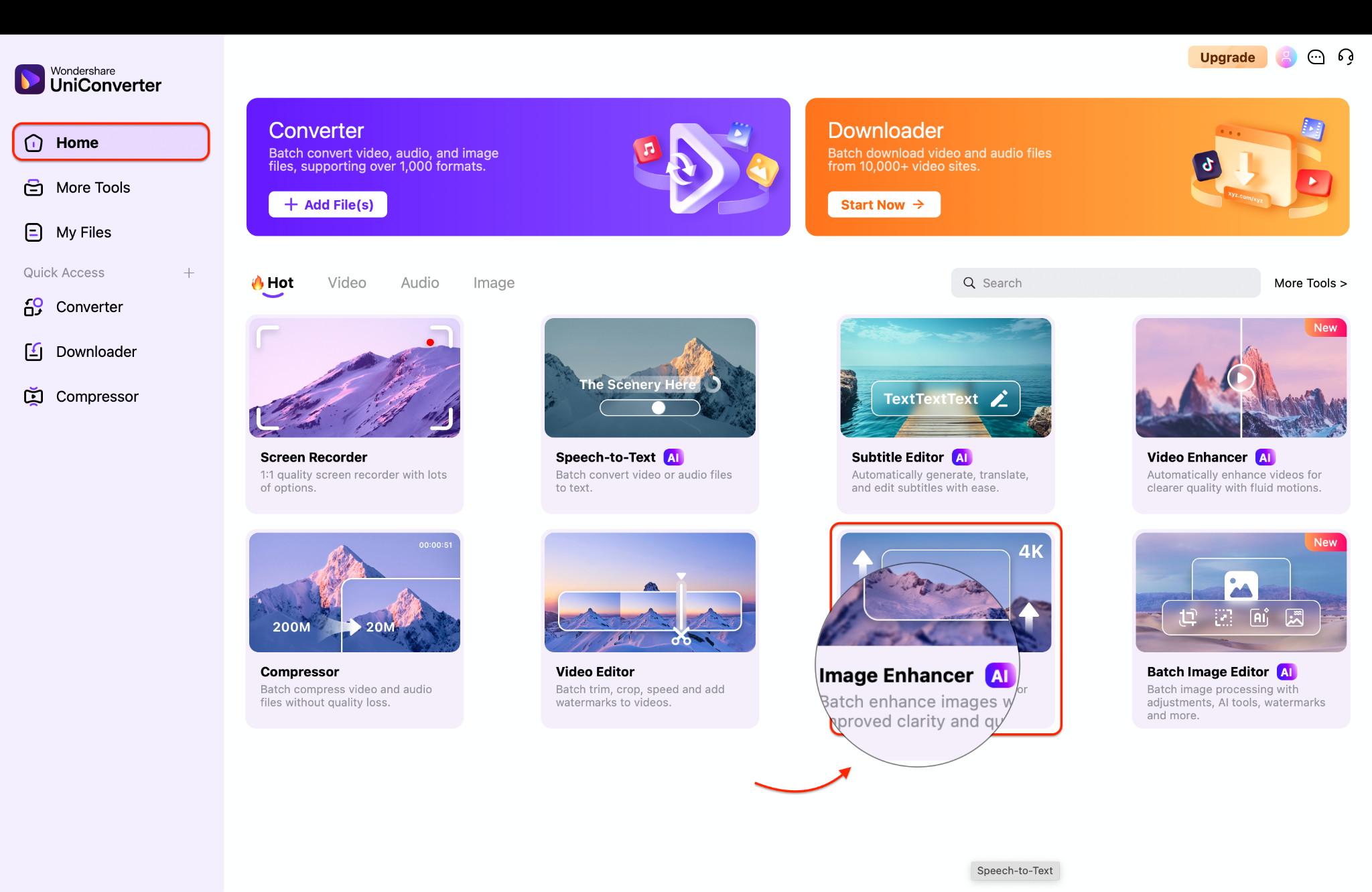
Step 1: Open UniConverter and Import Images
Launch Wondershare UniConverter on your PC and navigate to the AI Image Enhancer under the Hot section tab. From there, import the Nano Banana-generated images you want to improve by clicking the "Add or drag image(s) here to start" button. This step gets you ready to enhance your photos with just a few simple clicks.
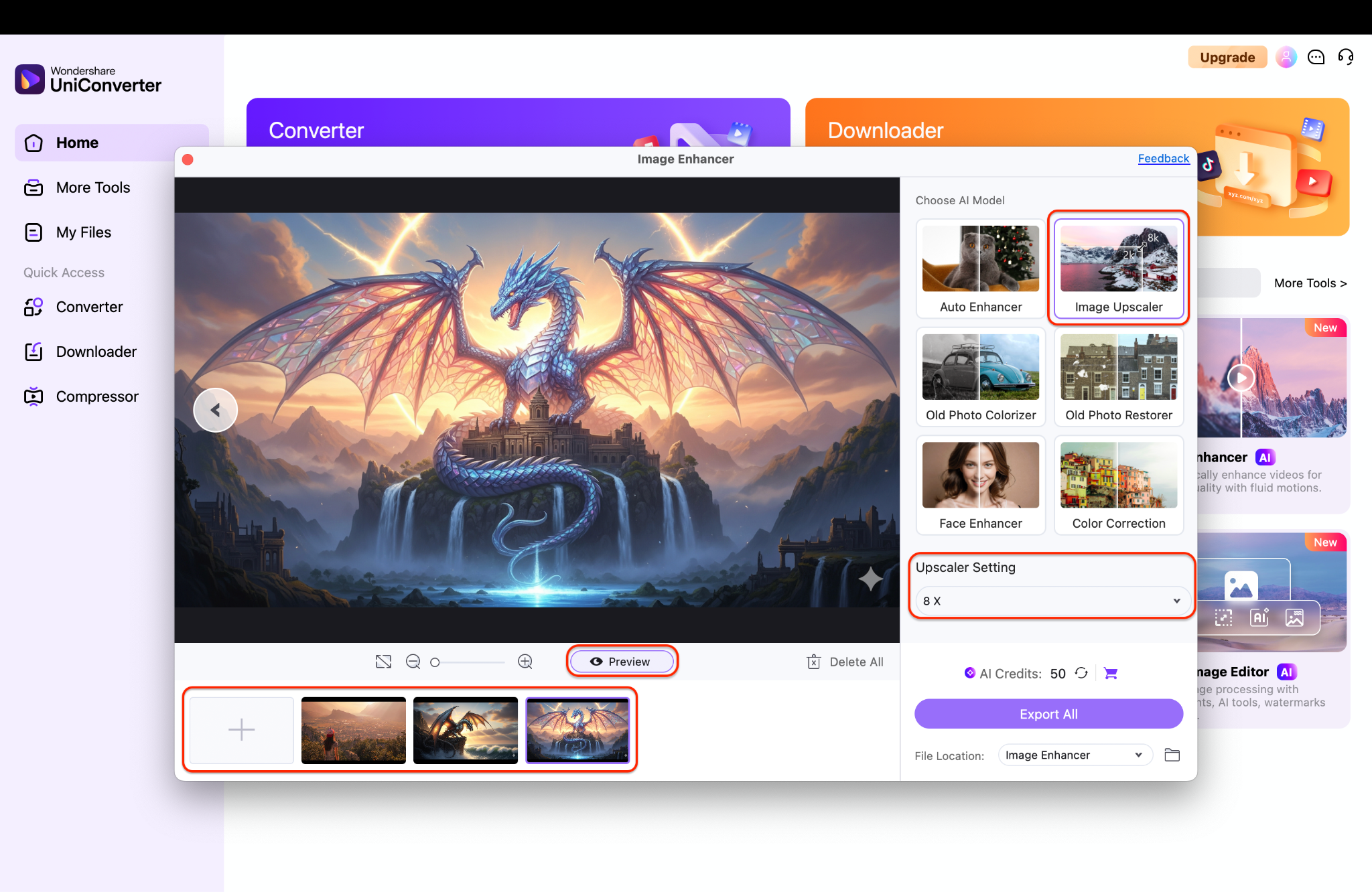
Step 2: Select 8× Upscaling and Preview
Select the 8× upscaling option to enhance image resolution and clarity significantly. Be sure to use the preview function to examine key details, such as faces and textures, to ensure they appear sharp and natural. Taking this moment to review helps you get the best results before finalizing.
Step 3: Start Processing and Exporting Your Images
Once you are satisfied with the preview, initiate the upscaling process and allow UniConverter to perform its magic. After enhancement is complete, export your high-resolution images with ease. Now you can confidently add these crisp images to social media posts, online shops, or print projects for impressive results.
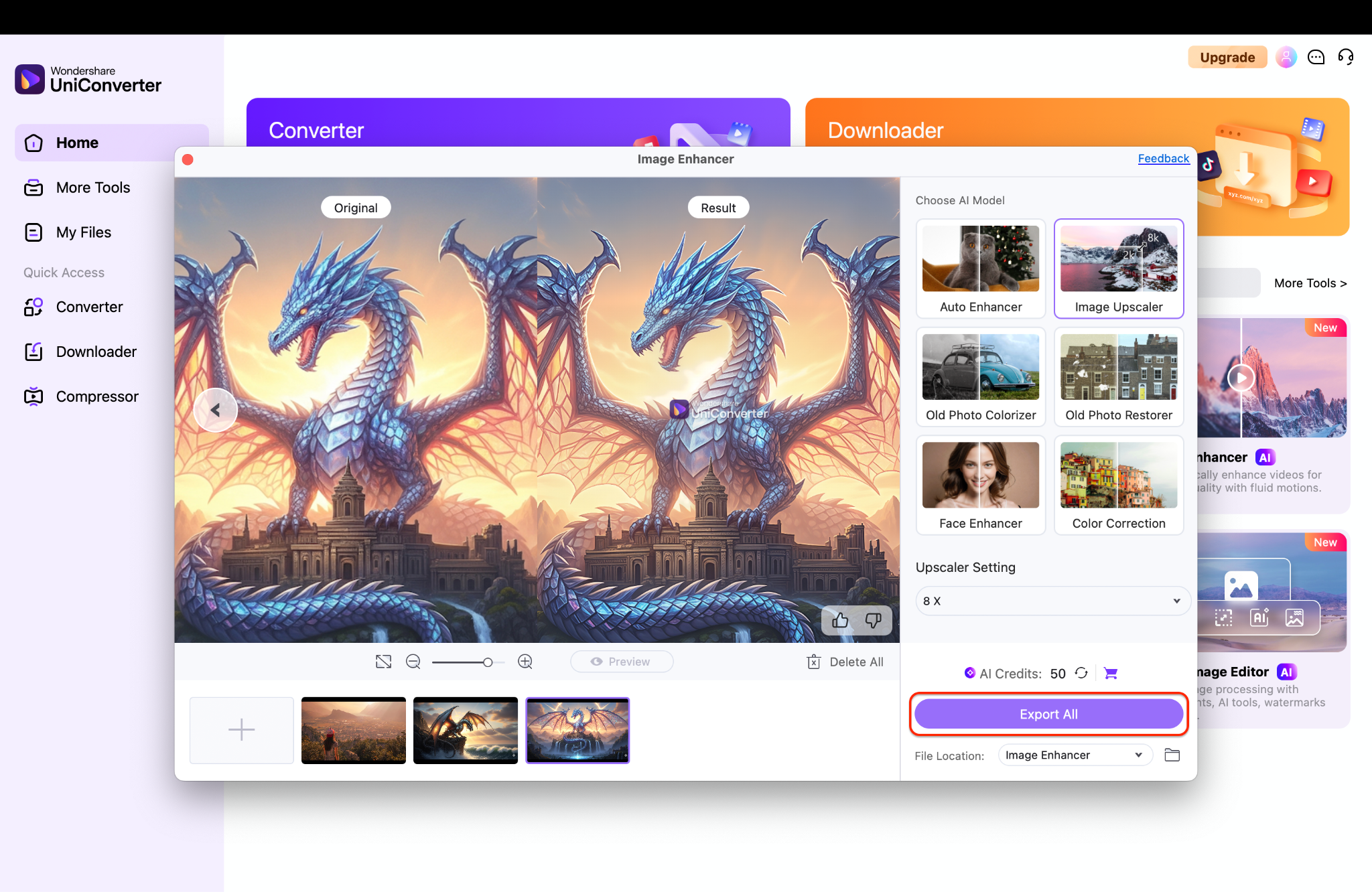
This approach is especially useful after multi-turn editing, where minor softening may occur; it restores crispness without demanding a return trip through manual pixel editing tools.

Enhance AI-Generated Images for Higher Resolution
Conclusion
Nano Banana image generator (Gemini 2.5 Flash) compresses the distance between imagination and output by treating image generation and editing as a single conversational loop, anchored by multi-image fusion, identity consistency, and targeted, local transformations that respect lighting and perspective. It complements a traditional editor rather than replacing it, trading pixel-by-pixel micromanagement for rapid ideation, quick iteration, and accessible control—traits that unlock fresh value for creators, marketers, and developers alike. With immediate access via the Gemini app and AI Studio, predictable per-image costs in the Gemini API, and convenient third-party previews, this Google AI image generator meets both casual and production needs out of the box.
FAQs
-
1. Any known limitations of Nano Banana?
Some users report that while Nano Banana is powerful, it is not yet a full replacement for Photoshop. Advanced, professional-level editing may still require traditional design tools. -
2. How does Nano Banana handle image consistency?
Nano Banana maintains high-resolution clarity and preserves the integrity of the original image, ensuring consistent likeness across multiple edits, background swaps, and style variations. -
3. Is Nano Banana free to use?
Yes. You can try Nano Banana for free via the Gemini app and Google AI Studio, allowing you to explore its core features without any upfront cost. -
4. What makes Nano Banana special compared to other image editors?
Nano Banana stands out for its multi-image fusion, character consistency, fast editing workflow, and high-quality output. It can edit specific areas independently—such as turning a pizza slice into a cartoon style while keeping the rest realistic—and generate creative compositions directly from prompts. -
5. How can you enhance Nano Banana images up to 8× clarity?
To further boost resolution and sharpness, use an AI upscaler like UniConverter’s AI Image Enhancer on desktop. It supports batch processing for 2×, 4×, or 8× upscaling, preserves transparency, and offers watermark-free exports—perfect for polishing images created with Gemini 2.5 Flash Image technology.

