


Struggling to create eye-catching videos that stand out on social media? Many beginners find traditional video editing complex and time-consuming, limiting their creative expression. Enter Grok Imagine, a powerful AI video generator app designed for effortless video content creation from images. With its unique Grok Imagine Spicy Mode, Grok Imagine lets you make bold, dynamic clips that grab attention instantly—something few free AI video makers offer.
Whether you're exploring Grok Imagine animation modes or aiming for viral-worthy content, this guide will walk you through accessing and mastering Grok Imagine's features, helping you produce striking AI-powered videos with ease.
In this article
- What Is Spicy Mode of Grok Imagine AI Image to Video Generator
- How to Access Grok Imagine Spicy Mode
- Strengths and Limitations of Grok Imagine Video Generator
- Easy Tips & Examples for Generating Prompts for Realistic AI Videos
- Best Grok Imagine Spicy Mode Prompts for Better Results
- Why Is Spicy Mode Missing in Grok Imagine?
- What Does “Video Moderated” Mean in Grok Imagine?
- How to Enhance Video Quality for More Impressions
- Conclusion
- FAQs
- [Beginner Pain Point] Traditional video editing is complex and time-consuming, making it hard for beginners to create engaging social media content.
- [Creative AI Solution] Grok Imagine simplifies video creation with image-to-video generation and unique modes like Spicy Mode for bold, viral-style content.
- [Strengths vs Limitations] It offers fast, creative outputs with audio integration, but struggles with realism, short clip length, and moderation risks.
- [Quality Enhancement Needs] Wondershare UniConverter improves AI-generated videos with upscaling, noise reduction, and batch processing for more professional results.
Part 1. What is Spicy Mode of Grok Imagine AI Image to Video Generator
Grok Imagine is a mobile-first AI image to video generator designed for quick and creative content. Its most talked-about feature, Spicy Mode, turns images or prompts into short, animated clips with a risqué or partially nude style—something most AI video tools, like Google Veo 3 or OpenAI's Sora, don't allow. While it uses moderation tools such as blurring, the results can be unpredictable, making it both intriguing and controversial. Spicy Mode offers more creative freedom but also raises concerns about safety, privacy, and consent. As a free AI video maker, it stands out in the AI image to animation space for its bold and boundary-pushing approach.
Part 2. How to Access Grok Imagine Spicy Mode for Free
You can try Grok Imagine's basic image-to-video generator for free, but Spicy Mode itself requires a paid subscription:
1. How to access Grok Imagine
Grok Imagine is accessible through the Grok mobile app, available on iOS and in early-release stages on Android in specific regions. While you can explore Grok's general tools via the web interface, the image-to-video capabilities—especially Grok Imagine—are currently mobile-only. That means if you're hoping to work with Spicy Mode, you'll need to grab the app.
While the desktop browser version of Grok focuses on chat and text tools, the whole creative pipeline—from AI image generation to animation—resides inside the app. This mobile-first design ensures smooth, fast performance and a touch-friendly environment for generating and reviewing videos. In short, mobile is mandatory if you want access to the full Grok Imagine video generator suite, including creative modes like Spicy.
2. How to activate Grok Imagine Spicy Mode
To access Grok Imagine's Spicy Mode, you need to be a SuperGrok or Premium+ X subscriber. Currently, Spicy Mode is available via the Grok mobile app on iOS and early Android releases, with some regional or platform-specific restrictions. Once eligible, you'll have access to all video generation modes, including Spicy Mode.
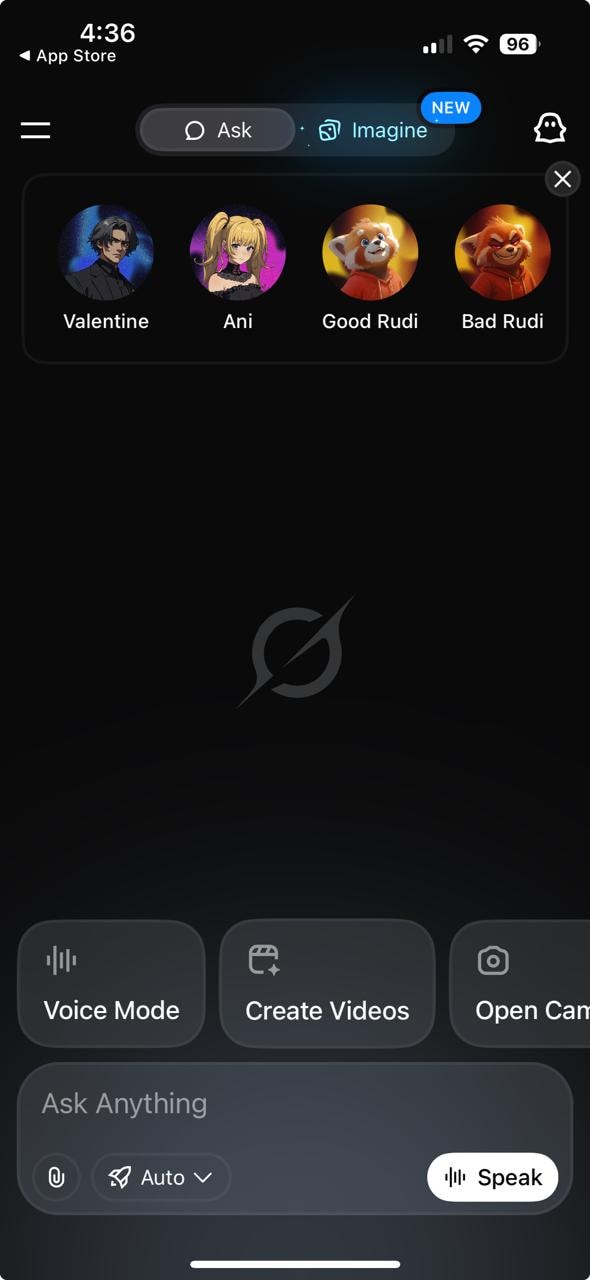
Step 1: Open the Grok App and Sign In
Launch the Grok app on your device and sign in with your credentials. If you don't have an account, create one quickly and easily. Ensure your subscription is active and that you are in a supported region to unlock premium features like Spicy Mode.
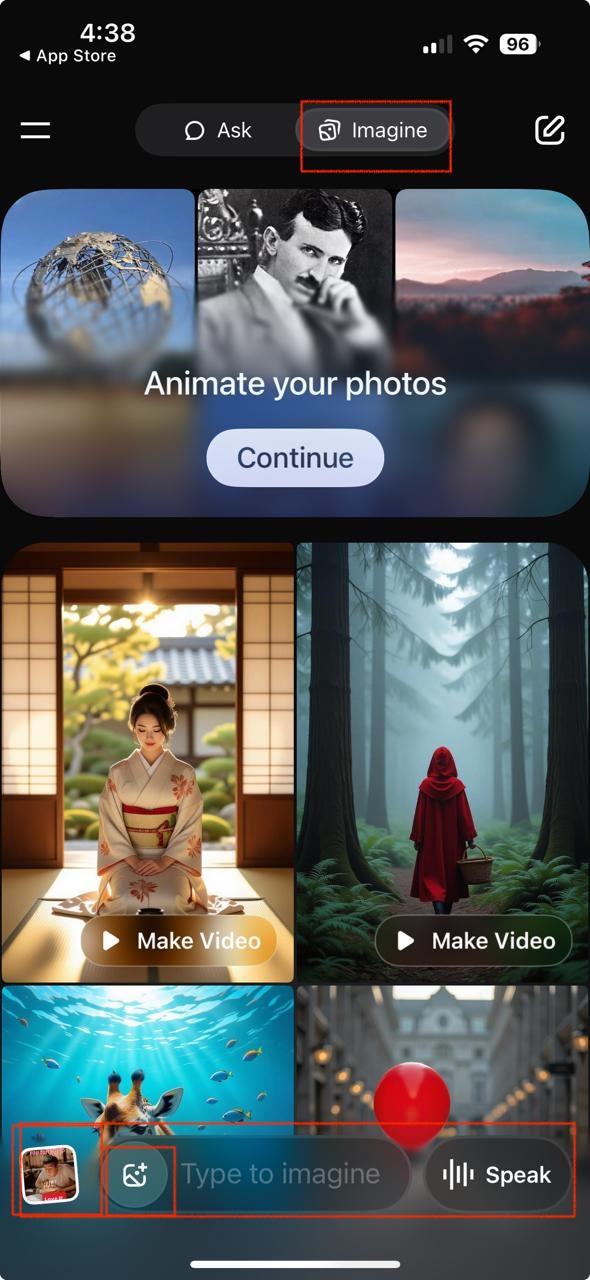
Step 2: Generate an Image and Find the Video Option
First, generate or upload an image in the 'Imagine' tab of the app. Once your image is ready, click the dropdown labeled "Make a video" beneath the image. This reveals different animation modes, including Spicy Mode.
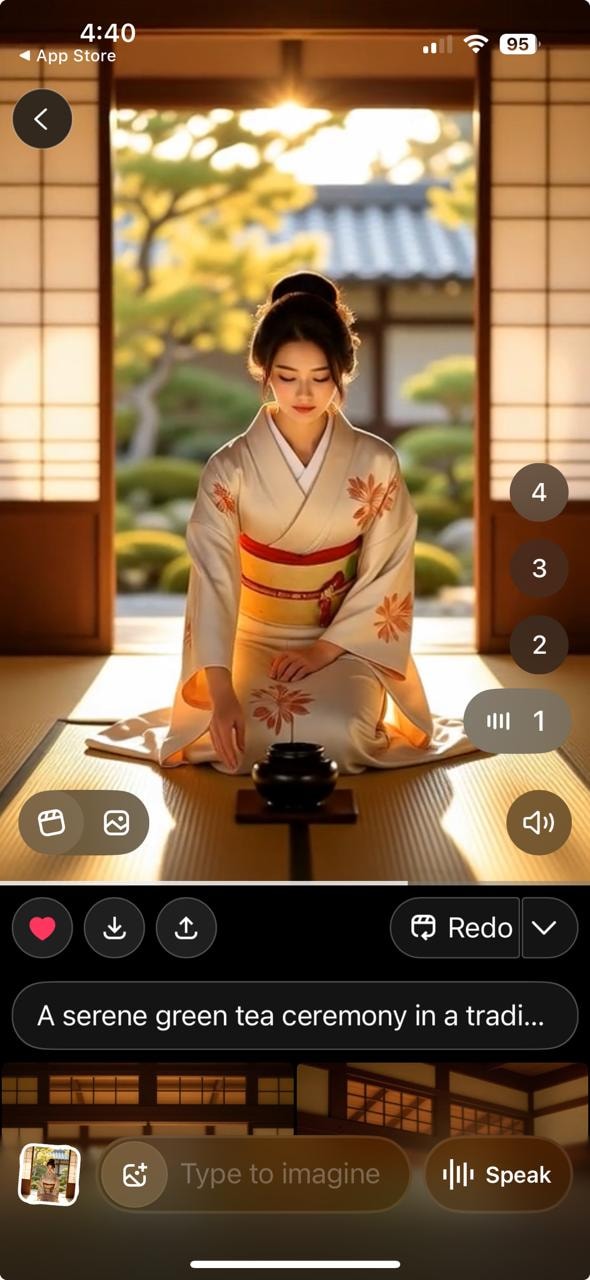
Step 3: Select Spicy Mode to Create Your Video
From the dropdown menu, choose Spicy Mode to enable this unique feature. Keep in mind, this mode allows more creative freedom, including suggestive content. You're now set to create bold and expressive AI-generated videos with Grok Imagine.
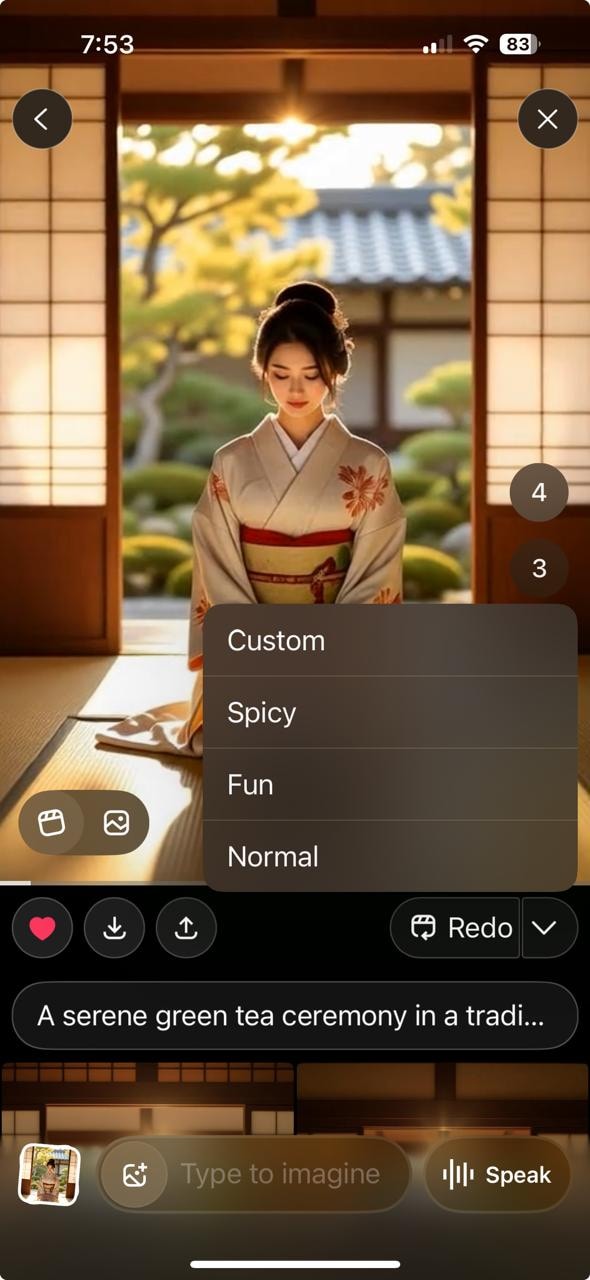
By following these steps, you can activate and use Spicy Mode in Grok Imagine to create unique and expressive AI-generated videos.
Part 3. Strengths and Limitations of Grok Imagine Video Generator
Here's a quick look at what this AI image-to-video tool does best and where it falls short:
Strengths
Creative Modes & Versatility
Grok Imagine delivers four distinct Grok Imagine animation modes (Normal, Fun, Custom, Spicy), making it highly adaptable for different storytelling vibes. With multiple animation styles and customization sliders, this Grok Imagine creative AI system lets you tailor outputs to match your artistic vision.
Spicy Mode offers that extra dash of edge—perfect for memes, impactful promos, or experimental content that demands attention.This flexibility ensures Grok Imagine remains a standout AI-powered video animation tool for creators seeking creative variety. This versatility makes it ideal for AI video content creation, whether you're targeting short-form social videos, memes, or conceptual animation reels.
Audio-Integrated Output
Unlike many AI video generator apps, Grok Imagine syncs audio with visuals right out of the box.This means your clip becomes an immersive, ready-to-share snippet rather than a silent experiment.For beginner creators and social users, this seamless integration significantly elevates the content quality.
Speed & Accessibility
The app frequently delivers results in just a few seconds—ideal for quick iteration and playful content creation.Its user interface supports fluid navigation, lowering the barrier to trying more creative prompts and styles.This makes Grok Imagine an attractive Grok AI meme generator, enabling spontaneous experimentation. It's also commonly referred to as a Grok Imagine meme generator thanks to its rapid turnaround and humorous viral output.
Viral Appeal
Grok Imagine's early usage stats—over 44 million images and videos generated in a single day—reveal its instant popularity. This positions it among the fastest AI meme generator tools currently available on mobile.Framing Grok as an "AI Vine" taps nostalgia while introducing a viral creative spin.
The buzz around Spicy Mode, including debates and memes, has catalyzed its reputation as a truly Grok Imagine viral AI tool. Early Grok Imagine user reviews highlight the ease of use, impressive animation quality, and the surprisingly fast rendering speed for an AI video tool still in its early stages.
Limitations
Realism Gaps & Artifacted Output
Though vibrant, many outputs show visible "AI-generated" signs—warped textures, glitchy motion, or waxy skin.This places Grok Imagine behind more polished systems like Grok Imagine vs Google Veo 3, especially for high-fidelity or professional content.It's best suited for stylized, expressive content rather than ultra-realistic storytelling.
Short Clip Duration
Videos are typically brief (around six to fifteen seconds), aligning with a meme or AI Vine format.While snappy content is great for platforms like TikTok or Instagram, longer narratives remain out of reach.Creators needing depth or storyline length may need additional tools.
Moderation Risks & Ethical Concerns
In hot-button moments like Grok generating deepfake-style clips of Taylor Swift from benign prompts, critics raised serious alarms.Such incidents highlight flaws in Grok Imagine NSFW content moderation, especially with real likenesses.In the broader Grok Imagine controversy landscape, legal and ethical stakes loom large without robust safeguards.
Prompt Overload Burnout
Stacking too many style directives often leaves the model stuck, rejecting prompts or generating bland results.Simpler, more precise cues tend to yield better animation fidelity.Creators should refine their prompts gradually, embracing clarity over complexity.
Part 4. Easy Tips & Examples for Generating Prompts for Realistic AI Videos
Mastering prompt writing is essential to fully unleash Grok Imagine's creative potential while avoiding awkward or unnatural results. Use this structured approach to build vivid, coherent, and cinematic prompts that guide the AI precisely.
Why This Works:
- Clarity: Specific descriptions anchor the AI in concrete subjects and actions.
- Context: Scene and camera details direct spatial storytelling and composition.
- Mood Control: Thoughtful lighting and style choices shape atmosphere and aesthetic tone.
Prompt Examples
Example 1: "A young woman spinning joyfully in a sunlit forest clearing with petals swirling around her, captured on a slow dolly-in, backlit by warm golden hour light, rendered in soft-focus vintage film style."
Why it works: A clear subject and action create a focused narrative. The forest setting adds depth and mood. Camera movement injects cinematic life, while warm lighting and vintage style unify the overall tone.
Example 2: "A small robot painting abstract graffiti on a brick wall in an urban courtyard, shot in a medium zoom pull-back, illuminated by neon street lamps at dusk, with gritty cyberpunk textures and slight film grain."
Why it works: Dynamic robot activity sparks engaging visuals. Urban details like neon lights and bricks add character and setting. The gritty cyberpunk style reinforces mood and texture for visual coherence.
Example 3: "A red panda sipping tea in a cozy library nook, gently turning a page of an open book, framed in a close-up tilt-shift lens, lit by warm candlelight, styled in soft storybook illustration with warm palette."
Why it works: A charming subject invites creativity. Thoughtful staging grounds the scene. Lighting and illustration style blend perfectly to create a cozy, storybook feel.
Additional Practical Tips for Grok Imagine Prompt Crafting
Iterate with Minor Changes: Tweak one element at a time—lighting, camera, then style—to isolate improvements and find the best combination.
Keep Scenes Manageable: Avoid overly busy environments like crowds or cluttered backgrounds that can confuse the AI and cause unnatural movement. Simpler scenes produce more consistent results.
Leverage AI Assistants: Use GPT or Gemini to draft structured prompts quickly, then add your creative polish for maximum impact.
- Availability may vary by plan, device, and region.
- Some outputs may be blocked or blurred by moderation.
- Avoid unauthorized real-person or harmful content.
- Follow local laws and platform guidelines.
Part 5. Best Grok Imagine Spicy Mode Prompts for Better Results
If you want better Grok Imagine Spicy Mode results, keep your prompts short, visual, and easy for the model to follow.
Simple Prompt Formula
Subject + Action + Camera angle + Lighting + Style
Best Grok Spicy Mode Prompts
- A fashion portrait turning slowly toward the camera, soft side lighting, cinematic close-up, glossy editorial style.
- A dancer moving in a neon-lit room, low-angle shot, vivid contrast, dramatic music video style.
- A character looking over the shoulder, slow zoom-in, warm sunset rim light, soft film look.
Prompt Tips for Uploaded Images
- Use a clear source image
- Keep the background simple
- Add only one motion cue
- Use one lighting direction
- Avoid too many style effects
What to Avoid
- Too many visual effects in one prompt
- Conflicting motion instructions
- Overly long Grok spicy mode prompts
- Busy scenes with multiple subjects
Part 6. Why Is Spicy Mode Missing in Grok Imagine?
If you’re trying to use Grok Imagine and notice that Spicy Mode is missing, you’re not alone. This feature may not appear for all users due to a combination of platform policies, regional restrictions, and feature rollout strategies. Understanding these factors can help explain why the option isn’t visible on your device.
Platform Policies and Content Restrictions
One of the main reasons Spicy Mode may be unavailable is due to content moderation policies. Platforms often limit or remove certain features to comply with app store guidelines, legal requirements, or internal safety standards. As a result, some modes that involve sensitive or unrestricted content may be restricted or disabled.
Regional Availability
Spicy Mode may also be limited based on your geographic location. Different regions have varying regulations regarding content, which can affect whether certain features are accessible. If you’re in a restricted region, the feature may be hidden or completely unavailable.
Gradual Feature Rollout
New features like Spicy Mode are often released gradually. This means only a portion of users can access them at first, while others may need to wait for a wider rollout or future updates.
App Version and Platform Differences
In some cases, Spicy Mode may only be available on specific platforms (such as web vs mobile) or require the latest app version. Updating your app or switching platforms may help determine if the feature is supported.
Part 7. What Does “Video Moderated” Mean in Grok Imagine?
If you see a “Video Moderated” message in Grok Imagine, it means the platform has reviewed your content and applied certain restrictions based on its safety and content policies. This is part of an automated and sometimes manual process designed to ensure that videos meet platform guidelines.
Content Policy Enforcement
“Video Moderated” typically indicates that the content may include elements that are considered sensitive, restricted, or not fully compliant with platform rules. This can include explicit visuals, copyrighted material, or potentially harmful content. As a result, the system may limit how the video is displayed or shared.
Automated Detection Systems
Grok Imagine uses automated moderation tools to scan videos for specific patterns, visuals, or audio cues. If the system detects content that triggers its filters, the video may be flagged and labeled as moderated, even if no manual review has occurred.
Impact on Video Playback
When a video is moderated, you may notice changes such as blurred visuals, muted audio, restricted access, or playback limitations. In some cases, the video may not be viewable at all depending on the severity of the flag.
How to Avoid Moderation
To reduce the chances of moderation, ensure your content follows platform guidelines. Avoid uploading sensitive or restricted material, and review community standards before creating or sharing videos.
Part 8. How to Enhance Video Quality for More Impressions
To take your Grok Imagine creations to the next level, UniConverter is a fantastic tool that helps with stabilization, color grading, and overall polish—perfect for catching more eyes.
It also enhances video clarity with AI-powered upscaling, improves lighting and sharpness, and refines details for a more professional look. Whether your content is slightly blurred or needs visual enhancement, UniConverter provides an easy way to fix blurry Grok imagine video and make your Spicy Mode videos stand out across platforms.
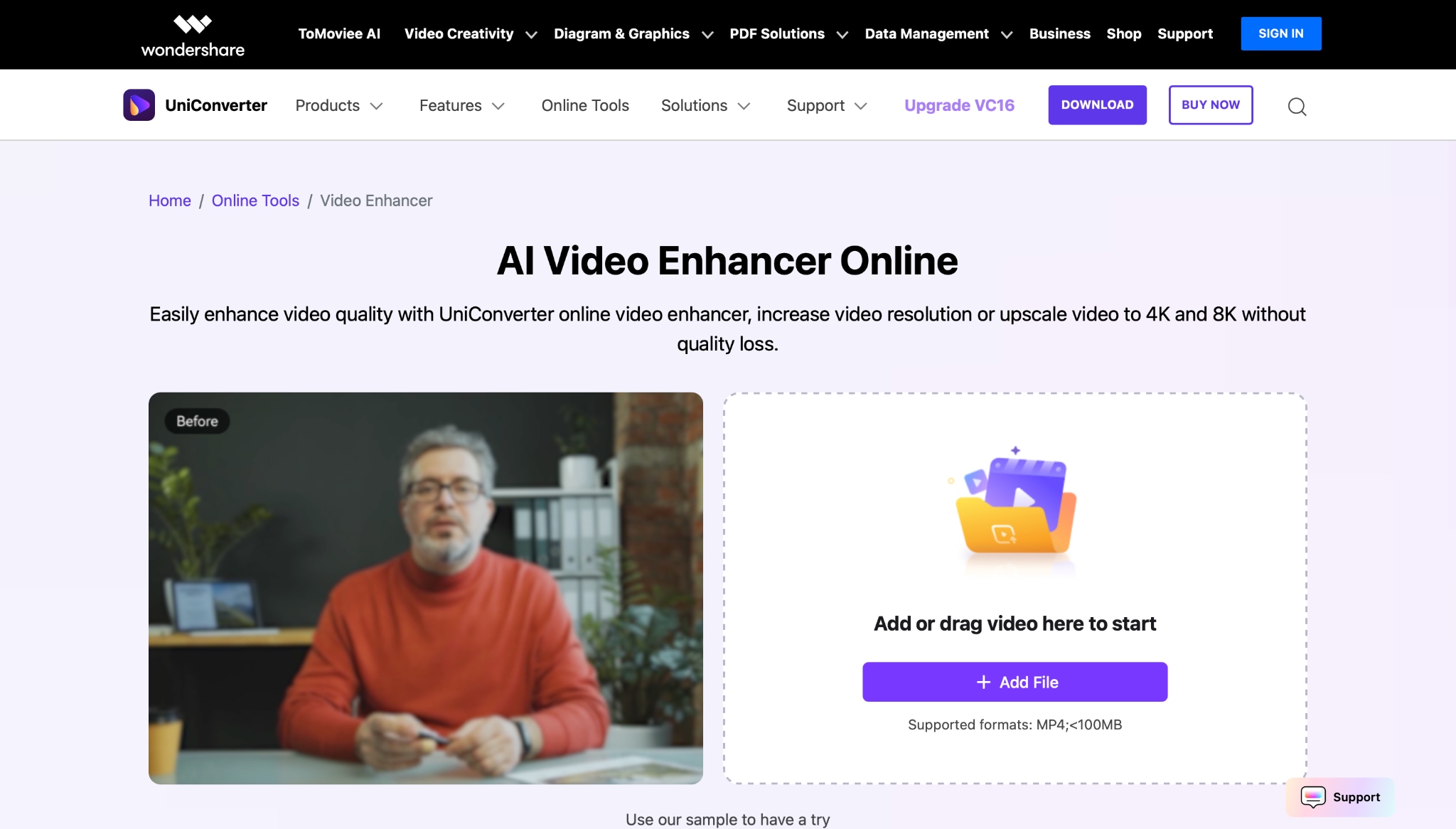
Why UniConverter is excellent for boosting your AI clips
- AI Video Enhancement: Automatically fine-tunes brightness, contrast, saturation, and sharpness using innovative AI technology. This gives your videos a sleek, professional, and cinematic feel with minimal effort.
- Noise Reduction: Uses AI to clean up grainy or speckled noise, especially in low-light videos, making your footage look more precise and more polished.
- AI Video Upscaling: Turns low-res videos into crisp, high-resolution versions like 4K or 8K without losing detail, so your clips look sharper and more professional.
- AI Video Sharpening: Reduces video blurriness with advanced sharpening tech, resulting in clearer, more detailed visuals that pop.
- Batch Processing: Lets you enhance several videos at once, saving you time and making it easier to manage bigger projects.
3-Step UniConverter Video Enhancement Guide
Follow these simple steps to fix blurry Grok imagine video quickly and professionally:
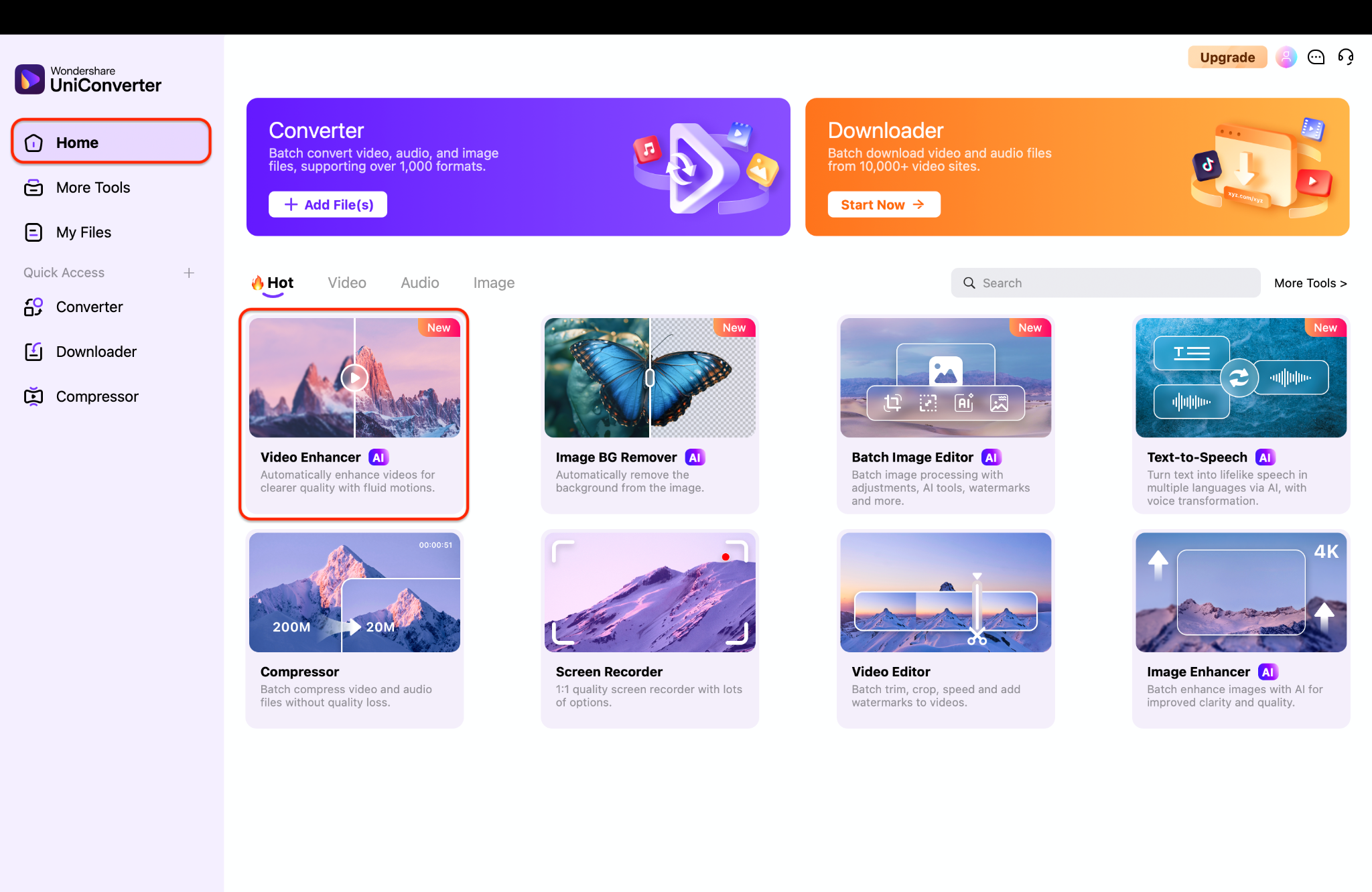
Step 1: Access Video Enhancer
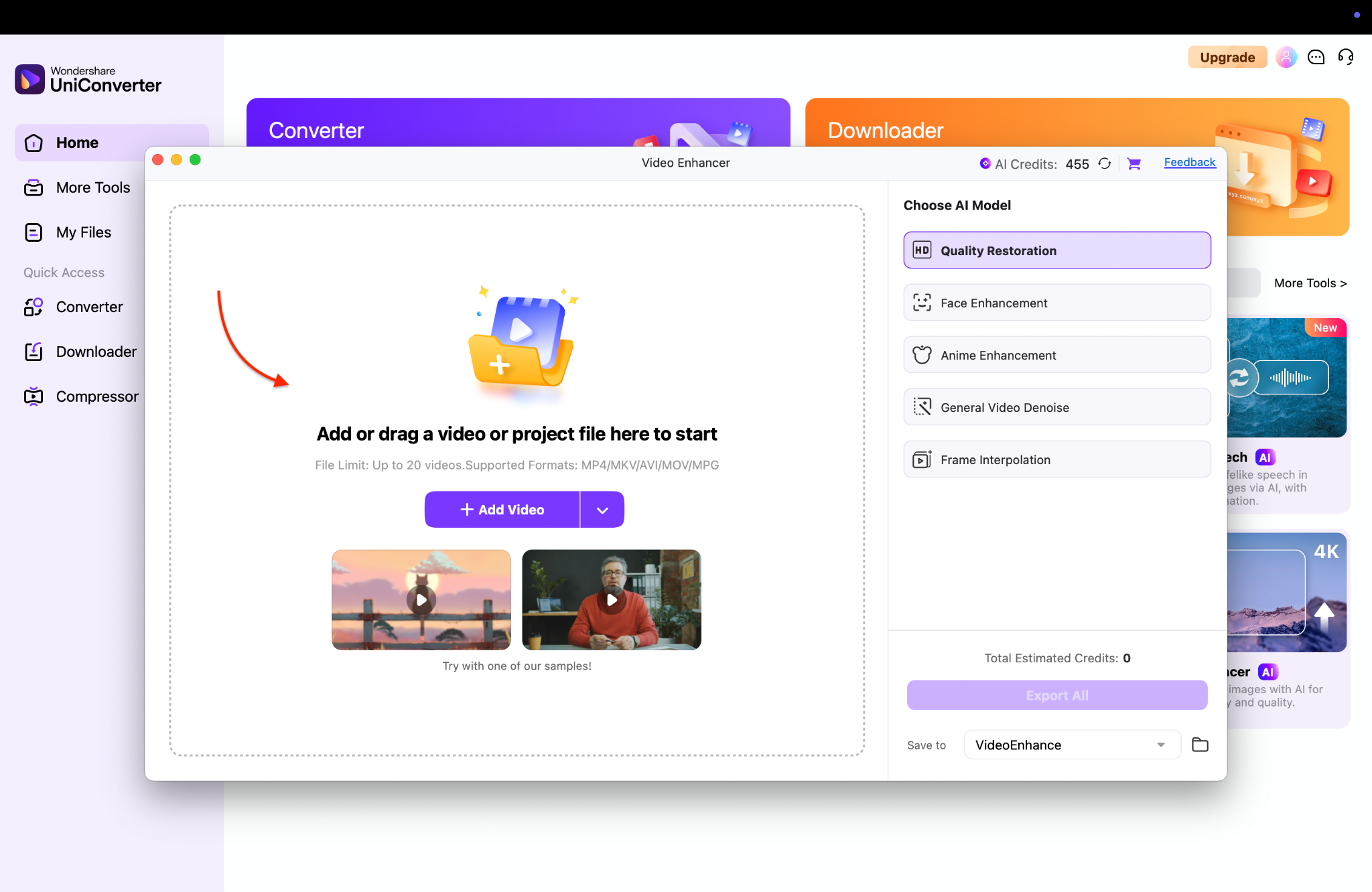
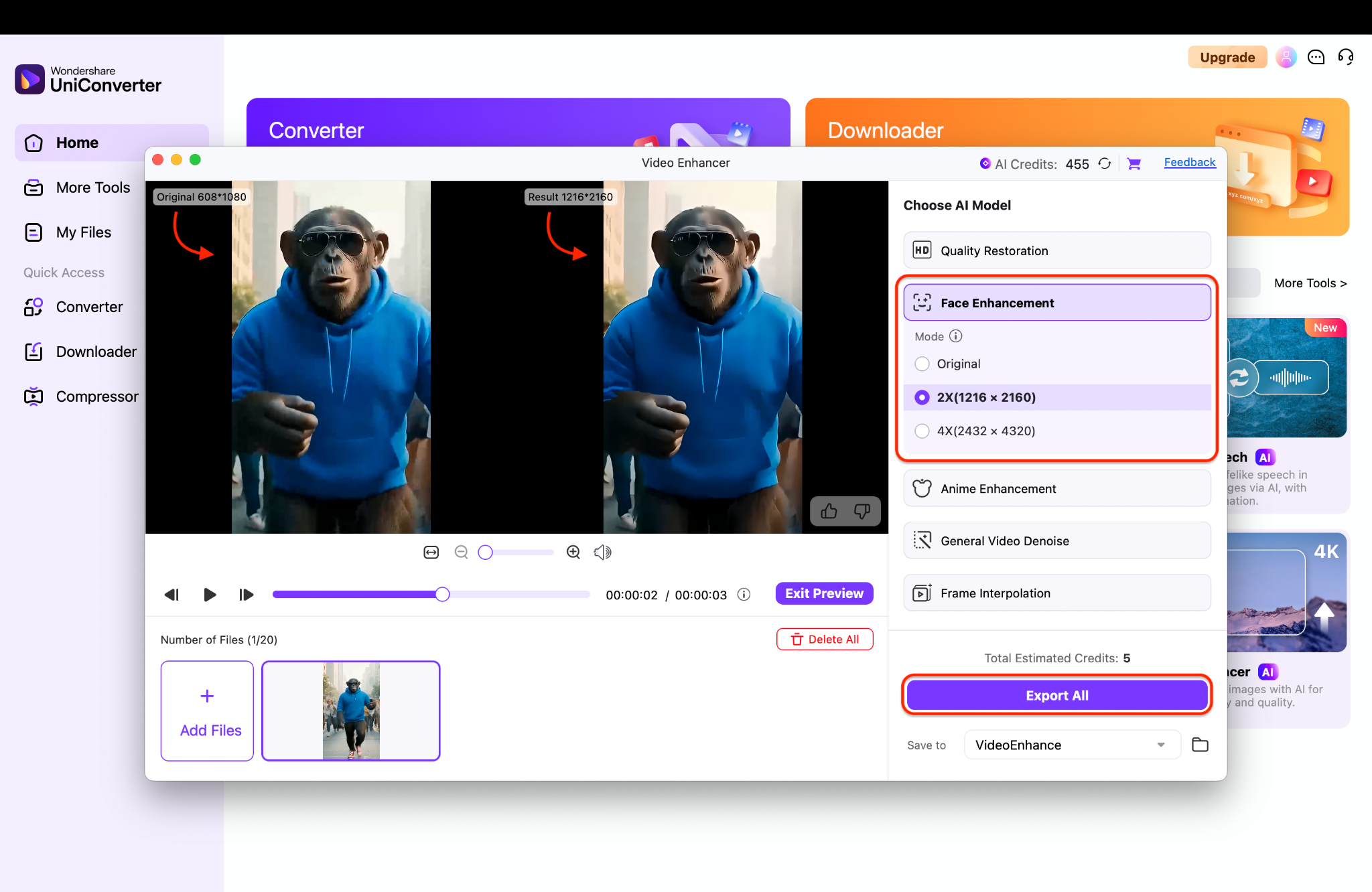
Step 2: Add Video or Videos and Choose an AI Model
Step 3: Export and Save

Enhance AI-Generated Videos to 4K or 8K Resolution
Conclusion
Grok Imagine is a fresh force in AI-powered video animation. Its mobile-first design and bold Grok Imagine Spicy Mode let you create short, expressive visual content—from AI meme creation to stylized cinematic loops. The freedom is exciting, but NSFW risks and unintended deepfakes mean creators must act responsibly. Always get consent, avoid harmful content, and use structured prompts for realistic outputs. For best results, refine animations in UniConverter with stabilization, color correction, and optimized export. When used thoughtfully, Grok Imagine blends flair with safety—pair it with UniConverter to enhance Grok ai video quality, turn bold ideas into professional, share-ready videos in minutes.
FAQs
-
1. Is Grok Imagine Spicy Mode free?
Grok Imagine may offer some basic image-to-video features for free, but Grok Imagine Spicy Mode usually requires an eligible paid plan such as SuperGrok or Premium+. -
2. Why is Grok Spicy Mode missing?
If Grok Spicy Mode is missing, the most common reasons are plan restrictions, regional limits, app version differences, or a phased feature rollout. -
3. What does “Video Moderated” mean in Grok Imagine?
In Grok Imagine, “Video Moderated” means the generated result was flagged by the platform’s content review system and may have limited visibility, blur, or playback restrictions. -
4. What are the best Grok Spicy Mode prompts?
The best Grok Spicy Mode prompts are usually short, specific, and focused on one subject, one action, and a clear visual style for more stable AI video results. -
5. How do I use Grok Spicy Mode for uploaded images?
For better Grok Spicy Mode results with uploaded images, use a clear source photo, keep the background simple, and add only a few precise prompt details.

