


Every content creator knows the struggle: you have a brilliant 10-minute story in your head, but your AI tools can only generate 4 seconds of chaotic, morphing footage. That was exactly my frustration last week when I sat down to create a series of animated shorts for a client. I’ve tested everything from Sora to Runway, but the promise of "consistent characters" and "long-form video" led me to Magic Light AI. Is it actually a game-changer, or—as many angry users on Reddit claim—a 'broken product' that eats your credits?
After spending money on the Pro plan ($35/month) and testing the controversial 'consistent character' feature, here is my raw, unfiltered review of whether Magic Light AI is a legitimate tool or a risky investment.
In this article
- When Magic Light AI Gain Its Popularity
- What Features Does Magic Light AI Offer
- Magic Light AI Pros, Cons and Pricing
- What Users Are Saying (Reviews)
- Quick Glance: Magic Light AI Comparison with Alternatives
- Steps Guide: How to Create a Video in Magic Light AI
- Bonus: How to Enhance Realistic Magic Light AI Generated Videos
- Conclusion
- FAQ
Part 1: When Magic Light AI Gain Its Popularity
Magic Light AI didn't explode onto the scene with a single viral video like some of its competitors. Instead, it gained traction in late 2024 and throughout 2025, specifically among "AI Tubers"—creators focusing on narrative content for YouTube and TikTok. While tools like Luma Dream Machine dazzled with photorealism, storytellers were hitting a wall: character consistency.
Magic Light AI carved out its niche by promising a solution to the "morphing face" problem. It gained massive popularity in niche communities like r/aitubers when users realized it offered a workflow specifically designed for a single character to walk through 20 different scenes without changing their shirt or ethnicity every time the camera angle shifted.
Part 2: What Features Does Magic Light AI Offer
Unlike generalist tools that just ask for a prompt, Magic Light is built with a specific architecture for storytelling, aggregating top-tier models into a single dashboard.
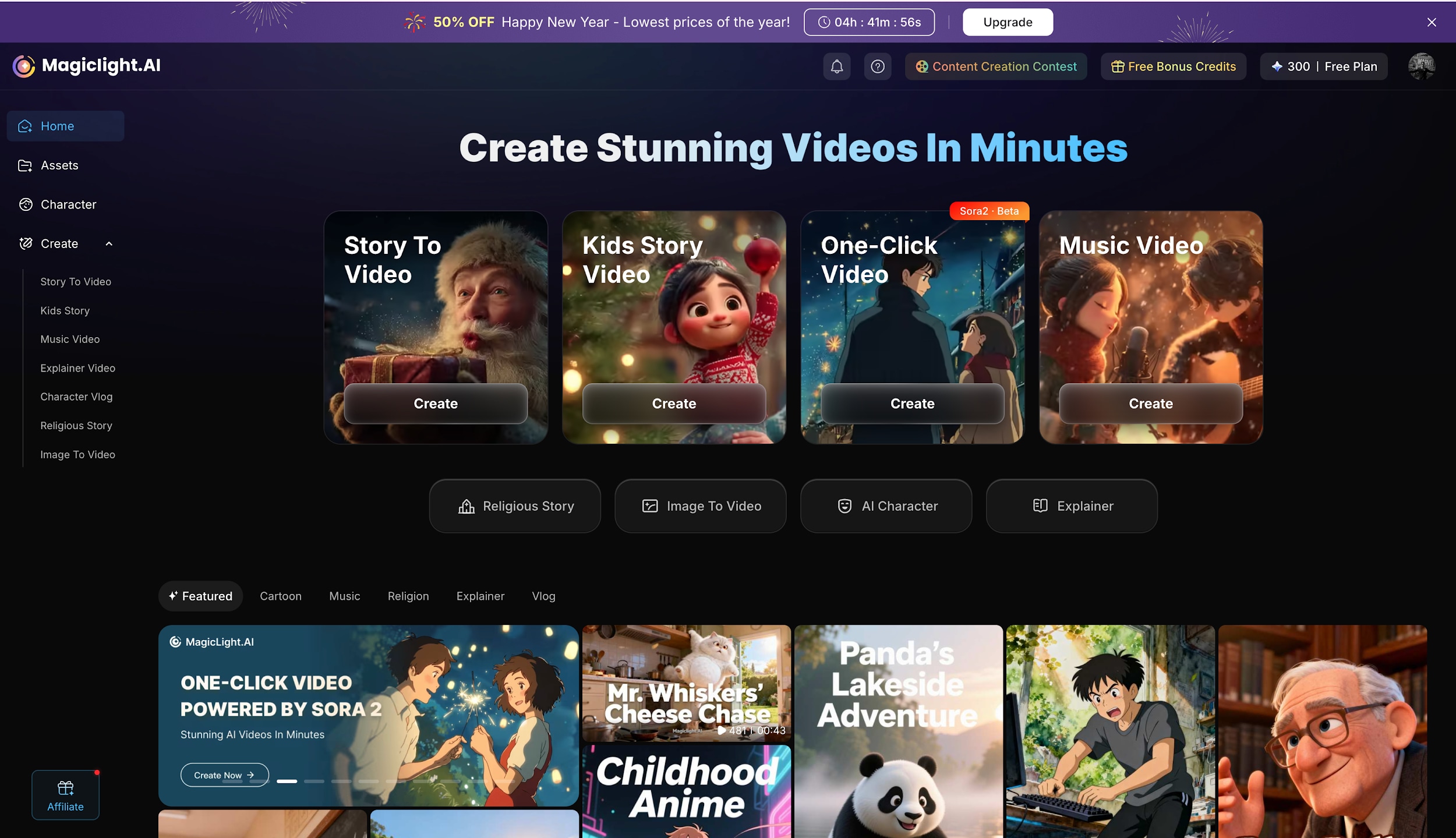
Video Generation
Magic Light offers specialized generation modes tailored to different content needs, rather than a "one-size-fits-all" prompt box:
Story to Video: The flagship feature for narrative creators. You can use "Smart Script" (powered by models like Gemini 3) to expand a simple idea into a structured screenplay. It supports various styles like "3D Cartoon," "Disney," and "Pixar".
Kids Story Video: A dedicated mode optimized for children's content. It focuses on creating vibrant, storybook-style animations suitable for bedtime stories, often using specific trending scripts for kids.
One-Click Video: A streamlined mode powered by Sora 2 that creates fully animated films with voice, lip-sync, and dynamic camera moves in a single step. Styles include "JOJO," "Ghibli," "Shinkai," and "Clay".
Music Video: A comprehensive creation tool powered by Suno that handles both audio and visual generation. It allows you to "Create Music" with full commercial rights and pairs it with a generated video in styles like "3D Cartoon" or "Disney," utilizing models like Hailuo 02 for the visuals.
Image to Video: Allows you to drag and drop static images (JPG, PNG) to animate specific character designs or scenes. It supports the Sora 2 model and allows for resolution (up to 720p shown in preview) and duration settings.
AI Character: A specialized mode for creating "Character Vlogs." It features a gallery of public characters (like animated animals) that you can use to create consistent character-driven content.
Explainer & Religious story: A dedicated workflow for creating educational or business videos. The interface allows you to input topics (e.g., "How a little seed grows into a big tree") and select specific styles and logic models like Hailuo 02 or ChatGPT 4 to generate clear, informative visual narratives.
Video Edition Tool
Beyond generation, the platform includes tools to refine the output:
AI Lip Sync: Matches character mouth movements to your audio track automatically.
AI Subtitle Generator: Automatically transcribes audio and overlays subtitles for social media readiness.
AI Voice Cloning: Allows you to clone a voice sample to use for your characters.
AI Animation Generator: Turns text scripts or ideas into complete, multi-scene animations with consistent characters, scenes, and motion.
AI Video Editor: A basic timeline editor to trim and arrange your generated clips.
Diversified AI Model
Magic Light allows you to choose the underlying "brain" for your generation, offering access to some of the most advanced models available in 2026:
Video Models: Sora 2, VEO 3, Kling 2.1 Master, Wan 2-6, Hailuo 2.3 Fast, and Seedance 1.5 Pro.
LLMs & Logic: Gemini 3, Gemini 3 Flash, ChatGPT 5, and the advanced image model Nano Banana 2 (Gemini 3.0 Pro Image).
Part 3: Magic Light AI Pros, Cons and Pricing
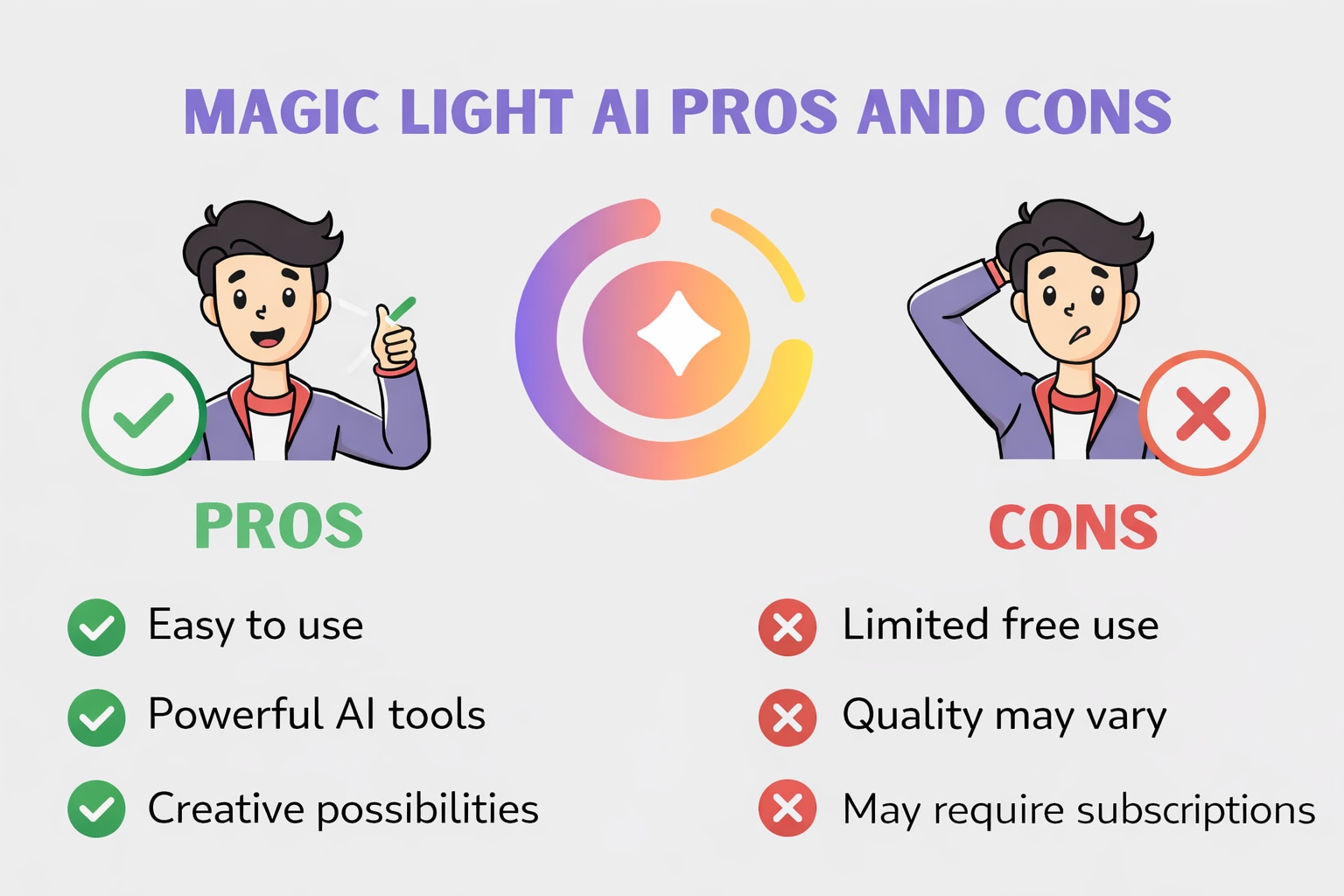
Pros and Cons of Magic Light AI
Magic Light AI Pricing: Magic Light AI operates on a credit-based monthly subscription. (Prices below reflect monthly billing; annual billing offers ~50% off).
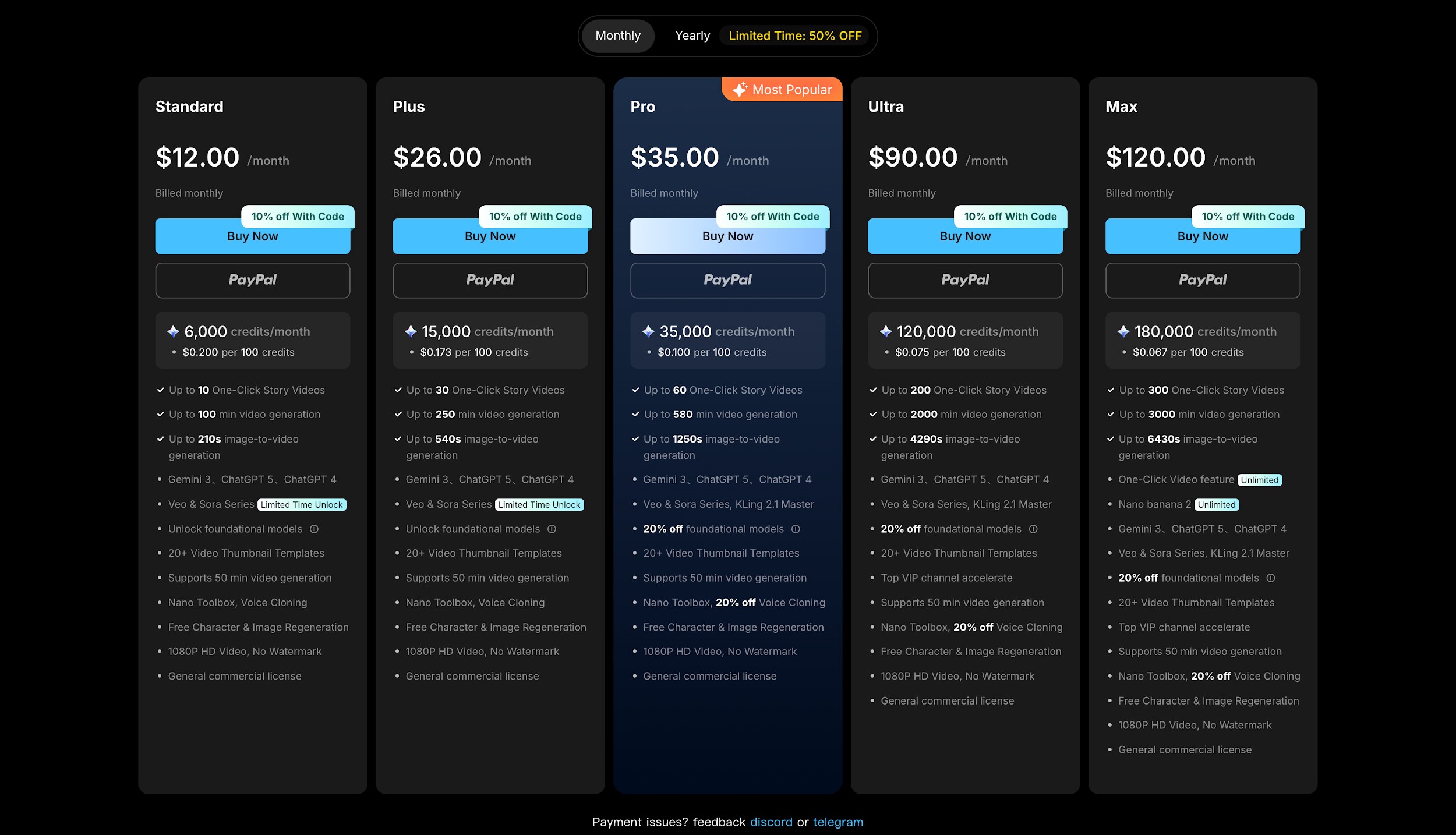
Standard: $12.00/month. Includes 6,000 credits/month. Good for testing (~10 one-click story videos).
Plus: $26.00/month. Includes 15,000 credits/month. Allows up to 30 one-click story videos.
Pro (Most Popular): $35.00/month. Includes 35,000 credits/month. This is the sweet spot for creators, offering access to Gemini 3, ChatGPT 5, Veo & Sora Series.
Ultra: $90.00/month. Includes 120,000 credits/month. For heavy power users.
Max: $120.00/month. Includes 180,000 credits/month. For agencies needing massive scale.
Part 4: What Users Are Saying (Reviews)
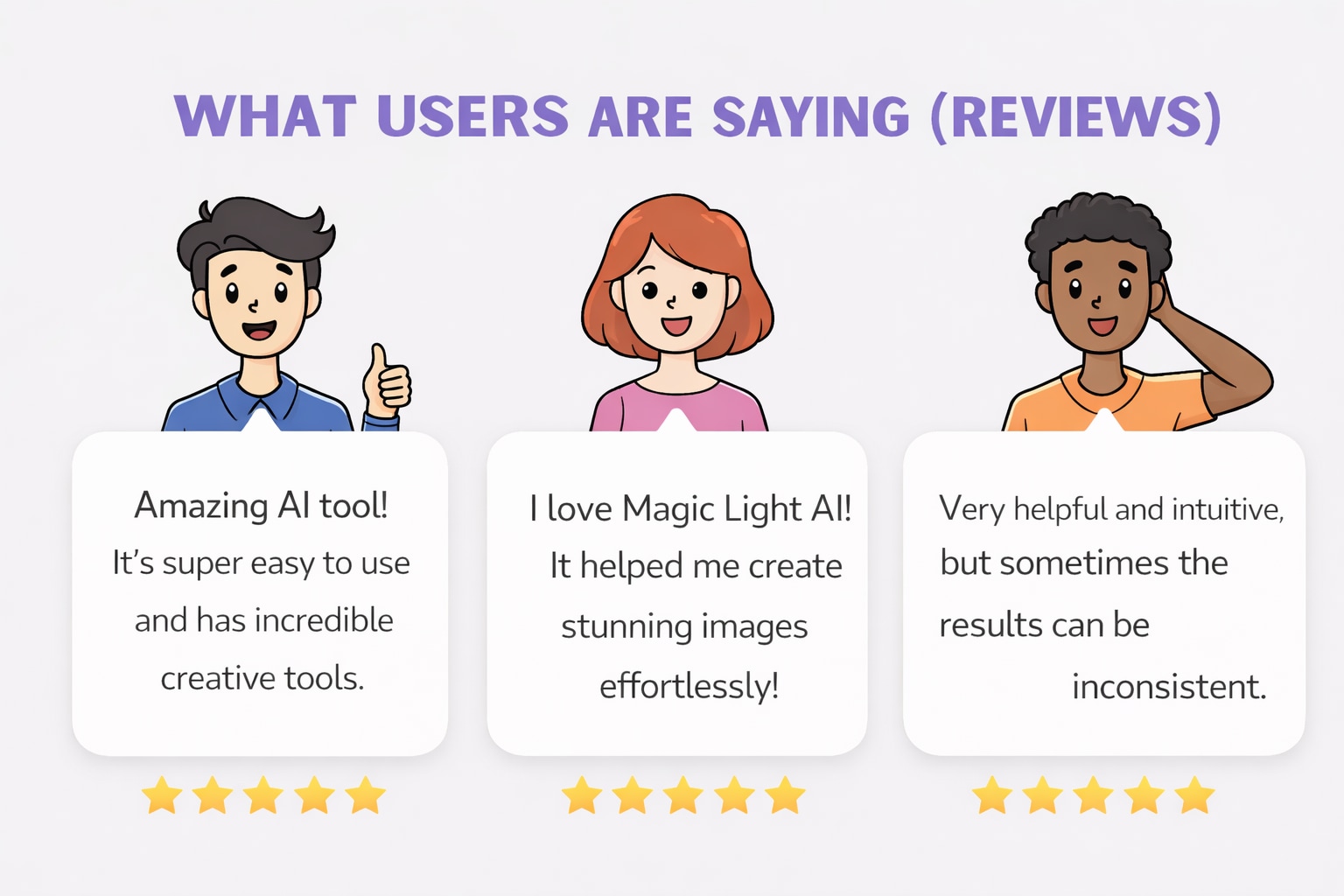
Positive Reviews
"I find it helpful in creating kids story and consisting characters specially bedtime stories."
—Confident_Sense_9499 via Reddit
"Magic light did well actually, may be I was new. One thing again I am testing not only magic light, Filmora Wondershare 14 now and LTX Studio and I am paying for it, not using them free. That's card, or a toffee offered by software companies to attract more customers. Let's people decide their own choice."
— Lakhwinder viaTrustpilot
"I create my own scripts. They're approximately 750 words. That produces about 48 storyboards. I generate my own characters because I want my videos to feel like episodes in a series. I don't do shorts, but they have several one-click templates if you're interested. The production timeline depends on how well the storyboards adhere to the script. Sometimes it takes several regenerations to get what I want. Regens are free, thankfully. It can take between 1 to 3 hours start-to-finish."
— Intelligent_Type_626 viaReddit
Negative Reviews
"Total garbage in a wonderful Christmas wrapping. Long story short: lots of wonderful features, none of which work. Default character looks different in every scene, changes clothing at will, animations don’t work AT ALL. Demo videos for MagicLight were obviously made with different software; their entire business model is a blatant lie."
— Individual-Pop-1703 viaReddit
"I joined a few days ago. It's a very frustrating experience. There's no support team for simple questions or to get answers to anything whatsoever. It
was too much wasting time trying to find answers on the Web that an email message or support team can answer in a minute or two. It's one of those sites that literally makes one go away!"
— Allan Philip viaTrustpilot
Part 5: Quick Glance: Magic Light AI Comparison with Alternatives
In this breakdown, we look at how Magic Light AI stacks up against the broader landscape of AI video generators, focusing on its unique position as a storytelling specialist rather than just a clip generator.
| Metric | Revid AI | Synthesia | Pictory | InVideo (AI) |
|---|---|---|---|---|
| AI models & options | AI script generator; talking avatars; voice synthesis & voice cloning; AI hook generation | Large library of realistic AI avatars & voices (100+ avatars; 140+ languages) | Text-to-video AI summarization; auto scene selection from long-form content | AI-assisted editing, templates, voice overs; stock video search AI |
| Generation type options | Video from text, audio, URL; script-to-video; meme & short formats (TikTok/Shorts) | Primarily text-to-video with AI avatars | Video from text or existing long-form content | AI-assisted video creation from templates and scripts |
| Video template diversity | Wide social templates (TikTok, Reels, Shorts, product, meme-style, intros) | Professional & business templates for training and presentations | Storytelling and repurposing-focused templates | Large template library for ads, intros, and marketing reels |
| Starting price | ~$39/month (Hobby) up to ~$199/month (Ultra) | ~$30–39/month (personal); higher for team/enterprise | ~$19–39+/month depending on tier | ~$16+/month depending on plan |
| Ease of use | Very beginner-friendly with automated workflows and publishing shortcuts | Easy overall but learning curve for avatar customization | Easy; simple editor with auto summarization, moderate flexibility | Easy–moderate; drag-and-drop templates simplify creation |
| Best for | Social media creators, marketers, SMBs scaling viral short-form content | Enterprise training, branding, corporate communications | Repurposing long talks or webinars into short clips | Small businesses and marketers needing versatile AI video + editing |
Part 6: Steps Guide: How to Create a Video in Magic Light AI
Based on my workflow creating a "One-Click Video" using the Sora 2 model, here is the exact process to get the best results.
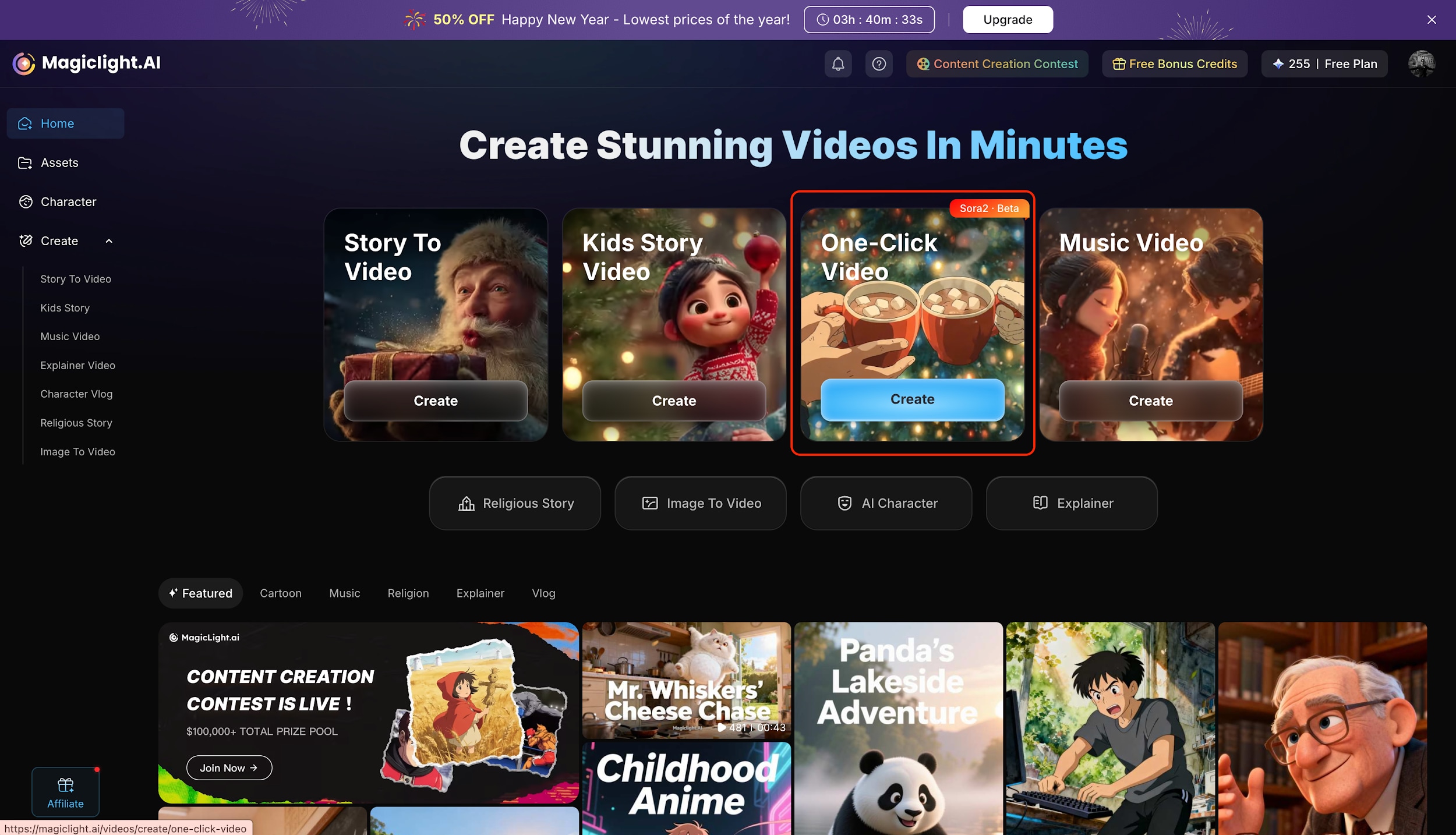
Step 1: Choose Your Creation Mode
Start by logging into the Magic Light AI dashboard where you will see various options like Story to Video, Music Video, and Kids Story. For this guide, select the "One-Click Video" card which is powered by the advanced Sora 2 model for high-quality animation. Click the blue "Create" button on that card to enter the dedicated workspace for your project.
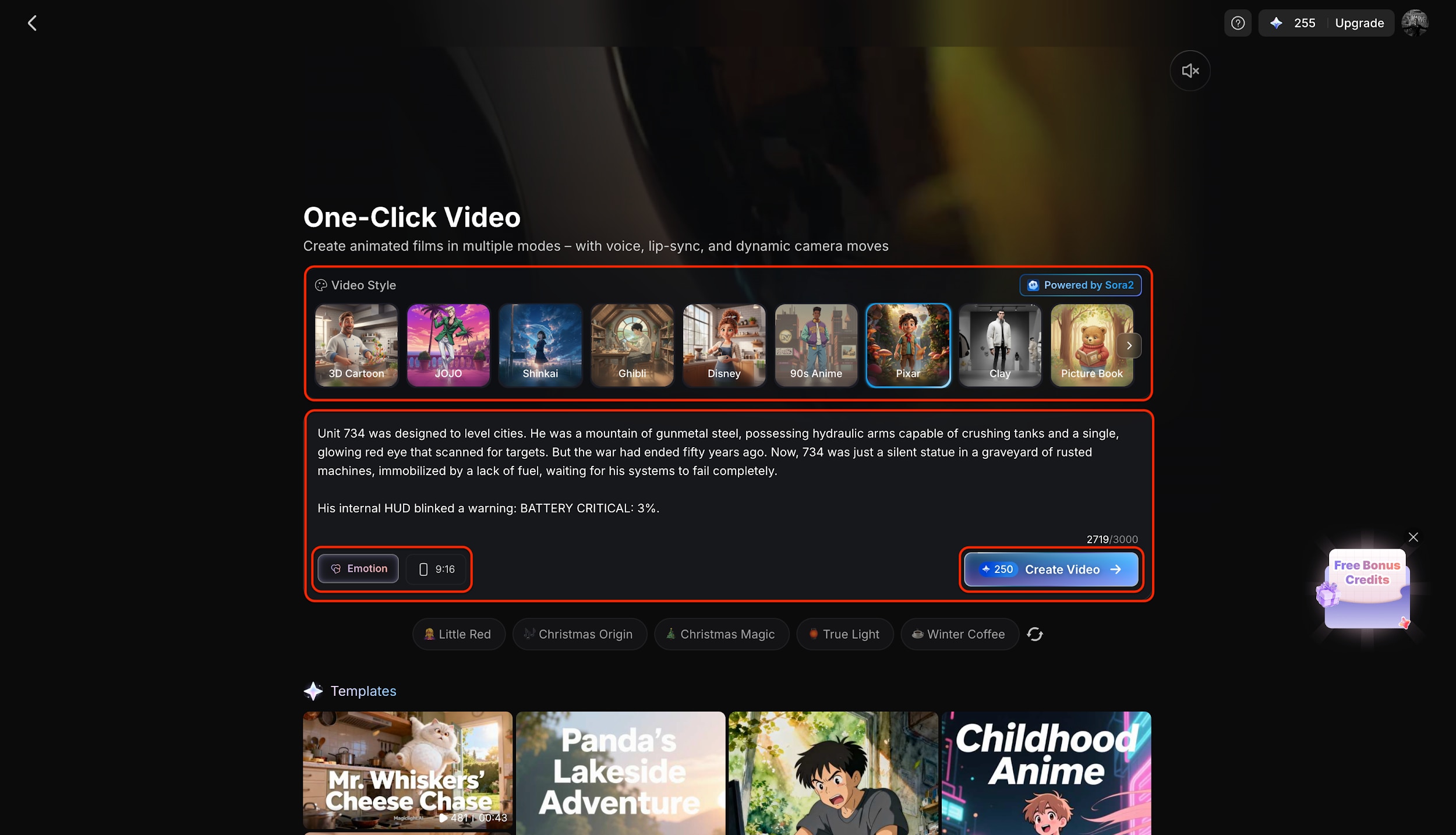
Step 2: Input Script and Select Style
Once inside the editor, type your story idea into the text box and select a visual style like "3D Cartoon" from the top ribbon. Before moving on, make sure to set your preferred Aspect Ratio (e.g., 9:16) and choose a specific "Directing Modes" such as Cinematic, Action, Suspense, or Emotional to control the camera's pacing and mood. Finally, click the blue "Create Video" button at the bottom right to lock in your script and proceed to character setup.
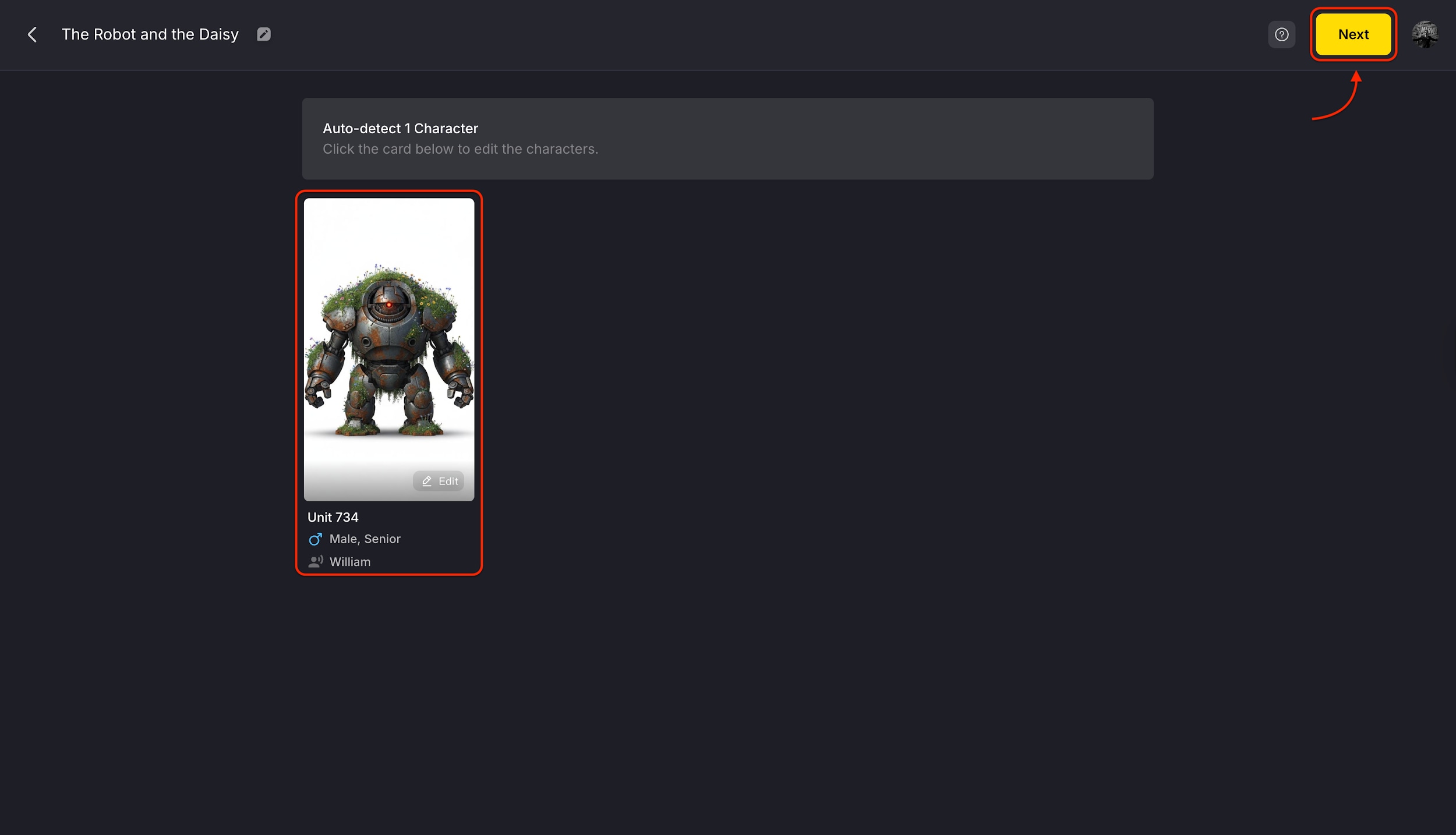
Step 3: Confirm and Edit Characters
The AI will automatically detect the main subjects from your script and present them as character cards, such as "Unit 734" in this example. You can click on these cards to edit their appearance or gender details to ensure they look exactly how you envisioned. When you are satisfied with the character design, hit the yellow "Next" button in the top corner to begin the final rendering process.
Pro Tip: Use the filters at the top of the Character Library to quickly sort by "Gender" or "Age" or "Kind" to find your perfect character!
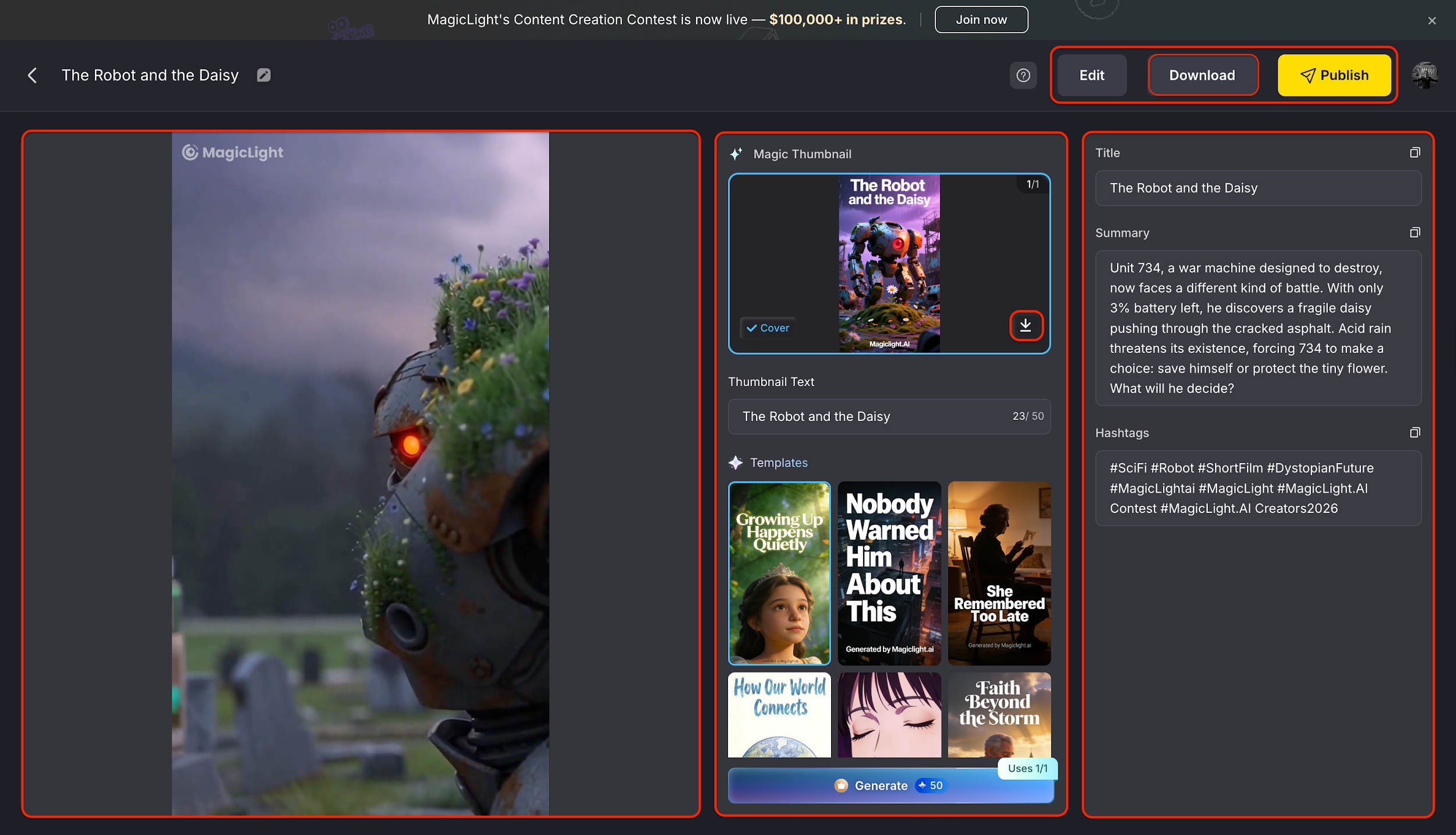
Step 4: Review, Publish, and Download
After the generation is complete, you will see your final video displayed alongside an auto-generated title, summary, and relevant hashtags. You can watch the playback to check the quality and use the "Edit" button if you need to regenerate any specific part. Once you are happy with the result, simply click "Download" to save the file or "Publish" to share your creation directly.
Part 7: Bonus: How to Enhance Realistic Magic Light AI Generated Videos
While Magic Light AI is great for storytelling, the raw output can sometimes look soft or low-resolution (often capped at 1080p). To make your video truly broadcast-ready, I recommend running it through Wondershare UniConverter.
Wondershare UniConverter is a complete video toolbox that acts as the perfect post-production partner for AI creators. While generative tools focus on storytelling, UniConverter specializes in professional refinement, offering a suite of lightweight features to upscale, smooth, and polish your footage without the steep learning curve of complex editors. It is designed to transform raw, fuzzy AI outputs into crisp, broadcast-quality videos, ensuring your creative vision isn't held back by technical limitations like low resolution or frame rate stutter.
Key Features:
- AI Video Enhancer: Upscales footage to 4K/8K, removes noise, and smooths motion with frame interpolation for a professional finish.
- Watermark Remover: Erases static or moving logos, text, and objects without blurring the background details.
- Subtitle Generator: Auto-generates accurate, synchronized subtitles in 145+ languages with dual-language display support.
- Format Converter: Converts 1,000+ formats (MP4, MOV, HEVC, etc.) at 130x high speed using GPU acceleration without quality loss.

AI Video Enhancer for AI-Generated Videos
Steps guide of using UniConverter to enhance AI generated videos
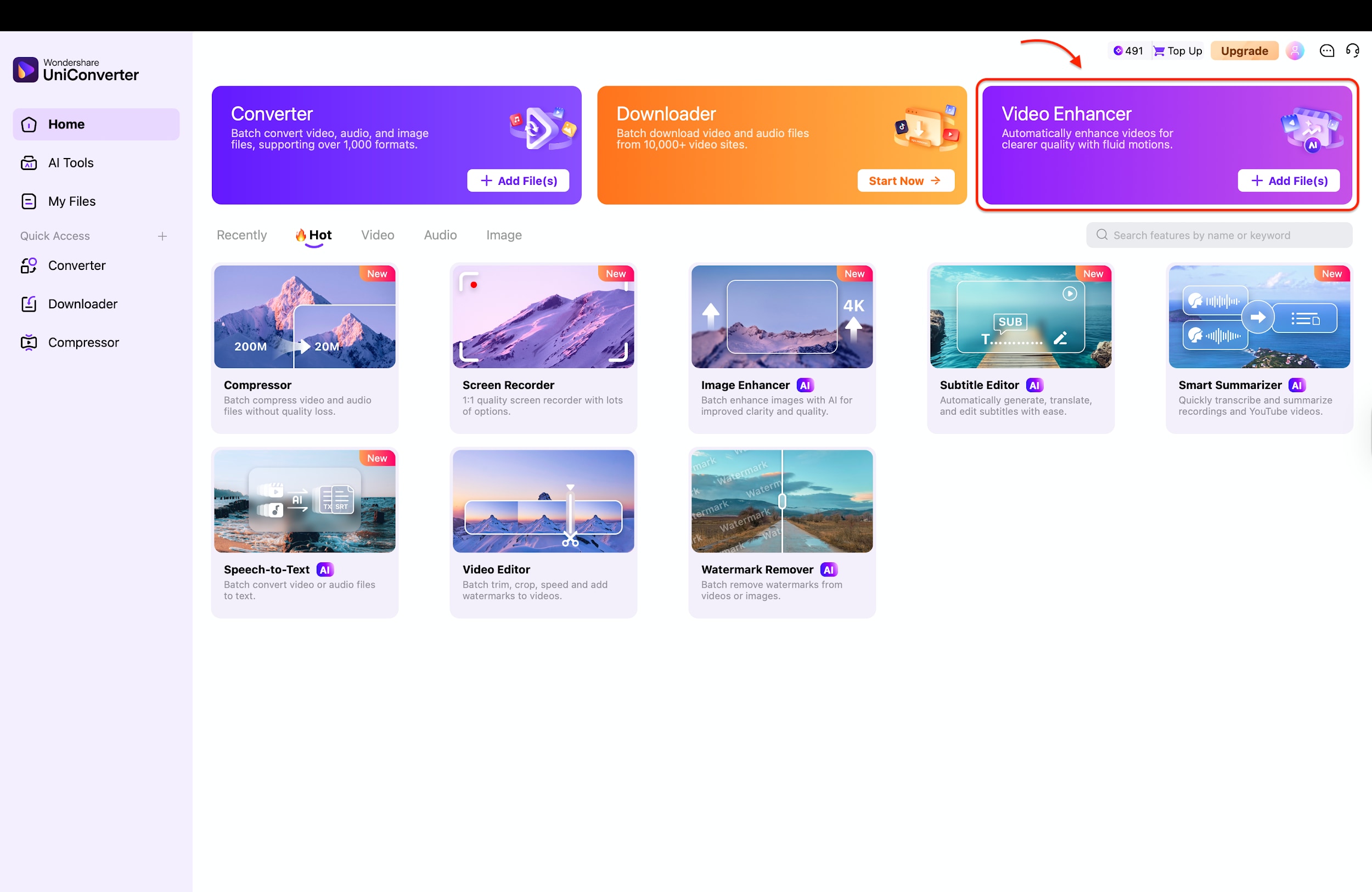
Step 1: Open Video Enhancer
Launch Wondershare UniConverter on your computer and navigate to the main "Home" dashboard. Look for the purple "Video Enhancer" card among the options, which is designed specifically to improve video quality. Click on it to open the enhancement workspace where you can start your project.
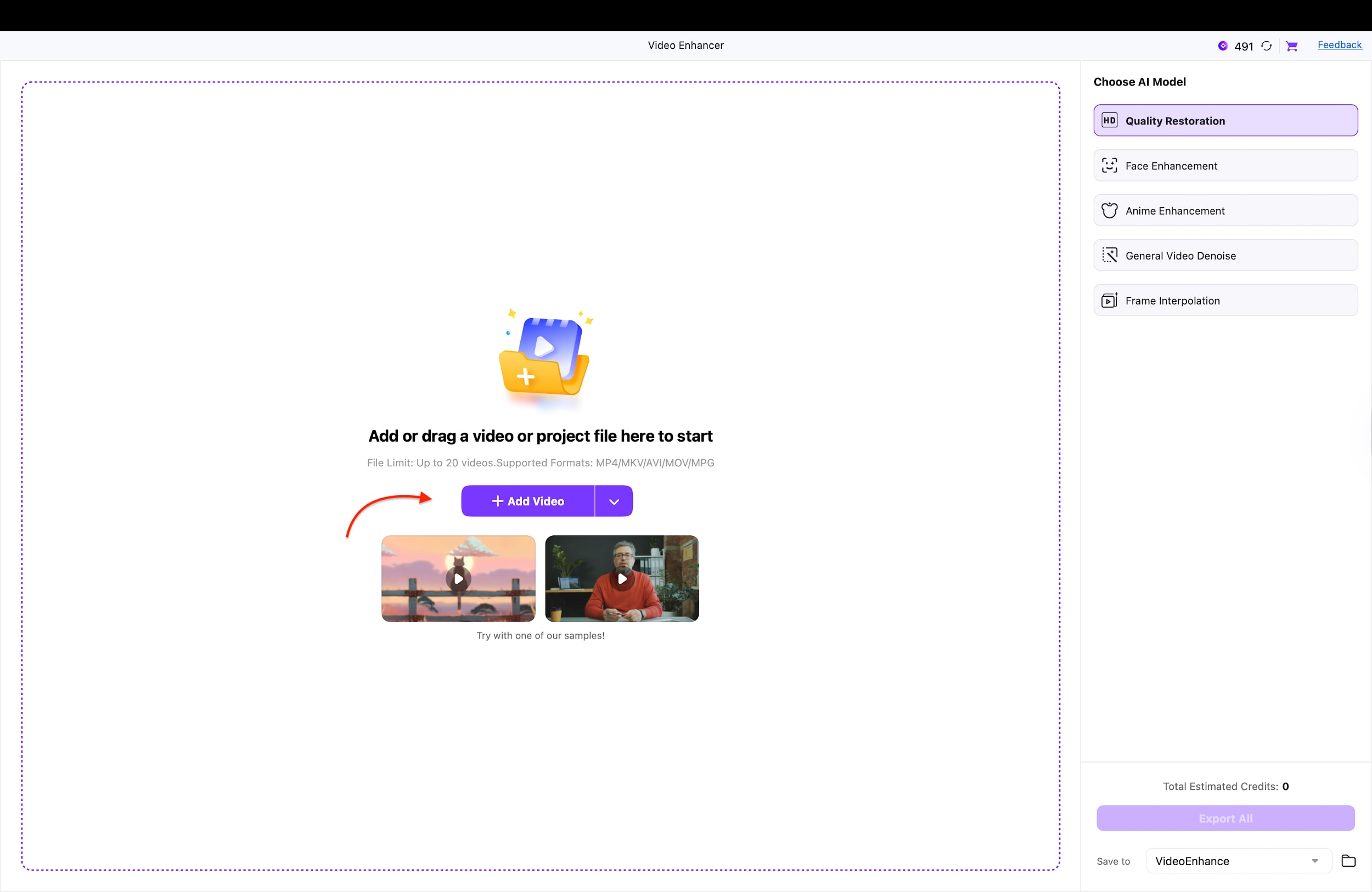
Step 2: Add Your Video
Once inside the Video Enhancer tool, you will see a clean window asking you to import your media. You can simply drag and drop your Magic Light AI video file directly into the center of the screen, or click the purple "+ Add Video" button to browse your folders. This prepares your low-resolution AI clip for the upscaling process.
Step 3: Choose Model and Settings
On the right-side panel, select the AI model that best fits your content, such as "Anime Enhancement" for cartoons or "General Video Denoise" for realistic clips. Next, choose your desired resolution multiplier, like "4X," to transform a blurry 1080p video into a crisp 4K masterpiece. Finally, ensure all settings match your desired output format before moving to the final render.
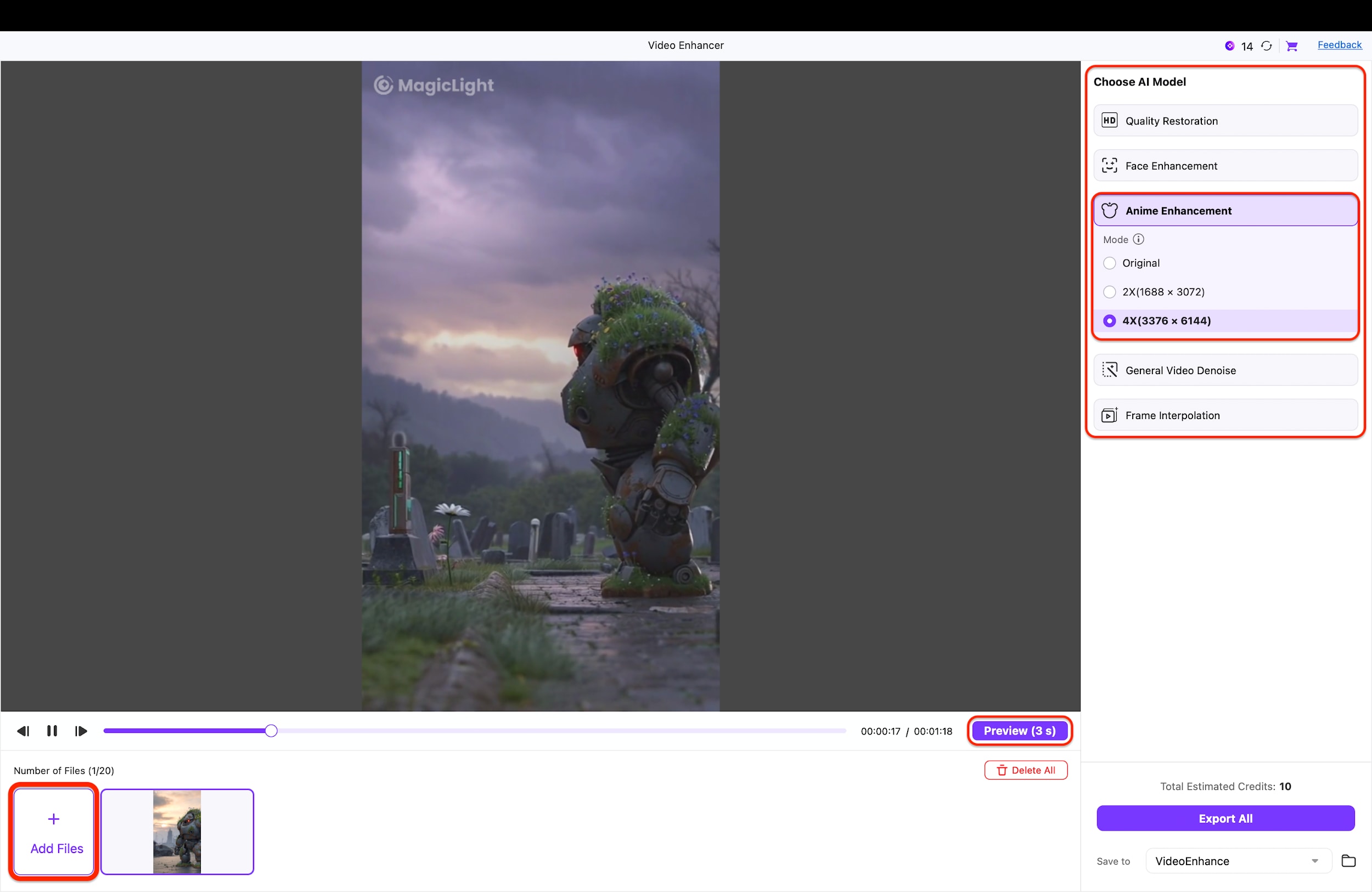
Pro Tip: If your AI-generated animation feels jerky or has low frame rates, select the "Frame Interpolation" model to smooth out the motion instantly!
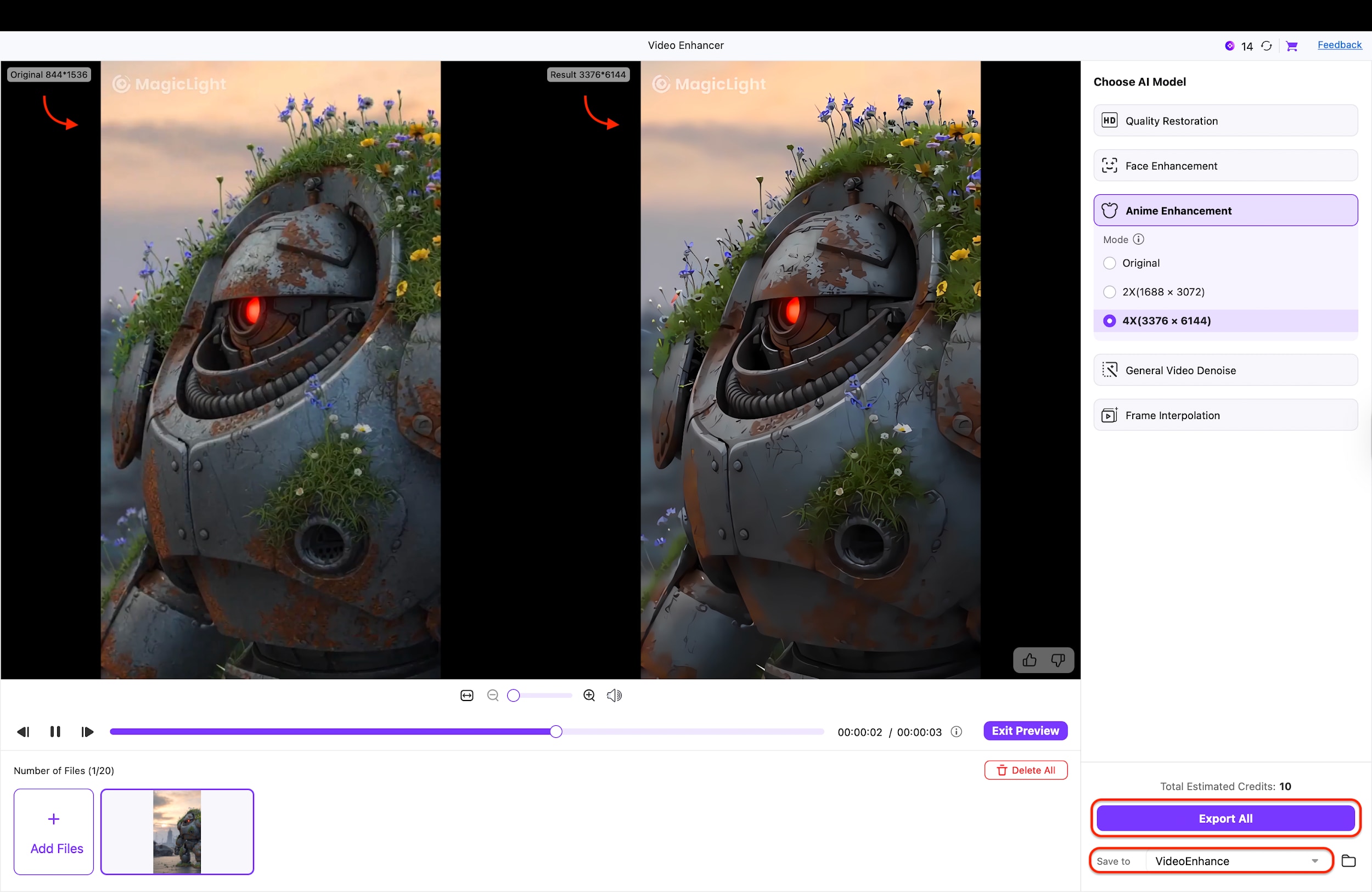
Step 4: Preview and Export
Click the "Preview" button to generate a short snippet and compare the "Original" vs. "Result" side-by-side to ensure the quality upgrade is what you want. After verifying the improvements, hit the purple "Export All" button at the bottom right to render and save the final enhanced video to your computer. Your broadcast-ready video is now ready for upload.
Part 8: Conclusion
So, is Magic Light AI worth buying? The honest answer is: It depends on your risk tolerance. If you are a storyteller, author, or "AI Tuber" who needs to create long-form animated content with consistent characters, yes, it is worth the learning curve. It solves the consistency problem better than almost anything else on the market right now.
Given the current volatility and mixed user reports of Magic Light AI, we recommend proceeding with caution. For creators who need guaranteed results today without gambling credits on failed renders,Wondershare UniConverter remains the safer, more professional investment for video enhancement.
FAQs
-
1. Is Magic Light AI free trial available?
Yes. Magic Light AI offers a free trial with limited credits (around 300 credits upon registration), allowing you to test its core features. To unlock more video renders, higher-quality exports, and remove watermarks, you’ll need a paid plan starting at approximately $12 per month. -
2. Can I use my own character images in Magic Light AI?
Yes. Magic Light AI includes a “Character Locker” feature that lets you upload your own photos as references. This helps maintain a consistent character appearance across multiple scenes, though accuracy may vary depending on pose, angle, and scene complexity. -
3. How long can videos generated by Magic Light AI be?
Magic Light AI supports long-form video creation, claiming up to 50 minutes. In practice, this is achieved by stitching together many shorter AI-generated clips into a continuous narrative, which you can further refine in the built-in editor. -
4. Does Magic Light AI support voiceovers and lip-syncing?
Yes. Magic Light AI includes built-in text-to-speech and lip-sync features powered by its Nano Toolbox. You can generate multilingual voiceovers directly within the platform without relying on external dubbing tools. -
5. Why does my Magic Light AI video look blurry at 1080p, and how can I get 4K quality?
Most AI video generators, including Magic Light AI, cap output at 1080p to reduce processing costs, which can appear soft on large screens. To achieve sharper results, you can use Wondershare UniConverter’s AI Video Enhancer to upscale videos to 4K, reduce noise, and smooth motion through frame interpolation, resulting in a more professional, broadcast-ready output.

