


In the golden age of 1990s PC gaming, few studios were as influential as Westwood Studios, the creators of Command & Conquer, Dune 2000, and Blade Runner. Alongside innovative gameplay, they were pioneers in delivering cinematic storytelling through full-motion video (FMV). To make this possible, they developed their own proprietary DFA (Digital Video Format).
Although obsolete today, DFA files hold a special place in gaming history. Fans, archivists, and retro enthusiasts still search for ways to play DFA files, convert them to MP4 or AVI, and preserve them for future generations. This guide explores everything you need to know about DFA, plus a step-by-step solution using UniConverter to keep those memories alive.
Content Table (uses your exact pattern; IDs will match parts we output next) ========================= -->
In this article
- Part 1: What is DFA Video Format?
- Part 2: Why Westwood Studios Created DFA for Their Games
- Part 3: Challenges and Limitations of DFA Format
- Part 4: Why Choose UniConverter to Convert DFA Files (Step-by-Step Guide)
- Part 5: Pro Tips for the Best DFA Conversion Results
- Part 6: The Future of DFA Files – Preservation and Modern Access
- Conclusion
- FAQ
Part 1: What is DFA Video Format?
The DFA Video Format (Digital Video Format) was a proprietary codec and container created exclusively by Westwood Studios. It was designed to handle cutscenes, intros, and mission briefings in their iconic games. Unlike standard video codecs such as MPEG or AVI, DFA was optimized for real-time playback on 1990s PCs with limited processing power and storage.
Key Characteristics of DFA
- FMV Support: DFA stored live-action cutscenes featuring actors like Kane in Command & Conquer.
- Compression: Balanced video quality with file size small enough to fit on CD-ROMs.
- Custom Codec: Could only be decoded by Westwood’s engine, making it tightly bound to their games.
- Container + Codec in One: Like Smacker and Bink formats of the same era, DFA was both the wrapper and the compression system.
How DFA Compared to Other Formats
At the time, several game studios experimented with proprietary video solutions:
- Smacker Video (RAD Game Tools): Popular in Blizzard games like Warcraft II.
- Bink Video: Became dominant in the late 1990s and early 2000s.
- MPEG-1/AVI: Common for commercial CD-ROM videos but too heavy for in-game playback.
Part 2: Why Westwood Studios Created DFA
In the early 1990s, PC gaming faced three technical limitations:
- Storage: CD-ROMs held ~650MB — not enough for large uncompressed video libraries.
- Processing Power: Pentium-class CPUs struggled with heavy video decoding.
- Lack of Hardware Acceleration: No GPU-based video decoding was widely available.
To solve this, Westwood created DFA.
The Need for DFA
- Efficiency: DFA reduced video file sizes while keeping story sequences watchable.
- Immersion: Cutscenes helped Westwood stand out by adding Hollywood-style storytelling to their games.
- Control: By owning the codec, Westwood avoided licensing third-party solutions.
Games That Used DFA
- Command & Conquer (1995) – Introduced Kane and Nod with DFA-powered briefings.
- Red Alert (1996) – Famous for alternate-history FMVs.
- Blade Runner (1997) – Cinematic sequences used DFA extensively.
- Dune 2000 (1998) – Classic strategy game with story cutscenes encoded in DFA.
🎮 DFA became synonymous with Westwood’s brand — their games were remembered not just for gameplay but for unforgettable FMV storytelling.

Easy to Use Batch DFA Video Converter
Part 3: Challenges and Limitations of DFA Format
While DFA was revolutionary in its time, it quickly became a technical relic.
Limitations
- Proprietary Codec: Only worked inside Westwood’s engines. No VLC or QuickTime support.
- Obsolescence: With Westwood’s closure (2003), DFA development ended.
- Poor Compatibility: No modern devices recognize DFA files.
- Extraction Difficulty: Fans had to create tools to extract DFA cutscenes.
Comparison with Other Codecs
|
Format |
Strengths |
Weaknesses |
Usage in 90s |
|
DFA |
Fast playback in Westwood games |
Proprietary, unsupported today |
Westwood FMVs |
|
Smacker |
Widely adopted in many studios |
Limited compression |
Blizzard, LucasArts |
|
Bink |
Better quality, industry standard later |
Heavier CPU demand in early PCs |
Multiple AAA games |
|
MPEG-1 |
Commercial standard, universal support |
Too large for in-game playback |
CD-ROM movies |
Preservation Problems
Today, retro gamers and archivists face challenges:
- DFA files are trapped inside old game discs.
- Conversion requires specialized tools.
- Without conversion, DFA risks being lost as digital history.
Part 4: Why Choose UniConverter to Convert DFA Files (Step-by-Step Guide)
UniConverter is a freemium online + desktop tool built for all media conversion needs. It supports virtually every video codec, including editing-friendly ones like ProRes, CineForm, and HEVC . UniConverter offers:

Why UniConverter is the Best for DFA Conversion
- Wide Format Support – Convert DFA to MP4, MOV, AVI, MKV, HEVC .
- Fast Performance – Up to 130x faster with NVIDIA GPU acceleration.
- Flexible Options – Adjust bitrate, resolution, codecs for editing or sharing.
- All-in-One Workflow – Convert, compress, edit, and burn DVDs.
- Cross-Platform Power – Windows, macOS, and cloud sync.
How to Convert DFA with UniConverter
Desktop Version:
Step 1: Install UniConverter Desktop
Download and install on Windows or macOS. Minimum: 750MHz CPU, 256MB RAM, 100MB storage.

Step 2: Import DFA Files
Click Add Files or drag DFA files into UniConverter . You can batch import entire cutscene folders.

Step 3: Choose Output Format
MP4 (H.264) → Universal playback.
MOV (ProRes) → Editing-friendly.
HEVC (H.265) → Smaller archival size.
MKV → Best for preservation.

Step 4: Adjust Settings
Tweak bitrate, resolution, frame rate. Keep original resolution for authenticity. Enable GPU acceleration for faster 4K/HD conversion.

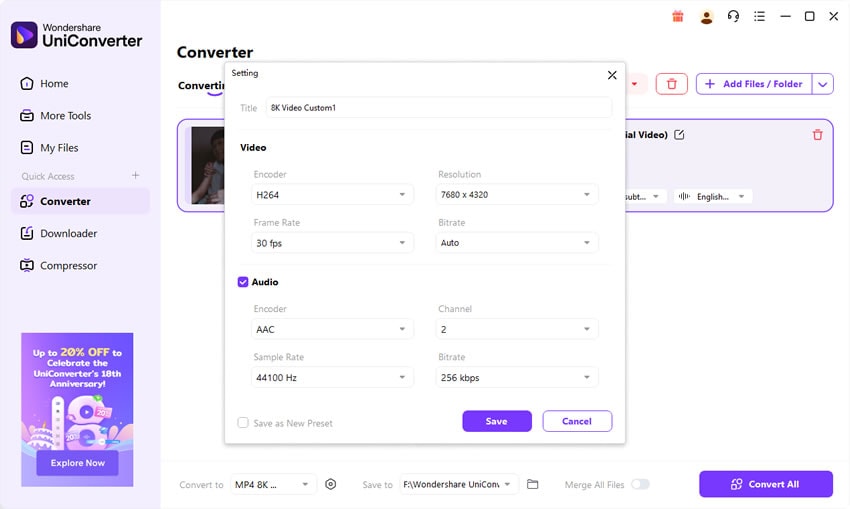
Step 5: Start Conversion
Choose a destination folder → click Convert. UniConverter will re-encode DFA to your chosen format.

Easy to Use Batch DFA Video Converter
Part 5: Pro Tips for the Best DFA Conversion Results
To make the most of DFA conversions, follow these expert tips:
Pick the Right Codec:
- For everyday playback → MP4 (H.264).
- For archival → MKV with HEVC .
- For editing → MOV (ProRes).
-
Tips for DFA Codec Conversion:
- Maintain Original Quality: Avoid scaling up old videos — keep native resolution to preserve authenticity.
- Batch Conversion: Use UniConverter desktop for handling entire FMV libraries at once.
- Optimize Audio: Convert DFA audio to AAC (universal) or WAV (lossless editing).
- Enable GPU Acceleration: Cuts processing time dramatically for large batches.
- Keep a Master Copy: Archive one version at high bitrate for future-proofing.
- Use Community Mods: Some fan projects upscale DFA cutscenes. Convert with UniConverter first, then enhance.
🎮 Example: Fans of C&C Remastered extracted original DFA cutscenes, converted them to MP4, and used AI upscalers to create HD remasters for YouTube.
Part 6: The Future of DFA Files – Preservation and Modern Access
Although the DFA Video Format is long obsolete, its cultural and historical importance keeps it alive in conversations among gamers, archivists, and preservationists.
DFA as a Legacy Codec
DFA was never meant to become a universal standard. It was a proprietary tool built by Westwood Studios to deliver cinematic storytelling during the 1990s. When the studio closed in 2003, DFA development ended, leaving it frozen in time. Yet, its role in powering Command & Conquer and Blade Runner cutscenes ensures it remains a symbol of the FMV era in gaming.
Preservation Efforts
Despite technical barriers, DFA files have not been lost:
- Fan Communities built custom extractors to pull DFA cutscenes from game discs.
- Remasters like Command & Conquer Remastered relied on DFA assets, upscaling them for HD audiences.
- Archives and YouTube Projects re-encode DFA into MP4 or MKV, making them widely accessible again.
Why DFA Still Matters
Preserving DFA is not about using the codec itself but safeguarding the storytelling it enabled. These cutscenes capture a transitional period where games borrowed from cinema to create more immersive experiences. For fans, they are nostalgic artifacts; for researchers, they are valuable case studies of media history.
Practical Future: Conversion is Key
DFA itself will not evolve. The only way forward is conversion into modern formats like MP4, MOV, or MKV. This ensures DFA cutscenes remain playable, editable, and sharable on today’s platforms. Tools like VC Media Converter make this process seamless, with batch workflows, GPU acceleration, and flexible output settings.
Long-Term Outlook
DFA will live on as a preservation project rather than an active format. Its legacy will survive in retro gaming communities, academic studies, and remastered collections. With proper conversion and archiving, DFA’s essence—those iconic FMVs that defined Westwood Studios—will remain accessible for decades to come.
Conclusion
The DFA Video Format is more than just an obsolete codec — it’s a piece of digital culture. Born from the limitations of 1990s hardware, it powered the unforgettable FMVs that defined Westwood Studios’ legacy. Today, DFA files survive only through conversion and preservation.
With UniConverter, fans can convert DFA files into MP4, MOV, AVI, or HEVC , ensuring these classic cutscenes remain watchable on modern devices. Whether you’re an archivist, retro gamer, or content creator, UniConverter makes DFA conversion simple, fast, and reliable.
Easy to Use Batch DFA Video Converter
FAQ
-
Q1: What is a DFA video file?
A DFA video file is a proprietary format developed by Westwood Studios for cutscenes and FMVs in games like Command & Conquer and Blade Runner. -
Q2: How can I play DFA files on PC today?
You can’t open DFA directly in VLC or Windows Media Player. Instead, use UniConverter to convert DFA to MP4 or AVI. Some fan tools also exist for extraction. -
Q3: Which is the best format to convert DFA to?
For universal playback, choose MP4 (H.264). For archival, use MKV with HEVC . For editing in Premiere or Final Cut, MOV (ProRes) is ideal. -
Q4: Can VLC play DFA video files directly?
No. VLC does not support DFA natively. You must convert DFA to a supported format first. -
Q5: Why preserve DFA cutscenes if the format is obsolete?
Because DFA is a key part of gaming history. It preserves Westwood’s storytelling style and the FMV era. Without conversion, these cutscenes risk being lost forever.

