


Many Spotify users love curating playlists and discovering new favorites. However, the main issue arises when they need to listen to it offline or transfer their music to other devices. The platform restricts direct downloads to ensure compliance with music licensing requirements.
This limitation often drives people to look for reliable best Spotify rippers that can make their favorite tracks easily accessible offline. This article will cover the top Spotify rippers, along with detailed guides for each, making it easier to choose the best option.
In this article
- How Does a Spotify Ripper Work?
- Challenges of Using Spotify Song Ripper Tools for Mac, Windows, and Online
- Spotify Audio Ripper: Best Windows & Mac Tools for Song Ripping
- Top Online Spotify Ripper Tools to Extract Songs Safely
- Extension Options: Fast Spotify Audio Ripper for Free MP3 Downloads
- Conclusion
- Frequently Asked Questions
Key Takeaways
[Offline Access Limits] Spotify restricts downloads, making it difficult to access music offline or transfer across devices.
[Common Risks] Ripper tools may cause legal issues, malware risks, quality loss, and missing metadata.
[Tool Options] Tools like MusicFab, Spotdown, SpotiDownloader, Tunefab, and browser extensions offer varying features but have limitations.
[Efficient Solution] Wondershare UniConverter enables high-quality batch conversion, metadata retention, and flexible format output.
Part 1. How Does a Spotify Ripper Work?
Spotify Audio rippers capture the audio from Spotify streams to your device and re-encode it into standard formats like MP3 and WAV. When you play a track or playlist, Spotify sends compressed audio to your app, and the ripper taps into this output at the system level before re-encoding it into a chosen file format.
This tool then converts that raw audio stream into your chosen format and applies your settings. Some rippers even work faster than real time, as they can convert entire playlists at 5x–10x speed by directly decoding the stream.
Part 2. Challenges of Using Spotify Song Ripper Tools for Mac, Windows, and Online
Before deciding on what tool you should choose, it's essential to examine the challenges of using Spotify MP3 ripper:
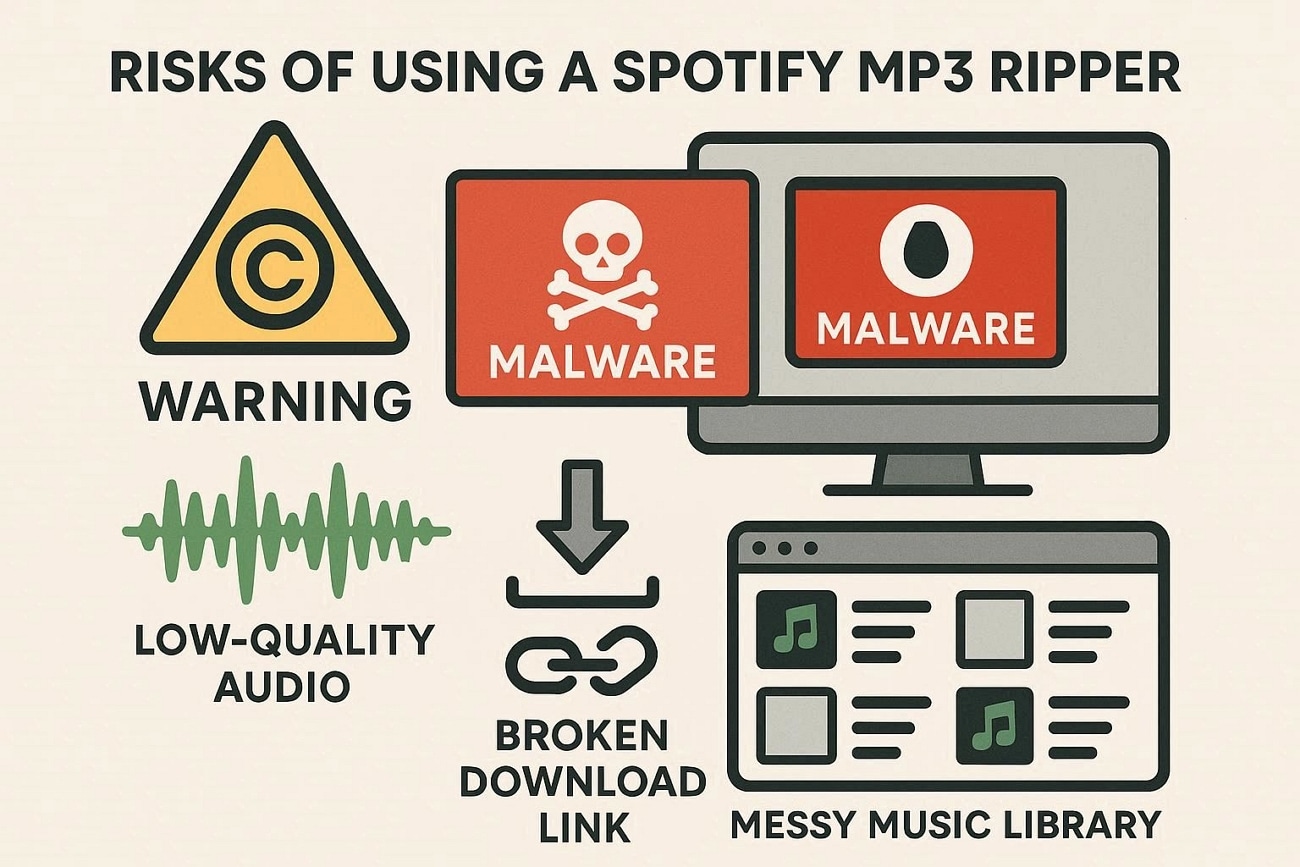
Legal and Copyright Risks: Ripping Spotify music often violates Spotify's terms of service, especially when the file is shared publicly. It can result in the user's account suspension, DMCA notices, or other legal trouble if they misuse downloaded tracks.
Malware and Unsafe Downloads: Many free downloaders include adware, trackers, or malware, especially on Windows and online sites. They show download buttons, aggressive redirects, and suspicious installers.
Quality Loss Audio: Many tools re‑record the audio in real time, leading to potential quality loss, volume changes, or background noise. The songs' output quality can also vary from platform to platform, which provides mixed results.
Broken Links: Online rippers frequently change domains, get blocked, or stop working without warning. An update to Spotify encryption can make the tool useless, leaving users searching for better options.
Incomplete Metadata: Most rippers fail to preserve proper tags like artist, album, track number, and artwork. This creates disorganized libraries with names like "Unknown Artist" requiring extra clean-up.
Why Users Need to Download Spotify Song Ripper Tools
After exploring its limitations, let's explore why users opt for the Spotify playlist ripper tools:
Unlimited Offline Listening: Users can use rippers to listen to unlimited content without an internet connection. This is especially useful during flights, road trips, or in areas with poor connectivity.
Permanent Access: Ripping lets you keep copies of songs and playlists even if they are removed or region‑blocked. You're not fully dependent on Spotify's catalog or your subscription status.
Reduce Subscription Costs: After downloading local copies, you may not need to pay for Premium just for offline playback. This can save money over time, especially for casual listeners.
Bypass Account Limitations: Ripped files are not bound to device limits or download caps. You can get full access to how and where you play your music.
Flexible Audio Formats: Rippers often let you choose among formats such as MP3, WAV, and FLAC. You can pick the right balance between sound quality and file size for each device.
Part 3. Spotify Audio Ripper: Best Windows & Mac Tools for Song Ripping
With the online options covered, let's now explore the best Windows and Mac Spotify MP3 ripper tools:
1. UniConverter
When using different Spotify ripping tools, you often end up with audio files in multiple formats, which can be inconvenient if you need a consistent format like MP3. In such cases, UniConverter serves as a reliable solution to convert Spotify OGG music into high-quality MP3 files quickly and efficiently. With its powerful conversion feature, UniConverter allows you to batch convert Spotify podcasts while preserving essential metadata such as artist name, album, and track details. This ensures your Spotify downloads remain well-organized and ready for use in events, playlists, or offline playback.
It supports various file formats, including MP3, WAV, and FLAC. Moreover, you can even trim the audio files, making it a one-stop solution. Users can access this tool from any major operating system, including Windows, Mac, and Linux.
Key Features
Compressor: This tool lets you compress various audio files, making it easier to manage your device storage.
Downloader: UniConverter provides an efficient "Downloader" which lets you simply download audio and video files by pasting their links.
Speech-to-Text: Users can also transform their audio files into a textual form, making it easier to gather information.
Audio Trimmer: The built-in trimming tool allows you to cut unwanted parts of your audio, helping you create clean and customized tracks effortlessly.
Batch Conversion: UniConverter enables you to convert multiple audio files at once, saving time while maintaining high-quality output and metadata.
In‑Depth Walkthrough: Song Extraction with UniConverter
After getting familiar with its basics, let's move on to its detailed step-by-step guide below:
Step 1. Insert Audio Files In the UniConverter Tool
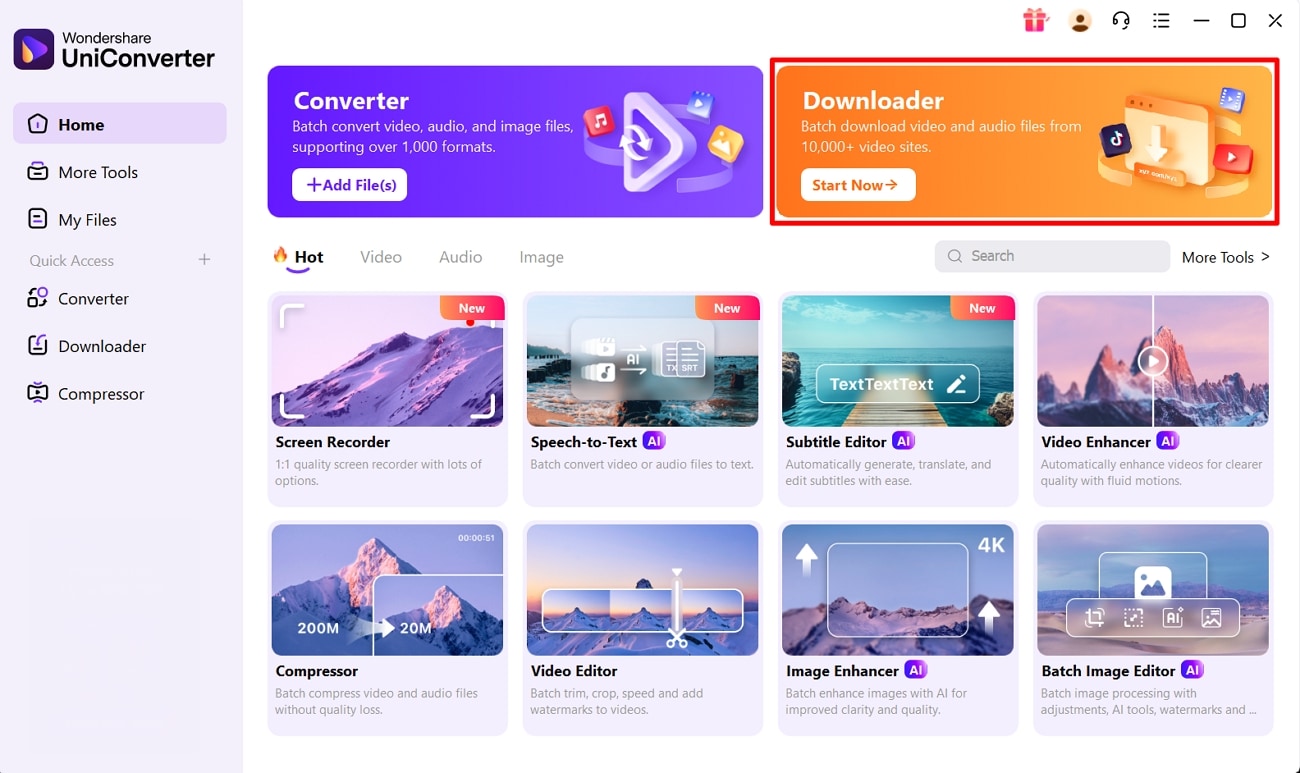
Upon accessing the tool, click on the "Downloader" tab in the main interface to reach out its Downloader interface.
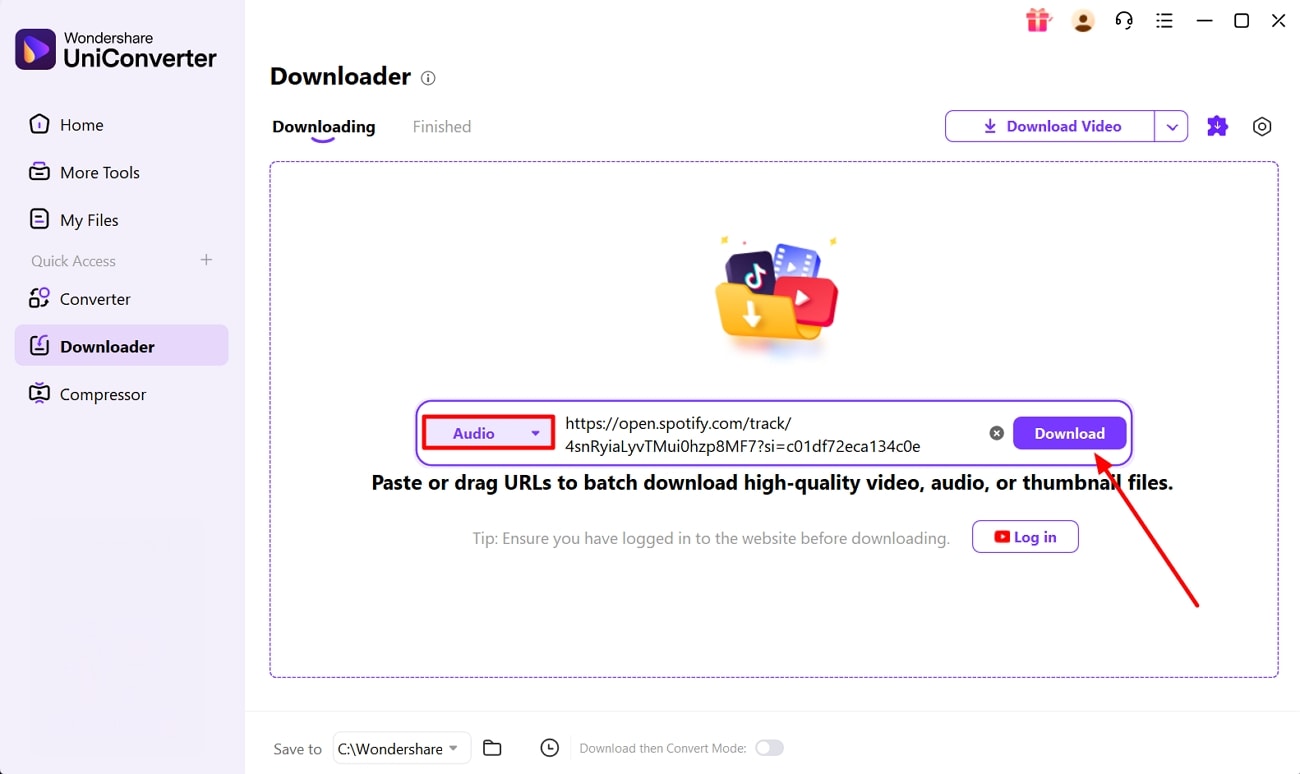
After inserting the desired link, choose "Audio" option within the downloading options and tap "Download."
Step 3. Locate the Downloaded Audio in the Device Folder
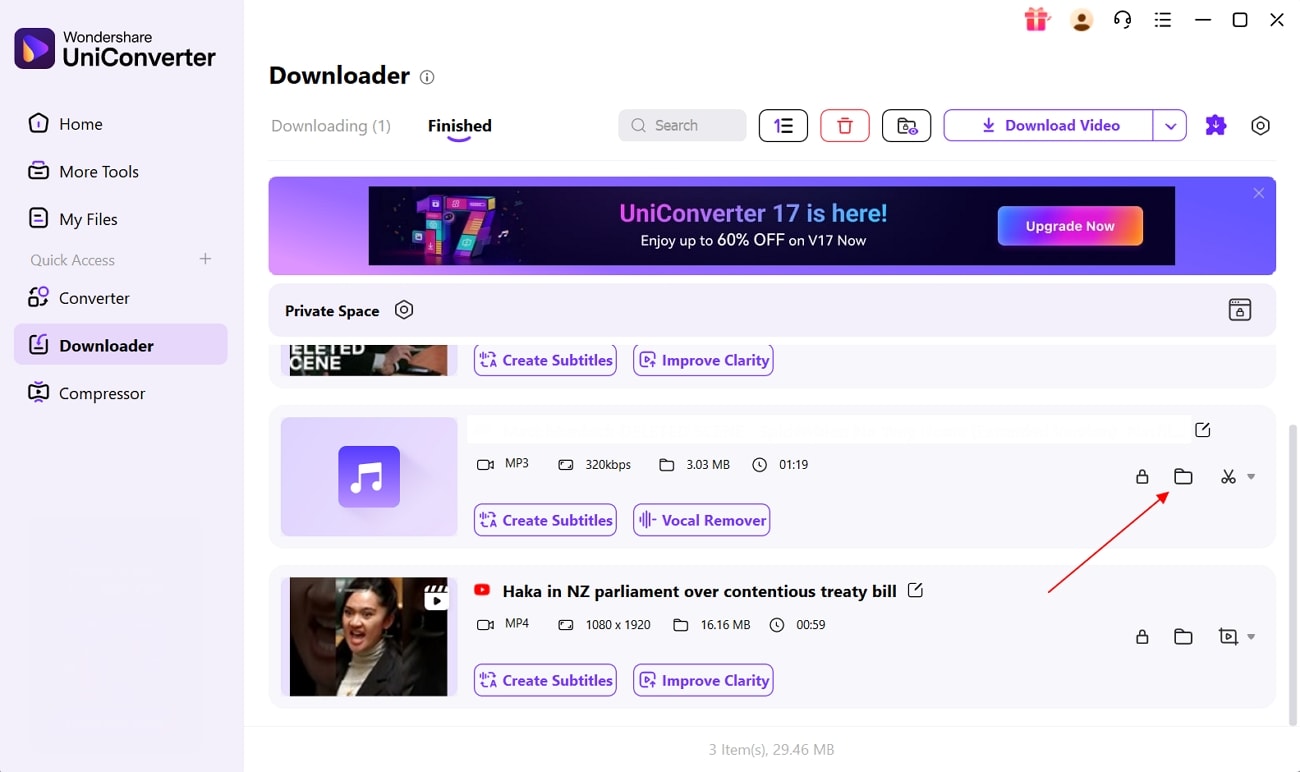
Navigate to the "Finished" section to look for the download Spotify MP3 file and access its location using the "Folder" icon.

Easy Spotify Ripper with One-Click Audio Extraction
Limitation
- To access its batch processing system, users need to buy a paid plan.
2. MusicFab Spotify Downloader
This Spotify playlist ripper can download Spotify songs, albums, playlists, podcasts, and even video podcasts. It provides wide support to MP3, FLAC, and WAV and outputs up to 320 kbps. Rather than recording, it uses a direct download method, which enables faster processing speeds with consistent output quality. Additionally, this program claims to download the whole 3-4 minute song within a few seconds.
Complete Procedure for Ripping Songs via MusicFab Spotify Downloader
Now, follow its detailed guide below to know its detailed workflow:
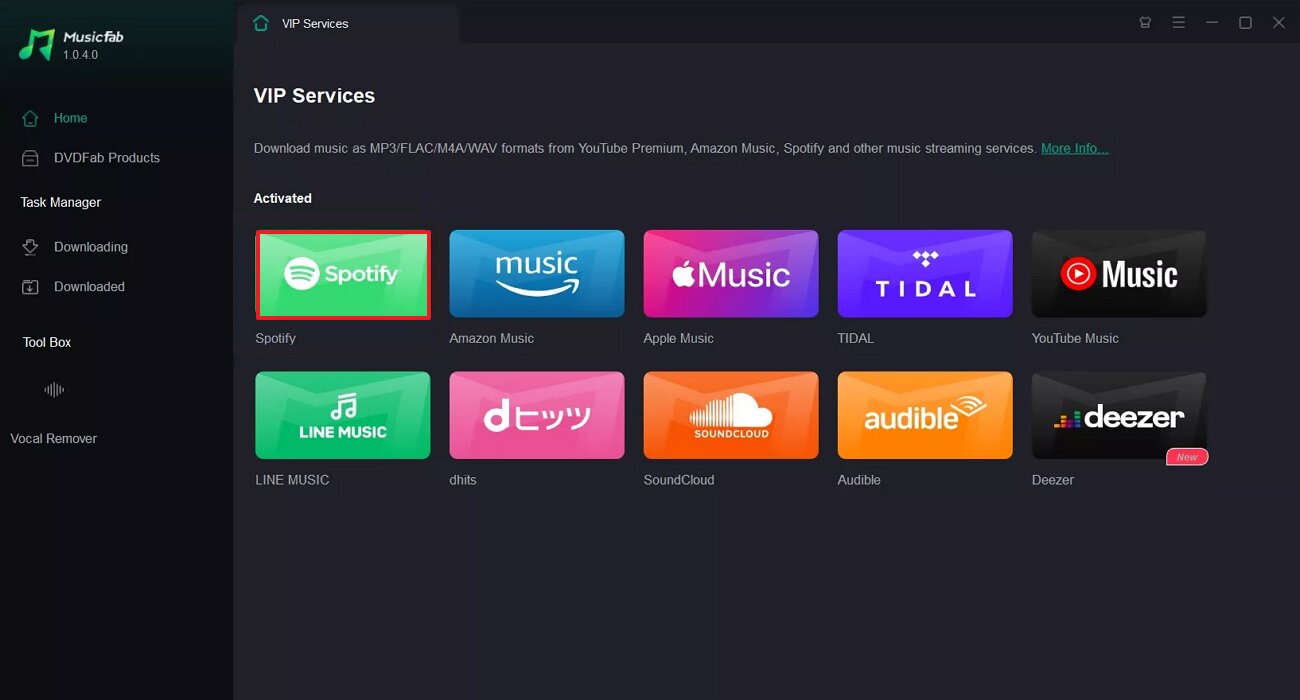
Step 1. As you enter the MusicFab tool, click on the Spotify tab available on this interface.
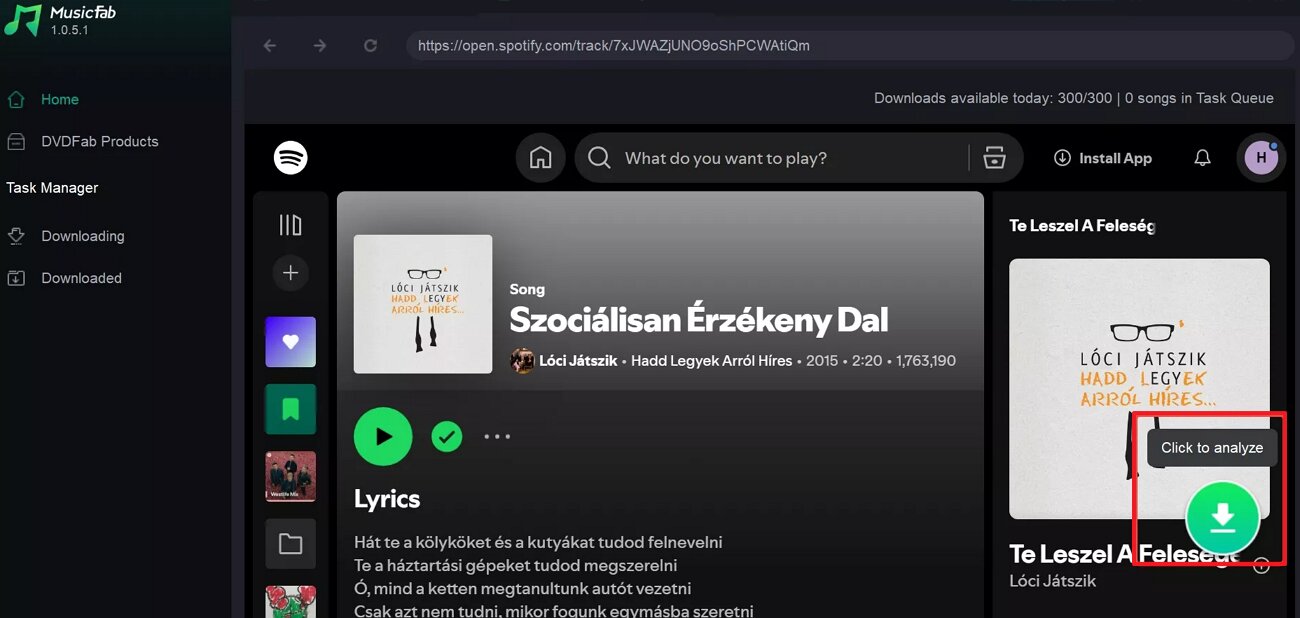
Step 2. Following this, access the desired song on Spotify and click on the "Download" icon available in the corner.
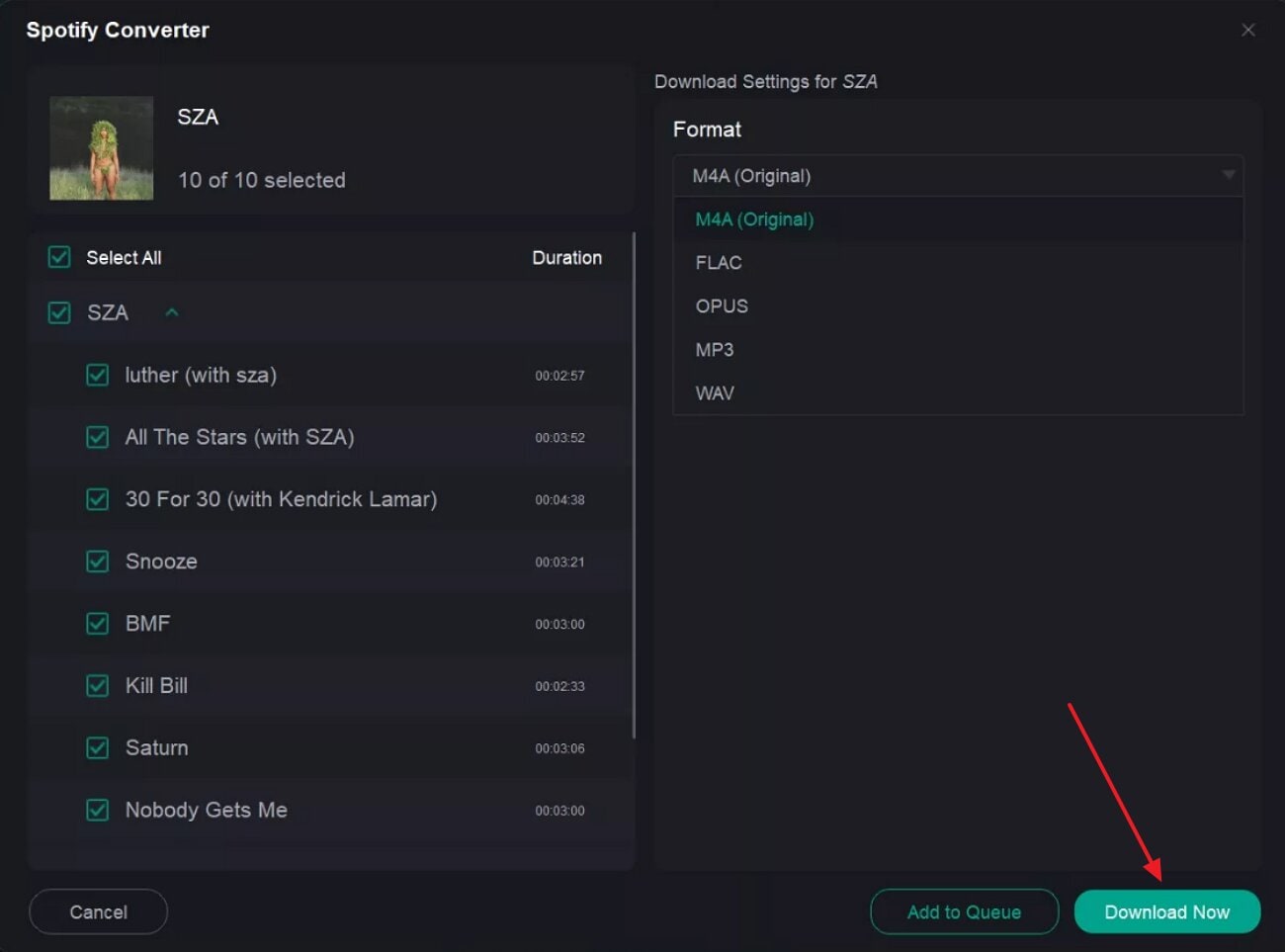
Step 3. At the end, select the desired settings for the audio and choose the "Download Now" button.
Limitations
- Users report that some songs, albums, or podcast episodes fail randomly.
- It takes time to adapt new changes after the Spotify update.
Part 4. Top Online Spotify Ripper Tools to Extract Songs Safely
To extract songs safely, here we have listed down the 5 most efficient Spotify music downloader websites:
1. Spotdown
This tool lets you paste a single-track or a full-album link to download multiple songs simultaneously. It converts Spotify audio to standard MP3 files, with typical output in the 128–320 kbps range. Users can also download songs in ZIP format, making it easier to archive and share with friends. Moreover, it preserves core metadata such as title, artist, album, and cover art so your downloaded songs appear organized.
Detailed Guide to Extract Songs with the Spotdown Tool
Now that you're familiar with the available features, let's walk through a detailed, step‑by‑step guide.
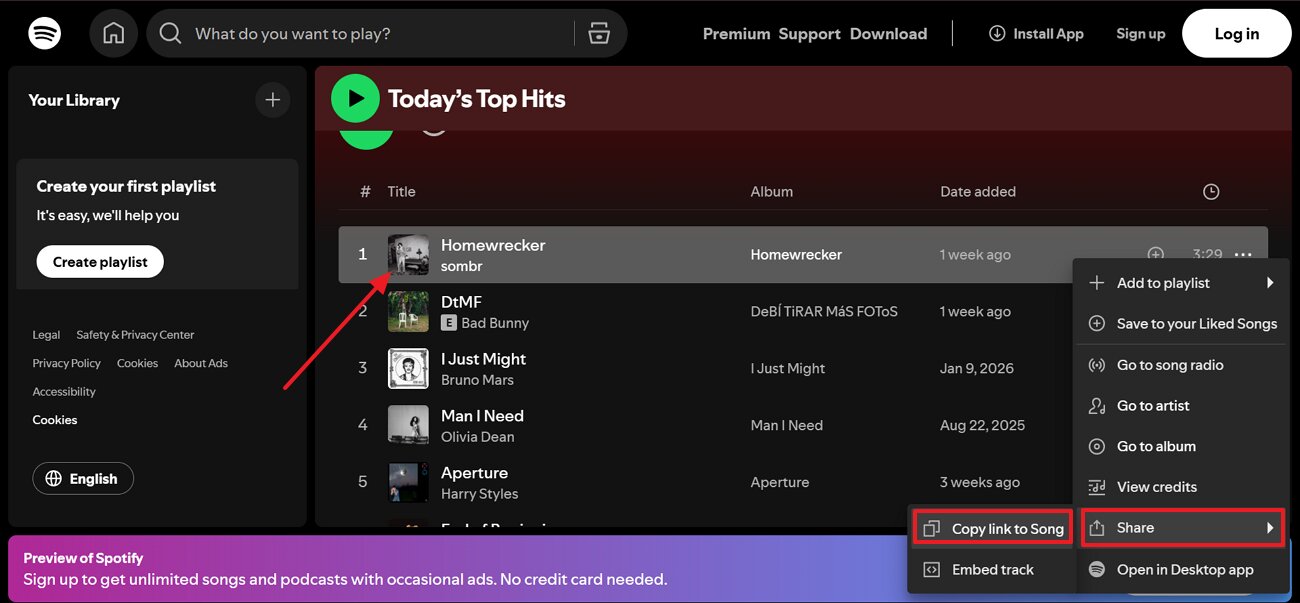
Step 1. Initiate by going to the Spotify website and clicking the "3 Dots" adjacent to the desired song. Then, select the Share option and choose the "Copy Link to Song" to copy the song link.
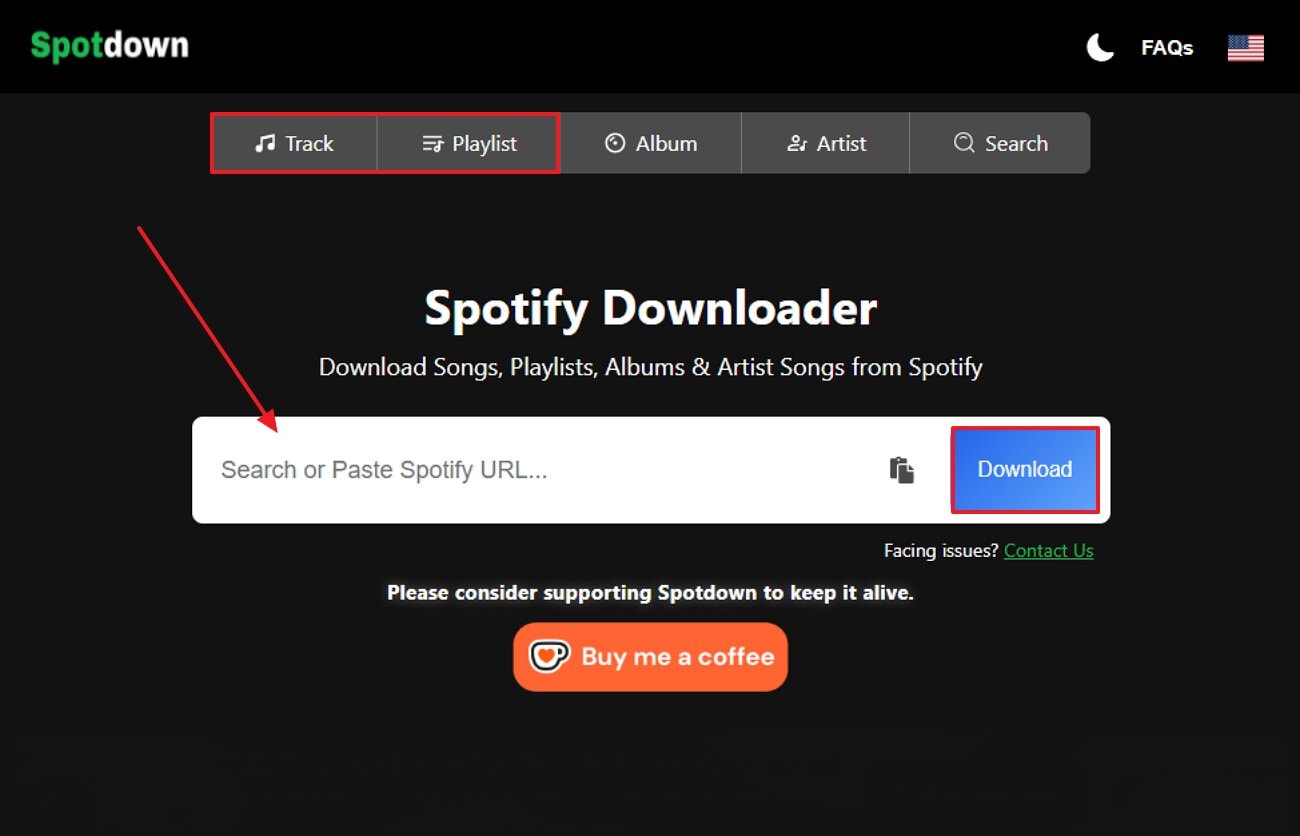
Step 2. Now, go to the Spotdown website, enter the song URL, and hit the "Download" button. Here, you can choose between the "Track and Playlist" option depending on your needs.
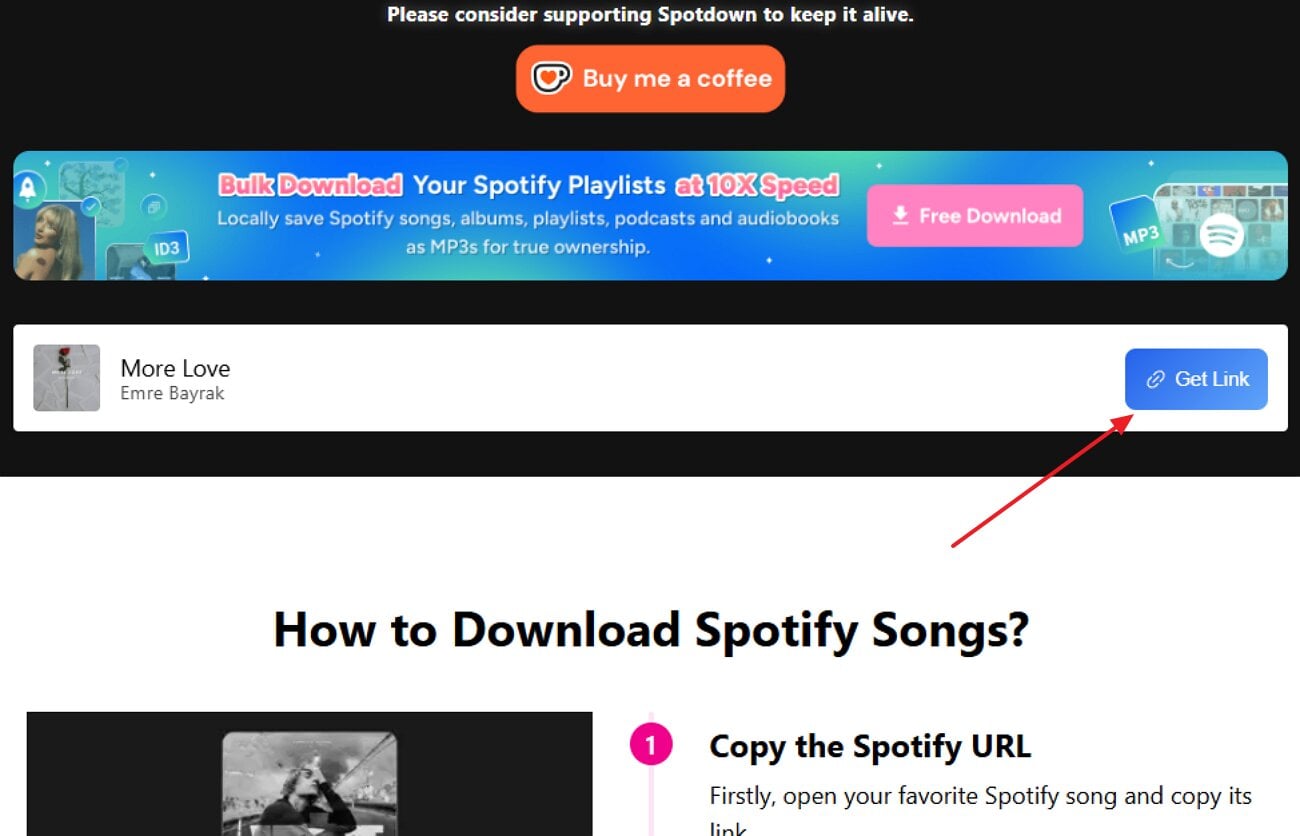
Step 3. Lastly, click on the "Get Link" button to download the Spotify song to your device folder.
Limitations
- Users noticed that this site shows ads, which disrupt the workflow.
- It doesn't support lossless or alternative formats like FLAC or WAV.
2. SpotiDownloader
SpotiDownloader converts Spotify content to MP3s with just a link. It ensures high-quality downloads up to 320 kbps, making files compatible with almost all players. Being an online tool, users can process multiple tracks at once and often package albums or playlists into ZIP archives. Furthermore, it also saves song metadata, including song title, artist, album name, and cover art ID, if available.
Step‑by‑Step Instructions to Extract Songs Using SpotiDownloader
To extract Spotify songs with the Spotify music downloader website, go through the following detailed guide below:
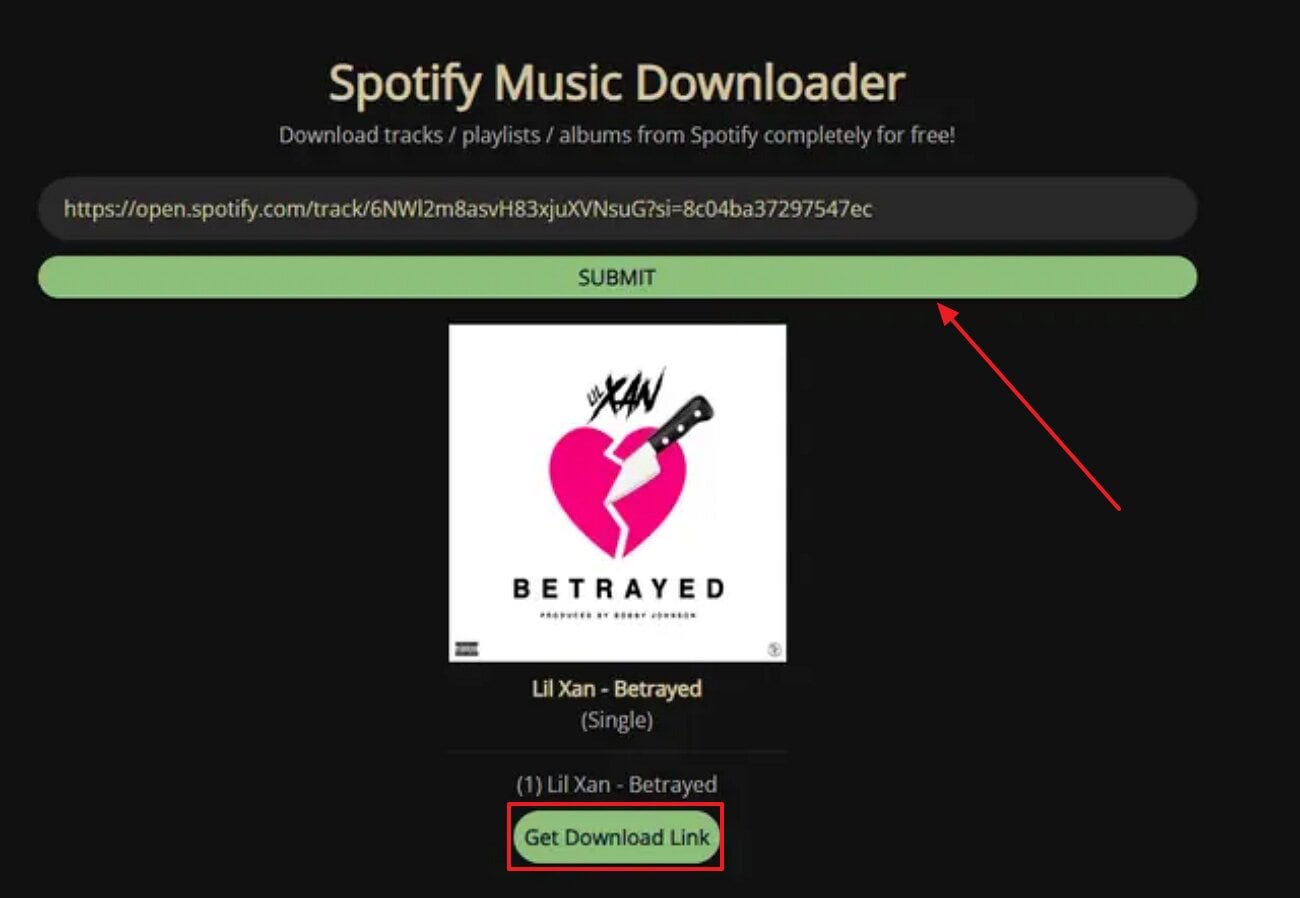
Instructions. Upon accessing the tool, enter the song URL and hit the "Submit" button. After a while, click on the "Get Download Link" button.
Limitations
- Large playlists may stop midway and require multiple attempts.
- Some tracks are saved with altered names or incomplete tags.
3. Tunefab
Users can download songs, albums, playlists, podcasts, shows, and even audiobooks from Spotify. This Spotify ripper free tool converts Spotify streams to MP3, M4A, and FLAC with a 320 kbps output quality. Additionally, it also includes an embedded Spotify web player so you can log in and browse your library. Users can also set the desired bitrate, sample rate, output format, and naming rules for the downloaded file.
In‑Depth Walkthrough: Song Extraction with Tunefab
Upon exploring its key features, let's dive into detailed guide to extract Spotify audios:
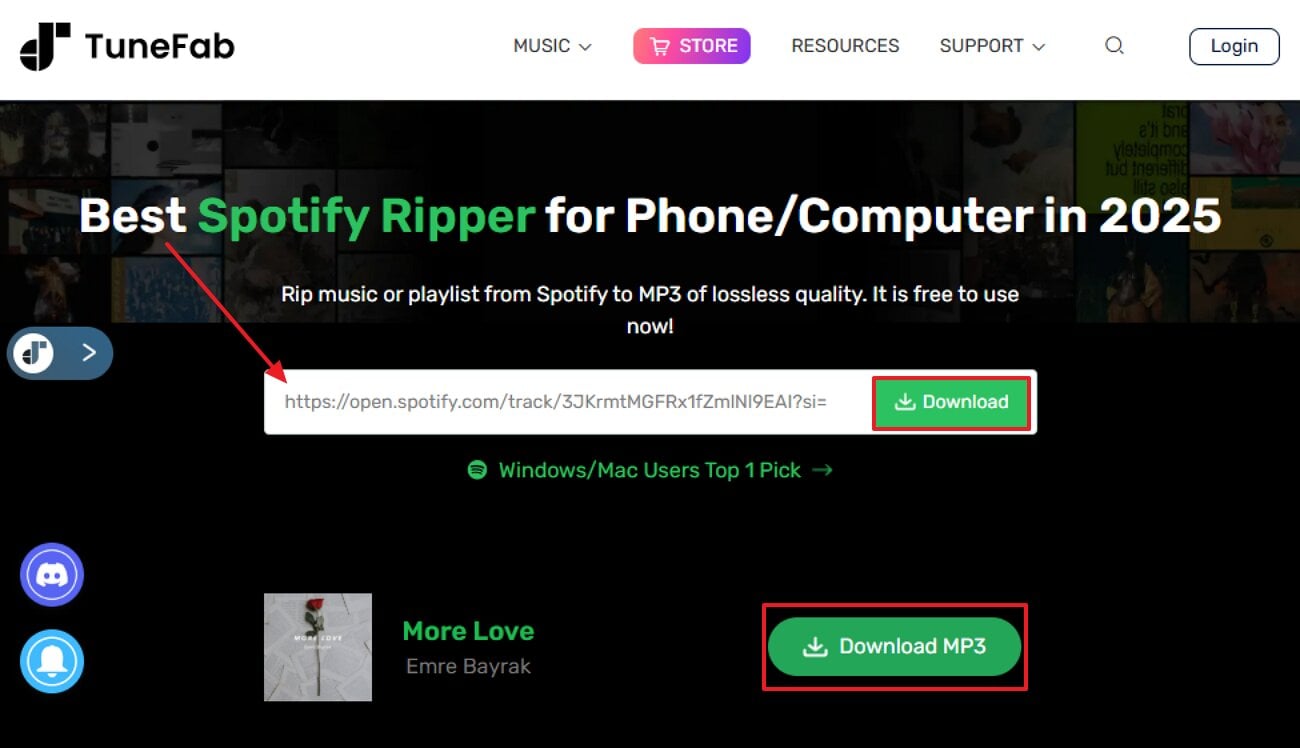
Instructions. Upon entering the Tunefab tool, enter the copied Spotify URL and choose the "Download" button. Afterwards, click on the Download MP3 icon to download it for offline listening.
Limitations
- The free trial is heavily limited, so advanced users require premium access.
- Its batch processing system uses noticeable CPU/RAM on older machines.
4. SpotMate
SpotMate is a browser-based tool that lets you download Spotify tracks, playlists, and albums as MP3 files. It focuses on producing high‑quality MP3 audio, preserving beats, vocals, and details. This site is specifically designed for quick conversion by simply pasting links. Furthermore, this Spotify music ripper supports both individual tracks as well as full playlists and albums, making it an ideal choice.
Beginner's Guide to Downloading Songs with SpotMate
After getting aware of its key features, have a look at its detailed stepwise guide below:
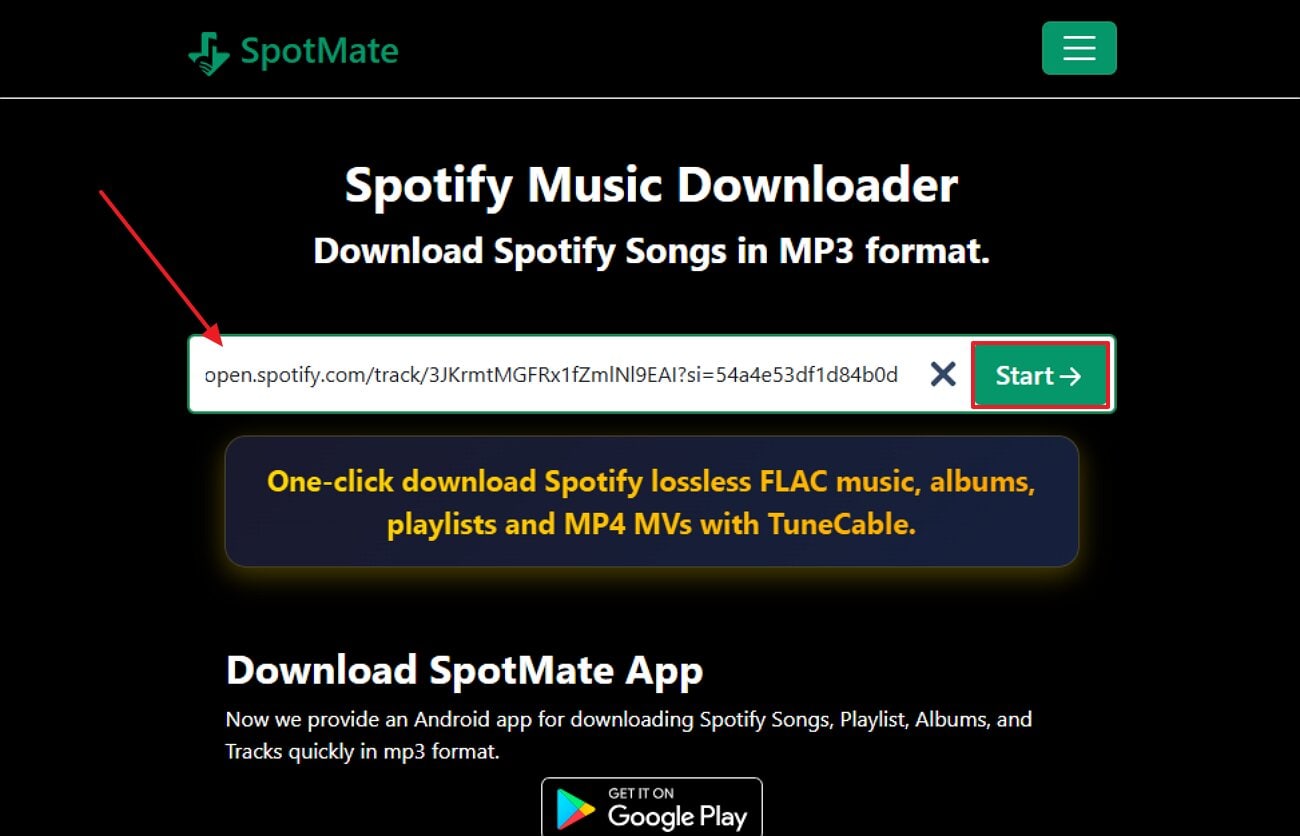
Step 1. As you access the SpotMate tool, enter the song URL and choose the "Start" button.
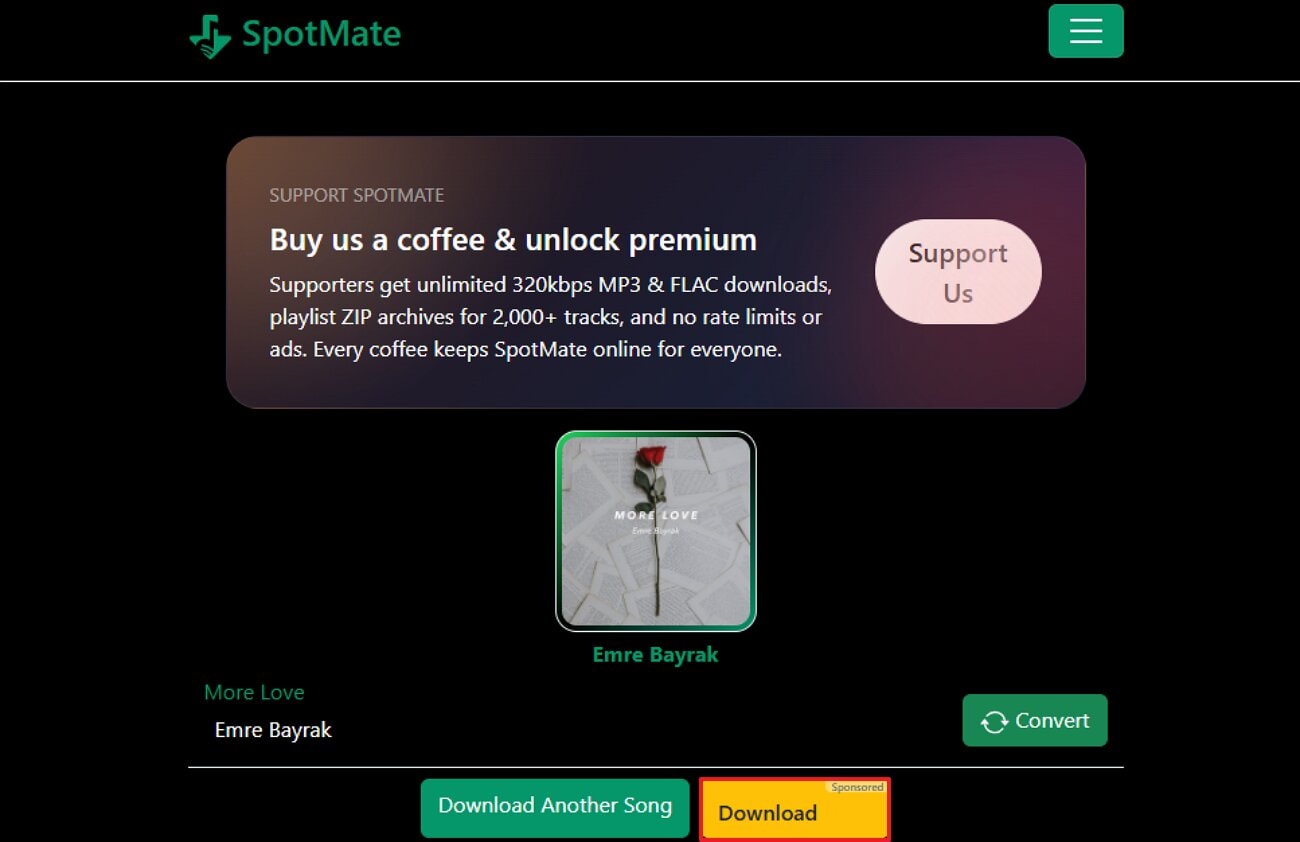
Step 2. Here, click on the "Download" button to render the audio instantly.
Limitations
- Besides MP3, it does not support other file formats, including FLAC.
- This tool does not offer a batch processing system to download multiple files.
Part 5. Extension Options: Fast Spotify Audio Ripper for Free MP3 Downloads
If you prefer a quicker solution, let's explore the best Spotify ripper extension option that have minimal setup:
Audio Downloader Prime - Chrome Extension
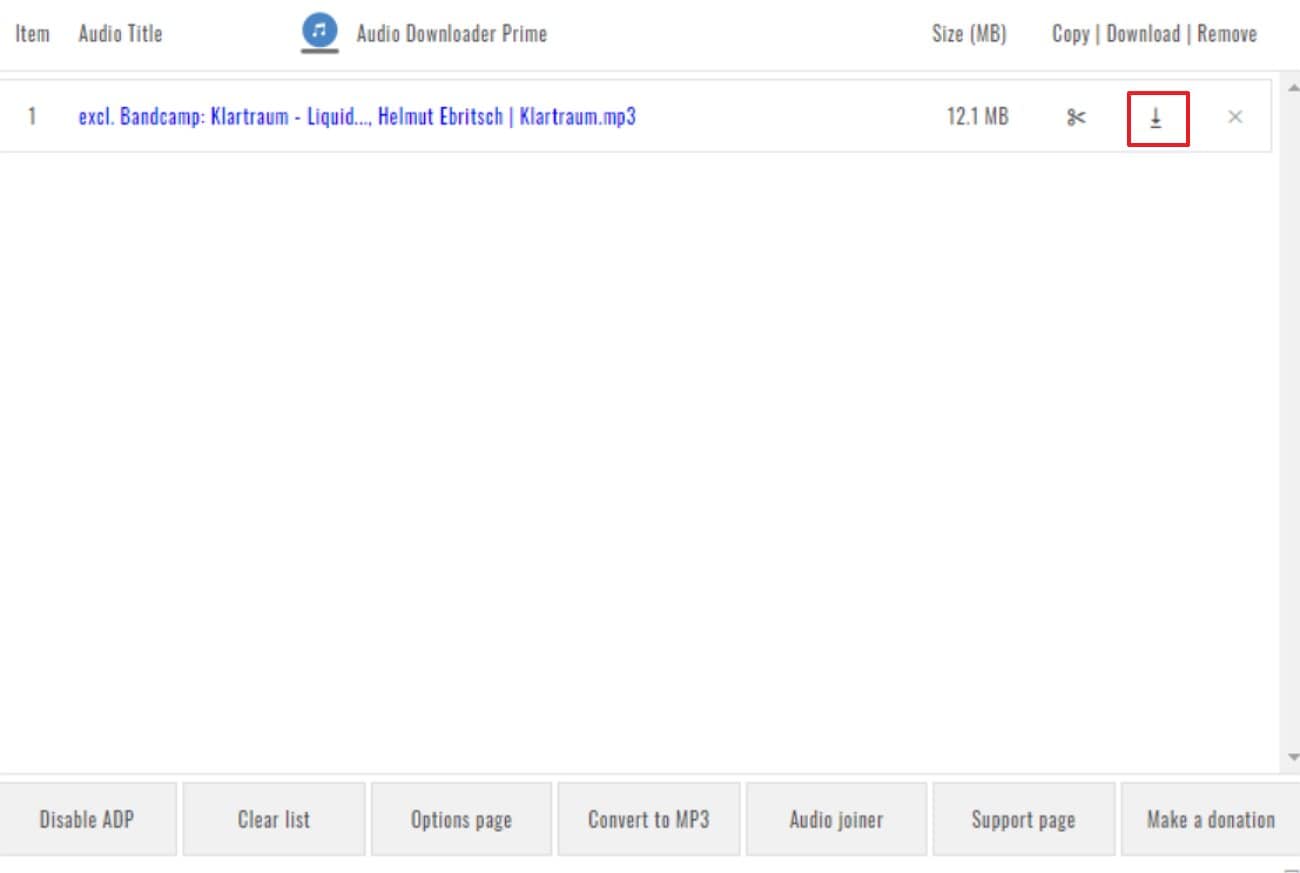
Enabling this extension will automatically show all the available songs that you listened to recently. Users can download songs in common formats like MP3, OGG, WAV, FLAC, MP4‑audio, and more. Additionally, it can be easily accessed via modern browsers, including Chrome, Firefox, and Opera. The foremost part is that this extension is lightweight and nullifies the need to download heavy software.
Practical Guide to Extracting Spotify Audio with Audio Downloader Prime
To download Spotify songs instantly, let's dive into its detailed step-by-step guide below:
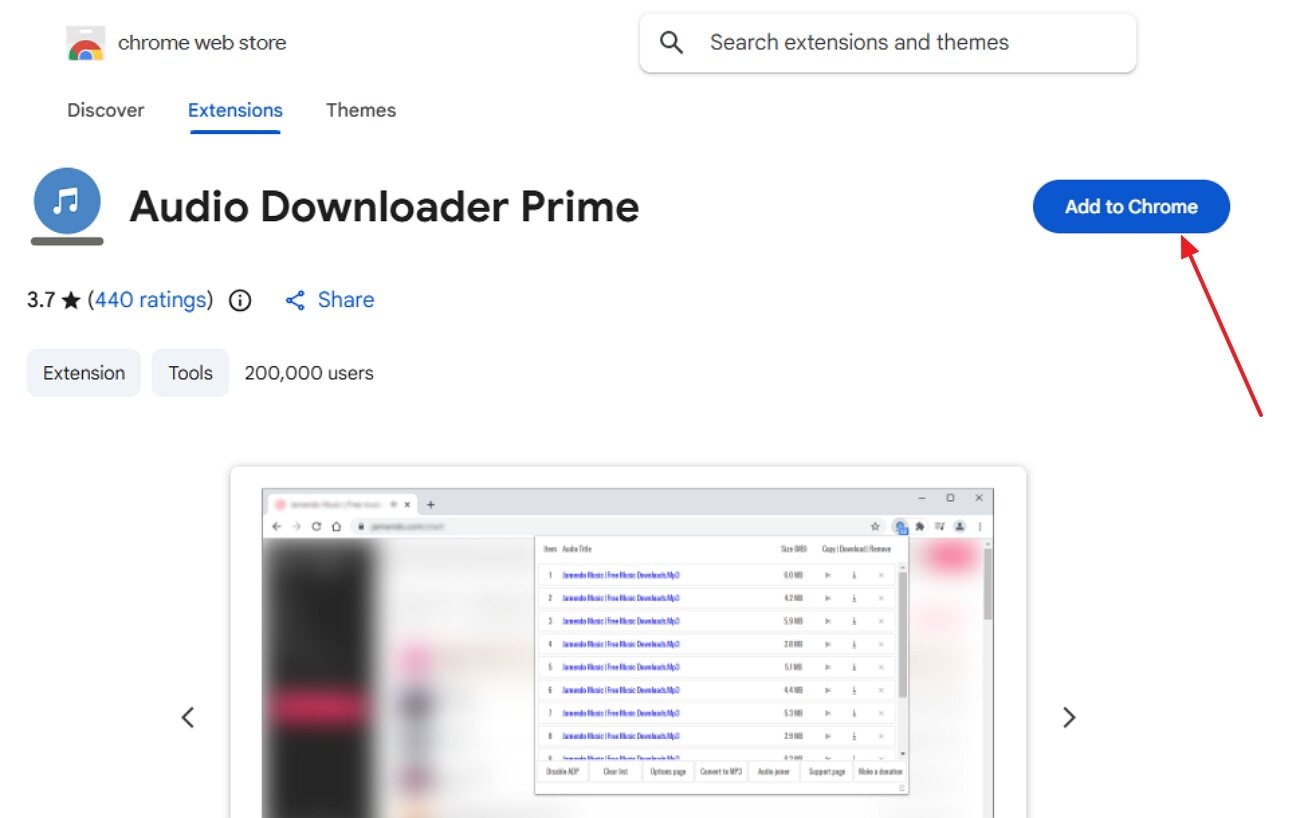
Step 1. At first, open the "Audio Downloader Prime" in the Chrome Web Store and select the "Add to Chrome" button.
Step 2. Afterwards, open the Spotify app and listen to your favorite songs. Then, open the extension, and it will show you the recent songs. Lastly, click on the "Download" icon to save the desired song.
Limitations
- It cannot download encrypted, segmented, or DRM‑protected streams.
- This extension did not fetch the song's metadata, including ID3 tags.
Conclusion
Summing up, users can now easily download Spotify songs offline without worrying about the internet connection. This article covered the 8 most efficient Spotify rippers that you can consider using. Furthermore, we recommend using UniConverter, which lets you download a complete Spotify playlist and convert it to numerous audio file formats.
Frequently Asked Questions
-
Q1. Is it legal to rip Spotify songs to MP3?
In most regions, ripping Spotify streams to MP3 violates Spotify's Terms of Service. It can also infringe copyright if you share, upload, or use those files beyond private listening. -
Q2. Will I get banned from Spotify for using a ripper?
Using rippers breaks Spotify's terms which don't allow copying or recording so your account can be terminated if detected. In practice, the enforcement is uneven, but it always carries legal risk. -
Q3. What is the difference between downloading and ripping on Spotify?
With a Spotify Premium account, you can download unlimited audio for offline use, but you can't share. On the other hand, ripping captures the decrypted audio stream and re‑encodes it into open formats like MP3, which can be shared. -
Q4. What's the best alternative if I don't want to rip at all?
The safest option is to use Spotify Premium to access songs offline. However if you want to share audio files then we recommend using UniConverter which lets you download and convert multiple songs. -
Q5. What audio format does Spotify support?
Spotify playback supports AAC 128 kbit/s on the free web player, AAC 256 kbit/s on Premium web, up to Very High around 320 kbit/s in apps, and Lossless up to 24-bit/44.1 kHz FLAC for eligible Premium users.

