
Sad Status Video Download: Songs & Emotional Clips
A short video can say a lot: a line about heartbreak, a song that brings back a memory, or a quiet moment when words feel unnecessary. If you are looking for a sad status video download for WhatsApp, this guide helps you find the right kind of clip, check where it comes from and save or prepare it without losing the details that matter.
In this article
- What Makes a Good Sad Status Video?
- Popular Types of Sad Status Videos
- Where to Find Sad Status Videos
- How to Download Sad Status Videos
- How to Post a Sad Video on WhatsApp Status
- How to Make a Sad Song Status with Your Own Clip
- Tips for Better Sad Status Videos
- Common Sad Status Video Download and Upload Problems
- FAQs About Sad Status Video Download
- Conclusion
What Makes a Good Sad Status Video?
A sad status video is a short clip that shares a feeling through a scene, a line of text, music or a combination of the three. Some clips are built around a breakup song; others use a simple visual with an emotional quote. You may also see searches such as sad video for status, sad song for status or sad status for WhatsApp. The wording changes, but the idea is similar: find something that fits the mood and is easy to share.
Before you save a clip, watch it with sound and check whether the message is readable on a phone. A song-led video needs clear audio; a quote-led video needs enough time for viewers to read the words. That matters more than adding extra visual effects.
Popular Types of Sad Status Videos
Not every emotional status is about a breakup. These five styles cover the most common ways people express sadness, reflection and longing in short videos.
Heartbreak and Breakup Status Videos
Heartbreak clips usually focus on the moment after a relationship ends: an empty familiar place, a remembered conversation or a person sitting alone. They work well with a short line or a restrained soundtrack. If you want the clip to feel personal, avoid stacking several dramatic quotes on screen; one clear message is often stronger.

Missing Someone and Long-Distance Status
A train window, a late-night message or a journey home can express distance without a long explanation. Choose a video that reflects the situation rather than copying an unrelated scene because it is trending. For a missing-you status, check the timing of any text against the music so the key line is not cut off.

Sad Song Status Videos
People searching for sad song for status often want a memorable lyric or a music-driven short clip. Listen before downloading: some previews are silent, and not every embedded video comes with the song you expect. If you are making your own version, use music you have rights to use or an in-app music option under its terms.

Lonely, Mood-Off and Reflective Status
A quiet street, an empty bench or a still skyline suits a thoughtful mood-off status. These scenes leave room for a few words without overwhelming the picture. They can also be a better choice than a breakup-specific video when you simply want to share a reflective mood.

Emotional Quotes and Sad Shayari
A sad shayari status or emotional quote video puts the writing first. Choose a simple background, readable lettering and enough on-screen time for the whole line. If the quote appears close to the edge of a widescreen video, it may be covered or cropped when you upload it to a vertical Status.

Where to Find Sad Status Videos
The best source depends on whether you want a ready-made status video, a specific song clip or a template you can personalize. Start with a site that lets you preview the actual content. A thumbnail alone does not tell you whether the saved file will include audio.
| Source | Useful for | What to check |
|---|---|---|
| LoveSove Sad Video Status | Ready-to-preview sad and emotional status collections | Open the individual clip; check the available download and reuse terms. |
| LoveSove WhatsApp Sad Song Collection | Song-led clips, heartbreak and missing-you themes | Preview the video and confirm soundtrack, duration and permissions. |
| StatusVideoHQ Mood Off Videos | Mood-off and breakup-style short videos | Check the individual video player and the file offered. |
| CapCut Sad Status Template | Creating a personalized emotional video from your own clip | Review template availability, export options and music rights. |
| ShareChat | Regional and Indian-language emotional status clips | Use available in-app saving or a compatible authorized method; support varies. |
Want to compare a real video collection? The sad status collection at LoveSove links to individual posts, while its sad WhatsApp song gallery groups song-based clips. Look at the video itself before relying on a download label. A source being public does not automatically grant permission to repost the clip or its music.
If a ready-made video does not fit, try starting with an editable template and your own footage. This gives you more control over the song, text position and final crop.
How to Download Sad Status Videos
There are two sensible routes: save a video directly from its source when permitted, or use a desktop downloader for a link that is currently supported. Neither method can guarantee that a deleted, private or restricted clip will be available.
Method 1: Save the Video from Its Original Source
- Open the individual sad status video and play it all the way through. Make sure it is the right clip, with the right sound.
- Look for a Download, Save or export option offered by the creator or website. If it is available for your use, save the video in the provided format.
- Open the downloaded file from your Downloads, Files or Photos folder and check its picture and audio before sharing.
A platform’s offline viewing button is not necessarily the same as getting a shareable MP4 file. Where no usable download is offered, choose another licensed clip or create your own.
Method 2: Download Supported Video Links with UniConverter
If you have an individual video URL that you are allowed to save, Wondershare UniConverter Downloader offers a desktop workflow for supported links on Windows and Mac. Source compatibility is not universal; it is worth checking a link before planning your Status around it.
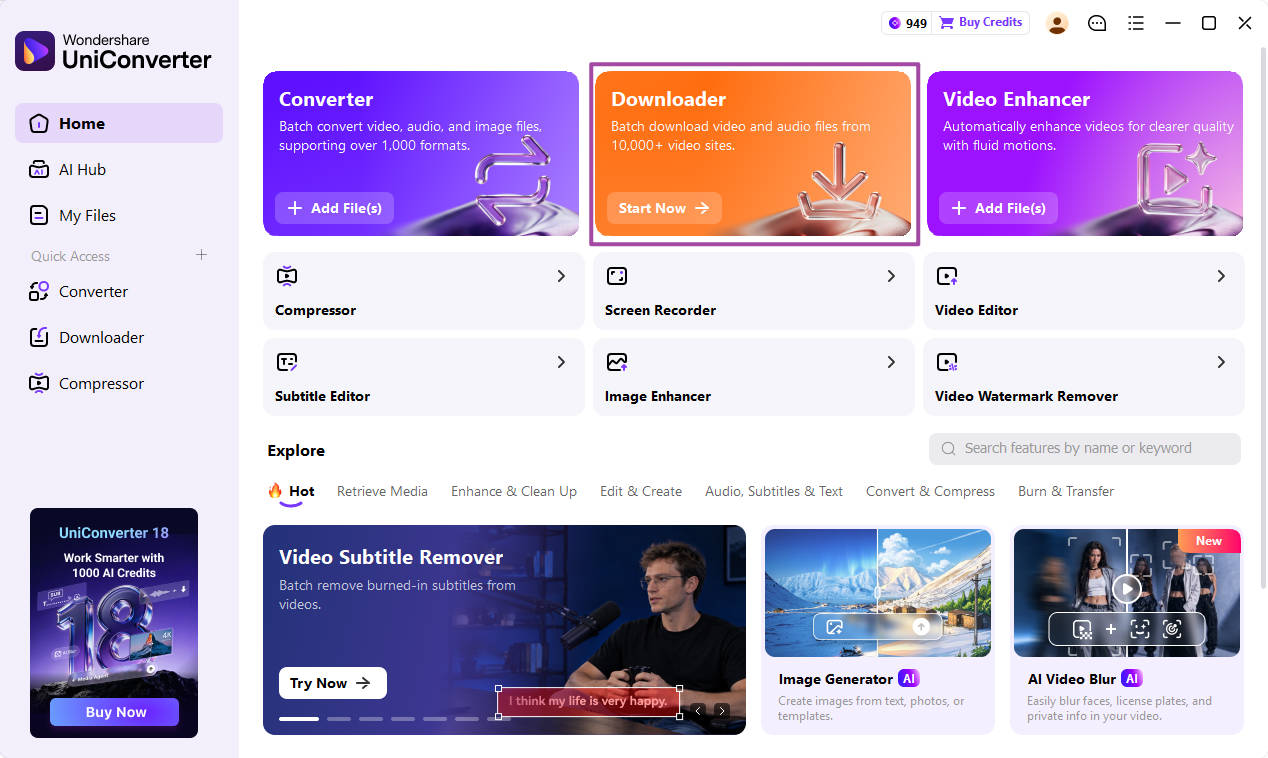
Step 1. Open UniConverter Downloader
Launch UniConverter 18, then select Downloader from Home or the left navigation. This opens the link-based download workspace.
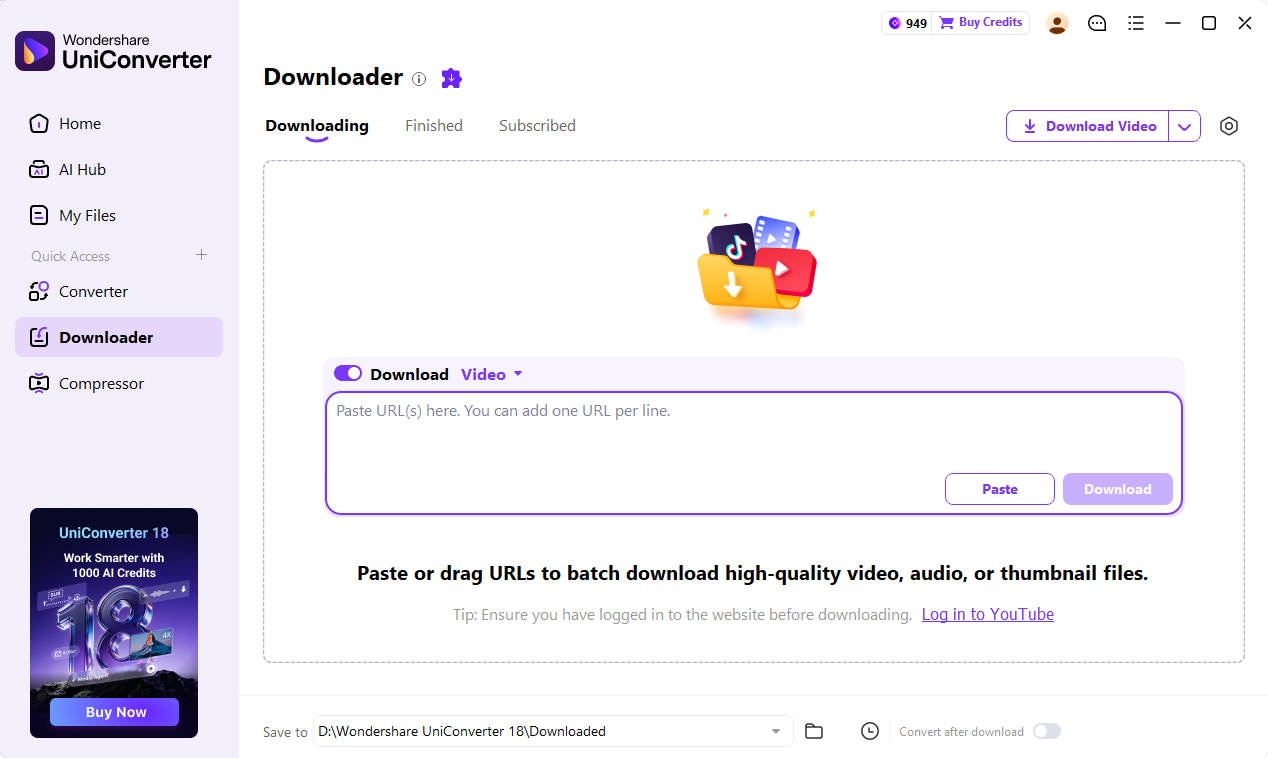
Step 2. Paste a Supported Video Link
Copy the full address of the individual video page, not a search result or creator profile. In Downloader, keep Download Video selected, paste the URL into the box and choose the Save to folder if needed.
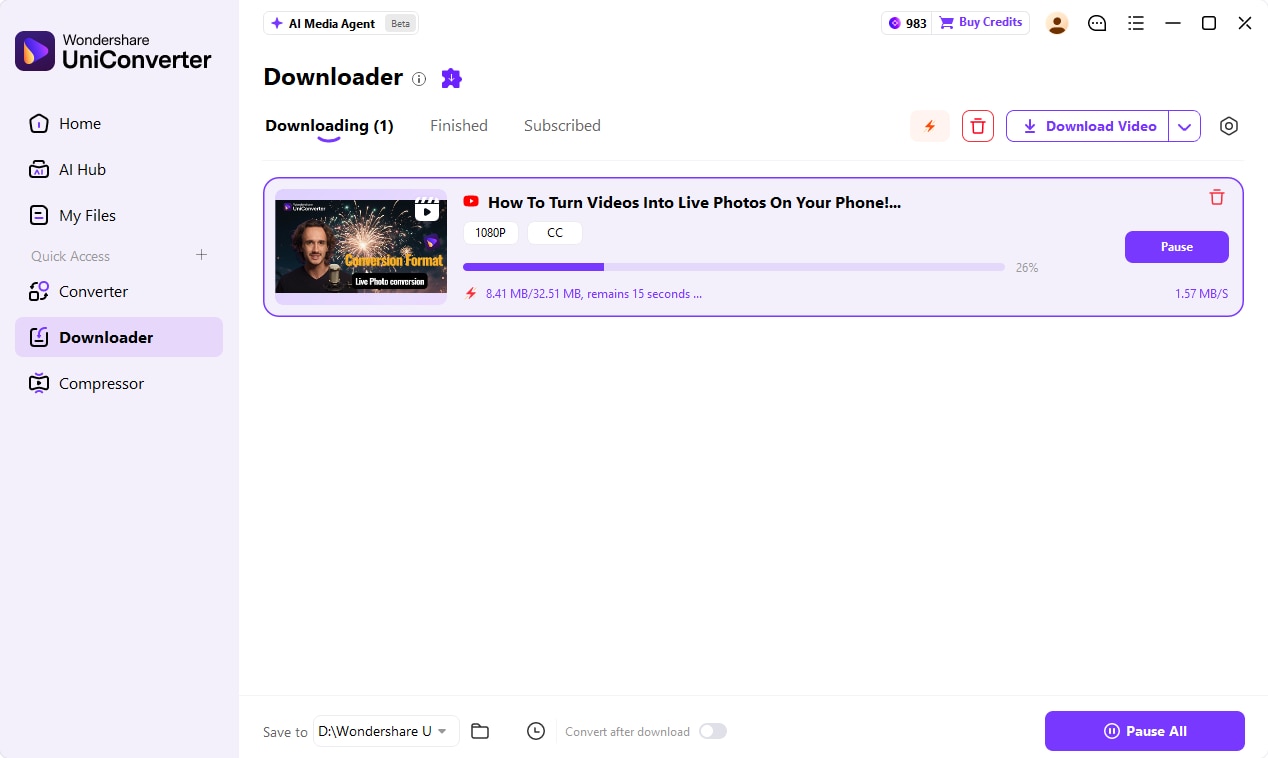
Step 3. Start the Download
Click Download. If UniConverter recognizes the link and offers an eligible video, follow the task in Downloading. Available formats, audio and quality depend on the source.
Step 4. Find the Saved Clip
Open Finished after the task completes. Use the folder control to locate the local file, then play it and check that the song, beginning and ending are intact.
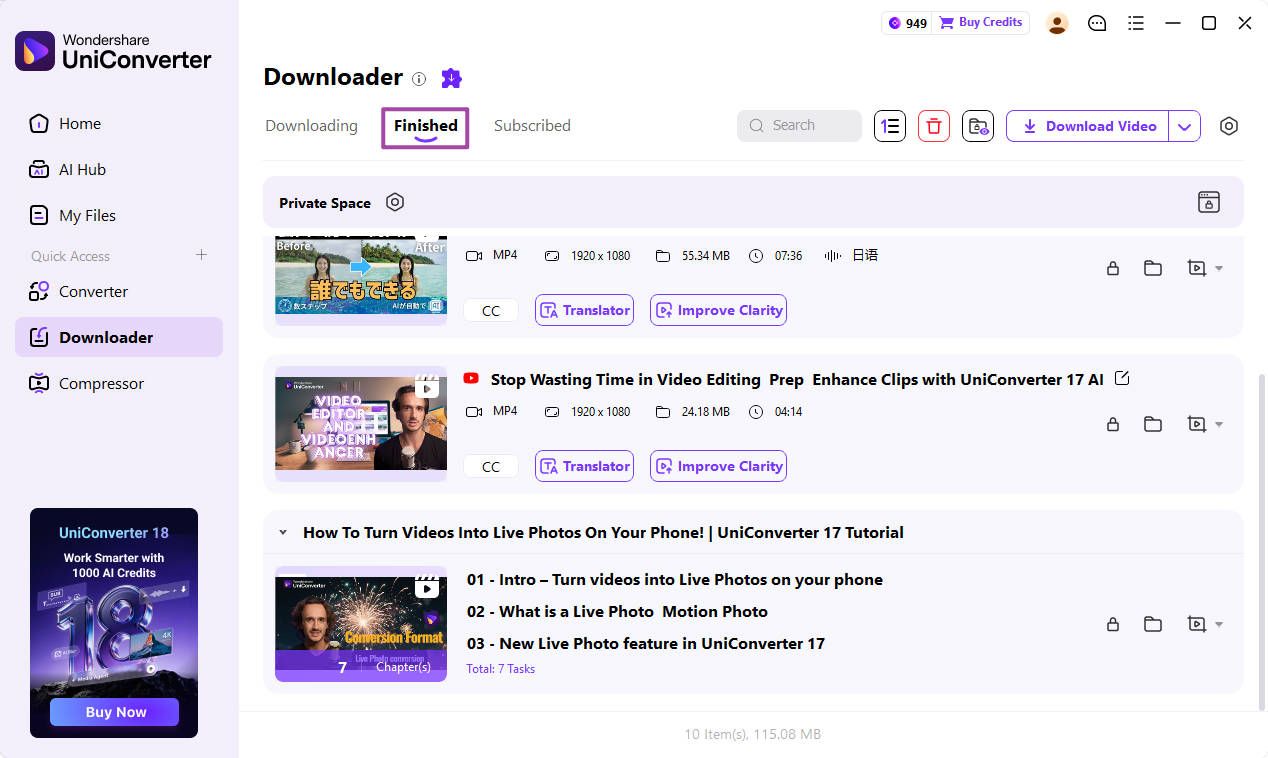
These screens show the UniConverter Downloader workflow, not a verified download from every sad-status website. If a site or link is unsupported, use its permitted save method. See the official Downloader instructions for additional options.
How to Post a Sad Video on WhatsApp Status
Once the video is on your phone, posting it as a WhatsApp Status is straightforward:
- Open WhatsApp and go to Updates.
- Tap My status or Add status, then pick the saved video from your device.
- Preview the clip, trim it if the app asks, and check that song audio and on-screen text are still clear.
- Choose your audience and post. Play the published Status once to check the actual result.
A clip saved from a video website and a contact’s existing WhatsApp Status are different things. If you want to keep a Status another person posted, see the WhatsApp Status download guide for Android and iPhone methods, and ask permission before saving or reposting it.
How to Make a Sad Song Status with Your Own Clip
If none of the ready-made videos says what you want, making a short one yourself can be simpler than searching for another download. A favorite photo or a few seconds of your own footage is enough to get started.
- Pick one idea. Choose heartbreak, missing someone, a mood-off moment or a short quote. Keep the message focused.
- Choose a vertical layout. Start with a 9:16 canvas if the main destination is a phone Status. Keep important faces and words away from the edges.
- Add a song or quote thoughtfully. Use audio you are allowed to use. For shayari or lyrics, put just enough text on-screen for comfortable reading.
- Export and preview. Save a compatible video, check the audio and watch it on your phone before uploading.
You can browse a sad status video template on CapCut for layout ideas. Template availability and music usage rights depend on the platform and the content you choose. If an existing clip needs another format, convert the saved local file rather than just renaming its extension.
Tips for Better Sad Status Videos
- Keep the words readable. Put quotes and lyrics toward the middle of the frame; phone interface elements can cover the top and bottom.
- Check the sound. A silent preview, missing track or abrupt ending can change the mood of a song status. Listen to the exported file before posting.
- Keep a clean original. Repeatedly saving and compressing a clip can leave text and faces soft. Make edits from your best available source.
- Choose a compatible format. MP4 is a practical starting point, but the codec and the device still matter. If a local video will not play, use UniConverter’s Converter to prepare a compatible copy.
- Use enhancement only when it helps. If an authorized video is already blurry, UniConverter AI Video Enhancer can help improve perceived clarity. Preview the result; enhancement cannot guarantee that missing original detail will be restored.
WhatsApp may process Status media after upload. If your video looks noticeably worse only when you add music, compare the two versions using the steps in the WhatsApp Status blurry-with-music guide.
Common Sad Status Video Download and Upload Problems
| Problem | Likely reason | What to try |
|---|---|---|
| The download button is missing | The source only streams the clip or restricts saving. | Check the owner’s options, or choose a source with a permitted download. |
| UniConverter does not recognize the link | The copied address is incomplete, a collection page or an unsupported source. | Copy the full individual URL; check the supported-link workflow. |
| The saved video has no music | The source may be silent or the track was unavailable. | Play the source, check the downloaded file and use authorized music in a new edit. |
| WhatsApp crops the quote | Important text sits too close to the frame edge. | Reframe for a vertical view and move words into a safer central area. |
| The Status looks blurry | Low-quality source or additional upload processing. | Start from a clearer file and compare before/after uploading. |
| The video will not open | Incompatible container or codec. | Try a compatible MP4 conversion from your authorized local file. |
FAQs About Sad Status Video Download
-
Where can I find short sad status videos with songs?
Browse a video collection that lets you play the actual clip first. For example, LoveSove’s sad song status gallery groups heartbreak and missing-you videos. Confirm the audio and permitted download option on the individual item before saving it.
-
Can I save a sad status video that someone posted on WhatsApp?
Sometimes, but the method depends on your device and whether you have permission. On Android, a viewed Status may appear in a temporary hidden folder; on iPhone, screen recording may be a fallback. Both have limitations. The WhatsApp Status download guide explains the actual steps and the best-quality option.
-
Can UniConverter download sad videos from ShareChat?
ShareChat URL compatibility is not confirmed in UniConverter Downloader. Check the post’s permitted saving options first. The ShareChat Video Downloader guide compares available routes, while UniConverter can process other supported links and compatible local files.
-
Why is my sad status video URL not recognized?
Make sure you copied the link to the individual video, not a creator profile, search page or expired share link. If the source is unsupported or restricts downloading, use a permitted alternative rather than retrying indefinitely. See the UniConverter video-link download guide for input and troubleshooting tips.
-
How can I make a sad song status without cutting off the lyrics?
Use a vertical canvas for a phone-first Status, keep your text away from the edges and make each line visible long enough to read. Before posting, preview the actual uploaded clip—not just the editor timeline. If the song is added inside WhatsApp, compare the posted result with your original export.
-
Why does my sad video become blurry after I add music on WhatsApp?
First compare the same original video posted with and without music. That helps distinguish a weak source file from changes during the Status workflow. Follow the blurry-with-music troubleshooting guide; do not assume converting the file to 4K will prevent all upload compression.
-
Can I improve an old sad status video before sharing it?
You can try AI Video Enhancer on a compatible saved video to improve perceived clarity, then preview faces, text and movement. It may help a soft clip look better, but AI processing cannot guarantee recovery of details that were never captured.
Conclusion
Choose a sad status video that fits your mood and plays clearly on your phone. Save only content you may use, then check the file before posting. For a supported video URL, UniConverter Downloader can help you keep a local copy for your next WhatsApp Status.